<?xml version="1.0" encoding="UTF-8"?>
<feed xmlns="http://www.w3.org/2005/Atom">

  <title>null program</title>
  <link rel="alternate" type="text/html" href="https://nullprogram.com"/>
  <link rel="self" type="application/atom+xml" href="https://nullprogram.com/feed/"/>
  <updated>2026-09-23T12:10:51Z</updated>
  <id>urn:uuid:f8b65823-4ec5-3a70-efc8-2b713aa63091</id>

  <author>
    <name>Christopher Wellons</name>
    <uri>https://nullprogram.com/</uri>
    <email>wellons@nullprogram.com</email>
  </author>

  
  <entry>
    <title>What's been going on in w64devkit the past year</title>
    <link rel="alternate" type="text/html" href="https://nullprogram.com/blog/2026/09/20/"/>
    <id>urn:uuid:843e3ff4-8bd3-4106-bca9-608a80e66545</id>
    <updated>2026-09-20T01:49:36Z</updated>
    <category term="c"/><category term="cpp"/>
    <content type="html">
      <![CDATA[<p>The past year has been exciting for w64devkit, which like any software
distribution is never complete. <a href="https://peter0x44.github.io/">Peter0x44</a> joined as co-maintainer, and
has pushed the project in good, new directions, with ideas I would never
have considered. Many of his improvements have gone back upstream, and so
you may benefit even if you don’t use w64devkit. I’d like to touch on the
various odds and ends from the past year.</p>

<h3 id="release-security">Release security</h3>

<p>In April I <a href="/blog/2026/04/25/">announced that release packaging is now signed</a>. Today
<em>all</em> EXEs and DLLS in w64devkit are code-signed with my key. My signing
key established a good reputation thanks to thousands of unique signatures
observed on the order of ~100,000 hosts — a pleasant side effect from
including ~300 binaries in a release. Users should have fewer problems
these days with security software. MSYS2 has also <a href="https://www.msys2.org/dev/code-signing/">adopted my signing
tool</a>, <code class="language-plaintext highlighter-rouge">aas-sign</code>, which is now included in w64devkit releases.</p>

<p>Builds are now automated by GitHub Actions, triggered when I (and <em>only</em>
I) push a new tag. That process code-signs and creates the release. Every
step of the release process is transparent, derived strictly from source
in the repository. Nowhere does it go behind a curtain and permit secret
tampering.</p>

<p>But that’s not all. I enabled <em>release immutability</em>: On publish, release
artifacts are locked in and nobody, not even me, can modify them. You can
tell by the presence of a release attestation at the end of the artifacts
listing. Nobody involved in the project down the road can go rogue and
sneak something into an old release.</p>

<h3 id="toolchain-changes">Toolchain changes</h3>

<p>The x64 release is now a “multilib” toolchain. That is it can compile
programs for 32-bit Windows, like a superset of the x86 release. The only
purpose of the x86 release is to run w64devkit on older hardware or older
operating systems. Like the x86 release, it targets Windows XP by default
and requires a CPU supporting SSE2 (i.e. at least Pentium 4).</p>

<p>To target x86, pass <code class="language-plaintext highlighter-rouge">-m32</code> when compiling and linking. Or better, use
tools prefixed with the <code class="language-plaintext highlighter-rouge">i686-w64-mingw32</code> architecture triple. The latter
is easier in general because different tools require different switches,
and the prefixed tools are <a href="/blog/2021/02/08/">aliases</a> that automatically do the right
thing.</p>

<div class="language-plaintext highlighter-rouge"><div class="highlight"><pre class="highlight"><code>$ x86_64-w64-mingw32-gcc -o hello64.exe hello.c
$ i686-w64-mingw32-gcc -o hello32.exe hello.c
</code></pre></div></div>

<p>Adding multilib was cheaper and easier than I anticipated, and it’s thanks
to Peter0x44. It’s already been convenient for me for several projects.</p>

<p>In the past you needed w64devkit’s <code class="language-plaintext highlighter-rouge">bin/</code> on your <code class="language-plaintext highlighter-rouge">$PATH</code> in order to use
the compiler, because that’s how GCC found the other tools it needs. This
is no longer the case, and you can invoke <code class="language-plaintext highlighter-rouge">path/to/gcc.exe</code> from scripts
and such without touching your path. This required a small GCC patch.</p>

<p>The standard COFF object format supports up to 65,535 sections. When the
format was designed this probably seemed like more than enough, but modern
C++ programs can easily exceed it, particularly debug builds of programs
using lots of lambda functions. As C++ projects grow they eventually hit a
threshold where builds fail unless you ask for the <a href="https://peter0x44.github.io/posts/bigobj_format_explained/">bigobj</a> COFF format,
which supports over 4 billion sections. This is annoying, and the tools
ought to deal with this automatically.</p>

<p>A couple years ago I patched Bintutils to produce bigobj by default so the
old limit would never affect a build. The catch is that Binutils lacks an
interface to request standard COFF, so you can’t downgrade if needed. Why
would you need to? When interacting some simpler linkers like the official
Go toolchain (gc)! Some linkers can’t consume bigobj. It also breaks some
builds that auto-detect the toolchain’s object format, as some detection
scripts don’t know about bigobj (ex. libbacktrace at the time).</p>

<p>Ideally Binutils would quietly upgrade to bigobj as needed. Only large
programs see bigobj. Naive linkers and detection scripts only deal with
standard COFF. Well, thanks to Peter0x44 that’s now what Bintutils does
upstream! My bigobj hack is no longer necessary, and cgo works again.</p>

<p>This past year I’ve decided to put less emphasis on making w64devkit as
small as possible, and I’m willing to increase the installation and
distribution size for worthwhile features. This is embodied by switching
from <code class="language-plaintext highlighter-rouge">-Os</code> to <code class="language-plaintext highlighter-rouge">-O2</code> for static runtimes and tools that are computationally
expensive. Everything is now a bit bigger and a bit faster. Programs that
spend significant time in the standard library will be a little faster,
too. Programs already designed for performance will see no difference.</p>

<h3 id="new-tools">New tools</h3>

<p>CMake, Ninja, and <a href="/blog/2026/04/07/">a new, graphical CMake debugger</a> are all now
included. They require at least Windows 7. I’ve patched CMake to default
to Ninja, as CMake’s default is to look for a Visual Studio installation.
You can still <code class="language-plaintext highlighter-rouge">-G MinGW Makefiles</code> for GNU Make instead of Ninja, but I
don’t recommend it. Ninja is faster and more robust.</p>

<div class="language-plaintext highlighter-rouge"><div class="highlight"><pre class="highlight"><code>$ cmake -B build       # configure for Ninja
$ cmake --build build  # build with Ninja
</code></pre></div></div>

<p><code class="language-plaintext highlighter-rouge">ccmake</code> is included (a Peter0x44 suggestion), a TUI front-end to examine
and modify CMake configurations. It’s been useful, more than I expected.
You can pass <code class="language-plaintext highlighter-rouge">-j</code> for parallel builds, but I strongly recommend using the
environment instead, e.g. in your <code class="language-plaintext highlighter-rouge">.profile</code>:</p>

<div class="language-plaintext highlighter-rouge"><div class="highlight"><pre class="highlight"><code>export CMAKE_BUILD_PARALLEL_LEVEL="$(nproc)"
export CTEST_PARALLEL_LEVEL=$(nproc)
</code></pre></div></div>

<p>Yes, parallel testing, too! I also recommend multi-config if that makes
sense for you:</p>

<div class="language-plaintext highlighter-rouge"><div class="highlight"><pre class="highlight"><code>$ cmake -B build -G 'Ninja Multi-Config'
$ cmake --build build --config Debug
$ cmake --build build --config Release
</code></pre></div></div>

<p>I was tempted to make this default, but it changes the build tree layout
(<code class="language-plaintext highlighter-rouge">Debug/</code> and <code class="language-plaintext highlighter-rouge">Release/</code> directories) and a shocking percentage of real
world <code class="language-plaintext highlighter-rouge">CMakeLists.txt</code> break under multi-config because they’re written
incorrectly. The world needs a good CMake linter, which could catch most
cases statically.</p>

<p>Complementing is Ccache, with special patches from Peter0x44 to improve
Windows support. If you switch between branches often then using <code class="language-plaintext highlighter-rouge">ccache</code>
will speed up your (re-)builds. I also set up the conventional Ccache
<code class="language-plaintext highlighter-rouge">lib/ccache/</code> directory. It’s a directory in w64devkit that when added
your <code class="language-plaintext highlighter-rouge">$PATH</code> transparently backs all your builds with Ccache. On a typical
Linux distribution this would be <code class="language-plaintext highlighter-rouge">/usr/lib/ccache/</code>. You can enabled it in
your <code class="language-plaintext highlighter-rouge">w64devkit.ini</code> using <code class="language-plaintext highlighter-rouge">path type</code>, too:</p>

<div class="language-plaintext highlighter-rouge"><div class="highlight"><pre class="highlight"><code>path type = minimal+ccache
</code></pre></div></div>

<p>In my case Ccache hasn’t been useful as I hoped when I added it. I’ve
adopted Git worktrees workflow instead, so each branch sits still with its
own build tree(s).</p>

<p>To aid COM programming, the kit now includes <code class="language-plaintext highlighter-rouge">widl</code> and <code class="language-plaintext highlighter-rouge">uuidgen</code>, the
open source alternative to Microsoft MIDL, for generating Interface
Definition Language (IDL) files. <code class="language-plaintext highlighter-rouge">uuidgen</code> is a <a href="https://github.com/skeeto/w64devkit/blob/master/src/uuidgen.c">minimalist rewrite by
yours truly</a> of <a href="https://learn.microsoft.com/en-us/windows/win32/rpc/generating-interface-uuids">the Microsoft tool</a>.</p>

<p><a href="https://github.com/skeeto/w64devkit/pull/392">G. Berthiaume wrote</a> a new tool, <code class="language-plaintext highlighter-rouge">make2compdb</code>, that
<a href="https://github.com/skeeto/w64devkit/issues/251">extracts</a> JSON Compilation Database files, <code class="language-plaintext highlighter-rouge">compile_commands.json</code>,
from Make builds. It operates as a unix filter:</p>

<div class="language-plaintext highlighter-rouge"><div class="highlight"><pre class="highlight"><code>$ make -Bwn | make2compdb &gt;compile_commands.json
</code></pre></div></div>

<p>I wrote a <code class="language-plaintext highlighter-rouge">recycle</code> tool that sends files and folders to the recycle bin,
which for the latter is usually faster than deleting them with <code class="language-plaintext highlighter-rouge">rm -rf</code>.
The <code class="language-plaintext highlighter-rouge">trash</code> tool on other systems. I rarely delete files anymore, instead
using this command to send them off to sit in the recycle bin for a couple
weeks until Storage Sense automatically deletes them.</p>

<p>A <a href="https://nullprogram.com/blog/2026/03/29/#quiltcpp">few months ago</a> I announced the addition of <code class="language-plaintext highlighter-rouge">quilt</code>, an old
school patch management tool. The original doesn’t support Windows, so
this is a <a href="https://github.com/skeeto/quilt.cpp">full rewrite in C++</a>. Now that every platform has
Quilt, w64devkit’s patches are now managed with Quilt.</p>

<p>NSIS, an installer creator, is now included, so you can build your own
application installers. Just the command line tool, <code class="language-plaintext highlighter-rouge">makensis</code>. It’s also
in a “multilib” configuration, and x64 w64devkit can produce 32-bit and
64-bit installers. (My motivation to add NSIS was my <a href="https://github.com/skeeto/dumb-alt-tab">alternative alt-tab
switcher</a>, which requires an installer to install properly.)</p>

<p>Zstandard <code class="language-plaintext highlighter-rouge">zstd</code>/<code class="language-plaintext highlighter-rouge">unzstd</code> is now included because source tarballs are
often in <code class="language-plaintext highlighter-rouge">.tar.zst</code> format. It’s a great compression format, and ought to
be your default (rather than gzip) when you need compression. busybox-w32
<code class="language-plaintext highlighter-rouge">tar</code> knows to use <code class="language-plaintext highlighter-rouge">zstd</code> for <code class="language-plaintext highlighter-rouge">.tar.zst</code>.</p>

<h3 id="runtimes">Runtimes</h3>

<p>Unique to w64devkit, C11 threads are now part of the Mingw-w64 runtime. A
new implementation by yours truly, independent of winpthreads, smaller
than winpthreads, and requires no special compiler or linker flags. (If
you’re careful, you can even use it in <a href="/blog/2023/02/15/">CRT-free programs</a>.) The
catch is that it requires Windows 7 or later because I built it on <a href="/blog/2024/10/03/">SRW
locks</a>; XP would have required substantial complexity.</p>

<p>Writing an implementation taught me that <em>C11 threads are underspecified
poorly designed</em> — in case it wasn’t already obvious by the presence of
<a href="https://blog.stephencleary.com/2013/04/recursive-re-entrant-locks.html">recursive locks</a>! This C standard addition did not get nearly the
attention is needed and should have been cut (<a href="/blog/2023/02/11/">par for the course</a>).
My implementation excludes recursive locks. Trying to create one always
fails. It also has a weakened <code class="language-plaintext highlighter-rouge">thrd_current</code> because the semantics don’t
map onto the Windows threading model.</p>

<p><code class="language-plaintext highlighter-rouge">std::terminate</code> actually terminates (traps) instead of calling <code class="language-plaintext highlighter-rouge">exit</code>, so
it traps in GDB for inspection. This includes uncaught exceptions. It also
no longer prints a half-baked stack trace, shedding ~100k of dead weight
from most C++ programs. I did this in two steps a year apart, the second
just recently. I misplaced the trap in the first change, preventing it
from shedding as much weight as it could.</p>

<h3 id="future-directions">Future directions</h3>

<p>Years ago I disabled Link-Time Optimization (LTO) due to bugs in GCC and
Binutils. Just having it available in the toolchain triggered LTO bugs.
These problems reduced my faith that LTO could produce correct programs,
so I disabled it.</p>

<p>However, I’m toying with the idea of not only re-enabling LTO, but even
distributing “FatLTO” runtimes, particularly for C++ and Fortran. That is,
runtime object files will contain both native code (at <code class="language-plaintext highlighter-rouge">-O2</code> per above)
and LTO bytecode. If you don’t request LTO, you get the pre-compiled
native code just like today, at no link-time cost. If you enable LTO, it
essentially rebuilds the runtime itself at link time. Very computationally
expensive, but you get full control, and you can even coerce it back to
the old <code class="language-plaintext highlighter-rouge">-Os</code> (or even <code class="language-plaintext highlighter-rouge">-Oz</code>) if you prefer that.</p>

<p>As far as I can tell, nobody actually distributes a toolchain with FatLTO
runtimes, so w64devkit might be the first. I know I’m the first to cross
compile FatLTO objects with GCC — remember that everything in w64devkit is
cross-compiled — because it’s never worked correctly in a GCC release. My
first attempt produced a toolchain that didn’t work.</p>

<p>I’m feeling more confident this time around because fixing LTO bugs is now
very easy: Strap a frontier AI into a good coding harness, show it what’s
broken, give it all the sources (<code class="language-plaintext highlighter-rouge">source.tar</code>), and ~15 minutes later I
have a patch. We live in a sci-fi world. I started by fixing known-to-me
LTO bugs, enabled FatLTO, then worked through newly-discovered LTO bugs.
I’ve been dogfooding it, and nothing new has popped up in awhile, but it
will take some time for me to feel confident. I’m less confident in my
ability to discover Fortran runtime bugs. Upstream GCC <a href="https://gcc.gnu.org/ai-policy.html">rejects these
fixes out of hand</a>, so through no choice of my own w64devkit will have
a unique edge in this space.</p>

<p>While some of the new features require at least Windows 7, I’m still
committed to supporting Windows XP as a baseline for the x86 release. I
keep an old XP laptop on hand, on which I test and enjoy w64devkit. You
just have to make do with some older tools, but that’s what you were
already doing anyway.</p>

]]>
    </content>
  </entry>
  
  <entry>
    <title>A custom virtual machine for the Stars! 4X game</title>
    <link rel="alternate" type="text/html" href="https://nullprogram.com/blog/2026/09/17/"/>
    <id>urn:uuid:0b80f9d8-07a1-4d9f-a26d-f119b08364da</id>
    <updated>2026-09-17T02:00:00Z</updated>
    <category term="c"/><category term="game"/>
    <content type="html">
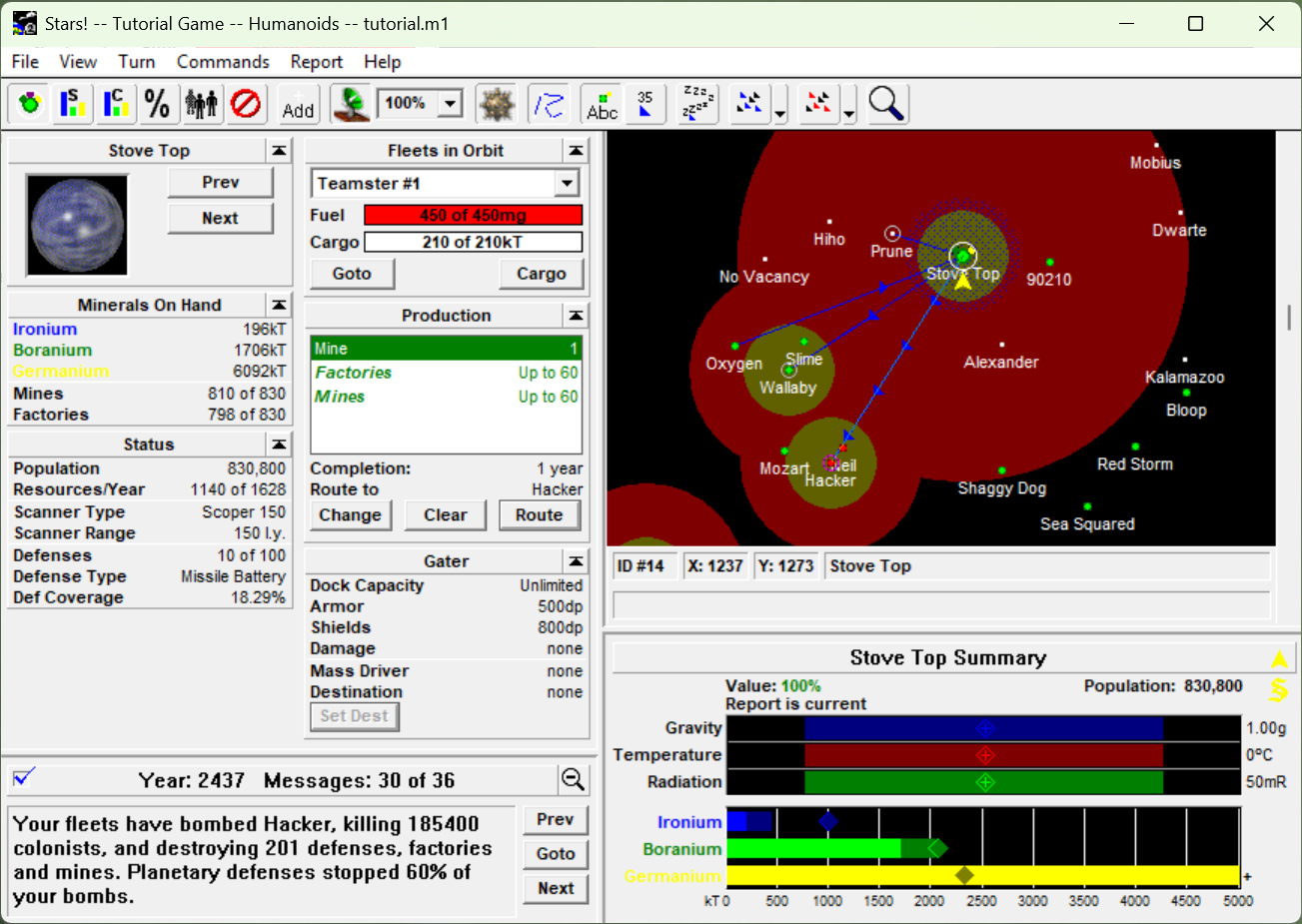
      <![CDATA[<p><a href="https://en.wikipedia.org/wiki/Stars!">Stars!</a> is a 1995 <a href="https://en.wikipedia.org/wiki/4X">4X</a> game (explore, expand, exploit, exterminate)
for 16-bit Windows 3.1 that I first played ~28 years ago. While Windows is
famously backwards compatible, it’s notoriously difficult to play Stars!
today. Windows x64 cannot run 16-bit applications, and playing requires
either retro hardware or emulation (<a href="https://github.com/otya128/winevdm">otvdm</a>, <a href="https://www.dosbox.com/">DOSBox</a>), sometimes
paired with <a href="https://www.winehq.org/">Wine</a>. My new, exciting solution, <strong><a href="https://github.com/skeeto/StarsVM">Stars!VM</a></strong>, or
<em>Stars! Virtual Machine</em>, embeds a custom <a href="/blog/2014/12/09/">80286</a> emulator and a Win16
to Win32 bridge. As native Win32, the game looks and feels exactly as it
did originally, except sporting a modern file chooser and 4k scaling. It’s
indistinguishable from a genuine 32-bit or 64-bit port of the game,
especially with the original 16-bit game embedded inside the VM
executable.</p>

<p><img src="/img/stars.png" alt="" /></p>

<p>The <a href="/blog/2026/04/25/">signed</a> releases on GitHub embed a compressed copy of the original
16-bit game, so that single EXE is ready to play out-of-the-box with no
further setup or downloads. I’m distributing 32-bit builds (but requires
SSE2) because there’s no advantage to 64-bit here, and these builds work
(almost) everywhere <em>except</em> 16-bit Windows. 32-bit Windows could run the
original 16-bit game, but the VM-encapsulated version is better behaved.
It doesn’t dump a <code class="language-plaintext highlighter-rouge">Stars.ini</code> under <code class="language-plaintext highlighter-rouge">C:\WINDOWS</code>, it interacts properly
with the task bar, and copy protection is neutralized via the OS bridge.</p>

<p>If you ever been curious about Stars!, now’s the time to try it. The game
has a thorough, built-in tutorial, but also check out the <a href="https://archive.org/download/manual_Stars/Stars.pdf">manual</a>,
<a href="https://wiki.starsautohost.org/">wiki</a>, <a href="https://starsautohost.org/strategy/guidef/SSG.htm">strategy guide</a>, and <a href="https://starsautohost.org/stars.htm">AutoHost</a> (play-by-email service).
The game predates the modern search engine concept, otherwise they might
have chosen a better name. I suggest using “stars 4x” in your searches.</p>

<p>If you want to build from source and hack on the VM yourself, the best
tool for the job is <a href="https://github.com/skeeto/w64devkit">w64devkit</a>, of course, because it <a href="/blog/2020/09/25/">comes with
everything you’ll need</a>. Plus the game itself: <code class="language-plaintext highlighter-rouge">stars.exe</code>
from <a href="https://wiki.starsautohost.org/wiki/Downloads"><code class="language-plaintext highlighter-rouge">stars27jrc3.zip</code></a>.</p>

<h3 id="implementation-details">Implementation details</h3>

<p>The emulator itself requires x86 or x86-64 because it does not implement
x87 (80-bit floating point) in software, but instead runs these operation
directly on the host’s x87 hardware. This is simple, fast, and precise.
The project validates the emulation as a whole with a differential fuzzer
against the host. The fuzzer randomly generates a 16-bit instruction,
emulates it, then runs it with <a href="/blog/2015/03/19/">JIT</a> on the host and compares the
results.</p>

<p>Handles on Windows are pointer-sized, and so the Win16-to-Win32 bridge
maps 16-bit handles to host handles. It marshals between different struct
layouts when translating these calls, services the DOS interrupts the game
requires, an copies data in and out of guest memory. It’s rather like
running a <a href="/blog/2026/01/01/">Wasm</a> instance, which of course makes sense in retrospect.</p>

<p>The Win32 bridge is also monitorable and manipulatable using the Model
Context Protocol (MCP). AI agents can “see” the UI “DOM” as it’s built,
and can drive it by injecting synthetic events into the event pump, all
without going through the usual desktop control. The MCP can also read and
write guest memory. Opus 5 played a complete game through MCP — which is
quite fun to watch — requesting my assistance at just two points when it
got stuck in the UI. A foundation for a new Stars!Bench?</p>

<p>Targeting old 16-bit computers, the authors couldn’t afford to build a
sloppy, wasteful UI, and so by modern standards the game UI is remarkably
fast and responsive. They don’t make ‘em like they used to. Computing the
next turn, or “turn generation,” is the computational bottleneck, and so
that’s where I focused my optimization efforts. The emulator can trace
executed instructions, so I gathered traces of turn generation, then had
Fable 5.1 identify and reverse engineer the hottest common routines (e.g.
the game’s L’Ecuyer MCG PRNG) and basic blocks. Each was re-written in C
and mapped into the instruction decoder as new 80286 instructions. On load
the emulator identifies these routines and patches them with the new
instruction. This resulted in a nearly ~2x speedup of turn generation. By
exploiting local conditions, emulating a particular known program, I get
JIT performance without JIT complexity.</p>

<p>The original game doesn’t use <a href="/blog/2023/02/13/">buffered I/O</a>, and instead issues many
small reads and writes. Passing these small reads/writes straight to Win32
made I/O take ~5% turn generation time, probably worse today than it was
back then. Plus it’s just rude. The emulator buffers the game’s I/O calls,
further speeding up turn generation.</p>

<p>The game has some sound effects in the “battle VCR” and the final version
of the game shipped with Microsoft’s <code class="language-plaintext highlighter-rouge">WaveMix.dll</code>. Rather than load and
link this DLL, the emulator implements the DLL’s interfaces natively, and
these routines are dynamically linked into the 16-bit process. You will
not need this DLL with the emulator, nor is it embedded in releases.</p>

<p>The game also has art assets embedded uncompressed in the original EXE,
forming the bulk of its ~3MB. Stars!VM uses a custom LZ-based compression
algorithm tailored to compressing the original game. It’s compressed when
embedded in releases. So the 32-bit version of the game is half the size
of the original, at ~1.5MB.</p>

<p>The original game requires a serial code, serving as its copy protection.
A code is 8 alpha-numeric characters that must pass two checks. Failing
the first is loud, but failing the second will sabotage your game with
penalties. You’ll know because it will announce that your people suspect
you are a usurper. Most codes you’ll find online are such “usurper” codes.
Play-by-email (PBEM) saves embed a hardware signature derived from C and D
drive configuration. People playing on different machines using the same
serial code recieve the usurper penalty.</p>

<p>I bought a serial code back in the day, but it hasn’t been possible to
purchase one a for at least decade now. So the emulator injects a fixed
serial code on first run (disable with <code class="language-plaintext highlighter-rouge">--prompt-serial</code>), and you won’t
need to worry about it. The VM also produces a fixed hardware signature
(same as any other emulator), so it looks like everyone running Stars!VM
is sharing the a machine, meaning no penalty for key reuse. I cracked the
serial code checks anyway, allowing me discover interesting ones. My
favorites: CLONEMUM, CROSSNUT, EGGSWAIN, GHOSTKIN, GONKSHOW, GRIPMIME,
SEEKCAPS, SIFTBOLD, SIRBUOYS, SLIMFAZE, SLOTMOPS, SPAWNELK, SUNBLOND,
WANTNEAR, and WRONGPOX. These look like some of <a href="/blog/2017/07/27/">my passwords</a>.</p>

<h3 id="endless-possibilities">Endless possibilities</h3>

<p>I’m quite pleased and excited with the results, especially for a weekend
project. It’s breathed life back into the game for me, not only having a
better experience running it, but also that I can trivially bend the game
to my will in the ways I dreamed about. A few hooks in the right places
should open the game to easy modding, but I’m more engineer than modder.</p>

]]>
    </content>
  </entry>
  
  <entry>
    <title>Concurrent, atomic MSI hash tables</title>
    <link rel="alternate" type="text/html" href="https://nullprogram.com/blog/2026/05/06/"/>
    <id>urn:uuid:d877f4c2-b213-4af7-8fb9-269558ee6b86</id>
    <updated>2026-05-06T02:01:17Z</updated>
    <category term="c"/>
    <content type="html">
      <![CDATA[<p>Readers will be familiar with <a href="/blog/2022/08/08/">Mask-Step-Index (MSI) hash tables</a>, a
technique for building fast, open-addressed hash tables in <a href="/blog/2025/01/19/#flat-hash-map">a dozen lines
of code</a>. If multiple threads or processes access an MSI table with
at least one still inserting elements, care must be taken to avoid data
races. This article will show how to add atomic operations to MSI tables
in order to support different concurrency constraints.</p>

<p>Let’s begin with the simplest case: An integer hash set, no deletions,
only one insert thread (single producer), and consumers do not care about
insert order. That is, the producer inserts A then B, but consumers may
observe B in the table before A. Suppose this is the hash table in the
single-threaded case:</p>

<div class="language-c highlighter-rouge"><div class="highlight"><pre class="highlight"><code><span class="kt">int32_t</span> <span class="o">*</span><span class="nf">lookup</span><span class="p">(</span><span class="kt">int32_t</span> <span class="n">key</span><span class="p">,</span> <span class="kt">int32_t</span> <span class="o">*</span><span class="n">table</span><span class="p">,</span> <span class="kt">int</span> <span class="n">exp</span><span class="p">)</span>
<span class="p">{</span>
    <span class="kt">uint64_t</span> <span class="n">hash</span> <span class="o">=</span> <span class="p">((</span><span class="kt">uint64_t</span><span class="p">)</span><span class="n">key</span> <span class="o">*</span> <span class="mi">1111111111111111111u</span><span class="p">)</span> <span class="o">&gt;&gt;</span> <span class="mi">32</span><span class="p">;</span>
    <span class="kt">uint32_t</span> <span class="n">mask</span> <span class="o">=</span> <span class="p">((</span><span class="kt">uint32_t</span><span class="p">)</span><span class="mi">1</span> <span class="o">&lt;&lt;</span> <span class="n">exp</span><span class="p">)</span> <span class="o">-</span> <span class="mi">1</span><span class="p">;</span>
    <span class="kt">uint32_t</span> <span class="n">step</span> <span class="o">=</span> <span class="p">(</span><span class="n">hash</span> <span class="o">&gt;&gt;</span> <span class="p">(</span><span class="mi">32</span> <span class="o">-</span> <span class="n">exp</span><span class="p">))</span> <span class="o">|</span> <span class="mi">1</span><span class="p">;</span>
    <span class="k">for</span> <span class="p">(</span><span class="kt">uint32_t</span> <span class="n">index</span> <span class="o">=</span> <span class="n">hash</span><span class="p">;;)</span> <span class="p">{</span>
        <span class="n">index</span> <span class="o">=</span> <span class="p">(</span><span class="n">index</span> <span class="o">+</span> <span class="n">step</span><span class="p">)</span> <span class="o">&amp;</span> <span class="n">mask</span><span class="p">;</span>
        <span class="k">if</span> <span class="p">(</span><span class="o">!</span><span class="n">table</span><span class="p">[</span><span class="n">index</span><span class="p">]</span> <span class="o">||</span> <span class="n">table</span><span class="p">[</span><span class="n">index</span><span class="p">]</span><span class="o">==</span><span class="n">key</span><span class="p">)</span> <span class="p">{</span>
            <span class="k">return</span> <span class="n">table</span> <span class="o">+</span> <span class="n">index</span><span class="p">;</span>
        <span class="p">}</span>
    <span class="p">}</span>
<span class="p">}</span>
</code></pre></div></div>

<p>Keys must be non-zero, and tables are zero-initialized. Usage example:</p>

<div class="language-c highlighter-rouge"><div class="highlight"><pre class="highlight"><code>    <span class="c1">// Initialization</span>
    <span class="k">enum</span> <span class="p">{</span> <span class="n">exp</span> <span class="o">=</span> <span class="mi">8</span> <span class="p">};</span>
    <span class="kt">int32_t</span> <span class="n">table</span><span class="p">[</span><span class="mi">1</span><span class="o">&lt;&lt;</span><span class="mi">8</span><span class="p">]</span> <span class="o">=</span> <span class="p">{};</span>

    <span class="c1">// Producer</span>
    <span class="k">for</span> <span class="p">(</span><span class="kt">int</span> <span class="n">i</span> <span class="o">=</span> <span class="mi">0</span><span class="p">;</span> <span class="n">i</span> <span class="o">&lt;</span> <span class="n">nkeys</span><span class="p">;</span> <span class="n">i</span><span class="o">++</span><span class="p">)</span> <span class="p">{</span>
        <span class="o">*</span><span class="n">lookup</span><span class="p">(</span><span class="n">keys</span><span class="p">[</span><span class="n">i</span><span class="p">],</span> <span class="n">table</span><span class="p">,</span> <span class="n">exp</span><span class="p">)</span> <span class="o">=</span> <span class="n">keys</span><span class="p">[</span><span class="n">i</span><span class="p">];</span>
    <span class="p">}</span>

    <span class="c1">// Consumer</span>
    <span class="kt">int32_t</span> <span class="n">key</span> <span class="o">=</span> <span class="mi">1234</span><span class="p">;</span>
    <span class="n">bool</span> <span class="n">present</span> <span class="o">=</span> <span class="o">*</span><span class="n">lookup</span><span class="p">(</span><span class="n">key</span><span class="p">,</span> <span class="n">table</span><span class="p">,</span> <span class="n">exp</span><span class="p">);</span>
</code></pre></div></div>

<p>The only problem is the data race on <code class="language-plaintext highlighter-rouge">table</code> slots. Since consumers can
tolerate out-of-order insertions, ordering does not matter and relaxed
atomics eliminate the data race. Insert and query now have different
requirements, so it makes sense to distinguish them. Starting with the
latter:</p>

<div class="language-c highlighter-rouge"><div class="highlight"><pre class="highlight"><code><span class="n">bool</span> <span class="nf">contains</span><span class="p">(</span><span class="kt">int32_t</span> <span class="n">key</span><span class="p">,</span> <span class="kt">int32_t</span> <span class="o">*</span><span class="n">table</span><span class="p">,</span> <span class="kt">int</span> <span class="n">exp</span><span class="p">)</span>
<span class="p">{</span>
    <span class="kt">uint64_t</span> <span class="n">hash</span> <span class="o">=</span> <span class="p">((</span><span class="kt">uint64_t</span><span class="p">)</span><span class="n">key</span> <span class="o">*</span> <span class="mi">1111111111111111111u</span><span class="p">)</span> <span class="o">&gt;&gt;</span> <span class="mi">32</span><span class="p">;</span>
    <span class="kt">uint32_t</span> <span class="n">mask</span> <span class="o">=</span> <span class="p">((</span><span class="kt">uint32_t</span><span class="p">)</span><span class="mi">1</span> <span class="o">&lt;&lt;</span> <span class="n">exp</span><span class="p">)</span> <span class="o">-</span> <span class="mi">1</span><span class="p">;</span>
    <span class="kt">uint32_t</span> <span class="n">step</span> <span class="o">=</span> <span class="p">(</span><span class="n">hash</span> <span class="o">&gt;&gt;</span> <span class="p">(</span><span class="mi">32</span> <span class="o">-</span> <span class="n">exp</span><span class="p">))</span> <span class="o">|</span> <span class="mi">1</span><span class="p">;</span>
    <span class="k">for</span> <span class="p">(</span><span class="kt">uint32_t</span> <span class="n">index</span> <span class="o">=</span> <span class="n">hash</span><span class="p">;;)</span> <span class="p">{</span>
        <span class="n">index</span> <span class="o">=</span> <span class="p">(</span><span class="n">index</span> <span class="o">+</span> <span class="n">step</span><span class="p">)</span> <span class="o">&amp;</span> <span class="n">mask</span><span class="p">;</span>
        <span class="kt">int32_t</span> <span class="n">k</span> <span class="o">=</span> <span class="n">__atomic_load_n</span><span class="p">(</span><span class="n">table</span><span class="o">+</span><span class="n">index</span><span class="p">,</span> <span class="n">__ATOMIC_RELAXED</span><span class="p">);</span>
        <span class="k">if</span> <span class="p">(</span><span class="o">!</span><span class="n">k</span><span class="p">)</span> <span class="p">{</span>
            <span class="k">return</span> <span class="nb">false</span><span class="p">;</span>
        <span class="p">}</span> <span class="k">else</span> <span class="k">if</span> <span class="p">(</span><span class="n">k</span> <span class="o">==</span> <span class="n">key</span><span class="p">)</span> <span class="p">{</span>
            <span class="k">return</span> <span class="nb">true</span><span class="p">;</span>
        <span class="p">}</span>
    <span class="p">}</span>
<span class="p">}</span>
</code></pre></div></div>

<p>Note how all elements are accessed by atomic loads, as a producer may
store to any slot at any time. Now producers:</p>

<div class="language-c highlighter-rouge"><div class="highlight"><pre class="highlight"><code><span class="n">bool</span> <span class="nf">insert</span><span class="p">(</span><span class="kt">int32_t</span> <span class="n">key</span><span class="p">,</span> <span class="kt">int32_t</span> <span class="o">*</span><span class="n">table</span><span class="p">,</span> <span class="kt">int</span> <span class="n">exp</span><span class="p">)</span>
<span class="p">{</span>
    <span class="kt">uint64_t</span> <span class="n">hash</span> <span class="o">=</span> <span class="p">((</span><span class="kt">uint64_t</span><span class="p">)</span><span class="n">key</span> <span class="o">*</span> <span class="mi">1111111111111111111u</span><span class="p">)</span> <span class="o">&gt;&gt;</span> <span class="mi">32</span><span class="p">;</span>
    <span class="kt">uint32_t</span> <span class="n">mask</span> <span class="o">=</span> <span class="p">((</span><span class="kt">uint32_t</span><span class="p">)</span><span class="mi">1</span> <span class="o">&lt;&lt;</span> <span class="n">exp</span><span class="p">)</span> <span class="o">-</span> <span class="mi">1</span><span class="p">;</span>
    <span class="kt">uint32_t</span> <span class="n">step</span> <span class="o">=</span> <span class="p">(</span><span class="n">hash</span> <span class="o">&gt;&gt;</span> <span class="p">(</span><span class="mi">32</span> <span class="o">-</span> <span class="n">exp</span><span class="p">))</span> <span class="o">|</span> <span class="mi">1</span><span class="p">;</span>
    <span class="k">for</span> <span class="p">(</span><span class="kt">uint32_t</span> <span class="n">index</span> <span class="o">=</span> <span class="n">hash</span><span class="p">;;)</span> <span class="p">{</span>
        <span class="n">index</span> <span class="o">=</span> <span class="p">(</span><span class="n">index</span> <span class="o">+</span> <span class="n">step</span><span class="p">)</span> <span class="o">&amp;</span> <span class="n">mask</span><span class="p">;</span>
        <span class="k">if</span> <span class="p">(</span><span class="o">!</span><span class="n">table</span><span class="p">[</span><span class="n">index</span><span class="p">])</span> <span class="p">{</span>
            <span class="n">__atomic_store_n</span><span class="p">(</span><span class="n">table</span><span class="o">+</span><span class="n">index</span><span class="p">,</span> <span class="n">key</span><span class="p">,</span> <span class="n">__ATOMIC_RELAXED</span><span class="p">);</span>
            <span class="k">return</span> <span class="nb">true</span><span class="p">;</span>
        <span class="p">}</span> <span class="k">else</span> <span class="k">if</span> <span class="p">(</span><span class="n">table</span><span class="p">[</span><span class="n">index</span><span class="p">]</span> <span class="o">==</span> <span class="n">key</span><span class="p">)</span> <span class="p">{</span>
            <span class="k">return</span> <span class="nb">false</span><span class="p">;</span>
        <span class="p">}</span>
    <span class="p">}</span>
<span class="p">}</span>
</code></pre></div></div>

<p>This function may load elements non-atomically because there’s only one
producer: the current thread. This idea could not be expressed were the
type system involved, e.g. <code class="language-plaintext highlighter-rouge">_Atomic</code>, but <a href="https://gcc.gnu.org/onlinedocs/gcc/_005f_005fatomic-Builtins.html">GCC atomics</a> do not
involve require such special qualifiers. Stores on the other hand are
concurrent with consumers, requiring an atomic store. Single-producer,
multiple-consumer (SPMC) usage is nearly identical to the single-threaded
case:</p>

<div class="language-c highlighter-rouge"><div class="highlight"><pre class="highlight"><code>    <span class="c1">// Producer</span>
    <span class="k">for</span> <span class="p">(</span><span class="kt">int</span> <span class="n">i</span> <span class="o">=</span> <span class="mi">0</span><span class="p">;</span> <span class="n">i</span> <span class="o">&lt;</span> <span class="n">nkeys</span><span class="p">;</span> <span class="n">i</span><span class="o">++</span><span class="p">)</span> <span class="p">{</span>
        <span class="n">insert</span><span class="p">(</span><span class="n">keys</span><span class="p">[</span><span class="n">i</span><span class="p">],</span> <span class="n">table</span><span class="p">,</span> <span class="n">exp</span><span class="p">);</span>
    <span class="p">}</span>

    <span class="c1">// Consumer</span>
    <span class="kt">int32_t</span> <span class="n">key</span> <span class="o">=</span> <span class="mi">1234</span><span class="p">;</span>
    <span class="n">bool</span> <span class="n">present</span> <span class="o">=</span> <span class="n">contains</span><span class="p">(</span><span class="n">key</span><span class="p">,</span> <span class="n">table</span><span class="p">,</span> <span class="n">exp</span><span class="p">);</span>
</code></pre></div></div>

<p>A concurrent integer hash table is contrived and unrealistic. In a real
program a key likely carries some broader semantic meaning. For example,
if that “integer” is actually a memory offset known as a pointer, then it
<em>points</em> at some object, and it is important that stores to that object
happen before consumers observe the pointer in the table:</p>

<div class="language-c highlighter-rouge"><div class="highlight"><pre class="highlight"><code><span class="n">bool</span>   <span class="n">insert</span><span class="p">(</span><span class="n">Thing</span> <span class="o">*</span><span class="n">thing</span><span class="p">,</span> <span class="n">Thing</span> <span class="o">**</span><span class="n">table</span><span class="p">,</span> <span class="kt">int</span> <span class="n">exp</span><span class="p">)</span>
<span class="n">Thing</span> <span class="o">*</span><span class="n">lookup</span><span class="p">(</span><span class="n">Key</span> <span class="n">key</span><span class="p">,</span> <span class="n">Thing</span> <span class="o">**</span><span class="n">table</span><span class="p">,</span> <span class="kt">int</span> <span class="n">exp</span><span class="p">)</span>
</code></pre></div></div>

<p>Where usage might look like:</p>

<div class="language-c highlighter-rouge"><div class="highlight"><pre class="highlight"><code>    <span class="c1">// Producer</span>
    <span class="k">for</span> <span class="p">(</span><span class="kt">int</span> <span class="n">i</span> <span class="o">=</span> <span class="mi">0</span><span class="p">;</span> <span class="n">i</span> <span class="o">&lt;</span> <span class="n">nthings</span><span class="p">;</span> <span class="n">i</span><span class="o">++</span><span class="p">)</span> <span class="p">{</span>
        <span class="n">things</span><span class="p">[</span><span class="n">i</span><span class="p">].</span><span class="n">key</span> <span class="o">=</span> <span class="p">...;</span>  <span class="c1">// update/init object</span>
        <span class="n">insert</span><span class="p">(</span><span class="n">things</span><span class="o">+</span><span class="n">i</span><span class="p">,</span> <span class="n">table</span><span class="p">,</span> <span class="n">exp</span><span class="p">);</span>
    <span class="p">}</span>

    <span class="c1">// Consumer</span>
    <span class="n">bool</span> <span class="n">present</span> <span class="o">=</span> <span class="o">!!</span><span class="n">find</span><span class="p">((</span><span class="n">Key</span><span class="p">){...},</span> <span class="n">table</span><span class="p">,</span> <span class="n">exp</span><span class="p">);</span>
</code></pre></div></div>

<p>In this case relaxed atomics are insufficient. Updates to the inserted
object may be reordered after the insertion, and consumers will race on
those updates. In this case we upgrade to acquire-release:</p>

<div class="language-c highlighter-rouge"><div class="highlight"><pre class="highlight"><code><span class="n">Thing</span> <span class="o">*</span><span class="nf">lookup</span><span class="p">(</span><span class="n">Key</span> <span class="n">key</span><span class="p">,</span> <span class="n">Thing</span> <span class="o">**</span><span class="n">table</span><span class="p">,</span> <span class="kt">int</span> <span class="n">exp</span><span class="p">)</span>
<span class="p">{</span>
    <span class="c1">// ...</span>
    <span class="k">for</span> <span class="p">(...)</span> <span class="p">{</span>
        <span class="c1">// ...</span>
        <span class="n">Thing</span> <span class="o">*</span><span class="n">thing</span> <span class="o">=</span> <span class="n">__atomic_load_n</span><span class="p">(</span><span class="n">table</span><span class="o">+</span><span class="n">index</span><span class="p">,</span> <span class="n">__ATOMIC_ACQUIRE</span><span class="p">);</span>
        <span class="k">if</span> <span class="p">(</span><span class="o">!</span><span class="n">thing</span> <span class="o">||</span> <span class="n">thing</span><span class="o">-&gt;</span><span class="n">key</span><span class="o">==</span><span class="n">key</span><span class="p">)</span> <span class="p">{</span>
            <span class="k">return</span> <span class="n">thing</span><span class="p">;</span>
        <span class="p">}</span>
    <span class="p">}</span>
<span class="p">}</span>

<span class="n">bool</span> <span class="nf">insert</span><span class="p">(</span><span class="n">Thing</span> <span class="o">*</span><span class="n">thing</span><span class="p">,</span> <span class="n">Thing</span> <span class="o">**</span><span class="n">table</span><span class="p">,</span> <span class="kt">int</span> <span class="n">exp</span><span class="p">)</span>
<span class="p">{</span>
    <span class="c1">// ...</span>
    <span class="k">for</span> <span class="p">(...)</span> <span class="p">{</span>
        <span class="c1">// ...</span>
        <span class="k">if</span> <span class="p">(</span><span class="o">!</span><span class="n">table</span><span class="p">[</span><span class="n">index</span><span class="p">])</span> <span class="p">{</span>
            <span class="n">__atomic_store_n</span><span class="p">(</span><span class="n">table</span><span class="o">+</span><span class="n">index</span><span class="p">,</span> <span class="n">thing</span><span class="p">,</span> <span class="n">__ATOMIC_RELEASE</span><span class="p">);</span>
            <span class="k">return</span> <span class="nb">true</span><span class="p">;</span>
        <span class="p">}</span> <span class="k">else</span> <span class="k">if</span> <span class="p">(</span><span class="n">table</span><span class="p">[</span><span class="n">index</span><span class="p">]</span><span class="o">-&gt;</span><span class="n">key</span> <span class="o">==</span> <span class="n">thing</span><span class="o">-&gt;</span><span class="n">key</span><span class="p">)</span> <span class="p">{</span>
            <span class="k">return</span> <span class="nb">false</span><span class="p">;</span>
        <span class="p">}</span>
    <span class="p">}</span>
<span class="p">}</span>
</code></pre></div></div>

<p>In this case producer and consumer synchronize on the atomics. Producer
stores are ordered before the release, and consumer loads are ordered
after the acquire. Objects are not modified once in the table, so atomics
are not required for their fields. On some architectures, including x86,
there will be no indication at the ISA level that atomics are in use —
i.e. this likely generates the same code as the single-threaded version —
and these atomics merely constrain the compiler’s instruction scheduling.</p>

<p>As a side effect of synchronizing, consumers will now observe insertions
in the same order as the producer. This is a more realistic and practical
situation than an integer hash table.</p>

<h3 id="multiple-producers">Multiple producers</h3>

<p>The multiple-producer case (MPMC) is more complicated for producers, but
consumers are unaffected, so we need only modify insertion. Still without
any locks, we will optimistically update the table. We look at the current
slot item, and if nothing is present compare-and-swap the new element in
place. On failure we <em>acquire</em> the element that won the race, continuing
as though it’s what we saw in the first place.</p>

<div class="language-c highlighter-rouge"><div class="highlight"><pre class="highlight"><code><span class="n">bool</span> <span class="nf">insert</span><span class="p">(</span><span class="n">Thing</span> <span class="o">*</span><span class="n">thing</span><span class="p">,</span> <span class="n">Thing</span> <span class="o">**</span><span class="n">table</span><span class="p">,</span> <span class="kt">int</span> <span class="n">exp</span><span class="p">)</span>
<span class="p">{</span>
    <span class="c1">// ...</span>
    <span class="k">for</span> <span class="p">(...)</span> <span class="p">{</span>
        <span class="c1">// ...</span>
        <span class="n">Thing</span> <span class="o">*</span><span class="n">current</span> <span class="o">=</span> <span class="n">__atomic_load_n</span><span class="p">(</span><span class="n">table</span><span class="o">+</span><span class="n">index</span><span class="p">,</span> <span class="n">__ATOMIC_ACQUIRE</span><span class="p">);</span>
        <span class="k">if</span> <span class="p">(</span><span class="o">!</span><span class="n">current</span><span class="p">)</span> <span class="p">{</span>
            <span class="kt">int</span> <span class="n">pass</span> <span class="o">=</span> <span class="n">__ATOMIC_RELEASE</span><span class="p">;</span>
            <span class="kt">int</span> <span class="n">fail</span> <span class="o">=</span> <span class="n">__ATOMIC_ACQUIRE</span><span class="p">;</span>
            <span class="k">if</span> <span class="p">(</span><span class="n">__atomic_compare_exchange_n</span><span class="p">(</span>
                    <span class="n">table</span><span class="o">+</span><span class="n">index</span><span class="p">,</span> <span class="o">&amp;</span><span class="n">current</span><span class="p">,</span> <span class="n">thing</span><span class="p">,</span> <span class="mi">0</span><span class="p">,</span> <span class="n">pass</span><span class="p">,</span> <span class="n">fail</span><span class="p">))</span> <span class="p">{</span>
                <span class="k">return</span> <span class="nb">true</span><span class="p">;</span>
            <span class="p">}</span>
        <span class="p">}</span>
        <span class="k">if</span> <span class="p">(</span><span class="n">current</span><span class="o">-&gt;</span><span class="n">key</span> <span class="o">==</span> <span class="n">thing</span><span class="o">-&gt;</span><span class="n">key</span><span class="p">)</span> <span class="p">{</span>
            <span class="k">return</span> <span class="nb">false</span><span class="p">;</span>
        <span class="p">}</span>
    <span class="p">}</span>
<span class="p">}</span>
</code></pre></div></div>

<p>This is quite similar <a href="/blog/2023/09/30/#as-a-concurrent-hash-map">my hash trie concurrency enhancement</a> a few
years ago.</p>

]]>
    </content>
  </entry>
  
  <entry>
    <title>I have officially retired from Emacs</title>
    <link rel="alternate" type="text/html" href="https://nullprogram.com/blog/2026/04/26/"/>
    <id>urn:uuid:91357133-9d2d-4a6f-9b39-4bd1d35c814e</id>
    <updated>2026-04-26T00:00:00Z</updated>
    <category term="ai"/><category term="cpp"/><category term="emacs"/><category term="elfeed"/>
    <content type="html">
      <![CDATA[<p>This article was discussed <a href="https://old.reddit.com/r/emacs/comments/1svziwa">on reddit</a> and <a href="https://news.ycombinator.com/item?id=47906651">on Hacker News</a>.</p>

<p>This past Tuesday I typed <code class="language-plaintext highlighter-rouge">C-x C-c</code> in Emacs for the last time after 20
years of daily use. Though <a href="/blog/2017/04/01/">nearly half that time</a> was gradually
retiring it, switching to modal editing, then to Vim. Emacs is a platform,
and I’d grown accustomed to its applications, especially those I built
myself. There was no particular hurry, so replacements came slowly. With
my <a href="/blog/2026/03/29/">newly-acquired superpowers</a> I could knock out the last two pieces
in a few days’ work, namely <a href="/blog/2009/06/23/"><code class="language-plaintext highlighter-rouge">M-x calc</code></a> with <strong><a href="https://github.com/skeeto/stackcalc">stackcalc</a></strong> and
<a href="/blog/2013/09/04/">Elfeed</a> with <strong><a href="https://github.com/skeeto/Elfeed2">Elfeed2</a></strong>. I’m especially excited about the
latter because it already exceeds the original. Both are multi-platform,
native C++ GUI applications using native UI components.</p>

<!--more-->

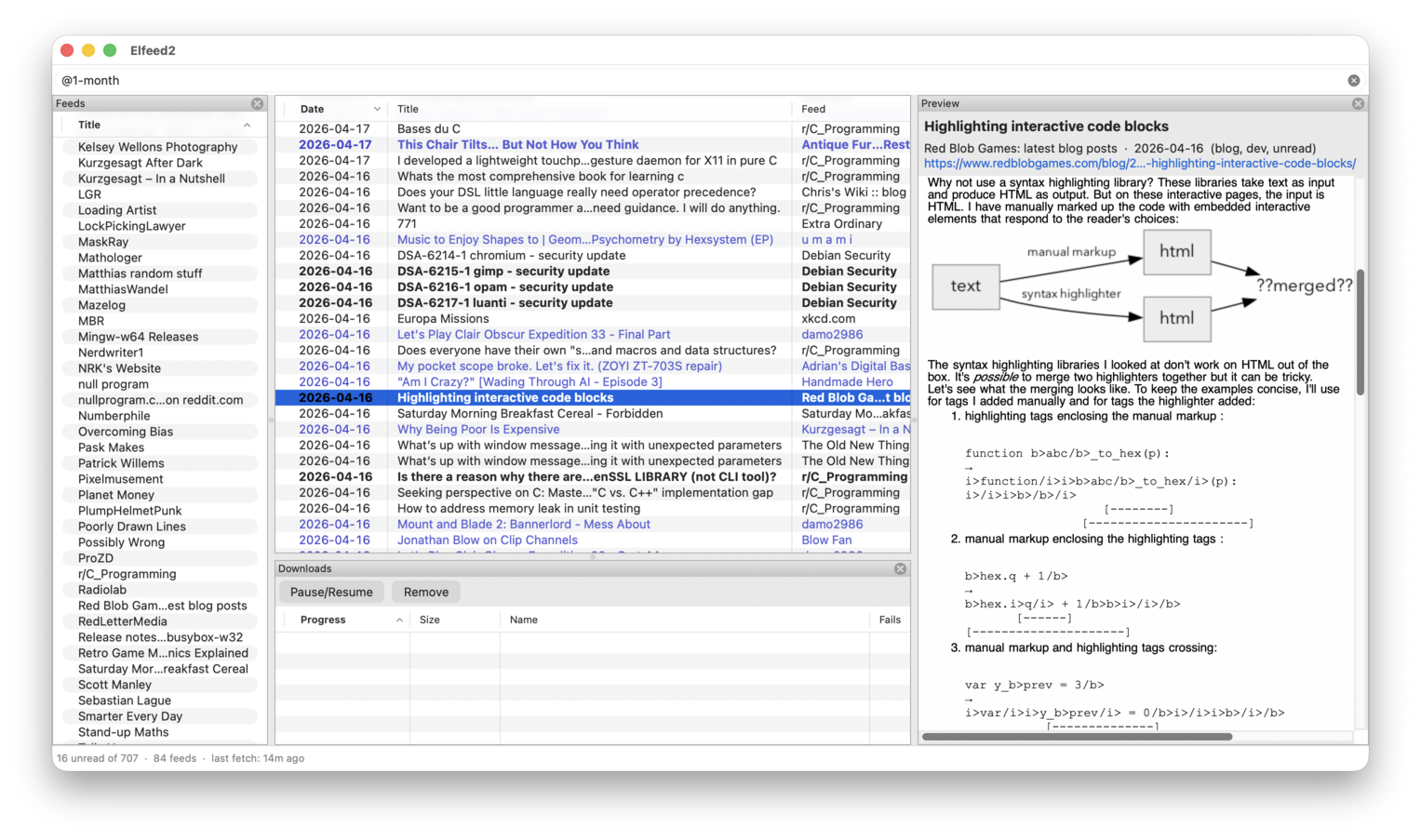
<p><img src="/img/elfeed2.png" alt="" /></p>

<p>These <a href="https://melpa.org/#/?q=skeeto">actively-in-use</a> packages require new maintainers (apply on
the project’s issues/discussion):</p>

<ul>
  <li><a href="https://github.com/skeeto/at-el/">@</a> (<a href="/blog/2013/04/07/">about</a>)</li>
  <li><del><a href="https://github.com/skeeto/emacs-aio/">aio</a> (<a href="/blog/2019/03/10/">about</a>)</del></li>
  <li><a href="https://github.com/skeeto/bitpack/">bitpack</a></li>
  <li><del><a href="https://github.com/skeeto/elfeed/">Elfeed</a> (<a href="https://github.com/skeeto/elfeed/discussions/563">apply here</a>)</del></li>
  <li><del><a href="https://github.com/skeeto/impatient-mode/">Impatient</a> (<a href="/blog/2012/08/20/">about</a>)</del></li>
  <li><a href="https://github.com/skeeto/javadoc-lookup/">javadoc-lookup</a> (<a href="/blog/2013/01/30/">about</a>)</li>
  <li><a href="https://github.com/skeeto/elisp-json-rpc/">json-rpc</a></li>
  <li><a href="https://github.com/skeeto/emacs-memoize/">memoize</a> (<a href="/blog/2010/07/26/">about</a>)</li>
  <li><del><a href="https://github.com/skeeto/nasm-mode/">nasm-mode</a> (<a href="/blog/2015/04/19/">about</a>)</del></li>
  <li><del><a href="https://github.com/skeeto/emacs-web-server/">simple-httpd</a> (<a href="/blog/2012/08/20/">about</a>)</del></li>
  <li><a href="https://github.com/skeeto/skewer-mode/">Skewer</a> (<a href="/blog/2012/10/31/">about</a>)</li>
  <li><del><a href="https://github.com/skeeto/elisp-weak-ref/">weak-ref</a> (<a href="/blog/2012/12/17/">about</a>)</del></li>
  <li><a href="https://github.com/skeeto/x86-lookup/">x86-lookup</a> (<a href="/blog/2015/11/21/">about</a>)</li>
</ul>

<p>No wonder it took so long for me to move on! I’m not handing these off to
just anyone, and you’ll need to establish your reputation. Having already
made contributions is a good sign, even if never merged. I’m willing to
transfer them off my namespace, though you’ll need to manage the Melpa
hand-off (on which I’ll sign-off). If there are no takers, these projects
will be archived but not deleted.</p>

<h3 id="trying-out-wxwidgets">Trying out wxWidgets</h3>

<p>The Emacs Calculator is amazing and the best calculator I’ve ever used,
which is why nothing I could find was going to replace it. My clone uses
GMP and MPFR for multi-precision, so it’s far faster, as to be expected,
but it’s not nearly at feature parity. It’s missing esoteric features
including symbolic processing. Though it’s enough to cover all of my own
usage. I can add more features later. The Emacs Calculator manual served
as a specification when building stackcalc.</p>

<p>Elfeed has been a cornerstone of my daily routines for the past 13 years.
Nothing else I’ve found scratches that itch for me, so I’ve always known
it would require a rewrite someday. Knowing it would take a few weeks of
work, and that I <em>already had the feed reader I wanted</em>, made motivation
difficult to find. Though now that I can accomplish ~3 weeks of old-way
work in a new-way day, this sort of project becomes that much easier to
start and finish. Though it’s not yet at a 1.0 release, after a couple
days Elfeed2 was working well enough to replace the original Elfeed.</p>

<p>While <a href="https://github.com/ocornut/imgui">Dear ImGui</a> was the right choice for <a href="https://github.com/skeeto/dcmake">dcmake</a>, it would not be
so for these two applications. Active rendering doesn’t suit a feed reader
left running all day, and I needed a richer toolkit. Professionally I work
in Qt, but I wanted something lighter-weight for my projects, accessible
via CMake <code class="language-plaintext highlighter-rouge">FetchContent</code>. That naturally led to <a href="https://wxwidgets.org/">wxWidgets</a>. While it
has issues — mitigatable character encoding problems, accidental quadratic
time in many places — it’s worked better than I anticipated, letting me
rapidly produce native-looking applications on Windows, macOS, and Linux.</p>

<p>Unlike Dear ImGui, wxWidgets is a platform, including <a href="/blog/2021/12/30/">sane</a> I/O and
path handling. I <em>mostly</em> don’t need platform layers when building
applications like these. I can simply rely on wxWidgets’ utilities.</p>

<p>Both of these projects build out-of-the-box on <a href="https://github.com/skeeto/w64devkit">w64devkit</a> thanks to the
dependencies being <code class="language-plaintext highlighter-rouge">FetchContent</code>-compatible. On all platforms you just
need a C++ toolchain and CMake:</p>

<div class="language-plaintext highlighter-rouge"><div class="highlight"><pre class="highlight"><code>$ cmake -B build
$ cmake --build build
</code></pre></div></div>

<p>Now that I have experience with wxWidgets, learning its limitations and
capabilities, it’s likely to be a foundation of most of my GUI projects to
come, except where something like Dear ImGui is a better git.</p>

]]>
    </content>
  </entry>
  
  <entry>
    <title>My brave new code-signing world</title>
    <link rel="alternate" type="text/html" href="https://nullprogram.com/blog/2026/04/25/"/>
    <id>urn:uuid:9db72e48-92f3-4426-a18f-9a317354e2c8</id>
    <updated>2026-04-25T18:12:29Z</updated>
    <category term="ai"/><category term="cpp"/><category term="crypto"/>
    <content type="html">
      <![CDATA[<p>The new <a href="https://github.com/skeeto/w64devkit">w64devkit</a> release two weeks ago is the first to be code-signed
with my identity, verified by Microsoft’s certificate chain. Currently
only the release packaging is signed — the self-extracting archive <em>and</em>
its payload — but I will soon code-sign individual EXEs and DLLs within
the distribution. In fact, <em>all</em> Windows builds of my project releases
have been code-signed the past two weeks, including <a href="/blog/2026/04/07/">dcmake</a>, and so
should everything going forward. My signing identity builds reputation
with each download, so users will have an easier time with SmartScreen,
and security software generally. <a href="https://learn.microsoft.com/en-us/azure/artifact-signing/overview">Azure Artifact Signing</a> creates the
actual signature, but the rest is done with new infrastructure I built
myself, <strong><a href="https://github.com/skeeto/aas-sign">aas-sign</a></strong>. As is often the case, the existing options were
deficient for my needs, so I had to build it myself.</p>

<p><strong>This code-signing is not free</strong>, and simply having <code class="language-plaintext highlighter-rouge">aas-sign</code> on hand,
or using the GitHub Actions action, is insufficient. You must be serious
enough to spend US$10/month for the Azure subscription. After that you are
subjected to the labyrinth that is the Azure portal, the most confusing UI
I’ve ever used. Luckily we live in <a href="/blog/2026/03/29/">an age of wonders</a>, and I could
describe to Claude in Chrome what I wanted and it would happen (Sonnet
works better than Opus for this). It took as much time to figure out Azure
as I spent creating a fully-functional, native debugger front-end. Clear
your schedule if you’re going to try it yourself. If it weren’t for AI
assistance I would have given up.</p>

<p>The one-time setup process is <strong>only open to North America</strong>, and involves
sharing identify documents (i.e. driver’s license) with Microsoft. Unlike
the rest of Azure, that part was streamlined and fairly painless. Between
the cost and this requirement, <em>this is a niche space</em>.</p>

<p>However, if this is your niche, aas-sign is currently the best software
available. <em>It’s the tool Microsoft should have written</em>, but didn’t due
to ongoing institutional failures. The alternatives are a pair of tools:
<a href="https://learn.microsoft.com/en-us/cli/azure/?view=azure-cli-latest">Azure CLI</a> (Python) combined with either <a href="https://github.com/ebourg/jsign">Jsign</a> (Java) or
<a href="https://learn.microsoft.com/en-us/dotnet/framework/tools/signtool-exe">SignTool.exe</a> (Windows only). All impose artificial runtime constraints
hostile to build pipeline composablility. Poor engineering. In contrast,
aas-sign is a native, multi-platform, single-file application.</p>

<p>If you know this space, <a href="https://github.com/mtrojnar/osslsigncode">osslsigncode</a> probably comes to mind, but it
produces signatures itself. It doesn’t interface with Azure and so has no
role here aside from semi-reliable validation. The most popular use case
is code-signing with self-signed certificates, but <a href="https://www.bcs.org/articles-opinion-and-research/what-happens-when-microsoft-defender-flags-your-software/">that actually makes
everything worse</a>.</p>

<p>There are two modes for aas-sign: Laptop and Action. Laptop mode is the
most compelling, so we’ll start with that, but Action mode is the most
useful in practice.</p>

<h3 id="laptopdesktop-mode">Laptop/desktop mode</h3>

<p>Suppose you built an EXE or DLL, and would like to code-sign and publish
it. Typically that looks like this:</p>

<div class="language-plaintext highlighter-rouge"><div class="highlight"><pre class="highlight"><code>$ aas-sign sign myapp.exe myapp.dll
</code></pre></div></div>

<p>It computes an Authenticode for each (concurrently), sends it off to
Azure, gets back a signature, then a countersignature, and embeds the
signatures in the images. If you have multiple signing identities then you
might use <code class="language-plaintext highlighter-rouge">--as</code> (“sign as”):</p>

<div class="language-plaintext highlighter-rouge"><div class="highlight"><pre class="highlight"><code>$ aas-sign sign --as eus:contoso:jdoe myapp.exe myapp.dll
</code></pre></div></div>

<p>The colon-delimited triple is my own invention to combine region (East
US), tenant (Contoso), and profile (J. Doe) into one string. The first
time you use it, and every ~90 days thereafter, you’ll need to
authenticate with Azure first:</p>

<div class="language-plaintext highlighter-rouge"><div class="highlight"><pre class="highlight"><code>$ aas-sign login
</code></pre></div></div>

<p>This will open a browser (just like <code class="language-plaintext highlighter-rouge">az login</code>) to log in, from which it
will obtain a token than can be used to obtain signing tokens. (Yes, a
token to get tokens; I’m concealing as much complexity as possible.) You
might also want to establish a default identity, as typically you’d only
have one:</p>

<div class="language-plaintext highlighter-rouge"><div class="highlight"><pre class="highlight"><code>$ aas-sign config eus:contoso:jdoe
</code></pre></div></div>

<p>Or all at once:</p>

<div class="language-plaintext highlighter-rouge"><div class="highlight"><pre class="highlight"><code>$ aas-sign login eus:contoso:jdoe
</code></pre></div></div>

<p>My goal was, after enduring the Azure portal sign-up, to maximally
streamline code-signing.</p>

<h3 id="action-mode">Action mode</h3>

<p>Manually building, signing, and publishing releases is easy and might be
fine if you’re not releasing too frequently — or too <em>in</em>infrequently that
you forget how to do it — but likely you’d want to automate this process.
I was stubborn about it myself, until <a href="https://peter0x44.github.io/">Peter0x44</a> pushed me hard enough
to take it seriously, for which I’m grateful. There’s an official GitHub
Action to code-sign with Azure, but it requires a Windows runner, fatally
limiting for my own needs. So aas-sign also defines a code-signing action.
The previous example would have this in its own action:</p>

<div class="language-yaml highlighter-rouge"><div class="highlight"><pre class="highlight"><code>  <span class="pi">-</span> <span class="na">name</span><span class="pi">:</span> <span class="s">Sign</span>
    <span class="na">uses</span><span class="pi">:</span> <span class="s">skeeto/aas-sign@v1.0.0</span>
    <span class="na">with</span><span class="pi">:</span>
      <span class="na">endpoint</span><span class="pi">:</span>  <span class="s">${{ secrets.TRUSTED_SIGNING_ENDPOINT }}</span>
      <span class="na">account</span><span class="pi">:</span>   <span class="s">${{ secrets.TRUSTED_SIGNING_ACCOUNT }}</span>
      <span class="na">profile</span><span class="pi">:</span>   <span class="s">${{ secrets.CERTIFICATE_PROFILE }}</span>
      <span class="na">client-id</span><span class="pi">:</span> <span class="s">${{ secrets.AZURE_CLIENT_ID }}</span>
      <span class="na">tenant-id</span><span class="pi">:</span> <span class="s">${{ secrets.AZURE_TENANT_ID }}</span>
      <span class="na">files</span><span class="pi">:</span> <span class="pi">|</span>
        <span class="s">myapp.exe</span>
        <span class="s">myapp.dll</span>
</code></pre></div></div>

<p>The secrets are bunch of strings you (or your AI agent) retrieve from the
Azure portal. You also need to create Federated Identity Credential (FIC)
for each repository, which I suggest triggering on an environment. (This
all may <a href="https://www.youtube.com/watch?v=y8OnoxKotPQ">sound like a joke</a> but it’s real.) Again, just ask an AI to
do all this stuff. The mandatory Azure interfacing limits how much I can
streamline this process. Then aas-sign combines these with per-job tokens
GitHub injects into the runner to authenticate (via the FIC) and sign.</p>

<p>I’ve gone through this a number of times, and the AI breezes through the
GitHub UI, but struggles through the Azure portal — objective evidence of
how awful it is. Idea for a UI benchmark: How many AI tokens does it take
to accomplish typical activities?</p>

<p>For w64devkit, my plan is to run aas-sign inside the Docker build and sign
executables in the container before it’s SFX-packaged. This is impossible
with SignTool.exe and needlessly frictional with Jsign (requires at least
a JRE if not a JDK). The easiest path forward was to literally build my
own tool from scratch.</p>

<p>I’m considering <code class="language-plaintext highlighter-rouge">aas-sign</code> as a new w64devkit command, but it’s so niche
that I’m likely to be its sole user. On the other hand, those already
running w64devkit in GitHub Actions could use it in Action mode to
code-sign their builds without any additional tools.</p>

]]>
    </content>
  </entry>
  
  <entry>
    <title>dcmake: a new CMake debugger UI</title>
    <link rel="alternate" type="text/html" href="https://nullprogram.com/blog/2026/04/07/"/>
    <id>urn:uuid:eb448519-0a55-4c1c-bc55-17a65634224f</id>
    <updated>2026-04-07T03:04:02Z</updated>
    <category term="cpp"/>
    <content type="html">
      <![CDATA[<p>CMake has a <a href="https://cmake.org/cmake/help/latest/manual/cmake.1.html#cmdoption-cmake-debugger"><code class="language-plaintext highlighter-rouge">--debugger</code> mode</a> since <a href="https://cmake.org/cmake/help/latest/release/3.27.html#debugger">3.27</a> (July 2023),
allowing software to manipulate it interactively through the <a href="https://microsoft.github.io/debug-adapter-protocol/">Debugger
Adaptor Protocol</a> (DAP), an HTTP-like protocol passing JSON messages.
Debugger front-ends can start, stop, step, breakpoint, query variables,
etc. a live CMake. When I came across this mode, I immediately conceived a
project putting it to use. Thanks to <a href="/blog/2026/03/29/">recent leaps in software engineering
productivity</a>, I had a working prototype in 30 minutes, and by the
end of that same day, a complete, multi-platform, native, GUI application.
I named it <strong><a href="https://github.com/skeeto/dcmake">dcmake</a></strong> (“debugger for CMake”). I’ve tested it on macOS,
Windows, and Linux. Despite only being couple days old, it’s one of the
coolest things I’ve ever built. Prior to 2026, I estimate it would have
taken me a month to get the tool to this point.</p>

<p><a href="/img/dcmake/dcmake.png"><img src="/img/dcmake/dcmake-thumb.png" alt="" /></a></p>

<p>It has a <a href="https://github.com/ocornut/imgui">Dear ImGui</a> interface, which I’ve experienced as a user but
never built on myself before. Specifically the <a href="https://github.com/ocornut/imgui/wiki/Docking">docking branch</a>. In a
sense it’s a toolkit for building debuggers, so it’s playing an enormous
role in how quickly I put this project together. All of the “windows” tear
out and may be free-floating or docked wherever you like, closely matching
the classic Visual Studio UI. I borrowed all the same keybindings: F10 to
step over, F11 to step in, F5 to start/continue, shift+F5 to stop. Click
on line numbers to toggle breakpoints, right click to run-to-line, hover
over variables with the mouse to see their values. Nearly every every UI
state persists across sessions, and it opens nearly instantly.</p>

<video src="/vid/dcmake.mp4" loop="" muted="" autoplay=""></video>

<p>This is just one of many situations I’ve used AI the past month for UI
development, and it’s been shockingly effective. I can describe roughly
the interface I want, and the AI makes it happen in a matter of minutes.
It understands what I mean, filling in the details, sometimes anticipating
what I’ll ask for next. If I’m unsure how I want a UI to work, it also
offers good advice. If I need simple icons and such, it can draw those,
too. It’s all incredibly empowering.</p>

<p>On macOS and Linux it runs on top of GLFW with OpenGL 3 rendering, and on
Windows it uses native Win32 windowing and DirectX 11 rendering.</p>

<p>Program arguments given to dcmake populate the top-left arguments text
input, which go straight into CMake on start. So you can prepend <code class="language-plaintext highlighter-rouge">d</code> to
your CMake configuration command to run it inside the debugger. Passing no
arguments sets it up for “standard” <code class="language-plaintext highlighter-rouge">-B build</code> configuration.</p>

<p>In general, if you don’t have anywhere in particular to look, likely the
first thing to do after starting dcmake (in a project) is press F10. It
starts CMake paused on the first line of <code class="language-plaintext highlighter-rouge">CMakeLists.txt</code>, or whatever
script you’re debugging. If you’re trying out dcmake for the first time,
that’s a good place to start. Keep pressing F10 to step through that
script, watching it run through its configuration. If you F11 through the
script then you’ll dive deeper and deeper into CMake itself, which can be
insightful.</p>

<p>There is no point in trying to debug <code class="language-plaintext highlighter-rouge">--build</code> invocations. It’s just a
uniform interface to the underlying build tool, and there is no CMake left
to debug at that point. However, it <em>does</em> work with <code class="language-plaintext highlighter-rouge">-P</code> <a href="https://cmake.org/cmake/help/latest/manual/cmake.1.html#cmdoption-cmake-P">script mode</a>
invocations. CMake can operate as a <a href="https://claude.ai/public/artifacts/06b50c8f-ff71-4562-8ab5-80adaddff9b7">platform-agnostic shell script-like
tool</a>, but unlike shell scripts you can step through them with a
debugger like dcmake.</p>

<p>On Windows it supports Unicode paths all the way through, without <a href="/blog/2021/12/30/">a UTF-8
manifest</a>. This took some <a href="/blog/2022/02/18/">special care</a>, in particular
avoiding any C++ standard library I/O functionality. Current frontier AI
cannot handle this detail on their own. The macOS platform required a bit
of Objective-C, as it often does, and I’m happy I didn’t have to figure
that part out myself.</p>

<p>The next release of <a href="https://github.com/skeeto/w64devkit">w64devkit</a> will include dcmake, complementing its
recent addition of CMake. This new tool has already proven useful in its
own development.</p>

]]>
    </content>
  </entry>
  
  <entry>
    <title>2026 has been the most pivotal year in my career… and it's only March</title>
    <link rel="alternate" type="text/html" href="https://nullprogram.com/blog/2026/03/29/"/>
    <id>urn:uuid:91d679b3-4f07-4b61-b359-5890695ad621</id>
    <updated>2026-03-29T21:38:22Z</updated>
    <category term="ai"/><category term="c"/><category term="cpp"/>
    <content type="html">
      <![CDATA[<p>In February I left my employer after nearly two decades of service. In the
moment I was optimistic, yet unsure I made the right choice. Dust settled,
I’m now absolutely sure I chose correctly. I’m happier and better for it.
There were multiple factors, but it’s not mere chance it coincides with
these early months of <a href="https://shumer.dev/something-big-is-happening">the automation of software engineering</a>. I
left an employer that is <em>years behind</em> adopting AI to one actively
supporting and encouraging it. As of March, in my professional capacity
<strong>I no longer write code myself</strong>. My current situation was unimaginable
to me only a year ago. Like it or not, this is the future of software
engineering. Turns out I like it, and having tasted the future I don’t
want to go back to the old ways.</p>

<p><img src="/img/20x.png" alt="" /></p>

<p>In case you’re worried, this is still me. These are my own words. <a href="https://paulgraham.com/writes.html">Writing
is thinking</a>, and it would defeat the purpose for an AI to write
in my place on my personal blog. That’s not going to change.</p>

<p>I still spend much time reading and understanding code, and using most of
the same development tools. It’s more like being a manager, orchestrating
a nebulous team of inhumanly-fast, nameless assistants. Instead of dicing
the vegetables, I conjure a helper to do it while I continue to run the
kitchen. I haven’t managed people in some 20 years now, but I can feel
those old muscles being put to use again as I improve at this new role.
Will these kitchens still need human chefs like me by the end of the
decade? Unclear, and it’s something we all need to prepare for.</p>

<p>My situation gave me an experience onboarding with AI assistance — a fast
process given a near-instant, infinitely-patient helper answering any
question about the code. By second week I was making substantial, wide
contributions to the large C++ code base. It’s difficult to attach a
quantifiable factor like 2x, 5x, 10x, etc. faster, but I can say for
certain this wouldn’t have been possible without AI. The bottlenecks have
shifted from producing code, which now takes relatively no time at all, to
other points, and we’re all still trying to figure it out.</p>

<p>My personal programming has transformed as well. Everything <a href="/blog/2024/11/10/">I said about
AI in late 2024</a> is, as I predicted, utterly obsolete. There’s a
huge, growing gap between open weight models and the frontier. Models you
can run yourself are toys. In general, almost any AI product or service
worth your attention costs money. The free stuff is, at minimum, months
behind. Most people only use limited, free services, so there’s a broad
unawareness of just how far AI has advanced. AI is <em>now highly skilled at
programming</em>, and better than me at almost every programming task, with
inhumanly-low defect rates. The remaining issues are mainly steering
problems: If AI code doesn’t do what I need, likely the AI writing it
didn’t understand what I needed.</p>

<p>I’ll still write code myself from time to time for fun — <a href="/blog/2018/06/10/">minimalist</a>,
with my <a href="/blog/2023/10/08/">style</a> and <a href="/blog/2025/01/19/">techniques</a> — the same way I play <a href="https://en.wikipedia.org/wiki/Shogi">shogi</a> on
the weekends for fun. However, artisan production is uneconomical in the
presence of industrialization. AI makes programming so cheap that only the
rich will write code by hand.</p>

<p>A small part of me is sad at what is lost. A bigger part is excited about
the possibilities of the future. I’ve always had more ideas than time or
energy to pursue them. With AI at my command, the problem changes shape. I
can comfortably take on complexity from which I previously shied away, and
I can take a shot at any idea sufficiently formed in my mind to prompt an
AI — a whole skill of its own that I’m actively developing.</p>

<p>For instance, a couple weeks ago I <a href="https://github.com/skeeto/w64devkit/pull/357">put AI to work on a problem</a>,
and it produced a working solution for me after ~12 hours of continuous,
autonomous work, literally while I slept. The past month <a href="https://github.com/skeeto/w64devkit">w64devkit</a> has
burst with activity, almost entirely AI-driven. Some of it architectural
changes I’ve wanted for years, but would require hours of tedious work,
and so I never got around to it. AI knocked it out in minutes, with the
new architecture opening new opportunities. It’s also taken on most of the
cognitive load of maintenance.</p>

<h3 id="quiltcpp">Quilt.cpp</h3>

<p>So far the my biggest, successful undertaking is <strong><a href="https://github.com/skeeto/quilt.cpp">Quilt.cpp</a></strong>, a C++
clone of <a href="https://savannah.nongnu.org/projects/quilt">Quilt</a>, an early, actively-used source control system for
patch management. Git is a glaring omission from the <a href="/blog/2020/09/25/">almost</a> complete
w64devkit, due platform and build issues. I’ve thought Quilt could fill
<em>some</em> of that source control hole, except the original is written in
Bash, Perl, and GNU Coreutils — even more of a challenge than Git. Since
Quilt is conceptually simple, and I could lean on <a href="https://frippery.org/busybox/">busybox-w32</a> <code class="language-plaintext highlighter-rouge">diff</code>
and <code class="language-plaintext highlighter-rouge">patch</code>, I’ve considered writing my own implementation, just <a href="/blog/2023/01/18/">as I did
pkg-config</a>, but I never found the energy to do it.</p>

<p>Then I got good enough with AI to knock out a near feature-complete clone
in about four days, including a built-in <code class="language-plaintext highlighter-rouge">diff</code> and <code class="language-plaintext highlighter-rouge">patch</code> so it doesn’t
actually depend on external tools (except invoking <code class="language-plaintext highlighter-rouge">$EDITOR</code>). On Windows
it’s a ~1.6MB standalone EXE, to be included in future w64devkit releases.
The source is distributed as an amalgamation, a single file <code class="language-plaintext highlighter-rouge">quilt.cpp</code>
per its namesake:</p>

<div class="language-plaintext highlighter-rouge"><div class="highlight"><pre class="highlight"><code>$ c++ -std=c++20 -O2 -s -o quilt.exe quilt.cpp
$ ./quilt.exe --help
Usage: quilt [--quiltrc file] &lt;command&gt; [options] [args]

Commands:
  new        Create a new empty patch
  add        Add files to the topmost patch
  push       Apply patches to the source tree
  pop        Remove applied patches from the stack
  refresh    Regenerate a patch from working tree changes
  diff       Show the diff of the topmost or a specified patch
  series     List all patches in the series
  applied    List applied patches
  unapplied  List patches not yet applied
  top        Show the topmost applied patch
  next       Show the next patch after the top or a given patch
  previous   Show the patch before the top or a given patch
  delete     Remove a patch from the series
  rename     Rename a patch
  import     Import an external patch into the series
  header     Print or modify a patch header
  files      List files modified by a patch
  patches    List patches that modify a given file
  edit       Add files to the topmost patch and open an editor
  revert     Discard working tree changes to files in a patch
  remove     Remove files from the topmost patch
  fold       Fold a diff from stdin into the topmost patch
  fork       Create a copy of the topmost patch under a new name
  annotate   Show which patch modified each line of a file
  graph      Print a dot dependency graph of applied patches
  mail       Generate an mbox file from a range of patches
  grep       Search source files (not implemented)
  setup      Set up a source tree from a series file (not implemented)
  shell      Open a subshell (not implemented)
  snapshot   Save a snapshot of the working tree for later diff
  upgrade    Upgrade quilt metadata to the current format
  init       Initialize quilt metadata in the current directory

Use "quilt &lt;command&gt; --help" for details on a specific command.
</code></pre></div></div>

<p>It supports Windows and POSIX, and runs ~5x faster than the original. AI
developed it on Windows, Linux, and macOS: It’s best when the AI can close
the debug loop and tackle problems autonomously without involving a human
slowpoke. The handful of “not implemented” parts aren’t because they’re
too hard — each would probably take an AI ~10 minutes — but deliberate
decisions of taste.</p>

<p>There’s an irony that the reason I could produce Quilt.cpp with such ease
is also a reason I don’t really need it anymore.</p>

<p>I changed the output of <code class="language-plaintext highlighter-rouge">quilt mail</code> to be more Git-compatible. The mbox
produced by Quilt.cpp can be imported into Git with a plain <code class="language-plaintext highlighter-rouge">git am</code>:</p>

<div class="language-plaintext highlighter-rouge"><div class="highlight"><pre class="highlight"><code>$ quilt mail --mbox feature-branch.mbox
$ git am feature-branch.mbox
</code></pre></div></div>

<p>The idea being that I could work on a machine without Git (e.g. Windows
XP), and copy/mail the mbox to another machine where Git can absorb it as
though it were in Git the whole time. <code class="language-plaintext highlighter-rouge">git format-patch</code> to <code class="language-plaintext highlighter-rouge">quilt import</code>
sends commits in the opposite direction, useful for manually testing
Quilt.cpp on real change sets.</p>

<p>To be clear, I could not have done this if the original Quilt did not
exist as a working program. I began with an AI generating a <a href="https://eli.thegreenplace.net/2026/rewriting-pycparser-with-the-help-of-an-llm/">conformance
suite</a> based on the original, its documentation, and other online
documentation, validating that suite against the original implementation
(see <code class="language-plaintext highlighter-rouge">-DQUILT_TEST_EXECUTABLE</code>). Then had another AI code to the tests, on
architectural guidance from me, with <code class="language-plaintext highlighter-rouge">-D_GLIBCXX_DEBUG</code> and sanitizers as
guardrails. That was day one. The next three days were lots of refining
and iteration as I discover the gaps in the test suite. I’d prompt AI to
compare Quilt.cpp to the original Quilt man page, add tests for missing
features, validate the new tests against the original Quilt, then run
several agents to fix the tests. While they worked I’d try the latest
build and note any bugs. As of this writing, the result is about equal
parts test and non-test, ~9KLoC each.</p>

<p>I’m likely to use this technique to clone other tools with implementations
unsuitable for my purposes. I learned quite a bit from this first attempt.</p>

<p>Why C++ instead of my usual choice of C? As we know, <a href="/blog/2023/02/11/">conventional C is
highly error-prone</a>. Even AI has trouble with it. In the ~9k lines
of C++ that is Quilt.cpp, I am only aware of three memory safety errors by
the AI. Two were null-terminated string issues with <code class="language-plaintext highlighter-rouge">strtol</code>, where the AI
was essentially writing C instead of C++, after which I directed the AI to
use <code class="language-plaintext highlighter-rouge">std::from_chars</code> and drop as much direct libc use as possible. (The
other was an unlikely branch with <code class="language-plaintext highlighter-rouge">std::vector::back</code> on an empty vector.)
We can rescue C with better techniques like arena allocation, counted
strings, and slices, but while (current) state of the art AI understands
these things, it cannot work effectively with them in C. I’ve tried. So I
picked C++, and from my professional work I know AI is better at C++ than
me.</p>

<p>Also like a manager, I have not read most of the code, and instead focused
on results, so you might say this was “vibe-coded.” It <em>is</em> thoroughly
tested, though I’m sure there are still bugs to be ironed out, especially
on the more esoteric features I haven’t tried by hand yet.</p>

<h3 id="lets-discuss-tools">Let’s discuss tools</h3>

<p>After opposing CMake for years, you may have noticed the latest w64devkit
now includes CMake and Ninja. What happened? Preparing for my anticipated
employment change, this past December I read <a href="https://crascit.com/professional-cmake/"><em>Professional CMake</em></a>.
I realized that my practical problems with CMake were that nearly everyone
uses it incorrectly. Most CMake builds are a disaster, but my new-found
knowledge allows me to navigate the common mistakes. Only high profile
open source projects manage to put together proper CMake builds. Otherwise
the internet is loaded with CMake misinformation. Similar to AI, if you’re
not paying for CMake knowledge then it’s likely wrong or misleading. So I
highly recommend that book!</p>

<p>Frontier AI is <em>very good</em> with CMake. When a project has a CMake build
that isn’t <em>too</em> badly broken, just tell AI to fix it, <em>without any
specifics</em>, and build problems disappear in mere minutes without having to
think about it. It’s awesome. Combine it with the previous discussion
about tests making AI so much more effective, and that it <em>also</em> knows
CTest well, and you’ve got a killer formula. I’m more effective with CTest
myself merely from observing how AI uses it. AI (currently) cannot use
debuggers, so putting powerful, familiar testing tools in its hands helps
a lot, versus the usual bespoke, debugger-friendly solutions I prefer.</p>

<p>Similar to solving CMake problems: Have a hairy merge conflict? Just ask
AI resolve it. It’s like magic. I no longer fear merge conflicts.</p>

<p>So part of my motivation for adding CMake to w64devkit was anticipation of
projects like Quilt.cpp, where they’d be available to AI, or at least so I
could use the tools the AI used to build/test myself. It’s already paid
for itself, and there’s more to come.</p>

<p>For agent software, on personal projects I’m using Claude Code. It’s a
great value, cheaper than paying API rates but requires working around
5-hour limit windows. I started with Pro (US$20/mo), but I’m getting so
much out of it that as of this writing I’m on 5x Max (US$100/mo) simply to
have enough to explore all my ideas. Be warned: <strong>Anthropic software is
quite buggy, more so than industry average</strong>, and it’s obvious that they
never even <em>start</em>, let alone test, some of their released software on
disfavored platforms (Windows, Android). Don’t expect to use Claude Code
effectively for native Windows platform development, which sadly includes
w64devkit. Hopefully that’s fixed someday. I suspect Anthropic hit a
bottleneck on QA, and unable to fit AI in that role they don’t bother. You
can theoretically report bugs on GitHub, but they’re just ignored and
closed. (Why don’t they have AI agents jumping on this wealth of bug
reports?)</p>

<p>At work I’m using Cursor where I get a choice of models. My favorite for
March has been GPT-5.4, which in my experience beats Opus 4.6 on Claude
Code by a small margin. It’s immediately obvious that Cursor is better
agent software than Claude Code. It’s more robust, more featureful, and
with a clearer UI than Claude Code. It has no trouble on Windows and can
drive w64devkit flawlessly. It’s also more expensive than Claude Code. My
employer currently spends ~US$250/mo on my AI tokens, dirt cheap
considering what they’re getting out of it. I have bottlenecks elsewhere
that keep me from spending even more.</p>

<p>As a general rule, for software engineering always use the smartest model
available. The cheaper, dumber models cost more in the long run. It takes
more tokens to achieve worse results, which costs more human time to sort
out.</p>

<p>(Update September 2026: This summer Claude Desktop drastically improved,
and is currently the best publicly available coding harness. On the other
hand Cursor degraded, adopted dark patterns, and is untrustworthy. With
the OpenAI models no longer available on Cursor, there is no longer any
reason whatsoever to use it.)</p>

<p>Neither Cursor nor Claude Code are open source, so what are the purists to
do, even if they’re willing to pay API rates for tokens? Sadly I have no
answers for you. I haven’t gotten any open source agent software actually
working, and it seems they may lack the necessary secret sauce.</p>

<p>Update: Several folks suggested I give <a href="https://opencode.ai/">OpenCode</a> another shot, and this
time I got over the configuration hurdle. Single executable, slick
interface, and unlike Claude Code, I observed no bugs in my brief trial.
Give that a shot if you’re looking for an open source client.</p>

<p>The future is going to be weird. My experience is only a peek at what’s to
come, and my head is still spinning. However, the more I adapt to the
changes, the better I feel. If you’re feeling anxious like I was, don’t
flinch from improving your own AI knowledge and experience.</p>

]]>
    </content>
  </entry>
  
  <entry>
    <title>Frankenwine: Multiple personas in a Wine process</title>
    <link rel="alternate" type="text/html" href="https://nullprogram.com/blog/2026/01/19/"/>
    <id>urn:uuid:d2b53f8d-88a6-400b-a748-693a758741c5</id>
    <updated>2026-01-19T21:51:38Z</updated>
    <category term="c"/><category term="win32"/><category term="linux"/><category term="x86"/>
    <content type="html">
      <![CDATA[<p>I came across a recent article on <a href="https://gpfault.net/posts/drunk-exe.html">making Linux system calls from a Wine
process</a>. Windows programs running under Wine are still normal Linux
processes and may interact with the Linux kernel like any other process.
None of this was surprising, and the demonstration works just as I expect.
Still, it got the wheels spinning and I realized an <em>almost</em> practical
application: build <a href="/blog/2023/01/18/">my pkg-config implementation</a> such that on Windows
<code class="language-plaintext highlighter-rouge">pkg-config.exe</code> behaves as a native pkg-config, but when run under Wine
this same binary takes the persona of a Linux program and becomes a cross
toolchain pkg-config, bypassing Win32 and talking directly with the Linux
kernel. <a href="https://justine.lol/cosmopolitan/">Cosmopolitan Libc</a> cleverly does this out-of-the-box, but
in this article we’ll mash together a couple existing sources with a bit
of glue.</p>

<p>The results are in <a href="https://github.com/skeeto/u-config/commit/e0008d7e">the merge-demo branch</a> of u-config, and took
hardly any work:</p>

<div class="language-plaintext highlighter-rouge"><div class="highlight"><pre class="highlight"><code>$ git show --stat
...
 main_linux_amd64.c |   8 ++---
 main_wine.c        | 101 +++++++++++++++++++++++++++++++++++++++++
 src/linux_noarch.c |  16 ++++-----
 src/u-config.c     |   1 +
 4 files changed, 114 insertions(+), 12 deletions(-)
</code></pre></div></div>

<p>A platform layer, <code class="language-plaintext highlighter-rouge">main_wine.c</code>, is a merge of two existing platform
layers, one of which required unavoidable tweaks. We’ll get to those
details in a moment. First we’ll need to detect if we’re running under
Wine, and <a href="https://web.archive.org/web/20250923061634/https://stackoverflow.com/questions/7372388/determine-whether-a-program-is-running-under-wine-at-runtime/42333249#42333249">the best solution I found</a> was to locate
<code class="language-plaintext highlighter-rouge">ntdll!wine_get_version</code>. If this function exists, we’re in Wine. That
works out to a pretty one-liner because <code class="language-plaintext highlighter-rouge">ntdll.dll</code> is already loaded:</p>

<div class="language-c highlighter-rouge"><div class="highlight"><pre class="highlight"><code><span class="n">bool</span> <span class="nf">running_on_wine</span><span class="p">()</span>
<span class="p">{</span>
    <span class="k">return</span> <span class="n">GetProcAddress</span><span class="p">(</span><span class="n">GetModuleHandleA</span><span class="p">(</span><span class="s">"ntdll"</span><span class="p">),</span> <span class="s">"wine_get_version"</span><span class="p">);</span>
<span class="p">}</span>
</code></pre></div></div>

<p>An x86-64 Linux syscall wrapper with <a href="/blog/2024/12/20/">thorough inline assembly</a>:</p>

<div class="language-c highlighter-rouge"><div class="highlight"><pre class="highlight"><code><span class="kt">ptrdiff_t</span> <span class="nf">syscall3</span><span class="p">(</span><span class="kt">int</span> <span class="n">n</span><span class="p">,</span> <span class="kt">ptrdiff_t</span> <span class="n">a</span><span class="p">,</span> <span class="kt">ptrdiff_t</span> <span class="n">b</span><span class="p">,</span> <span class="kt">ptrdiff_t</span> <span class="n">c</span><span class="p">)</span>
<span class="p">{</span>
    <span class="kt">ptrdiff_t</span> <span class="n">r</span><span class="p">;</span>
    <span class="n">asm</span> <span class="k">volatile</span> <span class="p">(</span>
        <span class="s">"syscall"</span>
        <span class="o">:</span> <span class="s">"=a"</span><span class="p">(</span><span class="n">r</span><span class="p">)</span>
        <span class="o">:</span> <span class="s">"a"</span><span class="p">(</span><span class="n">n</span><span class="p">),</span> <span class="s">"D"</span><span class="p">(</span><span class="n">a</span><span class="p">),</span> <span class="s">"S"</span><span class="p">(</span><span class="n">b</span><span class="p">),</span> <span class="s">"d"</span><span class="p">(</span><span class="n">c</span><span class="p">)</span>
        <span class="o">:</span> <span class="s">"rcx"</span><span class="p">,</span> <span class="s">"r11"</span><span class="p">,</span> <span class="s">"memory"</span>
    <span class="p">);</span>
    <span class="k">return</span> <span class="n">r</span><span class="p">;</span>
<span class="p">}</span>

<span class="kt">ptrdiff_t</span> <span class="nf">write</span><span class="p">(</span><span class="kt">int</span> <span class="n">fd</span><span class="p">,</span> <span class="kt">void</span> <span class="o">*</span><span class="n">buf</span><span class="p">,</span> <span class="kt">ptrdiff_t</span> <span class="n">len</span><span class="p">)</span>
<span class="p">{</span>
    <span class="k">return</span> <span class="n">syscall3</span><span class="p">(</span><span class="n">SYS_write</span><span class="p">,</span> <span class="n">fd</span><span class="p">,</span> <span class="p">(</span><span class="kt">ptrdiff_t</span><span class="p">)</span><span class="n">buf</span><span class="p">,</span> <span class="n">len</span><span class="p">);</span>
<span class="p">}</span>
</code></pre></div></div>

<p>I’d normally use <code class="language-plaintext highlighter-rouge">long</code> for all these integers because Linux is <a href="https://en.wikipedia.org/wiki/64-bit_computing#64-bit_data_models">LP64</a>
(<code class="language-plaintext highlighter-rouge">long</code> is pointer-sized), but Windows is LLP64 (only <code class="language-plaintext highlighter-rouge">long long</code> is 64
bits). It’s so bizarre to interface with Linux from LLP64, and this will
have consequences later. With these pieces we can see the basic shape of a
split personality program:</p>

<div class="language-c highlighter-rouge"><div class="highlight"><pre class="highlight"><code>    <span class="k">if</span> <span class="p">(</span><span class="n">running_on_wine</span><span class="p">())</span> <span class="p">{</span>
        <span class="n">write</span><span class="p">(</span><span class="mi">1</span><span class="p">,</span> <span class="s">"hello, wine</span><span class="se">\n</span><span class="s">"</span><span class="p">,</span> <span class="mi">12</span><span class="p">);</span>
    <span class="p">}</span> <span class="k">else</span> <span class="p">{</span>
        <span class="n">HANDLE</span> <span class="n">h</span> <span class="o">=</span> <span class="n">GetStdHandle</span><span class="p">(</span><span class="n">STD_OUTPUT_HANDLE</span><span class="p">);</span>
        <span class="n">WriteFile</span><span class="p">(</span><span class="n">h</span><span class="p">,</span> <span class="s">"hello, windows</span><span class="se">\n</span><span class="s">"</span><span class="p">,</span> <span class="mi">15</span><span class="p">,</span> <span class="mi">0</span><span class="p">,</span> <span class="mi">0</span><span class="p">);</span>
    <span class="p">}</span>
</code></pre></div></div>

<p>We can cram two programs into this binary and select which program at run
time depending on what we see. In typical programs locating and calling
into glibc would be a challenge, particularly with the incompatible ABIs
involved. We’re avoiding it here by interfacing directly with the kernel.</p>

<h3 id="application-to-u-config">Application to u-config</h3>

<p>Luckily u-config has completely-optional platform layers implemented with
Linux system calls. The POSIX platform layer works fine, and that’s what
distributions should generally use, but these bonus platforms are unhosted
and do not require libc. That means we can shove it into a Windows build
with relatively little trouble.</p>

<p>Before we do that, let’s think about what we’re doing. <a href="/blog/2021/08/21/">Debian has great
cross toolchain support</a>, including Mingw-w64. There are even a few
Windows libraries in the Debian package repository, <a href="https://packages.debian.org/trixie/x32/libz-mingw-w64">such as zlib</a>, and
we can build Windows programs against them. If you’re cross-building and
using pkg-config, you ought to use the cross toolchain pkg-config, which
in GNU ecosystems gets an architecture prefix like the other cross tools.
Debian cross toolchains each include a cross pkg-config, and it sometimes
<em>almost</em> works correctly! Here’s what I get on Debian 13:</p>

<div class="language-plaintext highlighter-rouge"><div class="highlight"><pre class="highlight"><code>$ x86_64-w64-mingw32-pkg-config --cflags --libs zlib
-I/usr/x86_64-w64-mingw32/include -L/usr/x86_64-w64-mingw32/lib -lz
</code></pre></div></div>

<p>Note the architecture in the <code class="language-plaintext highlighter-rouge">-I</code> and <code class="language-plaintext highlighter-rouge">-L</code> options. It really is querying
the <a href="https://peter0x44.github.io/posts/cross-compilers/">cross sysroot</a>. Though these paths are in the cross sysroot,
and so should not be listed by pkg-config. It’s unoptimal and indicates
this pkg-config is probably misconfigured. In other cases it’s far from
correct:</p>

<div class="language-plaintext highlighter-rouge"><div class="highlight"><pre class="highlight"><code>$ x86_64-w64-mingw32-pkg-config --variable pc_path pkg-config
/usr/local/lib/x86_64-linux-gnu/pkgconfig:...
</code></pre></div></div>

<p>A tool prefixed <code class="language-plaintext highlighter-rouge">x86_64-w64-mingw32-</code> should not produce paths containing
<code class="language-plaintext highlighter-rouge">x86_64-linux-gnu</code> (the host architecture in this case). Our version won’t
have these issues.</p>

<p>The u-config platform interface is five functions:</p>

<div class="language-c highlighter-rouge"><div class="highlight"><pre class="highlight"><code><span class="n">filemap</span> <span class="nf">os_mapfile</span><span class="p">(</span><span class="n">os</span> <span class="o">*</span><span class="p">,</span> <span class="n">arena</span> <span class="o">*</span><span class="p">,</span> <span class="n">s8</span> <span class="n">path</span><span class="p">);</span>  <span class="c1">// read whole files</span>
<span class="n">s8node</span> <span class="o">*</span><span class="nf">os_listing</span><span class="p">(</span><span class="n">os</span> <span class="o">*</span><span class="p">,</span> <span class="n">arena</span> <span class="o">*</span><span class="p">,</span> <span class="n">s8</span> <span class="n">path</span><span class="p">);</span>  <span class="c1">// list directories</span>
<span class="kt">void</span>    <span class="nf">os_write</span><span class="p">(</span><span class="n">os</span> <span class="o">*</span><span class="p">,</span> <span class="n">i32</span> <span class="n">fd</span><span class="p">,</span> <span class="n">s8</span><span class="p">);</span>          <span class="c1">// standard out/err</span>
<span class="kt">void</span>    <span class="nf">os_fail</span><span class="p">(</span><span class="n">os</span> <span class="o">*</span><span class="p">);</span>                       <span class="c1">// non-zero exit</span>

<span class="kt">void</span> <span class="nf">uconfig</span><span class="p">(</span><span class="n">config</span> <span class="o">*</span><span class="p">);</span>
</code></pre></div></div>

<p>Platforms implement the first four functions, and call <code class="language-plaintext highlighter-rouge">uconfig()</code> with
the platform’s configuration, context pointer (<code class="language-plaintext highlighter-rouge">os *</code>), command line
arguments, environment, and some memory (all in the <code class="language-plaintext highlighter-rouge">config</code> object). My
strategy is to link two platforms into the binary, and the first challenge
is they both define <code class="language-plaintext highlighter-rouge">os_write</code>, etc. I did not plan nor intend for one
binary to contain more than one platform layer. Unity builds offer a fix
without changing a single line of code:</p>

<div class="language-c highlighter-rouge"><div class="highlight"><pre class="highlight"><code><span class="cp">#define os_fail     win32_fail
#define os_listing  win32_listing
#define os_mapfile  win32_mapfile
#define os_write    win32_write
#include</span> <span class="cpf">"main_windows.c"</span><span class="cp">
#undef os_write
#undef os_mapfile
#undef os_listing
#undef os_fail
</span>
<span class="cp">#define os_fail     linux_fail
#define os_listing  linux_listing
#define os_mapfile  linux_mapfile
#define os_write    linux_write
#include</span> <span class="cpf">"main_linux_amd64.c"</span><span class="cp">
#undef os_write
#undef os_mapfile
#undef os_listing
#undef os_fail
</span></code></pre></div></div>

<p>This dirty, but effective trick <a href="/blog/2025/02/05/">may look familiar</a>. It also doesn’t
interfere with the other builds. Next I define the real platform functions
as a dispatch based on our run-time situation:</p>

<div class="language-c highlighter-rouge"><div class="highlight"><pre class="highlight"><code><span class="n">b32</span> <span class="n">wine_detected</span><span class="p">;</span>

<span class="n">filemap</span> <span class="nf">os_mapfile</span><span class="p">(</span><span class="n">os</span> <span class="o">*</span><span class="n">ctx</span><span class="p">,</span> <span class="n">arena</span> <span class="o">*</span><span class="n">a</span><span class="p">,</span> <span class="n">s8</span> <span class="n">path</span><span class="p">)</span>
<span class="p">{</span>
    <span class="k">if</span> <span class="p">(</span><span class="n">wine_detected</span><span class="p">)</span> <span class="p">{</span>
        <span class="k">return</span> <span class="n">linux_mapfile</span><span class="p">(</span><span class="n">ctx</span><span class="p">,</span> <span class="n">a</span><span class="p">,</span> <span class="n">path</span><span class="p">);</span>
    <span class="p">}</span> <span class="k">else</span> <span class="p">{</span>
        <span class="k">return</span> <span class="n">win32_mapfile</span><span class="p">(</span><span class="n">ctx</span><span class="p">,</span> <span class="n">a</span><span class="p">,</span> <span class="n">path</span><span class="p">);</span>
    <span class="p">}</span>
<span class="p">}</span>
</code></pre></div></div>

<p>If I were serious about keeping this experiment, I’d lift <code class="language-plaintext highlighter-rouge">os</code> as I did
the functions (as <code class="language-plaintext highlighter-rouge">win32_os</code>, <code class="language-plaintext highlighter-rouge">linux_os</code>) and include <code class="language-plaintext highlighter-rouge">wine_detected</code> in
the context, eliminating this global variable. That cannot be done with
simple hacks and macros.</p>

<p>The next challenge is that I wrote the Linux platform layer assuming LP64,
and so it uses <code class="language-plaintext highlighter-rouge">long</code> instead of an equivalent platform-agnostic type like
<code class="language-plaintext highlighter-rouge">ptrdiff_t</code>. I never thought this would be an issue because this source
literally contains <code class="language-plaintext highlighter-rouge">asm</code> blocks and no conditional compilation, yet here
we are. Lesson learned. I wanted to try an extremely janky <code class="language-plaintext highlighter-rouge">#define</code> on
<code class="language-plaintext highlighter-rouge">long</code> to fix it, but this source file has a couple <code class="language-plaintext highlighter-rouge">long long</code> that won’t
play along. These multi-token type names of C are antithetical to its
preprocessor! So I adjusted the source manually instead.</p>

<p>The Windows and Linux platform entry points are completely different, both
in name and form, and so co-exist naturally. The merged platform layer is
a new entry point that will pass control to the appropriate entry point:</p>

<div class="language-c highlighter-rouge"><div class="highlight"><pre class="highlight"><code><span class="kt">void</span> <span class="nf">entrypoint</span><span class="p">(</span><span class="kt">ptrdiff_t</span> <span class="o">*</span><span class="n">stack</span><span class="p">);</span>  <span class="c1">// Linux</span>
<span class="kt">void</span> <span class="kr">__stdcall</span> <span class="nf">mainCRTStartup</span><span class="p">();</span>    <span class="c1">// Windows</span>
</code></pre></div></div>

<p>On Linux <code class="language-plaintext highlighter-rouge">stack</code> is <a href="/blog/2025/03/06/">the initial value of the stack pointer</a>, which
<a href="https://articles.manugarg.com/aboutelfauxiliaryvectors">points to <code class="language-plaintext highlighter-rouge">argc</code>, <code class="language-plaintext highlighter-rouge">argv</code>, <code class="language-plaintext highlighter-rouge">envp</code>, and <code class="language-plaintext highlighter-rouge">auxv</code></a>. We’ll need construct
an artificial “stack” for the Linux platform layer to harvest. On Windows
this is <a href="/blog/2023/02/15/">the process entry point</a>, and it will find the rest on its
own as a normal Windows process. Ultimately this ended up simpler than I
expected:</p>

<div class="language-c highlighter-rouge"><div class="highlight"><pre class="highlight"><code><span class="kt">void</span> <span class="kr">__stdcall</span> <span class="nf">merge_entrypoint</span><span class="p">()</span>
<span class="p">{</span>
    <span class="n">wine_detected</span> <span class="o">=</span> <span class="n">running_on_wine</span><span class="p">();</span>
    <span class="k">if</span> <span class="p">(</span><span class="n">wine_detected</span><span class="p">)</span> <span class="p">{</span>
        <span class="n">u8</span> <span class="o">*</span><span class="n">fakestack</span><span class="p">[</span><span class="n">CMDLINE_ARGV_MAX</span><span class="o">+</span><span class="mi">1</span><span class="p">];</span>
        <span class="n">c16</span> <span class="o">*</span><span class="n">cmd</span> <span class="o">=</span> <span class="n">GetCommandLineW</span><span class="p">();</span>
        <span class="n">fakestack</span><span class="p">[</span><span class="mi">0</span><span class="p">]</span> <span class="o">=</span> <span class="p">(</span><span class="n">u8</span> <span class="o">*</span><span class="p">)(</span><span class="n">iz</span><span class="p">)</span><span class="n">cmdline_to_argv8</span><span class="p">(</span><span class="n">cmd</span><span class="p">,</span> <span class="n">fakestack</span><span class="o">+</span><span class="mi">1</span><span class="p">);</span>
        <span class="c1">// TODO: append envp to the fake stack</span>
        <span class="n">entrypoint</span><span class="p">((</span><span class="n">iz</span> <span class="o">*</span><span class="p">)</span><span class="n">fakestack</span><span class="p">);</span>
    <span class="p">}</span> <span class="k">else</span> <span class="p">{</span>
        <span class="n">mainCRTStartup</span><span class="p">();</span>
    <span class="p">}</span>
<span class="p">}</span>
</code></pre></div></div>

<p>Where <a href="/blog/2022/02/18/"><code class="language-plaintext highlighter-rouge">cmdline_to_argv8</code> is my Windows argument parser</a>, already
used by u-config, and I reserve one element at the front to store <code class="language-plaintext highlighter-rouge">argc</code>.
Since this is just a proof-of-concept I didn’t bother fabricating and
pushing <code class="language-plaintext highlighter-rouge">envp</code> onto the fake stack. The Linux entry point doesn’t need
<code class="language-plaintext highlighter-rouge">auxv</code> and can be omitted. Once in the Linux entry point it’s essentially
a Linux process from then on, except the x64 calling convention still in
use internally.</p>

<p>Finally, I configure the Linux platform layer for Debian’s cross sysroot:</p>

<div class="language-c highlighter-rouge"><div class="highlight"><pre class="highlight"><code><span class="cp">#define PKG_CONFIG_LIBDIR "/usr/x86_64-w64-mingw32/lib/pkgconfig"
#define PKG_CONFIG_SYSTEM_INCLUDE_PATH "/usr/x86_64-w64-mingw32/include</span><span class="cpf">"
#define PKG_CONFIG_SYSTEM_LIBRARY_PATH "</span><span class="c1">/usr/x86_64-w64-mingw32/lib"</span><span class="cp">
</span></code></pre></div></div>

<p>And that’s it! We have our platform merge. Build (<a href="https://github.com/skeeto/w64devkit">w64devkit</a>):</p>

<div class="language-plaintext highlighter-rouge"><div class="highlight"><pre class="highlight"><code>$ cc -nostartfiles -e merge_entrypoint -o pkg-config.exe main_wine.c
</code></pre></div></div>

<p>On Debian use <code class="language-plaintext highlighter-rouge">x86_64-w64-mingw32-gcc</code> for <code class="language-plaintext highlighter-rouge">cc</code>. The <code class="language-plaintext highlighter-rouge">-e</code> linker option
selects the new, higher level entry point. After installing <a href="https://packages.debian.org/trixie/wine-binfmt">Wine
binfmt</a>, here’s how it looks on Debian:</p>

<div class="language-plaintext highlighter-rouge"><div class="highlight"><pre class="highlight"><code>$ ./pkg-config.exe --cflags --libs zlib
-lz
</code></pre></div></div>

<p>That’s the correct output, but is it using the cross sysroot? Ask it to
include the <code class="language-plaintext highlighter-rouge">-I</code> argument despite it being in the cross sysroot:</p>

<div class="language-plaintext highlighter-rouge"><div class="highlight"><pre class="highlight"><code>$ ./pkg-config.exe --cflags --libs --keep-system-cflags zlib
-I/usr/x86_64-w64-mingw32/include -lz
</code></pre></div></div>

<p>Looking good! It passes the <code class="language-plaintext highlighter-rouge">pc_path</code> test, too:</p>

<div class="language-plaintext highlighter-rouge"><div class="highlight"><pre class="highlight"><code>$ ./pkg-config.exe --variable pc_path pkg-config
/usr/x86_64-w64-mingw32/lib/pkgconfig
</code></pre></div></div>

<p>Running <em>this same binary</em> on Windows after installing zlib in w64devkit:</p>

<div class="language-plaintext highlighter-rouge"><div class="highlight"><pre class="highlight"><code>$ ./pkg-config.exe --cflags --libs --keep-system-cflags zlib
-IC:/w64devkit/include -lz
</code></pre></div></div>

<p>Also:</p>

<div class="language-plaintext highlighter-rouge"><div class="highlight"><pre class="highlight"><code>$ ./pkg-config.exe --variable pc_path pkg-config
C:/w64devkit/lib/pkgconfig;C:/w64devkit/share/pkgconfig
</code></pre></div></div>

<p>My Frankenwine is a success!</p>

]]>
    </content>
  </entry>
  

</feed>