<?xml version="1.0" encoding="UTF-8"?>
<feed xmlns="http://www.w3.org/2005/Atom">

  <title>Articles tagged debian at null program</title>
  <link rel="alternate" type="text/html"
        href="https://nullprogram.com/tags/debian/"/>
  <link rel="self" type="application/atom+xml"
        href="https://nullprogram.com/tags/debian/feed/"/>
  <updated>2026-04-26T00:45:29Z</updated>
  <id>urn:uuid:31ca31c3-9fcb-4be8-8278-f5e1373a4738</id>

  <author>
    <name>Christopher Wellons</name>
    <uri>https://nullprogram.com</uri>
    <email>wellons@nullprogram.com</email>
  </author>


  <entry>
    <title>Test cross-architecture without leaving home</title>
    <link rel="alternate" type="text/html" href="https://nullprogram.com/blog/2021/08/21/"/>
    <id>urn:uuid:ac34f8a0-af73-4301-b21b-5a47d48e3069</id>
    <updated>2021-08-21T23:59:33Z</updated>
    <category term="c"/><category term="go"/><category term="debian"/><category term="trick"/>
    <content type="html">
      <![CDATA[<p>I like to test my software across different environments, on <a href="/blog/2020/05/15/">strange
platforms</a>, and with <a href="/blog/2018/04/13/">alternative implementations</a>. Each has its
own quirks and oddities that can shake bugs out earlier. C is particularly
good at this since it has such a wide selection of compilers and runs on
everything. For instance I count at least 7 distinct C compilers in Debian
alone. One advantage of <a href="/blog/2017/03/30/">writing portable software</a> is access to a
broader testing environment, and it’s one reason I prefer to target
standards rather than specific platforms.</p>

<p>However, I’ve long struggled with architecture diversity. My work and
testing has been almost entirely on x86, with ARM as a distant second
(Raspberry Pi and friends). Big endian hosts are particularly rare.
However, I recently learned a trick for quickly and conveniently accessing
many different architectures without even leaving my laptop: <a href="https://wiki.debian.org/QemuUserEmulation">QEMU User
Emulation</a>. Debian and its derivatives support this very well and
require almost no setup or configuration.</p>

<!--more-->

<h3 id="cross-compilation-example">Cross-compilation Example</h3>

<p>While there are many options, my main cross-testing architecture has been
PowerPC. It’s 32-bit big endian, while I’m generally working on 64-bit
little endian, which is exactly the sort of mismatch I’m going for. I use
a Debian-supplied cross-compiler and qemu-user tools. The <a href="https://en.wikipedia.org/wiki/Binfmt_misc">binfmt</a>
support is especially slick, so that’s how I usually use it.</p>

<div class="language-plaintext highlighter-rouge"><div class="highlight"><pre class="highlight"><code># apt install gcc-powerpc-linux-gnu qemu-user-binfmt
</code></pre></div></div>

<p><code class="language-plaintext highlighter-rouge">binfmt_misc</code> is a kernel module that teaches Linux how to recognize
arbitrary binary formats. For instance, there’s a Wine binfmt so that
Linux programs can transparently <code class="language-plaintext highlighter-rouge">exec(3)</code> Windows <code class="language-plaintext highlighter-rouge">.exe</code> binaries. In the
case of QEMU User Mode, binaries for foreign architectures are loaded into
a QEMU virtual machine configured in user mode. In user mode there’s no
guest operating system, and instead the virtual machine translates guest
system calls to the host operating system.</p>

<p>The first package gives me <code class="language-plaintext highlighter-rouge">powerpc-linux-gnu-gcc</code>. The prefix is the
<a href="https://wiki.debian.org/Multiarch/Tuples">architecture tuple</a> describing the instruction set and system ABI.
To try this out, I have a little test program that inspects its execution
environment:</p>

<div class="language-c highlighter-rouge"><div class="highlight"><pre class="highlight"><code><span class="cp">#include</span> <span class="cpf">&lt;stdio.h&gt;</span><span class="cp">
</span>
<span class="kt">int</span> <span class="nf">main</span><span class="p">(</span><span class="kt">void</span><span class="p">)</span>
<span class="p">{</span>
    <span class="kt">char</span> <span class="o">*</span><span class="n">w</span> <span class="o">=</span> <span class="s">"?"</span><span class="p">;</span>
    <span class="k">switch</span> <span class="p">(</span><span class="k">sizeof</span><span class="p">(</span><span class="kt">void</span> <span class="o">*</span><span class="p">))</span> <span class="p">{</span>
    <span class="k">case</span> <span class="mi">1</span><span class="p">:</span> <span class="n">w</span> <span class="o">=</span> <span class="s">"8"</span><span class="p">;</span>  <span class="k">break</span><span class="p">;</span>
    <span class="k">case</span> <span class="mi">2</span><span class="p">:</span> <span class="n">w</span> <span class="o">=</span> <span class="s">"16"</span><span class="p">;</span> <span class="k">break</span><span class="p">;</span>
    <span class="k">case</span> <span class="mi">4</span><span class="p">:</span> <span class="n">w</span> <span class="o">=</span> <span class="s">"32"</span><span class="p">;</span> <span class="k">break</span><span class="p">;</span>
    <span class="k">case</span> <span class="mi">8</span><span class="p">:</span> <span class="n">w</span> <span class="o">=</span> <span class="s">"64"</span><span class="p">;</span> <span class="k">break</span><span class="p">;</span>
    <span class="p">}</span>

    <span class="kt">char</span> <span class="o">*</span><span class="n">b</span> <span class="o">=</span> <span class="s">"?"</span><span class="p">;</span>
    <span class="k">switch</span> <span class="p">(</span><span class="o">*</span><span class="p">(</span><span class="kt">char</span> <span class="o">*</span><span class="p">)(</span><span class="kt">int</span> <span class="p">[]){</span><span class="mi">1</span><span class="p">})</span> <span class="p">{</span>
    <span class="k">case</span> <span class="mi">0</span><span class="p">:</span> <span class="n">b</span> <span class="o">=</span> <span class="s">"big"</span><span class="p">;</span>    <span class="k">break</span><span class="p">;</span>
    <span class="k">case</span> <span class="mi">1</span><span class="p">:</span> <span class="n">b</span> <span class="o">=</span> <span class="s">"little"</span><span class="p">;</span> <span class="k">break</span><span class="p">;</span>
    <span class="p">}</span>

    <span class="n">printf</span><span class="p">(</span><span class="s">"%s-bit, %s endian</span><span class="se">\n</span><span class="s">"</span><span class="p">,</span> <span class="n">w</span><span class="p">,</span> <span class="n">b</span><span class="p">);</span>
<span class="p">}</span>
</code></pre></div></div>

<p>When I run this natively on x86-64:</p>

<div class="language-plaintext highlighter-rouge"><div class="highlight"><pre class="highlight"><code>$ gcc test.c
$ ./a.out
64-bit, little endian
</code></pre></div></div>

<p>Running it on PowerPC via QEMU:</p>

<div class="language-plaintext highlighter-rouge"><div class="highlight"><pre class="highlight"><code>$ powerpc-linux-gnu-gcc -static test.c
$ ./a.out
32-bit, big endian
</code></pre></div></div>

<p>Thanks to binfmt, I could execute it as though the PowerPC binary were a
native binary. With just a couple of environment variables in the right
place, I could pretend I’m developing on PowerPC — aside from emulation
performance penalties of course.</p>

<p>However, you might have noticed I pulled a sneaky on ya: <code class="language-plaintext highlighter-rouge">-static</code>. So far
what I’ve shown only works with static binaries. There’s no dynamic loader
available to run dynamically-linked binaries. Fortunately this is easy to
fix in two steps. The first step is to install the dynamic linker for
PowerPC:</p>

<div class="language-plaintext highlighter-rouge"><div class="highlight"><pre class="highlight"><code># apt install libc6-powerpc-cross
</code></pre></div></div>

<p>The second is to tell QEMU where to find it since, unfortunately, it
cannot currently do so on its own.</p>

<div class="language-plaintext highlighter-rouge"><div class="highlight"><pre class="highlight"><code>$ export QEMU_LD_PREFIX=/usr/powerpc-linux-gnu
</code></pre></div></div>

<p>Now I can leave out the <code class="language-plaintext highlighter-rouge">-static</code>:</p>

<div class="language-plaintext highlighter-rouge"><div class="highlight"><pre class="highlight"><code>$ powerpc-linux-gnu-gcc test.c
$ ./a.out
32-bit, big endian
</code></pre></div></div>

<p>A practical example: Remember <a href="https://github.com/skeeto/binitools">binitools</a>? I’m now ready to run its
<a href="/blog/2019/01/25/">fuzz-generated test suite</a> on this cross-testing platform.</p>

<div class="language-plaintext highlighter-rouge"><div class="highlight"><pre class="highlight"><code>$ git clone https://github.com/skeeto/binitools
$ cd binitools/
$ make check CC=powerpc-linux-gnu-gcc
...
PASS: 668/668
</code></pre></div></div>

<p>Or if I’m going to be running <code class="language-plaintext highlighter-rouge">make</code> often:</p>

<div class="language-plaintext highlighter-rouge"><div class="highlight"><pre class="highlight"><code>$ export CC=powerpc-linux-gnu-gcc
$ make -e check
</code></pre></div></div>

<p>Recall: <a href="/blog/2017/08/20/">make’s <code class="language-plaintext highlighter-rouge">-e</code> flag</a> passes the environment through, so I
don’t need to pass <code class="language-plaintext highlighter-rouge">CC=...</code> on the command line each time.</p>

<p>When setting up a test suite for your own programs, consider how difficult
it would be to run the tests under customized circumstances like this. The
easier it is to run your tests, the more they’re going to be run. I’ve run
into many projects with such overly-complex test builds that even enabling
sanitizers in the tests suite was a pain, let alone cross-architecture
testing.</p>

<p>Dependencies? There might be a way to use <a href="https://wiki.debian.org/Multiarch/HOWTO">Debian’s multiarch support</a>
to install these packages, but I haven’t been able to figure it out. You
likely need to build dependencies yourself using the cross compiler.</p>

<h3 id="testing-with-go">Testing with Go</h3>

<p>None of this is limited to C (or even C++). I’ve also successfully used
this to test Go libraries and programs cross-architecture. This isn’t
nearly as important since it’s harder to write unportable Go than C — e.g.
<a href="https://commandcenter.blogspot.com/2012/04/byte-order-fallacy.html">dumb pointer tricks</a> are literally labeled “unsafe”. However, Go
(gc) trivializes cross-compilation and is statically compiled, so it’s
incredibly simple. Once you’ve installed <code class="language-plaintext highlighter-rouge">qemu-user-binfmt</code> it’s entirely
transparent:</p>

<div class="language-plaintext highlighter-rouge"><div class="highlight"><pre class="highlight"><code>$ GOARCH=mips64 go test
</code></pre></div></div>

<p>That’s all there is to cross-platform testing. If for some reason binfmt
doesn’t work (WSL) or you don’t want to install it, there’s just one extra
step (package named <code class="language-plaintext highlighter-rouge">example</code>):</p>

<div class="language-plaintext highlighter-rouge"><div class="highlight"><pre class="highlight"><code>$ GOARCH=mips64 go test -c
$ qemu-mips64-static example.test
</code></pre></div></div>

<p>The <code class="language-plaintext highlighter-rouge">-c</code> option builds a test binary but doesn’t run it, instead allowing
you to choose where and how to run it.</p>

<p>It even works <a href="/blog/2021/06/29/">with cgo</a> — if you’re willing to jump through the same
hoops as with C of course:</p>

<div class="language-go highlighter-rouge"><div class="highlight"><pre class="highlight"><code><span class="k">package</span> <span class="n">main</span>

<span class="c">// #include &lt;stdint.h&gt;</span>
<span class="c">// uint16_t v = 0x1234;</span>
<span class="c">// char *hi = (char *)&amp;v + 0;</span>
<span class="c">// char *lo = (char *)&amp;v + 1;</span>
<span class="k">import</span> <span class="s">"C"</span>
<span class="k">import</span> <span class="s">"fmt"</span>

<span class="k">func</span> <span class="n">main</span><span class="p">()</span> <span class="p">{</span>
	<span class="n">fmt</span><span class="o">.</span><span class="n">Printf</span><span class="p">(</span><span class="s">"%02x %02x</span><span class="se">\n</span><span class="s">"</span><span class="p">,</span> <span class="o">*</span><span class="n">C</span><span class="o">.</span><span class="n">hi</span><span class="p">,</span> <span class="o">*</span><span class="n">C</span><span class="o">.</span><span class="n">lo</span><span class="p">)</span>
<span class="p">}</span>
</code></pre></div></div>

<p>With <code class="language-plaintext highlighter-rouge">go run</code> on x86-64:</p>

<div class="language-plaintext highlighter-rouge"><div class="highlight"><pre class="highlight"><code>$ CGO_ENABLED=1 go run example.go
34 12
</code></pre></div></div>

<p>Via QEMU User Mode:</p>

<div class="language-plaintext highlighter-rouge"><div class="highlight"><pre class="highlight"><code>$ export CGO_ENABLED=1
$ export GOARCH=mips64
$ export CC=mips64-linux-gnuabi64-gcc
$ export QEMU_LD_PREFIX=/usr/mips64-linux-gnuabi64
$ go run example.go
12 34
</code></pre></div></div>

<p>I was pleasantly surprised how well this all works.</p>

<h3 id="one-dimension">One dimension</h3>

<p>Despite the variety, all these architectures are still “running” the same
operating system, Linux, and so they only vary on one dimension. For most
programs primarily targeting x86-64 Linux, PowerPC Linux is practically
the same thing, while x86-64 OpenBSD is foreign territory despite sharing
an architecture and ABI (<a href="/blog/2016/11/17/">System V</a>). Testing across operating
systems still requires spending the time to install, configure, and
maintain these extra hosts. That’s an article for another time.</p>

]]>
    </content>
  </entry>


  <entry>
    <title>From Vimperator to Tridactyl</title>
    <link rel="alternate" type="text/html" href="https://nullprogram.com/blog/2018/09/20/"/>
    <id>urn:uuid:85e7dab1-88f8-34d2-c4d9-7a35d5978b20</id>
    <updated>2018-09-20T15:01:46Z</updated>
    <category term="web"/><category term="rant"/><category term="debian"/><category term="vim"/>
    <content type="html">
      <![CDATA[<p>Earlier this month I experienced a life-changing event — or so I
thought it would be. It was fully anticipated, and I had been dreading
the day for almost a year, wondering what I was going to do. Could I
overcome these dire straits? Would I ever truly accept the loss, or
will I become a cranky old man who won’t stop talking about how great
it all used to be?</p>

<p>So what was this <a href="https://utcc.utoronto.ca/~cks/space/blog/web/Firefox57ComingExplosion">big event</a>? On September 5th, Mozilla
officially and fully ended support for XUL extensions (<a href="https://en.wikipedia.org/wiki/XUL">XML User
Interface Language</a>), a.k.a. “legacy” extensions. The last
Firefox release to support these extensions was Firefox 52 ESR, the
browser I had been using for some time. A couple days later, Firefox
60 ESR entered Debian Stretch to replace it.</p>

<p>The XUL extension API was never well designed. It was clunky, quirky,
and the development process for extensions was painful, <a href="http://steve-yegge.blogspot.com/2007/01/pinocchio-problem.html">requiring
frequent restarts</a>. It was bad enough that I was never interested
in writing my own extensions. Poorly-written extensions unfairly gave
Firefox a bad name, causing <a href="https://utcc.utoronto.ca/~cks/space/blog/web/FirefoxResignedToLeaks">memory leaks</a> and other issues, and
Firefox couldn’t tame the misbehavior.</p>

<p>Yet this extension API was <em>incredibly powerful</em>, allowing for rather
extreme UI transformations that really did turn Firefox into a whole
new browser. For the past 15 years I wasn’t using Firefox so much as a
highly customized browser <em>based on</em> Firefox. It’s how Firefox has
really stood apart from everyone else, including Chrome.</p>

<p>The wide open XUL extension API was getting in the way of Firefox
moving forward. Continuing to support it required sacrifices that
Mozilla was less and less willing to make. To replace it, they
introduced the WebExtensions API, modeled very closely after Chrome’s
extension API. These extensions are sandboxed, much less trusted, and
the ecosystem more closely resembles the “app store” model (Ugh!).
This is great for taming poorly-behaved extensions, but they are <em>far</em>
less powerful and capable.</p>

<p>The powerful, transformative extension I’d <a href="/blog/2009/04/03/">been using the past
decade</a> was Vimperator — and occasionally with temporary stints in
its fork, Pentadactyl. It overhauled most of Firefox’s interface,
turning it into a Vim-like modal interface. In normal mode I had single
keys bound to all sorts of useful functionality.</p>

<p>The problem is that Vimperator is an XUL extension, and it’s not
possible to fully implement using the WebExtensions API. It needs
capabilities that WebExtensions will likely never provide. Losing XUL
extensions would mean being thrown back 10 years in terms my UI
experience. The possibility of having to use the web without it
sounded unpleasant.</p>

<p>Fortunately there was a savior on the horizon already waiting for me:
<a href="https://github.com/tridactyl/tridactyl"><strong>Tridactyl</strong></a>! It is essentially a from-scratch rewrite
of Vimperator using the WebExtensions API. To my complete surprise,
these folks have managed to recreate around 85% of what I had within
the WebExtensions limitations. It will never be 100%, but it’s close
enough to keep me happy.</p>

<h3 id="what-matters-to-me">What matters to me</h3>

<p>There are some key things Vimperator gave me that I was afraid of
losing.</p>

<ul>
  <li>Browser configuration from a text file.</li>
</ul>

<p>I keep all <a href="/blog/2012/06/23/">my personal configuration dotfiles under source
control</a>. It’s a shame that Firefox, despite being so
flexible, has never supported this approach to configuration.
Fortunately Vimperator filled this gap with its <code class="language-plaintext highlighter-rouge">.vimperatorrc</code> file,
which could not only be used to configure the extension but also access
nearly everything on the <code class="language-plaintext highlighter-rouge">about:config</code> page. It’s the killer feature
Firefox never had.</p>

<p>Since WebExtensions are sandboxed, they cannot (normally) access files.
Fortunately there’s a work around: <a href="https://developer.mozilla.org/en-US/docs/Mozilla/Add-ons/WebExtensions/Native_messaging"><strong>native messaging</strong></a>. It’s a
tiny, unsung backdoor that closes the loop on some vital features.
Tridactyl makes it super easy to set up (<code class="language-plaintext highlighter-rouge">:installnative</code>), and doing so
enables the <code class="language-plaintext highlighter-rouge">.tridactylrc</code> file to be loaded on startup. Due to
WebExtensions limitations it’s not nearly as powerful as the old
<code class="language-plaintext highlighter-rouge">.vimperatorrc</code> but it covers most of my needs.</p>

<ul>
  <li>Edit any text input using a real text editor.</li>
</ul>

<p>In Vimperator, when a text input is focused I could press CTRL+i to
pop up my <code class="language-plaintext highlighter-rouge">$EDITOR</code> (Vim, Emacs, etc.) to manipulate the input much
more comfortably. This is <em>so</em>, so nice when writing long form content
on the web. The alternative is to copy-paste back and forth, which is
tedious and error prone.</p>

<p>Since WebExtensions are sandboxed, they cannot (normally) start
processes. Again, native messaging comes to the rescue and allows
Tridactyl to reproduce this feature perfectly.</p>

<ul>
  <li>Mouseless browsing.</li>
</ul>

<p>In Vimperator I could press <code class="language-plaintext highlighter-rouge">f</code> or <code class="language-plaintext highlighter-rouge">F</code> to enter a special mode that
allowed me to simulate a click to a page element, usually a hyperlink.
This could be used to navigate without touching the mouse. It’s really
nice for “productive” browsing, where my fingers are already on home
row due to typing (programming or writing), and I need to switch to a
browser to look something up. I rarely touch the mouse when I’m in
productive mode.</p>

<p>This actually mostly works fine under WebExtensions, too. However, due
to sandboxing, WebExtensions aren’t active on any of Firefox’s “meta”
pages (configuration, errors, etc.), or Mozilla’s domains. This means
no mouseless navigation on these pages.</p>

<p>The good news is that <strong>Tridactyl has better mouseless browsing than
Vimperator</strong>. Its “tag” overlay is alphabetic rather than numeric, so
it’s easier to type. When it’s available, the experience is better.</p>

<ul>
  <li>Custom key bindings for <em>everything</em>.</li>
</ul>

<p>In normal mode, which is the usual state Vimperator/Tridactyl is in,
I’ve got useful functionality bound to single keys. There’s little
straining for the CTRL key. I use <code class="language-plaintext highlighter-rouge">d</code> to close a tab, <code class="language-plaintext highlighter-rouge">u</code> to undo it.
In my own configuration I use <code class="language-plaintext highlighter-rouge">w</code> and <code class="language-plaintext highlighter-rouge">e</code> to change tabs, and <code class="language-plaintext highlighter-rouge">x</code> and
<code class="language-plaintext highlighter-rouge">c</code> to move through the history. I can navigate to any “quickmark” in
three keystrokes. It’s all very fast and fluid.</p>

<p>Since WebExtensions are sandboxed, extensions have limited ability to
capture these keystrokes. If the wrong browser UI element is focused,
they don’t work. If the current page is one of those
extension-restricted pages, these keys don’t work.</p>

<p>The worse problem of all, by <em>far</em>, is that <strong>WebExtensions are not
active until the current page has loaded</strong>. This is the most glaring
flaw in WebExtensions, and I’m surprised it still hasn’t been addressed.
It negatively affects every single extension I use. What this means for
Tridactyl is that for a second or so after navigating a link, I can’t
interact with the extension, and the inputs are completely lost. <em>This
is incredibly frustrating.</em> I have to wait on slow, remote servers to
respond before regaining control of my own browser, and I often forget
about this issue, which results in a bunch of eaten keystrokes. (Update:
Months have passed and I’ve never gotten used to this issue. It
irritates me a hundred times every day. This is by far Firefox’s worst
design flaw.)</p>

<h3 id="other-extensions">Other extensions</h3>

<p>I’m continuing to use <a href="https://github.com/gorhill/uBlock"><strong>uBlock Origin</strong></a>. Nothing changes. As
I’ve said before, an ad-blocker is by far the most important security
tool on your computer. If you practice good computer hygiene,
malicious third-party ads/scripts are the biggest threat vector for
your system. A website telling you to turn off your ad-blocker should
be regarded as suspiciously as being told to turn off your virus
scanner (for all you Windows users who are still using one).</p>

<p>The opposite of mouseless browsing is keyboardless browsing. When I’m
<em>not</em> being productive, I’m often not touching the keyboard, and
navigating with just the mouse is most comfortable. However, clicking
little buttons is not. So instead of clicking the backward and forward
buttons, I prefer to swipe the mouse, e.g. make a gesture.</p>

<p>I previously used FireGestures, an XUL extension. <del>I’m now using
<a href="https://github.com/Robbendebiene/Gesturefy"><strong>Gesturefy</strong></a></del>. (Update: Gesturefy doesn’t support ESR
either.) I also considered <a href="https://addons.mozilla.org/en-US/firefox/addon/foxy-gestures/">Foxy Gestures</a>, but it doesn’t currently
support ESR releases. Unfortunately all mouse gesture WebExtensions
suffer from the page load problem: any gesture given before the page
loads is lost. It’s less of any annoyance than with Tridactyl, but it
still trips me up. They also don’t work on extension-restricted pages.</p>

<p>Firefox 60 ESR is the first time I’m using a browser supported by
<a href="https://github.com/gorhill/uMatrix"><strong>uMatrix</strong></a> — another blessing from the author of uBlock
Origin (Raymond Hill) — so I’ve been trying it out. Effective use
requires some in-depth knowledge of how the web works, such as the
same-origin policy, etc. It’s not something I’d recommend for most
people.</p>

<p><a href="https://github.com/greasemonkey/greasemonkey"><strong>GreaseMonkey</strong></a> was converted to the WebExtensions API awhile
back. As a result it’s a bit less capable than it used to be, and I had
to adjust a couple of <a href="https://greasyfork.org/en/users/2022-skeeto">my own scripts</a> before they’d work again. I
use it as a “light extension” system.</p>

<h3 id="xul-alternatives">XUL alternatives</h3>

<p>Many people have suggested using one of the several Firefox forks that’s
maintaining XUL compatibility. I haven’t taken this seriously for a
couple of reasons:</p>

<ul>
  <li>Maintaining a feature-complete web browser like Firefox is a <em>very</em>
serious undertaking, and I trust few organizations to do it correctly.
Firefox and Chromium forks have <a href="https://bugs.debian.org/cgi-bin/bugreport.cgi?bug=887875">a poor security track record</a>.</li>
</ul>

<p>Even the Debian community gave up on that idea long ago, and they’ve
made a special exception that allows recent versions of Firefox and
Chrome into the stable release. Web browsers are huge and complex
because web standards are huge and complex (a situation that concerns
me in the long term). The <a href="https://www.cvedetails.com/product/3264/Mozilla-Firefox.html?vendor_id=452">vulnerabilities that pop up regularly are
frightening</a>.</p>

<p>In <em>Back to the Future Part II</em>, Biff Tannen was thinking too small.
Instead of a sports almanac, he should have brought a copy of the CVE
database.</p>

<p>This is why I also can’t just keep using an old version of Firefox. If I
was unhappy with, say, the direction of Emacs 26, I could keep using
Emacs 25 essentially forever, frozen in time. However, Firefox is
<em>internet software</em>. <a href="https://utcc.utoronto.ca/~cks/space/blog/tech/InternetSoftwareDecay">Internet software decays and must be
maintained</a>.</p>

<ul>
  <li>The community has already abandoned XUL extensions.</li>
</ul>

<p>Most importantly, the Vimperator extension is no longer maintained.
There’s no reason to stick around this ghost town.</p>

<h3 id="special-tridactyl-customizations">Special Tridactyl customizations</h3>

<p>The syntax for <code class="language-plaintext highlighter-rouge">.tridactylrc</code> is a bit different than <code class="language-plaintext highlighter-rouge">.vimperatorrc</code>,
so I couldn’t just reuse my old configuration file. Key bindings are
simple enough to translate, and quickmarks are configured almost the
same way. However, it took me some time to figure out the rest.</p>

<p>With Vimperator I’d been using Firefox’s obscure “bookmark keywords”
feature, where a bookmark is associated with a single word. In
Vimperator I’d use this as a prefix when opening a new tab to change the
context of the location I was requesting.</p>

<p>For example, to visit the Firefox subreddit I’d press <code class="language-plaintext highlighter-rouge">o</code> to start
opening a new tab, then <code class="language-plaintext highlighter-rouge">r firefox</code>. I had <code class="language-plaintext highlighter-rouge">r</code> registered via
<code class="language-plaintext highlighter-rouge">.vimperatorrc</code> as the bookmark keyword for the URL template
<code class="language-plaintext highlighter-rouge">https://old.reddit.com/r/%s</code>.</p>

<p>WebExtensions doesn’t expose bookmark keywords, and keywords are likely
to be removed in a future Firefox release. So instead someone showed me
this trick:</p>

<div class="language-plaintext highlighter-rouge"><div class="highlight"><pre class="highlight"><code>set searchurls.r   https://old.reddit.com/r/%s
set searchurls.w   https://en.wikipedia.org/w/index.php?search=%s
set searchurls.wd  https://en.wiktionary.org/wiki/?search=%s
</code></pre></div></div>

<p>These lines in <code class="language-plaintext highlighter-rouge">.tridactylrc</code> recreates the old functionality. Works
like a charm!</p>

<p>Another initial annoyance is that WebExtensions only exposes the X
clipboard (<code class="language-plaintext highlighter-rouge">XA_CLIPBOARD</code>), not the X selection (<code class="language-plaintext highlighter-rouge">XA_PRIMARY</code>).
However, I nearly always use the X selection for copy-paste, so it was
like I didn’t have any clipboard access. (Honestly, I’d prefer
<code class="language-plaintext highlighter-rouge">XA_CLIPBOARD</code> didn’t exist at all.) Again, native messaging routes
around the problem nicely, and it’s trivial to configure:</p>

<div class="language-plaintext highlighter-rouge"><div class="highlight"><pre class="highlight"><code>set yankto both
set putfrom selection
</code></pre></div></div>

<p>There’s an experimental feature, <code class="language-plaintext highlighter-rouge">guiset</code> to remove most of Firefox’s
UI elements, so that it even looks nearly like the old Vimperator. As
of this writing, this feature works poorly, so I’m not using it. It’s
really not important to me anyway.</p>

<h3 id="todays-status">Today’s status</h3>

<p>So I’m back to about 85% of the functionality I had before the
calamity, which is far better than I had imagined. Other than the
frequent minor annoyances, I’m pretty satisfied.</p>

<p>In exchange I get better mouseless browsing and much better performance.
I’m not kidding, the difference Firefox Quantum makes is night and day.
<del>In my own case, Firefox 60 ESR is using <em>one third</em> of the memory of
Firefox 52 ESR</del> (Update: after more experience with it, I realize its
just as much of a memory hog as before), and I’m not experiencing the
gradual memory leak. <del>This really makes a difference on my laptop with
4GB of RAM.</del></p>

<p>So was it worth giving up that 15% capability for these improvements?
Perhaps it was. Now that I’ve finally made the leap, I’m feeling a lot
better about the whole situation.</p>

]]>
    </content>
  </entry>


  <entry>
    <title>Brute Force Incognito Browsing</title>
    <link rel="alternate" type="text/html" href="https://nullprogram.com/blog/2018/09/06/"/>
    <id>urn:uuid:376eff98-5b58-30fd-d101-3dac9052bf82</id>
    <updated>2018-09-06T14:07:13Z</updated>
    <category term="linux"/><category term="debian"/><category term="trick"/><category term="web"/>
    <content type="html">
      <![CDATA[<p>Both Firefox and Chrome have a feature for creating temporary private
browsing sessions. Firefox calls it <a href="https://support.mozilla.org/en-US/kb/private-browsing-use-firefox-without-history">Private Browsing</a> and Chrome
calls it <a href="https://support.google.com/chrome/answer/95464">Incognito Mode</a>. Both work essentially the same way. A
temporary browsing session is started without carrying over most
existing session state (cookies, etc.), and no state (cookies,
browsing history, cached data, etc.) is preserved after ending the
session. Depending on the configuration, some browser extensions will
be enabled in the private session, and their own internal state may be
preserved.</p>

<p>The most obvious use is for visiting websites that you don’t want
listed in your browsing history. Another use for more savvy users is
to visit websites with a fresh, empty cookie file. For example, some
news websites use a cookie to track the number visits and require a
subscription after a certain number of “free” articles. Manually
deleting cookies is a pain (especially without a specialized
extension), but opening the same article in a private session is two
clicks away.</p>

<p>For web development there’s yet another use. A private session is a way
to view your website from the perspective of a first-time visitor.
You’ll be logged out and will have little or no existing state.</p>

<p>However, sometimes <em>it just doesn’t go far enough</em>. Some of those news
websites have adapted, and in addition to counting the number of visits,
they’ve figured out how to detect private sessions and block them. I
haven’t looked into <em>how</em> they do this — maybe something to do with
local storage, or detecting previously cached content. Sometimes I want
a private session that’s <em>truly</em> fully isolated. The existing private
session features just aren’t isolated enough or they behave differently,
which is how they’re being detected.</p>

<p>Some time ago I put together a couple of scripts to brute force my own
private sessions when I need them, generally for testing websites in a
guaranteed fresh, fully-functioning instance. It also lets me run
multiple such sessions in parallel. My scripts don’t rely on any
private session feature of the browser, so the behavior is identical
to a real browser, making it undetectable.</p>

<p>The downside is that, for better or worse, no browser extensions are
carried over. In some ways this can be considered a feature, but a lot
of the time I would like my ad-blocker to carry over. Your ad-blocker is
probably <em>the</em> most important security software on your computer, so you
should hesitate to give it up.</p>

<p>Another downside is that both Firefox and Chrome have some irritating
first-time behaviors that can’t be disabled. The intent is to be
newbie-friendly but it just gets in my way. For example, both bug me
about logging into their browser platforms. Firefox starts with two
tabs. Chrome creates a popup to ask me to configure a printer. Both
start with a junk URL in the location bar so I can’t just middle-click
paste (i.e. the X11 selection clipboard) into it. It’s definitely not
designed for my use case.</p>

<h3 id="firefox">Firefox</h3>

<p>Here’s my brute force private session script for Firefox:</p>

<div class="language-sh highlighter-rouge"><div class="highlight"><pre class="highlight"><code><span class="c">#!/bin/sh -e</span>
<span class="nv">DIR</span><span class="o">=</span><span class="s2">"</span><span class="k">${</span><span class="nv">XDG_CACHE_HOME</span><span class="k">:-</span><span class="nv">$HOME</span><span class="p">/.cache</span><span class="k">}</span><span class="s2">"</span>
<span class="nb">mkdir</span> <span class="nt">-p</span> <span class="nt">--</span> <span class="s2">"</span><span class="nv">$DIR</span><span class="s2">"</span>
<span class="nv">TEMP</span><span class="o">=</span><span class="s2">"</span><span class="si">$(</span><span class="nb">mktemp</span> <span class="nt">-d</span> <span class="nt">--</span> <span class="s2">"</span><span class="nv">$DIR</span><span class="s2">/firefox-XXXXXX"</span><span class="si">)</span><span class="s2">"</span>
<span class="nb">trap</span> <span class="s2">"rm -rf -- '</span><span class="nv">$TEMP</span><span class="s2">'"</span> INT TERM EXIT
firefox <span class="nt">-profile</span> <span class="s2">"</span><span class="nv">$TEMP</span><span class="s2">"</span> <span class="nt">-no-remote</span> <span class="s2">"</span><span class="nv">$@</span><span class="s2">"</span>
</code></pre></div></div>

<p>It creates a temporary directory under <code class="language-plaintext highlighter-rouge">$XDG_CACHE_HOME</code> and tells
Firefox to use the profile in that directory. No such profile exists,
of course, so Firefox creates a fresh profile.</p>

<p>In theory I could just create a <em>new</em> profile alongside the default
within my existing <code class="language-plaintext highlighter-rouge">~/.mozilla</code> directory. However, I’ve never liked
Firefox’s profile feature, especially with the intentionally
unpredictable way it stores the profile itself: behind random path. I
also don’t trust it to be fully isolated and to fully clean up when I’m
done.</p>

<p>Before starting Firefox, I register a trap with the shell to clean up
the profile directory regardless of what happens. It doesn’t matter if
Firefox exits cleanly, if it crashes, or if I CTRL-C it to death.</p>

<p>The <code class="language-plaintext highlighter-rouge">-no-remote</code> option prevents the new Firefox instance from joining
onto an existing Firefox instance, which it <em>really</em> prefers to do even
though it’s technically supposed to be a different profile.</p>

<p>Note the <code class="language-plaintext highlighter-rouge">"$@"</code>, which passes arguments through to Firefox — most often
the URL of the site I want to test.</p>

<h3 id="chromium">Chromium</h3>

<p>I don’t actually use Chrome but rather the open source version,
Chromium. I think this script will also work with Chrome.</p>

<div class="language-sh highlighter-rouge"><div class="highlight"><pre class="highlight"><code><span class="c">#!/bin/sh -e</span>
<span class="nv">DIR</span><span class="o">=</span><span class="s2">"</span><span class="k">${</span><span class="nv">XDG_CACHE_HOME</span><span class="k">:-</span><span class="nv">$HOME</span><span class="p">/.cache</span><span class="k">}</span><span class="s2">"</span>
<span class="nb">mkdir</span> <span class="nt">-p</span> <span class="nt">--</span> <span class="s2">"</span><span class="nv">$DIR</span><span class="s2">"</span>
<span class="nv">TEMP</span><span class="o">=</span><span class="s2">"</span><span class="si">$(</span><span class="nb">mktemp</span> <span class="nt">-d</span> <span class="nt">--</span> <span class="s2">"</span><span class="nv">$DIR</span><span class="s2">/chromium-XXXXXX"</span><span class="si">)</span><span class="s2">"</span>
<span class="nb">trap</span> <span class="s2">"rm -rf -- '</span><span class="nv">$TEMP</span><span class="s2">'"</span> INT TERM EXIT
chromium <span class="nt">--user-data-dir</span><span class="o">=</span><span class="s2">"</span><span class="nv">$TEMP</span><span class="s2">"</span> <span class="se">\</span>
         <span class="nt">--no-default-browser-check</span> <span class="se">\</span>
         <span class="nt">--no-first-run</span> <span class="se">\</span>
         <span class="s2">"</span><span class="nv">$@</span><span class="s2">"</span> <span class="o">&gt;</span>/dev/null 2&gt;&amp;1
</code></pre></div></div>

<p>It’s exactly the same as the Firefox script and only the browser
arguments have changed. I tell it not to ask about being the default
browser, and <code class="language-plaintext highlighter-rouge">--no-first-run</code> disables <em>some</em> of the irritating
first-time behaviors.</p>

<p>Chromium is <em>very</em> noisy on the command line, so I also redirect all
output to <code class="language-plaintext highlighter-rouge">/dev/null</code>.</p>

<p>If you’re on Debian like me, its version of Chromium comes with a
<code class="language-plaintext highlighter-rouge">--temp-profile</code> option that handles the throwaway profile
automatically. So the script can be simplified:</p>

<div class="language-sh highlighter-rouge"><div class="highlight"><pre class="highlight"><code><span class="c">#!/bin/sh -e</span>
chromium <span class="nt">--temp-profile</span> <span class="se">\</span>
         <span class="nt">--no-default-browser-check</span> <span class="se">\</span>
         <span class="nt">--no-first-run</span> <span class="se">\</span>
         <span class="s2">"</span><span class="nv">$@</span><span class="s2">"</span> <span class="o">&gt;</span>/dev/null 2&gt;&amp;1
</code></pre></div></div>

<p>In my own use case, these scripts have fully replaced the built-in
private session features. In fact, since Chromium is not my primary
browser, my brute force private session script is how I usually launch
it. I only run it to test things, and I always want to test using a
fresh profile.</p>

]]>
    </content>
  </entry>


  <entry>
    <title>Building and Installing Software in $HOME</title>
    <link rel="alternate" type="text/html" href="https://nullprogram.com/blog/2017/06/19/"/>
    <id>urn:uuid:ae490550-a3b8-3b8f-4338-c2aba7306c8f</id>
    <updated>2017-06-19T02:34:39Z</updated>
    <category term="linux"/><category term="tutorial"/><category term="debian"/><category term="c"/><category term="cpp"/>
    <content type="html">
      <![CDATA[<p>For more than 5 years now I’ve kept a private “root” filesystem within
my home directory under <code class="language-plaintext highlighter-rouge">$HOME/.local/</code>. Within are the standard
<code class="language-plaintext highlighter-rouge">/usr</code> directories, such as <code class="language-plaintext highlighter-rouge">bin/</code>, <code class="language-plaintext highlighter-rouge">include/</code>, <code class="language-plaintext highlighter-rouge">lib/</code>, etc.,
containing my own software, libraries, and man pages. These are
first-class citizens, indistinguishable from the system-installed
programs and libraries. With one exception (setuid programs), none of
this requires root privileges.</p>

<p>Installing software in $HOME serves two important purposes, both of
which are indispensable to me on a regular basis.</p>

<ul>
  <li><strong>No root access</strong>: Sometimes I’m using a system administered by
someone else, and I don’t have root access.</li>
</ul>

<p>This prevents me from installing packaged software myself through the
system’s package manager. Building and installing the software myself in
my home directory, without involvement from the system administrator,
neatly works around this issue. As a software developer, it’s already
perfectly normal for me to build and run custom software, and this is
just an extension of that behavior.</p>

<p>In the most desperate situation, all I need from the sysadmin is a
decent C compiler and at least a minimal POSIX environment. I can
<a href="/blog/2016/11/17/">bootstrap anything I might need</a>, both libraries and
programs, including a better C compiler along the way. This is one
major strength of open source software.</p>

<p>I have noticed one alarming trend: Both GCC (since 4.8) and Clang are
written in C++, so it’s becoming less and less reasonable to bootstrap
a C++ compiler from a C compiler, or even from a C++ compiler that’s
more than a few years old. So you may also need your sysadmin to
supply a fairly recent C++ compiler if you want to bootstrap an
environment that includes C++. I’ve had to avoid some C++ software
(such as CMake) for this reason.</p>

<ul>
  <li><strong>Custom software builds</strong>: Even if I <em>am</em> root, I may still want to
install software not available through the package manager, a version
not available in the package manager, or a version with custom
patches.</li>
</ul>

<p>In theory this is what <code class="language-plaintext highlighter-rouge">/usr/local</code> is all about. It’s typically the
location for software not managed by the system’s package manager.
However, I think it’s cleaner to put this in <code class="language-plaintext highlighter-rouge">$HOME/.local</code>, so long
as other system users don’t need it.</p>

<p>For example, I have an installation of each version of Emacs between
24.3 (the oldest version worth supporting) through the latest stable
release, each suffixed with its version number, under <code class="language-plaintext highlighter-rouge">$HOME/.local</code>.
This is useful for quickly running a test suite under different
releases.</p>

<div class="language-plaintext highlighter-rouge"><div class="highlight"><pre class="highlight"><code>$ git clone https://github.com/skeeto/elfeed
$ cd elfeed/
$ make EMACS=emacs24.3 clean test
...
$ make EMACS=emacs25.2 clean test
...
</code></pre></div></div>

<p>Another example is NetHack, which I prefer to play with a couple of
custom patches (<a href="https://bilious.alt.org/?11">Menucolors</a>, <a href="https://gist.github.com/skeeto/11fed852dbfe9889a5fce80e9f6576ac">wchar</a>). The install to
<code class="language-plaintext highlighter-rouge">$HOME/.local</code> <a href="https://gist.github.com/skeeto/5cb9d5e774ce62655aff3507cb806981">is also captured as a patch</a>.</p>

<div class="language-plaintext highlighter-rouge"><div class="highlight"><pre class="highlight"><code>$ tar xzf nethack-343-src.tar.gz
$ cd nethack-3.4.3/
$ patch -p1 &lt; ~/nh343-menucolor.diff
$ patch -p1 &lt; ~/nh343-wchar.diff
$ patch -p1 &lt; ~/nh343-home-install.diff
$ sh sys/unix/setup.sh
$ make -j$(nproc) install
</code></pre></div></div>

<p>Normally NetHack wants to be setuid (e.g. run as the “games” user) in
order to restrict access to high scores, saves, and bones — saved levels
where a player died, to be inserted randomly into other players’ games.
This prevents cheating, but requires root to set up. Fortunately, when I
install NetHack in my home directory, this isn’t a feature I actually
care about, so I can ignore it.</p>

<p><a href="/blog/2017/06/15/">Mutt</a> is in a similar situation, since it wants to install a
special setgid program (<code class="language-plaintext highlighter-rouge">mutt_dotlock</code>) that synchronizes mailbox
access. All MUAs need something like this.</p>

<p>Everything described below is relevant to basically any modern
unix-like system: Linux, BSD, etc. I personally install software in
$HOME across a variety of systems and, fortunately, it mostly works
the same way everywhere. This is probably in large part due to
everyone standardizing around the GCC and GNU binutils interfaces,
even if the system compiler is actually LLVM/Clang.</p>

<h3 id="configuring-for-home-installs">Configuring for $HOME installs</h3>

<p>Out of the box, installing things in <code class="language-plaintext highlighter-rouge">$HOME/.local</code> won’t do anything
useful. You need to set up some environment variables in your shell
configuration (i.e. <code class="language-plaintext highlighter-rouge">.profile</code>, <code class="language-plaintext highlighter-rouge">.bashrc</code>, etc.) to tell various
programs, such as your shell, about it. The most obvious variable is
$PATH:</p>

<div class="language-sh highlighter-rouge"><div class="highlight"><pre class="highlight"><code><span class="nb">export </span><span class="nv">PATH</span><span class="o">=</span><span class="nv">$HOME</span>/.local/bin:<span class="nv">$PATH</span>
</code></pre></div></div>

<p>Notice I put it in the front of the list. This is because I want my
home directory programs to override system programs with the same
name. For what other reason would I install a program with the same
name if not to override the system program?</p>

<p>In the simplest situation this is good enough, but in practice you’ll
probably need to set a few more things. If you install libraries in
your home directory and expect to use them just as if they were
installed on the system, you’ll need to tell the compiler where else
to look for those headers and libraries, both for C and C++.</p>

<div class="language-sh highlighter-rouge"><div class="highlight"><pre class="highlight"><code><span class="nb">export </span><span class="nv">C_INCLUDE_PATH</span><span class="o">=</span><span class="nv">$HOME</span>/.local/include
<span class="nb">export </span><span class="nv">CPLUS_INCLUDE_PATH</span><span class="o">=</span><span class="nv">$HOME</span>/.local/include
<span class="nb">export </span><span class="nv">LIBRARY_PATH</span><span class="o">=</span><span class="nv">$HOME</span>/.local/lib
</code></pre></div></div>

<p>The first two are like the <code class="language-plaintext highlighter-rouge">-I</code> compiler option and the third is like
<code class="language-plaintext highlighter-rouge">-L</code> linker option, except you <em>usually</em> won’t need to use them
explicitly. Unfortunately <code class="language-plaintext highlighter-rouge">LIBRARY_PATH</code> doesn’t override the system
library paths, so in some cases, you will need to explicitly set
<code class="language-plaintext highlighter-rouge">-L</code>. Otherwise you will still end up linking against the system library
rather than the custom packaged version. I really wish GCC and Clang
didn’t behave this way.</p>

<p>Some software uses <code class="language-plaintext highlighter-rouge">pkg-config</code> to determine its compiler and linker
flags, and your home directory will contain some of the needed
information. So set that up too:</p>

<div class="language-sh highlighter-rouge"><div class="highlight"><pre class="highlight"><code><span class="nb">export </span><span class="nv">PKG_CONFIG_PATH</span><span class="o">=</span><span class="nv">$HOME</span>/.local/lib/pkgconfig
</code></pre></div></div>

<h4 id="run-time-linker">Run-time linker</h4>

<p>Finally, when you install libraries in your home directory, the run-time
dynamic linker will need to know where to find them. There are three
ways to deal with this:</p>

<ol>
  <li>The <a href="https://web.archive.org/web/20090312014334/http://blogs.sun.com/rie/entry/tt_ld_library_path_tt">crude, easy way</a>: <code class="language-plaintext highlighter-rouge">LD_LIBRARY_PATH</code>.</li>
  <li>The elegant, difficult way: ELF runpath.</li>
  <li>Screw it, just statically link the bugger. (Not always possible.)</li>
</ol>

<p>For the crude way, point the run-time linker at your <code class="language-plaintext highlighter-rouge">lib/</code> and you’re
done:</p>

<div class="language-sh highlighter-rouge"><div class="highlight"><pre class="highlight"><code><span class="nb">export </span><span class="nv">LD_LIBRARY_PATH</span><span class="o">=</span><span class="nv">$HOME</span>/.local/lib
</code></pre></div></div>

<p>However, this is like using a shotgun to kill a fly. If you install a
library in your home directory that is also installed on the system,
and then run a system program, it may be linked against <em>your</em> library
rather than the library installed on the system as was originally
intended. This could have detrimental effects.</p>

<p>The precision method is to set the ELF “runpath” value. It’s like a
per-binary <code class="language-plaintext highlighter-rouge">LD_LIBRARY_PATH</code>. The run-time linker uses this path first
in its search for libraries, and it will only have an effect on that
particular program/library. This also applies to <code class="language-plaintext highlighter-rouge">dlopen()</code>.</p>

<p>Some software will configure the runpath by default in their build
system, but often you need to configure this yourself. The simplest way
is to set the <code class="language-plaintext highlighter-rouge">LD_RUN_PATH</code> environment variable when building software.
Another option is to manually pass <code class="language-plaintext highlighter-rouge">-rpath</code> options to the linker via
<code class="language-plaintext highlighter-rouge">LDFLAGS</code>. It’s used directly like this:</p>

<div class="language-plaintext highlighter-rouge"><div class="highlight"><pre class="highlight"><code>$ gcc -Wl,-rpath=$HOME/.local/lib -o foo bar.o baz.o -lquux
</code></pre></div></div>

<p>Verify with <code class="language-plaintext highlighter-rouge">readelf</code>:</p>

<div class="language-plaintext highlighter-rouge"><div class="highlight"><pre class="highlight"><code>$ readelf -d foo | grep runpath
Library runpath: [/home/username/.local/lib]
</code></pre></div></div>

<p>ELF supports a special <code class="language-plaintext highlighter-rouge">$ORIGIN</code> “variable” set to the binary’s
location. This allows the program and associated libraries to be
installed anywhere without changes, so long as they have the same
relative position to each other . (Note the quotes to prevent shell
interpolation.)</p>

<div class="language-plaintext highlighter-rouge"><div class="highlight"><pre class="highlight"><code>$ gcc -Wl,-rpath='$ORIGIN/../lib' -o foo bar.o baz.o -lquux
</code></pre></div></div>

<p>There is one situation where <code class="language-plaintext highlighter-rouge">runpath</code> won’t work: when you want a
system-installed program to find a home directory library with
<code class="language-plaintext highlighter-rouge">dlopen()</code> — e.g. as an extension to that program. You either need to
ensure it uses a relative or absolute path (i.e. the argument to
<code class="language-plaintext highlighter-rouge">dlopen()</code> contains a slash) or you must use <code class="language-plaintext highlighter-rouge">LD_LIBRARY_PATH</code>.</p>

<p>Personally, I always use the <a href="https://www.jwz.org/doc/worse-is-better.html">Worse is Better</a> <code class="language-plaintext highlighter-rouge">LD_LIBRARY_PATH</code>
shotgun. Occasionally it’s caused some annoying issues, but the vast
majority of the time it gets the job done with little fuss. This is
just my personal development environment, after all, not a production
server.</p>

<h4 id="manual-pages">Manual pages</h4>

<p>Another potentially tricky issue is man pages. When a program or
library installs a man page in your home directory, it would certainly
be nice to access it with <code class="language-plaintext highlighter-rouge">man &lt;topic&gt;</code> just like it was installed on
the system. Fortunately, Debian and Debian-derived systems, using a
mechanism I haven’t yet figured out, discover home directory man pages
automatically without any assistance. No configuration needed.</p>

<p>It’s more complicated on other systems, such as the BSDs. You’ll need to
set the <code class="language-plaintext highlighter-rouge">MANPATH</code> variable to include <code class="language-plaintext highlighter-rouge">$HOME/.local/share/man</code>. It’s
unset by default and it overrides the system settings, which means you
need to manually include the system paths. The <code class="language-plaintext highlighter-rouge">manpath</code> program can
help with this … if it’s available.</p>

<div class="language-sh highlighter-rouge"><div class="highlight"><pre class="highlight"><code><span class="nb">export </span><span class="nv">MANPATH</span><span class="o">=</span><span class="nv">$HOME</span>/.local/share/man:<span class="si">$(</span>manpath<span class="si">)</span>
</code></pre></div></div>

<p>I haven’t figured out a portable way to deal with this issue, so I
mostly ignore it.</p>

<h3 id="how-to-install-software-in-home">How to install software in $HOME</h3>

<p>While I’ve <a href="/blog/2017/03/30/">poo-pooed autoconf</a> in the past, the standard
<code class="language-plaintext highlighter-rouge">configure</code> script usually makes it trivial to build and install
software in $HOME. The key ingredient is the <code class="language-plaintext highlighter-rouge">--prefix</code> option:</p>

<div class="language-plaintext highlighter-rouge"><div class="highlight"><pre class="highlight"><code>$ tar xzf name-version.tar.gz
$ cd name-version/
$ ./configure --prefix=$HOME/.local
$ make -j$(nproc)
$ make install
</code></pre></div></div>

<p>Most of the time it’s that simple! If you’re linking against your own
libraries and want to use <code class="language-plaintext highlighter-rouge">runpath</code>, it’s a little more complicated:</p>

<div class="language-plaintext highlighter-rouge"><div class="highlight"><pre class="highlight"><code>$ ./configure --prefix=$HOME/.local \
              LDFLAGS="-Wl,-rpath=$HOME/.local/lib"
</code></pre></div></div>

<p>For <a href="https://cmake.org/">CMake</a>, there’s <code class="language-plaintext highlighter-rouge">CMAKE_INSTALL_PREFIX</code>:</p>

<div class="language-plaintext highlighter-rouge"><div class="highlight"><pre class="highlight"><code>$ cmake -DCMAKE_INSTALL_PREFIX=$HOME/.local ..
</code></pre></div></div>

<p>The CMake builds I’ve seen use ELF runpath by default, and no further
configuration may be required to make that work. I’m sure that’s not
always the case, though.</p>

<p>Some software is just a single, static, standalone binary with
<a href="/blog/2016/11/15/">everything baked in</a>. It doesn’t need to be given a prefix, and
installation is as simple as copying the binary into place. For example,
<a href="https://github.com/skeeto/enchive">Enchive</a> works like this:</p>

<div class="language-plaintext highlighter-rouge"><div class="highlight"><pre class="highlight"><code>$ git clone https://github.com/skeeto/enchive
$ cd enchive/
$ make
$ cp enchive ~/.local/bin
</code></pre></div></div>

<p>Some software uses its own unique configuration interface. I can respect
that, but it does add some friction for users who now have something
additional and non-transferable to learn. I demonstrated a NetHack build
above, which has a configuration much more involved than it really
should be. Another example is LuaJIT, which uses <code class="language-plaintext highlighter-rouge">make</code> variables that
must be provided consistently on every invocation:</p>

<div class="language-plaintext highlighter-rouge"><div class="highlight"><pre class="highlight"><code>$ tar xzf LuaJIT-2.0.5.tar.gz
$ cd LuaJIT-2.0.5/
$ make -j$(nproc) PREFIX=$HOME/.local
$ make PREFIX=$HOME/.local install
</code></pre></div></div>

<p>(You <em>can</em> use the “install” target to both build and install, but I
wanted to illustrate the repetition of <code class="language-plaintext highlighter-rouge">PREFIX</code>.)</p>

<p>Some libraries aren’t so smart about <code class="language-plaintext highlighter-rouge">pkg-config</code> and need some
handholding — for example, <a href="https://www.gnu.org/software/ncurses/">ncurses</a>. I mention it because
it’s required for both Vim and Emacs, among many others, so I’m often
building it myself. It ignores <code class="language-plaintext highlighter-rouge">--prefix</code> and needs to be told a
second time where to install things:</p>

<div class="language-plaintext highlighter-rouge"><div class="highlight"><pre class="highlight"><code>$ ./configure --prefix=$HOME/.local \
              --enable-pc-files \
              --with-pkg-config-libdir=$PKG_CONFIG_PATH
</code></pre></div></div>

<p>Another issue is that a whole lot of software has been hardcoded for
ncurses 5.x (i.e. <code class="language-plaintext highlighter-rouge">ncurses5-config</code>), and it requires hacks/patching
to make it behave properly with ncurses 6.x. I’ve avoided ncurses 6.x
for this reason.</p>

<h3 id="learning-through-experience">Learning through experience</h3>

<p>I could go on and on like this, discussing the quirks for the various
libraries and programs that I use. Over the years I’ve gotten used to
many of these issues, committing the solutions to memory.
Unfortunately, even within the same version of a piece of software,
the quirks can change <a href="https://www.debian.org/News/2017/20170617.en.html">between major operating system
releases</a>, so I’m continuously learning my way around new
issues. It’s really given me an appreciation for all the hard work
that package maintainers put into customizing and maintaining software
builds to <a href="https://www.debian.org/doc/manuals/maint-guide/">fit properly into a larger ecosystem</a>.</p>

]]>
    </content>
  </entry>


  <entry>
    <title>Switching to the Mutt Email Client</title>
    <link rel="alternate" type="text/html" href="https://nullprogram.com/blog/2017/06/15/"/>
    <id>urn:uuid:ef3edda3-ddaa-37cd-6bfc-fc9d13cd3414</id>
    <updated>2017-06-15T21:55:01Z</updated>
    <category term="vim"/><category term="debian"/>
    <content type="html">
      <![CDATA[<p><em>Note: The way I manage my email wouldn’t really work for most people,
so don’t read this as a recommendation. This is just a discussion of
how I prefer to use email.</em></p>

<p>It was almost four years ago I switched from webmail to a customized
email configuration <a href="/blog/2013/09/03/">based on Notmuch and Emacs</a>. Notmuch served
as both as a native back-end that provided indexing and tagging, as well
as a front-end, written in Emacs Lisp. It dramatically improved my email
experience, and I wished I had done it earlier. I’ve really enjoyed
having so much direct control over my email.</p>

<p>However, I’m always fiddling with things — fiddling feels a lot more
productive than it actually is — and last month I re-invented my email
situation, this time switching to a combination of <a href="http://www.mutt.org/">Mutt</a>,
<a href="http://www.vim.org/">Vim</a>, <a href="https://www.djcbsoftware.nl/code/mu/">mu</a>, and <a href="https://tmux.github.io/">tmux</a>. The entirety of my email
interface now resides inside a terminal, and I’m enjoying it even more.
I feel I’ve “leveled up” again in my email habits.</p>

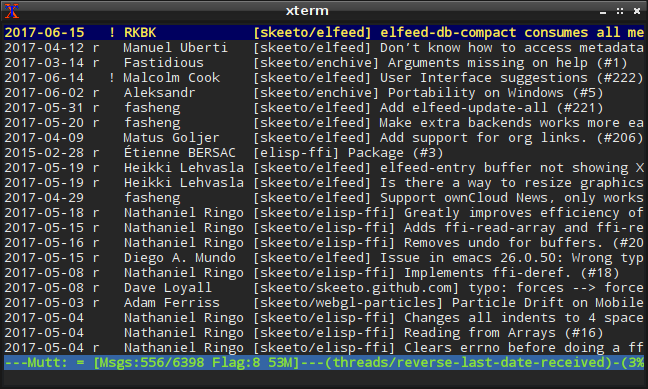
<p><a href="/img/screenshot/mutt.png"><img src="/img/screenshot/mutt-thumb.png" alt="" /></a></p>

<p>On the server-side I also switched from Exim to Postfix and procmail,
making the server configuration a whole lot simpler. Including
SpamAssassin, it’s just three lines added to the default Debian
configuration. It leaves a lot less room for error, and I could rebuild
it from scratch with little trouble if there was an emergency. My
previous configuration required quite a bit of system configuration,
such as relying on <a href="http://inotify.aiken.cz/?section=incron&amp;page=about">incron</a> to sort incoming mail, particularly
spam, but procmail now does this job more cleanly.</p>

<h3 id="towards-robustness">Towards Robustness</h3>

<p>Over the years I’ve gotten less patient when it comes to <a href="https://www.youtube.com/watch?v=oyLBGkS5ICk">dealing with
breaking changes</a> in software, and I’ve gotten more conservative
about system stability. Continuously updating my configurations and
habits to the latest software changes was an interesting challenge
earlier in my career, but today there are much better uses of my time.
Debian Stable, my preferred operating system, runs at pretty much the
perfect pace for me.</p>

<p>Following these changing preferences, one of the biggest motivations for
my recent email change was to make my email setup more robust and
stable. Until now, email was tied tightly to Emacs, with a configuration
drawing directly from <a href="https://melpa.org/">MELPA</a>, pulling in the bleeding edge
version of every package I use. Breaking changes arrive at unexpected
times, and occasionally the current version of a package temporarily
doesn’t work. Usually it’s because the developer pushed a bad commit
right before the latest MELPA build, and so the package is broken for a
few hours or days. I’ve been <a href="https://github.com/skeeto/elfeed/issues/202">guilty of this myself</a>. MELPA
Stable is intended to address these issues, but it seems to break more
often than normal MELPA. For example, at the time of this writing,
<a href="https://github.com/emacs-evil/evil">Evil</a> is not installable via MELPA Stable due to an unmet
dependency.</p>

<p>Tying something as vital as email to this Rube Goldberg machine made me
nervous. Access to my email depended on a number of independent systems
of various levels of stability to mostly work correctly. My switch to
Mutt cut this down to just a couple of very stable systems.</p>

<h3 id="formatflowed">format=flowed</h3>

<p>I’ve long believed HTML email is an abomination that should never have
been invented. Text is the ideal format for email, and there are a
number of specifications to make it work well across different systems.
One of those standards is <a href="https://tools.ietf.org/html/rfc3676">RFC 3676</a>, colloquially named
<a href="https://joeclark.org/ffaq.html">format=flowed</a>, or just f=f.</p>

<p>Messages encoded with f=f allow mail clients to safely reflow the
paragraphs to nicely fit the user’s display, whether that display be
thinner or wider than the sender’s original message. It’s also
completely compatible with mail clients that don’t understand
format=flowed, which will display the message as the sender originally
wrapped it.</p>

<p>The gist of f=f is that messages can have both “soft” and “hard” line
breaks. If a line ends with a space, then it’s a soft line break. The
mail client can safely reflow lines separated by a soft line break.
Without the trailing space, it’s a hard line break, which prohibits
flowing with the next line. The last line of a paragraph ends with a
hard line break. It’s also used for text that shouldn’t reflow, such as
code samples.</p>

<p>I’ll illustrate using an underscore in place of a space, so that you can
see it:</p>

<div class="language-plaintext highlighter-rouge"><div class="highlight"><pre class="highlight"><code>This is a message in the format=flowed style, allowing_
mail clients to flow this message nicely in displays of_
different widths.

&gt; This is an example of a quote block in a message,_
&gt; which is supported by the format=flowed specification.
&gt;&gt; It also supports nested quote blocks, which means_
&gt;&gt; this paragraph won't flow into the previous.
</code></pre></div></div>

<p>The RFC covers edge cases that require special “space-stuffing” rules,
but, when editing a text email in an editor, you only need to think
about soft and hard line breaks. In my case, Mutt takes care of the rest
of the details.</p>

<p>Unfortunately <a href="https://www.emacswiki.org/emacs/GnusFormatFlowed">Emacs’s lacks decent support for f=f</a>, though
I’m sure a minor mode could be written to make it work well. On the
other hand, Vim has been <a href="/blog/2017/04/01/">playing an increasing role in my day-to-day
editing</a>, and it has excellent built-in support for f=f. Since I’m
now using Vim to compose all of my email, I get it for free.</p>

<p>First, I tell Mutt that I want to use f=f in my <code class="language-plaintext highlighter-rouge">.muttrc</code>:</p>

<div class="language-plaintext highlighter-rouge"><div class="highlight"><pre class="highlight"><code>set text_flowed
</code></pre></div></div>

<p>Then in Vim, I add the <code class="language-plaintext highlighter-rouge">w</code> flag to <code class="language-plaintext highlighter-rouge">formatoptions</code>, which tells it to
wrap paragraphs using soft line breaks.</p>

<div class="language-plaintext highlighter-rouge"><div class="highlight"><pre class="highlight"><code>set fo+=w
</code></pre></div></div>

<p>If I want to inspect my f=f formatting, I temporarily enable the <code class="language-plaintext highlighter-rouge">list</code>
option, which displays a <code class="language-plaintext highlighter-rouge">$</code> for all newlines.</p>

<div class="language-plaintext highlighter-rouge"><div class="highlight"><pre class="highlight"><code>set list
</code></pre></div></div>

<p>Although few people would notice a difference, I feel a little bad for
<em>not</em> using f=f all these years! A few people may have endured some
ugly, non-flowing emails from me. My only condolance is that at least it
wasn’t HTML.</p>

<p>It’s not all roses, though. When I reply to a message, Mutt doesn’t
insert the quoted text as f=f into my reply, so I have to massage it
into f=f myself. Also, just as GitHub doesn’t support Markdown in email
responses, neither does it support f=f. When I reply to issues by email,
GitHub won’t nicely reflow my carefully crafted f=f message, needlessly
making email responses an inferior option.</p>

<h3 id="features-unneeded">Features unneeded</h3>

<p>One reason I didn’t choose this particular email arrangement 4 years ago
was that PGP support was one of my prime requirements. Mutt has solid
PGP support, but, with a Maildir setup (i.e. not IMAP), I’d have to use
the key on the server, which was out of the question. Since <a href="/blog/2017/03/12/">I no longer
care about PGP</a>, my email requirements are more relaxed.</p>

<p>Over the years wasn’t making much use of Notmuch’s tagging system. I
only used two tags: “unread” and “inbox” (e.g. read, but still needs
attention). Otherwise I’d use Notmuch’s powerful search to find what I
wanted. I still needed to keep track of the tags I was using, so the
Notmuch index, nearly as large as the email messages themselves, became
part of my mail backup.</p>

<p>The <a href="https://cr.yp.to/proto/maildir.html">Maildir format</a> itself supports some flags: passed (P),
replied (R), seen (S), trashed (T), draft (D), and flagged (F). These
are stored in the message’s filename. In my new configuration, the
“seen” tag (inversely) takes the place of Notmuch’s “unread” tag. The
“flagged” tag takes place of the “inbox” tag. Normally in Mutt you’d use
mailboxes — i.e. Maildir subdirectories — for something like this, but I
prefer all my mail to sit in one big bucket. Search, don’t sort.</p>

<p>Since the two flags are part of the filename, I no longer need to
include a tag database (i.e. the entire Notmuch index) in the backup,
and my mail backups are much smaller. I could continue to use Notmuch
for searching, but I’ve settled on mu instead. When I perform a search,
mu writes the results to a temporary Maildir using symbolic links, which
I visit with Mutt. The mu index is transient and doesn’t need to be
backed up.</p>

<p>Mu also manages my contacts alias list. It can produce a Mutt-style
alias file based on the contents of my Maildir:</p>

<div class="language-plaintext highlighter-rouge"><div class="highlight"><pre class="highlight"><code>mu cfind --format=mutt-alias &gt; aliases
</code></pre></div></div>

<p>It’s been really nice to have all my email sitting around as nothing
more than a big pile of files like this. I’ve begun <a href="https://docs.python.org/3.4/library/email.html">writing little
scripts to harvest data</a> from it, too.</p>

<h3 id="configuration-files">Configuration files</h3>

<p>As with all my personal configuration files, you can <a href="https://github.com/skeeto/dotfiles/blob/master/_muttrc">see my .muttrc
online</a>. The first few weeks I was tweaking this file hourly,
but I’ve now got it basically the way I want.</p>

]]>
    </content>
  </entry>


  <entry>
    <title>How to build DOS COM files with GCC</title>
    <link rel="alternate" type="text/html" href="https://nullprogram.com/blog/2014/12/09/"/>
    <id>urn:uuid:cff7d942-a91d-38b8-46fd-d05bbce0e212</id>
    <updated>2014-12-09T23:50:10Z</updated>
    <category term="c"/><category term="debian"/><category term="tutorial"/><category term="game"/>
    <content type="html">
      <![CDATA[<p><em>Update 2018: RenéRebe builds upon this article in an <a href="https://www.youtube.com/watch?v=Y7vU5T6rKHE">interesting
follow-up video</a> (<a href="https://www.youtube.com/watch?v=EXiF7g8Hmt4">part 2</a>).</em></p>

<p><em>Update 2020: DOS Defender <a href="https://www.youtube.com/watch?v=6UjuFnZYkG4">was featured on GET OFF MY LAWN</a>.</em></p>

<p>This past weekend I participated in <a href="http://ludumdare.com/compo/2014/12/03/welcome-to-ludum-dare-31/">Ludum Dare #31</a>. Before the
theme was even announced, due to <a href="/blog/2014/11/22/">recent fascination</a> I wanted
to make an old school DOS game. DOSBox would be the target platform
since it’s the most practical way to run DOS applications anymore,
despite modern x86 CPUs still being fully backwards compatible all the
way back to the 16-bit 8086.</p>

<p>I successfully created and submitted a DOS game called <a href="http://ludumdare.com/compo/ludum-dare-31/?uid=8472">DOS
Defender</a>. It’s a 32-bit 80386 real mode DOS COM program. All
assets are embedded in the executable and there are no external
dependencies, so the entire game is packed into that 10kB binary.</p>

<ul>
  <li><a href="https://github.com/skeeto/dosdefender-ld31">https://github.com/skeeto/dosdefender-ld31</a></li>
  <li><a href="https://github.com/skeeto/dosdefender-ld31/releases/download/1.1.0/DOSDEF.COM">DOSDEF.COM</a> (10kB, v1.1.0, run in DOSBox)</li>
</ul>

<p><img src="/img/screenshot/dosdefender.gif" alt="" /></p>

<p>You’ll need a joystick/gamepad in order to play. I included mouse
support in the Ludum Dare release in order to make it easier to
review, but this was removed because it doesn’t work well.</p>

<p>The most technically interesting part is that <strong>I didn’t need <em>any</em>
DOS development tools to create this</strong>! I only used my every day Linux
C compiler (<code class="language-plaintext highlighter-rouge">gcc</code>). It’s not actually possible to build DOS Defender
in DOS. Instead, I’m treating DOS as an embedded platform, which is
the only form in which <a href="http://www.freedos.org/">DOS still exists today</a>. Along with
DOSBox and <a href="http://www.dosemu.org/">DOSEMU</a>, this is a pretty comfortable toolchain.</p>

<p>If all you care about is how to do this yourself, skip to the
“Tricking GCC” section, where we’ll write a “Hello, World” DOS COM
program with Linux’s GCC.</p>

<h3 id="finding-the-right-tools">Finding the right tools</h3>

<p>I didn’t have GCC in mind when I started this project. What really
triggered all of this was that I had noticed Debian’s <a href="http://linux.die.net/man/1/bcc">bcc</a>
package, Bruce’s C Compiler, that builds 16-bit 8086 binaries. It’s
kept around for compiling x86 bootloaders and such, but it can also be
used to compile DOS COM files, which was the part that interested me.</p>

<p>For some background: the Intel 8086 was a 16-bit microprocessor
released in 1978. It had none of the fancy features of today’s CPU: no
memory protection, no floating point instructions, and only up to 1MB
of RAM addressable. All modern x86 desktops and laptops can still
pretend to be a 40-year-old 16-bit 8086 microprocessor, with the same
limited addressing and all. That’s some serious backwards
compatibility. This feature is called <em>real mode</em>. It’s the mode in
which all x86 computers boot. Modern operating systems switch to
<em>protected mode</em> as soon as possible, which provides virtual
addressing and safe multi-tasking. DOS is not one of these operating
systems.</p>

<p>Unfortunately, bcc is not an ANSI C compiler. It supports a subset of
K&amp;R C, along with inline x86 assembly. Unlike other 8086 C compilers,
it has no notion of “far” or “long” pointers, so inline assembly is
required to access <a href="http://en.wikipedia.org/wiki/X86_memory_segmentation">other memory segments</a> (VGA, clock, etc.).
Side note: the remnants of these 8086 “long pointers” still exists
today in the Win32 API: <code class="language-plaintext highlighter-rouge">LPSTR</code>, <code class="language-plaintext highlighter-rouge">LPWORD</code>, <code class="language-plaintext highlighter-rouge">LPDWORD</code>, etc. The inline
assembly isn’t anywhere near as nice as GCC’s inline assembly. The
assembly code has to manually load variables from the stack so, since
bcc supports two different calling conventions, the assembly ends up
being hard-coded to one calling convention or the other.</p>

<p>Given all its limitations, I went looking for alternatives.</p>

<h3 id="djgpp">DJGPP</h3>

<p><a href="http://www.delorie.com/djgpp/">DJGPP</a> is the DOS port of GCC. It’s a very impressive project,
bringing almost all of POSIX to DOS. The DOS ports of many programs
are built with DJGPP. In order to achieve this, it only produces
32-bit protected mode programs. If a protected mode program needs to
manipulate hardware (i.e. VGA), it must make requests to a <a href="http://en.wikipedia.org/wiki/DOS_Protected_Mode_Interface">DOS
Protected Mode Interface</a> (DPMI) service. If I used DJGPP, I
couldn’t make a single, standalone binary as I had wanted, since I’d
need to include a DPMI server. There’s also a performance penalty for
making DPMI requests.</p>

<p>Getting a DJGPP toolchain working can be difficult, to put it kindly.
Fortunately I found a useful project, <a href="https://github.com/andrewwutw/build-djgpp">build-djgpp</a>, that makes
it easy, at least on Linux.</p>

<p>Either there’s a serious bug or the official DJGPP binaries <a href="http://www.delorie.com/djgpp/v2faq/faq6_7.html">have
become infected again</a>, because in my testing I kept getting
the “Not COFF: check for viruses” error message when running my
programs in DOSBox. To double check that it’s not an infection on my
own machine, I set up a DJGPP toolchain on my Raspberry Pi, to act as
a clean room. It’s impossible for this ARM-based device to get
infected with an x86 virus. It still had the same problem, and all the
binary hashes matched up between the machines, so it’s not my fault.</p>

<p>So given the DPMI issue and the above, I moved on.</p>

<h3 id="tricking-gcc">Tricking GCC</h3>

<p>What I finally settled on is a neat hack that involves “tricking” GCC
into producing real mode DOS COM files, so long as it can target 80386
(as is usually the case). The 80386 was released in 1985 and was the
first 32-bit x86 microprocessor. GCC still targets this instruction
set today, even in the x86-64 toolchain. Unfortunately, GCC cannot
actually produce 16-bit code, so my main goal of targeting 8086 would
not be achievable. This doesn’t matter, though, since DOSBox, my
intended platform, is an 80386 emulator.</p>

<p>In theory this should even work unchanged with MinGW, but there’s a
long-standing MinGW bug that prevents it from working right (“cannot
perform PE operations on non PE output file”). It’s still do-able, and
I did it myself, but you’ll need to drop the <code class="language-plaintext highlighter-rouge">OUTPUT_FORMAT</code> directive
and add an extra <code class="language-plaintext highlighter-rouge">objcopy</code> step (<code class="language-plaintext highlighter-rouge">objcopy -O binary</code>).</p>

<h4 id="hello-world-in-dos">Hello World in DOS</h4>

<p>To demonstrate how to do all this, let’s make a DOS “Hello, World” COM
program using GCC on Linux.</p>

<p>There’s a significant burden with this technique: <strong>there will be no
standard library</strong>. It’s basically like writing an operating system
from scratch, except for the few services DOS provides. This means no
<code class="language-plaintext highlighter-rouge">printf()</code> or anything of the sort. Instead we’ll ask DOS to print a
string to the terminal. Making a request to DOS means firing an
interrupt, which means inline assembly!</p>

<p>DOS has nine interrupts: 0x20, 0x21, 0x22, 0x23, 0x24, 0x25, 0x26,
0x27, 0x2F. The big one, and the one we’re interested in, is 0x21,
function 0x09 (print string). Between DOS and BIOS, there are
<a href="http://www.o3one.org/hwdocs/bios_doc/dosref22.html">thousands of functions called this way</a>. I’m not going to try
to explain x86 assembly, but in short the function number is stuffed
into register <code class="language-plaintext highlighter-rouge">ah</code> and interrupt 0x21 is fired. Function 0x09 also
takes an argument, the pointer to the string to be printed, which is
passed in registers <code class="language-plaintext highlighter-rouge">dx</code> and <code class="language-plaintext highlighter-rouge">ds</code>.</p>

<p>Here’s the GCC inline assembly <code class="language-plaintext highlighter-rouge">print()</code> function. Strings passed to
this function must be terminated with a <code class="language-plaintext highlighter-rouge">$</code>. Why? Because DOS.</p>

<div class="language-c highlighter-rouge"><div class="highlight"><pre class="highlight"><code><span class="k">static</span> <span class="kt">void</span> <span class="nf">print</span><span class="p">(</span><span class="kt">char</span> <span class="o">*</span><span class="n">string</span><span class="p">)</span>
<span class="p">{</span>
    <span class="n">asm</span> <span class="k">volatile</span> <span class="p">(</span><span class="s">"mov   $0x09, %%ah</span><span class="se">\n</span><span class="s">"</span>
                  <span class="s">"int   $0x21</span><span class="se">\n</span><span class="s">"</span>
                  <span class="o">:</span> <span class="cm">/* no output */</span>
                  <span class="o">:</span> <span class="s">"d"</span><span class="p">(</span><span class="n">string</span><span class="p">)</span>
                  <span class="o">:</span> <span class="s">"ah"</span><span class="p">);</span>
<span class="p">}</span>
</code></pre></div></div>

<p>The assembly is declared <code class="language-plaintext highlighter-rouge">volatile</code> because it has a side effect
(printing the string). To GCC, the assembly is an opaque hunk, and the
optimizer relies in the output/input/clobber constraints (the last
three lines). For DOS programs like this, all inline assembly will
have side effects. This is because it’s not being written for
optimization but to access hardware and DOS, things not accessible to
plain C.</p>

<p>Care must also be taken by the caller, because GCC doesn’t know that
the memory pointed to by <code class="language-plaintext highlighter-rouge">string</code> is ever read. It’s likely the array
that backs the string needs to be declared <code class="language-plaintext highlighter-rouge">volatile</code> too. This is all
foreshadowing into what’s to come: doing anything in this environment
is an endless struggle against the optimizer. Not all of these battles
can be won.</p>

<p>Now for the main function. The name of this function shouldn’t matter,
but I’m avoiding calling it <code class="language-plaintext highlighter-rouge">main()</code> since MinGW has a funny ideas
about mangling this particular symbol, even when it’s asked not to.</p>

<div class="language-c highlighter-rouge"><div class="highlight"><pre class="highlight"><code><span class="kt">int</span> <span class="nf">dosmain</span><span class="p">(</span><span class="kt">void</span><span class="p">)</span>
<span class="p">{</span>
    <span class="n">print</span><span class="p">(</span><span class="s">"Hello, World!</span><span class="se">\n</span><span class="s">$"</span><span class="p">);</span>
    <span class="k">return</span> <span class="mi">0</span><span class="p">;</span>
<span class="p">}</span>
</code></pre></div></div>

<p>COM files are limited to 65,279 bytes in size. This is because an x86
memory segment is 64kB and COM files are simply loaded by DOS to
0x0100 in the segment and executed. There are no headers, it’s just a
raw binary. Since a COM program can never be of any significant size,
and no real linking needs to occur (freestanding), the entire thing
will be compiled as one translation unit. It will be one call to GCC
with a bunch of options.</p>

<h4 id="compiler-options">Compiler Options</h4>

<p>Here are the essential compiler options.</p>

<div class="language-plaintext highlighter-rouge"><div class="highlight"><pre class="highlight"><code>-std=gnu99 -Os -nostdlib -m32 -march=i386 -ffreestanding
</code></pre></div></div>

<p>Since no standard libraries are in use, the only difference between
gnu99 and c99 is that trigraphs are disabled (as they should be) and
inline assembly can be written as <code class="language-plaintext highlighter-rouge">asm</code> instead of <code class="language-plaintext highlighter-rouge">__asm__</code>. It’s a
no brainer. This project will be so closely tied to GCC that I don’t
care about using GCC extensions anyway.</p>

<p>I’m using <code class="language-plaintext highlighter-rouge">-Os</code> to keep the compiled output as small as possible. It
will also make the program run faster. This is important when
targeting DOSBox because, by default, it will deliberately run as slow
as a machine from the 1980’s. I want to be able to fit in that
constraint. If the optimizer is causing problems, you may need to
temporarily make this <code class="language-plaintext highlighter-rouge">-O0</code> to determine if the problem is your fault
or the optimizer’s fault.</p>

<p>You see, the optimizer doesn’t understand that the program will be
running in real mode, and under its addressing constraints. <strong>It will
perform all sorts of invalid optimizations that break your perfectly
valid programs.</strong> It’s not a GCC bug since we’re doing crazy stuff
here. I had to rework my code a number of times to stop the optimizer
from breaking my program. For example, I had to avoid returning
complex structs from functions because they’d sometimes be filled with
garbage. The real danger here is that a future version of GCC will be
more clever and will break more stuff. In this battle, <code class="language-plaintext highlighter-rouge">volatile</code> is
your friend.</p>

<p>Th next option is <code class="language-plaintext highlighter-rouge">-nostdlib</code>, since there are no valid libraries for
us to link against, even statically.</p>

<p>The options <code class="language-plaintext highlighter-rouge">-m32 -march=i386</code> set the compiler to produce 80386 code.
If I was writing a bootloader for a modern computer, targeting 80686
would be fine, too, but DOSBox is 80386.</p>

<p>The <code class="language-plaintext highlighter-rouge">-ffreestanding</code> argument requires that GCC not emit code that
calls built-in standard library helper functions. Sometimes instead of
emitting code to do something, it emits code that calls a built-in
function to do it, especially with math operators. This was one of the
main problems I had with bcc, where this behavior couldn’t be
disabled. This is most commonly used in writing bootloaders and
kernels. And now DOS COM files.</p>

<h4 id="linker-options">Linker Options</h4>

<p>The <code class="language-plaintext highlighter-rouge">-Wl</code> option is used to pass arguments to the linker (<code class="language-plaintext highlighter-rouge">ld</code>). We
need it since we’re doing all this in one call to GCC.</p>

<div class="language-plaintext highlighter-rouge"><div class="highlight"><pre class="highlight"><code>-Wl,--nmagic,--script=com.ld
</code></pre></div></div>

<p>The <code class="language-plaintext highlighter-rouge">--nmagic</code> turns off page alignment of sections. One, we don’t
need this. Two, that would waste precious space. In my tests it
doesn’t appear to be necessary, but I’m including it just in case.</p>

<p>The <code class="language-plaintext highlighter-rouge">--script</code> option tells the linker that we want to use a custom
<a href="http://wiki.osdev.org/Linker_Scripts">linker script</a>. This allows us to precisely lay out the sections
(<code class="language-plaintext highlighter-rouge">text</code>, <code class="language-plaintext highlighter-rouge">data</code>, <code class="language-plaintext highlighter-rouge">bss</code>, <code class="language-plaintext highlighter-rouge">rodata</code>) of our program. Here’s the <code class="language-plaintext highlighter-rouge">com.ld</code>
script.</p>

<div class="language-plaintext highlighter-rouge"><div class="highlight"><pre class="highlight"><code>OUTPUT_FORMAT(binary)
SECTIONS
{
    . = 0x0100;
    .text :
    {
        *(.text);
    }
    .data :
    {
        *(.data);
        *(.bss);
        *(.rodata);
    }
    _heap = ALIGN(4);
}
</code></pre></div></div>

<p>The <code class="language-plaintext highlighter-rouge">OUTPUT_FORMAT(binary)</code> says not to put this into an ELF (or PE,
etc.) file. The linker should just dump the raw code. A COM file is
just raw code, so this means the linker will produce a COM file!</p>

<p>I had said that COM files are loaded to <code class="language-plaintext highlighter-rouge">0x0100</code>. The fourth line
offsets the binary to this location. The first byte of the COM file
will still be the first byte of code, but it will be designed to run
from that offset in memory.</p>

<p>What follows is all the sections, <code class="language-plaintext highlighter-rouge">text</code> (program), <code class="language-plaintext highlighter-rouge">data</code> (static
data), <code class="language-plaintext highlighter-rouge">bss</code> (zero-initialized data), <code class="language-plaintext highlighter-rouge">rodata</code> (strings). Finally I
mark the end of the binary with the symbol <code class="language-plaintext highlighter-rouge">_heap</code>. This will come in
handy later for writing <code class="language-plaintext highlighter-rouge">sbrk()</code>, after we’re done with “Hello,
World.” I’ve asked for the <code class="language-plaintext highlighter-rouge">_heap</code> position to be 4-byte aligned.</p>

<p>We’re almost there.</p>

<h4 id="program-startup">Program Startup</h4>

<p>The linker is usually aware of our entry point (<code class="language-plaintext highlighter-rouge">main</code>) and sets that
up for us. But since we asked for “binary” output, we’re on our own.
If the <code class="language-plaintext highlighter-rouge">print()</code> function is emitted first, our program’s execution
will begin with executing that function, which is invalid. Our program
needs a little header stanza to get things started.</p>

<p>The linker script has a <code class="language-plaintext highlighter-rouge">STARTUP</code> option for handling this, but to
keep it simple we’ll put that right in the program. This is usually
called <code class="language-plaintext highlighter-rouge">crt0.o</code> or <code class="language-plaintext highlighter-rouge">Boot.o</code>, in case those names every come up in your
own reading. This inline assembly <em>must</em> be the very first thing in
our code, before any includes and such. DOS will do most of the setup
for us, we really just have to jump to the entry point.</p>

<div class="language-c highlighter-rouge"><div class="highlight"><pre class="highlight"><code><span class="n">asm</span> <span class="p">(</span><span class="s">".code16gcc</span><span class="se">\n</span><span class="s">"</span>
     <span class="s">"call  dosmain</span><span class="se">\n</span><span class="s">"</span>
     <span class="s">"mov   $0x4C, %ah</span><span class="se">\n</span><span class="s">"</span>
     <span class="s">"int   $0x21</span><span class="se">\n</span><span class="s">"</span><span class="p">);</span>
</code></pre></div></div>

<p>The <code class="language-plaintext highlighter-rouge">.code16gcc</code> tells the assembler that we’re going to be running in
real mode, so that it makes the proper adjustment. Despite the name,
this will <em>not</em> make it produce 16-bit code! First it calls <code class="language-plaintext highlighter-rouge">dosmain</code>,
the function we wrote above. Then it informs DOS, using function
<code class="language-plaintext highlighter-rouge">0x4C</code> (terminate with return code), that we’re done, passing the exit
code along in the 1-byte register <code class="language-plaintext highlighter-rouge">al</code> (already set by <code class="language-plaintext highlighter-rouge">dosmain</code>).
This inline assembly is automatically <code class="language-plaintext highlighter-rouge">volatile</code> because it has no
inputs or outputs.</p>

<h4 id="everything-at-once">Everything at Once</h4>

<p>Here’s the entire C program.</p>

<div class="language-c highlighter-rouge"><div class="highlight"><pre class="highlight"><code><span class="n">asm</span> <span class="p">(</span><span class="s">".code16gcc</span><span class="se">\n</span><span class="s">"</span>
     <span class="s">"call  dosmain</span><span class="se">\n</span><span class="s">"</span>
     <span class="s">"mov   $0x4C,%ah</span><span class="se">\n</span><span class="s">"</span>
     <span class="s">"int   $0x21</span><span class="se">\n</span><span class="s">"</span><span class="p">);</span>

<span class="k">static</span> <span class="kt">void</span> <span class="nf">print</span><span class="p">(</span><span class="kt">char</span> <span class="o">*</span><span class="n">string</span><span class="p">)</span>
<span class="p">{</span>
    <span class="n">asm</span> <span class="k">volatile</span> <span class="p">(</span><span class="s">"mov   $0x09, %%ah</span><span class="se">\n</span><span class="s">"</span>
                  <span class="s">"int   $0x21</span><span class="se">\n</span><span class="s">"</span>
                  <span class="o">:</span> <span class="cm">/* no output */</span>
                  <span class="o">:</span> <span class="s">"d"</span><span class="p">(</span><span class="n">string</span><span class="p">)</span>
                  <span class="o">:</span> <span class="s">"ah"</span><span class="p">);</span>
<span class="p">}</span>

<span class="kt">int</span> <span class="nf">dosmain</span><span class="p">(</span><span class="kt">void</span><span class="p">)</span>
<span class="p">{</span>
    <span class="n">print</span><span class="p">(</span><span class="s">"Hello, World!</span><span class="se">\n</span><span class="s">$"</span><span class="p">);</span>
    <span class="k">return</span> <span class="mi">0</span><span class="p">;</span>
<span class="p">}</span>
</code></pre></div></div>

<p>I won’t repeat <code class="language-plaintext highlighter-rouge">com.ld</code>. Here’s the call to GCC.</p>

<div class="language-plaintext highlighter-rouge"><div class="highlight"><pre class="highlight"><code>gcc -std=gnu99 -Os -nostdlib -m32 -march=i386 -ffreestanding \
    -o hello.com -Wl,--nmagic,--script=com.ld hello.c
</code></pre></div></div>

<p>And testing it in DOSBox:</p>

<p><img src="/img/screenshot/dosbox-hello.png" alt="" /></p>

<p>From here if you want fancy graphics, it’s just a matter of making an
interrupt and <a href="http://www.brackeen.com/vga/index.html">writing to VGA memory</a>. If you want sound you can
perform an interrupt for the PC speaker. I haven’t sorted out how to
call Sound Blaster yet. It was from this point that I grew DOS
Defender.</p>

<h3 id="memory-allocation">Memory Allocation</h3>

<p>To cover one more thing, remember that <code class="language-plaintext highlighter-rouge">_heap</code> symbol? We can use it
to implement <code class="language-plaintext highlighter-rouge">sbrk()</code> for dynamic memory allocation within the main
program segment. This is real mode, and there’s no virtual memory, so
we’re free to write to any memory we can address at any time. Some of
this is reserved (i.e. low and high memory) for hardware. So using
<code class="language-plaintext highlighter-rouge">sbrk()</code> specifically isn’t <em>really</em> necessary, but it’s interesting
to implement ourselves.</p>

<p>As is normal on x86, your text and segments are at a low address
(0x0100 in this case) and the stack is at a high address (around
0xffff in this case). On Unix-like systems, the memory returned by
<code class="language-plaintext highlighter-rouge">malloc()</code> comes from two places: <code class="language-plaintext highlighter-rouge">sbrk()</code> and <code class="language-plaintext highlighter-rouge">mmap()</code>. What <code class="language-plaintext highlighter-rouge">sbrk()</code>
does is allocates memory just above the text/data segments, growing
“up” towards the stack. Each call to <code class="language-plaintext highlighter-rouge">sbrk()</code> will grow this space (or
leave it exactly the same). That memory would then managed by
<code class="language-plaintext highlighter-rouge">malloc()</code> and friends.</p>

<p>Here’s how we can get <code class="language-plaintext highlighter-rouge">sbrk()</code> in a COM program. Notice I have to
define my own <code class="language-plaintext highlighter-rouge">size_t</code>, since we don’t have a standard library.</p>

<div class="language-c highlighter-rouge"><div class="highlight"><pre class="highlight"><code><span class="k">typedef</span> <span class="kt">unsigned</span> <span class="kt">short</span>  <span class="kt">size_t</span><span class="p">;</span>

<span class="k">extern</span> <span class="kt">char</span> <span class="n">_heap</span><span class="p">;</span>
<span class="k">static</span> <span class="kt">char</span> <span class="o">*</span><span class="n">hbreak</span> <span class="o">=</span> <span class="o">&amp;</span><span class="n">_heap</span><span class="p">;</span>

<span class="k">static</span> <span class="kt">void</span> <span class="o">*</span><span class="nf">sbrk</span><span class="p">(</span><span class="kt">size_t</span> <span class="n">size</span><span class="p">)</span>
<span class="p">{</span>
    <span class="kt">char</span> <span class="o">*</span><span class="n">ptr</span> <span class="o">=</span> <span class="n">hbreak</span><span class="p">;</span>
    <span class="n">hbreak</span> <span class="o">+=</span> <span class="n">size</span><span class="p">;</span>
    <span class="k">return</span> <span class="n">ptr</span><span class="p">;</span>
<span class="p">}</span>
</code></pre></div></div>

<p>It just sets a pointer to <code class="language-plaintext highlighter-rouge">_heap</code> and grows it as needed. A slightly
smarter <code class="language-plaintext highlighter-rouge">sbrk()</code> would be careful about alignment as well.</p>

<p>In the making of DOS Defender an interesting thing happened. I was
(incorrectly) counting on the memory return by my <code class="language-plaintext highlighter-rouge">sbrk()</code> being
zeroed. This was the case the first time the game ran. However, DOS
doesn’t zero this memory between programs. When I would run my game
again, <em>it would pick right up where it left off</em>, because the same
data structures with the same contents were loaded back into place. A
pretty cool accident! It’s part of what makes this a fun embedded
platform.</p>

]]>
    </content>
  </entry>


  <entry>
    <title>Reimaging a VM from the inside with Debian</title>
    <link rel="alternate" type="text/html" href="https://nullprogram.com/blog/2014/02/15/"/>
    <id>urn:uuid:b8708360-8720-3757-142d-ada37953cf15</id>
    <updated>2014-02-15T03:26:45Z</updated>
    <category term="debian"/>
    <content type="html">
      <![CDATA[<p>Recently I was in a situation where I wanted to spin up a virtual
machine in a cloud computing service but the provided operating system
selection was meager. The two options were Ubuntu 11.10 (i.e. October
2011) or RHEL 6.3 (June 2012). Worse, these were the desktop versions
of these platforms, so they had X.Org installed along with a bunch of
desktop applications. These images were not really intended as
servers.</p>

<p>As always, I strongly prefer <a href="http://www.debian.org/">Debian</a>. Ubuntu is derived from
Debian so it isn’t far from ideal, but I didn’t want to deal with such
an old version, plus all the desktop cruft. Also, I <em>really just want
to use Debian Wheezy</em> (currently stable). It’s extremely solid and I
know it through and through.</p>

<p>Since there’s no way for me to provide my own image, my only option is
to install Debian from within the virtual machine. A significant
difficulty in this is that I also have no way to provide alternate
boot media. I would need to install Debian from within Ubuntu,
<em>over top</em> of Ubuntu <em>while</em> it’s running. Within these restrictions
this may sound like an impossible task.</p>

<p>Fortunately, Debian, being <em>the</em> universal operating system and living
up to its name, has a way to do this, and do it cleanly. When I’m done
there will be absolutely <em>no</em> trace of Ubuntu left. I could do the
same from within the Red Hat system, but working from Ubuntu takes one
fewer step. The magic tool for solving this problem is
<a href="https://wiki.debian.org/Debootstrap"><strong>debootstrap</strong></a>. It installs a Debian base system into
an arbitrary subdirectory. This is what the official Debian installer
uses and it’s used to <a href="/blog/2013/06/17/">build my live CD</a>. Ubuntu offers this as
a normal package, so I don’t need to download anything special.</p>

<h3 id="creating-a-pivot">Creating a Pivot</h3>

<p>So I’ve got a way to install Debian from within another Linux
installation, but now how can I install Debian over top of Ubuntu? I
will ultimately need to use debootstrap on the root of a fresh
filesystem. I can’t wipe Ubuntu’s root partition while it’s running. I
can’t even resize it since that’s where <code class="language-plaintext highlighter-rouge">/</code> is mounted.</p>

<p>Fortunately for me the person who set up this VM just went through
Ubuntu’s defaults. This means there’s a single primary partition
holding the entire Ubuntu installation (sda1), a second extended
partition (sda2), and within the extended partition there’s a swap
partition (sda5).</p>

<p><img src="/img/screenshot/ubuntu-gparted.png" alt="" /></p>

<p>The swap partition is 1GB, which, while cramped, is plenty of room for
a Debian base system. I have no use for an extended partition so I can
just blow the whole thing away and install Debian to sda2.</p>

<div class="language-plaintext highlighter-rouge"><div class="highlight"><pre class="highlight"><code>ubuntu# swapoff /dev/sda5
ubuntu# fdisk /dev/sda  # (fix up partitions)
ubuntu# mkfs.ext4 /dev/sda2
ubuntu# mkdir /mnt/debian
ubuntu# mount /dev/sda2 /mnt/debian
ubuntu# debootstrap wheezy /mnt/debian &lt;local-deb-mirror&gt;
</code></pre></div></div>

<p>Now I have a proper Debian base system installed on a second
partition. At this point I could configure Grub to boot into it by
default rather than Ubuntu. However, as it stands so far, I would have
no way to access it remotely (or at all) since I haven’t set anything
up. From here I just follow the guide in <a href="http://www.debian.org/releases/stable/amd64/apds03.html.en">appendix D</a> and configure
it from a chroot,</p>

<div class="language-plaintext highlighter-rouge"><div class="highlight"><pre class="highlight"><code>ubuntu# LANG=C.UTF-8 chroot /mnt/debian /bin/bash
chroot# mount -t proc proc /proc
chroot# dpkg-reconfigure tzdata
chroot# apt-get install linux-image-amd64 locales openssh-server
chroot# passwd
</code></pre></div></div>

<p>I just copy Ubuntu’s <code class="language-plaintext highlighter-rouge">/etc/network/interfaces</code> so that the new system
uses the same network configuration (DHCP in this case).</p>

<div class="language-plaintext highlighter-rouge"><div class="highlight"><pre class="highlight"><code>ubuntu# cp /etc/network/interfaces /mnt/debian/etc/network/
</code></pre></div></div>

<p>A create a one-line <code class="language-plaintext highlighter-rouge">/etc/fstab</code>, mounting <code class="language-plaintext highlighter-rouge">/dev/sda2</code> as <code class="language-plaintext highlighter-rouge">/</code>.</p>

<div class="language-plaintext highlighter-rouge"><div class="highlight"><pre class="highlight"><code>/dev/sda2  /  ext4  defaults  0  1
</code></pre></div></div>

<p>Finally I overwrite the Ubuntu-installed Grub. I need to set up the
devices in order to actually install Grub.</p>

<div class="language-plaintext highlighter-rouge"><div class="highlight"><pre class="highlight"><code>chroot# apt-get install makedev
chroot# cd /dev
chroot# MAKEDEV generic
chroot# apt-get install grub-pc
chroot# update-grub
</code></pre></div></div>

<p>The Ubuntu system isn’t visible to the Grub installer, so the VM will
now boot into my tiny Debian system by default.</p>

<div class="language-plaintext highlighter-rouge"><div class="highlight"><pre class="highlight"><code>ubuntu# reboot
</code></pre></div></div>

<h3 id="taking-over-the-host">Taking Over the Host</h3>

<p>After about a minute I can SSH into the VM again. This time I’m in a
proper Debian Wheezy system running from sda2! Now the problem is
making use of that large partition that still houses Ubuntu. I <em>could</em>
try slicing it up and mounting parts of it for Debian, but there’s
something simpler I can do: repeat the same exact process on the first
partition. The Debian system I just set up becomes a <em>pivot</em> for the
real installation.</p>

<div class="language-plaintext highlighter-rouge"><div class="highlight"><pre class="highlight"><code>pivot# mkfs.ext4 /dev/sda1
pivot# mkdir /mnt/debian
pivot# mount /dev/sda1 /mnt/debian
pivot# debootstrap wheezy /mnt/debian
(... etc ...)
</code></pre></div></div>

<p>After installing Grub again, reboot. There may be some way to simply
copy the pivot system directly but I’m not confident enough to trust a
straight <code class="language-plaintext highlighter-rouge">cp -r</code>.</p>

<h3 id="final-touches">Final Touches</h3>

<p>Now I’m running Debian on the large partition. The pivot can be
converted back into a swap partition.</p>

<div class="language-plaintext highlighter-rouge"><div class="highlight"><pre class="highlight"><code>debian# mkswap /dev/sda2
debian# swapon /dev/sda2
debian# echo /dev/sda2 swap swap defaults 0 0 &gt;&gt; /etc/fstab
</code></pre></div></div>

<p>This is now as good as a fresh installation of a Debian base system
(i.e. what the cloud provider <em>should</em> have offered in the first
place). If it was possible on this cloud, this is where I’d make a
snapshot for cloning future VMs. Since that’s not an option, should I
need more Debian VMs in the future I’ll write a pair of shell scripts
to do all this for me. An automated conversion process would probably
take about 5 minutes.</p>

<p>I love Debian.</p>

]]>
    </content>
  </entry>


  <entry>
    <title>Live Systems are Handy</title>
    <link rel="alternate" type="text/html" href="https://nullprogram.com/blog/2013/07/31/"/>
    <id>urn:uuid:e56188a1-1152-358f-882f-690cae8cf966</id>
    <updated>2013-07-31T00:00:00Z</updated>
    <category term="debian"/>
    <content type="html">
      <![CDATA[<p>The <a href="/blog/2013/06/17/">personal live system</a> I configured a couple
months ago has turned out to be <em>quite</em> handy. I’ve used it almost
every day, especially as I’ve learned more about the features of
live-boot and live-config, the runtime components of
<a href="http://live.debian.net/">live-build</a>.</p>

<p>At work I use a number of “scratch” computers whose only real purpose
is to temporarily sit at particular points on an experimental,
isolated network. It doesn’t matter what operating system is installed
on them; they really just need to be able to communicate on the
network and, occasionally, run Wireshark.</p>

<p>For awhile these systems just had a base Ubuntu install from a couple
of years ago. This works fine, of course, but it was missing
<a href="/blog/2012/06/23/">all of my dotfiles</a>. It didn’t feel like home. I
could put my dotfiles on these systems, but there are a number of
these machines and I’d have to keep my dotfiles up to date on each,
without any Internet access, as they changed.</p>

<p>More so, Unity, Ubuntu’s default desktop environment, isn’t all that
friendly to a keyboard-only setup. I don’t have any mice attached to
these systems so I have to navigate without one. Sure, It has keyboard
shortcuts for the basic things, but that’s not enough. On the other
hand, my personal configuration is entirely built around avoiding the
mouse. Except for a few specific, reasonable cases (graphics programs
like Gimp, Inkscape), I can do anything just as comfortably without as
I can with a mouse.</p>

<p>Here’s where my live system comes to the rescue. <strong>The generated ISO
is a “hybrid” image.</strong> This means it can be both burned into a CD as a
standard ISO 9660 filesystem <em>and</em> written directly to a hard disk as
a read-only disk image. After <code class="language-plaintext highlighter-rouge">dd</code>ing the ISO onto a thumb drive, I
could plug the drive into these machines and boot directly into a
comfortable development environment. When I update my dotfiles
significantly I just build a new ISO (takes about 5 minutes) and copy
the new version onto the thumb drive.</p>

<h3 id="running-a-live-system-from-ram">Running a live system from RAM</h3>

<p>So the next problem is that there are a number of these systems but I
have only one thumb drive. Once I boot a machine from the thumb drive
I can’t remove the drive and continue to use the system. I could burn
a bunch of CDs, one for each system, but, fortunately, live-boot has a
wonderful solution for this: <code class="language-plaintext highlighter-rouge">toram</code>.</p>

<p>That’s right, just add <code class="language-plaintext highlighter-rouge">toram</code> to the system boot arguments and during
boot the entire system is lifted into memory. <strong>Editing the system
arguments before booting can be done by hitting <kbd>tab</kbd> at the
isolinux/syslinux boot menu.</strong> Once the system is up I’m free to
remove the thumb drive and use it to boot another system.
Additionally, the system will also be <em>much</em> faster — faster than
even a normal system — since it’s running entirely in RAM.</p>

<p>The disadvantage is that there’s now less memory available to the
system for other things. This can be mitigated by making use of a swap
partition on a local disk.</p>

<h3 id="persistence">Persistence</h3>

<p>These live systems use an interesting filesystem called
<a href="http://en.wikipedia.org/wiki/SquashFS">SquashFS</a>. It’s like a compressed tar archive, but it has
two significant advantages:</p>

<ul>
  <li>The contents are available for efficient random access.</li>
  <li>It can be mounted as a first-class filesystem.</li>
</ul>

<p>SquashFS is read-only. This presents a big problem if you want to use
it as your root filesystem. Luckily there’s another cool trick to fix
this: a <em>union</em> filesystem, <code class="language-plaintext highlighter-rouge">aufs</code>. A writable filesystem can be
mounted over top the read-only SquashFS filesystem, unioning the
contents of the two filesystems, providing the illusion of a writable
SquashFS. It’s effectively copy-on-write.</p>

<p>Typically for a live system the writable filesystem is <code class="language-plaintext highlighter-rouge">tmpfs</code>, a
filesystem backed by RAM. This means all changes are lost when the
operating system halts. This is useful for a throwaway operating
system, but sometimes data persistence between boots is required. This
time live-config has a solution: <code class="language-plaintext highlighter-rouge">persistence</code>. Add this word to the
system boot arguments and, rather than a RAM filesystem, a partition
on real media will be used to back changes to the SquashFS filesystem.</p>

<p>The next question would be, “Which partition?” That’s part of a
discovery phase. During boot, the various storage media are scanned
looking for a filesystem labeled “persistence”. If one is found, it
looks for a file in the root of that filesystem called
<code class="language-plaintext highlighter-rouge">persistence.conf</code>, which explains how to map this partition with the
live system. Full persistence can be achieved with this one-liner
configuration,</p>

<div class="language-plaintext highlighter-rouge"><div class="highlight"><pre class="highlight"><code>/ union
</code></pre></div></div>

<p>This means the root of this filesystem should be union mounted with
the live system. However, this will capture some extraneous
directories like <code class="language-plaintext highlighter-rouge">/tmp</code>, which I don’t want to write to storage media.
I prefer a more nuanced configuration,</p>

<div class="language-plaintext highlighter-rouge"><div class="highlight"><pre class="highlight"><code>/etc union
/home union
/opt union
/sbin union
/usr union
/var union
</code></pre></div></div>

<p>This captures all the important stuff while leaving <code class="language-plaintext highlighter-rouge">/tmp</code> to a RAM
filesystem (where it belongs!). Not only is my home directory
persistent, but so is any additional software I install. Effectively,
it is now a normal, non-live system.</p>

<p>If the live system is installed on a thumb drive, the space <em>after</em>
the image can be used for this persistence. After <code class="language-plaintext highlighter-rouge">dd</code>ing the ISO, use
fdisk/parted to add a second partition, format a fresh partition
labeled “persistence” in it, then drop in config file.</p>

<div class="language-plaintext highlighter-rouge"><div class="highlight"><pre class="highlight"><code>mkfs.ext4 -L persistence /dev/sdb2
mount /dev/sdb2 /mnt/sdb2
cp peristence.conf /mnt/sdb2
</code></pre></div></div>

<p>Furthermore, the persistence partition can be encrypted with LUKS,
providing a portable, persistent, encrypted operating system. The
live-config will automatically find it, prompt for the passphrase on
boot, and handle all the rest on its own like normal. (Well, once
<a href="http://bugs.debian.org/cgi-bin/bugreport.cgi?bug=700902">this bug fix is released</a>.)</p>

<h4 id="persistence-as-an-installation">Persistence as an installation</h4>

<p>Remember how I had said the exact operating system for these scratch
computers wasn’t important? While using one of these systems a
lightbulb went off in my head. After booting the live system, I could
just <code class="language-plaintext highlighter-rouge">dd</code> the contents of the thumb drive directly onto the hard disk,
<em>including the persistence partition</em>, make “persistence” a default
boot argument, and I’ll have installed a fully configured operating
system with all my goodies within a few minutes! It’s the ultimate
anti-thin client. This is what I’m using now.</p>

<p>Since it’s possible to build a live system image within a live system
(“Yo dawg …”), I can use the <code class="language-plaintext highlighter-rouge">toram</code> boot option to update and/or
reinstall the entire system from scratch, in-place, without the help
of external storage.</p>

<p>Live systems are a powerful tool, at least for my line of work.</p>

]]>
    </content>
  </entry>


  <entry>
    <title>Personal OS Configuration Live System</title>
    <link rel="alternate" type="text/html" href="https://nullprogram.com/blog/2013/06/17/"/>
    <id>urn:uuid:ce0f1153-4efa-3703-2e46-4c78b52adba6</id>
    <updated>2013-06-17T00:00:00Z</updated>
    <category term="debian"/><category term="emacs"/>
    <content type="html">
      <![CDATA[<p>I don’t know what to title or name this thing, so bear with me.</p>

<p>Two years ago I started <a href="/blog/2011/10/19/">versioning my Emacs configuration</a>.
One year ago I started <a href="/blog/2012/06/23/">versioning the rest of my dotfiles</a>
the same way. This has composed beautifully with Debian, which truly
is <a href="http://www.debian.org/"><em>the</em> universal operating system</a>. To create my
comfortable development environment from scratch on a new (or used)
computer, all I need to do is
<a href="http://www.debian.org/CD/netinst/">install a bare-bones Debian system</a>, then direct it to
automatically install a short list of my preferred software (apt-get),
and finally clone these two repositories into place. Given a decent
Internet connection, the whole process takes under an hour to go from
blank hard drive to highly-productive computer system.</p>

<p>In fact, this whole process is so straightforward that it can be
automated using an amazing tool called <a href="http://live.debian.net/">live-build</a>!
Taking the next step in versioning and automation, I wrote a
live-build build that creates a live system with my personal
configuration baked in.</p>

<ul>
  <li><a href="https://github.com/skeeto/live-dev-env">https://github.com/skeeto/live-dev-env</a></li>
</ul>

<p><strong>A link to the latest ISO build can be found in the above link</strong>. To
try it out, burn it to a CD, write it onto a flash drive (it’s a
hybrid ISO), or just fire it up in your favorite virtual machine. You
will be booted directly into <em>very nearly</em> my exact configuration,
down to the same random wallpaper selection. It’s extremely minimal and
will look like this.</p>

<p><img src="/img/screenshot/live-skeeto.jpg" alt="" /></p>

<p>I don’t know for sure yet if this will be useful to anyone except me.
On occasions where I need to make quick use of some arbitrary
computer, or maybe just for system rescue, having this will be
incredibly handy. <a href="http://www.knopper.net/knoppix/index-en.html">Knoppix</a> is nice, but working without my
own configuration can be discouraging; it’s so slow in comparison.</p>

<p>It’s also a chance for others to glimpse at my workflow without any
commitment (i.e. potential dotfile clobbering). I like to study other
developers’ workflows, stealing their ideas for my own, so I want to
make mine easy to study. I think I’m doing some innovative things with
a <a href="https://github.com/skeeto/dotfiles#openbox">hacked-together pseudo-tiling window manager</a>, my Firefox
configuration, and my Emacs configuration. At least two of my
co-workers’ Emacs configurations are forked from mine (you know who
you are!). From a selfish perspective, the more people using workflows
like mine, the better these workflows will be supported by the
community at large!</p>

<p>I had said that it’s “very nearly” my exact configuration. At the time
of this writing, what’s missing is <a href="http://www.quicklisp.org/">Quicklisp</a> and
<a href="https://github.com/technomancy/leiningen">Leiningen</a>, since these aren’t available as fully-functioning
Debian packages at the moment. I’ll work them in eventually. The build
is non-incremental and takes about an hour right now, so adding these
little extras by trial-and-error will take some time.</p>

<p><a href="http://5digits.org/pentadactyl/">Pentadactyl</a> really shines here, because it allows me to
completely configure Firefox/Iceweasel from a version-friendly text
file. Except for some user scripts (still figuring out how to install
those at build time), the browser in that image is identical to what
I’m using right now. Even though <a href="/blog/2013/02/25/">V8 is the king of performance</a>,
Firefox still wins hands-down for power users due to its superior
configurability.</p>

<p>However, this Firefox configuration still has an annoyance. Several of
the browser add-ons that I pre-install always pop up their first-run
welcome messages. These messages flip a setting in Firefox’s registry
so they don’t run again, a setting that is lost when the system shuts
down. I can toggle these settings from the Pentadactyl configuration
file, but not early enough. By the time Pentadactyl gets to applying
these settings it’s too late. The messages, including Pentadactyl’s,
are already queued to be shown. I don’t think it’s possible to
completely fix this, even if Pentadactyl is fixed.</p>

<p>Anything not already installed is readily installable through apt-get.
Right now I’m considering the feasibility of some sort of lazy-install
system based on command-not-found. Debian has a package called
command-not-found which intercepts the shell’s error handler when an
issued command is not found. Instead of just giving the normal
warning, it prints out what package needs to be installed in order to
provide the command. What I think would be really neat is if the
needed package is automatically installed, then the requested command
is then re-run, all without returning control to the shell in the
interim. It would be a lot like Emacs autoloads. As long as I have an
Internet connection, most of Debian’s packages would be <em>virtually</em>
installed on my live system as far as I’m concerned. The initial run
of any program just takes a little longer.</p>

<p>I’ll continue to tweak this image over time, not only as I figure out
how to make things work in Debian live-build, but also as my
preferences and workflows evolve. Adjusting my configuration to work
on a live-system has been enlightening, revealing all sorts of little
manual things that I hadn’t yet automated. Perhaps someday this build
will replace traditional operating system installations for me, at
least for productive work. I could do all of my work from a portable
read-only live system with a bit of short-lived (i.e. local cache)
user-data persistence stored on a separate writable medium.</p>

]]>
    </content>
  </entry>


  <entry>
    <title>Debian Bugtracker Data</title>
    <link rel="alternate" type="text/html" href="https://nullprogram.com/blog/2012/10/15/"/>
    <id>urn:uuid:864ff7e4-3b2d-35f3-c378-0626d635c51b</id>
    <updated>2012-10-15T00:00:00Z</updated>
    <category term="debian"/>
    <content type="html">
      <![CDATA[<p>There was some concern in the latest Debian newsletter about a
<a href="http://www.debian.org/News/weekly/2012/20/#bugsrate">decrease in the bug reporting rate</a>. It could be
<a href="http://www.perrier.eu.org/weblog/2012/10/09#690000">signaling a decrease in momentum for Debian</a>. Even worse,
this is actually part of a <a href="http://www.donarmstrong.com/posts/bug_reporting_rate/">6-year trend</a>.</p>

<p>This has me a little concerned. Debian is an amazing project and it’s
responsible for so much of my productivity. It truly is <em>the</em>
universal operating system. No other (non-Debian-derivative)
distribution, or operating system in general, comes close, in my
opinion.</p>

<p>Fortunately this is only one <a href="http://popcon.debian.org/">of many statistics</a>, and
observing bug reports is rather indirect. The other indicators say
things are healthy and growing. I suspect that the core packages that
most users have installed have matured over the years so that the bugs
are fewer and less severe. I also suspect that because Ubuntu has
attracted a lot of users, many bugs that would have been reported
against Debian are instead reported to Launchpad, without falling
through into Debian’s system.</p>

<p>I wanted to take a look at the data myself, so, using the
<a href="http://wiki.debian.org/DebbugsSoapInterface">Debbugs SOAP interface</a>, I grabbed all of the bug report
timestamps for all bugs from 1 to 690000 (where they exist). Here is
that data. The first column is bug number and the second is the unix
epoch timestamp.</p>

<ul>
  <li><a href="https://skeeto.s3.amazonaws.com/share/bts-dates-2012-10.txt.gz">bts-dates-2012-10.txt.gz</a></li>
</ul>

<p>Using GNU Octave I worked out a histogram and plot with 1-day bins. My
curve fit is a bit more optimistic than Don Armstrong’s. However, I
also have no idea what I’m doing,</p>

<p><a href="/img/plot/bts-hist-2012-10.png"><img src="/img/plot/bts-hist-2012-10-thumb.png" alt="" /></a></p>

<p>There was a peak 6 years ago, but things have recently plateaued —
except for very recently with the Wheezy freeze (June 2012), which is
expected. If you have any insight on this, please share.</p>

]]>
    </content>
  </entry>


  <entry>
    <title>Emacs Abnormal Termination</title>
    <link rel="alternate" type="text/html" href="https://nullprogram.com/blog/2012/09/28/"/>
    <id>urn:uuid:81986f77-1a4a-3b00-ec3a-a6517f9ca4ca</id>
    <updated>2012-09-28T00:00:00Z</updated>
    <category term="emacs"/><category term="elisp"/><category term="debian"/>
    <content type="html">
      <![CDATA[<p><em>Update: This bug was fixed in Emacs 24.4 (released October 2014).</em></p>

<p>A few months ago I <a href="http://bugs.debian.org/cgi-bin/bugreport.cgi?bug=682995">filed a bug report for Emacs</a>
(<a href="http://lists.gnu.org/archive/html/bug-gnu-emacs/2012-07/msg01071.html">upstream</a>) when I stumbled across Emacs aborting under <em>very</em>
specific circumstances. I was editing in <a href="http://jblevins.org/projects/markdown-mode/">markdown-mode</a> and a
regular expression replacement on lists would reliably, and
frustratingly, cause Emacs to crash.</p>

<p>Through a sort-of binary search I only loaded only half of
markdown-mode to see in which half it would trigger, then I cut that
half in half again and repeated recursively until I had it down to a
small expression that causes a <code class="language-plaintext highlighter-rouge">--no-init-file</code> (<code class="language-plaintext highlighter-rouge">-q</code>) Emacs to
abort. It almost looks like I found it through fuzz testing. Change or
remove anything even slightly and it no longer triggers the abort.</p>

<p>To trigger it, there’s an <code class="language-plaintext highlighter-rouge">after-change-functions</code> hook that performs
a regular expression search immediately after a <code class="language-plaintext highlighter-rouge">replace-regexp</code>. A
peek at the backtrace with gdb shows that this somehow causes the
point to leave the bounds of the buffer. Emacs detects this as an
assertion before dereferencing anything, and it aborts, thus
preventing a buffer overflow vulnerability. This is important for
<a href="/blog/2009/05/17/">my Emacs web server</a> because if there’s a way to
trigger this bug in the web server I’d much rather have it abort than
run arbitrary shellcode injected in by a malicious HTTP request.</p>

<p>My bug report has seen no activity since I posted it. I can understand
why. The circumstances to trigger it are unlikely and it’s a very old
bug, so it’s low priority. It’s also a huge pain to debug. Hacking on
Emacs from Lisp is pleasant but hacking on Emacs from C is not. The
bug likely sits in the bowels of the complicated regular expression
engine, making it even more unpleasant. I personally have no interest
in trying to fix it myself.</p>

<p>So, since it looks like it’s here for the long haul it’s kind of fun
to implement an <code class="language-plaintext highlighter-rouge">abort</code> function on top of it, allowing Elisp programs
to terminate Emacs abnormally — you know, in case <code class="language-plaintext highlighter-rouge">kill-emacs</code> isn’t
fun enough.</p>

<div class="language-cl highlighter-rouge"><div class="highlight"><pre class="highlight"><code><span class="p">(</span><span class="nb">defun</span> <span class="nb">abort</span> <span class="p">()</span>
  <span class="s">"Ask Emacs to abnormally terminate itself (bug#12077)."</span>
  <span class="p">(</span><span class="nv">interactive</span><span class="p">)</span>
  <span class="p">(</span><span class="nv">with-temp-buffer</span>
    <span class="p">(</span><span class="nv">insert</span> <span class="s">"#\n*\n"</span><span class="p">)</span>
    <span class="p">(</span><span class="nv">goto-char</span> <span class="p">(</span><span class="nv">point-min</span><span class="p">))</span>
    <span class="p">(</span><span class="nv">add-hook</span> <span class="ss">'after-change-functions</span>
              <span class="p">(</span><span class="k">lambda</span> <span class="p">(</span><span class="nv">a</span> <span class="nv">b</span> <span class="nv">c</span><span class="p">)</span> <span class="p">(</span><span class="nv">re-search-forward</span> <span class="s">""</span><span class="p">)))</span>
    <span class="p">(</span><span class="nv">replace-regexp</span> <span class="s">"^\\*"</span> <span class="s">" *"</span><span class="p">)))</span>
</code></pre></div></div>

<p>It’s interactive so you could even bind a key to it.</p>

]]>
    </content>
  </entry>


  <entry>
    <title>Moving to Openbox</title>
    <link rel="alternate" type="text/html" href="https://nullprogram.com/blog/2012/06/25/"/>
    <id>urn:uuid:8e15a68e-5ad4-356b-7d5b-5c854e4c5302</id>
    <updated>2012-06-25T00:00:00Z</updated>
    <category term="rant"/><category term="git"/><category term="debian"/><category term="reddit"/>
    <content type="html">
      <![CDATA[<p>With <a href="/blog/2012/06/23/">my dotfiles repository established</a> I now
have a common configuration and environment for Bash, Git, Emacs
(separate repository), and even Firefox! This wouldn’t normally be
possible because Firefox doesn’t have tidy dotfiles by default, but
the wonderful <a href="/blog/2009/04/03/">Pentadactyl</a> made it possible. My
script sets up keybindings, bookmark keywords, and quickmarks so that
my browser feels identical across all my computers. Now that it’s easy
to add tweaks, I’m sure I’ll be putting more in there in the future.</p>

<p>However, one major application remained and I was really itching to
capture its configuration too, since even my web browser is part of
the experience. I could drop my dotfiles into a new computer within
minutes and be ready to start hacking, except for my desktop
environment. This was still a tedious, manual step, plagued by the
configuration propagation issue. I wouldn’t to get too fancy with
keybindings since I couldn’t rely on them being everywhere.</p>

<p>The problem was I was using KDE at the time and KDE’s configuration
isn’t really version-friendly. Some of it is binary, making it
unmergable, it doesn’t play well between different versions, and it’s
unclear what needs to be captured and what can be ignored.</p>

<p>I wasn’t exactly a <em>happy</em> KDE user and really felt no attachment to
it. I had only been using it a few months. I’ve used a number of
desktops since 2004, the main ones being Xfce (couple years), IceWM
(couple years), xmonad (8 months), and Gnome 2 (the rest of the
time). Gnome 2 was my fallback, the familiar environment where I could
feel at home and secure — that is, until Gnome 3 / Unity. The coming
of Gnome 3 marked the death of Gnome 2. It became harder and harder to
obtain version 2 and I lost my fallback.</p>

<p>I gave Gnome 3 and Unity each a couple of weeks but I just couldn’t
stand them. Unremovable mouse hotspots, all new alt-tab behavior,
regular crashing (after restoring old alt-tab behavior), and extreme
unconfigurability even with a third-party tweak tool. I jumped for KDE
4, hoping to establish a comfortable fallback for myself.</p>

<p>KDE is pretty and configurable enough for me to get work done. There’s
a lot of bloat (“activities” and widgets), but I can safely ignore
it. The areas where it’s lacking didn’t bother me much, like the
inability/non-triviality of custom application launchers.</p>

<p>My short time with Gnome 3 and now with KDE 4 did herald a new, good
change to my habits: keyboard application launching. I got used to
using the application menu to type my application name and launch
it. I <em>did</em> use dmenu during my xmonad trial, but I didn’t quite make
a habit out of it. It was also on a slower computer, slow enough for
dmenu to be a problem. For years I was just launching things from a
terminal. However, the Gnome and KDE menus both have a big common
annoyance. If you want to add a custom item, you need to write a
special desktop file and save it to the right location. Bleh! dmenu
works right off your <code class="language-plaintext highlighter-rouge">PATH</code> — the way it <em>should</em> work — so no
special work needed.</p>

<p>Gnome 2 <em>has</em> been revived with a fork called MATE, but with the lack
of a modern application launcher, I’m now too spoiled to be
interested. Plus I wanted to find a suitable environment that I could
integrate with my dotfiles repository.</p>

<p>After being a little embarrassed at
<a href="http://www.terminally-incoherent.com/blog/2012/05/18/show-me-your-desktop-4/">Luke’s latest <em>Show Me Your Desktop</em></a>
(what kind of self-respecting Linux geek uses a heavyweight desktop?!)
I shopped around for a clean desktop environment with a configuration
that would version properly. Perhaps I might find that perfect desktop
environment I’ve been looking for all these years, if it even
exists. It wasn’t too long before I ended up in Openbox. I’m pleased
to report that I’m exceptionally happy with it.</p>

<p>Its configuration is two XML files and a shell script. The XML can be
generated by a GUI configuration editor and/or edited by hand. The GUI
was nice for quickly seeing what Openbox could do when I first logged
into it, so I <em>did</em> use it once and find it useful. The configuration
is very flexible too! I created keyboard bindings to slosh windows
around the screen, resize them, move them across desktops, maximize in
only one direction, change focus in a direction, and launch specific
applications (for example super-n launches a new terminal
window). It’s like the perfect combination of tiling and stacking
window managers. Not only is it more configurable than KDE, but it’s
done cleanly.</p>

<p>Openbox is pretty close to the perfect environment I want. There are
still some annoying little bugs, mostly related to window positioning,
but they’ve mostly been fixed. The problem is that they haven’t made
an official release for a year and a half, so these fixes aren’t yet
available. I might normally think to myself, “Why haven’t I been using
Openbox for years?” but I know better than that. Versions of Openbox
from just two years ago, like the one in Debian Squeeze (the current
stable), <em>aren’t very good</em>. So I haven’t actually been missing out on
anything. This is something really new.</p>

<p>I’m not using a desktop environment on top of Openbox, so there are no
panels or any of the normal stuff. This is perfectly fine for me; I
have better things to spend that real estate on. I <em>am</em> using a window
composite manager called <code class="language-plaintext highlighter-rouge">xcompmgr</code> to make things pretty through
proper transparency and subtle drop shadows. Without panels, there
were a couple problems to deal with. I was used to my desktop
environment performing removable drive mounting and wireless network
management for me, so I needed to find standalone applications to do
the job.</p>

<p>Removable filesystems can be mounted the old fashioned way, where I
create a mount point, find the device name, then mount the device on
the mount point as root. This is annoying and unacceptable after
experiencing automounting for years. I found two applications to do
this: Thunar, Xfce’s file manager; and <code class="language-plaintext highlighter-rouge">pmount</code>, a somewhat-buggy
command-line tool.</p>

<p>I chose Wicd to do network management. It has both a GTK client and an
ncurses client, so I can easily manage my wireless network
connectivity with and without a graphical environment — something I
could have used for years now (goodbye <code class="language-plaintext highlighter-rouge">iwconfig</code>)! Unfortunately Wicd
is rigidly inflexible, allowing only one network interface to be up at
a time. This is a problem when I want to be on both a wired and
wireless network at the same time. For example, sometimes I use my
laptop as a gateway between a wired and wireless network. In these
cases I need to shut down Wicd and go back to manual networking for
awhile.</p>

<p>The next issue was wallpapers. I’ve always liked having
<a href="http://reddit.com/r/EarthPorn">natural landscape wallpapers</a>. So far,
I could move onto a new computer and have everything functionally
working, but I’d have a blank gray background. KDE 4 got me used to
slideshow wallpaper, changing the landscape image to a new one every
10-ish minutes. For a few years now, I’ve made a habit of creating a
<code class="language-plaintext highlighter-rouge">.wallpapers</code> directory in my home directory and dumping interesting
wallpapers in there as I come across them. When picking a new
wallpaper, or telling KDE where to look for random wallpapers, I’d
grab one from there. I’ve decided to continue this with my dotfiles
repository.</p>

<p>I wrote a shell script that uses <code class="language-plaintext highlighter-rouge">feh</code> to randomly set the root
(wallpaper) image every 10 minutes. It gets installed in <code class="language-plaintext highlighter-rouge">.wallpapers</code>
from the dotfiles repository. Openbox runs this script in the
background when it starts. I don’t actually store the hundreds of
images in my repository. There’s a <code class="language-plaintext highlighter-rouge">fetch.sh</code> that grabs them all from
Amazon S3 automatically. This is just another small step I take after
running the dotfiles install script. Any new images I throw in
<code class="language-plaintext highlighter-rouge">.wallpaper</code> get put int the rotation, but only for that computer.</p>

<p>I’ve now got all this encoded into my configuration files and checked
into my dotfiles repository. It’s <em>incredibly</em> satisfying to have this
in common across each of my computers and to have it instantly
available on any new installs. I’m that much closer to having <em>the</em>
ideal (and ultimately unattainable) computing experience!</p>
]]>
    </content>
  </entry>


  <entry>
    <title>Your BitTorrent Client is Probably Defective by Design</title>
    <link rel="alternate" type="text/html" href="https://nullprogram.com/blog/2009/10/26/"/>
    <id>urn:uuid:6044435b-c026-3f19-0044-3204e1d60648</id>
    <updated>2009-10-26T00:00:00Z</updated>
    <category term="rant"/><category term="debian"/>
    <content type="html">
      <![CDATA[<!-- 26 October 2009 -->
<p>
Your BitTorrent client probably has DRM in it, even if it's Free
software. Torrent files (<code>.torrent</code>) may contain a special,
but unofficial, "private" flag. When it does, clients are supposed to
disable decentralized tracking features, regardless of the user's
desires. This is a direct analog to the copy-prevention flag that PDFs
may have set, which tell PDF viewers to cripple themselves, except
that your Free PDF reader is actually more likely to ignore it.
</p>
<p>
It's impossible to simply open the torrent file and turn off the
flag. The client has to be modified, fixing the purposeful defect, to
ignore it. Note, simpler clients that don't have these features in the
first place don't have this problem, since they don't have any
features to disable.
</p>
<p>
The private flag exists because modern BitTorrent trackers can
function without a central tracker. If the central tracker is down, or
if the user doesn't want to use it, the client can fetch a list of
peers in the torrent from a worldwide <a
href="http://en.wikipedia.org/wiki/Distributed_hash_table">
distributed hash table</a>. It's one big decentralized BitTorrent
tracker (though any arbitrary data can be inserted into it). Clients
also have the ability to tell each other about peers when they are
doing their normal data exchange. Thanks to this, clients can
transcend central trackers and join the larger global torrent of
peers. It makes for healthier torrents.
</p>
<p>
Anyone who knows a few peers involved with a torrent can join in,
regardless of their ability to talk to the central tracker. But
private tracker sites don't want their torrents to be available
outside to those outside of their control, so they proposed an
addition to the BitTorrent spec for a "private" flag. Clients with
decentralized capabilities are advised cripple that ability when the
flag is on, so no peer lists will leak outside the private
tracker. This flag was never accepted into the official spec, and I
hope it never is.
</p>
<p>
Unfortunately the private trackers set an ultimatum: obey the private
flag or find your client banned. The client developers fell in line
and, and as far as I am aware, no publicly available clients will use
decentralized tracking while the flag is on. At one point, the
BitComet client ignored the flag and was banned for some time until it
was "fixed".
</p>
<p>
The private flag wasn't placed in front with the rest of the metadata
where it belonged. It's intentionally placed at the end of the torrent
file inside of the info section. This means that the flag is part of
the info_hash property of the torrent, which is the global identifier
for the torrent. Unset or remove the private flag and the hash
changes, creating a whole new torrent without any seeds.
</p>
<p>
This is DRM, an artificial restriction imposed on the user. It's
insulting. Users should be the ones that control what happens with
their computers. The reasonable approach to a private flag is that,
when the private flag is enabled, decentralized tracking is turned off
by default, but can be re-enabled by the user should they desire. That
way the desired behavior is indicated but the user has the final say,
not some unrelated website operator.
</p>
<p>
I rarely use private trackers, since they are nearly pointless, but I
still find this private flag set on public torrents, probably from
someone simply reposting the torrent file from a private site. It's
annoying to run into. It makes the torrents weaker.
</p>
<p>
Debian, which is my distribution of choice, is generally good about
removing DRM from the software it distributes. For example, the PDF
readers in the repositories have their DRM disabled (i.e. xpdf). So
why not do the same thing for all the intentionally defective
BitTorrent clients?
</p>
<p>
I went on the Debian IRC channel and brought up the issue only to find
out that everyone thought a little DRM was reasonable. So then I <a
href="http://bugs.debian.org/cgi-bin/bugreport.cgi?bug=549607"> filed
a bug report on it</a>, which was simply closed <a
href="http://bugs.debian.org/cgi-bin/bugreport.cgi?bug=549607#10">citing
that the DRM is a beneficial "feature"</a> and that removing the
intentional defect would make the clients "poorer". They also insisted
that it's part of the spec <a
href="http://wiki.theory.org/BitTorrentSpecification"> when it's
not</a>. I'm really disappointed in Debian now.
</p>
<p>
Now, I <i>could</i> modify a client to ignore the flag, but it's not
useful if I am the only one not running DRM. It takes two to tango. A
client used by many people would have to be fixed before it becomes
beneficial.
</p>
<p>
So when someone asks for an example of Free Software or Open Source
software with DRM in it, you can point to BitTorrent clients.
</p>
]]>
    </content>
  </entry>


</feed>