<?xml version="1.0" encoding="UTF-8"?>
<feed xmlns="http://www.w3.org/2005/Atom">

  <title>Articles tagged gpgpu at null program</title>
  <link rel="alternate" type="text/html"
        href="https://nullprogram.com/tags/gpgpu/"/>
  <link rel="self" type="application/atom+xml"
        href="https://nullprogram.com/tags/gpgpu/feed/"/>
  <updated>2026-04-07T16:02:31Z</updated>
  <id>urn:uuid:e9f7d39e-ac47-4b56-91c1-796bd01500ad</id>

  <author>
    <name>Christopher Wellons</name>
    <uri>https://nullprogram.com</uri>
    <email>wellons@nullprogram.com</email>
  </author>


  <entry>
    <title>A GPU Approach to Particle Physics</title>
    <link rel="alternate" type="text/html" href="https://nullprogram.com/blog/2014/06/29/"/>
    <id>urn:uuid:2d2ab14c-18c6-3968-d9b1-5243e7d0b2f1</id>
    <updated>2014-06-29T03:23:42Z</updated>
    <category term="webgl"/><category term="media"/><category term="interactive"/><category term="gpgpu"/><category term="javascript"/><category term="opengl"/>
    <content type="html">
      <![CDATA[<p>The next project in my <a href="/tags/gpgpu/">GPGPU series</a> is a particle physics
engine that computes the entire physics simulation on the GPU.
Particles are influenced by gravity and will bounce off scene
geometry. This WebGL demo uses a shader feature not strictly required
by the OpenGL ES 2.0 specification, so it may not work on some
platforms, especially mobile devices. It will be discussed later in
the article.</p>

<ul>
  <li><a href="https://skeeto.github.io/webgl-particles/">https://skeeto.github.io/webgl-particles/</a> (<a href="https://github.com/skeeto/webgl-particles">source</a>)</li>
</ul>

<p>It’s interactive. The mouse cursor is a circular obstacle that the
particles bounce off of, and clicking will place a permanent obstacle
in the simulation. You can paint and draw structures through which the
the particles will flow.</p>

<p>Here’s an HTML5 video of the demo in action, which, out of necessity,
is recorded at 60 frames-per-second and a high bitrate, so it’s pretty
big. Video codecs don’t gracefully handle all these full-screen
particles very well and lower framerates really don’t capture the
effect properly. I also added some appropriate sound that you won’t
hear in the actual demo.</p>

<video width="500" height="375" controls="" poster="/img/particles/poster.png" preload="none">
  <source src="https://nullprogram.s3.amazonaws.com/particles/particles.webm" type="video/webm" />
  <source src="https://nullprogram.s3.amazonaws.com/particles/particles.mp4" type="video/mp4" />
  <img src="/img/particles/poster.png" width="500" height="375" />
</video>

<p>On a modern GPU, it can simulate <em>and</em> draw over 4 million particles
at 60 frames per second. Keep in mind that this is a JavaScript
application, I haven’t really spent time optimizing the shaders, and
it’s living within the constraints of WebGL rather than something more
suitable for general computation, like OpenCL or at least desktop
OpenGL.</p>

<h3 id="encoding-particle-state-as-color">Encoding Particle State as Color</h3>

<p>Just as with the <a href="/blog/2014/06/10/">Game of Life</a> and <a href="/blog/2014/06/22/">path finding</a>
projects, simulation state is stored in pairs of textures and the
majority of the work is done by a fragment shader mapped between them
pixel-to-pixel. I won’t repeat myself with the details of setting this
up, so refer to the Game of Life article if you need to see how it
works.</p>

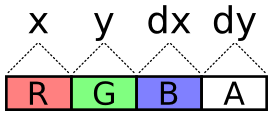
<p>For this simulation, there are four of these textures instead of two:
a pair of position textures and a pair of velocity textures. Why pairs
of textures? There are 4 channels, so every one of these components
(x, y, dx, dy) could be packed into its own color channel. This seems
like the simplest solution.</p>

<p><img src="/img/particles/pack-tight.png" alt="" /></p>

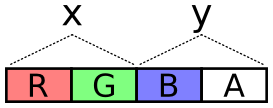
<p>The problem with this scheme is the lack of precision. With the
R8G8B8A8 internal texture format, each channel is one byte. That’s 256
total possible values. The display area is 800 by 600 pixels, so not
even every position on the display would be possible. Fortunately, two
bytes, for a total of 65,536 values, is plenty for our purposes.</p>

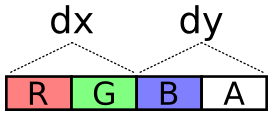
<p><img src="/img/particles/position-pack.png" alt="" />
<img src="/img/particles/velocity-pack.png" alt="" /></p>

<p>The next problem is how to encode values across these two channels. It
needs to cover negative values (negative velocity) and it should try
to take full advantage of dynamic range, i.e. try to spread usage
across all of those 65,536 values.</p>

<p>To encode a value, multiply the value by a scalar to stretch it over
the encoding’s dynamic range. The scalar is selected so that the
required highest values (the dimensions of the display) are the
highest values of the encoding.</p>

<p>Next, add half the dynamic range to the scaled value. This converts
all negative values into positive values with 0 representing the
lowest value. This representation is called <a href="http://en.wikipedia.org/wiki/Signed_number_representations#Excess-K">Excess-K</a>. The
downside to this is that clearing the texture (<code class="language-plaintext highlighter-rouge">glClearColor</code>) with
transparent black no longer sets the decoded values to 0.</p>

<p>Finally, treat each channel as a digit of a base-256 number. The
OpenGL ES 2.0 shader language has no bitwise operators, so this is
done with plain old division and modulus. I made an encoder and
decoder in both JavaScript and GLSL. JavaScript needs it to write the
initial values and, for debugging purposes, so that it can read back
particle positions.</p>

<div class="language-glsl highlighter-rouge"><div class="highlight"><pre class="highlight"><code><span class="kt">vec2</span> <span class="nf">encode</span><span class="p">(</span><span class="kt">float</span> <span class="n">value</span><span class="p">)</span> <span class="p">{</span>
    <span class="n">value</span> <span class="o">=</span> <span class="n">value</span> <span class="o">*</span> <span class="n">scale</span> <span class="o">+</span> <span class="n">OFFSET</span><span class="p">;</span>
    <span class="kt">float</span> <span class="n">x</span> <span class="o">=</span> <span class="n">mod</span><span class="p">(</span><span class="n">value</span><span class="p">,</span> <span class="n">BASE</span><span class="p">);</span>
    <span class="kt">float</span> <span class="n">y</span> <span class="o">=</span> <span class="n">floor</span><span class="p">(</span><span class="n">value</span> <span class="o">/</span> <span class="n">BASE</span><span class="p">);</span>
    <span class="k">return</span> <span class="kt">vec2</span><span class="p">(</span><span class="n">x</span><span class="p">,</span> <span class="n">y</span><span class="p">)</span> <span class="o">/</span> <span class="n">BASE</span><span class="p">;</span>
<span class="p">}</span>

<span class="kt">float</span> <span class="nf">decode</span><span class="p">(</span><span class="kt">vec2</span> <span class="n">channels</span><span class="p">)</span> <span class="p">{</span>
    <span class="k">return</span> <span class="p">(</span><span class="n">dot</span><span class="p">(</span><span class="n">channels</span><span class="p">,</span> <span class="kt">vec2</span><span class="p">(</span><span class="n">BASE</span><span class="p">,</span> <span class="n">BASE</span> <span class="o">*</span> <span class="n">BASE</span><span class="p">))</span> <span class="o">-</span> <span class="n">OFFSET</span><span class="p">)</span> <span class="o">/</span> <span class="n">scale</span><span class="p">;</span>
<span class="p">}</span>
</code></pre></div></div>

<p>And JavaScript. Unlike normalized GLSL values above (0.0-1.0), this
produces one-byte integers (0-255) for packing into typed arrays.</p>

<div class="language-js highlighter-rouge"><div class="highlight"><pre class="highlight"><code><span class="kd">function</span> <span class="nx">encode</span><span class="p">(</span><span class="nx">value</span><span class="p">,</span> <span class="nx">scale</span><span class="p">)</span> <span class="p">{</span>
    <span class="kd">var</span> <span class="nx">b</span> <span class="o">=</span> <span class="nx">Particles</span><span class="p">.</span><span class="nx">BASE</span><span class="p">;</span>
    <span class="nx">value</span> <span class="o">=</span> <span class="nx">value</span> <span class="o">*</span> <span class="nx">scale</span> <span class="o">+</span> <span class="nx">b</span> <span class="o">*</span> <span class="nx">b</span> <span class="o">/</span> <span class="mi">2</span><span class="p">;</span>
    <span class="kd">var</span> <span class="nx">pair</span> <span class="o">=</span> <span class="p">[</span>
        <span class="nb">Math</span><span class="p">.</span><span class="nx">floor</span><span class="p">((</span><span class="nx">value</span> <span class="o">%</span> <span class="nx">b</span><span class="p">)</span> <span class="o">/</span> <span class="nx">b</span> <span class="o">*</span> <span class="mi">255</span><span class="p">),</span>
        <span class="nb">Math</span><span class="p">.</span><span class="nx">floor</span><span class="p">(</span><span class="nb">Math</span><span class="p">.</span><span class="nx">floor</span><span class="p">(</span><span class="nx">value</span> <span class="o">/</span> <span class="nx">b</span><span class="p">)</span> <span class="o">/</span> <span class="nx">b</span> <span class="o">*</span> <span class="mi">255</span><span class="p">)</span>
    <span class="p">];</span>
    <span class="k">return</span> <span class="nx">pair</span><span class="p">;</span>
<span class="p">}</span>

<span class="kd">function</span> <span class="nx">decode</span><span class="p">(</span><span class="nx">pair</span><span class="p">,</span> <span class="nx">scale</span><span class="p">)</span> <span class="p">{</span>
    <span class="kd">var</span> <span class="nx">b</span> <span class="o">=</span> <span class="nx">Particles</span><span class="p">.</span><span class="nx">BASE</span><span class="p">;</span>
    <span class="k">return</span> <span class="p">(((</span><span class="nx">pair</span><span class="p">[</span><span class="mi">0</span><span class="p">]</span> <span class="o">/</span> <span class="mi">255</span><span class="p">)</span> <span class="o">*</span> <span class="nx">b</span> <span class="o">+</span>
             <span class="p">(</span><span class="nx">pair</span><span class="p">[</span><span class="mi">1</span><span class="p">]</span> <span class="o">/</span> <span class="mi">255</span><span class="p">)</span> <span class="o">*</span> <span class="nx">b</span> <span class="o">*</span> <span class="nx">b</span><span class="p">)</span> <span class="o">-</span> <span class="nx">b</span> <span class="o">*</span> <span class="nx">b</span> <span class="o">/</span> <span class="mi">2</span><span class="p">)</span> <span class="o">/</span> <span class="nx">scale</span><span class="p">;</span>
<span class="p">}</span>
</code></pre></div></div>

<p>The fragment shader that updates each particle samples the position
and velocity textures at that particle’s “index”, decodes their
values, operates on them, then encodes them back into a color for
writing to the output texture. Since I’m using WebGL, which lacks
multiple rendering targets (despite having support for <code class="language-plaintext highlighter-rouge">gl_FragData</code>),
the fragment shader can only output one color. Position is updated in
one pass and velocity in another as two separate draws. The buffers
are not swapped until <em>after</em> both passes are done, so the velocity
shader (intentionally) doesn’t uses the updated position values.</p>

<p>There’s a limit to the maximum texture size, typically 8,192 or 4,096,
so rather than lay the particles out in a one-dimensional texture, the
texture is kept square. Particles are indexed by two-dimensional
coordinates.</p>

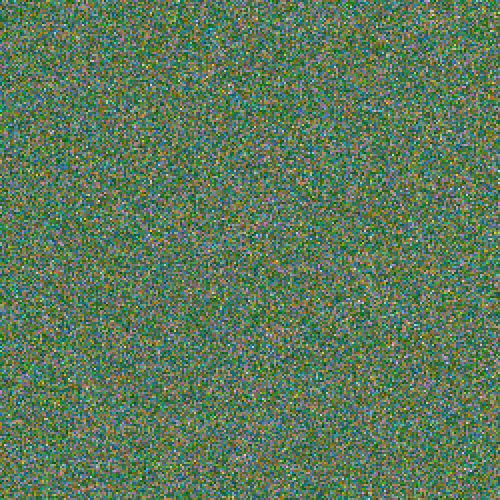
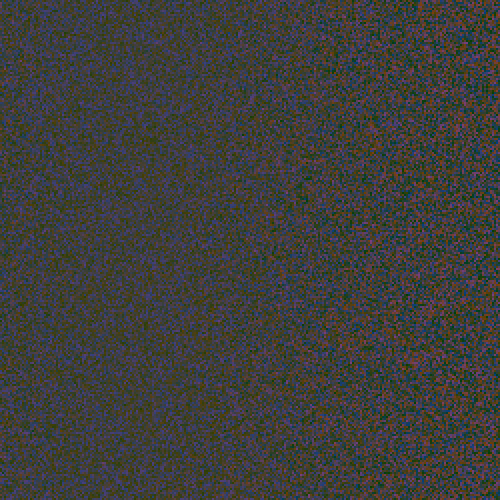
<p>It’s pretty interesting to see the position or velocity textures drawn
directly to the screen rather than the normal display. It’s another
domain through which to view the simulation, and it even helped me
identify some issues that were otherwise hard to see. The output is a
shimmering array of color, but with definite patterns, revealing a lot
about the entropy (or lack thereof) of the system. I’d share a video
of it, but it would be even more impractical to encode than the normal
display. Here are screenshots instead: position, then velocity. The
alpha component is not captured here.</p>

<p><img src="/img/particles/position.png" alt="" />
<img src="/img/particles/velocity.png" alt="" /></p>

<h3 id="entropy-conservation">Entropy Conservation</h3>

<p>One of the biggest challenges with running a simulation like this on a
GPU is the lack of random values. There’s no <code class="language-plaintext highlighter-rouge">rand()</code> function in the
shader language, so the whole thing is deterministic by default. All
entropy comes from the initial texture state filled by the CPU. When
particles clump up and match state, perhaps from flowing together over
an obstacle, it can be difficult to work them back apart since the
simulation handles them identically.</p>

<p>To mitigate this problem, the first rule is to conserve entropy
whenever possible. When a particle falls out of the bottom of the
display, it’s “reset” by moving it back to the top. If this is done by
setting the particle’s Y value to 0, then information is destroyed.
This must be avoided! Particles below the bottom edge of the display
tend to have slightly different Y values, despite exiting during the
same iteration. Instead of resetting to 0, a constant value is added:
the height of the display. The Y values remain different, so these
particles are more likely to follow different routes when bumping into
obstacles.</p>

<p>The next technique I used is to supply a single fresh random value via
a uniform for each iteration This value is added to the position and
velocity of reset particles. The same value is used for all particles
for that particular iteration, so this doesn’t help with overlapping
particles, but it does help to break apart “streams”. These are
clearly-visible lines of particles all following the same path. Each
exits the bottom of the display on a different iteration, so the
random value separates them slightly. Ultimately this stirs in a few
bits of fresh entropy into the simulation on each iteration.</p>

<p>Alternatively, a texture containing random values could be supplied to
the shader. The CPU would have to frequently fill and upload the
texture, plus there’s the issue of choosing where to sample the
texture, itself requiring a random value.</p>

<p>Finally, to deal with particles that have exactly overlapped, the
particle’s unique two-dimensional index is scaled and added to the
position and velocity when resetting, teasing them apart. The random
value’s sign is multiplied by the index to avoid bias in any
particular direction.</p>

<p>To see all this in action in the demo, make a big bowl to capture all
the particles, getting them to flow into a single point. This removes
all entropy from the system. Now clear the obstacles. They’ll all fall
down in a single, tight clump. It will still be somewhat clumped when
resetting at the top, but you’ll see them spraying apart a little bit
(particle indexes being added). These will exit the bottom at slightly
different times, so the random value plays its part to work them apart
even more. After a few rounds, the particles should be pretty evenly
spread again.</p>

<p>The last source of entropy is your mouse. When you move it through the
scene you disturb particles and introduce some noise to the
simulation.</p>

<h3 id="textures-as-vertex-attribute-buffers">Textures as Vertex Attribute Buffers</h3>

<p>This project idea occurred to me while reading the <a href="http://www.khronos.org/files/opengles_shading_language.pdf">OpenGL ES shader
language specification</a> (PDF). I’d been wanting to do a particle
system, but I was stuck on the problem how to draw the particles. The
texture data representing positions needs to somehow be fed back into
the pipeline as vertices. Normally a <a href="http://www.opengl.org/wiki/Buffer_Texture">buffer texture</a> — a texture
backed by an array buffer — or a <a href="http://www.opengl.org/wiki/Pixel_Buffer_Object">pixel buffer object</a> —
asynchronous texture data copying — might be used for this, but WebGL
has none these features. Pulling texture data off the GPU and putting
it all back on as an array buffer on each frame is out of the
question.</p>

<p>However, I came up with a cool technique that’s better than both those
anyway. The shader function <code class="language-plaintext highlighter-rouge">texture2D</code> is used to sample a pixel in a
texture. Normally this is used by the fragment shader as part of the
process of computing a color for a pixel. But the shader language
specification mentions that <code class="language-plaintext highlighter-rouge">texture2D</code> is available in vertex
shaders, too. That’s when it hit me. <strong>The vertex shader itself can
perform the conversion from texture to vertices.</strong></p>

<p>It works by passing the previously-mentioned two-dimensional particle
indexes as the vertex attributes, using them to look up particle
positions from within the vertex shader. The shader would run in
<code class="language-plaintext highlighter-rouge">GL_POINTS</code> mode, emitting point sprites. Here’s the abridged version,</p>

<div class="language-glsl highlighter-rouge"><div class="highlight"><pre class="highlight"><code><span class="k">attribute</span> <span class="kt">vec2</span> <span class="n">index</span><span class="p">;</span>

<span class="k">uniform</span> <span class="kt">sampler2D</span> <span class="n">positions</span><span class="p">;</span>
<span class="k">uniform</span> <span class="kt">vec2</span> <span class="n">statesize</span><span class="p">;</span>
<span class="k">uniform</span> <span class="kt">vec2</span> <span class="n">worldsize</span><span class="p">;</span>
<span class="k">uniform</span> <span class="kt">float</span> <span class="n">size</span><span class="p">;</span>

<span class="c1">// float decode(vec2) { ...</span>

<span class="kt">void</span> <span class="nf">main</span><span class="p">()</span> <span class="p">{</span>
    <span class="kt">vec4</span> <span class="n">psample</span> <span class="o">=</span> <span class="n">texture2D</span><span class="p">(</span><span class="n">positions</span><span class="p">,</span> <span class="n">index</span> <span class="o">/</span> <span class="n">statesize</span><span class="p">);</span>
    <span class="kt">vec2</span> <span class="n">p</span> <span class="o">=</span> <span class="kt">vec2</span><span class="p">(</span><span class="n">decode</span><span class="p">(</span><span class="n">psample</span><span class="p">.</span><span class="n">rg</span><span class="p">),</span> <span class="n">decode</span><span class="p">(</span><span class="n">psample</span><span class="p">.</span><span class="n">ba</span><span class="p">));</span>
    <span class="nb">gl_Position</span> <span class="o">=</span> <span class="kt">vec4</span><span class="p">(</span><span class="n">p</span> <span class="o">/</span> <span class="n">worldsize</span> <span class="o">*</span> <span class="mi">2</span><span class="p">.</span><span class="mi">0</span> <span class="o">-</span> <span class="mi">1</span><span class="p">.</span><span class="mi">0</span><span class="p">,</span> <span class="mi">0</span><span class="p">,</span> <span class="mi">1</span><span class="p">);</span>
    <span class="nb">gl_PointSize</span> <span class="o">=</span> <span class="n">size</span><span class="p">;</span>
<span class="p">}</span>
</code></pre></div></div>

<p>The real version also samples the velocity since it modulates the
color (slow moving particles are lighter than fast moving particles).</p>

<p>However, there’s a catch: implementations are allowed to limit the
number of vertex shader texture bindings to 0
(<code class="language-plaintext highlighter-rouge">GL_MAX_VERTEX_TEXTURE_IMAGE_UNITS</code>). So <em>technically</em> vertex shaders
must always support <code class="language-plaintext highlighter-rouge">texture2D</code>, but they’re not required to support
actually having textures. It’s sort of like food service on an
airplane that doesn’t carry passengers. These platforms don’t support
this technique. So far I’ve only had this problem on some mobile
devices.</p>

<p>Outside of the lack of support by some platforms, this allows every
part of the simulation to stay on the GPU and paves the way for a pure
GPU particle system.</p>

<h3 id="obstacles">Obstacles</h3>

<p>An important observation is that particles do not interact with each
other. This is not an n-body simulation. They do, however, interact
with the rest of the world: they bounce intuitively off those static
circles. This environment is represented by another texture, one
that’s not updated during normal iteration. I call this the <em>obstacle</em>
texture.</p>

<p>The colors on the obstacle texture are surface normals. That is, each
pixel has a direction to it, a flow directing particles in some
direction. Empty space has a special normal value of (0, 0). This is
not normalized (doesn’t have a length of 1), so it’s an out-of-band
value that has no effect on particles.</p>

<p><img src="/img/particles/obstacle.png" alt="" /></p>

<p>(I didn’t realize until I was done how much this looks like the
Greendale Community College flag.)</p>

<p>A particle checks for a collision simply by sampling the obstacle
texture. If it finds a normal at its location, it changes its velocity
using the shader function <code class="language-plaintext highlighter-rouge">reflect</code>. This function is normally used
for reflecting light in a 3D scene, but it works equally well for
slow-moving particles. The effect is that particles bounce off the the
circle in a natural way.</p>

<p>Sometimes particles end up on/in an obstacle with a low or zero
velocity. To dislodge these they’re given a little nudge in the
direction of the normal, pushing them away from the obstacle. You’ll
see this on slopes where slow particles jiggle their way down to
freedom like jumping beans.</p>

<p>To make the obstacle texture user-friendly, the actual geometry is
maintained on the CPU side of things in JavaScript. It keeps a list of
these circles and, on updates, redraws the obstacle texture from this
list. This happens, for example, every time you move your mouse on the
screen, providing a moving obstacle. The texture provides
shader-friendly access to the geometry. Two representations for two
purposes.</p>

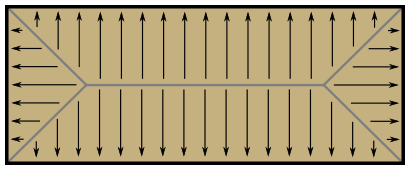
<p>When I started writing this part of the program, I envisioned that
shapes other than circles could place placed, too. For example, solid
rectangles: the normals would look something like this.</p>

<p><img src="/img/particles/rectangle.png" alt="" /></p>

<p>So far these are unimplemented.</p>

<h4 id="future-ideas">Future Ideas</h4>

<p>I didn’t try it yet, but I wonder if particles could interact with
each other by also drawing themselves onto the obstacles texture. Two
nearby particles would bounce off each other. Perhaps <a href="/blog/2013/06/26/">the entire
liquid demo</a> could run on the GPU like this. If I’m imagining
it correctly, particles would gain volume and obstacles forming bowl
shapes would fill up rather than concentrate particles into a single
point.</p>

<p>I think there’s still some more to explore with this project.</p>

]]>
    </content>
  </entry>


  <entry>
    <title>A GPU Approach to Path Finding</title>
    <link rel="alternate" type="text/html" href="https://nullprogram.com/blog/2014/06/22/"/>
    <id>urn:uuid:29de5cb3-f93a-3e6e-9adc-ff689e736877</id>
    <updated>2014-06-22T22:51:46Z</updated>
    <category term="ai"/><category term="webgl"/><category term="javascript"/><category term="gpgpu"/><category term="opengl"/>
    <content type="html">
      <![CDATA[<p>Last time <a href="/blog/2014/06/10/">I demonstrated how to run Conway’s Game of Life</a>
entirely on a graphics card. This concept can be generalized to <em>any</em>
cellular automaton, including automata with more than two states. In
this article I’m going to exploit this to solve the <a href="http://en.wikipedia.org/wiki/Shortest_path_problem">shortest path
problem</a> for two-dimensional grids entirely on a GPU. It will be
just as fast as traditional searches on a CPU.</p>

<p>The JavaScript side of things is essentially the same as before — two
textures with fragment shader in between that steps the automaton
forward — so I won’t be repeating myself. The only parts that have
changed are the cell state encoding (to express all automaton states)
and the fragment shader (to code the new rules).</p>

<ul>
  <li><a href="https://skeeto.github.io/webgl-path-solver/">Online Demo</a>
(<a href="https://github.com/skeeto/webgl-path-solver">source</a>)</li>
</ul>

<p>Included is a pure JavaScript implementation of the cellular
automaton (State.js) that I used for debugging and experimentation,
but it doesn’t actually get used in the demo. A fragment shader
(12state.frag) encodes the full automaton rules for the GPU.</p>

<h3 id="maze-solving-cellular-automaton">Maze-solving Cellular Automaton</h3>

<p>There’s a dead simple 2-state cellular automaton that can solve any
<em>perfect</em> maze of arbitrary dimension. Each cell is either OPEN or a
WALL, only 4-connected neighbors are considered, and there’s only one
rule: if an OPEN cell has only one OPEN neighbor, it becomes a WALL.</p>

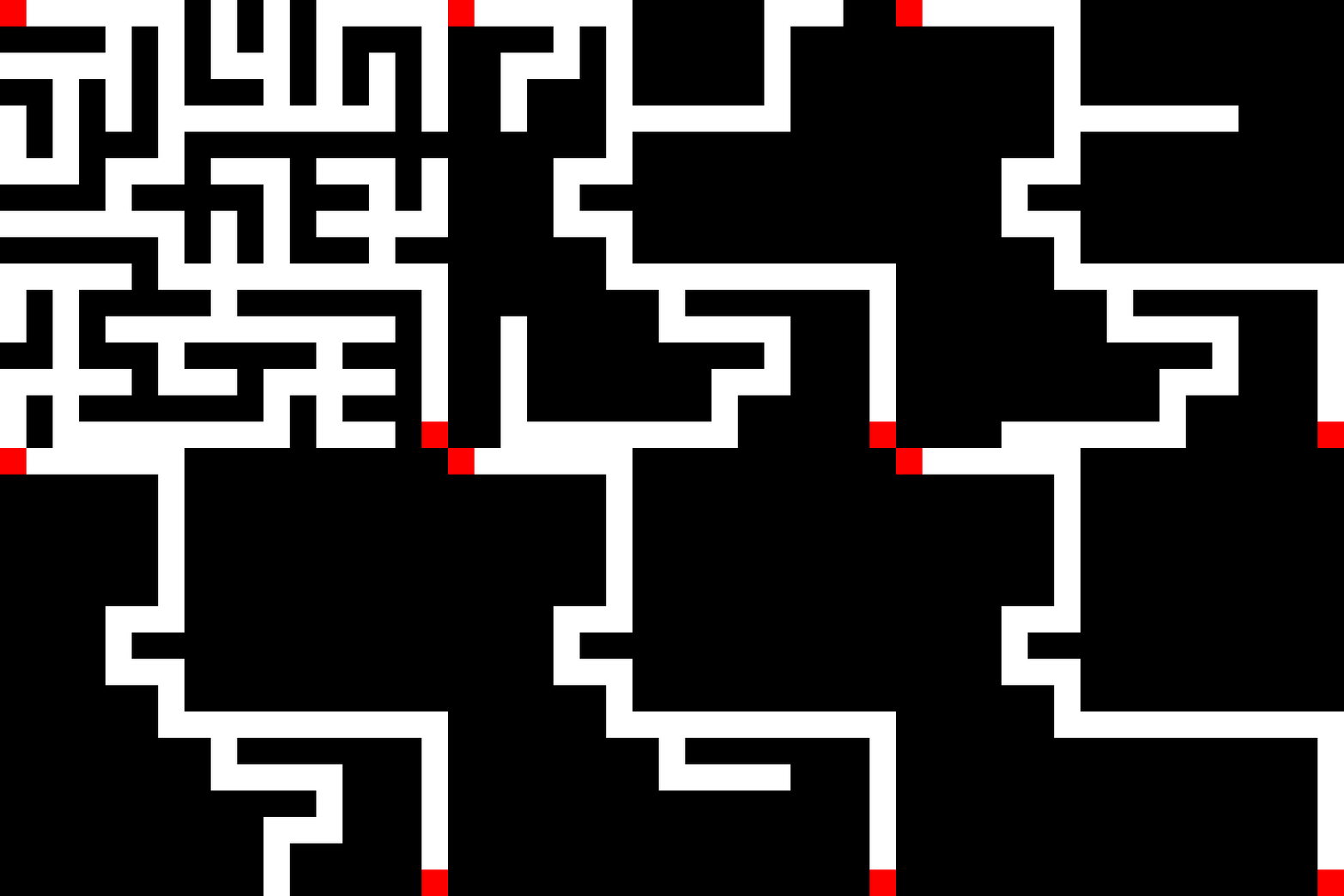
<p><img src="/img/path/simple.gif" alt="" /></p>

<p>On each step the dead ends collapse towards the solution. In the above
GIF, in order to keep the start and finish from collapsing, I’ve added
a third state (red) that holds them open. On a GPU, you’d have to do
as many draws as the length of the longest dead end.</p>

<p>A perfect maze is a maze where there is exactly one solution. This
technique doesn’t work for mazes with multiple solutions, loops, or
open spaces. The extra solutions won’t collapse into one, let alone
the shortest one.</p>

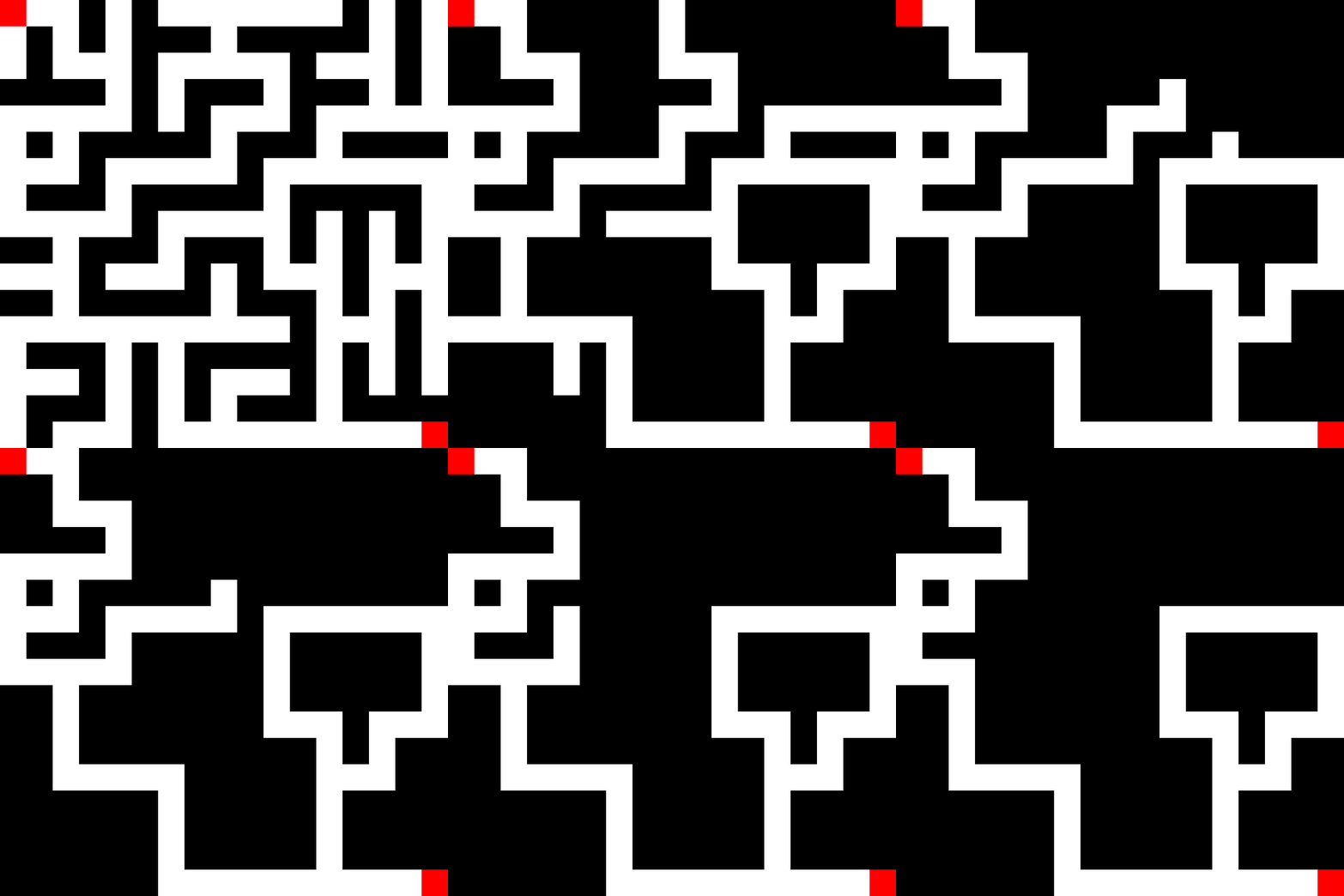
<p><img src="/img/path/simple-loop.gif" alt="" /></p>

<p>To fix this we need a more advanced cellular automaton.</p>

<h3 id="path-solving-cellular-automaton">Path-solving Cellular Automaton</h3>

<p>I came up with a 12-state cellular automaton that can not only solve
mazes, but will specifically find the shortest path. Like above, it
only considers 4-connected neighbors.</p>

<ul>
  <li>OPEN (white): passable space in the maze</li>
  <li>WALL (black): impassable space in the maze</li>
  <li>BEGIN (red): starting position</li>
  <li>END (red): goal position</li>
  <li>FLOW (green): flood fill that comes in four flavors: north, east, south, west</li>
  <li>ROUTE (blue): shortest path solution, also comes in four flavors</li>
</ul>

<p>If we wanted to consider 8-connected neighbors, everything would be
the same, but it would require 20 states (n, ne, e, se, s, sw, w, nw)
instead of 12. The rules are still pretty simple.</p>

<ul>
  <li>WALL and ROUTE cells never change state.</li>
  <li>OPEN becomes FLOW if it has any adjacent FLOW cells. It points
towards the neighboring FLOW cell (n, e, s, w).</li>
  <li>END becomes ROUTE if adjacent to a FLOW cell. It points towards the
FLOW cell (n, e, s, w). This rule is important for preventing
multiple solutions from appearing.</li>
  <li>FLOW becomes ROUTE if adjacent to a ROUTE cell that points towards
it. Combined with the above rule, it means when a FLOW cell touches
a ROUTE cell, there’s a cascade.</li>
  <li>BEGIN becomes ROUTE when adjacent to a ROUTE cell. The direction is
unimportant. This rule isn’t strictly necessary but will come in
handy later.</li>
</ul>

<p>This can be generalized for cellular grids of any arbitrary dimension,
and it could even run on a GPU for higher dimensions, limited
primarily by the number of texture uniform bindings (2D needs 1
texture binding, 3D needs 2 texture bindings, 4D needs 8 texture
bindings … I think). But if you need to find the shortest path along
a five-dimensional grid, I’d like to know why!</p>

<p>So what does it look like?</p>

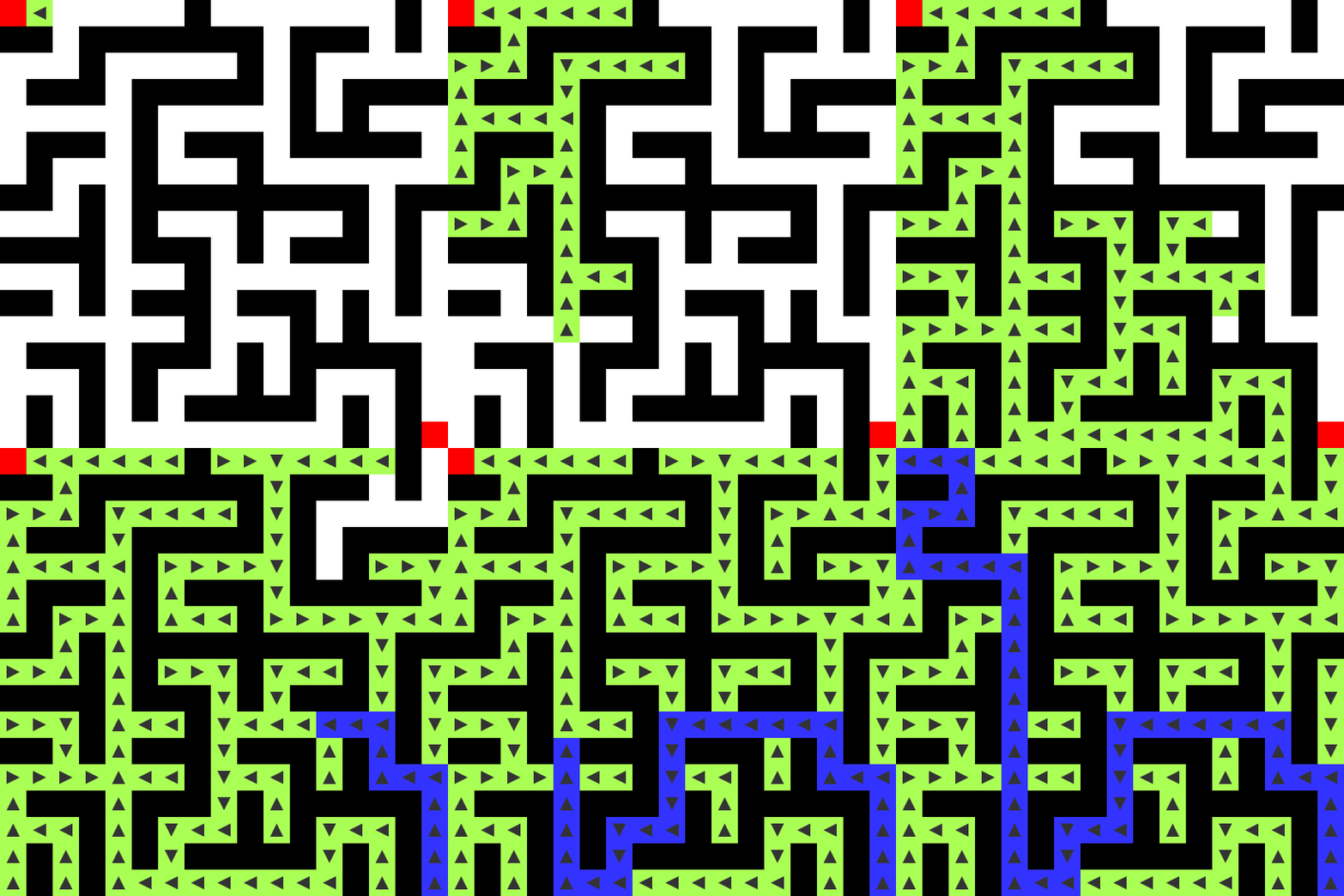
<p><img src="/img/path/maze.gif" alt="" /></p>

<p>FLOW cells flood the entire maze. Branches of the maze are search in
parallel as they’re discovered. As soon as an END cell is touched, a
ROUTE is traced backwards along the flow to the BEGIN cell. It
requires double the number of steps as the length of the shortest
path.</p>

<p>Note that the FLOW cell keep flooding the maze even after the END was
found. It’s a cellular automaton, so there’s no way to communicate to
these other cells that the solution was discovered. However, when
running on a GPU this wouldn’t matter anyway. There’s no bailing out
early before all the fragment shaders have run.</p>

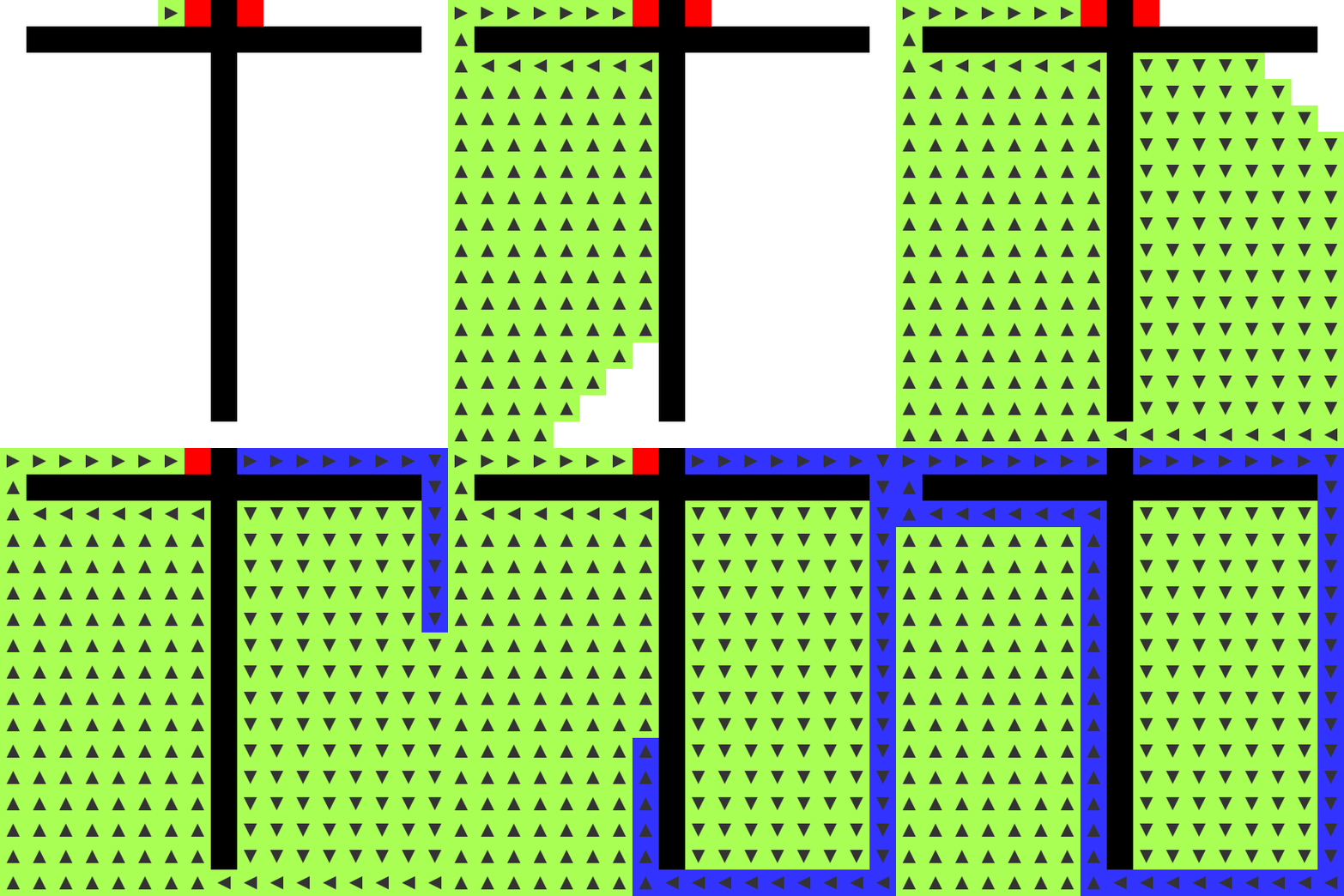
<p>What’s great about this is that we’re not limited to mazes whatsoever.
Here’s a path through a few connected rooms with open space.</p>

<p><img src="/img/path/flood.gif" alt="" /></p>

<h4 id="maze-types">Maze Types</h4>

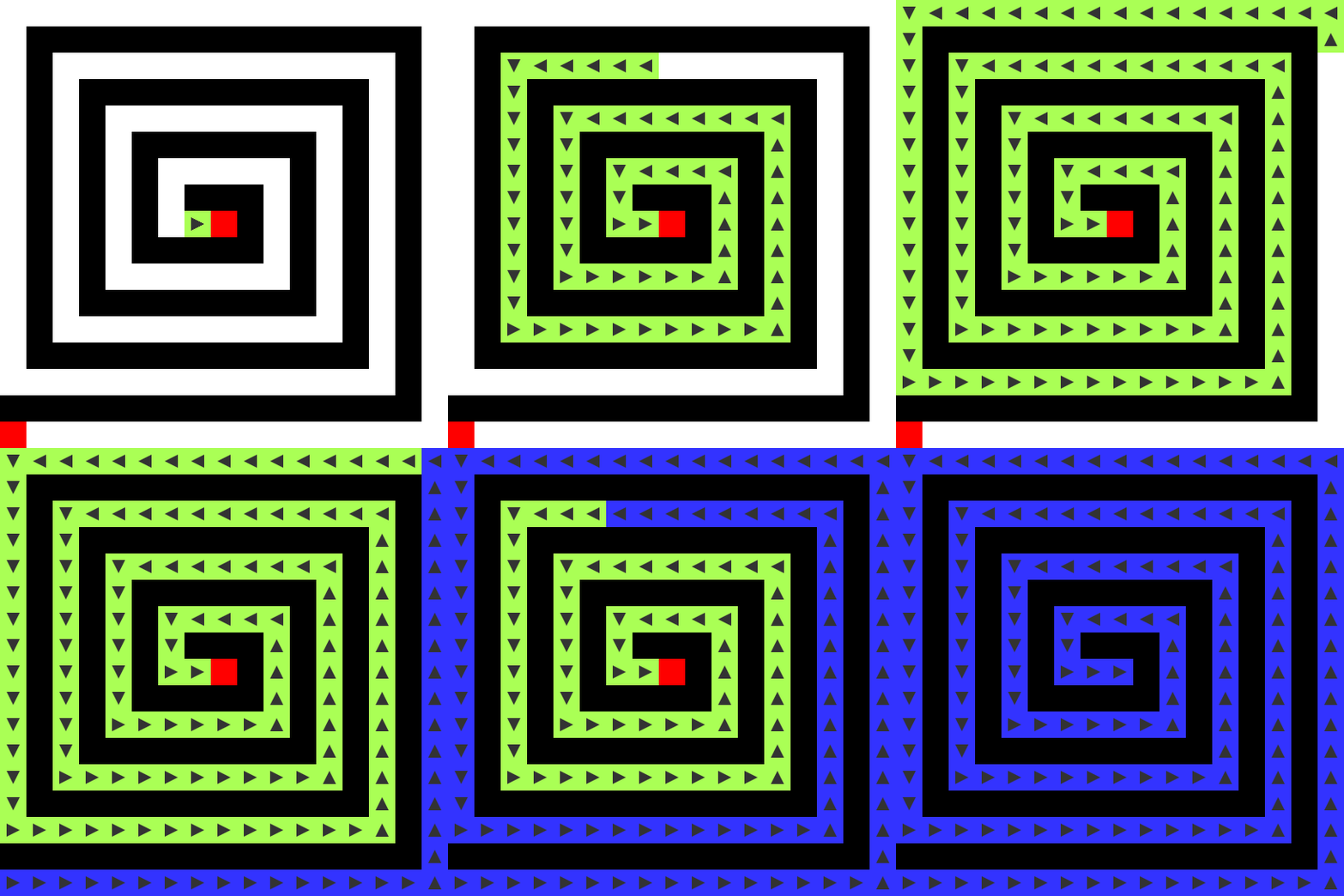
<p>The worst-case solution is the longest possible shortest path. There’s
only one frontier and running the entire automaton to push it forward
by one cell is inefficient, even for a GPU.</p>

<p><img src="/img/path/spiral.gif" alt="" /></p>

<p>The way a maze is generated plays a large role in how quickly the
cellular automaton can solve it. A common maze generation algorithm
is a random depth-first search (DFS). The entire maze starts out
entirely walled in and the algorithm wanders around at random plowing
down walls, but never breaking into open space. When it comes to a
dead end, it unwinds looking for new walls to knock down. This methods
tends towards long, winding paths with a low branching factor.</p>

<p>The mazes you see in the demo are Kruskal’s algorithm mazes. Walls are
knocked out at random anywhere in the maze, without breaking the
perfect maze rule. It has a much higher branching factor and makes for
a much more interesting demo.</p>

<h4 id="skipping-the-route-step">Skipping the Route Step</h4>

<p>On my computers, with a 1023x1023 Kruskal maze <del>it’s about an
order of magnitude slower</del> (see update below) than <a href="http://en.wikipedia.org/wiki/A*_search_algorithm">A*</a>
(<a href="http://ondras.github.io/rot.js/hp/">rot.js’s version</a>) for the same maze. <del>Not very
impressive!</del> I <em>believe</em> this gap will close with time, as GPUs
become parallel faster than CPUs get faster. However, there’s
something important to consider: it’s not only solving the shortest
path between source and goal, <strong>it’s finding the shortest path between
the source and any other point</strong>. At its core it’s a <a href="http://www.redblobgames.com/pathfinding/tower-defense/">breadth-first
grid search</a>.</p>

<p><em>Update</em>: One day after writing this article I realized that
<code class="language-plaintext highlighter-rouge">glReadPixels</code> was causing a gigantic bottlebeck. By only checking for
the end conditions once every 500 iterations, this method is now
equally fast as A* on modern graphics cards, despite taking up to an
extra 499 iterations. <strong>In just a few more years, this technique
should be faster than A*.</strong></p>

<p>Really, there’s little use in ROUTE step. It’s a poor fit for the GPU.
It has no use in any real application. I’m using it here mainly for
demonstration purposes. If dropped, the cellular automaton would
become 6 states: OPEN, WALL, and four flavors of FLOW. Seed the source
point with a FLOW cell (arbitrary direction) and run the automaton
until all of the OPEN cells are gone.</p>

<h3 id="detecting-end-state">Detecting End State</h3>

<p>The ROUTE cells do have a useful purpose, though. How do we know when
we’re done? We can poll the BEGIN cell to check for when it becomes a
ROUTE cell. Then we know we’ve found the solution. This doesn’t
necessarily mean all of the FLOW cells have finished propagating,
though, especially in the case of a DFS-maze.</p>

<p>In a CPU-based solution, I’d keep a counter and increment it every
time an OPEN cell changes state. The the counter doesn’t change after
an iteration, I’m done. OpenGL 4.2 introduces an <a href="http://www.opengl.org/wiki/Atomic_Counter">atomic
counter</a> that could serve this role, but this isn’t available in
OpenGL ES / WebGL. The only thing left to do is use <code class="language-plaintext highlighter-rouge">glReadPixels</code> to
pull down the entire thing and check for end state on the CPU.</p>

<p>The original 2-state automaton above also suffers from this problem.</p>

<h3 id="encoding-cell-state">Encoding Cell State</h3>

<p>Cells are stored per pixel in a GPU texture. I spent quite some time
trying to brainstorm a clever way to encode the twelve cell states
into a vec4 color. Perhaps there’s some way to <a href="/blog/2014/06/21/">exploit
blending</a> to update cell states, or make use of some other kind
of built-in pixel math. I couldn’t think of anything better than a
straight-forward encoding of 0 to 11 into a single color channel (red
in my case).</p>

<div class="language-glsl highlighter-rouge"><div class="highlight"><pre class="highlight"><code><span class="kt">int</span> <span class="nf">state</span><span class="p">(</span><span class="kt">vec2</span> <span class="n">offset</span><span class="p">)</span> <span class="p">{</span>
    <span class="kt">vec2</span> <span class="n">coord</span> <span class="o">=</span> <span class="p">(</span><span class="nb">gl_FragCoord</span><span class="p">.</span><span class="n">xy</span> <span class="o">+</span> <span class="n">offset</span><span class="p">)</span> <span class="o">/</span> <span class="n">scale</span><span class="p">;</span>
    <span class="kt">vec4</span> <span class="n">color</span> <span class="o">=</span> <span class="n">texture2D</span><span class="p">(</span><span class="n">maze</span><span class="p">,</span> <span class="n">coord</span><span class="p">);</span>
    <span class="k">return</span> <span class="kt">int</span><span class="p">(</span><span class="n">color</span><span class="p">.</span><span class="n">r</span> <span class="o">*</span> <span class="mi">11</span><span class="p">.</span><span class="mi">0</span> <span class="o">+</span> <span class="mi">0</span><span class="p">.</span><span class="mi">5</span><span class="p">);</span>
<span class="p">}</span>
</code></pre></div></div>

<p>This leaves three untouched channels for other useful information. I
experimented (uncommitted) with writing distance in the green channel.
When an OPEN cell becomes a FLOW cell, it adds 1 to its adjacent FLOW
cell distance. I imagine this could be really useful in a real
application: put your map on the GPU, run the cellular automaton a
sufficient number of times, pull the map back off (<code class="language-plaintext highlighter-rouge">glReadPixels</code>),
and for every point you know both the path and total distance to the
source point.</p>

<h3 id="performance">Performance</h3>

<p>As mentioned above, I ran the GPU maze-solver against A* to test its
performance. I didn’t yet try running it against Dijkstra’s algorithm
on a CPU over the entire grid (one source, many destinations). If I
had to guess, I’d bet the GPU would come out on top for grids with a
high branching factor (open spaces, etc.) so that its parallelism is
most effectively exploited, but Dijkstra’s algorithm would win in all
other cases.</p>

<p>Overall this is more of a proof of concept than a practical
application. It’s proof that we can trick OpenGL into solving mazes
for us!</p>

]]>
    </content>
  </entry>


  <entry>
    <title>A GPU Approach to Conway's Game of Life</title>
    <link rel="alternate" type="text/html" href="https://nullprogram.com/blog/2014/06/10/"/>
    <id>urn:uuid:205b43ce-faa8-33c8-db27-173ddad64229</id>
    <updated>2014-06-10T06:29:48Z</updated>
    <category term="webgl"/><category term="javascript"/><category term="interactive"/><category term="gpgpu"/><category term="opengl"/>
    <content type="html">
      <![CDATA[<p class="abstract">
Update: In the next article, I <a href="/blog/2014/06/22/">extend this
program to solving mazes</a>. The demo has also been <a href="http://rykap.com/graphics/skew/2016/01/23/game-of-life.html">
ported to the Skew programming language</a>.
</p>

<p><a href="http://en.wikipedia.org/wiki/Conway%27s_Game_of_Life">Conway’s Game of Life</a> is <a href="/blog/2014/06/01/">another well-matched
workload</a> for GPUs. Here’s the actual WebGL demo if you want
to check it out before continuing.</p>

<ul>
  <li><a href="http://skeeto.github.io/webgl-game-of-life/">https://skeeto.github.io/webgl-game-of-life/</a>
(<a href="http://github.com/skeeto/webgl-game-of-life/">source</a>)</li>
</ul>

<p>To quickly summarize the rules:</p>

<ul>
  <li>The universe is a two-dimensional grid of 8-connected square cells.</li>
  <li>A cell is either dead or alive.</li>
  <li>A dead cell with exactly three living neighbors comes to life.</li>
  <li>A live cell with less than two neighbors dies from underpopulation.</li>
  <li>A live cell with more than three neighbors dies from overpopulation.</li>
</ul>

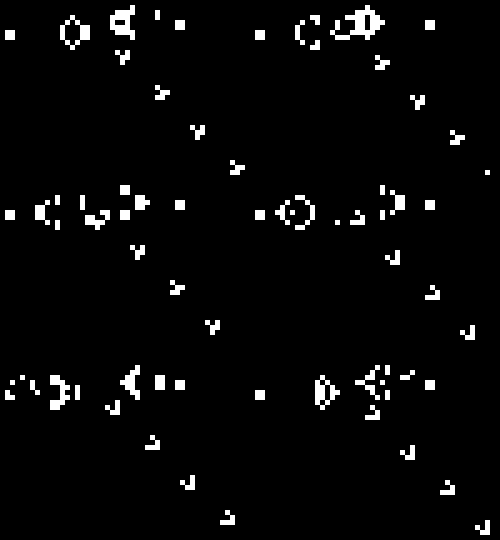
<p><img src="/img/gol/gol.gif" alt="" /></p>

<p>These simple cellular automata rules lead to surprisingly complex,
organic patterns. Cells are updated in parallel, so it’s generally
implemented using two separate buffers. This makes it a perfect
candidate for an OpenGL fragment shader.</p>

<h3 id="preparing-the-textures">Preparing the Textures</h3>

<p>The entire simulation state will be stored in a single, 2D texture in
GPU memory. Each pixel of the texture represents one Life cell. The
texture will have the internal format GL_RGBA. That is, each pixel
will have a red, green, blue, and alpha channel. This texture is not
drawn directly to the screen, so how exactly these channels are used
is mostly unimportant. It’s merely a simulation data structure. This
is because I’m using <a href="/blog/2013/06/10/">the OpenGL programmable pipeline for general
computation</a>. I’m calling this the “front” texture.</p>

<p>Four multi-bit (actual width is up to the GPU) channels seems
excessive considering that all I <em>really</em> need is a single bit of
state for each cell. However, due to <a href="http://www.opengl.org/wiki/Framebuffer_Object#Framebuffer_Completeness">framebuffer completion
rules</a>, in order to draw onto this texture it <em>must</em> be GL_RGBA.
I could pack more than one cell into one texture pixel, but this would
reduce parallelism: the shader will run once per pixel, not once per
cell.</p>

<p>Because cells are updated in parallel, this texture can’t be modified
in-place. It would overwrite important state. In order to do any real
work I need a second texture to store the update. This is the “back”
texture. After the update, this back texture will hold the current
simulation state, so the names of the front and back texture are
swapped. The front texture always holds the current state, with the
back texture acting as a workspace.</p>

<div class="language-javascript highlighter-rouge"><div class="highlight"><pre class="highlight"><code><span class="nx">GOL</span><span class="p">.</span><span class="nx">prototype</span><span class="p">.</span><span class="nx">swap</span> <span class="o">=</span> <span class="kd">function</span><span class="p">()</span> <span class="p">{</span>
    <span class="kd">var</span> <span class="nx">tmp</span> <span class="o">=</span> <span class="k">this</span><span class="p">.</span><span class="nx">textures</span><span class="p">.</span><span class="nx">front</span><span class="p">;</span>
    <span class="k">this</span><span class="p">.</span><span class="nx">textures</span><span class="p">.</span><span class="nx">front</span> <span class="o">=</span> <span class="k">this</span><span class="p">.</span><span class="nx">textures</span><span class="p">.</span><span class="nx">back</span><span class="p">;</span>
    <span class="k">this</span><span class="p">.</span><span class="nx">textures</span><span class="p">.</span><span class="nx">back</span> <span class="o">=</span> <span class="nx">tmp</span><span class="p">;</span>
    <span class="k">return</span> <span class="k">this</span><span class="p">;</span>
<span class="p">};</span>
</code></pre></div></div>

<p>Here’s how a texture is created and prepared. It’s wrapped in a
function/method because I’ll need two identical textures, making two
separate calls to this function. All of these settings are required
for framebuffer completion (explained later).</p>

<div class="language-javascript highlighter-rouge"><div class="highlight"><pre class="highlight"><code><span class="nx">GOL</span><span class="p">.</span><span class="nx">prototype</span><span class="p">.</span><span class="nx">texture</span> <span class="o">=</span> <span class="kd">function</span><span class="p">()</span> <span class="p">{</span>
    <span class="kd">var</span> <span class="nx">gl</span> <span class="o">=</span> <span class="k">this</span><span class="p">.</span><span class="nx">gl</span><span class="p">;</span>
    <span class="kd">var</span> <span class="nx">tex</span> <span class="o">=</span> <span class="nx">gl</span><span class="p">.</span><span class="nx">createTexture</span><span class="p">();</span>
    <span class="nx">gl</span><span class="p">.</span><span class="nx">bindTexture</span><span class="p">(</span><span class="nx">gl</span><span class="p">.</span><span class="nx">TEXTURE_2D</span><span class="p">,</span> <span class="nx">tex</span><span class="p">);</span>
    <span class="nx">gl</span><span class="p">.</span><span class="nx">texParameteri</span><span class="p">(</span><span class="nx">gl</span><span class="p">.</span><span class="nx">TEXTURE_2D</span><span class="p">,</span> <span class="nx">gl</span><span class="p">.</span><span class="nx">TEXTURE_WRAP_S</span><span class="p">,</span> <span class="nx">gl</span><span class="p">.</span><span class="nx">REPEAT</span><span class="p">);</span>
    <span class="nx">gl</span><span class="p">.</span><span class="nx">texParameteri</span><span class="p">(</span><span class="nx">gl</span><span class="p">.</span><span class="nx">TEXTURE_2D</span><span class="p">,</span> <span class="nx">gl</span><span class="p">.</span><span class="nx">TEXTURE_WRAP_T</span><span class="p">,</span> <span class="nx">gl</span><span class="p">.</span><span class="nx">REPEAT</span><span class="p">);</span>
    <span class="nx">gl</span><span class="p">.</span><span class="nx">texParameteri</span><span class="p">(</span><span class="nx">gl</span><span class="p">.</span><span class="nx">TEXTURE_2D</span><span class="p">,</span> <span class="nx">gl</span><span class="p">.</span><span class="nx">TEXTURE_MIN_FILTER</span><span class="p">,</span> <span class="nx">gl</span><span class="p">.</span><span class="nx">NEAREST</span><span class="p">);</span>
    <span class="nx">gl</span><span class="p">.</span><span class="nx">texParameteri</span><span class="p">(</span><span class="nx">gl</span><span class="p">.</span><span class="nx">TEXTURE_2D</span><span class="p">,</span> <span class="nx">gl</span><span class="p">.</span><span class="nx">TEXTURE_MAG_FILTER</span><span class="p">,</span> <span class="nx">gl</span><span class="p">.</span><span class="nx">NEAREST</span><span class="p">);</span>
    <span class="nx">gl</span><span class="p">.</span><span class="nx">texImage2D</span><span class="p">(</span><span class="nx">gl</span><span class="p">.</span><span class="nx">TEXTURE_2D</span><span class="p">,</span> <span class="mi">0</span><span class="p">,</span> <span class="nx">gl</span><span class="p">.</span><span class="nx">RGBA</span><span class="p">,</span>
                  <span class="k">this</span><span class="p">.</span><span class="nx">statesize</span><span class="p">.</span><span class="nx">x</span><span class="p">,</span> <span class="k">this</span><span class="p">.</span><span class="nx">statesize</span><span class="p">.</span><span class="nx">y</span><span class="p">,</span>
                  <span class="mi">0</span><span class="p">,</span> <span class="nx">gl</span><span class="p">.</span><span class="nx">RGBA</span><span class="p">,</span> <span class="nx">gl</span><span class="p">.</span><span class="nx">UNSIGNED_BYTE</span><span class="p">,</span> <span class="kc">null</span><span class="p">);</span>
    <span class="k">return</span> <span class="nx">tex</span><span class="p">;</span>
<span class="p">};</span>
</code></pre></div></div>

<p>A texture wrap of <code class="language-plaintext highlighter-rouge">GL_REPEAT</code> means the simulation will be
automatically <a href="http://en.wikipedia.org/wiki/Wraparound_(video_games)">torus-shaped</a>. The interpolation is
<code class="language-plaintext highlighter-rouge">GL_NEAREST</code>, because I don’t want to interpolate between cell states
at all. The final OpenGL call initializes the texture size
(<code class="language-plaintext highlighter-rouge">this.statesize</code>). This size is different than the size of the
display because, again, this is <em>actually</em> a simulation data structure
for my purposes.</p>

<p>The <code class="language-plaintext highlighter-rouge">null</code> at the end would normally be texture data. I don’t need to
supply any data at this point, so this is left blank. Normally this
would leave the texture content in an undefined state, but for
security purposes, WebGL will automatically ensure that it’s zeroed.
Otherwise there’s a chance that sensitive data might leak from another
WebGL instance on another page or, worse, from another process using
OpenGL. I’ll make a similar call again later with <code class="language-plaintext highlighter-rouge">glTexSubImage2D()</code>
to fill the texture with initial random state.</p>

<p>In OpenGL ES, and therefore WebGL, wrapped (<code class="language-plaintext highlighter-rouge">GL_REPEAT</code>) texture
dimensions must be powers of two, i.e. 512x512, 256x1024, etc. Since I
want to exploit the built-in texture wrapping, I’ve decided to
constrain my simulation state size to powers of two. If I manually did
the wrapping in the fragment shader, I could make the simulation state
any size I wanted.</p>

<h3 id="framebuffers">Framebuffers</h3>

<p>A framebuffer is the target of the current <code class="language-plaintext highlighter-rouge">glClear()</code>,
<code class="language-plaintext highlighter-rouge">glDrawArrays()</code>, or <code class="language-plaintext highlighter-rouge">glDrawElements()</code>. The user’s display is the
<em>default</em> framebuffer. New framebuffers can be created and used as
drawing targets in place of the default framebuffer. This is how
things are drawn off-screen without effecting the display.</p>

<p>A framebuffer by itself is nothing but an empty frame. It needs a
canvas. Other resources are attached in order to make use of it. For
the simulation I want to draw onto the back buffer, so I attach this
to a framebuffer. If this framebuffer is bound at the time of the draw
call, the output goes onto the texture. This is really powerful
because <strong>this texture can be used as an input for another draw
command</strong>, which is exactly what I’ll be doing later.</p>

<p>Here’s what making a single step of the simulation looks like.</p>

<div class="language-javascript highlighter-rouge"><div class="highlight"><pre class="highlight"><code><span class="nx">GOL</span><span class="p">.</span><span class="nx">prototype</span><span class="p">.</span><span class="nx">step</span> <span class="o">=</span> <span class="kd">function</span><span class="p">()</span> <span class="p">{</span>
    <span class="kd">var</span> <span class="nx">gl</span> <span class="o">=</span> <span class="k">this</span><span class="p">.</span><span class="nx">gl</span><span class="p">;</span>
    <span class="nx">gl</span><span class="p">.</span><span class="nx">bindFramebuffer</span><span class="p">(</span><span class="nx">gl</span><span class="p">.</span><span class="nx">FRAMEBUFFER</span><span class="p">,</span> <span class="k">this</span><span class="p">.</span><span class="nx">framebuffers</span><span class="p">.</span><span class="nx">step</span><span class="p">);</span>
    <span class="nx">gl</span><span class="p">.</span><span class="nx">framebufferTexture2D</span><span class="p">(</span><span class="nx">gl</span><span class="p">.</span><span class="nx">FRAMEBUFFER</span><span class="p">,</span> <span class="nx">gl</span><span class="p">.</span><span class="nx">COLOR_ATTACHMENT0</span><span class="p">,</span>
                            <span class="nx">gl</span><span class="p">.</span><span class="nx">TEXTURE_2D</span><span class="p">,</span> <span class="k">this</span><span class="p">.</span><span class="nx">textures</span><span class="p">.</span><span class="nx">back</span><span class="p">,</span> <span class="mi">0</span><span class="p">);</span>
    <span class="nx">gl</span><span class="p">.</span><span class="nx">viewport</span><span class="p">(</span><span class="mi">0</span><span class="p">,</span> <span class="mi">0</span><span class="p">,</span> <span class="k">this</span><span class="p">.</span><span class="nx">statesize</span><span class="p">.</span><span class="nx">x</span><span class="p">,</span> <span class="k">this</span><span class="p">.</span><span class="nx">statesize</span><span class="p">.</span><span class="nx">y</span><span class="p">);</span>
    <span class="nx">gl</span><span class="p">.</span><span class="nx">bindTexture</span><span class="p">(</span><span class="nx">gl</span><span class="p">.</span><span class="nx">TEXTURE_2D</span><span class="p">,</span> <span class="k">this</span><span class="p">.</span><span class="nx">textures</span><span class="p">.</span><span class="nx">front</span><span class="p">);</span>
    <span class="k">this</span><span class="p">.</span><span class="nx">programs</span><span class="p">.</span><span class="nx">gol</span><span class="p">.</span><span class="nx">use</span><span class="p">()</span>
        <span class="p">.</span><span class="nx">attrib</span><span class="p">(</span><span class="dl">'</span><span class="s1">quad</span><span class="dl">'</span><span class="p">,</span> <span class="k">this</span><span class="p">.</span><span class="nx">buffers</span><span class="p">.</span><span class="nx">quad</span><span class="p">,</span> <span class="mi">2</span><span class="p">)</span>
        <span class="p">.</span><span class="nx">uniform</span><span class="p">(</span><span class="dl">'</span><span class="s1">state</span><span class="dl">'</span><span class="p">,</span> <span class="mi">0</span><span class="p">,</span> <span class="kc">true</span><span class="p">)</span>
        <span class="p">.</span><span class="nx">uniform</span><span class="p">(</span><span class="dl">'</span><span class="s1">scale</span><span class="dl">'</span><span class="p">,</span> <span class="k">this</span><span class="p">.</span><span class="nx">statesize</span><span class="p">)</span>
        <span class="p">.</span><span class="nx">draw</span><span class="p">(</span><span class="nx">gl</span><span class="p">.</span><span class="nx">TRIANGLE_STRIP</span><span class="p">,</span> <span class="mi">4</span><span class="p">);</span>
    <span class="k">this</span><span class="p">.</span><span class="nx">swap</span><span class="p">();</span>
    <span class="k">return</span> <span class="k">this</span><span class="p">;</span>
<span class="p">};</span>
</code></pre></div></div>

<p>First, bind the custom framebuffer as the current framebuffer with
<code class="language-plaintext highlighter-rouge">glBindFramebuffer()</code>. This framebuffer was previously created with
<code class="language-plaintext highlighter-rouge">glCreateFramebuffer()</code> and required no initial configuration. The
configuration is entirely done here, where the back texture is
attached to the current framebuffer. This replaces any texture that
might currently be attached to this spot — like the front texture
from the previous iteration. Finally, the size of the drawing area is
locked to the size of the simulation state with <code class="language-plaintext highlighter-rouge">glViewport()</code>.</p>

<p><a href="https://github.com/skeeto/igloojs">Using Igloo again</a> to keep the call concise, a fullscreen quad
is rendered so that the fragment shader runs <em>exactly</em> once for each
cell. That <code class="language-plaintext highlighter-rouge">state</code> uniform is the front texture, bound as
<code class="language-plaintext highlighter-rouge">GL_TEXTURE0</code>.</p>

<p>With the drawing complete, the buffers are swapped. Since every pixel
was drawn, there’s no need to ever use <code class="language-plaintext highlighter-rouge">glClear()</code>.</p>

<h3 id="the-game-of-life-fragment-shader">The Game of Life Fragment Shader</h3>

<p>The simulation rules are coded entirely in the fragment shader. After
initialization, JavaScript’s only job is to make the appropriate
<code class="language-plaintext highlighter-rouge">glDrawArrays()</code> call over and over. To run different cellular automata,
all I would need to do is modify the fragment shader and generate an
appropriate initial state for it.</p>

<div class="language-glsl highlighter-rouge"><div class="highlight"><pre class="highlight"><code><span class="k">uniform</span> <span class="kt">sampler2D</span> <span class="n">state</span><span class="p">;</span>
<span class="k">uniform</span> <span class="kt">vec2</span> <span class="n">scale</span><span class="p">;</span>

<span class="kt">int</span> <span class="nf">get</span><span class="p">(</span><span class="kt">int</span> <span class="n">x</span><span class="p">,</span> <span class="kt">int</span> <span class="n">y</span><span class="p">)</span> <span class="p">{</span>
    <span class="k">return</span> <span class="kt">int</span><span class="p">(</span><span class="n">texture2D</span><span class="p">(</span><span class="n">state</span><span class="p">,</span> <span class="p">(</span><span class="nb">gl_FragCoord</span><span class="p">.</span><span class="n">xy</span> <span class="o">+</span> <span class="kt">vec2</span><span class="p">(</span><span class="n">x</span><span class="p">,</span> <span class="n">y</span><span class="p">))</span> <span class="o">/</span> <span class="n">scale</span><span class="p">).</span><span class="n">r</span><span class="p">);</span>
<span class="p">}</span>

<span class="kt">void</span> <span class="nf">main</span><span class="p">()</span> <span class="p">{</span>
    <span class="kt">int</span> <span class="n">sum</span> <span class="o">=</span> <span class="n">get</span><span class="p">(</span><span class="o">-</span><span class="mi">1</span><span class="p">,</span> <span class="o">-</span><span class="mi">1</span><span class="p">)</span> <span class="o">+</span>
              <span class="n">get</span><span class="p">(</span><span class="o">-</span><span class="mi">1</span><span class="p">,</span>  <span class="mi">0</span><span class="p">)</span> <span class="o">+</span>
              <span class="n">get</span><span class="p">(</span><span class="o">-</span><span class="mi">1</span><span class="p">,</span>  <span class="mi">1</span><span class="p">)</span> <span class="o">+</span>
              <span class="n">get</span><span class="p">(</span> <span class="mi">0</span><span class="p">,</span> <span class="o">-</span><span class="mi">1</span><span class="p">)</span> <span class="o">+</span>
              <span class="n">get</span><span class="p">(</span> <span class="mi">0</span><span class="p">,</span>  <span class="mi">1</span><span class="p">)</span> <span class="o">+</span>
              <span class="n">get</span><span class="p">(</span> <span class="mi">1</span><span class="p">,</span> <span class="o">-</span><span class="mi">1</span><span class="p">)</span> <span class="o">+</span>
              <span class="n">get</span><span class="p">(</span> <span class="mi">1</span><span class="p">,</span>  <span class="mi">0</span><span class="p">)</span> <span class="o">+</span>
              <span class="n">get</span><span class="p">(</span> <span class="mi">1</span><span class="p">,</span>  <span class="mi">1</span><span class="p">);</span>
    <span class="k">if</span> <span class="p">(</span><span class="n">sum</span> <span class="o">==</span> <span class="mi">3</span><span class="p">)</span> <span class="p">{</span>
        <span class="nb">gl_FragColor</span> <span class="o">=</span> <span class="kt">vec4</span><span class="p">(</span><span class="mi">1</span><span class="p">.</span><span class="mi">0</span><span class="p">,</span> <span class="mi">1</span><span class="p">.</span><span class="mi">0</span><span class="p">,</span> <span class="mi">1</span><span class="p">.</span><span class="mi">0</span><span class="p">,</span> <span class="mi">1</span><span class="p">.</span><span class="mi">0</span><span class="p">);</span>
    <span class="p">}</span> <span class="k">else</span> <span class="k">if</span> <span class="p">(</span><span class="n">sum</span> <span class="o">==</span> <span class="mi">2</span><span class="p">)</span> <span class="p">{</span>
        <span class="kt">float</span> <span class="n">current</span> <span class="o">=</span> <span class="kt">float</span><span class="p">(</span><span class="n">get</span><span class="p">(</span><span class="mi">0</span><span class="p">,</span> <span class="mi">0</span><span class="p">));</span>
        <span class="nb">gl_FragColor</span> <span class="o">=</span> <span class="kt">vec4</span><span class="p">(</span><span class="n">current</span><span class="p">,</span> <span class="n">current</span><span class="p">,</span> <span class="n">current</span><span class="p">,</span> <span class="mi">1</span><span class="p">.</span><span class="mi">0</span><span class="p">);</span>
    <span class="p">}</span> <span class="k">else</span> <span class="p">{</span>
        <span class="nb">gl_FragColor</span> <span class="o">=</span> <span class="kt">vec4</span><span class="p">(</span><span class="mi">0</span><span class="p">.</span><span class="mi">0</span><span class="p">,</span> <span class="mi">0</span><span class="p">.</span><span class="mi">0</span><span class="p">,</span> <span class="mi">0</span><span class="p">.</span><span class="mi">0</span><span class="p">,</span> <span class="mi">1</span><span class="p">.</span><span class="mi">0</span><span class="p">);</span>
    <span class="p">}</span>
<span class="p">}</span>
</code></pre></div></div>

<p>The <code class="language-plaintext highlighter-rouge">get(int, int)</code> function returns the value of the cell at (x, y),
0 or 1. For the sake of simplicity, the output of the fragment shader
is solid white and black, but just sampling one channel (red) is good
enough to know the state of the cell. I’ve learned that loops and
arrays are are troublesome in GLSL, so I’ve manually unrolled the
neighbor check. Cellular automata that have more complex state could
make use of the other channels and perhaps even exploit alpha channel
blending in some special way.</p>

<p>Otherwise, this is just a straightforward encoding of the rules.</p>

<h3 id="displaying-the-state">Displaying the State</h3>

<p>What good is the simulation if the user doesn’t see anything? So far
all of the draw calls have been done on a custom framebuffer. Next
I’ll render the simulation state to the default framebuffer.</p>

<div class="language-javascript highlighter-rouge"><div class="highlight"><pre class="highlight"><code><span class="nx">GOL</span><span class="p">.</span><span class="nx">prototype</span><span class="p">.</span><span class="nx">draw</span> <span class="o">=</span> <span class="kd">function</span><span class="p">()</span> <span class="p">{</span>
    <span class="kd">var</span> <span class="nx">gl</span> <span class="o">=</span> <span class="k">this</span><span class="p">.</span><span class="nx">gl</span><span class="p">;</span>
    <span class="nx">gl</span><span class="p">.</span><span class="nx">bindFramebuffer</span><span class="p">(</span><span class="nx">gl</span><span class="p">.</span><span class="nx">FRAMEBUFFER</span><span class="p">,</span> <span class="kc">null</span><span class="p">);</span>
    <span class="nx">gl</span><span class="p">.</span><span class="nx">viewport</span><span class="p">(</span><span class="mi">0</span><span class="p">,</span> <span class="mi">0</span><span class="p">,</span> <span class="k">this</span><span class="p">.</span><span class="nx">viewsize</span><span class="p">.</span><span class="nx">x</span><span class="p">,</span> <span class="k">this</span><span class="p">.</span><span class="nx">viewsize</span><span class="p">.</span><span class="nx">y</span><span class="p">);</span>
    <span class="nx">gl</span><span class="p">.</span><span class="nx">bindTexture</span><span class="p">(</span><span class="nx">gl</span><span class="p">.</span><span class="nx">TEXTURE_2D</span><span class="p">,</span> <span class="k">this</span><span class="p">.</span><span class="nx">textures</span><span class="p">.</span><span class="nx">front</span><span class="p">);</span>
    <span class="k">this</span><span class="p">.</span><span class="nx">programs</span><span class="p">.</span><span class="nx">copy</span><span class="p">.</span><span class="nx">use</span><span class="p">()</span>
        <span class="p">.</span><span class="nx">attrib</span><span class="p">(</span><span class="dl">'</span><span class="s1">quad</span><span class="dl">'</span><span class="p">,</span> <span class="k">this</span><span class="p">.</span><span class="nx">buffers</span><span class="p">.</span><span class="nx">quad</span><span class="p">,</span> <span class="mi">2</span><span class="p">)</span>
        <span class="p">.</span><span class="nx">uniform</span><span class="p">(</span><span class="dl">'</span><span class="s1">state</span><span class="dl">'</span><span class="p">,</span> <span class="mi">0</span><span class="p">,</span> <span class="kc">true</span><span class="p">)</span>
        <span class="p">.</span><span class="nx">uniform</span><span class="p">(</span><span class="dl">'</span><span class="s1">scale</span><span class="dl">'</span><span class="p">,</span> <span class="k">this</span><span class="p">.</span><span class="nx">viewsize</span><span class="p">)</span>
        <span class="p">.</span><span class="nx">draw</span><span class="p">(</span><span class="nx">gl</span><span class="p">.</span><span class="nx">TRIANGLE_STRIP</span><span class="p">,</span> <span class="mi">4</span><span class="p">);</span>
    <span class="k">return</span> <span class="k">this</span><span class="p">;</span>
<span class="p">};</span>
</code></pre></div></div>

<p>First, bind the default framebuffer as the current buffer. There’s no
actual handle for the default framebuffer, so using <code class="language-plaintext highlighter-rouge">null</code> sets it to
the default. Next, set the viewport to the size of the display. Then
use the “copy” program to copy the state to the default framebuffer
where the user will see it. One pixel per cell is <em>far</em> too small, so
it will be scaled as a consequence of <code class="language-plaintext highlighter-rouge">this.viewsize</code> being four times
larger.</p>

<p>Here’s what the “copy” fragment shader looks like. It’s so simple
because I’m storing the simulation state in black and white. If the
state was in a different format than the display format, this shader
would need to perform the translation.</p>

<div class="language-glsl highlighter-rouge"><div class="highlight"><pre class="highlight"><code><span class="k">uniform</span> <span class="kt">sampler2D</span> <span class="n">state</span><span class="p">;</span>
<span class="k">uniform</span> <span class="kt">vec2</span> <span class="n">scale</span><span class="p">;</span>

<span class="kt">void</span> <span class="nf">main</span><span class="p">()</span> <span class="p">{</span>
    <span class="nb">gl_FragColor</span> <span class="o">=</span> <span class="n">texture2D</span><span class="p">(</span><span class="n">state</span><span class="p">,</span> <span class="nb">gl_FragCoord</span><span class="p">.</span><span class="n">xy</span> <span class="o">/</span> <span class="n">scale</span><span class="p">);</span>
<span class="p">}</span>

</code></pre></div></div>

<p>Since I’m scaling up by four — i.e. 16 pixels per cell — this
fragment shader is run 16 times per simulation cell. Since I used
<code class="language-plaintext highlighter-rouge">GL_NEAREST</code> on the texture there’s no funny business going on here.
If I had used <code class="language-plaintext highlighter-rouge">GL_LINEAR</code>, it would look blurry.</p>

<p>You might notice I’m passing in a <code class="language-plaintext highlighter-rouge">scale</code> uniform and using
<code class="language-plaintext highlighter-rouge">gl_FragCoord</code>. The <code class="language-plaintext highlighter-rouge">gl_FragCoord</code> variable is in window-relative
coordinates, but when I sample a texture I need unit coordinates:
values between 0 and 1. To get this, I divide <code class="language-plaintext highlighter-rouge">gl_FragCoord</code> by the
size of the viewport. Alternatively I could pass the coordinates as a
varying from the vertex shader, automatically interpolated between the
quad vertices.</p>

<p>An important thing to notice is that <strong>the simulation state never
leaves the GPU</strong>. It’s updated there and it’s drawn there. The CPU is
operating the simulation like the strings on a marionette — <em>from a
thousand feet up in the air</em>.</p>

<h3 id="user-interaction">User Interaction</h3>

<p>What good is a Game of Life simulation if you can’t poke at it? If all
of the state is on the GPU, how can I modify it? This is where
<code class="language-plaintext highlighter-rouge">glTexSubImage2D()</code> comes in. As its name implies, it’s used to set
the values of some portion of a texture. I want to write a <code class="language-plaintext highlighter-rouge">poke()</code>
method that uses this OpenGL function to set a single cell.</p>

<div class="language-javascript highlighter-rouge"><div class="highlight"><pre class="highlight"><code><span class="nx">GOL</span><span class="p">.</span><span class="nx">prototype</span><span class="p">.</span><span class="nx">poke</span> <span class="o">=</span> <span class="kd">function</span><span class="p">(</span><span class="nx">x</span><span class="p">,</span> <span class="nx">y</span><span class="p">,</span> <span class="nx">value</span><span class="p">)</span> <span class="p">{</span>
    <span class="kd">var</span> <span class="nx">gl</span> <span class="o">=</span> <span class="k">this</span><span class="p">.</span><span class="nx">gl</span><span class="p">,</span>
        <span class="nx">v</span> <span class="o">=</span> <span class="nx">value</span> <span class="o">*</span> <span class="mi">255</span><span class="p">;</span>
    <span class="nx">gl</span><span class="p">.</span><span class="nx">bindTexture</span><span class="p">(</span><span class="nx">gl</span><span class="p">.</span><span class="nx">TEXTURE_2D</span><span class="p">,</span> <span class="k">this</span><span class="p">.</span><span class="nx">textures</span><span class="p">.</span><span class="nx">front</span><span class="p">);</span>
    <span class="nx">gl</span><span class="p">.</span><span class="nx">texSubImage2D</span><span class="p">(</span><span class="nx">gl</span><span class="p">.</span><span class="nx">TEXTURE_2D</span><span class="p">,</span> <span class="mi">0</span><span class="p">,</span> <span class="nx">x</span><span class="p">,</span> <span class="nx">y</span><span class="p">,</span> <span class="mi">1</span><span class="p">,</span> <span class="mi">1</span><span class="p">,</span>
                     <span class="nx">gl</span><span class="p">.</span><span class="nx">RGBA</span><span class="p">,</span> <span class="nx">gl</span><span class="p">.</span><span class="nx">UNSIGNED_BYTE</span><span class="p">,</span>
                     <span class="k">new</span> <span class="nb">Uint8Array</span><span class="p">([</span><span class="nx">v</span><span class="p">,</span> <span class="nx">v</span><span class="p">,</span> <span class="nx">v</span><span class="p">,</span> <span class="mi">255</span><span class="p">]));</span>
    <span class="k">return</span> <span class="k">this</span><span class="p">;</span>
<span class="p">};</span>
</code></pre></div></div>

<p>Bind the front texture, set the region at (x, y) of size 1x1 (a single
pixel) to a very specific RGBA value. There’s nothing else to it. If
you click on the simulation in my demo, it will call this poke method.
This method could also be used to initialize the entire simulation
with random values, though it wouldn’t be very efficient doing it one
pixel at a time.</p>

<h3 id="getting-the-state">Getting the State</h3>

<p>What if you wanted to read the simulation state into CPU memory,
perhaps to store for reloading later? So far I can set the state and
step the simulation, but there’s been no way to get at the data.
Unfortunately I can’t directly access texture data. There’s nothing
like the inverse of <code class="language-plaintext highlighter-rouge">glTexSubImage2D()</code>. Here are a few options:</p>

<ul>
  <li>
    <p>Call <code class="language-plaintext highlighter-rouge">toDataURL()</code> on the canvas. This would grab the rendering of
the simulation, which would need to be translated back into
simulation state. Sounds messy.</p>
  </li>
  <li>
    <p>Take a screenshot. Basically the same idea, but even messier.</p>
  </li>
  <li>
    <p>Use <code class="language-plaintext highlighter-rouge">glReadPixels()</code> on a framebuffer. The texture can be attached to
a framebuffer, then read through the framebuffer. This is the right
solution.</p>
  </li>
</ul>

<p>I’m reusing the “step” framebuffer for this since it’s already
intended for these textures to be its attachments.</p>

<div class="language-javascript highlighter-rouge"><div class="highlight"><pre class="highlight"><code><span class="nx">GOL</span><span class="p">.</span><span class="nx">prototype</span><span class="p">.</span><span class="kd">get</span> <span class="o">=</span> <span class="kd">function</span><span class="p">()</span> <span class="p">{</span>
    <span class="kd">var</span> <span class="nx">gl</span> <span class="o">=</span> <span class="k">this</span><span class="p">.</span><span class="nx">gl</span><span class="p">,</span> <span class="nx">w</span> <span class="o">=</span> <span class="k">this</span><span class="p">.</span><span class="nx">statesize</span><span class="p">.</span><span class="nx">x</span><span class="p">,</span> <span class="nx">h</span> <span class="o">=</span> <span class="k">this</span><span class="p">.</span><span class="nx">statesize</span><span class="p">.</span><span class="nx">y</span><span class="p">;</span>
    <span class="nx">gl</span><span class="p">.</span><span class="nx">bindFramebuffer</span><span class="p">(</span><span class="nx">gl</span><span class="p">.</span><span class="nx">FRAMEBUFFER</span><span class="p">,</span> <span class="k">this</span><span class="p">.</span><span class="nx">framebuffers</span><span class="p">.</span><span class="nx">step</span><span class="p">);</span>
    <span class="nx">gl</span><span class="p">.</span><span class="nx">framebufferTexture2D</span><span class="p">(</span><span class="nx">gl</span><span class="p">.</span><span class="nx">FRAMEBUFFER</span><span class="p">,</span> <span class="nx">gl</span><span class="p">.</span><span class="nx">COLOR_ATTACHMENT0</span><span class="p">,</span>
                            <span class="nx">gl</span><span class="p">.</span><span class="nx">TEXTURE_2D</span><span class="p">,</span> <span class="k">this</span><span class="p">.</span><span class="nx">textures</span><span class="p">.</span><span class="nx">front</span><span class="p">,</span> <span class="mi">0</span><span class="p">);</span>
    <span class="kd">var</span> <span class="nx">rgba</span> <span class="o">=</span> <span class="k">new</span> <span class="nb">Uint8Array</span><span class="p">(</span><span class="nx">w</span> <span class="o">*</span> <span class="nx">h</span> <span class="o">*</span> <span class="mi">4</span><span class="p">);</span>
    <span class="nx">gl</span><span class="p">.</span><span class="nx">readPixels</span><span class="p">(</span><span class="mi">0</span><span class="p">,</span> <span class="mi">0</span><span class="p">,</span> <span class="nx">w</span><span class="p">,</span> <span class="nx">h</span><span class="p">,</span> <span class="nx">gl</span><span class="p">.</span><span class="nx">RGBA</span><span class="p">,</span> <span class="nx">gl</span><span class="p">.</span><span class="nx">UNSIGNED_BYTE</span><span class="p">,</span> <span class="nx">rgba</span><span class="p">);</span>
    <span class="k">return</span> <span class="nx">rgba</span><span class="p">;</span>
<span class="p">};</span>
</code></pre></div></div>

<p>Voilà! This <code class="language-plaintext highlighter-rouge">rgba</code> array can be passed directly back to
<code class="language-plaintext highlighter-rouge">glTexSubImage2D()</code> as a perfect snapshot of the simulation state.</p>

<h3 id="conclusion">Conclusion</h3>

<p>This project turned out to be far simpler than I anticipated, so much
so that I was able to get the simulation running within an evening’s
effort. I learned a whole lot more about WebGL in the process, enough
for me to revisit <a href="/blog/2013/06/26/">my WebGL liquid simulation</a>. It uses a
similar texture-drawing technique, which I really fumbled through that
first time. I dramatically cleaned it up, making it fast enough to run
smoothly on my mobile devices.</p>

<p>Also, this Game of Life implementation is <em>blazing</em> fast. If rendering
is skipped, <strong>it can run a 2048x2048 Game of Life at over 18,000
iterations per second!</strong> However, this isn’t terribly useful because
it hits its steady state well before that first second has passed.</p>

]]>
    </content>
  </entry>


  <entry>
    <title>A GPU Approach to Voronoi Diagrams</title>
    <link rel="alternate" type="text/html" href="https://nullprogram.com/blog/2014/06/01/"/>
    <id>urn:uuid:97759105-8995-34d3-c914-a84eb7eb762c</id>
    <updated>2014-06-01T21:53:48Z</updated>
    <category term="webgl"/><category term="media"/><category term="video"/><category term="math"/><category term="interactive"/><category term="gpgpu"/><category term="opengl"/>
    <content type="html">
      <![CDATA[<p>I recently got an itch to play around with <a href="http://en.wikipedia.org/wiki/Voronoi_diagram">Voronoi diagrams</a>.
It’s a diagram that divides a space into regions composed of points
closest to one of a set of seed points. There are a couple of
algorithms for computing a Voronoi diagram: Bowyer-Watson and Fortune.
These are complicated and difficult to implement.</p>

<p>However, if we’re interested only in <em>rendering</em> a Voronoi diagram as
a bitmap, there’s a trivial brute for algorithm. For every pixel of
output, determine the closest seed vertex and color that pixel
appropriately. It’s slow, especially as the number of seed vertices
goes up, but it works perfectly and it’s dead simple!</p>

<p>Does this strategy seem familiar? It sure sounds a lot like an OpenGL
<em>fragment shader</em>! With a shader, I can push the workload off to the
GPU, which is intended for this sort of work. Here’s basically what it
looks like.</p>

<div class="language-glsl highlighter-rouge"><div class="highlight"><pre class="highlight"><code><span class="cm">/* voronoi.frag */</span>
<span class="k">uniform</span> <span class="kt">vec2</span> <span class="n">seeds</span><span class="p">[</span><span class="mi">32</span><span class="p">];</span>
<span class="k">uniform</span> <span class="kt">vec3</span> <span class="n">colors</span><span class="p">[</span><span class="mi">32</span><span class="p">];</span>

<span class="kt">void</span> <span class="nf">main</span><span class="p">()</span> <span class="p">{</span>
    <span class="kt">float</span> <span class="n">dist</span> <span class="o">=</span> <span class="n">distance</span><span class="p">(</span><span class="n">seeds</span><span class="p">[</span><span class="mi">0</span><span class="p">],</span> <span class="nb">gl_FragCoord</span><span class="p">.</span><span class="n">xy</span><span class="p">);</span>
    <span class="kt">vec3</span> <span class="n">color</span> <span class="o">=</span> <span class="n">colors</span><span class="p">[</span><span class="mi">0</span><span class="p">];</span>
    <span class="k">for</span> <span class="p">(</span><span class="kt">int</span> <span class="n">i</span> <span class="o">=</span> <span class="mi">1</span><span class="p">;</span> <span class="n">i</span> <span class="o">&lt;</span> <span class="mi">32</span><span class="p">;</span> <span class="n">i</span><span class="o">++</span><span class="p">)</span> <span class="p">{</span>
        <span class="kt">float</span> <span class="n">current</span> <span class="o">=</span> <span class="n">distance</span><span class="p">(</span><span class="n">seeds</span><span class="p">[</span><span class="n">i</span><span class="p">],</span> <span class="nb">gl_FragCoord</span><span class="p">.</span><span class="n">xy</span><span class="p">);</span>
        <span class="k">if</span> <span class="p">(</span><span class="n">current</span> <span class="o">&lt;</span> <span class="n">dist</span><span class="p">)</span> <span class="p">{</span>
            <span class="n">color</span> <span class="o">=</span> <span class="n">colors</span><span class="p">[</span><span class="n">i</span><span class="p">];</span>
            <span class="n">dist</span> <span class="o">=</span> <span class="n">current</span><span class="p">;</span>
        <span class="p">}</span>
    <span class="p">}</span>
    <span class="nb">gl_FragColor</span> <span class="o">=</span> <span class="kt">vec4</span><span class="p">(</span><span class="n">color</span><span class="p">,</span> <span class="mi">1</span><span class="p">.</span><span class="mi">0</span><span class="p">);</span>
<span class="p">}</span>
</code></pre></div></div>

<p>If you have a WebGL-enabled browser, you can see the results for
yourself here. Now, as I’ll explain below, what you see here isn’t
really this shader, but the result looks identical. There are two
different WebGL implementations included, but only the smarter one is
active. (There’s also a really slow HTML5 canvas fallback.)</p>

<ul>
  <li><a href="http://skeeto.github.io/voronoi-toy/">https://skeeto.github.io/voronoi-toy/</a>
(<a href="http://github.com/skeeto/voronoi-toy">source</a>)</li>
</ul>

<p>You can click and drag points around the diagram with your mouse. You
can add and remove points with left and right clicks. And if you press
the “a” key, the seed points will go for a random walk, animating the
whole diagram. Here’s a (HTML5) video showing it off.</p>

<video width="500" height="280" controls="" preload="metadata">
  <source src="https://nullprogram.s3.amazonaws.com/voronoi/voronoi.webm" type="video/webm" />
  <source src="https://nullprogram.s3.amazonaws.com/voronoi/voronoi.mp4" type="video/mp4" />
</video>

<p>Unfortunately, there are some serious problems with this approach. It
has to do with passing seed information as uniforms.</p>

<ol>
  <li>
    <p><strong>The number of seed vertices is hardcoded.</strong> The shader language
requires uniform arrays to have known lengths at compile-time. If I
want to increase the number of seed vertices, I need to generate,
compile, and link a new shader to replace it. My implementation
actually does this. The number is replaced with a <code class="language-plaintext highlighter-rouge">%%MAX%%</code>
template that I fill in using a regular expression before sending
the program off to the GPU.</p>
  </li>
  <li>
    <p><strong>The number of available uniform bindings is very constrained</strong>,
even on high-end GPUs: <code class="language-plaintext highlighter-rouge">GL_MAX_FRAGMENT_UNIFORM_VECTORS</code>. This
value is allowed to be as small as 16! A typical value on high-end
graphics cards is a mere 221. Each array element counts as a
binding, so our shader may be limited to as few as 8 seed vertices.
Even on nice GPUs, we’re absolutely limited to 110 seed vertices.
An alternative approach might be passing seed and color information
as a texture, but I didn’t try this.</p>
  </li>
  <li>
    <p><strong>There’s no way to bail out of the loop early</strong>, at least with
OpenGL ES 2.0 (WebGL) shaders. We can’t <code class="language-plaintext highlighter-rouge">break</code> or do any sort of
branching on the loop variable. Even if we only have 4 seed
vertices, we still have to compare against the full count. The GPU
has plenty of time available, so this wouldn’t be a big issue,
except that we need to skip over the “unused” seeds somehow. They
need to be given unreasonable position values. Infinity would be an
unreasonable value (infinitely far away), but GLSL floats aren’t
guaranteed to be able to represent infinity. We can’t even know
what the maximum floating-point value might be. If we pick
something too large, we get an overflow garbage value, such as 0
(!!!) in my experiments.</p>
  </li>
</ol>

<p>Because of these limitations, this is not a very good way of going
about computing Voronoi diagrams on a GPU. Fortunately there’s a
<em>much</em> much better approach!</p>

<h3 id="a-smarter-approach">A Smarter Approach</h3>

<p>With the above implemented, I was playing around with the fragment
shader, going beyond solid colors. For example, I changed the
shade/color based on distance from the seed vertex. A results of this
was this “blood cell” image, a difference of a couple lines in the
shader.</p>

<p><a href="https://nullprogram.s3.amazonaws.com/voronoi/blood.png">
  <img src="https://nullprogram.s3.amazonaws.com/voronoi/blood.png" width="500" height="312" />
</a></p>

<p>That’s when it hit me! Render each seed as cone pointed towards the
camera in an orthographic projection, coloring each cone according to
the seed’s color. The Voronoi diagram would work itself out
<em>automatically</em> in the depth buffer. That is, rather than do all this
distance comparison in the shader, let OpenGL do its normal job of
figuring out the scene geometry.</p>

<p>Here’s a video (<a href="https://nullprogram.s3.amazonaws.com/voronoi/voronoi-cones.gif">GIF</a>) I made that demonstrates what I mean.</p>

<video width="500" height="500" controls="" preload="metadata">
  <source src="https://nullprogram.s3.amazonaws.com/voronoi/voronoi-cones.webm" type="video/webm" />
  <source src="https://nullprogram.s3.amazonaws.com/voronoi/voronoi-cones.mp4" type="video/mp4" />
  <img src="https://nullprogram.s3.amazonaws.com/voronoi/voronoi-cones.gif" width="500" height="500" />
</video>

<p>Not only is this much faster, it’s also far simpler! Rather than being
limited to a hundred or so seed vertices, this version could literally
do millions of them, limited only by the available memory for
attribute buffers.</p>

<h4 id="the-resolution-catch">The Resolution Catch</h4>

<p>There’s a catch, though. There’s no way to perfectly represent a cone
in OpenGL. (And if there was, we’d be back at the brute force approach
as above anyway.) The cone must be built out of primitive triangles,
sort of like pizza slices, using <code class="language-plaintext highlighter-rouge">GL_TRIANGLE_FAN</code> mode. Here’s a cone
made of 16 triangles.</p>

<p><img src="https://nullprogram.s3.amazonaws.com/voronoi/triangle-fan.png" alt="" /></p>

<p>Unlike the previous brute force approach, this is an <em>approximation</em>
of the Voronoi diagram. The more triangles, the better the
approximation, converging on the precision of the initial brute force
approach. I found that for this project, about 64 triangles was
indistinguishable from brute force.</p>

<p><img src="https://nullprogram.s3.amazonaws.com/voronoi/resolution.gif" width="500" height="500" /></p>

<h4 id="instancing-to-the-rescue">Instancing to the Rescue</h4>

<p>At this point things are looking pretty good. On my desktop, I can
maintain 60 frames-per-second for up to about 500 seed vertices moving
around randomly (“a”). After this, it becomes <em>draw-bound</em> because
each seed vertex requires a separate glDrawArrays() call to OpenGL.
The workaround for this is an OpenGL extension called instancing. The
<a href="http://blog.tojicode.com/2013/07/webgl-instancing-with.html">WebGL extension for instancing</a> is <code class="language-plaintext highlighter-rouge">ANGLE_instanced_arrays</code>.</p>

<p>The cone model was already sent to the GPU during initialization, so,
without instancing, the draw loop only has to bind the uniforms and
call draw for each seed. This code uses my <a href="https://github.com/skeeto/igloojs">Igloo WebGL
library</a> to simplify the API.</p>

<div class="language-js highlighter-rouge"><div class="highlight"><pre class="highlight"><code><span class="kd">var</span> <span class="nx">cone</span> <span class="o">=</span> <span class="nx">programs</span><span class="p">.</span><span class="nx">cone</span><span class="p">.</span><span class="nx">use</span><span class="p">()</span>
        <span class="p">.</span><span class="nx">attrib</span><span class="p">(</span><span class="dl">'</span><span class="s1">cone</span><span class="dl">'</span><span class="p">,</span> <span class="nx">buffers</span><span class="p">.</span><span class="nx">cone</span><span class="p">,</span> <span class="mi">3</span><span class="p">);</span>
<span class="k">for</span> <span class="p">(</span><span class="kd">var</span> <span class="nx">i</span> <span class="o">=</span> <span class="mi">0</span><span class="p">;</span> <span class="nx">i</span> <span class="o">&lt;</span> <span class="nx">seeds</span><span class="p">.</span><span class="nx">length</span><span class="p">;</span> <span class="nx">i</span><span class="o">++</span><span class="p">)</span> <span class="p">{</span>
    <span class="nx">cone</span><span class="p">.</span><span class="nx">uniform</span><span class="p">(</span><span class="dl">'</span><span class="s1">color</span><span class="dl">'</span><span class="p">,</span> <span class="nx">seeds</span><span class="p">[</span><span class="nx">i</span><span class="p">].</span><span class="nx">color</span><span class="p">)</span>
        <span class="p">.</span><span class="nx">uniform</span><span class="p">(</span><span class="dl">'</span><span class="s1">position</span><span class="dl">'</span><span class="p">,</span> <span class="nx">seeds</span><span class="p">[</span><span class="nx">i</span><span class="p">].</span><span class="nx">position</span><span class="p">)</span>
        <span class="p">.</span><span class="nx">draw</span><span class="p">(</span><span class="nx">gl</span><span class="p">.</span><span class="nx">TRIANGLE_FAN</span><span class="p">,</span> <span class="mi">66</span><span class="p">);</span>  <span class="c1">// 64 triangles == 66 verts</span>
<span class="p">}</span>
</code></pre></div></div>

<p>It’s driving this pair of shaders.</p>

<div class="language-glsl highlighter-rouge"><div class="highlight"><pre class="highlight"><code><span class="cm">/* cone.vert */</span>
<span class="k">attribute</span> <span class="kt">vec3</span> <span class="n">cone</span><span class="p">;</span>
<span class="k">uniform</span> <span class="kt">vec2</span> <span class="n">position</span><span class="p">;</span>

<span class="kt">void</span> <span class="nf">main</span><span class="p">()</span> <span class="p">{</span>
    <span class="nb">gl_Position</span> <span class="o">=</span> <span class="kt">vec4</span><span class="p">(</span><span class="n">cone</span><span class="p">.</span><span class="n">xy</span> <span class="o">+</span> <span class="n">position</span><span class="p">,</span> <span class="n">cone</span><span class="p">.</span><span class="n">z</span><span class="p">,</span> <span class="mi">1</span><span class="p">.</span><span class="mi">0</span><span class="p">);</span>
<span class="p">}</span>
</code></pre></div></div>

<div class="language-glsl highlighter-rouge"><div class="highlight"><pre class="highlight"><code><span class="cm">/* cone.frag */</span>
<span class="k">uniform</span> <span class="kt">vec3</span> <span class="n">color</span><span class="p">;</span>

<span class="kt">void</span> <span class="nf">main</span><span class="p">()</span> <span class="p">{</span>
    <span class="nb">gl_FragColor</span> <span class="o">=</span> <span class="kt">vec4</span><span class="p">(</span><span class="n">color</span><span class="p">,</span> <span class="mi">1</span><span class="p">.</span><span class="mi">0</span><span class="p">);</span>
<span class="p">}</span>
</code></pre></div></div>

<p>Instancing works by adjusting how attributes are stepped. Normally the
vertex shader runs once per element, but instead we can ask that some
attributes step once per <em>instance</em>, or even once per multiple
instances. Uniforms are then converted to vertex attribs and the
“loop” runs implicitly on the GPU. The instanced glDrawArrays() call
takes one additional argument: the number of instances to draw.</p>

<div class="language-js highlighter-rouge"><div class="highlight"><pre class="highlight"><code><span class="nx">ext</span> <span class="o">=</span> <span class="nx">gl</span><span class="p">.</span><span class="nx">getExtension</span><span class="p">(</span><span class="dl">"</span><span class="s2">ANGLE_instanced_arrays</span><span class="dl">"</span><span class="p">);</span> <span class="c1">// only once</span>

<span class="nx">programs</span><span class="p">.</span><span class="nx">cone</span><span class="p">.</span><span class="nx">use</span><span class="p">()</span>
    <span class="p">.</span><span class="nx">attrib</span><span class="p">(</span><span class="dl">'</span><span class="s1">cone</span><span class="dl">'</span><span class="p">,</span> <span class="nx">buffers</span><span class="p">.</span><span class="nx">cone</span><span class="p">,</span> <span class="mi">3</span><span class="p">)</span>
    <span class="p">.</span><span class="nx">attrib</span><span class="p">(</span><span class="dl">'</span><span class="s1">position</span><span class="dl">'</span><span class="p">,</span> <span class="nx">buffers</span><span class="p">.</span><span class="nx">positions</span><span class="p">,</span> <span class="mi">2</span><span class="p">)</span>
    <span class="p">.</span><span class="nx">attrib</span><span class="p">(</span><span class="dl">'</span><span class="s1">color</span><span class="dl">'</span><span class="p">,</span> <span class="nx">buffers</span><span class="p">.</span><span class="nx">colors</span><span class="p">,</span> <span class="mi">3</span><span class="p">);</span>
<span class="cm">/* Tell OpenGL these iterate once (1) per instance. */</span>
<span class="nx">ext</span><span class="p">.</span><span class="nx">vertexAttribDivisorANGLE</span><span class="p">(</span><span class="nx">cone</span><span class="p">.</span><span class="nx">vars</span><span class="p">[</span><span class="dl">'</span><span class="s1">position</span><span class="dl">'</span><span class="p">],</span> <span class="mi">1</span><span class="p">);</span>
<span class="nx">ext</span><span class="p">.</span><span class="nx">vertexAttribDivisorANGLE</span><span class="p">(</span><span class="nx">cone</span><span class="p">.</span><span class="nx">vars</span><span class="p">[</span><span class="dl">'</span><span class="s1">color</span><span class="dl">'</span><span class="p">],</span> <span class="mi">1</span><span class="p">);</span>
<span class="nx">ext</span><span class="p">.</span><span class="nx">drawArraysInstancedANGLE</span><span class="p">(</span><span class="nx">gl</span><span class="p">.</span><span class="nx">TRIANGLE_FAN</span><span class="p">,</span> <span class="mi">0</span><span class="p">,</span> <span class="mi">66</span><span class="p">,</span> <span class="nx">seeds</span><span class="p">.</span><span class="nx">length</span><span class="p">);</span>
</code></pre></div></div>

<p>The ugly ANGLE names are because this is an extension, not part of
WebGL itself. As such, my program will fall back to use multiple draw
calls when the extension is not available. It’s only there for a speed
boost.</p>

<p>Here are the new shaders. Notice the uniforms are gone.</p>

<div class="language-glsl highlighter-rouge"><div class="highlight"><pre class="highlight"><code><span class="cm">/* cone-instanced.vert */</span>
<span class="k">attribute</span> <span class="kt">vec3</span> <span class="n">cone</span><span class="p">;</span>
<span class="k">attribute</span> <span class="kt">vec2</span> <span class="n">position</span><span class="p">;</span>
<span class="k">attribute</span> <span class="kt">vec3</span> <span class="n">color</span><span class="p">;</span>

<span class="k">varying</span> <span class="kt">vec3</span> <span class="n">vcolor</span><span class="p">;</span>

<span class="kt">void</span> <span class="nf">main</span><span class="p">()</span> <span class="p">{</span>
    <span class="n">vcolor</span> <span class="o">=</span> <span class="n">color</span><span class="p">;</span>
    <span class="nb">gl_Position</span> <span class="o">=</span> <span class="kt">vec4</span><span class="p">(</span><span class="n">cone</span><span class="p">.</span><span class="n">xy</span> <span class="o">+</span> <span class="n">position</span><span class="p">,</span> <span class="n">cone</span><span class="p">.</span><span class="n">z</span><span class="p">,</span> <span class="mi">1</span><span class="p">.</span><span class="mi">0</span><span class="p">);</span>
<span class="p">}</span>
</code></pre></div></div>

<div class="language-glsl highlighter-rouge"><div class="highlight"><pre class="highlight"><code><span class="cm">/* cone-instanced.frag */</span>
<span class="k">varying</span> <span class="kt">vec3</span> <span class="n">vcolor</span><span class="p">;</span>

<span class="kt">void</span> <span class="nf">main</span><span class="p">()</span> <span class="p">{</span>
    <span class="nb">gl_FragColor</span> <span class="o">=</span> <span class="kt">vec4</span><span class="p">(</span><span class="n">vcolor</span><span class="p">,</span> <span class="mi">1</span><span class="p">.</span><span class="mi">0</span><span class="p">);</span>
<span class="p">}</span>
</code></pre></div></div>

<p>On the same machine, the instancing version can do a few thousand seed
vertices (an order of magnitude more) at 60 frames-per-second, after
which it becomes bandwidth saturated. This is because, for the
animation, every vertex position is updated on the GPU on each frame.
At this point it’s overcrowded anyway, so there’s no need to support
more.</p>

]]>
    </content>
  </entry>


</feed>