<?xml version="1.0" encoding="UTF-8"?>
<feed xmlns="http://www.w3.org/2005/Atom">

  <title>Articles tagged javascript at null program</title>
  <link rel="alternate" type="text/html"
        href="https://nullprogram.com/tags/javascript/"/>
  <link rel="self" type="application/atom+xml"
        href="https://nullprogram.com/tags/javascript/feed/"/>
  <updated>2026-04-09T13:25:45Z</updated>
  <id>urn:uuid:9d102329-9ecd-4318-8e36-179ecc067f75</id>

  <author>
    <name>Christopher Wellons</name>
    <uri>https://nullprogram.com</uri>
    <email>wellons@nullprogram.com</email>
  </author>


  <entry>
    <title>When Parallel: Pull, Don't Push</title>
    <link rel="alternate" type="text/html" href="https://nullprogram.com/blog/2020/04/30/"/>
    <id>urn:uuid:ac12ef1d-299f-4edb-9eb1-5ed4dac1219c</id>
    <updated>2020-04-30T22:35:51Z</updated>
    <category term="optimization"/><category term="interactive"/><category term="javascript"/><category term="opengl"/><category term="media"/><category term="webgl"/><category term="c"/>
    <content type="html">
      <![CDATA[<p><em>This article was discussed <a href="https://news.ycombinator.com/item?id=23089729">on Hacker News</a>.</em></p>

<p>I’ve noticed a small pattern across a few of my projects where I had
vectorized and parallelized some code. The original algorithm had a
“push” approach, the optimized version instead took a “pull” approach.
In this article I’ll describe what I mean, though it’s mostly just so I
can show off some pretty videos, pictures, and demos.</p>

<!--more-->

<h3 id="sandpiles">Sandpiles</h3>

<p>A good place to start is the <a href="https://en.wikipedia.org/wiki/Abelian_sandpile_model">Abelian sandpile model</a>, which, like
many before me, completely <a href="https://xkcd.com/356/">captured</a> my attention for awhile.
It’s a cellular automaton where each cell is a pile of grains of sand —
a sandpile. At each step, any sandpile with more than four grains of
sand spill one grain into its four 4-connected neighbors, regardless of
the number of grains in those neighboring cell. Cells at the edge spill
their grains into oblivion, and those grains no longer exist.</p>

<p>With excess sand falling over the edge, the model eventually hits a
stable state where all piles have three or fewer grains. However, until
it reaches stability, all sorts of interesting patterns ripple though
the cellular automaton. In certain cases, the final pattern itself is
beautiful and interesting.</p>

<p>Numberphile has a great video describing how to <a href="https://www.youtube.com/watch?v=1MtEUErz7Gg">form a group over
recurrent configurations</a> (<a href="https://www.youtube.com/watch?v=hBdJB-BzudU">also</a>). In short, for any given grid
size, there’s a stable <em>identity</em> configuration that, when “added” to
any other element in the group will stabilize back to that element. The
identity configuration is a fractal itself, and has been a focus of
study on its own.</p>

<p>Computing the identity configuration is really just about running the
simulation to completion a couple times from certain starting
configurations. Here’s an animation of the process for computing the
64x64 identity configuration:</p>

<p><a href="https://nullprogram.com/video/?v=sandpiles-64"><img src="/img/identity-64-thumb.png" alt="" /></a></p>

<p>As a fractal, the larger the grid, the more self-similar patterns there
are to observe. There are lots of samples online, and the biggest I
could find was <a href="https://commons.wikimedia.org/wiki/File:Sandpile_group_identity_on_3000x3000_grid.png">this 3000x3000 on Wikimedia Commons</a>. But I wanted
to see one <em>that’s even bigger, damnit</em>! So, skipping to the end, I
eventually computed this 10000x10000 identity configuration:</p>

<p><a href="/img/identity-10000.png"><img src="/img/identity-10000-thumb.png" alt="" /></a></p>

<p>This took 10 days to compute using my optimized implementation:</p>

<p><a href="https://github.com/skeeto/scratch/blob/master/animation/sandpiles.c">https://github.com/skeeto/scratch/blob/master/animation/sandpiles.c</a></p>

<p>I picked an algorithm described <a href="https://codegolf.stackexchange.com/a/106990">in a code golf challenge</a>:</p>

<div class="language-plaintext highlighter-rouge"><div class="highlight"><pre class="highlight"><code>f(ones(n)*6 - f(ones(n)*6))
</code></pre></div></div>

<p>Where <code class="language-plaintext highlighter-rouge">f()</code> is the function that runs the simulation to a stable state.</p>

<p>I used <a href="/blog/2015/07/10/">OpenMP to parallelize across cores, and SIMD to parallelize
within a thread</a>. Each thread operates on 32 sandpiles at a time.
To compute the identity sandpile, each sandpile only needs 3 bits of
state, so this could potentially be increased to 85 sandpiles at a time
on the same hardware. The output format is my old mainstay, Netpbm,
<a href="/blog/2017/11/03/">including the video output</a>.</p>

<h4 id="sandpile-push-and-pull">Sandpile push and pull</h4>

<p>So, what do I mean about pushing and pulling? The naive approach to
simulating sandpiles looks like this:</p>

<div class="language-plaintext highlighter-rouge"><div class="highlight"><pre class="highlight"><code>for each i in sandpiles {
    if input[i] &lt; 4 {
        output[i] = input[i]
    } else {
        output[i] = input[i] - 4
        for each j in neighbors {
            output[j] = output[j] + 1
        }
    }
}
</code></pre></div></div>

<p>As the algorithm examines each cell, it <em>pushes</em> results into
neighboring cells. If we’re using concurrency, that means multiple
threads of execution may be mutating the same cell, which requires
synchronization — locks, <a href="/blog/2014/09/02/">atomics</a>, etc. That much
synchronization is the death knell of performance. The threads will
spend all their time contending for the same resources, even if it’s
just false sharing.</p>

<p>The solution is to <em>pull</em> grains from neighbors:</p>

<div class="language-plaintext highlighter-rouge"><div class="highlight"><pre class="highlight"><code>for each i in sandpiles {
    if input[i] &lt; 4 {
        output[i] = input[i]
    } else {
        output[i] = input[i] - 4
    }
    for each j in neighbors {
        if input[j] &gt;= 4 {
            output[i] = output[i] + 1
        }
    }
}
</code></pre></div></div>

<p>Each thread only modifies one cell — the cell it’s in charge of updating
— so no synchronization is necessary. It’s shader-friendly and should
sound familiar if you’ve seen <a href="/blog/2014/06/10/">my WebGL implementation of Conway’s Game
of Life</a>. It’s essentially the same algorithm. If you chase down
the various Abelian sandpile references online, you’ll eventually come
across a 2017 paper by Cameron Fish about <a href="http://people.reed.edu/~davidp/homepage/students/fish.pdf">running sandpile simulations
on GPUs</a>. He cites my WebGL Game of Life article, bringing
everything full circle. We had spoken by email at the time, and he
<a href="https://people.reed.edu/~davidp/web_sandpiles/">shared his <strong>interactive simulation</strong> with me</a>.</p>

<p>Vectorizing this algorithm is straightforward: Load multiple piles at
once, one per SIMD channel, and use masks to implement the branches. In
my code I’ve also unrolled the loop. To avoid bounds checking in the
SIMD code, I pad the state data structure with zeros so that the edge
cells have static neighbors and are no longer special.</p>

<h3 id="webgl-fire">WebGL Fire</h3>

<p>Back in the old days, one of the <a href="http://fabiensanglard.net/doom_fire_psx/">cool graphics tricks was fire
animations</a>. It was so easy to implement on limited hardware. In
fact, the most obvious way to compute it was directly in the
framebuffer, such as in <a href="/blog/2014/12/09/">the VGA buffer</a>, with no outside state.</p>

<p>There’s a heat source at the bottom of the screen, and the algorithm
runs from bottom up, propagating that heat upwards randomly. Here’s the
algorithm using traditional screen coordinates (top-left corner origin):</p>

<div class="language-plaintext highlighter-rouge"><div class="highlight"><pre class="highlight"><code>func rand(min, max) // random integer in [min, max]

for each x, y from bottom {
    buf[y-1][x+rand(-1, 1)] = buf[y][x] - rand(0, 1)
}
</code></pre></div></div>

<p>As a <em>push</em> algorithm it works fine with a single-thread, but
it doesn’t translate well to modern video hardware. So convert it to a
<em>pull</em> algorithm!</p>

<div class="language-plaintext highlighter-rouge"><div class="highlight"><pre class="highlight"><code>for each x, y {
    sx = x + rand(-1, 1)
    sy = y + rand(1, 2)
    output[y][x] = input[sy][sx] - rand(0, 1)
}
</code></pre></div></div>

<p>Cells pull the fire upward from the bottom. Though this time there’s a
catch: <em>This algorithm will have subtly different results.</em></p>

<ul>
  <li>
    <p>In the original, there’s a single state buffer and so a flame could
propagate upwards multiple times in a single pass. I’ve compensated
here by allowing a flames to propagate further at once.</p>
  </li>
  <li>
    <p>In the original, a flame only propagates to one other cell. In this
version, two cells might pull from the same flame, cloning it.</p>
  </li>
</ul>

<p>In the end it’s hard to tell the difference, so this works out.</p>

<p><a href="https://nullprogram.com/webgl-fire/"><img src="/img/fire-thumb.png" alt="" /></a></p>

<p><a href="https://github.com/skeeto/webgl-fire/">source code and instructions</a></p>

<p>There’s still potentially contention in that <code class="language-plaintext highlighter-rouge">rand()</code> function, but this
can be resolved <a href="https://www.shadertoy.com/view/WttXWX">with a hash function</a> that takes <code class="language-plaintext highlighter-rouge">x</code> and <code class="language-plaintext highlighter-rouge">y</code> as
inputs.</p>

]]>
    </content>
  </entry>


  <entry>
    <title>Unintuitive JSON Parsing</title>
    <link rel="alternate" type="text/html" href="https://nullprogram.com/blog/2019/12/28/"/>
    <id>urn:uuid:721eda6d-a78a-41e1-9d78-db3666208a71</id>
    <updated>2019-12-28T17:23:09Z</updated>
    <category term="javascript"/><category term="compsci"/><category term="lang"/>
    <content type="html">
      <![CDATA[<p><em>This article was discussed <a href="https://news.ycombinator.com/item?id=21900715">on Hacker News</a> and <a href="https://old.reddit.com/r/programming/comments/egvq11/unintuitive_json_parsing/">on reddit</a>.</em></p>

<p>Despite the goal of JSON being a subset of JavaScript — which <a href="http://seriot.ch/parsing_json.php">it failed
to achieve</a> (update: <a href="https://github.com/tc39/proposal-json-superset">this was fixed</a>) — parsing JSON is
quite unlike parsing a programming language. For invalid inputs, the
specific cause of error is often counter-intuitive. Normally this
doesn’t matter, but I recently <a href="https://github.com/skeeto/pdjson/pull/19/commits/1500ca73f2ed44ed8a6129fd1fa164bd7e326874#diff-eb030bc5ad128fc13160acab7d06f3a0R702">ran into a case where it does</a>.</p>

<!--more-->

<p>Consider this invalid input to a JSON parser:</p>

<div class="language-plaintext highlighter-rouge"><div class="highlight"><pre class="highlight"><code>[01]
</code></pre></div></div>

<p>To a human this might be interpreted as an array containing a number.
Either the leading zero is ignored, or it indicates octal, as it does in
many languages, including JavaScript. In either case the number in the
array would be 1.</p>

<p>However, JSON does not support leading zeros, neither ignoring them nor
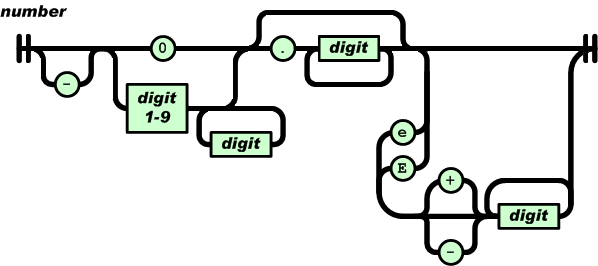
supporting octal notation. Here’s the railroad diagram for numbers <a href="https://www.json.org/json-en.html">from
the JSON specficaiton</a>:</p>

<p><img src="/img/diagram/json-number.png" alt="" />
<!-- Copyright (C) 2017 Ecma International --></p>

<p>Or in regular expression form:</p>

<div class="language-plaintext highlighter-rouge"><div class="highlight"><pre class="highlight"><code>-?(0|[1-9][0-9]*)(\.[0-9]+)?([eE][+-]?[0-9]+)?
</code></pre></div></div>

<p>If a token starts with <code class="language-plaintext highlighter-rouge">0</code> then it can only be followed by <code class="language-plaintext highlighter-rouge">.</code>, <code class="language-plaintext highlighter-rouge">e</code>,
or <code class="language-plaintext highlighter-rouge">E</code>. It cannot be followed by a digit. So, the natural human
response to mentally parsing <code class="language-plaintext highlighter-rouge">[01]</code> is: This input is invalid because
it contains a number with a leading zero, and leading zeros are not
accepted. <em>But this is not actually why parsing fails!</em></p>

<p>A simple model for the parser is as consuming tokens from a lexer. The
lexer’s job is to read individual code points (characters) from the
input and group them into tokens. The possible tokens are string,
number, left brace, right brace, left bracket, right bracket, comma,
true, false, and null. The lexer skips over insignificant whitespace,
and it doesn’t care about structure, like matching braces and
brackets. That’s the parser’s job.</p>

<p>In some instances the lexer can fail to parse a token. For example, if
while looking for a new token the lexer reads the character <code class="language-plaintext highlighter-rouge">%</code>, then
the input must be invalid. No token starts with this character. So in
some cases invalid input will be detected by the lexer.</p>

<p>The parser consumes tokens from the lexer and, using some state, ensures
the sequence of tokens is valid. For example, arrays must be a well
formed sequence of left bracket, value, comma, value, comma, etc., right
bracket. One way to reject input with trailing garbage, is for the lexer
to also produce an EOF (end of file/input) token when there are no more
tokens, and the parser could specifically check for that token before
accepting the input as valid.</p>

<p>Getting back to the input <code class="language-plaintext highlighter-rouge">[01]</code>, a JSON parser receives a left bracket
token, then updates its bookkeeping to track that it’s parsing an array.
When looking for the next token, the lexer sees the character <code class="language-plaintext highlighter-rouge">0</code>
followed by <code class="language-plaintext highlighter-rouge">1</code>. According to the railroad diagram, this is a number
token (starts with <code class="language-plaintext highlighter-rouge">0</code>), but <code class="language-plaintext highlighter-rouge">1</code> cannot be part of this token, so it
produces a number token with the contents “0”. Everything is still fine.</p>

<p>Next the lexer sees <code class="language-plaintext highlighter-rouge">1</code> followed by <code class="language-plaintext highlighter-rouge">]</code>. Since <code class="language-plaintext highlighter-rouge">]</code> cannot be part of a
number, it produces another number token with the contents “1”. The
parser receives this token but, since it’s parsing an array, it expects
either a comma token or a right bracket. Since this is neither, the
parser fails with an error about an unexpected number. <strong>The parser will
not complain about leading zeros because JSON has no concept of leading
zeros.</strong> Human intuition is right, but for the wrong reasons.</p>

<p>Try this for yourself in your favorite JSON parser. Or even just pop up
the JavaScript console in your browser and try it out:</p>

<div class="language-plaintext highlighter-rouge"><div class="highlight"><pre class="highlight"><code>JSON.parse('[01]');
</code></pre></div></div>

<p>Firefox reports:</p>

<blockquote>
  <p>SyntaxError: JSON.parse: expected ‘,’ or ‘]’ after array element</p>
</blockquote>

<p>Chromium reports:</p>

<blockquote>
  <p>SyntaxError: Unexpected number in JSON</p>
</blockquote>

<p>Edge reports (note it says “number” not “digit”):</p>

<blockquote>
  <p>Error: Invalid number at position:3</p>
</blockquote>

<p>In all cases the parsers accepted a zero as the first array element,
then rejected the input after the second number token for being a bad
sequence of tokens. In other words, this is a parser error rather than
a lexer error, as a human might intuit.</p>

<p><a href="https://github.com/skeeto/pdjson">My JSON parser</a> comes with a testing tool that shows the token
stream up until the parser rejects the input, useful for understanding
these situations:</p>

<div class="language-plaintext highlighter-rouge"><div class="highlight"><pre class="highlight"><code>$ echo '[01]' | tests/stream
struct expect seq[] = {
    {JSON_ARRAY},
    {JSON_NUMBER, "0"},
    {JSON_ERROR},
};
</code></pre></div></div>

<p>There’s an argument to be made here that perhaps the human readable
error message <em>should</em> mention leading zeros, since that’s likely the
cause of the invalid input. That is, a human probably thought JSON
allowed leading zeros, and so the clearer message would tell the human
that JSON does not allow leading zeros. This is the “more art than
science” part of parsing.</p>

<p>It’s the same story with this invalid input:</p>

<div class="language-plaintext highlighter-rouge"><div class="highlight"><pre class="highlight"><code>[truefalse]
</code></pre></div></div>

<p>From this input, the lexer <em>unambiguously</em> produces left bracket,
true, false, right bracket. It’s still up to the parser to reject this
input. The only reason we never see <code class="language-plaintext highlighter-rouge">truefalse</code> in valid JSON is that
the overall structure never allows these tokens to be adjacent, not
because they’d be ambiguous. Programming languages have identifiers,
and in a programming language this would parse as the identifier
<code class="language-plaintext highlighter-rouge">truefalse</code> rather than <code class="language-plaintext highlighter-rouge">true</code> followed by <code class="language-plaintext highlighter-rouge">false</code>. From this point of
view, JSON seems quite strange.</p>

<p>Just as before, Firefox reports:</p>

<blockquote>
  <p>SyntaxError: JSON.parse: expected ‘,’ or ‘]’ after array element</p>
</blockquote>

<p>Chromium reports the same error as it does for <code class="language-plaintext highlighter-rouge">[true false]</code>:</p>

<blockquote>
  <p>SyntaxError: Unexpected token f in JSON</p>
</blockquote>

<p>Edge’s message is probably a minor bug in their JSON parser:</p>

<blockquote>
  <p>Error: Expected ‘]’ at position:10</p>
</blockquote>

<p>Position 10 is the last character in <code class="language-plaintext highlighter-rouge">false</code>. The lexer consumed <code class="language-plaintext highlighter-rouge">false</code>
from the input, produced a “false” token, then the parser rejected the
input. When it reported the error, it chose the <em>end</em> of the invalid
token as the error position rather than the start, despite the fact that
the only two valid tokens (comma, right bracket) are both a single
character. It should also say “Expected ‘]’ or ‘,’” (as Firefox does)
rather than just “]”.</p>

<h3 id="concatenated-json">Concatenated JSON</h3>

<p>That’s all pretty academic. Except for producing nice error messages,
nobody really cares so much <em>why</em> the input was rejected. The mismatch
between intuition and reality isn’t important.</p>

<p>However, it <em>does</em> come up with concatenated JSON. Some parsers,
including mine, will optionally consume multiple JSON values, one after
another, from the same input. Here’s an example from <a href="/blog/2016/09/15/">one of my
favorite</a> command line tools, <a href="https://stedolan.github.io/jq/">jq</a>:</p>

<div class="language-plaintext highlighter-rouge"><div class="highlight"><pre class="highlight"><code>echo '{"x":0,"y":1}{"x":2,"y":3}{"x":4,"y":5}' | jq '.x + .y'
1
5
9
</code></pre></div></div>

<p>The input contains three unambiguously-concatenated JSON objects, so
the parser produces three distinct objects. Now consider this input,
this time outside of the context of an array:</p>

<div class="language-plaintext highlighter-rouge"><div class="highlight"><pre class="highlight"><code>01
</code></pre></div></div>

<p>Is this invalid, one number, or two numbers? According to the lexer and
parser model described above, this is valid and unambiguously two
concatenated numbers. Here’s what my parser says:</p>

<div class="language-plaintext highlighter-rouge"><div class="highlight"><pre class="highlight"><code>$ echo '01' | tests/stream
struct expect seq[] = {
    {JSON_NUMBER, "0"},
    {JSON_DONE},
    {JSON_NUMBER, "1"},
    {JSON_DONE},
    {JSON_ERROR},
};
</code></pre></div></div>

<p>Note: The <code class="language-plaintext highlighter-rouge">JSON_DONE</code> “token” indicates acceptance, and the <code class="language-plaintext highlighter-rouge">JSON_ERROR</code>
token is an EOF indicator, not a hard error. Since jq allows leading
zeros in its JSON input, it’s ambiguous and parses this as the number 1,
so asking its opinion on this input isn’t so interesting. I surveyed
some other JSON parsers that accept concatenated JSON:</p>

<ul>
  <li><a href="https://github.com/FasterXML/jackson">Jackson</a>: Reject as leading zero.</li>
  <li><a href="https://github.com/yonik/noggit">Noggit</a>: Reject as leading zero.</li>
  <li><a href="https://lloyd.github.io/yajl/">yajl</a>: Accept as two numbers.</li>
</ul>

<p>For my parser it’s the same story for <code class="language-plaintext highlighter-rouge">truefalse</code>:</p>

<div class="language-plaintext highlighter-rouge"><div class="highlight"><pre class="highlight"><code>echo 'truefalse' | tests/stream
struct expect seq[] = {
    {JSON_TRUE, "true"},
    {JSON_DONE},
    {JSON_FALSE, "false"},
    {JSON_DONE},
    {JSON_ERROR},
};
</code></pre></div></div>

<p>Neither rejecting nor accepting this input is wrong, per se.
Concatenated JSON is outside of the scope of JSON itself, and
concatenating arbitrary JSON objects without a whitespace delimiter can
lead to weird and ill-formed input. This is all a great argument in
favor or <a href="http://ndjson.org/">Newline Delimited JSON</a>, and its two simple rules:</p>

<ol>
  <li>Line separator is <code class="language-plaintext highlighter-rouge">'\n'</code></li>
  <li>Each line is a valid JSON value</li>
</ol>

<p>This solves the concatenation issue, and, even more, it works well with
parsers not supporting concatenation: Split the input on newlines and
pass each line to your JSON parser.</p>

]]>
    </content>
  </entry>


  <entry>
    <title>On-the-fly Linear Congruential Generator Using Emacs Calc</title>
    <link rel="alternate" type="text/html" href="https://nullprogram.com/blog/2019/11/19/"/>
    <id>urn:uuid:13e56720-ef3a-4fa4-a4ff-0a6fef914504</id>
    <updated>2019-11-19T01:17:50Z</updated>
    <category term="emacs"/><category term="crypto"/><category term="optimization"/><category term="c"/><category term="java"/><category term="javascript"/>
    <content type="html">
      <![CDATA[<p>I regularly make throwaway “projects” and do a surprising amount of
programming in <code class="language-plaintext highlighter-rouge">/tmp</code>. For Emacs Lisp, the equivalent is the
<code class="language-plaintext highlighter-rouge">*scratch*</code> buffer. These are places where I can make a mess, and the
mess usually gets cleaned up before it becomes a problem. A lot of my
established projects (<a href="/blog/2019/03/22/">ex</a>.) start out in volatile storage and
only graduate to more permanent storage once the concept has proven
itself.</p>

<p>Throughout my whole career, this sort of throwaway experimentation has
been an important part of my personal growth, and I try to <a href="/blog/2016/09/02/">encourage it
in others</a>. Even if the idea I’m trying doesn’t pan out, I usually
learn something new, and occasionally it translates into an article here.</p>

<p>I also enjoy small programming challenges. One of the most abused
tools in my mental toolbox is the Monte Carlo method, and I readily
apply it to solve toy problems. Even beyond this, random number
generators are frequently a useful tool (<a href="/blog/2017/04/27/">1</a>, <a href="/blog/2019/07/22/">2</a>), so I
find myself reaching for one all the time.</p>

<p>Nearly every programming language comes with a pseudo-random number
generation function or library. Unfortunately the language’s standard
PRNG is usually a poor choice (C, <a href="https://arvid.io/2018/06/30/on-cxx-random-number-generator-quality/">C++</a>, <a href="https://lowleveldesign.org/2018/08/15/randomness-in-net/">C#</a>, <a href="https://grokbase.com/t/gg/golang-nuts/155f6kbb7a/go-nuts-why-are-high-bits-used-by-math-rand-helpers-instead-of-low-ones">Go</a>).
It’s probably mediocre quality, <a href="/blog/2018/05/27/">slower than it needs to be</a>
(<a href="https://grokbase.com/t/gg/golang-nuts/155f6kbb7a/go-nuts-why-are-high-bits-used-by-math-rand-helpers-instead-of-low-ones">also</a>), <a href="https://lists.freebsd.org/pipermail/svn-src-head/2013-July/049068.html">lacks reliable semantics or behavior between
implementations</a>, or is missing some other property I want. So I’ve
long been a fan of <em>BYOPRNG:</em> Bring Your Own Pseudo-random Number
Generator. Just embed a generator with the desired properties directly
into the program. The <a href="/blog/2017/09/21/">best non-cryptographic PRNGs today</a> are
tiny and exceptionally friendly to embedding. Though, depending on what
you’re doing, you might <a href="/blog/2019/04/30/">need to be creative about seeding</a>.</p>

<h3 id="crafting-a-prng">Crafting a PRNG</h3>

<p>On occasion I don’t have an established, embeddable PRNG in reach, and
I have yet to commit xoshiro256** to memory. Or maybe I want to use
a totally unique PRNG for a particular project. In these cases I make
one up. With just a bit of know-how it’s not too difficult.</p>

<p>Probably the easiest decent PRNG to code from scratch is the venerable
<a href="https://en.wikipedia.org/wiki/Linear_congruential_generator">Linear Congruential Generator</a> (LCG). It’s a simple recurrence
relation:</p>

<div class="language-plaintext highlighter-rouge"><div class="highlight"><pre class="highlight"><code>x[1] = (x[0] * A + C) % M
</code></pre></div></div>

<p>That’s trivial to remember once you know the details. You only need to
choose appropriate values for <code class="language-plaintext highlighter-rouge">A</code>, <code class="language-plaintext highlighter-rouge">C</code>, and <code class="language-plaintext highlighter-rouge">M</code>. Done correctly, it
will be a <em>full-period</em> generator — a generator that visits a
permutation of each of the numbers between 0 and <code class="language-plaintext highlighter-rouge">M - 1</code>. The seed —
the value of <code class="language-plaintext highlighter-rouge">x[0]</code> — is chooses a starting position in this (looping)
permutation.</p>

<p><code class="language-plaintext highlighter-rouge">M</code> has a natural, obvious choice: a power of two matching the range of
operands, such as 2^32 or 2^64. With this the modulo operation is free
as a natural side effect of the computer architecture.</p>

<p>Choosing <code class="language-plaintext highlighter-rouge">C</code> also isn’t difficult. It must be co-prime with <code class="language-plaintext highlighter-rouge">M</code>, and
since <code class="language-plaintext highlighter-rouge">M</code> is a power of two, any odd number is valid. Even 1. In
theory choosing a small value like 1 is faster since the compiler
won’t need to embed a large integer in the code, but this difference
doesn’t show up in any micro-benchmarks I tried. If you want a cool,
unique generator, then choose a large random integer. More on that
below.</p>

<p>The tricky value is <code class="language-plaintext highlighter-rouge">A</code>, and getting it right is the linchpin of the
whole LCG. It must be coprime with <code class="language-plaintext highlighter-rouge">M</code> (i.e. not even), and, for a
full-period generator, <code class="language-plaintext highlighter-rouge">A-1</code> must be divisible by four. For better
results, <code class="language-plaintext highlighter-rouge">A-1</code> should not be divisible by 8. A good choice is a prime
number that satisfies these properties.</p>

<p>If your operands are 64-bit integers, or larger, how are you going to
generate a prime number?</p>

<h4 id="primes-from-emacs-calc">Primes from Emacs Calc</h4>

<p>Emacs Calc can solve this problem. I’ve <a href="/blog/2009/06/23/">noted before</a> how
featureful it is. It has arbitrary precision, random number
generation, and primality testing. It’s everything we need to choose
<code class="language-plaintext highlighter-rouge">A</code>. (In fact, this is nearly identical to <a href="/blog/2015/10/30/">the process I used to
implement RSA</a>.) For this example I’m going to generate a 64-bit
LCG for the C programming language, but it’s easy to use whatever
width you like and mostly whatever language you like. If you wanted a
<a href="http://www.pcg-random.org/posts/does-it-beat-the-minimal-standard.html">minimal standard 128-bit LCG</a>, this will still work.</p>

<p>Start by opening up Calc with <code class="language-plaintext highlighter-rouge">M-x calc</code>, then:</p>

<ol>
  <li>Push <code class="language-plaintext highlighter-rouge">2</code> on the stack</li>
  <li>Push <code class="language-plaintext highlighter-rouge">64</code> on the stack</li>
  <li>Press <code class="language-plaintext highlighter-rouge">^</code>, computing 2^64 and pushing it on the stack</li>
  <li>Press <code class="language-plaintext highlighter-rouge">k r</code> to generate a random number in this range</li>
  <li>Press <code class="language-plaintext highlighter-rouge">d r 16</code> to switch to hexadecimal display</li>
  <li>Press <code class="language-plaintext highlighter-rouge">k n</code> to find the next prime following the random value</li>
  <li>Repeat step 6 until you get a number that ends with <code class="language-plaintext highlighter-rouge">5</code> or <code class="language-plaintext highlighter-rouge">D</code></li>
  <li>Press <code class="language-plaintext highlighter-rouge">k p</code> a few times to avoid false positives.</li>
</ol>

<p>What’s left on the stack is your <code class="language-plaintext highlighter-rouge">A</code>! If you want a random value for
<code class="language-plaintext highlighter-rouge">C</code>, you can follow a similar process. Heck, make it prime, too!</p>

<p>The reason for using hexadecimal (step 5) and looking for <code class="language-plaintext highlighter-rouge">5</code> or <code class="language-plaintext highlighter-rouge">D</code>
(step 7) is that such numbers satisfy both of the important properties
for <code class="language-plaintext highlighter-rouge">A-1</code>.</p>

<p>Calc doesn’t try to factor your random integer. Instead it uses the
<a href="https://en.wikipedia.org/wiki/Miller%E2%80%93Rabin_primality_test">Miller–Rabin primality test</a>, a probabilistic test that, itself,
requires random numbers. It has false positives but no false negatives.
The false positives can be mitigated by repeating the test multiple
times, hence step 8.</p>

<p>Trying this all out right now, I got this implementation (in C):</p>

<div class="language-c highlighter-rouge"><div class="highlight"><pre class="highlight"><code><span class="kt">uint64_t</span> <span class="nf">lcg1</span><span class="p">(</span><span class="kt">void</span><span class="p">)</span>
<span class="p">{</span>
    <span class="k">static</span> <span class="kt">uint64_t</span> <span class="n">s</span> <span class="o">=</span> <span class="mi">0</span><span class="p">;</span>
    <span class="n">s</span> <span class="o">=</span> <span class="n">s</span><span class="o">*</span><span class="n">UINT64_C</span><span class="p">(</span><span class="mh">0x7c3c3267d015ceb5</span><span class="p">)</span> <span class="o">+</span> <span class="n">UINT64_C</span><span class="p">(</span><span class="mh">0x24bd2d95276253a9</span><span class="p">);</span>
    <span class="k">return</span> <span class="n">s</span><span class="p">;</span>
<span class="p">}</span>
</code></pre></div></div>

<p>However, we can still do a little better. Outputting the entire state
doesn’t have great results, so instead it’s better to create a
<em>truncated</em> LCG and only return some portion of the most significant
bits.</p>

<div class="language-c highlighter-rouge"><div class="highlight"><pre class="highlight"><code><span class="kt">uint32_t</span> <span class="nf">lcg2</span><span class="p">(</span><span class="kt">void</span><span class="p">)</span>
<span class="p">{</span>
    <span class="k">static</span> <span class="kt">uint64_t</span> <span class="n">s</span> <span class="o">=</span> <span class="mi">0</span><span class="p">;</span>
    <span class="n">s</span> <span class="o">=</span> <span class="n">s</span><span class="o">*</span><span class="n">UINT64_C</span><span class="p">(</span><span class="mh">0x7c3c3267d015ceb5</span><span class="p">)</span> <span class="o">+</span> <span class="n">UINT64_C</span><span class="p">(</span><span class="mh">0x24bd2d95276253a9</span><span class="p">);</span>
    <span class="k">return</span> <span class="n">s</span> <span class="o">&gt;&gt;</span> <span class="mi">32</span><span class="p">;</span>
<span class="p">}</span>
</code></pre></div></div>

<p>This won’t quite pass <a href="http://simul.iro.umontreal.ca/testu01/tu01.html">BigCrush</a> in 64-bit form, but the results
are pretty reasonable for most purposes.</p>

<p>But we can still do better without needing to remember much more than
this.</p>

<h3 id="appending-permutation">Appending permutation</h3>

<p>A <a href="http://www.pcg-random.org/">Permuted Congruential Generator</a> (PCG) is really just a
truncated LCG with a permutation applied to its output. Like LCGs
themselves, there are arbitrarily many variations. The “official”
implementation has a <a href="/blog/2018/02/07/">data-dependent shift</a>, for which I can
never remember the details. Fortunately a couple of simple, easy to
remember transformations is sufficient. Basically anything I used
<a href="/blog/2018/07/31/">while prospecting for hash functions</a>. I love xorshifts, so
lets add one of those:</p>

<div class="language-c highlighter-rouge"><div class="highlight"><pre class="highlight"><code><span class="kt">uint32_t</span> <span class="nf">pcg1</span><span class="p">(</span><span class="kt">void</span><span class="p">)</span>
<span class="p">{</span>
    <span class="k">static</span> <span class="kt">uint64_t</span> <span class="n">s</span> <span class="o">=</span> <span class="mi">0</span><span class="p">;</span>
    <span class="n">s</span> <span class="o">=</span> <span class="n">s</span><span class="o">*</span><span class="n">UINT64_C</span><span class="p">(</span><span class="mh">0x7c3c3267d015ceb5</span><span class="p">)</span> <span class="o">+</span> <span class="n">UINT64_C</span><span class="p">(</span><span class="mh">0x24bd2d95276253a9</span><span class="p">);</span>
    <span class="kt">uint32_t</span> <span class="n">r</span> <span class="o">=</span> <span class="n">s</span> <span class="o">&gt;&gt;</span> <span class="mi">32</span><span class="p">;</span>
    <span class="n">r</span> <span class="o">^=</span> <span class="n">r</span> <span class="o">&gt;&gt;</span> <span class="mi">16</span><span class="p">;</span>
    <span class="k">return</span> <span class="n">r</span><span class="p">;</span>
<span class="p">}</span>
</code></pre></div></div>

<p>This is a big improvement, but it still fails one BigCrush test. As
they say, when xorshift isn’t enough, use xorshift-multiply! Below I
generated a 32-bit prime for the multiply, but any odd integer is a
valid permutation.</p>

<div class="language-c highlighter-rouge"><div class="highlight"><pre class="highlight"><code><span class="kt">uint32_t</span> <span class="nf">pcg2</span><span class="p">(</span><span class="kt">void</span><span class="p">)</span>
<span class="p">{</span>
    <span class="k">static</span> <span class="kt">uint64_t</span> <span class="n">s</span> <span class="o">=</span> <span class="mi">0</span><span class="p">;</span>
    <span class="n">s</span> <span class="o">=</span> <span class="n">s</span><span class="o">*</span><span class="n">UINT64_C</span><span class="p">(</span><span class="mh">0x7c3c3267d015ceb5</span><span class="p">)</span> <span class="o">+</span> <span class="n">UINT64_C</span><span class="p">(</span><span class="mh">0x24bd2d95276253a9</span><span class="p">);</span>
    <span class="kt">uint32_t</span> <span class="n">r</span> <span class="o">=</span> <span class="n">s</span> <span class="o">&gt;&gt;</span> <span class="mi">32</span><span class="p">;</span>
    <span class="n">r</span> <span class="o">^=</span> <span class="n">r</span> <span class="o">&gt;&gt;</span> <span class="mi">16</span><span class="p">;</span>
    <span class="n">r</span> <span class="o">*=</span> <span class="n">UINT32_C</span><span class="p">(</span><span class="mh">0x60857ba9</span><span class="p">);</span>
    <span class="k">return</span> <span class="n">r</span><span class="p">;</span>
<span class="p">}</span>
</code></pre></div></div>

<p>This passes BigCrush, and I can reliably build a new one entirely from
scratch using Calc any time I need it.</p>

<h3 id="bonus-adapting-to-other-languages">Bonus: Adapting to other languages</h3>

<p>Sometimes it’s not so straightforward to adapt this technique to other
languages. For example, JavaScript has limited support for 32-bit
integer operations (enough for a poor 32-bit LCG) and no 64-bit
integer operations. Though <a href="https://developer.mozilla.org/en-US/docs/Web/JavaScript/Reference/Global_Objects/BigInt">BigInt</a> is now a thing, and should
make a great 96- or 128-bit LCG easy to build.</p>

<div class="language-js highlighter-rouge"><div class="highlight"><pre class="highlight"><code><span class="kd">function</span> <span class="nx">lcg</span><span class="p">(</span><span class="nx">seed</span><span class="p">)</span> <span class="p">{</span>
    <span class="kd">let</span> <span class="nx">s</span> <span class="o">=</span> <span class="nx">BigInt</span><span class="p">(</span><span class="nx">seed</span><span class="p">);</span>
    <span class="k">return</span> <span class="kd">function</span><span class="p">()</span> <span class="p">{</span>
        <span class="nx">s</span> <span class="o">*=</span> <span class="mh">0xef725caa331524261b9646cd</span><span class="nx">n</span><span class="p">;</span>
        <span class="nx">s</span> <span class="o">+=</span> <span class="mh">0x213734f2c0c27c292d814385</span><span class="nx">n</span><span class="p">;</span>
        <span class="nx">s</span> <span class="o">&amp;=</span> <span class="mh">0xffffffffffffffffffffffff</span><span class="nx">n</span><span class="p">;</span>
        <span class="k">return</span> <span class="nb">Number</span><span class="p">(</span><span class="nx">s</span> <span class="o">&gt;&gt;</span> <span class="mi">64</span><span class="nx">n</span><span class="p">);</span>
    <span class="p">}</span>
<span class="p">}</span>
</code></pre></div></div>

<p>Java doesn’t have unsigned integers, so how could you build the above
PCG in Java? Easy! First, remember is that Java has two’s complement
semantics, including wrap around, and that two’s complement doesn’t
care about unsigned or signed for multiplication (or addition, or
subtraction). The result is identical. Second, the oft-forgotten <code class="language-plaintext highlighter-rouge">&gt;&gt;&gt;</code>
operator does an unsigned right shift. With these two tips:</p>

<div class="language-java highlighter-rouge"><div class="highlight"><pre class="highlight"><code><span class="kt">long</span> <span class="n">s</span> <span class="o">=</span> <span class="mi">0</span><span class="o">;</span>

<span class="kt">int</span> <span class="nf">pcg2</span><span class="o">()</span> <span class="o">{</span>
    <span class="n">s</span> <span class="o">=</span> <span class="n">s</span><span class="o">*</span><span class="mh">0x7c3c3267d015ceb5</span><span class="no">L</span> <span class="o">+</span> <span class="mh">0x24bd2d95276253a9</span><span class="no">L</span><span class="o">;</span>
    <span class="kt">int</span> <span class="n">r</span> <span class="o">=</span> <span class="o">(</span><span class="kt">int</span><span class="o">)(</span><span class="n">s</span> <span class="o">&gt;&gt;&gt;</span> <span class="mi">32</span><span class="o">);</span>
    <span class="n">r</span> <span class="o">^=</span> <span class="n">r</span> <span class="o">&gt;&gt;&gt;</span> <span class="mi">16</span><span class="o">;</span>
    <span class="n">r</span> <span class="o">*=</span> <span class="mh">0x60857ba9</span><span class="o">;</span>
    <span class="k">return</span> <span class="n">r</span><span class="o">;</span>
<span class="o">}</span>
</code></pre></div></div>

<p>So, in addition to the Calc step list above, you may need to know some
of the finer details of your target language.</p>

]]>
    </content>
  </entry>


  <entry>
    <title>An Async / Await Library for Emacs Lisp</title>
    <link rel="alternate" type="text/html" href="https://nullprogram.com/blog/2019/03/10/"/>
    <id>urn:uuid:5d1462fa-a30d-432e-9a4f-827eb67862b2</id>
    <updated>2019-03-10T20:57:03Z</updated>
    <category term="emacs"/><category term="elisp"/><category term="lisp"/><category term="python"/><category term="javascript"/><category term="lang"/><category term="asyncio"/>
    <content type="html">
      <![CDATA[<p>As part of <a href="/blog/2019/02/24/">building my Python proficiency</a>, I’ve learned how to
use <a href="https://docs.python.org/3/library/asyncio.html">asyncio</a>. This new language feature <a href="https://docs.python.org/3/whatsnew/3.5.html#whatsnew-pep-492">first appeared in
Python 3.5</a> (<a href="https://www.python.org/dev/peps/pep-0492/">PEP 492</a>, September 2015). JavaScript grew <a href="https://developer.mozilla.org/en-US/docs/Web/JavaScript/Reference/Statements/async_function">a
nearly identical feature</a> in ES2017 (June 2017). An async function
can pause to await on an asynchronously computed result, much like a
generator pausing when it yields a value.</p>

<p>In fact, both Python and JavaScript async functions are essentially just
fancy generator functions with some specialized syntax and semantics.
That is, they’re <a href="https://blog.varunramesh.net/posts/stackless-vs-stackful-coroutines/">stackless coroutines</a>. Both languages already had
generators, so their generator-like async functions are a natural
extension that — unlike <a href="/blog/2017/06/21/"><em>stackful</em> coroutines</a> — do not require
significant, new runtime plumbing.</p>

<p>Emacs <a href="/blog/2018/05/31/">officially got generators in 25.1</a> (September 2016),
though, unlike Python and JavaScript, it didn’t require any additional
support from the compiler or runtime. It’s implemented entirely using
Lisp macros. In other words, it’s just another library, not a core
language feature. In theory, the generator library could be easily
backported to the first Emacs release to <a href="/blog/2016/12/22/">properly support lexical
closures</a>, Emacs 24.1 (June 2012).</p>

<p>For the same reason, stackless async/await coroutines can also be
implemented as a library. So that’s what I did, letting Emacs’ generator
library do most of the heavy lifting. The package is called <code class="language-plaintext highlighter-rouge">aio</code>:</p>

<ul>
  <li><strong><a href="https://github.com/skeeto/emacs-aio">https://github.com/skeeto/emacs-aio</a></strong></li>
</ul>

<p>It’s modeled more closely on JavaScript’s async functions than Python’s
asyncio, with the core representation being <em>promises</em> rather than a
coroutine objects. I just have an easier time reasoning about promises
than coroutines.</p>

<p>I’m definitely <a href="https://github.com/chuntaro/emacs-async-await">not the first person to realize this was
possible</a>, and was beaten to the punch by two years. Wanting to
<a href="http://www.winestockwebdesign.com/Essays/Lisp_Curse.html">avoid fragmentation</a>, I set aside all formality in my first
iteration on the idea, not even bothering with namespacing my
identifiers. It was to be only an educational exercise. However, I got
quite attached to my little toy. Once I got my head wrapped around the
problem, everything just sort of clicked into place so nicely.</p>

<p>In this article I will show step-by-step one way to build async/await
on top of generators, laying out one concept at a time and then
building upon each. But first, some examples to illustrate the desired
final result.</p>

<h3 id="aio-example">aio example</h3>

<p>Ignoring <a href="/blog/2016/06/16/">all its problems</a> for a moment, suppose you want to use
<code class="language-plaintext highlighter-rouge">url-retrieve</code> to fetch some content from a URL and return it. To keep
this simple, I’m going to omit error handling. Also assume that
<code class="language-plaintext highlighter-rouge">lexical-binding</code> is <code class="language-plaintext highlighter-rouge">t</code> for all examples. Besides, lexical scope
required by the generator library, and therefore also required by <code class="language-plaintext highlighter-rouge">aio</code>.</p>

<p>The most naive approach is to fetch the content synchronously:</p>

<div class="language-cl highlighter-rouge"><div class="highlight"><pre class="highlight"><code><span class="p">(</span><span class="nb">defun</span> <span class="nv">fetch-fortune-1</span> <span class="p">(</span><span class="nv">url</span><span class="p">)</span>
  <span class="p">(</span><span class="k">let</span> <span class="p">((</span><span class="nv">buffer</span> <span class="p">(</span><span class="nv">url-retrieve-synchronously</span> <span class="nv">url</span><span class="p">)))</span>
    <span class="p">(</span><span class="nv">with-current-buffer</span> <span class="nv">buffer</span>
      <span class="p">(</span><span class="nb">prog1</span> <span class="p">(</span><span class="nv">buffer-string</span><span class="p">)</span>
        <span class="p">(</span><span class="nv">kill-buffer</span><span class="p">)))))</span>
</code></pre></div></div>

<p>The result is returned directly, and errors are communicated by an error
signal (e.g. Emacs’ version of exceptions). This is convenient, but the
function will block the main thread, locking up Emacs until the result
has arrived. This is obviously very undesirable, so, in practice,
everyone nearly always uses the asynchronous version:</p>

<div class="language-cl highlighter-rouge"><div class="highlight"><pre class="highlight"><code><span class="p">(</span><span class="nb">defun</span> <span class="nv">fetch-fortune-2</span> <span class="p">(</span><span class="nv">url</span> <span class="nv">callback</span><span class="p">)</span>
  <span class="p">(</span><span class="nv">url-retrieve</span> <span class="nv">url</span> <span class="p">(</span><span class="k">lambda</span> <span class="p">(</span><span class="nv">_status</span><span class="p">)</span>
                      <span class="p">(</span><span class="nb">funcall</span> <span class="nv">callback</span> <span class="p">(</span><span class="nv">buffer-string</span><span class="p">)))))</span>
</code></pre></div></div>

<p>The main thread no longer blocks, but it’s a whole lot less
convenient. The result isn’t returned to the caller, and instead the
caller supplies a callback function. The result, whether success or
failure, will be delivered via callback, so the caller must split
itself into two pieces: the part before the callback and the callback
itself. Errors cannot be delivered using a error signal because of the
inverted flow control.</p>

<p>The situation gets worse if, say, you need to fetch results from two
different URLs. You either fetch results one at a time (inefficient),
or you manage two different callbacks that could be invoked in any
order, and therefore have to coordinate.</p>

<p><em>Wouldn’t it be nice for the function to work like the first example,
but be asynchronous like the second example?</em> Enter async/await:</p>

<div class="language-cl highlighter-rouge"><div class="highlight"><pre class="highlight"><code><span class="p">(</span><span class="nv">aio-defun</span> <span class="nv">fetch-fortune-3</span> <span class="p">(</span><span class="nv">url</span><span class="p">)</span>
  <span class="p">(</span><span class="k">let</span> <span class="p">((</span><span class="nv">buffer</span> <span class="p">(</span><span class="nv">aio-await</span> <span class="p">(</span><span class="nv">aio-url-retrieve</span> <span class="nv">url</span><span class="p">))))</span>
    <span class="p">(</span><span class="nv">with-current-buffer</span> <span class="nv">buffer</span>
      <span class="p">(</span><span class="nb">prog1</span> <span class="p">(</span><span class="nv">buffer-string</span><span class="p">)</span>
        <span class="p">(</span><span class="nv">kill-buffer</span><span class="p">)))))</span>
</code></pre></div></div>

<p>A function defined with <code class="language-plaintext highlighter-rouge">aio-defun</code> is just like <code class="language-plaintext highlighter-rouge">defun</code> except that
it can use <code class="language-plaintext highlighter-rouge">aio-await</code> to pause and wait on any other function defined
with <code class="language-plaintext highlighter-rouge">aio-defun</code> — or, more specifically, any function that returns a
promise. Borrowing Python parlance: Returning a promise makes a
function <em>awaitable</em>. If there’s an error, it’s delivered as a error
signal from <code class="language-plaintext highlighter-rouge">aio-url-retrieve</code>, just like the first example. When
called, this function returns immediately with a promise object that
represents a future result. The caller might look like this:</p>

<div class="language-cl highlighter-rouge"><div class="highlight"><pre class="highlight"><code><span class="p">(</span><span class="nv">defcustom</span> <span class="nv">fortune-url</span> <span class="o">...</span><span class="p">)</span>

<span class="p">(</span><span class="nv">aio-defun</span> <span class="nv">display-fortune</span> <span class="p">()</span>
  <span class="p">(</span><span class="nv">interactive</span><span class="p">)</span>
  <span class="p">(</span><span class="nv">message</span> <span class="s">"%s"</span> <span class="p">(</span><span class="nv">aio-await</span> <span class="p">(</span><span class="nv">fetch-fortune-3</span> <span class="nv">fortune-url</span><span class="p">))))</span>
</code></pre></div></div>

<p>How wonderfully clean that looks! And, yes, it even works with
<code class="language-plaintext highlighter-rouge">interactive</code> like that. I can <code class="language-plaintext highlighter-rouge">M-x display-fortune</code> and a fortune is
printed in the minibuffer as soon as the result arrives from the
server. In the meantime Emacs doesn’t block and I can continue my
work.</p>

<p>You can’t do anything you couldn’t already do before. It’s just a
nicer way to organize the same callbacks: <em>implicit</em> rather than
<em>explicit</em>.</p>

<h3 id="promises-simplified">Promises, simplified</h3>

<p>The core object at play is the <em>promise</em>. Promises are already a
rather simple concept, but <code class="language-plaintext highlighter-rouge">aio</code> promises have been distilled to their
essence, as they’re only needed for this singular purpose. More on
this later.</p>

<p>As I said, a promise represents a future result. In practical terms, a
promise is just an object to which one can subscribe with a callback.
When the result is ready, the callbacks are invoked. Another way to
put it is that <em>promises <a href="https://en.wikipedia.org/wiki/Reification_(computer_science)">reify</a> the concept of callbacks</em>. A
callback is no longer just the idea of extra argument on a function.
It’s a first-class <em>thing</em> that itself can be passed around as a
value.</p>

<p>Promises have two slots: the final promise <em>result</em> and a list of
<em>subscribers</em>. A <code class="language-plaintext highlighter-rouge">nil</code> result means the result hasn’t been computed
yet. It’s so simple I’m not even <a href="/blog/2018/02/14/">bothering with <code class="language-plaintext highlighter-rouge">cl-struct</code></a>.</p>

<div class="language-cl highlighter-rouge"><div class="highlight"><pre class="highlight"><code><span class="p">(</span><span class="nb">defun</span> <span class="nv">aio-promise</span> <span class="p">()</span>
  <span class="s">"Create a new promise object."</span>
  <span class="p">(</span><span class="nv">record</span> <span class="ss">'aio-promise</span> <span class="no">nil</span> <span class="p">()))</span>

<span class="p">(</span><span class="nv">defsubst</span> <span class="nv">aio-promise-p</span> <span class="p">(</span><span class="nv">object</span><span class="p">)</span>
  <span class="p">(</span><span class="nb">and</span> <span class="p">(</span><span class="nb">eq</span> <span class="ss">'aio-promise</span> <span class="p">(</span><span class="nb">type-of</span> <span class="nv">object</span><span class="p">))</span>
       <span class="p">(</span><span class="nb">=</span> <span class="mi">3</span> <span class="p">(</span><span class="nb">length</span> <span class="nv">object</span><span class="p">))))</span>

<span class="p">(</span><span class="nv">defsubst</span> <span class="nv">aio-result</span> <span class="p">(</span><span class="nv">promise</span><span class="p">)</span>
  <span class="p">(</span><span class="nb">aref</span> <span class="nv">promise</span> <span class="mi">1</span><span class="p">))</span>
</code></pre></div></div>

<p>To subscribe to a promise, use <code class="language-plaintext highlighter-rouge">aio-listen</code>:</p>

<div class="language-cl highlighter-rouge"><div class="highlight"><pre class="highlight"><code><span class="p">(</span><span class="nb">defun</span> <span class="nv">aio-listen</span> <span class="p">(</span><span class="nv">promise</span> <span class="nv">callback</span><span class="p">)</span>
  <span class="p">(</span><span class="k">let</span> <span class="p">((</span><span class="nv">result</span> <span class="p">(</span><span class="nv">aio-result</span> <span class="nv">promise</span><span class="p">)))</span>
    <span class="p">(</span><span class="k">if</span> <span class="nv">result</span>
        <span class="p">(</span><span class="nv">run-at-time</span> <span class="mi">0</span> <span class="no">nil</span> <span class="nv">callback</span> <span class="nv">result</span><span class="p">)</span>
      <span class="p">(</span><span class="nb">push</span> <span class="nv">callback</span> <span class="p">(</span><span class="nb">aref</span> <span class="nv">promise</span> <span class="mi">2</span><span class="p">)))))</span>
</code></pre></div></div>

<p>If the result isn’t ready yet, add the callback to the list of
subscribers. If the result is ready <em>call the callback in the next
event loop turn</em> using <code class="language-plaintext highlighter-rouge">run-at-time</code>. This is important because it
keeps all the asynchronous components isolated from one another. They
won’t see each others’ frames on the call stack, nor frames from
<code class="language-plaintext highlighter-rouge">aio</code>. This is so important that the <a href="https://promisesaplus.com/">Promises/A+ specification</a>
is explicit about it.</p>

<p>The other half of the equation is resolving a promise, which is done
with <code class="language-plaintext highlighter-rouge">aio-resolve</code>. Unlike other promises, <code class="language-plaintext highlighter-rouge">aio</code> promises don’t care
whether the promise is being <em>fulfilled</em> (success) or <em>rejected</em>
(error). Instead a promise is resolved using a <em>value function</em> — or,
usually, a <em>value closure</em>. Subscribers receive this value function
and extract the value by invoking it with no arguments.</p>

<p>Why? This lets the promise’s resolver decide the semantics of the
result. Instead of returning a value, this function can instead signal
an error, propagating an error signal that terminated an async function.
Because of this, the promise doesn’t need to know how it’s being
resolved.</p>

<p>When a promise is resolved, subscribers are each scheduled in their own
event loop turns in the same order that they subscribed. If a promise
has already been resolved, nothing happens. (Thought: Perhaps this
should be an error in order to catch API misuse?)</p>

<div class="language-cl highlighter-rouge"><div class="highlight"><pre class="highlight"><code><span class="p">(</span><span class="nb">defun</span> <span class="nv">aio-resolve</span> <span class="p">(</span><span class="nv">promise</span> <span class="nv">value-function</span><span class="p">)</span>
  <span class="p">(</span><span class="nb">unless</span> <span class="p">(</span><span class="nv">aio-result</span> <span class="nv">promise</span><span class="p">)</span>
    <span class="p">(</span><span class="k">let</span> <span class="p">((</span><span class="nv">callbacks</span> <span class="p">(</span><span class="nb">nreverse</span> <span class="p">(</span><span class="nb">aref</span> <span class="nv">promise</span> <span class="mi">2</span><span class="p">))))</span>
      <span class="p">(</span><span class="nb">setf</span> <span class="p">(</span><span class="nb">aref</span> <span class="nv">promise</span> <span class="mi">1</span><span class="p">)</span> <span class="nv">value-function</span>
            <span class="p">(</span><span class="nb">aref</span> <span class="nv">promise</span> <span class="mi">2</span><span class="p">)</span> <span class="p">())</span>
      <span class="p">(</span><span class="nb">dolist</span> <span class="p">(</span><span class="nv">callback</span> <span class="nv">callbacks</span><span class="p">)</span>
        <span class="p">(</span><span class="nv">run-at-time</span> <span class="mi">0</span> <span class="no">nil</span> <span class="nv">callback</span> <span class="nv">value-function</span><span class="p">)))))</span>
</code></pre></div></div>

<p>If you’re not an async function, you might subscribe to a promise like
so:</p>

<div class="language-cl highlighter-rouge"><div class="highlight"><pre class="highlight"><code><span class="p">(</span><span class="nv">aio-listen</span> <span class="nv">promise</span> <span class="p">(</span><span class="k">lambda</span> <span class="p">(</span><span class="nv">v</span><span class="p">)</span>
                      <span class="p">(</span><span class="nv">message</span> <span class="s">"%s"</span> <span class="p">(</span><span class="nb">funcall</span> <span class="nv">v</span><span class="p">))))</span>
</code></pre></div></div>

<p>The simplest example of a non-async function that creates and delivers
on a promise is a “sleep” function:</p>

<div class="language-cl highlighter-rouge"><div class="highlight"><pre class="highlight"><code><span class="p">(</span><span class="nb">defun</span> <span class="nv">aio-sleep</span> <span class="p">(</span><span class="nv">seconds</span> <span class="k">&amp;optional</span> <span class="nv">result</span><span class="p">)</span>
  <span class="p">(</span><span class="k">let</span> <span class="p">((</span><span class="nv">promise</span> <span class="p">(</span><span class="nv">aio-promise</span><span class="p">))</span>
        <span class="p">(</span><span class="nv">value-function</span> <span class="p">(</span><span class="k">lambda</span> <span class="p">()</span> <span class="nv">result</span><span class="p">)))</span>
    <span class="p">(</span><span class="nb">prog1</span> <span class="nv">promise</span>
      <span class="p">(</span><span class="nv">run-at-time</span> <span class="nv">seconds</span> <span class="no">nil</span>
                   <span class="nf">#'</span><span class="nv">aio-resolve</span> <span class="nv">promise</span> <span class="nv">value-function</span><span class="p">))))</span>
</code></pre></div></div>

<p>Similarly, here’s a “timeout” promise that delivers a special timeout
error signal at a given time in the future.</p>

<div class="language-cl highlighter-rouge"><div class="highlight"><pre class="highlight"><code><span class="p">(</span><span class="nb">defun</span> <span class="nv">aio-timeout</span> <span class="p">(</span><span class="nv">seconds</span><span class="p">)</span>
  <span class="p">(</span><span class="k">let</span> <span class="p">((</span><span class="nv">promise</span> <span class="p">(</span><span class="nv">aio-promise</span><span class="p">))</span>
        <span class="p">(</span><span class="nv">value-function</span> <span class="p">(</span><span class="k">lambda</span> <span class="p">()</span> <span class="p">(</span><span class="nb">signal</span> <span class="ss">'aio-timeout</span> <span class="no">nil</span><span class="p">))))</span>
    <span class="p">(</span><span class="nb">prog1</span> <span class="nv">promise</span>
      <span class="p">(</span><span class="nv">run-at-time</span> <span class="nv">seconds</span> <span class="no">nil</span>
                   <span class="nf">#'</span><span class="nv">aio-resolve</span> <span class="nv">promise</span> <span class="nv">value-function</span><span class="p">))))</span>
</code></pre></div></div>

<p>That’s all there is to promises.</p>

<h3 id="evaluate-in-the-context-of-a-promise">Evaluate in the context of a promise</h3>

<p>Before we get into pausing functions, lets deal with the slightly
simpler matter of delivering their return values using a promise. What
we need is a way to evaluate a “body” and capture its result in a
promise. If the body exits due to a signal, we want to capture that as
well.</p>

<p>Here’s a macro that does just this:</p>

<div class="language-cl highlighter-rouge"><div class="highlight"><pre class="highlight"><code><span class="p">(</span><span class="nb">defmacro</span> <span class="nv">aio-with-promise</span> <span class="p">(</span><span class="nv">promise</span> <span class="k">&amp;rest</span> <span class="nv">body</span><span class="p">)</span>
  <span class="o">`</span><span class="p">(</span><span class="nv">aio-resolve</span> <span class="o">,</span><span class="nv">promise</span>
                <span class="p">(</span><span class="nv">condition-case</span> <span class="nb">error</span>
                    <span class="p">(</span><span class="k">let</span> <span class="p">((</span><span class="nv">result</span> <span class="p">(</span><span class="k">progn</span> <span class="o">,@</span><span class="nv">body</span><span class="p">)))</span>
                      <span class="p">(</span><span class="k">lambda</span> <span class="p">()</span> <span class="nv">result</span><span class="p">))</span>
                  <span class="p">(</span><span class="nb">error</span> <span class="p">(</span><span class="k">lambda</span> <span class="p">()</span>
                           <span class="p">(</span><span class="nb">signal</span> <span class="p">(</span><span class="nb">car</span> <span class="nb">error</span><span class="p">)</span> <span class="c1">; rethrow</span>
                                   <span class="p">(</span><span class="nb">cdr</span> <span class="nb">error</span><span class="p">)))))))</span>
</code></pre></div></div>

<p>The body result is captured in a closure and delivered to the promise.
If there’s an error signal, it’s “<em>rethrown</em>” into subscribers by the
promise’s value function.</p>

<p>This is where Emacs Lisp has a serious weak spot. There’s not really a
concept of rethrowing a signal. Unlike a language with explicit
exception objects that can capture a snapshot of the backtrace, the
original backtrace is completely lost where the signal is caught.
There’s no way to “reattach” it to the signal when it’s rethrown. This
is unfortunate because it would greatly help debugging if you got to see
the full backtrace on the other side of the promise.</p>

<h3 id="async-functions">Async functions</h3>

<p>So we have promises and we want to pause a function on a promise.
Generators have <code class="language-plaintext highlighter-rouge">iter-yield</code> for pausing an iterator’s execution. To
tackle this problem:</p>

<ol>
  <li>Yield the promise to pause the iterator.</li>
  <li>Subscribe a callback on the promise that continues the generator
(<code class="language-plaintext highlighter-rouge">iter-next</code>) with the promise’s result as the yield result.</li>
</ol>

<p>All the hard work is done in either side of the yield, so <code class="language-plaintext highlighter-rouge">aio-await</code> is
just a simple wrapper around <code class="language-plaintext highlighter-rouge">iter-yield</code>:</p>

<div class="language-cl highlighter-rouge"><div class="highlight"><pre class="highlight"><code><span class="p">(</span><span class="nb">defmacro</span> <span class="nv">aio-await</span> <span class="p">(</span><span class="nv">expr</span><span class="p">)</span>
  <span class="o">`</span><span class="p">(</span><span class="nb">funcall</span> <span class="p">(</span><span class="nv">iter-yield</span> <span class="o">,</span><span class="nv">expr</span><span class="p">)))</span>
</code></pre></div></div>

<p>Remember, that <code class="language-plaintext highlighter-rouge">funcall</code> is here to extract the promise value from the
value function. If it signals an error, this propagates directly into
the iterator just as if it had been a direct call — minus an accurate
backtrace.</p>

<p>So <code class="language-plaintext highlighter-rouge">aio-lambda</code> / <code class="language-plaintext highlighter-rouge">aio-defun</code> needs to wrap the body in a generator
(<code class="language-plaintext highlighter-rouge">iter-lamba</code>), invoke it to produce a generator, then drive the
generator using callbacks. Here’s a simplified, unhygienic definition of
<code class="language-plaintext highlighter-rouge">aio-lambda</code>:</p>

<div class="language-cl highlighter-rouge"><div class="highlight"><pre class="highlight"><code><span class="p">(</span><span class="nb">defmacro</span> <span class="nv">aio-lambda</span> <span class="p">(</span><span class="nv">arglist</span> <span class="k">&amp;rest</span> <span class="nv">body</span><span class="p">)</span>
  <span class="o">`</span><span class="p">(</span><span class="k">lambda</span> <span class="p">(</span><span class="k">&amp;rest</span> <span class="nv">args</span><span class="p">)</span>
     <span class="p">(</span><span class="k">let</span> <span class="p">((</span><span class="nv">promise</span> <span class="p">(</span><span class="nv">aio-promise</span><span class="p">))</span>
           <span class="p">(</span><span class="nv">iter</span> <span class="p">(</span><span class="nb">apply</span> <span class="p">(</span><span class="nv">iter-lambda</span> <span class="o">,</span><span class="nv">arglist</span>
                          <span class="p">(</span><span class="nv">aio-with-promise</span> <span class="nv">promise</span>
                            <span class="o">,@</span><span class="nv">body</span><span class="p">))</span>
                        <span class="nv">args</span><span class="p">)))</span>
       <span class="p">(</span><span class="nb">prog1</span> <span class="nv">promise</span>
         <span class="p">(</span><span class="nv">aio--step</span> <span class="nv">iter</span> <span class="nv">promise</span> <span class="no">nil</span><span class="p">)))))</span>
</code></pre></div></div>

<p>The body is evaluated inside <code class="language-plaintext highlighter-rouge">aio-with-promise</code> with the result
delivered to the promise returned directly by the async function.</p>

<p>Before returning, the iterator is handed to <code class="language-plaintext highlighter-rouge">aio--step</code>, which drives
the iterator forward until it delivers its first promise. When the
iterator yields a promise, <code class="language-plaintext highlighter-rouge">aio--step</code> attaches a callback back to
itself on the promise as described above. Immediately driving the
iterator up to the first yielded promise “primes” it, which is
important for getting the ball rolling on any asynchronous operations.</p>

<p>If the iterator ever yields something other than a promise, it’s
delivered right back into the iterator.</p>

<div class="language-cl highlighter-rouge"><div class="highlight"><pre class="highlight"><code><span class="p">(</span><span class="nb">defun</span> <span class="nv">aio--step</span> <span class="p">(</span><span class="nv">iter</span> <span class="nv">promise</span> <span class="nv">yield-result</span><span class="p">)</span>
  <span class="p">(</span><span class="nv">condition-case</span> <span class="nv">_</span>
      <span class="p">(</span><span class="nv">cl-loop</span> <span class="nv">for</span> <span class="nv">result</span> <span class="nb">=</span> <span class="p">(</span><span class="nv">iter-next</span> <span class="nv">iter</span> <span class="nv">yield-result</span><span class="p">)</span>
               <span class="nv">then</span> <span class="p">(</span><span class="nv">iter-next</span> <span class="nv">iter</span> <span class="p">(</span><span class="k">lambda</span> <span class="p">()</span> <span class="nv">result</span><span class="p">))</span>
               <span class="nv">until</span> <span class="p">(</span><span class="nv">aio-promise-p</span> <span class="nv">result</span><span class="p">)</span>
               <span class="nv">finally</span> <span class="p">(</span><span class="nv">aio-listen</span> <span class="nv">result</span>
                                   <span class="p">(</span><span class="k">lambda</span> <span class="p">(</span><span class="nv">value</span><span class="p">)</span>
                                     <span class="p">(</span><span class="nv">aio--step</span> <span class="nv">iter</span> <span class="nv">promise</span> <span class="nv">value</span><span class="p">))))</span>
    <span class="p">(</span><span class="nv">iter-end-of-sequence</span><span class="p">)))</span>
</code></pre></div></div>

<p>When the iterator is done, nothing more needs to happen since the
iterator resolves its own return value promise.</p>

<p>The definition of <code class="language-plaintext highlighter-rouge">aio-defun</code> just uses <code class="language-plaintext highlighter-rouge">aio-lambda</code> with <code class="language-plaintext highlighter-rouge">defalias</code>.
There’s nothing to it.</p>

<p>That’s everything you need! Everything else in the package is merely
useful, awaitable functions like <code class="language-plaintext highlighter-rouge">aio-sleep</code> and <code class="language-plaintext highlighter-rouge">aio-timeout</code>.</p>

<h3 id="composing-promises">Composing promises</h3>

<p>Unfortunately <code class="language-plaintext highlighter-rouge">url-retrieve</code> doesn’t support timeouts. We can work
around this by composing two promises: a <code class="language-plaintext highlighter-rouge">url-retrieve</code> promise and
<code class="language-plaintext highlighter-rouge">aio-timeout</code> promise. First define a promise-returning function,
<code class="language-plaintext highlighter-rouge">aio-select</code> that takes a list of promises and returns (as another
promise) the first promise to resolve:</p>

<div class="language-cl highlighter-rouge"><div class="highlight"><pre class="highlight"><code><span class="p">(</span><span class="nb">defun</span> <span class="nv">aio-select</span> <span class="p">(</span><span class="nv">promises</span><span class="p">)</span>
  <span class="p">(</span><span class="k">let</span> <span class="p">((</span><span class="nv">result</span> <span class="p">(</span><span class="nv">aio-promise</span><span class="p">)))</span>
    <span class="p">(</span><span class="nb">prog1</span> <span class="nv">result</span>
      <span class="p">(</span><span class="nb">dolist</span> <span class="p">(</span><span class="nv">promise</span> <span class="nv">promises</span><span class="p">)</span>
        <span class="p">(</span><span class="nv">aio-listen</span> <span class="nv">promise</span> <span class="p">(</span><span class="k">lambda</span> <span class="p">(</span><span class="nv">_</span><span class="p">)</span>
                              <span class="p">(</span><span class="nv">aio-resolve</span>
                               <span class="nv">result</span>
                               <span class="p">(</span><span class="k">lambda</span> <span class="p">()</span> <span class="nv">promise</span><span class="p">))))))))</span>
</code></pre></div></div>

<p>We give <code class="language-plaintext highlighter-rouge">aio-select</code> both our <code class="language-plaintext highlighter-rouge">url-retrieve</code> and <code class="language-plaintext highlighter-rouge">timeout</code> promises, and
it tells us which resolved first:</p>

<div class="language-cl highlighter-rouge"><div class="highlight"><pre class="highlight"><code><span class="p">(</span><span class="nv">aio-defun</span> <span class="nv">fetch-fortune-4</span> <span class="p">(</span><span class="nv">url</span> <span class="nv">timeout</span><span class="p">)</span>
  <span class="p">(</span><span class="k">let*</span> <span class="p">((</span><span class="nv">promises</span> <span class="p">(</span><span class="nb">list</span> <span class="p">(</span><span class="nv">aio-url-retrieve</span> <span class="nv">url</span><span class="p">)</span>
                         <span class="p">(</span><span class="nv">aio-timeout</span> <span class="nv">timeout</span><span class="p">)))</span>
         <span class="p">(</span><span class="nv">fastest</span> <span class="p">(</span><span class="nv">aio-await</span> <span class="p">(</span><span class="nv">aio-select</span> <span class="nv">promises</span><span class="p">)))</span>
         <span class="p">(</span><span class="nv">buffer</span> <span class="p">(</span><span class="nv">aio-await</span> <span class="nv">fastest</span><span class="p">)))</span>
    <span class="p">(</span><span class="nv">with-current-buffer</span> <span class="nv">buffer</span>
      <span class="p">(</span><span class="nb">prog1</span> <span class="p">(</span><span class="nv">buffer-string</span><span class="p">)</span>
        <span class="p">(</span><span class="nv">kill-buffer</span><span class="p">)))))</span>
</code></pre></div></div>

<p>Cool! Note: This will not actually cancel the URL request, just move
the async function forward earlier and prevent it from getting the
result.</p>

<h3 id="threads">Threads</h3>

<p>Despite <code class="language-plaintext highlighter-rouge">aio</code> being entirely about managing concurrent, asynchronous
operations, it has nothing at all to do with threads — as in Emacs 26’s
support for kernel threads. All async functions and promise callbacks
are expected to run <em>only</em> on the main thread. That’s not to say an
async function can’t await on a result from another thread. It just must
be <a href="/blog/2017/02/14/">done very carefully</a>.</p>

<h3 id="processes">Processes</h3>

<p>The package also includes two functions for realizing promises on
processes, whether they be subprocesses or network sockets.</p>

<ul>
  <li><code class="language-plaintext highlighter-rouge">aio-process-filter</code></li>
  <li><code class="language-plaintext highlighter-rouge">aio-process-sentinel</code></li>
</ul>

<p>For example, this function loops over each chunk of output (typically
4kB) from the process, as delivered to a filter function:</p>

<div class="language-cl highlighter-rouge"><div class="highlight"><pre class="highlight"><code><span class="p">(</span><span class="nv">aio-defun</span> <span class="nv">process-chunks</span> <span class="p">(</span><span class="nv">process</span><span class="p">)</span>
  <span class="p">(</span><span class="nv">cl-loop</span> <span class="nv">for</span> <span class="nv">chunk</span> <span class="nb">=</span> <span class="p">(</span><span class="nv">aio-await</span> <span class="p">(</span><span class="nv">aio-process-filter</span> <span class="nv">process</span><span class="p">))</span>
           <span class="nv">while</span> <span class="nv">chunk</span>
           <span class="nb">do</span> <span class="p">(</span><span class="o">...</span> <span class="nv">process</span> <span class="nv">chunk</span> <span class="o">...</span><span class="p">)))</span>
</code></pre></div></div>

<p>Exercise for the reader: Write an awaitable function that returns a line
at at time rather than a chunk at a time. You can build it on top of
<code class="language-plaintext highlighter-rouge">aio-process-filter</code>.</p>

<p>I considered wrapping functions like <code class="language-plaintext highlighter-rouge">start-process</code> so that their <code class="language-plaintext highlighter-rouge">aio</code>
versions would return a promise representing some kind of result from
the process. However there are <em>so</em> many different ways to create and
configure processes that I would have ended up duplicating all the
process functions. Focusing on the filter and sentinel, and letting the
caller create and configure the process is much cleaner.</p>

<p>Unfortunately Emacs has no asynchronous API for writing output to a
process. Both <code class="language-plaintext highlighter-rouge">process-send-string</code> and <code class="language-plaintext highlighter-rouge">process-send-region</code> will block
if the pipe or socket is full. There is no callback, so you cannot await
on writing output. Maybe there’s a way to do it with a dedicated thread?</p>

<p>Another issue is that the <code class="language-plaintext highlighter-rouge">process-send-*</code> functions <a href="/blog/2013/01/14/">are
preemptible</a>, made necessary because they block. The
<code class="language-plaintext highlighter-rouge">aio-process-*</code> functions leave a gap (i.e. between filter awaits)
where no filter or sentinel function is attached. It’s a consequence
of promises being single-fire. The gap is harmless so long as the
async function doesn’t await something else or get preempted. This
needs some more thought.</p>

<p><strong><em>Update</em></strong>: These process functions no longer exist and have been
replaced by a small framework for building chains of promises. See
<code class="language-plaintext highlighter-rouge">aio-make-callback</code>.</p>

<h3 id="testing-aio">Testing aio</h3>

<p>The test suite for <code class="language-plaintext highlighter-rouge">aio</code> is a bit unusual. Emacs’ built-in test suite,
ERT, doesn’t support asynchronous tests. Furthermore, tests are
generally run in batch mode, where Emacs invokes a single function and
then exits rather than pump an event loop. Batch mode can only handle
asynchronous process I/O, not the async functions of <code class="language-plaintext highlighter-rouge">aio</code>. So it’s
not possible to run the tests in batch mode.</p>

<p>Instead I hacked together a really crude callback-based test suite. It
runs in non-batch mode and writes the test results into a buffer
(run with <code class="language-plaintext highlighter-rouge">make check</code>). Not ideal, but it works.</p>

<p>One of the tests is a sleep sort (with reasonable tolerances). It’s a
pretty neat demonstration of what you can do with <code class="language-plaintext highlighter-rouge">aio</code>:</p>

<div class="language-cl highlighter-rouge"><div class="highlight"><pre class="highlight"><code><span class="p">(</span><span class="nv">aio-defun</span> <span class="nv">sleep-sort</span> <span class="p">(</span><span class="nb">values</span><span class="p">)</span>
  <span class="p">(</span><span class="k">let</span> <span class="p">((</span><span class="nv">promises</span> <span class="p">(</span><span class="nb">mapcar</span> <span class="p">(</span><span class="k">lambda</span> <span class="p">(</span><span class="nv">v</span><span class="p">)</span> <span class="p">(</span><span class="nv">aio-sleep</span> <span class="nv">v</span> <span class="nv">v</span><span class="p">))</span> <span class="nb">values</span><span class="p">)))</span>
    <span class="p">(</span><span class="nv">cl-loop</span> <span class="nv">while</span> <span class="nv">promises</span>
             <span class="nv">for</span> <span class="nv">next</span> <span class="nb">=</span> <span class="p">(</span><span class="nv">aio-await</span> <span class="p">(</span><span class="nv">aio-select</span> <span class="nv">promises</span><span class="p">))</span>
             <span class="nb">do</span> <span class="p">(</span><span class="nb">setf</span> <span class="nv">promises</span> <span class="p">(</span><span class="nv">delq</span> <span class="nv">next</span> <span class="nv">promises</span><span class="p">))</span>
             <span class="nv">collect</span> <span class="p">(</span><span class="nv">aio-await</span> <span class="nv">next</span><span class="p">))))</span>
</code></pre></div></div>

<p>To see it in action (<code class="language-plaintext highlighter-rouge">M-x sleep-sort-demo</code>):</p>

<div class="language-cl highlighter-rouge"><div class="highlight"><pre class="highlight"><code><span class="p">(</span><span class="nv">aio-defun</span> <span class="nv">sleep-sort-demo</span> <span class="p">()</span>
  <span class="p">(</span><span class="nv">interactive</span><span class="p">)</span>
  <span class="p">(</span><span class="k">let</span> <span class="p">((</span><span class="nb">values</span> <span class="o">'</span><span class="p">(</span><span class="mf">0.1</span> <span class="mf">0.4</span> <span class="mf">1.1</span> <span class="mf">0.2</span> <span class="mf">0.8</span> <span class="mf">0.6</span><span class="p">)))</span>
    <span class="p">(</span><span class="nv">message</span> <span class="s">"%S"</span> <span class="p">(</span><span class="nv">aio-await</span> <span class="p">(</span><span class="nv">sleep-sort</span> <span class="nb">values</span><span class="p">)))))</span>
</code></pre></div></div>

<h3 id="asyncawait-is-pretty-awesome">Async/await is pretty awesome</h3>

<p>I’m quite happy with how this all came together. Once I had the
concepts straight — particularly resolving to value functions —
everything made sense and all the parts fit together well, and mostly
by accident. That feels good.</p>

]]>
    </content>
  </entry>


  <entry>
    <title>A JavaScript Typed Array Gotcha</title>
    <link rel="alternate" type="text/html" href="https://nullprogram.com/blog/2019/01/23/"/>
    <id>urn:uuid:da8bd8c0-6003-3d77-5409-16db63420368</id>
    <updated>2019-01-23T02:50:30Z</updated>
    <category term="c"/><category term="javascript"/><category term="lang"/>
    <content type="html">
      <![CDATA[<p>JavaScript’s prefix increment and decrement operators can be
surprising when applied to typed arrays. It caught be by surprise when
I was <a href="https://github.com/skeeto/ulid-c">porting some C code</a> over <a href="https://github.com/skeeto/ulid-js">to JavaScript</a> Just
using your brain to execute this code, what do you believe is the
value of <code class="language-plaintext highlighter-rouge">r</code>?</p>

<div class="language-js highlighter-rouge"><div class="highlight"><pre class="highlight"><code><span class="kd">let</span> <span class="nx">array</span> <span class="o">=</span> <span class="k">new</span> <span class="nb">Uint8Array</span><span class="p">([</span><span class="mi">255</span><span class="p">]);</span>
<span class="kd">let</span> <span class="nx">r</span> <span class="o">=</span> <span class="o">++</span><span class="nx">array</span><span class="p">[</span><span class="mi">0</span><span class="p">];</span>
</code></pre></div></div>

<p>The increment and decrement operators originated in the B programming
language. Its closest living relative today is C, and, as far as these
operators are concered, C can be considered an ancestor of JavaScript.
So what is the value of <code class="language-plaintext highlighter-rouge">r</code> in this similar C code?</p>

<div class="language-c highlighter-rouge"><div class="highlight"><pre class="highlight"><code><span class="kt">uint8_t</span> <span class="n">array</span><span class="p">[]</span> <span class="o">=</span> <span class="p">{</span><span class="mi">255</span><span class="p">};</span>
<span class="kt">int</span> <span class="n">r</span> <span class="o">=</span> <span class="o">++</span><span class="n">array</span><span class="p">[</span><span class="mi">0</span><span class="p">];</span>
</code></pre></div></div>

<p>Of course, if they were the same then there would be nothing to write
about, so that should make it easier to guess if you aren’t sure. The
answer: In JavaScript, <code class="language-plaintext highlighter-rouge">r</code> is 256. In C, <code class="language-plaintext highlighter-rouge">r</code> is 0.</p>

<p>What happened to me was that I wrote an 80-bit integer increment
routine in C like this:</p>

<div class="language-c highlighter-rouge"><div class="highlight"><pre class="highlight"><code><span class="kt">uint8_t</span> <span class="n">array</span><span class="p">[</span><span class="mi">10</span><span class="p">];</span>
<span class="cm">/* ... */</span>
<span class="k">for</span> <span class="p">(</span><span class="kt">int</span> <span class="n">i</span> <span class="o">=</span> <span class="mi">9</span><span class="p">;</span> <span class="n">i</span> <span class="o">&gt;=</span> <span class="mi">0</span><span class="p">;</span> <span class="n">i</span><span class="o">--</span><span class="p">)</span>
    <span class="k">if</span> <span class="p">(</span><span class="o">++</span><span class="n">array</span><span class="p">[</span><span class="n">i</span><span class="p">])</span>
        <span class="k">break</span><span class="p">;</span>
</code></pre></div></div>

<p>But I was getting the wrong result over in JavaScript from essentially
the same code:</p>

<div class="language-js highlighter-rouge"><div class="highlight"><pre class="highlight"><code><span class="kd">let</span> <span class="nx">array</span> <span class="o">=</span> <span class="k">new</span> <span class="nb">Uint8Array</span><span class="p">(</span><span class="mi">10</span><span class="p">);</span>
<span class="cm">/* ... */</span>
<span class="k">for</span> <span class="p">(</span><span class="kd">let</span> <span class="nx">i</span> <span class="o">=</span> <span class="mi">9</span><span class="p">;</span> <span class="nx">i</span> <span class="o">&gt;=</span> <span class="mi">0</span><span class="p">;</span> <span class="nx">i</span><span class="o">--</span><span class="p">)</span>
    <span class="k">if</span> <span class="p">(</span><span class="o">++</span><span class="nx">array</span><span class="p">[</span><span class="nx">i</span><span class="p">])</span>
        <span class="k">break</span><span class="p">;</span>
</code></pre></div></div>

<p>So what’s going on here?</p>

<h3 id="javascript-specification">JavaScript specification</h3>

<p>The ES5 specification says this about <a href="https://es5.github.io/#x11.4.4">the prefix increment
operator</a>:</p>

<blockquote>
  <p>Let <em>expr</em> be the result of evaluating UnaryExpression.</p>

  <ol>
    <li>
      <p>Throw a SyntaxError exception if the following conditions are all
true: [omitted]</p>
    </li>
    <li>
      <p>Let <em>oldValue</em> be ToNumber(GetValue(<em>expr</em>)).</p>
    </li>
    <li>
      <p>Let <em>newValue</em> be the result of adding the value 1 to <em>oldValue</em>,
using the same rules as for the + operator (see 11.6.3).</p>
    </li>
    <li>
      <p>Call PutValue(<em>expr</em>, <em>newValue</em>).</p>
    </li>
  </ol>

  <p>Return <em>newValue</em>.</p>
</blockquote>

<p>So, <em>oldValue</em> is 255. This is a double precision float because all
numbers in JavaScript (outside of the bitwise operations) are double
precision floating point. Add 1 to this value to get 256, which is
<em>newValue</em>. When <em>newValue</em> is stored in the array via PutValue(), it’s
converted to an unsigned 8-bit integer, which truncates it to 0.</p>

<p>However, <em>newValue</em> is returned, not the value that was actually stored
in the array!</p>

<p>Since JavaScript is dynamically typed, this difference did not
actually matter until typed arrays are involved. I suspect if typed
arrays were in JavaScript from the beginning, the specified behavior
would be more in line with C.</p>

<p>This behavior isn’t limited to the prefix operators. Consider
assignment:</p>

<div class="language-js highlighter-rouge"><div class="highlight"><pre class="highlight"><code><span class="kd">let</span> <span class="nx">array</span> <span class="o">=</span> <span class="k">new</span> <span class="nb">Uint8Array</span><span class="p">([</span><span class="mi">255</span><span class="p">]);</span>
<span class="kd">let</span> <span class="nx">r</span> <span class="o">=</span> <span class="p">(</span><span class="nx">array</span><span class="p">[</span><span class="mi">0</span><span class="p">]</span> <span class="o">=</span> <span class="nx">array</span><span class="p">[</span><span class="mi">0</span><span class="p">]</span> <span class="o">+</span> <span class="mi">1</span><span class="p">);</span>
<span class="kd">let</span> <span class="nx">s</span> <span class="o">=</span> <span class="p">(</span><span class="nx">array</span><span class="p">[</span><span class="mi">0</span><span class="p">]</span> <span class="o">+=</span> <span class="mi">1</span><span class="p">);</span>
</code></pre></div></div>

<p>Both <code class="language-plaintext highlighter-rouge">r</code> and <code class="language-plaintext highlighter-rouge">s</code> will still be 256. The result of the assignment
operators is a similar story:</p>

<blockquote>
  <p>LeftHandSideExpression = AssignmentExpression is evaluated as
 follows:</p>

  <ol>
    <li>
      <p>Let <em>lref</em> be the result of evaluating LeftHandSideExpression.</p>
    </li>
    <li>
      <p>Let <em>rref</em> be the result of evaluating AssignmentExpression.</p>
    </li>
    <li>
      <p>Let <em>rval</em> be GetValue(<em>rref</em>).</p>
    </li>
    <li>
      <p>Throw a SyntaxError exception if the following conditions are all
true: [omitted]</p>
    </li>
    <li>
      <p>Call PutValue(<em>lref</em>, <em>rval</em>).</p>
    </li>
    <li>
      <p>Return <em>rval</em>.</p>
    </li>
  </ol>
</blockquote>

<p>Again, the result of the expression is independent of how it was stored
with PutValue().</p>

<h3 id="c-specification">C specification</h3>

<p>I’ll be referencing the original C89/C90 standard. The C specification
requires a little more work to get to the bottom of the issue. Starting
with 3.3.3.1 (Prefix increment and decrement operators):</p>

<blockquote>
  <p>The value of the operand of the prefix ++ operator is incremented. The
result is the new value of the operand after incrementation. The
expression ++E is equivalent to (E+=1).</p>
</blockquote>

<p>Later in 3.3.16.2 (Compound assignment):</p>

<blockquote>
  <p>A compound assignment of the form E1 op = E2 differs from the simple
assignment expression E1 = E1 op (E2) only in that the lvalue E1 is
evaluated only once.</p>
</blockquote>

<p>Then finally in 3.3.16 (Assignment operators):</p>

<blockquote>
  <p>An assignment operator stores a value in the object designated by
the left operand. An assignment expression has the value of the left
operand <strong>after the assignment</strong>, but is not an lvalue.</p>
</blockquote>

<p>So the result is explicitly the value after assignment. Let’s look at
this step by step after rewriting the expression.</p>

<div class="language-c highlighter-rouge"><div class="highlight"><pre class="highlight"><code><span class="kt">int</span> <span class="n">r</span> <span class="o">=</span> <span class="p">(</span><span class="n">array</span><span class="p">[</span><span class="mi">0</span><span class="p">]</span> <span class="o">=</span> <span class="n">array</span><span class="p">[</span><span class="mi">0</span><span class="p">]</span> <span class="o">+</span> <span class="mi">1</span><span class="p">);</span>
</code></pre></div></div>

<p>In C, all integer operations are performed with <em>at least</em> <code class="language-plaintext highlighter-rouge">int</code>
precision. Smaller integers are implicitly promoted to <code class="language-plaintext highlighter-rouge">int</code> before the
operation. The value of array[0] is 255, and, since <code class="language-plaintext highlighter-rouge">uint8_t</code> is smaller
than <code class="language-plaintext highlighter-rouge">int</code>, it gets promoted to <code class="language-plaintext highlighter-rouge">int</code>. Additionally, the literal
constant 1 is also an <code class="language-plaintext highlighter-rouge">int</code>, so there are actually two reasons for this
promotion.</p>

<p>So since these are <code class="language-plaintext highlighter-rouge">int</code> values, the result of the addition is 256, like
in JavaScript. To store the result, this value is then demoted to
<code class="language-plaintext highlighter-rouge">uint8_t</code> and truncated to 0. Finally, this post-assignment 0 is the
result of the expression, not the right-hand result as in JavaScript.</p>

<h3 id="specifications-are-useful">Specifications are useful</h3>

<p>These situations are why I prefer programming languages that have a
formal and approachable specification. If there’s no specification and
I’m observing <a href="https://old.reddit.com/r/matlab/comments/ae68bh/_/edmysxr/">undocumented, idiosyncratic behavior</a>, is this
just some subtle quirk of the current implementation — e.g. something
that might change without notice in the future — or is it intended
behavior that I can rely upon for correctness?</p>

]]>
    </content>
  </entry>


  <entry>
    <title>Two Chaotic Motion Demos</title>
    <link rel="alternate" type="text/html" href="https://nullprogram.com/blog/2018/02/15/"/>
    <id>urn:uuid:5b76d549-b253-355b-391b-cfdc25d2b056</id>
    <updated>2018-02-15T04:18:07Z</updated>
    <category term="javascript"/><category term="interactive"/><category term="webgl"/><category term="opengl"/>
    <content type="html">
      <![CDATA[<p>I’ve put together two online, interactive, demonstrations of <a href="https://en.wikipedia.org/wiki/Chaos_theory">chaotic
motion</a>. One is 2D and the other is 3D, but both are rendered
using <a href="/blog/2013/06/10/">WebGL</a> — which, for me, is the most interesting part.
Both are governed by ordinary differential equations. Both are
integrated using the <a href="https://en.wikipedia.org/wiki/Runge–Kutta_methods">Runge–Kutta method</a>, specifically RK4.</p>

<p>Far more knowledgeable people have already written introductions for
chaos theory, so here’s just a quick summary. A chaotic system is
deterministic but highly sensitive to initial conditions. Tweaking a
single bit of the starting state of either of my demos will quickly
lead to two arbitrarily different results. Both demonstrations have
features that aim to show this in action.</p>

<p>This ain’t my first chaotic system rodeo. About eight years ago I made
<a href="/blog/2010/10/16/">water wheel Java applet</a>, and that was based on some Matlab code I
collaborated on some eleven years ago. I really hope you’re not equipped
to run a crusty old Java applet in 2018, though. (<strong>Update</strong>: <a href="https://github.com/skeeto/waterwheel">now
upgraded to HTML5 Canvas</a>.)</p>

<p>If you want to find either of these demos again in the future, you
don’t need to find this article first. They’re both listed in my
<a href="/toys/">Showcase page</a>, linked from the header of this site.</p>

<h3 id="double-pendulum">Double pendulum</h3>

<p>First up is the classic <a href="https://en.wikipedia.org/wiki/Double_pendulum">double pendulum</a>. This one’s more intuitive
than my other demo since it’s modeling a physical system you could
actually build and observe in the real world.</p>

<p><a href="/double-pendulum/"><img src="/img/screenshot/double-pendulum.png" alt="" /></a></p>

<p>Source: <a href="https://github.com/skeeto/double-pendulum">https://github.com/skeeto/double-pendulum</a></p>

<p>I lifted the differential equations straight from the Wikipedia article
(<code class="language-plaintext highlighter-rouge">derivative()</code> in my code). Same for the Runge–Kutta method (<code class="language-plaintext highlighter-rouge">rk4()</code> in
my code). It’s all pretty straightforward. RK4 may not have been the
best choice for this system since it seems to bleed off energy over
time. If you let my demo run over night, by morning there will obviously
be a lot less activity.</p>

<p>I’m not a fan of buttons and other fancy GUI widgets — neither
designing them nor using them myself — prefering more cryptic, but
easy-to-use keyboard-driven interfaces. (Hey, it works well for
<a href="https://mpv.io/">mpv</a> and <a href="http://www.mplayerhq.hu/design7/news.html">MPlayer</a>.) I haven’t bothered with a mobile
interface, so sorry if you’re reading on your phone. You’ll just have
to enjoy watching a single pendulum.</p>

<p>Here are the controls:</p>

<ul>
  <li><kbd>a</kbd>: add a new random pendulum</li>
  <li><kbd>c</kbd>: imperfectly clone an existing pendulum</li>
  <li><kbd>d</kbd>: delete the most recently added pendulum</li>
  <li><kbd>m</kbd>: toggle between WebGL and Canvas rendering</li>
  <li><kbd>SPACE</kbd>: pause the simulation (toggle)</li>
</ul>

<p>To witness chaos theory in action:</p>

<ol>
  <li>Start with a single pendulum (the default).</li>
  <li>Pause the simulation (<kbd>SPACE</kbd>).</li>
  <li>Make a dozen or so clones (press <kbd>c</kbd> <a href="https://www.youtube.com/watch?v=Uk0mJSTatbw">for awhile</a>).</li>
  <li>Unpause.</li>
</ol>

<p>At first it will appear as single pendulum, but they’re actually all
stacked up, each starting from slightly randomized initial conditions.
Within a minute you’ll witness the pendulums diverge, and after a minute
they’ll all be completely different. It’s pretty to watch them come
apart at first.</p>

<p>It might appear that the <kbd>m</kbd> key doesn’t actually do
anything. That’s because the HTML5 Canvas rendering — which is what I
actually implemented first — is <em>really</em> close to the WebGL rendering.
I’m really proud of this. There are just three noticeable differences.
First, there’s a rounded line cap in the Canvas rendering where the
pendulum is “attached.” Second, the tail line segments aren’t properly
connected in the Canvas rendering. The segments are stroked separately
in order to get that gradient effect along its path. Third, it’s a lot
slower, particularly when there are many pendulums to render.</p>

<p><img src="/img/screenshot/canvas-indicators.png" alt="" /></p>

<p>In WebGL the two “masses” are rendered using that <a href="/blog/2017/11/03/#dot-rendering">handy old circle
rasterization technique</a> on a quad. Either a <a href="/blog/2014/06/01/">triangle fan</a>
or pre-rendering the circle as a texture would probably have been a
better choices. The two bars are the same quad buffers, just squeezed
and rotated into place. Both were really simple to create. It’s the
tail that was tricky to render.</p>

<p>When I wrote the original Canvas renderer, I set the super convenient
<code class="language-plaintext highlighter-rouge">lineWidth</code> property to get a nice, thick tail. In my first cut at
rendering the tail I used <code class="language-plaintext highlighter-rouge">GL_LINE_STRIP</code> to draw a line primitive.
The problem with the line primitive is that an OpenGL implementation
is only required to support single pixel wide lines. If I wanted
wider, I’d have to generate the geometry myself. So I did.</p>

<p>Like before, I wasn’t about to dirty my hands manipulating a
graphite-filled wooden stick on a piece of paper to solve this
problem. No, I lifted the math from something I found on the internet
again. In this case it was <a href="https://forum.libcinder.org/topic/smooth-thick-lines-using-geometry-shader#23286000001269127">a forum post by paul.houx</a>, which
provides a few vector equations to compute a triangle strip from a
line strip. My own modification was to add a miter limit, which keeps
sharp turns under control. You can find my implementation in
<code class="language-plaintext highlighter-rouge">polyline()</code> in my code. Here’s a close-up with the skeleton rendered
on top in black:</p>

<p><img src="/img/screenshot/tail-mesh.png" alt="" /></p>

<p>For the first time I’m also using ECMAScript’s new <a href="https://developer.mozilla.org/en-US/docs/Web/JavaScript/Reference/Template_literals">template
literals</a> to store the shaders inside the JavaScript source. These
string literals can contain newlines, but, even cooler, I it does
string interpolation, meaning I can embed JavaScript variables
directly into the shader code:</p>

<div class="language-javascript highlighter-rouge"><div class="highlight"><pre class="highlight"><code><span class="kd">let</span> <span class="nx">massRadius</span> <span class="o">=</span> <span class="mf">0.12</span><span class="p">;</span>
<span class="kd">let</span> <span class="nx">vertexShader</span> <span class="o">=</span> <span class="s2">`
attribute vec2 a_point;
uniform   vec2 u_center;
varying   vec2 v_point;

void main() {
    v_point = a_point;
    gl_Position = vec4(a_point * </span><span class="p">${</span><span class="nx">massRadius</span><span class="p">}</span><span class="s2"> + u_center, 0, 1);
}`</span><span class="p">;</span>
</code></pre></div></div>

<h4 id="allocation-avoidance">Allocation avoidance</h4>

<p>If you’ve looked at my code you might have noticed something curious.
I’m using a lot of <a href="https://developer.mozilla.org/en-US/docs/Web/JavaScript/Reference/Operators/Destructuring_assignment">destructuring assignments</a>, which is another
relatively new addition to ECMAScript. This was part of a little
experiment.</p>

<div class="language-javascript highlighter-rouge"><div class="highlight"><pre class="highlight"><code><span class="kd">function</span> <span class="nx">normalize</span><span class="p">(</span><span class="nx">v0</span><span class="p">,</span> <span class="nx">v1</span><span class="p">)</span> <span class="p">{</span>
    <span class="kd">let</span> <span class="nx">d</span> <span class="o">=</span> <span class="nb">Math</span><span class="p">.</span><span class="nx">sqrt</span><span class="p">(</span><span class="nx">v0</span> <span class="o">*</span> <span class="nx">v0</span> <span class="o">+</span> <span class="nx">v1</span> <span class="o">*</span> <span class="nx">v1</span><span class="p">);</span>
    <span class="k">return</span> <span class="p">[</span><span class="nx">v0</span> <span class="o">/</span> <span class="nx">d</span><span class="p">,</span> <span class="nx">v1</span> <span class="o">/</span> <span class="nx">d</span><span class="p">];</span>
<span class="p">}</span>

<span class="cm">/* ... */</span>

<span class="kd">let</span> <span class="p">[</span><span class="nx">nx</span><span class="p">,</span> <span class="nx">ny</span><span class="p">]</span> <span class="o">=</span> <span class="nx">normalize</span><span class="p">(</span><span class="o">-</span><span class="nx">ly</span><span class="p">,</span> <span class="nx">lx</span><span class="p">);</span>
</code></pre></div></div>

<p>One of my goals for this project was <strong>zero heap allocations in the
main WebGL rendering loop</strong>. There are <a href="https://i.imgur.com/ceqSpHg.jpg">no garbage collector hiccups
if there’s no garbage to collect</a>. This sort of thing is trivial
in a language with manual memory management, such as C and C++. Just
having value semantics for aggregates would be sufficient.</p>

<p>But with JavaScript I don’t get to choose how my objects are allocated.
I either have to pre-allocate everything, including space for all the
intermediate values (e.g. an object pool). This would be clunky and
unconventional. Or I can structure and access my allocations in such a
way that the JIT compiler can eliminate them (via escape analysis,
scalar replacement, etc.).</p>

<p>In this case, I’m trusting that JavaScript implementations will
flatten these destructuring assignments so that the intermediate array
never actually exists. It’s like pretending the array has value
semantics. This seems to work as I expect with V8, but not so well
with SpiderMonkey (yet?), at least in Firefox 52 ESR.</p>

<h4 id="single-precision">Single precision</h4>

<p>I briefly considered using <a href="https://developer.mozilla.org/en-US/docs/Web/JavaScript/Reference/Global_Objects/Math/fround"><code class="language-plaintext highlighter-rouge">Math.fround()</code></a> to convince
JavaScript to compute all the tail geometry in single precision. The
double pendulum system would remain double precision, but the geometry
doesn’t need all that precision. It’s all rounded to single precision
going out to the GPU anyway.</p>

<p>Normally when pulling values from a <code class="language-plaintext highlighter-rouge">Float32Array</code>, they’re cast to
double precision — JavaScript’s only numeric type — and all operations
are performed in double precision, even if the result is stored back
in a <code class="language-plaintext highlighter-rouge">Float32Array</code>. This is because the JIT compiler is required to
correctly perform all the <a href="https://possiblywrong.wordpress.com/2017/09/12/floating-point-agreement-between-matlab-and-c/">intermediate rounding</a>. To relax this
requirement, <a href="https://blog.mozilla.org/javascript/2013/11/07/efficient-float32-arithmetic-in-javascript/">surround each operation with a call to
<code class="language-plaintext highlighter-rouge">Math.fround()</code></a>. Since the result of doing each operation in
double precision with this rounding step in between is equivalent to
doing each operation in single precision, the JIT compiler can choose
to do the latter.</p>

<div class="language-javascript highlighter-rouge"><div class="highlight"><pre class="highlight"><code><span class="kd">let</span> <span class="nx">x</span> <span class="o">=</span> <span class="k">new</span> <span class="nb">Float32Array</span><span class="p">(</span><span class="nx">n</span><span class="p">);</span>
<span class="kd">let</span> <span class="nx">y</span> <span class="o">=</span> <span class="k">new</span> <span class="nb">Float32Array</span><span class="p">(</span><span class="nx">n</span><span class="p">);</span>
<span class="kd">let</span> <span class="nx">d</span> <span class="o">=</span> <span class="k">new</span> <span class="nb">Float32Array</span><span class="p">(</span><span class="nx">n</span><span class="p">);</span>
<span class="c1">// ...</span>
<span class="k">for</span> <span class="p">(</span><span class="kd">let</span> <span class="nx">i</span> <span class="o">=</span> <span class="mi">0</span><span class="p">;</span> <span class="nx">i</span> <span class="o">&lt;</span> <span class="nx">n</span><span class="p">;</span> <span class="nx">i</span><span class="o">++</span><span class="p">)</span> <span class="p">{</span>
    <span class="kd">let</span> <span class="nx">xprod</span> <span class="o">=</span> <span class="nb">Math</span><span class="p">.</span><span class="nx">fround</span><span class="p">(</span><span class="nx">x</span><span class="p">[</span><span class="nx">i</span><span class="p">]</span> <span class="o">*</span> <span class="nx">x</span><span class="p">[</span><span class="nx">i</span><span class="p">]);</span>
    <span class="kd">let</span> <span class="nx">yprod</span> <span class="o">=</span> <span class="nb">Math</span><span class="p">.</span><span class="nx">fround</span><span class="p">(</span><span class="nx">y</span><span class="p">[</span><span class="nx">i</span><span class="p">]</span> <span class="o">*</span> <span class="nx">y</span><span class="p">[</span><span class="nx">i</span><span class="p">]);</span>
    <span class="nx">d</span><span class="p">[</span><span class="nx">i</span><span class="p">]</span> <span class="o">=</span> <span class="nb">Math</span><span class="p">.</span><span class="nx">sqrt</span><span class="p">(</span><span class="nb">Math</span><span class="p">.</span><span class="nx">fround</span><span class="p">(</span><span class="nx">xprod</span> <span class="o">+</span> <span class="nx">yprod</span><span class="p">));</span>
<span class="p">}</span>
</code></pre></div></div>

<p>I ultimately decided not to bother with this since it would
significantly obscures my code for what is probably a minuscule
performance gain (in this case). It’s also really difficult to tell if
I did it all correctly. So I figure this is better suited for
compilers that target JavaScript rather than something to do by hand.</p>

<h3 id="lorenz-system">Lorenz system</h3>

<p>The other demo is a <a href="https://en.wikipedia.org/wiki/Lorenz_system">Lorenz system</a> with its famous butterfly
pattern. I actually wrote this one a year and a half ago but never got
around to writing about it. You can tell it’s older because I’m still
using <code class="language-plaintext highlighter-rouge">var</code>.</p>

<p><a href="/lorenz-webgl/"><img src="/img/screenshot/lorenz-webgl.png" alt="" /></a></p>

<p>Source: <a href="https://github.com/skeeto/lorenz-webgl">https://github.com/skeeto/lorenz-webgl</a></p>

<p>Like before, the equations came straight from the Wikipedia article
(<code class="language-plaintext highlighter-rouge">Lorenz.lorenz()</code> in my code). They math is a lot simpler this time,
too.</p>

<p>This one’s a bit more user friendly with a side menu displaying all
your options. The keys are basically the same. This was completely by
accident, I swear. Here are the important ones:</p>

<ul>
  <li><kbd>a</kbd>: add a new random solution</li>
  <li><kbd>c</kbd>: clone a solution with a perturbation</li>
  <li><kbd>C</kbd>: remove all solutions</li>
  <li><kbd>SPACE</kbd>: toggle pause/unpause</li>
  <li>You can click, drag, and toss it to examine it in 3D</li>
</ul>

<p>Witnessing chaos theory in action is the same process as before: clear
it down to a single solution (<kbd>C</kbd> then <kbd>a</kbd>), then add
a bunch of randomized clones (<kbd>c</kbd>).</p>

<p>There is no Canvas renderer for this one. It’s pure WebGL. The tails are
drawn using <code class="language-plaintext highlighter-rouge">GL_LINE_STRIP</code>, but in this case it works fine that they’re
a single pixel wide. If heads are turned on, those are just <code class="language-plaintext highlighter-rouge">GL_POINT</code>.
The geometry is threadbare for this one.</p>

<p>There is one notable feature: <strong>The tails are stored exclusively in
GPU memory</strong>. Only the “head” is stored CPU-side. After it computes
the next step, it updates a single spot of the tail with
<code class="language-plaintext highlighter-rouge">glBufferSubData()</code>, and the VBO is actually a circular buffer. OpenGL
doesn’t directly support rendering from circular buffers, but it
<em>does</em> have element arrays. An element array is an additional buffer
of indices that tells OpenGL what order to use the elements in the
other buffers.</p>

<p>Naively would mean for a tail of 4 segments, I need 4 different
element arrays, one for each possible rotation:</p>

<div class="language-plaintext highlighter-rouge"><div class="highlight"><pre class="highlight"><code>array 0: 0 1 2 3
array 1: 1 2 3 0
array 2: 2 3 0 1
array 3: 3 0 1 2
</code></pre></div></div>

<p>With the knowledge that element arrays can start at an offset, and
with a little cleverness, you might notice these can all overlap in a
single, 7-element array:</p>

<div class="language-plaintext highlighter-rouge"><div class="highlight"><pre class="highlight"><code>0 1 2 3 0 1 2
</code></pre></div></div>

<p>Array 0 is at offset 0, array 1 is at offset 1, array 2 is at offset 2,
and array 3 is at offset 3. The tails in the Lorenz system are drawn
using <code class="language-plaintext highlighter-rouge">drawElements()</code> with exactly this sort of array.</p>

<p>Like before, I was very careful to produce zero heap allocations in the
main loop. The FPS counter generates some garbage in the DOM due to
reflow, but this goes away if you hide the help menu (<kbd>?</kbd>). This
was long enough ago that destructuring assignment wasn’t available, but
Lorenz system and rendering it were so simple that using pre-allocated
objects worked fine.</p>

<p>Beyond just the programming, I’ve gotten hours of entertainment
playing with each of these systems. This was also the first time I’ve
used WebGL in over a year, and this project was a reminder of just how
working with it is so pleasurable. <a href="https://www.khronos.org/registry/webgl/specs/1.0/">The specification</a> is
superbly written and serves perfectly as its own reference.</p>

]]>
    </content>
  </entry>


  <entry>
    <title>Stealing Session Cookies with Tcpdump</title>
    <link rel="alternate" type="text/html" href="https://nullprogram.com/blog/2016/06/23/"/>
    <id>urn:uuid:309396d4-fe6e-30a1-1a96-35281b58fb77</id>
    <updated>2016-06-23T21:55:24Z</updated>
    <category term="netsec"/><category term="javascript"/><category term="web"/>
    <content type="html">
      <![CDATA[<p>My wife was shopping online for running shoes when she got this
classic Firefox pop-up.</p>

<p><a href="/img/tcpdump/warning.png"><img src="/img/tcpdump/warning-thumb.png" alt="" /></a></p>

<p>These days this is usually just a server misconfiguration annoyance.
However, she was logged into an account, which included a virtual
shopping cart and associated credit card payment options, meaning
actual sensitive information would be at risk.</p>

<p>The main culprit was the website’s search feature, which wasn’t
transmitted over HTTPS. There’s an HTTPS version of the search (which
I found manually), but searches aren’t directed there. This means it’s
also vulnerable to <a href="https://www.youtube.com/watch?v=MFol6IMbZ7Y">SSL stripping</a>.</p>

<p>Fortunately Firefox warns about the issue and requires a positive
response before continuing. Neither Chrome nor Internet Explorer get
this right. Both transmit session cookies in the clear without
warning, then subtly mention it after the fact. She may not have even
noticed the problem (and then asked me about it) if not for that
pop-up.</p>

<p>I contacted the website’s technical support two weeks ago and they
never responded, nor did they fix any of their issues, so for now you
can <a href="https://www.roadrunnersports.com">see this all for yourself</a>.</p>

<h3 id="finding-the-session-cookies">Finding the session cookies</h3>

<p>To prove to myself that this whole situation was really as bad as it
looked, I decided to steal her session cookie and use it to manipulate
her shopping cart. First I hit F12 in her browser to peek at the
network headers. Perhaps nothing important was actually sent in the
clear.</p>

<p><img src="/img/tcpdump/headers.png" alt="" /></p>

<p>The session cookie (red box) was definitely sent in the request. I
only need to catch it on the network. That’s an easy job for tcpdump.</p>

<div class="language-plaintext highlighter-rouge"><div class="highlight"><pre class="highlight"><code>tcpdump -A -l dst www.roadrunnersports.com and dst port 80 | \
    grep "^Cookie: "
</code></pre></div></div>

<p>This command tells tcpdump to dump selected packet content as ASCII
(<code class="language-plaintext highlighter-rouge">-A</code>). It also sets output to line-buffered so that I can see packets
as soon as they arrive (<code class="language-plaintext highlighter-rouge">-l</code>). The filter will only match packets
going out to this website and only on port 80 (HTTP), so I won’t see
any extraneous noise (<code class="language-plaintext highlighter-rouge">dst &lt;addr&gt; and dst port &lt;port&gt;</code>). Finally, I
crudely run that all through grep to see if any cookies fall out.</p>

<p>On the next insecure page load I get this (wrapped here for display)
spilling many times into my terminal:</p>

<div class="language-plaintext highlighter-rouge"><div class="highlight"><pre class="highlight"><code>Cookie: JSESSIONID=99004F61A4ED162641DC36046AC81EAB.prd_rrs12; visitSo
  urce=Registered; RoadRunnerTestCookie=true; mobify-path=; __cy_d=09A
  78CC1-AF18-40BC-8752-B2372492EDE5; _cybskt=; _cycurrln=; wpCart=0; _
  up=1.2.387590744.1465699388; __distillery=a859d68_771ff435-d359-489a
  -bf1a-1e3dba9b8c10-db57323d1-79769fcf5b1b-fc6c; DYN_USER_ID=16328657
  52; DYN_USER_CONFIRM=575360a28413d508246fae6befe0e1f4
</code></pre></div></div>

<p>That’s a bingo! I massage this into a bit of JavaScript, go to the
store page in my own browser, and dump it in the developer console. I
don’t know which cookies are important, but that doesn’t matter. I
take them all.</p>

<div class="language-plaintext highlighter-rouge"><div class="highlight"><pre class="highlight"><code>document.cookie = "Cookie: JSESSIONID=99004F61A4ED162641DC36046A" +
                  "C81EAB.prd_rrs12;";
document.cookie = "visitSource=Registered";
document.cookie = "RoadRunnerTestCookie=true";
document.cookie = "mobify-path=";
document.cookie = "__cy_d=09A78CC1-AF18-40BC-8752-B2372492EDE5";
document.cookie = "_cybskt=";
document.cookie = "_cycurrln=";
document.cookie = "wpCart=0";
document.cookie = "_up=1.2.387590744.1465699388";
document.cookie = "__distillery=a859d68_771ff435-d359-489a-bf1a-" +
                  "1e3dba9b8c10-db57323d1-79769fcf5b1b-fc6c";
document.cookie = "DYN_USER_ID=1632865752";
document.cookie = "DYN_USER_CONFIRM=575360a28413d508246fae6befe0e1f4";
</code></pre></div></div>

<p>Refresh the page and now I’m logged in. I can see what’s in the
shopping cart. I can add and remove items. I can checkout and complete
the order. My browser is as genuine as hers.</p>

<h3 id="how-to-fix-it">How to fix it</h3>

<p>The quick and dirty thing to do is set the <a href="http://tools.ietf.org/html/rfc6265#section-4.1.2.5">Secure</a> and
<a href="http://tools.ietf.org/html/rfc6265#section-4.1.2.6">HttpOnly</a> flags on all cookies. The first prevents cookies
from being sent in the clear, where a passive observer might see them.
The second prevents the JavaScript from accessing them, since an
active attacker could inject their own JavaScript in the page.
Customers would appear to be logged out on plain HTTP pages, which is
confusing.</p>

<p>However, since this is an online store, there’s absolutely no excuse
to be serving <em>anything</em> over plain HTTP. This just opens customers up
to downgrade attacks. The long term solution, in addition to the
cookie flags above, is to redirect all HTTP requests to HTTPS and
never serve or request content over HTTP, especially not executable
content like JavaScript.</p>

]]>
    </content>
  </entry>


  <entry>
    <title>A GPU Approach to Particle Physics</title>
    <link rel="alternate" type="text/html" href="https://nullprogram.com/blog/2014/06/29/"/>
    <id>urn:uuid:2d2ab14c-18c6-3968-d9b1-5243e7d0b2f1</id>
    <updated>2014-06-29T03:23:42Z</updated>
    <category term="webgl"/><category term="media"/><category term="interactive"/><category term="gpgpu"/><category term="javascript"/><category term="opengl"/>
    <content type="html">
      <![CDATA[<p>The next project in my <a href="/tags/gpgpu/">GPGPU series</a> is a particle physics
engine that computes the entire physics simulation on the GPU.
Particles are influenced by gravity and will bounce off scene
geometry. This WebGL demo uses a shader feature not strictly required
by the OpenGL ES 2.0 specification, so it may not work on some
platforms, especially mobile devices. It will be discussed later in
the article.</p>

<ul>
  <li><a href="https://skeeto.github.io/webgl-particles/">https://skeeto.github.io/webgl-particles/</a> (<a href="https://github.com/skeeto/webgl-particles">source</a>)</li>
</ul>

<p>It’s interactive. The mouse cursor is a circular obstacle that the
particles bounce off of, and clicking will place a permanent obstacle
in the simulation. You can paint and draw structures through which the
the particles will flow.</p>

<p>Here’s an HTML5 video of the demo in action, which, out of necessity,
is recorded at 60 frames-per-second and a high bitrate, so it’s pretty
big. Video codecs don’t gracefully handle all these full-screen
particles very well and lower framerates really don’t capture the
effect properly. I also added some appropriate sound that you won’t
hear in the actual demo.</p>

<video width="500" height="375" controls="" poster="/img/particles/poster.png" preload="none">
  <source src="https://nullprogram.s3.amazonaws.com/particles/particles.webm" type="video/webm" />
  <source src="https://nullprogram.s3.amazonaws.com/particles/particles.mp4" type="video/mp4" />
  <img src="/img/particles/poster.png" width="500" height="375" />
</video>

<p>On a modern GPU, it can simulate <em>and</em> draw over 4 million particles
at 60 frames per second. Keep in mind that this is a JavaScript
application, I haven’t really spent time optimizing the shaders, and
it’s living within the constraints of WebGL rather than something more
suitable for general computation, like OpenCL or at least desktop
OpenGL.</p>

<h3 id="encoding-particle-state-as-color">Encoding Particle State as Color</h3>

<p>Just as with the <a href="/blog/2014/06/10/">Game of Life</a> and <a href="/blog/2014/06/22/">path finding</a>
projects, simulation state is stored in pairs of textures and the
majority of the work is done by a fragment shader mapped between them
pixel-to-pixel. I won’t repeat myself with the details of setting this
up, so refer to the Game of Life article if you need to see how it
works.</p>

<p>For this simulation, there are four of these textures instead of two:
a pair of position textures and a pair of velocity textures. Why pairs
of textures? There are 4 channels, so every one of these components
(x, y, dx, dy) could be packed into its own color channel. This seems
like the simplest solution.</p>

<p><img src="/img/particles/pack-tight.png" alt="" /></p>

<p>The problem with this scheme is the lack of precision. With the
R8G8B8A8 internal texture format, each channel is one byte. That’s 256
total possible values. The display area is 800 by 600 pixels, so not
even every position on the display would be possible. Fortunately, two
bytes, for a total of 65,536 values, is plenty for our purposes.</p>

<p><img src="/img/particles/position-pack.png" alt="" />
<img src="/img/particles/velocity-pack.png" alt="" /></p>

<p>The next problem is how to encode values across these two channels. It
needs to cover negative values (negative velocity) and it should try
to take full advantage of dynamic range, i.e. try to spread usage
across all of those 65,536 values.</p>

<p>To encode a value, multiply the value by a scalar to stretch it over
the encoding’s dynamic range. The scalar is selected so that the
required highest values (the dimensions of the display) are the
highest values of the encoding.</p>

<p>Next, add half the dynamic range to the scaled value. This converts
all negative values into positive values with 0 representing the
lowest value. This representation is called <a href="http://en.wikipedia.org/wiki/Signed_number_representations#Excess-K">Excess-K</a>. The
downside to this is that clearing the texture (<code class="language-plaintext highlighter-rouge">glClearColor</code>) with
transparent black no longer sets the decoded values to 0.</p>

<p>Finally, treat each channel as a digit of a base-256 number. The
OpenGL ES 2.0 shader language has no bitwise operators, so this is
done with plain old division and modulus. I made an encoder and
decoder in both JavaScript and GLSL. JavaScript needs it to write the
initial values and, for debugging purposes, so that it can read back
particle positions.</p>

<div class="language-glsl highlighter-rouge"><div class="highlight"><pre class="highlight"><code><span class="kt">vec2</span> <span class="nf">encode</span><span class="p">(</span><span class="kt">float</span> <span class="n">value</span><span class="p">)</span> <span class="p">{</span>
    <span class="n">value</span> <span class="o">=</span> <span class="n">value</span> <span class="o">*</span> <span class="n">scale</span> <span class="o">+</span> <span class="n">OFFSET</span><span class="p">;</span>
    <span class="kt">float</span> <span class="n">x</span> <span class="o">=</span> <span class="n">mod</span><span class="p">(</span><span class="n">value</span><span class="p">,</span> <span class="n">BASE</span><span class="p">);</span>
    <span class="kt">float</span> <span class="n">y</span> <span class="o">=</span> <span class="n">floor</span><span class="p">(</span><span class="n">value</span> <span class="o">/</span> <span class="n">BASE</span><span class="p">);</span>
    <span class="k">return</span> <span class="kt">vec2</span><span class="p">(</span><span class="n">x</span><span class="p">,</span> <span class="n">y</span><span class="p">)</span> <span class="o">/</span> <span class="n">BASE</span><span class="p">;</span>
<span class="p">}</span>

<span class="kt">float</span> <span class="nf">decode</span><span class="p">(</span><span class="kt">vec2</span> <span class="n">channels</span><span class="p">)</span> <span class="p">{</span>
    <span class="k">return</span> <span class="p">(</span><span class="n">dot</span><span class="p">(</span><span class="n">channels</span><span class="p">,</span> <span class="kt">vec2</span><span class="p">(</span><span class="n">BASE</span><span class="p">,</span> <span class="n">BASE</span> <span class="o">*</span> <span class="n">BASE</span><span class="p">))</span> <span class="o">-</span> <span class="n">OFFSET</span><span class="p">)</span> <span class="o">/</span> <span class="n">scale</span><span class="p">;</span>
<span class="p">}</span>
</code></pre></div></div>

<p>And JavaScript. Unlike normalized GLSL values above (0.0-1.0), this
produces one-byte integers (0-255) for packing into typed arrays.</p>

<div class="language-js highlighter-rouge"><div class="highlight"><pre class="highlight"><code><span class="kd">function</span> <span class="nx">encode</span><span class="p">(</span><span class="nx">value</span><span class="p">,</span> <span class="nx">scale</span><span class="p">)</span> <span class="p">{</span>
    <span class="kd">var</span> <span class="nx">b</span> <span class="o">=</span> <span class="nx">Particles</span><span class="p">.</span><span class="nx">BASE</span><span class="p">;</span>
    <span class="nx">value</span> <span class="o">=</span> <span class="nx">value</span> <span class="o">*</span> <span class="nx">scale</span> <span class="o">+</span> <span class="nx">b</span> <span class="o">*</span> <span class="nx">b</span> <span class="o">/</span> <span class="mi">2</span><span class="p">;</span>
    <span class="kd">var</span> <span class="nx">pair</span> <span class="o">=</span> <span class="p">[</span>
        <span class="nb">Math</span><span class="p">.</span><span class="nx">floor</span><span class="p">((</span><span class="nx">value</span> <span class="o">%</span> <span class="nx">b</span><span class="p">)</span> <span class="o">/</span> <span class="nx">b</span> <span class="o">*</span> <span class="mi">255</span><span class="p">),</span>
        <span class="nb">Math</span><span class="p">.</span><span class="nx">floor</span><span class="p">(</span><span class="nb">Math</span><span class="p">.</span><span class="nx">floor</span><span class="p">(</span><span class="nx">value</span> <span class="o">/</span> <span class="nx">b</span><span class="p">)</span> <span class="o">/</span> <span class="nx">b</span> <span class="o">*</span> <span class="mi">255</span><span class="p">)</span>
    <span class="p">];</span>
    <span class="k">return</span> <span class="nx">pair</span><span class="p">;</span>
<span class="p">}</span>

<span class="kd">function</span> <span class="nx">decode</span><span class="p">(</span><span class="nx">pair</span><span class="p">,</span> <span class="nx">scale</span><span class="p">)</span> <span class="p">{</span>
    <span class="kd">var</span> <span class="nx">b</span> <span class="o">=</span> <span class="nx">Particles</span><span class="p">.</span><span class="nx">BASE</span><span class="p">;</span>
    <span class="k">return</span> <span class="p">(((</span><span class="nx">pair</span><span class="p">[</span><span class="mi">0</span><span class="p">]</span> <span class="o">/</span> <span class="mi">255</span><span class="p">)</span> <span class="o">*</span> <span class="nx">b</span> <span class="o">+</span>
             <span class="p">(</span><span class="nx">pair</span><span class="p">[</span><span class="mi">1</span><span class="p">]</span> <span class="o">/</span> <span class="mi">255</span><span class="p">)</span> <span class="o">*</span> <span class="nx">b</span> <span class="o">*</span> <span class="nx">b</span><span class="p">)</span> <span class="o">-</span> <span class="nx">b</span> <span class="o">*</span> <span class="nx">b</span> <span class="o">/</span> <span class="mi">2</span><span class="p">)</span> <span class="o">/</span> <span class="nx">scale</span><span class="p">;</span>
<span class="p">}</span>
</code></pre></div></div>

<p>The fragment shader that updates each particle samples the position
and velocity textures at that particle’s “index”, decodes their
values, operates on them, then encodes them back into a color for
writing to the output texture. Since I’m using WebGL, which lacks
multiple rendering targets (despite having support for <code class="language-plaintext highlighter-rouge">gl_FragData</code>),
the fragment shader can only output one color. Position is updated in
one pass and velocity in another as two separate draws. The buffers
are not swapped until <em>after</em> both passes are done, so the velocity
shader (intentionally) doesn’t uses the updated position values.</p>

<p>There’s a limit to the maximum texture size, typically 8,192 or 4,096,
so rather than lay the particles out in a one-dimensional texture, the
texture is kept square. Particles are indexed by two-dimensional
coordinates.</p>

<p>It’s pretty interesting to see the position or velocity textures drawn
directly to the screen rather than the normal display. It’s another
domain through which to view the simulation, and it even helped me
identify some issues that were otherwise hard to see. The output is a
shimmering array of color, but with definite patterns, revealing a lot
about the entropy (or lack thereof) of the system. I’d share a video
of it, but it would be even more impractical to encode than the normal
display. Here are screenshots instead: position, then velocity. The
alpha component is not captured here.</p>

<p><img src="/img/particles/position.png" alt="" />
<img src="/img/particles/velocity.png" alt="" /></p>

<h3 id="entropy-conservation">Entropy Conservation</h3>

<p>One of the biggest challenges with running a simulation like this on a
GPU is the lack of random values. There’s no <code class="language-plaintext highlighter-rouge">rand()</code> function in the
shader language, so the whole thing is deterministic by default. All
entropy comes from the initial texture state filled by the CPU. When
particles clump up and match state, perhaps from flowing together over
an obstacle, it can be difficult to work them back apart since the
simulation handles them identically.</p>

<p>To mitigate this problem, the first rule is to conserve entropy
whenever possible. When a particle falls out of the bottom of the
display, it’s “reset” by moving it back to the top. If this is done by
setting the particle’s Y value to 0, then information is destroyed.
This must be avoided! Particles below the bottom edge of the display
tend to have slightly different Y values, despite exiting during the
same iteration. Instead of resetting to 0, a constant value is added:
the height of the display. The Y values remain different, so these
particles are more likely to follow different routes when bumping into
obstacles.</p>

<p>The next technique I used is to supply a single fresh random value via
a uniform for each iteration This value is added to the position and
velocity of reset particles. The same value is used for all particles
for that particular iteration, so this doesn’t help with overlapping
particles, but it does help to break apart “streams”. These are
clearly-visible lines of particles all following the same path. Each
exits the bottom of the display on a different iteration, so the
random value separates them slightly. Ultimately this stirs in a few
bits of fresh entropy into the simulation on each iteration.</p>

<p>Alternatively, a texture containing random values could be supplied to
the shader. The CPU would have to frequently fill and upload the
texture, plus there’s the issue of choosing where to sample the
texture, itself requiring a random value.</p>

<p>Finally, to deal with particles that have exactly overlapped, the
particle’s unique two-dimensional index is scaled and added to the
position and velocity when resetting, teasing them apart. The random
value’s sign is multiplied by the index to avoid bias in any
particular direction.</p>

<p>To see all this in action in the demo, make a big bowl to capture all
the particles, getting them to flow into a single point. This removes
all entropy from the system. Now clear the obstacles. They’ll all fall
down in a single, tight clump. It will still be somewhat clumped when
resetting at the top, but you’ll see them spraying apart a little bit
(particle indexes being added). These will exit the bottom at slightly
different times, so the random value plays its part to work them apart
even more. After a few rounds, the particles should be pretty evenly
spread again.</p>

<p>The last source of entropy is your mouse. When you move it through the
scene you disturb particles and introduce some noise to the
simulation.</p>

<h3 id="textures-as-vertex-attribute-buffers">Textures as Vertex Attribute Buffers</h3>

<p>This project idea occurred to me while reading the <a href="http://www.khronos.org/files/opengles_shading_language.pdf">OpenGL ES shader
language specification</a> (PDF). I’d been wanting to do a particle
system, but I was stuck on the problem how to draw the particles. The
texture data representing positions needs to somehow be fed back into
the pipeline as vertices. Normally a <a href="http://www.opengl.org/wiki/Buffer_Texture">buffer texture</a> — a texture
backed by an array buffer — or a <a href="http://www.opengl.org/wiki/Pixel_Buffer_Object">pixel buffer object</a> —
asynchronous texture data copying — might be used for this, but WebGL
has none these features. Pulling texture data off the GPU and putting
it all back on as an array buffer on each frame is out of the
question.</p>

<p>However, I came up with a cool technique that’s better than both those
anyway. The shader function <code class="language-plaintext highlighter-rouge">texture2D</code> is used to sample a pixel in a
texture. Normally this is used by the fragment shader as part of the
process of computing a color for a pixel. But the shader language
specification mentions that <code class="language-plaintext highlighter-rouge">texture2D</code> is available in vertex
shaders, too. That’s when it hit me. <strong>The vertex shader itself can
perform the conversion from texture to vertices.</strong></p>

<p>It works by passing the previously-mentioned two-dimensional particle
indexes as the vertex attributes, using them to look up particle
positions from within the vertex shader. The shader would run in
<code class="language-plaintext highlighter-rouge">GL_POINTS</code> mode, emitting point sprites. Here’s the abridged version,</p>

<div class="language-glsl highlighter-rouge"><div class="highlight"><pre class="highlight"><code><span class="k">attribute</span> <span class="kt">vec2</span> <span class="n">index</span><span class="p">;</span>

<span class="k">uniform</span> <span class="kt">sampler2D</span> <span class="n">positions</span><span class="p">;</span>
<span class="k">uniform</span> <span class="kt">vec2</span> <span class="n">statesize</span><span class="p">;</span>
<span class="k">uniform</span> <span class="kt">vec2</span> <span class="n">worldsize</span><span class="p">;</span>
<span class="k">uniform</span> <span class="kt">float</span> <span class="n">size</span><span class="p">;</span>

<span class="c1">// float decode(vec2) { ...</span>

<span class="kt">void</span> <span class="nf">main</span><span class="p">()</span> <span class="p">{</span>
    <span class="kt">vec4</span> <span class="n">psample</span> <span class="o">=</span> <span class="n">texture2D</span><span class="p">(</span><span class="n">positions</span><span class="p">,</span> <span class="n">index</span> <span class="o">/</span> <span class="n">statesize</span><span class="p">);</span>
    <span class="kt">vec2</span> <span class="n">p</span> <span class="o">=</span> <span class="kt">vec2</span><span class="p">(</span><span class="n">decode</span><span class="p">(</span><span class="n">psample</span><span class="p">.</span><span class="n">rg</span><span class="p">),</span> <span class="n">decode</span><span class="p">(</span><span class="n">psample</span><span class="p">.</span><span class="n">ba</span><span class="p">));</span>
    <span class="nb">gl_Position</span> <span class="o">=</span> <span class="kt">vec4</span><span class="p">(</span><span class="n">p</span> <span class="o">/</span> <span class="n">worldsize</span> <span class="o">*</span> <span class="mi">2</span><span class="p">.</span><span class="mi">0</span> <span class="o">-</span> <span class="mi">1</span><span class="p">.</span><span class="mi">0</span><span class="p">,</span> <span class="mi">0</span><span class="p">,</span> <span class="mi">1</span><span class="p">);</span>
    <span class="nb">gl_PointSize</span> <span class="o">=</span> <span class="n">size</span><span class="p">;</span>
<span class="p">}</span>
</code></pre></div></div>

<p>The real version also samples the velocity since it modulates the
color (slow moving particles are lighter than fast moving particles).</p>

<p>However, there’s a catch: implementations are allowed to limit the
number of vertex shader texture bindings to 0
(<code class="language-plaintext highlighter-rouge">GL_MAX_VERTEX_TEXTURE_IMAGE_UNITS</code>). So <em>technically</em> vertex shaders
must always support <code class="language-plaintext highlighter-rouge">texture2D</code>, but they’re not required to support
actually having textures. It’s sort of like food service on an
airplane that doesn’t carry passengers. These platforms don’t support
this technique. So far I’ve only had this problem on some mobile
devices.</p>

<p>Outside of the lack of support by some platforms, this allows every
part of the simulation to stay on the GPU and paves the way for a pure
GPU particle system.</p>

<h3 id="obstacles">Obstacles</h3>

<p>An important observation is that particles do not interact with each
other. This is not an n-body simulation. They do, however, interact
with the rest of the world: they bounce intuitively off those static
circles. This environment is represented by another texture, one
that’s not updated during normal iteration. I call this the <em>obstacle</em>
texture.</p>

<p>The colors on the obstacle texture are surface normals. That is, each
pixel has a direction to it, a flow directing particles in some
direction. Empty space has a special normal value of (0, 0). This is
not normalized (doesn’t have a length of 1), so it’s an out-of-band
value that has no effect on particles.</p>

<p><img src="/img/particles/obstacle.png" alt="" /></p>

<p>(I didn’t realize until I was done how much this looks like the
Greendale Community College flag.)</p>

<p>A particle checks for a collision simply by sampling the obstacle
texture. If it finds a normal at its location, it changes its velocity
using the shader function <code class="language-plaintext highlighter-rouge">reflect</code>. This function is normally used
for reflecting light in a 3D scene, but it works equally well for
slow-moving particles. The effect is that particles bounce off the the
circle in a natural way.</p>

<p>Sometimes particles end up on/in an obstacle with a low or zero
velocity. To dislodge these they’re given a little nudge in the
direction of the normal, pushing them away from the obstacle. You’ll
see this on slopes where slow particles jiggle their way down to
freedom like jumping beans.</p>

<p>To make the obstacle texture user-friendly, the actual geometry is
maintained on the CPU side of things in JavaScript. It keeps a list of
these circles and, on updates, redraws the obstacle texture from this
list. This happens, for example, every time you move your mouse on the
screen, providing a moving obstacle. The texture provides
shader-friendly access to the geometry. Two representations for two
purposes.</p>

<p>When I started writing this part of the program, I envisioned that
shapes other than circles could place placed, too. For example, solid
rectangles: the normals would look something like this.</p>

<p><img src="/img/particles/rectangle.png" alt="" /></p>

<p>So far these are unimplemented.</p>

<h4 id="future-ideas">Future Ideas</h4>

<p>I didn’t try it yet, but I wonder if particles could interact with
each other by also drawing themselves onto the obstacles texture. Two
nearby particles would bounce off each other. Perhaps <a href="/blog/2013/06/26/">the entire
liquid demo</a> could run on the GPU like this. If I’m imagining
it correctly, particles would gain volume and obstacles forming bowl
shapes would fill up rather than concentrate particles into a single
point.</p>

<p>I think there’s still some more to explore with this project.</p>

]]>
    </content>
  </entry>


  <entry>
    <title>A GPU Approach to Path Finding</title>
    <link rel="alternate" type="text/html" href="https://nullprogram.com/blog/2014/06/22/"/>
    <id>urn:uuid:29de5cb3-f93a-3e6e-9adc-ff689e736877</id>
    <updated>2014-06-22T22:51:46Z</updated>
    <category term="ai"/><category term="webgl"/><category term="javascript"/><category term="gpgpu"/><category term="opengl"/>
    <content type="html">
      <![CDATA[<p>Last time <a href="/blog/2014/06/10/">I demonstrated how to run Conway’s Game of Life</a>
entirely on a graphics card. This concept can be generalized to <em>any</em>
cellular automaton, including automata with more than two states. In
this article I’m going to exploit this to solve the <a href="http://en.wikipedia.org/wiki/Shortest_path_problem">shortest path
problem</a> for two-dimensional grids entirely on a GPU. It will be
just as fast as traditional searches on a CPU.</p>

<p>The JavaScript side of things is essentially the same as before — two
textures with fragment shader in between that steps the automaton
forward — so I won’t be repeating myself. The only parts that have
changed are the cell state encoding (to express all automaton states)
and the fragment shader (to code the new rules).</p>

<ul>
  <li><a href="https://skeeto.github.io/webgl-path-solver/">Online Demo</a>
(<a href="https://github.com/skeeto/webgl-path-solver">source</a>)</li>
</ul>

<p>Included is a pure JavaScript implementation of the cellular
automaton (State.js) that I used for debugging and experimentation,
but it doesn’t actually get used in the demo. A fragment shader
(12state.frag) encodes the full automaton rules for the GPU.</p>

<h3 id="maze-solving-cellular-automaton">Maze-solving Cellular Automaton</h3>

<p>There’s a dead simple 2-state cellular automaton that can solve any
<em>perfect</em> maze of arbitrary dimension. Each cell is either OPEN or a
WALL, only 4-connected neighbors are considered, and there’s only one
rule: if an OPEN cell has only one OPEN neighbor, it becomes a WALL.</p>

<p><img src="/img/path/simple.gif" alt="" /></p>

<p>On each step the dead ends collapse towards the solution. In the above
GIF, in order to keep the start and finish from collapsing, I’ve added
a third state (red) that holds them open. On a GPU, you’d have to do
as many draws as the length of the longest dead end.</p>

<p>A perfect maze is a maze where there is exactly one solution. This
technique doesn’t work for mazes with multiple solutions, loops, or
open spaces. The extra solutions won’t collapse into one, let alone
the shortest one.</p>

<p><img src="/img/path/simple-loop.gif" alt="" /></p>

<p>To fix this we need a more advanced cellular automaton.</p>

<h3 id="path-solving-cellular-automaton">Path-solving Cellular Automaton</h3>

<p>I came up with a 12-state cellular automaton that can not only solve
mazes, but will specifically find the shortest path. Like above, it
only considers 4-connected neighbors.</p>

<ul>
  <li>OPEN (white): passable space in the maze</li>
  <li>WALL (black): impassable space in the maze</li>
  <li>BEGIN (red): starting position</li>
  <li>END (red): goal position</li>
  <li>FLOW (green): flood fill that comes in four flavors: north, east, south, west</li>
  <li>ROUTE (blue): shortest path solution, also comes in four flavors</li>
</ul>

<p>If we wanted to consider 8-connected neighbors, everything would be
the same, but it would require 20 states (n, ne, e, se, s, sw, w, nw)
instead of 12. The rules are still pretty simple.</p>

<ul>
  <li>WALL and ROUTE cells never change state.</li>
  <li>OPEN becomes FLOW if it has any adjacent FLOW cells. It points
towards the neighboring FLOW cell (n, e, s, w).</li>
  <li>END becomes ROUTE if adjacent to a FLOW cell. It points towards the
FLOW cell (n, e, s, w). This rule is important for preventing
multiple solutions from appearing.</li>
  <li>FLOW becomes ROUTE if adjacent to a ROUTE cell that points towards
it. Combined with the above rule, it means when a FLOW cell touches
a ROUTE cell, there’s a cascade.</li>
  <li>BEGIN becomes ROUTE when adjacent to a ROUTE cell. The direction is
unimportant. This rule isn’t strictly necessary but will come in
handy later.</li>
</ul>

<p>This can be generalized for cellular grids of any arbitrary dimension,
and it could even run on a GPU for higher dimensions, limited
primarily by the number of texture uniform bindings (2D needs 1
texture binding, 3D needs 2 texture bindings, 4D needs 8 texture
bindings … I think). But if you need to find the shortest path along
a five-dimensional grid, I’d like to know why!</p>

<p>So what does it look like?</p>

<p><img src="/img/path/maze.gif" alt="" /></p>

<p>FLOW cells flood the entire maze. Branches of the maze are search in
parallel as they’re discovered. As soon as an END cell is touched, a
ROUTE is traced backwards along the flow to the BEGIN cell. It
requires double the number of steps as the length of the shortest
path.</p>

<p>Note that the FLOW cell keep flooding the maze even after the END was
found. It’s a cellular automaton, so there’s no way to communicate to
these other cells that the solution was discovered. However, when
running on a GPU this wouldn’t matter anyway. There’s no bailing out
early before all the fragment shaders have run.</p>

<p>What’s great about this is that we’re not limited to mazes whatsoever.
Here’s a path through a few connected rooms with open space.</p>

<p><img src="/img/path/flood.gif" alt="" /></p>

<h4 id="maze-types">Maze Types</h4>

<p>The worst-case solution is the longest possible shortest path. There’s
only one frontier and running the entire automaton to push it forward
by one cell is inefficient, even for a GPU.</p>

<p><img src="/img/path/spiral.gif" alt="" /></p>

<p>The way a maze is generated plays a large role in how quickly the
cellular automaton can solve it. A common maze generation algorithm
is a random depth-first search (DFS). The entire maze starts out
entirely walled in and the algorithm wanders around at random plowing
down walls, but never breaking into open space. When it comes to a
dead end, it unwinds looking for new walls to knock down. This methods
tends towards long, winding paths with a low branching factor.</p>

<p>The mazes you see in the demo are Kruskal’s algorithm mazes. Walls are
knocked out at random anywhere in the maze, without breaking the
perfect maze rule. It has a much higher branching factor and makes for
a much more interesting demo.</p>

<h4 id="skipping-the-route-step">Skipping the Route Step</h4>

<p>On my computers, with a 1023x1023 Kruskal maze <del>it’s about an
order of magnitude slower</del> (see update below) than <a href="http://en.wikipedia.org/wiki/A*_search_algorithm">A*</a>
(<a href="http://ondras.github.io/rot.js/hp/">rot.js’s version</a>) for the same maze. <del>Not very
impressive!</del> I <em>believe</em> this gap will close with time, as GPUs
become parallel faster than CPUs get faster. However, there’s
something important to consider: it’s not only solving the shortest
path between source and goal, <strong>it’s finding the shortest path between
the source and any other point</strong>. At its core it’s a <a href="http://www.redblobgames.com/pathfinding/tower-defense/">breadth-first
grid search</a>.</p>

<p><em>Update</em>: One day after writing this article I realized that
<code class="language-plaintext highlighter-rouge">glReadPixels</code> was causing a gigantic bottlebeck. By only checking for
the end conditions once every 500 iterations, this method is now
equally fast as A* on modern graphics cards, despite taking up to an
extra 499 iterations. <strong>In just a few more years, this technique
should be faster than A*.</strong></p>

<p>Really, there’s little use in ROUTE step. It’s a poor fit for the GPU.
It has no use in any real application. I’m using it here mainly for
demonstration purposes. If dropped, the cellular automaton would
become 6 states: OPEN, WALL, and four flavors of FLOW. Seed the source
point with a FLOW cell (arbitrary direction) and run the automaton
until all of the OPEN cells are gone.</p>

<h3 id="detecting-end-state">Detecting End State</h3>

<p>The ROUTE cells do have a useful purpose, though. How do we know when
we’re done? We can poll the BEGIN cell to check for when it becomes a
ROUTE cell. Then we know we’ve found the solution. This doesn’t
necessarily mean all of the FLOW cells have finished propagating,
though, especially in the case of a DFS-maze.</p>

<p>In a CPU-based solution, I’d keep a counter and increment it every
time an OPEN cell changes state. The the counter doesn’t change after
an iteration, I’m done. OpenGL 4.2 introduces an <a href="http://www.opengl.org/wiki/Atomic_Counter">atomic
counter</a> that could serve this role, but this isn’t available in
OpenGL ES / WebGL. The only thing left to do is use <code class="language-plaintext highlighter-rouge">glReadPixels</code> to
pull down the entire thing and check for end state on the CPU.</p>

<p>The original 2-state automaton above also suffers from this problem.</p>

<h3 id="encoding-cell-state">Encoding Cell State</h3>

<p>Cells are stored per pixel in a GPU texture. I spent quite some time
trying to brainstorm a clever way to encode the twelve cell states
into a vec4 color. Perhaps there’s some way to <a href="/blog/2014/06/21/">exploit
blending</a> to update cell states, or make use of some other kind
of built-in pixel math. I couldn’t think of anything better than a
straight-forward encoding of 0 to 11 into a single color channel (red
in my case).</p>

<div class="language-glsl highlighter-rouge"><div class="highlight"><pre class="highlight"><code><span class="kt">int</span> <span class="nf">state</span><span class="p">(</span><span class="kt">vec2</span> <span class="n">offset</span><span class="p">)</span> <span class="p">{</span>
    <span class="kt">vec2</span> <span class="n">coord</span> <span class="o">=</span> <span class="p">(</span><span class="nb">gl_FragCoord</span><span class="p">.</span><span class="n">xy</span> <span class="o">+</span> <span class="n">offset</span><span class="p">)</span> <span class="o">/</span> <span class="n">scale</span><span class="p">;</span>
    <span class="kt">vec4</span> <span class="n">color</span> <span class="o">=</span> <span class="n">texture2D</span><span class="p">(</span><span class="n">maze</span><span class="p">,</span> <span class="n">coord</span><span class="p">);</span>
    <span class="k">return</span> <span class="kt">int</span><span class="p">(</span><span class="n">color</span><span class="p">.</span><span class="n">r</span> <span class="o">*</span> <span class="mi">11</span><span class="p">.</span><span class="mi">0</span> <span class="o">+</span> <span class="mi">0</span><span class="p">.</span><span class="mi">5</span><span class="p">);</span>
<span class="p">}</span>
</code></pre></div></div>

<p>This leaves three untouched channels for other useful information. I
experimented (uncommitted) with writing distance in the green channel.
When an OPEN cell becomes a FLOW cell, it adds 1 to its adjacent FLOW
cell distance. I imagine this could be really useful in a real
application: put your map on the GPU, run the cellular automaton a
sufficient number of times, pull the map back off (<code class="language-plaintext highlighter-rouge">glReadPixels</code>),
and for every point you know both the path and total distance to the
source point.</p>

<h3 id="performance">Performance</h3>

<p>As mentioned above, I ran the GPU maze-solver against A* to test its
performance. I didn’t yet try running it against Dijkstra’s algorithm
on a CPU over the entire grid (one source, many destinations). If I
had to guess, I’d bet the GPU would come out on top for grids with a
high branching factor (open spaces, etc.) so that its parallelism is
most effectively exploited, but Dijkstra’s algorithm would win in all
other cases.</p>

<p>Overall this is more of a proof of concept than a practical
application. It’s proof that we can trick OpenGL into solving mazes
for us!</p>

]]>
    </content>
  </entry>


  <entry>
    <title>Feedback Applet Ported to WebGL</title>
    <link rel="alternate" type="text/html" href="https://nullprogram.com/blog/2014/06/21/"/>
    <id>urn:uuid:1bcbcaaa-35b8-34f8-b114-34a2116882ef</id>
    <updated>2014-06-21T02:49:57Z</updated>
    <category term="webgl"/><category term="javascript"/><category term="media"/><category term="interactive"/><category term="opengl"/>
    <content type="html">
      <![CDATA[<p>The biggest flaw with so many OpenGL tutorials is trying to teach two
complicated topics at once: the OpenGL API and 3D graphics. These are
only loosely related and do not need to be learned simultaneously.
It’s far more valuable to <a href="http://www.skorks.com/2010/04/on-the-value-of-fundamentals-in-software-development/">focus on the fundamentals</a>, which can
only happen when handled separately. With the programmable pipeline,
OpenGL is useful for a lot more than 3D graphics. There are many
non-3D directions that tutorials can take.</p>

<p>I think that’s why I’ve been enjoying my journey through WebGL so
much. Except for <a href="https://skeeto.github.io/sphere-js/">my sphere demo</a>, which was only barely 3D,
none of <a href="/toys/">my projects</a> have been what would typically be
considered 3D graphics. Instead, each new project has introduced me to
some new aspect of OpenGL, accidentally playing out like a great
tutorial. I started out drawing points and lines, then took a dive
<a href="https://skeeto.github.io/perlin-noise/">into non-trivial fragment shaders</a>, then <a href="/blog/2013/06/26/">textures and
framebuffers</a>, then the <a href="/blog/2014/06/01/">depth buffer</a>, then <a href="/blog/2014/06/10/">general
computation</a> with fragment shaders.</p>

<p>The next project introduced me to <em>alpha blending</em>. <strong>I ported <a href="/blog/2011/05/01/">my old
feedback applet</a> to WebGL!</strong></p>

<ul>
  <li><a href="https://skeeto.github.io/Feedback/webgl/">https://skeeto.github.io/Feedback/webgl/</a>
(<a href="http://github.com/skeeto/Feedback">source</a>)</li>
</ul>

<p>Since finishing the port I’ve already spent a couple of hours just
playing with it. It’s mesmerizing. Here’s a video demonstration in
case WebGL doesn’t work for you yet. I’m manually driving it to show
off the different things it can do.</p>

<video width="500" height="500" controls="">
  <source src="https://nullprogram.s3.amazonaws.com/feedback/feedback.webm" type="video/webm" />
  <source src="https://nullprogram.s3.amazonaws.com/feedback/feedback.mp4" type="video/mp4" />
  <img src="https://nullprogram.s3.amazonaws.com/feedback/feedback-poster.png" width="500" height="500" />
</video>

<h3 id="drawing-a-frame">Drawing a Frame</h3>

<p>On my laptop, the original Java version plods along at about 6 frames
per second. That’s because it does all of the compositing on the CPU.
Each frame it has to blend over 1.2 million color components. This is
exactly the sort of thing the GPU is built to do. The WebGL version
does the full 60 frames per second (i.e. requestAnimationFrame)
without breaking a sweat. The CPU only computes a couple of 3x3 affine
transformation matrices per frame: virtually nothing.</p>

<p>Similar to my <a href="/blog/2014/06/10/">WebGL Game of Life</a>, there’s texture stored on the
GPU that holds almost all the system state. It’s the same size as the
display. To draw the next frame, this texture is drawn to the display
directly, then transformed (rotated and scaled down slightly), and
drawn again to the display. This is the “feedback” part and it’s where
blending kicks in. It’s the core component of the whole project.</p>

<p>Next, some fresh shapes are drawn to the display (i.e. the circle for
the mouse cursor) and the entire thing is captured back onto the state
texture with <code class="language-plaintext highlighter-rouge">glCopyTexImage2D</code>, to be used for the next frame. It’s
important that <code class="language-plaintext highlighter-rouge">glCopyTexImage2D</code> is called before returning to the
JavaScript top-level (back to the event loop), because the screen data
will no longer be available at that point, even if it’s still visible
on the screen.</p>

<h4 id="alpha-blending">Alpha Blending</h4>

<p>They say a picture is worth a thousand words, and that’s literally
true with the <a href="http://www.andersriggelsen.dk/glblendfunc.php">Visual glBlendFunc + glBlendEquation Tool</a>. A
few minutes playing with that tool tells you pretty much everything
you need to know.</p>

<p>While you <em>could</em> potentially perform blending yourself in a fragment
shader with multiple draw calls, it’s much better (and faster) to
configure OpenGL to do it. There are two functions to set it up:
<code class="language-plaintext highlighter-rouge">glBlendFunc</code> and <code class="language-plaintext highlighter-rouge">glBlendEquation</code>. There are also “separate”
versions of all this for specifying color channels separately, but I
don’t need that for this project.</p>

<p>The enumeration passed to <code class="language-plaintext highlighter-rouge">glBlendFunc</code> decides how the colors are
combined. In WebGL our options are <code class="language-plaintext highlighter-rouge">GL_FUNC_ADD</code> (a + b),
<code class="language-plaintext highlighter-rouge">GL_FUNC_SUBTRACT</code> (a - b), <code class="language-plaintext highlighter-rouge">GL_FUNC_REVERSE_SUBTRACT</code> (b - a). In
regular OpenGL there’s also <code class="language-plaintext highlighter-rouge">GL_MIN</code> (min(a, b)) and <code class="language-plaintext highlighter-rouge">GL_MAX</code> (max(a,
b)).</p>

<p>The function <code class="language-plaintext highlighter-rouge">glBlendEquation</code> takes two enumerations, choosing how
the alpha channels are applied to the colors before the blend function
(above) is applied. The alpha channel could be ignored and the color
used directly (<code class="language-plaintext highlighter-rouge">GL_ONE</code>) or discarded (<code class="language-plaintext highlighter-rouge">GL_ZERO</code>). The alpha channel
could be multiplied directly (<code class="language-plaintext highlighter-rouge">GL_SRC_ALPHA</code>, <code class="language-plaintext highlighter-rouge">GL_DST_ALPHA</code>), or
inverted first (<code class="language-plaintext highlighter-rouge">GL_ONE_MINUS_SRC_ALPHA</code>). In WebGL there are 72
possible combinations.</p>

<div class="language-js highlighter-rouge"><div class="highlight"><pre class="highlight"><code><span class="nx">gl</span><span class="p">.</span><span class="nx">enable</span><span class="p">(</span><span class="nx">gl</span><span class="p">.</span><span class="nx">BLEND</span><span class="p">);</span>
<span class="nx">gl</span><span class="p">.</span><span class="nx">blendEquation</span><span class="p">(</span><span class="nx">gl</span><span class="p">.</span><span class="nx">FUNC_ADD</span><span class="p">);</span>
<span class="nx">gl</span><span class="p">.</span><span class="nx">blendFunc</span><span class="p">(</span><span class="nx">gl</span><span class="p">.</span><span class="nx">SRC_ALPHA</span><span class="p">,</span> <span class="nx">gl</span><span class="p">.</span><span class="nx">SRC_ALPHA</span><span class="p">);</span>
</code></pre></div></div>

<p>In this project I’m using <code class="language-plaintext highlighter-rouge">GL_FUNC_ADD</code> and <code class="language-plaintext highlighter-rouge">GL_SRC_ALPHA</code> for both
source and destination. The alpha value put out by the fragment shader
is the experimentally-determined, magical value of 0.62. A little
higher and the feedback tends to blend towards bright white really
fast. A little lower and it blends away to nothing really fast. It’s a
numerical instability that has the interesting side effect of making
the demo <strong>behave <em>slightly</em> differently depending on the floating
point precision of the GPU running it</strong>!</p>

<h3 id="saving-a-screenshot">Saving a Screenshot</h3>

<p>The HTML5 canvas object that provides the WebGL context has a
<code class="language-plaintext highlighter-rouge">toDataURL()</code> method for grabbing the canvas contents as a friendly
base64-encoded PNG image. Unfortunately this doesn’t work with WebGL
unless the <code class="language-plaintext highlighter-rouge">preserveDrawingBuffer</code> options is set, which can introduce
performance issues. Without this option, the browser is free to throw
away the drawing buffer before the next JavaScript turn, making the
pixel information inaccessible.</p>

<p>By coincidence there’s a really convenient workaround for this
project. Remember that state texture? That’s exactly what we want to
save. I can attach it to a framebuffer and use <code class="language-plaintext highlighter-rouge">glReadPixels</code> just
like did in WebGL Game of Life to grab the simulation state. The pixel
data is then drawn to a background canvas (<em>without</em> using WebGL) and
<code class="language-plaintext highlighter-rouge">toDataURL()</code> is used on that canvas to get a PNG image. I slap this
on a link with <a href="https://developer.mozilla.org/en-US/docs/Web/HTML/Element/a#attr-download">the new download attribute</a> and call it done.</p>

<h3 id="anti-aliasing">Anti-aliasing</h3>

<p>At the time of this writing, support for automatic anti-aliasing in
WebGL is sparse at best. I’ve never seen it working anywhere yet, in
any browser on any platform. <code class="language-plaintext highlighter-rouge">GL_SMOOTH</code> isn’t available and the
anti-aliasing context creation option doesn’t do anything on any of my
computers. Fortunately I was able to work around this <a href="http://rubendv.be/graphics/opengl/2014/03/25/drawing-antialiased-circles-in-opengl.html">using a cool
<code class="language-plaintext highlighter-rouge">smoothstep</code> trick</a>.</p>

<p>The article I linked explains it better than I could, but here’s the
gist of it. This shader draws a circle in a quad, but leads to jagged,
sharp edges.</p>

<div class="language-glsl highlighter-rouge"><div class="highlight"><pre class="highlight"><code><span class="k">uniform</span> <span class="kt">vec4</span> <span class="n">color</span><span class="p">;</span>
<span class="k">varying</span> <span class="kt">vec3</span> <span class="n">coord</span><span class="p">;</span>  <span class="c1">// object space</span>

<span class="kt">void</span> <span class="nf">main</span><span class="p">()</span> <span class="p">{</span>
    <span class="k">if</span> <span class="p">(</span><span class="n">distance</span><span class="p">(</span><span class="n">coord</span><span class="p">.</span><span class="n">xy</span><span class="p">,</span> <span class="kt">vec2</span><span class="p">(</span><span class="mi">0</span><span class="p">,</span> <span class="mi">0</span><span class="p">))</span> <span class="o">&lt;</span> <span class="mi">1</span><span class="p">.</span><span class="mi">0</span><span class="p">)</span> <span class="p">{</span>
        <span class="nb">gl_FragColor</span> <span class="o">=</span> <span class="n">color</span><span class="p">;</span>
    <span class="p">}</span> <span class="k">else</span> <span class="p">{</span>
        <span class="nb">gl_FragColor</span> <span class="o">=</span> <span class="kt">vec4</span><span class="p">(</span><span class="mi">0</span><span class="p">,</span> <span class="mi">0</span><span class="p">,</span> <span class="mi">0</span><span class="p">,</span> <span class="mi">1</span><span class="p">);</span>
    <span class="p">}</span>
<span class="p">}</span>
</code></pre></div></div>

<p><img src="/img/feedback/hard.png" alt="" /></p>

<p>The improved version uses <code class="language-plaintext highlighter-rouge">smoothstep</code> to fade from inside the circle
to outside the circle. Not only does it look nicer on the screen, I
think it looks nicer as code, too. Unfortunately WebGL has no <code class="language-plaintext highlighter-rouge">fwidth</code>
function as explained in the article, so the delta is hardcoded.</p>

<div class="language-glsl highlighter-rouge"><div class="highlight"><pre class="highlight"><code><span class="k">uniform</span> <span class="kt">vec4</span> <span class="n">color</span><span class="p">;</span>
<span class="k">varying</span> <span class="kt">vec3</span> <span class="n">coord</span><span class="p">;</span>

<span class="k">const</span> <span class="kt">vec4</span> <span class="n">outside</span> <span class="o">=</span> <span class="kt">vec4</span><span class="p">(</span><span class="mi">0</span><span class="p">,</span> <span class="mi">0</span><span class="p">,</span> <span class="mi">0</span><span class="p">,</span> <span class="mi">1</span><span class="p">);</span>
<span class="k">const</span> <span class="kt">float</span> <span class="n">delta</span> <span class="o">=</span> <span class="mi">0</span><span class="p">.</span><span class="mi">1</span><span class="p">;</span>

<span class="kt">void</span> <span class="nf">main</span><span class="p">()</span> <span class="p">{</span>
    <span class="kt">float</span> <span class="n">dist</span> <span class="o">=</span> <span class="n">distance</span><span class="p">(</span><span class="n">coord</span><span class="p">.</span><span class="n">xy</span><span class="p">,</span> <span class="kt">vec2</span><span class="p">(</span><span class="mi">0</span><span class="p">,</span> <span class="mi">0</span><span class="p">));</span>
    <span class="kt">float</span> <span class="n">a</span> <span class="o">=</span> <span class="n">smoothstep</span><span class="p">(</span><span class="mi">1</span><span class="p">.</span><span class="mi">0</span> <span class="o">-</span> <span class="n">delta</span><span class="p">,</span> <span class="mi">1</span><span class="p">.</span><span class="mi">0</span><span class="p">,</span> <span class="n">dist</span><span class="p">);</span>
    <span class="nb">gl_FragColor</span> <span class="o">=</span> <span class="n">mix</span><span class="p">(</span><span class="n">color</span><span class="p">,</span> <span class="n">outside</span><span class="p">,</span> <span class="n">a</span><span class="p">);</span>
<span class="p">}</span>
</code></pre></div></div>

<p><img src="/img/feedback/smooth.png" alt="" /></p>

<h3 id="matrix-uniforms">Matrix Uniforms</h3>

<p>Up until this point I had avoided matrix uniforms. I was doing
transformations individually within the shader. However, as transforms
get more complicated, it’s much better to express the transform as a
matrix and let the shader language handle matrix multiplication
implicitly. Rather than pass half a dozen uniforms describing the
transform, you pass a single matrix that has the full range of motion.</p>

<p>My <a href="https://github.com/skeeto/igloojs">Igloo WebGL library</a> originally had a vector library that
provided GLSL-style vectors, including full swizzling. My long term
goal was to extend this to support GLSL-style matrices. However,
writing a matrix library from scratch was turning out to be <em>far</em> more
work than I expected. Plus it’s reinventing the wheel.</p>

<p>So, instead, I dropped my vector library — I completely deleted it —
and decided to use <a href="http://glmatrix.net/">glMatrix</a>, a <em>really</em> solid
WebGL-friendly matrix library. Highly recommended! It doesn’t
introduce any new types, it just provides functions for operating on
JavaScript typed arrays, the same arrays that get passed directly to
WebGL functions. This composes perfectly with Igloo without making it
a formal dependency.</p>

<p>Here’s my function for creating the mat3 uniform that transforms both
the main texture as well as the individual shape sprites. This use of
glMatrix looks a lot like <a href="http://docs.oracle.com/javase/7/docs/api/java/awt/geom/AffineTransform.html">java.awt.geom.AffineTransform</a>, does it
not? That’s one of my favorite parts of Java 2D, and <a href="/blog/2013/06/16/">I’ve been
missing it</a>.</p>

<div class="language-js highlighter-rouge"><div class="highlight"><pre class="highlight"><code><span class="cm">/* Translate, scale, and rotate. */</span>
<span class="nx">Feedback</span><span class="p">.</span><span class="nx">affine</span> <span class="o">=</span> <span class="kd">function</span><span class="p">(</span><span class="nx">tx</span><span class="p">,</span> <span class="nx">ty</span><span class="p">,</span> <span class="nx">sx</span><span class="p">,</span> <span class="nx">sy</span><span class="p">,</span> <span class="nx">a</span><span class="p">)</span> <span class="p">{</span>
    <span class="kd">var</span> <span class="nx">m</span> <span class="o">=</span> <span class="nx">mat3</span><span class="p">.</span><span class="nx">create</span><span class="p">();</span>
    <span class="nx">mat3</span><span class="p">.</span><span class="nx">translate</span><span class="p">(</span><span class="nx">m</span><span class="p">,</span> <span class="nx">m</span><span class="p">,</span> <span class="p">[</span><span class="nx">tx</span><span class="p">,</span> <span class="nx">ty</span><span class="p">]);</span>
    <span class="nx">mat3</span><span class="p">.</span><span class="nx">rotate</span><span class="p">(</span><span class="nx">m</span><span class="p">,</span> <span class="nx">m</span><span class="p">,</span> <span class="nx">a</span><span class="p">);</span>
    <span class="nx">mat3</span><span class="p">.</span><span class="nx">scale</span><span class="p">(</span><span class="nx">m</span><span class="p">,</span> <span class="nx">m</span><span class="p">,</span> <span class="p">[</span><span class="nx">sx</span><span class="p">,</span> <span class="nx">sy</span><span class="p">]);</span>
    <span class="k">return</span> <span class="nx">m</span><span class="p">;</span>
<span class="p">};</span>
</code></pre></div></div>

<p>The return value is just a plain Float32Array that I can pass to
<code class="language-plaintext highlighter-rouge">glUniformMatrix3fv</code>. It becomes the <code class="language-plaintext highlighter-rouge">placement</code> uniform in the
shader.</p>

<div class="language-glsl highlighter-rouge"><div class="highlight"><pre class="highlight"><code><span class="k">attribute</span> <span class="kt">vec2</span> <span class="n">quad</span><span class="p">;</span>
<span class="k">uniform</span> <span class="kt">mat3</span> <span class="n">placement</span><span class="p">;</span>
<span class="k">varying</span> <span class="kt">vec3</span> <span class="n">coord</span><span class="p">;</span>

<span class="kt">void</span> <span class="nf">main</span><span class="p">()</span> <span class="p">{</span>
    <span class="n">coord</span> <span class="o">=</span> <span class="kt">vec3</span><span class="p">(</span><span class="n">quad</span><span class="p">,</span> <span class="mi">0</span><span class="p">);</span>
    <span class="kt">vec2</span> <span class="n">position</span> <span class="o">=</span> <span class="p">(</span><span class="n">placement</span> <span class="o">*</span> <span class="kt">vec3</span><span class="p">(</span><span class="n">quad</span><span class="p">,</span> <span class="mi">1</span><span class="p">)).</span><span class="n">xy</span><span class="p">;</span>
    <span class="nb">gl_Position</span> <span class="o">=</span> <span class="kt">vec4</span><span class="p">(</span><span class="n">position</span><span class="p">,</span> <span class="mi">0</span><span class="p">,</span> <span class="mi">1</span><span class="p">);</span>
<span class="p">}</span>
</code></pre></div></div>

<p>To move to 3D graphics from here, I would just need to step up to a
mat4 and operate on 3D coordinates instead of 2D. glMatrix would still
do the heavy lifting on the CPU side. If this was part of an OpenGL
tutorial series, perhaps that’s how it would transition to the next
stage.</p>

<h3 id="conclusion">Conclusion</h3>

<p>I’m really happy with how this one turned out. The only way it’s
indistinguishable from the original applet is that it runs faster. In
preparation for this project, I made a big pile of improvements to
Igloo, bringing it up to speed with my current WebGL knowledge. This
will greatly increase the speed at which I can code up and experiment
with future projects. WebGL + <a href="/blog/2012/10/31/">Skewer</a> + Igloo has really
become a powerful platform for rapid prototyping with OpenGL.</p>

]]>
    </content>
  </entry>


  <entry>
    <title>A GPU Approach to Conway's Game of Life</title>
    <link rel="alternate" type="text/html" href="https://nullprogram.com/blog/2014/06/10/"/>
    <id>urn:uuid:205b43ce-faa8-33c8-db27-173ddad64229</id>
    <updated>2014-06-10T06:29:48Z</updated>
    <category term="webgl"/><category term="javascript"/><category term="interactive"/><category term="gpgpu"/><category term="opengl"/>
    <content type="html">
      <![CDATA[<p class="abstract">
Update: In the next article, I <a href="/blog/2014/06/22/">extend this
program to solving mazes</a>. The demo has also been <a href="http://rykap.com/graphics/skew/2016/01/23/game-of-life.html">
ported to the Skew programming language</a>.
</p>

<p><a href="http://en.wikipedia.org/wiki/Conway%27s_Game_of_Life">Conway’s Game of Life</a> is <a href="/blog/2014/06/01/">another well-matched
workload</a> for GPUs. Here’s the actual WebGL demo if you want
to check it out before continuing.</p>

<ul>
  <li><a href="http://skeeto.github.io/webgl-game-of-life/">https://skeeto.github.io/webgl-game-of-life/</a>
(<a href="http://github.com/skeeto/webgl-game-of-life/">source</a>)</li>
</ul>

<p>To quickly summarize the rules:</p>

<ul>
  <li>The universe is a two-dimensional grid of 8-connected square cells.</li>
  <li>A cell is either dead or alive.</li>
  <li>A dead cell with exactly three living neighbors comes to life.</li>
  <li>A live cell with less than two neighbors dies from underpopulation.</li>
  <li>A live cell with more than three neighbors dies from overpopulation.</li>
</ul>

<p><img src="/img/gol/gol.gif" alt="" /></p>

<p>These simple cellular automata rules lead to surprisingly complex,
organic patterns. Cells are updated in parallel, so it’s generally
implemented using two separate buffers. This makes it a perfect
candidate for an OpenGL fragment shader.</p>

<h3 id="preparing-the-textures">Preparing the Textures</h3>

<p>The entire simulation state will be stored in a single, 2D texture in
GPU memory. Each pixel of the texture represents one Life cell. The
texture will have the internal format GL_RGBA. That is, each pixel
will have a red, green, blue, and alpha channel. This texture is not
drawn directly to the screen, so how exactly these channels are used
is mostly unimportant. It’s merely a simulation data structure. This
is because I’m using <a href="/blog/2013/06/10/">the OpenGL programmable pipeline for general
computation</a>. I’m calling this the “front” texture.</p>

<p>Four multi-bit (actual width is up to the GPU) channels seems
excessive considering that all I <em>really</em> need is a single bit of
state for each cell. However, due to <a href="http://www.opengl.org/wiki/Framebuffer_Object#Framebuffer_Completeness">framebuffer completion
rules</a>, in order to draw onto this texture it <em>must</em> be GL_RGBA.
I could pack more than one cell into one texture pixel, but this would
reduce parallelism: the shader will run once per pixel, not once per
cell.</p>

<p>Because cells are updated in parallel, this texture can’t be modified
in-place. It would overwrite important state. In order to do any real
work I need a second texture to store the update. This is the “back”
texture. After the update, this back texture will hold the current
simulation state, so the names of the front and back texture are
swapped. The front texture always holds the current state, with the
back texture acting as a workspace.</p>

<div class="language-javascript highlighter-rouge"><div class="highlight"><pre class="highlight"><code><span class="nx">GOL</span><span class="p">.</span><span class="nx">prototype</span><span class="p">.</span><span class="nx">swap</span> <span class="o">=</span> <span class="kd">function</span><span class="p">()</span> <span class="p">{</span>
    <span class="kd">var</span> <span class="nx">tmp</span> <span class="o">=</span> <span class="k">this</span><span class="p">.</span><span class="nx">textures</span><span class="p">.</span><span class="nx">front</span><span class="p">;</span>
    <span class="k">this</span><span class="p">.</span><span class="nx">textures</span><span class="p">.</span><span class="nx">front</span> <span class="o">=</span> <span class="k">this</span><span class="p">.</span><span class="nx">textures</span><span class="p">.</span><span class="nx">back</span><span class="p">;</span>
    <span class="k">this</span><span class="p">.</span><span class="nx">textures</span><span class="p">.</span><span class="nx">back</span> <span class="o">=</span> <span class="nx">tmp</span><span class="p">;</span>
    <span class="k">return</span> <span class="k">this</span><span class="p">;</span>
<span class="p">};</span>
</code></pre></div></div>

<p>Here’s how a texture is created and prepared. It’s wrapped in a
function/method because I’ll need two identical textures, making two
separate calls to this function. All of these settings are required
for framebuffer completion (explained later).</p>

<div class="language-javascript highlighter-rouge"><div class="highlight"><pre class="highlight"><code><span class="nx">GOL</span><span class="p">.</span><span class="nx">prototype</span><span class="p">.</span><span class="nx">texture</span> <span class="o">=</span> <span class="kd">function</span><span class="p">()</span> <span class="p">{</span>
    <span class="kd">var</span> <span class="nx">gl</span> <span class="o">=</span> <span class="k">this</span><span class="p">.</span><span class="nx">gl</span><span class="p">;</span>
    <span class="kd">var</span> <span class="nx">tex</span> <span class="o">=</span> <span class="nx">gl</span><span class="p">.</span><span class="nx">createTexture</span><span class="p">();</span>
    <span class="nx">gl</span><span class="p">.</span><span class="nx">bindTexture</span><span class="p">(</span><span class="nx">gl</span><span class="p">.</span><span class="nx">TEXTURE_2D</span><span class="p">,</span> <span class="nx">tex</span><span class="p">);</span>
    <span class="nx">gl</span><span class="p">.</span><span class="nx">texParameteri</span><span class="p">(</span><span class="nx">gl</span><span class="p">.</span><span class="nx">TEXTURE_2D</span><span class="p">,</span> <span class="nx">gl</span><span class="p">.</span><span class="nx">TEXTURE_WRAP_S</span><span class="p">,</span> <span class="nx">gl</span><span class="p">.</span><span class="nx">REPEAT</span><span class="p">);</span>
    <span class="nx">gl</span><span class="p">.</span><span class="nx">texParameteri</span><span class="p">(</span><span class="nx">gl</span><span class="p">.</span><span class="nx">TEXTURE_2D</span><span class="p">,</span> <span class="nx">gl</span><span class="p">.</span><span class="nx">TEXTURE_WRAP_T</span><span class="p">,</span> <span class="nx">gl</span><span class="p">.</span><span class="nx">REPEAT</span><span class="p">);</span>
    <span class="nx">gl</span><span class="p">.</span><span class="nx">texParameteri</span><span class="p">(</span><span class="nx">gl</span><span class="p">.</span><span class="nx">TEXTURE_2D</span><span class="p">,</span> <span class="nx">gl</span><span class="p">.</span><span class="nx">TEXTURE_MIN_FILTER</span><span class="p">,</span> <span class="nx">gl</span><span class="p">.</span><span class="nx">NEAREST</span><span class="p">);</span>
    <span class="nx">gl</span><span class="p">.</span><span class="nx">texParameteri</span><span class="p">(</span><span class="nx">gl</span><span class="p">.</span><span class="nx">TEXTURE_2D</span><span class="p">,</span> <span class="nx">gl</span><span class="p">.</span><span class="nx">TEXTURE_MAG_FILTER</span><span class="p">,</span> <span class="nx">gl</span><span class="p">.</span><span class="nx">NEAREST</span><span class="p">);</span>
    <span class="nx">gl</span><span class="p">.</span><span class="nx">texImage2D</span><span class="p">(</span><span class="nx">gl</span><span class="p">.</span><span class="nx">TEXTURE_2D</span><span class="p">,</span> <span class="mi">0</span><span class="p">,</span> <span class="nx">gl</span><span class="p">.</span><span class="nx">RGBA</span><span class="p">,</span>
                  <span class="k">this</span><span class="p">.</span><span class="nx">statesize</span><span class="p">.</span><span class="nx">x</span><span class="p">,</span> <span class="k">this</span><span class="p">.</span><span class="nx">statesize</span><span class="p">.</span><span class="nx">y</span><span class="p">,</span>
                  <span class="mi">0</span><span class="p">,</span> <span class="nx">gl</span><span class="p">.</span><span class="nx">RGBA</span><span class="p">,</span> <span class="nx">gl</span><span class="p">.</span><span class="nx">UNSIGNED_BYTE</span><span class="p">,</span> <span class="kc">null</span><span class="p">);</span>
    <span class="k">return</span> <span class="nx">tex</span><span class="p">;</span>
<span class="p">};</span>
</code></pre></div></div>

<p>A texture wrap of <code class="language-plaintext highlighter-rouge">GL_REPEAT</code> means the simulation will be
automatically <a href="http://en.wikipedia.org/wiki/Wraparound_(video_games)">torus-shaped</a>. The interpolation is
<code class="language-plaintext highlighter-rouge">GL_NEAREST</code>, because I don’t want to interpolate between cell states
at all. The final OpenGL call initializes the texture size
(<code class="language-plaintext highlighter-rouge">this.statesize</code>). This size is different than the size of the
display because, again, this is <em>actually</em> a simulation data structure
for my purposes.</p>

<p>The <code class="language-plaintext highlighter-rouge">null</code> at the end would normally be texture data. I don’t need to
supply any data at this point, so this is left blank. Normally this
would leave the texture content in an undefined state, but for
security purposes, WebGL will automatically ensure that it’s zeroed.
Otherwise there’s a chance that sensitive data might leak from another
WebGL instance on another page or, worse, from another process using
OpenGL. I’ll make a similar call again later with <code class="language-plaintext highlighter-rouge">glTexSubImage2D()</code>
to fill the texture with initial random state.</p>

<p>In OpenGL ES, and therefore WebGL, wrapped (<code class="language-plaintext highlighter-rouge">GL_REPEAT</code>) texture
dimensions must be powers of two, i.e. 512x512, 256x1024, etc. Since I
want to exploit the built-in texture wrapping, I’ve decided to
constrain my simulation state size to powers of two. If I manually did
the wrapping in the fragment shader, I could make the simulation state
any size I wanted.</p>

<h3 id="framebuffers">Framebuffers</h3>

<p>A framebuffer is the target of the current <code class="language-plaintext highlighter-rouge">glClear()</code>,
<code class="language-plaintext highlighter-rouge">glDrawArrays()</code>, or <code class="language-plaintext highlighter-rouge">glDrawElements()</code>. The user’s display is the
<em>default</em> framebuffer. New framebuffers can be created and used as
drawing targets in place of the default framebuffer. This is how
things are drawn off-screen without effecting the display.</p>

<p>A framebuffer by itself is nothing but an empty frame. It needs a
canvas. Other resources are attached in order to make use of it. For
the simulation I want to draw onto the back buffer, so I attach this
to a framebuffer. If this framebuffer is bound at the time of the draw
call, the output goes onto the texture. This is really powerful
because <strong>this texture can be used as an input for another draw
command</strong>, which is exactly what I’ll be doing later.</p>

<p>Here’s what making a single step of the simulation looks like.</p>

<div class="language-javascript highlighter-rouge"><div class="highlight"><pre class="highlight"><code><span class="nx">GOL</span><span class="p">.</span><span class="nx">prototype</span><span class="p">.</span><span class="nx">step</span> <span class="o">=</span> <span class="kd">function</span><span class="p">()</span> <span class="p">{</span>
    <span class="kd">var</span> <span class="nx">gl</span> <span class="o">=</span> <span class="k">this</span><span class="p">.</span><span class="nx">gl</span><span class="p">;</span>
    <span class="nx">gl</span><span class="p">.</span><span class="nx">bindFramebuffer</span><span class="p">(</span><span class="nx">gl</span><span class="p">.</span><span class="nx">FRAMEBUFFER</span><span class="p">,</span> <span class="k">this</span><span class="p">.</span><span class="nx">framebuffers</span><span class="p">.</span><span class="nx">step</span><span class="p">);</span>
    <span class="nx">gl</span><span class="p">.</span><span class="nx">framebufferTexture2D</span><span class="p">(</span><span class="nx">gl</span><span class="p">.</span><span class="nx">FRAMEBUFFER</span><span class="p">,</span> <span class="nx">gl</span><span class="p">.</span><span class="nx">COLOR_ATTACHMENT0</span><span class="p">,</span>
                            <span class="nx">gl</span><span class="p">.</span><span class="nx">TEXTURE_2D</span><span class="p">,</span> <span class="k">this</span><span class="p">.</span><span class="nx">textures</span><span class="p">.</span><span class="nx">back</span><span class="p">,</span> <span class="mi">0</span><span class="p">);</span>
    <span class="nx">gl</span><span class="p">.</span><span class="nx">viewport</span><span class="p">(</span><span class="mi">0</span><span class="p">,</span> <span class="mi">0</span><span class="p">,</span> <span class="k">this</span><span class="p">.</span><span class="nx">statesize</span><span class="p">.</span><span class="nx">x</span><span class="p">,</span> <span class="k">this</span><span class="p">.</span><span class="nx">statesize</span><span class="p">.</span><span class="nx">y</span><span class="p">);</span>
    <span class="nx">gl</span><span class="p">.</span><span class="nx">bindTexture</span><span class="p">(</span><span class="nx">gl</span><span class="p">.</span><span class="nx">TEXTURE_2D</span><span class="p">,</span> <span class="k">this</span><span class="p">.</span><span class="nx">textures</span><span class="p">.</span><span class="nx">front</span><span class="p">);</span>
    <span class="k">this</span><span class="p">.</span><span class="nx">programs</span><span class="p">.</span><span class="nx">gol</span><span class="p">.</span><span class="nx">use</span><span class="p">()</span>
        <span class="p">.</span><span class="nx">attrib</span><span class="p">(</span><span class="dl">'</span><span class="s1">quad</span><span class="dl">'</span><span class="p">,</span> <span class="k">this</span><span class="p">.</span><span class="nx">buffers</span><span class="p">.</span><span class="nx">quad</span><span class="p">,</span> <span class="mi">2</span><span class="p">)</span>
        <span class="p">.</span><span class="nx">uniform</span><span class="p">(</span><span class="dl">'</span><span class="s1">state</span><span class="dl">'</span><span class="p">,</span> <span class="mi">0</span><span class="p">,</span> <span class="kc">true</span><span class="p">)</span>
        <span class="p">.</span><span class="nx">uniform</span><span class="p">(</span><span class="dl">'</span><span class="s1">scale</span><span class="dl">'</span><span class="p">,</span> <span class="k">this</span><span class="p">.</span><span class="nx">statesize</span><span class="p">)</span>
        <span class="p">.</span><span class="nx">draw</span><span class="p">(</span><span class="nx">gl</span><span class="p">.</span><span class="nx">TRIANGLE_STRIP</span><span class="p">,</span> <span class="mi">4</span><span class="p">);</span>
    <span class="k">this</span><span class="p">.</span><span class="nx">swap</span><span class="p">();</span>
    <span class="k">return</span> <span class="k">this</span><span class="p">;</span>
<span class="p">};</span>
</code></pre></div></div>

<p>First, bind the custom framebuffer as the current framebuffer with
<code class="language-plaintext highlighter-rouge">glBindFramebuffer()</code>. This framebuffer was previously created with
<code class="language-plaintext highlighter-rouge">glCreateFramebuffer()</code> and required no initial configuration. The
configuration is entirely done here, where the back texture is
attached to the current framebuffer. This replaces any texture that
might currently be attached to this spot — like the front texture
from the previous iteration. Finally, the size of the drawing area is
locked to the size of the simulation state with <code class="language-plaintext highlighter-rouge">glViewport()</code>.</p>

<p><a href="https://github.com/skeeto/igloojs">Using Igloo again</a> to keep the call concise, a fullscreen quad
is rendered so that the fragment shader runs <em>exactly</em> once for each
cell. That <code class="language-plaintext highlighter-rouge">state</code> uniform is the front texture, bound as
<code class="language-plaintext highlighter-rouge">GL_TEXTURE0</code>.</p>

<p>With the drawing complete, the buffers are swapped. Since every pixel
was drawn, there’s no need to ever use <code class="language-plaintext highlighter-rouge">glClear()</code>.</p>

<h3 id="the-game-of-life-fragment-shader">The Game of Life Fragment Shader</h3>

<p>The simulation rules are coded entirely in the fragment shader. After
initialization, JavaScript’s only job is to make the appropriate
<code class="language-plaintext highlighter-rouge">glDrawArrays()</code> call over and over. To run different cellular automata,
all I would need to do is modify the fragment shader and generate an
appropriate initial state for it.</p>

<div class="language-glsl highlighter-rouge"><div class="highlight"><pre class="highlight"><code><span class="k">uniform</span> <span class="kt">sampler2D</span> <span class="n">state</span><span class="p">;</span>
<span class="k">uniform</span> <span class="kt">vec2</span> <span class="n">scale</span><span class="p">;</span>

<span class="kt">int</span> <span class="nf">get</span><span class="p">(</span><span class="kt">int</span> <span class="n">x</span><span class="p">,</span> <span class="kt">int</span> <span class="n">y</span><span class="p">)</span> <span class="p">{</span>
    <span class="k">return</span> <span class="kt">int</span><span class="p">(</span><span class="n">texture2D</span><span class="p">(</span><span class="n">state</span><span class="p">,</span> <span class="p">(</span><span class="nb">gl_FragCoord</span><span class="p">.</span><span class="n">xy</span> <span class="o">+</span> <span class="kt">vec2</span><span class="p">(</span><span class="n">x</span><span class="p">,</span> <span class="n">y</span><span class="p">))</span> <span class="o">/</span> <span class="n">scale</span><span class="p">).</span><span class="n">r</span><span class="p">);</span>
<span class="p">}</span>

<span class="kt">void</span> <span class="nf">main</span><span class="p">()</span> <span class="p">{</span>
    <span class="kt">int</span> <span class="n">sum</span> <span class="o">=</span> <span class="n">get</span><span class="p">(</span><span class="o">-</span><span class="mi">1</span><span class="p">,</span> <span class="o">-</span><span class="mi">1</span><span class="p">)</span> <span class="o">+</span>
              <span class="n">get</span><span class="p">(</span><span class="o">-</span><span class="mi">1</span><span class="p">,</span>  <span class="mi">0</span><span class="p">)</span> <span class="o">+</span>
              <span class="n">get</span><span class="p">(</span><span class="o">-</span><span class="mi">1</span><span class="p">,</span>  <span class="mi">1</span><span class="p">)</span> <span class="o">+</span>
              <span class="n">get</span><span class="p">(</span> <span class="mi">0</span><span class="p">,</span> <span class="o">-</span><span class="mi">1</span><span class="p">)</span> <span class="o">+</span>
              <span class="n">get</span><span class="p">(</span> <span class="mi">0</span><span class="p">,</span>  <span class="mi">1</span><span class="p">)</span> <span class="o">+</span>
              <span class="n">get</span><span class="p">(</span> <span class="mi">1</span><span class="p">,</span> <span class="o">-</span><span class="mi">1</span><span class="p">)</span> <span class="o">+</span>
              <span class="n">get</span><span class="p">(</span> <span class="mi">1</span><span class="p">,</span>  <span class="mi">0</span><span class="p">)</span> <span class="o">+</span>
              <span class="n">get</span><span class="p">(</span> <span class="mi">1</span><span class="p">,</span>  <span class="mi">1</span><span class="p">);</span>
    <span class="k">if</span> <span class="p">(</span><span class="n">sum</span> <span class="o">==</span> <span class="mi">3</span><span class="p">)</span> <span class="p">{</span>
        <span class="nb">gl_FragColor</span> <span class="o">=</span> <span class="kt">vec4</span><span class="p">(</span><span class="mi">1</span><span class="p">.</span><span class="mi">0</span><span class="p">,</span> <span class="mi">1</span><span class="p">.</span><span class="mi">0</span><span class="p">,</span> <span class="mi">1</span><span class="p">.</span><span class="mi">0</span><span class="p">,</span> <span class="mi">1</span><span class="p">.</span><span class="mi">0</span><span class="p">);</span>
    <span class="p">}</span> <span class="k">else</span> <span class="k">if</span> <span class="p">(</span><span class="n">sum</span> <span class="o">==</span> <span class="mi">2</span><span class="p">)</span> <span class="p">{</span>
        <span class="kt">float</span> <span class="n">current</span> <span class="o">=</span> <span class="kt">float</span><span class="p">(</span><span class="n">get</span><span class="p">(</span><span class="mi">0</span><span class="p">,</span> <span class="mi">0</span><span class="p">));</span>
        <span class="nb">gl_FragColor</span> <span class="o">=</span> <span class="kt">vec4</span><span class="p">(</span><span class="n">current</span><span class="p">,</span> <span class="n">current</span><span class="p">,</span> <span class="n">current</span><span class="p">,</span> <span class="mi">1</span><span class="p">.</span><span class="mi">0</span><span class="p">);</span>
    <span class="p">}</span> <span class="k">else</span> <span class="p">{</span>
        <span class="nb">gl_FragColor</span> <span class="o">=</span> <span class="kt">vec4</span><span class="p">(</span><span class="mi">0</span><span class="p">.</span><span class="mi">0</span><span class="p">,</span> <span class="mi">0</span><span class="p">.</span><span class="mi">0</span><span class="p">,</span> <span class="mi">0</span><span class="p">.</span><span class="mi">0</span><span class="p">,</span> <span class="mi">1</span><span class="p">.</span><span class="mi">0</span><span class="p">);</span>
    <span class="p">}</span>
<span class="p">}</span>
</code></pre></div></div>

<p>The <code class="language-plaintext highlighter-rouge">get(int, int)</code> function returns the value of the cell at (x, y),
0 or 1. For the sake of simplicity, the output of the fragment shader
is solid white and black, but just sampling one channel (red) is good
enough to know the state of the cell. I’ve learned that loops and
arrays are are troublesome in GLSL, so I’ve manually unrolled the
neighbor check. Cellular automata that have more complex state could
make use of the other channels and perhaps even exploit alpha channel
blending in some special way.</p>

<p>Otherwise, this is just a straightforward encoding of the rules.</p>

<h3 id="displaying-the-state">Displaying the State</h3>

<p>What good is the simulation if the user doesn’t see anything? So far
all of the draw calls have been done on a custom framebuffer. Next
I’ll render the simulation state to the default framebuffer.</p>

<div class="language-javascript highlighter-rouge"><div class="highlight"><pre class="highlight"><code><span class="nx">GOL</span><span class="p">.</span><span class="nx">prototype</span><span class="p">.</span><span class="nx">draw</span> <span class="o">=</span> <span class="kd">function</span><span class="p">()</span> <span class="p">{</span>
    <span class="kd">var</span> <span class="nx">gl</span> <span class="o">=</span> <span class="k">this</span><span class="p">.</span><span class="nx">gl</span><span class="p">;</span>
    <span class="nx">gl</span><span class="p">.</span><span class="nx">bindFramebuffer</span><span class="p">(</span><span class="nx">gl</span><span class="p">.</span><span class="nx">FRAMEBUFFER</span><span class="p">,</span> <span class="kc">null</span><span class="p">);</span>
    <span class="nx">gl</span><span class="p">.</span><span class="nx">viewport</span><span class="p">(</span><span class="mi">0</span><span class="p">,</span> <span class="mi">0</span><span class="p">,</span> <span class="k">this</span><span class="p">.</span><span class="nx">viewsize</span><span class="p">.</span><span class="nx">x</span><span class="p">,</span> <span class="k">this</span><span class="p">.</span><span class="nx">viewsize</span><span class="p">.</span><span class="nx">y</span><span class="p">);</span>
    <span class="nx">gl</span><span class="p">.</span><span class="nx">bindTexture</span><span class="p">(</span><span class="nx">gl</span><span class="p">.</span><span class="nx">TEXTURE_2D</span><span class="p">,</span> <span class="k">this</span><span class="p">.</span><span class="nx">textures</span><span class="p">.</span><span class="nx">front</span><span class="p">);</span>
    <span class="k">this</span><span class="p">.</span><span class="nx">programs</span><span class="p">.</span><span class="nx">copy</span><span class="p">.</span><span class="nx">use</span><span class="p">()</span>
        <span class="p">.</span><span class="nx">attrib</span><span class="p">(</span><span class="dl">'</span><span class="s1">quad</span><span class="dl">'</span><span class="p">,</span> <span class="k">this</span><span class="p">.</span><span class="nx">buffers</span><span class="p">.</span><span class="nx">quad</span><span class="p">,</span> <span class="mi">2</span><span class="p">)</span>
        <span class="p">.</span><span class="nx">uniform</span><span class="p">(</span><span class="dl">'</span><span class="s1">state</span><span class="dl">'</span><span class="p">,</span> <span class="mi">0</span><span class="p">,</span> <span class="kc">true</span><span class="p">)</span>
        <span class="p">.</span><span class="nx">uniform</span><span class="p">(</span><span class="dl">'</span><span class="s1">scale</span><span class="dl">'</span><span class="p">,</span> <span class="k">this</span><span class="p">.</span><span class="nx">viewsize</span><span class="p">)</span>
        <span class="p">.</span><span class="nx">draw</span><span class="p">(</span><span class="nx">gl</span><span class="p">.</span><span class="nx">TRIANGLE_STRIP</span><span class="p">,</span> <span class="mi">4</span><span class="p">);</span>
    <span class="k">return</span> <span class="k">this</span><span class="p">;</span>
<span class="p">};</span>
</code></pre></div></div>

<p>First, bind the default framebuffer as the current buffer. There’s no
actual handle for the default framebuffer, so using <code class="language-plaintext highlighter-rouge">null</code> sets it to
the default. Next, set the viewport to the size of the display. Then
use the “copy” program to copy the state to the default framebuffer
where the user will see it. One pixel per cell is <em>far</em> too small, so
it will be scaled as a consequence of <code class="language-plaintext highlighter-rouge">this.viewsize</code> being four times
larger.</p>

<p>Here’s what the “copy” fragment shader looks like. It’s so simple
because I’m storing the simulation state in black and white. If the
state was in a different format than the display format, this shader
would need to perform the translation.</p>

<div class="language-glsl highlighter-rouge"><div class="highlight"><pre class="highlight"><code><span class="k">uniform</span> <span class="kt">sampler2D</span> <span class="n">state</span><span class="p">;</span>
<span class="k">uniform</span> <span class="kt">vec2</span> <span class="n">scale</span><span class="p">;</span>

<span class="kt">void</span> <span class="nf">main</span><span class="p">()</span> <span class="p">{</span>
    <span class="nb">gl_FragColor</span> <span class="o">=</span> <span class="n">texture2D</span><span class="p">(</span><span class="n">state</span><span class="p">,</span> <span class="nb">gl_FragCoord</span><span class="p">.</span><span class="n">xy</span> <span class="o">/</span> <span class="n">scale</span><span class="p">);</span>
<span class="p">}</span>

</code></pre></div></div>

<p>Since I’m scaling up by four — i.e. 16 pixels per cell — this
fragment shader is run 16 times per simulation cell. Since I used
<code class="language-plaintext highlighter-rouge">GL_NEAREST</code> on the texture there’s no funny business going on here.
If I had used <code class="language-plaintext highlighter-rouge">GL_LINEAR</code>, it would look blurry.</p>

<p>You might notice I’m passing in a <code class="language-plaintext highlighter-rouge">scale</code> uniform and using
<code class="language-plaintext highlighter-rouge">gl_FragCoord</code>. The <code class="language-plaintext highlighter-rouge">gl_FragCoord</code> variable is in window-relative
coordinates, but when I sample a texture I need unit coordinates:
values between 0 and 1. To get this, I divide <code class="language-plaintext highlighter-rouge">gl_FragCoord</code> by the
size of the viewport. Alternatively I could pass the coordinates as a
varying from the vertex shader, automatically interpolated between the
quad vertices.</p>

<p>An important thing to notice is that <strong>the simulation state never
leaves the GPU</strong>. It’s updated there and it’s drawn there. The CPU is
operating the simulation like the strings on a marionette — <em>from a
thousand feet up in the air</em>.</p>

<h3 id="user-interaction">User Interaction</h3>

<p>What good is a Game of Life simulation if you can’t poke at it? If all
of the state is on the GPU, how can I modify it? This is where
<code class="language-plaintext highlighter-rouge">glTexSubImage2D()</code> comes in. As its name implies, it’s used to set
the values of some portion of a texture. I want to write a <code class="language-plaintext highlighter-rouge">poke()</code>
method that uses this OpenGL function to set a single cell.</p>

<div class="language-javascript highlighter-rouge"><div class="highlight"><pre class="highlight"><code><span class="nx">GOL</span><span class="p">.</span><span class="nx">prototype</span><span class="p">.</span><span class="nx">poke</span> <span class="o">=</span> <span class="kd">function</span><span class="p">(</span><span class="nx">x</span><span class="p">,</span> <span class="nx">y</span><span class="p">,</span> <span class="nx">value</span><span class="p">)</span> <span class="p">{</span>
    <span class="kd">var</span> <span class="nx">gl</span> <span class="o">=</span> <span class="k">this</span><span class="p">.</span><span class="nx">gl</span><span class="p">,</span>
        <span class="nx">v</span> <span class="o">=</span> <span class="nx">value</span> <span class="o">*</span> <span class="mi">255</span><span class="p">;</span>
    <span class="nx">gl</span><span class="p">.</span><span class="nx">bindTexture</span><span class="p">(</span><span class="nx">gl</span><span class="p">.</span><span class="nx">TEXTURE_2D</span><span class="p">,</span> <span class="k">this</span><span class="p">.</span><span class="nx">textures</span><span class="p">.</span><span class="nx">front</span><span class="p">);</span>
    <span class="nx">gl</span><span class="p">.</span><span class="nx">texSubImage2D</span><span class="p">(</span><span class="nx">gl</span><span class="p">.</span><span class="nx">TEXTURE_2D</span><span class="p">,</span> <span class="mi">0</span><span class="p">,</span> <span class="nx">x</span><span class="p">,</span> <span class="nx">y</span><span class="p">,</span> <span class="mi">1</span><span class="p">,</span> <span class="mi">1</span><span class="p">,</span>
                     <span class="nx">gl</span><span class="p">.</span><span class="nx">RGBA</span><span class="p">,</span> <span class="nx">gl</span><span class="p">.</span><span class="nx">UNSIGNED_BYTE</span><span class="p">,</span>
                     <span class="k">new</span> <span class="nb">Uint8Array</span><span class="p">([</span><span class="nx">v</span><span class="p">,</span> <span class="nx">v</span><span class="p">,</span> <span class="nx">v</span><span class="p">,</span> <span class="mi">255</span><span class="p">]));</span>
    <span class="k">return</span> <span class="k">this</span><span class="p">;</span>
<span class="p">};</span>
</code></pre></div></div>

<p>Bind the front texture, set the region at (x, y) of size 1x1 (a single
pixel) to a very specific RGBA value. There’s nothing else to it. If
you click on the simulation in my demo, it will call this poke method.
This method could also be used to initialize the entire simulation
with random values, though it wouldn’t be very efficient doing it one
pixel at a time.</p>

<h3 id="getting-the-state">Getting the State</h3>

<p>What if you wanted to read the simulation state into CPU memory,
perhaps to store for reloading later? So far I can set the state and
step the simulation, but there’s been no way to get at the data.
Unfortunately I can’t directly access texture data. There’s nothing
like the inverse of <code class="language-plaintext highlighter-rouge">glTexSubImage2D()</code>. Here are a few options:</p>

<ul>
  <li>
    <p>Call <code class="language-plaintext highlighter-rouge">toDataURL()</code> on the canvas. This would grab the rendering of
the simulation, which would need to be translated back into
simulation state. Sounds messy.</p>
  </li>
  <li>
    <p>Take a screenshot. Basically the same idea, but even messier.</p>
  </li>
  <li>
    <p>Use <code class="language-plaintext highlighter-rouge">glReadPixels()</code> on a framebuffer. The texture can be attached to
a framebuffer, then read through the framebuffer. This is the right
solution.</p>
  </li>
</ul>

<p>I’m reusing the “step” framebuffer for this since it’s already
intended for these textures to be its attachments.</p>

<div class="language-javascript highlighter-rouge"><div class="highlight"><pre class="highlight"><code><span class="nx">GOL</span><span class="p">.</span><span class="nx">prototype</span><span class="p">.</span><span class="kd">get</span> <span class="o">=</span> <span class="kd">function</span><span class="p">()</span> <span class="p">{</span>
    <span class="kd">var</span> <span class="nx">gl</span> <span class="o">=</span> <span class="k">this</span><span class="p">.</span><span class="nx">gl</span><span class="p">,</span> <span class="nx">w</span> <span class="o">=</span> <span class="k">this</span><span class="p">.</span><span class="nx">statesize</span><span class="p">.</span><span class="nx">x</span><span class="p">,</span> <span class="nx">h</span> <span class="o">=</span> <span class="k">this</span><span class="p">.</span><span class="nx">statesize</span><span class="p">.</span><span class="nx">y</span><span class="p">;</span>
    <span class="nx">gl</span><span class="p">.</span><span class="nx">bindFramebuffer</span><span class="p">(</span><span class="nx">gl</span><span class="p">.</span><span class="nx">FRAMEBUFFER</span><span class="p">,</span> <span class="k">this</span><span class="p">.</span><span class="nx">framebuffers</span><span class="p">.</span><span class="nx">step</span><span class="p">);</span>
    <span class="nx">gl</span><span class="p">.</span><span class="nx">framebufferTexture2D</span><span class="p">(</span><span class="nx">gl</span><span class="p">.</span><span class="nx">FRAMEBUFFER</span><span class="p">,</span> <span class="nx">gl</span><span class="p">.</span><span class="nx">COLOR_ATTACHMENT0</span><span class="p">,</span>
                            <span class="nx">gl</span><span class="p">.</span><span class="nx">TEXTURE_2D</span><span class="p">,</span> <span class="k">this</span><span class="p">.</span><span class="nx">textures</span><span class="p">.</span><span class="nx">front</span><span class="p">,</span> <span class="mi">0</span><span class="p">);</span>
    <span class="kd">var</span> <span class="nx">rgba</span> <span class="o">=</span> <span class="k">new</span> <span class="nb">Uint8Array</span><span class="p">(</span><span class="nx">w</span> <span class="o">*</span> <span class="nx">h</span> <span class="o">*</span> <span class="mi">4</span><span class="p">);</span>
    <span class="nx">gl</span><span class="p">.</span><span class="nx">readPixels</span><span class="p">(</span><span class="mi">0</span><span class="p">,</span> <span class="mi">0</span><span class="p">,</span> <span class="nx">w</span><span class="p">,</span> <span class="nx">h</span><span class="p">,</span> <span class="nx">gl</span><span class="p">.</span><span class="nx">RGBA</span><span class="p">,</span> <span class="nx">gl</span><span class="p">.</span><span class="nx">UNSIGNED_BYTE</span><span class="p">,</span> <span class="nx">rgba</span><span class="p">);</span>
    <span class="k">return</span> <span class="nx">rgba</span><span class="p">;</span>
<span class="p">};</span>
</code></pre></div></div>

<p>Voilà! This <code class="language-plaintext highlighter-rouge">rgba</code> array can be passed directly back to
<code class="language-plaintext highlighter-rouge">glTexSubImage2D()</code> as a perfect snapshot of the simulation state.</p>

<h3 id="conclusion">Conclusion</h3>

<p>This project turned out to be far simpler than I anticipated, so much
so that I was able to get the simulation running within an evening’s
effort. I learned a whole lot more about WebGL in the process, enough
for me to revisit <a href="/blog/2013/06/26/">my WebGL liquid simulation</a>. It uses a
similar texture-drawing technique, which I really fumbled through that
first time. I dramatically cleaned it up, making it fast enough to run
smoothly on my mobile devices.</p>

<p>Also, this Game of Life implementation is <em>blazing</em> fast. If rendering
is skipped, <strong>it can run a 2048x2048 Game of Life at over 18,000
iterations per second!</strong> However, this isn’t terribly useful because
it hits its steady state well before that first second has passed.</p>

]]>
    </content>
  </entry>


  <entry>
    <title>Per Loop vs. Per Iteration Bindings</title>
    <link rel="alternate" type="text/html" href="https://nullprogram.com/blog/2014/06/06/"/>
    <id>urn:uuid:42b38d5e-1781-3354-c1b2-1228fff81ebd</id>
    <updated>2014-06-06T20:18:58Z</updated>
    <category term="lang"/><category term="javascript"/>
    <content type="html">
      <![CDATA[<p>The <a href="http://wiki.ecmascript.org/doku.php?id=harmony:specification_drafts">April 5th, 2014 draft</a> of the <a href="https://people.mozilla.org/~jorendorff/es6-draft.html#sec-for-statement-runtime-semantics-labelledevaluation">ECMA-262 6th Edition
specification</a> — a.k.a the next major version of
JavaScript/ECMAScript — contained a subtle, though very significant,
change to the semantics of the <code class="language-plaintext highlighter-rouge">for</code> loop (13.6.3.3). Loop variables
are now fresh bindings for each iteration of the loop: a
<em>per-iteration</em> binding. Previously loop variables were established
once for the entire loop, a <em>per-loop</em> binding. The purpose is an
attempt to <a href="https://bugzil.la/449811">fix an old gotcha</a> that effects many languages.</p>

<p>If you couldn’t already tell, this is going to be another language
lawyer post!</p>

<h3 id="backup-to-c">Backup to C</h3>

<p>To try to explain what this all means this in plain English, let’s
step back a moment and discuss what a <code class="language-plaintext highlighter-rouge">for</code> loop really is. I can’t
find a source for this, but I’m pretty confident the three-part <code class="language-plaintext highlighter-rouge">for</code>
loop originated in K&amp;R C.</p>

<div class="language-plaintext highlighter-rouge"><div class="highlight"><pre class="highlight"><code>for (INITIALIZATION; CONDITION; ITERATION) {
    BODY;
}
</code></pre></div></div>

<ol>
  <li>Evaluate INITIALIZATION.</li>
  <li>Evaluate CONDITION. If zero (false), exit the <code class="language-plaintext highlighter-rouge">for</code>.</li>
  <li>Evaluate BODY.</li>
  <li>Evaluate ITERATION and go to 2.</li>
</ol>

<p>In the original C, and all the way up to C89, no variable declarations
were allowed in the initialization expression. I can understand why:
there’s a subtle complication, though it’s harmless in C. We’ll get to
that soon. Here’s a typical C89 for loop.</p>

<div class="language-c highlighter-rouge"><div class="highlight"><pre class="highlight"><code><span class="kt">int</span> <span class="n">count</span> <span class="o">=</span> <span class="mi">10</span><span class="p">;</span>
<span class="cm">/* ... */</span>
<span class="kt">int</span> <span class="n">i</span><span class="p">;</span>
<span class="k">for</span> <span class="p">(</span><span class="n">i</span> <span class="o">=</span> <span class="mi">0</span><span class="p">;</span> <span class="n">i</span> <span class="o">&lt;</span> <span class="n">count</span><span class="p">;</span> <span class="n">i</span><span class="o">++</span><span class="p">)</span> <span class="p">{</span>
    <span class="kt">double</span> <span class="n">foo</span><span class="p">;</span>
    <span class="cm">/* ... */</span>
<span class="p">}</span>
</code></pre></div></div>

<p>The variable <code class="language-plaintext highlighter-rouge">i</code> is established independent of the loop, in the scope
outside the <code class="language-plaintext highlighter-rouge">for</code> loop, alongside <code class="language-plaintext highlighter-rouge">count</code>. This isn’t even a per-loop
binding. As far as the language is concerned, it’s just a variable
that the loop happens to access and mutate. It’s very
assembly-language-like. Because C has block scoping, the body of the
for loop is another nested scope. The variable <code class="language-plaintext highlighter-rouge">foo</code> is in this scope,
reestablished on each iteration of the loop (per-iteration).</p>

<p>As an implementation detail, <code class="language-plaintext highlighter-rouge">foo</code> will reside <a href="/blog/2008/07/18/">at the same location
on the stack</a> each time around the loop. If it’s accessed
before being initialized, it will probably hold the value from the
previous iteration, but, as far as the language is concerned, this is
just a happy, though <em>undefined</em>, coincidence.</p>

<h4 id="c99-loops">C99 Loops</h4>

<p>Fast forward to the end of the 20th century. At this point, other
languages have allowed variable declarations in the initialization
part for years, so it’s time for C to catch up with C99.</p>

<div class="language-c highlighter-rouge"><div class="highlight"><pre class="highlight"><code><span class="kt">int</span> <span class="n">count</span> <span class="o">=</span> <span class="mi">10</span><span class="p">;</span>
<span class="cm">/* ... */</span>
<span class="k">for</span> <span class="p">(</span><span class="kt">int</span> <span class="n">i</span> <span class="o">=</span> <span class="mi">0</span><span class="p">;</span> <span class="n">i</span> <span class="o">&lt;</span> <span class="n">count</span><span class="p">;</span> <span class="n">i</span><span class="o">++</span><span class="p">)</span> <span class="p">{</span>
    <span class="kt">double</span> <span class="n">foo</span><span class="p">;</span>
    <span class="cm">/* ... */</span>
<span class="p">}</span>
</code></pre></div></div>

<p>Now consider this: <strong>in what scope is the variable</strong> <code class="language-plaintext highlighter-rouge">i</code>? The outer
scope as before? The iteration scope with <code class="language-plaintext highlighter-rouge">foo</code>? The answer is
neither. In order to make this work, a whole new loop scope is
established in between: a <em>per-loop binding</em>. This scope holds for the
entire duration of the loop.</p>

<p><img src="/img/diagram/for-scope.png" alt="" /></p>

<p>The variable <code class="language-plaintext highlighter-rouge">i</code> is constrained to the <code class="language-plaintext highlighter-rouge">for</code> loop without being
limited to the iteration scope. This is important because <code class="language-plaintext highlighter-rouge">i</code> is what
keeps track of the loop’s progress. The semantic equivalent in C89
makes the additional scope explicit with a block.</p>

<div class="language-c highlighter-rouge"><div class="highlight"><pre class="highlight"><code><span class="kt">int</span> <span class="n">count</span> <span class="o">=</span> <span class="mi">10</span><span class="p">;</span>
<span class="cm">/* ... */</span>
<span class="p">{</span>
    <span class="kt">int</span> <span class="n">i</span><span class="p">;</span>
    <span class="k">for</span> <span class="p">(</span><span class="n">i</span> <span class="o">=</span> <span class="mi">0</span><span class="p">;</span> <span class="n">i</span> <span class="o">&lt;</span> <span class="n">count</span><span class="p">;</span> <span class="n">i</span><span class="o">++</span><span class="p">)</span> <span class="p">{</span>
        <span class="kt">double</span> <span class="n">foo</span><span class="p">;</span>
        <span class="cm">/* ... */</span>
    <span class="p">}</span>
<span class="p">}</span>
</code></pre></div></div>

<p>This, ladies and gentlemen, is the the C-style 3-part <code class="language-plaintext highlighter-rouge">for</code> loop.
Every language that has this statement, and has block scope, follows
these semantics. This included JavaScript up until two months ago,
where the draft now gives it its own unique behavior.</p>

<h3 id="javascripts-let">JavaScript’s Let</h3>

<p>As it exists today in its practical form, little of the above is
relevant to JavaScript. JavaScript has no block scope, just function
scope. A three-part for-loop doesn’t establish all these scopes,
because scopes like these are absent from the language.</p>

<p>An important change coming with 6th edition is the introduction of
<code class="language-plaintext highlighter-rouge">let</code> declarations. Variables declared with <code class="language-plaintext highlighter-rouge">let</code> will have block
scope.</p>

<div class="language-javascript highlighter-rouge"><div class="highlight"><pre class="highlight"><code><span class="kd">let</span> <span class="nx">count</span> <span class="o">=</span> <span class="mi">10</span><span class="p">;</span>
<span class="c1">// ...</span>
<span class="k">for</span><span class="p">(</span><span class="kd">let</span> <span class="nx">i</span> <span class="o">=</span> <span class="mi">0</span><span class="p">;</span> <span class="nx">i</span> <span class="o">&lt;</span> <span class="nx">count</span><span class="p">;</span> <span class="nx">i</span><span class="o">++</span><span class="p">)</span> <span class="p">{</span>
    <span class="kd">let</span> <span class="nx">foo</span><span class="p">;</span>
    <span class="c1">// ...</span>
<span class="p">}</span>
<span class="nx">console</span><span class="p">.</span><span class="nx">log</span><span class="p">(</span><span class="nx">foo</span><span class="p">);</span> <span class="c1">// error</span>
<span class="nx">console</span><span class="p">.</span><span class="nx">log</span><span class="p">(</span><span class="nx">i</span><span class="p">);</span>   <span class="c1">// error</span>
</code></pre></div></div>

<p>If these variables had been declared with <code class="language-plaintext highlighter-rouge">var</code>, the last two lines
wouldn’t be errors (or worse, global references). <code class="language-plaintext highlighter-rouge">count</code>, <code class="language-plaintext highlighter-rouge">i</code>, and
<code class="language-plaintext highlighter-rouge">foo</code> would all be in the same function-level scope. This is really
great! I look forward to using <code class="language-plaintext highlighter-rouge">let</code> exclusively someday.</p>

<h4 id="the-closure-trap">The Closure Trap</h4>

<p>I mentioned a subtle complication. Most of the time programmers don’t
need to consider or even be aware of this middle scope. However, when
combined with closures it suddenly becomes an issue. Here’s an example
with Perl,</p>

<div class="language-perl highlighter-rouge"><div class="highlight"><pre class="highlight"><code><span class="k">my</span> <span class="nv">@closures</span><span class="p">;</span>
<span class="k">for</span> <span class="p">(</span><span class="k">my</span> <span class="nv">$i</span> <span class="o">=</span> <span class="mi">0</span><span class="p">;</span> <span class="nv">$i</span> <span class="o">&lt;</span> <span class="mi">2</span><span class="p">;</span> <span class="nv">$i</span><span class="o">++</span><span class="p">)</span> <span class="p">{</span>
    <span class="nb">push</span><span class="p">(</span><span class="nv">@closures</span><span class="p">,</span> <span class="k">sub </span><span class="p">{</span> <span class="k">return</span> <span class="nv">$i</span><span class="p">;</span> <span class="p">});</span>
<span class="p">}</span>
<span class="nv">$closures</span><span class="p">[</span><span class="mi">0</span><span class="p">]();</span>  <span class="c1"># =&gt; 2</span>
<span class="nv">$closures</span><span class="p">[</span><span class="mi">1</span><span class="p">]();</span>  <span class="c1"># =&gt; 2</span>
</code></pre></div></div>

<p>Here’s one with Python. Python lacks a three-part <code class="language-plaintext highlighter-rouge">for</code> loop, but its
standard <code class="language-plaintext highlighter-rouge">for</code> loop has similar semantics.</p>

<div class="language-python highlighter-rouge"><div class="highlight"><pre class="highlight"><code><span class="n">closures</span> <span class="o">=</span> <span class="p">[]</span>
<span class="k">for</span> <span class="n">i</span> <span class="ow">in</span> <span class="nb">xrange</span><span class="p">(</span><span class="mi">2</span><span class="p">):</span>
    <span class="n">closures</span><span class="p">.</span><span class="n">append</span><span class="p">(</span><span class="k">lambda</span><span class="p">:</span> <span class="n">i</span><span class="p">)</span>
<span class="n">closures</span><span class="p">[</span><span class="mi">0</span><span class="p">]()</span>  <span class="c1"># =&gt; 1
</span><span class="n">closures</span><span class="p">[</span><span class="mi">1</span><span class="p">]()</span>  <span class="c1"># =&gt; 1
</span></code></pre></div></div>

<p>And now Ruby.</p>

<div class="language-ruby highlighter-rouge"><div class="highlight"><pre class="highlight"><code><span class="n">closures</span> <span class="o">=</span> <span class="p">[]</span>
<span class="k">for</span> <span class="n">i</span> <span class="k">in</span> <span class="p">(</span><span class="mi">0</span><span class="o">..</span><span class="mi">1</span><span class="p">)</span>
  <span class="n">closures</span> <span class="o">&lt;&lt;</span> <span class="nb">lambda</span> <span class="p">{</span> <span class="n">i</span> <span class="p">}</span>
<span class="k">end</span>
<span class="n">closures</span><span class="p">[</span><span class="mi">0</span><span class="p">].</span><span class="nf">call</span>  <span class="c1"># =&gt; 1</span>
<span class="n">closures</span><span class="p">[</span><span class="mi">1</span><span class="p">].</span><span class="nf">call</span>  <span class="c1"># =&gt; 1</span>
</code></pre></div></div>

<p>In all three cases, one closure is created per iteration. Each closure
captures the loop variable <code class="language-plaintext highlighter-rouge">i</code>. It’s easy to make the mistake of
thinking each closure will return a unique value. However, as pointed
out above, this is a <em>per-loop</em> variable, existing in a middle scope.
The closures all capture the same variable, merely bound to different
values at the time of capture. The solution is to establish a new
variable in the iteration scope and capture that instead. Below, I’ve
established a <code class="language-plaintext highlighter-rouge">$value</code> variable for this.</p>

<div class="language-perl highlighter-rouge"><div class="highlight"><pre class="highlight"><code><span class="k">my</span> <span class="nv">@closures</span><span class="p">;</span>
<span class="k">for</span> <span class="p">(</span><span class="k">my</span> <span class="nv">$i</span> <span class="o">=</span> <span class="mi">0</span><span class="p">;</span> <span class="nv">$i</span> <span class="o">&lt;</span> <span class="mi">2</span><span class="p">;</span> <span class="nv">$i</span><span class="o">++</span><span class="p">)</span> <span class="p">{</span>
    <span class="k">my</span> <span class="nv">$value</span> <span class="o">=</span> <span class="nv">$i</span><span class="p">;</span>
    <span class="nb">push</span><span class="p">(</span><span class="nv">@closures</span><span class="p">,</span> <span class="k">sub </span><span class="p">{</span> <span class="k">return</span> <span class="nv">$value</span><span class="p">;</span> <span class="p">});</span>
<span class="p">}</span>
<span class="nv">$closures</span><span class="p">[</span><span class="mi">0</span><span class="p">]();</span>  <span class="c1"># =&gt; 0</span>
<span class="nv">$closures</span><span class="p">[</span><span class="mi">1</span><span class="p">]();</span>  <span class="c1"># =&gt; 1</span>
</code></pre></div></div>

<p>This is something that newbies easily get tripped up on. Because
they’re still trying to wrap their heads around the closure concept,
this looks like some crazy bug in the interpreter/compiler. I can
understand why the ECMA-262 draft was changed to accommodate this
situation.</p>

<h4 id="the-javascript-workaround">The JavaScript Workaround</h4>

<p>The language in the new draft has two items called
<em>perIterationBindings</em> and <em>CreatePerIterationEnvironment</em> (in case
you’re searching for the relevant part of the spec). Like the <code class="language-plaintext highlighter-rouge">$value</code>
example above, <code class="language-plaintext highlighter-rouge">for</code> loops in JavaScript with “lexical” (i.e. <code class="language-plaintext highlighter-rouge">let</code>)
loop bindings will implicitly <em>mask</em> the loop variable with a variable
of the same name in the iteration scope.</p>

<div class="language-javascript highlighter-rouge"><div class="highlight"><pre class="highlight"><code><span class="kd">let</span> <span class="nx">closures</span> <span class="o">=</span> <span class="p">[];</span>
<span class="k">for</span> <span class="p">(</span><span class="kd">let</span> <span class="nx">i</span> <span class="o">=</span> <span class="mi">0</span><span class="p">;</span> <span class="nx">i</span> <span class="o">&lt;</span> <span class="mi">2</span><span class="p">;</span> <span class="nx">i</span><span class="o">++</span><span class="p">)</span> <span class="p">{</span>
    <span class="nx">closures</span><span class="p">.</span><span class="nx">push</span><span class="p">(</span><span class="kd">function</span><span class="p">()</span> <span class="p">{</span> <span class="k">return</span> <span class="nx">i</span><span class="p">;</span> <span class="p">});</span>
<span class="p">}</span>

<span class="cm">/* Before the change: */</span>
<span class="nx">closures</span><span class="p">[</span><span class="mi">0</span><span class="p">]();</span>  <span class="c1">// =&gt; 2</span>
<span class="nx">closures</span><span class="p">[</span><span class="mi">1</span><span class="p">]();</span>  <span class="c1">// =&gt; 2</span>

<span class="cm">/* After the change: */</span>
<span class="nx">closures</span><span class="p">[</span><span class="mi">0</span><span class="p">]();</span>  <span class="c1">// =&gt; 0</span>
<span class="nx">closures</span><span class="p">[</span><span class="mi">1</span><span class="p">]();</span>  <span class="c1">// =&gt; 1</span>
</code></pre></div></div>

<p>Note: If you try to run this yourself, note that at the time of this
writing, the only JavaScript implementation I could find that updated
to the latest draft was <a href="https://github.com/google/traceur-compiler">Traceur</a>. You’ll probably see the
“before” behavior for now.</p>

<p>You can’t see it (I said it’s implicit!), but under an updated
JavaScript implementation there are actually two <code class="language-plaintext highlighter-rouge">i</code> variables here.
The closures capture the most inner <code class="language-plaintext highlighter-rouge">i</code>, the per-iteration version of
<code class="language-plaintext highlighter-rouge">i</code>. Let’s go back to the original example, JavaScript-style.</p>

<div class="language-javascript highlighter-rouge"><div class="highlight"><pre class="highlight"><code><span class="kd">let</span> <span class="nx">count</span> <span class="o">=</span> <span class="mi">10</span><span class="p">;</span>
<span class="c1">// ...</span>
<span class="k">for</span> <span class="p">(</span><span class="kd">let</span> <span class="nx">i</span> <span class="o">=</span> <span class="mi">0</span><span class="p">;</span> <span class="nx">i</span> <span class="o">&lt;</span> <span class="nx">count</span><span class="p">;</span> <span class="nx">i</span><span class="o">++</span><span class="p">)</span> <span class="p">{</span>
   <span class="kd">let</span> <span class="nx">foo</span><span class="p">;</span>
   <span class="c1">// ...</span>
<span class="p">}</span>
</code></pre></div></div>

<p>Here’s what the scope looks like for the latest draft. Notice the
second <code class="language-plaintext highlighter-rouge">i</code> in the iteration scope. The inner <code class="language-plaintext highlighter-rouge">i</code> is initially assigned
to the value of the outer <code class="language-plaintext highlighter-rouge">i</code>.</p>

<p><img src="/img/diagram/for-scope-js.png" alt="" /></p>

<p>We could emulate this in an older edition. Imagine writing a macro to
do this.</p>

<div class="language-javascript highlighter-rouge"><div class="highlight"><pre class="highlight"><code><span class="kd">let</span> <span class="nx">count</span> <span class="o">=</span> <span class="mi">10</span><span class="p">;</span>
<span class="c1">// ...</span>
<span class="k">for</span> <span class="p">(</span><span class="kd">let</span> <span class="nx">i</span> <span class="o">=</span> <span class="mi">0</span><span class="p">;</span> <span class="nx">i</span> <span class="o">&lt;</span> <span class="nx">count</span><span class="p">;</span> <span class="nx">i</span><span class="o">++</span><span class="p">)</span> <span class="p">{</span>
    <span class="kd">let</span> <span class="nx">__i</span> <span class="o">=</span> <span class="nx">i</span><span class="p">;</span>  <span class="c1">// (possible name collision)</span>
    <span class="p">{</span>
        <span class="kd">let</span> <span class="nx">i</span> <span class="o">=</span> <span class="nx">__i</span><span class="p">;</span>
        <span class="kd">let</span> <span class="nx">foo</span><span class="p">;</span>
        <span class="c1">// ...</span>
    <span class="p">}</span>
<span class="p">}</span>
</code></pre></div></div>

<p>I have to use <code class="language-plaintext highlighter-rouge">__i</code> to smuggle the value across scopes without having
<code class="language-plaintext highlighter-rouge">i</code> reference itself. Unlike Lisp’s <code class="language-plaintext highlighter-rouge">let</code>, the assignment value for
<code class="language-plaintext highlighter-rouge">var</code> and <code class="language-plaintext highlighter-rouge">let</code> is evaluated in the nested scope, not the outer scope.</p>

<p>Each iteration gets its own <code class="language-plaintext highlighter-rouge">i</code>. But what happens when the loop
modifies <code class="language-plaintext highlighter-rouge">i</code>? Simple, it’s copied back out at the end of the body.</p>

<div class="language-javascript highlighter-rouge"><div class="highlight"><pre class="highlight"><code><span class="kd">let</span> <span class="nx">count</span> <span class="o">=</span> <span class="mi">10</span><span class="p">;</span>
<span class="c1">// ...</span>
<span class="k">for</span> <span class="p">(</span><span class="kd">let</span> <span class="nx">i</span> <span class="o">=</span> <span class="mi">0</span><span class="p">;</span> <span class="nx">i</span> <span class="o">&lt;</span> <span class="nx">count</span><span class="p">;</span> <span class="nx">i</span><span class="o">++</span><span class="p">)</span> <span class="p">{</span>
    <span class="kd">let</span> <span class="nx">__i</span> <span class="o">=</span> <span class="nx">i</span><span class="p">;</span>
    <span class="p">{</span>
        <span class="kd">let</span> <span class="nx">i</span> <span class="o">=</span> <span class="nx">__i</span><span class="p">;</span>
        <span class="kd">let</span> <span class="nx">foo</span><span class="p">;</span>
        <span class="c1">// ...</span>
        <span class="nx">__i</span> <span class="o">=</span> <span class="nx">i</span><span class="p">;</span>
    <span class="p">}</span>
    <span class="nx">i</span> <span class="o">=</span> <span class="nx">__i</span><span class="p">;</span>
<span class="p">}</span>
</code></pre></div></div>

<p>Now all the expected <code class="language-plaintext highlighter-rouge">for</code> semantics work — the body can also update
the loop variable — but we still get the closure-friendly
per-iteration variables.</p>

<h3 id="conclusion">Conclusion</h3>

<p>I’m still not sure if I really like this change. It’s clean fix, but
the gotcha hasn’t been eliminated. Instead it’s been inverted.
Sometime someone will have the unusual circumstance of <em>wanting</em> to
capture the loop variable, and he will run into some surprising
behavior. Because the semantics are a lot more complicated, it’s hard
to reason about what’s not working unless you already know JavaScript
has magical <code class="language-plaintext highlighter-rouge">for</code> loops.</p>

<p>Perl and C# each also gained per-iteration bindings in their history,
but rather than complicate or change their standard <code class="language-plaintext highlighter-rouge">for</code> loops, they
instead introduced it as a new syntactic construction: <code class="language-plaintext highlighter-rouge">foreach</code>.</p>

<div class="language-perl highlighter-rouge"><div class="highlight"><pre class="highlight"><code><span class="k">my</span> <span class="nv">@closures</span><span class="p">;</span>
<span class="k">foreach</span> <span class="k">my</span> <span class="nv">$i</span> <span class="p">(</span><span class="mi">0</span><span class="p">,</span> <span class="mi">1</span><span class="p">)</span> <span class="p">{</span>
    <span class="nb">push</span><span class="p">(</span><span class="nv">@closures</span><span class="p">,</span> <span class="k">sub </span><span class="p">{</span> <span class="k">return</span> <span class="nv">$i</span><span class="p">;</span> <span class="p">});</span>
<span class="p">}</span>
<span class="nv">$closures</span><span class="p">[</span><span class="mi">0</span><span class="p">]();</span>  <span class="c1"># =&gt; 0</span>
<span class="nv">$closures</span><span class="p">[</span><span class="mi">1</span><span class="p">]();</span>  <span class="c1"># =&gt; 1</span>
</code></pre></div></div>

<p>In this case, per-iteration bindings definitely make sense. The
variable <code class="language-plaintext highlighter-rouge">$i</code> is established and bound to each value in turn. As far
as control flow goes, it’s very functional. The binding is never
actually mutated.</p>

<p>I think it could be argued that Python and Ruby’s <code class="language-plaintext highlighter-rouge">for ... in</code> forms
should behave like this <code class="language-plaintext highlighter-rouge">foreach</code>. These were probably misdesigned
early on, but it’s not possible to change their semantics at this
point. Because JavaScript’s <code class="language-plaintext highlighter-rouge">var</code> was improperly designed from the
beginning, <code class="language-plaintext highlighter-rouge">let</code> offers the opportunity to fix more than just <code class="language-plaintext highlighter-rouge">var</code>.
We’re seeing this right now with these new <code class="language-plaintext highlighter-rouge">for</code> semantics.</p>

]]>
    </content>
  </entry>


  <entry>
    <title>Emacs Lisp Readable Closures</title>
    <link rel="alternate" type="text/html" href="https://nullprogram.com/blog/2013/12/30/"/>
    <id>urn:uuid:84f86fb6-e029-3a57-1450-1d25be3fdee0</id>
    <updated>2013-12-30T23:52:38Z</updated>
    <category term="emacs"/><category term="elisp"/><category term="lisp"/><category term="javascript"/>
    <content type="html">
      <![CDATA[<p>I’ve stated before that one of the unique features of Emacs Lisp is
that its closures are <em>readable</em>. Closures can be serialized by the
printer and read back in with the reader. I am unaware of any other
programming language that has this feature. In fact it’s essential for
Elisp byte-code compilation because byte-compiled Elisp files are
merely s-expressions of byte-code dumped out as source.</p>

<h3 id="lisp-printing">Lisp Printing</h3>

<p>The Lisp family of languages are <em>homoiconic</em>. Lisp source code is
written in the syntax of its own data structures, s-expressions. Since
a compiler/interpreter is usually provided at run-time, a consequence
of this is that reading and printing are a fundamental feature of
Lisps. A value can be handed to the printer, which will serialize the
value into an s-expression as a sequence of characters. Later on the
reader can parse the s-expression back into an <code class="language-plaintext highlighter-rouge">equal</code> value.</p>

<p>To compare, JavaScript originally had half of this in place.
JavaScript has convenient object syntax for defining an associative
array, known today as JSON. The <code class="language-plaintext highlighter-rouge">eval</code> function could (dangerously) be
used as a reader for parsing a string containing JSON-encoded data
into a value. But until <code class="language-plaintext highlighter-rouge">JSON.stringify()</code> became standard, developers
had to write their own printer. Lisp s-expression syntax is much more
powerful (and complicated) than JSON, maintaining
<a href="/blog/2013/03/28/">both identity and cycles</a> (e.g. <code class="language-plaintext highlighter-rouge">*print-circle*</code>).</p>

<p>Not all values can be read. They’ll still print (when <code class="language-plaintext highlighter-rouge">*print-readably*</code>
is nil) but will do so using special syntax that will signal an error
in the reader: <code class="language-plaintext highlighter-rouge">#&lt;</code>. For example, in Emacs Lisp buffers cannot be
serialized so they print using this syntax.</p>

<div class="language-cl highlighter-rouge"><div class="highlight"><pre class="highlight"><code><span class="p">(</span><span class="nb">prin1-to-string</span> <span class="p">(</span><span class="nv">current-buffer</span><span class="p">))</span>
<span class="c1">;; =&gt; "#&lt;buffer *scratch*&gt;"</span>
</code></pre></div></div>

<p>It doesn’t matter what’s between the angle brackets, or even that
there’s a closing angle bracket. The reader will signal an error as
soon as it hits a <code class="language-plaintext highlighter-rouge">#&lt;</code>.</p>

<h4 id="almost-everything-prints-readably">Almost Everything Prints Readably</h4>

<p>Elisp has a small set of primitive data types. All of these primitive
types print readably:</p>

<ul>
  <li>integer (<code class="language-plaintext highlighter-rouge">1024</code>, <code class="language-plaintext highlighter-rouge">?a</code>)</li>
  <li>float (<code class="language-plaintext highlighter-rouge">1.7</code>)</li>
  <li>cons/list (<code class="language-plaintext highlighter-rouge">(...)</code>)</li>
  <li>vector (one-dimensional, <code class="language-plaintext highlighter-rouge">[...]</code>)</li>
  <li>bool-vector (<code class="language-plaintext highlighter-rouge">#&amp;n"..."</code>)</li>
  <li>string (<code class="language-plaintext highlighter-rouge">"..."</code>)</li>
  <li>char-table (<code class="language-plaintext highlighter-rouge">#^[...]</code>)</li>
  <li>hash-table (readable as of Emacs 23.3, <code class="language-plaintext highlighter-rouge">#s(hash-table ...)</code>)</li>
  <li>byte-code function object (<code class="language-plaintext highlighter-rouge">#[...]</code>)</li>
  <li>symbol</li>
</ul>

<p>Here are all the non-readable types. Each one has a good reason for
not being serializable.</p>

<ul>
  <li>buffer</li>
  <li>process (external state)</li>
  <li>frame (user interface element)</li>
  <li>marker (live, automatically updates)</li>
  <li>overlay (belongs to a buffer)</li>
  <li>built-in functions (native code)</li>
  <li>user-ptr (opaque pointers from Emacs 25 dynamic modules)</li>
</ul>

<p>And that’s it. Every other value in Elisp is constructed from one or
more of these primitives, including keymaps, functions, macros, syntax
tables, <code class="language-plaintext highlighter-rouge">defstruct</code> structs, and EIEIO objects. This means that as
long as these values don’t refer to an unreadable value, they
themselves can be printed.</p>

<p>An interesting note here is that, unlike the Common Lisp Object System
(CLOS), EIEIO objects are readable by default. To Elisp they’re just
vectors, so of course they print. CLOS objects are unreadable without
manually defining a print method per class.</p>

<h3 id="elisp-closures">Elisp Closures</h3>

<p>Elisp got lexical scoping in Emacs 24, released in June 2012. It’s now
one of the relatively few languages to have both dynamic and lexical
scope. Like Common Lisp, variables declared with <code class="language-plaintext highlighter-rouge">defvar</code> (and family)
continue to have dynamic scope. For backwards compatibility with old
Lisp code, lexical scope is disabled by default. It’s enabled for a
specific file or buffer by setting <code class="language-plaintext highlighter-rouge">lexical-binding</code> to non-nil.</p>

<p>With lexical scope, anonymous functions become closures, a powerful
functional programming primitive: a function plus a captured lexical
environment. It also provides some performance benefits. In my own
tests, compiled Elisp with lexical scope enabled is about 10% to 15%
faster than with the default dynamic scope.</p>

<p>What do closures look like in Emacs Lisp? It takes on two forms
depending on whether the closure is compiled or not. For example,
consider this function, <code class="language-plaintext highlighter-rouge">foo</code>, that takes two arguments and returns a
closure that returns the first argument.</p>

<div class="language-cl highlighter-rouge"><div class="highlight"><pre class="highlight"><code><span class="c1">;; -*- lexical-binding: t; -*-</span>
<span class="p">(</span><span class="nb">defun</span> <span class="nv">foo</span> <span class="p">(</span><span class="nv">x</span> <span class="nv">y</span><span class="p">)</span>
  <span class="p">(</span><span class="k">lambda</span> <span class="p">()</span> <span class="nv">x</span><span class="p">))</span>

<span class="p">(</span><span class="nv">foo</span> <span class="ss">:bar</span> <span class="ss">:ignored</span><span class="p">)</span>
<span class="c1">;; =&gt; (closure ((y . :ignored) (x . :bar) t) () x)</span>
</code></pre></div></div>

<p>An uncompiled closure is a list beginning with the symbol <code class="language-plaintext highlighter-rouge">closure</code>.
The second element is the lexical environment, the third is the
argument list (lambda list), and the rest is the body of the function.
Here we can see that both <code class="language-plaintext highlighter-rouge">x</code> and <code class="language-plaintext highlighter-rouge">y</code> have been “closed over.” This is
a little bit sloppy because the function never makes use of <code class="language-plaintext highlighter-rouge">y</code>.
Capturing it has a few problems.</p>

<ul>
  <li>The closure has a larger footprint than necessary.</li>
  <li>Values are held longer than necessary, delaying collection.</li>
  <li>It affects the readability of the closure, which I’ll get to later.</li>
</ul>

<p>Fortunately the compiler is smart enough to see this and will avoid
capturing unused variables. To prove this, I’ve now compiled <code class="language-plaintext highlighter-rouge">foo</code> so
that it returns a compiled closure.</p>

<div class="language-cl highlighter-rouge"><div class="highlight"><pre class="highlight"><code><span class="p">(</span><span class="nv">foo</span> <span class="ss">:bar</span> <span class="ss">:ignored</span><span class="p">)</span>
<span class="c1">;; =&gt; #[0 "\300\207" [:bar] 1]</span>
</code></pre></div></div>

<p>What’s returned here is a byte-code function object, with the <code class="language-plaintext highlighter-rouge">#[...]</code>
syntax. It has these elements:</p>

<ol>
  <li>The function’s lambda list (zero arguments)</li>
  <li>Byte-codes stored in a unibyte string</li>
  <li>Constants vector</li>
  <li>Maximum stack space needed by this function</li>
</ol>

<p>Notice that the lexical environment has been captured in the constants
vector, specifically noting the lack of <code class="language-plaintext highlighter-rouge">:ignored</code> in this vector. The
compiler didn’t capture it.</p>

<p>For those curious about the byte-code here’s an explanation. The
string syntax shown is in octal, representing a string containing two
bytes: 192 and 135. The
<a href="/blog/2014/01/04/">Elisp byte-code interpreter is stack-based</a>. The 192
(<code class="language-plaintext highlighter-rouge">constant 0</code>) says to push the first constant onto the stack. The 135
(<code class="language-plaintext highlighter-rouge">return</code>) says to pop the top element from the stack and return it.</p>

<div class="language-cl highlighter-rouge"><div class="highlight"><pre class="highlight"><code><span class="p">(</span><span class="nb">coerce</span> <span class="s">"\300\207"</span> <span class="ss">'list</span><span class="p">)</span>
<span class="c1">;; =&gt; (192 135)</span>
</code></pre></div></div>

<h3 id="the-readable-closures-catch">The Readable Closures Catch</h3>

<p>Since closures are byte-code function objects, they print readably.
You can capture an environment in a closure, serialize it, read it
back in, and evaluate it. That’s pretty cool! This means closures can
be transmitted to other Emacs instances in a multi-processing setup
(i.e. <a href="https://github.com/nicferrier/elnode">Elnode</a>, <a href="https://github.com/jwiegley/emacs-async">Async</a>)</p>

<p>The catch is that it’s easy to accidentally capture an unreadable
value, especially buffers. Consider this function <code class="language-plaintext highlighter-rouge">bar</code> which uses a
temporary buffer as an efficient string builder. It returns a closure
that returns the result. (Weird, but stick with me here!)</p>

<div class="language-cl highlighter-rouge"><div class="highlight"><pre class="highlight"><code><span class="p">(</span><span class="nb">defun</span> <span class="nv">bar</span> <span class="p">(</span><span class="nv">n</span><span class="p">)</span>
  <span class="p">(</span><span class="nv">with-temp-buffer</span>
    <span class="p">(</span><span class="k">let</span> <span class="p">((</span><span class="nv">standard-output</span> <span class="p">(</span><span class="nv">current-buffer</span><span class="p">)))</span>
      <span class="p">(</span><span class="nb">loop</span> <span class="nv">for</span> <span class="nv">i</span> <span class="nv">from</span> <span class="mi">0</span> <span class="nv">to</span> <span class="nv">n</span> <span class="nb">do</span> <span class="p">(</span><span class="nb">princ</span> <span class="nv">i</span><span class="p">))</span>
      <span class="p">(</span><span class="k">let</span> <span class="p">((</span><span class="nb">string</span> <span class="p">(</span><span class="nv">buffer-string</span><span class="p">)))</span>
        <span class="p">(</span><span class="k">lambda</span> <span class="p">()</span> <span class="nb">string</span><span class="p">)))))</span>
</code></pre></div></div>

<p>The compiled form looks fine,</p>

<div class="language-cl highlighter-rouge"><div class="highlight"><pre class="highlight"><code><span class="p">(</span><span class="nv">bar</span> <span class="mi">3</span><span class="p">)</span>
<span class="c1">;; =&gt; #[0 "\300\207" ["0123"] 1]</span>
</code></pre></div></div>

<p>But the interpreted form of the closure has a problem. The
<code class="language-plaintext highlighter-rouge">with-temp-buffer</code> macro silently introduced a new binding — an
abstraction leak.</p>

<div class="language-cl highlighter-rouge"><div class="highlight"><pre class="highlight"><code><span class="p">(</span><span class="nv">bar</span> <span class="mi">3</span><span class="p">)</span>
<span class="c1">;; =&gt; (closure ((string . "0123")</span>
<span class="c1">;;              (temp-buffer . #&lt;killed buffer&gt;)</span>
<span class="c1">;;              (n . 3) t)</span>
<span class="c1">;;      () string)</span>
</code></pre></div></div>

<p>The temporary buffer is mistakenly captured in the closure making it
unreadable, but <em>only</em> in its uncompiled form. This creates the
awkward situation where compiled and uncompiled code has <a href="/blog/2016/12/22/#accidental-closures">different
behavior</a>.</p>

]]>
    </content>
  </entry>


  <entry>
    <title>JavaScript Function Metaprogramming</title>
    <link rel="alternate" type="text/html" href="https://nullprogram.com/blog/2013/08/17/"/>
    <id>urn:uuid:c98de2cf-206f-3d7c-cf0c-6b05a06e62e8</id>
    <updated>2013-08-17T00:00:00Z</updated>
    <category term="javascript"/>
    <content type="html">
      <![CDATA[<p>The <a href="https://developer.mozilla.org/en-US/docs/Web/JavaScript/Reference/Global_Objects/Function">JavaScript Function constructor</a> is useful
metaprogramming feature of JavaScript. It works like <code class="language-plaintext highlighter-rouge">eval</code>, treating
the contents of a string as code, but <a href="/blog/2012/11/14/">without the quirkiness</a>.
The constructor’s API looks like this,</p>

<div class="language-plaintext highlighter-rouge"><div class="highlight"><pre class="highlight"><code>new Function([arg1[, arg2[, ... argN]],] functionBody)
</code></pre></div></div>

<p>For example, creating a 2-argument <code class="language-plaintext highlighter-rouge">add</code> function at run-time,</p>

<div class="language-javascript highlighter-rouge"><div class="highlight"><pre class="highlight"><code><span class="kd">var</span> <span class="nx">add</span> <span class="o">=</span> <span class="k">new</span> <span class="nb">Function</span><span class="p">(</span><span class="dl">'</span><span class="s1">x</span><span class="dl">'</span><span class="p">,</span> <span class="dl">'</span><span class="s1">y</span><span class="dl">'</span><span class="p">,</span> <span class="dl">'</span><span class="s1">return x + y</span><span class="dl">'</span><span class="p">);</span>
<span class="nx">add</span><span class="p">(</span><span class="mi">3</span><span class="p">,</span> <span class="mi">5</span><span class="p">);</span>  <span class="c1">// =&gt; 8</span>
</code></pre></div></div>

<p>In all of the JavaScript engines I’m aware of, functions created this
way are fully optimized and JITed just like any other, except that
this is done later. The function isn’t established at compile-time but
at some point during run-time. The constructor could be implemented in
pure JavaScript using <code class="language-plaintext highlighter-rouge">eval</code>,</p>

<div class="language-javascript highlighter-rouge"><div class="highlight"><pre class="highlight"><code><span class="cm">/* Notice: not 100% correct, but close. */</span>
<span class="kd">function</span> <span class="nb">Function</span><span class="p">()</span> <span class="p">{</span>
    <span class="kd">var</span> <span class="nx">args</span> <span class="o">=</span> <span class="nb">Array</span><span class="p">.</span><span class="nx">prototype</span><span class="p">.</span><span class="nx">slice</span><span class="p">.</span><span class="nx">call</span><span class="p">(</span><span class="nx">arguments</span><span class="p">,</span> <span class="mi">0</span><span class="p">);</span>
    <span class="kd">var</span> <span class="nx">body</span> <span class="o">=</span> <span class="nx">args</span><span class="p">.</span><span class="nx">pop</span><span class="p">();</span>
    <span class="k">return</span> <span class="nb">eval</span><span class="p">(</span><span class="dl">'</span><span class="s1">(function(</span><span class="dl">'</span> <span class="o">+</span> <span class="nx">args</span><span class="p">.</span><span class="nx">join</span><span class="p">(</span><span class="dl">'</span><span class="s1">, </span><span class="dl">'</span><span class="p">)</span> <span class="o">+</span> <span class="dl">'</span><span class="s1">) { </span><span class="dl">'</span> <span class="o">+</span> <span class="nx">body</span> <span class="o">+</span> <span class="dl">'</span><span class="s1"> })</span><span class="dl">'</span><span class="p">);</span>
<span class="p">}</span>
</code></pre></div></div>

<h3 id="constructor-misuse">Constructor Misuse</h3>

<p>Misusing the Function constructor has the risk that you may invoke
compilation repeatedly. For example, both of these functions return an
array of adder functions.</p>

<div class="language-javascript highlighter-rouge"><div class="highlight"><pre class="highlight"><code><span class="kd">function</span> <span class="nx">literal</span><span class="p">()</span> <span class="p">{</span>
    <span class="kd">var</span> <span class="nx">out</span> <span class="o">=</span> <span class="p">[];</span>
    <span class="k">for</span> <span class="p">(</span><span class="kd">var</span> <span class="nx">i</span> <span class="o">=</span> <span class="mi">0</span><span class="p">;</span> <span class="nx">i</span> <span class="o">&lt;</span> <span class="mi">10</span><span class="p">;</span> <span class="nx">i</span><span class="o">++</span><span class="p">)</span> <span class="p">{</span>
        <span class="nx">out</span><span class="p">.</span><span class="nx">push</span><span class="p">(</span><span class="kd">function</span><span class="p">(</span><span class="nx">x</span><span class="p">,</span> <span class="nx">y</span><span class="p">)</span> <span class="p">{</span> <span class="k">return</span> <span class="nx">x</span> <span class="o">+</span> <span class="nx">y</span><span class="p">;</span> <span class="p">});</span>
    <span class="p">}</span>
    <span class="k">return</span> <span class="nx">out</span><span class="p">;</span>
<span class="p">}</span>

<span class="kd">function</span> <span class="kd">constructor</span><span class="p">()</span> <span class="p">{</span>
    <span class="kd">var</span> <span class="nx">out</span> <span class="o">=</span> <span class="p">[];</span>
    <span class="k">for</span> <span class="p">(</span><span class="kd">var</span> <span class="nx">i</span> <span class="o">=</span> <span class="mi">0</span><span class="p">;</span> <span class="nx">i</span> <span class="o">&lt;</span> <span class="mi">10</span><span class="p">;</span> <span class="nx">i</span><span class="o">++</span><span class="p">)</span> <span class="p">{</span>
        <span class="nx">out</span><span class="p">.</span><span class="nx">push</span><span class="p">(</span><span class="k">new</span> <span class="nb">Function</span><span class="p">(</span><span class="dl">'</span><span class="s1">x</span><span class="dl">'</span><span class="p">,</span> <span class="dl">'</span><span class="s1">y</span><span class="dl">'</span><span class="p">,</span> <span class="dl">'</span><span class="s1">return x + y</span><span class="dl">'</span><span class="p">));</span>
    <span class="p">}</span>
    <span class="k">return</span> <span class="nx">out</span><span class="p">;</span>
<span class="p">}</span>
</code></pre></div></div>

<p>The <code class="language-plaintext highlighter-rouge">literal</code> function creates 10 unique closure objects.</p>

<div class="language-javascript highlighter-rouge"><div class="highlight"><pre class="highlight"><code><span class="kd">var</span> <span class="nx">x</span> <span class="o">=</span> <span class="nx">literal</span><span class="p">();</span>
<span class="nx">x</span><span class="p">[</span><span class="mi">0</span><span class="p">]</span> <span class="o">===</span> <span class="nx">x</span><span class="p">[</span><span class="mi">1</span><span class="p">];</span>  <span class="c1">// =&gt; false</span>
</code></pre></div></div>

<p>While these appear to be unique objects, they’re all backed by the
same code in memory. Since the function has no free variables, it
doesn’t actually capture anything. These closures are really just
empty handles to the same function. This function will be recognized
and compiled ahead of time before <code class="language-plaintext highlighter-rouge">literal</code> is ever executed.</p>

<p>On the other hand, short of any serious optimization magic, the
<code class="language-plaintext highlighter-rouge">constructor</code> function version of this creates 10 unique backing
functions, invoking the compiler for each one individually at
<em>run-time</em>. If they’re used enough to warrant it, each will also be
optimized separately. This is a misuse of the Function constructor, as
bad as misusing <code class="language-plaintext highlighter-rouge">eval</code>.</p>

<h3 id="whats-it-for">What’s it for?</h3>

<p>As stated before, the Function constructor is useful for
metaprogramming. Use it to generate source code programmatically. For
example, this function generates 64 new functions by assembling source
code from strings.</p>

<div class="language-javascript highlighter-rouge"><div class="highlight"><pre class="highlight"><code><span class="kd">function</span> <span class="nx">opfuncs</span><span class="p">()</span> <span class="p">{</span>
    <span class="kd">var</span> <span class="nx">ops</span> <span class="o">=</span> <span class="p">[</span><span class="dl">'</span><span class="s1">+</span><span class="dl">'</span><span class="p">,</span> <span class="dl">'</span><span class="s1">-</span><span class="dl">'</span><span class="p">,</span> <span class="dl">'</span><span class="s1">*</span><span class="dl">'</span><span class="p">,</span> <span class="dl">'</span><span class="s1">/</span><span class="dl">'</span><span class="p">];</span>
    <span class="kd">var</span> <span class="nx">names</span> <span class="o">=</span> <span class="p">[</span><span class="dl">'</span><span class="s1">a</span><span class="dl">'</span><span class="p">,</span> <span class="dl">'</span><span class="s1">s</span><span class="dl">'</span><span class="p">,</span> <span class="dl">'</span><span class="s1">m</span><span class="dl">'</span><span class="p">,</span> <span class="dl">'</span><span class="s1">d</span><span class="dl">'</span><span class="p">];</span>
    <span class="kd">var</span> <span class="nx">funcs</span> <span class="o">=</span> <span class="p">{};</span>
    <span class="k">for</span> <span class="p">(</span><span class="kd">var</span> <span class="nx">i</span> <span class="o">=</span> <span class="mi">0</span><span class="p">;</span> <span class="nx">i</span> <span class="o">&lt;</span> <span class="nx">ops</span><span class="p">.</span><span class="nx">length</span><span class="p">;</span> <span class="nx">i</span><span class="o">++</span><span class="p">)</span> <span class="p">{</span>
        <span class="k">for</span> <span class="p">(</span><span class="kd">var</span> <span class="nx">j</span> <span class="o">=</span> <span class="mi">0</span><span class="p">;</span> <span class="nx">j</span> <span class="o">&lt;</span> <span class="nx">ops</span><span class="p">.</span><span class="nx">length</span><span class="p">;</span> <span class="nx">j</span><span class="o">++</span><span class="p">)</span> <span class="p">{</span>
            <span class="k">for</span> <span class="p">(</span><span class="kd">var</span> <span class="nx">k</span> <span class="o">=</span> <span class="mi">0</span><span class="p">;</span> <span class="nx">k</span> <span class="o">&lt;</span> <span class="nx">ops</span><span class="p">.</span><span class="nx">length</span><span class="p">;</span> <span class="nx">k</span><span class="o">++</span><span class="p">)</span> <span class="p">{</span>
                <span class="kd">var</span> <span class="nx">name</span> <span class="o">=</span> <span class="nx">names</span><span class="p">[</span><span class="nx">i</span><span class="p">]</span> <span class="o">+</span> <span class="nx">names</span><span class="p">[</span><span class="nx">j</span><span class="p">]</span> <span class="o">+</span> <span class="nx">names</span><span class="p">[</span><span class="nx">k</span><span class="p">],</span>
                    <span class="nx">body</span> <span class="o">=</span> <span class="p">[</span><span class="dl">'</span><span class="s1">w</span><span class="dl">'</span><span class="p">,</span> <span class="nx">ops</span><span class="p">[</span><span class="nx">i</span><span class="p">],</span> <span class="dl">'</span><span class="s1">x</span><span class="dl">'</span><span class="p">,</span> <span class="nx">ops</span><span class="p">[</span><span class="nx">j</span><span class="p">],</span> <span class="dl">'</span><span class="s1">y</span><span class="dl">'</span><span class="p">,</span> <span class="nx">ops</span><span class="p">[</span><span class="nx">k</span><span class="p">],</span> <span class="dl">'</span><span class="s1">z</span><span class="dl">'</span><span class="p">];</span>
                <span class="nx">funcs</span><span class="p">[</span><span class="nx">name</span><span class="p">]</span> <span class="o">=</span> <span class="k">new</span> <span class="nb">Function</span><span class="p">(</span><span class="dl">'</span><span class="s1">w</span><span class="dl">'</span><span class="p">,</span> <span class="dl">'</span><span class="s1">x</span><span class="dl">'</span><span class="p">,</span> <span class="dl">'</span><span class="s1">y</span><span class="dl">'</span><span class="p">,</span> <span class="dl">'</span><span class="s1">z</span><span class="dl">'</span><span class="p">,</span>
                                           <span class="dl">'</span><span class="s1">return </span><span class="dl">'</span> <span class="o">+</span> <span class="nx">body</span><span class="p">.</span><span class="nx">join</span><span class="p">(</span><span class="dl">''</span><span class="p">));</span>
            <span class="p">}</span>
        <span class="p">}</span>
    <span class="p">}</span>
    <span class="k">return</span> <span class="nx">funcs</span><span class="p">;</span>
<span class="p">}</span>
</code></pre></div></div>

<p>Writing out all these functions explicitly would take 66 lines of code
instead of just 16, and it would be error prone and more difficult to
maintain. Metaprogramming is a win here.</p>

<div class="language-javascript highlighter-rouge"><div class="highlight"><pre class="highlight"><code><span class="cm">/* Ugh ... */</span>
<span class="kd">var</span> <span class="nx">opfuncs</span> <span class="o">=</span> <span class="p">{</span>
    <span class="na">aaa</span><span class="p">:</span> <span class="kd">function</span><span class="p">(</span><span class="nx">w</span><span class="p">,</span> <span class="nx">x</span><span class="p">,</span> <span class="nx">y</span><span class="p">,</span> <span class="nx">z</span><span class="p">)</span> <span class="p">{</span> <span class="k">return</span> <span class="nx">w</span> <span class="o">+</span> <span class="nx">x</span> <span class="o">+</span> <span class="nx">y</span> <span class="o">+</span> <span class="nx">z</span><span class="p">;</span> <span class="p">},</span>
    <span class="na">aas</span><span class="p">:</span> <span class="kd">function</span><span class="p">(</span><span class="nx">w</span><span class="p">,</span> <span class="nx">x</span><span class="p">,</span> <span class="nx">y</span><span class="p">,</span> <span class="nx">z</span><span class="p">)</span> <span class="p">{</span> <span class="k">return</span> <span class="nx">w</span> <span class="o">+</span> <span class="nx">x</span> <span class="o">+</span> <span class="nx">y</span> <span class="o">-</span> <span class="nx">z</span><span class="p">;</span> <span class="p">},</span>
    <span class="cm">/* ... */</span>
    <span class="na">ddd</span><span class="p">:</span> <span class="kd">function</span><span class="p">(</span><span class="nx">w</span><span class="p">,</span> <span class="nx">x</span><span class="p">,</span> <span class="nx">y</span><span class="p">,</span> <span class="nx">z</span><span class="p">)</span> <span class="p">{</span> <span class="k">return</span> <span class="nx">w</span> <span class="o">/</span> <span class="nx">x</span> <span class="o">/</span> <span class="nx">y</span> <span class="o">/</span> <span class="nx">z</span><span class="p">;</span> <span class="p">}</span>
<span class="p">};</span>
</code></pre></div></div>

<p>The <code class="language-plaintext highlighter-rouge">opfuncs</code> function should be called exactly once. These functions
shouldn’t be generated multiple times because the benefits of the
metaprogramming approach would be lost. To ensure that, I’m replacing
the function with its result in this example,</p>

<div class="language-javascript highlighter-rouge"><div class="highlight"><pre class="highlight"><code><span class="nx">opfuncs</span> <span class="o">=</span> <span class="nx">opfuncs</span><span class="p">();</span>
<span class="nx">opfuncs</span><span class="p">.</span><span class="nx">aaa</span><span class="p">(</span><span class="mi">2</span><span class="p">,</span><span class="mi">3</span><span class="p">,</span><span class="mi">4</span><span class="p">,</span><span class="mi">5</span><span class="p">);</span> <span class="c1">// 2+3+4+5 =&gt; 14</span>
<span class="nx">opfuncs</span><span class="p">.</span><span class="nx">ama</span><span class="p">(</span><span class="mi">2</span><span class="p">,</span><span class="mi">3</span><span class="p">,</span><span class="mi">4</span><span class="p">,</span><span class="mi">5</span><span class="p">);</span> <span class="c1">// 2+3*4+5 =&gt; 19</span>
</code></pre></div></div>

<p>The final metaprogrammed <code class="language-plaintext highlighter-rouge">opfuncs</code> object should completely
indistinguishable from the longer, explicit version.</p>

<h3 id="the-design-flaw">The Design Flaw</h3>

<p>The primary flaw with the Function constructor is that it’s variadic.
The whole purpose of this constructor is to dynamically generate
functions at run-time, but <strong>there’s (generally) no straightforward way
to call a constructor with a variable number of arguments</strong>. The
<a href="/blog/2013/03/24/"><code class="language-plaintext highlighter-rouge">apply</code> method can’t directly compose with <code class="language-plaintext highlighter-rouge">new</code></a>.</p>

<p>Say we want to write a version of <code class="language-plaintext highlighter-rouge">opfuncs</code> where, rather than
generate 64 4-argument functions, it generates 4^(n-1) n-argument
functions, taking an argument <code class="language-plaintext highlighter-rouge">n</code>. Now <code class="language-plaintext highlighter-rouge">new Function</code> needs to be
applied to a variable number of arguments (n + 1).</p>

<p>If rather than take argument names as individual arguments, Function
took them as an array, this would be straightforward. It would be like
having <code class="language-plaintext highlighter-rouge">apply</code> built-in. This is how I would have designed Function to
work.</p>

<div class="language-plaintext highlighter-rouge"><div class="highlight"><pre class="highlight"><code>new Function(argNames, functionBody)
</code></pre></div></div>

<p>Used like this,</p>

<div class="language-javascript highlighter-rouge"><div class="highlight"><pre class="highlight"><code><span class="kd">var</span> <span class="nx">add</span> <span class="o">=</span> <span class="k">new</span> <span class="nb">Function</span><span class="p">([</span><span class="dl">'</span><span class="s1">x</span><span class="dl">'</span><span class="p">,</span> <span class="dl">'</span><span class="s1">y</span><span class="dl">'</span><span class="p">],</span> <span class="dl">'</span><span class="s1">return x + y</span><span class="dl">'</span><span class="p">);</span>
</code></pre></div></div>

<p>Fortunately there’s a simple workaround. The built-in constructors do
something useful for the most part when used without <code class="language-plaintext highlighter-rouge">new</code>. My
personal favorite is the Boolean constructor. Without <code class="language-plaintext highlighter-rouge">new</code> it returns
a primitive boolean based on the truthiness of its argument. It can be
used to remove falsy values from an array.</p>

<div class="language-javascript highlighter-rouge"><div class="highlight"><pre class="highlight"><code><span class="p">[</span><span class="mi">1</span><span class="p">,</span> <span class="dl">''</span><span class="p">,</span> <span class="dl">'</span><span class="s1">foo</span><span class="dl">'</span><span class="p">,</span> <span class="mi">0</span><span class="p">,</span> <span class="kc">null</span><span class="p">].</span><span class="nx">filter</span><span class="p">(</span><span class="nb">Boolean</span><span class="p">);</span>
<span class="c1">// =&gt; [1, "foo"]</span>
</code></pre></div></div>

<p>In the case of Function, <code class="language-plaintext highlighter-rouge">new</code> isn’t actually needed at all! This way,
<code class="language-plaintext highlighter-rouge">apply</code> can be used with the constructor. This works as expected,</p>

<div class="language-javascript highlighter-rouge"><div class="highlight"><pre class="highlight"><code><span class="kd">var</span> <span class="nx">add</span> <span class="o">=</span> <span class="nb">Function</span><span class="p">.</span><span class="nx">apply</span><span class="p">(</span><span class="kc">null</span><span class="p">,</span> <span class="p">[</span><span class="dl">'</span><span class="s1">x</span><span class="dl">'</span><span class="p">,</span> <span class="dl">'</span><span class="s1">y</span><span class="dl">'</span><span class="p">,</span> <span class="dl">'</span><span class="s1">return x + y</span><span class="dl">'</span><span class="p">]);</span>
</code></pre></div></div>

<p>Here it is being used to generate functions of n arguments.</p>

<div class="language-javascript highlighter-rouge"><div class="highlight"><pre class="highlight"><code><span class="cm">/** Return a function of n-args that sums its arguments. */</span>
<span class="kd">function</span> <span class="nx">addN</span><span class="p">(</span><span class="nx">n</span><span class="p">)</span> <span class="p">{</span>
    <span class="kd">var</span> <span class="nx">args</span> <span class="o">=</span> <span class="p">[];</span>
    <span class="k">for</span> <span class="p">(</span><span class="kd">var</span> <span class="nx">i</span> <span class="o">=</span> <span class="mi">0</span><span class="p">;</span> <span class="nx">i</span> <span class="o">&lt;</span> <span class="nx">n</span><span class="p">;</span> <span class="nx">i</span><span class="o">++</span><span class="p">)</span> <span class="p">{</span>
        <span class="nx">args</span><span class="p">.</span><span class="nx">push</span><span class="p">(</span><span class="dl">'</span><span class="s1">a</span><span class="dl">'</span> <span class="o">+</span> <span class="nx">i</span><span class="p">);</span>
    <span class="p">}</span>
    <span class="nx">args</span><span class="p">.</span><span class="nx">push</span><span class="p">(</span><span class="dl">'</span><span class="s1">return </span><span class="dl">'</span> <span class="o">+</span> <span class="nx">args</span><span class="p">.</span><span class="nx">join</span><span class="p">(</span><span class="dl">'</span><span class="s1"> + </span><span class="dl">'</span><span class="p">));</span>
    <span class="k">return</span> <span class="nb">Function</span><span class="p">.</span><span class="nx">apply</span><span class="p">(</span><span class="kc">null</span><span class="p">,</span> <span class="nx">args</span><span class="p">);</span>
<span class="p">}</span>

<span class="nx">addN</span><span class="p">(</span><span class="mi">5</span><span class="p">)(</span><span class="mi">3</span><span class="p">,</span> <span class="mi">4</span><span class="p">,</span> <span class="mi">5</span><span class="p">,</span> <span class="mi">6</span><span class="p">,</span> <span class="mi">7</span><span class="p">);</span>  <span class="c1">// =&gt; 25</span>
</code></pre></div></div>

<p>A single variadic function that uses the <code class="language-plaintext highlighter-rouge">arguments</code> special variable
to sum its arguments could be used in place of these individual
functions, but generating a function with a specific arity and using
it many times will have much better performance than the variadic
version.</p>

<div class="language-javascript highlighter-rouge"><div class="highlight"><pre class="highlight"><code><span class="kd">function</span> <span class="nx">add</span><span class="p">()</span> <span class="p">{</span>
    <span class="kd">var</span> <span class="nx">sum</span> <span class="o">=</span> <span class="mi">0</span><span class="p">;</span>
    <span class="k">for</span> <span class="p">(</span><span class="kd">var</span> <span class="nx">i</span> <span class="o">=</span> <span class="mi">0</span><span class="p">;</span> <span class="nx">i</span> <span class="o">&lt;</span> <span class="nx">arguments</span><span class="p">.</span><span class="nx">length</span><span class="p">;</span> <span class="nx">i</span><span class="o">++</span><span class="p">)</span> <span class="p">{</span>
        <span class="nx">sum</span> <span class="o">+=</span> <span class="nx">arguments</span><span class="p">[</span><span class="nx">i</span><span class="p">];</span>
    <span class="p">}</span>
    <span class="k">return</span> <span class="nx">sum</span><span class="p">;</span>
<span class="p">}</span>

<span class="kd">function</span> <span class="nx">test</span><span class="p">(</span><span class="nx">f</span><span class="p">,</span> <span class="nx">n</span><span class="p">)</span> <span class="p">{</span>
    <span class="kd">var</span> <span class="nx">start</span> <span class="o">=</span> <span class="nb">Date</span><span class="p">.</span><span class="nx">now</span><span class="p">();</span>
    <span class="k">for</span> <span class="p">(</span><span class="kd">var</span> <span class="nx">i</span> <span class="o">=</span> <span class="mi">0</span><span class="p">;</span> <span class="nx">i</span> <span class="o">&lt;</span> <span class="nx">n</span><span class="p">;</span> <span class="nx">i</span><span class="o">++</span><span class="p">)</span> <span class="p">{</span>
        <span class="nx">f</span><span class="p">(</span><span class="mi">3</span><span class="p">,</span> <span class="mi">4</span><span class="p">,</span> <span class="mi">5</span><span class="p">,</span> <span class="mi">6</span><span class="p">,</span> <span class="mi">7</span><span class="p">);</span>
    <span class="p">}</span>
    <span class="k">return</span> <span class="p">(</span><span class="nb">Date</span><span class="p">.</span><span class="nx">now</span><span class="p">()</span> <span class="o">-</span> <span class="nx">start</span><span class="p">)</span> <span class="o">/</span> <span class="mi">1000</span><span class="p">;</span>
<span class="p">}</span>

<span class="nx">test</span><span class="p">(</span><span class="nx">add</span><span class="p">,</span>     <span class="mi">10000000</span><span class="p">);</span>  <span class="c1">// =&gt; 0.698 seconds</span>
<span class="nx">test</span><span class="p">(</span><span class="nx">addN</span><span class="p">(</span><span class="mi">5</span><span class="p">),</span> <span class="mi">10000000</span><span class="p">);</span>  <span class="c1">// =&gt; 0.152 seconds</span>
</code></pre></div></div>

<p>In MonkeyScript, the metaprogramming approach is almost 5 times
faster.</p>

]]>
    </content>
  </entry>


  <entry>
    <title>Liquid Simulation in WebGL</title>
    <link rel="alternate" type="text/html" href="https://nullprogram.com/blog/2013/06/26/"/>
    <id>urn:uuid:a0e42262-19a8-3208-4a5b-b70485f5ae8a</id>
    <updated>2013-06-26T00:00:00Z</updated>
    <category term="javascript"/><category term="interactive"/><category term="webgl"/><category term="opengl"/>
    <content type="html">
      <![CDATA[<p>Over a year ago I implemented
<a href="/blog/2012/02/03/">a liquid simulation using a Box2D and Java 2D</a>. It’s a neat
trick that involves simulating a bunch of balls in a container,
blurring the rendering of this simulation, and finally thresholding
the blurred rendering. Due to <a href="/blog/2013/06/10/">my recent affection for WebGL</a>,
this week I ported the whole thing to JavaScript and WebGL.</p>

<ul>
  <li><a href="/fun-liquid/webgl/">nullprogram.com/fun-liquid/webgl/</a></li>
</ul>

<p>Unlike the previous Java version, blurring and thresholding is
performed entirely on the GPU. It <em>should</em> therefore be less CPU
intensive and a lot more GPU intensive. Assuming a decent GPU, it will
run at a (fixed) 60 FPS, as opposed to the mere 30 FPS I could squeeze
out of the old version. Other than this, the JavaScript version should
look pretty much identical to the Java version.</p>

<h3 id="box2d-performance">Box2D performance</h3>

<p>I ran into a few complications while porting. The first was the
performance of Box2D. I started out by using <a href="http://code.google.com/p/box2dweb/">box2dweb</a>,
which is a port of Box2DFlash, which is itself a port of Box2D. Even
on V8, the performance was poor enough that I couldn’t simulate enough
balls to achieve the liquid effect. The original JBox2D version
handles 400 balls just fine while this one was struggling to do about
40.</p>

<p><a href="http://www.50ply.com/">Brian</a> suggested I try out
<a href="https://github.com/kripken/box2d.js/">the Box2D emscripten port</a>. Rather than manually port Box2D
to JavaScript, emscripten compiles the original C++ to JavaScript via
LLVM, being so direct as to even maintain its own heap. The benefit is
much better performance, but the cost is a difficult API. Interacting
with emscripten-compiled code can be rather cumbersome, and this
emscripten port isn’t yet fully worked out. For example, creating a
PolygonShape object involves allocating an array on the emscripten
heap and manipulating a pointer-like thing. And when you screw up, the
error messages are completely unhelpful.</p>

<p>Moving to this other version of Box2D allowed me to increase the
number of balls to about 150, which is just enough to pull off the
effect. I’m still a bit surprised how slow this is. The computation
complexity for this is something like an O(n^2), so 150 is a long ways
behind 400. I may revisit this in the future to try to get better
performance by crafting my own very specialized physics engine from
scratch.</p>

<h3 id="webgl-complexity">WebGL complexity</h3>

<p>Before I even got into writing the WebGL component of this, I
implemented a 2D canvas display, without any blurring, just for
getting Box2D tuned. If you visit the demonstration page without a
WebGL-capable browser you’ll see this plain canvas display.</p>

<p>Getting WebGL to do the same thing was very simple. I used <code class="language-plaintext highlighter-rouge">GL_POINTS</code>
to draw the balls just like I had done with <a href="/sphere-js/">the sphere demo</a>.
To do blurring I would need to render this first stage onto an
intermediate framebuffer, then using this framebuffer as an input
texture I would blur and threshold this into the default framebuffer.</p>

<p>This actually took me awhile to work out, much longer than I had
anticipated. To prepare this intermediate framebuffer you must first
create and configure a texture. Then create and configure a
<em>render</em>buffer to fill in as the depth buffer. Then finally create the
framebuffer and attach both of these to it. Skip any step and all you
get are some vague WebGL warnings. (With regular OpenGL it’s worse,
since you get no automatic warnings at all.)</p>

<p>WebGL textures must have dimensions that are powers of two. However,
my final output does not. Carefully rendering onto a texture with a
different aspect ratio and properly sampling the results back off
introduces an intermediate coordinate system which mucks things up a
bit. It took me some time to wrap my head around it to work everything
out.</p>

<p>Finally, once I was nearly done, my fancy new shader was consistently
causing OpenGL to crash, taking my browser down with it. I had to
switch to a different computer to continue developing.</p>

<h4 id="the-gpu-as-a-bottleneck">The GPU as a bottleneck</h4>

<p>For the second time since I’ve picked up WebGL I have overestimated
graphics cards’ performance capabilities. It turns out my CPU is
faster at convolving a 25x25 kernel — the size of the convolution
kernel in the Java version — than any GPU that I have access to. If I
reduce the size of the kernel the GPU gets its edge back. The only way
to come close to 25x25 on the GPU is to cut some corners. I finally
settled on an 19x19 kernel, which seems to work just about as well
without being horribly slow. I may revisit this in the future so that
lower-end GPUs can run this at 60 FPS as well.</p>

<h3 id="conclusion">Conclusion</h3>

<p>I’m really happy with the results, and writing this has been a good
exercise in OpenGL. I completely met one of my original goals: to look
practically identical to the original Java version. I <em>mostly</em> met my
second, performance goal. On my nice desktop computer it runs more
than twice as fast, but, unfortunately, it’s very slow my tablet. If I
revisit this project in the future, the purpose will be to optimize
for these lower-end, mobile devices.</p>

<p>This project has also been a useful testbed for a low-level WebGL
wrapper library I’m working on called <a href="https://github.com/skeeto/igloojs">Igloo</a>, which I’ll cover
in a future post.</p>

]]>
    </content>
  </entry>


  <entry>
    <title>An HTML5 Canvas Design Pattern</title>
    <link rel="alternate" type="text/html" href="https://nullprogram.com/blog/2013/06/16/"/>
    <id>urn:uuid:841e3d35-6d30-380d-ffdc-96b37f991ce7</id>
    <updated>2013-06-16T00:00:00Z</updated>
    <category term="javascript"/><category term="java"/><category term="lisp"/>
    <content type="html">
      <![CDATA[<p>I’ve been falling into a particular design pattern when using the
HTML5 Canvas element. By “design pattern” I don’t mean some pretty
arrangement but rather a <a href="http://en.wikipedia.org/wiki/Software_design_pattern">software design pattern</a>. This one’s a
very Lisp-like pattern, and I wonder if I would have come up with it
if I hadn’t first seen it in Lisp. It can also be applied to the Java
2D API, though less elegantly.</p>

<p>First, a review.</p>

<h3 id="drawing-basics">Drawing Basics</h3>

<p>A canvas is just another element in the page.</p>

<div class="language-html highlighter-rouge"><div class="highlight"><pre class="highlight"><code><span class="nt">&lt;canvas</span> <span class="na">id=</span><span class="s">"display"</span> <span class="na">width=</span><span class="s">"200"</span> <span class="na">height=</span><span class="s">"200"</span><span class="nt">&gt;&lt;/canvas&gt;</span>
</code></pre></div></div>

<p>To draw onto it, get a context and call drawing methods on it.</p>

<div class="language-javascript highlighter-rouge"><div class="highlight"><pre class="highlight"><code><span class="kd">var</span> <span class="nx">ctx</span> <span class="o">=</span> <span class="nb">document</span><span class="p">.</span><span class="nx">getElementById</span><span class="p">(</span><span class="dl">'</span><span class="s1">display</span><span class="dl">'</span><span class="p">).</span><span class="nx">getContext</span><span class="p">(</span><span class="dl">'</span><span class="s1">2d</span><span class="dl">'</span><span class="p">);</span>
<span class="nx">ctx</span><span class="p">.</span><span class="nx">fillStyle</span> <span class="o">=</span> <span class="dl">'</span><span class="s1">blue</span><span class="dl">'</span><span class="p">;</span>
<span class="nx">ctx</span><span class="p">.</span><span class="nx">beginPath</span><span class="p">();</span>
<span class="nx">ctx</span><span class="p">.</span><span class="nx">arc</span><span class="p">(</span><span class="mi">100</span><span class="p">,</span> <span class="mi">100</span><span class="p">,</span> <span class="mi">75</span><span class="p">,</span> <span class="mi">0</span><span class="p">,</span> <span class="nb">Math</span><span class="p">.</span><span class="nx">PI</span> <span class="o">*</span> <span class="mi">3</span> <span class="o">/</span> <span class="mi">2</span><span class="p">);</span>
<span class="nx">ctx</span><span class="p">.</span><span class="nx">fill</span><span class="p">();</span>
</code></pre></div></div>

<p>This will result in a canvas that looks like this,</p>

<p><img src="/img/screenshot/canvas-arc.png" alt="" /></p>

<p>Here’s how to do the same thing with Java 2D. Very similar, except the
canvas is called a JComponent and the context is called a Graphics2D.
As you could imagine from this example, Java 2D API is much richer,
and more object-oriented than the Canvas API. The cast from Graphics
to Graphics2D is required due to legacy.</p>

<div class="language-java highlighter-rouge"><div class="highlight"><pre class="highlight"><code><span class="kd">public</span> <span class="kd">class</span> <span class="nc">Example</span> <span class="kd">extends</span> <span class="nc">JComponent</span> <span class="o">{</span>
    <span class="kd">public</span> <span class="kt">void</span> <span class="nf">paintComponent</span><span class="o">(</span><span class="nc">Graphics</span> <span class="n">graphics</span><span class="o">)</span> <span class="o">{</span>
        <span class="nc">Graphics2D</span> <span class="n">g</span> <span class="o">=</span> <span class="o">(</span><span class="nc">Graphics2D</span><span class="o">)</span> <span class="n">graphics</span><span class="o">;</span>
        <span class="n">g</span><span class="o">.</span><span class="na">setColor</span><span class="o">(</span><span class="nc">Color</span><span class="o">.</span><span class="na">BLUE</span><span class="o">);</span>
        <span class="n">g</span><span class="o">.</span><span class="na">fill</span><span class="o">(</span><span class="k">new</span> <span class="nc">Arc2D</span><span class="o">.</span><span class="na">Float</span><span class="o">(</span><span class="mi">25</span><span class="o">,</span> <span class="mi">25</span><span class="o">,</span> <span class="mi">150</span><span class="o">,</span> <span class="mi">150</span><span class="o">,</span> <span class="mi">0</span><span class="o">,</span> <span class="mi">360</span><span class="o">,</span> <span class="nc">Arc2D</span><span class="o">.</span><span class="na">CHORD</span><span class="o">));</span>
    <span class="o">}</span>
<span class="o">}</span>
</code></pre></div></div>

<p>An important feature of both is the ability to globally apply
transforms — translate, scale, shear, and rotate — to all drawing
commands. For example, drawings on the canvas can be vertically scaled
using the <code class="language-plaintext highlighter-rouge">scale()</code> method. Graphics2D also has a <code class="language-plaintext highlighter-rouge">scale()</code> method.</p>

<div class="language-javascript highlighter-rouge"><div class="highlight"><pre class="highlight"><code><span class="c1">// ...</span>
<span class="nx">ctx</span><span class="p">.</span><span class="nx">scale</span><span class="p">(</span><span class="mi">1</span><span class="p">,</span> <span class="mf">0.5</span><span class="p">);</span>
<span class="c1">// ...</span>
</code></pre></div></div>

<p><img src="/img/screenshot/canvas-arc-scaled.png" alt="" /></p>

<p>For both JavaScript and Java the rendered image isn’t being
<em>stretched</em>. Instead, the input vertices are being transformed before
rendering to pixels. This is what makes it possible to decouple the
<em>screen</em> coordinate system from the program’s internal coordinate
system. Outside of rare performance concerns, the program’s internal
logic shouldn’t be written in terms of pixels. It should rely on these
transforms to convert between coordinate systems at rendering time,
allowing for a moving camera.</p>

<h3 id="the-transform-stack">The Transform Stack</h3>

<p>Both cases also allow the current transform to be captured and
restored. Not only does this make it easier for a function to clean up
after itself and properly share the canvas with other functions, but
also multiple different coordinate transforms can be <em>stacked</em> on top
of each other. For example, the bottom transform might convert between
internal coordinates and screen coordinates. When it comes time to
draw a minimap, another transform can be pushed on top and the same
exact drawing methods applied to the canvas.</p>

<p>This is where Canvas and Java 2D start to differ. Both got some aspect
right and some aspect wrong, and I wish I could easily have the best
of both.</p>

<p>In canvas, this is literally a stack, and there are a pair of methods,
<code class="language-plaintext highlighter-rouge">save()</code> and <code class="language-plaintext highlighter-rouge">restore()</code> for pushing and popping the transform matrix
on an internal stack. The above JavaScript example may be in a
function that is called more than once, so it should restore the
transform matrix before returning.</p>

<div class="language-javascript highlighter-rouge"><div class="highlight"><pre class="highlight"><code><span class="nx">ctx</span><span class="p">.</span><span class="nx">save</span><span class="p">();</span>
<span class="nx">ctx</span><span class="p">.</span><span class="nx">scale</span><span class="p">(</span><span class="mi">1</span><span class="p">,</span> <span class="mf">0.5</span><span class="p">);</span>
<span class="c1">// ... draw ...</span>
<span class="nx">ctx</span><span class="p">.</span><span class="nx">restore</span><span class="p">();</span>
</code></pre></div></div>

<p>In Java this stack is managed manually, and it (typically) sits inside
the call stack itself as a variable.</p>

<div class="language-java highlighter-rouge"><div class="highlight"><pre class="highlight"><code><span class="nc">AffineTransform</span> <span class="n">tf</span> <span class="o">=</span> <span class="n">g</span><span class="o">.</span><span class="na">getTransform</span><span class="o">();</span>
<span class="n">g</span><span class="o">.</span><span class="na">scale</span><span class="o">(</span><span class="mi">1</span><span class="o">,</span> <span class="mf">0.5</span><span class="o">);</span>
<span class="c1">// ... draw ...</span>
<span class="n">g</span><span class="o">.</span><span class="na">setTransform</span><span class="o">(</span><span class="n">tf</span><span class="o">);</span>
</code></pre></div></div>

<p>I think Canvas’s built-in stack is more elegant than managing an
extraneous variable and object. However, what’s significant about Java
2D is that <strong>we actually have access to the transform matrix</strong>. It’s
that <a href="http://docs.oracle.com/javase/7/docs/api/java/awt/geom/AffineTransform.html">AffineTransform</a> object. The Canvas transform matrix is an
internal, inaccessible data structure. It has an established external
representation, <a href="http://www.w3.org/TR/SVGTiny12/svgudom.html#svg__SVGMatrix">SVGMatrix</a>, but it won’t provide a copy. If one
of these is needed, a separate matrix must to be maintained in
parallel. What a pain!</p>

<p>Why would we need the transform matrix? <strong>So that we can transform
coordinates in reverse!</strong> When a user interacts with the display, the
program receives <em>screen</em> coordinates. To be useful, these need to be
converted into internal coordinates so that the program can determine
where in the world the user clicked. The Java AffineTransform class
has a <code class="language-plaintext highlighter-rouge">createInverse()</code> method for computing this inverse transform.
This is something I really miss having when using Canvas. It’s such an
odd omission.</p>

<h3 id="the-design-pattern">The Design Pattern</h3>

<p>So, back to the design pattern. When it comes time draw something, a
transform is established on the context, something is drawn to the
context, then finally the transform is removed. The word “finally”
should stand out here. If we’re being careful, we should put the
teardown step inside a <code class="language-plaintext highlighter-rouge">finally</code> block. If something goes wrong, the
context will be left in a clean state. This has personally helped me
in debugging.</p>

<div class="language-javascript highlighter-rouge"><div class="highlight"><pre class="highlight"><code><span class="nx">ctx</span><span class="p">.</span><span class="nx">save</span><span class="p">();</span>
<span class="nx">ctx</span><span class="p">.</span><span class="nx">scale</span><span class="p">(</span><span class="mi">1</span><span class="p">,</span> <span class="mf">0.5</span><span class="p">);</span>
<span class="k">try</span> <span class="p">{</span>
    <span class="c1">// ... draw ...</span>
<span class="p">}</span> <span class="k">finally</span> <span class="p">{</span>
    <span class="nx">ctx</span><span class="p">.</span><span class="nx">restore</span><span class="p">();</span>
<span class="p">}</span>
</code></pre></div></div>

<p>In Lisp, this pattern is typically captured as a <code class="language-plaintext highlighter-rouge">with-</code> macro.</p>

<ol>
  <li>Perform setup</li>
  <li>Run body</li>
  <li>Teardown</li>
  <li>Return the body’s return value</li>
</ol>

<p>Instead of <code class="language-plaintext highlighter-rouge">finally</code>, the special form <code class="language-plaintext highlighter-rouge">unwind-protect</code> is used to
clean up regardless of any error condition. Here’s a simplified
version of Emacs’ <code class="language-plaintext highlighter-rouge">with-temp-buffer</code> macro, which itself is built on
another <code class="language-plaintext highlighter-rouge">with-</code> macro, <code class="language-plaintext highlighter-rouge">with-current-buffer</code>.</p>

<div class="language-cl highlighter-rouge"><div class="highlight"><pre class="highlight"><code><span class="p">(</span><span class="nb">defmacro</span> <span class="nv">with-temp-buffer</span> <span class="p">(</span><span class="k">&amp;rest</span> <span class="nv">body</span><span class="p">)</span>
  <span class="o">`</span><span class="p">(</span><span class="k">let</span> <span class="p">((</span><span class="nv">temp-buffer</span> <span class="p">(</span><span class="nv">generate-new-buffer</span> <span class="s">" *temp*"</span><span class="p">)))</span>
     <span class="p">(</span><span class="nv">with-current-buffer</span> <span class="nv">temp-buffer</span>
       <span class="p">(</span><span class="k">unwind-protect</span>
           <span class="p">(</span><span class="k">progn</span> <span class="o">,@</span><span class="nv">body</span><span class="p">)</span>
         <span class="p">(</span><span class="nv">kill-buffer</span> <span class="nv">temp-buffer</span><span class="p">)))))</span>
</code></pre></div></div>

<p>The setup is to create a new buffer and switch to it. The teardown
destroys the buffer, regardless of what happens in the body. An
example from Common Lisp would be <code class="language-plaintext highlighter-rouge">with-open-file</code>.</p>

<div class="language-cl highlighter-rouge"><div class="highlight"><pre class="highlight"><code><span class="p">(</span><span class="nb">with-open-file</span> <span class="p">(</span><span class="nc">stream</span> <span class="s">"/etc/passwd"</span><span class="p">)</span>
  <span class="p">(</span><span class="nb">loop</span> <span class="nv">while</span> <span class="p">(</span><span class="nb">listen</span> <span class="nc">stream</span><span class="p">)</span>
     <span class="nv">collect</span> <span class="p">(</span><span class="nb">read-line</span> <span class="nc">stream</span><span class="p">)))</span>
</code></pre></div></div>

<p>This macro ensures that the stream is closed when the body exits, no
matter what. (Side note: this can be very surprising when combined
with Clojure’s laziness!)</p>

<p>There are no macros in JavaScript, let alone Lisp’s powerful macro
system, but the pattern can still be captured using closures. Replace
the body with a callback.</p>

<div class="language-javascript highlighter-rouge"><div class="highlight"><pre class="highlight"><code><span class="kd">function</span> <span class="nx">Transform</span><span class="p">()</span> <span class="p">{</span>
    <span class="c1">// ...</span>
<span class="p">}</span>

<span class="c1">// ...</span>

<span class="nx">Transform</span><span class="p">.</span><span class="nx">prototype</span><span class="p">.</span><span class="nx">withDraw</span> <span class="o">=</span> <span class="kd">function</span><span class="p">(</span><span class="nx">ctx</span><span class="p">,</span> <span class="nx">callback</span><span class="p">)</span> <span class="p">{</span>
    <span class="nx">ctx</span><span class="p">.</span><span class="nx">save</span><span class="p">();</span>
    <span class="k">this</span><span class="p">.</span><span class="nx">applyTransform</span><span class="p">(</span><span class="nx">ctx</span><span class="p">);</span>
    <span class="k">try</span> <span class="p">{</span>
        <span class="nx">callback</span><span class="p">();</span>
    <span class="p">}</span> <span class="k">finally</span> <span class="p">{</span>
        <span class="nx">ctx</span><span class="p">.</span><span class="nx">restore</span><span class="p">();</span>
    <span class="p">}</span>
<span class="p">};</span>
</code></pre></div></div>

<p>The callback is called once the context is in the proper state. Here’s
how it would be used.</p>

<div class="language-javascript highlighter-rouge"><div class="highlight"><pre class="highlight"><code><span class="kd">var</span> <span class="nx">transform</span> <span class="o">=</span> <span class="k">new</span> <span class="nx">Transform</span><span class="p">().</span><span class="nx">scale</span><span class="p">(</span><span class="mi">1</span><span class="p">,</span> <span class="mf">0.5</span><span class="p">);</span>  <span class="c1">// (fluent API)</span>

<span class="kd">function</span> <span class="nx">render</span><span class="p">(</span><span class="nx">step</span><span class="p">)</span> <span class="p">{</span>
    <span class="nx">transform</span><span class="p">.</span><span class="nx">withDraw</span><span class="p">(</span><span class="nx">ctx</span><span class="p">,</span> <span class="kd">function</span><span class="p">()</span> <span class="p">{</span>
        <span class="c1">// ... draw ...</span>
    <span class="p">});</span>
<span class="p">}</span>
</code></pre></div></div>

<p>Since JavaScript has proper closures, that <code class="language-plaintext highlighter-rouge">step</code> variable is
completely available to the callback. This function-as-body pattern
comes up a lot (e.g. <a href="http://requirejs.org/docs/whyamd.html">AMD</a>), and seeing it work so well makes me
think of JavaScript as a “suitable Lisp.”</p>

<p>Java can just barely pull off the pattern using anonymous classes, but
it’s very clunky.</p>

<div class="language-java highlighter-rouge"><div class="highlight"><pre class="highlight"><code><span class="kd">class</span> <span class="nc">Transform</span> <span class="o">{</span>
    <span class="c1">// ...</span>

    <span class="nc">AffineTransform</span> <span class="n">transform</span><span class="o">;</span>

    <span class="kd">public</span> <span class="kt">void</span> <span class="nf">withDraw</span><span class="o">(</span><span class="nc">Graphics2D</span> <span class="n">g</span><span class="o">,</span> <span class="nc">Runnable</span> <span class="n">callback</span><span class="o">)</span> <span class="o">{</span>
        <span class="nc">AffineTransform</span> <span class="n">original</span> <span class="o">=</span> <span class="n">g</span><span class="o">.</span><span class="na">getTransform</span><span class="o">();</span>
        <span class="n">g</span><span class="o">.</span><span class="na">transform</span><span class="o">(</span><span class="n">transform</span><span class="o">);</span>
        <span class="k">try</span> <span class="o">{</span>
            <span class="n">callback</span><span class="o">.</span><span class="na">run</span><span class="o">();</span>
        <span class="o">}</span> <span class="k">finally</span> <span class="o">{</span>
            <span class="n">g</span><span class="o">.</span><span class="na">setTransform</span><span class="o">(</span><span class="n">original</span><span class="o">);</span>
        <span class="o">}</span>
    <span class="o">}</span>
<span class="o">}</span>

<span class="kd">class</span> <span class="nc">Foo</span> <span class="o">{</span>
    <span class="c1">// ...</span>

    <span class="nc">Transform</span> <span class="n">transform</span><span class="o">;</span>

    <span class="kd">public</span> <span class="kt">void</span> <span class="nf">render</span><span class="o">(</span><span class="nc">Graphics2D</span> <span class="n">g</span><span class="o">,</span> <span class="kt">double</span> <span class="n">step</span><span class="o">)</span> <span class="o">{</span>
        <span class="n">transform</span><span class="o">.</span><span class="na">withDraw</span><span class="o">(</span><span class="n">g</span><span class="o">,</span> <span class="k">new</span> <span class="nc">Runnable</span><span class="o">()</span> <span class="o">{</span>
            <span class="kd">public</span> <span class="kt">void</span> <span class="nf">run</span><span class="o">()</span> <span class="o">{</span>
                <span class="c1">// ... draw ...</span>
            <span class="o">}</span>
        <span class="o">});</span>
    <span class="o">}</span>
<span class="o">}</span>
</code></pre></div></div>

<p>Java’s anonymous classes are closures, but, unlike Lisp and
JavaScript, they close over <em>values</em> rather than <em>bindings</em>. Purely in
attempt to hide this complexity, Java requires that variables accessed
from the anonymous class be declared as <code class="language-plaintext highlighter-rouge">final</code>. It’s awkward and
confusing enough that I probably wouldn’t try to apply it in Java.</p>

<p>I think this pattern works very well with JavaScript, and if you dig
around in some of my graphical JavaScript you’ll see that I’ve already
put it to use. JavaScript functions work pretty well as a stand in for
some kinds of Lisp macros.</p>

]]>
    </content>
  </entry>


  <entry>
    <title>Long Live WebGL</title>
    <link rel="alternate" type="text/html" href="https://nullprogram.com/blog/2013/06/10/"/>
    <id>urn:uuid:75a9dce9-79f1-388e-f5f9-578cbb5b8800</id>
    <updated>2013-06-10T00:00:00Z</updated>
    <category term="javascript"/><category term="interactive"/><category term="web"/><category term="webgl"/><category term="opengl"/>
    <content type="html">
      <![CDATA[<p>On several occasions over the last few years I’ve tried to get into
OpenGL programming. I’d sink an afternoon into attempting to learn it,
only to get frustrated and quit without learning much. There’s a lot
of outdated and downright poor information out there, and a beginner
can’t tell the good from the bad. I tried using OpenGL from C++, then
Java (<a href="http://www.lwjgl.org/">lwjgl</a>), then finally JavaScript (<a href="http://en.wikipedia.org/wiki/WebGL">WebGL</a>). This
last one is what finally stuck, unlocking a new world of projects for
me. It’s been very empowering!</p>

<p>I’ll explain why WebGL is what finally made OpenGL click for me.</p>

<h3 id="old-vs-new">Old vs. New</h3>

<p>I may get a few details wrong, but here’s the gist of it.</p>

<p>Currently there are basically two ways to use OpenGL: the old way
(<em>compatibility profile</em>, fixed-function pipeline) and the new way
(<em>core profile</em>, programmable pipeline). The new API came about
because of a specific new capability that graphics cards gained years
after the original OpenGL specification was written. This is, modern
graphics cards are fully programmable. Programs can be compiled with
the GPU hardware as the target, allowing them to run directly on the
graphics card. The new API is oriented around running these programs
on the graphics card.</p>

<p>Before the programmable pipeline, graphics cards had a fixed set of
functionality for rendering 3D graphics. You tell it what
functionality you want to use, then hand it data little bits at a
time. Any functionality not provided by the GPU had to be done on the
CPU. The CPU ends of doing a lot of the work that would be better
suited for a GPU, in addition to spoon-feeding data to the GPU during
rendering.</p>

<p>With the programmable pipeline, you start by sending a program, called
a <em>shader</em>, to the GPU. At the application’s run-time, the graphics
driver takes care of compiling this shader, which is written in the
OpenGL Shading Language (GLSL). When it comes time to render a frame,
you prepare all the shader’s inputs in memory buffers on the GPU, then
issue a <em>draw</em> command to the GPU. The program output goes into
another buffer, probably to be treated as pixels for the screen. On
it’s own, the GPU processes the inputs in parallel <em>much</em> faster than a
CPU could ever do sequentially.</p>

<p>An <em>very</em> important detail to notice here is that, at a high level,
<strong>this process is almost orthogonal to the concept of rendering
graphics</strong>. The inputs to a shader are arbitrary data. The final
output is arbitrary data. The process is structured so that it’s
easily used to render graphics, but it’s not strictly required. It can
be used to perform arbitrary computations.</p>

<p>This paradigm shift in GPU architecture is the biggest barrier to
learning OpenGL. The apparent surface area of the API is doubled in
size because it includes the irrelevant, outdated parts. Sure, the
recent versions of OpenGL eschew the fixed-function API (3.1+), but
all of that mess still shows up when browsing and searching
documentation. Worse, <strong>there are still many tutorials that teach the
outdated API</strong>. In fact, as of this writing the first Google result
for “opengl tutorial” turns up one of these outdated tutorials.</p>

<h3 id="opengl-es-and-webgl">OpenGL ES and WebGL</h3>

<p>OpenGL for Embedded Systems (<a href="http://en.wikipedia.org/wiki/OpenGL_ES">OpenGL ES</a>) is a subset of OpenGL
specifically designed for devices like smartphones and tablet
computers. The OpenGL ES 2.0 specification removes the old
fixed-function APIs. What’s significant about this is that WebGL is
based on OpenGL ES 2.0. If the context a discussion is WebGL, you’re
guaranteed to not be talking about an outdated API. This indicator has
been a really handy way to filter out a lot of bad information.</p>

<p>In fact, I think <strong>the <a href="http://www.khronos.org/registry/webgl/specs/1.0/">WebGL specification</a> is probably the
best documentation root for exploring OpenGL</strong>. None of the outdated
functions are listed, most of the descriptions are written in plain
English, and they all link out to the official documentation if
clarification or elaboration is needed. As I was learning WebGL it was
easy to jump around this document to find what I needed.</p>

<p>This is also a reason to completely avoid spending time learning the
fixed-function pipeline. It’s incompatible with WebGL and many modern
platforms. Learning it would be about as useful as learning Latin when
your goal is to communicate with people from other parts of the world.</p>

<h3 id="the-fundamentals">The Fundamentals</h3>

<p>Now that WebGL allowed me to focus on the relevant parts of OpenGL, I
was able to spend effort into figuring out the important stuff that
the tutorials skip over. You see, even the tutorials that are using
the right pipeline still do a poor job. They skip over the
fundamentals and dive right into 3D graphics. This is a mistake.</p>

<p>I’m a firm believer that
<a href="http://www.skorks.com/2010/04/on-the-value-of-fundamentals-in-software-development/">mastery lies in having a solid grip on the fundamentals</a>.
The programmable pipeline has little built-in support for 3D graphics.
This is because <strong>OpenGL is at its essence <a href="http://www.html5rocks.com/en/tutorials/webgl/webgl_fundamentals/">a 2D API</a></strong>. The
vertex shader accepts <em>something</em> as input and it produces 2D vertices
in device coordinates (-1 to 1) as output. Projecting this <em>something</em>
to 2D is functionality you have to do yourself, because OpenGL won’t
be doing it for you. Realizing this one fact was what <em>really</em> made
everything click for me.</p>

<p><img src="/img/diagram/device-coordinates.png" alt="" /></p>

<p>Many of the tutorials try to handwave this part. “Just use this
library and this boilerplate so you can ignore this part,” they say,
quickly moving on to spinning a cube. This is sort of like using an
IDE for programming and having no idea how a build system works. This
works if you’re in a hurry to accomplish a specific task, but it’s no
way to achieve mastery.</p>

<p>More so, for me the step being skipped <em>is perhaps the most
interesting part of it all</em>! For example, after getting a handle on
how things worked — without copy-pasting any boilerplate around — I
ported <a href="/blog/2012/06/03/">my OpenCL 3D perlin noise generator</a> to GLSL.</p>

<ul>
  <li><a href="/perlin-noise/">/perlin-noise/</a>
(<a href="https://github.com/skeeto/perlin-noise/tree/master/webgl">source</a>)</li>
</ul>

<p><img src="/img/noise/octave-perlin2d.png" alt="" /></p>

<p>Instead of saving off each frame as an image, this just displays it in
real-time. The CPU’s <em>only</em> job is to ask the GPU to render a new
frame at a regular interval. Other than this, it’s entirely idle. All
the computation is being done by the GPU, and at speeds far greater
than a CPU could achieve.</p>

<p>Side note: you may notice some patterns in the noise. This is because,
as of this writing, I’m still working out decent a random number
generation in the fragment shader.</p>

<p>If your computer is struggling to display that page it’s because the
WebGL context is demanding more from your GPU than it can deliver. All
this GPU power is being put to use for something other than 3D
graphics! I think that’s far more interesting than a spinning 3D cube.</p>

<h3 id="spinning-3d-sphere">Spinning 3D Sphere</h3>

<p>However, speaking of 3D cubes, this sort of thing was actually my very
first WebGL project. To demonstrate the
<a href="/blog/2012/02/08/">biased-random-point-on-a-sphere</a> thing to a co-worker (outside
of work), I wrote a 3D HTML5 canvas plotter. I didn’t know WebGL yet.</p>

<ul>
  <li><a href="/sphere-js/?webgl=false">HTML5 Canvas 2D version</a>
(<a href="https://github.com/skeeto/sphere-js">source</a>) (ignore the warning)</li>
</ul>

<p>On a typical computer this can only handle about 4,000 points before
the framerate drops. In my effort to finally learn WebGL, I ported the
display to WebGL and GLSL. Remember that you have to bring your own 3D
projection to OpenGL? Since I had already worked all of that out for
the 2D canvas, this was just a straightforward port to GLSL. Except
for the colored axes, this looks identical to the 2D canvas version.</p>

<ul>
  <li><a href="/sphere-js/">WebGL version</a>
(a red warning means it’s not working right!)</li>
</ul>

<p><img src="/img/screenshot/sphere-js.png" alt="" /></p>

<p>This version can literally handle <em>millions</em> of points without
breaking a sweat. The difference is dramatic. Here’s 100,000 points in
each (any more points and it’s just a black sphere).</p>

<ul>
  <li><a href="/sphere-js/?n=100000">WebGL 100,000 points</a></li>
  <li><a href="/sphere-js/?n=100000&amp;webgl=false">Canvas 100,000 points</a></li>
</ul>

<h3 id="a-friendly-api">A Friendly API</h3>

<p>WebGL still three major advantages over other OpenGL bindings, all of
which make it a real joy to use.</p>

<h4 id="length-parameters">Length Parameters</h4>

<p>In C/C++ world, where the OpenGL specification lies, any function that
accepts an arbitrary-length buffer must also have an parameter for the
buffer’s size. Due to this, these functions tend to have a lot of
parameters! So in addition to OpenGL’s existing clunkiness there are
these length arguments to worry about.</p>

<p>Not so in WebGL! Since JavaScript is a type-safe language, the buffer
lengths are stored with the buffers themselves, so this parameter
completely disappears. This is also an advantage of Java’s lwjgl.</p>

<h4 id="resource-management">Resource Management</h4>

<p>Any time a shader, program, buffer, etc. is created, resources are
claimed on the GPU. Long running programs need to manage these
properly, destroying them before losing the handle on them. Otherwise
it’s a GPU leak.</p>

<p>WebGL ties GPU resource management to JavaScript’s garbage collector.
If a buffer is created and then let go, the GPU’s associated resources
will be freed at the same time as the wrapper object in JavaScript.
This can still be done explicitly if tight management is needed, but
the GC fallback is there if it’s not done.</p>

<p>Because this is untrusted code interacting with the GPU, this part is
essential for security reasons. JavaScript programs can’t leak GPU
resources, even intentionally.</p>

<p>Unlike the buffer length advantage, lwjgl does not do this. You still
need to manage GPU resources manually in Java, just as you would C.</p>

<h4 id="live-interaction">Live Interaction</h4>

<p>Perhaps most significantly of all, I can
<a href="https://github.com/skeeto/skewer-mode">drive WebGL interactively with Skewer</a>. If I expose shader
initialization properly, I can even update the shaders while the
display running. Before WebGL, live OpenGL interaction is something
that could only be achieved with the Common Lisp OpenGL bindings (as
far as I know).</p>

<p>It’s <em>really</em> cool to be able to manipulate an OpenGL context from
Emacs.</p>

<h3 id="the-future">The Future</h3>

<p>I’m expecting to do a lot more with WebGL in the future. I’m <em>really</em>
keeping my eye out for an opportunity to combine it with
<a href="/blog/2013/01/26/">distributed web computing</a>, but using the GPU instead of the
CPU. If I find a problem that fits this infrastructure well, this
system may be the first of its kind: visit a web page and let it use
your GPU to help solve some distributed computing problem!</p>

]]>
    </content>
  </entry>


  <entry>
    <title>Skewer Gets HTML Interaction</title>
    <link rel="alternate" type="text/html" href="https://nullprogram.com/blog/2013/06/01/"/>
    <id>urn:uuid:f8c13ac6-2da6-3851-497c-8785db8a203e</id>
    <updated>2013-06-01T00:00:00Z</updated>
    <category term="javascript"/><category term="emacs"/><category term="web"/>
    <content type="html">
      <![CDATA[<p>A month ago Zane Ashby made a pull request that <a href="https://github.com/skeeto/skewer-mode/pull/19">added another minor
mode to Skewer</a>: skewer-html-mode. It’s analogous to the
skewer-css minor mode in that it evaluates HTML “expressions” in the
context of the current page. The original pull request was mostly a
proof of concept, with evaluated HTML snippets being appended to the
end of the page (<code class="language-plaintext highlighter-rouge">body</code>) unless a target selector is manually
specified.</p>

<p>This mode is still a bit rough around this edges, but since I think
it’s useful enough for productive work I’ve merged it in.</p>

<h3 id="replacing-html">Replacing HTML</h3>

<p>Unsatisfied with just appending content, I ran with the idea and
updated it to automatically <em>replace</em> structurally-matching content on
the page when possible. Zane’s fundamental idea remained intact: a CSS
selector is sent to the browser along with the HTML. Skewer running in
the browser uses <code class="language-plaintext highlighter-rouge">querySelector()</code> to find the relevant part of the
document and replaces it with the provided HTML. This is done with the
command <code class="language-plaintext highlighter-rouge">skewer-html-eval-tag</code> (default: <code class="language-plaintext highlighter-rouge">C-M-x</code>), which selects the
innermost tag enclosing the point.</p>

<p>To accomplish this, an important piece of skewer-html exists to
compute this CSS selector. It’s a purely structural selector, ignoring
classes, IDs, and so on, instead relying on the pseudo-selector
<a href="https://developer.mozilla.org/en-US/docs/Web/CSS/:nth-of-type">:nth-of-type</a>. For example, say this is the content of
the buffer and the point is somewhere inside the second heading (Bar).</p>

<div class="language-html highlighter-rouge"><div class="highlight"><pre class="highlight"><code><span class="nt">&lt;html&gt;</span>
  <span class="nt">&lt;head&gt;&lt;/head&gt;</span>
  <span class="nt">&lt;body&gt;</span>
    <span class="nt">&lt;div</span> <span class="na">id=</span><span class="s">"main"</span><span class="nt">&gt;</span>
      <span class="nt">&lt;h1&gt;</span>Foo<span class="nt">&lt;/h1&gt;</span>
      <span class="nt">&lt;p&gt;</span>I am foo.<span class="nt">&lt;/p&gt;</span>
      <span class="nt">&lt;h1&gt;</span>Bar<span class="nt">&lt;/h1&gt;</span>
      <span class="nt">&lt;p&gt;</span>I am bar.<span class="nt">&lt;/p&gt;</span>
    <span class="nt">&lt;/div&gt;</span>
  <span class="nt">&lt;/body&gt;</span>
<span class="nt">&lt;/html&gt;</span>
</code></pre></div></div>

<p>The function <code class="language-plaintext highlighter-rouge">skewer-html-compute-selector</code> will generate this
selector. Note that :nth-of-type is 1-indexed.</p>

<div class="language-plaintext highlighter-rouge"><div class="highlight"><pre class="highlight"><code>body:nth-of-type(1) &gt; div:nth-of-type(1) &gt; h1:nth-of-type(2)
</code></pre></div></div>

<p>The <code class="language-plaintext highlighter-rouge">&gt;</code> syntax requires that these all be direct descendants and
:nth-of-type allows it to ignore all those paragraph elements. This
means other types of elements can be added around these headers, like
additional paragraphs, without changing the selector. The :nth-of-type
on <code class="language-plaintext highlighter-rouge">body</code> is obviously unnecessary, but this is just to keep
skewer-html dead simple. It doesn’t need to know the semantics of
HTML, just the surface syntax. There will only ever be one <code class="language-plaintext highlighter-rouge">body</code> tag,
but to skewer-html it’s just another HTML tag.</p>

<p>Side note: this is why I <em>strongly</em> prefer to use <code class="language-plaintext highlighter-rouge">/&gt;</code> self-closing
syntax in HTML5 even though it’s unnecessary. Unlike XML, that closing
slash is treated as whitespace and it’s impossible to self-close tags.
The schema specifies which tags are “void” (always self-closing:
<code class="language-plaintext highlighter-rouge">img</code>, <code class="language-plaintext highlighter-rouge">br</code>) and which tags are “normal” (explicitly closed: <code class="language-plaintext highlighter-rouge">script</code>,
<code class="language-plaintext highlighter-rouge">canvas</code>). This means if you <em>don’t</em> use <code class="language-plaintext highlighter-rouge">/&gt;</code> syntax, your editor
would need to know the HTML5 schema in order to properly understand
the syntax. I prefer not to require this of a text editor — or
anything else doing dumb manipulations of HTML text — especially with
the HTML5 specification constantly changing.</p>

<p>When I was writing this I originally included <code class="language-plaintext highlighter-rouge">html</code> in the selector.
Selector computation would just walk up to the root of the document
regardless of what the tags were. Curiously, including this causes the
selector to fail to match even though this is literally the page
structure. So, out of necessity, skewer-html knows enough to leave it
off.</p>

<p>For replacement, rather than a simple <code class="language-plaintext highlighter-rouge">innerHTML</code> assignment on the
selected element, Skewer is parsing the HTML into an node object,
removing the selected node object, and putting the new one in its
place. The reason for this is that I want to include all of the
replacement element’s attributes.</p>

<p>Another HTML oddity is that the <code class="language-plaintext highlighter-rouge">body</code> and <code class="language-plaintext highlighter-rouge">head</code> elements cannot be
replaced. It’s a limitation of the DOM. This means these tags cannot
be “evaluated” directly, only their descendants. Brian and I also ran
into this issue in <a href="http://www.50ply.com/blog/2012/08/13/introducing-impatient-mode/">impatient-mode</a> while trying to work around a
strange HTML encoding corner case: scripts loaded with a <code class="language-plaintext highlighter-rouge">script</code> tag
created by <code class="language-plaintext highlighter-rouge">document.write()</code> are parsed with a different encoding
than when loaded directly by adding a <code class="language-plaintext highlighter-rouge">script</code> element to the page.</p>

<p>This last part is actually a small saving grace for skewer-css, which
works by appending new stylesheets to the end of <code class="language-plaintext highlighter-rouge">body</code>. Why <code class="language-plaintext highlighter-rouge">body</code>
and not <code class="language-plaintext highlighter-rouge">head</code>? Because some documents out there have stylesheets
linked from <code class="language-plaintext highlighter-rouge">body</code>, and properly overriding these requires appending
stylesheets <em>after</em> them. If <code class="language-plaintext highlighter-rouge">body</code> is replaced by skewer-html, all of
the dynamic stylesheets appended by skewer-css would be lost,
reverting the style of the page. Since we can’t do that, this isn’t an
issue!</p>

<h3 id="appending-html">Appending HTML</h3>

<p>So what happens when the selector doesn’t match anything in the
current document? Skewer fills in the missing part of the structure
and sticks the content in the right place. Next time the tag is
evaluated, the structure exists and it becomes a replacement
operation. This means the document in the browser can start completely
empty (like the <code class="language-plaintext highlighter-rouge">run-skewer</code> page) and you can fill in content as you
write it.</p>

<p>But what if the page already has content? There’s an interactive
command <code class="language-plaintext highlighter-rouge">skewer-html-fetch-selector-into-buffer</code>. You select a part of
the page and it gets inserted into the current buffer (probably a
scratch buffer). The idea is that you can then modify and then
evaluate it to update the page. This is the roughest part of
skewer-html right now since I’m still figuring out a good workflow
around it.</p>

<p>If you have Skewer installed and updated, you already have
skewer-html. It was merged into <code class="language-plaintext highlighter-rouge">master</code> about a month ago. If you
have any ideas or opinions for how you think this minor mode should
work, please share it. The intended workflow is still not a
fully-formed idea.</p>

]]>
    </content>
  </entry>


  <entry>
    <title>Load Libraries in Skewer with Bower</title>
    <link rel="alternate" type="text/html" href="https://nullprogram.com/blog/2013/05/18/"/>
    <id>urn:uuid:4dc317df-853c-3d75-68da-ebaa2a43f628</id>
    <updated>2013-05-18T00:00:00Z</updated>
    <category term="javascript"/><category term="emacs"/>
    <content type="html">
      <![CDATA[<p>I recently added support to <a href="/blog/2012/10/31/">Skewer</a> for loading libraries on
the fly using <a href="https://github.com/bower/bower">Bower’s package infrastructure</a>. Just make sure
you’re up to date, then while skewering a page run <code class="language-plaintext highlighter-rouge">M-x
skewer-bower-load</code>. It will prompt for a package and version, download
the library, then inject it into the currently skewered page.</p>

<p>Because the Bower infrastructure is so simple, <strong>Bower is not actually
needed in order to use this.</strong> Only Git is required, configured by
<code class="language-plaintext highlighter-rouge">skewer-bower-git-executable</code>, which it tries to configure itself from
<a href="https://github.com/magit/magit">Magit</a> if it’s been loaded.</p>

<h3 id="motivation">Motivation</h3>

<p>Skewer comes with a <a href="http://en.wikipedia.org/wiki/Greasemonkey">userscript</a> that adds a small toggle button
to the top-right corner every page I visit. Here’s a screenshot of the
toggle on this page.</p>

<p><img src="/img/screenshot/skewer-toggle.png" alt="" /></p>

<p>When that little red triangle is clicked, the page is connected to
Emacs and the triangle turns green. Click it again and it disconnects,
turning red. It remembers its state between page refreshes so that I’m
not constantly having to toggle.</p>

<p>It’s mainly for development purposes, but it’s occasionally useful to
Skewer an arbitrary page on the Internet so that I can poke at it from
Emacs. One habit that I noticed comes up a lot is that I want to use
jQuery as I fiddle with the page, but jQuery isn’t actually loaded for
this page. What I’ll do is visit a jQuery script in Emacs and load
this buffer (<code class="language-plaintext highlighter-rouge">C-c C-k</code>). As expected, this is tedious and easily
automated.</p>

<p>Rather than add specific support for jQuery, I thought it would be
more useful to hook into one of the existing JavaScript package
managers. Not only would I get jQuery but I’d be able to load anything
else provided by the package manager. This means if I learn about a
cool new library, chances are I could just switch to my <code class="language-plaintext highlighter-rouge">*javascript*</code>
scratch buffer, load the library with this new Skewer feature, and
play with it. Very convenient.</p>

<h3 id="how-it-works">How it Works</h3>

<p>There are <a href="http://wp.me/p2UXnc-f">a number of package managers</a> out there. I chose
Bower because of its emphasis on client-side JavaScript and, more so,
because its infrastructure is <em>so</em> simple that I wouldn’t actually
need to use Bower itself to access it. In adding this feature to
Skewer, I wrote half a Bower client from scratch very easily.</p>

<p>The only part of the Bower infrastructure hosted by Bower itself is a
tiny registry that maps package names to Git repositories. This host
also accepts new mappings, unauthenticated, for registering new
packages. The entire database is served up as plain old JSON.</p>

<ul>
  <li><a href="https://bower.herokuapp.com/packages">https://bower.herokuapp.com/packages</a></li>
</ul>

<p>To find out what versions are available, clone this repository with
Git and inspect the repository tags. Tags that follow the
<a href="http://semver.org/">Semantic Versioning</a> scheme are versions of the package
available for use with Bower. Once a version is specified, look at
<code class="language-plaintext highlighter-rouge">bower.json</code> in the tree-ish referenced by that tag to get the rest of
the package metadata, such as dependencies, endpoint listing, and
description.</p>

<p>This is all very clever. The Bower registry doesn’t have to host any
code, so it remains simple and small. It could probably be rewritten
from scratch in 15-30 minutes. Almost all the repositories are on
GitHub, which most package developers are already comfortable with.
Package maintainers don’t need to use any tools or interact with any
new host systems. Except for adding some metadata they just keep doing
what they’re doing. I think this last point is a big part of
<a href="http://melpa.milkbox.net/">MELPA’s</a> success.</p>

<h3 id="bowers-fatal-weaknesses">Bower’s Fatal Weaknesses</h3>

<p>Unfortunately Bower has two issues, one of which is widespread, that
seriously impacts its usefulness.</p>

<h4 id="dependency-specification">Dependency Specification</h4>

<p>Even though Bower specifies <a href="http://semver.org/">Semantic Versioning</a> for package
versions, which <em>very</em> precisely describes version syntax and
semantics, the <strong>dependencies field in <code class="language-plaintext highlighter-rouge">bower.json</code> is
underspecified</strong>. There’s no agreed upon method for specifying
relative dependency versions.</p>

<p>Say your package depends on jQuery and it relies on the newer jQuery
1.6 behavior of <code class="language-plaintext highlighter-rouge">attr()</code>. You would mark down that you depend on
jQuery 1.6.0. Say a user of your package is also using another package
that depends on jQuery, it’s using the <code class="language-plaintext highlighter-rouge">on()</code> method, which requires
jQuery 1.7 or newer. It specifies jQuery 1.7.0. This is a dependency
conflict.</p>

<p>Of course your package works perfectly fine with 1.7.0. It works fine
at 1.6.0 and later. In other package management systems, you would
probably have marked that you depend on “&gt;=1.6.0” rather than just
1.6.0. Unfortunately, Bower doesn’t specify this as a valid dependency
version. Some package maintainers have gone ahead and specified
relative versions anyway, but inconsistently. Some use the “&gt;=” prefix
like I did above, some prefix with “~” (“<em>about</em> this version”), which
is pretty useless.</p>

<p>And this leads into the other flaw.</p>

<h4 id="most-bower-packages-are-broken">Most Bower Packages are Broken</h4>

<p>While some parts of Bower are underspecified, most packages don’t
follow the simple specifications that already exist! That is to say,
<strong>most Bower packages are broken</strong>. This is incredibly unfortunate
because it means at least half of the packages can’t be loaded by this
new Skewer feature.</p>

<p>How are they broken? As of this writing, there are 2,195 packages list
in Bower’s registry.</p>

<ul>
  <li>
    <p>113 (5%) of them have unreachable or unresponsive repositories.
About half of these are due to invalid repository URLs.</p>
  </li>
  <li>
    <p>1,830 (83%) have no bower.json metadata file. This means the client
has to guess at the metadata.</p>
  </li>
  <li>
    <p>1,034 (47%) have unguessable endpoints. My client looks for other
package management metadata outside of Bower’s, as well as tries to
guess base on the package name. Failing to guess causes the package
to fail to load. These packages aren’t a subset of the last set
with missing bower.json files. Sometimes the bower.json files
contain incorrect information, which causes my client to drop into
guessing mode.</p>
  </li>
  <li>
    <p>1400 (64%) don’t use Semantic Versioning: either no versioning at
all or some other arbitrary versioning system.</p>
  </li>
  <li>
    <p>In total, <strong>2041 (93%) of all Bower packages have invalid or
missing metadata</strong> — bad registry entry, missing bower.json file,
or lack of semantic version tags.</p>
  </li>
</ul>

<p>The good news is that most of the important libraries, like jQuery and
Underscore, work properly. I’ve also registered two of my JavaScript
libraries, <a href="/blog/2013/03/28/">ResurrectJS</a> and <a href="/blog/2013/03/25/">rng-js</a>, so these can be
loaded on the fly in Skewer.</p>

]]>
    </content>
  </entry>


  <entry>
    <title>JavaScript Function Statements vs. Expressions</title>
    <link rel="alternate" type="text/html" href="https://nullprogram.com/blog/2013/05/14/"/>
    <id>urn:uuid:aa5d1d3f-60c2-3b30-41c6-833dfee56cce</id>
    <updated>2013-05-14T00:00:00Z</updated>
    <category term="javascript"/><category term="lang"/>
    <content type="html">
      <![CDATA[<p>The JavaScript <code class="language-plaintext highlighter-rouge">function</code> keyword has two meanings depending on how
it’s used: as a <em>statement</em> or as an <em>expression</em>. It’s a statement
when the keyword appears at the top-level of a block. This is known as
a <em>function declaration</em>.</p>

<div class="language-javascript highlighter-rouge"><div class="highlight"><pre class="highlight"><code><span class="kd">function</span> <span class="nx">foo</span><span class="p">()</span> <span class="p">{</span>
    <span class="c1">// ...</span>
<span class="p">}</span>
</code></pre></div></div>

<p>This statement means declare a variable called <code class="language-plaintext highlighter-rouge">foo</code> in the current
scope, create a closure named <code class="language-plaintext highlighter-rouge">foo</code>, and assign this closure to this
variable. Also, this assignment is “lifted” such that it happens
before any part of the body of the surrounding function is evaluated,
including before any variable assignments.</p>

<p>Notice that the closure’s name is separate from the variable name.
Except for a certain well-known JavaScript engine, closure/function
objects have a read-only <code class="language-plaintext highlighter-rouge">name</code> property.</p>

<div class="language-javascript highlighter-rouge"><div class="highlight"><pre class="highlight"><code><span class="nx">foo</span><span class="p">.</span><span class="nx">name</span><span class="p">;</span> <span class="c1">// =&gt; "foo"</span>
</code></pre></div></div>

<p>A name is required for function declarations, otherwise they would be
no-ops. This name also appears in debugging backtraces.</p>

<p>A function’s name has different semantics in <em>function expressions</em>.
The <code class="language-plaintext highlighter-rouge">function</code> keyword is an expression when used in an expression
position of a statement.</p>

<div class="language-javascript highlighter-rouge"><div class="highlight"><pre class="highlight"><code><span class="kd">var</span> <span class="nx">foo</span> <span class="o">=</span> <span class="kd">function</span><span class="p">()</span> <span class="p">{</span>
    <span class="c1">// ...</span>
<span class="p">}</span>
</code></pre></div></div>

<p>The function expression above evaluates to an anonymous closure, which
is then assigned to the variable <code class="language-plaintext highlighter-rouge">foo</code>. This is <em>nearly</em> identical to
the previous function declaration except for two details.</p>

<ul>
  <li>
    <p>Explicit variable assignments are never lifted, unlike function
declarations. This assignment will happen exactly where it appears
in the code.</p>
  </li>
  <li>
    <p>The resulting closure is anonymous. The <code class="language-plaintext highlighter-rouge">name</code> property, if
available, will be an empty string. Furthermore, <strong>the lack of name
affects the scope of the function</strong>. I’ll get back to that point in
a moment.</p>
  </li>
</ul>

<h3 id="iifes">IIFEs</h3>

<p>An immediately-invoked function expression (IIFE), used to establish a
one-off local scope, is typically wrapped in parenthesis. The purpose
of the parenthesis is to put <code class="language-plaintext highlighter-rouge">function</code> in an expression position so
that it is a function expression rather than a function declaration.</p>

<div class="language-javascript highlighter-rouge"><div class="highlight"><pre class="highlight"><code><span class="p">(</span><span class="kd">function</span><span class="p">()</span> <span class="p">{</span>
    <span class="c1">// ... declare variables, etc.</span>
<span class="p">}());</span>
</code></pre></div></div>

<p>Another way to put <code class="language-plaintext highlighter-rouge">function</code> in an expression position is to precede
it with an unary operator. This is an example of being clever instead
of practical.</p>

<div class="language-javascript highlighter-rouge"><div class="highlight"><pre class="highlight"><code><span class="o">!</span><span class="kd">function</span><span class="p">()</span> <span class="p">{</span>
    <span class="c1">// ... declare variables, etc.</span>
<span class="p">}();</span>
</code></pre></div></div>

<p>If <code class="language-plaintext highlighter-rouge">function</code> is already in an expression position, the wrapping
parenthesis are unnecessary. For example,</p>

<div class="language-javascript highlighter-rouge"><div class="highlight"><pre class="highlight"><code><span class="kd">var</span> <span class="nx">foo</span> <span class="o">=</span> <span class="kd">function</span><span class="p">()</span> <span class="p">{</span> <span class="k">return</span> <span class="dl">"</span><span class="s2">bar</span><span class="dl">"</span><span class="p">;</span> <span class="p">}();</span>
<span class="nx">foo</span><span class="p">;</span> <span class="c1">// =&gt; "bar"</span>
</code></pre></div></div>

<p>However, it may still be a good idea to wrap the IIFE in parenthesis
just to help other programmers read your code. A casual glance that
doesn’t notice the function invocation would assume a function is
being assigned to <code class="language-plaintext highlighter-rouge">foo</code>. Wrapping a function expression with
parenthesis is a well-known idiom for IIFEs.</p>

<h3 id="function-name-and-scope">Function Name and Scope</h3>

<p>What happens when a function expression is given a name? Two things.</p>

<ol>
  <li>
    <p>The name will appear in the <code class="language-plaintext highlighter-rouge">name</code> property of the closure (if
available). Also, the name will also show up in backtraces. This
makes naming closures a handy debugging technique.</p>
  </li>
  <li>
    <p><strong>The name becomes a variable in the scope of the function</strong>. This
means it’s possible to write recursive function expressions!</p>
  </li>
</ol>

<div class="language-javascript highlighter-rouge"><div class="highlight"><pre class="highlight"><code><span class="kd">function</span> <span class="nx">maths</span><span class="p">()</span> <span class="p">{</span>
    <span class="k">return</span> <span class="p">{</span>
        <span class="c1">// ...</span>
        <span class="na">fact</span><span class="p">:</span> <span class="kd">function</span> <span class="nx">fact</span><span class="p">(</span><span class="nx">n</span><span class="p">)</span> <span class="p">{</span>
            <span class="k">return</span> <span class="nx">n</span> <span class="o">===</span> <span class="mi">0</span> <span class="p">?</span> <span class="mi">1</span> <span class="p">:</span> <span class="nx">n</span> <span class="o">*</span> <span class="nx">fact</span><span class="p">(</span><span class="nx">n</span> <span class="o">-</span> <span class="mi">1</span><span class="p">);</span>
        <span class="p">}</span>
    <span class="p">};</span>
<span class="p">}</span>

<span class="nx">maths</span><span class="p">().</span><span class="nx">fact</span><span class="p">(</span><span class="mi">10</span><span class="p">);</span> <span class="c1">// =&gt; 3628800</span>
</code></pre></div></div>

<p>The <code class="language-plaintext highlighter-rouge">fact</code> function is evaluated as a function expression as part of
this object literal. The variable <code class="language-plaintext highlighter-rouge">fact</code> is established in the scope
of the function <code class="language-plaintext highlighter-rouge">fact</code>, assigned to the function itself, allowing the
function to call itself. It’s a self-contained recursive function.</p>

<h3 id="pop-quiz-function-name-and-scope">Pop Quiz: Function Name and Scope</h3>

<p>Given this, try to determine the answer to this problem in your head.
What does the second invocation of <code class="language-plaintext highlighter-rouge">foo</code> evaluate to?</p>

<div class="language-javascript highlighter-rouge"><div class="highlight"><pre class="highlight"><code><span class="kd">function</span> <span class="nx">foo</span><span class="p">()</span> <span class="p">{</span>
    <span class="nx">foo</span> <span class="o">=</span> <span class="kd">function</span><span class="p">()</span> <span class="p">{</span>
        <span class="k">return</span> <span class="dl">"</span><span class="s2">function two</span><span class="dl">"</span><span class="p">;</span>
    <span class="p">};</span>
    <span class="k">return</span> <span class="dl">"</span><span class="s2">function one</span><span class="dl">"</span><span class="p">;</span>
<span class="p">}</span>

<span class="nx">foo</span><span class="p">();</span> <span class="c1">// =&gt; "function one"</span>
<span class="nx">foo</span><span class="p">();</span> <span class="c1">// =&gt; ???</span>
</code></pre></div></div>

<p>Here’s where we come to the major difference between function
declarations and function expressions. The answer is <code class="language-plaintext highlighter-rouge">"function two"</code>.
Even though functions declarations create named functions, <strong>these
functions do not have the implicit self-named variable in its scope</strong>.
Unless this variable is declared explicitly, the name will refer to a
variable in a containing scope.</p>

<p>This has the useful property that a function can re-define itself
<em>and</em> be correctly named at the same time. If the function needs to
perform expensive first-time initialization, such reassignment can be
used to do it lazily without exposing any state <em>and</em> without
requiring an is-initialized check on each invocation. For example,
this trick is exactly how Emacs autoloading works.</p>

<p>If this function declaration is converted to what <em>appears</em> to be the
equivalent function expression form the difference is obvious.</p>

<div class="language-javascript highlighter-rouge"><div class="highlight"><pre class="highlight"><code><span class="kd">var</span> <span class="nx">foo</span> <span class="o">=</span> <span class="kd">function</span> <span class="nx">foo</span><span class="p">()</span> <span class="p">{</span>
    <span class="nx">foo</span> <span class="o">=</span> <span class="kd">function</span><span class="p">()</span> <span class="p">{</span>
        <span class="k">return</span> <span class="dl">"</span><span class="s2">function two</span><span class="dl">"</span><span class="p">;</span>
    <span class="p">};</span>
    <span class="k">return</span> <span class="dl">"</span><span class="s2">function one</span><span class="dl">"</span><span class="p">;</span>
<span class="p">};</span>

<span class="nx">foo</span><span class="p">();</span> <span class="c1">// =&gt; "function one"</span>
</code></pre></div></div>

<p>The reassignment happens in the function’s scope, leaving the outer
scope’s assignment intact. For better or worse, even ignoring
assignment lifting, there’s no way to perfectly emulate function
declaration using a function expression.</p>
]]>
    </content>
  </entry>


  <entry>
    <title>Inventing a Datetime Web Service</title>
    <link rel="alternate" type="text/html" href="https://nullprogram.com/blog/2013/05/11/"/>
    <id>urn:uuid:578a8f22-8748-3dbf-e927-2cf43954fd2f</id>
    <updated>2013-05-11T00:00:00Z</updated>
    <category term="javascript"/><category term="web"/>
    <content type="html">
      <![CDATA[<p>Recently I wanted to experiment with dates in a JavaScript web app.
The <a href="https://developer.mozilla.org/en-US/docs/JavaScript/Reference/Global_Objects/Date">JavaScript Date object</a> is a fairly decent tool for working
with dates. Unfortunately, it has some annoyances,</p>

<ul>
  <li>
    <p>It doesn’t play well with JSON. JSON.stringify() flattens it into a
string, so the JSON.parse() on the other size doesn’t turn it back
into a Date object. I made a library, <a href="/blog/2013/03/28/">ResurrectJS</a>, to
deal with this.</p>
  </li>
  <li>
    <p>Dates are mutable. The same mistake was made in Java in the last
century. However, in the JavaScript world this isn’t really a big
deal. The language doesn’t really support immutability well at the
moment anyway. There is <a href="https://developer.mozilla.org/en-US/docs/JavaScript/Reference/Global_Objects/Object/freeze">Object.freeze()</a> but JavaScript
engines don’t optimize for it yet.</p>
  </li>
  <li>
    <p>Inconsistent indexing. Months are 0-indexed while days are
1-indexed. The date “2013-05-11” is awkwardly instantiated with the
arguments <code class="language-plaintext highlighter-rouge">new Date(2013, 4, 11)</code>. This is another repeat of an
early Java design mistake.</p>
  </li>
  <li>
    <p>Date objects have timezones and there’s no way to set the timezone.
A Date represents an instance in time, regardless of the local
timezone, and the timezone only matters when the Date is being
formatted as a human-readable string. When formatting a Date into a
string there’s no way to specify the timezone. There’s a
<code class="language-plaintext highlighter-rouge">getTimezoneOffset()</code> method for asking about the Date’s timezone,
but no corresponding <code class="language-plaintext highlighter-rouge">setTimezoneOffset()</code>.</p>
  </li>
  <li>
    <p>It relies on the local computer’s time. This isn’t actually a flaw
in Date. Where <em>else</em> would it get the time? This just happened to
be an obstacle for my particular experiment. This issue is also the
purpose of this post.</p>
  </li>
</ul>

<h3 id="existing-datetime-services">Existing Datetime Services</h3>

<p>So if I don’t trust the local system time to be precise, where can I
get a more accurate time? Surely there are web services out there for
it, right? NIST operates <a href="http://time.gov/">time.gov</a> and maybe that
has a web API for web applications. I don’t need to be super precise
— a web API could never be — just within a couple of seconds.</p>

<p>Turns out there isn’t any such web service, at least not a reliable
one. Yahoo used to <a href="http://developer.yahoo.com/util/timeservice/V1/getTime.html">provide one called getTime</a>, but it’s been
shut down. In my searches I also came across this:</p>

<ul>
  <li><a href="http://json-time.appspot.com/time.json">http://json-time.appspot.com/time.json</a> (<a href="https://github.com/simonw/json-time">GitHub</a>)</li>
</ul>

<p>It supports JSONP, which is almost exactly what I need. Unfortunately,
it’s just a free Google App Engine app, so it’s unavailable most of
the time due to being over quota. In fact, at the time of this writing
it is down.</p>

<p>I could stand up my own server for the task, but that costs both time
and money, so I’m not really interested in doing that. It’s liberating
to build web apps that <a href="/blog/2013/01/13/">don’t require that I run a server</a>. There
are so many nice web APIs out there that do the hard part for me. I
can just put my app on GitHub’s free static hosting, like this blog.
The biggest obstacle is dealing with the same-origin policy. JSONP
isn’t always supported and very few of these APIs support CORS, even
though they easily could. This is part of the web that’s still
maturing. My personal guess is that WebSockets will end up filling
this role rather than CORS.</p>

<h3 id="deriving-a-datetime-service">Deriving a Datetime Service</h3>

<p>So I was thinking about how I could get around this. Surely some API
out there includes a date in its response and I could just piggyback
off that. This is when the lightbulb went off: <strong>web servers hand out
date strings all the time</strong>! It’s a standard HTTP header: <code class="language-plaintext highlighter-rouge">Date</code>! Even
<a href="/blog/2009/05/17/">my own web server does this</a>.</p>

<div class="language-js highlighter-rouge"><div class="highlight"><pre class="highlight"><code><span class="kd">function</span> <span class="nx">getServerDate</span><span class="p">()</span> <span class="p">{</span>
    <span class="kd">var</span> <span class="nx">xhr</span> <span class="o">=</span> <span class="k">new</span> <span class="nx">XMLHttpRequest</span><span class="p">();</span>
    <span class="nx">xhr</span><span class="p">.</span><span class="nx">open</span><span class="p">(</span><span class="dl">'</span><span class="s1">HEAD</span><span class="dl">'</span><span class="p">,</span> <span class="dl">'</span><span class="s1">/?nocache=</span><span class="dl">'</span> <span class="o">+</span> <span class="nb">Math</span><span class="p">.</span><span class="nx">random</span><span class="p">(),</span> <span class="kc">false</span><span class="p">);</span>
    <span class="nx">xhr</span><span class="p">.</span><span class="nx">send</span><span class="p">();</span>
    <span class="k">return</span> <span class="k">new</span> <span class="nb">Date</span><span class="p">(</span><span class="nx">xhr</span><span class="p">.</span><span class="nx">getResponseHeader</span><span class="p">(</span><span class="dl">'</span><span class="s1">Date</span><span class="dl">'</span><span class="p">));</span>
<span class="p">}</span>
</code></pre></div></div>

<p>This makes a synchronous XMLHttpRequest to the page’s host, being
careful to cache bust so that I’m not handed a stale date. I’m also
using a HEAD request to minimize the size of the response. Personally,
I trust the server’s clock precision more than the client’s. Here it
is in action.</p>

<div>
Local: <b><span id="time-local" style="float: right;">---</span></b>
</div>
<div>
Server: <b><span id="time-server" style="float: right;">---</span></b>
</div>

<p>This is probably not too exciting because you should be within a
couple of seconds of the server. If you’re feeling ambitious, change
your local system time by a few minutes and refresh the page. The
server time should still be accurate while your local time is whatever
incorrect time you set.</p>

<script>
var Demo = Demo || {};

Demo.getServerDate = function() {
    var xhr = new XMLHttpRequest();
    xhr.open('HEAD', '/?nocache=' + Math.random(), false);
    xhr.send();
    return new Date(xhr.getResponseHeader('Date'));
};

Demo.setDate = function(id, date) {
    document.getElementById(id).innerHTML = date;
};

Demo.offset = Demo.getServerDate() - Date.now();

setInterval(function() {
    var date = new Date();
    Demo.setDate('time-local', date);
    Demo.setDate('time-server', new Date(Demo.offset + date.valueOf()));
}, 1000 / 15);
</script>

<p>Here’s the code for these clocks:</p>

<div class="language-js highlighter-rouge"><div class="highlight"><pre class="highlight"><code><span class="kd">var</span> <span class="nx">Demo</span> <span class="o">=</span> <span class="nx">Demo</span> <span class="o">||</span> <span class="p">{};</span>

<span class="nx">Demo</span><span class="p">.</span><span class="nx">setDate</span> <span class="o">=</span> <span class="kd">function</span><span class="p">(</span><span class="nx">id</span><span class="p">,</span> <span class="nx">date</span><span class="p">)</span> <span class="p">{</span>
    <span class="nb">document</span><span class="p">.</span><span class="nx">getElementById</span><span class="p">(</span><span class="nx">id</span><span class="p">).</span><span class="nx">innerHTML</span> <span class="o">=</span> <span class="nx">date</span><span class="p">;</span>
<span class="p">};</span>

<span class="nx">Demo</span><span class="p">.</span><span class="nx">offset</span> <span class="o">=</span> <span class="nx">Demo</span><span class="p">.</span><span class="nx">getServerDate</span><span class="p">()</span> <span class="o">-</span> <span class="nb">Date</span><span class="p">.</span><span class="nx">now</span><span class="p">();</span>

<span class="nx">setInterval</span><span class="p">(</span><span class="kd">function</span><span class="p">()</span> <span class="p">{</span>
    <span class="kd">var</span> <span class="nx">date</span> <span class="o">=</span> <span class="k">new</span> <span class="nb">Date</span><span class="p">();</span>
    <span class="nx">Demo</span><span class="p">.</span><span class="nx">setDate</span><span class="p">(</span><span class="dl">'</span><span class="s1">time-local</span><span class="dl">'</span><span class="p">,</span> <span class="nx">date</span><span class="p">);</span>
    <span class="nx">Demo</span><span class="p">.</span><span class="nx">setDate</span><span class="p">(</span><span class="dl">'</span><span class="s1">time-server</span><span class="dl">'</span><span class="p">,</span> <span class="k">new</span> <span class="nb">Date</span><span class="p">(</span><span class="nx">Demo</span><span class="p">.</span><span class="nx">offset</span> <span class="o">+</span> <span class="nx">date</span><span class="p">.</span><span class="nx">valueOf</span><span class="p">()));</span>
<span class="p">},</span> <span class="mi">1000</span> <span class="o">/</span> <span class="mi">15</span><span class="p">);</span>
</code></pre></div></div>

<p>You know what? I think this is better than some random datetime
web service anyway.</p>

]]>
    </content>
  </entry>


  <entry>
    <title>Userspace Threading in JavaScript</title>
    <link rel="alternate" type="text/html" href="https://nullprogram.com/blog/2013/04/28/"/>
    <id>urn:uuid:5f81e774-9521-30a6-f816-62a7a3edcf10</id>
    <updated>2013-04-28T00:00:00Z</updated>
    <category term="javascript"/><category term="lisp"/>
    <content type="html">
      <![CDATA[<p>There was an interesting Daily Programmer problem posted a couple of
weeks ago: <a href="http://redd.it/1ceai7">write a userspace threading library</a>. I decided to do
it in JavaScript, building it on top of <code class="language-plaintext highlighter-rouge">setTimeout</code>. Remember that
JavaScript is single-threaded by specification, so this will be a
nonpreemptive, cooperative system.</p>

<p>Start by creating the Thread prototype. As thread constructors usually
work, it accepts the function to be run in that thread.</p>

<div class="language-javascript highlighter-rouge"><div class="highlight"><pre class="highlight"><code><span class="kd">function</span> <span class="nx">Thread</span><span class="p">(</span><span class="nx">f</span><span class="p">)</span> <span class="p">{</span>
    <span class="k">this</span><span class="p">.</span><span class="nx">alive</span> <span class="o">=</span> <span class="kc">true</span><span class="p">;</span>
    <span class="k">this</span><span class="p">.</span><span class="nx">schedule</span><span class="p">(</span><span class="nx">f</span><span class="p">);</span>
<span class="p">}</span>
</code></pre></div></div>

<p>The <code class="language-plaintext highlighter-rouge">schedule</code> method schedules a function to be run in that thread.
It’s not really meant for users to use directly. I’ll define it in a
moment.</p>

<p>Only one thread actually runs at a time, so globally keep track of the
which one is running at the moment.</p>

<div class="language-javascript highlighter-rouge"><div class="highlight"><pre class="highlight"><code><span class="nx">Thread</span><span class="p">.</span><span class="nx">current</span> <span class="o">=</span> <span class="kc">null</span><span class="p">;</span>
</code></pre></div></div>

<p>Now here’s the core method that makes everything work, <code class="language-plaintext highlighter-rouge">runner</code>. It
accepts a function of arbitrary arity and returns a function that runs
the provided function in <code class="language-plaintext highlighter-rouge">this</code> thread.</p>

<div class="language-javascript highlighter-rouge"><div class="highlight"><pre class="highlight"><code><span class="nx">Thread</span><span class="p">.</span><span class="nx">prototype</span><span class="p">.</span><span class="nx">runner</span> <span class="o">=</span> <span class="kd">function</span><span class="p">(</span><span class="nx">f</span><span class="p">)</span> <span class="p">{</span>
    <span class="kd">var</span> <span class="nx">_this</span> <span class="o">=</span> <span class="k">this</span><span class="p">;</span>
    <span class="k">return</span> <span class="kd">function</span><span class="p">()</span> <span class="p">{</span>
        <span class="k">if</span> <span class="p">(</span><span class="nx">_this</span><span class="p">.</span><span class="nx">alive</span><span class="p">)</span> <span class="p">{</span>
            <span class="k">try</span> <span class="p">{</span>
                <span class="nx">Thread</span><span class="p">.</span><span class="nx">current</span> <span class="o">=</span> <span class="nx">_this</span><span class="p">;</span>
                <span class="nx">f</span><span class="p">.</span><span class="nx">apply</span><span class="p">(</span><span class="k">this</span><span class="p">,</span> <span class="nx">arguments</span><span class="p">);</span>
            <span class="p">}</span> <span class="k">finally</span> <span class="p">{</span>
                <span class="nx">Thread</span><span class="p">.</span><span class="nx">current</span> <span class="o">=</span> <span class="kc">null</span><span class="p">;</span>
            <span class="p">}</span>
        <span class="p">}</span>
    <span class="p">};</span>
<span class="p">};</span>
</code></pre></div></div>

<p>The runner sets the current thread to the proper value, calls the
function, then clears the current thread. If the thread is no longer
active, nothing happens.</p>

<p>With that in place, <code class="language-plaintext highlighter-rouge">schedule</code> is defined like this,</p>

<div class="language-javascript highlighter-rouge"><div class="highlight"><pre class="highlight"><code><span class="nx">Thread</span><span class="p">.</span><span class="nx">prototype</span><span class="p">.</span><span class="nx">schedule</span> <span class="o">=</span> <span class="kd">function</span><span class="p">(</span><span class="nx">f</span><span class="p">)</span> <span class="p">{</span>
    <span class="nx">setTimeout</span><span class="p">(</span><span class="k">this</span><span class="p">.</span><span class="nx">runner</span><span class="p">(</span><span class="nx">f</span><span class="p">),</span> <span class="mi">0</span><span class="p">);</span>
<span class="p">};</span>
</code></pre></div></div>

<p>It creates a runner function for <code class="language-plaintext highlighter-rouge">f</code> and schedules it to run as soon
as possible on JavaScript’s event loop using <code class="language-plaintext highlighter-rouge">setTimeout</code>. Queuing up
on the event loop is the cooperative part of all this. Other threads
and events may already be queued with a timeout of 0, so they run
first.</p>

<p>Technically this is all that’s needed. To yield, schedule a function
and return.</p>

<div class="language-javascript highlighter-rouge"><div class="highlight"><pre class="highlight"><code><span class="kd">function</span><span class="p">()</span> <span class="p">{</span>
    <span class="c1">// ... do some work ...</span>
    <span class="nx">Thread</span><span class="p">.</span><span class="nx">current</span><span class="p">.</span><span class="nx">schedule</span><span class="p">(</span><span class="kd">function</span><span class="p">()</span> <span class="p">{</span>
        <span class="c1">// ... do more work ...</span>
    <span class="p">});</span>
<span class="p">}</span>
</code></pre></div></div>

<p>I don’t want the user to need to think about <code class="language-plaintext highlighter-rouge">Thread.current</code>, so
here’s a convenience <code class="language-plaintext highlighter-rouge">yield</code> function.</p>

<div class="language-javascript highlighter-rouge"><div class="highlight"><pre class="highlight"><code><span class="nx">Thread</span><span class="p">.</span><span class="k">yield</span> <span class="o">=</span> <span class="kd">function</span><span class="p">(</span><span class="nx">f</span><span class="p">)</span> <span class="p">{</span>
    <span class="nx">Thread</span><span class="p">.</span><span class="nx">current</span><span class="p">.</span><span class="nx">schedule</span><span class="p">(</span><span class="nx">f</span><span class="p">);</span>
<span class="p">};</span>
</code></pre></div></div>

<p>Now to use it,</p>

<div class="language-javascript highlighter-rouge"><div class="highlight"><pre class="highlight"><code><span class="kd">function</span><span class="p">()</span> <span class="p">{</span>
    <span class="c1">// ... do some work ...</span>
    <span class="nx">Thread</span><span class="p">.</span><span class="k">yield</span><span class="p">(</span><span class="kd">function</span><span class="p">()</span> <span class="p">{</span>
        <span class="c1">// ... do more work ...</span>
    <span class="p">});</span>
<span class="p">}</span>
</code></pre></div></div>

<p>Halting a thread is easy. Any scheduled functions for this thread will
not be invoked, as specified in the <code class="language-plaintext highlighter-rouge">runner</code> method.</p>

<div class="language-javascript highlighter-rouge"><div class="highlight"><pre class="highlight"><code><span class="nx">Thread</span><span class="p">.</span><span class="nx">prototype</span><span class="p">.</span><span class="nx">destroy</span> <span class="o">=</span> <span class="kd">function</span><span class="p">()</span> <span class="p">{</span>
    <span class="k">this</span><span class="p">.</span><span class="nx">alive</span> <span class="o">=</span> <span class="kc">false</span><span class="p">;</span>
<span class="p">};</span>
</code></pre></div></div>

<p>There’s one more situation to worry about: callbacks. Imagine an
asynchronous storage API.</p>

<div class="language-javascript highlighter-rouge"><div class="highlight"><pre class="highlight"><code><span class="c1">// ... in thread context ...</span>
<span class="nx">storage</span><span class="p">.</span><span class="nx">getValue</span><span class="p">(</span><span class="kd">function</span><span class="p">(</span><span class="nx">value</span><span class="p">)</span> <span class="p">{</span>
    <span class="c1">// doesn't run in thread context</span>
<span class="p">});</span>
</code></pre></div></div>

<p>In order to run in the thread the library user would need to create a
<code class="language-plaintext highlighter-rouge">runner</code> function for the current thread. To avoid making them worry
about <code class="language-plaintext highlighter-rouge">Thread.current</code> and <code class="language-plaintext highlighter-rouge">runner</code>, provide another convenience
function, <code class="language-plaintext highlighter-rouge">wrap</code>. There may be a better name for it, but I couldn’t
think of it.</p>

<div class="language-javascript highlighter-rouge"><div class="highlight"><pre class="highlight"><code><span class="nx">Thread</span><span class="p">.</span><span class="nx">wrap</span> <span class="o">=</span> <span class="kd">function</span><span class="p">(</span><span class="nx">f</span><span class="p">)</span> <span class="p">{</span>
    <span class="k">return</span> <span class="nx">Thread</span><span class="p">.</span><span class="nx">current</span><span class="p">.</span><span class="nx">runner</span><span class="p">(</span><span class="nx">f</span><span class="p">);</span>
<span class="p">};</span>
</code></pre></div></div>

<p>Fixing the callback,</p>

<div class="language-javascript highlighter-rouge"><div class="highlight"><pre class="highlight"><code><span class="c1">// ... in thread context ...</span>
<span class="nx">storage</span><span class="p">.</span><span class="nx">getValue</span><span class="p">(</span><span class="nx">Thread</span><span class="p">.</span><span class="nx">wrap</span><span class="p">(</span><span class="kd">function</span><span class="p">(</span><span class="nx">value</span><span class="p">)</span> <span class="p">{</span>
    <span class="c1">// ... also in thread context ...</span>
<span class="p">}));</span>
</code></pre></div></div>

<h3 id="threading-demo">Threading Demo</h3>

<p>To demonstrate threading I’ll make a thread that continuously fetches
random numbers from a server and displays them.</p>

<p>Here’s a <a href="/blog/2012/08/20/">simple-httpd</a> servlet for generating
numbers. The route for this servlet will be <code class="language-plaintext highlighter-rouge">/random</code>.</p>

<div class="language-cl highlighter-rouge"><div class="highlight"><pre class="highlight"><code><span class="p">(</span><span class="nv">defservlet</span> <span class="nb">random</span> <span class="nv">text/plain</span> <span class="p">()</span>
  <span class="p">(</span><span class="nb">princ</span> <span class="p">(</span><span class="nv">random*</span> <span class="mf">1.0</span><span class="p">)))</span>
</code></pre></div></div>

<p>Since I’m doing this interactively with <a href="/blog/2012/10/31/">Skewer</a> on
the blank demo page, make a tag for displaying the number.</p>

<div class="language-javascript highlighter-rouge"><div class="highlight"><pre class="highlight"><code><span class="kd">var</span> <span class="nx">h1</span> <span class="o">=</span> <span class="nb">document</span><span class="p">.</span><span class="nx">createElement</span><span class="p">(</span><span class="dl">'</span><span class="s1">h1</span><span class="dl">'</span><span class="p">);</span>
<span class="nb">document</span><span class="p">.</span><span class="nx">body</span><span class="p">.</span><span class="nx">appendChild</span><span class="p">(</span><span class="nx">h1</span><span class="p">);</span>
</code></pre></div></div>

<p>Here’s the function that will run in the thread. It fetches a number
asynchronously, displays it, then recurses. Notice that
<code class="language-plaintext highlighter-rouge">Thread.yield()</code> acts like a trampoline, providing free tail-call
optimization! This is because the stack is cleared before the provided
function is invoked.</p>

<div class="language-javascript highlighter-rouge"><div class="highlight"><pre class="highlight"><code><span class="kd">function</span> <span class="nx">random</span><span class="p">()</span> <span class="p">{</span>
    <span class="kd">var</span> <span class="nx">xhr</span> <span class="o">=</span> <span class="k">new</span> <span class="nx">XMLHttpRequest</span><span class="p">();</span>
    <span class="nx">xhr</span><span class="p">.</span><span class="nx">open</span><span class="p">(</span><span class="dl">'</span><span class="s1">GET</span><span class="dl">'</span><span class="p">,</span> <span class="dl">'</span><span class="s1">/random</span><span class="dl">'</span><span class="p">,</span> <span class="kc">true</span><span class="p">);</span>
    <span class="nx">xhr</span><span class="p">.</span><span class="nx">send</span><span class="p">();</span>
    <span class="nx">xhr</span><span class="p">.</span><span class="nx">onload</span> <span class="o">=</span> <span class="nx">Thread</span><span class="p">.</span><span class="nx">wrap</span><span class="p">(</span><span class="kd">function</span><span class="p">()</span> <span class="p">{</span>
        <span class="nx">h1</span><span class="p">.</span><span class="nx">innerHTML</span> <span class="o">=</span> <span class="nx">xhr</span><span class="p">.</span><span class="nx">responseText</span><span class="p">;</span>
        <span class="nx">Thread</span><span class="p">.</span><span class="k">yield</span><span class="p">(</span><span class="nx">random</span><span class="p">);</span>
    <span class="p">});</span>
<span class="p">};</span>
</code></pre></div></div>

<p>I set <code class="language-plaintext highlighter-rouge">onload</code> after calling <code class="language-plaintext highlighter-rouge">send</code> just for code organization
purposes. That code is evaluated <em>after</em> <code class="language-plaintext highlighter-rouge">send</code> is called. As far as I
know this should work fine.</p>

<p>Now to create a thread!</p>

<div class="language-javascript highlighter-rouge"><div class="highlight"><pre class="highlight"><code><span class="kd">var</span> <span class="nx">foo</span> <span class="o">=</span> <span class="k">new</span> <span class="nx">Thread</span><span class="p">(</span><span class="nx">random</span><span class="p">);</span>
</code></pre></div></div>

<p>The heading flashes with random numbers as soon as the thread is
created. Even though this thread is continuously running, it’s
frequently yielding. Everything remains responsive, including the
ability to stop the thread.</p>

<div class="language-javascript highlighter-rouge"><div class="highlight"><pre class="highlight"><code><span class="nx">foo</span><span class="p">.</span><span class="nx">destroy</span><span class="p">();</span>
</code></pre></div></div>

<p>As soon as this is evaluated, the heading stops being updated. I think
that’s pretty neat!</p>

<h3 id="performance">Performance</h3>

<p>I haven’t tested performance, but I imagine it’s awful. Especially
because of that frequent use of the <code class="language-plaintext highlighter-rouge">apply</code> method. You wouldn’t want
CPU-intensive operations to cooperate like this. Fortunately, in my
demo above I’m manipulating the DOM and waiting on a server response,
so the performance penalties of threading should be negligible.</p>

]]>
    </content>
  </entry>


  <entry>
    <title>Tracking Mobile Device Orientation with Emacs</title>
    <link rel="alternate" type="text/html" href="https://nullprogram.com/blog/2013/04/27/"/>
    <id>urn:uuid:3e015231-d0f9-3d53-72a1-ec7d4a30c941</id>
    <updated>2013-04-27T00:00:00Z</updated>
    <category term="emacs"/><category term="javascript"/><category term="web"/>
    <content type="html">
      <![CDATA[<p>Nine years ago I bought my first laptop computer. For the first time I
could carry my computer around and do productive things at places
beyond my desk. In the meantime a new paradigm of mobile computing has
arrived. Following a similar pattern, this month I bought a Samsung
Galaxy Note 10.1, an Android tablet computer. Having never owned a
smartphone, this is my first taste of modern mobile computing.</p>

<p><a href="/img/misc/tablet.jpg"><img src="/img/misc/tablet-thumb.jpg" alt="" /></a></p>

<p>Once the technology caught up, laptops were capable enough to fully
replace desktops. However, this tablet is no replacement for my
laptop. <a href="http://www.terminally-incoherent.com/blog/2012/06/13/ipad/">Mobile devices are purely for consumption</a>, so I will
continue to use desktops and laptops for the majority of my computing.
I’m writing this post on my laptop, not my tablet, for example.</p>

<p>Owning a tablet has opened up a whole new platform for me to explore
as a programmer. I’m not particularly interested in writing Android
apps, though. I’m obviously not alone in this, as I’ve found that
nearly all Android software available right now is somewhere between
poor and mediocre in quality. The hardware was worth the cost of the
device, but the software still has a long way to go. I’m optimistic
about this so I have no regrets.</p>

<h3 id="a-new-web-platform">A New Web Platform</h3>

<p>Instead, I’m interested in mobile devices as a web platform. One of
the few high-quality pieces of software on Android are the web
browsers (Chrome and Firefox), and I’m already familiar with
developing for these. Even more, I can develop software live on the
tablet remotely from my laptop using <a href="/blog/2012/10/31/">Skewer</a> —
i.e. the exact same development tools and workflow I’m already using.</p>

<p>What’s new and challenging is the user interface. Instead of
traditional clicking and typing, mobile users tap, hold, swipe, and
even tilt the screen. Most challenging of all is probably
accommodating both kinds of interfaces at once.</p>

<p>One of the first things I wanted to play with after buying the tablet
was the gyro. The tablet knows its acceleration and orientation at all
times. This information can be accessed in JavaScript using
<a href="http://dev.w3.org/geo/api/spec-source-orientation.html">a fairly new API</a>. The two events of interest are
<code class="language-plaintext highlighter-rouge">ondevicemotion</code> and <code class="language-plaintext highlighter-rouge">ondeviceorientation</code>. Using
<a href="/blog/2012/08/20/">simple-httpd</a> I can transmit all this information
to Emacs as it arrives.</p>

<p>Instead of writing a new servlet for this, to try it out I used
<code class="language-plaintext highlighter-rouge">skewer.log()</code>. Connect a web page viewed on the tablet to Skewer
hosted on the laptop, then evaluate this in a <code class="language-plaintext highlighter-rouge">js2-mode</code> buffer on the
laptop.</p>

<div class="language-javascript highlighter-rouge"><div class="highlight"><pre class="highlight"><code><span class="nb">window</span><span class="p">.</span><span class="nx">addEventListener</span><span class="p">(</span><span class="dl">'</span><span class="s1">devicemotion</span><span class="dl">'</span><span class="p">,</span> <span class="kd">function</span><span class="p">(</span><span class="nx">event</span><span class="p">)</span> <span class="p">{</span>
    <span class="kd">var</span> <span class="nx">a</span> <span class="o">=</span> <span class="nx">event</span><span class="p">.</span><span class="nx">accelerationIncludingGravity</span><span class="p">;</span>
    <span class="nx">skewer</span><span class="p">.</span><span class="nx">log</span><span class="p">([</span><span class="nx">a</span><span class="p">.</span><span class="nx">x</span><span class="p">,</span> <span class="nx">a</span><span class="p">.</span><span class="nx">y</span><span class="p">,</span> <span class="nx">a</span><span class="p">.</span><span class="nx">z</span><span class="p">]);</span>
<span class="p">});</span>
</code></pre></div></div>

<p>Or for orientation,</p>

<div class="language-javascript highlighter-rouge"><div class="highlight"><pre class="highlight"><code><span class="nb">window</span><span class="p">.</span><span class="nx">addEventListener</span><span class="p">(</span><span class="dl">'</span><span class="s1">deviceorientation</span><span class="dl">'</span><span class="p">,</span> <span class="kd">function</span><span class="p">(</span><span class="nx">event</span><span class="p">)</span> <span class="p">{</span>
    <span class="nx">skewer</span><span class="p">.</span><span class="nx">log</span><span class="p">([</span><span class="nx">event</span><span class="p">.</span><span class="nx">alpha</span><span class="p">,</span> <span class="nx">event</span><span class="p">.</span><span class="nx">beta</span><span class="p">,</span> <span class="nx">event</span><span class="p">.</span><span class="nx">gamma</span><span class="p">]);</span>
<span class="p">});</span>
</code></pre></div></div>

<p>These orientation values appeared in my <code class="language-plaintext highlighter-rouge">*skewer-repl*</code> buffer as I
casually rolled the tablet on one axis. The units are obviously
degrees.</p>

<div class="language-plaintext highlighter-rouge"><div class="highlight"><pre class="highlight"><code>[157.4155398727678, 0.38583511837777246, -44.61023992234689]
[155.4477623728871, -0.6438986350040569, -44.69645057005079]
[154.32208572596647, -0.7516393196323073, -45.79730289443301]
[155.437674183483, -0.48375529832044045, -46.406449900466015]
[156.2974174150692, 0.21938214098430556, -47.482812581579154]
[154.85869270791937, 0.11046702400456986, -48.67378583696511]
[153.3284161451347, -0.9344782009891125, -48.61755630462298]
[154.11860073021347, -0.6553947505116874, -49.949668589018074]
[155.85919247792117, 0.05473832995756562, -49.84400214746339]
[156.92487274317241, 0.4946305069438346, -49.86369016774595]
[158.06542554210534, 0.712759801803332, -49.61875275392013]
[159.356905031128, 1.3387109941852697, -49.9372717956745]
</code></pre></div></div>

<p>It would be neat to pump these into a 3D plot display as they come in,
such that my laptop displays the current tablet orientation on the
screen as I move it around, but I didn’t see any quick way to do this.</p>

<p>Here are some acceleration values at rest. Since I took these samples
on Earth the units are obviously in meters per second per second.</p>

<div class="language-plaintext highlighter-rouge"><div class="highlight"><pre class="highlight"><code>[-0.009576806798577309, 0.31603461503982544, 9.816226959228516]
[-0.047884032130241394, 0.3064578175544739, 9.806650161743164]
[-0.009576806798577309, 0.28730419278144836, 9.787496566772461]
[0.009576806798577309, 0.3064578175544739, 9.816226959228516]
[-0.06703764945268631, 0.3256114423274994, 9.797073364257812]
[-0.047884032130241394, 0.2968810200691223, 9.864110946655273]
[-0.028730420395731926, 0.2968810200691223, 9.576807022094727]
[-0.019153613597154617, 0.363918662071228, 9.691728591918945]
[-0.05746084079146385, 0.3734954595565796, 10.199298858642578]
</code></pre></div></div>

<p>Now that I have the hardware for it, I really want to use this API to
do something interesting in a web application. I just don’t have any
specific ideas yet.</p>

]]>
    </content>
  </entry>


  <entry>
    <title>Precise JavaScript Serialization with ResurrectJS</title>
    <link rel="alternate" type="text/html" href="https://nullprogram.com/blog/2013/03/28/"/>
    <id>urn:uuid:6f9b879f-aeee-3a35-21ef-0f8b23444d0a</id>
    <updated>2013-03-28T00:00:00Z</updated>
    <category term="javascript"/>
    <content type="html">
      <![CDATA[<p>One of the problems I needed to solve while
<a href="/blog/2013/03/17/">writing my 7DRL</a> was serializing the game’s entire
state for a future restore. It needed to automatically save the game
so that the player could close their browser/tab and continue the game
later from where they left off. I attempted to use
<a href="http://nanodeath.github.com/HydrateJS/">HydrateJS</a>, but finding it inadequate for the task I
<a href="/blog/2013/03/11/">rolled my own solution from scratch</a>.</p>

<p>After the week ended, I ripped my solution out of the game, filled in
the rest of the missing features, and created a precise serialization
library called <a href="https://github.com/skeeto/resurrect-js">ResurrectJS</a>. It can do everything
HydrateJS is meant to do and more: Dates, RegExps, and DOM objects.</p>

<ul>
  <li><a href="https://github.com/skeeto/resurrect-js">https://github.com/skeeto/resurrect-js</a></li>
</ul>

<p>It works with all the major browsers, including You Know Who.</p>

<p>To demonstrate, here’s another Greeter prototype.</p>

<div class="language-javascript highlighter-rouge"><div class="highlight"><pre class="highlight"><code><span class="kd">function</span> <span class="nx">Greeter</span><span class="p">(</span><span class="nx">name</span><span class="p">)</span> <span class="p">{</span>
    <span class="k">this</span><span class="p">.</span><span class="nx">name</span> <span class="o">=</span> <span class="nx">name</span><span class="p">;</span>
<span class="p">}</span>
<span class="nx">Greeter</span><span class="p">.</span><span class="nx">prototype</span><span class="p">.</span><span class="nx">greet</span> <span class="o">=</span> <span class="kd">function</span><span class="p">()</span> <span class="p">{</span>
    <span class="k">return</span> <span class="dl">"</span><span class="s2">Hello, my name is </span><span class="dl">"</span> <span class="o">+</span> <span class="k">this</span><span class="p">.</span><span class="nx">name</span><span class="p">;</span>
<span class="p">};</span>

<span class="kd">var</span> <span class="nx">kelsey</span> <span class="o">=</span> <span class="k">new</span> <span class="nx">Greeter</span><span class="p">(</span><span class="dl">'</span><span class="s1">Kelsey</span><span class="dl">'</span><span class="p">);</span>
<span class="nx">kelsey</span><span class="p">.</span><span class="nx">greet</span><span class="p">();</span>
<span class="c1">// =&gt; "Hello, my name is Kelsey"</span>
</code></pre></div></div>

<p>ResurrectJS can serialize <code class="language-plaintext highlighter-rouge">kelsey</code> for storage, including behavior.
I’m creating new Resurrect objects each time just to show that this
definitely works across different instances. Nothing up my sleeves!
There’s no reason to avoid reusing Resurrect objects because the only
state they maintain between method calls is their configuration.</p>

<div class="language-javascript highlighter-rouge"><div class="highlight"><pre class="highlight"><code><span class="kd">var</span> <span class="nx">string</span> <span class="o">=</span> <span class="kc">null</span><span class="p">;</span>
<span class="nx">string</span> <span class="o">=</span> <span class="k">new</span> <span class="nx">Resurrect</span><span class="p">().</span><span class="nx">stringify</span><span class="p">(</span><span class="nx">kelsey</span><span class="p">);</span>
<span class="c1">// =&gt; '[{"#":"Greeter","name":"Kelsey"}]'</span>

<span class="nx">kelsey</span><span class="p">;</span>
<span class="c1">// =&gt; {"name":"Kelsey","#id":null}</span>
</code></pre></div></div>

<p>Notice that the serialization format is a bit unusual: it’s wrapped in
an array. It’s still a valid JSON encoding. Also notice that <code class="language-plaintext highlighter-rouge">kelsey</code>
gained a new property, <code class="language-plaintext highlighter-rouge">#id</code>, assigned to <code class="language-plaintext highlighter-rouge">null</code>, but this property
was not encoded. I’ll explain all this below.</p>

<p>Here’s object resurrection.</p>

<div class="language-javascript highlighter-rouge"><div class="highlight"><pre class="highlight"><code><span class="kd">var</span> <span class="nx">zombie</span> <span class="o">=</span> <span class="kc">null</span><span class="p">;</span>
<span class="nx">zombie</span> <span class="o">=</span> <span class="k">new</span> <span class="nx">Resurrect</span><span class="p">().</span><span class="nx">resurrect</span><span class="p">(</span><span class="nx">string</span><span class="p">);</span>
<span class="c1">// =&gt; {"#":"Greeter","name":"Kelsey"}</span>

<span class="nx">zombie</span><span class="p">.</span><span class="nx">greet</span><span class="p">();</span>
<span class="c1">// =&gt; "Hello, my name is Kelsey"</span>

<span class="nx">zombie</span> <span class="o">===</span> <span class="nx">kelsey</span><span class="p">;</span>  <span class="c1">// A whole new object</span>
<span class="c1">// =&gt; false</span>
</code></pre></div></div>

<p>The resurrected object has a <code class="language-plaintext highlighter-rouge">#</code> property.
<a href="/blog/2013/03/11/">As explained before</a> this is used to link the
object back into the prototype chain so that its behavior is restored.</p>

<p>What’s special now, which I didn’t need in my game, is that
<em>identity</em>, including circularity, is properly maintained! For
example,</p>

<div class="language-javascript highlighter-rouge"><div class="highlight"><pre class="highlight"><code><span class="kd">var</span> <span class="nx">necromancer</span> <span class="o">=</span> <span class="k">new</span> <span class="nx">Resurrect</span><span class="p">();</span>
<span class="nx">necromancer</span><span class="p">.</span><span class="nx">stringify</span><span class="p">([</span><span class="nx">kelsey</span><span class="p">,</span> <span class="nx">kelsey</span><span class="p">]);</span>
<span class="c1">// =&gt; '[[{"#":1},{"#":1}],{"#":"Greeter","name":"Kelsey"}]'</span>

<span class="kd">var</span> <span class="nx">array</span> <span class="o">=</span> <span class="nx">necromancer</span><span class="p">.</span><span class="nx">resurrect</span><span class="p">(</span><span class="nx">string</span><span class="p">);</span>
<span class="nx">array</span><span class="p">[</span><span class="mi">0</span><span class="p">]</span> <span class="o">===</span> <span class="nx">array</span><span class="p">[</span><span class="mi">1</span><span class="p">];</span>
<span class="c1">// =&gt; true</span>
</code></pre></div></div>

<p>The encoding should begin to reveal itself now. There’s only one
Greeter object serialized and two <code class="language-plaintext highlighter-rouge">{'#': 1}</code> objects — references
into the top-level array.</p>

<h3 id="identity-and-equality-review">Identity and Equality Review</h3>

<p>Just to make sure everyone’s on the same page I’m going to go over the
difference between <em>identity</em> and <em>equality</em>. Identity is referential:
testing for it is effectively comparing memory pointers. Equality is
structural: testing for it walks the structures recursively.</p>

<p>In JavaScript the <code class="language-plaintext highlighter-rouge">===</code> operator tests equality for primitive values
(numbers, strings) and identity for objects.</p>

<div class="language-javascript highlighter-rouge"><div class="highlight"><pre class="highlight"><code><span class="mi">2</span> <span class="o">===</span> <span class="mi">2</span><span class="p">;</span>
<span class="c1">// true, these values are equal</span>

<span class="p">({</span><span class="na">foo</span><span class="p">:</span> <span class="mi">2</span><span class="p">}</span> <span class="o">===</span> <span class="p">{</span><span class="na">foo</span><span class="p">:</span> <span class="mi">2</span><span class="p">});</span>
<span class="c1">// false, these are equal but different object instances</span>
</code></pre></div></div>

<p>JavaScript has no operator for testing object equality and writing a
function to do the job is surprisingly complicated.
<a href="https://github.com/documentcloud/underscore">Underscore.js</a> has such a function and it’s about 100
lines of code.</p>

<p>JSON maintains object equality but not object identity. Due to the
former it can be used to fake an equality test.</p>

<div class="language-javascript highlighter-rouge"><div class="highlight"><pre class="highlight"><code><span class="nb">Object</span><span class="p">.</span><span class="nx">prototype</span><span class="p">.</span><span class="nx">equals</span> <span class="o">=</span> <span class="kd">function</span><span class="p">(</span><span class="nx">that</span><span class="p">)</span> <span class="p">{</span>
    <span class="k">return</span> <span class="nx">JSON</span><span class="p">.</span><span class="nx">stringify</span><span class="p">(</span><span class="k">this</span><span class="p">)</span> <span class="o">===</span> <span class="nx">JSON</span><span class="p">.</span><span class="nx">stringify</span><span class="p">(</span><span class="nx">that</span><span class="p">);</span>
<span class="p">};</span>

<span class="p">({</span><span class="na">foo</span><span class="p">:</span> <span class="mi">2</span><span class="p">}).</span><span class="nx">equals</span><span class="p">({</span><span class="na">foo</span><span class="p">:</span> <span class="mi">2</span><span class="p">});</span>
<span class="c1">// =&gt; true</span>
</code></pre></div></div>

<p>However, keys are encoded in insertion order, so this is really
fragile. Bencode would be better suited (sorted keys), except that it
supports few of JavaScript’s types.</p>

<div class="language-javascript highlighter-rouge"><div class="highlight"><pre class="highlight"><code><span class="p">({</span><span class="na">a</span><span class="p">:</span> <span class="mi">1</span><span class="p">,</span> <span class="na">b</span><span class="p">:</span> <span class="mi">2</span><span class="p">}).</span><span class="nx">equals</span><span class="p">({</span><span class="na">b</span><span class="p">:</span> <span class="mi">2</span><span class="p">,</span> <span class="na">a</span><span class="p">:</span> <span class="mi">1</span><span class="p">});</span>
<span class="c1">// =&gt; false (incorrect), due to ordering</span>
</code></pre></div></div>

<p>ResurrectJS extends JSON to maintain identity as well as equality
across serialization. It does so through the use of references, as
explained below.</p>

<p>In functional languages, such as Haskell or most of Clojure, there is
little to no practical distinction between these two concepts. When
objects are immutable it makes no difference to a program if they are
identical. Everything is a <em>value</em>.</p>

<h3 id="serialization-algorithm">Serialization Algorithm</h3>

<p>The clever algorithm used by ResurrectJS was thought up by
<a href="http://50ply.com/">Brian</a> while I discussing the problem with him. Unlike
HydrateJS, the serialized form doesn’t follow the original structure’s
form. While walking the data structure, copies of objects are placed
into an array as they’re visited. When an object is first seen, it is
tagged with an <code class="language-plaintext highlighter-rouge">#id</code> property corresponding to the copy’s position in
the array. If we come across an object with a non-null <code class="language-plaintext highlighter-rouge">#id</code> we know
we’ve seen it before and skip over it.</p>

<p>Most importantly, <strong>these copies don’t actually have any direct
references to other objects</strong>. Instead these properties are replaced
with references to objects in other positions in the array. Primitive,
non-object values aren’t referenced like this. They’re left in place
and encoded as part of the object copy.</p>

<p>I’m using the word “object” broadly here to include Arrays. Objects
and Arrays are <em>composite</em> and everything else are <em>atoms</em>/<em>values</em>.
Composites are things that are made up of atoms, so they need to be
taken apart before serialization.</p>

<p>When walking the data structure is complete, the program walks the
copy array and sets the <code class="language-plaintext highlighter-rouge">#id</code> properties of the <em>original</em> objects to
<code class="language-plaintext highlighter-rouge">null</code>. This prevents them from being mistaken as already-visited by
future ResurrectJS walks (and this was one of HydrateJS’s flaws). If
the <code class="language-plaintext highlighter-rouge">cleanup</code> config option is set to <code class="language-plaintext highlighter-rouge">true</code>, these <code class="language-plaintext highlighter-rouge">#id</code> properties
are completely removed with <code class="language-plaintext highlighter-rouge">delete</code>, which has performance
implications for those objects.</p>

<p>Finally, the copy array is serialized by JSON.stringify(). That’s it!
Because objects are identified by their position in the copy array
they don’t need identifiers attached to them when encoded.</p>

<p>In the array example above <code class="language-plaintext highlighter-rouge">{'#': 1}</code> is a reference to the second
object in the copy array. The first object in the copy array is the
original array being serialized. For example, here’s a circular
reference,</p>

<div class="language-javascript highlighter-rouge"><div class="highlight"><pre class="highlight"><code><span class="kd">var</span> <span class="nx">circle</span> <span class="o">=</span> <span class="p">[];</span>
<span class="nx">circle</span><span class="p">.</span><span class="nx">push</span><span class="p">(</span><span class="nx">circle</span><span class="p">);</span>
<span class="nx">necromancer</span><span class="p">.</span><span class="nx">stringify</span><span class="p">(</span><span class="nx">circle</span><span class="p">);</span>
<span class="c1">// =&gt; '[[{"#":0}]]'</span>
</code></pre></div></div>

<p>The first object in the copy array is an array that contains a
reference to itself.</p>

<p>JSON doesn’t support <code class="language-plaintext highlighter-rouge">undefined</code> but I get it for free with this
scheme: any time I come across <code class="language-plaintext highlighter-rouge">undefined</code> I replace it with a
reference to the object at index -1. This will always be <code class="language-plaintext highlighter-rouge">undefined</code>!</p>

<div class="language-javascript highlighter-rouge"><div class="highlight"><pre class="highlight"><code><span class="nx">string</span> <span class="o">=</span> <span class="nx">necromancer</span><span class="p">.</span><span class="nx">stringify</span><span class="p">([</span><span class="kc">undefined</span><span class="p">]);</span>
<span class="c1">// =&gt; '[[{"#":-1}]]'</span>
</code></pre></div></div>

<h3 id="deserialization">Deserialization</h3>

<p>To deserialize, the string is parsed as regular JSON resulting in the
final copy array, which is walked. Prototypes are properly linked and
references are replaced with the appropriate object from the array. The
first object in the array is the root of the data structure (the very
first object seen during serialization), so it is returned as the
result. Simple!</p>

<h3 id="special-values">Special Values</h3>

<p>ResurrectJS handles Dates automatically, treating them as <em>atomic
values</em>.</p>

<div class="language-javascript highlighter-rouge"><div class="highlight"><pre class="highlight"><code><span class="kd">var</span> <span class="nx">object</span> <span class="o">=</span> <span class="p">{</span><span class="na">date</span><span class="p">:</span> <span class="k">new</span> <span class="nb">Date</span><span class="p">(</span><span class="nb">Math</span><span class="p">.</span><span class="nx">pow</span><span class="p">(</span><span class="mi">10</span><span class="p">,</span> <span class="mi">12</span><span class="p">))};</span>
<span class="nx">string</span> <span class="o">=</span> <span class="nx">necromancer</span><span class="p">.</span><span class="nx">stringify</span><span class="p">(</span><span class="nx">object</span><span class="p">);</span>
<span class="c1">// =&gt; '[{"date":{"#.":"Date","#v":["2001-09-09T01:46:40.000Z"]}}]'</span>

<span class="nx">necromancer</span><span class="p">.</span><span class="nx">resurrect</span><span class="p">(</span><span class="nx">string</span><span class="p">).</span><span class="nx">date</span><span class="p">.</span><span class="nx">toString</span><span class="p">();</span>
<span class="c1">// =&gt; "Sat Sep 08 2001 21:46:40 GMT-0400 (EDT)"</span>
</code></pre></div></div>

<p>When the program comes across one of these special values, a
“constructor” object is placed in the copy. On deserialization, not
only are references restored, but special values are also
reconstructed. The <code class="language-plaintext highlighter-rouge">#.</code> field indicates the constructor and the <code class="language-plaintext highlighter-rouge">#v</code>
field provides the constructor’s arguments as an array.
<a href="/blog/2013/03/24/">Applying a constructor</a> was a non-trivial issue.</p>

<p>A consequence of treating Dates as values is that ResurrectJS doesn’t
maintain their identity. Having the same Date in two places on a data
structure will result in two different date objects after
deserialization.</p>

<div class="language-javascript highlighter-rouge"><div class="highlight"><pre class="highlight"><code><span class="kd">var</span> <span class="nx">date</span> <span class="o">=</span> <span class="k">new</span> <span class="nb">Date</span><span class="p">();</span>
<span class="nx">string</span> <span class="o">=</span> <span class="nx">necromancer</span><span class="p">.</span><span class="nx">stringify</span><span class="p">([</span><span class="nx">date</span><span class="p">,</span> <span class="nx">date</span><span class="p">]);</span>
<span class="nx">array</span> <span class="o">=</span> <span class="nx">necromancer</span><span class="p">.</span><span class="nx">resurrect</span><span class="p">(</span><span class="nx">string</span><span class="p">);</span>
<span class="nx">array</span><span class="p">[</span><span class="mi">0</span><span class="p">]</span> <span class="o">===</span> <span class="nx">array</span><span class="p">[</span><span class="mi">1</span><span class="p">];</span>
<span class="c1">// =&gt; false</span>
</code></pre></div></div>

<p>If the user was intending on mutating the Date and having it update
Dates (the same one) elsewhere in the structure, this will break it.
In my opinion, people mutating Dates deserve whatever is coming to
them.</p>

<p>Here’s a RegExp being serialized,</p>

<div class="language-javascript highlighter-rouge"><div class="highlight"><pre class="highlight"><code><span class="nx">string</span> <span class="o">=</span> <span class="nx">necromancer</span><span class="p">.</span><span class="nx">stringify</span><span class="p">(</span><span class="sr">/abc/i</span><span class="p">);</span>
<span class="c1">// =&gt; '{"#.":"RegExp","#v":["abc","i"]}'</span>

<span class="nx">necromancer</span><span class="p">.</span><span class="nx">resurrect</span><span class="p">(</span><span class="nx">string</span><span class="p">).</span><span class="nx">test</span><span class="p">(</span><span class="dl">'</span><span class="s1">abC</span><span class="dl">'</span><span class="p">);</span>
<span class="c1">// =&gt; true</span>
</code></pre></div></div>

<p>If you were watching carefully you might notice there’s no wrapper
array. If an atomic value is stringified directly then the copy array
process is not performed.</p>

<p>Here’s one of the most interesting values to serialize: a DOM element.</p>

<div class="language-javascript highlighter-rouge"><div class="highlight"><pre class="highlight"><code><span class="kd">var</span> <span class="nx">h1</span> <span class="o">=</span> <span class="nb">document</span><span class="p">.</span><span class="nx">createElement</span><span class="p">(</span><span class="dl">'</span><span class="s1">h1</span><span class="dl">'</span><span class="p">);</span>
<span class="nx">h1</span><span class="p">.</span><span class="nx">innerHTML</span> <span class="o">=</span> <span class="dl">'</span><span class="s1">Hello</span><span class="dl">'</span><span class="p">;</span>
<span class="nx">necromancer</span><span class="p">.</span><span class="nx">stringify</span><span class="p">(</span><span class="nx">h1</span><span class="p">);</span>
<span class="c1">// =&gt; '{"#.":"Resurrect.Node","#v":["&lt;h1&gt;Hello&lt;/h1&gt;"]}'</span>

<span class="nb">document</span><span class="p">.</span><span class="nx">body</span><span class="p">.</span><span class="nx">appendChild</span><span class="p">(</span><span class="nx">necromancer</span><span class="p">.</span><span class="nx">resurrect</span><span class="p">(</span><span class="nx">string</span><span class="p">));</span>
<span class="c1">// (the heading appears on the page)</span>
</code></pre></div></div>

<p>It uses <a href="https://developer.mozilla.org/en-US/docs/XMLSerializer">XMLSerializer</a> to serialize the DOM element into XML.
The counterpart to XMLSerializer is <a href="https://developer.mozilla.org/en-US/docs/DOM/DOMParser">DOMParser</a>, but,
unfortunately, DOMParser is near useless. Instead I create a wrapper
<code class="language-plaintext highlighter-rouge">div</code>, shove the string in as <code class="language-plaintext highlighter-rouge">innerHTML</code>, and pull the DOM element
out. It works beautifully.</p>

<h3 id="configuration">Configuration</h3>

<p>The Resurrect constructor accepts a configuration object. Check the
documentation for all of the details. It lets you control the prefix
used for the intrusive property names, in case you need <code class="language-plaintext highlighter-rouge">#</code> for
yourself. You can control prototype relinking and post-serialization
cleanup, as mentioned before.</p>

<div class="language-javascript highlighter-rouge"><div class="highlight"><pre class="highlight"><code><span class="nx">necromancer</span> <span class="o">=</span> <span class="k">new</span> <span class="nx">Resurrect</span><span class="p">({</span>
    <span class="na">prefix</span><span class="p">:</span> <span class="dl">'</span><span class="s1">__</span><span class="dl">'</span><span class="p">,</span>
    <span class="na">cleanup</span><span class="p">:</span> <span class="kc">true</span><span class="p">,</span>
    <span class="na">revive</span><span class="p">:</span> <span class="kc">false</span>
<span class="p">});</span>
</code></pre></div></div>

<p>I’m really quite proud of how this library turned out. <em>As far as I
know</em> it’s the only library that can actually do all this. It’s
tempting to pull it into <a href="/blog/2012/10/31/">Skewer</a> so that it can
transmit data structures between Emacs Lisp and JavaScript as
perfectly as possible, but I’m afraid that the properties I’m adding
during serialization are too intrusive.</p>

]]>
    </content>
  </entry>


  <entry>
    <title>JavaScript Fantasy Name Generator</title>
    <link rel="alternate" type="text/html" href="https://nullprogram.com/blog/2013/03/27/"/>
    <id>urn:uuid:8c5e22c4-f826-3b81-3f55-4ea60882620e</id>
    <updated>2013-03-27T00:00:00Z</updated>
    <category term="javascript"/><category term="game"/><category term="interactive"/>
    <content type="html">
      <![CDATA[<p>Also in preparation for <a href="/blog/2013/03/17/">my 7-day roguelike</a> I
rewrote the <a href="/blog/2009/01/04/">RingWorks fantasy name generator</a>
<a href="https://github.com/skeeto/fantasyname">in JavaScript</a>. It’s my third implementation of this generator
and this one is also the most mature <em>by far</em>.</p>

<p>Try it out by <a href="/fantasyname/">playing with the demo</a> (<a href="https://github.com/skeeto/fantasyname">GitHub</a>).</p>

<p>The first implementation was written in Perl. It worked by
interpreting the template string each time a name was to be generated.
This was incredibly slow, partly because of the needless re-parsing,
but mostly because the parser library I used had really poor
performance. It’s literally <em>millions</em> of times slower than this new
JavaScript implementation.</p>

<p>The <a href="/blog/2009/07/03/">second implementation</a> I did in Emacs Lisp. I didn’t
actually write a parser. Instead, an s-expression is walked and
interpreted for each name generation. Much faster, but I missed having
the template syntax.</p>

<p>The JavaScript implementation has a template <em>compiler</em>. There are
five primitive name generator prototypes — including strings
themselves, because anything with a toString() method can be a name
generator — which the compiler composes into a composite generator
following the template. The neatest part is that it’s an optimizing
compiler, using the smallest composition of generators possible. If a
template can only emit one possible pattern, the compiler will try to
return a string of exactly the one possible output.</p>

<div class="language-javascript highlighter-rouge"><div class="highlight"><pre class="highlight"><code><span class="k">typeof</span> <span class="nx">NameGen</span><span class="p">.</span><span class="nx">compile</span><span class="p">(</span><span class="dl">'</span><span class="s1">(foo) (bar)</span><span class="dl">'</span><span class="p">);</span>
<span class="c1">// =&gt; "string"</span>
</code></pre></div></div>

<p>Here’s the example usage I have in the documentation. On my junk
laptop it can generate a million names for this template in just under
a second.</p>

<div class="language-javascript highlighter-rouge"><div class="highlight"><pre class="highlight"><code><span class="kd">var</span> <span class="nx">generator</span> <span class="o">=</span> <span class="nx">NameGen</span><span class="p">.</span><span class="nx">compile</span><span class="p">(</span><span class="dl">"</span><span class="s2">sV'i</span><span class="dl">"</span><span class="p">);</span>
<span class="nx">generator</span><span class="p">.</span><span class="nx">toString</span><span class="p">();</span>  <span class="c1">// =&gt; "entheu'loaf"</span>
<span class="nx">generator</span><span class="p">.</span><span class="nx">toString</span><span class="p">();</span>  <span class="c1">// =&gt; "honi'munch"</span>
</code></pre></div></div>

<p>However, in this case there aren’t actually that many possible
outputs. How do I know? You can ask the generator about what it can
generate. Generators know quite a bit about themselves!</p>

<div class="language-javascript highlighter-rouge"><div class="highlight"><pre class="highlight"><code><span class="nx">generator</span><span class="p">.</span><span class="nx">combinations</span><span class="p">();</span>
<span class="c1">// =&gt; 118910</span>

<span class="kd">var</span> <span class="nx">foobar</span> <span class="o">=</span> <span class="nx">NameGen</span><span class="p">.</span><span class="nx">compile</span><span class="p">(</span><span class="dl">'</span><span class="s1">(foo|bar)</span><span class="dl">'</span><span class="p">);</span>
<span class="nx">foobar</span><span class="p">.</span><span class="nx">combinations</span><span class="p">();</span>
<span class="c1">// =&gt; 2</span>
<span class="nx">foobar</span><span class="p">.</span><span class="nx">enumerate</span><span class="p">();</span> <span class="c1">// List all possible outputs.</span>
<span class="c1">// =&gt; ["foo", "bar"]</span>
</code></pre></div></div>

<p>After some experience using it in Disc RL I found that it would be
<em>really</em> useful to be mark parts of the output to the capitalized.
Without this, capitalization is awkwardly separate metadata. So I
extended the original syntax to do this. Prefix anything with an
exclamation point and it gets capitalized in the output.</p>

<p>For example, here’s a template I find amusing. There are 5,113,130
possible output names.</p>

<div class="language-plaintext highlighter-rouge"><div class="highlight"><pre class="highlight"><code>!BsV (the) !i
</code></pre></div></div>

<p>Here are some of the interesting output names.</p>

<div class="language-plaintext highlighter-rouge"><div class="highlight"><pre class="highlight"><code>Quisey the Dork
Cunda the Snark
Strisia the Numb
Pustie the Dolt
Blhatau the Clown
</code></pre></div></div>

<p>Mostly as an exercise, I also added tilde syntax, which reverses the
component that follows it. So <code class="language-plaintext highlighter-rouge">~(foobar)</code> will always emit <code class="language-plaintext highlighter-rouge">raboof</code>. I
don’t think this is particularly useful but having it opens the door
for other similar syntax extensions.</p>

<p>If you’re making a procedurally generated game in JavaScript, consider
using this library for name generation!</p>

]]>
    </content>
  </entry>


  <entry>
    <title>A Seedable JavaScript PRNG</title>
    <link rel="alternate" type="text/html" href="https://nullprogram.com/blog/2013/03/25/"/>
    <id>urn:uuid:ece9b67a-ef3f-3a8c-cd71-bde0a752a7ef</id>
    <updated>2013-03-25T00:00:00Z</updated>
    <category term="javascript"/>
    <content type="html">
      <![CDATA[<p>In preparation for <a href="/blog/2013/03/17/">my 7-day roguelike</a>, I
developed a <a href="https://github.com/skeeto/rng-js">seedable pseudo-random number generator library</a>.
Half of it is basically a port of <a href="https://github.com/skeeto/brianscheme/blob/master/random.sch">BrianScheme’s PRNG</a>.</p>

<p>JavaScript comes with an automatically-seeded global uniform PRNG,
Math.random(). This is suitable for most purposes, but if
repeatability and isolation is desired — such as when generating a
roguelike dungeon — it’s inadequate. I also wanted to be able to
sample from different probability distributions, particularly the
normal distribution and the exponential distribution.</p>

<p>The underlying number generator is the elegant RC4. Seeds are
strings and anything else (except functions) is run through
JSON.stringify(). Characters above code 255 are treated as two-byte
values. If no seed is provided it will grab some of the available
entropy for the job. To generate a uniform random double-precision
value, 7 bytes (56 bits) are generated to account for the full 53-bit
mantissa.</p>

<p>All other distributions sample from the uniform number generator, so
bits are twiddled in only one place. Moreso, it means that
Math.random() can be used as the core random number generator. My RC4
implementation is about 10x slower than V8’s Math.random(), so if all
you care about is the probability distributions, not the seeding, then
you could benefit from better performance. Just provide Math.random as
the “seed”.</p>

<p>Here’s an example of it in action. I’m seeding it with an arbitrary
object and generating six normally-distributed values. The output
should be exactly the same no matter what JavaScript engine is used.</p>

<div class="language-javascript highlighter-rouge"><div class="highlight"><pre class="highlight"><code><span class="p">(</span><span class="kd">function</span><span class="p">(</span><span class="nx">array</span><span class="p">,</span> <span class="nx">n</span><span class="p">)</span> <span class="p">{</span>
    <span class="kd">var</span> <span class="nx">rng</span> <span class="o">=</span> <span class="k">new</span> <span class="nx">RNG</span><span class="p">({</span><span class="na">foo</span><span class="p">:</span> <span class="dl">'</span><span class="s1">bar</span><span class="dl">'</span><span class="p">});</span>
    <span class="k">for</span> <span class="p">(</span><span class="kd">var</span> <span class="nx">i</span> <span class="o">=</span> <span class="mi">0</span><span class="p">;</span> <span class="nx">i</span> <span class="o">&lt;</span> <span class="nx">n</span><span class="p">;</span> <span class="nx">i</span><span class="o">++</span><span class="p">)</span> <span class="p">{</span>
        <span class="nx">array</span><span class="p">.</span><span class="nx">push</span><span class="p">(</span><span class="nb">parseFloat</span><span class="p">(</span><span class="nx">rng</span><span class="p">.</span><span class="nx">normal</span><span class="p">().</span><span class="nx">toFixed</span><span class="p">(</span><span class="mi">4</span><span class="p">)));</span>
    <span class="p">}</span>
    <span class="k">return</span> <span class="nx">array</span><span class="p">;</span>
<span class="p">}([],</span> <span class="mi">6</span><span class="p">));</span>
<span class="c1">// =&gt; [0.807, -0.9347, -1.4543, -0.2737, 0.5064, -1.7342]</span>
</code></pre></div></div>

<p>Provided probability distributions:</p>

<ul>
  <li>Uniform</li>
  <li><a href="http://en.wikipedia.org/wiki/Normal_distribution">Normal</a></li>
  <li><a href="http://en.wikipedia.org/wiki/Exponential_distribution">Exponential</a></li>
  <li><a href="http://en.wikipedia.org/wiki/Poisson_distribution">Poisson</a></li>
  <li><a href="http://en.wikipedia.org/wiki/Gamma_distribution">Gamma</a></li>
</ul>

<p>As far as the extras go, in my game I only ended up using the
exponential distribution, for generating monster-spawning events.
I intended to use the normal distribution for map generation, but, to
save time, I used <a href="http://ondras.github.com/rot.js/hp/">rot.js</a> for that purpose.</p>

<p>As far as testing goes, I basically just exported the output to GNU
Octave so that I could eyeball the histogram and do some basic
statistical checks. Everything <em>looks</em> reasonable, so I assume it’s
implemented correctly. “That’s the problem with randomness.
<a href="http://search.dilbert.com/comic/Random%20Number%20Generator">You can never be sure</a>.”</p>

<p>Using the same seed as above, here are some histograms of the first
10,000 samples for different probability distributions.</p>

<p>Uniform:</p>

<p><img src="/img/plot/rngjs-uniform.png" alt="" /></p>

<p>Normal:</p>

<p><img src="/img/plot/rngjs-normal.png" alt="" /></p>

<p>Exponential:</p>

<p><img src="/img/plot/rngjs-exponential.png" alt="" /></p>

<p>Gamma (mean = 4):</p>

<p><img src="/img/plot/rngjs-gamma.png" alt="" /></p>

]]>
    </content>
  </entry>


  <entry>
    <title>Applying Constructors in JavaScript</title>
    <link rel="alternate" type="text/html" href="https://nullprogram.com/blog/2013/03/24/"/>
    <id>urn:uuid:c190935b-b654-3cb4-ade4-0ce9c19a46aa</id>
    <updated>2013-03-24T00:00:00Z</updated>
    <category term="javascript"/>
    <content type="html">
      <![CDATA[<p>I’ve <a href="https://github.com/skeeto/resurrect-js">split off my JavaScript serialization library</a>, where
<a href="/blog/2013/03/11/">deserialized objects maintain their prototype chain</a>.
One of the problems I ran into was applying a provided constructor
function to an arbitrary number of arguments. Due to abstraction leaks
in the language’s design, this turns out to be disappointingly more
complicated than I thought. Fortunately there’s a portable workaround
hack that works.</p>

<p>The goal of this article is to define a <code class="language-plaintext highlighter-rouge">create</code> function to replace
the <code class="language-plaintext highlighter-rouge">new</code> operator. This function will take a constructor function and
an arbitrary number of arguments for the constructor. Below, these
pairs should have identical effects.</p>

<div class="language-javascript highlighter-rouge"><div class="highlight"><pre class="highlight"><code><span class="k">new</span> <span class="nx">Greeter</span><span class="p">(</span><span class="dl">'</span><span class="s1">Kelsey</span><span class="dl">'</span><span class="p">);</span>
<span class="nx">create</span><span class="p">(</span><span class="nx">Greeter</span><span class="p">,</span> <span class="dl">'</span><span class="s1">Kelsey</span><span class="dl">'</span><span class="p">);</span>

<span class="k">new</span> <span class="nb">RegExp</span><span class="p">(</span><span class="dl">'</span><span class="s1">abc</span><span class="dl">'</span><span class="p">,</span> <span class="dl">'</span><span class="s1">i</span><span class="dl">'</span><span class="p">);</span>
<span class="nx">create</span><span class="p">(</span><span class="nb">RegExp</span><span class="p">,</span> <span class="dl">'</span><span class="s1">abc</span><span class="dl">'</span><span class="p">,</span> <span class="dl">'</span><span class="s1">i</span><span class="dl">'</span><span class="p">);</span>

<span class="k">new</span> <span class="nb">Date</span><span class="p">(</span><span class="mi">0</span><span class="p">);</span>
<span class="nx">create</span><span class="p">(</span><span class="nb">Date</span><span class="p">,</span> <span class="mi">0</span><span class="p">);</span>
</code></pre></div></div>

<h3 id="function-application-review">Function Application Review</h3>

<p>Functions are full-fledged objects with their own methods, the three
most important of which being <code class="language-plaintext highlighter-rouge">call</code>, <code class="language-plaintext highlighter-rouge">apply</code>, and <code class="language-plaintext highlighter-rouge">bind</code>. The first
two invoke the function and the last one creates a new function.</p>

<p><code class="language-plaintext highlighter-rouge">call</code> is used when a particular context (<code class="language-plaintext highlighter-rouge">this</code>) needs to be
explicitly set. The argument provided as the first argument will be
the context and the remaining arguments will be the normal function
arguments.</p>

<div class="language-javascript highlighter-rouge"><div class="highlight"><pre class="highlight"><code><span class="kd">function</span> <span class="nx">foo</span><span class="p">(</span><span class="nx">a</span><span class="p">,</span> <span class="nx">b</span><span class="p">,</span> <span class="nx">c</span><span class="p">)</span> <span class="p">{</span>
    <span class="k">return</span> <span class="p">[</span><span class="k">this</span><span class="p">,</span> <span class="nx">a</span><span class="p">,</span> <span class="nx">b</span><span class="p">,</span> <span class="nx">c</span><span class="p">];</span>
<span class="p">}</span>

<span class="nx">foo</span><span class="p">.</span><span class="nx">call</span><span class="p">(</span><span class="mi">0</span><span class="p">,</span> <span class="mi">1</span><span class="p">,</span> <span class="dl">"</span><span class="s2">bar</span><span class="dl">"</span><span class="p">,</span> <span class="mi">3</span><span class="p">);</span>
<span class="c1">// =&gt; [0, 1, "bar", 3]</span>

<span class="nx">foo</span><span class="p">.</span><span class="nx">call</span><span class="p">(</span><span class="kc">null</span><span class="p">,</span> <span class="mi">1</span><span class="p">,</span> <span class="dl">"</span><span class="s2">bar</span><span class="dl">"</span><span class="p">,</span> <span class="mi">3</span><span class="p">);</span>
<span class="c1">// =&gt; [[object Window], 1, "bar", 3]</span>
<span class="c1">// =&gt; [null, 1, "bar", 3] (strict mode)</span>
</code></pre></div></div>

<p>Normally, <code class="language-plaintext highlighter-rouge">null</code> and <code class="language-plaintext highlighter-rouge">undefined</code> cannot be passed as <code class="language-plaintext highlighter-rouge">this</code>: they will
automatically be replaced with the global object. In
<a href="https://developer.mozilla.org/en-US/docs/JavaScript/Reference/Functions_and_function_scope/Strict_mode">strict mode</a>, these values are passed directly as
<code class="language-plaintext highlighter-rouge">this</code>. Also, primitive types will be boxed — wrapped in an object.</p>

<p><code class="language-plaintext highlighter-rouge">apply</code> is exactly like <code class="language-plaintext highlighter-rouge">call</code>, but the arguments are provided as an
array. This is necessary for truly dynamic function calls since the
arguments aren’t fixed.</p>

<div class="language-javascript highlighter-rouge"><div class="highlight"><pre class="highlight"><code><span class="nx">foo</span><span class="p">.</span><span class="nx">apply</span><span class="p">(</span><span class="mi">0</span><span class="p">,</span> <span class="p">[</span><span class="mi">1</span><span class="p">,</span> <span class="dl">"</span><span class="s2">bar</span><span class="dl">"</span><span class="p">,</span> <span class="mi">3</span><span class="p">]);</span>
<span class="c1">// =&gt; [0, 1, "bar", 3]</span>
</code></pre></div></div>

<p>Finally, <code class="language-plaintext highlighter-rouge">bind</code> is also like <code class="language-plaintext highlighter-rouge">call</code> except that it performs <em>partial
application</em>. It returns a function with the context and initial
arguments locked in place.</p>

<div class="language-javascript highlighter-rouge"><div class="highlight"><pre class="highlight"><code><span class="kd">var</span> <span class="nx">bar</span> <span class="o">=</span> <span class="nx">foo</span><span class="p">.</span><span class="nx">bind</span><span class="p">(</span><span class="mi">0</span><span class="p">,</span> <span class="mi">1</span><span class="p">,</span> <span class="dl">"</span><span class="s2">bar</span><span class="dl">"</span><span class="p">);</span>
<span class="nx">bar</span><span class="p">(</span><span class="mi">3</span><span class="p">);</span>
<span class="c1">// =&gt; [0, 1, "bar", 3]</span>
</code></pre></div></div>

<p>Notice how a call to <code class="language-plaintext highlighter-rouge">bind</code> looks like a call to <code class="language-plaintext highlighter-rouge">call</code>. The arguments
are provided individually. What if I wanted a <code class="language-plaintext highlighter-rouge">bind</code> that was shaped
like <code class="language-plaintext highlighter-rouge">apply</code>? That is, what if the arguments I want to lock in place
are listed in an array? Here’s is the really cool part: <code class="language-plaintext highlighter-rouge">bind</code> itself
is a function, so it can be applied to the array of arguments.</p>

<div class="language-javascript highlighter-rouge"><div class="highlight"><pre class="highlight"><code><span class="kd">var</span> <span class="nx">baz</span> <span class="o">=</span> <span class="nx">foo</span><span class="p">.</span><span class="nx">bind</span><span class="p">.</span><span class="nx">apply</span><span class="p">(</span><span class="nx">foo</span><span class="p">,</span> <span class="p">[</span><span class="mi">0</span><span class="p">,</span> <span class="mi">1</span><span class="p">,</span> <span class="dl">"</span><span class="s2">bar</span><span class="dl">"</span><span class="p">]);</span>
<span class="nx">baz</span><span class="p">(</span><span class="mi">3</span><span class="p">);</span>
<span class="c1">// =&gt; [0, 1, "bar", 3]</span>
</code></pre></div></div>

<p>This can be a little confusing because there are two contexts being
bound. The first context is the context for <code class="language-plaintext highlighter-rouge">bind</code>, which is the
function (<code class="language-plaintext highlighter-rouge">foo</code>) being partially applied. The second context is <code class="language-plaintext highlighter-rouge">this</code>
(0) being locked into place.</p>

<h3 id="manual-object-construction">Manual Object Construction</h3>

<p>Generally to create a new object in JavaScript, the <code class="language-plaintext highlighter-rouge">new</code> operator is
applied to a constructor function. How it works is generally very
simple:</p>

<ol>
  <li>Create a new object with the constructor’s prototype (<code class="language-plaintext highlighter-rouge">__proto__</code>)
as its prototype.</li>
  <li>Apply the constructor function to this object.</li>
</ol>

<p>The first step can be accomplished with the relatively recent
Object.create() function. The second is just a normal function call.</p>

<div class="language-javascript highlighter-rouge"><div class="highlight"><pre class="highlight"><code><span class="kd">function</span> <span class="nx">Greeter</span><span class="p">(</span><span class="nx">name</span><span class="p">)</span> <span class="p">{</span>
    <span class="k">this</span><span class="p">.</span><span class="nx">name</span> <span class="o">=</span> <span class="nx">name</span><span class="p">;</span>
<span class="p">}</span>

<span class="nx">Greeter</span><span class="p">.</span><span class="nx">prototype</span><span class="p">.</span><span class="nx">greet</span> <span class="o">=</span> <span class="kd">function</span><span class="p">()</span> <span class="p">{</span>
    <span class="k">return</span> <span class="dl">"</span><span class="s2">Hello, </span><span class="dl">"</span> <span class="o">+</span> <span class="k">this</span><span class="p">.</span><span class="nx">name</span><span class="p">;</span>
<span class="p">};</span>

<span class="c1">// Standard construction with the new operator</span>
<span class="kd">var</span> <span class="nx">greeter</span> <span class="o">=</span> <span class="k">new</span> <span class="nx">Greeter</span><span class="p">(</span><span class="dl">'</span><span class="s1">Kelsey</span><span class="dl">'</span><span class="p">);</span>

<span class="nx">greeter</span><span class="p">.</span><span class="nx">greet</span><span class="p">();</span>  <span class="c1">// =&gt; "Hello, Kelsey"</span>

<span class="c1">// Manual construction with Object.create()</span>
<span class="kd">var</span> <span class="nx">manual</span> <span class="o">=</span> <span class="nb">Object</span><span class="p">.</span><span class="nx">create</span><span class="p">(</span><span class="nx">Greeter</span><span class="p">.</span><span class="nx">prototype</span><span class="p">);</span>
<span class="nx">Greeter</span><span class="p">.</span><span class="nx">call</span><span class="p">(</span><span class="nx">manual</span><span class="p">,</span> <span class="dl">'</span><span class="s1">Kelsey</span><span class="dl">'</span><span class="p">);</span>

<span class="nx">manual</span><span class="p">.</span><span class="nx">greet</span><span class="p">();</span>  <span class="c1">// =&gt; "Hello, Kelsey"</span>
</code></pre></div></div>

<p>Above, <code class="language-plaintext highlighter-rouge">call</code> had to be used in order to set the context of the
call. Similarly, if there’s an array of arguments, <code class="language-plaintext highlighter-rouge">apply</code> could be
used instead.</p>

<div class="language-javascript highlighter-rouge"><div class="highlight"><pre class="highlight"><code><span class="nx">Greeter</span><span class="p">.</span><span class="nx">apply</span><span class="p">(</span><span class="nx">manual</span><span class="p">,</span> <span class="p">[</span><span class="dl">'</span><span class="s1">Kelsey</span><span class="dl">'</span><span class="p">]);</span>
<span class="nx">manual</span><span class="p">.</span><span class="nx">greet</span><span class="p">();</span>  <span class="c1">// =&gt; "Hello, Kelsey"</span>
</code></pre></div></div>

<h3 id="getting-it-right">Getting it Right</h3>

<p>The above doesn’t <em>entirely</em> capture everything about the <code class="language-plaintext highlighter-rouge">new</code>
operator. Constructors are allowed to return an object (i.e. not a
primitive value) other than <code class="language-plaintext highlighter-rouge">this</code>, and that will be the newly
constructed object — even if it’s an entirely different type!</p>

<div class="language-javascript highlighter-rouge"><div class="highlight"><pre class="highlight"><code><span class="kd">function</span> <span class="nx">Foo</span><span class="p">()</span> <span class="p">{</span>
    <span class="k">return</span> <span class="k">new</span> <span class="nx">Greeter</span><span class="p">(</span><span class="dl">'</span><span class="s1">Chris</span><span class="dl">'</span><span class="p">);</span>
<span class="p">}</span>

<span class="k">new</span> <span class="nx">Foo</span><span class="p">().</span><span class="nx">greet</span><span class="p">();</span>  <span class="c1">// =&gt; "Hello, Chris"</span>
</code></pre></div></div>

<p>Here’s the proper way to write <code class="language-plaintext highlighter-rouge">create</code>, assuming the language doesn’t
throw a curve-ball at us in some corner case.</p>

<div class="language-javascript highlighter-rouge"><div class="highlight"><pre class="highlight"><code><span class="kd">function</span> <span class="nx">create</span><span class="p">(</span><span class="kd">constructor</span><span class="p">)</span> <span class="p">{</span>
    <span class="kd">var</span> <span class="nx">args</span> <span class="o">=</span> <span class="nb">Array</span><span class="p">.</span><span class="nx">prototype</span><span class="p">.</span><span class="nx">slice</span><span class="p">.</span><span class="nx">call</span><span class="p">(</span><span class="nx">arguments</span><span class="p">,</span> <span class="mi">1</span><span class="p">);</span>
    <span class="kd">var</span> <span class="nx">object</span> <span class="o">=</span> <span class="nb">Object</span><span class="p">.</span><span class="nx">create</span><span class="p">(</span><span class="kd">constructor</span><span class="p">.</span><span class="nx">prototype</span><span class="p">);</span>
    <span class="kd">var</span> <span class="nx">result</span> <span class="o">=</span> <span class="kd">constructor</span><span class="p">.</span><span class="nx">apply</span><span class="p">(</span><span class="nx">object</span><span class="p">,</span> <span class="nx">args</span><span class="p">);</span>
    <span class="k">if</span> <span class="p">(</span><span class="k">typeof</span> <span class="nx">result</span> <span class="o">===</span> <span class="dl">'</span><span class="s1">object</span><span class="dl">'</span><span class="p">)</span> <span class="p">{</span>
        <span class="k">return</span> <span class="nx">result</span><span class="p">;</span>
    <span class="p">}</span> <span class="k">else</span> <span class="p">{</span>
        <span class="k">return</span> <span class="nx">object</span><span class="p">;</span>
    <span class="p">}</span>
<span class="p">}</span>

<span class="nx">create</span><span class="p">(</span><span class="nx">Greeter</span><span class="p">,</span> <span class="dl">'</span><span class="s1">Chris</span><span class="dl">'</span><span class="p">).</span><span class="nx">greet</span><span class="p">();</span>  <span class="c1">// =&gt; "Hello, Chris"</span>
<span class="nx">create</span><span class="p">(</span><span class="nx">Foo</span><span class="p">).</span><span class="nx">greet</span><span class="p">();</span>  <span class="c1">// =&gt; "Hello, Chris"</span>
</code></pre></div></div>

<h3 id="the-abstraction-leak">The Abstraction Leak</h3>

<p>The above works with any JavaScript objects defined by the developer,
but, unfortunately, built in types have special privilege that
complicates their construction. It <em>does</em> work with RegExp,</p>

<div class="language-javascript highlighter-rouge"><div class="highlight"><pre class="highlight"><code><span class="nx">create</span><span class="p">(</span><span class="nb">RegExp</span><span class="p">,</span> <span class="dl">'</span><span class="s1">abc</span><span class="dl">'</span><span class="p">,</span> <span class="dl">'</span><span class="s1">i</span><span class="dl">'</span><span class="p">).</span><span class="nx">test</span><span class="p">(</span><span class="dl">'</span><span class="s1">abC</span><span class="dl">'</span><span class="p">);</span>  <span class="c1">// =&gt; true</span>
</code></pre></div></div>

<p>However, it does <em>not</em> work with Date or the other built in types,</p>

<div class="language-javascript highlighter-rouge"><div class="highlight"><pre class="highlight"><code><span class="nx">create</span><span class="p">(</span><span class="nb">Date</span><span class="p">,</span> <span class="mi">0</span><span class="p">).</span><span class="nx">toISOString</span><span class="p">();</span> <span class="c1">// =&gt; TypeError</span>
</code></pre></div></div>

<p>There are two reasons for this: the built in types don’t <em>actually</em>
use the prototype chain. <strong>Object.create() cannot create built in
types!</strong> Below I will use the <code class="language-plaintext highlighter-rouge">toString</code> method from the Object
prototype to see what the runtime <em>really</em> thinks these types are.</p>

<div class="language-javascript highlighter-rouge"><div class="highlight"><pre class="highlight"><code><span class="kd">function</span> <span class="nx">toString</span><span class="p">(</span><span class="nx">object</span><span class="p">)</span> <span class="p">{</span>
    <span class="k">return</span> <span class="nb">Object</span><span class="p">.</span><span class="nx">prototype</span><span class="p">.</span><span class="nx">toString</span><span class="p">.</span><span class="nx">call</span><span class="p">(</span><span class="nx">object</span><span class="p">);</span>
<span class="p">}</span>

<span class="kd">var</span> <span class="nx">fakeDate</span> <span class="o">=</span> <span class="nb">Object</span><span class="p">.</span><span class="nx">create</span><span class="p">(</span><span class="nb">Date</span><span class="p">.</span><span class="nx">prototype</span><span class="p">);</span>
<span class="nx">toString</span><span class="p">(</span><span class="nx">fakeDate</span><span class="p">);</span>  <span class="c1">// =&gt; "[object Object]"</span>
<span class="nx">toString</span><span class="p">(</span><span class="k">new</span> <span class="nb">Date</span><span class="p">());</span>  <span class="c1">// =&gt; "[object Date]"</span>
</code></pre></div></div>

<p>The object returned by Object.create() isn’t actually a Date object as
far as the runtime is concerned. The same applies to Number, RegExp,
String, etc. If you try to call any methods on these objects, it will
throw a type error.</p>

<p>Worse, with the exception of RegExp, the built in type constructors
don’t return objects either. The wrapper objects Boolean, Number, and
String return the primitive version of their arguments. Date returns a
primitive string.</p>

<div class="language-javascript highlighter-rouge"><div class="highlight"><pre class="highlight"><code><span class="k">typeof</span> <span class="nb">Date</span><span class="p">(</span><span class="mi">0</span><span class="p">);</span>  <span class="c1">// "string"</span>
</code></pre></div></div>

<p>So <strong>the <em>only</em> way to create a Date or these other built in types
(except RegExp) is through the <code class="language-plaintext highlighter-rouge">new</code> operator</strong>. To loop back around
to the original problem: we have an array of arguments and a
constructor. We want to <code class="language-plaintext highlighter-rouge">apply</code> the constructor to the array to create
a new object. <strong>The conflict is that <code class="language-plaintext highlighter-rouge">new</code> and <code class="language-plaintext highlighter-rouge">apply</code> can’t be used
at the same time</strong>, so it would seem there’s no way to write generic
<code class="language-plaintext highlighter-rouge">create</code> function that works with built in types without explicitly
making them a special case.</p>

<h3 id="the-workaround">The Workaround</h3>

<p>Fortunately, <a href="https://web.archive.org/web/20130612133353/http://stackoverflow.com/a/14378462">kybernetikos at Stack Overflow</a> found an ingenious
solution to this. We <em>can</em> have our cake and eat it, too. We can mix
<code class="language-plaintext highlighter-rouge">new</code> and <code class="language-plaintext highlighter-rouge">apply</code> by hacking <code class="language-plaintext highlighter-rouge">bind</code>. It turns out to be a lot simpler
than the “proper” <code class="language-plaintext highlighter-rouge">create</code> definition above.</p>

<div class="language-javascript highlighter-rouge"><div class="highlight"><pre class="highlight"><code><span class="kd">function</span> <span class="nx">create</span><span class="p">(</span><span class="kd">constructor</span><span class="p">)</span> <span class="p">{</span>
    <span class="kd">var</span> <span class="nx">factory</span> <span class="o">=</span> <span class="kd">constructor</span><span class="p">.</span><span class="nx">bind</span><span class="p">.</span><span class="nx">apply</span><span class="p">(</span><span class="kd">constructor</span><span class="p">,</span> <span class="nx">arguments</span><span class="p">);</span>
    <span class="k">return</span> <span class="k">new</span> <span class="nx">factory</span><span class="p">();</span>
<span class="p">};</span>
</code></pre></div></div>

<p>It works with all the built in types, covering all the examples at the
top of the article.</p>

<div class="language-javascript highlighter-rouge"><div class="highlight"><pre class="highlight"><code><span class="nx">toString</span><span class="p">(</span><span class="nx">create</span><span class="p">(</span><span class="nb">Date</span><span class="p">,</span> <span class="mi">0</span><span class="p">));</span>  <span class="c1">// =&gt; "[object Date]"</span>
<span class="nx">toString</span><span class="p">(</span><span class="nx">create</span><span class="p">(</span><span class="nb">RegExp</span><span class="p">,</span> <span class="dl">'</span><span class="s1">abc</span><span class="dl">'</span><span class="p">));</span>  <span class="c1">// =&gt; "[object RegExp]"</span>
<span class="nx">create</span><span class="p">(</span><span class="nx">Greeter</span><span class="p">,</span> <span class="dl">'</span><span class="s1">Kelsey</span><span class="dl">'</span><span class="p">).</span><span class="nx">greet</span><span class="p">();</span>  <span class="c1">// =&gt; "Hello, Kelsey"</span>
</code></pre></div></div>

<p>The bizarre thing here is that <code class="language-plaintext highlighter-rouge">new</code> still gets to break the
rules. Normally, <code class="language-plaintext highlighter-rouge">bind</code> locks in <code class="language-plaintext highlighter-rouge">this</code> permanently, so that it can’t
be overridden even by <code class="language-plaintext highlighter-rouge">call</code>. Here’s <code class="language-plaintext highlighter-rouge">foo</code> again demonstrating this.</p>

<div class="language-javascript highlighter-rouge"><div class="highlight"><pre class="highlight"><code><span class="kd">function</span> <span class="nx">foo</span><span class="p">(</span><span class="nx">a</span><span class="p">,</span> <span class="nx">b</span><span class="p">,</span> <span class="nx">c</span><span class="p">)</span> <span class="p">{</span>
    <span class="k">return</span> <span class="p">[</span><span class="k">this</span><span class="p">,</span> <span class="nx">a</span><span class="p">,</span> <span class="nx">b</span><span class="p">,</span> <span class="nx">c</span><span class="p">];</span>
<span class="p">}</span>

<span class="nx">foo</span><span class="p">.</span><span class="nx">bind</span><span class="p">(</span><span class="mi">100</span><span class="p">).</span><span class="nx">call</span><span class="p">(</span><span class="mi">0</span><span class="p">,</span> <span class="mi">1</span><span class="p">,</span> <span class="mi">2</span><span class="p">,</span> <span class="mi">3</span><span class="p">);</span>  <span class="c1">// =&gt; [100, 1, 2, 3]</span>
</code></pre></div></div>

<p>The <code class="language-plaintext highlighter-rouge">factory</code> constructor in <code class="language-plaintext highlighter-rouge">create</code> already has <code class="language-plaintext highlighter-rouge">this</code> bound, but
<code class="language-plaintext highlighter-rouge">new</code> gets to override it anyway. Moreso — and this is really
important for my purposes — the constructor name survives this
process, through both the unofficial <code class="language-plaintext highlighter-rouge">name</code> property and <code class="language-plaintext highlighter-rouge">toString</code>
method! Normally functions returned by <code class="language-plaintext highlighter-rouge">bind</code> have no name.</p>

<div class="language-javascript highlighter-rouge"><div class="highlight"><pre class="highlight"><code><span class="nx">Greeter</span><span class="p">.</span><span class="nx">bind</span><span class="p">(</span><span class="kc">null</span><span class="p">).</span><span class="nx">name</span><span class="p">;</span>  <span class="c1">// ""</span>
<span class="nx">create</span><span class="p">(</span><span class="nx">Greeter</span><span class="p">,</span> <span class="dl">''</span><span class="p">).</span><span class="kd">constructor</span><span class="p">.</span><span class="nx">name</span><span class="p">;</span>  <span class="c1">// =&gt; "Greeter"</span>
</code></pre></div></div>

<p>Thanks to this hack, this final version of <code class="language-plaintext highlighter-rouge">create</code> is essentially
what I’m using in <a href="https://github.com/skeeto/resurrect-js">my library</a> to reconstruct arbitrary
“value” objects. I’m lucky I came across it or I really would have
been stuck.</p>

]]>
    </content>
  </entry>


  <entry>
    <title>7DRL 2013 Complete</title>
    <link rel="alternate" type="text/html" href="https://nullprogram.com/blog/2013/03/17/"/>
    <id>urn:uuid:bb22fefb-c0c9-3a83-88fe-70179a7975f8</id>
    <updated>2013-03-17T00:00:00Z</updated>
    <category term="javascript"/><category term="interactive"/><category term="game"/>
    <content type="html">
      <![CDATA[<p>As I mentioned previously, I participated in this year’s Seven Day
Roguelike. It was my first time doing so. I managed to complete my
roguelike within the allotted time period, though lacking many
features I had originally planned. It’s an HTML5 game run entirely
within the browser. You can play the final version here,</p>

<ul>
  <li><a href="/disc-rl/">Disc RL</a></li>
</ul>

<p><a href="/img/screenshot/disc-rl.png"><img src="/img/screenshot/disc-rl-thumb.png" alt="" /></a></p>

<h3 id="what-went-right">What Went Right</h3>

<h4 id="display">Display</h4>

<p>The first thing I did was create a functioning graphical display. The
goal was to get it into a playable state as soon as possible so that I
could try ideas out as I implemented them. This was especially true
because I was doing <a href="/blog/2012/10/31/">live development</a>, adding
features to the game as it was running.</p>

<p>The display is made up of 225 (15x15) absolutely positioned <code class="language-plaintext highlighter-rouge">div</code>
elements. The content of each div is determined by its dynamically-set
CSS classes. Generally, the type of map tile is one class (background)
and the type of monster in that tile is another class (foreground). If
the game had items, these would also be displayed using classes.</p>

<p>While I could use <code class="language-plaintext highlighter-rouge">background-image</code> to fill these <code class="language-plaintext highlighter-rouge">div</code>s with images,
I decided when I started I would use no images whatsoever. Everything
in the game would be drawn using CSS.</p>

<p>After the display was working, I was able spend the rest of the time
working entirely in game coordinates, completely forgetting all about
screen coordinates. This made everything else so much simpler.</p>

<h4 id="saving">Saving</h4>

<p>Early in the week I got <a href="/blog/2013/03/11/">my save system working</a>.
After ditching a library that wasn’t working, it only took me about 45
minutes to do this from scratch. Plugging my main data structure into
it <em>just worked</em>. I did end up accidentally violating my assumption
about non-circularity. When adding multiple dungeon levels, these
levels would refer to each other, leading to circularity. I got around
that with a small hack of referring to other dungeons by name, an
indirect reference.</p>

<p>From what I’ve seen of other HTML5 roguelikes, saving state seems to
be a unique feature of my roguelike. I don’t see anyone else doing it.</p>

<h4 id="combat">Combat</h4>

<p>I think the final combat mechanics are fairly interesting. It’s all
based on <em>identity discs</em> and <em>corruption</em> (see the help in the game
for more information). There are two kinds of attacks that any
creature in the game can do: melee (bash with your disc) and ranged
(throw your disc). I created three different AIs to make use of these,
bringing in four different monster classes. Note, I consider these
game spoilers.</p>

<ul>
  <li>
    <p><strong>Simple</strong>: Middle-of-the-road on abilities, these guys run up
and try to hit you. No ranged attacks. The strategy is to attack
them with ranged as they close in, then melee them down. They’re
easy and these are the monsters you see in the beginning of the
game.</p>
  </li>
  <li>
    <p><strong>Brute</strong>: These guys have high health and damage (high
strength), but are slow moving (low dexterity). They try to run up
to you and bash you (same AI as “simple” monsters). The strategy
for them is to “kite” them, keeping your distance and hitting them
with ranged attacks, especially when they’re standing on
corruption.</p>
  </li>
  <li>
    <p><strong>Archer</strong>: Archers are the opposite of brutes: low health, high
ranged damage, and high speed. They chase you down and perform
ranged attacks no matter what. The strategy for dealing with them
is to break line-of-sight and wait. They’ll run up and around the
corner where you can melee attack them. Since they’ll continue to
use ranged attacks this leaves them wide open for melee
attacks. This is due to a mechanic that monsters, including the
player, can’t block attacks with their disc for one turn after they
throw it.</p>
  </li>
  <li>
    <p><strong>Skirmisher</strong>: This is a hybrid of brutes and archers and are
the most difficult. They have high dexterity, sometimes also high
strength, and use the appropriate attack for the situation. At
range they use ranged attacks, they’ll try to run away from you if
you get close, and if you do manage to get up close they’ll switch
to melee. Dealing with these guys depends a lot on the terrain
around you. Remember to take advantage of corruption when dealing
with them.</p>
  </li>
</ul>

<p>The eight final, identical bosses of the game have a slightly custom
AI, making them sort of like another class on their own. They’re the
“T” monsters in the screenshot above. I won’t describe it here because
I still want there to be some sort of secret. :-)</p>

<h4 id="corruption">Corruption</h4>

<p>Corruption was actually something I came up with late in the week, and
I’m happy with out it turned out. It makes for more interesting combat
tactics (see above) and I think it really adds some flavor.
Occasionally when you move over corrupted (green) tiles, you will
notice the game’s interface being scrambled for a turn.</p>

<h4 id="rotjs">rot.js</h4>

<p>I ended up using <a href="http://ondras.github.com/rot.js/hp/">rot.js</a> to handle field-of-view calculations,
path finding, and dungeon generation. These are all time consuming to
write and there really is no reason to implement your own for the
first two. I would have liked to do my own dungeon generation, but
rot.js was just so convenient for this that I decided to skip it. The
downside is that my dungeons will look like the dungeons from other
games.</p>

<p>Path finding was critical not only for monsters but also automatic
exploration. Even though it’s quirky, I’m really happy with how it
turned out. Personally, one of the most tiring parts of some
roguelikes is just manually navigating around empty complex
corridors. Good gameplay is all about a long series of interesting
decisions. Choosing right or left when exploring a map is generally
not an interesting decision, because there’s really no differentiating
them. Auto-exploration is a useful way to quickly get the player to
the next interesting decision. In my game, you generally only need to
press a directional navigation key when you’re engaged in combat.</p>

<h4 id="help-screen">Help Screen</h4>

<p>I’m really happy with how my overlay screens turned out, especially
the keyboard styling. I’m talking about the help screen, control
screen, and end-game screen. Since this is the <em>very</em> first thing
presented to the user, I felt it was important to invest time into
it. First impressions are everything.</p>

<h3 id="what-went-wrong">What Went Wrong</h3>

<p>The game is smaller than I originally planned. Monsters have unused
stats and slots on them not displayed by the interface. A look at the
code will reveal a lot of openings I left for functionality not
actually present. I originally intended for 10 dungeon levels, but
lacking a variety of monster AIs, which are time consuming to write, I
ended up with 6 dungeon levels.</p>

<h4 id="user-interfaces">User Interfaces</h4>

<p>My original healing mechanic was going to be health potions (under a
different, thematic name), with no heal-over-time. As I was nearing
the end of the week I still hadn’t implemented items, so this got
scrapped for a heal-on-level mechanic and an easing of the leveling
curve. Everything was in place for implementing items, and therefore
healing potions, except for the user interface. This was a common
situation: the UI being the hardest part of any new feature. Writing
an inventory management interface was going to take too much time, so
I dropped it.</p>

<p>Also dumped due to the lack of time to implement an interface for it
was some kind of spell mechanic. Towards the end I did squeeze in
ranged attacks, but this was out of necessity of real combat
mechanics.</p>

<p>There’s no race (Program, User, etc) and class (melee, ranged, etc.)
selection, not even character name selection. This is really just
another user interface thing.</p>

<p>There are no stores/merchants because these are probably the hardest
to implement interfaces of all!</p>

<h4 id="game-balance">Game Balance</h4>

<p>I’m also not entirely satisfied with the balance. The early game is
too easy and the late game is probably too hard. The difficulty ramps
up quickly in the middle. Fortunately this is probably better than the
reverse: the early game is too hard and the end game is too
easy. Early difficulty won’t be what’s scaring off anyone trying out
the game — instead, that would be boredom! Generally if you find a
level too difficult, you need to retreat to the previous level and
grind out a few more levels. This turns out to be not very
interesting, so there needs to be less of it.</p>

<p>Fixing this would take a lot more play-testing — also very
time-consuming. At the end of the week I probably spent around six
hours just playing legitimately (i.e. not cheating), and having fun
doing so, but that still wasn’t enough. The very end of the game with
the final bosses is quite challenging, so to test that part in a
reasonable time-frame I had to cheat a bit.</p>

<h4 id="code-namespacing">Code Namespacing</h4>

<p>My namespaces are messy. This was the largest freestanding (i.e. not
AngularJS) JavaScript application I’ve done so far, and it’s the first
one where I could really start to appreciate tighter namespace
management. This lead to more coupling between different systems than
was strictly necessary.</p>

<p>I still want to avoid the classical module pattern of wrapping
everything in a big closure. That’s incompatible with Skewer for one,
and it would have also been incompatible with my prototype-preserving
storage system. I just need to be more disciplined in containing
sprawl.</p>

<p>However, in the end none of this really mattered one bit. No one is
maintaining this code and no one will ever read it except me. At the
end of the week it’s <em>much</em> better to have sloppy code and a working
game than a clean codebase and only half of a game.</p>

<h4 id="css-animations">CSS Animations</h4>

<p>Along with my no-images philosophy, I was intending to exploit CSS
animations to make the map look really interesting. I wanted the
glowing walls to pulsate with energy. Unfortunately adding a removing
classes causes these animations to reset if reflow is allowed to occur
— sometimes. The exact behavior is browser-dependent. All the
individual tile animations would get out of sync and everything would
look terrible. There is intentionally little control over this
behavior, for optimization purposes, so I couldn’t fix it.</p>

<h3 id="next-year">Next Year?</h3>

<p>Will I participate again next year? Maybe. I’m really happy with the
outcome this year, but I’m afraid doing the same thing again next year
will feel tedious. But maybe I’ll change my mind after taking a year
off from this! I wasn’t intending on participating this year, until
<a href="http://50ply.com/">Brian</a> twisted my arm into it. See, peer pressure isn’t always
a bad thing!</p>

]]>
    </content>
  </entry>


  <entry>
    <title>Serializing JavaScript Objects</title>
    <link rel="alternate" type="text/html" href="https://nullprogram.com/blog/2013/03/11/"/>
    <id>urn:uuid:2d56d74b-eb80-3627-4908-d20be7dfa04e</id>
    <updated>2013-03-11T00:00:00Z</updated>
    <category term="javascript"/>
    <content type="html">
      <![CDATA[<p>This year I’m participating in the annual
<a href="http://roguebasin.roguelikedevelopment.org/index.php?title=7DRL">Seven Day Roguelike Challenge</a>, where participants are
attempting to create their own fully-playable <a href="http://en.wikipedia.org/wiki/Roguelike">roguelike</a> within
seven days. My entry is called <a href="https://github.com/skeeto/disc-rl">Disc RL</a> (<a href="/disc-rl/">play</a>), a
client-side browser roguelike.</p>

<p>Today’s issue was saving the game state in <a href="http://diveintohtml5.info/storage.html">Local Storage</a>.
Otherwise the entire game would be lost if the tab was closed or the
page left for any reason. This would limit the possible depth of my
game, as any time investment could easily be lost. The issue is that
Local Storage only stores strings, so the game state must be
serialized and deserialized by my application.</p>

<p>You might say, “Use JSON!” The problem is that I’m using JavaScript’s
object system, including polymorphism. The actual monsters are
prototypes of the various types of monsters, which are themselves
prototypes of the base monster prototype. Serializing a monster with
<code class="language-plaintext highlighter-rouge">JSON.stringify()</code> loses all this “class” information, so the
deserialized object will have no behavior.</p>

<div class="language-javascript highlighter-rouge"><div class="highlight"><pre class="highlight"><code><span class="kd">function</span> <span class="nx">Foo</span><span class="p">()</span> <span class="p">{}</span>

<span class="nx">Foo</span><span class="p">.</span><span class="nx">prototype</span><span class="p">.</span><span class="nx">greet</span> <span class="o">=</span> <span class="kd">function</span><span class="p">()</span> <span class="p">{</span>
    <span class="k">return</span> <span class="dl">"</span><span class="s2">hello</span><span class="dl">"</span><span class="p">;</span>
<span class="p">};</span>

<span class="kd">var</span> <span class="nx">foo1</span> <span class="o">=</span> <span class="k">new</span> <span class="nx">Foo</span><span class="p">();</span>
<span class="nx">foo1</span><span class="p">.</span><span class="nx">greet</span><span class="p">();</span>
<span class="c1">// =&gt; "hello"</span>

<span class="kd">var</span> <span class="nx">foo2</span> <span class="o">=</span> <span class="nx">JSON</span><span class="p">.</span><span class="nx">parse</span><span class="p">(</span><span class="nx">JSON</span><span class="p">.</span><span class="nx">stringify</span><span class="p">(</span><span class="nx">foo1</span><span class="p">));</span>
<span class="nx">foo2</span><span class="p">.</span><span class="nx">greet</span><span class="p">();</span>
<span class="c1">// =&gt; TypeError: Object has no method 'greet'</span>
</code></pre></div></div>

<p>Specifically what’s not being captured here is the <code class="language-plaintext highlighter-rouge">__proto__</code>
property of the original object. When a property is not found on the
current object, <code class="language-plaintext highlighter-rouge">__proto__</code> is followed to check the next object in
the prototype chain, all the way up to Object. The <code class="language-plaintext highlighter-rouge">greet()</code> method is
found on the next item in the chain.</p>

<p>So the next suggestion might be, “Include <code class="language-plaintext highlighter-rouge">__proto__</code> in the JSON
string.” The main obstacle here is <strong>functions values cannot be
serialized</strong>. More specifically, <em>closures</em> cannot be
serialized. Closures capture their environment but there is no way to
access this environment in order to serialize it. If the prototype has
methods, which it likely does, it can’t be serialized.</p>

<p>Fortunately for my purposes I don’t actually need to serialize any
objects with methods directly attached. I only need to ensure the
<code class="language-plaintext highlighter-rouge">__proto__</code> property points at the right prototype before I start
using the object.</p>

<div class="language-javascript highlighter-rouge"><div class="highlight"><pre class="highlight"><code><span class="c1">// Setting __proto__ directly:</span>

<span class="nx">foo2</span><span class="p">.</span><span class="nx">__proto__</span> <span class="o">=</span> <span class="nx">Foo</span><span class="p">.</span><span class="nx">prototype</span><span class="p">;</span>
<span class="nx">foo2</span><span class="p">.</span><span class="nx">greet</span><span class="p">();</span>
<span class="c1">// =&gt; "hello"</span>

<span class="c1">// Or if your implementation doesn't support __proto__ (IE):</span>

<span class="kd">var</span> <span class="nx">foo3</span> <span class="o">=</span> <span class="nb">Object</span><span class="p">.</span><span class="nx">create</span><span class="p">(</span><span class="nx">Foo</span><span class="p">.</span><span class="nx">prototype</span><span class="p">);</span>
<span class="k">for</span> <span class="p">(</span><span class="kd">var</span> <span class="nx">p</span> <span class="k">in</span> <span class="nx">foo2</span><span class="p">)</span> <span class="p">{</span>
    <span class="k">if</span> <span class="p">(</span><span class="nx">foo2</span><span class="p">.</span><span class="nx">hasOwnProperty</span><span class="p">(</span><span class="nx">p</span><span class="p">))</span> <span class="p">{</span>
        <span class="nx">foo3</span><span class="p">[</span><span class="nx">p</span><span class="p">]</span> <span class="o">=</span> <span class="nx">foo2</span><span class="p">[</span><span class="nx">p</span><span class="p">];</span>
    <span class="p">}</span>
<span class="p">}</span>
<span class="nx">foo3</span><span class="p">.</span><span class="nx">greet</span><span class="p">();</span>
<span class="c1">// =&gt; "hello"</span>
</code></pre></div></div>

<p>Of course this one was really easy because there was only one
prototype in my example. If we deserialize an arbitrary object how do
we know which prototype to connect it to? We could attach this
information to the object before serializing it. We can’t store the
prototype itself because we’d run into the same problem as
before. Instead, we want to attach the <em>name</em> of prototype. When the
object is restored we can use the name to look up the appropriate
prototype. Prototypes themselves don’t have names but constructors
generally do.</p>

<div class="language-javascript highlighter-rouge"><div class="highlight"><pre class="highlight"><code><span class="nx">foo</span><span class="p">.</span><span class="kd">constructor</span><span class="p">.</span><span class="nx">name</span><span class="p">;</span>
<span class="c1">// =&gt; "Foo"</span>
</code></pre></div></div>

<p>I’m going to stuff this name in the <code class="language-plaintext highlighter-rouge">"#"</code> property of the object, a
name that is unlikely to be used. A longer name has a better chance of
avoiding a collision, but since I’m putting this in localStorage, and
every stored object gets this field, I want to keep it short.</p>

<div class="language-javascript highlighter-rouge"><div class="highlight"><pre class="highlight"><code><span class="kd">function</span> <span class="nx">serialize</span><span class="p">(</span><span class="nx">object</span><span class="p">)</span> <span class="p">{</span>
    <span class="nx">object</span><span class="p">[</span><span class="dl">'</span><span class="s1">#</span><span class="dl">'</span><span class="p">]</span> <span class="o">=</span> <span class="nx">object</span><span class="p">.</span><span class="kd">constructor</span><span class="p">.</span><span class="nx">name</span><span class="p">;</span>
    <span class="k">return</span> <span class="nx">JSON</span><span class="p">.</span><span class="nx">stringify</span><span class="p">(</span><span class="nx">object</span><span class="p">);</span>
<span class="p">}</span>

<span class="kd">function</span> <span class="nx">deserialize</span><span class="p">(</span><span class="nx">string</span><span class="p">)</span> <span class="p">{</span>
    <span class="kd">var</span> <span class="nx">object</span> <span class="o">=</span> <span class="nx">JSON</span><span class="p">.</span><span class="nx">parse</span><span class="p">(</span><span class="nx">string</span><span class="p">);</span>
    <span class="nx">object</span><span class="p">.</span><span class="nx">__proto__</span> <span class="o">=</span> <span class="nb">window</span><span class="p">[</span><span class="nx">object</span><span class="p">[</span><span class="dl">'</span><span class="s1">#</span><span class="dl">'</span><span class="p">]].</span><span class="nx">prototype</span><span class="p">;</span>
    <span class="k">return</span> <span class="nx">object</span><span class="p">;</span>
<span class="p">}</span>

<span class="kd">var</span> <span class="nx">string</span> <span class="o">=</span> <span class="nx">serialize</span><span class="p">(</span><span class="k">new</span> <span class="nx">Foo</span><span class="p">());</span>
<span class="c1">// string === "{\"#\":\"Foo\"}"</span>

<span class="nx">deserialize</span><span class="p">(</span><span class="nx">string</span><span class="p">).</span><span class="nx">greet</span><span class="p">();</span>
<span class="c1">// =&gt; "hello"</span>
</code></pre></div></div>

<p>To look up the prototype I check for a global variable of that name on
the global object, which in this case is <code class="language-plaintext highlighter-rouge">window</code>. This places one
important restriction on how I use my serializer: all constructors
must have names and must be assigned to the corresponding global
variable. Being a prototype language this isn’t necessarily the case!</p>

<div class="language-javascript highlighter-rouge"><div class="highlight"><pre class="highlight"><code><span class="p">(</span><span class="kd">function</span><span class="p">()</span> <span class="p">{</span>
    <span class="kd">var</span> <span class="nx">Bar</span> <span class="o">=</span> <span class="kd">function</span> <span class="nx">Quux</span><span class="p">()</span> <span class="p">{};</span>
    <span class="kd">var</span> <span class="nx">bar</span> <span class="o">=</span> <span class="k">new</span> <span class="nx">Bar</span><span class="p">();</span>
    <span class="k">return</span> <span class="nx">bar</span><span class="p">.</span><span class="kd">constructor</span><span class="p">.</span><span class="nx">name</span><span class="p">;</span>
<span class="p">}());</span>
<span class="c1">// =&gt; "Quux"</span>
</code></pre></div></div>

<p>Here, the Bar/Quux prototype isn’t global nor does the attached name
(Quux) match the name I used with <code class="language-plaintext highlighter-rouge">new</code> (Bar). If <code class="language-plaintext highlighter-rouge">bar</code> was serialized
there would be no way to get a hold of its prototype.</p>

<p>So the two constraints so far are:</p>

<ul>
  <li>
    <p>I need to consistently name my prototypes and store them in global
variables.</p>
  </li>
  <li>
    <p>I must never store a function in the property of any object I want
to serialize.</p>
  </li>
</ul>

<p>Before I started on this today I was actually violating both of these
rules. It took a small amount of refactoring to meet these
conditions. Those people trying to be clever by using closures to hide
private fields on their objects will ultimately get stuck on the
second constraint.</p>

<p>To be useful, I need to recursively enter arrays and objects,
attaching prototype information to any other objects I come
across. This introduces one last constraint: no object can be
reachable more than once from my root object. If an object appears
more than once, it will be serialized twice and duplicated in the data
structure when deserialized. Worse, if I make a circular reference my
serialization function will never return.</p>

<p>To deal with this the serializer would need to keep track of what
objects it has seen and, when an object is seen again, a reference is
emitted instead. The deserializer, after reading in the entire
structure, would need to replace these references with the right
object. Fortunately for my roguelike no single object appears more
than once in my core data structure, so I don’t need to worry about
this.</p>

<p>After discussing all this with <a href="http://www.devrand.org/">Gavin</a> he did a search an found
<a href="http://nanodeath.github.com/HydrateJS/">HydrateJS</a>, a JavaScript library to do exactly all this,
including the object reference stuff I didn’t need. Unfortunately this
library turned out to be way too buggy for me to use. Objects returned
by the parser are unable to be properly re-serialized again, so I
couldn’t save, load, and save again.</p>

<p>I ended up writing my own functions to do what I needed:
<a href="https://github.com/skeeto/disc-rl/blob/master/src/save.js">save.js</a>. It’s not as capable as HydrateJS intends to be, but
it does everything I need, and my entire game state can safely go back
and forth between load and save arbitrarily many times. Most of the
complexity comes from just figuring out exactly what type a particular
thing is. This is frustratingly non-trivial in JavaScript.</p>

<p>It was really neat to see all this working so smoothly once I got it
in place. When I started my roguelike I wasn’t sure if I could pull
off load/restore properly. You can see this system in action right now
at the play link at the top of the post. Play a little bit, close the
tab, then visit the page again. It <em>should</em> restore your game (note:
IE unsupported).</p>

<p>I might rip my serialization stuff out into its own library when I’m
done. I bet I’ll find it useful again.</p>

]]>
    </content>
  </entry>


  <entry>
    <title>Fast Monte Carlo Method with JavaScript</title>
    <link rel="alternate" type="text/html" href="https://nullprogram.com/blog/2013/02/25/"/>
    <id>urn:uuid:0208230e-3f57-334e-5d57-7a18f3794288</id>
    <updated>2013-02-25T00:00:00Z</updated>
    <category term="emacs"/><category term="lisp"/><category term="c"/><category term="javascript"/>
    <content type="html">
      <![CDATA[<blockquote>
  <p>How many times should a random number from <code class="language-plaintext highlighter-rouge">[0, 1]</code> be drawn to have
it sum over 1?</p>
</blockquote>

<p>If you want to figure it out for yourself, stop reading now and come
back when you’re done.</p>

<p><a href="http://bayesianthink.blogspot.com/2013/02/the-expected-draws-to-sum-over-one.html">The answer</a> is <em>e</em>. When I came across this question I took
the lazy programmer route and, rather than work out the math, I
estimated the answer using the Monte Carlo method. I used the language
I always use for these scratchpad computations: Emacs Lisp. All I need
to do is switch to the <code class="language-plaintext highlighter-rouge">*scratch*</code> buffer and start hacking. No
external program needed.</p>

<p>The downside is that Elisp is incredibly slow. Fortunately, Elisp is
so similar to Common Lisp that porting to it is almost trivial. My
preferred Common Lisp implementation, SBCL, is very, very fast so it’s
a huge speed upgrade with little cost, should I need it. As far as I
know, SBCL is the fastest Common Lisp implementation.</p>

<p>Even though Elisp was fast enough to determine that the answer is
probably <em>e</em>, I wanted to play around with it. This little test
program doubles as a way to estimate the value of <em>e</em>,
<a href="http://math.fullerton.edu/mathews/n2003/montecarlopimod.html">similar to estimating <em>pi</em></a>. The more trial runs I give it the
more accurate my answer will get — to a point.</p>

<p>Here’s the Common Lisp version. (I love the loop macro, obviously.)</p>

<div class="language-cl highlighter-rouge"><div class="highlight"><pre class="highlight"><code><span class="p">(</span><span class="nb">defun</span> <span class="nv">trial</span> <span class="p">()</span>
  <span class="p">(</span><span class="nb">loop</span> <span class="nv">for</span> <span class="nb">count</span> <span class="nv">upfrom</span> <span class="mi">1</span>
     <span class="nv">sum</span> <span class="p">(</span><span class="nb">random</span> <span class="mf">1.0</span><span class="p">)</span> <span class="nv">into</span> <span class="nv">total</span>
     <span class="nv">until</span> <span class="p">(</span><span class="nb">&gt;</span> <span class="nv">total</span> <span class="mi">1</span><span class="p">)</span>
     <span class="nv">finally</span> <span class="p">(</span><span class="nb">return</span> <span class="nb">count</span><span class="p">)))</span>

<span class="p">(</span><span class="nb">defun</span> <span class="nv">monte-carlo</span> <span class="p">(</span><span class="nv">n</span><span class="p">)</span>
  <span class="p">(</span><span class="nb">loop</span> <span class="nv">repeat</span> <span class="nv">n</span>
     <span class="nv">sum</span> <span class="p">(</span><span class="nv">trial</span><span class="p">)</span> <span class="nv">into</span> <span class="nv">total</span>
     <span class="nv">finally</span> <span class="p">(</span><span class="nb">return</span> <span class="p">(</span><span class="nb">/</span> <span class="nv">total</span> <span class="mf">1.0</span> <span class="nv">n</span><span class="p">))))</span>
</code></pre></div></div>

<p>Using SBCL 1.0.57.0.debian on an Intel Core i7-2600 CPU, once
everything’s warmed up this takes about 9.4 seconds with 100 million
trials.</p>

<div class="language-plaintext highlighter-rouge"><div class="highlight"><pre class="highlight"><code>(time (monte-carlo 100000000))
Evaluation took:
  9.423 seconds of real time
  9.388587 seconds of total run time (9.380586 user, 0.008001 system)
  99.64% CPU
  31,965,834,356 processor cycles
  99,008 bytes consed
2.7185063
</code></pre></div></div>

<p>Since this makes for an interesting benchmark I gave it a whirl in
JavaScript,</p>

<div class="language-javascript highlighter-rouge"><div class="highlight"><pre class="highlight"><code><span class="kd">function</span> <span class="nx">trial</span><span class="p">()</span> <span class="p">{</span>
    <span class="kd">var</span> <span class="nx">count</span> <span class="o">=</span> <span class="mi">0</span><span class="p">,</span> <span class="nx">sum</span> <span class="o">=</span> <span class="mi">0</span><span class="p">;</span>
    <span class="k">while</span> <span class="p">(</span><span class="nx">sum</span> <span class="o">&lt;=</span> <span class="mi">1</span><span class="p">)</span> <span class="p">{</span>
        <span class="nx">sum</span> <span class="o">+=</span> <span class="nb">Math</span><span class="p">.</span><span class="nx">random</span><span class="p">();</span>
        <span class="nx">count</span><span class="o">++</span><span class="p">;</span>
    <span class="p">}</span>
    <span class="k">return</span> <span class="nx">count</span><span class="p">;</span>
<span class="p">}</span>

<span class="kd">function</span> <span class="nx">monteCarlo</span><span class="p">(</span><span class="nx">n</span><span class="p">)</span> <span class="p">{</span>
    <span class="kd">var</span> <span class="nx">total</span> <span class="o">=</span> <span class="mi">0</span><span class="p">;</span>
    <span class="k">for</span> <span class="p">(</span><span class="kd">var</span> <span class="nx">i</span> <span class="o">=</span> <span class="mi">0</span><span class="p">;</span> <span class="nx">i</span> <span class="o">&lt;</span> <span class="nx">n</span><span class="p">;</span> <span class="nx">i</span><span class="o">++</span><span class="p">)</span> <span class="p">{</span>
        <span class="nx">total</span> <span class="o">+=</span> <span class="nx">trial</span><span class="p">();</span>
    <span class="p">}</span>
    <span class="k">return</span> <span class="nx">total</span> <span class="o">/</span> <span class="nx">n</span><span class="p">;</span>
<span class="p">}</span>
</code></pre></div></div>

<p>I ran this on Chromium 24.0.1312.68 Debian 7.0 (180326) which uses V8,
currently the fastest JavaScript engine. With 100 million trials,
<strong>this only took about 2.7 seconds</strong>!</p>

<div class="language-javascript highlighter-rouge"><div class="highlight"><pre class="highlight"><code><span class="nx">monteCarlo</span><span class="p">(</span><span class="mi">100000000</span><span class="p">);</span> <span class="c1">// ~2.7 seconds, according to Skewer</span>
<span class="c1">// =&gt; 2.71850356</span>
</code></pre></div></div>

<p>Whoa! It beat SBCL! I was shocked. Let’s try using C as a
baseline. Surely C will be the fastest.</p>

<div class="language-c highlighter-rouge"><div class="highlight"><pre class="highlight"><code><span class="cp">#include</span> <span class="cpf">&lt;stdio.h&gt;</span><span class="cp">
#include</span> <span class="cpf">&lt;stdlib.h&gt;</span><span class="cp">
</span>
<span class="kt">int</span> <span class="nf">trial</span><span class="p">()</span> <span class="p">{</span>
    <span class="kt">int</span> <span class="n">count</span> <span class="o">=</span> <span class="mi">0</span><span class="p">;</span>
    <span class="kt">double</span> <span class="n">sum</span> <span class="o">=</span> <span class="mi">0</span><span class="p">;</span>
    <span class="k">while</span> <span class="p">(</span><span class="n">sum</span> <span class="o">&lt;=</span> <span class="mi">1</span><span class="p">.</span><span class="mi">0</span><span class="p">)</span> <span class="p">{</span>
        <span class="n">sum</span> <span class="o">+=</span> <span class="n">rand</span><span class="p">()</span> <span class="o">/</span> <span class="p">(</span><span class="kt">double</span><span class="p">)</span> <span class="n">RAND_MAX</span><span class="p">;</span>
        <span class="n">count</span><span class="o">++</span><span class="p">;</span>
    <span class="p">}</span>
    <span class="k">return</span> <span class="n">count</span><span class="p">;</span>
<span class="p">}</span>

<span class="kt">double</span> <span class="nf">monteCarlo</span><span class="p">(</span><span class="kt">int</span> <span class="n">n</span><span class="p">)</span> <span class="p">{</span>
    <span class="kt">int</span> <span class="n">i</span><span class="p">,</span> <span class="n">total</span> <span class="o">=</span> <span class="mi">0</span><span class="p">;</span>
    <span class="k">for</span> <span class="p">(</span><span class="n">i</span> <span class="o">=</span> <span class="mi">0</span><span class="p">;</span> <span class="n">i</span> <span class="o">&lt;</span> <span class="n">n</span><span class="p">;</span> <span class="n">i</span><span class="o">++</span><span class="p">)</span> <span class="p">{</span>
        <span class="n">total</span> <span class="o">+=</span> <span class="n">trial</span><span class="p">();</span>
    <span class="p">}</span>
    <span class="k">return</span> <span class="n">total</span> <span class="o">/</span> <span class="p">(</span><span class="kt">double</span><span class="p">)</span> <span class="n">n</span><span class="p">;</span>
<span class="p">}</span>

<span class="kt">int</span> <span class="nf">main</span><span class="p">()</span> <span class="p">{</span>
    <span class="n">printf</span><span class="p">(</span><span class="s">"%f</span><span class="se">\n</span><span class="s">"</span><span class="p">,</span> <span class="n">monteCarlo</span><span class="p">(</span><span class="mi">100000000</span><span class="p">));</span>
    <span class="k">return</span> <span class="mi">0</span><span class="p">;</span>
<span class="p">}</span>
</code></pre></div></div>

<p>I used the highest optimization setting on the compiler.</p>

<div class="language-plaintext highlighter-rouge"><div class="highlight"><pre class="highlight"><code>$ gcc -ansi -W -Wall -Wextra -O3 temp.c
$ time ./a.out
2.718359

real	0m3.782s
user	0m3.760s
sys	0m0.000s
</code></pre></div></div>

<p>Incredible! <strong>JavaScript was faster than C!</strong> That was completely
unexpected.</p>

<h3 id="the-circumstances">The Circumstances</h3>

<p>Both the Common Lisp and C code could probably be carefully tweaked to
improve performance. In Common Lisp’s case I could attach type
information and turn down safety. For C I could use more compiler
flags to squeeze out a bit more performance. Then <em>maybe</em> they could
beat JavaScript.</p>

<p>In contrast, as far as I can tell the JavaScript code is already as
optimized as it can get. There just aren’t many knobs to tweak. Note
that minifying the code will make no difference, especially since I’m
not measuring the parsing time. Except for the functions themselves,
the variables are all local, so they are never “looked up” at
run-time. Their name length doesn’t matter. Remember, in JavaScript
<em>global</em> variables are expensive, because they’re (generally) hash
table lookups on the global object at run-time. For any decent
compiler, local variables are basically precomputed memory offsets —
very fast.</p>

<p>The function names themselves are global variables, but the V8
compiler appears to eliminate this cost (inlining?). Wrapping the
entire thing in another function, turning the two original functions
into local variables, makes no difference in performance.</p>

<p>While Common Lisp and C <em>may</em> be able to beat JavaScript if time is
invested in optimizing them — something to be done rarely — in a
casual implementation of this algorithm, JavaScript beats them both. I
find this really exciting.</p>

]]>
    </content>
  </entry>


  <entry>
    <title>JavaScript "Map With This"</title>
    <link rel="alternate" type="text/html" href="https://nullprogram.com/blog/2013/02/07/"/>
    <id>urn:uuid:ab4dce26-0d77-34c5-34dc-e27a07bf4359</id>
    <updated>2013-02-07T00:00:00Z</updated>
    <category term="javascript"/>
    <content type="html">
      <![CDATA[<p>JavaScript has a handy <code class="language-plaintext highlighter-rouge">map()</code> function for mapping a function across
the elements of an array, producing a new array. It’s part of
JavaScript’s functional side.</p>

<div class="language-javascript highlighter-rouge"><div class="highlight"><pre class="highlight"><code><span class="p">[</span><span class="mi">1</span><span class="p">,</span> <span class="mi">2</span><span class="p">,</span> <span class="mi">3</span><span class="p">,</span> <span class="mi">4</span><span class="p">,</span> <span class="mi">5</span><span class="p">].</span><span class="nx">map</span><span class="p">(</span><span class="kd">function</span><span class="p">(</span><span class="nx">x</span><span class="p">)</span> <span class="p">{</span> <span class="k">return</span> <span class="nx">x</span> <span class="o">*</span> <span class="nx">x</span><span class="p">;</span> <span class="p">});</span>
<span class="c1">// =&gt; [1, 4, 9, 16, 25]</span>
</code></pre></div></div>

<p>Each array element is passed as the first argument to the
function. (Unfortunately, it <a href="https://developer.mozilla.org/en-US/docs/JavaScript/Reference/Global_Objects/Array/map">also passes two more arguments</a>:
the element’s index and the array itself, but I’m not using those
here.) However, I sometimes find myself wishing there was a map-like
function that used the element as the <em>context</em> of the function. Then
I could apply a <em>method</em> to each of the elements in the array rather
than be limited to functions.</p>

<p>It’s JavaScript so this could be added by adding a new map-like method
on the Array prototype, but these sorts of extensions are bad
practice.  Fortunately, there’s a clean way to do this by building on
the <code class="language-plaintext highlighter-rouge">map()</code> method. Here’s a function that produces an adaptor
function, which translates the arguments of a provided function into a
modified call to the provided function.</p>

<div class="language-javascript highlighter-rouge"><div class="highlight"><pre class="highlight"><code><span class="kd">function</span> <span class="nx">withThis</span><span class="p">(</span><span class="nx">f</span><span class="p">)</span> <span class="p">{</span>
    <span class="kd">var</span> <span class="nx">args</span> <span class="o">=</span> <span class="nb">Array</span><span class="p">.</span><span class="nx">prototype</span><span class="p">.</span><span class="nx">slice</span><span class="p">.</span><span class="nx">call</span><span class="p">(</span><span class="nx">arguments</span><span class="p">,</span> <span class="mi">1</span><span class="p">);</span>
    <span class="k">return</span> <span class="kd">function</span><span class="p">(</span><span class="nx">object</span><span class="p">)</span> <span class="p">{</span>
        <span class="k">return</span> <span class="nx">f</span><span class="p">.</span><span class="nx">apply</span><span class="p">(</span><span class="nx">object</span><span class="p">,</span> <span class="nx">args</span><span class="p">);</span>
    <span class="p">};</span>
<span class="p">}</span>
</code></pre></div></div>

<p>Here, <code class="language-plaintext highlighter-rouge">withThis()</code> takes a variadic function and some arguments,
returning a new function that accepts one additional argument on the
left and partially applies the provided function to the provided
arguments. The first argument on the new function is used as the
context of a call to the provided function. Here’s an example,</p>

<div class="language-javascript highlighter-rouge"><div class="highlight"><pre class="highlight"><code><span class="p">[</span><span class="mi">1</span><span class="p">,</span> <span class="mi">2</span><span class="p">,</span> <span class="mi">3</span><span class="p">].</span><span class="nx">map</span><span class="p">(</span><span class="nx">withThis</span><span class="p">(</span><span class="nb">Number</span><span class="p">.</span><span class="nx">prototype</span><span class="p">.</span><span class="nx">toFixed</span><span class="p">,</span> <span class="mi">2</span><span class="p">));</span>
<span class="c1">// =&gt; ["1.00", "2.00", "3.00"]</span>
</code></pre></div></div>

<p>The expression <code class="language-plaintext highlighter-rouge">withThis(Number.prototype.toFixed, 2)</code> returns a
non-method version of <code class="language-plaintext highlighter-rouge">toFixed()</code>, partially applied to 2, which
operates on its first argument rather than <code class="language-plaintext highlighter-rouge">this</code>. It’s well-suited to
be passed to <code class="language-plaintext highlighter-rouge">map()</code> or <code class="language-plaintext highlighter-rouge">filter()</code>.</p>

<p>One downside to this is that it’s not polymorphic; it doesn’t dispatch
on the type of the element. This can be fixed,</p>

<div class="language-javascript highlighter-rouge"><div class="highlight"><pre class="highlight"><code><span class="kd">function</span> <span class="nx">withThis</span><span class="p">(</span><span class="nx">f</span><span class="p">)</span> <span class="p">{</span>
    <span class="kd">var</span> <span class="nx">args</span> <span class="o">=</span> <span class="nb">Array</span><span class="p">.</span><span class="nx">prototype</span><span class="p">.</span><span class="nx">slice</span><span class="p">.</span><span class="nx">call</span><span class="p">(</span><span class="nx">arguments</span><span class="p">,</span> <span class="mi">1</span><span class="p">);</span>
    <span class="k">return</span> <span class="kd">function</span><span class="p">(</span><span class="nx">object</span><span class="p">)</span> <span class="p">{</span>
        <span class="k">return</span> <span class="nx">object</span><span class="p">[</span><span class="nx">f</span><span class="p">].</span><span class="nx">apply</span><span class="p">(</span><span class="nx">object</span><span class="p">,</span> <span class="nx">args</span><span class="p">);</span>
    <span class="p">};</span>
<span class="p">}</span>
</code></pre></div></div>

<div class="language-javascript highlighter-rouge"><div class="highlight"><pre class="highlight"><code><span class="p">[</span><span class="mi">1</span><span class="p">,</span> <span class="k">new</span> <span class="nb">Date</span><span class="p">(),</span> <span class="p">[</span><span class="mi">1</span><span class="p">,</span> <span class="mi">2</span><span class="p">,</span> <span class="mi">3</span><span class="p">]].</span><span class="nx">map</span><span class="p">(</span><span class="nx">withThis</span><span class="p">(</span><span class="dl">'</span><span class="s1">toString</span><span class="dl">'</span><span class="p">));</span>
<span class="c1">// =&gt; ["1", "Thu Feb 07 2013 17:08:46 GMT-0500 (EST)", "1,2,3"]</span>
</code></pre></div></div>

<p>It’s also easier to call. Here’s the same <code class="language-plaintext highlighter-rouge">toFixed()</code> example.</p>

<div class="language-javascript highlighter-rouge"><div class="highlight"><pre class="highlight"><code><span class="p">[</span><span class="mi">1</span><span class="p">,</span> <span class="mi">2</span><span class="p">,</span> <span class="mi">3</span><span class="p">].</span><span class="nx">map</span><span class="p">(</span><span class="nx">withThis</span><span class="p">(</span><span class="dl">'</span><span class="s1">toFixed</span><span class="dl">'</span><span class="p">,</span> <span class="mi">2</span><span class="p">));</span>
<span class="c1">// =&gt; ["1.00", "2.00", "3.00"]</span>
</code></pre></div></div>

<p>I haven’t tested it yet, but I’d bet the second version of
<code class="language-plaintext highlighter-rouge">withThis()</code> is a lot slower. It has to look up the actual method
using the string at run time when, in the first version, the
identifier is established at compile time. If this is the case, here’s
a final version that does the right thing depending on what type of
argument is provided.</p>

<div class="language-javascript highlighter-rouge"><div class="highlight"><pre class="highlight"><code><span class="kd">function</span> <span class="nx">withThis</span><span class="p">(</span><span class="nx">f</span><span class="p">)</span> <span class="p">{</span>
    <span class="kd">var</span> <span class="nx">args</span> <span class="o">=</span> <span class="nb">Array</span><span class="p">.</span><span class="nx">prototype</span><span class="p">.</span><span class="nx">slice</span><span class="p">.</span><span class="nx">call</span><span class="p">(</span><span class="nx">arguments</span><span class="p">,</span> <span class="mi">1</span><span class="p">);</span>
    <span class="k">if</span> <span class="p">(</span><span class="k">typeof</span> <span class="nx">f</span> <span class="o">===</span> <span class="dl">'</span><span class="s1">string</span><span class="dl">'</span><span class="p">)</span> <span class="p">{</span>
        <span class="k">return</span> <span class="kd">function</span><span class="p">(</span><span class="nx">object</span><span class="p">)</span> <span class="p">{</span>
            <span class="k">return</span> <span class="nx">object</span><span class="p">[</span><span class="nx">f</span><span class="p">].</span><span class="nx">apply</span><span class="p">(</span><span class="nx">object</span><span class="p">,</span> <span class="nx">args</span><span class="p">);</span>
        <span class="p">};</span>
    <span class="p">}</span> <span class="k">else</span> <span class="p">{</span>
        <span class="k">return</span> <span class="kd">function</span><span class="p">(</span><span class="nx">object</span><span class="p">)</span> <span class="p">{</span>
            <span class="k">return</span> <span class="nx">f</span><span class="p">.</span><span class="nx">apply</span><span class="p">(</span><span class="nx">object</span><span class="p">,</span> <span class="nx">args</span><span class="p">);</span>
        <span class="p">};</span>
    <span class="p">}</span>
<span class="p">}</span>
</code></pre></div></div>

]]>
    </content>
  </entry>


  <entry>
    <title>Web Distributed Computing Revisited</title>
    <link rel="alternate" type="text/html" href="https://nullprogram.com/blog/2013/01/26/"/>
    <id>urn:uuid:ab83f362-cc7f-308f-309b-5f3af5ae9be9</id>
    <updated>2013-01-26T00:00:00Z</updated>
    <category term="javascript"/><category term="web"/><category term="lisp"/><category term="reddit"/>
    <content type="html">
      <![CDATA[<p>Four years ago I investigated the idea of using
<a href="/blog/2009/06/09/">browsers as nodes for distributed computing</a>. I concluded
that due to the platform’s constraints there were few problems that it
was suited to solve. However, the situation has since changed quite a
bit! In fact, this weekend I made practical use of web browsers across
a number of geographically separated computers to solve a
computational problem.</p>

<h3 id="what-changed">What changed?</h3>

<p><a href="http://en.wikipedia.org/wiki/Web_worker">Web workers</a> came into existence, not just as a specification
but as an implementation across all the major browsers. It allows for
JavaScript to be run in an isolated, dedicated background thread. This
eliminates the <code class="language-plaintext highlighter-rouge">setTimeout()</code> requirement from before, which not only
caused a performance penalty but really hampered running any sort of
lively interface alongside the computation. The interface and
computation were competing for time on the same thread.</p>

<p>The worker isn’t <em>entirely</em> isolated; otherwise it would be useless
for anything but wasting resources. As pubsub events, it can pass
<a href="https://developer.mozilla.org/en-US/docs/DOM/The_structured_clone_algorithm">structured clones</a> to and from the main thread running in the
page. Other than this, it has no access to the DOM or other data on
the page.</p>

<p>The interface is a bit unfriendly to <a href="/blog/2012/10/31/">live development</a>, but
it’s manageable. It’s invoked by passing the URL of a script to the
constructor. This script is the code that runs in the dedicated thread.</p>

<div class="language-javascript highlighter-rouge"><div class="highlight"><pre class="highlight"><code><span class="kd">var</span> <span class="nx">worker</span> <span class="o">=</span> <span class="k">new</span> <span class="nx">Worker</span><span class="p">(</span><span class="dl">'</span><span class="s1">script/worker.js</span><span class="dl">'</span><span class="p">);</span>
</code></pre></div></div>

<p>The sort of interface that would have been more convenient for live
interaction would be something like what is found on most
multi-threaded platforms: a thread constructor that accepts a function
as an argument.</p>

<div class="language-javascript highlighter-rouge"><div class="highlight"><pre class="highlight"><code><span class="cm">/* This doesn't work! */</span>
<span class="kd">var</span> <span class="nx">worker</span> <span class="o">=</span> <span class="k">new</span> <span class="nx">Worker</span><span class="p">(</span><span class="kd">function</span><span class="p">()</span> <span class="p">{</span>
    <span class="c1">// ...</span>
<span class="p">});</span>
</code></pre></div></div>

<p>I completely understand why this isn’t the case. The worker thread
needs to be totally isolated and the above example is insufficient.
I’m passing a closure to the constructor, which means I would be
sharing bindings, and therefore data, with the worker thread. This
interface could be faked using a <a href="http://en.wikipedia.org/wiki/Data_URI_scheme">data URI</a> and taking
advantage of the fact that most browsers return function source code
from <code class="language-plaintext highlighter-rouge">toString()</code>.</p>

<s>Another difficulty is libraries. Ignoring the stupid idea of
passing code through the event API and evaling it, that single URL
must contain *all* the source code the worker will use as one
script. This means if you want to use any libraries you'll need to
concatenate them with your script. That complicates things slightly,
but I imagine many people will be minifying their worker JavaScript
anyway.</s>

<p>Libraries can be loaded by the worker with the <code class="language-plaintext highlighter-rouge">importScripts()</code>
function, so not everything needs to be packed into one
script. Furthermore, workers can make HTTP requests with
XMLHttpRequest, so that data don’t need to be embedded either. Note
that it’s probably worth making these requests synchronously (third
argument <code class="language-plaintext highlighter-rouge">false</code>), because blocking isn’t an issue in workers.</p>

<p>The other big change was the effect Google Chrome, especially its V8
JavaScript engine, had on the browser market. Browser JavaScript is
probably about two orders of magnitude faster than it was when I wrote
my previous post. It’s
<a href="http://youtu.be/UJPdhx5zTaw">incredible what the V8 team has accomplished</a>. If written
carefully, V8 JavaScript performance can beat out most other languages.</p>

<p>Finally, I also now have much, much better knowledge of JavaScript
than I did four years ago. I’m not fumbling around like I was before.</p>

<h3 id="applying-these-changes">Applying these Changes</h3>

<p><a href="http://redd.it/178vsz">This weekend’s Daily Programmer challenge</a> was to find a “key” —
a permutation of the alphabet — that when applied to a small
dictionary results in the maximum number of words with their letters
in alphabetical order. That’s a keyspace of 26!, or
403,291,461,126,605,635,584,000,000.</p>

<p>When I’m developing, I use both a laptop and a desktop simultaneously,
and I really wanted to put them both to work searching that huge space
for good solutions. Initially I was going to accomplish this by
writing my program in Clojure and running it on each machine. But what
about involving my wife’s computer, too? I wasn’t going to bother her
with setting up an environment to run my stuff. Writing it in
JavaScript as a web application would be the way to go. To coordinate
this work I’d use <a href="/blog/2012/08/20/">simple-httpd</a>. And so it was born,</p>

<ul>
  <li><a href="https://github.com/skeeto/key-collab">https://github.com/skeeto/key-collab</a></li>
</ul>

<p>Here’s what it looks like in action. Each tab open consumes one CPU
core, allowing users to control their commitment by choosing how many
tabs to keep open. All of those numbers update about twice per second,
so users can get a concrete idea of what’s going on. I think it’s fun
to watch.</p>

<p><a href="/img/screenshot/key-collab.png"><img src="/img/screenshot/key-collab-thumb.png" alt="" /></a></p>

<p>(I’m obviously a fan of blues and greens on my web pages. I don’t know why.)</p>

<p>I posted the server’s URL on reddit in the challenge thread, so
various reddit users from around the world joined in on the
computation.</p>

<h3 id="strict-mode">Strict Mode</h3>

<p>I had an accidental discovery with <a href="https://developer.mozilla.org/en-US/docs/JavaScript/Reference/Functions_and_function_scope/Strict_mode">strict mode</a> and
Chrome. I’ve always figured using strict mode had an effect on the
performance of code, but had no idea how much. From the beginning, I
had intended to use it in my worker script. Being isolated already,
there are absolutely no downsides.</p>

<p>However, while I was developing and experimenting I accidentally
turned it off and left it off. It was left turned off for a short time
in the version I distributed to the clients, so I got to see how
things were going without it. When I noticed the mistake and
uncommented the <code class="language-plaintext highlighter-rouge">"use strict"</code> line, <strong>I saw a 6-fold speed boost in
Chrome</strong>. Wow! Just making those few promises to Chrome allowed it to
make some massive performance optimizations.</p>

<p>With Chrome moving at full speed, it was able to inspect 560 keys per
second on <a href="http://www.50ply.com/">Brian’s</a> laptop. I was getting about 300 keys per
second on my own (less-capable) computers. I haven’t been able to get
anything close to these speeds in any other language/platform (but I
didn’t try in C yet).</p>

<p>Furthermore, I got a noticeable speed boost in Chrome by using proper
object oriented programming, versus a loose collection of functions
and ad-hoc structures. I think it’s because it made me construct my
data structures consistently, allowing V8’s hidden classes to work
their magic. It also probably helped the compiler predict type
information. I’ll need to investigate this further.</p>

<p>Use strict mode whenever possible, folks!</p>

<h3 id="what-made-this-problem-work">What made this problem work?</h3>

<p>Having web workers available was a big help. However, this problem met
the original constraints fairly well.</p>

<ul>
  <li>
    <p>It was <strong>low bandwidth</strong>. No special per-client instructions were
required. The client only needed to report back a 26-character
string.</p>
  </li>
  <li>
    <p>There was <strong>no state</strong> to worry about. The original version of my
script tried keys at random. The later version used a hill-climbing
algorithm, so there was <em>some</em> state but it was only needed for a
few seconds at a time. It wasn’t worth holding onto.</p>
  </li>
</ul>

<p>This project was a lot of fun so I hope I get another opportunity to
do it again in the future, hopefully with a lot more nodes
participating.</p>

]]>
    </content>
  </entry>


  <entry>
    <title>Flu Trends Timeline</title>
    <link rel="alternate" type="text/html" href="https://nullprogram.com/blog/2013/01/13/"/>
    <id>urn:uuid:795da82b-feaf-39a2-cd67-527e21cc77d8</id>
    <updated>2013-01-13T00:00:00Z</updated>
    <category term="javascript"/><category term="interactive"/>
    <content type="html">
      <![CDATA[<p>This past week I came across this CSV-formatted data from Google. It’s
search engine trends for searches about the flu for different parts of
the US.</p>

<ul>
  <li><a href="http://www.google.org/flutrends/us/data.txt">http://www.google.org/flutrends/us/data.txt</a></li>
</ul>

<p>I thought it would be interesting to display this data on a map with a
slider along the bottom to select the date. Here’s the result of
spending two hours doing just that. I’m really happy with how it
turned out, and, further, I picked up a few new tricks from the
process.</p>

<ul>
  <li><a href="/flu-trends-timeline">Flu Trends Timeline</a> (<a href="https://github.com/skeeto/flu-trends-timeline">GitHub</a>)</li>
</ul>

<p><a href="/flu-trends-timeline"><img src="/img/screenshot/flu-thumb.png" alt="" /></a></p>

<p>You probably noticed there was a spinner when you first opened the
page. This is because it’s asynchronously fetching the latest
<code class="language-plaintext highlighter-rouge">data.txt</code> from Google. However, since it’s a
<a href="http://en.wikipedia.org/wiki/Same_origin_policy">cross-origin</a> request, and I don’t
<a href="http://en.wikipedia.org/wiki/Cross-origin_resource_sharing">control the server headers</a> (static hosting), it’s using
<a href="http://anyorigin.com/">AnyOrigin.com</a> to translate it into a <a href="http://en.wikipedia.org/wiki/JSONP">JSONP</a>
request. That’s a really handy service!</p>

<p>To parse the CSV format, I’m using <a href="http://code.google.com/p/jquery-csv/">jquery-csv</a>. I
wouldn’t mention it except that it has a really cool feature I haven’t
seen in any other CSV parser: instead of reading the text into a
two-dimensional array — which would need to be “parsed” further — it
can read in each row as a object, using the CSV header line as the
properties. This is the <code class="language-plaintext highlighter-rouge">toObjects()</code> function. It makes it feel like
reading straightforward JSON. For example,</p>

<div class="language-plaintext highlighter-rouge"><div class="highlight"><pre class="highlight"><code>name,color,weight
apple,red,1.2
banana,yellow,1.6
orange,orange,0.9
</code></pre></div></div>

<p>Will be parsed into this in JavaScript structure,</p>

<div class="language-javascript highlighter-rouge"><div class="highlight"><pre class="highlight"><code><span class="p">[{</span><span class="na">name</span><span class="p">:</span><span class="dl">"</span><span class="s2">apple</span><span class="dl">"</span><span class="p">,</span>  <span class="na">color</span><span class="p">:</span><span class="dl">"</span><span class="s2">red</span><span class="dl">"</span><span class="p">,</span>    <span class="na">weight</span><span class="p">:</span><span class="dl">"</span><span class="s2">1.2</span><span class="dl">"</span><span class="p">},</span>
 <span class="p">{</span><span class="na">name</span><span class="p">:</span><span class="dl">"</span><span class="s2">banana</span><span class="dl">"</span><span class="p">,</span> <span class="na">color</span><span class="p">:</span><span class="dl">"</span><span class="s2">yellow</span><span class="dl">"</span><span class="p">,</span> <span class="na">weight</span><span class="p">:</span><span class="dl">"</span><span class="s2">1.6</span><span class="dl">"</span><span class="p">},</span>
 <span class="p">{</span><span class="na">name</span><span class="p">:</span><span class="dl">"</span><span class="s2">orange</span><span class="dl">"</span><span class="p">,</span> <span class="na">color</span><span class="p">:</span><span class="dl">"</span><span class="s2">orange</span><span class="dl">"</span><span class="p">,</span> <span class="na">weight</span><span class="p">:</span><span class="dl">"</span><span class="s2">0.9</span><span class="dl">"</span><span class="p">}]</span>
</code></pre></div></div>

<p>With the flu data, it means each returned object is a single date
snapshot, just what I need. The only data-massaging I had to do was
mapping over each object to convert the date string into a proper Date
object.</p>

<p>Using two neat tricks I’ve got the latest data parsed into my desired
data structure. Next up is displaying a map. At first I wasn’t sure
how I to do this cleanly but then I remembered an old DailyProgrammer
problem: <a href="http://redd.it/yj38u">#89, Coloring the United States of America</a>. SVG maps
tend to contain metadata describing what shape is what. In this case,
each state shape’s <code class="language-plaintext highlighter-rouge">id</code> attribute has the two-letter state code. Even
more, SVG plays very, very well with JavaScript. It can be manipulated
as part of the DOM, using the same API, including jQuery. It also uses
CSS for styling.</p>

<p>The tricky part is actually accessing the SVG’s document root. To do
this, it can’t be included as an <code class="language-plaintext highlighter-rouge">img</code> tag. Otherwise it’s an opaque
raster image as far as JavaScript is concerned. It either needs to be
embedded into the HTML — a dirty mix of languages that should be
avoided — or accessed through an asynchronous request. Accessing
remote XML was the original purpose of asynchronous browser requests,
after all (i.e. the poorly-named <strong>XML</strong>HttpRequest object). I can host
this SVG from my own server, so this isn’t an issue like the CSV data.</p>

<p>HTML doesn’t have a slider input, unfortunately, so for the slider I’m
using the <a href="http://jqueryui.com/slider/">jQuery UI Slider</a>. I’m not terribly impressed
with it but it gets the job done. Even before I had the slider
connected, I could change the display date on the fly from Emacs using
<a href="/blog/2012/10/31/">Skewer</a>.</p>

<p>In regard my initial expectations, this project was surprisingly
<em>very</em> well suited for HTML and JavaScript. Being able to manipulate
SVG on the fly is really powerful and I doubt there’s an easier
platform on which to do it than the browser.</p>

]]>
    </content>
  </entry>


  <entry>
    <title>An Emacs Pastebin</title>
    <link rel="alternate" type="text/html" href="https://nullprogram.com/blog/2012/12/29/"/>
    <id>urn:uuid:cbfbf5b0-607d-34d0-6f31-b2712d4e421f</id>
    <updated>2012-12-29T00:00:00Z</updated>
    <category term="elisp"/><category term="emacs"/><category term="javascript"/><category term="web"/>
    <content type="html">
      <![CDATA[<p>Luke is doing an interesting <s>three</s>five-part tutorial on writing
a pastebin in PHP: <a href="http://terminally-incoherent.com/blog/2012/12/17/php-like-a-pro-part-1/">PHP Like a Pro</a> (<a href="http://terminally-incoherent.com/blog/2012/12/19/php-like-a-pro-part-2/">2</a>, <a href="http://terminally-incoherent.com/blog/2012/12/26/php-like-a-pro-part-3/">3</a>,
<a href="http://terminally-incoherent.com/blog/2013/01/02/php-like-a-pro-part-4/">4</a>, <a href="http://terminally-incoherent.com/blog/2013/01/04/php-like-a-pro-part-5/">5</a>). The tutorial is largely an introduction to
the set of tools a professional would use to accomplish a more
involved project, the most interesting of which, for me, is
<a href="http://vagrantup.com/">Vagrant</a>.</p>

<p>Because I have <a href="http://me.veekun.com/blog/2012/04/09/php-a-fractal-of-bad-design/">no intention of ever using PHP</a>, I decided to
follow along in parallel with my own version. I used Emacs Lisp with
my <a href="/blog/2012/08/20/">simple-httpd</a> package for the server. I really
like my servlet API so was a lot more fun than I expected it to be!
Here’s the source code,</p>

<ul>
  <li><a href="https://github.com/skeeto/emacs-pastebin">https://github.com/skeeto/emacs-pastebin</a></li>
</ul>

<p>Here’s what it looked like once I was all done,</p>

<p><a href="/img/screenshot/pastebin.png"><img src="/img/screenshot/pastebin-thumb.png" alt="" /></a></p>

<p>It has syntax highlighting, paste expiration, and light version
control. The server side is as simple as possible, consisting of only
three servlets,</p>

<ul>
  <li><code class="language-plaintext highlighter-rouge">/pastebin/</code>: static files</li>
  <li><code class="language-plaintext highlighter-rouge">/pastebin/get</code>: serves (immutable) pastes in JSON</li>
  <li><code class="language-plaintext highlighter-rouge">/pastebin/post</code>: accepts new pastes in JSON, returns the ID</li>
</ul>

<p>A paste’s JSON is the raw paste content plus some metadata, including
post date, expiration date, language (highlighting), parent paste ID,
and title. That’s it! The server is just a database and static file
host. It performs no dynamic page generation. Instead, the client-side
JavaScript does all the work.</p>

<p>For you non-Emacs users, the repository has a <code class="language-plaintext highlighter-rouge">pastebin-standalone.el</code>
which can be used to launch a standalone instance of the pastebin
server, so long as you have Emacs on your computer. It will fetch any
needed dependencies automatically. See the header comment of this file
for instructions.</p>

<h3 id="ids">IDs</h3>

<p>A paste ID is four or more randomly-generated numbers, letters, dashes
or underscores, with some minor restrictions (<code class="language-plaintext highlighter-rouge">pastebin-id-valid-p</code>).
It’s appended to the end of the servlet URL.</p>

<ul>
  <li><code class="language-plaintext highlighter-rouge">/pastebin/&lt;id&gt;</code></li>
  <li><code class="language-plaintext highlighter-rouge">/pastebin/get/&lt;id&gt;</code></li>
</ul>

<p>In the first case, the servlet entirely ignores the ID. Its job is
only to serve static files. In the second case the server looks up the
ID in the database and returns the paste JSON.</p>

<p>The client-side inspects the page’s URL to determine the ID currently
being viewed, if any. It performs an asynchronous request to
<code class="language-plaintext highlighter-rouge">/pastebin/get/&lt;id&gt;</code> to fetch the paste and insert the result, if
found, into the current page.</p>

<p>Form submission isn’t done the normal way. Instead, the submission is
intercepted by an event handler, which wraps the form data up in JSON
(much cleaner to parse!) and sends it asynchronously to
<code class="language-plaintext highlighter-rouge">/pastebin/post</code> via POST. This servlet inserts the paste in the
database and responds in <code class="language-plaintext highlighter-rouge">text/plain</code> with the paste ID it
generated. The client-side then redirects the browser to the paste URL
for that paste.</p>

<h3 id="features">Features</h3>

<p>As I said, the server performs no page generation, so syntax
highlighting is done in the client with
<a href="http://softwaremaniacs.org/soft/highlight/en/">highlight.js</a>. I <em>could</em> have used <a href="http://emacswiki.org/emacs/Htmlize">htmlize</a>
and supported any language that Emacs supports. However, I wanted to
keep the server as simple as possible, and, more importantly, I
<em>really</em> don’t trust Emacs’ various modes to be secure in operating on
arbitrary data. That’s a huge attack surface and these modes were
written without security in mind (fairly reasonable). It’s actually a
deliberate feature for Emacs to automatically <code class="language-plaintext highlighter-rouge">eval</code> Elisp in comments
<a href="http://www.gnu.org/software/emacs/manual/html_node/emacs/Specifying-File-Variables.html">under certain circumstances</a>.</p>

<p>Version control is accomplished by keeping track of which paste was
the parent of the paste being posted. When viewing a paste, the
content is also placed in a textarea for editing. Submitting this form
will create a new paste with the current paste as the parent. When
viewing a paste that has a parent, a “diff” option is provided to view
a diff patch of the current paste with its parent (see the screenshot
above). Again, the server is dead simple, so this patch is computed by
JavaScript after fetching the parent paste from the server.</p>

<h3 id="databases">Databases</h3>

<p>As part of my fun I made a generic database API for the servlets, then
implemented three different database backends. I used eieio, Emacs
Lisp’s CLOS-like object system, to implement this API. Creating a new
database backend is just a matter of making a new class that
implements two specific methods.</p>

<p>The first, and default, implementation uses an Elisp hash table for
storage, which is lost when Emacs exits.</p>

<p>The second is a flat-file database. I estimate it should be able to
support at least 16 million different pastes gracefully. The on-disk
format for pastes is an s-expression. Basically, this is read by
Emacs, expiration date checked, converted to JSON, then served to the
client.</p>

<p>To my great surprise there is practically no support for programmatic
access to a SQL database from <em>GNU</em> Emacs Lisp (other Emacsen do). The
closest I found was <a href="http://www.online-marketwatch.com/pgel/pg.html">pg.el</a>, which is asynchronous by
necessity. However, the specific target I had in mind was SQLite.</p>

<p>I <em>did</em> manage to implement a third backend that uses SQLite, but it’s
a big hack. It invokes the <code class="language-plaintext highlighter-rouge">sqlite3</code> command line program once for
every request, asking for a response in CSV — the only output format
that seems to escape unambiguously. This response then has to be
parsed, so long as it’s not too long to blow the regex stack.</p>

<p><em>Update February 2014</em>: I have
<a href="/blog/2014/02/06/">found a solution to this problem</a>!</p>

<h3 id="future">Future</h3>

<p>This has been an educational project for me. As a tutorial and for
practice I’ll probably write the server again from scratch using other
languages and platforms (Node.js and Hunchentoot maybe?), keeping the
same front-end.</p>

]]>
    </content>
  </entry>


  <entry>
    <title>JavaScript Truthiness Quiz</title>
    <link rel="alternate" type="text/html" href="https://nullprogram.com/blog/2012/11/28/"/>
    <id>urn:uuid:d621c4c0-9f17-3c95-d907-8e57d029dfe5</id>
    <updated>2012-11-28T00:00:00Z</updated>
    <category term="javascript"/><category term="lang"/>
    <content type="html">
      <![CDATA[<p>I’ve got another quirky JavaScript quiz for you. This one has two
different answers.</p>

<div class="language-javascript highlighter-rouge"><div class="highlight"><pre class="highlight"><code><span class="kd">function</span> <span class="nx">foo</span><span class="p">(</span><span class="nx">object</span><span class="p">)</span> <span class="p">{</span>
    <span class="nx">object</span><span class="p">.</span><span class="nx">bar</span> <span class="o">=</span> <span class="kc">false</span><span class="p">;</span>
    <span class="k">return</span> <span class="nx">object</span><span class="p">.</span><span class="nx">bar</span> <span class="o">&amp;&amp;</span> <span class="kc">true</span><span class="p">;</span>
<span class="p">}</span>

<span class="nx">foo</span><span class="p">(</span><span class="nx">___</span><span class="p">);</span> <span class="c1">// Fill in an argument such that foo() returns true.</span>
</code></pre></div></div>

<p>Obviously a normal object won’t do the job. Something more special is
needed.</p>

<div class="language-javascript highlighter-rouge"><div class="highlight"><pre class="highlight"><code><span class="nx">foo</span><span class="p">({</span><span class="na">bar</span><span class="p">:</span> <span class="kc">true</span><span class="p">});</span>  <span class="c1">// =&gt; false</span>
</code></pre></div></div>

<p>The fact that <code class="language-plaintext highlighter-rouge">foo()</code> <em>can</em> return <code class="language-plaintext highlighter-rouge">true</code> could introduce a bug during
refactoring: the code initially appears to be a tautology that could
be reduced to a simpler <code class="language-plaintext highlighter-rouge">return false</code>. Since this quiz has solutions
that’s obviously not true.</p>

<p>Had I reversed the booleans — assign <code class="language-plaintext highlighter-rouge">bar</code> to <code class="language-plaintext highlighter-rouge">true</code> and make this
function return a falsy value — then almost any immutable object,
such as a string, would do.</p>

<div class="language-javascript highlighter-rouge"><div class="highlight"><pre class="highlight"><code><span class="kd">function</span> <span class="nx">foo2</span><span class="p">(</span><span class="nx">object</span><span class="p">)</span> <span class="p">{</span>
    <span class="nx">object</span><span class="p">.</span><span class="nx">bar</span> <span class="o">=</span> <span class="kc">true</span><span class="p">;</span>  <span class="c1">// inverse</span>
    <span class="k">return</span> <span class="nx">object</span><span class="p">.</span><span class="nx">bar</span> <span class="o">&amp;&amp;</span> <span class="kc">true</span><span class="p">;</span>
<span class="p">}</span>

<span class="nx">foo2</span><span class="p">(</span><span class="dl">"</span><span class="s2">baz</span><span class="dl">"</span><span class="p">);</span>  <span class="c1">// =&gt; undefined</span>
</code></pre></div></div>

<p>The <code class="language-plaintext highlighter-rouge">bar</code> assignment would fail and attempting to access it would
return <code class="language-plaintext highlighter-rouge">undefined</code>, which is falsy.</p>

<h3 id="answer">Answer</h3>

<p>The two approaches are <em>getters</em> and <em>property descriptors</em>.</p>

<h4 id="getters">Getters</h4>

<p>JavaScript <a href="https://developer.mozilla.org/en-US/docs/JavaScript/Guide/Working_with_Objects#Defining_getters_and_setters">directly supports getter and setter properties</a>.
Without special language support, such accessors could be accomplished
with plain methods (like Java).</p>

<div class="language-javascript highlighter-rouge"><div class="highlight"><pre class="highlight"><code><span class="kd">var</span> <span class="nx">lovesBlue</span> <span class="o">=</span> <span class="p">{</span>
    <span class="na">_color</span><span class="p">:</span> <span class="dl">"</span><span class="s2">blue</span><span class="dl">"</span><span class="p">,</span>  <span class="c1">// private</span>

    <span class="na">getColor</span><span class="p">:</span> <span class="kd">function</span><span class="p">()</span> <span class="p">{</span>
        <span class="k">return</span> <span class="k">this</span><span class="p">.</span><span class="nx">_color</span><span class="p">;</span>
    <span class="p">},</span>

    <span class="cm">/* Only blue colors are allowed! */</span>
    <span class="na">setColor</span><span class="p">:</span> <span class="kd">function</span><span class="p">(</span><span class="nx">color</span><span class="p">)</span> <span class="p">{</span>
        <span class="k">if</span> <span class="p">(</span><span class="sr">/blue/</span><span class="p">.</span><span class="nx">test</span><span class="p">(</span><span class="nx">color</span><span class="p">))</span> <span class="p">{</span>
            <span class="k">this</span><span class="p">.</span><span class="nx">_color</span> <span class="o">=</span> <span class="nx">color</span><span class="p">;</span>
        <span class="p">}</span>
        <span class="k">return</span> <span class="k">this</span><span class="p">.</span><span class="nx">_color</span><span class="p">;</span>
    <span class="p">}</span>
<span class="p">};</span>

<span class="nx">lovesBlue</span><span class="p">.</span><span class="nx">getColor</span><span class="p">();</span>              <span class="c1">// =&gt; "blue"</span>
<span class="nx">lovesBlue</span><span class="p">.</span><span class="nx">setColor</span><span class="p">(</span><span class="dl">"</span><span class="s2">red</span><span class="dl">"</span><span class="p">);</span>         <span class="c1">// =&gt; "blue" (set fails)</span>
<span class="nx">lovesBlue</span><span class="p">.</span><span class="nx">setColor</span><span class="p">(</span><span class="dl">"</span><span class="s2">light blue</span><span class="dl">"</span><span class="p">);</span>  <span class="c1">// =&gt; "light blue"</span>
</code></pre></div></div>

<p>JavaScript allows properties themselves to transparently run methods,
such as to enforce invariants, even though it’s not an obvious call
site. This is how many of the browser environment objects
work. There’s a special syntax with <code class="language-plaintext highlighter-rouge">get</code> and <code class="language-plaintext highlighter-rouge">set</code> keywords. (Keep
this mind, JSON parser writers!)</p>

<div class="language-javascript highlighter-rouge"><div class="highlight"><pre class="highlight"><code><span class="kd">var</span> <span class="nx">lovesBlue</span> <span class="o">=</span> <span class="p">{</span>
    <span class="na">_color</span><span class="p">:</span> <span class="dl">"</span><span class="s2">blue</span><span class="dl">"</span><span class="p">,</span>

    <span class="kd">get</span> <span class="nx">color</span><span class="p">()</span> <span class="p">{</span>
        <span class="k">return</span> <span class="k">this</span><span class="p">.</span><span class="nx">_color</span><span class="p">;</span>
    <span class="p">},</span>

    <span class="kd">set</span> <span class="nx">color</span><span class="p">(</span><span class="nx">color</span><span class="p">)</span> <span class="p">{</span>
        <span class="k">if</span> <span class="p">(</span><span class="sr">/blue/</span><span class="p">.</span><span class="nx">test</span><span class="p">(</span><span class="nx">color</span><span class="p">))</span> <span class="p">{</span>
            <span class="k">this</span><span class="p">.</span><span class="nx">_color</span> <span class="o">=</span> <span class="nx">color</span><span class="p">;</span>
        <span class="p">}</span>
    <span class="p">}</span>
<span class="p">};</span>

<span class="nx">lovesBlue</span><span class="p">.</span><span class="nx">color</span> <span class="o">=</span> <span class="dl">"</span><span class="s2">red</span><span class="dl">"</span><span class="p">;</span>  <span class="c1">// =&gt; "red", but assignment fails</span>
<span class="nx">lovesBlue</span><span class="p">.</span><span class="nx">color</span><span class="p">;</span>          <span class="c1">// =&gt; "blue"</span>
</code></pre></div></div>

<p>This can be used to solve the quiz,</p>

<div class="language-javascript highlighter-rouge"><div class="highlight"><pre class="highlight"><code><span class="nx">foo</span><span class="p">({</span><span class="kd">get</span> <span class="nx">bar</span><span class="p">()</span> <span class="p">{</span> <span class="k">return</span> <span class="kc">true</span><span class="p">;</span> <span class="p">}});</span>
</code></pre></div></div>

<p>Because <code class="language-plaintext highlighter-rouge">bar</code> is a getter with no associated setter, there’s
effectively no assigning values to <code class="language-plaintext highlighter-rouge">bar</code> and it always evaluates to
<code class="language-plaintext highlighter-rouge">true</code>.</p>

<h4 id="property-descriptors">Property descriptors</h4>

<p>Object properties <a href="https://developer.mozilla.org/en-US/docs/JavaScript/Reference/Global_Objects/Object/defineProperty">themselves have properties</a>, called
<em>descriptors</em>, governing their behavior. The accessors above are
examples of the descriptors <code class="language-plaintext highlighter-rouge">get</code> and <code class="language-plaintext highlighter-rouge">set</code>. For our situation there’s
a <code class="language-plaintext highlighter-rouge">writable</code> descriptor which determines whether or not a particular
property can be assigned. If you really wanted to lock this in,
there’s even a metadescriptor (a <em>metameta</em>property?), <code class="language-plaintext highlighter-rouge">configurable</code>,
that determines whether or not a property’s descriptors, including
itself, can be modified.</p>

<p>There’s no literal syntax for them, but these descriptors can be set
with <code class="language-plaintext highlighter-rouge">Object.defineProperty()</code>. Conveniently, this function returns
the object being modified.</p>

<div class="language-javascript highlighter-rouge"><div class="highlight"><pre class="highlight"><code><span class="nx">foo</span><span class="p">(</span><span class="nb">Object</span><span class="p">.</span><span class="nx">defineProperty</span><span class="p">({},</span> <span class="dl">'</span><span class="s1">bar</span><span class="dl">'</span><span class="p">,</span> <span class="p">{</span><span class="na">value</span><span class="p">:</span> <span class="kc">true</span><span class="p">,</span> <span class="na">writable</span><span class="p">:</span> <span class="kc">false</span><span class="p">}));</span>
</code></pre></div></div>

<p>This creates a new object, sets <code class="language-plaintext highlighter-rouge">bar</code> to <code class="language-plaintext highlighter-rouge">true</code>, and locks that in by
making the property read-only.</p>

<p>The fact that attempting to assign a read-only property <em>silently</em>
fails instead of throwing an exception is probably another mistake in
the language’s design. While this behavior newbie-friendly, it allows
bugs to slip by undetected, only to be found much later when they’re
more expensive to address. It makes JavaScript programs more brittle.</p>

<h4 id="existing-objects-a-third-approach">Existing objects: a third approach?</h4>

<p>If you’re lazy and in a browser environment, you don’t even need to
construct new objects to solve the problem. There are some already
lying around! My favorite is HTML5’s <code class="language-plaintext highlighter-rouge">localStorage</code>. It stringifies
all property assignments. This means that <code class="language-plaintext highlighter-rouge">false</code> becomes <code class="language-plaintext highlighter-rouge">"false"</code>,
which is truthy.</p>

<div class="language-javascript highlighter-rouge"><div class="highlight"><pre class="highlight"><code><span class="nx">foo</span><span class="p">(</span><span class="nx">localStorage</span><span class="p">);</span>  <span class="c1">// =&gt; true</span>
</code></pre></div></div>

<p>This is arguably a third approach because the stringification behavior
can’t be accomplished with either normal accessors or descriptors
alone.</p>

]]>
    </content>
  </entry>


  <entry>
    <title>Raising the Dead with JavaScript</title>
    <link rel="alternate" type="text/html" href="https://nullprogram.com/blog/2012/11/20/"/>
    <id>urn:uuid:8ba4b264-c7ce-33f5-d69f-51a6240a24b3</id>
    <updated>2012-11-20T00:00:00Z</updated>
    <category term="javascript"/><category term="lang"/>
    <content type="html">
      <![CDATA[<p>After my <a href="/blog/2012/11/19/">last post</a>, <a href="http://devrand.org/">Gavin</a> sent me this:
<a href="https://developer.mozilla.org/en-US/docs/JavaScript/Reference/Scope_Cheatsheet">Scope Cheatsheet</a>. Besides its misleading wording, an
interesting fact stood out and gave me another JavaScript challenge
question. I’ll also show you how it allows JavaScript to raise the
dead!</p>

<h3 id="background">Background</h3>

<p>Like its close cousin, Scheme, JavaScript is a <a href="http://en.wikipedia.org/wiki/Common_Lisp#The_function_namespace">Lisp-1</a>:
functions and variables share the same namespace. In Scheme, the
<code class="language-plaintext highlighter-rouge">define</code> form defines new variables.</p>

<div class="language-scheme highlighter-rouge"><div class="highlight"><pre class="highlight"><code><span class="p">(</span><span class="k">define</span> <span class="nv">foo</span> <span class="s">"Hello, world!"</span><span class="p">)</span>
</code></pre></div></div>

<p>Combine with the <code class="language-plaintext highlighter-rouge">lambda</code> form and it can be used to name functions,</p>

<div class="language-scheme highlighter-rouge"><div class="highlight"><pre class="highlight"><code><span class="p">(</span><span class="k">define</span> <span class="nv">square</span> <span class="p">(</span><span class="k">lambda</span> <span class="p">(</span><span class="nf">x</span><span class="p">)</span> <span class="p">(</span><span class="nb">*</span> <span class="nv">x</span> <span class="nv">x</span><span class="p">)))</span>

<span class="p">(</span><span class="nf">square</span> <span class="mi">-4</span><span class="p">)</span>  <span class="c1">;; =&gt; 16</span>
</code></pre></div></div>

<p>The variable <code class="language-plaintext highlighter-rouge">square</code> is assigned to an anonymous function, and
afterward it can be called as a function. Since this is so common,
there’s a syntactic shorthand (<em>sugar</em>) for this,</p>

<div class="language-scheme highlighter-rouge"><div class="highlight"><pre class="highlight"><code><span class="p">(</span><span class="k">define</span> <span class="p">(</span><span class="nf">square</span> <span class="nv">x</span><span class="p">)</span> <span class="p">(</span><span class="nb">*</span> <span class="nv">x</span> <span class="nv">x</span><span class="p">))</span>
</code></pre></div></div>

<p>Notice that the first argument to <code class="language-plaintext highlighter-rouge">define</code> is now a list rather than a
symbol. This is a signal to <code class="language-plaintext highlighter-rouge">define</code> that a function is being defined,
and that this should be expanded into the <code class="language-plaintext highlighter-rouge">lambda</code> example
above. (Also note that the declaration mimics a function call, which
is pretty neat.)</p>

<p>JavaScript also has syntactic sugar for the same purpose. The <code class="language-plaintext highlighter-rouge">var</code>
statement establishes a binding in the current scope. This can be used
to define both variables and functions, since they share a
namespace. For convenience, in addition to defining an anonymous
function, the <code class="language-plaintext highlighter-rouge">function</code> statement can be used to declare a variable
<em>and</em> assign it a function. These definitions below are equivalent
… most of the time.</p>

<div class="language-javascript highlighter-rouge"><div class="highlight"><pre class="highlight"><code><span class="kd">var</span> <span class="nx">square</span> <span class="o">=</span> <span class="kd">function</span><span class="p">(</span><span class="nx">x</span><span class="p">)</span> <span class="p">{</span>
    <span class="k">return</span> <span class="nx">x</span> <span class="o">*</span> <span class="nx">x</span><span class="p">;</span>
<span class="p">}</span>

<span class="kd">function</span> <span class="nx">square</span><span class="p">(</span><span class="nx">x</span><span class="p">)</span> <span class="p">{</span>
    <span class="k">return</span> <span class="nx">x</span> <span class="o">*</span> <span class="nx">x</span><span class="p">;</span>
<span class="p">}</span>
</code></pre></div></div>

<p>The second definition is actually more magical than a syntactic
shorthand, which leads into my quiz.</p>

<h3 id="quiz">Quiz</h3>

<div class="language-javascript highlighter-rouge"><div class="highlight"><pre class="highlight"><code><span class="kd">function</span> <span class="nx">bar</span><span class="p">()</span> <span class="p">{</span>
    <span class="kd">var</span> <span class="nx">foo</span> <span class="o">=</span> <span class="mi">0</span><span class="p">;</span>
    <span class="kd">function</span> <span class="nx">foo</span><span class="p">()</span> <span class="p">{}</span>
    <span class="k">return</span> <span class="k">typeof</span> <span class="nx">foo</span><span class="p">;</span>
<span class="p">}</span>

<span class="nx">bar</span><span class="p">();</span> <span class="c1">// What does this return? Why?</span>

<span class="kd">function</span> <span class="nx">baz</span><span class="p">()</span> <span class="p">{</span>
    <span class="kd">var</span> <span class="nx">foo</span><span class="p">;</span>
    <span class="kd">function</span> <span class="nx">foo</span><span class="p">()</span> <span class="p">{}</span>
    <span class="k">return</span> <span class="k">typeof</span> <span class="nx">foo</span><span class="p">;</span>
<span class="p">}</span>

<span class="nx">baz</span><span class="p">();</span> <span class="c1">// How about now?</span>

<span class="kd">function</span> <span class="nx">quux</span><span class="p">()</span> <span class="p">{</span>
    <span class="kd">var</span> <span class="nx">foo</span> <span class="o">=</span> <span class="mi">0</span><span class="p">;</span>
    <span class="kd">var</span> <span class="nx">foo</span> <span class="o">=</span> <span class="kd">function</span> <span class="p">()</span> <span class="p">{}</span>
    <span class="k">return</span> <span class="k">typeof</span> <span class="nx">foo</span><span class="p">;</span>
<span class="p">}</span>

<span class="nx">quux</span><span class="p">();</span> <span class="c1">// How about now?</span>
</code></pre></div></div>

<p>We have three functions, <code class="language-plaintext highlighter-rouge">bar()</code>, <code class="language-plaintext highlighter-rouge">baz()</code>, and <code class="language-plaintext highlighter-rouge">quux()</code>, each slightly
different. Try to figure out the return value of each without running
them in a JavaScript interpreter. Reading the cheatsheet should give
you a good idea of the answer.</p>

<h3 id="answer">Answer</h3>

<p>Figured it out? The first function, <code class="language-plaintext highlighter-rouge">bar()</code>, is the surprising one. If
the special <code class="language-plaintext highlighter-rouge">function</code> form was merely syntactic sugar then all this
means is that <code class="language-plaintext highlighter-rouge">foo</code> is redundantly declared (and re-assigned before
accessing it, which the compiler could optimize). The final assignment
is a function, so it should return <code class="language-plaintext highlighter-rouge">'function'</code>.</p>

<p>However, <em>this is not the case!</em> This function returns <code class="language-plaintext highlighter-rouge">'number'</code>. The
first assignment listed in the code actually happens <em>after</em> the
second assignment, the function definition. This is because functions
defined using the special syntax are <em>hoisted</em> to the top of the
function. The function assignments are evaluated before any other part
of the function body. This is the extra magic behind the special
<code class="language-plaintext highlighter-rouge">function</code> syntax.</p>

<p>The effect is more apparent when looking at the return value of
<code class="language-plaintext highlighter-rouge">quux()</code>, which is <code class="language-plaintext highlighter-rouge">'function'</code>. The special <code class="language-plaintext highlighter-rouge">function</code> syntax isn’t
used so the assignments are performed in the order that they’re
listed. This isn’t surprising, except for the fact that variables can
be declared multiple times in a scope without any sort of warning.</p>

<p>The second function, <code class="language-plaintext highlighter-rouge">baz()</code>, returns <code class="language-plaintext highlighter-rouge">'function'</code>. The function
definition is still hoisted but the variable declaration performs no
assignment. The function assignment is not overridden. Because of the
lack of assignment, nothing actually happens at all for the variable
declaration.</p>

<p>Now, this seems to be a cloudy concept for even skilled programmers: a
variable declaration like <code class="language-plaintext highlighter-rouge">var foo = 0</code> accomplishes <em>two</em> separate
things. The merge of these two tasks into a single statement is merely
one of convenience.</p>

<ol>
  <li>
    <p><strong>Declaration</strong>: declares a variable, modifying the <em>semantics</em>
of the function’s body. It changes what <em>place</em> in memory an
<em>identifier</em> in the current scope will refer to. This is a
compile-time activity. Nothing <em>happens</em> at run time — there is
no <em>when</em>. When function definitions are hoisted, it’s the
<em>assignment</em> (part 2) that gets hoisted. In C, variables are
initially assigned to stack garbage (globals are zeroed). In
JavaScript, variables are initially assigned to <code class="language-plaintext highlighter-rouge">undefined</code>.</p>
  </li>
  <li>
    <p><strong>Assignment</strong>: <em>binds</em> a variable to a new value. This is
evaluated at run time. It matters <em>when</em> this happens in relation
to other evaluations.</p>
  </li>
</ol>

<p>Consider this,</p>

<div class="language-javascript highlighter-rouge"><div class="highlight"><pre class="highlight"><code><span class="kd">var</span> <span class="nx">foo</span> <span class="o">=</span> <span class="nx">foo</span><span class="p">;</span>
</code></pre></div></div>

<p>The expression on the right-hand side is evaluated in the same scope
as the variable declaration. <code class="language-plaintext highlighter-rouge">foo</code> is initially assigned to
<code class="language-plaintext highlighter-rouge">undefined</code>, then it is re-assigned to <code class="language-plaintext highlighter-rouge">undefined</code>. This permits
recursive functions to be defined with <code class="language-plaintext highlighter-rouge">var</code> — otherwise the
identifier used to make the recursive call wouldn’t refer to the
function itself.</p>

<div class="language-javascript highlighter-rouge"><div class="highlight"><pre class="highlight"><code><span class="kd">var</span> <span class="nx">factorial</span> <span class="o">=</span> <span class="kd">function</span><span class="p">(</span><span class="nx">n</span><span class="p">)</span> <span class="p">{</span>
    <span class="k">if</span> <span class="p">(</span><span class="nx">n</span> <span class="o">===</span> <span class="mi">0</span><span class="p">)</span>
        <span class="k">return</span> <span class="mi">1</span><span class="p">;</span>
    <span class="k">else</span>
        <span class="k">return</span> <span class="nx">factorial</span><span class="p">(</span><span class="nx">n</span> <span class="o">-</span> <span class="mi">1</span><span class="p">)</span> <span class="o">*</span> <span class="nx">n</span><span class="p">;</span>
<span class="p">};</span>
</code></pre></div></div>

<p>In contrast, Lisp’s <code class="language-plaintext highlighter-rouge">let</code> does not evaluate the right-hand side within
the scope of the <code class="language-plaintext highlighter-rouge">let</code>, so recursive definitions are not possible with
a regular <code class="language-plaintext highlighter-rouge">let</code>. This is the purpose of <code class="language-plaintext highlighter-rouge">letrec</code> (Scheme) and <code class="language-plaintext highlighter-rouge">labels</code>
(Common Lisp).</p>

<div class="language-cl highlighter-rouge"><div class="highlight"><pre class="highlight"><code><span class="c1">;; Compile error, x is unbound</span>
<span class="p">(</span><span class="k">let</span> <span class="p">((</span><span class="nv">x</span> <span class="nv">x</span><span class="p">))</span>
  <span class="nv">x</span><span class="p">)</span>
</code></pre></div></div>

<h3 id="why-function-hoisting">Why function hoisting?</h3>

<p>JavaScript’s original goal was to be easy for novices to program. I
think that they wanted users to be able to define functions anywhere
in a function (at the top level) without thinking about it. Novices
generally don’t think of functions as values, so this is probably more
intuitive for them. To accomplish this, the assignment needs to happen
before the real body of the function. Unfortunately, this leads to
surprising behavior, and, ultimately, it was probably a bad design
choice.</p>

<p>Below, in any other language the function definition would be dead
code, unreachable by any valid control flow, and the compiler would be
free to toss it.</p>

<div class="language-javascript highlighter-rouge"><div class="highlight"><pre class="highlight"><code><span class="kd">function</span> <span class="nx">foo</span><span class="p">()</span> <span class="p">{</span>
    <span class="k">return</span> <span class="nx">baz</span><span class="p">();</span>
    <span class="kd">function</span> <span class="nx">baz</span><span class="p">()</span> <span class="p">{</span> <span class="k">return</span> <span class="dl">'</span><span class="s1">Hello</span><span class="dl">'</span><span class="p">;</span> <span class="p">}</span>
<span class="p">}</span>

<span class="nx">foo</span><span class="p">();</span> <span class="c1">// =&gt; 'Hello'</span>
</code></pre></div></div>

<p>But in JavaScript you can raise the dead!</p>

]]>
    </content>
  </entry>


  <entry>
    <title>JavaScript Debugging Challenge</title>
    <link rel="alternate" type="text/html" href="https://nullprogram.com/blog/2012/11/19/"/>
    <id>urn:uuid:51e6cdc8-6562-3ac7-e298-ddb0c989f81a</id>
    <updated>2012-11-19T00:00:00Z</updated>
    <category term="javascript"/><category term="lang"/>
    <content type="html">
      <![CDATA[<p>As I’ve been exploring JavaScript I’ve come up with a few interesting
questions that expose some of JavaScript’s quirks. This is the first
one, which I came up with over the weekend. Study it and try to come
up with an answer before looking a the explanation below. Go ahead and
use a JavaScript interpreter or debugger to poke at it if you need to.</p>

<div class="language-javascript highlighter-rouge"><div class="highlight"><pre class="highlight"><code><span class="kd">var</span> <span class="nx">count</span> <span class="o">=</span> <span class="mi">4</span><span class="p">;</span>

<span class="kd">function</span> <span class="nx">foo</span><span class="p">()</span> <span class="p">{</span>
    <span class="kd">var</span> <span class="nx">table</span> <span class="o">=</span> <span class="p">[</span><span class="nx">count</span><span class="p">];</span>

    <span class="cm">/* Build the table. */</span>
    <span class="k">while</span> <span class="p">(</span><span class="nx">count</span><span class="o">--</span> <span class="o">&gt;</span> <span class="mi">0</span><span class="p">)</span> <span class="p">{</span>
        <span class="nx">table</span><span class="p">.</span><span class="nx">push</span><span class="p">([]);</span>
    <span class="p">}</span>

    <span class="cm">/* Fill it with numbers. */</span>
    <span class="k">for</span> <span class="p">(</span><span class="kd">var</span> <span class="nx">count</span> <span class="o">=</span> <span class="mi">1</span><span class="p">;</span> <span class="nx">count</span> <span class="o">&lt;</span> <span class="nx">table</span><span class="p">.</span><span class="nx">length</span><span class="p">;</span> <span class="nx">count</span><span class="o">++</span><span class="p">)</span> <span class="p">{</span>
        <span class="nx">table</span><span class="p">[</span><span class="nx">count</span><span class="p">].</span><span class="nx">push</span><span class="p">(</span><span class="nx">count</span><span class="p">);</span>
    <span class="p">}</span>
    <span class="k">return</span> <span class="nx">table</span><span class="p">;</span>
<span class="p">}</span>

<span class="nx">foo</span><span class="p">();</span> <span class="c1">// What does this return? And why?</span>
</code></pre></div></div>

<p>When I originally came up with the problem, I just enabled
<a href="http://50ply.com/blog/2012/08/13/introducing-impatient-mode/">impatient-mode</a> in my editor buffer to share it friends. It’s a
really convenient alternative to pastebins!</p>

<h3 id="answer">Answer</h3>

<p>If you’ve gotten this far either you figured it out or you gave up
(hopefully not right away!). Without careful attention, the expected
output would be <code class="language-plaintext highlighter-rouge">[4, [1], [2], [3], [4]]</code>. Create an array containing
<code class="language-plaintext highlighter-rouge">count</code>, push on <code class="language-plaintext highlighter-rouge">count</code> arrays, and finally iterate over the whole
thing. Seems simple.</p>

<p>However, the actual return value is <code class="language-plaintext highlighter-rouge">[undefined]</code>, which at first may
seem to defy logic. There’s a bit of a double-trick to this question
due to the way I wrote it.</p>

<p>The first trick is that this might appear to be a quirk in the Array
<code class="language-plaintext highlighter-rouge">push()</code> method. If you pass an array to <code class="language-plaintext highlighter-rouge">push()</code> does it actually
concatenate the array, flattening out the result? If it did, pushing
an empty array would result in nothing. This is not the case,
fortunately.</p>

<div class="language-javascript highlighter-rouge"><div class="highlight"><pre class="highlight"><code><span class="kd">var</span> <span class="nx">foo</span> <span class="o">=</span> <span class="p">[</span><span class="mi">1</span><span class="p">,</span> <span class="mi">2</span><span class="p">,</span> <span class="mi">3</span><span class="p">];</span>
<span class="nx">foo</span><span class="p">.</span><span class="nx">push</span><span class="p">([]);</span>  <span class="c1">// foo = [1, 2, 3, []]</span>
</code></pre></div></div>

<p>The real quirk here is JavaScript’s strange scoping rules. JavaScript
only has <em>function</em> scope <sup id="fnref:let" role="doc-noteref"><a href="#fn:let" class="footnote" rel="footnote">1</a></sup>, not <em>block</em> scope like most other
languages. A loop, including <code class="language-plaintext highlighter-rouge">for</code>, doesn’t get its own scope so the
looping variables are actually hoisted into the function scope. For
the first two uses of <code class="language-plaintext highlighter-rouge">count</code>, it isn’t actually a <em>free variable</em>
like it appears to be. It refers to the <code class="language-plaintext highlighter-rouge">for</code> loop variable <code class="language-plaintext highlighter-rouge">count</code>
even though it’s declared later in the function.</p>

<p>A variable doesn’t spring into existence at the place it’s declared —
otherwise that would be a sort-of hidden nested scope. The binding’s
extent is determined at <em>compile-time</em> (i.e. <em>lexical</em> scope). If the
variable is declared anywhere in the function with <code class="language-plaintext highlighter-rouge">var</code>, it is bound
for the entire body of the function. In contrast, C requires that
variables be declared before they are used. This isn’t strictly
necessary from the compiler’s point of view, but it keeps humans from
making mistakes like above. A C variable “exists” (barring
optimizations, it’s been allocated space on the stack) for the entire
block it’s declared in, but since it can’t be referenced before the
declaration that detail has no visible effect.</p>

<p>In the code above, because <code class="language-plaintext highlighter-rouge">count</code> was not assigned any value at the
beginning of the function, it is initially bound to <code class="language-plaintext highlighter-rouge">undefined</code>, which
is coerced into <code class="language-plaintext highlighter-rouge">0</code> when used as a number. The result is that the
array is initially filled with <code class="language-plaintext highlighter-rouge">undefined</code>, then zero arrays are
pushed onto it. In the final loop, the array doesn’t have any elements
to loop over so nothing happens and <code class="language-plaintext highlighter-rouge">[undefined]</code> is returned.</p>

<p>yet.</p>

<div class="footnotes" role="doc-endnotes">
  <ol>
    <li id="fn:let" role="doc-endnote">
      <p>JavaScript 1.7 actually has <a href="https://developer.mozilla.org/en-US/docs/JavaScript/Reference/Statements/let">block scope when using <code class="language-plaintext highlighter-rouge">let</code></a>, but <code class="language-plaintext highlighter-rouge">let</code> is not widely supported <a href="#fnref:let" class="reversefootnote" role="doc-backlink">&#8617;</a></p>
    </li>
  </ol>
</div>
]]>
    </content>
  </entry>


  <entry>
    <title>JavaScript Strings as Arrays</title>
    <link rel="alternate" type="text/html" href="https://nullprogram.com/blog/2012/11/15/"/>
    <id>urn:uuid:4e3a5238-827b-38f0-242e-caae33f379d8</id>
    <updated>2012-11-15T00:00:00Z</updated>
    <category term="javascript"/><category term="lisp"/>
    <content type="html">
      <![CDATA[<h3 id="lisp">Lisp</h3>

<p>One thing I enjoy about Common Lisp is its general treatment of
sequences. (In fact, I wish it went further with it!) Functions that
don’t depend on list-specific features generally work with any kind of
sequence. For example, <code class="language-plaintext highlighter-rouge">remove-duplicates</code> doesn’t just work with lists,
it works on any sequence.</p>

<div class="language-cl highlighter-rouge"><div class="highlight"><pre class="highlight"><code><span class="p">(</span><span class="nb">remove-duplicates</span> <span class="o">'</span><span class="p">(</span><span class="nv">a</span> <span class="nv">b</span> <span class="nv">b</span> <span class="nv">c</span><span class="p">))</span>  <span class="c1">; list</span>
<span class="nv">=&gt;</span> <span class="p">(</span><span class="nv">A</span> <span class="nv">B</span> <span class="nv">C</span><span class="p">)</span>

<span class="p">(</span><span class="nb">remove-duplicates</span> <span class="o">#(</span><span class="nv">a</span> <span class="nv">b</span> <span class="nv">b</span> <span class="nv">c</span><span class="p">))</span>  <span class="c1">; array</span>
<span class="nv">=&gt;</span> <span class="o">#(</span><span class="nv">A</span> <span class="nv">B</span> <span class="nv">C</span><span class="p">)</span>
</code></pre></div></div>

<p>Functions like <code class="language-plaintext highlighter-rouge">member</code> and <code class="language-plaintext highlighter-rouge">mapcar</code> require lists because their
behavior explicitly uses them. The general sequence version of these
are <code class="language-plaintext highlighter-rouge">find</code> and <code class="language-plaintext highlighter-rouge">map</code>. Writing a new sequence function means sticking
to these generic sequence functions, particularly <code class="language-plaintext highlighter-rouge">elt</code> and <code class="language-plaintext highlighter-rouge">subseq</code>
rather than the more specialized accessors.</p>

<p>A string is just a one-dimensional array — a vector — with elements
of the type <em>character</em>. This means all sequence functions also work
on strings.</p>

<div class="language-cl highlighter-rouge"><div class="highlight"><pre class="highlight"><code><span class="p">(</span><span class="nb">make-array</span> <span class="mi">10</span> <span class="ss">:element-type</span> <span class="ss">'character</span> <span class="ss">:initial-element</span> <span class="sc">#\a</span><span class="p">)</span>
<span class="nv">=&gt;</span> <span class="s">"aaaaaaaaaa"</span>

<span class="p">(</span><span class="nb">remove-duplicates</span> <span class="s">"abbc"</span><span class="p">)</span>
<span class="nv">=&gt;</span> <span class="s">"abc"</span>

<span class="p">(</span><span class="nb">map</span> <span class="ss">'string</span> <span class="nf">#'</span><span class="nb">char-upcase</span> <span class="s">"foo"</span><span class="p">)</span>
<span class="nv">=&gt;</span> <span class="s">"FOO"</span>

<span class="p">(</span><span class="nb">reverse</span> <span class="s">"foo"</span><span class="p">)</span>
<span class="nv">=&gt;</span> <span class="s">"oof"</span>
</code></pre></div></div>

<p>There is no special set of functions just for operating on strings
(except those for string-specific operations). Strings are as powerful
and flexible as any other sequence. This is very convenient.</p>

<h3 id="javascript">JavaScript</h3>

<p>Unfortunately, JavaScript strings aren’t <em>quite</em> arrays. They look and
act a little bit like arrays, but they’re missing a few of the useful
methods.</p>

<div class="language-javascript highlighter-rouge"><div class="highlight"><pre class="highlight"><code><span class="kd">var</span> <span class="nx">foo</span> <span class="o">=</span> <span class="dl">"</span><span class="s2">abcdef</span><span class="dl">"</span><span class="p">;</span>

<span class="nx">foo</span><span class="p">[</span><span class="mi">1</span><span class="p">]</span>
<span class="o">=&gt;</span> <span class="dl">"</span><span class="s2">b</span><span class="dl">"</span>

<span class="nx">foo</span><span class="p">.</span><span class="nx">length</span>
<span class="o">=&gt;</span> <span class="mi">6</span>

<span class="nx">foo</span><span class="p">.</span><span class="nx">reverse</span><span class="p">()</span>  <span class="c1">// error, no method 'reverse'</span>
</code></pre></div></div>

<p>Notice that, when indexing, it returns a one-character string, not a
single character. This is because there’s no character type in
JavaScript. It would have been interesting if JavaScript had gone the
Elisp route, where there’s no character type but instead characters
are represented by integers, with some sort of character literal for
using characters in code. This sort of thing can be emulated with the
<code class="language-plaintext highlighter-rouge">charCodeAt()</code> method.</p>

<p>To work around the strings-are-not-arrays thing, strings can be
converted to arrays with <code class="language-plaintext highlighter-rouge">split()</code>, manipulated as an array, and
restored with <code class="language-plaintext highlighter-rouge">join()</code>.</p>

<div class="language-javascript highlighter-rouge"><div class="highlight"><pre class="highlight"><code><span class="nx">foo</span><span class="p">.</span><span class="nx">split</span><span class="p">(</span><span class="dl">''</span><span class="p">).</span><span class="nx">reverse</span><span class="p">().</span><span class="nx">join</span><span class="p">(</span><span class="dl">''</span><span class="p">)</span>
<span class="o">=&gt;</span> <span class="dl">"</span><span class="s2">fedcba</span><span class="dl">"</span>
</code></pre></div></div>

<p>The string method <code class="language-plaintext highlighter-rouge">replace</code> can act as a stand-in for <code class="language-plaintext highlighter-rouge">map</code> and
<code class="language-plaintext highlighter-rouge">filter</code>. The replacement argument can be a function, which will be
called on each match. If a single character at a time is selected for
replacement then what’s left is the <code class="language-plaintext highlighter-rouge">map</code> method.</p>

<div class="language-javascript highlighter-rouge"><div class="highlight"><pre class="highlight"><code><span class="c1">// Map over each character</span>
<span class="nx">foo</span><span class="p">.</span><span class="nx">replace</span><span class="p">(</span><span class="sr">/./g</span><span class="p">,</span> <span class="kd">function</span><span class="p">(</span><span class="nx">c</span><span class="p">)</span> <span class="p">{</span>
    <span class="k">return</span> <span class="nb">String</span><span class="p">.</span><span class="nx">fromCharCode</span><span class="p">(</span><span class="nx">c</span><span class="p">.</span><span class="nx">charCodeAt</span><span class="p">(</span><span class="mi">0</span><span class="p">)</span> <span class="o">+</span> <span class="mi">10</span><span class="p">);</span>
<span class="p">});</span>
<span class="o">=&gt;</span> <span class="dl">"</span><span class="s2">klmnop</span><span class="dl">"</span>
</code></pre></div></div>

<p>For <code class="language-plaintext highlighter-rouge">filter</code>, an empty string would be returned in the case of the
predicate returning <code class="language-plaintext highlighter-rouge">false</code> and the original match in the case of
<code class="language-plaintext highlighter-rouge">true</code>.</p>

<div class="language-javascript highlighter-rouge"><div class="highlight"><pre class="highlight"><code><span class="nx">foo</span><span class="p">.</span><span class="nx">replace</span><span class="p">(</span><span class="sr">/./g</span><span class="p">,</span> <span class="kd">function</span><span class="p">(</span><span class="nx">c</span><span class="p">)</span> <span class="p">{</span>
    <span class="k">if</span> <span class="p">(</span><span class="dl">"</span><span class="s2">xyeczd</span><span class="dl">"</span><span class="p">.</span><span class="nx">indexOf</span><span class="p">(</span><span class="nx">c</span><span class="p">)</span> <span class="o">&gt;=</span> <span class="mi">0</span><span class="p">)</span>
        <span class="k">return</span> <span class="nx">c</span><span class="p">;</span>
    <span class="k">else</span>
        <span class="k">return</span> <span class="dl">''</span><span class="p">;</span>
<span class="p">});</span>
<span class="o">=&gt;</span> <span class="dl">"</span><span class="s2">cde</span><span class="dl">"</span>
</code></pre></div></div>

<p>In most cases, typical use of regular expressions would serve the need
for the <code class="language-plaintext highlighter-rouge">filter()</code> method, so this is mostly unnecessary. For example,
the above could also be done like so,</p>

<div class="language-javascript highlighter-rouge"><div class="highlight"><pre class="highlight"><code><span class="nx">foo</span><span class="p">.</span><span class="nx">replace</span><span class="p">(</span><span class="sr">/</span><span class="se">[^</span><span class="sr">xyeczd</span><span class="se">]</span><span class="sr">/g</span><span class="p">,</span> <span class="dl">''</span><span class="p">);</span>
</code></pre></div></div>

<p>Another way to fix the missing methods would be to simply implement
the Array methods for strings and add them to the String prototype,
but that’s generally considered bad practice.</p>
]]>
    </content>
  </entry>


  <entry>
    <title>JavaScript's Quirky eval</title>
    <link rel="alternate" type="text/html" href="https://nullprogram.com/blog/2012/11/14/"/>
    <id>urn:uuid:8676a0fa-c6ea-3231-717c-259c363be653</id>
    <updated>2012-11-14T00:00:00Z</updated>
    <category term="javascript"/><category term="lang"/>
    <content type="html">
      <![CDATA[<p>The infamous <code class="language-plaintext highlighter-rouge">eval</code> function is a strange beast in <em>any</em> language, but
I think JavaScript’s is perhaps the strangest incarnation. Its very
presence in a function foils any possibility of optimization, because
it is capable of wreaking so much havoc.</p>

<p>The purpose of <code class="language-plaintext highlighter-rouge">eval</code> is to take an arbitrary data structure
containing a program (usually a string) and evaluate it. Most of the
time the use <code class="language-plaintext highlighter-rouge">eval</code> indicates a bad program — its use completely
unnecessary, very slow, and probably dangerous. There are exceptions,
like <a href="/blog/2012/10/31/">Skewer</a>, where a REPL is being provided to a
developer. <em>Something</em> needs to perform the “E” part of REPL.</p>

<p>If the language’s platform already has a parser and
compiler/interpreter around, like an interpreted language, it’s most
of the way to having an <code class="language-plaintext highlighter-rouge">eval</code>. <code class="language-plaintext highlighter-rouge">eval</code> just exposes the existing
functionality directly to programs. In a brute-force, trivial
approach, the string to be evaluated could be written to a file and
loaded like a regular program.</p>

<h3 id="semantics">Semantics</h3>

<p>However, executing arbitrary code in an established context is
non-trivial. When a program is compiled, the compiler maps out the
program’s various lexical bindings at compile time. For example, when
compiling C, a function’s variables become offsets from the stack
pointer. As an optimization, unused variables can be discarded, saving
precious stack space. If the code calling <code class="language-plaintext highlighter-rouge">eval</code> has been compiled
like this and the evaluation is being done in the same lexical
environment as the call, then <code class="language-plaintext highlighter-rouge">eval</code> needs to be able to access this
mapping in order to map identifiers to bindings.</p>

<p>This complication can be avoided if the <code class="language-plaintext highlighter-rouge">eval</code> is explicitly done in
the global context. For example, take <a href="http://www.lispworks.com/documentation/HyperSpec/Body/f_eval.htm">Common Lisp’s <code class="language-plaintext highlighter-rouge">eval</code></a>.</p>

<blockquote>
  <p>Evaluates form in the current <em>dynamic environment</em> and the <em>null
lexical environment</em>.</p>
</blockquote>

<p>This means lexical bindings are not considered, only dynamic (global)
bindings. In the expression below, <code class="language-plaintext highlighter-rouge">foo</code> is bound lexically so <code class="language-plaintext highlighter-rouge">eval</code>
has no access to it. The compilation and optimization of this code is
unaffected by the <code class="language-plaintext highlighter-rouge">eval</code>. It’s about as complicated as loading a new
source file with <code class="language-plaintext highlighter-rouge">load</code>.</p>

<div class="language-cl highlighter-rouge"><div class="highlight"><pre class="highlight"><code><span class="p">(</span><span class="k">let</span> <span class="p">((</span><span class="nv">foo</span> <span class="ss">'bar</span><span class="p">))</span>
  <span class="p">(</span><span class="nb">eval</span> <span class="ss">'foo</span><span class="p">))</span>  <span class="c1">; error, foo is unbound</span>
</code></pre></div></div>

<p><a href="http://docs.python.org/2/library/functions.html#eval">Python</a> and <a href="http://ruby.about.com/od/advancedruby/a/Bindings.htm">Ruby</a> are similar, where <code class="language-plaintext highlighter-rouge">eval</code> is done in
the global environment. In both cases, an evaluation environment can
be passed explicitly as an additional argument.</p>

<p>In <a href="http://perldoc.perl.org/functions/eval.html">Perl</a> things start to get a bit strange (string
version). <code class="language-plaintext highlighter-rouge">eval</code> <em>is</em> done in the current lexical
environment. <del>However, no assignments, either to change bindings
or modify data structures, are visible outside of the
<code>eval</code>.</del> (Fixed a string interpolation mistake.)</p>

<div class="language-perl highlighter-rouge"><div class="highlight"><pre class="highlight"><code><span class="k">sub </span><span class="nf">foo</span> <span class="p">{</span>
    <span class="k">my</span> <span class="nv">$bar</span> <span class="o">=</span> <span class="mi">10</span><span class="p">;</span>
    <span class="nb">eval</span> <span class="p">'</span><span class="s1">$bar = 5</span><span class="p">';</span>
    <span class="k">return</span> <span class="nb">eval</span> <span class="p">'</span><span class="s1">$bar</span><span class="p">';</span>
<span class="p">}</span>
</code></pre></div></div>

<p>This function returns <code class="language-plaintext highlighter-rouge">5</code>. The <code class="language-plaintext highlighter-rouge">eval</code> modified the lexically scoped
<code class="language-plaintext highlighter-rouge">$bar</code>.</p>

<p>Note how short Lisp’s <code class="language-plaintext highlighter-rouge">eval</code> documentation is compared to
Perl’s. Lisp’s <code class="language-plaintext highlighter-rouge">eval</code> semantics are dead simple — very important for
such a dangerous function. Perl’s description is two orders of
magnitude larger than Lisp’s and it still doesn’t fully document the
feature.</p>

<h3 id="javascript">JavaScript</h3>

<p>JavaScript goes much further than all of this. Not only is <code class="language-plaintext highlighter-rouge">eval</code> done
in the current lexical environment but <strong>it can introduce entirely new
bindings!</strong></p>

<div class="language-javascript highlighter-rouge"><div class="highlight"><pre class="highlight"><code><span class="kd">function</span> <span class="nx">foo</span><span class="p">()</span> <span class="p">{</span>
    <span class="nb">eval</span><span class="p">(</span><span class="dl">'</span><span class="s1">var bar = 10</span><span class="dl">'</span><span class="p">);</span>
    <span class="k">return</span> <span class="nx">bar</span><span class="p">;</span>
<span class="p">}</span>
</code></pre></div></div>

<p>This function returns 10. <code class="language-plaintext highlighter-rouge">eval</code> created a new lexical variable in
<code class="language-plaintext highlighter-rouge">foo</code> <em>at run time</em>. Because the environment can be manipulated so
drastically at run time, any hopes of effectively compiling <code class="language-plaintext highlighter-rouge">foo</code> are
thrown out the window. To have an outside function modify the local
environment is a severe side-effect. It essentially requires that
JavaScript be interpreted rather than compiled. Along with the <code class="language-plaintext highlighter-rouge">with</code>
statement, it’s strong evidence that JavaScript was at some point
designed by novices.</p>

<p><code class="language-plaintext highlighter-rouge">eval</code> also makes closures a lot heavier. Normally the compiler can
determine at compile time which variables are being accessed by a
function and minimize the environment captured by a closure. For
example,</p>

<div class="language-javascript highlighter-rouge"><div class="highlight"><pre class="highlight"><code><span class="kd">function</span> <span class="nx">foo</span><span class="p">(</span><span class="nx">x</span><span class="p">)</span> <span class="p">{</span>
    <span class="kd">var</span> <span class="nx">y</span> <span class="o">=</span> <span class="p">{</span><span class="na">x</span><span class="p">:</span> <span class="nx">x</span><span class="p">};</span>
    <span class="k">return</span> <span class="kd">function</span><span class="p">()</span> <span class="p">{</span>
        <span class="k">return</span> <span class="nx">x</span> <span class="o">*</span> <span class="nx">x</span><span class="p">;</span>
    <span class="p">};</span>
<span class="p">}</span>
</code></pre></div></div>

<p>The function <code class="language-plaintext highlighter-rouge">foo</code> returns a closure capturing the bindings <code class="language-plaintext highlighter-rouge">x</code> and
<code class="language-plaintext highlighter-rouge">y</code>. The compiler can prove that <code class="language-plaintext highlighter-rouge">y</code> is never accessed by the closure
and omit it, <a href="http://coding.smashingmagazine.com/2012/11/05/writing-fast-memory-efficient-javascript/">freeing the object</a> bound to <code class="language-plaintext highlighter-rouge">y</code> for garbage
collection. However, if <code class="language-plaintext highlighter-rouge">eval</code> is present, <em>anything</em> could be
accessed at any time and the compiler can prove nothing. For example,</p>

<div class="language-javascript highlighter-rouge"><div class="highlight"><pre class="highlight"><code><span class="kd">function</span> <span class="nx">foo</span><span class="p">(</span><span class="nx">x</span><span class="p">)</span> <span class="p">{</span>
    <span class="k">return</span> <span class="kd">function</span><span class="p">()</span> <span class="p">{</span>
        <span class="k">return</span> <span class="nb">eval</span><span class="p">(</span><span class="dl">'</span><span class="s1">x * x</span><span class="dl">'</span><span class="p">);</span>
    <span class="p">};</span>
<span class="p">}</span>
</code></pre></div></div>

<p>The variable <code class="language-plaintext highlighter-rouge">x</code> is never accessed lexically, but the <code class="language-plaintext highlighter-rouge">eval</code> can tease
it out at run time. The expression <code class="language-plaintext highlighter-rouge">foo(3)()</code> will evaluate to 9,
showing that anything exposed to the closure is not free to be garbage
collected as long as the closure is accessible.</p>

<p>If that’s where the story ended, JavaScript optimization would look
pretty bleak. <em>Any</em> function call could be a call to <code class="language-plaintext highlighter-rouge">eval</code> and so any
time we call another function it may stomp all over the local
environment, preventing the compiler from proving anything useful. For
example,</p>

<div class="language-javascript highlighter-rouge"><div class="highlight"><pre class="highlight"><code><span class="kd">var</span> <span class="nx">secretEval</span> <span class="o">=</span> <span class="nb">eval</span><span class="p">;</span>
<span class="kd">function</span> <span class="nx">foo</span><span class="p">(</span><span class="nx">string</span><span class="p">)</span> <span class="p">{</span>
    <span class="c1">// ...</span>
    <span class="nx">secretEval</span><span class="p">(</span><span class="nx">string</span><span class="p">);</span>
    <span class="c1">// ...</span>
<span class="p">}</span>
</code></pre></div></div>

<p>There’s good news and bad news. The good news is that this is <em>not</em>
the case in the above example. <code class="language-plaintext highlighter-rouge">string</code> will be evaluated in the
global environment, not the local environment. The bad news is that
this is because of a obscure, complicated concept of
<a href="http://perfectionkills.com/global-eval-what-are-the-options/">indirect and direct <code class="language-plaintext highlighter-rouge">eval</code>s</a>.</p>

<p>In general, when <code class="language-plaintext highlighter-rouge">eval</code> is called by a name other than “<code class="language-plaintext highlighter-rouge">eval</code>” it is
an <em>indirect</em> call and is performed in the global environment (see the
linked article for a more exact description). This means the compiler
can tell at compile time whether or not <code class="language-plaintext highlighter-rouge">eval</code> will be evaluating in
the lexical environment. If not, it’s free to make optimizations that
<code class="language-plaintext highlighter-rouge">eval</code> would otherwise prohibit. Whew!</p>

<h3 id="strict-mode">Strict mode</h3>

<p>To address <code class="language-plaintext highlighter-rouge">eval</code>’s problems a bit further, along with some other
problems, ECMAScript 5 introduced <a href="https://developer.mozilla.org/en-US/docs/JavaScript/Reference/Functions_and_function_scope/Strict_mode">strict mode</a>. Strict mode
modifies JavaScript’s semantics so that it’s a more robust and
compiler-friendly language.</p>

<p>In strict mode, <code class="language-plaintext highlighter-rouge">eval</code> still uses the local environment when called
directly but it gets its own nested environment. New bindings are
created in this nested environment, which is discarded when evaluation
is complete. JavaScript’s <code class="language-plaintext highlighter-rouge">eval</code> is still quirky, but less so than
before.</p>

]]>
    </content>
  </entry>


  <entry>
    <title>Skewer: Emacs Live Browser Interaction</title>
    <link rel="alternate" type="text/html" href="https://nullprogram.com/blog/2012/10/31/"/>
    <id>urn:uuid:2564011d-0057-3a3e-eaff-c28748d077b0</id>
    <updated>2012-10-31T00:00:00Z</updated>
    <category term="emacs"/><category term="javascript"/>
    <content type="html">
      <![CDATA[<p>Inspired by <a href="http://youtu.be/qwtVtcQQfqc">Emacs Rocks! Episode 11</a> on
<a href="https://github.com/swank-js/swank-js">swank-js</a>, I spent the last week writing a new extension to
Emacs to improve support for web development. It’s called
<a href="https://github.com/skeeto/skewer-mode">Skewer</a> and it allows you to interact with a browser
like you would an inferior Lisp process. It’s written in pure Emacs
Lisp, operates as a servlet for <a href="/blog/2009/05/17/">my Elisp webserver</a>,
and <strong>requires no special support from your browser or any other
external programs</strong>, making it portable and very easy to set up.</p>

<h3 id="repository">Repository</h3>

<ul>
  <li>
    <p>Available on <a href="http://melpa.milkbox.net/">MELPA</a></p>
  </li>
  <li>
    <p><a href="https://github.com/skeeto/skewer-mode">https://github.com/skeeto/skewer-mode</a></p>
  </li>
</ul>

<h3 id="demo">Demo</h3>

<p>(No audio.)</p>

<video src="https://nullprogram.s3.amazonaws.com/skewer/demo.webm" controls="controls" width="600" height="375">
       <a href="http://youtu.be/4tyTgyzUJqM">YouTube video</a>
</video>

<p>The video also <a href="http://youtu.be/4tyTgyzUJqM">on YouTube</a>.</p>

<p>It works a little bit like <a href="http://50ply.com/blog/2012/08/13/introducing-impatient-mode/">impatient-mode</a>. First,
the browser makes a long poll to Emacs. When you’re ready to send code
to the browser to evaluate, Emacs wraps the expression in a bit of
JSON and sends it to the browser. The browser responds with the result
and starts another long poll.</p>

<p>As such, the browser doesn’t need to do anything special to support
Skewer. If it can run jQuery, it can be skewered. I’ve tested it and
found it working successfully on the latest versions of all the major
browsers, including <em>you-know-who</em>.</p>

<p>To properly grab expressions around/before the point I’m using the
<em>amazing</em> <a href="https://github.com/mooz/js2-mode">js2-mode</a>, originally written by the famous Steve
Yegge. If you’re developing JavaScript you should be using this mode
anyway! I thought I was clever with my <a href="https://github.com/skeeto/psl-mode">psl-mode</a>, writing
my own full language parser. Steve Yegge did the same thing on a much
larger scale three years ago with js2-mode. It includes an entire
JavaScript 1.8 parser so the mode has <em>full</em> semantic understanding of
the language. For Skewer, I use js2-mode’s functions to access the AST
and extract complete, valid expressions.</p>

<h3 id="whats-wrong-with-swank-js">What’s wrong with swank-js?</h3>

<p>Skewer provides nearly the same functionality as swank-js, a
JavaScript back-end to SLIME. At a glance my extension seems redundant.</p>

<p>The problem with swank-js is the complicated setup. It requires a
cooperating Node.js server, a particular version of SLIME, and a lot
of patience. I could never get it working, and if I did I wouldn’t
want to have to do all that setup again on another computer. In
contrast, Skewer is just another Emacs package, no special setup
needed. Thanks to <code class="language-plaintext highlighter-rouge">package.el</code> installing and using it should be no
more difficult than installing any other package.</p>

<p>Most importantly, with Skewer I can capture the setup in my
<a href="/blog/2011/10/19/">.emacs.d repository</a> where it will automatically
work across any operating system, so long as it has Emacs installed.</p>

<h3 id="getting-into-javascript">Getting into JavaScript</h3>

<p>I already used Skewer to develop a little <a href="https://github.com/skeeto/boids-js">boids toy</a>, which
I’m using to demonstrate the mode (the video). Unlike my previous
experiences in web development, this was extremely enjoyable —
probably because it felt a lot like I was writing Lisp. And unlike any
Lisp I’ve used so far, I had a canvas to draw on with my live
code. That’s a satisfying tool to have.</p>

<p>Due to those prior poor experiences, I had avoided web development for
a long time. But now that I have some decent tools configured I’m
going to get into it more. In fact, I’ve decided I’m completely done
with <a href="/toys/">writing Java applets</a>. Bounze will have been my last
one.</p>

<p>This has become a pattern for me. When I want to start using a new
language or platform I need to figure out a work-flow with Emacs. This
involves trying out new modes, reading about how other people do it,
and, ultimately, when I found out the existing stuff is inadequate I
build my own extensions to create the work-flow I desire. I did this
with <a href="/blog/2010/10/14/">Java</a>, recently with psl-mode (which was to
be expected), and now web development.</p>

<p>In my recent proper introduction JavaScript in order to create and
demo Skewer mode idiomatically, perhaps the most exciting discovery
this past week was the JavaScript community itself. I’ve been mostly
unaware of this community and taking my first steps into it has been
enlightening.</p>

<p>JavaScript had a rough start. It was designed in a rush by developers
who, at the time, didn’t quite understand the consequences of their
design decisions, and later extended by similar people. The name of
the language itself is evidence of this. Fortunately some really smart
people jumped on board along the way (including Guy Steele of Lisp
fame) and have tried to undo, or at least mitigate, the mistakes.</p>

<p>Due to the coarseness of the language, the JavaScript community is
actually a lot like the Elisp community, but on a larger scale:
there’s still a whole lot of frontier to explore and it’s pretty easy
to make a noticeable splash.</p>

<p>Here’s to splashing!</p>

]]>
    </content>
  </entry>


  <entry>
    <title>Elisp Printed Hash Tables</title>
    <link rel="alternate" type="text/html" href="https://nullprogram.com/blog/2010/06/07/"/>
    <id>urn:uuid:3a623665-57e7-3a74-cb71-fef1573e0e09</id>
    <updated>2010-06-07T00:00:00Z</updated>
    <category term="emacs"/><category term="javascript"/>
    <content type="html">
      <![CDATA[<!-- 7 June 2010 -->
<p>
A printed hash table representation is pretty new to Elisp, and a bit
late. As far as I know Elisp didn't come with a way to print, and read
back in, a hash table without rolling your own
(like <a href="http://curiousprogrammer.wordpress.com/2010/06/07/data-dumper-in-emacs-lisp/">
Jared Dilettante was doing with a Data::Dumper style output</a>),
until 23.1 in July 2009. This is
when <a href="http://www.gnu.org/software/emacs/NEWS.23.1">
<code>json.el</code> was first included with Emacs</a>, for dumping to
and reading from <a href="http://en.wikipedia.org/wiki/JSON">JSON</a>.
</p>

<figure class="highlight"><pre><code class="language-cl" data-lang="cl"><span class="p">(</span><span class="nb">require</span> <span class="ss">'json</span><span class="p">)</span>

<span class="p">(</span><span class="k">setq</span> <span class="nv">hash</span> <span class="p">(</span><span class="nb">make-hash-table</span><span class="p">))</span>
<span class="p">(</span><span class="nv">puthash</span> <span class="s">"key1"</span> <span class="s">"data1"</span> <span class="nv">hash</span><span class="p">)</span>
<span class="p">(</span><span class="nv">puthash</span> <span class="s">"key2"</span> <span class="s">"data2"</span> <span class="nv">hash</span><span class="p">)</span>

<span class="p">(</span><span class="nv">insert</span> <span class="s">"\n;; "</span> <span class="p">(</span><span class="nv">json-encode</span> <span class="nv">hash</span><span class="p">))</span>
<span class="c1">;; {"key2":"data2", "key1":"data1"}</span></code></pre></figure>

<p>
Just a month ago Emacs 23.2 came out, very silently
including <a href="http://www.gnu.org/software/emacs/NEWS.23.2">a new
printed representation for hash tables</a> with a <code>#s</code> hash
notation.
</p>

<figure class="highlight"><pre><code class="language-cl" data-lang="cl"><span class="sx">#s</span><span class="p">(</span><span class="nc">hash-table</span> <span class="nv">data</span> <span class="p">(</span><span class="s">"key1"</span> <span class="s">"data1"</span> <span class="s">"key2"</span> <span class="s">"data2"</span><span class="p">))</span></code></pre></figure>

<p>
With this hash tables can be printed and read as part of normal
s-expressions with the standard lisp reader and printer functions.  It
seems heavy, having to write out "<code>hash-table</code>" in there,
but I think it's because the <code>#s</code> notation will be used to
create printed forms of other lisp objects that currently do not have
one.
</p>
]]>
    </content>
  </entry>


  <entry>
    <title>JavaScript Distributed Computing</title>
    <link rel="alternate" type="text/html" href="https://nullprogram.com/blog/2009/06/09/"/>
    <id>urn:uuid:e859a5e0-5ce4-3eca-d8eb-9379578c00b0</id>
    <updated>2009-06-09T00:00:00Z</updated>
    <category term="javascript"/>
    <content type="html">
      <![CDATA[<!-- 9 June 2009 -->
<p>
<img src="/img/diagram/js-grid.png" alt=""
     title="Browser computing grid." class="right"/>

I'm not the first to come across this idea: the browser could be used
as part of a distributed computing system. A web server hands out
JavaScript and the browser runs the script and reports the results
back to the server. The browser is a portable, widely available
platform so just about anyone can easily contribute, possibly without
even knowing.
</p>
<p>
Browsers aren't really expecting this sort of thing. They will
complain if a script is running for too long. If you tell Firefox to
continue running the script anyway, it will lock up until the script
is done (or when it complains again). This can be worked around by <a
href="http://www.julienlecomte.net/blog/2007/10/28/">writing a simple
scheduler with <code>setTimeout()</code></a>.
</p>
<p>
This could also potentially be used as an alternative to
advertising. Instead of selling advertising space, a website operator
could sell visitor's CPU time by including a little snippet of
code. This may be more successful, because most visitors would be
unaware of it, making it less intrusive. It will be less likely to be
blocked. Of course, there ethical issues about this. <a
href="http://www.pluraprocessing.com/">In fact, there is already a
company doing this with secret Java applets</a>.
</p>
<p>
There are two serious constraints on using JavaScript in a browser as
a distributed computing platform:
</p>
<p>
<b>Low bandwidth</b>. There isn't a lot of opportunity to transfer data
between the server and the node, and nodes can't talk to
each other. The data needed by a node must be small. The results data
must also be small.
</p>
<p>
<b>Short computational units</b>. The JavaScript in the browser has no
way to store its running state between browser sessions, so it must
rely on the server for this. This means that the units of work must be
able to be completed within a short period of time. A few minutes at
the most on a normal computer.
</p>
<p>
A lot of problems won't fit inside these limitations. One that I
thought might was a <a
href="http://en.wikipedia.org/wiki/Mersenne_primes">Mersenne prime</a>
search. A Mersenne prime is a prime of the form,
</p>
<p>
2<sup>n</sup> - 1
</p>
<p>
So even though the largest known Mersenne prime has nearly 13 million
digits (about 5 MB just to store the entire number), it can be
described by it's exponent, <code>43,112,609</code>, which is small
enough to fit in a 4-byte integer. The result of a calculation, a
probabilistic primality test, is a "yes" or "no". One bit. It fits the
first constraint very well.
</p>
<p>
However, the smallest amount of work a node can do is an entire
primality test. If we break it down any further, the prime will have
been expanded and we will not fit the first constraint. There will be
too much data. To see how possible it might be, I implemented it,
which you can try out here,
</p>
<p>
<a href="/download/mersenne/">/download/mersenne/</a> (sloppy code warning!)
</p>
<p>
I modified an <a href="http://www.leemon.com/crypto/BigInt.html">
existing JavaScript bigint library</a> which allowed me to get it up
running quickly. After you receive the page, your browser will run the
<a
href="http://en.wikipedia.org/wiki/Miller%E2%80%93Rabin_primality_test">
Miller-Rabin primality test</a> on <code>2^9941 - 1</code>. You can
edit the source HTML to try a different exponent. Running it on
several of my computers on different browsers it took anywhere from an
hour to 8 hours. And that's only with an exponent of
<code>9941</code>. It's an unsuitable problem.
</p>
<p>
It would be neat to see a browser computing grid in action, but I
can't think of a problem to solve with it.
</p>
]]>
    </content>
  </entry>


  <entry>
    <title>Greasemonkey User Scripts</title>
    <link rel="alternate" type="text/html" href="https://nullprogram.com/blog/2009/05/05/"/>
    <id>urn:uuid:deeb9286-98ca-30bb-24eb-d18995c7c30a</id>
    <updated>2009-05-05T00:00:00Z</updated>
    <category term="javascript"/>
    <content type="html">
      <![CDATA[<!-- 5 May 2009 -->
<p>
I have recently been playing around with <a
href="http://www.greasespot.net/"> Greasemonkey</a>, a great Firefox
add-on that gives users a lot of control over how a website is
displayed. It works by having the user providing a bit of Javascript
that runs when a website is rendered. The user doesn't actually have
to write the script, but can find them in various script repositories.
</p>
<p>
When I looked around, I couldn't find scripts to do some things I
wanted, so I started writing my own. Now that I have started that
habit I see uses for user scripts all over the place. Suddenly I can
fix anything I find annoying on the web. It's very empowering.
</p>
<p>
Of course, Firefox add-ons can do anything a user script can do. But
Greasemonkey user scripts are lightweight, more secure (due to being
less powerful), easier to write, and don't require a browser restart
to install and uninstall.
</p>
<p>
I posted my scripts on <a href="http://userscripts.org/users/88171">
userscripts.org</a> so that people could find them easily, but I
always like to host these things locally, too. <s>You can find it
under /userscripts here.</s> Don't forget to review the source before
you install it! That is, unless you automatically trust me and my
website's security. I, or an infiltrator, could slip something sneaky
in there.
</p>
<p>
I actually first used Greasemonkey back in 2005, but they had some <a
href="http://www.greasespot.net/2005/07/mandatory-greasemonkey-update.html">
very serious security issues</a> back in those days. It was bad enough
that I just uninstalled it, which was actually recommended by the
Greasemonkey people themselves. So, four years later I am back to
check it out.
</p>
<p>
The first user script I wrote was in response to a "feature" on <a
href="http://tvtropes.org">TV Tropes</a>. In addition to the overall
cruddiness of the website, they started adding "folders" to the
information on long pages. It folds up all of the information behind
little clickable widgets. It uses CSS to hide the information and
Javascript to reveal it by adjusting those styles on the fly. If you
have a browser with CSS support but not Javascript (or have it
disabled like I did), you won't ever be able to see the information in
the browser. As of this writing the <a
href="http://tvtropes.org/pmwiki/pmwiki.php/Main/JumpingTheShark">
Jumping the Shark</a> article uses this. Take a look.
</p>
<p>
This is an awful idea! It critically breaks the usability of the page.
And what's the point? We already have a vertical scrollbar to control
the display. Unfortunately, a lot of clueless people seem to like this
sort of behavior — because it's flashy — so we will probably only see
more of it on the web in the future.
</p>
<p>
My TV Tropes user script is simple: it scrapes off some of the
CSS. Specifically, the "folder" CSS. That's it! Someone who already
knows how to make user scripts could probably put this together in
less than 15 minutes.
</p>
<p>
If you want to tackle web annoyances, learn Greasemonkey!
</p>
]]>
    </content>
  </entry>


</feed>