<?xml version="1.0" encoding="UTF-8"?>
<feed xmlns="http://www.w3.org/2005/Atom">

  <title>Articles tagged lang at null program</title>
  <link rel="alternate" type="text/html"
        href="https://nullprogram.com/tags/lang/"/>
  <link rel="self" type="application/atom+xml"
        href="https://nullprogram.com/tags/lang/feed/"/>
  <updated>2026-04-09T13:25:45Z</updated>
  <id>urn:uuid:a6275ef4-a851-4550-918f-4cfc74bc9568</id>

  <author>
    <name>Christopher Wellons</name>
    <uri>https://nullprogram.com</uri>
    <email>wellons@nullprogram.com</email>
  </author>


  <entry>
    <title>Unintuitive JSON Parsing</title>
    <link rel="alternate" type="text/html" href="https://nullprogram.com/blog/2019/12/28/"/>
    <id>urn:uuid:721eda6d-a78a-41e1-9d78-db3666208a71</id>
    <updated>2019-12-28T17:23:09Z</updated>
    <category term="javascript"/><category term="compsci"/><category term="lang"/>
    <content type="html">
      <![CDATA[<p><em>This article was discussed <a href="https://news.ycombinator.com/item?id=21900715">on Hacker News</a> and <a href="https://old.reddit.com/r/programming/comments/egvq11/unintuitive_json_parsing/">on reddit</a>.</em></p>

<p>Despite the goal of JSON being a subset of JavaScript — which <a href="http://seriot.ch/parsing_json.php">it failed
to achieve</a> (update: <a href="https://github.com/tc39/proposal-json-superset">this was fixed</a>) — parsing JSON is
quite unlike parsing a programming language. For invalid inputs, the
specific cause of error is often counter-intuitive. Normally this
doesn’t matter, but I recently <a href="https://github.com/skeeto/pdjson/pull/19/commits/1500ca73f2ed44ed8a6129fd1fa164bd7e326874#diff-eb030bc5ad128fc13160acab7d06f3a0R702">ran into a case where it does</a>.</p>

<!--more-->

<p>Consider this invalid input to a JSON parser:</p>

<div class="language-plaintext highlighter-rouge"><div class="highlight"><pre class="highlight"><code>[01]
</code></pre></div></div>

<p>To a human this might be interpreted as an array containing a number.
Either the leading zero is ignored, or it indicates octal, as it does in
many languages, including JavaScript. In either case the number in the
array would be 1.</p>

<p>However, JSON does not support leading zeros, neither ignoring them nor
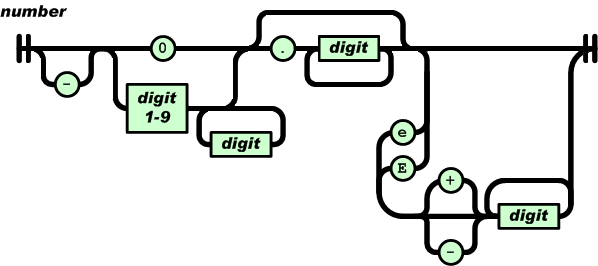
supporting octal notation. Here’s the railroad diagram for numbers <a href="https://www.json.org/json-en.html">from
the JSON specficaiton</a>:</p>

<p><img src="/img/diagram/json-number.png" alt="" />
<!-- Copyright (C) 2017 Ecma International --></p>

<p>Or in regular expression form:</p>

<div class="language-plaintext highlighter-rouge"><div class="highlight"><pre class="highlight"><code>-?(0|[1-9][0-9]*)(\.[0-9]+)?([eE][+-]?[0-9]+)?
</code></pre></div></div>

<p>If a token starts with <code class="language-plaintext highlighter-rouge">0</code> then it can only be followed by <code class="language-plaintext highlighter-rouge">.</code>, <code class="language-plaintext highlighter-rouge">e</code>,
or <code class="language-plaintext highlighter-rouge">E</code>. It cannot be followed by a digit. So, the natural human
response to mentally parsing <code class="language-plaintext highlighter-rouge">[01]</code> is: This input is invalid because
it contains a number with a leading zero, and leading zeros are not
accepted. <em>But this is not actually why parsing fails!</em></p>

<p>A simple model for the parser is as consuming tokens from a lexer. The
lexer’s job is to read individual code points (characters) from the
input and group them into tokens. The possible tokens are string,
number, left brace, right brace, left bracket, right bracket, comma,
true, false, and null. The lexer skips over insignificant whitespace,
and it doesn’t care about structure, like matching braces and
brackets. That’s the parser’s job.</p>

<p>In some instances the lexer can fail to parse a token. For example, if
while looking for a new token the lexer reads the character <code class="language-plaintext highlighter-rouge">%</code>, then
the input must be invalid. No token starts with this character. So in
some cases invalid input will be detected by the lexer.</p>

<p>The parser consumes tokens from the lexer and, using some state, ensures
the sequence of tokens is valid. For example, arrays must be a well
formed sequence of left bracket, value, comma, value, comma, etc., right
bracket. One way to reject input with trailing garbage, is for the lexer
to also produce an EOF (end of file/input) token when there are no more
tokens, and the parser could specifically check for that token before
accepting the input as valid.</p>

<p>Getting back to the input <code class="language-plaintext highlighter-rouge">[01]</code>, a JSON parser receives a left bracket
token, then updates its bookkeeping to track that it’s parsing an array.
When looking for the next token, the lexer sees the character <code class="language-plaintext highlighter-rouge">0</code>
followed by <code class="language-plaintext highlighter-rouge">1</code>. According to the railroad diagram, this is a number
token (starts with <code class="language-plaintext highlighter-rouge">0</code>), but <code class="language-plaintext highlighter-rouge">1</code> cannot be part of this token, so it
produces a number token with the contents “0”. Everything is still fine.</p>

<p>Next the lexer sees <code class="language-plaintext highlighter-rouge">1</code> followed by <code class="language-plaintext highlighter-rouge">]</code>. Since <code class="language-plaintext highlighter-rouge">]</code> cannot be part of a
number, it produces another number token with the contents “1”. The
parser receives this token but, since it’s parsing an array, it expects
either a comma token or a right bracket. Since this is neither, the
parser fails with an error about an unexpected number. <strong>The parser will
not complain about leading zeros because JSON has no concept of leading
zeros.</strong> Human intuition is right, but for the wrong reasons.</p>

<p>Try this for yourself in your favorite JSON parser. Or even just pop up
the JavaScript console in your browser and try it out:</p>

<div class="language-plaintext highlighter-rouge"><div class="highlight"><pre class="highlight"><code>JSON.parse('[01]');
</code></pre></div></div>

<p>Firefox reports:</p>

<blockquote>
  <p>SyntaxError: JSON.parse: expected ‘,’ or ‘]’ after array element</p>
</blockquote>

<p>Chromium reports:</p>

<blockquote>
  <p>SyntaxError: Unexpected number in JSON</p>
</blockquote>

<p>Edge reports (note it says “number” not “digit”):</p>

<blockquote>
  <p>Error: Invalid number at position:3</p>
</blockquote>

<p>In all cases the parsers accepted a zero as the first array element,
then rejected the input after the second number token for being a bad
sequence of tokens. In other words, this is a parser error rather than
a lexer error, as a human might intuit.</p>

<p><a href="https://github.com/skeeto/pdjson">My JSON parser</a> comes with a testing tool that shows the token
stream up until the parser rejects the input, useful for understanding
these situations:</p>

<div class="language-plaintext highlighter-rouge"><div class="highlight"><pre class="highlight"><code>$ echo '[01]' | tests/stream
struct expect seq[] = {
    {JSON_ARRAY},
    {JSON_NUMBER, "0"},
    {JSON_ERROR},
};
</code></pre></div></div>

<p>There’s an argument to be made here that perhaps the human readable
error message <em>should</em> mention leading zeros, since that’s likely the
cause of the invalid input. That is, a human probably thought JSON
allowed leading zeros, and so the clearer message would tell the human
that JSON does not allow leading zeros. This is the “more art than
science” part of parsing.</p>

<p>It’s the same story with this invalid input:</p>

<div class="language-plaintext highlighter-rouge"><div class="highlight"><pre class="highlight"><code>[truefalse]
</code></pre></div></div>

<p>From this input, the lexer <em>unambiguously</em> produces left bracket,
true, false, right bracket. It’s still up to the parser to reject this
input. The only reason we never see <code class="language-plaintext highlighter-rouge">truefalse</code> in valid JSON is that
the overall structure never allows these tokens to be adjacent, not
because they’d be ambiguous. Programming languages have identifiers,
and in a programming language this would parse as the identifier
<code class="language-plaintext highlighter-rouge">truefalse</code> rather than <code class="language-plaintext highlighter-rouge">true</code> followed by <code class="language-plaintext highlighter-rouge">false</code>. From this point of
view, JSON seems quite strange.</p>

<p>Just as before, Firefox reports:</p>

<blockquote>
  <p>SyntaxError: JSON.parse: expected ‘,’ or ‘]’ after array element</p>
</blockquote>

<p>Chromium reports the same error as it does for <code class="language-plaintext highlighter-rouge">[true false]</code>:</p>

<blockquote>
  <p>SyntaxError: Unexpected token f in JSON</p>
</blockquote>

<p>Edge’s message is probably a minor bug in their JSON parser:</p>

<blockquote>
  <p>Error: Expected ‘]’ at position:10</p>
</blockquote>

<p>Position 10 is the last character in <code class="language-plaintext highlighter-rouge">false</code>. The lexer consumed <code class="language-plaintext highlighter-rouge">false</code>
from the input, produced a “false” token, then the parser rejected the
input. When it reported the error, it chose the <em>end</em> of the invalid
token as the error position rather than the start, despite the fact that
the only two valid tokens (comma, right bracket) are both a single
character. It should also say “Expected ‘]’ or ‘,’” (as Firefox does)
rather than just “]”.</p>

<h3 id="concatenated-json">Concatenated JSON</h3>

<p>That’s all pretty academic. Except for producing nice error messages,
nobody really cares so much <em>why</em> the input was rejected. The mismatch
between intuition and reality isn’t important.</p>

<p>However, it <em>does</em> come up with concatenated JSON. Some parsers,
including mine, will optionally consume multiple JSON values, one after
another, from the same input. Here’s an example from <a href="/blog/2016/09/15/">one of my
favorite</a> command line tools, <a href="https://stedolan.github.io/jq/">jq</a>:</p>

<div class="language-plaintext highlighter-rouge"><div class="highlight"><pre class="highlight"><code>echo '{"x":0,"y":1}{"x":2,"y":3}{"x":4,"y":5}' | jq '.x + .y'
1
5
9
</code></pre></div></div>

<p>The input contains three unambiguously-concatenated JSON objects, so
the parser produces three distinct objects. Now consider this input,
this time outside of the context of an array:</p>

<div class="language-plaintext highlighter-rouge"><div class="highlight"><pre class="highlight"><code>01
</code></pre></div></div>

<p>Is this invalid, one number, or two numbers? According to the lexer and
parser model described above, this is valid and unambiguously two
concatenated numbers. Here’s what my parser says:</p>

<div class="language-plaintext highlighter-rouge"><div class="highlight"><pre class="highlight"><code>$ echo '01' | tests/stream
struct expect seq[] = {
    {JSON_NUMBER, "0"},
    {JSON_DONE},
    {JSON_NUMBER, "1"},
    {JSON_DONE},
    {JSON_ERROR},
};
</code></pre></div></div>

<p>Note: The <code class="language-plaintext highlighter-rouge">JSON_DONE</code> “token” indicates acceptance, and the <code class="language-plaintext highlighter-rouge">JSON_ERROR</code>
token is an EOF indicator, not a hard error. Since jq allows leading
zeros in its JSON input, it’s ambiguous and parses this as the number 1,
so asking its opinion on this input isn’t so interesting. I surveyed
some other JSON parsers that accept concatenated JSON:</p>

<ul>
  <li><a href="https://github.com/FasterXML/jackson">Jackson</a>: Reject as leading zero.</li>
  <li><a href="https://github.com/yonik/noggit">Noggit</a>: Reject as leading zero.</li>
  <li><a href="https://lloyd.github.io/yajl/">yajl</a>: Accept as two numbers.</li>
</ul>

<p>For my parser it’s the same story for <code class="language-plaintext highlighter-rouge">truefalse</code>:</p>

<div class="language-plaintext highlighter-rouge"><div class="highlight"><pre class="highlight"><code>echo 'truefalse' | tests/stream
struct expect seq[] = {
    {JSON_TRUE, "true"},
    {JSON_DONE},
    {JSON_FALSE, "false"},
    {JSON_DONE},
    {JSON_ERROR},
};
</code></pre></div></div>

<p>Neither rejecting nor accepting this input is wrong, per se.
Concatenated JSON is outside of the scope of JSON itself, and
concatenating arbitrary JSON objects without a whitespace delimiter can
lead to weird and ill-formed input. This is all a great argument in
favor or <a href="http://ndjson.org/">Newline Delimited JSON</a>, and its two simple rules:</p>

<ol>
  <li>Line separator is <code class="language-plaintext highlighter-rouge">'\n'</code></li>
  <li>Each line is a valid JSON value</li>
</ol>

<p>This solves the concatenation issue, and, even more, it works well with
parsers not supporting concatenation: Split the input on newlines and
pass each line to your JSON parser.</p>

]]>
    </content>
  </entry>


  <entry>
    <title>No, PHP Doesn't Have Closures</title>
    <link rel="alternate" type="text/html" href="https://nullprogram.com/blog/2019/09/25/"/>
    <id>urn:uuid:286e6fd2-0532-4848-8d4a-10101d1ffa53</id>
    <updated>2019-09-25T21:10:43Z</updated>
    <category term="lang"/><category term="rant"/>
    <content type="html">
      <![CDATA[<p>The PHP programming language is bizarre and, if nothing else, worthy of
anthropological study. The only consistent property of PHP <a href="https://eev.ee/blog/2012/04/09/php-a-fractal-of-bad-design/">is how badly
it’s designed</a>, yet it somehow remains widely popular. There’s
a social dynamic at play here that science has yet to unlock.</p>

<p>I don’t say this because I hate PHP. There’s no reason for that: I don’t
write programs in PHP, never had to use it, and don’t expect to ever
need it. Despite this, I just can’t look away from PHP in the same way I
can’t look away from a car accident.</p>

<p>I recently came across a link to the PHP manual, and morbid curiosity
that caused me to look through it. It’s fun to pick an arbitrary section
of the manual and see how many crazy design choices I can spot, or at
least see what sort of strange terminology the manual has invented to
describe a common concept. This time around, one such section was on
<a href="https://www.php.net/manual/en/functions.anonymous.php">anonymous functions</a>, including closures. It was even worse than
I expected.</p>

<p>In some circumstances, closures can be a litmus test. Closure semantics
are not complex, but they’re subtle and <a href="/blog/2014/06/06/">a little tricky</a> until you
get hang of them. If you’re interviewing a candidate, toss in a question
or two about closures. Either they’re familiar and get it right away, or
they’re unfamiliar and get nothing right. The latter is when it’s most
informative. PHP itself falls clearly into the latter. Not only that,
the example of a “closure” in the manual demonstrates a “closure”
closing over a global variable!</p>

<p>I’d been told for years that PHP has closures, and I took that claim at
face value. In fact, PHP has had “closures” since 5.3.0, released in
June 2009, so I’m over a decade late in investigating it. However, as
far as I can tell, nobody’s ever pointed out that PHP “closures” are, in
fact, not actually closures.</p>

<h3 id="anonymous-functions-and-closures">Anonymous functions and closures</h3>

<p>Before getting into why they’re not closures, let’s go over how it
works, starting with a plain old anonymous function. PHP <em>does</em> have
anonymous functions — the easy part.</p>

<div class="language-php highlighter-rouge"><div class="highlight"><pre class="highlight"><code><span class="k">function</span> <span class="n">foo</span><span class="p">()</span> <span class="p">{</span>
    <span class="k">return</span> <span class="k">function</span><span class="p">()</span> <span class="p">{</span>
        <span class="k">return</span> <span class="mi">1</span><span class="p">;</span>
    <span class="p">};</span>
<span class="p">}</span>
</code></pre></div></div>

<p>The function <code class="language-plaintext highlighter-rouge">foo</code> returns a function that returns 1. In PHP 7 you can
call the returned function immediately like so:</p>

<div class="language-php highlighter-rouge"><div class="highlight"><pre class="highlight"><code><span class="nv">$r</span> <span class="o">=</span> <span class="nf">foo</span><span class="p">()();</span>  <span class="c1">// $r = 1</span>
</code></pre></div></div>

<p>In PHP 5 this is a syntax error because, well, it’s PHP and its parser
is <a href="/blog/2008/08/29/">about as clunky as Matlab’s</a>.</p>

<p>In a well-designed language, you’d expect that this could also be a
closure. That is, it <em>closes over</em> local variables, and the function may
continue to access those variables later. For example:</p>

<div class="language-php highlighter-rouge"><div class="highlight"><pre class="highlight"><code><span class="k">function</span> <span class="n">bar</span><span class="p">(</span><span class="nv">$n</span><span class="p">)</span> <span class="p">{</span>
    <span class="k">return</span> <span class="k">function</span><span class="p">()</span> <span class="p">{</span>
        <span class="k">return</span> <span class="nv">$n</span><span class="p">;</span>
    <span class="p">};</span>
<span class="p">}</span>

<span class="nf">bar</span><span class="p">(</span><span class="mi">1</span><span class="p">)();</span>  <span class="c1">// error: Undefined variable: n</span>
</code></pre></div></div>

<p>This fails because you must explicitly tell PHP what variables you
intend to access inside the anonymous function with <code class="language-plaintext highlighter-rouge">use</code>:</p>

<div class="language-php highlighter-rouge"><div class="highlight"><pre class="highlight"><code><span class="k">function</span> <span class="n">bar</span><span class="p">(</span><span class="nv">$n</span><span class="p">)</span> <span class="p">{</span>
    <span class="k">return</span> <span class="k">function</span><span class="p">()</span> <span class="k">use</span> <span class="p">(</span><span class="nv">$n</span><span class="p">)</span> <span class="p">{</span>
        <span class="k">return</span> <span class="nv">$n</span><span class="p">;</span>
    <span class="p">};</span>
<span class="p">}</span>

<span class="nf">bar</span><span class="p">(</span><span class="mi">1</span><span class="p">)();</span>  <span class="c1">// 1</span>
</code></pre></div></div>

<p>If this actually closed over <code class="language-plaintext highlighter-rouge">$n</code>, this would be a legitimate closure.
Having to tell the language exactly which variables are being closed
over would be pretty dumb, but it still meets the definition of a
closure.</p>

<p>But here’s the catch: It’s not actually closing over any variables. The
names listed in <code class="language-plaintext highlighter-rouge">use</code> are actually extra, hidden parameters bound to the
current value of those variables. In other words, <strong>this is nothing more
than partial function evaluation</strong>.</p>

<div class="language-php highlighter-rouge"><div class="highlight"><pre class="highlight"><code><span class="k">function</span> <span class="n">bar</span><span class="p">(</span><span class="nv">$n</span><span class="p">)</span> <span class="p">{</span>
    <span class="nv">$f</span> <span class="o">=</span> <span class="k">function</span><span class="p">()</span> <span class="k">use</span> <span class="p">(</span><span class="nv">$n</span><span class="p">)</span> <span class="p">{</span>
        <span class="k">return</span> <span class="nv">$n</span><span class="p">;</span>
    <span class="p">};</span>
    <span class="nv">$n</span><span class="o">++</span><span class="p">;</span>  <span class="c1">// never used!</span>
    <span class="k">return</span> <span class="nv">$f</span><span class="p">;</span>
<span class="p">}</span>

<span class="nv">$r</span> <span class="o">=</span> <span class="nf">bar</span><span class="p">(</span><span class="mi">1</span><span class="p">)();</span>  <span class="c1">// $r = 1</span>
</code></pre></div></div>

<p>Here’s the equivalent in JavaScript using <a href="https://developer.mozilla.org/en-US/docs/Web/JavaScript/Reference/Global_objects/Function/bind#Syntax">the <code class="language-plaintext highlighter-rouge">bind()</code> method</a>:</p>

<div class="language-js highlighter-rouge"><div class="highlight"><pre class="highlight"><code><span class="kd">function</span> <span class="nx">bar</span><span class="p">(</span><span class="nx">n</span><span class="p">)</span> <span class="p">{</span>
    <span class="kd">let</span> <span class="nx">f</span> <span class="o">=</span> <span class="kd">function</span><span class="p">(</span><span class="nx">m</span><span class="p">)</span> <span class="p">{</span>
        <span class="k">return</span> <span class="nx">m</span><span class="p">;</span>
    <span class="p">};</span>
    <span class="k">return</span> <span class="nx">f</span><span class="p">.</span><span class="nx">bind</span><span class="p">(</span><span class="kc">null</span><span class="p">,</span> <span class="nx">n</span><span class="p">);</span>
<span class="p">}</span>
</code></pre></div></div>

<p>This is actually more powerful than PHP’s “closures” since any arbitrary
expression can be used for the bound argument. In PHP it’s limited to a
couple of specific forms. If JavaScript didn’t have proper closures, and
instead we all had to rely on <code class="language-plaintext highlighter-rouge">bind()</code>, nobody would claim that
JavaScript had closures. It shouldn’t be different for PHP.</p>

<h3 id="references">References</h3>

<p>PHP <em>does</em> have references, and binding a reference to an anonymous
function is kinda, sorta like a closure. But that’s still just partial
function evaluation, but where that argument is a reference.</p>

<p>Here’s how to tell these reference captures aren’t actually closures:
They work equally well for global variables as local variables. So it’s
still not <em>closing over</em> a lexical environment, just binding a reference
to a parameter.</p>

<div class="language-php highlighter-rouge"><div class="highlight"><pre class="highlight"><code><span class="nv">$counter</span> <span class="o">=</span> <span class="mi">0</span><span class="p">;</span>

<span class="k">function</span> <span class="n">bar</span><span class="p">(</span><span class="nv">$n</span><span class="p">)</span> <span class="p">{</span>
    <span class="k">global</span> <span class="nv">$counter</span><span class="p">;</span>
    <span class="nv">$f</span> <span class="o">=</span> <span class="k">function</span><span class="p">()</span> <span class="k">use</span> <span class="p">(</span><span class="o">&amp;</span><span class="nv">$n</span><span class="p">,</span> <span class="o">&amp;</span><span class="nv">$counter</span><span class="p">)</span> <span class="p">{</span>
        <span class="nv">$counter</span><span class="o">++</span><span class="p">;</span>
        <span class="k">return</span> <span class="nv">$n</span><span class="p">;</span>
    <span class="p">};</span>
    <span class="nv">$n</span><span class="o">++</span><span class="p">;</span>  <span class="c1">// now has an effect</span>
    <span class="k">return</span> <span class="nv">$f</span><span class="p">;</span>
<span class="p">}</span>

<span class="nv">$r</span> <span class="o">=</span> <span class="nf">bar</span><span class="p">(</span><span class="mi">1</span><span class="p">)();</span>  <span class="c1">// $r = 2, $counter = 1</span>
</code></pre></div></div>

<p>In the example above, there’s no difference between <code class="language-plaintext highlighter-rouge">$n</code>, a local
variable, and <code class="language-plaintext highlighter-rouge">$counter</code>, a global variable. It wouldn’t make sense for
a closure to close over a global variable.</p>

<h3 id="emacs-lisp-partial-function-application">Emacs Lisp partial function application</h3>

<p>Emacs Lisp famously didn’t get lexical scope, and therefore closures,
<a href="/blog/2016/12/22/">until fairly recently</a>. It was — and still is by default — a
dynamic scope oddball. However, it’s long had an <code class="language-plaintext highlighter-rouge">apply-partially</code>
function for partial function application. It returns a closure-like
object, and did so when the language didn’t have proper closures. So it
can be used to create a “closure” just like PHP:</p>

<div class="language-lisp highlighter-rouge"><div class="highlight"><pre class="highlight"><code><span class="p">(</span><span class="nb">defun</span> <span class="nv">bar</span> <span class="p">(</span><span class="nv">n</span><span class="p">)</span>
  <span class="p">(</span><span class="nv">apply-partially</span> <span class="p">(</span><span class="k">lambda</span> <span class="p">(</span><span class="nv">m</span><span class="p">)</span> <span class="nv">m</span><span class="p">)</span> <span class="nv">n</span><span class="p">))</span>
</code></pre></div></div>

<p>This works regardless of lexical or dynamic scope, which is because this
construct isn’t really a closure, just like PHP’s isn’t a closure. In
PHP, its partial function evaluation is built directly into the language
with special <code class="language-plaintext highlighter-rouge">use</code> syntax.</p>

<h3 id="monkey-see-monkey-do">Monkey see, monkey do</h3>

<p>Why does the shell command language use sigils? Because it’s built atop
interactive command line usage, where bare words are taken literally and
variables are the exception. Why does Perl use sigils? Because it was
originally designed as an alternative to shell scripts, so it mimicked
that syntax. Why does PHP use sigils? Because Perl did.</p>

<p>The situation with closures follows that pattern, and it comes up all
over PHP. Its designers see a feature in another language, but don’t
really understand its purpose or semantics. So when they attempt to add
that feature to PHP, they get it disastrously wrong.</p>

]]>
    </content>
  </entry>


  <entry>
    <title>UTF-8 String Indexing Strategies</title>
    <link rel="alternate" type="text/html" href="https://nullprogram.com/blog/2019/05/29/"/>
    <id>urn:uuid:12e9ed44-b5c1-495f-8750-dfaf1ab008e2</id>
    <updated>2019-05-29T21:52:06Z</updated>
    <category term="elisp"/><category term="emacs"/><category term="go"/><category term="lang"/>
    <content type="html">
      <![CDATA[<p><em>This article was discussed <a href="https://news.ycombinator.com/item?id=20049491">on Hacker News</a>.</em></p>

<p>When designing or, in some cases, implementing a programming language
with built-in support for Unicode strings, an important decision must be
made about how to represent or encode those strings in memory. Not all
representations are equal, and there are trade-offs between different
choices.</p>

<!--more-->

<p>One issue to consider is that strings typically feature random access
indexing of code points with a time complexity resembling constant
time (<code class="language-plaintext highlighter-rouge">O(1)</code>). However, not all string representations actually
support this well. Strings using variable length encoding, such as
UTF-8 or UTF-16, have <code class="language-plaintext highlighter-rouge">O(n)</code> time complexity indexing, ignoring
special cases (discussed below). The most obvious choice to achieve
<code class="language-plaintext highlighter-rouge">O(1)</code> time complexity — an array of 32-bit values, as in UCS-4 —
makes very inefficient use of memory, especially with typical strings.</p>

<p>Despite this, UTF-8 is still chosen in a number of programming
languages, or at least in their implementations. In this article I’ll
discuss three examples — Emacs Lisp, Julia, and Go — and how each takes a
slightly different approach.</p>

<h3 id="emacs-lisp">Emacs Lisp</h3>

<p>Emacs Lisp has two different types of strings that generally can be used
interchangeably: <em>unibyte</em> and <em>multibyte</em>. In fact, the difference
between them is so subtle that I bet that most people writing Emacs Lisp
don’t even realize there are two kinds of strings.</p>

<p>Emacs Lisp uses UTF-8 internally to encode all “multibyte” strings and
buffers. To fully support arbitrary sequences of bytes in the files
being edited, Emacs uses <a href="https://www.gnu.org/software/emacs/manual/html_node/elisp/Text-Representations.html">its own extension of Unicode</a> to
precisely and unambiguously represent raw bytes intermixed with text.
Any arbitrary sequence of bytes can be decoded into Emacs’ internal
representation, then losslessly re-encoded back into the exact same
sequence of bytes.</p>

<p>Unibyte strings and buffers are really just byte-strings. In practice,
they’re essentially ISO/IEC 8859-1, a.k.a. <em>Latin-1</em>. It’s a Unicode
string where all code points are below 256. Emacs prefers the smallest
and simplest string representation when possible, <a href="https://www.python.org/dev/peps/pep-0393/">similar to CPython
3.3+</a>.</p>

<div class="language-cl highlighter-rouge"><div class="highlight"><pre class="highlight"><code><span class="p">(</span><span class="nv">multibyte-string-p</span> <span class="s">"hello"</span><span class="p">)</span>
<span class="c1">;; =&gt; nil</span>

<span class="p">(</span><span class="nv">multibyte-string-p</span> <span class="s">"π ≈ 3.14"</span><span class="p">)</span>
<span class="c1">;; =&gt; t</span>
</code></pre></div></div>

<p>Emacs Lisp strings are mutable, and therein lies the kicker: As soon as
you insert a code point above 255, Emacs quietly converts the string to
multibyte.</p>

<div class="language-cl highlighter-rouge"><div class="highlight"><pre class="highlight"><code><span class="p">(</span><span class="nb">defvar</span> <span class="nv">fish</span> <span class="s">"fish"</span><span class="p">)</span>

<span class="p">(</span><span class="nv">multibyte-string-p</span> <span class="nv">fish</span><span class="p">)</span>
<span class="c1">;; =&gt; nil</span>

<span class="p">(</span><span class="nb">setf</span> <span class="p">(</span><span class="nb">aref</span> <span class="nv">fish</span> <span class="mi">2</span><span class="p">)</span> <span class="nv">?</span><span class="err">ŝ</span>
      <span class="p">(</span><span class="nb">aref</span> <span class="nv">fish</span> <span class="mi">3</span><span class="p">)</span> <span class="nv">?o</span><span class="p">)</span>

<span class="nv">fish</span>
<span class="c1">;; =&gt; "fiŝo"</span>

<span class="p">(</span><span class="nv">multibyte-string-p</span> <span class="nv">fish</span><span class="p">)</span>
<span class="c1">;; =&gt; t</span>
</code></pre></div></div>

<p>Constant time indexing into unibyte strings is straightforward, and
Emacs does the obvious thing when indexing into unibyte strings. It
helps that most strings in Emacs are probably unibyte, even when the
user isn’t working in English.</p>

<p>Most buffers are multibyte, even if those buffers are generally just
ASCII. Since <a href="/blog/2017/09/07/">Emacs uses gap buffers</a> it generally doesn’t matter:
Nearly all accesses are tightly clustered around the point, so O(n)
indexing doesn’t often matter.</p>

<p>That leaves multibyte strings. Consider these idioms for iterating
across a string in Emacs Lisp:</p>

<div class="language-cl highlighter-rouge"><div class="highlight"><pre class="highlight"><code><span class="p">(</span><span class="nb">dotimes</span> <span class="p">(</span><span class="nv">i</span> <span class="p">(</span><span class="nb">length</span> <span class="nb">string</span><span class="p">))</span>
  <span class="p">(</span><span class="k">let</span> <span class="p">((</span><span class="nv">c</span> <span class="p">(</span><span class="nb">aref</span> <span class="nb">string</span> <span class="nv">i</span><span class="p">)))</span>
    <span class="o">...</span><span class="p">))</span>

<span class="p">(</span><span class="nv">cl-loop</span> <span class="nv">for</span> <span class="nv">c</span> <span class="nv">being</span> <span class="k">the</span> <span class="nv">elements</span> <span class="nv">of</span> <span class="nb">string</span>
         <span class="o">...</span><span class="p">)</span>
</code></pre></div></div>

<p>The latter expands into essentially the same as the former: An
incrementing index that uses <code class="language-plaintext highlighter-rouge">aref</code> to index to that code point. So is
iterating over a multibyte string — a common operation — an O(n^2)
operation?</p>

<p>The good news is that, at least in this case, no! It’s essentially just
as efficient as iterating over a unibyte string. Before going over why,
consider this little puzzle. Here’s a little string comparison function
that compares two strings a code point at a time, returning their first
difference:</p>

<div class="language-cl highlighter-rouge"><div class="highlight"><pre class="highlight"><code><span class="p">(</span><span class="nb">defun</span> <span class="nv">compare</span> <span class="p">(</span><span class="nv">string-a</span> <span class="nv">string-b</span><span class="p">)</span>
  <span class="p">(</span><span class="nv">cl-loop</span> <span class="nv">for</span> <span class="nv">a</span> <span class="nv">being</span> <span class="k">the</span> <span class="nv">elements</span> <span class="nv">of</span> <span class="nv">string-a</span>
           <span class="nv">for</span> <span class="nv">b</span> <span class="nv">being</span> <span class="k">the</span> <span class="nv">elements</span> <span class="nv">of</span> <span class="nv">string-b</span>
           <span class="nb">unless</span> <span class="p">(</span><span class="nb">eql</span> <span class="nv">a</span> <span class="nv">b</span><span class="p">)</span>
           <span class="nb">return</span> <span class="p">(</span><span class="nb">cons</span> <span class="nv">a</span> <span class="nv">b</span><span class="p">)))</span>
</code></pre></div></div>

<p>Let’s examine benchmarks with some long strings (100,000 code points):</p>

<div class="language-cl highlighter-rouge"><div class="highlight"><pre class="highlight"><code><span class="p">(</span><span class="nv">benchmark-run</span>
    <span class="p">(</span><span class="k">let</span> <span class="p">((</span><span class="nv">a</span> <span class="p">(</span><span class="nb">make-string</span> <span class="mi">100000</span> <span class="mi">0</span><span class="p">))</span>
          <span class="p">(</span><span class="nv">b</span> <span class="p">(</span><span class="nb">make-string</span> <span class="mi">100000</span> <span class="mi">0</span><span class="p">)))</span>
      <span class="p">(</span><span class="nv">compare</span> <span class="nv">a</span> <span class="nv">b</span><span class="p">)))</span>
<span class="c1">;; =&gt; (0.012568031 0 0.0)</span>
</code></pre></div></div>

<p>With using two, zeroed unibyte strings it takes 13ms. How about changing
the last code point in one of them to 256, converting it to a multibyte
string:</p>

<div class="language-cl highlighter-rouge"><div class="highlight"><pre class="highlight"><code><span class="p">(</span><span class="nv">benchmark-run</span>
    <span class="p">(</span><span class="k">let</span> <span class="p">((</span><span class="nv">a</span> <span class="p">(</span><span class="nb">make-string</span> <span class="mi">100000</span> <span class="mi">0</span><span class="p">))</span>
          <span class="p">(</span><span class="nv">b</span> <span class="p">(</span><span class="nb">make-string</span> <span class="mi">100000</span> <span class="mi">0</span><span class="p">)))</span>
      <span class="p">(</span><span class="nb">setf</span> <span class="p">(</span><span class="nb">aref</span> <span class="nv">a</span> <span class="p">(</span><span class="nb">1-</span> <span class="p">(</span><span class="nb">length</span> <span class="nv">a</span><span class="p">)))</span> <span class="mi">256</span><span class="p">)</span>
      <span class="p">(</span><span class="nv">compare</span> <span class="nv">a</span> <span class="nv">b</span><span class="p">)))</span>
<span class="c1">;; =&gt; (0.012680513 0 0.0)</span>
</code></pre></div></div>

<p>Same running time, so that multibyte string cost nothing more to iterate
across. Let’s try making them both multibyte:</p>

<div class="language-cl highlighter-rouge"><div class="highlight"><pre class="highlight"><code><span class="p">(</span><span class="nv">benchmark-run</span>
    <span class="p">(</span><span class="k">let</span> <span class="p">((</span><span class="nv">a</span> <span class="p">(</span><span class="nb">make-string</span> <span class="mi">100000</span> <span class="mi">0</span><span class="p">))</span>
          <span class="p">(</span><span class="nv">b</span> <span class="p">(</span><span class="nb">make-string</span> <span class="mi">100000</span> <span class="mi">0</span><span class="p">)))</span>
      <span class="p">(</span><span class="nb">setf</span> <span class="p">(</span><span class="nb">aref</span> <span class="nv">a</span> <span class="p">(</span><span class="nb">1-</span> <span class="p">(</span><span class="nb">length</span> <span class="nv">a</span><span class="p">)))</span> <span class="mi">256</span>
            <span class="p">(</span><span class="nb">aref</span> <span class="nv">b</span> <span class="p">(</span><span class="nb">1-</span> <span class="p">(</span><span class="nb">length</span> <span class="nv">b</span><span class="p">)))</span> <span class="mi">256</span><span class="p">)</span>
      <span class="p">(</span><span class="nv">compare</span> <span class="nv">a</span> <span class="nv">b</span><span class="p">)))</span>
<span class="c1">;; =&gt; (2.327959762 0 0.0)</span>
</code></pre></div></div>

<p>That took 2.3 seconds: about 2000x longer to run! Iterating over two
multibyte strings concurrently seems to have broken an optimization.
Can you reason about what’s happened?</p>

<p>To avoid the O(n) cost on this common indexing operating, Emacs keeps
a “bookmark” for the last indexing location into a multibyte string.
If the next access is nearby, it can starting looking from this
bookmark, forwards or backwards. Like a gap buffer, this gives a big
advantage to clustered accesses, including iteration.</p>

<p>However, this string bookmark is <em>global</em>, one per Emacs instance, not
once per string. In the last benchmark, the two multibyte strings are
constantly fighting over a single string bookmark, and indexing in
comparison function is reduced to O(n^2) time complexity.</p>

<p>So, Emacs <em>pretends</em> it has constant time access into its UTF-8 text
data, but it’s only faking it with some simple optimizations. This
usually works out just fine.</p>

<h3 id="julia">Julia</h3>

<p>Another approach is to not pretend at all, and to make this limitation
of UTF-8 explicit in the interface. Julia took this approach, and it
<a href="/blog/2014/03/06/">was one of my complaints about the language</a>. I don’t think
this is necessarily a bad choice, but I do still think it’s
inappropriate considering Julia’s target audience (i.e. Matlab users).</p>

<p>Julia strings are explicitly byte strings containing valid UTF-8 data.
All indexing occurs on bytes, which is trivially constant time, and
always decodes the multibyte code point starting at that byte. <em>But</em>
it is an error to index to a byte that doesn’t begin a code point.
That error is also trivially checked in constant time.</p>

<div class="language-julia highlighter-rouge"><div class="highlight"><pre class="highlight"><code><span class="n">s</span> <span class="o">=</span> <span class="s">"π"</span>

<span class="n">s</span><span class="x">[</span><span class="mi">1</span><span class="x">]</span>
<span class="c"># =&gt; 'π'</span>

<span class="n">s</span><span class="x">[</span><span class="mi">2</span><span class="x">]</span>
<span class="c"># ERROR: UnicodeError: invalid character index</span>
<span class="c">#  in getindex at ./strings/basic.jl:37</span>
</code></pre></div></div>

<p>Slices are still over bytes, but they “round up” to the end of the
current code point:</p>

<div class="language-julia highlighter-rouge"><div class="highlight"><pre class="highlight"><code><span class="n">s</span><span class="x">[</span><span class="mi">1</span><span class="o">:</span><span class="mi">1</span><span class="x">]</span>
<span class="c"># =&gt; "π"</span>
</code></pre></div></div>

<p>Iterating over a string requires helper functions which keep an internal
“bookmark” so that each access is constant time:</p>

<div class="language-julia highlighter-rouge"><div class="highlight"><pre class="highlight"><code><span class="k">for</span> <span class="n">i</span> <span class="k">in</span> <span class="n">eachindex</span><span class="x">(</span><span class="n">string</span><span class="x">)</span>
    <span class="n">c</span> <span class="o">=</span> <span class="n">string</span><span class="x">[</span><span class="n">i</span><span class="x">]</span>
    <span class="c"># ...</span>
<span class="k">end</span>
</code></pre></div></div>

<p>So Julia doesn’t pretend, it makes the problem explicit.</p>

<h3 id="go">Go</h3>

<p>Go is very similar to Julia, but takes an even more explicit view of
strings. All strings are byte strings and there are no restrictions on
their contents. Conventionally strings contain UTF-8 encoded text, but
this is not strictly required. There’s a <code class="language-plaintext highlighter-rouge">unicode/utf8</code> package for
working with strings containing UTF-8 data.</p>

<p>Beyond convention, the <code class="language-plaintext highlighter-rouge">range</code> clause also assumes the string contains
UTF-8 data, and it’s not an error if it does not. Bytes not containing
valid UTF-8 data appear as a <code class="language-plaintext highlighter-rouge">REPLACEMENT CHARACTER</code> (U+FFFD).</p>

<div class="language-go highlighter-rouge"><div class="highlight"><pre class="highlight"><code><span class="k">func</span> <span class="n">main</span><span class="p">()</span> <span class="p">{</span>
    <span class="n">s</span> <span class="o">:=</span> <span class="s">"π</span><span class="se">\xff</span><span class="s">"</span>
    <span class="k">for</span> <span class="n">_</span><span class="p">,</span> <span class="n">r</span> <span class="o">:=</span> <span class="k">range</span> <span class="n">s</span> <span class="p">{</span>
        <span class="n">fmt</span><span class="o">.</span><span class="n">Printf</span><span class="p">(</span><span class="s">"U+%04x</span><span class="se">\n</span><span class="s">"</span><span class="p">,</span> <span class="n">r</span><span class="p">)</span>
    <span class="p">}</span>
<span class="p">}</span>

<span class="c">// U+03c0</span>
<span class="c">// U+fffd</span>
</code></pre></div></div>

<p>A further case of the language favoring UTF-8 is that casting a string
to <code class="language-plaintext highlighter-rouge">[]rune</code> decodes strings into code points, like UCS-4, again using
<code class="language-plaintext highlighter-rouge">REPLACEMENT CHARACTER</code>:</p>

<div class="language-go highlighter-rouge"><div class="highlight"><pre class="highlight"><code><span class="k">func</span> <span class="n">main</span><span class="p">()</span> <span class="p">{</span>
    <span class="n">s</span> <span class="o">:=</span> <span class="s">"π</span><span class="se">\xff</span><span class="s">"</span>
    <span class="n">r</span> <span class="o">:=</span> <span class="p">[]</span><span class="kt">rune</span><span class="p">(</span><span class="n">s</span><span class="p">)</span>
    <span class="n">fmt</span><span class="o">.</span><span class="n">Printf</span><span class="p">(</span><span class="s">"U+%04x</span><span class="se">\n</span><span class="s">"</span><span class="p">,</span> <span class="n">r</span><span class="p">[</span><span class="m">0</span><span class="p">])</span>
    <span class="n">fmt</span><span class="o">.</span><span class="n">Printf</span><span class="p">(</span><span class="s">"U+%04x</span><span class="se">\n</span><span class="s">"</span><span class="p">,</span> <span class="n">r</span><span class="p">[</span><span class="m">1</span><span class="p">])</span>
<span class="p">}</span>

<span class="c">// U+03c0</span>
<span class="c">// U+fffd</span>
</code></pre></div></div>

<p>So, like Julia, there’s no pretending, and the programmer explicitly
must consider the problem.</p>

<h3 id="preferences">Preferences</h3>

<p>All-in-all I probably prefer how Julia and Go are explicit with
UTF-8’s limitations, rather than Emacs Lisp’s attempt to cover it up
with an internal optimization. Since the abstraction is leaky, it may
as well be made explicit.</p>

]]>
    </content>
  </entry>


  <entry>
    <title>An Async / Await Library for Emacs Lisp</title>
    <link rel="alternate" type="text/html" href="https://nullprogram.com/blog/2019/03/10/"/>
    <id>urn:uuid:5d1462fa-a30d-432e-9a4f-827eb67862b2</id>
    <updated>2019-03-10T20:57:03Z</updated>
    <category term="emacs"/><category term="elisp"/><category term="lisp"/><category term="python"/><category term="javascript"/><category term="lang"/><category term="asyncio"/>
    <content type="html">
      <![CDATA[<p>As part of <a href="/blog/2019/02/24/">building my Python proficiency</a>, I’ve learned how to
use <a href="https://docs.python.org/3/library/asyncio.html">asyncio</a>. This new language feature <a href="https://docs.python.org/3/whatsnew/3.5.html#whatsnew-pep-492">first appeared in
Python 3.5</a> (<a href="https://www.python.org/dev/peps/pep-0492/">PEP 492</a>, September 2015). JavaScript grew <a href="https://developer.mozilla.org/en-US/docs/Web/JavaScript/Reference/Statements/async_function">a
nearly identical feature</a> in ES2017 (June 2017). An async function
can pause to await on an asynchronously computed result, much like a
generator pausing when it yields a value.</p>

<p>In fact, both Python and JavaScript async functions are essentially just
fancy generator functions with some specialized syntax and semantics.
That is, they’re <a href="https://blog.varunramesh.net/posts/stackless-vs-stackful-coroutines/">stackless coroutines</a>. Both languages already had
generators, so their generator-like async functions are a natural
extension that — unlike <a href="/blog/2017/06/21/"><em>stackful</em> coroutines</a> — do not require
significant, new runtime plumbing.</p>

<p>Emacs <a href="/blog/2018/05/31/">officially got generators in 25.1</a> (September 2016),
though, unlike Python and JavaScript, it didn’t require any additional
support from the compiler or runtime. It’s implemented entirely using
Lisp macros. In other words, it’s just another library, not a core
language feature. In theory, the generator library could be easily
backported to the first Emacs release to <a href="/blog/2016/12/22/">properly support lexical
closures</a>, Emacs 24.1 (June 2012).</p>

<p>For the same reason, stackless async/await coroutines can also be
implemented as a library. So that’s what I did, letting Emacs’ generator
library do most of the heavy lifting. The package is called <code class="language-plaintext highlighter-rouge">aio</code>:</p>

<ul>
  <li><strong><a href="https://github.com/skeeto/emacs-aio">https://github.com/skeeto/emacs-aio</a></strong></li>
</ul>

<p>It’s modeled more closely on JavaScript’s async functions than Python’s
asyncio, with the core representation being <em>promises</em> rather than a
coroutine objects. I just have an easier time reasoning about promises
than coroutines.</p>

<p>I’m definitely <a href="https://github.com/chuntaro/emacs-async-await">not the first person to realize this was
possible</a>, and was beaten to the punch by two years. Wanting to
<a href="http://www.winestockwebdesign.com/Essays/Lisp_Curse.html">avoid fragmentation</a>, I set aside all formality in my first
iteration on the idea, not even bothering with namespacing my
identifiers. It was to be only an educational exercise. However, I got
quite attached to my little toy. Once I got my head wrapped around the
problem, everything just sort of clicked into place so nicely.</p>

<p>In this article I will show step-by-step one way to build async/await
on top of generators, laying out one concept at a time and then
building upon each. But first, some examples to illustrate the desired
final result.</p>

<h3 id="aio-example">aio example</h3>

<p>Ignoring <a href="/blog/2016/06/16/">all its problems</a> for a moment, suppose you want to use
<code class="language-plaintext highlighter-rouge">url-retrieve</code> to fetch some content from a URL and return it. To keep
this simple, I’m going to omit error handling. Also assume that
<code class="language-plaintext highlighter-rouge">lexical-binding</code> is <code class="language-plaintext highlighter-rouge">t</code> for all examples. Besides, lexical scope
required by the generator library, and therefore also required by <code class="language-plaintext highlighter-rouge">aio</code>.</p>

<p>The most naive approach is to fetch the content synchronously:</p>

<div class="language-cl highlighter-rouge"><div class="highlight"><pre class="highlight"><code><span class="p">(</span><span class="nb">defun</span> <span class="nv">fetch-fortune-1</span> <span class="p">(</span><span class="nv">url</span><span class="p">)</span>
  <span class="p">(</span><span class="k">let</span> <span class="p">((</span><span class="nv">buffer</span> <span class="p">(</span><span class="nv">url-retrieve-synchronously</span> <span class="nv">url</span><span class="p">)))</span>
    <span class="p">(</span><span class="nv">with-current-buffer</span> <span class="nv">buffer</span>
      <span class="p">(</span><span class="nb">prog1</span> <span class="p">(</span><span class="nv">buffer-string</span><span class="p">)</span>
        <span class="p">(</span><span class="nv">kill-buffer</span><span class="p">)))))</span>
</code></pre></div></div>

<p>The result is returned directly, and errors are communicated by an error
signal (e.g. Emacs’ version of exceptions). This is convenient, but the
function will block the main thread, locking up Emacs until the result
has arrived. This is obviously very undesirable, so, in practice,
everyone nearly always uses the asynchronous version:</p>

<div class="language-cl highlighter-rouge"><div class="highlight"><pre class="highlight"><code><span class="p">(</span><span class="nb">defun</span> <span class="nv">fetch-fortune-2</span> <span class="p">(</span><span class="nv">url</span> <span class="nv">callback</span><span class="p">)</span>
  <span class="p">(</span><span class="nv">url-retrieve</span> <span class="nv">url</span> <span class="p">(</span><span class="k">lambda</span> <span class="p">(</span><span class="nv">_status</span><span class="p">)</span>
                      <span class="p">(</span><span class="nb">funcall</span> <span class="nv">callback</span> <span class="p">(</span><span class="nv">buffer-string</span><span class="p">)))))</span>
</code></pre></div></div>

<p>The main thread no longer blocks, but it’s a whole lot less
convenient. The result isn’t returned to the caller, and instead the
caller supplies a callback function. The result, whether success or
failure, will be delivered via callback, so the caller must split
itself into two pieces: the part before the callback and the callback
itself. Errors cannot be delivered using a error signal because of the
inverted flow control.</p>

<p>The situation gets worse if, say, you need to fetch results from two
different URLs. You either fetch results one at a time (inefficient),
or you manage two different callbacks that could be invoked in any
order, and therefore have to coordinate.</p>

<p><em>Wouldn’t it be nice for the function to work like the first example,
but be asynchronous like the second example?</em> Enter async/await:</p>

<div class="language-cl highlighter-rouge"><div class="highlight"><pre class="highlight"><code><span class="p">(</span><span class="nv">aio-defun</span> <span class="nv">fetch-fortune-3</span> <span class="p">(</span><span class="nv">url</span><span class="p">)</span>
  <span class="p">(</span><span class="k">let</span> <span class="p">((</span><span class="nv">buffer</span> <span class="p">(</span><span class="nv">aio-await</span> <span class="p">(</span><span class="nv">aio-url-retrieve</span> <span class="nv">url</span><span class="p">))))</span>
    <span class="p">(</span><span class="nv">with-current-buffer</span> <span class="nv">buffer</span>
      <span class="p">(</span><span class="nb">prog1</span> <span class="p">(</span><span class="nv">buffer-string</span><span class="p">)</span>
        <span class="p">(</span><span class="nv">kill-buffer</span><span class="p">)))))</span>
</code></pre></div></div>

<p>A function defined with <code class="language-plaintext highlighter-rouge">aio-defun</code> is just like <code class="language-plaintext highlighter-rouge">defun</code> except that
it can use <code class="language-plaintext highlighter-rouge">aio-await</code> to pause and wait on any other function defined
with <code class="language-plaintext highlighter-rouge">aio-defun</code> — or, more specifically, any function that returns a
promise. Borrowing Python parlance: Returning a promise makes a
function <em>awaitable</em>. If there’s an error, it’s delivered as a error
signal from <code class="language-plaintext highlighter-rouge">aio-url-retrieve</code>, just like the first example. When
called, this function returns immediately with a promise object that
represents a future result. The caller might look like this:</p>

<div class="language-cl highlighter-rouge"><div class="highlight"><pre class="highlight"><code><span class="p">(</span><span class="nv">defcustom</span> <span class="nv">fortune-url</span> <span class="o">...</span><span class="p">)</span>

<span class="p">(</span><span class="nv">aio-defun</span> <span class="nv">display-fortune</span> <span class="p">()</span>
  <span class="p">(</span><span class="nv">interactive</span><span class="p">)</span>
  <span class="p">(</span><span class="nv">message</span> <span class="s">"%s"</span> <span class="p">(</span><span class="nv">aio-await</span> <span class="p">(</span><span class="nv">fetch-fortune-3</span> <span class="nv">fortune-url</span><span class="p">))))</span>
</code></pre></div></div>

<p>How wonderfully clean that looks! And, yes, it even works with
<code class="language-plaintext highlighter-rouge">interactive</code> like that. I can <code class="language-plaintext highlighter-rouge">M-x display-fortune</code> and a fortune is
printed in the minibuffer as soon as the result arrives from the
server. In the meantime Emacs doesn’t block and I can continue my
work.</p>

<p>You can’t do anything you couldn’t already do before. It’s just a
nicer way to organize the same callbacks: <em>implicit</em> rather than
<em>explicit</em>.</p>

<h3 id="promises-simplified">Promises, simplified</h3>

<p>The core object at play is the <em>promise</em>. Promises are already a
rather simple concept, but <code class="language-plaintext highlighter-rouge">aio</code> promises have been distilled to their
essence, as they’re only needed for this singular purpose. More on
this later.</p>

<p>As I said, a promise represents a future result. In practical terms, a
promise is just an object to which one can subscribe with a callback.
When the result is ready, the callbacks are invoked. Another way to
put it is that <em>promises <a href="https://en.wikipedia.org/wiki/Reification_(computer_science)">reify</a> the concept of callbacks</em>. A
callback is no longer just the idea of extra argument on a function.
It’s a first-class <em>thing</em> that itself can be passed around as a
value.</p>

<p>Promises have two slots: the final promise <em>result</em> and a list of
<em>subscribers</em>. A <code class="language-plaintext highlighter-rouge">nil</code> result means the result hasn’t been computed
yet. It’s so simple I’m not even <a href="/blog/2018/02/14/">bothering with <code class="language-plaintext highlighter-rouge">cl-struct</code></a>.</p>

<div class="language-cl highlighter-rouge"><div class="highlight"><pre class="highlight"><code><span class="p">(</span><span class="nb">defun</span> <span class="nv">aio-promise</span> <span class="p">()</span>
  <span class="s">"Create a new promise object."</span>
  <span class="p">(</span><span class="nv">record</span> <span class="ss">'aio-promise</span> <span class="no">nil</span> <span class="p">()))</span>

<span class="p">(</span><span class="nv">defsubst</span> <span class="nv">aio-promise-p</span> <span class="p">(</span><span class="nv">object</span><span class="p">)</span>
  <span class="p">(</span><span class="nb">and</span> <span class="p">(</span><span class="nb">eq</span> <span class="ss">'aio-promise</span> <span class="p">(</span><span class="nb">type-of</span> <span class="nv">object</span><span class="p">))</span>
       <span class="p">(</span><span class="nb">=</span> <span class="mi">3</span> <span class="p">(</span><span class="nb">length</span> <span class="nv">object</span><span class="p">))))</span>

<span class="p">(</span><span class="nv">defsubst</span> <span class="nv">aio-result</span> <span class="p">(</span><span class="nv">promise</span><span class="p">)</span>
  <span class="p">(</span><span class="nb">aref</span> <span class="nv">promise</span> <span class="mi">1</span><span class="p">))</span>
</code></pre></div></div>

<p>To subscribe to a promise, use <code class="language-plaintext highlighter-rouge">aio-listen</code>:</p>

<div class="language-cl highlighter-rouge"><div class="highlight"><pre class="highlight"><code><span class="p">(</span><span class="nb">defun</span> <span class="nv">aio-listen</span> <span class="p">(</span><span class="nv">promise</span> <span class="nv">callback</span><span class="p">)</span>
  <span class="p">(</span><span class="k">let</span> <span class="p">((</span><span class="nv">result</span> <span class="p">(</span><span class="nv">aio-result</span> <span class="nv">promise</span><span class="p">)))</span>
    <span class="p">(</span><span class="k">if</span> <span class="nv">result</span>
        <span class="p">(</span><span class="nv">run-at-time</span> <span class="mi">0</span> <span class="no">nil</span> <span class="nv">callback</span> <span class="nv">result</span><span class="p">)</span>
      <span class="p">(</span><span class="nb">push</span> <span class="nv">callback</span> <span class="p">(</span><span class="nb">aref</span> <span class="nv">promise</span> <span class="mi">2</span><span class="p">)))))</span>
</code></pre></div></div>

<p>If the result isn’t ready yet, add the callback to the list of
subscribers. If the result is ready <em>call the callback in the next
event loop turn</em> using <code class="language-plaintext highlighter-rouge">run-at-time</code>. This is important because it
keeps all the asynchronous components isolated from one another. They
won’t see each others’ frames on the call stack, nor frames from
<code class="language-plaintext highlighter-rouge">aio</code>. This is so important that the <a href="https://promisesaplus.com/">Promises/A+ specification</a>
is explicit about it.</p>

<p>The other half of the equation is resolving a promise, which is done
with <code class="language-plaintext highlighter-rouge">aio-resolve</code>. Unlike other promises, <code class="language-plaintext highlighter-rouge">aio</code> promises don’t care
whether the promise is being <em>fulfilled</em> (success) or <em>rejected</em>
(error). Instead a promise is resolved using a <em>value function</em> — or,
usually, a <em>value closure</em>. Subscribers receive this value function
and extract the value by invoking it with no arguments.</p>

<p>Why? This lets the promise’s resolver decide the semantics of the
result. Instead of returning a value, this function can instead signal
an error, propagating an error signal that terminated an async function.
Because of this, the promise doesn’t need to know how it’s being
resolved.</p>

<p>When a promise is resolved, subscribers are each scheduled in their own
event loop turns in the same order that they subscribed. If a promise
has already been resolved, nothing happens. (Thought: Perhaps this
should be an error in order to catch API misuse?)</p>

<div class="language-cl highlighter-rouge"><div class="highlight"><pre class="highlight"><code><span class="p">(</span><span class="nb">defun</span> <span class="nv">aio-resolve</span> <span class="p">(</span><span class="nv">promise</span> <span class="nv">value-function</span><span class="p">)</span>
  <span class="p">(</span><span class="nb">unless</span> <span class="p">(</span><span class="nv">aio-result</span> <span class="nv">promise</span><span class="p">)</span>
    <span class="p">(</span><span class="k">let</span> <span class="p">((</span><span class="nv">callbacks</span> <span class="p">(</span><span class="nb">nreverse</span> <span class="p">(</span><span class="nb">aref</span> <span class="nv">promise</span> <span class="mi">2</span><span class="p">))))</span>
      <span class="p">(</span><span class="nb">setf</span> <span class="p">(</span><span class="nb">aref</span> <span class="nv">promise</span> <span class="mi">1</span><span class="p">)</span> <span class="nv">value-function</span>
            <span class="p">(</span><span class="nb">aref</span> <span class="nv">promise</span> <span class="mi">2</span><span class="p">)</span> <span class="p">())</span>
      <span class="p">(</span><span class="nb">dolist</span> <span class="p">(</span><span class="nv">callback</span> <span class="nv">callbacks</span><span class="p">)</span>
        <span class="p">(</span><span class="nv">run-at-time</span> <span class="mi">0</span> <span class="no">nil</span> <span class="nv">callback</span> <span class="nv">value-function</span><span class="p">)))))</span>
</code></pre></div></div>

<p>If you’re not an async function, you might subscribe to a promise like
so:</p>

<div class="language-cl highlighter-rouge"><div class="highlight"><pre class="highlight"><code><span class="p">(</span><span class="nv">aio-listen</span> <span class="nv">promise</span> <span class="p">(</span><span class="k">lambda</span> <span class="p">(</span><span class="nv">v</span><span class="p">)</span>
                      <span class="p">(</span><span class="nv">message</span> <span class="s">"%s"</span> <span class="p">(</span><span class="nb">funcall</span> <span class="nv">v</span><span class="p">))))</span>
</code></pre></div></div>

<p>The simplest example of a non-async function that creates and delivers
on a promise is a “sleep” function:</p>

<div class="language-cl highlighter-rouge"><div class="highlight"><pre class="highlight"><code><span class="p">(</span><span class="nb">defun</span> <span class="nv">aio-sleep</span> <span class="p">(</span><span class="nv">seconds</span> <span class="k">&amp;optional</span> <span class="nv">result</span><span class="p">)</span>
  <span class="p">(</span><span class="k">let</span> <span class="p">((</span><span class="nv">promise</span> <span class="p">(</span><span class="nv">aio-promise</span><span class="p">))</span>
        <span class="p">(</span><span class="nv">value-function</span> <span class="p">(</span><span class="k">lambda</span> <span class="p">()</span> <span class="nv">result</span><span class="p">)))</span>
    <span class="p">(</span><span class="nb">prog1</span> <span class="nv">promise</span>
      <span class="p">(</span><span class="nv">run-at-time</span> <span class="nv">seconds</span> <span class="no">nil</span>
                   <span class="nf">#'</span><span class="nv">aio-resolve</span> <span class="nv">promise</span> <span class="nv">value-function</span><span class="p">))))</span>
</code></pre></div></div>

<p>Similarly, here’s a “timeout” promise that delivers a special timeout
error signal at a given time in the future.</p>

<div class="language-cl highlighter-rouge"><div class="highlight"><pre class="highlight"><code><span class="p">(</span><span class="nb">defun</span> <span class="nv">aio-timeout</span> <span class="p">(</span><span class="nv">seconds</span><span class="p">)</span>
  <span class="p">(</span><span class="k">let</span> <span class="p">((</span><span class="nv">promise</span> <span class="p">(</span><span class="nv">aio-promise</span><span class="p">))</span>
        <span class="p">(</span><span class="nv">value-function</span> <span class="p">(</span><span class="k">lambda</span> <span class="p">()</span> <span class="p">(</span><span class="nb">signal</span> <span class="ss">'aio-timeout</span> <span class="no">nil</span><span class="p">))))</span>
    <span class="p">(</span><span class="nb">prog1</span> <span class="nv">promise</span>
      <span class="p">(</span><span class="nv">run-at-time</span> <span class="nv">seconds</span> <span class="no">nil</span>
                   <span class="nf">#'</span><span class="nv">aio-resolve</span> <span class="nv">promise</span> <span class="nv">value-function</span><span class="p">))))</span>
</code></pre></div></div>

<p>That’s all there is to promises.</p>

<h3 id="evaluate-in-the-context-of-a-promise">Evaluate in the context of a promise</h3>

<p>Before we get into pausing functions, lets deal with the slightly
simpler matter of delivering their return values using a promise. What
we need is a way to evaluate a “body” and capture its result in a
promise. If the body exits due to a signal, we want to capture that as
well.</p>

<p>Here’s a macro that does just this:</p>

<div class="language-cl highlighter-rouge"><div class="highlight"><pre class="highlight"><code><span class="p">(</span><span class="nb">defmacro</span> <span class="nv">aio-with-promise</span> <span class="p">(</span><span class="nv">promise</span> <span class="k">&amp;rest</span> <span class="nv">body</span><span class="p">)</span>
  <span class="o">`</span><span class="p">(</span><span class="nv">aio-resolve</span> <span class="o">,</span><span class="nv">promise</span>
                <span class="p">(</span><span class="nv">condition-case</span> <span class="nb">error</span>
                    <span class="p">(</span><span class="k">let</span> <span class="p">((</span><span class="nv">result</span> <span class="p">(</span><span class="k">progn</span> <span class="o">,@</span><span class="nv">body</span><span class="p">)))</span>
                      <span class="p">(</span><span class="k">lambda</span> <span class="p">()</span> <span class="nv">result</span><span class="p">))</span>
                  <span class="p">(</span><span class="nb">error</span> <span class="p">(</span><span class="k">lambda</span> <span class="p">()</span>
                           <span class="p">(</span><span class="nb">signal</span> <span class="p">(</span><span class="nb">car</span> <span class="nb">error</span><span class="p">)</span> <span class="c1">; rethrow</span>
                                   <span class="p">(</span><span class="nb">cdr</span> <span class="nb">error</span><span class="p">)))))))</span>
</code></pre></div></div>

<p>The body result is captured in a closure and delivered to the promise.
If there’s an error signal, it’s “<em>rethrown</em>” into subscribers by the
promise’s value function.</p>

<p>This is where Emacs Lisp has a serious weak spot. There’s not really a
concept of rethrowing a signal. Unlike a language with explicit
exception objects that can capture a snapshot of the backtrace, the
original backtrace is completely lost where the signal is caught.
There’s no way to “reattach” it to the signal when it’s rethrown. This
is unfortunate because it would greatly help debugging if you got to see
the full backtrace on the other side of the promise.</p>

<h3 id="async-functions">Async functions</h3>

<p>So we have promises and we want to pause a function on a promise.
Generators have <code class="language-plaintext highlighter-rouge">iter-yield</code> for pausing an iterator’s execution. To
tackle this problem:</p>

<ol>
  <li>Yield the promise to pause the iterator.</li>
  <li>Subscribe a callback on the promise that continues the generator
(<code class="language-plaintext highlighter-rouge">iter-next</code>) with the promise’s result as the yield result.</li>
</ol>

<p>All the hard work is done in either side of the yield, so <code class="language-plaintext highlighter-rouge">aio-await</code> is
just a simple wrapper around <code class="language-plaintext highlighter-rouge">iter-yield</code>:</p>

<div class="language-cl highlighter-rouge"><div class="highlight"><pre class="highlight"><code><span class="p">(</span><span class="nb">defmacro</span> <span class="nv">aio-await</span> <span class="p">(</span><span class="nv">expr</span><span class="p">)</span>
  <span class="o">`</span><span class="p">(</span><span class="nb">funcall</span> <span class="p">(</span><span class="nv">iter-yield</span> <span class="o">,</span><span class="nv">expr</span><span class="p">)))</span>
</code></pre></div></div>

<p>Remember, that <code class="language-plaintext highlighter-rouge">funcall</code> is here to extract the promise value from the
value function. If it signals an error, this propagates directly into
the iterator just as if it had been a direct call — minus an accurate
backtrace.</p>

<p>So <code class="language-plaintext highlighter-rouge">aio-lambda</code> / <code class="language-plaintext highlighter-rouge">aio-defun</code> needs to wrap the body in a generator
(<code class="language-plaintext highlighter-rouge">iter-lamba</code>), invoke it to produce a generator, then drive the
generator using callbacks. Here’s a simplified, unhygienic definition of
<code class="language-plaintext highlighter-rouge">aio-lambda</code>:</p>

<div class="language-cl highlighter-rouge"><div class="highlight"><pre class="highlight"><code><span class="p">(</span><span class="nb">defmacro</span> <span class="nv">aio-lambda</span> <span class="p">(</span><span class="nv">arglist</span> <span class="k">&amp;rest</span> <span class="nv">body</span><span class="p">)</span>
  <span class="o">`</span><span class="p">(</span><span class="k">lambda</span> <span class="p">(</span><span class="k">&amp;rest</span> <span class="nv">args</span><span class="p">)</span>
     <span class="p">(</span><span class="k">let</span> <span class="p">((</span><span class="nv">promise</span> <span class="p">(</span><span class="nv">aio-promise</span><span class="p">))</span>
           <span class="p">(</span><span class="nv">iter</span> <span class="p">(</span><span class="nb">apply</span> <span class="p">(</span><span class="nv">iter-lambda</span> <span class="o">,</span><span class="nv">arglist</span>
                          <span class="p">(</span><span class="nv">aio-with-promise</span> <span class="nv">promise</span>
                            <span class="o">,@</span><span class="nv">body</span><span class="p">))</span>
                        <span class="nv">args</span><span class="p">)))</span>
       <span class="p">(</span><span class="nb">prog1</span> <span class="nv">promise</span>
         <span class="p">(</span><span class="nv">aio--step</span> <span class="nv">iter</span> <span class="nv">promise</span> <span class="no">nil</span><span class="p">)))))</span>
</code></pre></div></div>

<p>The body is evaluated inside <code class="language-plaintext highlighter-rouge">aio-with-promise</code> with the result
delivered to the promise returned directly by the async function.</p>

<p>Before returning, the iterator is handed to <code class="language-plaintext highlighter-rouge">aio--step</code>, which drives
the iterator forward until it delivers its first promise. When the
iterator yields a promise, <code class="language-plaintext highlighter-rouge">aio--step</code> attaches a callback back to
itself on the promise as described above. Immediately driving the
iterator up to the first yielded promise “primes” it, which is
important for getting the ball rolling on any asynchronous operations.</p>

<p>If the iterator ever yields something other than a promise, it’s
delivered right back into the iterator.</p>

<div class="language-cl highlighter-rouge"><div class="highlight"><pre class="highlight"><code><span class="p">(</span><span class="nb">defun</span> <span class="nv">aio--step</span> <span class="p">(</span><span class="nv">iter</span> <span class="nv">promise</span> <span class="nv">yield-result</span><span class="p">)</span>
  <span class="p">(</span><span class="nv">condition-case</span> <span class="nv">_</span>
      <span class="p">(</span><span class="nv">cl-loop</span> <span class="nv">for</span> <span class="nv">result</span> <span class="nb">=</span> <span class="p">(</span><span class="nv">iter-next</span> <span class="nv">iter</span> <span class="nv">yield-result</span><span class="p">)</span>
               <span class="nv">then</span> <span class="p">(</span><span class="nv">iter-next</span> <span class="nv">iter</span> <span class="p">(</span><span class="k">lambda</span> <span class="p">()</span> <span class="nv">result</span><span class="p">))</span>
               <span class="nv">until</span> <span class="p">(</span><span class="nv">aio-promise-p</span> <span class="nv">result</span><span class="p">)</span>
               <span class="nv">finally</span> <span class="p">(</span><span class="nv">aio-listen</span> <span class="nv">result</span>
                                   <span class="p">(</span><span class="k">lambda</span> <span class="p">(</span><span class="nv">value</span><span class="p">)</span>
                                     <span class="p">(</span><span class="nv">aio--step</span> <span class="nv">iter</span> <span class="nv">promise</span> <span class="nv">value</span><span class="p">))))</span>
    <span class="p">(</span><span class="nv">iter-end-of-sequence</span><span class="p">)))</span>
</code></pre></div></div>

<p>When the iterator is done, nothing more needs to happen since the
iterator resolves its own return value promise.</p>

<p>The definition of <code class="language-plaintext highlighter-rouge">aio-defun</code> just uses <code class="language-plaintext highlighter-rouge">aio-lambda</code> with <code class="language-plaintext highlighter-rouge">defalias</code>.
There’s nothing to it.</p>

<p>That’s everything you need! Everything else in the package is merely
useful, awaitable functions like <code class="language-plaintext highlighter-rouge">aio-sleep</code> and <code class="language-plaintext highlighter-rouge">aio-timeout</code>.</p>

<h3 id="composing-promises">Composing promises</h3>

<p>Unfortunately <code class="language-plaintext highlighter-rouge">url-retrieve</code> doesn’t support timeouts. We can work
around this by composing two promises: a <code class="language-plaintext highlighter-rouge">url-retrieve</code> promise and
<code class="language-plaintext highlighter-rouge">aio-timeout</code> promise. First define a promise-returning function,
<code class="language-plaintext highlighter-rouge">aio-select</code> that takes a list of promises and returns (as another
promise) the first promise to resolve:</p>

<div class="language-cl highlighter-rouge"><div class="highlight"><pre class="highlight"><code><span class="p">(</span><span class="nb">defun</span> <span class="nv">aio-select</span> <span class="p">(</span><span class="nv">promises</span><span class="p">)</span>
  <span class="p">(</span><span class="k">let</span> <span class="p">((</span><span class="nv">result</span> <span class="p">(</span><span class="nv">aio-promise</span><span class="p">)))</span>
    <span class="p">(</span><span class="nb">prog1</span> <span class="nv">result</span>
      <span class="p">(</span><span class="nb">dolist</span> <span class="p">(</span><span class="nv">promise</span> <span class="nv">promises</span><span class="p">)</span>
        <span class="p">(</span><span class="nv">aio-listen</span> <span class="nv">promise</span> <span class="p">(</span><span class="k">lambda</span> <span class="p">(</span><span class="nv">_</span><span class="p">)</span>
                              <span class="p">(</span><span class="nv">aio-resolve</span>
                               <span class="nv">result</span>
                               <span class="p">(</span><span class="k">lambda</span> <span class="p">()</span> <span class="nv">promise</span><span class="p">))))))))</span>
</code></pre></div></div>

<p>We give <code class="language-plaintext highlighter-rouge">aio-select</code> both our <code class="language-plaintext highlighter-rouge">url-retrieve</code> and <code class="language-plaintext highlighter-rouge">timeout</code> promises, and
it tells us which resolved first:</p>

<div class="language-cl highlighter-rouge"><div class="highlight"><pre class="highlight"><code><span class="p">(</span><span class="nv">aio-defun</span> <span class="nv">fetch-fortune-4</span> <span class="p">(</span><span class="nv">url</span> <span class="nv">timeout</span><span class="p">)</span>
  <span class="p">(</span><span class="k">let*</span> <span class="p">((</span><span class="nv">promises</span> <span class="p">(</span><span class="nb">list</span> <span class="p">(</span><span class="nv">aio-url-retrieve</span> <span class="nv">url</span><span class="p">)</span>
                         <span class="p">(</span><span class="nv">aio-timeout</span> <span class="nv">timeout</span><span class="p">)))</span>
         <span class="p">(</span><span class="nv">fastest</span> <span class="p">(</span><span class="nv">aio-await</span> <span class="p">(</span><span class="nv">aio-select</span> <span class="nv">promises</span><span class="p">)))</span>
         <span class="p">(</span><span class="nv">buffer</span> <span class="p">(</span><span class="nv">aio-await</span> <span class="nv">fastest</span><span class="p">)))</span>
    <span class="p">(</span><span class="nv">with-current-buffer</span> <span class="nv">buffer</span>
      <span class="p">(</span><span class="nb">prog1</span> <span class="p">(</span><span class="nv">buffer-string</span><span class="p">)</span>
        <span class="p">(</span><span class="nv">kill-buffer</span><span class="p">)))))</span>
</code></pre></div></div>

<p>Cool! Note: This will not actually cancel the URL request, just move
the async function forward earlier and prevent it from getting the
result.</p>

<h3 id="threads">Threads</h3>

<p>Despite <code class="language-plaintext highlighter-rouge">aio</code> being entirely about managing concurrent, asynchronous
operations, it has nothing at all to do with threads — as in Emacs 26’s
support for kernel threads. All async functions and promise callbacks
are expected to run <em>only</em> on the main thread. That’s not to say an
async function can’t await on a result from another thread. It just must
be <a href="/blog/2017/02/14/">done very carefully</a>.</p>

<h3 id="processes">Processes</h3>

<p>The package also includes two functions for realizing promises on
processes, whether they be subprocesses or network sockets.</p>

<ul>
  <li><code class="language-plaintext highlighter-rouge">aio-process-filter</code></li>
  <li><code class="language-plaintext highlighter-rouge">aio-process-sentinel</code></li>
</ul>

<p>For example, this function loops over each chunk of output (typically
4kB) from the process, as delivered to a filter function:</p>

<div class="language-cl highlighter-rouge"><div class="highlight"><pre class="highlight"><code><span class="p">(</span><span class="nv">aio-defun</span> <span class="nv">process-chunks</span> <span class="p">(</span><span class="nv">process</span><span class="p">)</span>
  <span class="p">(</span><span class="nv">cl-loop</span> <span class="nv">for</span> <span class="nv">chunk</span> <span class="nb">=</span> <span class="p">(</span><span class="nv">aio-await</span> <span class="p">(</span><span class="nv">aio-process-filter</span> <span class="nv">process</span><span class="p">))</span>
           <span class="nv">while</span> <span class="nv">chunk</span>
           <span class="nb">do</span> <span class="p">(</span><span class="o">...</span> <span class="nv">process</span> <span class="nv">chunk</span> <span class="o">...</span><span class="p">)))</span>
</code></pre></div></div>

<p>Exercise for the reader: Write an awaitable function that returns a line
at at time rather than a chunk at a time. You can build it on top of
<code class="language-plaintext highlighter-rouge">aio-process-filter</code>.</p>

<p>I considered wrapping functions like <code class="language-plaintext highlighter-rouge">start-process</code> so that their <code class="language-plaintext highlighter-rouge">aio</code>
versions would return a promise representing some kind of result from
the process. However there are <em>so</em> many different ways to create and
configure processes that I would have ended up duplicating all the
process functions. Focusing on the filter and sentinel, and letting the
caller create and configure the process is much cleaner.</p>

<p>Unfortunately Emacs has no asynchronous API for writing output to a
process. Both <code class="language-plaintext highlighter-rouge">process-send-string</code> and <code class="language-plaintext highlighter-rouge">process-send-region</code> will block
if the pipe or socket is full. There is no callback, so you cannot await
on writing output. Maybe there’s a way to do it with a dedicated thread?</p>

<p>Another issue is that the <code class="language-plaintext highlighter-rouge">process-send-*</code> functions <a href="/blog/2013/01/14/">are
preemptible</a>, made necessary because they block. The
<code class="language-plaintext highlighter-rouge">aio-process-*</code> functions leave a gap (i.e. between filter awaits)
where no filter or sentinel function is attached. It’s a consequence
of promises being single-fire. The gap is harmless so long as the
async function doesn’t await something else or get preempted. This
needs some more thought.</p>

<p><strong><em>Update</em></strong>: These process functions no longer exist and have been
replaced by a small framework for building chains of promises. See
<code class="language-plaintext highlighter-rouge">aio-make-callback</code>.</p>

<h3 id="testing-aio">Testing aio</h3>

<p>The test suite for <code class="language-plaintext highlighter-rouge">aio</code> is a bit unusual. Emacs’ built-in test suite,
ERT, doesn’t support asynchronous tests. Furthermore, tests are
generally run in batch mode, where Emacs invokes a single function and
then exits rather than pump an event loop. Batch mode can only handle
asynchronous process I/O, not the async functions of <code class="language-plaintext highlighter-rouge">aio</code>. So it’s
not possible to run the tests in batch mode.</p>

<p>Instead I hacked together a really crude callback-based test suite. It
runs in non-batch mode and writes the test results into a buffer
(run with <code class="language-plaintext highlighter-rouge">make check</code>). Not ideal, but it works.</p>

<p>One of the tests is a sleep sort (with reasonable tolerances). It’s a
pretty neat demonstration of what you can do with <code class="language-plaintext highlighter-rouge">aio</code>:</p>

<div class="language-cl highlighter-rouge"><div class="highlight"><pre class="highlight"><code><span class="p">(</span><span class="nv">aio-defun</span> <span class="nv">sleep-sort</span> <span class="p">(</span><span class="nb">values</span><span class="p">)</span>
  <span class="p">(</span><span class="k">let</span> <span class="p">((</span><span class="nv">promises</span> <span class="p">(</span><span class="nb">mapcar</span> <span class="p">(</span><span class="k">lambda</span> <span class="p">(</span><span class="nv">v</span><span class="p">)</span> <span class="p">(</span><span class="nv">aio-sleep</span> <span class="nv">v</span> <span class="nv">v</span><span class="p">))</span> <span class="nb">values</span><span class="p">)))</span>
    <span class="p">(</span><span class="nv">cl-loop</span> <span class="nv">while</span> <span class="nv">promises</span>
             <span class="nv">for</span> <span class="nv">next</span> <span class="nb">=</span> <span class="p">(</span><span class="nv">aio-await</span> <span class="p">(</span><span class="nv">aio-select</span> <span class="nv">promises</span><span class="p">))</span>
             <span class="nb">do</span> <span class="p">(</span><span class="nb">setf</span> <span class="nv">promises</span> <span class="p">(</span><span class="nv">delq</span> <span class="nv">next</span> <span class="nv">promises</span><span class="p">))</span>
             <span class="nv">collect</span> <span class="p">(</span><span class="nv">aio-await</span> <span class="nv">next</span><span class="p">))))</span>
</code></pre></div></div>

<p>To see it in action (<code class="language-plaintext highlighter-rouge">M-x sleep-sort-demo</code>):</p>

<div class="language-cl highlighter-rouge"><div class="highlight"><pre class="highlight"><code><span class="p">(</span><span class="nv">aio-defun</span> <span class="nv">sleep-sort-demo</span> <span class="p">()</span>
  <span class="p">(</span><span class="nv">interactive</span><span class="p">)</span>
  <span class="p">(</span><span class="k">let</span> <span class="p">((</span><span class="nb">values</span> <span class="o">'</span><span class="p">(</span><span class="mf">0.1</span> <span class="mf">0.4</span> <span class="mf">1.1</span> <span class="mf">0.2</span> <span class="mf">0.8</span> <span class="mf">0.6</span><span class="p">)))</span>
    <span class="p">(</span><span class="nv">message</span> <span class="s">"%S"</span> <span class="p">(</span><span class="nv">aio-await</span> <span class="p">(</span><span class="nv">sleep-sort</span> <span class="nb">values</span><span class="p">)))))</span>
</code></pre></div></div>

<h3 id="asyncawait-is-pretty-awesome">Async/await is pretty awesome</h3>

<p>I’m quite happy with how this all came together. Once I had the
concepts straight — particularly resolving to value functions —
everything made sense and all the parts fit together well, and mostly
by accident. That feels good.</p>

]]>
    </content>
  </entry>


  <entry>
    <title>Python Decorators: Syntactic Artificial Sweetener</title>
    <link rel="alternate" type="text/html" href="https://nullprogram.com/blog/2019/03/08/"/>
    <id>urn:uuid:588255e6-70a2-4733-bf58-ca9a857930f3</id>
    <updated>2019-03-08T23:00:49Z</updated>
    <category term="python"/><category term="lang"/>
    <content type="html">
      <![CDATA[<p>Python has a feature called <em>function decorators</em>. With a little bit of
syntax, the behavior of a function or class can be modified in useful
ways. Python comes with a few decorators, but most of the useful ones
are found in third-party libraries.</p>

<p><a href="https://www.python.org/dev/peps/pep-0318/">PEP 318</a> suggests a very simple, but practical decorator called
<code class="language-plaintext highlighter-rouge">synchronized</code>, though it doesn’t provide a concrete example. Consider
this function that increments a global counter:</p>

<div class="language-python highlighter-rouge"><div class="highlight"><pre class="highlight"><code><span class="n">counter</span> <span class="o">=</span> <span class="mi">0</span>

<span class="k">def</span> <span class="nf">increment</span><span class="p">():</span>
    <span class="k">global</span> <span class="n">counter</span>
    <span class="n">counter</span> <span class="o">=</span> <span class="n">counter</span> <span class="o">+</span> <span class="mi">1</span>
</code></pre></div></div>

<p>If this function is called from multiple threads, there’s a <em>race
condition</em> — though, at least for CPython, it’s <a href="https://blog.regehr.org/archives/490">not a <em>data
race</em></a> thanks to the Global Interpreter Lock (GIL). Incrementing
the counter is not an atomic operation, as illustrated by <a href="/blog/2019/02/24/">its byte
code</a>:</p>

<div class="language-plaintext highlighter-rouge"><div class="highlight"><pre class="highlight"><code> 0 LOAD_GLOBAL              0 (counter)
 3 LOAD_CONST               1 (1)
 6 BINARY_ADD
 7 STORE_GLOBAL             0 (counter)
10 LOAD_CONST               0 (None)
13 RETURN_VALUE
</code></pre></div></div>

<p>The variable is loaded, operated upon, and stored. Another thread
could be scheduled between any of these instructions and cause an
undesired result. It’s easy to see that in practice:</p>

<div class="language-python highlighter-rouge"><div class="highlight"><pre class="highlight"><code><span class="kn">from</span> <span class="nn">threading</span> <span class="kn">import</span> <span class="n">Thread</span>

<span class="k">def</span> <span class="nf">worker</span><span class="p">():</span>
    <span class="k">for</span> <span class="n">i</span> <span class="ow">in</span> <span class="nb">range</span><span class="p">(</span><span class="mi">200000</span><span class="p">):</span>
        <span class="n">increment</span><span class="p">()</span>

<span class="n">threads</span> <span class="o">=</span> <span class="p">[</span><span class="n">Thread</span><span class="p">(</span><span class="n">target</span><span class="o">=</span><span class="n">worker</span><span class="p">)</span> <span class="k">for</span> <span class="n">_</span> <span class="ow">in</span> <span class="nb">range</span><span class="p">(</span><span class="mi">8</span><span class="p">)];</span>
<span class="k">for</span> <span class="n">thread</span> <span class="ow">in</span> <span class="n">threads</span><span class="p">:</span>
    <span class="n">thread</span><span class="p">.</span><span class="n">start</span><span class="p">()</span>
<span class="k">for</span> <span class="n">thread</span> <span class="ow">in</span> <span class="n">threads</span><span class="p">:</span>
    <span class="n">thread</span><span class="p">.</span><span class="n">join</span><span class="p">()</span>

<span class="k">print</span><span class="p">(</span><span class="n">counter</span><span class="p">)</span>
</code></pre></div></div>

<p>The increment function is called exactly 1.6 million times, but on my
system I get different results on each run:</p>

<div class="language-plaintext highlighter-rouge"><div class="highlight"><pre class="highlight"><code>$ python3 example.py 
1306205
$ python3 example.py 
1162418
$ python3 example.py 
1076801
</code></pre></div></div>

<p>I could change the definition of <code class="language-plaintext highlighter-rouge">increment()</code> to use synchronization,
but wouldn’t it be nice if I could just tell Python to synchronize this
function? This is where a function decorator shines:</p>

<div class="language-python highlighter-rouge"><div class="highlight"><pre class="highlight"><code><span class="kn">from</span> <span class="nn">threading</span> <span class="kn">import</span> <span class="n">Lock</span>

<span class="k">def</span> <span class="nf">synchronized</span><span class="p">(</span><span class="n">f</span><span class="p">):</span>
    <span class="n">lock</span> <span class="o">=</span> <span class="n">Lock</span><span class="p">()</span>
    <span class="k">def</span> <span class="nf">wrapper</span><span class="p">():</span>
        <span class="k">with</span> <span class="n">lock</span><span class="p">:</span>
            <span class="k">return</span> <span class="n">f</span><span class="p">()</span>
    <span class="k">return</span> <span class="n">wrapper</span>
</code></pre></div></div>

<p>The <code class="language-plaintext highlighter-rouge">synchronized</code> function is a higher order function that accepts a
function and returns a function — or, more specifically, a <em>callable</em>.
The purpose is to wrap and <em>decorate</em> the function it’s given. In this
case the function is wrapped in a mutual exclusion lock. Note: This
implementation is very simple and only works for functions that accept
no arguments.</p>

<p>To use it, I just add a single line to <code class="language-plaintext highlighter-rouge">increment</code>:</p>

<div class="language-python highlighter-rouge"><div class="highlight"><pre class="highlight"><code><span class="o">@</span><span class="n">synchronized</span>
<span class="k">def</span> <span class="nf">increment</span><span class="p">():</span>
    <span class="k">global</span> <span class="n">counter</span>
    <span class="n">counter</span> <span class="o">=</span> <span class="n">counter</span> <span class="o">+</span> <span class="mi">1</span>
</code></pre></div></div>

<p>With this change my program now always prints 1600000.</p>

<h3 id="syntactic-sugar">Syntactic “sugar”</h3>

<p>Everyone is quick to point out that this is just syntactic sugar, and
that you can accomplish this without the <code class="language-plaintext highlighter-rouge">@</code> syntax. For example, the
last definition of <code class="language-plaintext highlighter-rouge">increment</code> is equivalent to:</p>

<div class="language-python highlighter-rouge"><div class="highlight"><pre class="highlight"><code><span class="k">def</span> <span class="nf">increment</span><span class="p">():</span>
    <span class="p">...</span>

<span class="n">increment</span> <span class="o">=</span> <span class="n">synchronized</span><span class="p">(</span><span class="n">increment</span><span class="p">)</span>
</code></pre></div></div>

<p>Decorators can also be parameterized. For example, Python’s
<code class="language-plaintext highlighter-rouge">functools</code> module has an <code class="language-plaintext highlighter-rouge">lru_cache</code> decorator for memoizing a
function:</p>

<div class="language-python highlighter-rouge"><div class="highlight"><pre class="highlight"><code><span class="o">@</span><span class="n">lru_cache</span><span class="p">(</span><span class="n">maxsize</span><span class="o">=</span><span class="mi">32</span><span class="p">)</span>
<span class="k">def</span> <span class="nf">expensive</span><span class="p">(</span><span class="n">n</span><span class="p">):</span>
    <span class="p">...</span>
</code></pre></div></div>

<p>Which is equivalent to this very direct source transformation:</p>

<div class="language-python highlighter-rouge"><div class="highlight"><pre class="highlight"><code><span class="k">def</span> <span class="nf">expensive</span><span class="p">(</span><span class="n">n</span><span class="p">):</span>
    <span class="p">...</span>

<span class="n">expensive</span> <span class="o">=</span> <span class="n">lru_cache</span><span class="p">(</span><span class="n">maxsize</span><span class="o">=</span><span class="mi">32</span><span class="p">)(</span><span class="n">expensive</span><span class="p">)</span>
</code></pre></div></div>

<p>So what comes after the <code class="language-plaintext highlighter-rouge">@</code> isn’t just a name. In fact, it <em>looks</em>
like it can be any kind of expression that evaluates to a function
decorator. Or is it?</p>

<h3 id="syntactic-artificial-sweetener">Syntactic artificial sweetener</h3>

<p>Reality is often disappointing. Let’s try using an “identity” decorator
defined using <code class="language-plaintext highlighter-rouge">lambda</code>. This decorator will accomplish nothing, but it
will test if we can decorate a function using a lambda expression.</p>

<div class="language-python highlighter-rouge"><div class="highlight"><pre class="highlight"><code><span class="o">@</span><span class="k">lambda</span> <span class="n">f</span><span class="p">:</span> <span class="n">f</span>
<span class="k">def</span> <span class="nf">foo</span><span class="p">():</span>
    <span class="k">pass</span>
</code></pre></div></div>

<p>But Python complains:</p>

<div class="language-plaintext highlighter-rouge"><div class="highlight"><pre class="highlight"><code>    @lambda f: f
          ^
SyntaxError: invalid syntax
</code></pre></div></div>

<p>Maybe Python is absolutely literal about the syntax sugar thing, and
it’s more like a kind of macro replacement. Let’s try wrapping it in
parentheses:</p>

<div class="language-python highlighter-rouge"><div class="highlight"><pre class="highlight"><code><span class="o">@</span><span class="p">(</span><span class="k">lambda</span> <span class="n">f</span><span class="p">:</span> <span class="n">f</span><span class="p">)</span>
<span class="k">def</span> <span class="nf">foo</span><span class="p">(</span><span class="n">n</span><span class="p">):</span>
    <span class="k">pass</span>
</code></pre></div></div>

<p>Nope, same error, but now pointing at the opening parenthesis. Getting
desperate now:</p>

<div class="language-python highlighter-rouge"><div class="highlight"><pre class="highlight"><code><span class="o">@</span><span class="p">[</span><span class="n">synchronized</span><span class="p">][</span><span class="mi">0</span><span class="p">]</span>
<span class="k">def</span> <span class="nf">foo</span><span class="p">():</span>
    <span class="k">pass</span>
</code></pre></div></div>

<p>Again, syntax error. What’s going on?</p>

<h3 id="pattern-matching">Pattern matching</h3>

<p>The problem is that the Python language reference doesn’t parse an
expression after <code class="language-plaintext highlighter-rouge">@</code>. It <a href="https://docs.python.org/3/reference/compound_stmts.html#function-definitions">matches a very specific pattern</a> that
just so happens to <em>look</em> like a Python expression. It’s not syntactic
sugar, it’s syntactic artificial sweetener!</p>

<div class="language-plaintext highlighter-rouge"><div class="highlight"><pre class="highlight"><code>ator ::= "@" dotted_name ["(" [argument_list [","]] ")"] NEWLINE
</code></pre></div></div>

<p>In a way, this puts Python in the ranks of PHP 5 and Matlab: two
languages with completely screwed up grammars that can only parse
specific constructions that the developers had anticipated. For
example, in PHP 5 (fixed in PHP 7):</p>

<div class="language-php highlighter-rouge"><div class="highlight"><pre class="highlight"><code><span class="k">function</span> <span class="n">foo</span><span class="p">()</span> <span class="p">{</span>
    <span class="k">return</span> <span class="k">function</span><span class="p">()</span> <span class="p">{</span>
        <span class="k">return</span> <span class="mi">0</span><span class="p">;</span>
    <span class="p">};</span>
<span class="p">}</span>

<span class="nf">foo</span><span class="p">()();</span>
</code></pre></div></div>

<p>That is a syntax error:</p>

<div class="language-plaintext highlighter-rouge"><div class="highlight"><pre class="highlight"><code>PHP Parse error:  syntax error, unexpected '(', expecting ',' or ';'
</code></pre></div></div>

<p>Or <a href="/blog/2008/08/29/">in any version of Matlab</a>:</p>

<div class="language-plaintext highlighter-rouge"><div class="highlight"><pre class="highlight"><code>    magic(4)(:)
</code></pre></div></div>

<p>That is a syntax error:</p>

<div class="language-plaintext highlighter-rouge"><div class="highlight"><pre class="highlight"><code>Unbalanced or unexpected parenthesis or bracket
</code></pre></div></div>

<p>In Python’s defense, this strange, limited syntax is only in a single
place rather than everywhere, but I still wonder why it was defined
that way.</p>

<p>Update: Clément Pit-Claudel pointed out the explanation in the PEP,
which references <a href="https://mail.python.org/pipermail/python-dev/2004-August/046711.html">a 2004 email by Guido van Rossum</a>:</p>

<blockquote>
  <p>I have a gut feeling about this one.  I’m not sure where it comes
from, but I have it.  It may be that I want the compiler to be able to
recognize certain decorators.</p>

  <p>So while it would be quite easy to change the syntax to @test in the
future, I’d like to stick with the more restricted form unless a real
use case is presented where allowing @test would increase readability.
(@foo().bar() doesn’t count because I don’t expect you’ll ever need
that).</p>
</blockquote>

]]>
    </content>
  </entry>


  <entry>
    <title>The CPython Bytecode Compiler is Dumb</title>
    <link rel="alternate" type="text/html" href="https://nullprogram.com/blog/2019/02/24/"/>
    <id>urn:uuid:4348d611-858b-4f48-a6f5-6e4b93f71a34</id>
    <updated>2019-02-24T21:56:35Z</updated>
    <category term="python"/><category term="lua"/><category term="lang"/><category term="elisp"/><category term="optimization"/>
    <content type="html">
      <![CDATA[<p><em>This article was <a href="https://news.ycombinator.com/item?id=19241545">discussed on Hacker News</a>.</em></p>

<p>Due to sheer coincidence of several unrelated tasks converging on
Python at work, I recently needed to brush up on my Python skills. So
far for me, Python has been little more than <a href="/blog/2017/05/15/">a fancy extension
language for BeautifulSoup</a>, though I also used it to participate
in the recent tradition of <a href="https://github.com/skeeto/qualbum">writing one’s own static site
generator</a>, in this case for <a href="http://photo.nullprogram.com/">my wife’s photo blog</a>.
I’ve been reading through <em>Fluent Python</em> by Luciano Ramalho, and it’s
been quite effective at getting me up to speed.</p>

<!--more-->

<p>As I write Python, <a href="/blog/2014/01/04/">like with Emacs Lisp</a>, I can’t help but
consider what exactly is happening inside the interpreter. I wonder if
the code I’m writing is putting undue constraints on the bytecode
compiler and limiting its options. Ultimately I’d like the code I
write <a href="/blog/2017/01/30/">to drive the interpreter efficiently and effectively</a>.
<a href="https://www.python.org/dev/peps/pep-0020/">The Zen of Python</a> says there should “only one obvious way to do
it,” but in practice there’s a lot of room for expression. Given
multiple ways to express the same algorithm or idea, I tend to prefer
the one that compiles to the more efficient bytecode.</p>

<p>Fortunately CPython, the main and most widely used implementation of
Python, is very transparent about its bytecode. It’s easy to inspect
and reason about its bytecode. The disassembly listing is easy to read
and understand, and I can always follow it without consulting the
documentation. This contrasts sharply with modern JavaScript engines
and their opaque use of JIT compilation, where performance is guided
by obeying certain patterns (<a href="https://www.youtube.com/watch?v=UJPdhx5zTaw">hidden classes</a>, etc.), helping the
compiler <a href="https://blog.mozilla.org/javascript/2013/11/07/efficient-float32-arithmetic-in-javascript/">understand my program’s types</a>, and being careful
not to unnecessarily constrain the compiler.</p>

<p>So, besides just catching up with Python the language, I’ve been
studying the bytecode disassembly of the functions that I write. One
fact has become quite apparent: <strong>the CPython bytecode compiler is
pretty dumb</strong>. With a few exceptions, it’s a very literal translation
of a Python program, and there is almost <a href="https://legacy.python.org/workshops/1998-11/proceedings/papers/montanaro/montanaro.html">no optimization</a>.
Below I’ll demonstrate a case where it’s possible to detect one of the
missed optimizations without inspecting the bytecode disassembly
thanks to a small abstraction leak in the optimizer.</p>

<p>To be clear: This isn’t to say CPython is bad, or even that it should
necessarily change. In fact, as I’ll show, <strong>dumb bytecode compilers
are par for the course</strong>. In the past I’ve lamented how the Emacs Lisp
compiler could do a better job, but CPython and Lua are operating at
the same level. There are benefits to a dumb and straightforward
bytecode compiler: the compiler itself is simpler, easier to maintain,
and more amenable to modification (e.g. as Python continues to
evolve). It’s also easier to debug Python (<code class="language-plaintext highlighter-rouge">pdb</code>) because it’s such a
close match to the source listing.</p>

<p><em>Update</em>: <a href="https://codewords.recurse.com/issues/seven/dragon-taming-with-tailbiter-a-bytecode-compiler">Darius Bacon points out</a> that Guido van Rossum
himself said, “<a href="https://books.google.com/books?id=bIxWAgAAQBAJ&amp;pg=PA26&amp;lpg=PA26&amp;dq=%22Python+is+about+having+the+simplest,+dumbest+compiler+imaginable.%22&amp;source=bl&amp;ots=2OfDoWX321&amp;sig=ACfU3U32jKZBE3VkJ0gvkKbxRRgD0bnoRg&amp;hl=en&amp;sa=X&amp;ved=2ahUKEwjZ1quO89bgAhWpm-AKHfckAxUQ6AEwAHoECAkQAQ#v=onepage&amp;q=%22Python%20is%20about%20having%20the%20simplest%2C%20dumbest%20compiler%20imaginable.%22&amp;f=false">Python is about having the simplest, dumbest compiler
imaginable.</a>” So this is all very much by design.</p>

<p>The consensus seems to be that if you want or need better performance,
use something other than Python. (And if you can’t do that, at least use
<a href="https://pypy.org/">PyPy</a>.) That’s a fairly reasonable and healthy goal. Still, if
I’m writing Python, I’d like to do the best I can, which means
exploiting the optimizations that <em>are</em> available when possible.</p>

<h3 id="disassembly-examples">Disassembly examples</h3>

<p>I’m going to compare three bytecode compilers in this article: CPython
3.7, Lua 5.3, and Emacs 26.1. Each of these languages are dynamically
typed, are primarily executed on a bytecode virtual machine, and it’s
easy to access their disassembly listings. One caveat: CPython and Emacs
use a stack-based virtual machine while Lua uses a register-based
virtual machine.</p>

<p>For CPython I’ll be using the <code class="language-plaintext highlighter-rouge">dis</code> module. For Emacs Lisp I’ll use <code class="language-plaintext highlighter-rouge">M-x
disassemble</code>, and all code will use lexical scoping. In Lua I’ll use
<code class="language-plaintext highlighter-rouge">lua -l</code> on the command line.</p>

<h3 id="local-variable-elimination">Local variable elimination</h3>

<p>Will the bytecode compiler eliminate local variables? Keeping the
variable around potentially involves allocating memory for it, assigning
to it, and accessing it. Take this example:</p>

<div class="language-py highlighter-rouge"><div class="highlight"><pre class="highlight"><code><span class="k">def</span> <span class="nf">foo</span><span class="p">():</span>
    <span class="n">x</span> <span class="o">=</span> <span class="mi">0</span>
    <span class="n">y</span> <span class="o">=</span> <span class="mi">1</span>
    <span class="k">return</span> <span class="n">x</span>
</code></pre></div></div>

<p>This function is equivalent to:</p>

<div class="language-py highlighter-rouge"><div class="highlight"><pre class="highlight"><code><span class="k">def</span> <span class="nf">foo</span><span class="p">():</span>
    <span class="k">return</span> <span class="mi">0</span>
</code></pre></div></div>

<p>Despite this, CPython completely misses this optimization for both <code class="language-plaintext highlighter-rouge">x</code>
and <code class="language-plaintext highlighter-rouge">y</code>:</p>

<div class="language-plaintext highlighter-rouge"><div class="highlight"><pre class="highlight"><code>  2           0 LOAD_CONST               1 (0)
              2 STORE_FAST               0 (x)
  3           4 LOAD_CONST               2 (1)
              6 STORE_FAST               1 (y)
  4           8 LOAD_FAST                0 (x)
             10 RETURN_VALUE
</code></pre></div></div>

<p>It assigns both variables, and even loads again from <code class="language-plaintext highlighter-rouge">x</code> for the return.
Missed optimizations, but, as I said, by keeping these variables around,
debugging is more straightforward. Users can always inspect variables.</p>

<p>How about Lua?</p>

<div class="language-lua highlighter-rouge"><div class="highlight"><pre class="highlight"><code><span class="k">function</span> <span class="nf">foo</span><span class="p">()</span>
    <span class="kd">local</span> <span class="n">x</span> <span class="o">=</span> <span class="mi">0</span>
    <span class="kd">local</span> <span class="n">y</span> <span class="o">=</span> <span class="mi">1</span>
    <span class="k">return</span> <span class="n">x</span>
<span class="k">end</span>
</code></pre></div></div>

<p>It also misses this optimization, though it matters a little less due to
its architecture (the return instruction references a register
regardless of whether or not that register is allocated to a local
variable):</p>

<div class="language-plaintext highlighter-rouge"><div class="highlight"><pre class="highlight"><code>        1       [2]     LOADK           0 -1    ; 0
        2       [3]     LOADK           1 -2    ; 1
        3       [4]     RETURN          0 2
        4       [5]     RETURN          0 1
</code></pre></div></div>

<p>Emacs Lisp also misses it:</p>

<div class="language-cl highlighter-rouge"><div class="highlight"><pre class="highlight"><code><span class="p">(</span><span class="nb">defun</span> <span class="nv">foo</span> <span class="p">()</span>
  <span class="p">(</span><span class="k">let</span> <span class="p">((</span><span class="nv">x</span> <span class="mi">0</span><span class="p">)</span>
        <span class="p">(</span><span class="nv">y</span> <span class="mi">1</span><span class="p">))</span>
    <span class="nv">x</span><span class="p">))</span>
</code></pre></div></div>

<p>Disassembly:</p>

<div class="language-plaintext highlighter-rouge"><div class="highlight"><pre class="highlight"><code>0	constant  0
1	constant  1
2	stack-ref 1
3	return
</code></pre></div></div>

<p>All three are on the same page.</p>

<h3 id="constant-folding">Constant folding</h3>

<p>Does the bytecode compiler evaluate simple constant expressions at
compile time? This is simple and everyone does it.</p>

<div class="language-py highlighter-rouge"><div class="highlight"><pre class="highlight"><code><span class="k">def</span> <span class="nf">foo</span><span class="p">():</span>
    <span class="k">return</span> <span class="mi">1</span> <span class="o">+</span> <span class="mi">2</span> <span class="o">*</span> <span class="mi">3</span> <span class="o">/</span> <span class="mi">4</span>
</code></pre></div></div>

<p>Disassembly:</p>

<div class="language-plaintext highlighter-rouge"><div class="highlight"><pre class="highlight"><code>  2           0 LOAD_CONST               1 (2.5)
              2 RETURN_VALUE
</code></pre></div></div>

<p>Lua:</p>

<div class="language-lua highlighter-rouge"><div class="highlight"><pre class="highlight"><code><span class="k">function</span> <span class="nf">foo</span><span class="p">()</span>
    <span class="k">return</span> <span class="mi">1</span> <span class="o">+</span> <span class="mi">2</span> <span class="o">*</span> <span class="mi">3</span> <span class="o">/</span> <span class="mi">4</span>
<span class="k">end</span>
</code></pre></div></div>

<p>Disassembly:</p>

<div class="language-plaintext highlighter-rouge"><div class="highlight"><pre class="highlight"><code>        1       [2]     LOADK           0 -1    ; 2.5
        2       [2]     RETURN          0 2
        3       [3]     RETURN          0 1
</code></pre></div></div>

<p>Emacs Lisp:</p>

<div class="language-cl highlighter-rouge"><div class="highlight"><pre class="highlight"><code><span class="p">(</span><span class="nb">defun</span> <span class="nv">foo</span> <span class="p">()</span>
  <span class="p">(</span><span class="nb">+</span> <span class="mi">1</span> <span class="p">(</span><span class="nb">/</span> <span class="p">(</span><span class="nb">*</span> <span class="mi">2</span> <span class="mi">3</span><span class="p">)</span> <span class="mf">4.0</span><span class="p">))</span>
</code></pre></div></div>

<p>Disassembly:</p>

<div class="language-plaintext highlighter-rouge"><div class="highlight"><pre class="highlight"><code>0	constant  2.5
1	return
</code></pre></div></div>

<p>That’s something we can count on so long as the operands are all
numeric literals (or also, for Python, string literals) that are
visible to the compiler. Don’t count on your operator overloads to
work here, though.</p>

<h3 id="allocation-optimization">Allocation optimization</h3>

<p>Optimizers often perform <em>escape analysis</em>, to determine if objects
allocated in a function ever become visible outside of that function. If
they don’t then these objects could potentially be stack-allocated
(instead of heap-allocated) or even be eliminated entirely.</p>

<p>None of the bytecode compilers are this sophisticated. However CPython
does have a trick up its sleeve: tuple optimization. Since tuples are
immutable, in certain circumstances CPython will reuse them and avoid
both the constructor and the allocation.</p>

<div class="language-py highlighter-rouge"><div class="highlight"><pre class="highlight"><code><span class="k">def</span> <span class="nf">foo</span><span class="p">():</span>
    <span class="k">return</span> <span class="p">(</span><span class="mi">1</span><span class="p">,</span> <span class="mi">2</span><span class="p">,</span> <span class="mi">3</span><span class="p">)</span>
</code></pre></div></div>

<p>Check it out, the tuple is used as a constant:</p>

<div class="language-plaintext highlighter-rouge"><div class="highlight"><pre class="highlight"><code>  2           0 LOAD_CONST               1 ((1, 2, 3))
              2 RETURN_VALUE
</code></pre></div></div>

<p>Which we can detect by evaluating <code class="language-plaintext highlighter-rouge">foo() is foo()</code>, which is <code class="language-plaintext highlighter-rouge">True</code>.
Though deviate from this too much and the optimization is disabled.
Remember how CPython can’t optimize away variables, and that they
break constant folding? The break this, too:</p>

<div class="language-py highlighter-rouge"><div class="highlight"><pre class="highlight"><code><span class="k">def</span> <span class="nf">foo</span><span class="p">():</span>
    <span class="n">x</span> <span class="o">=</span> <span class="mi">1</span>
    <span class="k">return</span> <span class="p">(</span><span class="n">x</span><span class="p">,</span> <span class="mi">2</span><span class="p">,</span> <span class="mi">3</span><span class="p">)</span>
</code></pre></div></div>

<p>Disassembly:</p>

<div class="language-plaintext highlighter-rouge"><div class="highlight"><pre class="highlight"><code>  2           0 LOAD_CONST               1 (1)
              2 STORE_FAST               0 (x)
  3           4 LOAD_FAST                0 (x)
              6 LOAD_CONST               2 (2)
              8 LOAD_CONST               3 (3)
             10 BUILD_TUPLE              3
             12 RETURN_VALUE
</code></pre></div></div>

<p>This function might document that it always returns a simple tuple,
but we can tell if its being optimized or not using <code class="language-plaintext highlighter-rouge">is</code> like before:
<code class="language-plaintext highlighter-rouge">foo() is foo()</code> is now <code class="language-plaintext highlighter-rouge">False</code>! In some future version of Python with
a cleverer bytecode compiler, that expression might evaluate to
<code class="language-plaintext highlighter-rouge">True</code>. (Unless the <a href="https://docs.python.org/3/reference/">Python language specification</a> is specific
about this case, which I didn’t check.)</p>

<p>Note: Curiously PyPy replicates this exact behavior when examined with
<code class="language-plaintext highlighter-rouge">is</code>. Was that deliberate? I’m impressed that PyPy matches CPython’s
semantics so closely here.</p>

<p>Putting a mutable value, such as a list, in the tuple will also break
this optimization. But that’s not the compiler being dumb. That’s a
hard constraint on the compiler: the caller might change the mutable
component of the tuple, so it must always return a fresh copy.</p>

<p>Neither Lua nor Emacs Lisp have a language-level concept equivalent of
an immutable tuple, so there’s nothing to compare.</p>

<p>Other than the tuples situation in CPython, none of the bytecode
compilers eliminate unnecessary intermediate objects.</p>

<div class="language-py highlighter-rouge"><div class="highlight"><pre class="highlight"><code><span class="k">def</span> <span class="nf">foo</span><span class="p">():</span>
    <span class="k">return</span> <span class="p">[</span><span class="mi">1024</span><span class="p">][</span><span class="mi">0</span><span class="p">]</span>
</code></pre></div></div>

<p>Disassembly:</p>

<div class="language-plaintext highlighter-rouge"><div class="highlight"><pre class="highlight"><code>  2           0 LOAD_CONST               1 (1024)
              2 BUILD_LIST               1
              4 LOAD_CONST               2 (0)
              6 BINARY_SUBSCR
              8 RETURN_VALUE
</code></pre></div></div>

<p>Lua:</p>

<div class="language-lua highlighter-rouge"><div class="highlight"><pre class="highlight"><code><span class="k">function</span> <span class="nf">foo</span><span class="p">()</span>
    <span class="k">return</span> <span class="p">({</span><span class="mi">1024</span><span class="p">})[</span><span class="mi">1</span><span class="p">]</span>
<span class="k">end</span>
</code></pre></div></div>

<p>Disassembly:</p>

<div class="language-plaintext highlighter-rouge"><div class="highlight"><pre class="highlight"><code>        1       [2]     NEWTABLE        0 1 0
        2       [2]     LOADK           1 -1    ; 1024
        3       [2]     SETLIST         0 1 1   ; 1
        4       [2]     GETTABLE        0 0 -2  ; 1
        5       [2]     RETURN          0 2
        6       [3]     RETURN          0 1
</code></pre></div></div>

<p>Emacs Lisp:</p>

<div class="language-cl highlighter-rouge"><div class="highlight"><pre class="highlight"><code><span class="p">(</span><span class="nb">defun</span> <span class="nv">foo</span> <span class="p">()</span>
  <span class="p">(</span><span class="nb">car</span> <span class="p">(</span><span class="nb">list</span> <span class="mi">1024</span><span class="p">)))</span>
</code></pre></div></div>

<p>Disassembly:</p>

<div class="language-plaintext highlighter-rouge"><div class="highlight"><pre class="highlight"><code>0	constant  1024
1	list1
2	car
3	return
</code></pre></div></div>

<h3 id="dont-expect-too-much">Don’t expect too much</h3>

<p>I could go on with lots of examples, looking at loop optimizations and
so on, and each case is almost certainly unoptimized. The general rule
of thumb is to simply not expect much from these bytecode compilers.
They’re very literal in their translation.</p>

<p>Working so much in C has put me in the habit of expecting all obvious
optimizations from the compiler. This frees me to be more expressive
in my code. Lots of things are cost-free thanks to these
optimizations, such as breaking a complex expression up into several
variables, naming my constants, or not using a local variable to
manually cache memory accesses. I’m confident the compiler will
optimize away my expressiveness. The catch is that <a href="/blog/2018/05/01/">clever compilers
can take things too far</a>, so I’ve got to be mindful of how it might
undermine my intentions — i.e. when I’m doing something unusual or not
strictly permitted.</p>

<p>These bytecode compilers will never truly surprise me. The cost is
that being more expressive in Python, Lua, or Emacs Lisp may reduce
performance at run time because it shows in the bytecode. Usually this
doesn’t matter, but sometimes it does.</p>

]]>
    </content>
  </entry>


  <entry>
    <title>A JavaScript Typed Array Gotcha</title>
    <link rel="alternate" type="text/html" href="https://nullprogram.com/blog/2019/01/23/"/>
    <id>urn:uuid:da8bd8c0-6003-3d77-5409-16db63420368</id>
    <updated>2019-01-23T02:50:30Z</updated>
    <category term="c"/><category term="javascript"/><category term="lang"/>
    <content type="html">
      <![CDATA[<p>JavaScript’s prefix increment and decrement operators can be
surprising when applied to typed arrays. It caught be by surprise when
I was <a href="https://github.com/skeeto/ulid-c">porting some C code</a> over <a href="https://github.com/skeeto/ulid-js">to JavaScript</a> Just
using your brain to execute this code, what do you believe is the
value of <code class="language-plaintext highlighter-rouge">r</code>?</p>

<div class="language-js highlighter-rouge"><div class="highlight"><pre class="highlight"><code><span class="kd">let</span> <span class="nx">array</span> <span class="o">=</span> <span class="k">new</span> <span class="nb">Uint8Array</span><span class="p">([</span><span class="mi">255</span><span class="p">]);</span>
<span class="kd">let</span> <span class="nx">r</span> <span class="o">=</span> <span class="o">++</span><span class="nx">array</span><span class="p">[</span><span class="mi">0</span><span class="p">];</span>
</code></pre></div></div>

<p>The increment and decrement operators originated in the B programming
language. Its closest living relative today is C, and, as far as these
operators are concered, C can be considered an ancestor of JavaScript.
So what is the value of <code class="language-plaintext highlighter-rouge">r</code> in this similar C code?</p>

<div class="language-c highlighter-rouge"><div class="highlight"><pre class="highlight"><code><span class="kt">uint8_t</span> <span class="n">array</span><span class="p">[]</span> <span class="o">=</span> <span class="p">{</span><span class="mi">255</span><span class="p">};</span>
<span class="kt">int</span> <span class="n">r</span> <span class="o">=</span> <span class="o">++</span><span class="n">array</span><span class="p">[</span><span class="mi">0</span><span class="p">];</span>
</code></pre></div></div>

<p>Of course, if they were the same then there would be nothing to write
about, so that should make it easier to guess if you aren’t sure. The
answer: In JavaScript, <code class="language-plaintext highlighter-rouge">r</code> is 256. In C, <code class="language-plaintext highlighter-rouge">r</code> is 0.</p>

<p>What happened to me was that I wrote an 80-bit integer increment
routine in C like this:</p>

<div class="language-c highlighter-rouge"><div class="highlight"><pre class="highlight"><code><span class="kt">uint8_t</span> <span class="n">array</span><span class="p">[</span><span class="mi">10</span><span class="p">];</span>
<span class="cm">/* ... */</span>
<span class="k">for</span> <span class="p">(</span><span class="kt">int</span> <span class="n">i</span> <span class="o">=</span> <span class="mi">9</span><span class="p">;</span> <span class="n">i</span> <span class="o">&gt;=</span> <span class="mi">0</span><span class="p">;</span> <span class="n">i</span><span class="o">--</span><span class="p">)</span>
    <span class="k">if</span> <span class="p">(</span><span class="o">++</span><span class="n">array</span><span class="p">[</span><span class="n">i</span><span class="p">])</span>
        <span class="k">break</span><span class="p">;</span>
</code></pre></div></div>

<p>But I was getting the wrong result over in JavaScript from essentially
the same code:</p>

<div class="language-js highlighter-rouge"><div class="highlight"><pre class="highlight"><code><span class="kd">let</span> <span class="nx">array</span> <span class="o">=</span> <span class="k">new</span> <span class="nb">Uint8Array</span><span class="p">(</span><span class="mi">10</span><span class="p">);</span>
<span class="cm">/* ... */</span>
<span class="k">for</span> <span class="p">(</span><span class="kd">let</span> <span class="nx">i</span> <span class="o">=</span> <span class="mi">9</span><span class="p">;</span> <span class="nx">i</span> <span class="o">&gt;=</span> <span class="mi">0</span><span class="p">;</span> <span class="nx">i</span><span class="o">--</span><span class="p">)</span>
    <span class="k">if</span> <span class="p">(</span><span class="o">++</span><span class="nx">array</span><span class="p">[</span><span class="nx">i</span><span class="p">])</span>
        <span class="k">break</span><span class="p">;</span>
</code></pre></div></div>

<p>So what’s going on here?</p>

<h3 id="javascript-specification">JavaScript specification</h3>

<p>The ES5 specification says this about <a href="https://es5.github.io/#x11.4.4">the prefix increment
operator</a>:</p>

<blockquote>
  <p>Let <em>expr</em> be the result of evaluating UnaryExpression.</p>

  <ol>
    <li>
      <p>Throw a SyntaxError exception if the following conditions are all
true: [omitted]</p>
    </li>
    <li>
      <p>Let <em>oldValue</em> be ToNumber(GetValue(<em>expr</em>)).</p>
    </li>
    <li>
      <p>Let <em>newValue</em> be the result of adding the value 1 to <em>oldValue</em>,
using the same rules as for the + operator (see 11.6.3).</p>
    </li>
    <li>
      <p>Call PutValue(<em>expr</em>, <em>newValue</em>).</p>
    </li>
  </ol>

  <p>Return <em>newValue</em>.</p>
</blockquote>

<p>So, <em>oldValue</em> is 255. This is a double precision float because all
numbers in JavaScript (outside of the bitwise operations) are double
precision floating point. Add 1 to this value to get 256, which is
<em>newValue</em>. When <em>newValue</em> is stored in the array via PutValue(), it’s
converted to an unsigned 8-bit integer, which truncates it to 0.</p>

<p>However, <em>newValue</em> is returned, not the value that was actually stored
in the array!</p>

<p>Since JavaScript is dynamically typed, this difference did not
actually matter until typed arrays are involved. I suspect if typed
arrays were in JavaScript from the beginning, the specified behavior
would be more in line with C.</p>

<p>This behavior isn’t limited to the prefix operators. Consider
assignment:</p>

<div class="language-js highlighter-rouge"><div class="highlight"><pre class="highlight"><code><span class="kd">let</span> <span class="nx">array</span> <span class="o">=</span> <span class="k">new</span> <span class="nb">Uint8Array</span><span class="p">([</span><span class="mi">255</span><span class="p">]);</span>
<span class="kd">let</span> <span class="nx">r</span> <span class="o">=</span> <span class="p">(</span><span class="nx">array</span><span class="p">[</span><span class="mi">0</span><span class="p">]</span> <span class="o">=</span> <span class="nx">array</span><span class="p">[</span><span class="mi">0</span><span class="p">]</span> <span class="o">+</span> <span class="mi">1</span><span class="p">);</span>
<span class="kd">let</span> <span class="nx">s</span> <span class="o">=</span> <span class="p">(</span><span class="nx">array</span><span class="p">[</span><span class="mi">0</span><span class="p">]</span> <span class="o">+=</span> <span class="mi">1</span><span class="p">);</span>
</code></pre></div></div>

<p>Both <code class="language-plaintext highlighter-rouge">r</code> and <code class="language-plaintext highlighter-rouge">s</code> will still be 256. The result of the assignment
operators is a similar story:</p>

<blockquote>
  <p>LeftHandSideExpression = AssignmentExpression is evaluated as
 follows:</p>

  <ol>
    <li>
      <p>Let <em>lref</em> be the result of evaluating LeftHandSideExpression.</p>
    </li>
    <li>
      <p>Let <em>rref</em> be the result of evaluating AssignmentExpression.</p>
    </li>
    <li>
      <p>Let <em>rval</em> be GetValue(<em>rref</em>).</p>
    </li>
    <li>
      <p>Throw a SyntaxError exception if the following conditions are all
true: [omitted]</p>
    </li>
    <li>
      <p>Call PutValue(<em>lref</em>, <em>rval</em>).</p>
    </li>
    <li>
      <p>Return <em>rval</em>.</p>
    </li>
  </ol>
</blockquote>

<p>Again, the result of the expression is independent of how it was stored
with PutValue().</p>

<h3 id="c-specification">C specification</h3>

<p>I’ll be referencing the original C89/C90 standard. The C specification
requires a little more work to get to the bottom of the issue. Starting
with 3.3.3.1 (Prefix increment and decrement operators):</p>

<blockquote>
  <p>The value of the operand of the prefix ++ operator is incremented. The
result is the new value of the operand after incrementation. The
expression ++E is equivalent to (E+=1).</p>
</blockquote>

<p>Later in 3.3.16.2 (Compound assignment):</p>

<blockquote>
  <p>A compound assignment of the form E1 op = E2 differs from the simple
assignment expression E1 = E1 op (E2) only in that the lvalue E1 is
evaluated only once.</p>
</blockquote>

<p>Then finally in 3.3.16 (Assignment operators):</p>

<blockquote>
  <p>An assignment operator stores a value in the object designated by
the left operand. An assignment expression has the value of the left
operand <strong>after the assignment</strong>, but is not an lvalue.</p>
</blockquote>

<p>So the result is explicitly the value after assignment. Let’s look at
this step by step after rewriting the expression.</p>

<div class="language-c highlighter-rouge"><div class="highlight"><pre class="highlight"><code><span class="kt">int</span> <span class="n">r</span> <span class="o">=</span> <span class="p">(</span><span class="n">array</span><span class="p">[</span><span class="mi">0</span><span class="p">]</span> <span class="o">=</span> <span class="n">array</span><span class="p">[</span><span class="mi">0</span><span class="p">]</span> <span class="o">+</span> <span class="mi">1</span><span class="p">);</span>
</code></pre></div></div>

<p>In C, all integer operations are performed with <em>at least</em> <code class="language-plaintext highlighter-rouge">int</code>
precision. Smaller integers are implicitly promoted to <code class="language-plaintext highlighter-rouge">int</code> before the
operation. The value of array[0] is 255, and, since <code class="language-plaintext highlighter-rouge">uint8_t</code> is smaller
than <code class="language-plaintext highlighter-rouge">int</code>, it gets promoted to <code class="language-plaintext highlighter-rouge">int</code>. Additionally, the literal
constant 1 is also an <code class="language-plaintext highlighter-rouge">int</code>, so there are actually two reasons for this
promotion.</p>

<p>So since these are <code class="language-plaintext highlighter-rouge">int</code> values, the result of the addition is 256, like
in JavaScript. To store the result, this value is then demoted to
<code class="language-plaintext highlighter-rouge">uint8_t</code> and truncated to 0. Finally, this post-assignment 0 is the
result of the expression, not the right-hand result as in JavaScript.</p>

<h3 id="specifications-are-useful">Specifications are useful</h3>

<p>These situations are why I prefer programming languages that have a
formal and approachable specification. If there’s no specification and
I’m observing <a href="https://old.reddit.com/r/matlab/comments/ae68bh/_/edmysxr/">undocumented, idiosyncratic behavior</a>, is this
just some subtle quirk of the current implementation — e.g. something
that might change without notice in the future — or is it intended
behavior that I can rely upon for correctness?</p>

]]>
    </content>
  </entry>


  <entry>
    <title>Emacs 26 Brings Generators and Threads</title>
    <link rel="alternate" type="text/html" href="https://nullprogram.com/blog/2018/05/31/"/>
    <id>urn:uuid:395c5e11-2088-32fa-53c8-0c749dca2064</id>
    <updated>2018-05-31T17:45:16Z</updated>
    <category term="emacs"/><category term="elisp"/><category term="lisp"/><category term="lang"/>
    <content type="html">
      <![CDATA[<p>Emacs 26.1 was <a href="https://lists.gnu.org/archive/html/emacs-devel/2018-05/msg00765.html">recently released</a>. As you would expect from a
major release, it comes with lots of new goodies. Being <a href="/tags/emacs/">a bit of an
Emacs Lisp enthusiast</a>, the two most interesting new features
are <a href="https://www.gnu.org/software/emacs/manual/html_node/elisp/Generators.html">generators</a> (<code class="language-plaintext highlighter-rouge">iter</code>) and <a href="https://www.gnu.org/software/emacs/manual/html_node/elisp/Threads.html">native threads</a>
(<code class="language-plaintext highlighter-rouge">thread</code>).</p>

<p><strong>Correction</strong>: Generators were actually introduced in Emacs 25.1
(Sept. 2016), not Emacs 26.1. Doh!</p>

<p><strong>Update</strong>: <a href="https://github.com/google/sanitizers/wiki/ThreadSanitizerCppManual">ThreadSanitizer (TSan)</a> quickly shows that Emacs’
threading implementation has many data races, making it <a href="https://hboehm.info/boehm-hotpar11.pdf">completely
untrustworthy</a>. Until this is fixed, <strong><em>nobody</em> should use Emacs
threads for any purpose</strong>, and threads should disabled at compile time.</p>

<!--more-->

<h3 id="generators">Generators</h3>

<p>Generators are one of those cool language features that provide a lot of
power at a small implementation cost. They’re like a constrained form of
coroutines, but, unlike coroutines, they’re typically built entirely on
top of first-class functions (e.g. closures). This means <em>no additional
run-time support is needed</em> in order to add generators to a language.
The only complications are the changes to the compiler. Generators are
not compiled the same way as normal functions despite looking so
similar.</p>

<p>What’s perhaps coolest of all about lisp-family generators, including
Emacs Lisp, is that the compiler component can be <em>implemented
entirely with macros</em>. The compiler need not be modified at all,
making generators no more than a library, and not actually part of the
language. That’s exactly how they’ve been implemented in Emacs Lisp
(<code class="language-plaintext highlighter-rouge">emacs-lisp/generator.el</code>).</p>

<p>So what’s a generator? It’s a function that returns an <em>iterator
object</em>. When an iterator object is invoked (e.g. <code class="language-plaintext highlighter-rouge">iter-next</code>) it
evaluates the body of the generator. Each iterator is independent.
What makes them unusual (and useful) is that the evaluation is
<em>paused</em> in the middle of the body to return a value, saving all the
internal state in the iterator. Normally pausing in the middle of
functions isn’t possible, which is what requires the special compiler
support.</p>

<p>Emacs Lisp generators appear to be most closely modeled after <a href="https://wiki.python.org/moin/Generators">Python
generators</a>, though it also shares some similarities to
<a href="https://developer.mozilla.org/en-US/docs/Web/JavaScript/Guide/Iterators_and_Generators">JavaScript generators</a>. What makes it most like Python is the use
of signals for flow control — something I’m <a href="http://wiki.c2.com/?DontUseExceptionsForFlowControl">not personally enthused
about</a>. When a Python generator
completes, it throws a <code class="language-plaintext highlighter-rouge">StopItertion</code> exception. In Emacs Lisp, it’s
an <code class="language-plaintext highlighter-rouge">iter-end-of-sequence</code> signal. A signal is out-of-band and avoids
the issue relying on some special in-band value to communicate the end
of iteration.</p>

<p>In contrast, JavaScript’s solution is to return a “rich” object wrapping
the actual yield value. This object has a <code class="language-plaintext highlighter-rouge">done</code> field that communicates
whether iteration has completed. This avoids the use of exceptions for
flow control, but the caller has to unpack the rich object.</p>

<p>Fortunately the flow control issue isn’t normally exposed to Emacs Lisp
code. Most of the time you’ll use the <code class="language-plaintext highlighter-rouge">iter-do</code> macro or (my preference)
the new <code class="language-plaintext highlighter-rouge">cl-loop</code> keyword <code class="language-plaintext highlighter-rouge">iter-by</code>.</p>

<p>To illustrate how a generator works, here’s a really simple iterator
that iterates over a list:</p>

<div class="language-cl highlighter-rouge"><div class="highlight"><pre class="highlight"><code><span class="p">(</span><span class="nv">iter-defun</span> <span class="nv">walk</span> <span class="p">(</span><span class="nb">list</span><span class="p">)</span>
  <span class="p">(</span><span class="nv">while</span> <span class="nb">list</span>
    <span class="p">(</span><span class="nv">iter-yield</span> <span class="p">(</span><span class="nb">pop</span> <span class="nb">list</span><span class="p">))))</span>
</code></pre></div></div>

<p>Here’s how it might be used:</p>

<div class="language-cl highlighter-rouge"><div class="highlight"><pre class="highlight"><code><span class="p">(</span><span class="nb">setf</span> <span class="nv">i</span> <span class="p">(</span><span class="nv">walk</span> <span class="o">'</span><span class="p">(</span><span class="ss">:a</span> <span class="ss">:b</span> <span class="ss">:c</span><span class="p">)))</span>

<span class="p">(</span><span class="nv">iter-next</span> <span class="nv">i</span><span class="p">)</span>  <span class="c1">; =&gt; :a</span>
<span class="p">(</span><span class="nv">iter-next</span> <span class="nv">i</span><span class="p">)</span>  <span class="c1">; =&gt; :b</span>
<span class="p">(</span><span class="nv">iter-next</span> <span class="nv">i</span><span class="p">)</span>  <span class="c1">; =&gt; :c</span>
<span class="p">(</span><span class="nv">iter-next</span> <span class="nv">i</span><span class="p">)</span>  <span class="c1">; error: iter-end-of-sequence</span>
</code></pre></div></div>

<p>The iterator object itself is <em>opaque</em> and you shouldn’t rely on any
part of its structure. That being said, I’m a firm believer that we
should understand how things work underneath the hood so that we can
make the most effective use of at them. No program should rely on the
particulars of the iterator object internals for <em>correctness</em>, but a
well-written program should employ them in a way that <a href="/blog/2017/01/30/">best exploits
their expected implementation</a>.</p>

<p>Currently iterator objects are closures, and <code class="language-plaintext highlighter-rouge">iter-next</code> invokes the
closure with its own internal protocol. It asks the closure to return
the next value (<code class="language-plaintext highlighter-rouge">:next</code> operation), and <code class="language-plaintext highlighter-rouge">iter-close</code> asks it to clean
itself up (<code class="language-plaintext highlighter-rouge">:close</code> operation).</p>

<p>Since they’re just closures, another <em>really</em> cool thing about Emacs
Lisp generators is that <a href="/blog/2013/12/30/">iterator objects are generally readable</a>.
That is, you can serialize them out with <code class="language-plaintext highlighter-rouge">print</code> and bring them back to
life with <code class="language-plaintext highlighter-rouge">read</code>, even in another instance of Emacs. They exist
independently of the original generator function. This will not work if
one of the values captured in the iterator object is not readable (e.g.
buffers).</p>

<p>How does pausing work? Well, one of other exciting new features of
Emacs 26 is the introduction of a jump table opcode, <code class="language-plaintext highlighter-rouge">switch</code>. I’d
lamented in the past that large <code class="language-plaintext highlighter-rouge">cond</code> and <code class="language-plaintext highlighter-rouge">cl-case</code> expressions could
be a lot more efficient if Emacs’ byte code supported jump tables. It
turns an O(n) sequence of comparisons into an O(1) lookup and jump.
It’s essentially the perfect foundation for a generator since it can
be used to <a href="https://www.chiark.greenend.org.uk/~sgtatham/coroutines.html">jump straight back to the position</a> where evaluation
was paused.</p>

<p><em>Buuut</em>, generators do not currently use jump tables. The generator
library predates the new <code class="language-plaintext highlighter-rouge">switch</code> opcode, and, being independent of it,
its author, Daniel Colascione, went with the best option at the time.
Chunks of code between yields are packaged as individual closures. These
closures are linked together a bit like nodes in a graph, creating a
sort of state machine. To get the next value, the iterator object
invokes the closure representing the next state.</p>

<p>I’ve <em>manually</em> macro expanded the <code class="language-plaintext highlighter-rouge">walk</code> generator above into a form
that <em>roughly</em> resembles the expansion of <code class="language-plaintext highlighter-rouge">iter-defun</code>:</p>

<div class="language-cl highlighter-rouge"><div class="highlight"><pre class="highlight"><code><span class="p">(</span><span class="nb">defun</span> <span class="nv">walk</span> <span class="p">(</span><span class="nb">list</span><span class="p">)</span>
  <span class="p">(</span><span class="k">let</span> <span class="p">(</span><span class="nv">state</span><span class="p">)</span>
    <span class="p">(</span><span class="nv">cl-flet*</span> <span class="p">((</span><span class="nv">state-2</span> <span class="p">()</span>
                 <span class="p">(</span><span class="nb">signal</span> <span class="ss">'iter-end-of-sequence</span> <span class="no">nil</span><span class="p">))</span>
               <span class="p">(</span><span class="nv">state-1</span> <span class="p">()</span>
                 <span class="p">(</span><span class="nb">prog1</span> <span class="p">(</span><span class="nb">pop</span> <span class="nb">list</span><span class="p">)</span>
                   <span class="p">(</span><span class="nb">when</span> <span class="p">(</span><span class="nb">null</span> <span class="nb">list</span><span class="p">)</span>
                     <span class="p">(</span><span class="nb">setf</span> <span class="nv">state</span> <span class="nf">#'</span><span class="nv">state-2</span><span class="p">))))</span>
               <span class="p">(</span><span class="nv">state-0</span> <span class="p">()</span>
                 <span class="p">(</span><span class="k">if</span> <span class="p">(</span><span class="nb">null</span> <span class="nb">list</span><span class="p">)</span>
                     <span class="p">(</span><span class="nv">state-2</span><span class="p">)</span>
                   <span class="p">(</span><span class="nb">setf</span> <span class="nv">state</span> <span class="nf">#'</span><span class="nv">state-1</span><span class="p">)</span>
                   <span class="p">(</span><span class="nv">state-1</span><span class="p">))))</span>
      <span class="p">(</span><span class="nb">setf</span> <span class="nv">state</span> <span class="nf">#'</span><span class="nv">state-0</span><span class="p">)</span>
      <span class="p">(</span><span class="k">lambda</span> <span class="p">()</span>
        <span class="p">(</span><span class="nb">funcall</span> <span class="nv">state</span><span class="p">)))))</span>
</code></pre></div></div>

<p>This omits the protocol I mentioned, and it doesn’t have yield results
(values passed to the iterator). The actual expansion is a whole lot
messier and less optimal than this, but hopefully my hand-rolled
generator is illustrative enough. Without the protocol, this iterator is
stepped using <code class="language-plaintext highlighter-rouge">funcall</code> rather than <code class="language-plaintext highlighter-rouge">iter-next</code>.</p>

<p>The <code class="language-plaintext highlighter-rouge">state</code> variable keeps track of where in the body of the generator
this iterator is currently “paused.” Continuing the iterator is
therefore just a matter of invoking the closure that represents this
state. Each state closure may update <code class="language-plaintext highlighter-rouge">state</code> to point to a new part of
the generator body. The terminal state is obviously <code class="language-plaintext highlighter-rouge">state-2</code>. Notice
how state transitions occur around branches.</p>

<p>I had said generators can be implemented as a library in Emacs Lisp.
Unfortunately theres a hole in this: <code class="language-plaintext highlighter-rouge">unwind-protect</code>. It’s not valid to
yield inside an <code class="language-plaintext highlighter-rouge">unwind-protect</code> form. Unlike, say, a throw-catch,
there’s no mechanism to trap an unwinding stack so that it can be
restarted later. The state closure needs to return and fall through the
<code class="language-plaintext highlighter-rouge">unwind-protect</code>.</p>

<p>A jump table version of the generator might look like the following.
I’ve used <code class="language-plaintext highlighter-rouge">cl-labels</code> since it allows for recursion.</p>

<div class="language-cl highlighter-rouge"><div class="highlight"><pre class="highlight"><code><span class="p">(</span><span class="nb">defun</span> <span class="nv">walk</span> <span class="p">(</span><span class="nb">list</span><span class="p">)</span>
  <span class="p">(</span><span class="k">let</span> <span class="p">((</span><span class="nv">state</span> <span class="mi">0</span><span class="p">))</span>
    <span class="p">(</span><span class="nv">cl-labels</span>
        <span class="p">((</span><span class="nv">closure</span> <span class="p">()</span>
           <span class="p">(</span><span class="nv">cl-case</span> <span class="nv">state</span>
             <span class="p">(</span><span class="mi">0</span> <span class="p">(</span><span class="k">if</span> <span class="p">(</span><span class="nb">null</span> <span class="nb">list</span><span class="p">)</span>
                    <span class="p">(</span><span class="nb">setf</span> <span class="nv">state</span> <span class="mi">2</span><span class="p">)</span>
                  <span class="p">(</span><span class="nb">setf</span> <span class="nv">state</span> <span class="mi">1</span><span class="p">))</span>
                <span class="p">(</span><span class="nv">closure</span><span class="p">))</span>
             <span class="p">(</span><span class="mi">1</span> <span class="p">(</span><span class="nb">prog1</span> <span class="p">(</span><span class="nb">pop</span> <span class="nb">list</span><span class="p">)</span>
                  <span class="p">(</span><span class="nb">when</span> <span class="p">(</span><span class="nb">null</span> <span class="nb">list</span><span class="p">)</span>
                    <span class="p">(</span><span class="nb">setf</span> <span class="nv">state</span> <span class="mi">2</span><span class="p">))))</span>
             <span class="p">(</span><span class="mi">2</span> <span class="p">(</span><span class="nb">signal</span> <span class="ss">'iter-end-of-sequence</span> <span class="no">nil</span><span class="p">)))))</span>
      <span class="nf">#'</span><span class="nv">closure</span><span class="p">)))</span>
</code></pre></div></div>

<p>When byte compiled on Emacs 26, that <code class="language-plaintext highlighter-rouge">cl-case</code> is turned into a jump
table. This “switch” form is closer to how generators are implemented in
other languages.</p>

<p>Iterator objects can <a href="/blog/2017/12/14/">share state between themselves</a> if they
close over a common environment (or, of course, use the same global
variables).</p>

<div class="language-cl highlighter-rouge"><div class="highlight"><pre class="highlight"><code><span class="p">(</span><span class="nb">setf</span> <span class="nv">foo</span>
      <span class="p">(</span><span class="k">let</span> <span class="p">((</span><span class="nb">list</span> <span class="o">'</span><span class="p">(</span><span class="ss">:a</span> <span class="ss">:b</span> <span class="ss">:c</span><span class="p">)))</span>
        <span class="p">(</span><span class="nb">list</span>
         <span class="p">(</span><span class="nb">funcall</span>
          <span class="p">(</span><span class="nv">iter-lambda</span> <span class="p">()</span>
            <span class="p">(</span><span class="nv">while</span> <span class="nb">list</span>
              <span class="p">(</span><span class="nv">iter-yield</span> <span class="p">(</span><span class="nb">pop</span> <span class="nb">list</span><span class="p">)))))</span>
         <span class="p">(</span><span class="nb">funcall</span>
          <span class="p">(</span><span class="nv">iter-lambda</span> <span class="p">()</span>
            <span class="p">(</span><span class="nv">while</span> <span class="nb">list</span>
              <span class="p">(</span><span class="nv">iter-yield</span> <span class="p">(</span><span class="nb">pop</span> <span class="nb">list</span><span class="p">))))))))</span>

<span class="p">(</span><span class="nv">iter-next</span> <span class="p">(</span><span class="nb">nth</span> <span class="mi">0</span> <span class="nv">foo</span><span class="p">))</span>  <span class="c1">; =&gt; :a</span>
<span class="p">(</span><span class="nv">iter-next</span> <span class="p">(</span><span class="nb">nth</span> <span class="mi">1</span> <span class="nv">foo</span><span class="p">))</span>  <span class="c1">; =&gt; :b</span>
<span class="p">(</span><span class="nv">iter-next</span> <span class="p">(</span><span class="nb">nth</span> <span class="mi">0</span> <span class="nv">foo</span><span class="p">))</span>  <span class="c1">; =&gt; :c</span>
</code></pre></div></div>

<p>For years there has been a <em>very</em> crude way to “pause” a function and
allow other functions to run: <code class="language-plaintext highlighter-rouge">accept-process-output</code>. It only works in
the context of processes, but five years ago this was <a href="/blog/2013/01/14/">sufficient for me
to build primitives on top of it</a>. Unlike this old process
function, generators do not block threads, including the user interface,
which is really important.</p>

<h3 id="threads">Threads</h3>

<p>Emacs 26 also bring us threads, which have been attached in a very
bolted on fashion. It’s not much more than a subset of pthreads: shared
memory threads, recursive mutexes, and condition variables. The
interfaces look just like they do in pthreads, and there hasn’t been
much done to integrate more naturally into the Emacs Lisp ecosystem.</p>

<p>This is also only the first step in bringing threading to Emacs Lisp.
Right now there’s effectively a global interpreter lock (GIL), and
threads only run one at a time cooperatively. Like with generators, the
Python influence is obvious. In theory, sometime in the future this
interpreter lock will be removed, making way for actual concurrency.</p>

<p>This is, again, where I think it’s useful to contrast with JavaScript,
which was also initially designed to be single-threaded. Low-level
threading primitives weren’t exposed — though mostly because
JavaScript typically runs sandboxed and there’s no safe way to expose
those primitives. Instead it got a <a href="/blog/2013/01/26/">web worker API</a> that exposes
concurrency at a much higher level, along with an efficient interface
for thread coordination.</p>

<p>For Emacs Lisp, I’d prefer something safer, more like the JavaScript
approach. Low-level pthreads are now a great way to wreck Emacs with
deadlocks (with no <code class="language-plaintext highlighter-rouge">C-g</code> escape). Playing around with the new
threading API for just a few days, I’ve already had to restart Emacs a
bunch of times. Bugs in Emacs Lisp are normally a lot more forgiving.</p>

<p>One important detail that has been designed well is that dynamic
bindings are thread-local. This is really essential for correct
behavior. This is also an easy way to create thread-local storage
(TLS): dynamically bind variables in the thread’s entrance function.</p>

<div class="language-cl highlighter-rouge"><div class="highlight"><pre class="highlight"><code><span class="c1">;;; -*- lexical-binding: t; -*-</span>

<span class="p">(</span><span class="nb">defvar</span> <span class="nv">foo-counter-tls</span><span class="p">)</span>
<span class="p">(</span><span class="nb">defvar</span> <span class="nv">foo-path-tls</span><span class="p">)</span>

<span class="p">(</span><span class="nb">defun</span> <span class="nv">foo-make-thread</span> <span class="p">(</span><span class="nv">path</span><span class="p">)</span>
  <span class="p">(</span><span class="nv">make-thread</span>
   <span class="p">(</span><span class="k">lambda</span> <span class="p">()</span>
     <span class="p">(</span><span class="k">let</span> <span class="p">((</span><span class="nv">foo-counter-tls</span> <span class="mi">0</span><span class="p">)</span>
           <span class="p">(</span><span class="nv">foo-name-tls</span> <span class="nv">path</span><span class="p">))</span>
       <span class="o">...</span><span class="p">))))</span>
</code></pre></div></div>

<p>However, <strong><code class="language-plaintext highlighter-rouge">cl-letf</code> “bindings” are <em>not</em> thread-local</strong>, which makes
this <a href="/blog/2017/10/27/">otherwise incredibly useful macro</a> quite dangerous in the
presence of threads. This is one way that the new threading API feels
bolted on.</p>

<h4 id="building-generators-on-threads">Building generators on threads</h4>

<p>In <a href="/blog/2017/06/21/">my stack clashing article</a> I showed a few different ways to
add coroutine support to C. One method spawned per-coroutine threads,
and coordinated using semaphores. With the new threads API in Emacs,
it’s possible to do exactly the same thing.</p>

<p>Since generators are just a limited form of coroutines, this means
threads offer another, <em>very</em> different way to implement them. The
threads API doesn’t provide semaphores, but condition variables can fill
in for them. To “pause” in the middle of the generator, just wait on a
condition variable.</p>

<p>So, naturally, I just had to see if I could make it work. I call it a
“thread iterator” or “thriter.” The API is <em>very</em> similar to <code class="language-plaintext highlighter-rouge">iter</code>:</p>

<p><strong><a href="https://github.com/skeeto/thriter">https://github.com/skeeto/thriter</a></strong></p>

<p>This is merely a proof of concept so don’t actually use this library
for anything. These thread-based generators are about 5x slower than
<code class="language-plaintext highlighter-rouge">iter</code> generators, and they’re a lot more heavy-weight, needing an
entire thread per iterator object. This makes <code class="language-plaintext highlighter-rouge">thriter-close</code> all the
more important. On the other hand, these generators have no problem
yielding inside <code class="language-plaintext highlighter-rouge">unwind-protect</code>.</p>

<p>Originally this article was going to dive into the details of how
these thread-iterators worked, but <code class="language-plaintext highlighter-rouge">thriter</code> turned out to be quite a
bit more complicated than I anticipated, especially as I worked
towards feature matching <code class="language-plaintext highlighter-rouge">iter</code>.</p>

<p>The gist of it is that each side of a next/yield transaction gets its
own condition variable, but share a common mutex. Values are passed
between the threads using slots on the iterator object. The side that
isn’t currently running waits on a condition variable until the other
side frees it, after which the releaser waits on its own condition
variable for the result. This is similar to <a href="/blog/2017/02/14/">asynchronous requests in
Emacs dynamic modules</a>.</p>

<p>Rather than use signals to indicate completion, I modeled it after
JavaScript generators. Iterators return a cons cell. The car indicates
continuation and the cdr holds the yield result. To terminate an
iterator early (<code class="language-plaintext highlighter-rouge">thriter-close</code> or garbage collection), <code class="language-plaintext highlighter-rouge">thread-signal</code>
is used to essentially “cancel” the thread and knock it off the
condition variable.</p>

<p>Since threads aren’t (and shouldn’t be) garbage collected, failing to
run a thread-iterator to completion would normally cause a memory leak,
as the thread <a href="https://www.youtube.com/watch?v=AK3PWHxoT_E">sits there forever waiting on a “next” that will never
come</a>. To deal with this, there’s a finalizer is attached to the
iterator object in such a way that it’s not visible to the thread. A
lost iterator is eventually cleaned up by the garbage collector, but, as
usual with finalizers, this is <a href="https://utcc.utoronto.ca/~cks/space/blog/programming/GoFinalizersStopLeaks">only a last resort</a>.</p>

<h4 id="the-future-of-threads">The future of threads</h4>

<p>This thread-iterator project was my initial, little experiment with
Emacs Lisp threads, similar to why I <a href="/blog/2016/11/05/">connected a joystick to Emacs
using a dynamic module</a>. While I don’t expect the current thread
API to go away, it’s not really suitable for general use in its raw
form. Bugs in Emacs Lisp programs should virtually never bring down
Emacs and require a restart. Outside of threads, the few situations
that break this rule are very easy to avoid (and very obvious that
something dangerous is happening). Dynamic modules are dangerous by
necessity, but concurrency doesn’t have to be.</p>

<p>There really needs to be a safe, high-level API with clean thread
isolation. Perhaps this higher-level API will eventually build on top of
the low-level threading API.</p>

]]>
    </content>
  </entry>


  <entry>
    <title>Emacs Lisp Lambda Expressions Are Not Self-Evaluating</title>
    <link rel="alternate" type="text/html" href="https://nullprogram.com/blog/2018/02/22/"/>
    <id>urn:uuid:7a3cd1d1-a48c-3c9b-1564-eacde8b9aa4d</id>
    <updated>2018-02-22T21:30:57Z</updated>
    <category term="emacs"/><category term="elisp"/><category term="lang"/>
    <content type="html">
      <![CDATA[<p>This week I made a mistake that ultimately enlightened me about the
nature of function objects in Emacs Lisp. There are three kinds of
function objects, but they each behave very differently when evaluated
as objects.</p>

<p>But before we get to that, let’s talk about one of Emacs’
embarrassing, old missteps: <code class="language-plaintext highlighter-rouge">eval-after-load</code>.</p>

<h3 id="taming-an-old-dragon">Taming an old dragon</h3>

<p>One of the long-standing issues with Emacs is that loading Emacs Lisp
files (.el and .elc) is a slow process, even when those files have
been byte compiled. There are a number of dirty hacks in place to deal
with this issue, and the biggest and nastiest of them all is the
<a href="https://lwn.net/Articles/707615/"><em>dumper</em></a>, also known as <em>unexec</em>.</p>

<p>The Emacs you routinely use throughout the day is actually a previous
instance of Emacs that’s been resurrected from the dead. Your undead
Emacs was probably created months, if not years, earlier, back when it
was originally compiled. The first stage of compiling Emacs is to
compile a minimal C core called <code class="language-plaintext highlighter-rouge">temacs</code>. The second stage is loading
a bunch of Emacs Lisp files, then dumping a memory image in an
unportable, platform-dependent way. On Linux, this actually <a href="https://lwn.net/Articles/707615/">requires
special hooks in glibc</a>. The Emacs you know and love is this
dumped image loaded back into memory, continuing from where it left
off just after it was compiled. Regardless of your own feelings on the
matter, you have to admit <a href="/blog/2011/01/30/">this <em>is</em> a very lispy thing to do</a>.</p>

<p>There are two notable costs to Emacs’ dumper:</p>

<ol>
  <li>
    <p>The dumped image contains hard-coded memory addresses. This means
Emacs can’t be a <em>Position Independent Executable</em> (PIE). It can’t
take advantage of a security feature called <em>Address Space Layout
Randomization</em> (ASLR), which would increase the difficulty of
<a href="/blog/2017/07/19/">exploiting</a> some <a href="/blog/2012/09/28/">classes of bugs</a>. This might be
important to you if Emacs processes untrusted data, such as when it’s
used as <a href="/blog/2013/09/03/">a mail client</a>, <a href="https://github.com/skeeto/emacs-web-server">a web server</a> or generally
<a href="https://github.com/skeeto/elfeed">parses data downloaded across the network</a>.</p>
  </li>
  <li>
    <p>It’s not possible to cross-compile Emacs since it can only be dumped
by running <code class="language-plaintext highlighter-rouge">temacs</code> on its target platform. As an experiment I’ve
attempted to dump the Windows version of Emacs on Linux using
<a href="https://www.winehq.org/">Wine</a>, but was unsuccessful.</p>
  </li>
</ol>

<p>The good news is that there’s <a href="https://lists.gnu.org/archive/html/emacs-devel/2018-02/msg00347.html">a portable dumper</a> in the works
that makes this a lot less nasty. If you’re adventurous, you can
already disable dumping and run <code class="language-plaintext highlighter-rouge">temacs</code> directly by setting
<a href="https://lists.gnu.org/archive/html/bug-gnu-emacs/2016-11/msg00729.html"><code class="language-plaintext highlighter-rouge">CANNOT_DUMP=yes</code> at compile time</a>. Be warned, though, that a
non-dumped Emacs takes several seconds, or worse, to initialize
<em>before</em> it even begins loading your own configuration. It’s also
somewhat buggy since it seems nobody ever runs it this way
productively.</p>

<p>The other major way Emacs users have worked around slow loading is
aggressive use of lazy loading, generally via <em>autoloads</em>. The major
package interactive entry points are defined ahead of time as stub
functions. These stubs, when invoked, load the full package, which
overrides the stub definition, then finally the stub re-invokes the
new definition with the same arguments.</p>

<p>To further assist with lazy loading, an evaluated <code class="language-plaintext highlighter-rouge">defvar</code> form will
not override an existing global variable binding. This means you can,
to a certain extent, configure a package before it’s loaded. The
package will not clobber any existing configuration when it loads.
This also explains the bizarre interfaces for the various hook
functions, like <code class="language-plaintext highlighter-rouge">add-hook</code> and <code class="language-plaintext highlighter-rouge">run-hooks</code>. These accept symbols — the
<em>names</em> of the variables — rather than <em>values</em> of those variables as
would normally be the case. The <code class="language-plaintext highlighter-rouge">add-to-list</code> function does the same
thing. It’s all intended to cooperate with lazy loading, where the
variable may not have been defined yet.</p>

<h4 id="eval-after-load">eval-after-load</h4>

<p>Sometimes this isn’t enough and you need some some configuration to
take place after the package has been loaded, but without forcing it
to load early. That is, you need to tell Emacs “evaluate this code
after this particular package loads.” That’s where <code class="language-plaintext highlighter-rouge">eval-after-load</code>
comes into play, except for its fatal flaw: it takes the word “eval”
completely literally.</p>

<p>The first argument to <code class="language-plaintext highlighter-rouge">eval-after-load</code> is the name of a package. Fair
enough. The second argument is a form that will be passed to <code class="language-plaintext highlighter-rouge">eval</code>
after that package is loaded. Now hold on a minute. The general rule
of thumb is that if you’re calling <code class="language-plaintext highlighter-rouge">eval</code>, you’re probably doing
something seriously wrong, and this function is no exception. This is
<em>completely</em> the wrong mechanism for the task.</p>

<p>The second argument should have been a function — either a (sharp
quoted) symbol or a function object. And then instead of <code class="language-plaintext highlighter-rouge">eval</code> it
would be something more sensible, like <code class="language-plaintext highlighter-rouge">funcall</code>. Perhaps this
improved version would be named <code class="language-plaintext highlighter-rouge">call-after-load</code> or <code class="language-plaintext highlighter-rouge">run-after-load</code>.</p>

<p>The big problem with passing an s-expression is that it will be left
uncompiled due to being quoted. <a href="/blog/2017/12/14/">I’ve talked before about the
importance of evaluating your lambdas</a>. <code class="language-plaintext highlighter-rouge">eval-after-load</code> not
only encourages badly written Emacs Lisp, it demands it.</p>

<div class="language-cl highlighter-rouge"><div class="highlight"><pre class="highlight"><code><span class="c1">;;; BAD!</span>
<span class="p">(</span><span class="nv">eval-after-load</span> <span class="ss">'simple-httpd</span>
                 <span class="o">'</span><span class="p">(</span><span class="nb">push</span> <span class="o">'</span><span class="p">(</span><span class="s">"c"</span> <span class="o">.</span> <span class="s">"text/plain"</span><span class="p">)</span> <span class="nv">httpd-mime-types</span><span class="p">))</span>
</code></pre></div></div>

<p>This was all corrected in Emacs 25. If the second argument to
<code class="language-plaintext highlighter-rouge">eval-after-load</code> is a function — the result of applying <code class="language-plaintext highlighter-rouge">functionp</code> is
non-nil — then it uses <code class="language-plaintext highlighter-rouge">funcall</code>. There’s also a new macro,
<code class="language-plaintext highlighter-rouge">with-eval-after-load</code>, to package it all up nicely.</p>

<div class="language-cl highlighter-rouge"><div class="highlight"><pre class="highlight"><code><span class="c1">;;; Better (Emacs &gt;= 25 only)</span>
<span class="p">(</span><span class="nv">eval-after-load</span> <span class="ss">'simple-httpd</span>
  <span class="p">(</span><span class="k">lambda</span> <span class="p">()</span>
    <span class="p">(</span><span class="nb">push</span> <span class="o">'</span><span class="p">(</span><span class="s">"c"</span> <span class="o">.</span> <span class="s">"text/plain"</span><span class="p">)</span> <span class="nv">httpd-mime-types</span><span class="p">)))</span>

<span class="c1">;;; Best (Emacs &gt;= 25 only)</span>
<span class="p">(</span><span class="nv">with-eval-after-load</span> <span class="ss">'simple-httpd</span>
  <span class="p">(</span><span class="nb">push</span> <span class="o">'</span><span class="p">(</span><span class="s">"c"</span> <span class="o">.</span> <span class="s">"text/plain"</span><span class="p">)</span> <span class="nv">httpd-mime-types</span><span class="p">))</span>
</code></pre></div></div>

<p>Though in both of these examples the compiler will likely warn about
<code class="language-plaintext highlighter-rouge">httpd-mime-types</code> not being defined. That’s a problem for another
day.</p>

<h4 id="a-workaround">A workaround</h4>

<p>But what if you <em>need</em> to use Emacs 24, as was the <a href="https://github.com/skeeto/elfeed/pull/268">situation that
sparked this article</a>? What can we do with the bad version of
<code class="language-plaintext highlighter-rouge">eval-after-load</code>? We could situate a lambda such that it’s evaluated,
but then smuggle the resulting function object into the form passed to
<code class="language-plaintext highlighter-rouge">eval-after-load</code>, all using a backquote.</p>

<div class="language-cl highlighter-rouge"><div class="highlight"><pre class="highlight"><code><span class="c1">;;; Note: this is subtly broken</span>
<span class="p">(</span><span class="nv">eval-after-load</span> <span class="ss">'simple-httpd</span>
  <span class="o">`</span><span class="p">(</span><span class="nb">funcall</span>
    <span class="o">,</span><span class="p">(</span><span class="k">lambda</span> <span class="p">()</span>
       <span class="p">(</span><span class="nb">push</span> <span class="o">'</span><span class="p">(</span><span class="s">"c"</span> <span class="o">.</span> <span class="s">"text/plain"</span><span class="p">)</span> <span class="nv">httpd-mime-types</span><span class="p">)))</span>
</code></pre></div></div>

<p>When everything is compiled, the backquoted form evalutes to this:</p>

<div class="language-cl highlighter-rouge"><div class="highlight"><pre class="highlight"><code><span class="p">(</span><span class="nb">funcall</span> <span class="err">#</span><span class="nv">[0</span> <span class="nv">&lt;bytecode&gt;</span> <span class="nv">[httpd-mime-types</span> <span class="p">(</span><span class="s">"c"</span> <span class="o">.</span> <span class="s">"text/plain"</span><span class="p">)</span><span class="nv">]</span> <span class="nv">2]</span><span class="p">)</span>
</code></pre></div></div>

<p>Where the second value (<code class="language-plaintext highlighter-rouge">#[...]</code>) is a <a href="/blog/2014/01/04/">byte-code object</a>.
However, as the comment notes, this is subtly broken. A cleaner and
correct way to solve all this is with a named function. The damage
caused by <code class="language-plaintext highlighter-rouge">eval-after-load</code> will have been (mostly) minimized.</p>

<div class="language-cl highlighter-rouge"><div class="highlight"><pre class="highlight"><code><span class="p">(</span><span class="nb">defun</span> <span class="nv">my-simple-httpd-hook</span> <span class="p">()</span>
  <span class="p">(</span><span class="nb">push</span> <span class="o">'</span><span class="p">(</span><span class="s">"c"</span> <span class="o">.</span> <span class="s">"text/plain"</span><span class="p">)</span> <span class="nv">httpd-mime-types</span><span class="p">))</span>

<span class="p">(</span><span class="nv">eval-after-load</span> <span class="ss">'simple-httpd</span>
  <span class="o">'</span><span class="p">(</span><span class="nb">funcall</span> <span class="nf">#'</span><span class="nv">my-simple-httpd-hook</span><span class="p">))</span>
</code></pre></div></div>

<p>But, let’s go back to the anonymous function solution. What was broken
about it? It all has to do with evaluating function objects.</p>

<h3 id="evaluating-function-objects">Evaluating function objects</h3>

<p>So what happens when we evaluate an expression like the one above with
<code class="language-plaintext highlighter-rouge">eval</code>? Here’s what it looks like again.</p>

<div class="language-cl highlighter-rouge"><div class="highlight"><pre class="highlight"><code><span class="p">(</span><span class="nb">funcall</span> <span class="err">#</span><span class="nv">[...]</span><span class="p">)</span>
</code></pre></div></div>

<p>First, <code class="language-plaintext highlighter-rouge">eval</code> notices it’s been given a non-empty list, so it’s probably
a function call. The first argument is the name of the function to be
called (<code class="language-plaintext highlighter-rouge">funcall</code>) and the remaining elements are its arguments. <em>But</em>
each of these elements must be evaluated first, and the <em>result</em> of that
evaluation becomes the arguments.</p>

<p>Any value that isn’t a list or a symbol is <em>self-evaluating</em>. That is,
it evaluates to its own value:</p>

<div class="language-cl highlighter-rouge"><div class="highlight"><pre class="highlight"><code><span class="p">(</span><span class="nb">eval</span> <span class="mi">10</span><span class="p">)</span>
<span class="c1">;; =&gt; 10</span>
</code></pre></div></div>

<p>If the value is a symbol, it’s treated as a variable. If the value is a
list, it goes through the function call process I’m describing (or one
of a number of other special cases, such as macro expansion, lambda
expressions, and special forms).</p>

<p>So, conceptually <code class="language-plaintext highlighter-rouge">eval</code> recurses on the function object <code class="language-plaintext highlighter-rouge">#[...]</code>. A
function object is not a list or a symbol, so it’s self-evaluating. No
problem.</p>

<div class="language-cl highlighter-rouge"><div class="highlight"><pre class="highlight"><code><span class="c1">;; Byte-code objects are self-evaluating</span>

<span class="p">(</span><span class="k">let</span> <span class="p">((</span><span class="nv">x</span> <span class="p">(</span><span class="nv">byte-compile</span> <span class="p">(</span><span class="k">lambda</span> <span class="p">()))))</span>
  <span class="p">(</span><span class="nb">eq</span> <span class="nv">x</span> <span class="p">(</span><span class="nb">eval</span> <span class="nv">x</span><span class="p">)))</span>
<span class="c1">;; =&gt; t</span>
</code></pre></div></div>

<p>What if this code <em>wasn’t</em> compiled? Rather than a byte-code object,
we’d have some other kind of function object for the interpreter.
Let’s examine the dynamic scope (<em>shudder</em>) case. Here, a lambda
<em>appears</em> to evaluate to itself, but appearances can be deceiving:</p>

<div class="language-cl highlighter-rouge"><div class="highlight"><pre class="highlight"><code><span class="p">(</span><span class="nb">eval</span> <span class="p">(</span><span class="k">lambda</span> <span class="p">())</span>
<span class="c1">;; =&gt; (lambda ())</span>
</code></pre></div></div>

<p>However, this is not self-evaluation. <strong>Lambda expressions are not
self-evaluating</strong>. It’s merely <em>coincidence</em> that the result of
evaluating a lambda expression looks like the original expression.
This is just how the Emacs Lisp interpreter is currently implemented
and, strictly speaking, it’s an implementation detail that <em>just so
happens</em> to be mostly compatible with byte-code objects being
self-evaluating. It would be a mistake to rely on this.</p>

<p>Instead, <strong>dynamic scope lambda expression evaluation is
<a href="https://labs.spotify.com/2013/06/18/creative-usernames/">idempotent</a>.</strong> Applying <code class="language-plaintext highlighter-rouge">eval</code> to the result will return
an <code class="language-plaintext highlighter-rouge">equal</code>, but not identical (<code class="language-plaintext highlighter-rouge">eq</code>), expression. In contrast, a
self-evaluating value is also idempotent under evaluation, but with
<code class="language-plaintext highlighter-rouge">eq</code> results.</p>

<div class="language-cl highlighter-rouge"><div class="highlight"><pre class="highlight"><code><span class="c1">;; Not self-evaluating:</span>

<span class="p">(</span><span class="k">let</span> <span class="p">((</span><span class="nv">x</span> <span class="o">'</span><span class="p">(</span><span class="k">lambda</span> <span class="p">())))</span>
  <span class="p">(</span><span class="nb">eq</span> <span class="nv">x</span> <span class="p">(</span><span class="nb">eval</span> <span class="nv">x</span><span class="p">)))</span>
<span class="c1">;; =&gt; nil</span>

<span class="c1">;; Evaluation is idempotent:</span>

<span class="p">(</span><span class="k">let</span> <span class="p">((</span><span class="nv">x</span> <span class="o">'</span><span class="p">(</span><span class="k">lambda</span> <span class="p">())))</span>
  <span class="p">(</span><span class="nb">equal</span> <span class="nv">x</span> <span class="p">(</span><span class="nb">eval</span> <span class="nv">x</span><span class="p">)))</span>
<span class="c1">;; =&gt; t</span>

<span class="p">(</span><span class="k">let</span> <span class="p">((</span><span class="nv">x</span> <span class="o">'</span><span class="p">(</span><span class="k">lambda</span> <span class="p">())))</span>
  <span class="p">(</span><span class="nb">equal</span> <span class="nv">x</span> <span class="p">(</span><span class="nb">eval</span> <span class="p">(</span><span class="nb">eval</span> <span class="nv">x</span><span class="p">))))</span>
<span class="c1">;; =&gt; t</span>
</code></pre></div></div>

<p>So, with dynamic scope, the subtly broken backquote example will still
work, but only by sheer luck. Under lexical scope, the situation isn’t
so lucky:</p>

<div class="language-cl highlighter-rouge"><div class="highlight"><pre class="highlight"><code><span class="c1">;;; -*- lexical-scope: t; -*-</span>

<span class="p">(</span><span class="k">lambda</span> <span class="p">())</span>
<span class="c1">;; =&gt; (closure (t) nil)</span>
</code></pre></div></div>

<p>These interpreted lambda functions are neither self-evaluating nor
idempotent. Passing <code class="language-plaintext highlighter-rouge">t</code> as the second argument to <code class="language-plaintext highlighter-rouge">eval</code> tells it to
use lexical scope, as shown below:</p>

<div class="language-cl highlighter-rouge"><div class="highlight"><pre class="highlight"><code><span class="c1">;; Not self-evaluating:</span>

<span class="p">(</span><span class="k">let</span> <span class="p">((</span><span class="nv">x</span> <span class="o">'</span><span class="p">(</span><span class="k">lambda</span> <span class="p">())))</span>
  <span class="p">(</span><span class="nb">eq</span> <span class="nv">x</span> <span class="p">(</span><span class="nb">eval</span> <span class="nv">x</span> <span class="no">t</span><span class="p">)))</span>
<span class="c1">;; =&gt; nil</span>

<span class="c1">;; Not idempotent:</span>

<span class="p">(</span><span class="k">let</span> <span class="p">((</span><span class="nv">x</span> <span class="o">'</span><span class="p">(</span><span class="k">lambda</span> <span class="p">())))</span>
  <span class="p">(</span><span class="nb">equal</span> <span class="nv">x</span> <span class="p">(</span><span class="nb">eval</span> <span class="nv">x</span> <span class="no">t</span><span class="p">)))</span>
<span class="c1">;; =&gt; nil</span>

<span class="p">(</span><span class="k">let</span> <span class="p">((</span><span class="nv">x</span> <span class="o">'</span><span class="p">(</span><span class="k">lambda</span> <span class="p">())))</span>
  <span class="p">(</span><span class="nb">equal</span> <span class="nv">x</span> <span class="p">(</span><span class="nb">eval</span> <span class="p">(</span><span class="nb">eval</span> <span class="nv">x</span> <span class="no">t</span><span class="p">)</span> <span class="no">t</span><span class="p">)))</span>
<span class="c1">;; error: (void-function closure)</span>
</code></pre></div></div>

<p>I can <a href="/blog/2017/05/03/">imagine an implementation</a> of Emacs Lisp where dynamic
scope lambda expressions are in the same boat, where they’re not even
idempotent. For example:</p>

<div class="language-cl highlighter-rouge"><div class="highlight"><pre class="highlight"><code><span class="c1">;;; -*- lexical-binding: nil; -*-</span>

<span class="p">(</span><span class="k">lambda</span> <span class="p">())</span>
<span class="c1">;; =&gt; (totally-not-a-closure ())</span>
</code></pre></div></div>

<p>Most Emacs Lisp would work just fine under this change, and only code
that makes some kind of logical mistake — where there’s nested
evaluation of lambda expressions — would break. This essentially
already happened when lots of code was quietly switched over to
lexical scope after Emacs 24. Lambda idempotency was lost and
well-written code didn’t notice.</p>

<p>There’s a temptation here for Emacs to define a <code class="language-plaintext highlighter-rouge">closure</code> function or
special form that would allow interpreter closure objects to be either
self-evaluating or idempotent. This would be a mistake. It would only
serve as a hack that covers up logical mistakes that lead to nested
evaluation. Much better to catch those problems early.</p>

<h3 id="solving-the-problem-with-one-character">Solving the problem with one character</h3>

<p>So how do we fix the subtly broken example? With a strategically
placed quote right before the comma.</p>

<div class="language-cl highlighter-rouge"><div class="highlight"><pre class="highlight"><code><span class="p">(</span><span class="nv">eval-after-load</span> <span class="ss">'simple-httpd</span>
  <span class="o">`</span><span class="p">(</span><span class="nb">funcall</span>
    <span class="ss">',</span><span class="p">(</span><span class="k">lambda</span> <span class="p">()</span>
        <span class="p">(</span><span class="nb">push</span> <span class="o">'</span><span class="p">(</span><span class="s">"c"</span> <span class="o">.</span> <span class="s">"text/plain"</span><span class="p">)</span> <span class="nv">httpd-mime-types</span><span class="p">)))</span>
</code></pre></div></div>

<p>So the form passed to <code class="language-plaintext highlighter-rouge">eval-after-load</code> becomes:</p>

<div class="language-cl highlighter-rouge"><div class="highlight"><pre class="highlight"><code><span class="c1">;; Compiled:</span>
<span class="p">(</span><span class="nb">funcall</span> <span class="p">(</span><span class="k">quote</span> <span class="err">#</span><span class="nv">[...]</span><span class="p">))</span>

<span class="c1">;; Dynamic scope:</span>
<span class="p">(</span><span class="nb">funcall</span> <span class="p">(</span><span class="k">quote</span> <span class="p">(</span><span class="k">lambda</span> <span class="p">()</span> <span class="o">...</span><span class="p">)))</span>

<span class="c1">;; Lexical scope:</span>
<span class="p">(</span><span class="nb">funcall</span> <span class="p">(</span><span class="k">quote</span> <span class="p">(</span><span class="nv">closure</span> <span class="p">(</span><span class="no">t</span><span class="p">)</span> <span class="p">()</span> <span class="o">...</span><span class="p">)))</span>
</code></pre></div></div>

<p>The quote prevents <code class="language-plaintext highlighter-rouge">eval</code> from evaluating the function object, which
would be either needless or harmful. There’s also an argument to be
made that this is a perfect situation for a sharp-quote (<code class="language-plaintext highlighter-rouge">#'</code>), which
exists to quote functions.</p>

]]>
    </content>
  </entry>


  <entry>
    <title>What's in an Emacs Lambda</title>
    <link rel="alternate" type="text/html" href="https://nullprogram.com/blog/2017/12/14/"/>
    <id>urn:uuid:efcc8cf7-11d3-3bd3-9fc9-a23e80f7bf33</id>
    <updated>2017-12-14T18:18:57Z</updated>
    <category term="emacs"/><category term="elisp"/><category term="compsci"/><category term="lang"/>
    <content type="html">
      <![CDATA[<p>There was recently some <a href="https://old.reddit.com/r/emacs/comments/7h23ed/dynamically_construct_a_lambda_function/">interesting discussion</a> about correctly
using backquotes to express a mixture of data and code. Since lambda
expressions <em>seem</em> to evaluate to themselves, what’s the difference?
For example, an association list of operations:</p>

<div class="language-cl highlighter-rouge"><div class="highlight"><pre class="highlight"><code><span class="o">'</span><span class="p">((</span><span class="nv">add</span> <span class="o">.</span> <span class="p">(</span><span class="k">lambda</span> <span class="p">(</span><span class="nv">a</span> <span class="nv">b</span><span class="p">)</span> <span class="p">(</span><span class="nb">+</span> <span class="nv">a</span> <span class="nv">b</span><span class="p">)))</span>
  <span class="p">(</span><span class="nv">sub</span> <span class="o">.</span> <span class="p">(</span><span class="k">lambda</span> <span class="p">(</span><span class="nv">a</span> <span class="nv">b</span><span class="p">)</span> <span class="p">(</span><span class="nb">-</span> <span class="nv">a</span> <span class="nv">b</span><span class="p">)))</span>
  <span class="p">(</span><span class="nv">mul</span> <span class="o">.</span> <span class="p">(</span><span class="k">lambda</span> <span class="p">(</span><span class="nv">a</span> <span class="nv">b</span><span class="p">)</span> <span class="p">(</span><span class="nb">*</span> <span class="nv">a</span> <span class="nv">b</span><span class="p">)))</span>
  <span class="p">(</span><span class="nv">div</span> <span class="o">.</span> <span class="p">(</span><span class="k">lambda</span> <span class="p">(</span><span class="nv">a</span> <span class="nv">b</span><span class="p">)</span> <span class="p">(</span><span class="nb">/</span> <span class="nv">a</span> <span class="nv">b</span><span class="p">))))</span>
</code></pre></div></div>

<p>It looks like it would work, and indeed it does work in this case.
However, there are good reasons to actually evaluate those lambda
expressions. Eventually invoking the lambda expressions in the quoted
form above are equivalent to using <code class="language-plaintext highlighter-rouge">eval</code>. So, instead, prefer the
backquote form:</p>

<div class="language-cl highlighter-rouge"><div class="highlight"><pre class="highlight"><code><span class="o">`</span><span class="p">((</span><span class="nv">add</span> <span class="o">.</span> <span class="o">,</span><span class="p">(</span><span class="k">lambda</span> <span class="p">(</span><span class="nv">a</span> <span class="nv">b</span><span class="p">)</span> <span class="p">(</span><span class="nb">+</span> <span class="nv">a</span> <span class="nv">b</span><span class="p">)))</span>
  <span class="p">(</span><span class="nv">sub</span> <span class="o">.</span> <span class="o">,</span><span class="p">(</span><span class="k">lambda</span> <span class="p">(</span><span class="nv">a</span> <span class="nv">b</span><span class="p">)</span> <span class="p">(</span><span class="nb">-</span> <span class="nv">a</span> <span class="nv">b</span><span class="p">)))</span>
  <span class="p">(</span><span class="nv">mul</span> <span class="o">.</span> <span class="o">,</span><span class="p">(</span><span class="k">lambda</span> <span class="p">(</span><span class="nv">a</span> <span class="nv">b</span><span class="p">)</span> <span class="p">(</span><span class="nb">*</span> <span class="nv">a</span> <span class="nv">b</span><span class="p">)))</span>
  <span class="p">(</span><span class="nv">div</span> <span class="o">.</span> <span class="o">,</span><span class="p">(</span><span class="k">lambda</span> <span class="p">(</span><span class="nv">a</span> <span class="nv">b</span><span class="p">)</span> <span class="p">(</span><span class="nb">/</span> <span class="nv">a</span> <span class="nv">b</span><span class="p">))))</span>
</code></pre></div></div>

<p>There are a lot of interesting things to say about this, but let’s
first reduce it to two very simple cases:</p>

<div class="language-cl highlighter-rouge"><div class="highlight"><pre class="highlight"><code><span class="p">(</span><span class="k">lambda</span> <span class="p">(</span><span class="nv">x</span><span class="p">)</span> <span class="nv">x</span><span class="p">)</span>

<span class="o">'</span><span class="p">(</span><span class="k">lambda</span> <span class="p">(</span><span class="nv">x</span><span class="p">)</span> <span class="nv">x</span><span class="p">)</span>
</code></pre></div></div>

<p>What’s the difference between these two forms? The first is a lambda
expression, and it evaluates to a function object. The other is a quoted
list that <em>looks like</em> a lambda expression, and it evaluates to a list —
a piece of data.</p>

<p>A naive evaluation of these expressions in <code class="language-plaintext highlighter-rouge">*scratch*</code> (<code class="language-plaintext highlighter-rouge">C-x C-e</code>)
suggests they are are identical, and so it would seem that quoting a
lambda expression doesn’t really matter:</p>

<div class="language-cl highlighter-rouge"><div class="highlight"><pre class="highlight"><code><span class="p">(</span><span class="k">lambda</span> <span class="p">(</span><span class="nv">x</span><span class="p">)</span> <span class="nv">x</span><span class="p">)</span>
<span class="c1">;; =&gt; (lambda (x) x)</span>

<span class="o">'</span><span class="p">(</span><span class="k">lambda</span> <span class="p">(</span><span class="nv">x</span><span class="p">)</span> <span class="nv">x</span><span class="p">)</span>
<span class="c1">;; =&gt; (lambda (x) x)</span>
</code></pre></div></div>

<p>However, there are two common situations where this is not the case:
<strong>byte compilation</strong> and <strong>lexical scope</strong>.</p>

<h3 id="lambda-under-byte-compilation">Lambda under byte compilation</h3>

<p>It’s a little trickier to evaluate these forms byte compiled in the
scratch buffer since that doesn’t happen automatically. But if it did,
it would look like this:</p>

<div class="language-cl highlighter-rouge"><div class="highlight"><pre class="highlight"><code><span class="c1">;;; -*- lexical-binding: nil; -*-</span>

<span class="p">(</span><span class="k">lambda</span> <span class="p">(</span><span class="nv">x</span><span class="p">)</span> <span class="nv">x</span><span class="p">)</span>
<span class="c1">;; =&gt; #[(x) "\010\207" [x] 1]</span>

<span class="o">'</span><span class="p">(</span><span class="k">lambda</span> <span class="p">(</span><span class="nv">x</span><span class="p">)</span> <span class="nv">x</span><span class="p">)</span>
<span class="c1">;; =&gt; (lambda (x) x)</span>
</code></pre></div></div>

<p>The <code class="language-plaintext highlighter-rouge">#[...]</code> is the syntax for a byte-code function object. As
discussed in detail in <a href="/blog/2014/01/04/">my byte-code internals article</a>, it’s a
special vector object that contains byte-code, and other metadata, for
evaluation by Emacs’ virtual stack machine. Elisp is one of very few
languages with <a href="/blog/2013/12/30/">readable function objects</a>, and this feature is
core to its ahead-of-time byte compilation.</p>

<p>The quote, by definition, prevents evaluation, and so inhibits byte
compilation of the lambda expression. It’s vital that the byte compiler
does not try to guess the programmer’s intent and compile the expression
anyway, since that would interfere with lists that just so happen to
look like lambda expressions — i.e. any list containing the <code class="language-plaintext highlighter-rouge">lambda</code>
symbol.</p>

<p>There are three reasons you want your lambda expressions to get byte
compiled:</p>

<ul>
  <li>
    <p>Byte-compiled functions are significantly faster. That’s the main
purpose for byte compilation after all.</p>
  </li>
  <li>
    <p>The compiler performs static checks, producing warnings and errors
ahead of time. This lets you spot certain classes of problems before
they occur. The static analysis is even better under lexical scope due
to its tighter semantics.</p>
  </li>
  <li>
    <p>Under lexical scope, byte-compiled closures may use less memory. More
specifically, they won’t accidentally keep objects alive longer than
necessary. I’ve never seen a name for this implementation issue, but I
call it <em>overcapturing</em>. More on this later.</p>
  </li>
</ul>

<p>While it’s common for personal configurations to skip byte compilation,
Elisp should still generally be written as if it were going to be byte
compiled. General rule of thumb: <strong>Ensure your lambda expressions are
actually evaluated.</strong></p>

<h3 id="lambda-in-lexical-scope">Lambda in lexical scope</h3>

<p>As I’ve stressed many times, <a href="/blog/2016/12/22/">you should <em>always</em> use lexical
scope</a>. There’s no practical disadvantage or trade-off involved.
Just do it.</p>

<p>Once lexical scope is enabled, the two expressions diverge even without
byte compilation:</p>

<div class="language-cl highlighter-rouge"><div class="highlight"><pre class="highlight"><code><span class="c1">;;; -*- lexical-binding: t; -*-</span>

<span class="p">(</span><span class="k">lambda</span> <span class="p">(</span><span class="nv">x</span><span class="p">)</span> <span class="nv">x</span><span class="p">)</span>
<span class="c1">;; =&gt; (closure (t) (x) x)</span>

<span class="o">'</span><span class="p">(</span><span class="k">lambda</span> <span class="p">(</span><span class="nv">x</span><span class="p">)</span> <span class="nv">x</span><span class="p">)</span>
<span class="c1">;; =&gt; (lambda (x) x)</span>
</code></pre></div></div>

<p>Under lexical scope, lambda expressions evaluate to <em>closures</em>.
Closures capture their lexical environment in their closure object —
nothing in this particular case. It’s a type of function object,
making it a valid first argument to <code class="language-plaintext highlighter-rouge">funcall</code>.</p>

<p>Since the quote prevents the second expression from being evaluated,
semantically it evaluates to a list that just so happens to look like
a (non-closure) function object. <strong>Invoking a <em>data</em> object as a
function is like using <code class="language-plaintext highlighter-rouge">eval</code></strong> — i.e. executing data as code.
Everyone already knows <code class="language-plaintext highlighter-rouge">eval</code> should not be used lightly.</p>

<p>It’s a little more interesting to look at a closure that actually
captures a variable, so here’s a definition for <code class="language-plaintext highlighter-rouge">constantly</code>, a
higher-order function that returns a closure that accepts any number of
arguments and returns a particular constant:</p>

<div class="language-cl highlighter-rouge"><div class="highlight"><pre class="highlight"><code><span class="p">(</span><span class="nb">defun</span> <span class="nb">constantly</span> <span class="p">(</span><span class="nv">x</span><span class="p">)</span>
  <span class="p">(</span><span class="k">lambda</span> <span class="p">(</span><span class="k">&amp;rest</span> <span class="nv">_</span><span class="p">)</span> <span class="nv">x</span><span class="p">))</span>
</code></pre></div></div>

<p>Without byte compiling it, here’s an example of its return value:</p>

<div class="language-cl highlighter-rouge"><div class="highlight"><pre class="highlight"><code><span class="p">(</span><span class="nb">constantly</span> <span class="ss">:foo</span><span class="p">)</span>
<span class="c1">;; =&gt; (closure ((x . :foo) t) (&amp;rest _) x)</span>
</code></pre></div></div>

<p>The environment has been captured as an association list (with a
trailing <code class="language-plaintext highlighter-rouge">t</code>), and we can plainly see that the variable <code class="language-plaintext highlighter-rouge">x</code> is bound to
the symbol <code class="language-plaintext highlighter-rouge">:foo</code> in this closure. Consider that we could manipulate
this data structure (e.g. <code class="language-plaintext highlighter-rouge">setcdr</code> or <code class="language-plaintext highlighter-rouge">setf</code>) to change the binding of
<code class="language-plaintext highlighter-rouge">x</code> for this closure. <em>This is essentially how closures mutate their own
environment.</em> Moreover, closures from the same environment share
structure, so such mutations are also shared. More on this later.</p>

<p>Semantically, closures are distinct objects (via <code class="language-plaintext highlighter-rouge">eq</code>), even if the
variables they close over are bound to the same value. This is because
they each have a distinct environment attached to them, even if in
some invisible way.</p>

<div class="language-cl highlighter-rouge"><div class="highlight"><pre class="highlight"><code><span class="p">(</span><span class="nb">eq</span> <span class="p">(</span><span class="nb">constantly</span> <span class="ss">:foo</span><span class="p">)</span> <span class="p">(</span><span class="nb">constantly</span> <span class="ss">:foo</span><span class="p">))</span>
<span class="c1">;; =&gt; nil</span>
</code></pre></div></div>

<p>Without byte compilation, this is true <em>even when there’s no lexical
environment to capture</em>:</p>

<div class="language-cl highlighter-rouge"><div class="highlight"><pre class="highlight"><code><span class="p">(</span><span class="nb">defun</span> <span class="nv">dummy</span> <span class="p">()</span>
  <span class="p">(</span><span class="k">lambda</span> <span class="p">()</span> <span class="no">t</span><span class="p">))</span>

<span class="p">(</span><span class="nb">eq</span> <span class="p">(</span><span class="nv">dummy</span><span class="p">)</span> <span class="p">(</span><span class="nv">dummy</span><span class="p">))</span>
<span class="c1">;; =&gt; nil</span>
</code></pre></div></div>

<p>The byte compiler is smart, though. <a href="/blog/2017/01/30/">As an optimization</a>, the
same closure object is reused when possible, avoiding unnecessary
work, including multiple object allocations. Though this is a bit of
an abstraction leak. A function can (ab)use this to introspect whether
it’s been byte compiled:</p>

<div class="language-cl highlighter-rouge"><div class="highlight"><pre class="highlight"><code><span class="p">(</span><span class="nb">defun</span> <span class="nv">have-i-been-compiled-p</span> <span class="p">()</span>
  <span class="p">(</span><span class="k">let</span> <span class="p">((</span><span class="nv">funcs</span> <span class="p">(</span><span class="nb">vector</span> <span class="no">nil</span> <span class="no">nil</span><span class="p">)))</span>
    <span class="p">(</span><span class="nb">dotimes</span> <span class="p">(</span><span class="nv">i</span> <span class="mi">2</span><span class="p">)</span>
      <span class="p">(</span><span class="nb">setf</span> <span class="p">(</span><span class="nb">aref</span> <span class="nv">funcs</span> <span class="nv">i</span><span class="p">)</span> <span class="p">(</span><span class="k">lambda</span> <span class="p">())))</span>
    <span class="p">(</span><span class="nb">eq</span> <span class="p">(</span><span class="nb">aref</span> <span class="nv">funcs</span> <span class="mi">0</span><span class="p">)</span> <span class="p">(</span><span class="nb">aref</span> <span class="nv">funcs</span> <span class="mi">1</span><span class="p">))))</span>

<span class="p">(</span><span class="nv">have-i-been-compiled-p</span><span class="p">)</span>
<span class="c1">;; =&gt; nil</span>

<span class="p">(</span><span class="nv">byte-compile</span> <span class="ss">'have-i-been-compiled-p</span><span class="p">)</span>

<span class="p">(</span><span class="nv">have-i-been-compiled-p</span><span class="p">)</span>
<span class="c1">;; =&gt; t</span>
</code></pre></div></div>

<p>The trick here is to evaluate the exact same non-capturing lambda
expression twice, which requires a loop (or at least some sort of
branch). <em>Semantically</em> we should think of these closures as being
distinct objects, but, if we squint our eyes a bit, we can see the
effects of the behind-the-scenes optimization.</p>

<p>Don’t actually do this in practice, of course. That’s what
<code class="language-plaintext highlighter-rouge">byte-code-function-p</code> is for, which won’t rely on a subtle
implementation detail.</p>

<h3 id="overcapturing">Overcapturing</h3>

<p>I mentioned before that one of the potential gotchas of not byte
compiling your lambda expressions is overcapturing closure variables in
the interpreter.</p>

<p>To evaluate lisp code, Emacs has both an interpreter and a virtual
machine. The interpreter evaluates code in list form: cons cells,
numbers, symbols, etc. The byte compiler is like the interpreter, but
instead of directly executing those forms, it emits byte-code that, when
evaluated by the virtual machine, produces identical visible results to
the interpreter — <em>in theory</em>.</p>

<p>What this means is that <strong>Emacs contains two different implementations
of Emacs Lisp</strong>, one in the interpreter and one in the byte compiler.
The Emacs developers have been maintaining and expanding these
implementations side-by-side for decades. A pitfall to this approach
is that the <em>implementations can, and do, diverge in their behavior</em>.
We saw this above with that introspective function, and it <a href="/blog/2013/01/22/">comes up
in practice with advice</a>.</p>

<p>Another way they diverge is in closure variable capture. For example:</p>

<div class="language-cl highlighter-rouge"><div class="highlight"><pre class="highlight"><code><span class="c1">;;; -*- lexical-binding: t; -*-</span>

<span class="p">(</span><span class="nb">defun</span> <span class="nv">overcapture</span> <span class="p">(</span><span class="nv">x</span> <span class="nv">y</span><span class="p">)</span>
  <span class="p">(</span><span class="nb">when</span> <span class="nv">y</span>
    <span class="p">(</span><span class="k">lambda</span> <span class="p">()</span> <span class="nv">x</span><span class="p">)))</span>

<span class="p">(</span><span class="nv">overcapture</span> <span class="ss">:x</span> <span class="ss">:some-big-value</span><span class="p">)</span>
<span class="c1">;; =&gt; (closure ((y . :some-big-value) (x . :x) t) nil x)</span>
</code></pre></div></div>

<p>Notice that the closure captured <code class="language-plaintext highlighter-rouge">y</code> even though it’s unnecessary.
This is because the interpreter doesn’t, and shouldn’t, take the time
to analyze the body of the lambda to determine which variables should
be captured. That would need to happen at run-time each time the
lambda is evaluated, which would make the interpreter much slower.
Overcapturing can get pretty messy if macros are introducing their own
hidden variables.</p>

<p>On the other hand, the byte compiler can do this analysis just once at
compile-time. And it’s already doing the analysis as part of its job.
It can avoid this problem easily:</p>

<div class="language-cl highlighter-rouge"><div class="highlight"><pre class="highlight"><code><span class="p">(</span><span class="nv">overcapture</span> <span class="ss">:x</span> <span class="ss">:some-big-value</span><span class="p">)</span>
<span class="c1">;; =&gt; #[0 "\300\207" [:x] 1]</span>
</code></pre></div></div>

<p>It’s clear that <code class="language-plaintext highlighter-rouge">:some-big-value</code> isn’t present in the closure.</p>

<p>But… how does this work?</p>

<h3 id="how-byte-compiled-closures-are-constructed">How byte compiled closures are constructed</h3>

<p>Recall from the <a href="/blog/2014/01/04/">internals article</a> that the four core elements of a
byte-code function object are:</p>

<ol>
  <li>Parameter specification</li>
  <li>Byte-code string (opcodes)</li>
  <li>Constants vector</li>
  <li>Maximum stack usage</li>
</ol>

<p>While a closure <em>seems</em> like compiling a whole new function each time
the lambda expression is evaluated, there’s actually not that much to
it! Namely, <a href="/blog/2017/01/08/">the <em>behavior</em> of the function remains the same</a>. Only
the closed-over environment changes.</p>

<p>What this means is that closures produced by a common lambda
expression can all share the same byte-code string (second element).
Their bodies are identical, so they compile to the same byte-code.
Where they differ are in their constants vector (third element), which
gets filled out according to the closed over environment. It’s clear
just from examining the outputs:</p>

<div class="language-cl highlighter-rouge"><div class="highlight"><pre class="highlight"><code><span class="p">(</span><span class="nb">constantly</span> <span class="ss">:a</span><span class="p">)</span>
<span class="c1">;; =&gt; #[128 "\300\207" [:a] 2]</span>

<span class="p">(</span><span class="nb">constantly</span> <span class="ss">:b</span><span class="p">)</span>
<span class="c1">;; =&gt; #[128 "\300\207" [:b] 2]</span>

</code></pre></div></div>

<p><code class="language-plaintext highlighter-rouge">constantly</code> has three of the four components of the closure in its own
constant pool. Its job is to construct the constants vector, and then
assemble the whole thing into a byte-code function object (<code class="language-plaintext highlighter-rouge">#[...]</code>).
Here it is with <code class="language-plaintext highlighter-rouge">M-x disassemble</code>:</p>

<div class="language-plaintext highlighter-rouge"><div class="highlight"><pre class="highlight"><code>0       constant  make-byte-code
1       constant  128
2       constant  "\300\207"
4       constant  vector
5       stack-ref 4
6       call      1
7       constant  2
8       call      4
9       return
</code></pre></div></div>

<p>(Note: since byte compiler doesn’t produce perfectly optimal code, I’ve
simplified it for this discussion.)</p>

<p>It pushes most of its constants on the stack. Then the <code class="language-plaintext highlighter-rouge">stack-ref 5</code> (5)
puts <code class="language-plaintext highlighter-rouge">x</code> on the stack. Then it calls <code class="language-plaintext highlighter-rouge">vector</code> to create the constants
vector (6). Finally, it constructs the function object (<code class="language-plaintext highlighter-rouge">#[...]</code>) by
calling <code class="language-plaintext highlighter-rouge">make-byte-code</code> (8).</p>

<p>Since this might be clearer, here’s the same thing expressed back in
terms of Elisp:</p>

<div class="language-cl highlighter-rouge"><div class="highlight"><pre class="highlight"><code><span class="p">(</span><span class="nb">defun</span> <span class="nb">constantly</span> <span class="p">(</span><span class="nv">x</span><span class="p">)</span>
  <span class="p">(</span><span class="nv">make-byte-code</span> <span class="mi">128</span> <span class="s">"\300\207"</span> <span class="p">(</span><span class="nb">vector</span> <span class="nv">x</span><span class="p">)</span> <span class="mi">2</span><span class="p">))</span>
</code></pre></div></div>

<p>To see the disassembly of the closure’s byte-code:</p>

<div class="language-cl highlighter-rouge"><div class="highlight"><pre class="highlight"><code><span class="p">(</span><span class="nb">disassemble</span> <span class="p">(</span><span class="nb">constantly</span> <span class="ss">:x</span><span class="p">))</span>
</code></pre></div></div>

<p>The result isn’t very surprising:</p>

<div class="language-plaintext highlighter-rouge"><div class="highlight"><pre class="highlight"><code>0       constant  :x
1       return
</code></pre></div></div>

<p>Things get a little more interesting when mutation is involved. Consider
this adder closure generator, which mutates its environment every time
it’s called:</p>

<div class="language-cl highlighter-rouge"><div class="highlight"><pre class="highlight"><code><span class="p">(</span><span class="nb">defun</span> <span class="nv">adder</span> <span class="p">()</span>
  <span class="p">(</span><span class="k">let</span> <span class="p">((</span><span class="nv">total</span> <span class="mi">0</span><span class="p">))</span>
    <span class="p">(</span><span class="k">lambda</span> <span class="p">()</span> <span class="p">(</span><span class="nv">cl-incf</span> <span class="nv">total</span><span class="p">))))</span>

<span class="p">(</span><span class="k">let</span> <span class="p">((</span><span class="nb">count</span> <span class="p">(</span><span class="nv">adder</span><span class="p">)))</span>
  <span class="p">(</span><span class="nb">funcall</span> <span class="nb">count</span><span class="p">)</span>
  <span class="p">(</span><span class="nb">funcall</span> <span class="nb">count</span><span class="p">)</span>
  <span class="p">(</span><span class="nb">funcall</span> <span class="nb">count</span><span class="p">))</span>
<span class="c1">;; =&gt; 3</span>

<span class="p">(</span><span class="nv">adder</span><span class="p">)</span>
<span class="c1">;; =&gt; #[0 "\300\211\242T\240\207" [(0)] 2]</span>
</code></pre></div></div>

<p>The adder essentially works like this:</p>

<div class="language-cl highlighter-rouge"><div class="highlight"><pre class="highlight"><code><span class="p">(</span><span class="nb">defun</span> <span class="nv">adder</span> <span class="p">()</span>
  <span class="p">(</span><span class="nv">make-byte-code</span> <span class="mi">0</span> <span class="s">"\300\211\242T\240\207"</span> <span class="p">(</span><span class="nb">vector</span> <span class="p">(</span><span class="nb">list</span> <span class="mi">0</span><span class="p">))</span> <span class="mi">2</span><span class="p">))</span>
</code></pre></div></div>

<p><em>In theory</em>, this closure could operate by mutating its constants vector
directly. But that wouldn’t be much of a <em>constants</em> vector, now would
it!? Instead, mutated variables are <em>boxed</em> inside a cons cell. Closures
don’t share constant vectors, so the main reason for boxing is to share
variables between closures from the same environment. That is, they have
the same cons in each of their constant vectors.</p>

<p>There’s no equivalent Elisp for the closure in <code class="language-plaintext highlighter-rouge">adder</code>, so here’s the
disassembly:</p>

<div class="language-plaintext highlighter-rouge"><div class="highlight"><pre class="highlight"><code>0       constant  (0)
1       dup
2       car-safe
3       add1
4       setcar
5       return
</code></pre></div></div>

<p>It puts two references to boxed integer on the stack (<code class="language-plaintext highlighter-rouge">constant</code>,
<code class="language-plaintext highlighter-rouge">dup</code>), unboxes the top one (<code class="language-plaintext highlighter-rouge">car-safe</code>), increments that unboxed
integer, stores it back in the box (<code class="language-plaintext highlighter-rouge">setcar</code>) via the bottom reference,
leaving the incremented value behind to be returned.</p>

<p>This all gets a little more interesting when closures interact:</p>

<div class="language-cl highlighter-rouge"><div class="highlight"><pre class="highlight"><code><span class="p">(</span><span class="nb">defun</span> <span class="nv">fancy-adder</span> <span class="p">()</span>
  <span class="p">(</span><span class="k">let</span> <span class="p">((</span><span class="nv">total</span> <span class="mi">0</span><span class="p">))</span>
    <span class="o">`</span><span class="p">(</span><span class="ss">:add</span> <span class="o">,</span><span class="p">(</span><span class="k">lambda</span> <span class="p">()</span> <span class="p">(</span><span class="nv">cl-incf</span> <span class="nv">total</span><span class="p">))</span>
      <span class="ss">:set</span> <span class="o">,</span><span class="p">(</span><span class="k">lambda</span> <span class="p">(</span><span class="nv">v</span><span class="p">)</span> <span class="p">(</span><span class="nb">setf</span> <span class="nv">total</span> <span class="nv">v</span><span class="p">))</span>
      <span class="ss">:get</span> <span class="o">,</span><span class="p">(</span><span class="k">lambda</span> <span class="p">()</span> <span class="nv">total</span><span class="p">))))</span>

<span class="p">(</span><span class="k">let</span> <span class="p">((</span><span class="nv">counter</span> <span class="p">(</span><span class="nv">fancy-adder</span><span class="p">)))</span>
  <span class="p">(</span><span class="nb">funcall</span> <span class="p">(</span><span class="nv">plist-get</span> <span class="nv">counter</span> <span class="ss">:set</span><span class="p">)</span> <span class="mi">100</span><span class="p">)</span>
  <span class="p">(</span><span class="nb">funcall</span> <span class="p">(</span><span class="nv">plist-get</span> <span class="nv">counter</span> <span class="ss">:add</span><span class="p">))</span>
  <span class="p">(</span><span class="nb">funcall</span> <span class="p">(</span><span class="nv">plist-get</span> <span class="nv">counter</span> <span class="ss">:add</span><span class="p">))</span>
  <span class="p">(</span><span class="nb">funcall</span> <span class="p">(</span><span class="nv">plist-get</span> <span class="nv">counter</span> <span class="ss">:get</span><span class="p">)))</span>
<span class="c1">;; =&gt; 102</span>

<span class="p">(</span><span class="nv">fancy-adder</span><span class="p">)</span>
<span class="c1">;; =&gt; (:add #[0 "\300\211\242T\240\207" [(0)] 2]</span>
<span class="c1">;;     :set #[257 "\300\001\240\207" [(0)] 3]</span>
<span class="c1">;;     :get #[0 "\300\242\207" [(0)] 1])</span>
</code></pre></div></div>

<p>This is starting to resemble object oriented programming, with methods
acting upon fields stored in a common, closed-over environment.</p>

<p>All three closures share a common variable, <code class="language-plaintext highlighter-rouge">total</code>. Since I didn’t
use <code class="language-plaintext highlighter-rouge">print-circle</code>, this isn’t obvious from the last result, but each
of those <code class="language-plaintext highlighter-rouge">(0)</code> conses are the same object. When one closure mutates
the box, they all see the change. Here’s essentially how <code class="language-plaintext highlighter-rouge">fancy-adder</code>
is transformed by the byte compiler:</p>

<div class="language-cl highlighter-rouge"><div class="highlight"><pre class="highlight"><code><span class="p">(</span><span class="nb">defun</span> <span class="nv">fancy-adder</span> <span class="p">()</span>
  <span class="p">(</span><span class="k">let</span> <span class="p">((</span><span class="nv">box</span> <span class="p">(</span><span class="nb">list</span> <span class="mi">0</span><span class="p">)))</span>
    <span class="p">(</span><span class="nb">list</span> <span class="ss">:add</span> <span class="p">(</span><span class="nv">make-byte-code</span> <span class="mi">0</span> <span class="s">"\300\211\242T\240\207"</span> <span class="p">(</span><span class="nb">vector</span> <span class="nv">box</span><span class="p">)</span> <span class="mi">2</span><span class="p">)</span>
          <span class="ss">:set</span> <span class="p">(</span><span class="nv">make-byte-code</span> <span class="mi">257</span> <span class="s">"\300\001\240\207"</span> <span class="p">(</span><span class="nb">vector</span> <span class="nv">box</span><span class="p">)</span> <span class="mi">3</span><span class="p">)</span>
          <span class="ss">:get</span> <span class="p">(</span><span class="nv">make-byte-code</span> <span class="mi">0</span> <span class="s">"\300\242\207"</span> <span class="p">(</span><span class="nb">vector</span> <span class="nv">box</span><span class="p">)</span> <span class="mi">1</span><span class="p">))))</span>
</code></pre></div></div>

<p>The backquote in the original <code class="language-plaintext highlighter-rouge">fancy-adder</code> brings this article full
circle. This final example wouldn’t work correctly if those lambdas
weren’t evaluated properly.</p>

]]>
    </content>
  </entry>


  <entry>
    <title>The Adversarial Implementation</title>
    <link rel="alternate" type="text/html" href="https://nullprogram.com/blog/2017/05/03/"/>
    <id>urn:uuid:e6f370f9-1d35-3295-3bd5-74ae20c52a0e</id>
    <updated>2017-05-03T17:51:53Z</updated>
    <category term="c"/><category term="python"/><category term="lang"/>
    <content type="html">
      <![CDATA[<p>When <a href="/blog/2017/03/30/">coding against a standard</a>, whether it’s a programming
language specification or an open API with multiple vendors, a common
concern is the conformity of a particular construct to the standard.
This cannot be determined simply by experimentation, since a piece of
code may work correctly due only to the specifics of a particular
implementation. It works <em>today</em> with <em>this</em> implementation, but it
may not work <em>tomorrow</em> or with a <em>different</em> implementation.
Sometimes an implementation will warn about the use of non-standard
behavior, but this isn’t always the case.</p>

<p>When I’m reasoning about whether or not something is allowed, I like to
imagine an <em>adversarial implementation</em>. If the standard allows some
freedom, this implementation takes an imaginative or unique approach. It
chooses <a href="/blog/2016/05/30/">non-obvious interpretations</a> with possibly unexpected,
but valid, results. This is nearly the opposite of <a href="https://groups.google.com/forum/m/#!msg/boring-crypto/48qa1kWignU/o8GGp2K1DAAJ">djb’s hypothetical
boringcc</a>, though some of the ideas are similar.</p>

<p>Many argue that <a href="http://yarchive.net/comp/linux/gcc.html">this is already the case</a> with modern C and C++
optimizing compilers. Compiler writers are already <a href="http://blog.llvm.org/2011/05/what-every-c-programmer-should-know.html">creative with the
standard</a> in order to squeeze out more performance, even if it’s
at odds with the programmer’s actual intentions. The most prominent
example in C and C++ is <em>strict aliasing</em>, where the optimizer is
deliberately blinded to certain kinds of aliasing because the standard
allows it to be, eliminating some (possibly important) loads. This
happens despite the compiler’s ability to trivially prove that two
particular objects really do alias.</p>

<p>I want to be clear that I’m not talking about the <a href="http://www.catb.org/jargon/html/N/nasal-demons.html">nasal daemon</a>
kind of creativity. That’s not a helpful thought experiment. What I
mean is this: <strong>Can I imagine a conforming implementation that breaks
any assumptions made by the code?</strong></p>

<p>In practice, compilers typically have to bridge multiple
specifications: the language standard, the <a href="/blog/2016/11/17/">platform ABI</a>, and
operating system interface (process startup, syscalls, etc.). This
really ties its hands on how creative it can be with any one of the
specifications. Depending on the situation, the imaginary adversarial
implementation isn’t necessarily running on any particular platform.
If our program is expected to have a long life, useful for many years
to come, we should avoid making too many assumptions about future
computers and imagine an adversarial compiler with few limitations.</p>

<h3 id="c-example">C example</h3>

<p>Take this bit of C:</p>

<div class="language-c highlighter-rouge"><div class="highlight"><pre class="highlight"><code><span class="n">printf</span><span class="p">(</span><span class="s">"%d"</span><span class="p">,</span> <span class="k">sizeof</span><span class="p">(</span><span class="n">foo</span><span class="p">));</span>
</code></pre></div></div>

<p>The <code class="language-plaintext highlighter-rouge">printf</code> function is variadic, and it relies entirely on the format
string in order to correctly handle all its arguments. The <code class="language-plaintext highlighter-rouge">%d</code>
specifier means that its matching argument is of type <code class="language-plaintext highlighter-rouge">int</code>. The result
of the <code class="language-plaintext highlighter-rouge">sizeof</code> operator is an integer of type <code class="language-plaintext highlighter-rouge">size_t</code>, which has a
different sign and may even be a different size.</p>

<p>Typically this code will work just fine. An <code class="language-plaintext highlighter-rouge">int</code> and <code class="language-plaintext highlighter-rouge">size_t</code> are
generally passed the same way, the actual value probably fits in an
<code class="language-plaintext highlighter-rouge">int</code>, and two’s complement means the signedness isn’t an issue due to
the value being positive. From the <code class="language-plaintext highlighter-rouge">printf</code> point of view, it
typically can’t detect that the type is wrong, so everything works by
chance. In fact, it’s hard to imagine a real situation where this
wouldn’t work fine.</p>

<p>However, this still undefined behavior — a scenario where a creative
adversarial implementation can break things. In this case there are a
few options for an adversarial implementation:</p>

<ol>
  <li>Arguments of type <code class="language-plaintext highlighter-rouge">int</code> and <code class="language-plaintext highlighter-rouge">size_t</code> are passed differently, so
<code class="language-plaintext highlighter-rouge">printf</code> will load the argument it from the wrong place.</li>
  <li>The implementation doesn’t use two’s complement and even small
positive values have different bit representations.</li>
  <li>The type of <code class="language-plaintext highlighter-rouge">foo</code> is given crazy padding for arbitrary reasons that
makes it so large it doesn’t fit in an <code class="language-plaintext highlighter-rouge">int</code>.</li>
</ol>

<p>What’s interesting about #1 is that <em>this has actually happened</em>. For
example, here’s a C source file.</p>

<div class="language-c highlighter-rouge"><div class="highlight"><pre class="highlight"><code><span class="kt">float</span> <span class="nf">foo</span><span class="p">(</span><span class="kt">float</span> <span class="n">x</span><span class="p">,</span> <span class="kt">int</span> <span class="n">y</span><span class="p">);</span>

<span class="kt">float</span>
<span class="nf">bar</span><span class="p">(</span><span class="kt">int</span> <span class="n">y</span><span class="p">)</span>
<span class="p">{</span>
    <span class="k">return</span> <span class="n">foo</span><span class="p">(</span><span class="mi">0</span><span class="p">.</span><span class="mi">0</span><span class="n">f</span><span class="p">,</span> <span class="n">y</span><span class="p">);</span>
<span class="p">}</span>
</code></pre></div></div>

<p>And in another source file:</p>

<div class="language-c highlighter-rouge"><div class="highlight"><pre class="highlight"><code><span class="kt">float</span>
<span class="nf">foo</span><span class="p">(</span><span class="kt">int</span> <span class="n">x</span><span class="p">,</span> <span class="kt">int</span> <span class="n">y</span><span class="p">)</span>
<span class="p">{</span>
    <span class="p">(</span><span class="kt">void</span><span class="p">)</span><span class="n">x</span><span class="p">;</span>  <span class="c1">// ignore x</span>
    <span class="k">return</span> <span class="n">y</span> <span class="o">*</span> <span class="mi">2</span><span class="p">.</span><span class="mi">0</span><span class="n">f</span><span class="p">;</span>
<span class="p">}</span>
</code></pre></div></div>

<p>The type of argument <code class="language-plaintext highlighter-rouge">x</code> differs between the prototype and the
definition, which is undefined behavior. However, since this argument
is ignored, this code will still work correctly on many different
real-world computers, particularly where <code class="language-plaintext highlighter-rouge">float</code> and <code class="language-plaintext highlighter-rouge">int</code> arguments
are passed the same way (i.e. on the stack).</p>

<p>However, in 2003 the x86-64 CPU arrived with its new System V ABI.
Floating point and integer arguments were now passed differently, and
the types of preceding arguments mattered when deciding which register
to use. Some constructs that worked fine, by chance, prior to 2003 would
soon stop working due to what may have seemed like an adversarial
implementation years before.</p>

<h3 id="python-example">Python example</h3>

<p>Let’s look at some Python. This snippet opens a file a million times
without closing any handles.</p>

<div class="language-py highlighter-rouge"><div class="highlight"><pre class="highlight"><code><span class="k">for</span> <span class="n">i</span> <span class="ow">in</span> <span class="nb">range</span><span class="p">(</span><span class="mi">1</span><span class="p">,</span> <span class="mi">1000000</span><span class="p">):</span>
    <span class="n">f</span> <span class="o">=</span> <span class="nb">open</span><span class="p">(</span><span class="s">"/dev/null"</span><span class="p">,</span> <span class="s">"r"</span><span class="p">)</span>
</code></pre></div></div>

<p>Assuming you have a <code class="language-plaintext highlighter-rouge">/dev/null</code>, this code will work fine without
throwing any exceptions on CPython, the most widely used Python
implementation. CPython uses a deterministic reference counting scheme,
and the handle is automatically closed as soon as its variable falls out
of scope. It’s like having an invisible <code class="language-plaintext highlighter-rouge">f.close()</code> at the end of the
block.</p>

<p>However, this code is incorrect. The deterministic handle closing an
implementation behavior, <a href="https://docs.python.org/3/reference/datamodel.html">not part of the specification</a>. The
operating system limits the number of files a process can have open at
once, and there’s a risk that this resource will run out even though
none of those handles are reachable. Imagine an adversarial Python
implementation trying to break this code. It could sufficiently delay
garbage collection, or even <a href="https://web.archive.org/web/0/https://blogs.msdn.microsoft.com/oldnewthing/20100809-00/?p=13203">have infinite memory</a>, omitting
garbage collection altogether.</p>

<p>Like before, such an implementation eventually did come about: PyPy, a
Python implementation written in Python with a JIT compiler. It uses (by
default) something closer to mark-and-sweep, not reference counting, and
those handles <a href="https://utcc.utoronto.ca/~cks/space/blog/programming/NondeterministicGCII">are left open</a> until the next collection.</p>

<div class="language-plaintext highlighter-rouge"><div class="highlight"><pre class="highlight"><code>&gt;&gt;&gt;&gt; for i in range(1, 1000000):
....     f = open("/dev/null", "r")
.... 
Traceback (most recent call last):
  File "&lt;stdin&gt;", line 2, in &lt;module&gt;
IOError: [Errno 24] Too many open files: '/dev/null'
</code></pre></div></div>

<h3 id="a-tool-for-understanding-specifications">A tool for understanding specifications</h3>

<p>This fits right in with a broader method of self-improvement:
Occasionally put yourself in the implementor’s shoes. Think about what
it would take to correctly implement the code that you write, either
as a language or the APIs that you call. On reflection, you may find
that some of those things that <em>seem</em> cheap may not be. Your
assumptions may be reasonable, but not guaranteed. (Though it may be
that “reasonable” is perfectly sufficient for your situation.)</p>

<p>An adversarial implementation is one that challenges an assumption
you’ve taken for granted by turning it on its head.</p>

]]>
    </content>
  </entry>


  <entry>
    <title>The Vulgarness of Abbreviated Function Templates</title>
    <link rel="alternate" type="text/html" href="https://nullprogram.com/blog/2016/10/02/"/>
    <id>urn:uuid:048f746a-de7f-3357-8409-cfd531363726</id>
    <updated>2016-10-02T23:59:59Z</updated>
    <category term="c"/><category term="cpp"/><category term="rant"/><category term="lang"/>
    <content type="html">
      <![CDATA[<p>The <code class="language-plaintext highlighter-rouge">auto</code> keyword has been a part of C and C++ since the very
beginning, originally as a one of the four <em>storage class specifiers</em>:
<code class="language-plaintext highlighter-rouge">auto</code>, <code class="language-plaintext highlighter-rouge">register</code>, <code class="language-plaintext highlighter-rouge">static</code>, and <code class="language-plaintext highlighter-rouge">extern</code>. An <code class="language-plaintext highlighter-rouge">auto</code> variable has
“automatic storage duration,” meaning it is automatically allocated at
the beginning of its scope and deallocated at the end. It’s the
default storage class for any variable without external linkage or
without <code class="language-plaintext highlighter-rouge">static</code> storage, so the vast majority of variables in a
typical C program are automatic.</p>

<p>In C and C++ <em>prior to C++11</em>, the following definitions are
equivalent because the <code class="language-plaintext highlighter-rouge">auto</code> is implied.</p>

<div class="language-c highlighter-rouge"><div class="highlight"><pre class="highlight"><code><span class="kt">int</span>
<span class="nf">square</span><span class="p">(</span><span class="kt">int</span> <span class="n">x</span><span class="p">)</span>
<span class="p">{</span>
    <span class="kt">int</span> <span class="n">x2</span> <span class="o">=</span> <span class="n">x</span> <span class="o">*</span> <span class="n">x</span><span class="p">;</span>
    <span class="k">return</span> <span class="n">x2</span><span class="p">;</span>
<span class="p">}</span>

<span class="kt">int</span>
<span class="nf">square</span><span class="p">(</span><span class="kt">int</span> <span class="n">x</span><span class="p">)</span>
<span class="p">{</span>
    <span class="k">auto</span> <span class="kt">int</span> <span class="n">x2</span> <span class="o">=</span> <span class="n">x</span> <span class="o">*</span> <span class="n">x</span><span class="p">;</span>
    <span class="k">return</span> <span class="n">x2</span><span class="p">;</span>
<span class="p">}</span>
</code></pre></div></div>

<p>As a holdover from <em>really</em> old school C, unspecified types in C are
implicitly <code class="language-plaintext highlighter-rouge">int</code>, and even today you can get away with weird stuff
like this:</p>

<div class="language-c highlighter-rouge"><div class="highlight"><pre class="highlight"><code><span class="cm">/* C only */</span>
<span class="n">square</span><span class="p">(</span><span class="n">x</span><span class="p">)</span>
<span class="p">{</span>
    <span class="k">auto</span> <span class="n">x2</span> <span class="o">=</span> <span class="n">x</span> <span class="o">*</span> <span class="n">x</span><span class="p">;</span>
    <span class="k">return</span> <span class="n">x2</span><span class="p">;</span>
<span class="p">}</span>
</code></pre></div></div>

<p>By “get away with” I mean in terms of the compiler accepting this as
valid input. Your co-workers, on the other hand, may become violent.</p>

<p>Like <code class="language-plaintext highlighter-rouge">register</code>, as a storage class <code class="language-plaintext highlighter-rouge">auto</code> is an historical artifact
without direct practical use in modern code. However, as a <em>concept</em>
it’s indispensable for the specification. In practice, automatic
storage means the variables lives on “the” stack (or <a href="http://clang.llvm.org/docs/SafeStack.html">one of the
stacks</a>), but the specifications make no mention of a
stack. In fact, the word “stack” doesn’t appear even once. Instead
it’s all described in terms of “automatic storage,” rightfully leaving
the details to the implementations. A stack is the most sensible
approach the vast majority of the time, particularly because it’s both
thread-safe and re-entrant.</p>

<h3 id="c11-type-inference">C++11 Type Inference</h3>

<p>One of the major changes in C++11 was repurposing the <code class="language-plaintext highlighter-rouge">auto</code> keyword,
moving it from a storage class specifier to a a <em>type specifier</em>. In
C++11, the compiler <strong>infers the type of an <code class="language-plaintext highlighter-rouge">auto</code> variable from its
initializer</strong>. In C++14, it’s also permitted for a function’s return
type, inferred from the <code class="language-plaintext highlighter-rouge">return</code> statement.</p>

<p>This new specifier is very useful in idiomatic C++ with its
ridiculously complex types. Transient variables, such as variables
bound to iterators in a loop, don’t need a redundant type
specification. It keeps code <em>DRY</em> (“Don’t Repeat Yourself”). Also,
templates easier to write, since it makes the compiler do more of the
work. The necessary type information is already semantically present,
and the compiler is a lot better at dealing with it.</p>

<p>With this change, the following is valid in both C and C++11, and, by
<em>sheer coincidence</em>, has the same meaning, but for entirely different
reasons.</p>

<div class="language-c highlighter-rouge"><div class="highlight"><pre class="highlight"><code><span class="kt">int</span>
<span class="nf">square</span><span class="p">(</span><span class="kt">int</span> <span class="n">x</span><span class="p">)</span>
<span class="p">{</span>
    <span class="k">auto</span> <span class="n">x2</span> <span class="o">=</span> <span class="n">x</span> <span class="o">*</span> <span class="n">x</span><span class="p">;</span>
    <span class="k">return</span> <span class="n">x2</span><span class="p">;</span>
<span class="p">}</span>
</code></pre></div></div>

<p>In C the type is implied as <code class="language-plaintext highlighter-rouge">int</code>, and in C++11 the type is inferred
from the type of <code class="language-plaintext highlighter-rouge">x * x</code>, which, in this case, is <code class="language-plaintext highlighter-rouge">int</code>. The prior
example with <code class="language-plaintext highlighter-rouge">auto int x2</code>, valid in C++98 and C++03, is no longer
valid in C++11 since <code class="language-plaintext highlighter-rouge">auto</code> and <code class="language-plaintext highlighter-rouge">int</code> are redundant type specifiers.</p>

<p>Occasionally I wish I had something like <code class="language-plaintext highlighter-rouge">auto</code> in C. If I’m writing a
<code class="language-plaintext highlighter-rouge">for</code> loop from 0 to <code class="language-plaintext highlighter-rouge">n</code>, I’d like the loop variable to be the same
type as <code class="language-plaintext highlighter-rouge">n</code>, even if I decide to change the type of <code class="language-plaintext highlighter-rouge">n</code> in the future.
For example,</p>

<div class="language-c highlighter-rouge"><div class="highlight"><pre class="highlight"><code><span class="k">struct</span> <span class="n">foo</span> <span class="o">*</span><span class="n">foo</span> <span class="o">=</span> <span class="n">foo_create</span><span class="p">();</span>
<span class="k">for</span> <span class="p">(</span><span class="kt">int</span> <span class="n">i</span> <span class="o">=</span> <span class="mi">0</span><span class="p">;</span> <span class="n">i</span> <span class="o">&lt;</span> <span class="n">foo</span><span class="o">-&gt;</span><span class="n">n</span><span class="p">;</span> <span class="n">i</span><span class="o">++</span><span class="p">)</span>
    <span class="cm">/* ... */</span><span class="p">;</span>
</code></pre></div></div>

<p>The loop variable <code class="language-plaintext highlighter-rouge">i</code> should be the same type as <code class="language-plaintext highlighter-rouge">foo-&gt;n</code>. If I decide
to change the type of <code class="language-plaintext highlighter-rouge">foo-&gt;n</code> in the struct definition, I’d have to
find and update every loop. The idiomatic C solution is to <code class="language-plaintext highlighter-rouge">typedef</code>
the integer, using the new type both in the struct and in loops, but I
don’t think that’s much better.</p>

<h3 id="abbreviated-function-templates">Abbreviated Function Templates</h3>

<p>Why is all this important? Well, I was recently reviewing some C++ and
came across this odd specimen. I’d never seen anything like it before.
Notice the use of <code class="language-plaintext highlighter-rouge">auto</code> for the parameter types.</p>

<div class="language-c++ highlighter-rouge"><div class="highlight"><pre class="highlight"><code><span class="kt">void</span>
<span class="nf">set_odd</span><span class="p">(</span><span class="k">auto</span> <span class="n">first</span><span class="p">,</span> <span class="k">auto</span> <span class="n">last</span><span class="p">,</span> <span class="k">const</span> <span class="k">auto</span> <span class="o">&amp;</span><span class="n">x</span><span class="p">)</span>
<span class="p">{</span>
    <span class="kt">bool</span> <span class="n">toggle</span> <span class="o">=</span> <span class="nb">false</span><span class="p">;</span>
    <span class="k">for</span> <span class="p">(;</span> <span class="n">first</span> <span class="o">!=</span> <span class="n">last</span><span class="p">;</span> <span class="n">first</span><span class="o">++</span><span class="p">,</span> <span class="n">toggle</span> <span class="o">=</span> <span class="o">!</span><span class="n">toggle</span><span class="p">)</span>
        <span class="k">if</span> <span class="p">(</span><span class="n">toggle</span><span class="p">)</span>
            <span class="o">*</span><span class="n">first</span> <span class="o">=</span> <span class="n">x</span><span class="p">;</span>
<span class="p">}</span>
</code></pre></div></div>

<p>Given the other uses of <code class="language-plaintext highlighter-rouge">auto</code> as a type specifier, this kind of makes
sense, right? The compiler infers the type from the input argument.
But, as you should often do, put yourself in the compiler’s shoes for
a moment. Given this function definition in isolation, can you
generate any code? Nope. The compiler needs to see the call site
before it can infer the type. Even more, different call sites may use
different types. That <strong>sounds an awful lot like a template</strong>, eh?</p>

<div class="language-c++ highlighter-rouge"><div class="highlight"><pre class="highlight"><code><span class="k">template</span><span class="o">&lt;</span><span class="k">typename</span> <span class="nc">T</span><span class="p">,</span> <span class="k">typename</span> <span class="nc">V</span><span class="p">&gt;</span>
<span class="kt">void</span>
<span class="nf">set_odd</span><span class="p">(</span><span class="n">T</span> <span class="n">first</span><span class="p">,</span> <span class="n">T</span> <span class="n">last</span><span class="p">,</span> <span class="k">const</span> <span class="n">V</span> <span class="o">&amp;</span><span class="n">x</span><span class="p">)</span>
<span class="p">{</span>
    <span class="kt">bool</span> <span class="n">toggle</span> <span class="o">=</span> <span class="nb">false</span><span class="p">;</span>
    <span class="k">for</span> <span class="p">(;</span> <span class="n">first</span> <span class="o">!=</span> <span class="n">last</span><span class="p">;</span> <span class="n">first</span><span class="o">++</span><span class="p">,</span> <span class="n">toggle</span> <span class="o">=</span> <span class="o">!</span><span class="n">toggle</span><span class="p">)</span>
        <span class="k">if</span> <span class="p">(</span><span class="n">toggle</span><span class="p">)</span>
            <span class="o">*</span><span class="n">first</span> <span class="o">=</span> <span class="n">x</span><span class="p">;</span>
<span class="p">}</span>
</code></pre></div></div>

<p>This is <strong>a proposed feature called <em>abbreviated function
templates</em></strong>, part of <a href="http://www.open-std.org/jtc1/sc22/wg21/docs/papers/2015/n4361.pdf"><em>C++ Extensions for Concepts</em></a>. It’s
intended to be shorthand for the template version of the function. GCC
4.9 implements it as an extension, which is why the author was unaware
of its unofficial status. In March 2016 it was established that
<a href="http://honermann.net/blog/2016/03/06/why-concepts-didnt-make-cxx17/">abbreviated function templates <strong>would <em>not</em> be part of
C++17</strong></a>, but may still appear in a future revision.</p>

<p>Personally, I find this use of <code class="language-plaintext highlighter-rouge">auto</code> to be vulgar. It overloads the
keyword with a third definition. This isn’t unheard of — <code class="language-plaintext highlighter-rouge">static</code> also
serves a number of unrelated purposes — but while similar to the
second form of <code class="language-plaintext highlighter-rouge">auto</code> (type inference), this proposed third form is
very different in its semantics (far more complex) and overhead
(potentially very costly). I’m glad it’s been rejected so far.
Templates better reflect the nature of this sort of code.</p>

]]>
    </content>
  </entry>


  <entry>
    <title>Makefile Assignments are Turing-Complete</title>
    <link rel="alternate" type="text/html" href="https://nullprogram.com/blog/2016/04/30/"/>
    <id>urn:uuid:49f54bce-b7da-374e-1e0e-1724b92e3e1f</id>
    <updated>2016-04-30T03:01:22Z</updated>
    <category term="lang"/><category term="compsci"/><category term="posix"/>
    <content type="html">
      <![CDATA[<p>For over a decade now, GNU Make has almost exclusively been my build
system of choice, either directly or indirectly. Unfortunately this
means I unnecessarily depend on some GNU extensions — an annoyance when
porting to the BSDs. In an effort to increase the portability of my
Makefiles, I recently read <a href="http://pubs.opengroup.org/onlinepubs/9699919799/utilities/make.html">the POSIX make specification</a>. I
learned two important things: 1) <del>POSIX make is so barren it’s not
really worth striving for</del> (<em>update</em>: I’ve <a href="/blog/2017/08/20/">changed my mind</a>),
and 2) <strong>make’s macro assignment mechanism is Turing-complete</strong>.</p>

<p>If you want to see it in action for yourself before reading further,
here’s a Makefile that implements Conway’s Game of Life (40x40) using
only macro assignments.</p>

<ul>
  <li><a href="/download/life.mak"><strong>life.mak</strong></a> (174kB) [<a href="https://github.com/skeeto/makefile-game-of-life">or generate your own</a>]</li>
</ul>

<p>Run it with any make program in an ANSI terminal. It <em>must</em> literally
be named <code class="language-plaintext highlighter-rouge">life.mak</code>. Beware: if you run it longer than a few minutes,
your computer may begin thrashing.</p>

<div class="language-plaintext highlighter-rouge"><div class="highlight"><pre class="highlight"><code>make -f life.mak
</code></pre></div></div>

<p>It’s 100% POSIX-compatible except for the <code class="language-plaintext highlighter-rouge">sleep 0.1</code> (fractional
sleep), which is only needed for visual effect.</p>

<h3 id="a-posix-workaround">A POSIX workaround</h3>

<p>Unlike virtually every real world implementation, POSIX make doesn’t
support conditional parts. For example, you might want your Makefile’s
behavior to change depending on the value of certain variables. In GNU
Make it looks like this:</p>

<div class="language-plaintext highlighter-rouge"><div class="highlight"><pre class="highlight"><code>ifdef USE_FOO
    EXTRA_FLAGS = -ffoo -lfoo
else
    EXTRA_FLAGS = -Wbar
endif
</code></pre></div></div>

<p>Or BSD-style:</p>

<div class="language-plaintext highlighter-rouge"><div class="highlight"><pre class="highlight"><code>.ifdef USE_FOO
    EXTRA_FLAGS = -ffoo -lfoo
.else
    EXTRA_FLAGS = -Wbar
.endif
</code></pre></div></div>

<p>If the goal is to write a strictly POSIX Makefile, how could I work
around the lack of conditional parts and maintain a similar interface?
The selection of macro/variable to evaluate can be dynamically
selected, allowing for some useful tricks. First define the option’s
default:</p>

<div class="language-plaintext highlighter-rouge"><div class="highlight"><pre class="highlight"><code>USE_FOO = 0
</code></pre></div></div>

<p>Then define both sets of flags:</p>

<div class="language-plaintext highlighter-rouge"><div class="highlight"><pre class="highlight"><code>EXTRA_FLAGS_0 = -Wbar
EXTRA_FLAGS_1 = -ffoo -lfoo
</code></pre></div></div>

<p>Now dynamically select one of these macros for assignment to
<code class="language-plaintext highlighter-rouge">EXTRA_FLAGS</code>.</p>

<div class="language-plaintext highlighter-rouge"><div class="highlight"><pre class="highlight"><code>EXTRA_FLAGS = $(EXTRA_FLAGS_$(USE_FOO))
</code></pre></div></div>

<p>The assignment on the command line overrides the assignment in the
Makefile, so the user gets to override <code class="language-plaintext highlighter-rouge">USE_FOO</code>.</p>

<div class="language-plaintext highlighter-rouge"><div class="highlight"><pre class="highlight"><code>$ make              # EXTRA_FLAGS = -Wbar
$ make USE_FOO=0    # EXTRA_FLAGS = -Wbar
$ make USE_FOO=1    # EXTRA_FLAGS = -ffoo -lfoo
</code></pre></div></div>

<p>Before reading the POSIX specification, I didn’t realize that the
<em>left</em> side of an assignment can get the same treatment. For example,
if I really want the “if defined” behavior back, I can use the macro
to mangle the left-hand side. For example,</p>

<div class="language-plaintext highlighter-rouge"><div class="highlight"><pre class="highlight"><code>EXTRA_FLAGS = -O0 -g3
EXTRA_FLAGS$(DEBUG) = -O3 -DNDEBUG
</code></pre></div></div>

<p>Caveat: If <code class="language-plaintext highlighter-rouge">DEBUG</code> is set to empty, it may still result in true for
<code class="language-plaintext highlighter-rouge">ifdef</code> depending on which make flavor you’re using, but will always
<em>appear</em> to be unset in this hack.</p>

<div class="language-plaintext highlighter-rouge"><div class="highlight"><pre class="highlight"><code>$ make             # EXTRA_FLAGS = -O3 -DNDEBUG
$ make DEBUG=yes   # EXTRA_FLAGS = -O0 -g3
</code></pre></div></div>

<p>This last case had me thinking: This is very similar to the (ab)use of
the x86 <code class="language-plaintext highlighter-rouge">mov</code> instruction in <a href="https://www.cl.cam.ac.uk/~sd601/papers/mov.pdf">mov is Turing-complete</a>. These
macro assignments alone should be enough to compute <em>any</em> algorithm.</p>

<h3 id="macro-operations">Macro Operations</h3>

<p>Macro names are just keys to a global associative array. This can be
used to build lookup tables. Here’s a Makefile to “compute” the square
root of integers between 0 and 10.</p>

<div class="language-plaintext highlighter-rouge"><div class="highlight"><pre class="highlight"><code>sqrt_0  = 0.000000
sqrt_1  = 1.000000
sqrt_2  = 1.414214
sqrt_3  = 1.732051
sqrt_4  = 2.000000
sqrt_5  = 2.236068
sqrt_6  = 2.449490
sqrt_7  = 2.645751
sqrt_8  = 2.828427
sqrt_9  = 3.000000
sqrt_10 = 3.162278
result := $(sqrt_$(n))
</code></pre></div></div>

<p>The BSD flavors of make have a <code class="language-plaintext highlighter-rouge">-V</code> option for printing variables,
which is an easy way to retrieve output. I used an “immediate”
assignment (<code class="language-plaintext highlighter-rouge">:=</code>) for <code class="language-plaintext highlighter-rouge">result</code> since some versions of make won’t
evaluate the expression before <code class="language-plaintext highlighter-rouge">-V</code> printing.</p>

<div class="language-plaintext highlighter-rouge"><div class="highlight"><pre class="highlight"><code>$ make -f sqrt.mak -V result n=8
2.828427
</code></pre></div></div>

<p>Without <code class="language-plaintext highlighter-rouge">-V</code>, a default target could be used instead:</p>

<div class="language-plaintext highlighter-rouge"><div class="highlight"><pre class="highlight"><code>output :
        @printf "$(result)\n"
</code></pre></div></div>

<p>There are no math operators, so performing arithmetic <a href="/blog/2008/03/15/">requires some
creativity</a>. For example, integers could be represented as a
series of x characters. The number 4 is <code class="language-plaintext highlighter-rouge">xxxx</code>, the number 6 is
<code class="language-plaintext highlighter-rouge">xxxxxx</code>, etc. Addition is concatenation (note: macros can have <code class="language-plaintext highlighter-rouge">+</code> in
their names):</p>

<div class="language-plaintext highlighter-rouge"><div class="highlight"><pre class="highlight"><code>A      = xxx
B      = xxxx
A+B    = $(A)$(B)
</code></pre></div></div>

<p>However, since there’s no way to “slice” a value, subtraction isn’t
possible. A more realistic approach to arithmetic would require lookup
tables.</p>

<h3 id="branching">Branching</h3>

<p>Branching could be achieved through more lookup tables. For example,</p>

<div class="language-plaintext highlighter-rouge"><div class="highlight"><pre class="highlight"><code>square_0  = 1
square_1  = 2
square_2  = 4
# ...
result := $($(op)_$(n))
</code></pre></div></div>

<p>And called as:</p>

<div class="language-plaintext highlighter-rouge"><div class="highlight"><pre class="highlight"><code>$ make n=5 op=sqrt    # 2.236068
$ make n=5 op=square  # 25
</code></pre></div></div>

<p>Or using the <code class="language-plaintext highlighter-rouge">DEBUG</code> trick above, use the condition to mask out the
results of the unwanted branch. This is similar to the <code class="language-plaintext highlighter-rouge">mov</code> paper.</p>

<div class="language-plaintext highlighter-rouge"><div class="highlight"><pre class="highlight"><code>result           := $(op)($(n)) = $($(op)_$(n))
result$(verbose) := $($(op)_$(n))
</code></pre></div></div>

<p>And its usage:</p>

<div class="language-plaintext highlighter-rouge"><div class="highlight"><pre class="highlight"><code>$ make n=5 op=square             # 25
$ make n=5 op=square verbose=1   # square(5) = 25
</code></pre></div></div>

<h3 id="what-about-loops">What about loops?</h3>

<p>Looping is a tricky problem. However, one of the most common build
(<a href="http://aegis.sourceforge.net/auug97.pdf">anti</a>?)patterns is the recursive Makefile. Borrowing from the
<code class="language-plaintext highlighter-rouge">mov</code> paper, which used an unconditional jump to restart the program
from the beginning, for a Makefile Turing-completeness I can invoke
the Makefile recursively, restarting the program with a new set of
inputs.</p>

<p>Remember the print target above? I can loop by invoking make again
with new inputs in this target,</p>

<div class="language-plaintext highlighter-rouge"><div class="highlight"><pre class="highlight"><code>output :
    @printf "$(result)\n"
    @$(MAKE) $(args)
</code></pre></div></div>

<p>Before going any further, now that loops have been added, the natural
next question is halting. In reality, the operating system will take
care of that after some millions of make processes have carelessly
been invoked by this horribly inefficient scheme. However, we can do
better. The program can clobber the <code class="language-plaintext highlighter-rouge">MAKE</code> variable when it’s ready to
halt. Let’s formalize it.</p>

<div class="language-plaintext highlighter-rouge"><div class="highlight"><pre class="highlight"><code>loop = $(MAKE) $(args)
output :
    @printf "$(result)\n"
    @$(loop)
</code></pre></div></div>

<p>To halt, the program just needs to clear <code class="language-plaintext highlighter-rouge">loop</code>.</p>

<p>Suppose we want to count down to 0. There will be an initial count:</p>

<div class="language-plaintext highlighter-rouge"><div class="highlight"><pre class="highlight"><code>count = 6
</code></pre></div></div>

<p>A decrement table:</p>

<div class="language-plaintext highlighter-rouge"><div class="highlight"><pre class="highlight"><code>6  = 5
5  = 4
4  = 3
3  = 2
2  = 1
1  = 0
0  = loop
</code></pre></div></div>

<p>The last line will be used to halt by clearing the name on the right
side. This is <a href="http://c2.com/cgi/wiki?ThreeStarProgrammer">three star</a> territory.</p>

<div class="language-plaintext highlighter-rouge"><div class="highlight"><pre class="highlight"><code>$($($(count))) =
</code></pre></div></div>

<p>The result (current iteration) loop value is computed from the lookup
table.</p>

<div class="language-plaintext highlighter-rouge"><div class="highlight"><pre class="highlight"><code>result = $($(count))
</code></pre></div></div>

<p>The next loop value is passed via <code class="language-plaintext highlighter-rouge">args</code>. If <code class="language-plaintext highlighter-rouge">loop</code> was cleared above,
this result will be discarded.</p>

<div class="language-plaintext highlighter-rouge"><div class="highlight"><pre class="highlight"><code>args = count=$(result)
</code></pre></div></div>

<p>With all that in place, invoking the Makefile will print a countdown
from 5 to 0 and quit. This is the general structure for the Game of
Life macro program.</p>

<h3 id="game-of-life">Game of Life</h3>

<p>A universal Turing machine has <a href="http://rendell-attic.org/gol/tm.htm">been implemented in Conway’s Game of
Life</a>. With all that heavy lifting done, one of the easiest
methods today to prove a language’s Turing-completeness is to
implement Conway’s Game of Life. Ignoring the criminal inefficiency of
it, the Game of Life Turing machine could be run on the Game of Life
simulation running on make’s macro assignments.</p>

<p>In the Game of Life program — the one linked at the top of this
article — each cell is stored in a macro named xxyy, after its
position. The top-left most cell is named 0000, then going left to
right, 0100, 0200, etc. Providing input is a matter of assigning each
of these macros. I chose <code class="language-plaintext highlighter-rouge">X</code> for alive and <code class="language-plaintext highlighter-rouge">-</code> for dead, but, as
you’ll see, any two characters permitted in macro names would work as
well.</p>

<div class="language-plaintext highlighter-rouge"><div class="highlight"><pre class="highlight"><code>$ make 0000=X 0100=- 0200=- 0300=X ...
</code></pre></div></div>

<p>The next part should be no surprise: The rules of the Game of Life are
encoded as a 512-entry lookup table. The key is formed by
concatenating the cell’s value along with all its neighbors, with
itself in the center.</p>

<p><img src="/img/diagram/make-gol.png" alt="" /></p>

<p>The “beginning” of the table looks like this:</p>

<div class="language-plaintext highlighter-rouge"><div class="highlight"><pre class="highlight"><code>--------- = -
X-------- = -
-X------- = -
XX------- = -
--X------ = -
X-X------ = -
-XX------ = -
XXX------ = X
---X----- = -
X--X----- = -
-X-X----- = -
XX-X----- = X
# ...
</code></pre></div></div>

<p>Note: The two right-hand <code class="language-plaintext highlighter-rouge">X</code> values here are the cell coming to life
(exactly three living neighbors). Computing the <em>next</em> value (n0101)
for 0101 is done like so:</p>

<div class="language-plaintext highlighter-rouge"><div class="highlight"><pre class="highlight"><code>n0101 = $($(0000)$(0100)$(0200)$(0001)$(0101)$(0201)$(0002)$(0102)$(0202))
</code></pre></div></div>

<p>Given these results, constructing the input to the next loop is
simple:</p>

<div class="language-plaintext highlighter-rouge"><div class="highlight"><pre class="highlight"><code>args = 0000=$(n0000) 0100=$(n0100) 0200=$(n0200) ...
</code></pre></div></div>

<p>The display output, to be given to <code class="language-plaintext highlighter-rouge">printf</code>, is built similarly:</p>

<div class="language-plaintext highlighter-rouge"><div class="highlight"><pre class="highlight"><code>output = $(n0000)$(n0100)$(n0200)$(n0300)...
</code></pre></div></div>

<p>In the real version, this is decorated with an ANSI escape code that
clears the terminal. The <code class="language-plaintext highlighter-rouge">printf</code> interprets the escape byte (<code class="language-plaintext highlighter-rouge">\033</code>)
so that it doesn’t need to appear literally in the source.</p>

<p>And that’s all there is to it: Conway’s Game of Life running in a
Makefile. <a href="https://www.youtube.com/watch?v=dMjQ3hA9mEA">Life, uh, finds a way</a>.</p>

<!-- Obviously the following image is not public domain. -->
<p><img src="/img/humor/life-finds-a-way.jpg" alt="" /></p>

]]>
    </content>
  </entry>


  <entry>
    <title>Per Loop vs. Per Iteration Bindings</title>
    <link rel="alternate" type="text/html" href="https://nullprogram.com/blog/2014/06/06/"/>
    <id>urn:uuid:42b38d5e-1781-3354-c1b2-1228fff81ebd</id>
    <updated>2014-06-06T20:18:58Z</updated>
    <category term="lang"/><category term="javascript"/>
    <content type="html">
      <![CDATA[<p>The <a href="http://wiki.ecmascript.org/doku.php?id=harmony:specification_drafts">April 5th, 2014 draft</a> of the <a href="https://people.mozilla.org/~jorendorff/es6-draft.html#sec-for-statement-runtime-semantics-labelledevaluation">ECMA-262 6th Edition
specification</a> — a.k.a the next major version of
JavaScript/ECMAScript — contained a subtle, though very significant,
change to the semantics of the <code class="language-plaintext highlighter-rouge">for</code> loop (13.6.3.3). Loop variables
are now fresh bindings for each iteration of the loop: a
<em>per-iteration</em> binding. Previously loop variables were established
once for the entire loop, a <em>per-loop</em> binding. The purpose is an
attempt to <a href="https://bugzil.la/449811">fix an old gotcha</a> that effects many languages.</p>

<p>If you couldn’t already tell, this is going to be another language
lawyer post!</p>

<h3 id="backup-to-c">Backup to C</h3>

<p>To try to explain what this all means this in plain English, let’s
step back a moment and discuss what a <code class="language-plaintext highlighter-rouge">for</code> loop really is. I can’t
find a source for this, but I’m pretty confident the three-part <code class="language-plaintext highlighter-rouge">for</code>
loop originated in K&amp;R C.</p>

<div class="language-plaintext highlighter-rouge"><div class="highlight"><pre class="highlight"><code>for (INITIALIZATION; CONDITION; ITERATION) {
    BODY;
}
</code></pre></div></div>

<ol>
  <li>Evaluate INITIALIZATION.</li>
  <li>Evaluate CONDITION. If zero (false), exit the <code class="language-plaintext highlighter-rouge">for</code>.</li>
  <li>Evaluate BODY.</li>
  <li>Evaluate ITERATION and go to 2.</li>
</ol>

<p>In the original C, and all the way up to C89, no variable declarations
were allowed in the initialization expression. I can understand why:
there’s a subtle complication, though it’s harmless in C. We’ll get to
that soon. Here’s a typical C89 for loop.</p>

<div class="language-c highlighter-rouge"><div class="highlight"><pre class="highlight"><code><span class="kt">int</span> <span class="n">count</span> <span class="o">=</span> <span class="mi">10</span><span class="p">;</span>
<span class="cm">/* ... */</span>
<span class="kt">int</span> <span class="n">i</span><span class="p">;</span>
<span class="k">for</span> <span class="p">(</span><span class="n">i</span> <span class="o">=</span> <span class="mi">0</span><span class="p">;</span> <span class="n">i</span> <span class="o">&lt;</span> <span class="n">count</span><span class="p">;</span> <span class="n">i</span><span class="o">++</span><span class="p">)</span> <span class="p">{</span>
    <span class="kt">double</span> <span class="n">foo</span><span class="p">;</span>
    <span class="cm">/* ... */</span>
<span class="p">}</span>
</code></pre></div></div>

<p>The variable <code class="language-plaintext highlighter-rouge">i</code> is established independent of the loop, in the scope
outside the <code class="language-plaintext highlighter-rouge">for</code> loop, alongside <code class="language-plaintext highlighter-rouge">count</code>. This isn’t even a per-loop
binding. As far as the language is concerned, it’s just a variable
that the loop happens to access and mutate. It’s very
assembly-language-like. Because C has block scoping, the body of the
for loop is another nested scope. The variable <code class="language-plaintext highlighter-rouge">foo</code> is in this scope,
reestablished on each iteration of the loop (per-iteration).</p>

<p>As an implementation detail, <code class="language-plaintext highlighter-rouge">foo</code> will reside <a href="/blog/2008/07/18/">at the same location
on the stack</a> each time around the loop. If it’s accessed
before being initialized, it will probably hold the value from the
previous iteration, but, as far as the language is concerned, this is
just a happy, though <em>undefined</em>, coincidence.</p>

<h4 id="c99-loops">C99 Loops</h4>

<p>Fast forward to the end of the 20th century. At this point, other
languages have allowed variable declarations in the initialization
part for years, so it’s time for C to catch up with C99.</p>

<div class="language-c highlighter-rouge"><div class="highlight"><pre class="highlight"><code><span class="kt">int</span> <span class="n">count</span> <span class="o">=</span> <span class="mi">10</span><span class="p">;</span>
<span class="cm">/* ... */</span>
<span class="k">for</span> <span class="p">(</span><span class="kt">int</span> <span class="n">i</span> <span class="o">=</span> <span class="mi">0</span><span class="p">;</span> <span class="n">i</span> <span class="o">&lt;</span> <span class="n">count</span><span class="p">;</span> <span class="n">i</span><span class="o">++</span><span class="p">)</span> <span class="p">{</span>
    <span class="kt">double</span> <span class="n">foo</span><span class="p">;</span>
    <span class="cm">/* ... */</span>
<span class="p">}</span>
</code></pre></div></div>

<p>Now consider this: <strong>in what scope is the variable</strong> <code class="language-plaintext highlighter-rouge">i</code>? The outer
scope as before? The iteration scope with <code class="language-plaintext highlighter-rouge">foo</code>? The answer is
neither. In order to make this work, a whole new loop scope is
established in between: a <em>per-loop binding</em>. This scope holds for the
entire duration of the loop.</p>

<p><img src="/img/diagram/for-scope.png" alt="" /></p>

<p>The variable <code class="language-plaintext highlighter-rouge">i</code> is constrained to the <code class="language-plaintext highlighter-rouge">for</code> loop without being
limited to the iteration scope. This is important because <code class="language-plaintext highlighter-rouge">i</code> is what
keeps track of the loop’s progress. The semantic equivalent in C89
makes the additional scope explicit with a block.</p>

<div class="language-c highlighter-rouge"><div class="highlight"><pre class="highlight"><code><span class="kt">int</span> <span class="n">count</span> <span class="o">=</span> <span class="mi">10</span><span class="p">;</span>
<span class="cm">/* ... */</span>
<span class="p">{</span>
    <span class="kt">int</span> <span class="n">i</span><span class="p">;</span>
    <span class="k">for</span> <span class="p">(</span><span class="n">i</span> <span class="o">=</span> <span class="mi">0</span><span class="p">;</span> <span class="n">i</span> <span class="o">&lt;</span> <span class="n">count</span><span class="p">;</span> <span class="n">i</span><span class="o">++</span><span class="p">)</span> <span class="p">{</span>
        <span class="kt">double</span> <span class="n">foo</span><span class="p">;</span>
        <span class="cm">/* ... */</span>
    <span class="p">}</span>
<span class="p">}</span>
</code></pre></div></div>

<p>This, ladies and gentlemen, is the the C-style 3-part <code class="language-plaintext highlighter-rouge">for</code> loop.
Every language that has this statement, and has block scope, follows
these semantics. This included JavaScript up until two months ago,
where the draft now gives it its own unique behavior.</p>

<h3 id="javascripts-let">JavaScript’s Let</h3>

<p>As it exists today in its practical form, little of the above is
relevant to JavaScript. JavaScript has no block scope, just function
scope. A three-part for-loop doesn’t establish all these scopes,
because scopes like these are absent from the language.</p>

<p>An important change coming with 6th edition is the introduction of
<code class="language-plaintext highlighter-rouge">let</code> declarations. Variables declared with <code class="language-plaintext highlighter-rouge">let</code> will have block
scope.</p>

<div class="language-javascript highlighter-rouge"><div class="highlight"><pre class="highlight"><code><span class="kd">let</span> <span class="nx">count</span> <span class="o">=</span> <span class="mi">10</span><span class="p">;</span>
<span class="c1">// ...</span>
<span class="k">for</span><span class="p">(</span><span class="kd">let</span> <span class="nx">i</span> <span class="o">=</span> <span class="mi">0</span><span class="p">;</span> <span class="nx">i</span> <span class="o">&lt;</span> <span class="nx">count</span><span class="p">;</span> <span class="nx">i</span><span class="o">++</span><span class="p">)</span> <span class="p">{</span>
    <span class="kd">let</span> <span class="nx">foo</span><span class="p">;</span>
    <span class="c1">// ...</span>
<span class="p">}</span>
<span class="nx">console</span><span class="p">.</span><span class="nx">log</span><span class="p">(</span><span class="nx">foo</span><span class="p">);</span> <span class="c1">// error</span>
<span class="nx">console</span><span class="p">.</span><span class="nx">log</span><span class="p">(</span><span class="nx">i</span><span class="p">);</span>   <span class="c1">// error</span>
</code></pre></div></div>

<p>If these variables had been declared with <code class="language-plaintext highlighter-rouge">var</code>, the last two lines
wouldn’t be errors (or worse, global references). <code class="language-plaintext highlighter-rouge">count</code>, <code class="language-plaintext highlighter-rouge">i</code>, and
<code class="language-plaintext highlighter-rouge">foo</code> would all be in the same function-level scope. This is really
great! I look forward to using <code class="language-plaintext highlighter-rouge">let</code> exclusively someday.</p>

<h4 id="the-closure-trap">The Closure Trap</h4>

<p>I mentioned a subtle complication. Most of the time programmers don’t
need to consider or even be aware of this middle scope. However, when
combined with closures it suddenly becomes an issue. Here’s an example
with Perl,</p>

<div class="language-perl highlighter-rouge"><div class="highlight"><pre class="highlight"><code><span class="k">my</span> <span class="nv">@closures</span><span class="p">;</span>
<span class="k">for</span> <span class="p">(</span><span class="k">my</span> <span class="nv">$i</span> <span class="o">=</span> <span class="mi">0</span><span class="p">;</span> <span class="nv">$i</span> <span class="o">&lt;</span> <span class="mi">2</span><span class="p">;</span> <span class="nv">$i</span><span class="o">++</span><span class="p">)</span> <span class="p">{</span>
    <span class="nb">push</span><span class="p">(</span><span class="nv">@closures</span><span class="p">,</span> <span class="k">sub </span><span class="p">{</span> <span class="k">return</span> <span class="nv">$i</span><span class="p">;</span> <span class="p">});</span>
<span class="p">}</span>
<span class="nv">$closures</span><span class="p">[</span><span class="mi">0</span><span class="p">]();</span>  <span class="c1"># =&gt; 2</span>
<span class="nv">$closures</span><span class="p">[</span><span class="mi">1</span><span class="p">]();</span>  <span class="c1"># =&gt; 2</span>
</code></pre></div></div>

<p>Here’s one with Python. Python lacks a three-part <code class="language-plaintext highlighter-rouge">for</code> loop, but its
standard <code class="language-plaintext highlighter-rouge">for</code> loop has similar semantics.</p>

<div class="language-python highlighter-rouge"><div class="highlight"><pre class="highlight"><code><span class="n">closures</span> <span class="o">=</span> <span class="p">[]</span>
<span class="k">for</span> <span class="n">i</span> <span class="ow">in</span> <span class="nb">xrange</span><span class="p">(</span><span class="mi">2</span><span class="p">):</span>
    <span class="n">closures</span><span class="p">.</span><span class="n">append</span><span class="p">(</span><span class="k">lambda</span><span class="p">:</span> <span class="n">i</span><span class="p">)</span>
<span class="n">closures</span><span class="p">[</span><span class="mi">0</span><span class="p">]()</span>  <span class="c1"># =&gt; 1
</span><span class="n">closures</span><span class="p">[</span><span class="mi">1</span><span class="p">]()</span>  <span class="c1"># =&gt; 1
</span></code></pre></div></div>

<p>And now Ruby.</p>

<div class="language-ruby highlighter-rouge"><div class="highlight"><pre class="highlight"><code><span class="n">closures</span> <span class="o">=</span> <span class="p">[]</span>
<span class="k">for</span> <span class="n">i</span> <span class="k">in</span> <span class="p">(</span><span class="mi">0</span><span class="o">..</span><span class="mi">1</span><span class="p">)</span>
  <span class="n">closures</span> <span class="o">&lt;&lt;</span> <span class="nb">lambda</span> <span class="p">{</span> <span class="n">i</span> <span class="p">}</span>
<span class="k">end</span>
<span class="n">closures</span><span class="p">[</span><span class="mi">0</span><span class="p">].</span><span class="nf">call</span>  <span class="c1"># =&gt; 1</span>
<span class="n">closures</span><span class="p">[</span><span class="mi">1</span><span class="p">].</span><span class="nf">call</span>  <span class="c1"># =&gt; 1</span>
</code></pre></div></div>

<p>In all three cases, one closure is created per iteration. Each closure
captures the loop variable <code class="language-plaintext highlighter-rouge">i</code>. It’s easy to make the mistake of
thinking each closure will return a unique value. However, as pointed
out above, this is a <em>per-loop</em> variable, existing in a middle scope.
The closures all capture the same variable, merely bound to different
values at the time of capture. The solution is to establish a new
variable in the iteration scope and capture that instead. Below, I’ve
established a <code class="language-plaintext highlighter-rouge">$value</code> variable for this.</p>

<div class="language-perl highlighter-rouge"><div class="highlight"><pre class="highlight"><code><span class="k">my</span> <span class="nv">@closures</span><span class="p">;</span>
<span class="k">for</span> <span class="p">(</span><span class="k">my</span> <span class="nv">$i</span> <span class="o">=</span> <span class="mi">0</span><span class="p">;</span> <span class="nv">$i</span> <span class="o">&lt;</span> <span class="mi">2</span><span class="p">;</span> <span class="nv">$i</span><span class="o">++</span><span class="p">)</span> <span class="p">{</span>
    <span class="k">my</span> <span class="nv">$value</span> <span class="o">=</span> <span class="nv">$i</span><span class="p">;</span>
    <span class="nb">push</span><span class="p">(</span><span class="nv">@closures</span><span class="p">,</span> <span class="k">sub </span><span class="p">{</span> <span class="k">return</span> <span class="nv">$value</span><span class="p">;</span> <span class="p">});</span>
<span class="p">}</span>
<span class="nv">$closures</span><span class="p">[</span><span class="mi">0</span><span class="p">]();</span>  <span class="c1"># =&gt; 0</span>
<span class="nv">$closures</span><span class="p">[</span><span class="mi">1</span><span class="p">]();</span>  <span class="c1"># =&gt; 1</span>
</code></pre></div></div>

<p>This is something that newbies easily get tripped up on. Because
they’re still trying to wrap their heads around the closure concept,
this looks like some crazy bug in the interpreter/compiler. I can
understand why the ECMA-262 draft was changed to accommodate this
situation.</p>

<h4 id="the-javascript-workaround">The JavaScript Workaround</h4>

<p>The language in the new draft has two items called
<em>perIterationBindings</em> and <em>CreatePerIterationEnvironment</em> (in case
you’re searching for the relevant part of the spec). Like the <code class="language-plaintext highlighter-rouge">$value</code>
example above, <code class="language-plaintext highlighter-rouge">for</code> loops in JavaScript with “lexical” (i.e. <code class="language-plaintext highlighter-rouge">let</code>)
loop bindings will implicitly <em>mask</em> the loop variable with a variable
of the same name in the iteration scope.</p>

<div class="language-javascript highlighter-rouge"><div class="highlight"><pre class="highlight"><code><span class="kd">let</span> <span class="nx">closures</span> <span class="o">=</span> <span class="p">[];</span>
<span class="k">for</span> <span class="p">(</span><span class="kd">let</span> <span class="nx">i</span> <span class="o">=</span> <span class="mi">0</span><span class="p">;</span> <span class="nx">i</span> <span class="o">&lt;</span> <span class="mi">2</span><span class="p">;</span> <span class="nx">i</span><span class="o">++</span><span class="p">)</span> <span class="p">{</span>
    <span class="nx">closures</span><span class="p">.</span><span class="nx">push</span><span class="p">(</span><span class="kd">function</span><span class="p">()</span> <span class="p">{</span> <span class="k">return</span> <span class="nx">i</span><span class="p">;</span> <span class="p">});</span>
<span class="p">}</span>

<span class="cm">/* Before the change: */</span>
<span class="nx">closures</span><span class="p">[</span><span class="mi">0</span><span class="p">]();</span>  <span class="c1">// =&gt; 2</span>
<span class="nx">closures</span><span class="p">[</span><span class="mi">1</span><span class="p">]();</span>  <span class="c1">// =&gt; 2</span>

<span class="cm">/* After the change: */</span>
<span class="nx">closures</span><span class="p">[</span><span class="mi">0</span><span class="p">]();</span>  <span class="c1">// =&gt; 0</span>
<span class="nx">closures</span><span class="p">[</span><span class="mi">1</span><span class="p">]();</span>  <span class="c1">// =&gt; 1</span>
</code></pre></div></div>

<p>Note: If you try to run this yourself, note that at the time of this
writing, the only JavaScript implementation I could find that updated
to the latest draft was <a href="https://github.com/google/traceur-compiler">Traceur</a>. You’ll probably see the
“before” behavior for now.</p>

<p>You can’t see it (I said it’s implicit!), but under an updated
JavaScript implementation there are actually two <code class="language-plaintext highlighter-rouge">i</code> variables here.
The closures capture the most inner <code class="language-plaintext highlighter-rouge">i</code>, the per-iteration version of
<code class="language-plaintext highlighter-rouge">i</code>. Let’s go back to the original example, JavaScript-style.</p>

<div class="language-javascript highlighter-rouge"><div class="highlight"><pre class="highlight"><code><span class="kd">let</span> <span class="nx">count</span> <span class="o">=</span> <span class="mi">10</span><span class="p">;</span>
<span class="c1">// ...</span>
<span class="k">for</span> <span class="p">(</span><span class="kd">let</span> <span class="nx">i</span> <span class="o">=</span> <span class="mi">0</span><span class="p">;</span> <span class="nx">i</span> <span class="o">&lt;</span> <span class="nx">count</span><span class="p">;</span> <span class="nx">i</span><span class="o">++</span><span class="p">)</span> <span class="p">{</span>
   <span class="kd">let</span> <span class="nx">foo</span><span class="p">;</span>
   <span class="c1">// ...</span>
<span class="p">}</span>
</code></pre></div></div>

<p>Here’s what the scope looks like for the latest draft. Notice the
second <code class="language-plaintext highlighter-rouge">i</code> in the iteration scope. The inner <code class="language-plaintext highlighter-rouge">i</code> is initially assigned
to the value of the outer <code class="language-plaintext highlighter-rouge">i</code>.</p>

<p><img src="/img/diagram/for-scope-js.png" alt="" /></p>

<p>We could emulate this in an older edition. Imagine writing a macro to
do this.</p>

<div class="language-javascript highlighter-rouge"><div class="highlight"><pre class="highlight"><code><span class="kd">let</span> <span class="nx">count</span> <span class="o">=</span> <span class="mi">10</span><span class="p">;</span>
<span class="c1">// ...</span>
<span class="k">for</span> <span class="p">(</span><span class="kd">let</span> <span class="nx">i</span> <span class="o">=</span> <span class="mi">0</span><span class="p">;</span> <span class="nx">i</span> <span class="o">&lt;</span> <span class="nx">count</span><span class="p">;</span> <span class="nx">i</span><span class="o">++</span><span class="p">)</span> <span class="p">{</span>
    <span class="kd">let</span> <span class="nx">__i</span> <span class="o">=</span> <span class="nx">i</span><span class="p">;</span>  <span class="c1">// (possible name collision)</span>
    <span class="p">{</span>
        <span class="kd">let</span> <span class="nx">i</span> <span class="o">=</span> <span class="nx">__i</span><span class="p">;</span>
        <span class="kd">let</span> <span class="nx">foo</span><span class="p">;</span>
        <span class="c1">// ...</span>
    <span class="p">}</span>
<span class="p">}</span>
</code></pre></div></div>

<p>I have to use <code class="language-plaintext highlighter-rouge">__i</code> to smuggle the value across scopes without having
<code class="language-plaintext highlighter-rouge">i</code> reference itself. Unlike Lisp’s <code class="language-plaintext highlighter-rouge">let</code>, the assignment value for
<code class="language-plaintext highlighter-rouge">var</code> and <code class="language-plaintext highlighter-rouge">let</code> is evaluated in the nested scope, not the outer scope.</p>

<p>Each iteration gets its own <code class="language-plaintext highlighter-rouge">i</code>. But what happens when the loop
modifies <code class="language-plaintext highlighter-rouge">i</code>? Simple, it’s copied back out at the end of the body.</p>

<div class="language-javascript highlighter-rouge"><div class="highlight"><pre class="highlight"><code><span class="kd">let</span> <span class="nx">count</span> <span class="o">=</span> <span class="mi">10</span><span class="p">;</span>
<span class="c1">// ...</span>
<span class="k">for</span> <span class="p">(</span><span class="kd">let</span> <span class="nx">i</span> <span class="o">=</span> <span class="mi">0</span><span class="p">;</span> <span class="nx">i</span> <span class="o">&lt;</span> <span class="nx">count</span><span class="p">;</span> <span class="nx">i</span><span class="o">++</span><span class="p">)</span> <span class="p">{</span>
    <span class="kd">let</span> <span class="nx">__i</span> <span class="o">=</span> <span class="nx">i</span><span class="p">;</span>
    <span class="p">{</span>
        <span class="kd">let</span> <span class="nx">i</span> <span class="o">=</span> <span class="nx">__i</span><span class="p">;</span>
        <span class="kd">let</span> <span class="nx">foo</span><span class="p">;</span>
        <span class="c1">// ...</span>
        <span class="nx">__i</span> <span class="o">=</span> <span class="nx">i</span><span class="p">;</span>
    <span class="p">}</span>
    <span class="nx">i</span> <span class="o">=</span> <span class="nx">__i</span><span class="p">;</span>
<span class="p">}</span>
</code></pre></div></div>

<p>Now all the expected <code class="language-plaintext highlighter-rouge">for</code> semantics work — the body can also update
the loop variable — but we still get the closure-friendly
per-iteration variables.</p>

<h3 id="conclusion">Conclusion</h3>

<p>I’m still not sure if I really like this change. It’s clean fix, but
the gotcha hasn’t been eliminated. Instead it’s been inverted.
Sometime someone will have the unusual circumstance of <em>wanting</em> to
capture the loop variable, and he will run into some surprising
behavior. Because the semantics are a lot more complicated, it’s hard
to reason about what’s not working unless you already know JavaScript
has magical <code class="language-plaintext highlighter-rouge">for</code> loops.</p>

<p>Perl and C# each also gained per-iteration bindings in their history,
but rather than complicate or change their standard <code class="language-plaintext highlighter-rouge">for</code> loops, they
instead introduced it as a new syntactic construction: <code class="language-plaintext highlighter-rouge">foreach</code>.</p>

<div class="language-perl highlighter-rouge"><div class="highlight"><pre class="highlight"><code><span class="k">my</span> <span class="nv">@closures</span><span class="p">;</span>
<span class="k">foreach</span> <span class="k">my</span> <span class="nv">$i</span> <span class="p">(</span><span class="mi">0</span><span class="p">,</span> <span class="mi">1</span><span class="p">)</span> <span class="p">{</span>
    <span class="nb">push</span><span class="p">(</span><span class="nv">@closures</span><span class="p">,</span> <span class="k">sub </span><span class="p">{</span> <span class="k">return</span> <span class="nv">$i</span><span class="p">;</span> <span class="p">});</span>
<span class="p">}</span>
<span class="nv">$closures</span><span class="p">[</span><span class="mi">0</span><span class="p">]();</span>  <span class="c1"># =&gt; 0</span>
<span class="nv">$closures</span><span class="p">[</span><span class="mi">1</span><span class="p">]();</span>  <span class="c1"># =&gt; 1</span>
</code></pre></div></div>

<p>In this case, per-iteration bindings definitely make sense. The
variable <code class="language-plaintext highlighter-rouge">$i</code> is established and bound to each value in turn. As far
as control flow goes, it’s very functional. The binding is never
actually mutated.</p>

<p>I think it could be argued that Python and Ruby’s <code class="language-plaintext highlighter-rouge">for ... in</code> forms
should behave like this <code class="language-plaintext highlighter-rouge">foreach</code>. These were probably misdesigned
early on, but it’s not possible to change their semantics at this
point. Because JavaScript’s <code class="language-plaintext highlighter-rouge">var</code> was improperly designed from the
beginning, <code class="language-plaintext highlighter-rouge">let</code> offers the opportunity to fix more than just <code class="language-plaintext highlighter-rouge">var</code>.
We’re seeing this right now with these new <code class="language-plaintext highlighter-rouge">for</code> semantics.</p>

]]>
    </content>
  </entry>


  <entry>
    <title>Three Dimensions of Type Systems</title>
    <link rel="alternate" type="text/html" href="https://nullprogram.com/blog/2014/04/25/"/>
    <id>urn:uuid:b953054a-3681-3f91-a3a0-f075261f2e69</id>
    <updated>2014-04-25T22:03:01Z</updated>
    <category term="lang"/>
    <content type="html">
      <![CDATA[<p>I occasionally come across articles, and even some books, that get
terminology mixed up when discussing type systems. The author might
say “strong” when what they’re talking about is “lexical.” In this
article I’ll define three orthogonal properties of type systems. A new
programming language design could select from each category
independently.</p>

<h3 id="static-vs-dynamic">Static vs Dynamic</h3>

<p>Static versus dynamic typing is probably the most obvious type system
property when glancing at an example of a language’s source code. This
refers to whether or not variables have types.</p>

<p>In a statically typed language, variables have a compile-time
determined type. At run-time, a variable will only ever hold a value
of this type. Except where type information can be <em>inferred</em>,
variable and function declarations are generally accompanied by its
type (manifest). Type violations are generally discovered early, at
compile-time, at the cost of additional up-front planning.</p>

<p>In a dynamically typed language, only values have types. A variable
may be bound to any type of value. Though a smart compiler may reason
about a program enough to know that certain variables are only ever
bound to a limited set of types. Type violations are generally
discovered late, at run-time, but this allows for more ad hoc design.</p>

<p>Statically typed languages: C, C++, Java, C#, Haskell</p>

<p>Dynamically typed languages: Python, Ruby, JavaScript, Lisp, Clojure</p>

<p>To give a quick comparison, here’s the same function definition in C
and JavaScript.</p>

<div class="language-c highlighter-rouge"><div class="highlight"><pre class="highlight"><code><span class="kt">double</span> <span class="nf">distance</span><span class="p">(</span><span class="k">struct</span> <span class="n">point</span> <span class="n">a</span><span class="p">,</span> <span class="k">struct</span> <span class="n">point</span> <span class="n">b</span><span class="p">)</span> <span class="p">{</span>
    <span class="k">return</span> <span class="n">sqrt</span><span class="p">(</span><span class="n">pow</span><span class="p">(</span><span class="n">a</span><span class="p">.</span><span class="n">x</span> <span class="o">-</span> <span class="n">b</span><span class="p">.</span><span class="n">x</span><span class="p">,</span> <span class="mi">2</span><span class="p">)</span> <span class="o">+</span> <span class="n">pow</span><span class="p">(</span><span class="n">a</span><span class="p">.</span><span class="n">y</span> <span class="o">-</span> <span class="n">b</span><span class="o">-</span><span class="n">y</span><span class="p">,</span> <span class="mi">2</span><span class="p">));</span>
<span class="p">}</span>
</code></pre></div></div>

<div class="language-javascript highlighter-rouge"><div class="highlight"><pre class="highlight"><code><span class="kd">function</span> <span class="nx">distance</span><span class="p">(</span><span class="nx">a</span><span class="p">,</span> <span class="nx">b</span><span class="p">)</span> <span class="p">{</span>
    <span class="k">return</span> <span class="nb">Math</span><span class="p">.</span><span class="nx">sqrt</span><span class="p">(</span><span class="nb">Math</span><span class="p">.</span><span class="nx">pow</span><span class="p">(</span><span class="nx">a</span><span class="p">.</span><span class="nx">x</span> <span class="o">-</span> <span class="nx">b</span><span class="p">.</span><span class="nx">x</span><span class="p">,</span> <span class="mi">2</span><span class="p">)</span> <span class="o">+</span> <span class="nb">Math</span><span class="p">.</span><span class="nx">pow</span><span class="p">(</span><span class="nx">a</span><span class="p">.</span><span class="nx">y</span> <span class="o">-</span> <span class="nx">b</span><span class="p">.</span><span class="nx">y</span><span class="p">,</span> <span class="mi">2</span><span class="p">));</span>
<span class="p">}</span>
</code></pre></div></div>

<p>Dynamic type systems are more apt for <em>duck typing</em>, though there are
exceptions such as <a href="/blog/2014/04/01/">with C++ templates</a>. In the JavaScript
example above, anything that has numeric <code class="language-plaintext highlighter-rouge">x</code> and <code class="language-plaintext highlighter-rouge">y</code> properties can be
passed to <code class="language-plaintext highlighter-rouge">distance</code>. The actual type doesn’t matter. In the C
version, only that very specific type, <code class="language-plaintext highlighter-rouge">struct point</code>, may be passed
to <code class="language-plaintext highlighter-rouge">distance</code>.</p>

<p>The C example could be made more generic, circumventing its type
system through a trick called <a href="http://en.wikipedia.org/wiki/Type_punning"><em>type punning</em></a>. This is where a
value is accessed by the program as though it was a different type of
value. This requires up-front planning and may potentially
<a href="http://blog.llvm.org/2011/05/what-every-c-programmer-should-know.html">violate <em>strict aliasing</em></a>.</p>

<h3 id="lexical-vs-dynamic-scope">Lexical vs. Dynamic Scope</h3>

<p>Lexical versus dynamic scope refers not to any values or objects
themselves, but rather to how variables are accessed. Virtually all
popular programming languages in use today use lexical scope. This is
because dynamic scope has serious performance and correctness
problems. In fact, it was likely invented entirely by accident.</p>

<p>However, it’s still useful to use dynamic scope on a careful, opt-in
process. Perl, Common Lisp, Clojure, and Emacs Lisp all permit
selective dynamic scope. It’s a clean method for temporarily masking a
global variable, such as the default stream for reading/writing
input/output.</p>

<p>Under lexical scope, the scope of a variable is determined statically
at compile-time. The compiler knows about all accesses to a particular
variable. This is sometimes called static scope but I’m using the word
lexical here to help differentiate from static typing (above).</p>

<p>In dynamic scope, all variables are essentially global variables. A
new binding masks any existing global binding for any functions called
from within that binding’s extent. If a function accesses a <em>free
variable</em>, it’s not known until run-time from where that value may
come. When the last binding is removed, such as when a local
variable’s scope exited, that global variable is then said to be
<em>unbound</em>. Dynamic scope is incompatible with closures.</p>

<p>Lexically scoped languages: C, C++, Java, JavaScript, Python, Ruby, (many more)</p>

<p>Dynamically scoped languages: Emacs Lisp, bash</p>

<p>As of Emacs 24, lexical scope can be enabled by default for a
file/buffer by setting <code class="language-plaintext highlighter-rouge">lexical-binding</code> to true. I imagine this will
some day become the default, making Emacs Lisp a lexically scoped
language. This is also a perfect example of lexical scope having
better performance:
<a href="/blog/2014/01/04/">turning on lexical scope makes Elisp programs run faster</a>.</p>

<p>Here’s an example of dynamic scope in Emacs Lisp.</p>

<div class="language-cl highlighter-rouge"><div class="highlight"><pre class="highlight"><code><span class="p">(</span><span class="nb">defun</span> <span class="nv">reveal</span> <span class="p">()</span>
  <span class="nv">x</span><span class="p">)</span> <span class="c1">; free variable</span>

<span class="p">(</span><span class="nb">defun</span> <span class="nv">foo</span> <span class="p">()</span>
  <span class="p">(</span><span class="k">let</span> <span class="p">((</span><span class="nv">x</span> <span class="ss">:foo</span><span class="p">))</span>
    <span class="p">(</span><span class="nv">reveal</span><span class="p">)))</span>

<span class="p">(</span><span class="nb">defun</span> <span class="nv">bar</span> <span class="p">()</span>
  <span class="p">(</span><span class="k">let</span> <span class="p">((</span><span class="nv">x</span> <span class="ss">:bar</span><span class="p">))</span>
    <span class="p">(</span><span class="nv">reveal</span><span class="p">)))</span>

<span class="p">(</span><span class="nv">foo</span><span class="p">)</span>
<span class="c1">;; =&gt; :foo</span>

<span class="p">(</span><span class="nv">bar</span><span class="p">)</span>
<span class="c1">;; =&gt; :bar</span>
</code></pre></div></div>

<p>The value of <code class="language-plaintext highlighter-rouge">x</code> as seen by <code class="language-plaintext highlighter-rouge">reveal</code> depends on which function called
it, since the binding leaks through. Running the exact same code in
Common Lisp, where it’s lexically scoped, would result in a run-time
error. It always tries to access <code class="language-plaintext highlighter-rouge">x</code> as a global variable. The scope
of <code class="language-plaintext highlighter-rouge">x</code> is strictly limited to <code class="language-plaintext highlighter-rouge">foo</code> or <code class="language-plaintext highlighter-rouge">bar</code>.</p>

<h3 id="strong-vs-weak">Strong vs. Weak</h3>

<p>Strong versus weak is probably the least understood property. Strong
typing is often mixed up with static typing despite being an
orthogonal concept. A language can be strongly, dynamically typed
(Python) — or weakly, statically typed (C). Strong/weak is also
sometimes confused with <em>type safety</em>.</p>

<p>This aspect refers to the tendency of values to be implicitly coerced
into another type depending on how they are used. Unlike the previous
two type system properties, this one isn’t bimodal. There’s a degree
to just how much implicit coercion occurs.</p>

<p>Strongly typed languages: Python, Common Lisp, Java, Ruby</p>

<p>Weakly typed languages: JavaScript, PHP, Perl, C</p>

<p>For example, take the following expression.</p>

<ul>
  <li><code class="language-plaintext highlighter-rouge">"8" - 5</code></li>
</ul>

<p>In strongly typed languages this will generally be an error: strings
have no definition with the subtraction operator. In weakly typed
languages, the “8” is likely to be parsed into a number as part of
being handled by the operator, with the expression evaluating to 3.</p>

<p>If a language has a triple equality operator (<code class="language-plaintext highlighter-rouge">===</code>), that’s a dead
giveaway that it’s weakly typed.</p>

<p>In the case of C, its pointers are what make it weakly typed. It’s
easy to make a pointer to a value, then dereference it as a different
type (usually leading to <em>undefined behavior</em>).</p>

<p>This is another trade-off between safety and convenience. Modern
languages tend towards strong typing.</p>

<h3 id="further-reading">Further Reading</h3>

<p>Here are three more type system properties that weren’t discussed.</p>

<ul>
  <li>
    <p>Type-safe vs. Type-unsafe : the ability of the programmer to
circumvent the language’s type system. Like strong versus weak,
this one is a spectrum, where some languages are always safe, some
offer some unsafe features, and some are very unsafe.</p>
  </li>
  <li>
    <p>Typed vs. untyped : determines if types exist at all. Sometimes
confused with static versus dynamic typing. Virtually all
programming languages are typed. An example of untyped languages
would be shell scripting languages where everything is a character
string.</p>
  </li>
  <li>
    <p><a href="http://en.wikipedia.org/wiki/Nominative_type_system">Nominal</a> vs. <a href="http://en.wikipedia.org/wiki/Structural_type_system">Structural</a> : types are compatible
depending on whether they are declared as such versus because they
have similar structure (i.e. duck typing). C++ straddles this one
with its template system.</p>
  </li>
</ul>

<p>Now a language can be summed up in six tokens (using the order I
presented them here). Unfortunately, applying the terms to languages
is somewhat subjective, especially when languages fall somewhere in
between, so not everyone will come to the same conclusions as I do
here.</p>

<ul>
  <li><strong>Common Lisp</strong>: dynamic, lexical, strong, type-safe, typed, nominal</li>
  <li><strong>Go</strong>: static, lexical, strong, type-safe, typed, structural</li>
  <li><strong>C</strong>: static, lexical, weak, type-unsafe, typed, nominal</li>
  <li><strong>JavaScript</strong>: dynamic, lexical, weak, type-safe, typed, nominal</li>
  <li><strong>Elisp</strong>: dynamic, dynamic, strong, type-safe, typed, nominal</li>
  <li><strong>bash</strong>: n/a, dynamic, n/a, untyped, type-safe, n/a</li>
</ul>

<p><em>Update May 2014</em>: Exactly one day day after I posted this article,
Robert Smallshire made a video covering the same topic in the same
way: <a href="http://www.infoq.com/presentations/dynamic-static-typing">The Unreasonable Effectiveness of Dynamic Typing for Practical
Programs</a>.</p>

]]>
    </content>
  </entry>


  <entry>
    <title>Duck Typing vs. Type Erasure</title>
    <link rel="alternate" type="text/html" href="https://nullprogram.com/blog/2014/04/01/"/>
    <id>urn:uuid:d01a1d2e-2752-35f4-949a-ff69d7f78e22</id>
    <updated>2014-04-01T21:07:31Z</updated>
    <category term="java"/><category term="cpp"/><category term="lang"/><category term="compsci"/>
    <content type="html">
      <![CDATA[<p>Consider the following C++ class.</p>

<div class="language-c++ highlighter-rouge"><div class="highlight"><pre class="highlight"><code><span class="cp">#include</span> <span class="cpf">&lt;iostream&gt;</span><span class="cp">
</span>
<span class="k">template</span> <span class="o">&lt;</span><span class="k">typename</span> <span class="nc">T</span><span class="p">&gt;</span>
<span class="k">struct</span> <span class="nc">Caller</span> <span class="p">{</span>
  <span class="k">const</span> <span class="n">T</span> <span class="n">callee_</span><span class="p">;</span>
  <span class="n">Caller</span><span class="p">(</span><span class="k">const</span> <span class="n">T</span> <span class="n">callee</span><span class="p">)</span> <span class="o">:</span> <span class="n">callee_</span><span class="p">(</span><span class="n">callee</span><span class="p">)</span> <span class="p">{}</span>
  <span class="kt">void</span> <span class="n">go</span><span class="p">()</span> <span class="p">{</span> <span class="n">callee_</span><span class="p">.</span><span class="n">call</span><span class="p">();</span> <span class="p">}</span>
<span class="p">};</span>
</code></pre></div></div>

<p>Caller can be parameterized to <em>any</em> type so long as it has a <code class="language-plaintext highlighter-rouge">call()</code>
method. For example, introduce two types, Foo and Bar.</p>

<div class="language-c++ highlighter-rouge"><div class="highlight"><pre class="highlight"><code><span class="k">struct</span> <span class="nc">Foo</span> <span class="p">{</span>
  <span class="kt">void</span> <span class="n">call</span><span class="p">()</span> <span class="k">const</span> <span class="p">{</span> <span class="n">std</span><span class="o">::</span><span class="n">cout</span> <span class="o">&lt;&lt;</span> <span class="s">"Foo"</span><span class="p">;</span> <span class="p">}</span>
<span class="p">};</span>

<span class="k">struct</span> <span class="nc">Bar</span> <span class="p">{</span>
  <span class="kt">void</span> <span class="n">call</span><span class="p">()</span> <span class="k">const</span> <span class="p">{</span> <span class="n">std</span><span class="o">::</span><span class="n">cout</span> <span class="o">&lt;&lt;</span> <span class="s">"Bar"</span><span class="p">;</span> <span class="p">}</span>
<span class="p">};</span>

<span class="kt">int</span> <span class="n">main</span><span class="p">()</span> <span class="p">{</span>
  <span class="n">Caller</span><span class="o">&lt;</span><span class="n">Foo</span><span class="o">&gt;</span> <span class="n">foo</span><span class="p">{</span><span class="n">Foo</span><span class="p">()};</span>
  <span class="n">Caller</span><span class="o">&lt;</span><span class="n">Bar</span><span class="o">&gt;</span> <span class="n">bar</span><span class="p">{</span><span class="n">Bar</span><span class="p">()};</span>
  <span class="n">foo</span><span class="p">.</span><span class="n">go</span><span class="p">();</span>
  <span class="n">bar</span><span class="p">.</span><span class="n">go</span><span class="p">();</span>
  <span class="n">std</span><span class="o">::</span><span class="n">cout</span> <span class="o">&lt;&lt;</span> <span class="n">std</span><span class="o">::</span><span class="n">endl</span><span class="p">;</span>
  <span class="k">return</span> <span class="mi">0</span><span class="p">;</span>
<span class="p">}</span>
</code></pre></div></div>

<p>This code compiles cleanly and, when run, emits “FooBar”. This is an
example of <em>duck typing</em> — i.e., “If it looks like a duck, swims like
a duck, and quacks like a duck, then it probably is a duck.” Foo and
Bar are unrelated types. They have no common inheritance, but by
providing the expected interface, they both work with with Caller.
This is a special case of <em>polymorphism</em>.</p>

<p>Duck typing is normally only found in dynamically typed languages.
Thanks to templates, a statically, strongly typed language like C++
can have duck typing without sacrificing any type safety.</p>

<h3 id="java-duck-typing">Java Duck Typing</h3>

<p>Let’s try the same thing in Java using generics.</p>

<div class="language-java highlighter-rouge"><div class="highlight"><pre class="highlight"><code><span class="kd">class</span> <span class="nc">Caller</span><span class="o">&lt;</span><span class="no">T</span><span class="o">&gt;</span> <span class="o">{</span>
    <span class="kd">final</span> <span class="no">T</span> <span class="n">callee</span><span class="o">;</span>
    <span class="nc">Caller</span><span class="o">(</span><span class="no">T</span> <span class="n">callee</span><span class="o">)</span> <span class="o">{</span>
        <span class="k">this</span><span class="o">.</span><span class="na">callee</span> <span class="o">=</span> <span class="n">callee</span><span class="o">;</span>
    <span class="o">}</span>
    <span class="kd">public</span> <span class="kt">void</span> <span class="nf">go</span><span class="o">()</span> <span class="o">{</span>
        <span class="n">callee</span><span class="o">.</span><span class="na">call</span><span class="o">();</span>  <span class="c1">// compiler error: cannot find symbol call</span>
    <span class="o">}</span>
<span class="o">}</span>

<span class="kd">class</span> <span class="nc">Foo</span> <span class="o">{</span>
    <span class="kd">public</span> <span class="kt">void</span> <span class="nf">call</span><span class="o">()</span> <span class="o">{</span> <span class="nc">System</span><span class="o">.</span><span class="na">out</span><span class="o">.</span><span class="na">print</span><span class="o">(</span><span class="s">"Foo"</span><span class="o">);</span> <span class="o">}</span>
<span class="o">}</span>

<span class="kd">class</span> <span class="nc">Bar</span> <span class="o">{</span>
    <span class="kd">public</span> <span class="kt">void</span> <span class="nf">call</span><span class="o">()</span> <span class="o">{</span> <span class="nc">System</span><span class="o">.</span><span class="na">out</span><span class="o">.</span><span class="na">print</span><span class="o">(</span><span class="s">"Bar"</span><span class="o">);</span> <span class="o">}</span>
<span class="o">}</span>

<span class="kd">public</span> <span class="kd">class</span> <span class="nc">Main</span> <span class="o">{</span>
    <span class="kd">public</span> <span class="kd">static</span> <span class="kt">void</span> <span class="nf">main</span><span class="o">(</span><span class="nc">String</span> <span class="n">args</span><span class="o">[])</span> <span class="o">{</span>
        <span class="nc">Caller</span><span class="o">&lt;</span><span class="nc">Foo</span><span class="o">&gt;</span> <span class="n">f</span> <span class="o">=</span> <span class="k">new</span> <span class="nc">Caller</span><span class="o">&lt;&gt;(</span><span class="k">new</span> <span class="nc">Foo</span><span class="o">());</span>
        <span class="nc">Caller</span><span class="o">&lt;</span><span class="nc">Bar</span><span class="o">&gt;</span> <span class="n">b</span> <span class="o">=</span> <span class="k">new</span> <span class="nc">Caller</span><span class="o">&lt;&gt;(</span><span class="k">new</span> <span class="nc">Bar</span><span class="o">());</span>
        <span class="n">f</span><span class="o">.</span><span class="na">go</span><span class="o">();</span>
        <span class="n">b</span><span class="o">.</span><span class="na">go</span><span class="o">();</span>
        <span class="nc">System</span><span class="o">.</span><span class="na">out</span><span class="o">.</span><span class="na">println</span><span class="o">();</span>
    <span class="o">}</span>
<span class="o">}</span>
</code></pre></div></div>

<p>The program is practically identical, but this will fail with a
compile-time error. This is the result of <em>type erasure</em>. Unlike C++’s
templates, there will only ever be one compiled version of Caller, and
T will become Object. Since Object has no <code class="language-plaintext highlighter-rouge">call()</code> method, compilation
fails. The generic type is only for enabling additional compiler
checks later on.</p>

<p>C++ templates behave like a macros, expanded by the compiler once for
each different type of applied parameter. The <code class="language-plaintext highlighter-rouge">call</code> symbol is looked
up later, after the type has been fully realized, not when the
template is defined.</p>

<p>To fix this, Foo and Bar need a common ancestry. Let’s make this
<code class="language-plaintext highlighter-rouge">Callee</code>.</p>

<div class="language-java highlighter-rouge"><div class="highlight"><pre class="highlight"><code><span class="kd">interface</span> <span class="nc">Callee</span> <span class="o">{</span>
    <span class="kt">void</span> <span class="nf">call</span><span class="o">();</span>
<span class="o">}</span>
</code></pre></div></div>

<p>Caller needs to be redefined such that T is a subclass of Callee.</p>

<div class="language-java highlighter-rouge"><div class="highlight"><pre class="highlight"><code><span class="kd">class</span> <span class="nc">Caller</span><span class="o">&lt;</span><span class="no">T</span> <span class="kd">extends</span> <span class="nc">Callee</span><span class="o">&gt;</span> <span class="o">{</span>
    <span class="c1">// ...</span>
<span class="o">}</span>
</code></pre></div></div>

<p>This now compiles cleanly because <code class="language-plaintext highlighter-rouge">call()</code> will be found in <code class="language-plaintext highlighter-rouge">Callee</code>.
Finally, implement Callee.</p>

<div class="language-java highlighter-rouge"><div class="highlight"><pre class="highlight"><code><span class="kd">class</span> <span class="nc">Foo</span> <span class="kd">implements</span> <span class="nc">Callee</span> <span class="o">{</span>
    <span class="c1">// ...</span>
<span class="o">}</span>

<span class="kd">class</span> <span class="nc">Bar</span> <span class="kd">implements</span> <span class="nc">Callee</span> <span class="o">{</span>
    <span class="c1">// ...</span>
<span class="o">}</span>
</code></pre></div></div>

<p>This is no longer duck typing, just plain old polymorphism. Type
erasure prohibits duck typing in Java (outside of dirty reflection
hacks).</p>

<h3 id="signals-and-slots-and-events-oh-my">Signals and Slots and Events! Oh My!</h3>

<p>Duck typing is useful for implementing the observer pattern without as
much boilerplate. A class can participate in the observer pattern
without <a href="http://raganwald.com/2014/03/31/class-hierarchies-dont-do-that.html">inheriting from some specialized class</a> or interface.
For example, see <a href="http://en.wikipedia.org/wiki/Signals_and_slots">the various signal and slots systems for C++</a>.
In constrast, Java <a href="http://docs.oracle.com/javase/7/docs/api/java/util/EventListener.html">has an EventListener type for everything</a>:</p>

<ul>
  <li>KeyListener</li>
  <li>MouseListener</li>
  <li>MouseMotionListener</li>
  <li>FocusListener</li>
  <li>ActionListener, etc.</li>
</ul>

<p>A class concerned with many different kinds of events, such as an
event logger, would need to inherit a large number of interfaces.</p>

]]>
    </content>
  </entry>


  <entry>
    <title>The Julia Programming Language</title>
    <link rel="alternate" type="text/html" href="https://nullprogram.com/blog/2014/03/06/"/>
    <id>urn:uuid:35f29378-6e92-3d11-43df-9c40139f142e</id>
    <updated>2014-03-06T23:55:44Z</updated>
    <category term="rant"/><category term="lang"/>
    <content type="html">
      <![CDATA[<p><em>Update 2020: This is an old, outdated review. With the benefit of more
experience, I no longer agree with my criticsms in this article.</em></p>

<p>Julia is a new programming language primarily intended for scientific
computing. It’s attempting to take on roles that are currently
occupied by Matlab, its clones, and R. “Matlab done right” could very
well be its tag-line, but it’s more than that. It has a beautiful type
system, it’s homoiconic, and its generic function support would make a
Lisp developer jealous. It still has a long ways to go, but, except
for some unfortunate issues, it’s off to a great start.</p>

<p>Speaking strictly in terms of the language, doing better than Matlab
isn’t really a significant feat. Among major programming languages,
<a href="/blog/2008/08/29/">Matlab’s awfulness and bad design</a> is
<a href="http://old.reddit.com/r/lolphp">second only to PHP</a>. Octave fixes a lot of the Matlab language,
but it can only go so far.</p>

<p>For both Matlab and R, the real strength is the enormous library of
toolboxes and functionality available to help solve seemingly any
scientific computing task. Plus the mindshare and the community. Julia
has none of this yet. The language is mostly complete, but it will
take years to build up its own package library to similar standards.</p>

<p>If you’re curious about learning more, the <a href="http://julia.readthedocs.org/en/latest/manual/">Julia manual</a>
covers the entire language as it currently exists. Unfortunately
anything outside the language proper and its standard library is
under-documented at this time.</p>

<h3 id="a-beautiful-type-system">A Beautiful Type System</h3>

<p>One of the first things you’ll be told is that Julia is <em>dynamically
typed</em>. That is, statically typed (C++, Java, Haskell) versus
dynamically typed (Lisp, Python, JavaScript). However, Julia has the
rather unique property that it straddles between these, and it could
be argued to belong to one or the other.</p>

<p>The defining characteristic of static typing is that <em>bindings</em> (i.e.
variables) have types. In dynamic typing, only values and objects have
types. In Julia, all bindings have a type, making it like a statically
typed language. If no type is explicitly declared, that type is <code class="language-plaintext highlighter-rouge">Any</code>,
an abstract supertype of all types. This comes into play with generic
functions.</p>

<p>Both abstract and concrete types can be parameterized by other types,
and certain values. The <code class="language-plaintext highlighter-rouge">::</code> syntax it used to declare a type.</p>

<div class="language-plaintext highlighter-rouge"><div class="highlight"><pre class="highlight"><code>type Point {T}
  x::T
  y::T
end
</code></pre></div></div>

<p>This creates a <code class="language-plaintext highlighter-rouge">Point</code> constructor function. When calling the
constructor, the parameter type can be implicit, derived from the type
of its arguments, or explicit. Because both <code class="language-plaintext highlighter-rouge">x</code> and <code class="language-plaintext highlighter-rouge">y</code> have the same
type, so must the constructor’s arguments.</p>

<div class="language-plaintext highlighter-rouge"><div class="highlight"><pre class="highlight"><code># Implicit type:
Point(1, -1)
# =&gt; Point{Int64}(1,-1)

# Explicit type:
Point{Float64}(1.1, -1.0)
# =&gt; Point{Float64}(1.1,-1.0)

Point(1, 1.0)
# ERROR: no method Point{T}(Int64,Float64)
</code></pre></div></div>

<p>The type can be constrained using <code class="language-plaintext highlighter-rouge">&lt;:</code>. If <code class="language-plaintext highlighter-rouge">Point</code> is declared like
the following it is restricted to real numbers. This is just like
Java’s <code class="language-plaintext highlighter-rouge">Point&lt;T extends Number&gt;</code>.</p>

<div class="language-plaintext highlighter-rouge"><div class="highlight"><pre class="highlight"><code>type Point {T &lt;: Real}
  x::T
  y::T
end
</code></pre></div></div>

<p>Unlike most languages, arrays aren’t built directly into the language.
They’re implemented almost entirely in Julia itself using this type
system. The special part is that they get literal syntax.</p>

<div class="language-plaintext highlighter-rouge"><div class="highlight"><pre class="highlight"><code>[1, 2, 3]
# =&gt; Array{Int64,1}

[1.0 2.0; 3.0 4.0]
# =&gt; Array{Float64,2}
</code></pre></div></div>

<p>Each Array is parameterized by the type of value it holds and by an
integer, indicating its rank.</p>

<h4 id="the-billion-dollar-mistake">The Billion Dollar Mistake</h4>

<p>Julia has avoided what some call <a href="http://yinwang0.wordpress.com/2013/06/03/null/">The Billion Dollar Mistake</a>:
null references. In languages such as Java, <code class="language-plaintext highlighter-rouge">null</code> is allowed in place
of any object of any type. This allowance has lead to many run-time
bugs that, if <code class="language-plaintext highlighter-rouge">null</code> didn’t exist, would have been caught at compile
time.</p>

<p>Julia has no <code class="language-plaintext highlighter-rouge">null</code> and so there’s no way to make this mistake, though
some kinds of APIs are harder to express without it.</p>

<h3 id="generic-functions">Generic Functions</h3>

<p>All of Julia’s functions are <em>generic</em>, including that <code class="language-plaintext highlighter-rouge">Point</code>
constructor above. Different methods can be defined for the same
function name, but for different types. In Common Lisp and Clojure,
generic functions are an opt-in feature, so most functions are not
generic.</p>

<p>Note that this is significantly different than function <em>overloading</em>,
where the specific function to call is determined at compile time. In
multimethods, the method chosen is determined by the run-time type of
its arguments. One of Julia’s notable achievements is that its
multimethods have very high performance. There’s usually more of a
trade-off.</p>

<p>Julia’s operators are functions with special syntax. For example, the
<code class="language-plaintext highlighter-rouge">+</code> function,</p>

<div class="language-plaintext highlighter-rouge"><div class="highlight"><pre class="highlight"><code>+(3, 4)
# =&gt; 7
</code></pre></div></div>

<p>A big advantage is that operators can be passed around as first-class
values.</p>

<div class="language-plaintext highlighter-rouge"><div class="highlight"><pre class="highlight"><code>map(-, [1, 2, 3])
# [-1, -2, -3]
</code></pre></div></div>

<p>Because all functions are generic, operators can have methods defined
for specific types, effectively becoming operator overloading (but
better!).</p>

<div class="language-plaintext highlighter-rouge"><div class="highlight"><pre class="highlight"><code>function +(p1::Point, p2::Point)
  return Point(p1.x + p1.y, p2.x + p2.y)
end

Point(1,1) + Point(1, 2)
# =&gt; Point{Int64}(2,3)
</code></pre></div></div>

<p>(Note that to write this method correctly, either <code class="language-plaintext highlighter-rouge">Point</code> or the
method should probably <a href="http://julia.readthedocs.org/en/latest/manual/conversion-and-promotion/">promote</a> its arguments.)</p>

<h3 id="foreign-function-interface">Foreign Function Interface</h3>

<p>Julia has a <em>really</em> slick foreign function interface (FFI). Libraries
don’t need to be explicitly loaded and call interfaces don’t have to
be declared ahead of time. That’s all taken care of automatically.</p>

<p>I’m not going to dive into the details, but basically all you have to
do is indicate the library, the function, the return type, and then
pass the arguments.</p>

<div class="language-plaintext highlighter-rouge"><div class="highlight"><pre class="highlight"><code>ccall((:clock, "libc"), Int32, ())
# =&gt; 2292761
</code></pre></div></div>

<p>Generally this would be wrapped up nicely in a regular function and
the caller would have no idea an FFI is being used. Unfortunately
structs aren’t yet supported.</p>

<h3 id="julias-problems">Julia’s Problems</h3>

<p>Not everything is elegant, though. There are some strange design
decisions. The two big ones for me are strings and modules.</p>

<h4 id="confused-strings">Confused Strings</h4>

<p>Julia has a <code class="language-plaintext highlighter-rouge">Char</code> type that represents a Unicode code point. It’s a
32-bit value. So far so good. However, a <code class="language-plaintext highlighter-rouge">String</code> is <em>not</em> a sequence
of these. A Julia string is a byte-array of UTF-8 encoded characters.</p>

<p>Indexing into a string operates on <em>bytes</em> rather than characters.
Attempting to index into the middle of a character results in an
error. Yuck!</p>

<div class="language-plaintext highlighter-rouge"><div class="highlight"><pre class="highlight"><code>"naïvety"[4]
# ERROR: invalid UTF-8 character index
</code></pre></div></div>

<p>I don’t understand why this behavior was chosen. This would make sense
if Julia was an old language and this was designed before Unicode was
established (e.g. C). But, no, this is a brand new language. There’s
no excuse not to get this right the first time. I suspect it has to do
with Julia’s FFI.</p>

<h4 id="clunky-closed-modules">Clunky, Closed Modules</h4>

<p>Julia’s module system looks like it was taken right out of Scheme’s
R6RS. This isn’t a good thing.</p>

<p>The <code class="language-plaintext highlighter-rouge">module</code> definition that wraps the entire module up in a single
syntactic unit. Here’s an example from the documentation. According to
the style guide, the body of the module is not indented out.</p>

<div class="language-plaintext highlighter-rouge"><div class="highlight"><pre class="highlight"><code>module MyModule
using Lib
export MyType, foo

type MyType
  x
end

bar(x) = 2x
foo(a::MyType) = bar(a.x) + 1

import Base.show
show(io, a::MyType) = print(io, "MyType $(a.x)")
end
</code></pre></div></div>

<p>That final <code class="language-plaintext highlighter-rouge">end</code> seals the module for good. There’s no opening the
module back up to define or redefine new functions or types. If you
want to change something you have to reload the entire module, which
will obsolete any type instances.</p>

<p>Compare this to Clojure, where the module isn’t wrapped up in a
syntactical construct.</p>

<div class="language-plaintext highlighter-rouge"><div class="highlight"><pre class="highlight"><code>(ns my.module
  (require : [clojure.set :refer [rename-keys]]))
</code></pre></div></div>

<p>Common Lisp’s <code class="language-plaintext highlighter-rouge">defpackage</code> also works like this. At any time you can
jump into a namespace and make new definitions.</p>

<div class="language-plaintext highlighter-rouge"><div class="highlight"><pre class="highlight"><code>(in-ns 'my.module)
</code></pre></div></div>

<p>This is absolutely essential to <a href="/blog/2012/10/31/">interactive development</a>. The
lack of this makes Julia <em>far</em> less dynamic than it should be.
Combined with the lack of a printer, <strong>Julia is not currently suitable
as an interactive interpreter subprocess</strong> (Slime, Cider, Skewer,
etc.).</p>

<p>This is a real shame, because I’d like to start playing around with
Julia, but right now it feels like a chore. It’s needlessly restricted
to a C++/Java style workflow.</p>

<p>I’ll probably revisit Julia once it’s had a few more years to mature.
Then we’ll see if things have improved enough for real use.</p>

]]>
    </content>
  </entry>


  <entry>
    <title>Emacs Byte-code Internals</title>
    <link rel="alternate" type="text/html" href="https://nullprogram.com/blog/2014/01/04/"/>
    <id>urn:uuid:c03869b5-fca0-3f9e-8dda-c3f361b287a8</id>
    <updated>2014-01-04T05:07:26Z</updated>
    <category term="emacs"/><category term="lisp"/><category term="elisp"/><category term="lang"/>
    <content type="html">
      <![CDATA[<p>Byte-code compilation is an underdocumented — and in the case of the
recent lexical binding updates, undocumented — part of Emacs. Most
users know that Elisp is usually compiled into a byte-code saved to
<code class="language-plaintext highlighter-rouge">.elc</code> files, and that byte-code loads and runs faster than uncompiled
Elisp. That’s all users really need to know, and the <em>GNU Emacs Lisp
Reference Manual</em> specifically discourages poking around too much.</p>

<blockquote>
  <p><strong>People do not write byte-code;</strong> that job is left to the byte
compiler. But we provide a disassembler to satisfy a cat-like
curiosity.</p>
</blockquote>

<p>Screw that! What if I want to handcraft some byte-code myself? :-) The
purpose of this article is to introduce the internals of Elisp
byte-code interpreter. I will explain how it works, why lexically
scoped code is faster, and demonstrate writing some byte-code by hand.</p>

<h3 id="the-humble-stack-machine">The Humble Stack Machine</h3>

<p>The byte-code interpreter is a simple stack machine. The stack holds
arbitrary lisp objects. The interpreter is backwards compatible but
not forwards compatible (old versions can’t run new byte-code). Each
instruction is between 1 and 3 bytes. The first byte is the opcode and
the second and third bytes are either a single operand or a single
intermediate value. Some operands are packed into the opcode byte.</p>

<p>As of this writing (Emacs 24.3) there are 142 opcodes, 6 of which have
been declared obsolete. Most opcodes refer to commonly used built-in
functions for fast access. (Looking at the selection, Elisp really is
geared towards text!) Considering packed operands, there are up to 27
potential opcodes unused, reserved for the future.</p>

<ul>
  <li>opcodes 48 - 55</li>
  <li>opcode 97</li>
  <li>opcode 128</li>
  <li>opcodes 169 - 174</li>
  <li>opcodes 180 - 181</li>
  <li>opcodes 183 - 191</li>
</ul>

<p>The easiest place to access the opcode listing is in
<a href="http://cvs.savannah.gnu.org/viewvc/emacs/emacs/lisp/emacs-lisp/bytecomp.el?view=markup">bytecomp.el</a>. Beware that some of the opcode comments are
currently out of date.</p>

<h3 id="segmentation-fault-warning">Segmentation Fault Warning</h3>

<p>Byte-code does not offer the same safety as normal Elisp. <strong>Bad
byte-code can, and will, cause Emacs to crash.</strong> You can try out for
yourself right now,</p>

<div class="language-plaintext highlighter-rouge"><div class="highlight"><pre class="highlight"><code>emacs -batch -Q --eval '(print (#[0 "\300\207" [] 0]))'
</code></pre></div></div>

<p>Or evaluate the code manually in a buffer (save everything first!),</p>

<div class="language-cl highlighter-rouge"><div class="highlight"><pre class="highlight"><code><span class="p">(</span><span class="err">#</span><span class="nv">[0</span> <span class="s">"\300\207"</span> <span class="nv">[]</span> <span class="nv">0]</span><span class="p">)</span>
</code></pre></div></div>

<p>This segfault, caused by referencing beyond the end of the constants
vector, is <em>not</em> an Emacs bug. Doing a boundary test would slow down
the byte-code interpreter. Not performing this test at run-time is a
practical engineering decision. The Emacs developers have instead
chosen to rely on valid byte-code output from the compiler, making a
disclaimer to anyone wanting to write their own byte-code,</p>

<blockquote>
  <p>You should not try to come up with the elements for a byte-code
function yourself, because if they are inconsistent, Emacs may crash
when you call the function. Always leave it to the byte compiler to
create these objects; it makes the elements consistent (we hope).</p>
</blockquote>

<p>You’ve been warned. Now it’s time to start playing with firecrackers.</p>

<h3 id="the-byte-code-object">The Byte-code Object</h3>

<p>A byte-code object is functionally equivalent to a normal Elisp vector
<em>except</em> that it can be evaluated as a function. Elements are accessed
in constant time, the syntax is similar to vector syntax (<code class="language-plaintext highlighter-rouge">[...]</code> vs.
<code class="language-plaintext highlighter-rouge">#[...]</code>), and it can be of any length, though valid functions must
have at least 4 elements.</p>

<p>There are two ways to create a byte-code object: using a byte-code
object literal or with <code class="language-plaintext highlighter-rouge">make-byte-code</code>.
<a href="/blog/2012/07/17/">Like vector literals</a>, byte-code literals don’t need to be
quoted.</p>

<div class="language-cl highlighter-rouge"><div class="highlight"><pre class="highlight"><code><span class="p">(</span><span class="nv">make-byte-code</span> <span class="mi">0</span> <span class="s">""</span> <span class="nv">[]</span> <span class="mi">0</span><span class="p">)</span>
<span class="c1">;; =&gt; #[0 "" [] 0]</span>

<span class="err">#</span><span class="nv">[1</span> <span class="mi">2</span> <span class="mi">3</span> <span class="nv">4]</span>
<span class="c1">;; =&gt; #[1 2 3 4]</span>

<span class="p">(</span><span class="err">#</span><span class="nv">[0</span> <span class="s">""</span> <span class="nv">[]</span> <span class="nv">0]</span><span class="p">)</span>
<span class="c1">;; error: Invalid byte opcode</span>
</code></pre></div></div>

<p>The elements of an object literal are:</p>

<ul>
  <li>Function parameter (lambda) list</li>
  <li>Unibyte string of byte-code</li>
  <li>Constants vector</li>
  <li>Maximum stack usage</li>
  <li>Docstring (optional, nil for none)</li>
  <li>Interactive specification (optional)</li>
</ul>

<h4 id="parameter-list">Parameter List</h4>

<p>The parameter list takes on two different forms depending on if the
function is lexically or dynamically scoped. If the function is
dynamically scoped, the argument list is exactly what appears in lisp
code.</p>

<div class="language-cl highlighter-rouge"><div class="highlight"><pre class="highlight"><code><span class="p">(</span><span class="nv">byte-compile</span> <span class="p">(</span><span class="k">lambda</span> <span class="p">(</span><span class="nv">a</span> <span class="nv">b</span> <span class="k">&amp;optional</span> <span class="nv">c</span><span class="p">)))</span>
<span class="c1">;; =&gt; #[(a b &amp;optional c) "\300\207" [nil] 1]</span>
</code></pre></div></div>

<p>There’s really no shorter way to represent the parameter list because
preserving the argument names is critical. Remember that, in dynamic
scope, while the function body is being evaluated these variables are
<em>globally</em> bound (eww!) to the function’s arguments.</p>

<p>When the function is lexically scoped, the parameter list is packed
into an Elisp integer, indicating the counts of the different kinds of
parameters: required, <code class="language-plaintext highlighter-rouge">&amp;optional</code>, and <code class="language-plaintext highlighter-rouge">&amp;rest</code>.</p>

<p><img src="/img/diagram/elisp-params.png" alt="" /></p>

<p>The least significant 7 bits indicate the number of required
arguments. Notice that this limits compiled, lexically-scoped
functions to 127 required arguments. The 8th bit is the number of
<code class="language-plaintext highlighter-rouge">&amp;rest</code> arguments (up to 1). The remaining bits indicate the total
number of optional and required arguments (not counting <code class="language-plaintext highlighter-rouge">&amp;rest</code>). It’s
really easy to parse these in your head when viewed as hexadecimal
because each portion almost always fits inside its own “digit.”</p>

<div class="language-cl highlighter-rouge"><div class="highlight"><pre class="highlight"><code><span class="p">(</span><span class="nv">byte-compile-make-args-desc</span> <span class="o">'</span><span class="p">())</span>
<span class="c1">;; =&gt; #x000  (0 args, 0 rest, 0 required)</span>

<span class="p">(</span><span class="nv">byte-compile-make-args-desc</span> <span class="o">'</span><span class="p">(</span><span class="nv">a</span> <span class="nv">b</span><span class="p">))</span>
<span class="c1">;; =&gt; #x202  (2 args, 0 rest, 2 required)</span>

<span class="p">(</span><span class="nv">byte-compile-make-args-desc</span> <span class="o">'</span><span class="p">(</span><span class="nv">a</span> <span class="nv">b</span> <span class="k">&amp;optional</span> <span class="nv">c</span><span class="p">))</span>
<span class="c1">;; =&gt; #x302  (3 args, 0 rest, 2 required)</span>

<span class="p">(</span><span class="nv">byte-compile-make-args-desc</span> <span class="o">'</span><span class="p">(</span><span class="nv">a</span> <span class="nv">b</span> <span class="k">&amp;optional</span> <span class="nv">c</span> <span class="k">&amp;rest</span> <span class="nv">d</span><span class="p">))</span>
<span class="c1">;; =&gt; #x382  (3 args, 1 rest, 2 required)</span>
</code></pre></div></div>

<p>The names of the arguments don’t matter in lexical scope: they’re
purely positional. This tighter argument specification is one of the
reasons lexical scope is faster: the byte-code interpreter doesn’t
need to parse the entire lambda list and assign all of the variables
on each function invocation.</p>

<h4 id="unibyte-string-byte-code">Unibyte String Byte-code</h4>

<p>The second element is a unibyte string — it strictly holds octets and
is not to be interpreted as any sort of Unicode encoding. These
strings should be created with <code class="language-plaintext highlighter-rouge">unibyte-string</code> because <code class="language-plaintext highlighter-rouge">string</code> may
return a multibyte string. To disambiguate the string type to the lisp
reader when higher values are present (&gt; 127), the strings are printed
in an escaped octal notation, keeping the string literal inside the
ASCII character set.</p>

<div class="language-cl highlighter-rouge"><div class="highlight"><pre class="highlight"><code><span class="p">(</span><span class="nv">unibyte-string</span> <span class="mi">100</span> <span class="mi">200</span> <span class="mi">250</span><span class="p">)</span>
<span class="c1">;; =&gt; "d\310\372"</span>
</code></pre></div></div>

<p>It’s unusual to see a byte-code string that doesn’t end with 135
(#o207, byte-return). Perhaps this should have been implicit? I’ll
talk more about the byte-code below.</p>

<h4 id="constants-vector">Constants Vector</h4>

<p>The byte-code has very limited operands. Most operands are only a few
bits, some fill an entire byte, and occasionally two bytes. The meat
of the function that holds all the constants, function symbols, and
variables symbols is the constants vector. It’s a normal Elisp vector
and can be created with <code class="language-plaintext highlighter-rouge">vector</code> or a vector literal. Operands
reference either this vector or they index into the stack itself.</p>

<div class="language-cl highlighter-rouge"><div class="highlight"><pre class="highlight"><code><span class="p">(</span><span class="nv">byte-compile</span> <span class="p">(</span><span class="k">lambda</span> <span class="p">(</span><span class="nv">a</span> <span class="nv">b</span><span class="p">)</span> <span class="p">(</span><span class="nv">my-func</span> <span class="nv">b</span> <span class="nv">a</span><span class="p">)))</span>
<span class="c1">;; =&gt; #[(a b) "\302\134\011\042\207" [b a my-func] 3]</span>
</code></pre></div></div>

<p>Note that the constants vector lists the variable symbols as well as
the external function symbol. If this was a lexically scoped function
the constants vector wouldn’t have the variables listed, being only
<code class="language-plaintext highlighter-rouge">[my-func]</code>.</p>

<h4 id="maximum-stack-usage">Maximum Stack Usage</h4>

<p>This is the maximum stack space used by this byte-code. This value can
be derived from the byte-code itself, but it’s pre-computed so that
the byte-code interpreter can quickly check for stack overflow.
Under-reporting this value is probably another way to crash Emacs.</p>

<h4 id="docstring">Docstring</h4>

<p>The simplest component and completely optional. It’s either the
docstring itself, or if the docstring is especially large it’s a cons
cell indicating a compiled <code class="language-plaintext highlighter-rouge">.elc</code> and a position for lazy access. Only
one position, the start, is needed because the lisp reader is used to
load it and it knows how to recognize the end.</p>

<h4 id="interactive-specification">Interactive Specification</h4>

<p>If this element is present and non-nil then the function is an
interactive function. It holds the exactly contents of <code class="language-plaintext highlighter-rouge">interactive</code>
in the uncompiled function definition.</p>

<div class="language-cl highlighter-rouge"><div class="highlight"><pre class="highlight"><code><span class="p">(</span><span class="nv">byte-compile</span> <span class="p">(</span><span class="k">lambda</span> <span class="p">(</span><span class="nv">n</span><span class="p">)</span> <span class="p">(</span><span class="nv">interactive</span> <span class="s">"nNumber: "</span><span class="p">)</span> <span class="nv">n</span><span class="p">))</span>
<span class="c1">;; =&gt; #[(n) "\010\207" [n] 1 nil "nNumber: "]</span>

<span class="p">(</span><span class="nv">byte-compile</span> <span class="p">(</span><span class="k">lambda</span> <span class="p">(</span><span class="nv">n</span><span class="p">)</span> <span class="p">(</span><span class="nv">interactive</span> <span class="p">(</span><span class="nb">list</span> <span class="p">(</span><span class="nb">read</span><span class="p">)))</span> <span class="nv">n</span><span class="p">))</span>
<span class="c1">;; =&gt; #[(n) "\010\207" [n] 1 nil (list (read))]</span>
</code></pre></div></div>

<p>The interactive expression is always interpreted, never byte-compiled.
This is usually fine because, by definition, this code is going to be
waiting on user input. However, it slows down keyboard macro playback.</p>

<h3 id="opcodes">Opcodes</h3>

<p>The bulk of the established opcode bytes is for variable, stack, and
constant access opcodes, most of which use packed operands.</p>

<ul>
  <li>0 - 7   : (<code class="language-plaintext highlighter-rouge">stack-ref</code>) stack reference</li>
  <li>8 - 15  : (<code class="language-plaintext highlighter-rouge">varref</code>) variable reference (from constants vector)</li>
  <li>16 - 23 : (<code class="language-plaintext highlighter-rouge">varset</code>) variable set (from constants vector)</li>
  <li>24 - 31 : (<code class="language-plaintext highlighter-rouge">varbind</code>) variable binding (from constants vector)</li>
  <li>32 - 39 : (<code class="language-plaintext highlighter-rouge">call</code>) function call (immediate = number of arguments)</li>
  <li>40 - 47 : (<code class="language-plaintext highlighter-rouge">unbind</code>) variable unbinding (from constants vector)</li>
  <li>129, 192-255 : (<code class="language-plaintext highlighter-rouge">constant</code>) direct constants vector access</li>
</ul>

<p>Except for the last item, each kind of instruction comes in sets of 8.
The nth such instruction means access the nth thing. For example, the
instruction “<code class="language-plaintext highlighter-rouge">2</code>” copies the third stack item to the top of the stack.
An instruction of “<code class="language-plaintext highlighter-rouge">9</code>” pushes onto the stack the value of the
variable named by the second element listed in the constants vector.</p>

<p>However, the 7th and 8th such instructions in each set take an operand
byte or two. The 7th instruction takes a 1-byte operand and the 8th
takes a 2-byte operand. A 2-byte operand is written in little-endian
byte-order regardless of the host platform.</p>

<p>For example, let’s manually craft an instruction that returns the
value of the global variable <code class="language-plaintext highlighter-rouge">foo</code>. Each opcode has a named constant
of <code class="language-plaintext highlighter-rouge">byte-X</code> so we don’t have to worry about their actual byte-code
number.</p>

<div class="language-cl highlighter-rouge"><div class="highlight"><pre class="highlight"><code><span class="p">(</span><span class="nb">require</span> <span class="ss">'bytecomp</span><span class="p">)</span>  <span class="c1">; named opcodes</span>

<span class="p">(</span><span class="nb">defvar</span> <span class="nv">foo</span> <span class="s">"hello"</span><span class="p">)</span>

<span class="p">(</span><span class="nv">defalias</span> <span class="ss">'get-foo</span>
  <span class="p">(</span><span class="nv">make-byte-code</span>
    <span class="m">#x000</span>                 <span class="c1">; no arguments</span>
    <span class="p">(</span><span class="nv">unibyte-string</span>
      <span class="p">(</span><span class="nb">+</span> <span class="mi">0</span> <span class="nv">byte-varref</span><span class="p">)</span>   <span class="c1">; ref variable under first constant</span>
      <span class="nv">byte-return</span><span class="p">)</span>        <span class="c1">; pop and return</span>
    <span class="nv">[foo]</span>                 <span class="c1">; constants</span>
    <span class="mi">1</span><span class="p">))</span>                   <span class="c1">; only using 1 stack space</span>

<span class="p">(</span><span class="nv">get-foo</span><span class="p">)</span>
<span class="c1">;; =&gt; "hello"</span>
</code></pre></div></div>

<p>Ta-da! That’s a handcrafted byte-code function. I left a “+ 0” in
there so that I can change the offset. This function has the exact
same behavior, it’s just less optimal,</p>

<div class="language-cl highlighter-rouge"><div class="highlight"><pre class="highlight"><code><span class="p">(</span><span class="nv">defalias</span> <span class="ss">'get-foo</span>
  <span class="p">(</span><span class="nv">make-byte-code</span>
    <span class="m">#x000</span>
    <span class="p">(</span><span class="nv">unibyte-string</span>
      <span class="p">(</span><span class="nb">+</span> <span class="mi">3</span> <span class="nv">byte-varref</span><span class="p">)</span>     <span class="c1">; 4th form of varref</span>
      <span class="nv">byte-return</span><span class="p">)</span>
    <span class="nv">[nil</span> <span class="no">nil</span> <span class="no">nil</span> <span class="nv">foo]</span>
    <span class="mi">1</span><span class="p">))</span>
</code></pre></div></div>

<p>If <code class="language-plaintext highlighter-rouge">foo</code> was the 10th constant, we would need to use the 1-byte
operand version. Again, the same behavior, just less optimal.</p>

<div class="language-cl highlighter-rouge"><div class="highlight"><pre class="highlight"><code><span class="p">(</span><span class="nv">defalias</span> <span class="ss">'get-foo</span>
  <span class="p">(</span><span class="nv">make-byte-code</span>
    <span class="m">#x000</span>
    <span class="p">(</span><span class="nv">unibyte-string</span>
      <span class="p">(</span><span class="nb">+</span> <span class="mi">6</span> <span class="nv">byte-varref</span><span class="p">)</span>     <span class="c1">; 7th form of varref</span>
      <span class="mi">9</span>                     <span class="c1">; operand, (constant index 9)</span>
      <span class="nv">byte-return</span><span class="p">)</span>
    <span class="nv">[nil</span> <span class="no">nil</span> <span class="no">nil</span> <span class="no">nil</span> <span class="no">nil</span> <span class="no">nil</span> <span class="no">nil</span> <span class="no">nil</span> <span class="no">nil</span> <span class="nv">foo]</span>
    <span class="mi">1</span><span class="p">))</span>
</code></pre></div></div>

<p>Dynamically-scoped code makes heavy use of <code class="language-plaintext highlighter-rouge">varref</code> but
lexically-scoped code rarely uses it (global variables only), instead
relying heavily on <code class="language-plaintext highlighter-rouge">stack-ref</code>, which is faster. This is where the
different calling conventions come into play.</p>

<h3 id="calling-convention">Calling Convention</h3>

<p>Each kind of scope gets its own calling convention. Here we finally
get to glimpse some of the really great work by Stefan Monnier
updating the compiler for lexical scope.</p>

<h4 id="dynamic-scope-calling-convention">Dynamic Scope Calling Convention</h4>

<p>Remembering back to the parameter list element of the byte-code
object, dynamically scoped functions keep track of all its argument
names. Before executing a function the interpreter examines the lambda
list and binds (<code class="language-plaintext highlighter-rouge">varbind</code>) every variable globally to an argument.</p>

<p>If the caller was byte-compiled, each argument started on the stack,
was popped and bound to a variable, and, to be accessed by the
function, will be pushed back right onto the stack (<code class="language-plaintext highlighter-rouge">varref</code>). There’s
a lot of argument indirection for each function call.</p>

<h4 id="lexical-scope-calling-convention">Lexical Scope Calling Convention</h4>

<p>With lexical scope, the argument names are not actually bound for the
evaluation byte-code. The names are completely gone because the
compiler has converted local variables into stack offsets.</p>

<p>When calling a lexically-scoped function, the byte-code interpreter
examines the integer parameter descriptor. It checks to make sure the
appropriate number of arguments have been provided, and for each
unprovided <code class="language-plaintext highlighter-rouge">&amp;optional</code> argument it pushes a nil onto the stack. If the
function has a <code class="language-plaintext highlighter-rouge">&amp;rest</code> parameter, any extra arguments are popped off
into a list and that list is pushed onto the stack.</p>

<p>From here the function can access its arguments directly on the stack
without any named variable misdirection. It can even consume them
directly.</p>

<div class="language-cl highlighter-rouge"><div class="highlight"><pre class="highlight"><code><span class="c1">;; -*- lexical-binding: t -*-</span>
<span class="p">(</span><span class="nb">defun</span> <span class="nv">foo</span> <span class="p">(</span><span class="nv">x</span><span class="p">)</span> <span class="nv">x</span><span class="p">)</span>

<span class="p">(</span><span class="nb">symbol-function</span> <span class="nf">#'</span><span class="nv">foo</span><span class="p">)</span>
<span class="c1">;; =&gt; #[#x101 "\207" [] 2]</span>
</code></pre></div></div>

<p>The byte-code for <code class="language-plaintext highlighter-rouge">foo</code> is a single instruction: <code class="language-plaintext highlighter-rouge">return</code>. The
function’s argument is already on the stack so it doesn’t have to do
anything. Strangely the maximum stack usage element is wrong here (2),
but it won’t cause a crash.</p>

<div class="language-cl highlighter-rouge"><div class="highlight"><pre class="highlight"><code><span class="c1">;; (As of this writing `byte-compile' always uses dynamic scope.)</span>

<span class="p">(</span><span class="nv">byte-compile</span> <span class="ss">'foo</span><span class="p">)</span>
<span class="c1">;; =&gt; #[(x) "\010\207" [x] 1]</span>
</code></pre></div></div>

<p>It takes longer to set up (x is implicitly bound), it has to make an
explicit variable dereference (<code class="language-plaintext highlighter-rouge">varref</code>), then it has to clean up by
unbinding x (implicit <code class="language-plaintext highlighter-rouge">unbind</code>). It’s no wonder lexical scope is
faster!</p>

<p>Note that there’s also a <code class="language-plaintext highlighter-rouge">disassemble</code> function for examining
byte-code, but it only reveals part of the story.</p>

<div class="language-cl highlighter-rouge"><div class="highlight"><pre class="highlight"><code><span class="p">(</span><span class="nb">disassemble</span> <span class="nf">#'</span><span class="nv">foo</span><span class="p">)</span>
<span class="c1">;; byte code:</span>
<span class="c1">;;   args: (x)</span>
<span class="c1">;; 0       varref    x</span>
<span class="c1">;; 1       return</span>
</code></pre></div></div>

<h3 id="compiler-intermediate-lapcode">Compiler Intermediate “lapcode”</h3>

<p>The Elisp byte-compiler has an intermediate language called lapcode
(“Lisp Assembly Program”), which is much easier to optimize than
byte-code. It’s basically an assembly language built out of
s-expressions. Opcodes are referenced by name and operands, including
packed operands, are handled whole. Each instruction is a cons cell,
<code class="language-plaintext highlighter-rouge">(opcode . operand)</code>, and a program is a list of these.</p>

<p>Let’s rewrite our last <code class="language-plaintext highlighter-rouge">get-foo</code> using lapcode.</p>

<div class="language-cl highlighter-rouge"><div class="highlight"><pre class="highlight"><code><span class="p">(</span><span class="nv">defalias</span> <span class="ss">'get-foo</span>
  <span class="p">(</span><span class="nv">make-byte-code</span>
    <span class="m">#x000</span>
    <span class="p">(</span><span class="nv">byte-compile-lapcode</span>
      <span class="o">'</span><span class="p">((</span><span class="nv">byte-varref</span> <span class="o">.</span> <span class="mi">9</span><span class="p">)</span>
        <span class="p">(</span><span class="nv">byte-return</span><span class="p">)))</span>
    <span class="nv">[nil</span> <span class="no">nil</span> <span class="no">nil</span> <span class="no">nil</span> <span class="no">nil</span> <span class="no">nil</span> <span class="no">nil</span> <span class="no">nil</span> <span class="no">nil</span> <span class="nv">foo]</span>
    <span class="mi">1</span><span class="p">))</span>
</code></pre></div></div>

<p>We didn’t have to worry about which form of <code class="language-plaintext highlighter-rouge">varref</code> we were using or
even how to encode a 2-byte operand. The lapcode “assembler” took care
of that detail.</p>

<h3 id="project-ideas">Project Ideas?</h3>

<p>The Emacs byte-code compiler and interpreter are fascinating. Having
spent time studying them I’m really tempted to build a project on top
of it all. Perhaps implementing a programming language that targets
the byte-code interpreter, improving compiler optimization, or, for a
really big project, JIT compiling Emacs byte-code.</p>

<p><strong>People <em>can</em> write byte-code!</strong></p>

]]>
    </content>
  </entry>


  <entry>
    <title>JavaScript Function Statements vs. Expressions</title>
    <link rel="alternate" type="text/html" href="https://nullprogram.com/blog/2013/05/14/"/>
    <id>urn:uuid:aa5d1d3f-60c2-3b30-41c6-833dfee56cce</id>
    <updated>2013-05-14T00:00:00Z</updated>
    <category term="javascript"/><category term="lang"/>
    <content type="html">
      <![CDATA[<p>The JavaScript <code class="language-plaintext highlighter-rouge">function</code> keyword has two meanings depending on how
it’s used: as a <em>statement</em> or as an <em>expression</em>. It’s a statement
when the keyword appears at the top-level of a block. This is known as
a <em>function declaration</em>.</p>

<div class="language-javascript highlighter-rouge"><div class="highlight"><pre class="highlight"><code><span class="kd">function</span> <span class="nx">foo</span><span class="p">()</span> <span class="p">{</span>
    <span class="c1">// ...</span>
<span class="p">}</span>
</code></pre></div></div>

<p>This statement means declare a variable called <code class="language-plaintext highlighter-rouge">foo</code> in the current
scope, create a closure named <code class="language-plaintext highlighter-rouge">foo</code>, and assign this closure to this
variable. Also, this assignment is “lifted” such that it happens
before any part of the body of the surrounding function is evaluated,
including before any variable assignments.</p>

<p>Notice that the closure’s name is separate from the variable name.
Except for a certain well-known JavaScript engine, closure/function
objects have a read-only <code class="language-plaintext highlighter-rouge">name</code> property.</p>

<div class="language-javascript highlighter-rouge"><div class="highlight"><pre class="highlight"><code><span class="nx">foo</span><span class="p">.</span><span class="nx">name</span><span class="p">;</span> <span class="c1">// =&gt; "foo"</span>
</code></pre></div></div>

<p>A name is required for function declarations, otherwise they would be
no-ops. This name also appears in debugging backtraces.</p>

<p>A function’s name has different semantics in <em>function expressions</em>.
The <code class="language-plaintext highlighter-rouge">function</code> keyword is an expression when used in an expression
position of a statement.</p>

<div class="language-javascript highlighter-rouge"><div class="highlight"><pre class="highlight"><code><span class="kd">var</span> <span class="nx">foo</span> <span class="o">=</span> <span class="kd">function</span><span class="p">()</span> <span class="p">{</span>
    <span class="c1">// ...</span>
<span class="p">}</span>
</code></pre></div></div>

<p>The function expression above evaluates to an anonymous closure, which
is then assigned to the variable <code class="language-plaintext highlighter-rouge">foo</code>. This is <em>nearly</em> identical to
the previous function declaration except for two details.</p>

<ul>
  <li>
    <p>Explicit variable assignments are never lifted, unlike function
declarations. This assignment will happen exactly where it appears
in the code.</p>
  </li>
  <li>
    <p>The resulting closure is anonymous. The <code class="language-plaintext highlighter-rouge">name</code> property, if
available, will be an empty string. Furthermore, <strong>the lack of name
affects the scope of the function</strong>. I’ll get back to that point in
a moment.</p>
  </li>
</ul>

<h3 id="iifes">IIFEs</h3>

<p>An immediately-invoked function expression (IIFE), used to establish a
one-off local scope, is typically wrapped in parenthesis. The purpose
of the parenthesis is to put <code class="language-plaintext highlighter-rouge">function</code> in an expression position so
that it is a function expression rather than a function declaration.</p>

<div class="language-javascript highlighter-rouge"><div class="highlight"><pre class="highlight"><code><span class="p">(</span><span class="kd">function</span><span class="p">()</span> <span class="p">{</span>
    <span class="c1">// ... declare variables, etc.</span>
<span class="p">}());</span>
</code></pre></div></div>

<p>Another way to put <code class="language-plaintext highlighter-rouge">function</code> in an expression position is to precede
it with an unary operator. This is an example of being clever instead
of practical.</p>

<div class="language-javascript highlighter-rouge"><div class="highlight"><pre class="highlight"><code><span class="o">!</span><span class="kd">function</span><span class="p">()</span> <span class="p">{</span>
    <span class="c1">// ... declare variables, etc.</span>
<span class="p">}();</span>
</code></pre></div></div>

<p>If <code class="language-plaintext highlighter-rouge">function</code> is already in an expression position, the wrapping
parenthesis are unnecessary. For example,</p>

<div class="language-javascript highlighter-rouge"><div class="highlight"><pre class="highlight"><code><span class="kd">var</span> <span class="nx">foo</span> <span class="o">=</span> <span class="kd">function</span><span class="p">()</span> <span class="p">{</span> <span class="k">return</span> <span class="dl">"</span><span class="s2">bar</span><span class="dl">"</span><span class="p">;</span> <span class="p">}();</span>
<span class="nx">foo</span><span class="p">;</span> <span class="c1">// =&gt; "bar"</span>
</code></pre></div></div>

<p>However, it may still be a good idea to wrap the IIFE in parenthesis
just to help other programmers read your code. A casual glance that
doesn’t notice the function invocation would assume a function is
being assigned to <code class="language-plaintext highlighter-rouge">foo</code>. Wrapping a function expression with
parenthesis is a well-known idiom for IIFEs.</p>

<h3 id="function-name-and-scope">Function Name and Scope</h3>

<p>What happens when a function expression is given a name? Two things.</p>

<ol>
  <li>
    <p>The name will appear in the <code class="language-plaintext highlighter-rouge">name</code> property of the closure (if
available). Also, the name will also show up in backtraces. This
makes naming closures a handy debugging technique.</p>
  </li>
  <li>
    <p><strong>The name becomes a variable in the scope of the function</strong>. This
means it’s possible to write recursive function expressions!</p>
  </li>
</ol>

<div class="language-javascript highlighter-rouge"><div class="highlight"><pre class="highlight"><code><span class="kd">function</span> <span class="nx">maths</span><span class="p">()</span> <span class="p">{</span>
    <span class="k">return</span> <span class="p">{</span>
        <span class="c1">// ...</span>
        <span class="na">fact</span><span class="p">:</span> <span class="kd">function</span> <span class="nx">fact</span><span class="p">(</span><span class="nx">n</span><span class="p">)</span> <span class="p">{</span>
            <span class="k">return</span> <span class="nx">n</span> <span class="o">===</span> <span class="mi">0</span> <span class="p">?</span> <span class="mi">1</span> <span class="p">:</span> <span class="nx">n</span> <span class="o">*</span> <span class="nx">fact</span><span class="p">(</span><span class="nx">n</span> <span class="o">-</span> <span class="mi">1</span><span class="p">);</span>
        <span class="p">}</span>
    <span class="p">};</span>
<span class="p">}</span>

<span class="nx">maths</span><span class="p">().</span><span class="nx">fact</span><span class="p">(</span><span class="mi">10</span><span class="p">);</span> <span class="c1">// =&gt; 3628800</span>
</code></pre></div></div>

<p>The <code class="language-plaintext highlighter-rouge">fact</code> function is evaluated as a function expression as part of
this object literal. The variable <code class="language-plaintext highlighter-rouge">fact</code> is established in the scope
of the function <code class="language-plaintext highlighter-rouge">fact</code>, assigned to the function itself, allowing the
function to call itself. It’s a self-contained recursive function.</p>

<h3 id="pop-quiz-function-name-and-scope">Pop Quiz: Function Name and Scope</h3>

<p>Given this, try to determine the answer to this problem in your head.
What does the second invocation of <code class="language-plaintext highlighter-rouge">foo</code> evaluate to?</p>

<div class="language-javascript highlighter-rouge"><div class="highlight"><pre class="highlight"><code><span class="kd">function</span> <span class="nx">foo</span><span class="p">()</span> <span class="p">{</span>
    <span class="nx">foo</span> <span class="o">=</span> <span class="kd">function</span><span class="p">()</span> <span class="p">{</span>
        <span class="k">return</span> <span class="dl">"</span><span class="s2">function two</span><span class="dl">"</span><span class="p">;</span>
    <span class="p">};</span>
    <span class="k">return</span> <span class="dl">"</span><span class="s2">function one</span><span class="dl">"</span><span class="p">;</span>
<span class="p">}</span>

<span class="nx">foo</span><span class="p">();</span> <span class="c1">// =&gt; "function one"</span>
<span class="nx">foo</span><span class="p">();</span> <span class="c1">// =&gt; ???</span>
</code></pre></div></div>

<p>Here’s where we come to the major difference between function
declarations and function expressions. The answer is <code class="language-plaintext highlighter-rouge">"function two"</code>.
Even though functions declarations create named functions, <strong>these
functions do not have the implicit self-named variable in its scope</strong>.
Unless this variable is declared explicitly, the name will refer to a
variable in a containing scope.</p>

<p>This has the useful property that a function can re-define itself
<em>and</em> be correctly named at the same time. If the function needs to
perform expensive first-time initialization, such reassignment can be
used to do it lazily without exposing any state <em>and</em> without
requiring an is-initialized check on each invocation. For example,
this trick is exactly how Emacs autoloading works.</p>

<p>If this function declaration is converted to what <em>appears</em> to be the
equivalent function expression form the difference is obvious.</p>

<div class="language-javascript highlighter-rouge"><div class="highlight"><pre class="highlight"><code><span class="kd">var</span> <span class="nx">foo</span> <span class="o">=</span> <span class="kd">function</span> <span class="nx">foo</span><span class="p">()</span> <span class="p">{</span>
    <span class="nx">foo</span> <span class="o">=</span> <span class="kd">function</span><span class="p">()</span> <span class="p">{</span>
        <span class="k">return</span> <span class="dl">"</span><span class="s2">function two</span><span class="dl">"</span><span class="p">;</span>
    <span class="p">};</span>
    <span class="k">return</span> <span class="dl">"</span><span class="s2">function one</span><span class="dl">"</span><span class="p">;</span>
<span class="p">};</span>

<span class="nx">foo</span><span class="p">();</span> <span class="c1">// =&gt; "function one"</span>
</code></pre></div></div>

<p>The reassignment happens in the function’s scope, leaving the outer
scope’s assignment intact. For better or worse, even ignoring
assignment lifting, there’s no way to perfectly emulate function
declaration using a function expression.</p>
]]>
    </content>
  </entry>


  <entry>
    <title>JavaScript Truthiness Quiz</title>
    <link rel="alternate" type="text/html" href="https://nullprogram.com/blog/2012/11/28/"/>
    <id>urn:uuid:d621c4c0-9f17-3c95-d907-8e57d029dfe5</id>
    <updated>2012-11-28T00:00:00Z</updated>
    <category term="javascript"/><category term="lang"/>
    <content type="html">
      <![CDATA[<p>I’ve got another quirky JavaScript quiz for you. This one has two
different answers.</p>

<div class="language-javascript highlighter-rouge"><div class="highlight"><pre class="highlight"><code><span class="kd">function</span> <span class="nx">foo</span><span class="p">(</span><span class="nx">object</span><span class="p">)</span> <span class="p">{</span>
    <span class="nx">object</span><span class="p">.</span><span class="nx">bar</span> <span class="o">=</span> <span class="kc">false</span><span class="p">;</span>
    <span class="k">return</span> <span class="nx">object</span><span class="p">.</span><span class="nx">bar</span> <span class="o">&amp;&amp;</span> <span class="kc">true</span><span class="p">;</span>
<span class="p">}</span>

<span class="nx">foo</span><span class="p">(</span><span class="nx">___</span><span class="p">);</span> <span class="c1">// Fill in an argument such that foo() returns true.</span>
</code></pre></div></div>

<p>Obviously a normal object won’t do the job. Something more special is
needed.</p>

<div class="language-javascript highlighter-rouge"><div class="highlight"><pre class="highlight"><code><span class="nx">foo</span><span class="p">({</span><span class="na">bar</span><span class="p">:</span> <span class="kc">true</span><span class="p">});</span>  <span class="c1">// =&gt; false</span>
</code></pre></div></div>

<p>The fact that <code class="language-plaintext highlighter-rouge">foo()</code> <em>can</em> return <code class="language-plaintext highlighter-rouge">true</code> could introduce a bug during
refactoring: the code initially appears to be a tautology that could
be reduced to a simpler <code class="language-plaintext highlighter-rouge">return false</code>. Since this quiz has solutions
that’s obviously not true.</p>

<p>Had I reversed the booleans — assign <code class="language-plaintext highlighter-rouge">bar</code> to <code class="language-plaintext highlighter-rouge">true</code> and make this
function return a falsy value — then almost any immutable object,
such as a string, would do.</p>

<div class="language-javascript highlighter-rouge"><div class="highlight"><pre class="highlight"><code><span class="kd">function</span> <span class="nx">foo2</span><span class="p">(</span><span class="nx">object</span><span class="p">)</span> <span class="p">{</span>
    <span class="nx">object</span><span class="p">.</span><span class="nx">bar</span> <span class="o">=</span> <span class="kc">true</span><span class="p">;</span>  <span class="c1">// inverse</span>
    <span class="k">return</span> <span class="nx">object</span><span class="p">.</span><span class="nx">bar</span> <span class="o">&amp;&amp;</span> <span class="kc">true</span><span class="p">;</span>
<span class="p">}</span>

<span class="nx">foo2</span><span class="p">(</span><span class="dl">"</span><span class="s2">baz</span><span class="dl">"</span><span class="p">);</span>  <span class="c1">// =&gt; undefined</span>
</code></pre></div></div>

<p>The <code class="language-plaintext highlighter-rouge">bar</code> assignment would fail and attempting to access it would
return <code class="language-plaintext highlighter-rouge">undefined</code>, which is falsy.</p>

<h3 id="answer">Answer</h3>

<p>The two approaches are <em>getters</em> and <em>property descriptors</em>.</p>

<h4 id="getters">Getters</h4>

<p>JavaScript <a href="https://developer.mozilla.org/en-US/docs/JavaScript/Guide/Working_with_Objects#Defining_getters_and_setters">directly supports getter and setter properties</a>.
Without special language support, such accessors could be accomplished
with plain methods (like Java).</p>

<div class="language-javascript highlighter-rouge"><div class="highlight"><pre class="highlight"><code><span class="kd">var</span> <span class="nx">lovesBlue</span> <span class="o">=</span> <span class="p">{</span>
    <span class="na">_color</span><span class="p">:</span> <span class="dl">"</span><span class="s2">blue</span><span class="dl">"</span><span class="p">,</span>  <span class="c1">// private</span>

    <span class="na">getColor</span><span class="p">:</span> <span class="kd">function</span><span class="p">()</span> <span class="p">{</span>
        <span class="k">return</span> <span class="k">this</span><span class="p">.</span><span class="nx">_color</span><span class="p">;</span>
    <span class="p">},</span>

    <span class="cm">/* Only blue colors are allowed! */</span>
    <span class="na">setColor</span><span class="p">:</span> <span class="kd">function</span><span class="p">(</span><span class="nx">color</span><span class="p">)</span> <span class="p">{</span>
        <span class="k">if</span> <span class="p">(</span><span class="sr">/blue/</span><span class="p">.</span><span class="nx">test</span><span class="p">(</span><span class="nx">color</span><span class="p">))</span> <span class="p">{</span>
            <span class="k">this</span><span class="p">.</span><span class="nx">_color</span> <span class="o">=</span> <span class="nx">color</span><span class="p">;</span>
        <span class="p">}</span>
        <span class="k">return</span> <span class="k">this</span><span class="p">.</span><span class="nx">_color</span><span class="p">;</span>
    <span class="p">}</span>
<span class="p">};</span>

<span class="nx">lovesBlue</span><span class="p">.</span><span class="nx">getColor</span><span class="p">();</span>              <span class="c1">// =&gt; "blue"</span>
<span class="nx">lovesBlue</span><span class="p">.</span><span class="nx">setColor</span><span class="p">(</span><span class="dl">"</span><span class="s2">red</span><span class="dl">"</span><span class="p">);</span>         <span class="c1">// =&gt; "blue" (set fails)</span>
<span class="nx">lovesBlue</span><span class="p">.</span><span class="nx">setColor</span><span class="p">(</span><span class="dl">"</span><span class="s2">light blue</span><span class="dl">"</span><span class="p">);</span>  <span class="c1">// =&gt; "light blue"</span>
</code></pre></div></div>

<p>JavaScript allows properties themselves to transparently run methods,
such as to enforce invariants, even though it’s not an obvious call
site. This is how many of the browser environment objects
work. There’s a special syntax with <code class="language-plaintext highlighter-rouge">get</code> and <code class="language-plaintext highlighter-rouge">set</code> keywords. (Keep
this mind, JSON parser writers!)</p>

<div class="language-javascript highlighter-rouge"><div class="highlight"><pre class="highlight"><code><span class="kd">var</span> <span class="nx">lovesBlue</span> <span class="o">=</span> <span class="p">{</span>
    <span class="na">_color</span><span class="p">:</span> <span class="dl">"</span><span class="s2">blue</span><span class="dl">"</span><span class="p">,</span>

    <span class="kd">get</span> <span class="nx">color</span><span class="p">()</span> <span class="p">{</span>
        <span class="k">return</span> <span class="k">this</span><span class="p">.</span><span class="nx">_color</span><span class="p">;</span>
    <span class="p">},</span>

    <span class="kd">set</span> <span class="nx">color</span><span class="p">(</span><span class="nx">color</span><span class="p">)</span> <span class="p">{</span>
        <span class="k">if</span> <span class="p">(</span><span class="sr">/blue/</span><span class="p">.</span><span class="nx">test</span><span class="p">(</span><span class="nx">color</span><span class="p">))</span> <span class="p">{</span>
            <span class="k">this</span><span class="p">.</span><span class="nx">_color</span> <span class="o">=</span> <span class="nx">color</span><span class="p">;</span>
        <span class="p">}</span>
    <span class="p">}</span>
<span class="p">};</span>

<span class="nx">lovesBlue</span><span class="p">.</span><span class="nx">color</span> <span class="o">=</span> <span class="dl">"</span><span class="s2">red</span><span class="dl">"</span><span class="p">;</span>  <span class="c1">// =&gt; "red", but assignment fails</span>
<span class="nx">lovesBlue</span><span class="p">.</span><span class="nx">color</span><span class="p">;</span>          <span class="c1">// =&gt; "blue"</span>
</code></pre></div></div>

<p>This can be used to solve the quiz,</p>

<div class="language-javascript highlighter-rouge"><div class="highlight"><pre class="highlight"><code><span class="nx">foo</span><span class="p">({</span><span class="kd">get</span> <span class="nx">bar</span><span class="p">()</span> <span class="p">{</span> <span class="k">return</span> <span class="kc">true</span><span class="p">;</span> <span class="p">}});</span>
</code></pre></div></div>

<p>Because <code class="language-plaintext highlighter-rouge">bar</code> is a getter with no associated setter, there’s
effectively no assigning values to <code class="language-plaintext highlighter-rouge">bar</code> and it always evaluates to
<code class="language-plaintext highlighter-rouge">true</code>.</p>

<h4 id="property-descriptors">Property descriptors</h4>

<p>Object properties <a href="https://developer.mozilla.org/en-US/docs/JavaScript/Reference/Global_Objects/Object/defineProperty">themselves have properties</a>, called
<em>descriptors</em>, governing their behavior. The accessors above are
examples of the descriptors <code class="language-plaintext highlighter-rouge">get</code> and <code class="language-plaintext highlighter-rouge">set</code>. For our situation there’s
a <code class="language-plaintext highlighter-rouge">writable</code> descriptor which determines whether or not a particular
property can be assigned. If you really wanted to lock this in,
there’s even a metadescriptor (a <em>metameta</em>property?), <code class="language-plaintext highlighter-rouge">configurable</code>,
that determines whether or not a property’s descriptors, including
itself, can be modified.</p>

<p>There’s no literal syntax for them, but these descriptors can be set
with <code class="language-plaintext highlighter-rouge">Object.defineProperty()</code>. Conveniently, this function returns
the object being modified.</p>

<div class="language-javascript highlighter-rouge"><div class="highlight"><pre class="highlight"><code><span class="nx">foo</span><span class="p">(</span><span class="nb">Object</span><span class="p">.</span><span class="nx">defineProperty</span><span class="p">({},</span> <span class="dl">'</span><span class="s1">bar</span><span class="dl">'</span><span class="p">,</span> <span class="p">{</span><span class="na">value</span><span class="p">:</span> <span class="kc">true</span><span class="p">,</span> <span class="na">writable</span><span class="p">:</span> <span class="kc">false</span><span class="p">}));</span>
</code></pre></div></div>

<p>This creates a new object, sets <code class="language-plaintext highlighter-rouge">bar</code> to <code class="language-plaintext highlighter-rouge">true</code>, and locks that in by
making the property read-only.</p>

<p>The fact that attempting to assign a read-only property <em>silently</em>
fails instead of throwing an exception is probably another mistake in
the language’s design. While this behavior newbie-friendly, it allows
bugs to slip by undetected, only to be found much later when they’re
more expensive to address. It makes JavaScript programs more brittle.</p>

<h4 id="existing-objects-a-third-approach">Existing objects: a third approach?</h4>

<p>If you’re lazy and in a browser environment, you don’t even need to
construct new objects to solve the problem. There are some already
lying around! My favorite is HTML5’s <code class="language-plaintext highlighter-rouge">localStorage</code>. It stringifies
all property assignments. This means that <code class="language-plaintext highlighter-rouge">false</code> becomes <code class="language-plaintext highlighter-rouge">"false"</code>,
which is truthy.</p>

<div class="language-javascript highlighter-rouge"><div class="highlight"><pre class="highlight"><code><span class="nx">foo</span><span class="p">(</span><span class="nx">localStorage</span><span class="p">);</span>  <span class="c1">// =&gt; true</span>
</code></pre></div></div>

<p>This is arguably a third approach because the stringification behavior
can’t be accomplished with either normal accessors or descriptors
alone.</p>

]]>
    </content>
  </entry>


  <entry>
    <title>Raising the Dead with JavaScript</title>
    <link rel="alternate" type="text/html" href="https://nullprogram.com/blog/2012/11/20/"/>
    <id>urn:uuid:8ba4b264-c7ce-33f5-d69f-51a6240a24b3</id>
    <updated>2012-11-20T00:00:00Z</updated>
    <category term="javascript"/><category term="lang"/>
    <content type="html">
      <![CDATA[<p>After my <a href="/blog/2012/11/19/">last post</a>, <a href="http://devrand.org/">Gavin</a> sent me this:
<a href="https://developer.mozilla.org/en-US/docs/JavaScript/Reference/Scope_Cheatsheet">Scope Cheatsheet</a>. Besides its misleading wording, an
interesting fact stood out and gave me another JavaScript challenge
question. I’ll also show you how it allows JavaScript to raise the
dead!</p>

<h3 id="background">Background</h3>

<p>Like its close cousin, Scheme, JavaScript is a <a href="http://en.wikipedia.org/wiki/Common_Lisp#The_function_namespace">Lisp-1</a>:
functions and variables share the same namespace. In Scheme, the
<code class="language-plaintext highlighter-rouge">define</code> form defines new variables.</p>

<div class="language-scheme highlighter-rouge"><div class="highlight"><pre class="highlight"><code><span class="p">(</span><span class="k">define</span> <span class="nv">foo</span> <span class="s">"Hello, world!"</span><span class="p">)</span>
</code></pre></div></div>

<p>Combine with the <code class="language-plaintext highlighter-rouge">lambda</code> form and it can be used to name functions,</p>

<div class="language-scheme highlighter-rouge"><div class="highlight"><pre class="highlight"><code><span class="p">(</span><span class="k">define</span> <span class="nv">square</span> <span class="p">(</span><span class="k">lambda</span> <span class="p">(</span><span class="nf">x</span><span class="p">)</span> <span class="p">(</span><span class="nb">*</span> <span class="nv">x</span> <span class="nv">x</span><span class="p">)))</span>

<span class="p">(</span><span class="nf">square</span> <span class="mi">-4</span><span class="p">)</span>  <span class="c1">;; =&gt; 16</span>
</code></pre></div></div>

<p>The variable <code class="language-plaintext highlighter-rouge">square</code> is assigned to an anonymous function, and
afterward it can be called as a function. Since this is so common,
there’s a syntactic shorthand (<em>sugar</em>) for this,</p>

<div class="language-scheme highlighter-rouge"><div class="highlight"><pre class="highlight"><code><span class="p">(</span><span class="k">define</span> <span class="p">(</span><span class="nf">square</span> <span class="nv">x</span><span class="p">)</span> <span class="p">(</span><span class="nb">*</span> <span class="nv">x</span> <span class="nv">x</span><span class="p">))</span>
</code></pre></div></div>

<p>Notice that the first argument to <code class="language-plaintext highlighter-rouge">define</code> is now a list rather than a
symbol. This is a signal to <code class="language-plaintext highlighter-rouge">define</code> that a function is being defined,
and that this should be expanded into the <code class="language-plaintext highlighter-rouge">lambda</code> example
above. (Also note that the declaration mimics a function call, which
is pretty neat.)</p>

<p>JavaScript also has syntactic sugar for the same purpose. The <code class="language-plaintext highlighter-rouge">var</code>
statement establishes a binding in the current scope. This can be used
to define both variables and functions, since they share a
namespace. For convenience, in addition to defining an anonymous
function, the <code class="language-plaintext highlighter-rouge">function</code> statement can be used to declare a variable
<em>and</em> assign it a function. These definitions below are equivalent
… most of the time.</p>

<div class="language-javascript highlighter-rouge"><div class="highlight"><pre class="highlight"><code><span class="kd">var</span> <span class="nx">square</span> <span class="o">=</span> <span class="kd">function</span><span class="p">(</span><span class="nx">x</span><span class="p">)</span> <span class="p">{</span>
    <span class="k">return</span> <span class="nx">x</span> <span class="o">*</span> <span class="nx">x</span><span class="p">;</span>
<span class="p">}</span>

<span class="kd">function</span> <span class="nx">square</span><span class="p">(</span><span class="nx">x</span><span class="p">)</span> <span class="p">{</span>
    <span class="k">return</span> <span class="nx">x</span> <span class="o">*</span> <span class="nx">x</span><span class="p">;</span>
<span class="p">}</span>
</code></pre></div></div>

<p>The second definition is actually more magical than a syntactic
shorthand, which leads into my quiz.</p>

<h3 id="quiz">Quiz</h3>

<div class="language-javascript highlighter-rouge"><div class="highlight"><pre class="highlight"><code><span class="kd">function</span> <span class="nx">bar</span><span class="p">()</span> <span class="p">{</span>
    <span class="kd">var</span> <span class="nx">foo</span> <span class="o">=</span> <span class="mi">0</span><span class="p">;</span>
    <span class="kd">function</span> <span class="nx">foo</span><span class="p">()</span> <span class="p">{}</span>
    <span class="k">return</span> <span class="k">typeof</span> <span class="nx">foo</span><span class="p">;</span>
<span class="p">}</span>

<span class="nx">bar</span><span class="p">();</span> <span class="c1">// What does this return? Why?</span>

<span class="kd">function</span> <span class="nx">baz</span><span class="p">()</span> <span class="p">{</span>
    <span class="kd">var</span> <span class="nx">foo</span><span class="p">;</span>
    <span class="kd">function</span> <span class="nx">foo</span><span class="p">()</span> <span class="p">{}</span>
    <span class="k">return</span> <span class="k">typeof</span> <span class="nx">foo</span><span class="p">;</span>
<span class="p">}</span>

<span class="nx">baz</span><span class="p">();</span> <span class="c1">// How about now?</span>

<span class="kd">function</span> <span class="nx">quux</span><span class="p">()</span> <span class="p">{</span>
    <span class="kd">var</span> <span class="nx">foo</span> <span class="o">=</span> <span class="mi">0</span><span class="p">;</span>
    <span class="kd">var</span> <span class="nx">foo</span> <span class="o">=</span> <span class="kd">function</span> <span class="p">()</span> <span class="p">{}</span>
    <span class="k">return</span> <span class="k">typeof</span> <span class="nx">foo</span><span class="p">;</span>
<span class="p">}</span>

<span class="nx">quux</span><span class="p">();</span> <span class="c1">// How about now?</span>
</code></pre></div></div>

<p>We have three functions, <code class="language-plaintext highlighter-rouge">bar()</code>, <code class="language-plaintext highlighter-rouge">baz()</code>, and <code class="language-plaintext highlighter-rouge">quux()</code>, each slightly
different. Try to figure out the return value of each without running
them in a JavaScript interpreter. Reading the cheatsheet should give
you a good idea of the answer.</p>

<h3 id="answer">Answer</h3>

<p>Figured it out? The first function, <code class="language-plaintext highlighter-rouge">bar()</code>, is the surprising one. If
the special <code class="language-plaintext highlighter-rouge">function</code> form was merely syntactic sugar then all this
means is that <code class="language-plaintext highlighter-rouge">foo</code> is redundantly declared (and re-assigned before
accessing it, which the compiler could optimize). The final assignment
is a function, so it should return <code class="language-plaintext highlighter-rouge">'function'</code>.</p>

<p>However, <em>this is not the case!</em> This function returns <code class="language-plaintext highlighter-rouge">'number'</code>. The
first assignment listed in the code actually happens <em>after</em> the
second assignment, the function definition. This is because functions
defined using the special syntax are <em>hoisted</em> to the top of the
function. The function assignments are evaluated before any other part
of the function body. This is the extra magic behind the special
<code class="language-plaintext highlighter-rouge">function</code> syntax.</p>

<p>The effect is more apparent when looking at the return value of
<code class="language-plaintext highlighter-rouge">quux()</code>, which is <code class="language-plaintext highlighter-rouge">'function'</code>. The special <code class="language-plaintext highlighter-rouge">function</code> syntax isn’t
used so the assignments are performed in the order that they’re
listed. This isn’t surprising, except for the fact that variables can
be declared multiple times in a scope without any sort of warning.</p>

<p>The second function, <code class="language-plaintext highlighter-rouge">baz()</code>, returns <code class="language-plaintext highlighter-rouge">'function'</code>. The function
definition is still hoisted but the variable declaration performs no
assignment. The function assignment is not overridden. Because of the
lack of assignment, nothing actually happens at all for the variable
declaration.</p>

<p>Now, this seems to be a cloudy concept for even skilled programmers: a
variable declaration like <code class="language-plaintext highlighter-rouge">var foo = 0</code> accomplishes <em>two</em> separate
things. The merge of these two tasks into a single statement is merely
one of convenience.</p>

<ol>
  <li>
    <p><strong>Declaration</strong>: declares a variable, modifying the <em>semantics</em>
of the function’s body. It changes what <em>place</em> in memory an
<em>identifier</em> in the current scope will refer to. This is a
compile-time activity. Nothing <em>happens</em> at run time — there is
no <em>when</em>. When function definitions are hoisted, it’s the
<em>assignment</em> (part 2) that gets hoisted. In C, variables are
initially assigned to stack garbage (globals are zeroed). In
JavaScript, variables are initially assigned to <code class="language-plaintext highlighter-rouge">undefined</code>.</p>
  </li>
  <li>
    <p><strong>Assignment</strong>: <em>binds</em> a variable to a new value. This is
evaluated at run time. It matters <em>when</em> this happens in relation
to other evaluations.</p>
  </li>
</ol>

<p>Consider this,</p>

<div class="language-javascript highlighter-rouge"><div class="highlight"><pre class="highlight"><code><span class="kd">var</span> <span class="nx">foo</span> <span class="o">=</span> <span class="nx">foo</span><span class="p">;</span>
</code></pre></div></div>

<p>The expression on the right-hand side is evaluated in the same scope
as the variable declaration. <code class="language-plaintext highlighter-rouge">foo</code> is initially assigned to
<code class="language-plaintext highlighter-rouge">undefined</code>, then it is re-assigned to <code class="language-plaintext highlighter-rouge">undefined</code>. This permits
recursive functions to be defined with <code class="language-plaintext highlighter-rouge">var</code> — otherwise the
identifier used to make the recursive call wouldn’t refer to the
function itself.</p>

<div class="language-javascript highlighter-rouge"><div class="highlight"><pre class="highlight"><code><span class="kd">var</span> <span class="nx">factorial</span> <span class="o">=</span> <span class="kd">function</span><span class="p">(</span><span class="nx">n</span><span class="p">)</span> <span class="p">{</span>
    <span class="k">if</span> <span class="p">(</span><span class="nx">n</span> <span class="o">===</span> <span class="mi">0</span><span class="p">)</span>
        <span class="k">return</span> <span class="mi">1</span><span class="p">;</span>
    <span class="k">else</span>
        <span class="k">return</span> <span class="nx">factorial</span><span class="p">(</span><span class="nx">n</span> <span class="o">-</span> <span class="mi">1</span><span class="p">)</span> <span class="o">*</span> <span class="nx">n</span><span class="p">;</span>
<span class="p">};</span>
</code></pre></div></div>

<p>In contrast, Lisp’s <code class="language-plaintext highlighter-rouge">let</code> does not evaluate the right-hand side within
the scope of the <code class="language-plaintext highlighter-rouge">let</code>, so recursive definitions are not possible with
a regular <code class="language-plaintext highlighter-rouge">let</code>. This is the purpose of <code class="language-plaintext highlighter-rouge">letrec</code> (Scheme) and <code class="language-plaintext highlighter-rouge">labels</code>
(Common Lisp).</p>

<div class="language-cl highlighter-rouge"><div class="highlight"><pre class="highlight"><code><span class="c1">;; Compile error, x is unbound</span>
<span class="p">(</span><span class="k">let</span> <span class="p">((</span><span class="nv">x</span> <span class="nv">x</span><span class="p">))</span>
  <span class="nv">x</span><span class="p">)</span>
</code></pre></div></div>

<h3 id="why-function-hoisting">Why function hoisting?</h3>

<p>JavaScript’s original goal was to be easy for novices to program. I
think that they wanted users to be able to define functions anywhere
in a function (at the top level) without thinking about it. Novices
generally don’t think of functions as values, so this is probably more
intuitive for them. To accomplish this, the assignment needs to happen
before the real body of the function. Unfortunately, this leads to
surprising behavior, and, ultimately, it was probably a bad design
choice.</p>

<p>Below, in any other language the function definition would be dead
code, unreachable by any valid control flow, and the compiler would be
free to toss it.</p>

<div class="language-javascript highlighter-rouge"><div class="highlight"><pre class="highlight"><code><span class="kd">function</span> <span class="nx">foo</span><span class="p">()</span> <span class="p">{</span>
    <span class="k">return</span> <span class="nx">baz</span><span class="p">();</span>
    <span class="kd">function</span> <span class="nx">baz</span><span class="p">()</span> <span class="p">{</span> <span class="k">return</span> <span class="dl">'</span><span class="s1">Hello</span><span class="dl">'</span><span class="p">;</span> <span class="p">}</span>
<span class="p">}</span>

<span class="nx">foo</span><span class="p">();</span> <span class="c1">// =&gt; 'Hello'</span>
</code></pre></div></div>

<p>But in JavaScript you can raise the dead!</p>

]]>
    </content>
  </entry>


  <entry>
    <title>JavaScript Debugging Challenge</title>
    <link rel="alternate" type="text/html" href="https://nullprogram.com/blog/2012/11/19/"/>
    <id>urn:uuid:51e6cdc8-6562-3ac7-e298-ddb0c989f81a</id>
    <updated>2012-11-19T00:00:00Z</updated>
    <category term="javascript"/><category term="lang"/>
    <content type="html">
      <![CDATA[<p>As I’ve been exploring JavaScript I’ve come up with a few interesting
questions that expose some of JavaScript’s quirks. This is the first
one, which I came up with over the weekend. Study it and try to come
up with an answer before looking a the explanation below. Go ahead and
use a JavaScript interpreter or debugger to poke at it if you need to.</p>

<div class="language-javascript highlighter-rouge"><div class="highlight"><pre class="highlight"><code><span class="kd">var</span> <span class="nx">count</span> <span class="o">=</span> <span class="mi">4</span><span class="p">;</span>

<span class="kd">function</span> <span class="nx">foo</span><span class="p">()</span> <span class="p">{</span>
    <span class="kd">var</span> <span class="nx">table</span> <span class="o">=</span> <span class="p">[</span><span class="nx">count</span><span class="p">];</span>

    <span class="cm">/* Build the table. */</span>
    <span class="k">while</span> <span class="p">(</span><span class="nx">count</span><span class="o">--</span> <span class="o">&gt;</span> <span class="mi">0</span><span class="p">)</span> <span class="p">{</span>
        <span class="nx">table</span><span class="p">.</span><span class="nx">push</span><span class="p">([]);</span>
    <span class="p">}</span>

    <span class="cm">/* Fill it with numbers. */</span>
    <span class="k">for</span> <span class="p">(</span><span class="kd">var</span> <span class="nx">count</span> <span class="o">=</span> <span class="mi">1</span><span class="p">;</span> <span class="nx">count</span> <span class="o">&lt;</span> <span class="nx">table</span><span class="p">.</span><span class="nx">length</span><span class="p">;</span> <span class="nx">count</span><span class="o">++</span><span class="p">)</span> <span class="p">{</span>
        <span class="nx">table</span><span class="p">[</span><span class="nx">count</span><span class="p">].</span><span class="nx">push</span><span class="p">(</span><span class="nx">count</span><span class="p">);</span>
    <span class="p">}</span>
    <span class="k">return</span> <span class="nx">table</span><span class="p">;</span>
<span class="p">}</span>

<span class="nx">foo</span><span class="p">();</span> <span class="c1">// What does this return? And why?</span>
</code></pre></div></div>

<p>When I originally came up with the problem, I just enabled
<a href="http://50ply.com/blog/2012/08/13/introducing-impatient-mode/">impatient-mode</a> in my editor buffer to share it friends. It’s a
really convenient alternative to pastebins!</p>

<h3 id="answer">Answer</h3>

<p>If you’ve gotten this far either you figured it out or you gave up
(hopefully not right away!). Without careful attention, the expected
output would be <code class="language-plaintext highlighter-rouge">[4, [1], [2], [3], [4]]</code>. Create an array containing
<code class="language-plaintext highlighter-rouge">count</code>, push on <code class="language-plaintext highlighter-rouge">count</code> arrays, and finally iterate over the whole
thing. Seems simple.</p>

<p>However, the actual return value is <code class="language-plaintext highlighter-rouge">[undefined]</code>, which at first may
seem to defy logic. There’s a bit of a double-trick to this question
due to the way I wrote it.</p>

<p>The first trick is that this might appear to be a quirk in the Array
<code class="language-plaintext highlighter-rouge">push()</code> method. If you pass an array to <code class="language-plaintext highlighter-rouge">push()</code> does it actually
concatenate the array, flattening out the result? If it did, pushing
an empty array would result in nothing. This is not the case,
fortunately.</p>

<div class="language-javascript highlighter-rouge"><div class="highlight"><pre class="highlight"><code><span class="kd">var</span> <span class="nx">foo</span> <span class="o">=</span> <span class="p">[</span><span class="mi">1</span><span class="p">,</span> <span class="mi">2</span><span class="p">,</span> <span class="mi">3</span><span class="p">];</span>
<span class="nx">foo</span><span class="p">.</span><span class="nx">push</span><span class="p">([]);</span>  <span class="c1">// foo = [1, 2, 3, []]</span>
</code></pre></div></div>

<p>The real quirk here is JavaScript’s strange scoping rules. JavaScript
only has <em>function</em> scope <sup id="fnref:let" role="doc-noteref"><a href="#fn:let" class="footnote" rel="footnote">1</a></sup>, not <em>block</em> scope like most other
languages. A loop, including <code class="language-plaintext highlighter-rouge">for</code>, doesn’t get its own scope so the
looping variables are actually hoisted into the function scope. For
the first two uses of <code class="language-plaintext highlighter-rouge">count</code>, it isn’t actually a <em>free variable</em>
like it appears to be. It refers to the <code class="language-plaintext highlighter-rouge">for</code> loop variable <code class="language-plaintext highlighter-rouge">count</code>
even though it’s declared later in the function.</p>

<p>A variable doesn’t spring into existence at the place it’s declared —
otherwise that would be a sort-of hidden nested scope. The binding’s
extent is determined at <em>compile-time</em> (i.e. <em>lexical</em> scope). If the
variable is declared anywhere in the function with <code class="language-plaintext highlighter-rouge">var</code>, it is bound
for the entire body of the function. In contrast, C requires that
variables be declared before they are used. This isn’t strictly
necessary from the compiler’s point of view, but it keeps humans from
making mistakes like above. A C variable “exists” (barring
optimizations, it’s been allocated space on the stack) for the entire
block it’s declared in, but since it can’t be referenced before the
declaration that detail has no visible effect.</p>

<p>In the code above, because <code class="language-plaintext highlighter-rouge">count</code> was not assigned any value at the
beginning of the function, it is initially bound to <code class="language-plaintext highlighter-rouge">undefined</code>, which
is coerced into <code class="language-plaintext highlighter-rouge">0</code> when used as a number. The result is that the
array is initially filled with <code class="language-plaintext highlighter-rouge">undefined</code>, then zero arrays are
pushed onto it. In the final loop, the array doesn’t have any elements
to loop over so nothing happens and <code class="language-plaintext highlighter-rouge">[undefined]</code> is returned.</p>

<p>yet.</p>

<div class="footnotes" role="doc-endnotes">
  <ol>
    <li id="fn:let" role="doc-endnote">
      <p>JavaScript 1.7 actually has <a href="https://developer.mozilla.org/en-US/docs/JavaScript/Reference/Statements/let">block scope when using <code class="language-plaintext highlighter-rouge">let</code></a>, but <code class="language-plaintext highlighter-rouge">let</code> is not widely supported <a href="#fnref:let" class="reversefootnote" role="doc-backlink">&#8617;</a></p>
    </li>
  </ol>
</div>
]]>
    </content>
  </entry>


  <entry>
    <title>JavaScript's Quirky eval</title>
    <link rel="alternate" type="text/html" href="https://nullprogram.com/blog/2012/11/14/"/>
    <id>urn:uuid:8676a0fa-c6ea-3231-717c-259c363be653</id>
    <updated>2012-11-14T00:00:00Z</updated>
    <category term="javascript"/><category term="lang"/>
    <content type="html">
      <![CDATA[<p>The infamous <code class="language-plaintext highlighter-rouge">eval</code> function is a strange beast in <em>any</em> language, but
I think JavaScript’s is perhaps the strangest incarnation. Its very
presence in a function foils any possibility of optimization, because
it is capable of wreaking so much havoc.</p>

<p>The purpose of <code class="language-plaintext highlighter-rouge">eval</code> is to take an arbitrary data structure
containing a program (usually a string) and evaluate it. Most of the
time the use <code class="language-plaintext highlighter-rouge">eval</code> indicates a bad program — its use completely
unnecessary, very slow, and probably dangerous. There are exceptions,
like <a href="/blog/2012/10/31/">Skewer</a>, where a REPL is being provided to a
developer. <em>Something</em> needs to perform the “E” part of REPL.</p>

<p>If the language’s platform already has a parser and
compiler/interpreter around, like an interpreted language, it’s most
of the way to having an <code class="language-plaintext highlighter-rouge">eval</code>. <code class="language-plaintext highlighter-rouge">eval</code> just exposes the existing
functionality directly to programs. In a brute-force, trivial
approach, the string to be evaluated could be written to a file and
loaded like a regular program.</p>

<h3 id="semantics">Semantics</h3>

<p>However, executing arbitrary code in an established context is
non-trivial. When a program is compiled, the compiler maps out the
program’s various lexical bindings at compile time. For example, when
compiling C, a function’s variables become offsets from the stack
pointer. As an optimization, unused variables can be discarded, saving
precious stack space. If the code calling <code class="language-plaintext highlighter-rouge">eval</code> has been compiled
like this and the evaluation is being done in the same lexical
environment as the call, then <code class="language-plaintext highlighter-rouge">eval</code> needs to be able to access this
mapping in order to map identifiers to bindings.</p>

<p>This complication can be avoided if the <code class="language-plaintext highlighter-rouge">eval</code> is explicitly done in
the global context. For example, take <a href="http://www.lispworks.com/documentation/HyperSpec/Body/f_eval.htm">Common Lisp’s <code class="language-plaintext highlighter-rouge">eval</code></a>.</p>

<blockquote>
  <p>Evaluates form in the current <em>dynamic environment</em> and the <em>null
lexical environment</em>.</p>
</blockquote>

<p>This means lexical bindings are not considered, only dynamic (global)
bindings. In the expression below, <code class="language-plaintext highlighter-rouge">foo</code> is bound lexically so <code class="language-plaintext highlighter-rouge">eval</code>
has no access to it. The compilation and optimization of this code is
unaffected by the <code class="language-plaintext highlighter-rouge">eval</code>. It’s about as complicated as loading a new
source file with <code class="language-plaintext highlighter-rouge">load</code>.</p>

<div class="language-cl highlighter-rouge"><div class="highlight"><pre class="highlight"><code><span class="p">(</span><span class="k">let</span> <span class="p">((</span><span class="nv">foo</span> <span class="ss">'bar</span><span class="p">))</span>
  <span class="p">(</span><span class="nb">eval</span> <span class="ss">'foo</span><span class="p">))</span>  <span class="c1">; error, foo is unbound</span>
</code></pre></div></div>

<p><a href="http://docs.python.org/2/library/functions.html#eval">Python</a> and <a href="http://ruby.about.com/od/advancedruby/a/Bindings.htm">Ruby</a> are similar, where <code class="language-plaintext highlighter-rouge">eval</code> is done in
the global environment. In both cases, an evaluation environment can
be passed explicitly as an additional argument.</p>

<p>In <a href="http://perldoc.perl.org/functions/eval.html">Perl</a> things start to get a bit strange (string
version). <code class="language-plaintext highlighter-rouge">eval</code> <em>is</em> done in the current lexical
environment. <del>However, no assignments, either to change bindings
or modify data structures, are visible outside of the
<code>eval</code>.</del> (Fixed a string interpolation mistake.)</p>

<div class="language-perl highlighter-rouge"><div class="highlight"><pre class="highlight"><code><span class="k">sub </span><span class="nf">foo</span> <span class="p">{</span>
    <span class="k">my</span> <span class="nv">$bar</span> <span class="o">=</span> <span class="mi">10</span><span class="p">;</span>
    <span class="nb">eval</span> <span class="p">'</span><span class="s1">$bar = 5</span><span class="p">';</span>
    <span class="k">return</span> <span class="nb">eval</span> <span class="p">'</span><span class="s1">$bar</span><span class="p">';</span>
<span class="p">}</span>
</code></pre></div></div>

<p>This function returns <code class="language-plaintext highlighter-rouge">5</code>. The <code class="language-plaintext highlighter-rouge">eval</code> modified the lexically scoped
<code class="language-plaintext highlighter-rouge">$bar</code>.</p>

<p>Note how short Lisp’s <code class="language-plaintext highlighter-rouge">eval</code> documentation is compared to
Perl’s. Lisp’s <code class="language-plaintext highlighter-rouge">eval</code> semantics are dead simple — very important for
such a dangerous function. Perl’s description is two orders of
magnitude larger than Lisp’s and it still doesn’t fully document the
feature.</p>

<h3 id="javascript">JavaScript</h3>

<p>JavaScript goes much further than all of this. Not only is <code class="language-plaintext highlighter-rouge">eval</code> done
in the current lexical environment but <strong>it can introduce entirely new
bindings!</strong></p>

<div class="language-javascript highlighter-rouge"><div class="highlight"><pre class="highlight"><code><span class="kd">function</span> <span class="nx">foo</span><span class="p">()</span> <span class="p">{</span>
    <span class="nb">eval</span><span class="p">(</span><span class="dl">'</span><span class="s1">var bar = 10</span><span class="dl">'</span><span class="p">);</span>
    <span class="k">return</span> <span class="nx">bar</span><span class="p">;</span>
<span class="p">}</span>
</code></pre></div></div>

<p>This function returns 10. <code class="language-plaintext highlighter-rouge">eval</code> created a new lexical variable in
<code class="language-plaintext highlighter-rouge">foo</code> <em>at run time</em>. Because the environment can be manipulated so
drastically at run time, any hopes of effectively compiling <code class="language-plaintext highlighter-rouge">foo</code> are
thrown out the window. To have an outside function modify the local
environment is a severe side-effect. It essentially requires that
JavaScript be interpreted rather than compiled. Along with the <code class="language-plaintext highlighter-rouge">with</code>
statement, it’s strong evidence that JavaScript was at some point
designed by novices.</p>

<p><code class="language-plaintext highlighter-rouge">eval</code> also makes closures a lot heavier. Normally the compiler can
determine at compile time which variables are being accessed by a
function and minimize the environment captured by a closure. For
example,</p>

<div class="language-javascript highlighter-rouge"><div class="highlight"><pre class="highlight"><code><span class="kd">function</span> <span class="nx">foo</span><span class="p">(</span><span class="nx">x</span><span class="p">)</span> <span class="p">{</span>
    <span class="kd">var</span> <span class="nx">y</span> <span class="o">=</span> <span class="p">{</span><span class="na">x</span><span class="p">:</span> <span class="nx">x</span><span class="p">};</span>
    <span class="k">return</span> <span class="kd">function</span><span class="p">()</span> <span class="p">{</span>
        <span class="k">return</span> <span class="nx">x</span> <span class="o">*</span> <span class="nx">x</span><span class="p">;</span>
    <span class="p">};</span>
<span class="p">}</span>
</code></pre></div></div>

<p>The function <code class="language-plaintext highlighter-rouge">foo</code> returns a closure capturing the bindings <code class="language-plaintext highlighter-rouge">x</code> and
<code class="language-plaintext highlighter-rouge">y</code>. The compiler can prove that <code class="language-plaintext highlighter-rouge">y</code> is never accessed by the closure
and omit it, <a href="http://coding.smashingmagazine.com/2012/11/05/writing-fast-memory-efficient-javascript/">freeing the object</a> bound to <code class="language-plaintext highlighter-rouge">y</code> for garbage
collection. However, if <code class="language-plaintext highlighter-rouge">eval</code> is present, <em>anything</em> could be
accessed at any time and the compiler can prove nothing. For example,</p>

<div class="language-javascript highlighter-rouge"><div class="highlight"><pre class="highlight"><code><span class="kd">function</span> <span class="nx">foo</span><span class="p">(</span><span class="nx">x</span><span class="p">)</span> <span class="p">{</span>
    <span class="k">return</span> <span class="kd">function</span><span class="p">()</span> <span class="p">{</span>
        <span class="k">return</span> <span class="nb">eval</span><span class="p">(</span><span class="dl">'</span><span class="s1">x * x</span><span class="dl">'</span><span class="p">);</span>
    <span class="p">};</span>
<span class="p">}</span>
</code></pre></div></div>

<p>The variable <code class="language-plaintext highlighter-rouge">x</code> is never accessed lexically, but the <code class="language-plaintext highlighter-rouge">eval</code> can tease
it out at run time. The expression <code class="language-plaintext highlighter-rouge">foo(3)()</code> will evaluate to 9,
showing that anything exposed to the closure is not free to be garbage
collected as long as the closure is accessible.</p>

<p>If that’s where the story ended, JavaScript optimization would look
pretty bleak. <em>Any</em> function call could be a call to <code class="language-plaintext highlighter-rouge">eval</code> and so any
time we call another function it may stomp all over the local
environment, preventing the compiler from proving anything useful. For
example,</p>

<div class="language-javascript highlighter-rouge"><div class="highlight"><pre class="highlight"><code><span class="kd">var</span> <span class="nx">secretEval</span> <span class="o">=</span> <span class="nb">eval</span><span class="p">;</span>
<span class="kd">function</span> <span class="nx">foo</span><span class="p">(</span><span class="nx">string</span><span class="p">)</span> <span class="p">{</span>
    <span class="c1">// ...</span>
    <span class="nx">secretEval</span><span class="p">(</span><span class="nx">string</span><span class="p">);</span>
    <span class="c1">// ...</span>
<span class="p">}</span>
</code></pre></div></div>

<p>There’s good news and bad news. The good news is that this is <em>not</em>
the case in the above example. <code class="language-plaintext highlighter-rouge">string</code> will be evaluated in the
global environment, not the local environment. The bad news is that
this is because of a obscure, complicated concept of
<a href="http://perfectionkills.com/global-eval-what-are-the-options/">indirect and direct <code class="language-plaintext highlighter-rouge">eval</code>s</a>.</p>

<p>In general, when <code class="language-plaintext highlighter-rouge">eval</code> is called by a name other than “<code class="language-plaintext highlighter-rouge">eval</code>” it is
an <em>indirect</em> call and is performed in the global environment (see the
linked article for a more exact description). This means the compiler
can tell at compile time whether or not <code class="language-plaintext highlighter-rouge">eval</code> will be evaluating in
the lexical environment. If not, it’s free to make optimizations that
<code class="language-plaintext highlighter-rouge">eval</code> would otherwise prohibit. Whew!</p>

<h3 id="strict-mode">Strict mode</h3>

<p>To address <code class="language-plaintext highlighter-rouge">eval</code>’s problems a bit further, along with some other
problems, ECMAScript 5 introduced <a href="https://developer.mozilla.org/en-US/docs/JavaScript/Reference/Functions_and_function_scope/Strict_mode">strict mode</a>. Strict mode
modifies JavaScript’s semantics so that it’s a more robust and
compiler-friendly language.</p>

<p>In strict mode, <code class="language-plaintext highlighter-rouge">eval</code> still uses the local environment when called
directly but it gets its own nested environment. New bindings are
created in this nested environment, which is discarded when evaluation
is complete. JavaScript’s <code class="language-plaintext highlighter-rouge">eval</code> is still quirky, but less so than
before.</p>

]]>
    </content>
  </entry>


  <entry>
    <title>BrianScheme</title>
    <link rel="alternate" type="text/html" href="https://nullprogram.com/blog/2011/01/11/"/>
    <id>urn:uuid:6d2dc892-9e47-3b94-dd9b-a1027340fef9</id>
    <updated>2011-01-11T00:00:00Z</updated>
    <category term="lisp"/><category term="lang"/>
    <content type="html">
      <![CDATA[<!-- 11 January 2011 -->
<p>
Remember back a year ago <a href="/blog/2010/01/24/">I tried my hand
at a Lisp implementation called Wisp</a>? Well, currently a co-worker
of mine, <a href="http://wubo.org/">Brian Taylor</a>, is similarly
working on his own Scheme implementation — but he knows more about
what he's doing than I did, so it's more interesting. However, that
expertise doesn't extend to inventing a clever name (Zing!): it's
unsubtly called <a href="https://github.com/netguy204/brianscheme">
BrianScheme</a>.
</p>
<pre>
git clone git://github.com/netguy204/brianscheme.git
</pre>
<p>
I've been <a href="https://github.com/skeeto/brianscheme">
hacking at it a little myself</a>, cheering from the sidelines.
</p>
<pre>
git remote add wellons git://github.com/skeeto/brianscheme.git
</pre>
<p>
Like Wisp, it's written from scratch in C from the bottom up. Unlike
Wisp, it has closures, lexical scoping, mark-and-sweep garbage
collection, object system, and compiles to a bytecode (in
memory). Continuations are still a ways off, but planned. One of the
most powerful features so far is the foreign function interface
(FFI). Now that he's implemented it
with <a href="http://sourceware.org/libffi/"> libffi</a> he's barely
had to touch the C code base. In fact, thanks to the FFI, the the C
portion of BrianScheme will be shrinking.
</p>
<p>
For example, BrianScheme currently lacks floating point numbers, and
its integers are currently just native fixnums. Sometime soon it will,
like Wisp, use the GNU Multi-Precision Library (GMP) to provide
bignums. Adding this will not require making <i>any</i> changes
whatsoever to the C code. Using the object system
(<a href="http://community.schemewiki.org/?Tiny-CLOS">Tiny-CLOS</a>),
hooks in the reader and printer, and the FFI, this can be entirely
implemented in the language itself.
</p>
<p>
Just-in-time compilation (JIT) has begun to be implemented without
touching C. Again, done by pulling in
in <a href="http://freshmeat.net/projects/libjit/"> libjit</a> with
the FFI.
</p>
<p>
Because I wrote Wisp to be embeddable and a library, I was able to run
Wisp in BrianScheme, via the FFI, and expose some bindings. For
example, I can send it s-expressions to evaluate,
</p>
<pre>
> (require 'wisp)
> (wisp:eval '(expt 6 56))
37711171281396032013366321198900157303750656
</pre>
<p>
BrianScheme doesn't currently support threading, mainly because the
garbage collector isn't ready for it. But remember
how <a href="/blog/2010/12/21/">I mentioned GNU Pth last month</a>?
Again, I was able to load Pth with the FFI to add userspace threading,
which <i>is</i> safe for the garbage collector because it's
effectively an atomic operation. (Once continuations are implemented,
this could actually be implemented without Pth, just by making good
use of those continuations.) The current hangup is the REPL, which
doesn't know about Pth and so it never yields. To take advantage of
threading you have to suspend the REPL (with <code>pth:join</code>).
</p>
<p>
This REPL issue should be solved with the long term goal for
BrianScheme. The C component of BrianScheme will merely exist for the
purposes of bootstrapping the full system. During initialization, just
about everything will be redefined in BrianScheme, with the original C
definitions only living long enough to load what's needed. This
includes reimplementing the reader itself in BrianScheme, which
enables all sorts of possibilities, like the previously mentioned
bignums implemented in the language
itself, <a href="/blog/2010/04/23/"> inline regular expressions</a>,
and proper yielding to the userspace thread scheduler.
</p>
<p>
So go ahead and clone Brian's repository (and add mine as a remote,
too! :-D) and poke around at it. To compare to Wisp again, it's not
quite as stable at the moment. It exits very easily from runtime
errors, due to lacking error handling, so an instance generally
doesn't live very long at the moment. This will probably be resolved
sometime soon. Except for that, it does play well with Emacs as
an <code>inferior-lisp</code>.
</p>
]]>
    </content>
  </entry>


  <entry>
    <title>A GNU Octave Feature</title>
    <link rel="alternate" type="text/html" href="https://nullprogram.com/blog/2008/08/29/"/>
    <id>urn:uuid:a8aec192-263a-38d3-5d0d-86824c93fd4f</id>
    <updated>2008-08-29T00:00:00Z</updated>
    <category term="octave"/><category term="rant"/><category term="lang"/>
    <content type="html">
      <![CDATA[<!-- 29 August 2008 -->
<p>
At work they recently moved me to a new project. It is a Matlab-based
data analysis thing. I haven't really touched Matlab in over a year
(the last time I used Matlab at work), and, instead, use GNU Octave at
home when the language is appropriate. I got so used to Octave that I
found a pretty critical feature missing from Matlab's implementation:
treat an expression as if it were of the type of its output.
</p>
<p>
Let's say we want to index into the result of a function. Take, for
example, the magic square function, <code>magic()</code>. This spits
out a
<a href="http://en.wikipedia.org/wiki/Magic_square">magic square</a>
of the given size. In Octave we can generate a 4x4 magic square and
chop out the middle 2x2 portion in one line.
</p>
<pre>
octave> magic(4)(2:3,2:3)
ans =

   11   10
    7    6
</pre>
<p>
Or more possibly clearly,
</p>
<pre>
octave> [magic(4)](2:3,2:3)
ans =

   11   10
    7    6
</pre>
<p>
Try this in Matlab and you will get a big, fat error. You have to
assign the magic square to a temporary variable to do the same
thing. I kept trying to do this sort of thing in Matlab and was
thinking to myself, "I <i>know</i> I can do this somehow!". Nope, I
was just used to having Octave.
</p>
<p>
Where this really shows is when you want to reshape a matrix into a
nice, simple vector. If you have a matrix <code>M</code> and want to
count the number of NaN's it has, you can't just apply
the <code>sum()</code> function over <code>isnan()</code> because it
only does sums of columns. You can get around this with a special
index, <code>(:)</code>.
</p>
<p>
So, to sum all elements in <code>M</code> directly,
</p>
<pre>
octave> sum(M(:))
</pre>
<p>
In Octave, to count NaN's with <code>isnan()</code>,
</p>
<pre>
octave> sum(isnan(M)(:))
</pre>
<p>
Again, Matlab won't let you index the result of <code>isnan()</code>
directly. Stupid. I guess the Matlab way to do this is to
apply <code>sum()</code> twice.
</p>
<p> Every language I can think of handles this properly. C, C++, Perl,
Ruby, etc. It is strange that Matlab itself doesn't have it. Score one
more for Octave.
</p>
]]>
    </content>
  </entry>


</feed>