<?xml version="1.0" encoding="UTF-8"?>
<feed xmlns="http://www.w3.org/2005/Atom">

  <title>Articles tagged math at null program</title>
  <link rel="alternate" type="text/html"
        href="https://nullprogram.com/tags/math/"/>
  <link rel="self" type="application/atom+xml"
        href="https://nullprogram.com/tags/math/feed/"/>
  <updated>2026-04-07T16:02:31Z</updated>
  <id>urn:uuid:699ac152-8662-474a-aeb6-98c1ddd9febb</id>

  <author>
    <name>Christopher Wellons</name>
    <uri>https://nullprogram.com</uri>
    <email>wellons@nullprogram.com</email>
  </author>


  <entry>
    <title>The Billion Pi Challenge</title>
    <link rel="alternate" type="text/html" href="https://nullprogram.com/blog/2014/09/18/"/>
    <id>urn:uuid:4e6ada8b-9f8a-3ba6-03d4-5617a34c49f1</id>
    <updated>2014-09-18T02:32:01Z</updated>
    <category term="c"/><category term="math"/>
    <content type="html">
      <![CDATA[<p><em>The challenge</em>: As quickly as possible, find all occurrences of a
given sequence of digits in the first one billion digits of pi. You
<a href="https://stuff.mit.edu/afs/sipb/contrib/pi/">don’t have to compute pi yourself</a> for this challenge. For
example, “141592653” appears 4 times: at positions 1, 427,238,911,
570,434,346, and 678,096,434.</p>

<p>To my surprise, this turned out to be harder than I expected. A
straightforward scan with <a href="http://en.wikipedia.org/wiki/Boyer%E2%80%93Moore%E2%80%93Horspool_algorithm">Boyer-Moore-Horspool</a> across the
entire text file is already pretty fast. On modern, COTS hardware it
takes about 6 seconds. Comparing bytes is cheap and it’s largely an
I/O-bound problem. This means building fancy indexes tends to make it
<em>slower</em> because it’s more I/O demanding.</p>

<p>The challenge was inspired by <a href="http://www.angio.net/pi/piquery.html">The Pi-Search Page</a>, which
offers a search on the first 200 million digits. There’s also a little
write-up about how their pi search works. I wanted to try to invent my
own solution. I did eventually come up with something that worked,
which can be found here. It’s written in plain old C.</p>

<ul>
  <li><a href="https://github.com/skeeto/pi-pattern">https://github.com/skeeto/pi-pattern</a></li>
</ul>

<p>You might want to give the challenge a shot on your own before
continuing!</p>

<h3 id="sqlite">SQLite</h3>

<p>The first thing I tried was SQLite. I thought an index (B-tree) over
fixed-length substrings would be efficient. A <code class="language-plaintext highlighter-rouge">LIKE</code> condition with a
right-hand wildcard is <a href="http://en.wikipedia.org/wiki/Sargable">sargable</a> and would work well with the
index. Here’s the schema I tried.</p>

<div class="language-sql highlighter-rouge"><div class="highlight"><pre class="highlight"><code><span class="k">CREATE</span> <span class="k">TABLE</span> <span class="n">digits</span>
<span class="p">(</span><span class="k">position</span> <span class="nb">INTEGER</span> <span class="k">PRIMARY</span> <span class="k">KEY</span><span class="p">,</span> <span class="n">sequence</span> <span class="nb">TEXT</span> <span class="k">NOT</span> <span class="k">NULL</span><span class="p">)</span>
</code></pre></div></div>

<p>There will be 1 row for each position, i.e. 1 billion rows. Using
<code class="language-plaintext highlighter-rouge">INTEGER PRIMARY KEY</code> means <code class="language-plaintext highlighter-rouge">position</code> will be used directly for row
IDs, saving some database space.</p>

<p><em>After</em> the data has been inserted by sliding a window along pi, I
build an index. It’s better to build an index after data is in the
database than before.</p>

<div class="language-sql highlighter-rouge"><div class="highlight"><pre class="highlight"><code><span class="k">CREATE</span> <span class="k">INDEX</span> <span class="n">sequence_index</span> <span class="k">ON</span> <span class="n">digits</span> <span class="p">(</span><span class="n">sequence</span><span class="p">,</span> <span class="k">position</span><span class="p">)</span>
</code></pre></div></div>

<p>This takes several hours to complete. When it’s done the database is
<em>a whopping 60GB!</em> Remember I said that this is very much an I/O-bound
problem? I wasn’t kidding. This doesn’t work well at all. Here’s the
a search for the example sequence.</p>

<div class="language-sql highlighter-rouge"><div class="highlight"><pre class="highlight"><code><span class="k">SELECT</span> <span class="k">position</span><span class="p">,</span> <span class="n">sequence</span> <span class="k">FROM</span> <span class="n">digits</span>
<span class="k">WHERE</span> <span class="n">sequence</span> <span class="k">LIKE</span> <span class="s1">'141592653%'</span>
</code></pre></div></div>

<p>You get your answers after about 15 minutes of hammering on the disk.</p>

<p>Sometime later I realized that up to 18-digits sequences could be
encoded into an integer, so that <code class="language-plaintext highlighter-rouge">TEXT</code> column could be a much simpler
<code class="language-plaintext highlighter-rouge">INTEGER</code>. Unfortunately this doesn’t really improve anything. I also
tried this in PostgreSQL but it was even worse. I gave up after 24
hours of waiting on it. These databases are not built for such long,
skinny tables, at least not without beefy hardware.</p>

<h3 id="offset-db">Offset DB</h3>

<p>A couple weeks later I had another idea. A query is just a sequence of
digits, so it can be trivially converted into a unique number. As
before, pick a fixed length for sequences (<code class="language-plaintext highlighter-rouge">n</code>) for the index and an
appropriate stride. The database would be one big file. To look up a
sequence, treat that sequence as an offset into the database and seek
into the database file to that offset times the stride. The total size
of the database is <code class="language-plaintext highlighter-rouge">10^n * stride</code>.</p>

<p>In this quick and dirty illustration, n=4 and stride=4 (far too small
for that n).</p>

<p><img src="/img/diagram/pi-stride.png" alt="" /></p>

<p>For example, if the fixed-length for sequences is 6 and the stride is
4,000 bytes, looking up “141592” is just a matter of seeking to byte
<code class="language-plaintext highlighter-rouge">141,592 * 4,000</code> and reading in positions until some sort of
sentinel. The stride must be long enough to store all the positions
for any indexed sequence.</p>

<p>For this purpose, the digits of pi are practically random numbers. The
good news is that it means a fixed stride will work well. Any
particular sequence appears just as often as any other. The chance a
specific n-length sequence begins at a specific position is <code class="language-plaintext highlighter-rouge">1 /
10^n</code>. There are 1 billion positions, so a particular sequence will
have <code class="language-plaintext highlighter-rouge">1e9 / 10^n</code> positions associated with it, which is a good place
to start for picking a stride.</p>

<p>The bad news is that building the index means jumping around the
database essentially at random for each write. This will break any
sort of cache between the program and the hard drive. It’s incredibly
slow, even mmap()ed. The workaround is to either do it entirely in RAM
(needs at least 6GB of RAM for 1 billion digits!) or to build it up
over many passes. I didn’t try it on an SSD but maybe the random
access is more tolerable there.</p>

<h4 id="adding-an-index">Adding an Index</h4>

<p>Doing all the work in memory makes it easier to improve the database
format anyway. It can be broken into an index section and a tables
section. Instead of a fixed stride for the data, front-load the
database with a similar index that points to the section (table) of
the database file that holds that sequence’s pi positions. Each of the
<code class="language-plaintext highlighter-rouge">10^n</code> positions gets a single integer in the index at the front of
the file. Looking up the positions for a sequence means parsing the
sequence as a number, seeking to that offset into the beginning of the
database, reading in another offset integer, and then seeking to that
new offset. Now the database is compact and there are no concerns
about stride.</p>

<p>No sentinel mark is needed either. The tables are concatenated in
order in the table part of the database. To determine where to stop,
take a peek at the <em>next</em> sequence’s start offset in the index. Its
table immediately follows, so this doubles as an end offset. For
convenience, one final integer in the index will point just beyond the
end of the database, so the last sequence (99999…) doesn’t require
special handling.</p>

<h4 id="searching-shorter-and-longer">Searching Shorter and Longer</h4>

<p>If the database built for fixed length sequences, how is a sequence of
a different length searched? The two cases, shorter and longer, are
handled differently.</p>

<p>If the sequence is <em>shorter</em>, fill in the remaining digits, …000 to
…999, and look up each sequence. For example, if n=6 and we’re
searching for “1415”, get all the positions for “141500”, “141501”,
“141502”, …, “141599” and concatenate them. Fortunately the database
already has them stored this way! Look up the offsets for “141500” and
“141600” and grab everything in between. The downside is that the pi
positions are only partially sorted, so they may require sorting
before presenting to the user.</p>

<p>If the sequence is <em>longer</em>, the original digits file will be needed.
Get the table for the subsequence fixed-length prefix, then seek into
the digits file checking each of the pi positions for a full match.
This requires lots of extra seeking, but a long sequence will
naturally have fewer positions to test. For example, if n=7 and we’re
looking for “141592653”, look up the “1415926” table in the database
and check each of its 106 positions.</p>

<p>With this database searches are only a few milliseconds (though very
much subject to cache misses). Here’s my program in action, from the
repository linked above.</p>

<div class="language-plaintext highlighter-rouge"><div class="highlight"><pre class="highlight"><code>$ time ./pipattern 141592653
1: 14159265358979323
427238911: 14159265303126685
570434346: 14159265337906537
678096434: 14159265360713718

real	0m0.004s
user	0m0.000s
sys	0m0.000s
</code></pre></div></div>

<p>I call that challenge completed!</p>

]]>
    </content>
  </entry>


  <entry>
    <title>A GPU Approach to Voronoi Diagrams</title>
    <link rel="alternate" type="text/html" href="https://nullprogram.com/blog/2014/06/01/"/>
    <id>urn:uuid:97759105-8995-34d3-c914-a84eb7eb762c</id>
    <updated>2014-06-01T21:53:48Z</updated>
    <category term="webgl"/><category term="media"/><category term="video"/><category term="math"/><category term="interactive"/><category term="gpgpu"/><category term="opengl"/>
    <content type="html">
      <![CDATA[<p>I recently got an itch to play around with <a href="http://en.wikipedia.org/wiki/Voronoi_diagram">Voronoi diagrams</a>.
It’s a diagram that divides a space into regions composed of points
closest to one of a set of seed points. There are a couple of
algorithms for computing a Voronoi diagram: Bowyer-Watson and Fortune.
These are complicated and difficult to implement.</p>

<p>However, if we’re interested only in <em>rendering</em> a Voronoi diagram as
a bitmap, there’s a trivial brute for algorithm. For every pixel of
output, determine the closest seed vertex and color that pixel
appropriately. It’s slow, especially as the number of seed vertices
goes up, but it works perfectly and it’s dead simple!</p>

<p>Does this strategy seem familiar? It sure sounds a lot like an OpenGL
<em>fragment shader</em>! With a shader, I can push the workload off to the
GPU, which is intended for this sort of work. Here’s basically what it
looks like.</p>

<div class="language-glsl highlighter-rouge"><div class="highlight"><pre class="highlight"><code><span class="cm">/* voronoi.frag */</span>
<span class="k">uniform</span> <span class="kt">vec2</span> <span class="n">seeds</span><span class="p">[</span><span class="mi">32</span><span class="p">];</span>
<span class="k">uniform</span> <span class="kt">vec3</span> <span class="n">colors</span><span class="p">[</span><span class="mi">32</span><span class="p">];</span>

<span class="kt">void</span> <span class="nf">main</span><span class="p">()</span> <span class="p">{</span>
    <span class="kt">float</span> <span class="n">dist</span> <span class="o">=</span> <span class="n">distance</span><span class="p">(</span><span class="n">seeds</span><span class="p">[</span><span class="mi">0</span><span class="p">],</span> <span class="nb">gl_FragCoord</span><span class="p">.</span><span class="n">xy</span><span class="p">);</span>
    <span class="kt">vec3</span> <span class="n">color</span> <span class="o">=</span> <span class="n">colors</span><span class="p">[</span><span class="mi">0</span><span class="p">];</span>
    <span class="k">for</span> <span class="p">(</span><span class="kt">int</span> <span class="n">i</span> <span class="o">=</span> <span class="mi">1</span><span class="p">;</span> <span class="n">i</span> <span class="o">&lt;</span> <span class="mi">32</span><span class="p">;</span> <span class="n">i</span><span class="o">++</span><span class="p">)</span> <span class="p">{</span>
        <span class="kt">float</span> <span class="n">current</span> <span class="o">=</span> <span class="n">distance</span><span class="p">(</span><span class="n">seeds</span><span class="p">[</span><span class="n">i</span><span class="p">],</span> <span class="nb">gl_FragCoord</span><span class="p">.</span><span class="n">xy</span><span class="p">);</span>
        <span class="k">if</span> <span class="p">(</span><span class="n">current</span> <span class="o">&lt;</span> <span class="n">dist</span><span class="p">)</span> <span class="p">{</span>
            <span class="n">color</span> <span class="o">=</span> <span class="n">colors</span><span class="p">[</span><span class="n">i</span><span class="p">];</span>
            <span class="n">dist</span> <span class="o">=</span> <span class="n">current</span><span class="p">;</span>
        <span class="p">}</span>
    <span class="p">}</span>
    <span class="nb">gl_FragColor</span> <span class="o">=</span> <span class="kt">vec4</span><span class="p">(</span><span class="n">color</span><span class="p">,</span> <span class="mi">1</span><span class="p">.</span><span class="mi">0</span><span class="p">);</span>
<span class="p">}</span>
</code></pre></div></div>

<p>If you have a WebGL-enabled browser, you can see the results for
yourself here. Now, as I’ll explain below, what you see here isn’t
really this shader, but the result looks identical. There are two
different WebGL implementations included, but only the smarter one is
active. (There’s also a really slow HTML5 canvas fallback.)</p>

<ul>
  <li><a href="http://skeeto.github.io/voronoi-toy/">https://skeeto.github.io/voronoi-toy/</a>
(<a href="http://github.com/skeeto/voronoi-toy">source</a>)</li>
</ul>

<p>You can click and drag points around the diagram with your mouse. You
can add and remove points with left and right clicks. And if you press
the “a” key, the seed points will go for a random walk, animating the
whole diagram. Here’s a (HTML5) video showing it off.</p>

<video width="500" height="280" controls="" preload="metadata">
  <source src="https://nullprogram.s3.amazonaws.com/voronoi/voronoi.webm" type="video/webm" />
  <source src="https://nullprogram.s3.amazonaws.com/voronoi/voronoi.mp4" type="video/mp4" />
</video>

<p>Unfortunately, there are some serious problems with this approach. It
has to do with passing seed information as uniforms.</p>

<ol>
  <li>
    <p><strong>The number of seed vertices is hardcoded.</strong> The shader language
requires uniform arrays to have known lengths at compile-time. If I
want to increase the number of seed vertices, I need to generate,
compile, and link a new shader to replace it. My implementation
actually does this. The number is replaced with a <code class="language-plaintext highlighter-rouge">%%MAX%%</code>
template that I fill in using a regular expression before sending
the program off to the GPU.</p>
  </li>
  <li>
    <p><strong>The number of available uniform bindings is very constrained</strong>,
even on high-end GPUs: <code class="language-plaintext highlighter-rouge">GL_MAX_FRAGMENT_UNIFORM_VECTORS</code>. This
value is allowed to be as small as 16! A typical value on high-end
graphics cards is a mere 221. Each array element counts as a
binding, so our shader may be limited to as few as 8 seed vertices.
Even on nice GPUs, we’re absolutely limited to 110 seed vertices.
An alternative approach might be passing seed and color information
as a texture, but I didn’t try this.</p>
  </li>
  <li>
    <p><strong>There’s no way to bail out of the loop early</strong>, at least with
OpenGL ES 2.0 (WebGL) shaders. We can’t <code class="language-plaintext highlighter-rouge">break</code> or do any sort of
branching on the loop variable. Even if we only have 4 seed
vertices, we still have to compare against the full count. The GPU
has plenty of time available, so this wouldn’t be a big issue,
except that we need to skip over the “unused” seeds somehow. They
need to be given unreasonable position values. Infinity would be an
unreasonable value (infinitely far away), but GLSL floats aren’t
guaranteed to be able to represent infinity. We can’t even know
what the maximum floating-point value might be. If we pick
something too large, we get an overflow garbage value, such as 0
(!!!) in my experiments.</p>
  </li>
</ol>

<p>Because of these limitations, this is not a very good way of going
about computing Voronoi diagrams on a GPU. Fortunately there’s a
<em>much</em> much better approach!</p>

<h3 id="a-smarter-approach">A Smarter Approach</h3>

<p>With the above implemented, I was playing around with the fragment
shader, going beyond solid colors. For example, I changed the
shade/color based on distance from the seed vertex. A results of this
was this “blood cell” image, a difference of a couple lines in the
shader.</p>

<p><a href="https://nullprogram.s3.amazonaws.com/voronoi/blood.png">
  <img src="https://nullprogram.s3.amazonaws.com/voronoi/blood.png" width="500" height="312" />
</a></p>

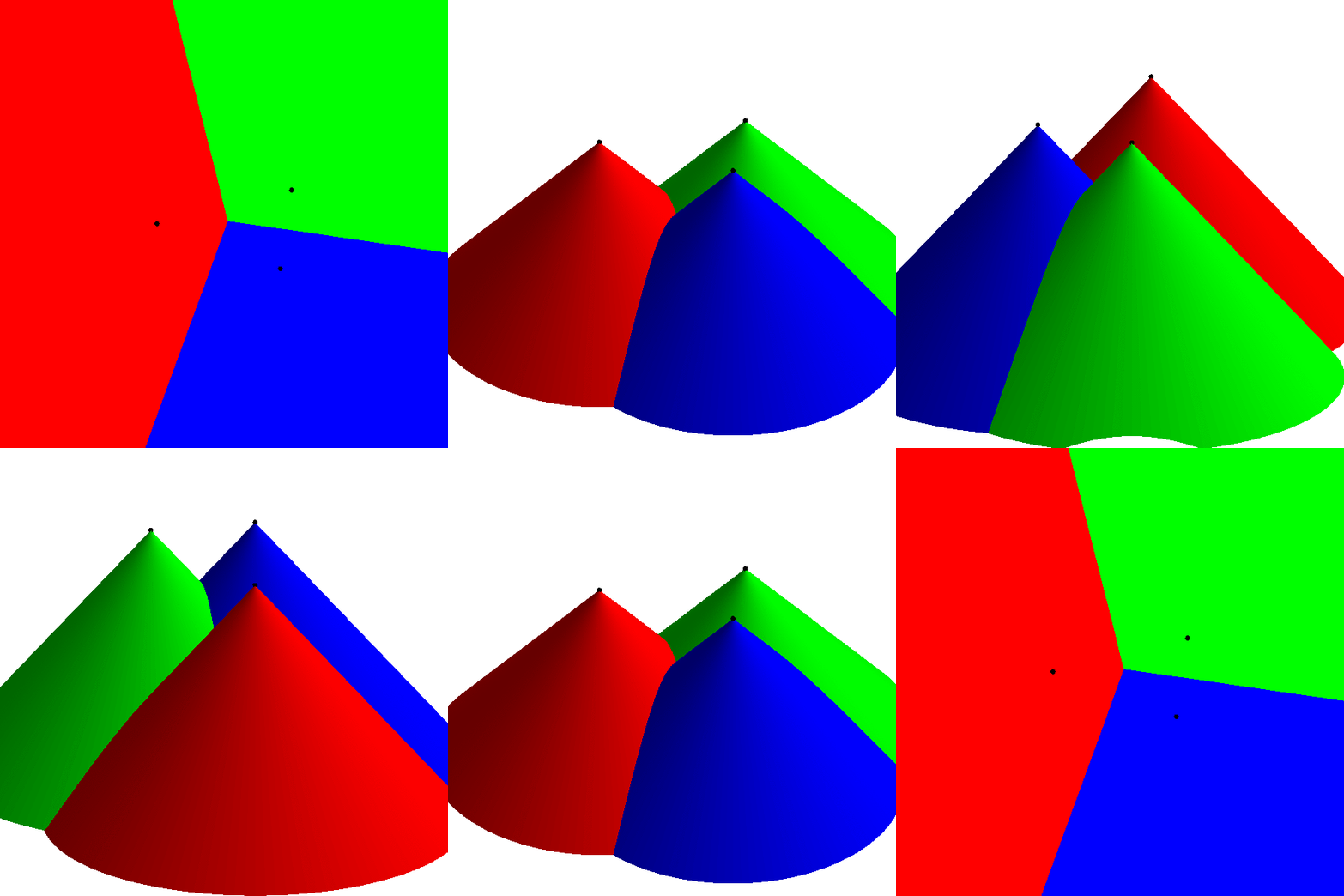
<p>That’s when it hit me! Render each seed as cone pointed towards the
camera in an orthographic projection, coloring each cone according to
the seed’s color. The Voronoi diagram would work itself out
<em>automatically</em> in the depth buffer. That is, rather than do all this
distance comparison in the shader, let OpenGL do its normal job of
figuring out the scene geometry.</p>

<p>Here’s a video (<a href="https://nullprogram.s3.amazonaws.com/voronoi/voronoi-cones.gif">GIF</a>) I made that demonstrates what I mean.</p>

<video width="500" height="500" controls="" preload="metadata">
  <source src="https://nullprogram.s3.amazonaws.com/voronoi/voronoi-cones.webm" type="video/webm" />
  <source src="https://nullprogram.s3.amazonaws.com/voronoi/voronoi-cones.mp4" type="video/mp4" />
  <img src="https://nullprogram.s3.amazonaws.com/voronoi/voronoi-cones.gif" width="500" height="500" />
</video>

<p>Not only is this much faster, it’s also far simpler! Rather than being
limited to a hundred or so seed vertices, this version could literally
do millions of them, limited only by the available memory for
attribute buffers.</p>

<h4 id="the-resolution-catch">The Resolution Catch</h4>

<p>There’s a catch, though. There’s no way to perfectly represent a cone
in OpenGL. (And if there was, we’d be back at the brute force approach
as above anyway.) The cone must be built out of primitive triangles,
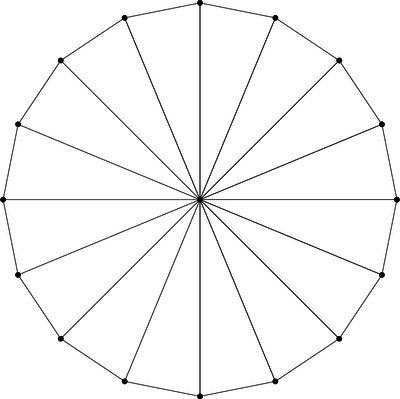
sort of like pizza slices, using <code class="language-plaintext highlighter-rouge">GL_TRIANGLE_FAN</code> mode. Here’s a cone
made of 16 triangles.</p>

<p><img src="https://nullprogram.s3.amazonaws.com/voronoi/triangle-fan.png" alt="" /></p>

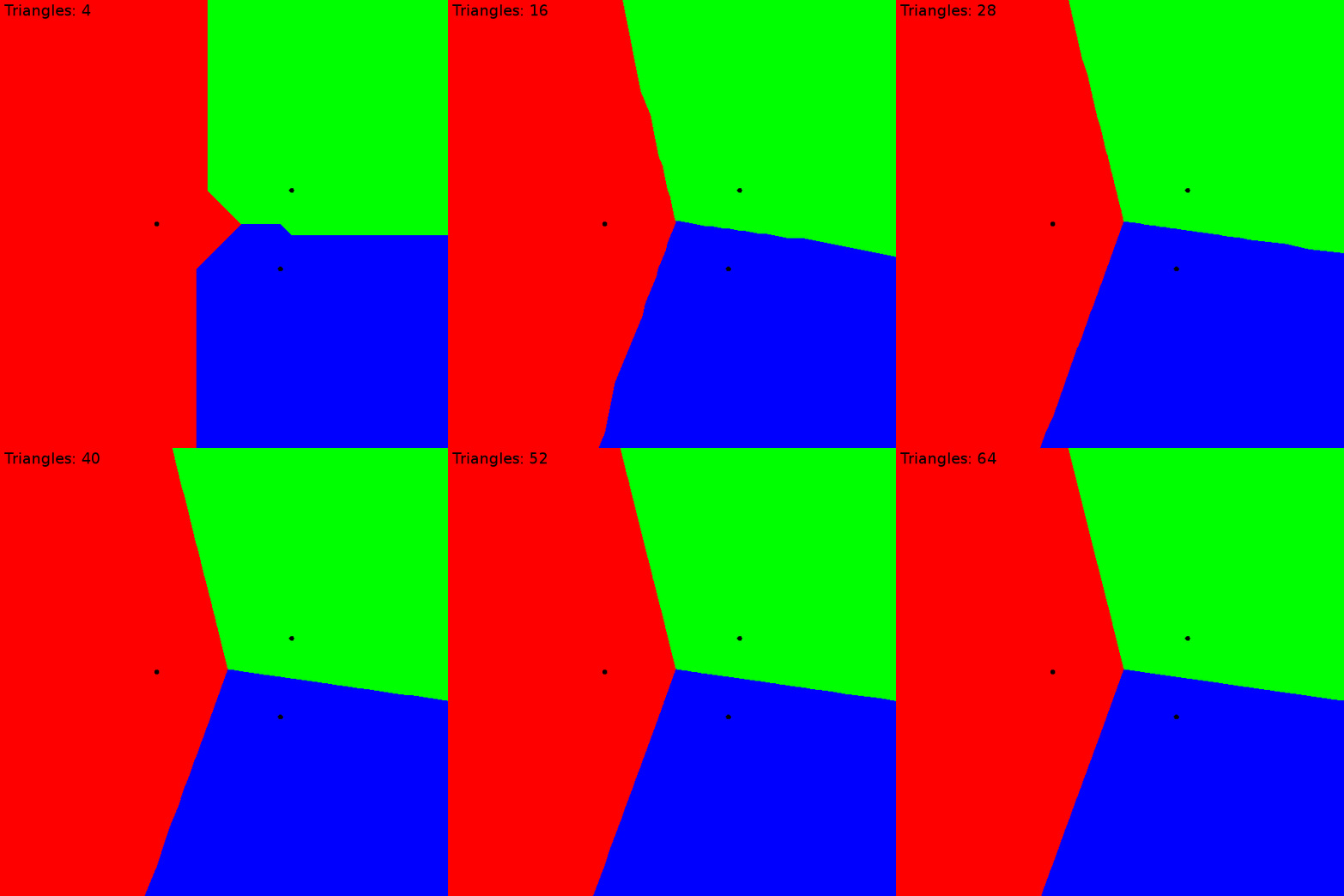
<p>Unlike the previous brute force approach, this is an <em>approximation</em>
of the Voronoi diagram. The more triangles, the better the
approximation, converging on the precision of the initial brute force
approach. I found that for this project, about 64 triangles was
indistinguishable from brute force.</p>

<p><img src="https://nullprogram.s3.amazonaws.com/voronoi/resolution.gif" width="500" height="500" /></p>

<h4 id="instancing-to-the-rescue">Instancing to the Rescue</h4>

<p>At this point things are looking pretty good. On my desktop, I can
maintain 60 frames-per-second for up to about 500 seed vertices moving
around randomly (“a”). After this, it becomes <em>draw-bound</em> because
each seed vertex requires a separate glDrawArrays() call to OpenGL.
The workaround for this is an OpenGL extension called instancing. The
<a href="http://blog.tojicode.com/2013/07/webgl-instancing-with.html">WebGL extension for instancing</a> is <code class="language-plaintext highlighter-rouge">ANGLE_instanced_arrays</code>.</p>

<p>The cone model was already sent to the GPU during initialization, so,
without instancing, the draw loop only has to bind the uniforms and
call draw for each seed. This code uses my <a href="https://github.com/skeeto/igloojs">Igloo WebGL
library</a> to simplify the API.</p>

<div class="language-js highlighter-rouge"><div class="highlight"><pre class="highlight"><code><span class="kd">var</span> <span class="nx">cone</span> <span class="o">=</span> <span class="nx">programs</span><span class="p">.</span><span class="nx">cone</span><span class="p">.</span><span class="nx">use</span><span class="p">()</span>
        <span class="p">.</span><span class="nx">attrib</span><span class="p">(</span><span class="dl">'</span><span class="s1">cone</span><span class="dl">'</span><span class="p">,</span> <span class="nx">buffers</span><span class="p">.</span><span class="nx">cone</span><span class="p">,</span> <span class="mi">3</span><span class="p">);</span>
<span class="k">for</span> <span class="p">(</span><span class="kd">var</span> <span class="nx">i</span> <span class="o">=</span> <span class="mi">0</span><span class="p">;</span> <span class="nx">i</span> <span class="o">&lt;</span> <span class="nx">seeds</span><span class="p">.</span><span class="nx">length</span><span class="p">;</span> <span class="nx">i</span><span class="o">++</span><span class="p">)</span> <span class="p">{</span>
    <span class="nx">cone</span><span class="p">.</span><span class="nx">uniform</span><span class="p">(</span><span class="dl">'</span><span class="s1">color</span><span class="dl">'</span><span class="p">,</span> <span class="nx">seeds</span><span class="p">[</span><span class="nx">i</span><span class="p">].</span><span class="nx">color</span><span class="p">)</span>
        <span class="p">.</span><span class="nx">uniform</span><span class="p">(</span><span class="dl">'</span><span class="s1">position</span><span class="dl">'</span><span class="p">,</span> <span class="nx">seeds</span><span class="p">[</span><span class="nx">i</span><span class="p">].</span><span class="nx">position</span><span class="p">)</span>
        <span class="p">.</span><span class="nx">draw</span><span class="p">(</span><span class="nx">gl</span><span class="p">.</span><span class="nx">TRIANGLE_FAN</span><span class="p">,</span> <span class="mi">66</span><span class="p">);</span>  <span class="c1">// 64 triangles == 66 verts</span>
<span class="p">}</span>
</code></pre></div></div>

<p>It’s driving this pair of shaders.</p>

<div class="language-glsl highlighter-rouge"><div class="highlight"><pre class="highlight"><code><span class="cm">/* cone.vert */</span>
<span class="k">attribute</span> <span class="kt">vec3</span> <span class="n">cone</span><span class="p">;</span>
<span class="k">uniform</span> <span class="kt">vec2</span> <span class="n">position</span><span class="p">;</span>

<span class="kt">void</span> <span class="nf">main</span><span class="p">()</span> <span class="p">{</span>
    <span class="nb">gl_Position</span> <span class="o">=</span> <span class="kt">vec4</span><span class="p">(</span><span class="n">cone</span><span class="p">.</span><span class="n">xy</span> <span class="o">+</span> <span class="n">position</span><span class="p">,</span> <span class="n">cone</span><span class="p">.</span><span class="n">z</span><span class="p">,</span> <span class="mi">1</span><span class="p">.</span><span class="mi">0</span><span class="p">);</span>
<span class="p">}</span>
</code></pre></div></div>

<div class="language-glsl highlighter-rouge"><div class="highlight"><pre class="highlight"><code><span class="cm">/* cone.frag */</span>
<span class="k">uniform</span> <span class="kt">vec3</span> <span class="n">color</span><span class="p">;</span>

<span class="kt">void</span> <span class="nf">main</span><span class="p">()</span> <span class="p">{</span>
    <span class="nb">gl_FragColor</span> <span class="o">=</span> <span class="kt">vec4</span><span class="p">(</span><span class="n">color</span><span class="p">,</span> <span class="mi">1</span><span class="p">.</span><span class="mi">0</span><span class="p">);</span>
<span class="p">}</span>
</code></pre></div></div>

<p>Instancing works by adjusting how attributes are stepped. Normally the
vertex shader runs once per element, but instead we can ask that some
attributes step once per <em>instance</em>, or even once per multiple
instances. Uniforms are then converted to vertex attribs and the
“loop” runs implicitly on the GPU. The instanced glDrawArrays() call
takes one additional argument: the number of instances to draw.</p>

<div class="language-js highlighter-rouge"><div class="highlight"><pre class="highlight"><code><span class="nx">ext</span> <span class="o">=</span> <span class="nx">gl</span><span class="p">.</span><span class="nx">getExtension</span><span class="p">(</span><span class="dl">"</span><span class="s2">ANGLE_instanced_arrays</span><span class="dl">"</span><span class="p">);</span> <span class="c1">// only once</span>

<span class="nx">programs</span><span class="p">.</span><span class="nx">cone</span><span class="p">.</span><span class="nx">use</span><span class="p">()</span>
    <span class="p">.</span><span class="nx">attrib</span><span class="p">(</span><span class="dl">'</span><span class="s1">cone</span><span class="dl">'</span><span class="p">,</span> <span class="nx">buffers</span><span class="p">.</span><span class="nx">cone</span><span class="p">,</span> <span class="mi">3</span><span class="p">)</span>
    <span class="p">.</span><span class="nx">attrib</span><span class="p">(</span><span class="dl">'</span><span class="s1">position</span><span class="dl">'</span><span class="p">,</span> <span class="nx">buffers</span><span class="p">.</span><span class="nx">positions</span><span class="p">,</span> <span class="mi">2</span><span class="p">)</span>
    <span class="p">.</span><span class="nx">attrib</span><span class="p">(</span><span class="dl">'</span><span class="s1">color</span><span class="dl">'</span><span class="p">,</span> <span class="nx">buffers</span><span class="p">.</span><span class="nx">colors</span><span class="p">,</span> <span class="mi">3</span><span class="p">);</span>
<span class="cm">/* Tell OpenGL these iterate once (1) per instance. */</span>
<span class="nx">ext</span><span class="p">.</span><span class="nx">vertexAttribDivisorANGLE</span><span class="p">(</span><span class="nx">cone</span><span class="p">.</span><span class="nx">vars</span><span class="p">[</span><span class="dl">'</span><span class="s1">position</span><span class="dl">'</span><span class="p">],</span> <span class="mi">1</span><span class="p">);</span>
<span class="nx">ext</span><span class="p">.</span><span class="nx">vertexAttribDivisorANGLE</span><span class="p">(</span><span class="nx">cone</span><span class="p">.</span><span class="nx">vars</span><span class="p">[</span><span class="dl">'</span><span class="s1">color</span><span class="dl">'</span><span class="p">],</span> <span class="mi">1</span><span class="p">);</span>
<span class="nx">ext</span><span class="p">.</span><span class="nx">drawArraysInstancedANGLE</span><span class="p">(</span><span class="nx">gl</span><span class="p">.</span><span class="nx">TRIANGLE_FAN</span><span class="p">,</span> <span class="mi">0</span><span class="p">,</span> <span class="mi">66</span><span class="p">,</span> <span class="nx">seeds</span><span class="p">.</span><span class="nx">length</span><span class="p">);</span>
</code></pre></div></div>

<p>The ugly ANGLE names are because this is an extension, not part of
WebGL itself. As such, my program will fall back to use multiple draw
calls when the extension is not available. It’s only there for a speed
boost.</p>

<p>Here are the new shaders. Notice the uniforms are gone.</p>

<div class="language-glsl highlighter-rouge"><div class="highlight"><pre class="highlight"><code><span class="cm">/* cone-instanced.vert */</span>
<span class="k">attribute</span> <span class="kt">vec3</span> <span class="n">cone</span><span class="p">;</span>
<span class="k">attribute</span> <span class="kt">vec2</span> <span class="n">position</span><span class="p">;</span>
<span class="k">attribute</span> <span class="kt">vec3</span> <span class="n">color</span><span class="p">;</span>

<span class="k">varying</span> <span class="kt">vec3</span> <span class="n">vcolor</span><span class="p">;</span>

<span class="kt">void</span> <span class="nf">main</span><span class="p">()</span> <span class="p">{</span>
    <span class="n">vcolor</span> <span class="o">=</span> <span class="n">color</span><span class="p">;</span>
    <span class="nb">gl_Position</span> <span class="o">=</span> <span class="kt">vec4</span><span class="p">(</span><span class="n">cone</span><span class="p">.</span><span class="n">xy</span> <span class="o">+</span> <span class="n">position</span><span class="p">,</span> <span class="n">cone</span><span class="p">.</span><span class="n">z</span><span class="p">,</span> <span class="mi">1</span><span class="p">.</span><span class="mi">0</span><span class="p">);</span>
<span class="p">}</span>
</code></pre></div></div>

<div class="language-glsl highlighter-rouge"><div class="highlight"><pre class="highlight"><code><span class="cm">/* cone-instanced.frag */</span>
<span class="k">varying</span> <span class="kt">vec3</span> <span class="n">vcolor</span><span class="p">;</span>

<span class="kt">void</span> <span class="nf">main</span><span class="p">()</span> <span class="p">{</span>
    <span class="nb">gl_FragColor</span> <span class="o">=</span> <span class="kt">vec4</span><span class="p">(</span><span class="n">vcolor</span><span class="p">,</span> <span class="mi">1</span><span class="p">.</span><span class="mi">0</span><span class="p">);</span>
<span class="p">}</span>
</code></pre></div></div>

<p>On the same machine, the instancing version can do a few thousand seed
vertices (an order of magnitude more) at 60 frames-per-second, after
which it becomes bandwidth saturated. This is because, for the
animation, every vertex position is updated on the GPU on each frame.
At this point it’s overcrowded anyway, so there’s no need to support
more.</p>

]]>
    </content>
  </entry>


  <entry>
    <title>Rumor Simulation</title>
    <link rel="alternate" type="text/html" href="https://nullprogram.com/blog/2012/03/09/"/>
    <id>urn:uuid:9fee2022-d273-34d6-0970-546b5e875460</id>
    <updated>2012-03-09T00:00:00Z</updated>
    <category term="java"/><category term="math"/><category term="media"/><category term="video"/><category term="reddit"/>
    <content type="html">
      <![CDATA[<p>A couple months ago someone posted
<a href="http://old.reddit.com/r/javahelp/comments/ngvp4/">an interesting programming homework problem</a> on reddit,
asking for help. Help had already been provided before I got there,
but I thought the problem was an interesting one.</p>

<blockquote>
  <p>Write a program that simulates the spreading of a rumor among a group
of people. At any given time, each person in the group is in one of
three categories:</p>

  <ul>
    <li>IGNORANT - the person has not yet heard the rumor</li>
    <li>SPREADER - the person has heard the rumor and is eager to spread it</li>
    <li>STIFLER - the person has heard the rumor but considers it old news
and will not spread it</li>
  </ul>

  <p>At the very beginning, there is one spreader; everyone else is
ignorant. Then people begin to encounter each other.</p>

  <p>So the encounters go like this:</p>

  <ul>
    <li>If a SPREADER and an IGNORANT meet, IGNORANT becomes a SPREADER.</li>
    <li>If a SPREADER and a STIFLER meet, the SPREADER becomes a STIFLER.</li>
    <li>If a SPREADER and a SPREADER meet, they both become STIFLERS.</li>
    <li>In all other encounters nothing changes.</li>
  </ul>

  <p>Your program should simulate this by repeatedly selecting two people
randomly and having them “meet.”</p>

  <p>There are three questions we want to answer:</p>

  <ul>
    <li>Will everyone eventually hear the rumor, or will it die out before
everyone hears it?</li>
    <li>If it does die out, what percentage of the population hears it?</li>
    <li>How long does it take? i.e. How many encounters occur before the
rumor dies out?</li>
  </ul>
</blockquote>

<p>I wrote a very thorough version to <a href="/blog/2011/11/28/">produce videos</a> of the
simulation in action.</p>

<ul>
  <li><a href="https://github.com/skeeto/rumor-sim">https://github.com/skeeto/rumor-sim</a></li>
</ul>

<p>It accepts some command line arguments, so you don’t need to edit any
code just to try out some simple things.</p>

<p>And here are a couple of videos. Each individual is a cell in a 2D
grid. IGNORANT is black, SPREADER is red, and STIFLER is white. Note
that this is <em>not</em> a cellular automata, because cell neighborship does
not come into play.</p>

<video src="https://s3.amazonaws.com/nullprogram/rumor/rumor-small.webm" controls="controls" width="400" height="250">
</video>

<video src="https://s3.amazonaws.com/nullprogram/rumor/rumor.webm" controls="controls" width="400" height="400">
</video>

<p>Here’s are the statistics for ten different rumors.</p>

<div class="language-plaintext highlighter-rouge"><div class="highlight"><pre class="highlight"><code>Rumor(n=10000, meetups=132380, knowing=0.789)
Rumor(n=10000, meetups=123944, knowing=0.7911)
Rumor(n=10000, meetups=117459, knowing=0.7985)
Rumor(n=10000, meetups=127063, knowing=0.79)
Rumor(n=10000, meetups=124116, knowing=0.8025)
Rumor(n=10000, meetups=115903, knowing=0.7952)
Rumor(n=10000, meetups=137222, knowing=0.7927)
Rumor(n=10000, meetups=134354, knowing=0.797)
Rumor(n=10000, meetups=113887, knowing=0.8025)
Rumor(n=10000, meetups=139534, knowing=0.7938)
</code></pre></div></div>

<p>Except for very small populations, the simulation always terminates
very close to 80% rumor coverage. I don’t understand (yet) why this
is, but I find it very interesting.</p>

]]>
    </content>
  </entry>


  <entry>
    <title>Lisp Let in GNU Octave</title>
    <link rel="alternate" type="text/html" href="https://nullprogram.com/blog/2012/02/08/"/>
    <id>urn:uuid:05e5318e-0cf4-3d80-4bf5-da695dbe9e47</id>
    <updated>2012-02-08T00:00:00Z</updated>
    <category term="octave"/><category term="trick"/><category term="lisp"/><category term="media"/><category term="math"/><category term="video"/>
    <content type="html">
      <![CDATA[<p>In <a href="/blog/2011/01/30/">BrianScheme</a>, the standard Lisp binding form <code class="language-plaintext highlighter-rouge">let</code> isn’t a
special form. That is, it’s not a hard-coded language feature, or
<em>special form</em>. It’s built on top of <code class="language-plaintext highlighter-rouge">lambda</code>. In any lexically-scoped
Lisp, the expression,</p>

<div class="language-cl highlighter-rouge"><div class="highlight"><pre class="highlight"><code><span class="p">(</span><span class="k">let</span> <span class="p">((</span><span class="nv">x</span> <span class="mi">10</span><span class="p">)</span>
      <span class="p">(</span><span class="nv">y</span> <span class="mi">20</span><span class="p">))</span>
  <span class="p">(</span><span class="nb">*</span> <span class="mi">10</span> <span class="mi">20</span><span class="p">))</span>
</code></pre></div></div>

<p>Can also be written as,</p>

<div class="language-cl highlighter-rouge"><div class="highlight"><pre class="highlight"><code><span class="p">((</span><span class="k">lambda</span> <span class="p">(</span><span class="nv">x</span> <span class="nv">y</span><span class="p">)</span>
   <span class="p">(</span><span class="nb">*</span> <span class="nv">x</span> <span class="nv">y</span><span class="p">))</span>
 <span class="mi">10</span> <span class="mi">20</span><span class="p">)</span>
</code></pre></div></div>

<p>BrianScheme’s <code class="language-plaintext highlighter-rouge">let</code> is just a macro that transforms into a lambda
expression. This is also what made it so important to implement lambda
lifting, to optimize these otherwise-expensive forms.</p>

<p>It’s possible to achieve a similar effect in GNU Octave (but not
Matlab, due to <a href="/blog/2008/08/29/">its flawed parser design</a>). The language permits
simple lambda expressions, much like Python.</p>

<div class="language-matlab highlighter-rouge"><div class="highlight"><pre class="highlight"><code><span class="o">&gt;</span> <span class="n">f</span> <span class="o">=</span> <span class="o">@</span><span class="p">(</span><span class="n">x</span><span class="p">)</span> <span class="n">x</span> <span class="o">+</span> <span class="mi">10</span><span class="p">;</span>
<span class="o">&gt;</span> <span class="n">f</span><span class="p">(</span><span class="mi">4</span><span class="p">)</span>
<span class="nb">ans</span> <span class="o">=</span> <span class="mi">14</span>
</code></pre></div></div>

<p>It can be used to create a scope in a language that’s mostly devoid of
scope. For example, I can avoid assigning a value to a temporary
variable just because I need to use it in two places. This one-liner
generates a random 3D unit vector.</p>

<div class="language-matlab highlighter-rouge"><div class="highlight"><pre class="highlight"><code><span class="p">(</span><span class="o">@</span><span class="p">(</span><span class="n">v</span><span class="p">)</span> <span class="n">v</span> <span class="p">/</span> <span class="nb">norm</span><span class="p">(</span><span class="n">v</span><span class="p">))(</span><span class="nb">randn</span><span class="p">(</span><span class="mi">1</span><span class="p">,</span> <span class="mi">3</span><span class="p">))</span>
</code></pre></div></div>

<p>The anonymous function is called inside the same expression where it’s
created. In practice, doing this is stupid. It’s confusing and there’s
really nothing to gain by being clever, doing it in one line instead
of two. Most importantly, there’s no macro system that can turn this
into a new language feature. <em>However</em>, I enjoyed using this technique
to create a one-liner that generates <code class="language-plaintext highlighter-rouge">n</code> random unit vectors.</p>

<div class="language-matlab highlighter-rouge"><div class="highlight"><pre class="highlight"><code><span class="n">n</span> <span class="o">=</span> <span class="mi">1000</span><span class="p">;</span>
<span class="n">p</span> <span class="o">=</span> <span class="p">(</span><span class="o">@</span><span class="p">(</span><span class="n">v</span><span class="p">)</span> <span class="n">v</span> <span class="o">.</span><span class="p">/</span> <span class="nb">repmat</span><span class="p">(</span><span class="nb">sqrt</span><span class="p">(</span><span class="nb">sum</span><span class="p">(</span><span class="nb">abs</span><span class="p">(</span><span class="n">v</span><span class="p">)</span> <span class="o">.^</span> <span class="mi">2</span><span class="p">,</span> <span class="mi">2</span><span class="p">)),</span> <span class="mi">1</span><span class="p">,</span> <span class="mi">3</span><span class="p">))(</span><span class="nb">randn</span><span class="p">(</span><span class="n">n</span><span class="p">,</span> <span class="mi">3</span><span class="p">));</span>
</code></pre></div></div>

<p>Why was I doing this? I was using the Monte Carlo method to
double-check my solution to <a href="http://godplaysdice.blogspot.com/2011/12/geometric-probability-problem.html">this math problem</a>:</p>

<blockquote>
  <p>What is the average straight line distance between two points on a
sphere of radius 1?</p>
</blockquote>

<p>I was also demonstrating to <a href="http://devrand.org/">Gavin</a> that simply choosing two
<em>angles</em> is insufficient, because the points the angles select are not
evenly distributed over the surface of the sphere. I generated this
video, where the poles are clearly visible due to the uneven selection
by two angles.</p>

<video src="https://s3.amazonaws.com/nullprogram/sphere/sphere-dark.webm" controls="controls" height="340" width="340">
</video>

<p>This took hours to render with gnuplot! Here are stylized versions:
<a href="https://s3.amazonaws.com/nullprogram/sphere/dark.html">Dark</a> and <a href="https://s3.amazonaws.com/nullprogram/sphere/light.html">Light</a>.</p>

]]>
    </content>
  </entry>


  <entry>
    <title>Cartoon Liquid Simulation</title>
    <link rel="alternate" type="text/html" href="https://nullprogram.com/blog/2012/02/03/"/>
    <id>urn:uuid:3819c303-f785-3d90-7c85-af2ca32b7ee4</id>
    <updated>2012-02-03T00:00:00Z</updated>
    <category term="interactive"/><category term="java"/><category term="math"/><category term="media"/><category term="video"/>
    <content type="html">
      <![CDATA[<p><strong>Update June 2013</strong>: This program has been <a href="/blog/2012/02/03/">ported to WebGL</a>!!!</p>

<p>The other day I came across this neat visual trick:
<a href="http://www.patrickmatte.com/stuff/physicsLiquid/">How to simulate liquid</a> (Flash). It’s a really simple way to
simulate some natural-looking liquid.</p>

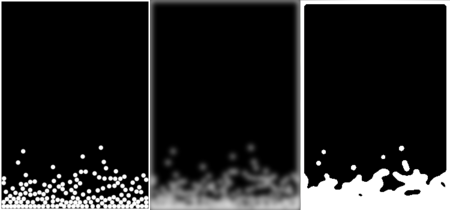
<ul>
  <li>Perform a physics simulation of a number of circular particles.</li>
  <li>Render this simulation in high contrast.</li>
  <li>Gaussian blur the rendering.</li>
  <li>Threshold the blur.</li>
</ul>

<p><img src="/img/liquid/liquid-thumb.png" alt="" /></p>

<p>I [made my own version][fun] in Java, using <a href="http://jbox2d.org/">JBox2D</a> for the
physics simulation.</p>

<ul>
  <li><a href="https://github.com/skeeto/fun-liquid">https://github.com/skeeto/fun-liquid</a></li>
</ul>

<p>For those of you who don’t want to run a Java applet, here’s a video
demonstration. Gravity is reversed every few seconds, causing the
liquid to slosh up and down over and over. The two triangles on the
sides help mix things up a bit. The video flips through the different
components of the animation.</p>

<video src="https://s3.amazonaws.com/nullprogram/liquid/liquid-overview.webm" poster="https://s3.amazonaws.com/nullprogram/liquid/liquid-poster.png" controls="controls" width="250" height="350">
</video>

<p>It’s not a perfect liquid simulation. The surface never settles down,
so the liquid is lumpy, like curdled milk. There’s also a lack of
cohesion, since JBox2D doesn’t provide cohesion directly. However, I
think I could implement cohesion on my own by writing a custom
contact.</p>

<p>JBox2D is a really nice, easy-to-use 2D physics library. I only had to
read the first two chapters of the <a href="http://box2d.org/">Box2D</a> manual. Everything
else can be figured out through the JBox2D Javadocs. It’s also
available from the Maven repository, which is the reason I initially
selected it. My only complaint so far is that the API doesn’t really
follow best practice, but that’s probably because it follows the Box2D
C++ API so closely.</p>

<p>I’m excited about JBox2D and I plan on using it again for some future
project ideas. Maybe even a game.</p>

<p>The most computationally intensive part of the process <em>isn’t</em> the
physics. That’s really quite cheap. It’s actually blurring, by far.
Blurring involves <a href="/blog/2008/02/22/">convolving a kernel</a> over the image —
O(n^2) time. The graphics card would be ideal for that step, probably
eliminating it as a bottleneck, but it’s unavailable to pure Java. I
could have <a href="/blog/2011/11/06/">pulled in lwjgl</a>, but I wanted to keep it simple,
so that it could be turned into a safe applet.</p>

<p>As a result, it may not run smoothly on computers that are more than a
couple of years old. I’ve been trying to come up with a cheaper
alternative, such as rendering a transparent halo around each ball,
but haven’t found anything yet. Even with that fix, thresholding would
probably be the next bottleneck — something else the graphics card
would be really good at.</p>

]]>
    </content>
  </entry>


  <entry>
    <title>Silky Smooth Perlin Noise Surface</title>
    <link rel="alternate" type="text/html" href="https://nullprogram.com/blog/2012/01/19/"/>
    <id>urn:uuid:3b93a02f-93e1-3221-2405-58a83127968e</id>
    <updated>2012-01-19T00:00:00Z</updated>
    <category term="octave"/><category term="math"/><category term="media"/>
    <content type="html">
      <![CDATA[<p>At work I’ve recently been generating
<a href="http://en.wikipedia.org/wiki/Viewshed">viewsheds</a> over
<a href="http://en.wikipedia.org/wiki/DTED">DTED</a> sets. Earlier this week I
was asked to give an informal presentation on what I was doing. I
wanted some terrain that demonstrated some key features, such as
vision being occluded by hills of varying heights. Rather than search
through the available DTED files for something good, I opted for
generating my own terrain, using an old trick of mine:
<a href="/blog/2007/11/20/">my noise “cloud” generator</a>. That’s a lesson in
the usefulness of maintaining a blog. The useful things you learn and
create are easy to revisit years later!</p>

<p>I generated some noise, looked at it with <code class="language-plaintext highlighter-rouge">surf()</code>, and repeated until
I found something useful. (<em>Update June 2012:</em> the function is called
<code class="language-plaintext highlighter-rouge">perlin()</code> but it’s not actually Perlin noise.)</p>

<div class="language-matlab highlighter-rouge"><div class="highlight"><pre class="highlight"><code><span class="n">m</span> <span class="o">=</span> <span class="n">perlin</span><span class="p">(</span><span class="mi">1024</span><span class="p">);</span>
<span class="nb">surf</span><span class="p">(</span><span class="n">m</span><span class="p">);</span>
</code></pre></div></div>

<p>The generated terrain is really quite rough, so I decided to smooth it
out by <a href="/blog/2008/02/22/">convolving it with a 2-dimensional Gaussian kernel</a>.</p>

<div class="language-matlab highlighter-rouge"><div class="highlight"><pre class="highlight"><code><span class="n">k</span> <span class="o">=</span> <span class="n">fspecial</span><span class="p">(</span><span class="s1">'gaussian'</span><span class="p">,</span> <span class="mi">9</span><span class="p">);</span>
<span class="n">ms</span> <span class="o">=</span> <span class="nb">conv2</span><span class="p">(</span><span class="n">m</span><span class="p">,</span> <span class="n">k</span><span class="p">,</span> <span class="s1">'same'</span><span class="p">);</span>
</code></pre></div></div>

<p>It still wasn’t smooth enough. So I repeated the process a bit,</p>

<div class="language-matlab highlighter-rouge"><div class="highlight"><pre class="highlight"><code><span class="k">for</span> <span class="n">i</span> <span class="o">=</span> <span class="mi">1</span><span class="p">:</span><span class="mi">10</span>
    <span class="n">ms</span> <span class="o">=</span> <span class="nb">conv2</span><span class="p">(</span><span class="n">ms</span><span class="p">,</span> <span class="n">k</span><span class="p">,</span> <span class="s1">'same'</span><span class="p">);</span>
<span class="k">end</span>
</code></pre></div></div>

<p>Perfect! I used that for my presentation. However, I was having fun
and decided to experiment more with this. I filtered it again another
1000 times and generated a <code class="language-plaintext highlighter-rouge">surf()</code> plot with a high-resolution
colormap — the default colormap size caused banding.</p>

<div class="language-matlab highlighter-rouge"><div class="highlight"><pre class="highlight"><code><span class="nb">colormap</span><span class="p">(</span><span class="nb">copper</span><span class="p">(</span><span class="mi">1024</span><span class="p">));</span>
<span class="nb">surf</span><span class="p">(</span><span class="n">ms</span><span class="p">,</span> <span class="s1">'EdgeAlpha'</span><span class="p">,</span> <span class="mi">0</span><span class="p">);</span>
<span class="nb">axis</span><span class="p">(</span><span class="s1">'equal'</span><span class="p">);</span>
</code></pre></div></div>

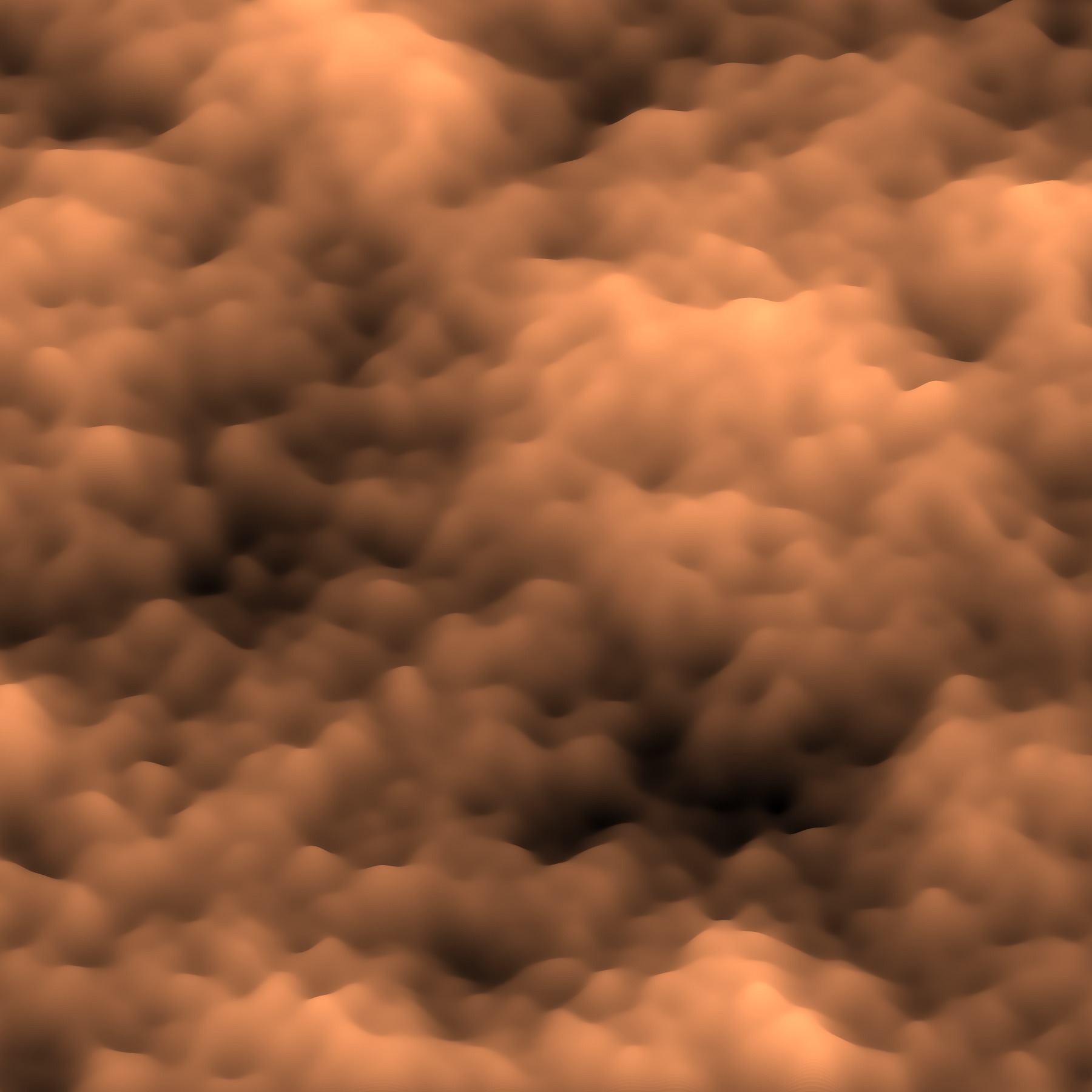
<p>It produced this beautiful result!</p>

<p><a href="/img/noise/silk-perlin-surface.jpg"><img src="/img/noise/silk-perlin-surface-thumb.jpg" alt="" /></a></p>

<p>I think it looks like a photograph from a high-powered microscope, or
maybe the turbulent surface of some kind of creamy beverage being
stirred.</p>

<p>At work when I need something Matlab-ish, I use Octave about half the
time and Matlab the other half. In this case, I was using
Matlab. Octave doesn’t support the <code class="language-plaintext highlighter-rouge">EdgeAlpha</code> property, nor the
<code class="language-plaintext highlighter-rouge">viewshed()</code> function that I needed for my work. Matlab currently
makes much prettier plots than Octave.</p>
]]>
    </content>
  </entry>


  <entry>
    <title>Unorderable Sets</title>
    <link rel="alternate" type="text/html" href="https://nullprogram.com/blog/2009/09/27/"/>
    <id>urn:uuid:616a14f1-ad6b-334b-f1c3-d3aadba6dc44</id>
    <updated>2009-09-27T00:00:00Z</updated>
    <category term="math"/><category term="compsci"/>
    <content type="html">
      <![CDATA[<!-- 27 September 2009 -->
<p>
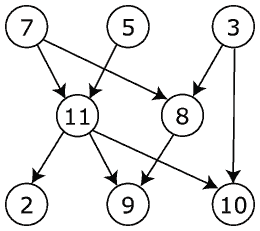
<img src="/img/diagram/dag.png" alt=""
     title="Directed acyclic graph (DAG)" class="right"/>

Under <a href="http://devrand.org/">Gavin</a>'s suggestion, I've been
watching <a href="http://en.wikipedia.org/wiki/The_Prisoner"> The
Prisoner</a>, a 1960's British television show. The main character is
an ex-spy held prisoner in "the Village", an Orwellian, isolated,
enclosed town. No one in the Village has a name, but is instead
assigned a number. The main character's number is 6.
</p>
<p>
As far as I can tell, after number 2 the order of the numbers is not
important. Number 56 is no more important than number 12. By using
numbers to name things there is an implied ordering, even if the the
ordering is insignificant. It could be misleading to a newcomer.
</p>
<p>
Is there an unordered set could be used to name things? More
specifically, is there a set that <i>cannot</i> be ordered? If it is
unorderable then there is no implicit ordering to cause
confusion. It's easy to have an unorderable set in theory, but I think
it is difficult to have in practice.
</p>
<p>
Using letters is obviously out, as the alphabet has an order. Words
and names made of letters can be sorted according to the alphabet.
However, the ability to order words is almost never used outside of
indexing. If words are used to name things, a newcomer is unlikely to
assume relationships based on ordering. No one will assume Alan is
more important than Bob.
</p>
<p>
Large numbers also tend to lack an assumed order. I don't think anyone
assumes a larger or smaller social security number has meaning, or a
larger or smaller phone number. However, these values are also known
to be handed out in some semi-random way.
</p>
<p>
But can we do better? For at least English speakers, is it possible to
create an unorderable set? If the items in the set have a vocal
pronunciation, then they can probably be ordered by their
phonetics. That could be avoided by using non-standard phonetic
components, like clicks and pops, which won't have a standard ordering
(in English, anyway).
</p>
<p>
A set has an order if there is a <a
href="http://en.wikipedia.org/wiki/Total_relation"> total</a>, <a
href="http://en.wikipedia.org/wiki/Transitive_relation">transitive</a>,
<a href="http://en.wikipedia.org/wiki/Relational_operator"> relational
operator</a> for the set. If such an operator does not exist then the
set isn't linearly ordered. I want a set that can't easily have such
an operator.
</p>
<p>
If a set of symbols was created, how might they be presented as to
show no ordering. The order of the symbols in the original
presentation might be considered the ordering, like how the alphabet
is always presented in order. A circle could be used, but this is
circularly ordered. I think there is also the issue of memorization. A
human will have a much better time memorizing the symbols if memorized
in some order. For example, try naming all the letters of the alphabet
at random, without repeats. Or US states.
</p>
<p>
Thanks to modern day technology, with dynamic content, the set could
be displayed in a random order each time it is viewed. For a web page,
the server could select a random order, or a JavaScript program could
reorder the images at random.
</p>
<p>
There could be partially ordered sets, like hierarchies and <a
href="http://en.wikipedia.org/wiki/Directed_acyclic_graph">DAGs</a>. The
ordering in The Prisoner is one of these. There is number 1, then
number 2, then everyone else. Is there a partially ordered set in use
that has unique names at the same level?
</p>
<p>
The penalties incurred by intentionally prohibiting order would likely
outweigh the benefit of the set. If it's not orderable, we can't index
it, and it's difficult to deal with. I expect it's much easer to just
use numbers and tell people that the order isn't important, or just
use an obviously unordered set.
</p>
]]>
    </content>
  </entry>


  <entry>
    <title>United States Hamiltonian Paths</title>
    <link rel="alternate" type="text/html" href="https://nullprogram.com/blog/2009/06/21/"/>
    <id>urn:uuid:4124ec41-1b0a-3a60-a8a2-9667a2243cad</id>
    <updated>2009-06-21T00:00:00Z</updated>
    <category term="math"/><category term="elisp"/><category term="lisp"/>
    <content type="html">
      <![CDATA[<!-- 21 June 2009 -->
<p>
Awhile ago I wanted to <a
href="http://threesixty360.wordpress.com/2009/04/22/traveling-the-lower-48/">
find every Hamiltonian path in the contiguous 48 states</a>. That is,
trips that visit each state exactly once. Writing a program to search
for Hamiltonian paths is easy (<a href="/blog/2009/05/27">I did this
already</a>). The most time consuming part was actually putting
together the data that specified the graph to be searched. I hope
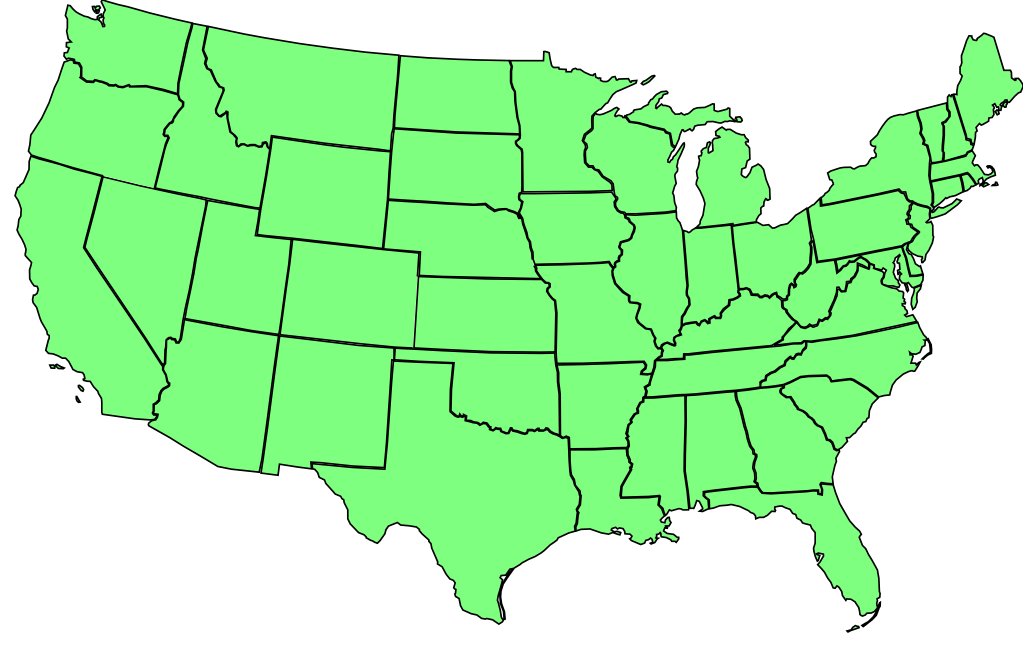
someone somewhere finds it useful. Here is a map for reference,
</p>
<p class="center">
<a href="/img/diagram/us48.png">
  <img src="/img/diagram/us48-small.png" alt=""/>
</a>
</p>
<p>
It took me several passes before I stopped finding errors. I
<i>think</i> I have it all right now, but there could still be some
mistakes. If you see one, leave a comment and I'll fix it here. Here
is the graph as an S-expression <a
href="http://en.wikipedia.org/wiki/Association_list#Association_lists">
alist</a>; the car (first) element in each list is a state, and the
cdr (rest) is the unordered list of states that can be reached from
it.
</p>
<pre>
((me nh)
 (nh vt ma me)
 (vt ny ma nh)
 (ma ri ct ny nh vt)
 (ny pa nj ma ct vt)
 (ri ma ct)
 (ct ri ma ny)
 (nj pa ny de)
 (de md pa nj)
 (pa nj ny de md wv oh)
 (md pa de va wv)
 (va md wv ky tn nc)
 (nc va tn ga sc)
 (sc nc ga)
 (ga fl sc al nc tn)
 (al ms fl ga tn)
 (ms la ar tn al)
 (tn ms al ga nc va ky mo ar)
 (ky wv va tn mo il in oh)
 (wv md pa oh ky va)
 (oh pa wv ky in mi)
 (fl al ga)
 (mi wi oh in)
 (wi mn ia il mi)
 (il in ky mo ia wi)
 (in oh ky il mi)
 (mo il ky tn ar ok ks ne ia)
 (ar mo tn ms la tx ok)
 (la ms ar tx)
 (tx ok nm ar la)
 (ok ks mo ar tx nm co)
 (ks ok co ne mo)
 (ne sd ia mo ks co wy)
 (sd nd mn ia ne wy mt)
 (nd mt sd mn)
 (ia ne mo il wi mn sd)
 (mn wi ia sd nd)
 (mt id wy sd nd)
 (wy id ut co ne sd mt)
 (co ne ks ok nm ut wy)
 (nm co ok tx az)
 (az nm ut ca nv)
 (ut nv id wy co az)
 (id mt wy ut nv or wa)
 (wa or id)
 (or wa id nv ca)
 (nv or id ut az ca)
 (ca az nv or))
</pre>
<p>
Note that all paths must start or end in Maine because it connects to
only one other state.
</p>
]]>
    </content>
  </entry>


  <entry>
    <title>Brainfuck Halting Problem</title>
    <link rel="alternate" type="text/html" href="https://nullprogram.com/blog/2009/04/12/"/>
    <id>urn:uuid:6f42cf03-1ca5-38e9-33d9-785fd0bd12ab</id>
    <updated>2009-04-12T00:00:00Z</updated>
    <category term="math"/>
    <content type="html">
      <![CDATA[<!-- 12 April 2009 -->
<p>
On my <a href="https://github.com/skeeto/bfc">brainfuck compiler
project</a>, I proposed pre-calculation as an optimization
technique. The idea can work, but it has an issue that will always be
unsolvable: how do you know that the pre-calculation will halt? This
is called <a href="http://en.wikipedia.org/wiki/Halting_problem"> the
halting problem</a> and it has been proven impossible to solve.
</p>
<p>
The idea was that the compiler would run the brainfuck program up
until the first input operation — if there even was one. It would
record all output and the final state of the memory. Instead of
compiling the code was was run, it would compile code that would print
all of the output and set the memory at the final state.
</p>
<p>
I has mistakenly assumed that it would be possible to detect a
non-halting program and avoid doing pre-calculation on it. I described
how it would be done and left it at that. Recently, someone kindly
sent me an email containing only 5 letters:
</p>
<pre>
+[--]
</pre>
<p>
This defeated my ill-conceived idea.
</p>
<p>
Because brainfuck is Turing complete, it is actually impossible to
determine whether or not an arbitrary brainfuck loop will halt. A
computer can't do it. A human brain (a fancy computer) can't do it
either. It cannot be done, at least not in this universe.
</p>
<p>
So, if implemented, this pre-calculation measure will always be
flawed.
</p>
]]>
    </content>
  </entry>


</feed>