<?xml version="1.0" encoding="UTF-8"?>
<feed xmlns="http://www.w3.org/2005/Atom">

  <title>Articles tagged openpgp at null program</title>
  <link rel="alternate" type="text/html"
        href="https://nullprogram.com/tags/openpgp/"/>
  <link rel="self" type="application/atom+xml"
        href="https://nullprogram.com/tags/openpgp/feed/"/>
  <updated>2026-04-07T03:24:16Z</updated>
  <id>urn:uuid:f29b12d7-84e6-4cef-ab71-46e854ab1df6</id>

  <author>
    <name>Christopher Wellons</name>
    <uri>https://nullprogram.com</uri>
    <email>wellons@nullprogram.com</email>
  </author>


  <entry>
    <title>Keyringless GnuPG</title>
    <link rel="alternate" type="text/html" href="https://nullprogram.com/blog/2019/08/09/"/>
    <id>urn:uuid:c51e0800-9bf5-4b77-93d4-35480c40a0ba</id>
    <updated>2019-08-09T23:52:39Z</updated>
    <category term="crypto"/><category term="openpgp"/>
    <content type="html">
      <![CDATA[<p><em>This article was discussed <a href="https://news.ycombinator.com/item?id=20792472">on Hacker News</a>.</em></p>

<p>My favorite music player is <a href="https://audacious-media-player.org/">Audacious</a>. It follows the Winamp
Classic tradition of not trying to manage my music library. Instead it
waits patiently for me to throw files and directories at it. These
selections will be informally grouped into transient, disposable
playlists of whatever I fancy that day.</p>

<!--more-->

<p>This matters to me because my music collection is the result of around
25 years of hoarding music files from various sources including CD rips,
Napster P2P sharing, and, most recently, <a href="https://ytdl-org.github.io/youtube-dl/">YouTube downloads</a>. It’s
not well-organized, but it’s organized well enough. Each album has its
own directory, and related albums are sometimes grouped together under
a directory for a particular artist.</p>

<p>Over the years I’ve tried various music players, and some have either
wanted to manage this library or hide the underlying file-organized
nature of my collection. Both situations are annoying because I really
don’t want or need that abstraction. I’m going just fine thinking of
my music library in terms of files, thank you very much. Same goes for
ebooks.</p>

<p><strong>GnuPG is like a media player that wants to manage your whole music
library.</strong> Rather than MP3s, it’s crypto keys on a keyring. Nearly every
operation requires keys that have been imported into the keyring. Until
GnuPG 2.2.8 (June 2018), which added the <code class="language-plaintext highlighter-rouge">--show-keys</code> command, you
couldn’t even be sure what you were importing until after it was already
imported. Hopefully it wasn’t <a href="https://github.com/skeeto/pgp-poisoner">garbage</a>.</p>

<p>GnuPG <em>does</em> has a pretty good excuse. It’s oriented around the Web of
Trust model, and it can’t follow this model effectively without having
all the keys at once. However, even if you don’t buy into the Web of
Trust, the GnuPG interface still requires you to play by its rules.
Sometimes I’ve got a message, a signature, and a public key and I just
want to verify that they’re all consistent with each other, <em>damnit</em>.</p>

<div class="language-plaintext highlighter-rouge"><div class="highlight"><pre class="highlight"><code>$ gpg --import foo.asc
gpg: key 1A719EF63AEB2CFE: public key "foo" imported
gpg: Total number processed: 1
gpg:               imported: 1
$ gpg --verify --trust-model always message.txt.sig message.txt
gpg: Signature made Fri 09 Aug 2019 05:44:43 PM EDT
gpg:                using EDDSA key ...1A719EF63AEB2CFE
gpg: Good signature from "foo" [unknown]
gpg: WARNING: Using untrusted key!
$ gpg --batch --yes --delete-key 1A719EF63AEB2CFE
</code></pre></div></div>

<p>Three commands and seven lines of output when one of each would do.
Plus there’s a false warning: Wouldn’t an “always” trust model mean
that this key is indeed trusted?</p>

<h3 id="signify">Signify</h3>

<p>Compare this to <a href="https://www.openbsd.org/papers/bsdcan-signify.html">OpenBSD’s signify</a> (<a href="https://flak.tedunangst.com/post/signify">also</a>). There’s no
keyring, and it’s up to the user — or the program shelling out to
signify — to supply the appropriate key. It’s like the music player that
just plays whatever I give it. Here’s a simplified <a href="https://man.openbsd.org/signify">usage
overview</a>:</p>

<div class="language-plaintext highlighter-rouge"><div class="highlight"><pre class="highlight"><code>signify -G [-c comment] -p pubkey -s seckey
signify -S [-x sigfile] -s seckey -m message
signify -V [-x sigfile] -p pubkey -m message
</code></pre></div></div>

<p>When generating a new keypair (<code class="language-plaintext highlighter-rouge">-G</code>), the user must choose the
destination files for the public and secret keys. When signing a message
(a file), the user must supply the secret key and the message. When
verifying a file, the user must supply the public key and the message.
This is a popular enough model that <a href="https://jedisct1.github.io/minisign/">other, compatible implementations
with the same interface</a> have been developed.</p>

<p>Signify is deliberately incompatible with OpenPGP and uses its own
simpler, and less featureful, format. Wouldn’t it be nice to have a
similar interface to verify OpenPGP signatures?</p>

<h3 id="simplegpg">SimpleGPG</h3>

<p>Well, I thought so. So I put together a shell script that wraps GnuPG
and provides such an interface:</p>

<p><strong><a href="https://github.com/skeeto/simplegpg">SimpleGPG</a></strong></p>

<p>The interface is nearly identical to signify, and the GnuPG keyring is
hidden away as if it didn’t exist. The main difference is that the keys
and signatures produced and consumed by this tool are fully compatible
with OpenPGP. You could use this script without requiring anyone else to
adopt something new or different.</p>

<p>To avoid touching your real keyring, the script creates a temporary
keyring directory each time it’s run. The GnuPG option <code class="language-plaintext highlighter-rouge">--homedir</code>
instructs it to use this temporary keyring and ignore the usual one.
The temporary keyring is destroyed when the script exits. This is kind
of clunky, but there’s no way around it.</p>

<p>Verification looks roughly like this in the script:</p>

<div class="language-plaintext highlighter-rouge"><div class="highlight"><pre class="highlight"><code>$ tmp=$(mktemp -d simplegpg-XXXXXX)
$ gpg --homedir $tmp
$ gpg --homedir $tmp --import foo.asc
$ gpg --homedir $tmp --verify message.txt.sig message.txt
$ rm -rf $tmp
</code></pre></div></div>

<p>Generating a key is trivial, and there’s only a prompt for the
protection passphrase. Like signify, it will generate an Ed25519 key
and all outputs are ASCII-armored.</p>

<div class="language-plaintext highlighter-rouge"><div class="highlight"><pre class="highlight"><code>$ simplegpg -G -p keyname.asc -s keyname.pgp
passphrase:
passphrase (confirm):
</code></pre></div></div>

<p>Since signify doesn’t have a concept of a user ID for a key, just an
“untrusted comment”, the user ID is not emphasized here. The default
user ID will be “simplegpg key”, so, if you plan to share the key with
regular GnuPG users who will need to import it into a keyring, you
probably want to use <code class="language-plaintext highlighter-rouge">-c</code> to give it a more informative name.</p>

<p>Unfortunately due GnuPG’s very limited, keyring-oriented interface,
key generation is about three times slower than it should be. That’s
because the protection key is run though the String-to-Key (S2K)
algorithm <em>three times</em>:</p>

<ol>
  <li>
    <p>Immediately after the key is generated, the passphrase is converted
to a key, the key is encrypted, and it’s put onto the temporary
keyring.</p>
  </li>
  <li>
    <p>When exporting, the key passphrase is again run through the S2K to
get the protection key to decrypt it.</p>
  </li>
  <li>
    <p>The export format uses a slightly different S2K algorithm, so this
export S2K is now used to create yet another protection key.</p>
  </li>
</ol>

<p>Technically the second <em>could</em> be avoided since gpg-agent, which is
always required, could be holding the secret key material. As far as I
can tell, gpg-agent simply does not learn freshly-generated keys. I do
not know why this is the case.</p>

<p>This is related to another issue. If you’re accustomed to GnuPG, you may
notice that the passphrase prompt didn’t come from pinentry, a program
specialized for passphrase prompts. GnuPG normally uses it for this.
Instead, the script handles the passphrase prompt and passes the
passphrase to GnuPG (via a file descriptor). This would not be necessary
if gpg-agent did its job. Without this part of the script, users are
prompted three times, via pinentry, for their passphrase when generating
a key.</p>

<p>When signing messages, the passphrase prompt comes from pinentry since
it’s initiated by GnuPG.</p>

<div class="language-plaintext highlighter-rouge"><div class="highlight"><pre class="highlight"><code>$ simplegpg -S -s keyname.pgp -m message.txt
passphrase:
</code></pre></div></div>

<p>This will produce <code class="language-plaintext highlighter-rouge">message.txt.sig</code> with an OpenPGP detached signature.</p>

<p>The passphrase prompt is for <code class="language-plaintext highlighter-rouge">--import</code>, not <code class="language-plaintext highlighter-rouge">--detach-sign</code>. As with
key generation, the S2K is run more than necessary: twice instead of
once. First to generate the decryption key, then a second time to
generate a different encryption key for the keyring since the export
format and keyring use different algorithms. Ugh.</p>

<p>But at least gpg-agent does its job this time, so only one passphrase
prompt is necessary. In general, a downside of these temporary
keyrings is that gpg-agent treats each as different keys, and you will
need to enter your passphrase once for each message signed. Just like
signify.</p>

<p>Verification, of course, requires no prompting and no S2K.</p>

<div class="language-plaintext highlighter-rouge"><div class="highlight"><pre class="highlight"><code>$ simplegpg -V -p keyname.asc -m message.txt
</code></pre></div></div>

<p>That’s all there is to keyringless OpenPGP signatures. Since I’m not
interested in the Web of Trust or keyservers, I wish GnuPG was more
friendly to this model of operation.</p>

<h3 id="passphrase2pgp">passphrase2pgp</h3>

<p>I mentioned that SimpleGPG is fully compatible with other OpenPGP
systems. This includes <a href="/blog/2019/07/10/">my own passphrase2pgp</a>, where your secret
key is stored only in your brain. No need for a secret key file. In the
time since I first wrote about it, passphrase2pgp has gained the ability
to produce signatures itself!</p>

<p>I’ve got my environment set up — <code class="language-plaintext highlighter-rouge">$REALNAME</code>, <code class="language-plaintext highlighter-rouge">$EMAIL</code>, and <code class="language-plaintext highlighter-rouge">$KEYID</code> per
the README — so I don’t need to supply a user ID argument, nor will I be
prompted to confirm my passphrase since it’s checked against a known
fingerprint. Generating the public key, for sharing, looks like this:</p>

<div class="language-plaintext highlighter-rouge"><div class="highlight"><pre class="highlight"><code>$ passphrase2pgp -K --armor --public &gt;keyname.asc

Or just:

$ passphrase2pgp -ap &gt;keyname.asc
</code></pre></div></div>

<p>Like with signify and SimplePGP, to sign a message I’m prompted for my
passphrase. It takes longer since the “S2K” here is much stronger by
necessity. The passphrase is used to generate the secret key, then from
that the signature on the message:</p>

<div class="language-plaintext highlighter-rouge"><div class="highlight"><pre class="highlight"><code>$ passphrase2pgp -S message.txt
</code></pre></div></div>

<p>For the SimpleGPG user on the other side it all looks the same as before:</p>

<div class="language-plaintext highlighter-rouge"><div class="highlight"><pre class="highlight"><code>$ simplegpg -V -p keyname.asc -m message.txt
</code></pre></div></div>

<p>I’m probably going to start signing my open source software releases,
and this is how I intend to do it.</p>

]]>
    </content>
  </entry>


  <entry>
    <title>The Long Key ID Collider</title>
    <link rel="alternate" type="text/html" href="https://nullprogram.com/blog/2019/07/22/"/>
    <id>urn:uuid:e688fdea-0699-42dd-89ac-564d0b2b65bc</id>
    <updated>2019-07-22T21:27:02Z</updated>
    <category term="crypto"/><category term="openpgp"/><category term="go"/>
    <content type="html">
      <![CDATA[<p>Over the last couple weeks I’ve spent a lot more time working with
OpenPGP keys. It’s a consequence of polishing my <a href="/blog/2019/07/10/">passphrase-derived
PGP key generator</a>. I’ve tightened up the internals, and it’s
enabled me to explore the corners of the format, try interesting
things, and observe how various OpenPGP implementations respond to
weird inputs.</p>

<p>For one particularly cool trick, take a look at these two (private)
keys I generated yesterday. Here’s the first:</p>

<div class="language-plaintext highlighter-rouge"><div class="highlight"><pre class="highlight"><code>-----BEGIN PGP PRIVATE KEY BLOCK-----

xVgEXTU3gxYJKwYBBAHaRw8BAQdAjJgvdh3N2pegXPEuMe25nJ3gI7k8gEgQvCor
AExppm4AAQC0TNsuIRHkxaGjLNN6hQowRMxLXAMrkZfMcp1DTG8GBg1TzQ9udWxs
cHJvZ3JhbS5jb23CXgQTFggAEAUCXTU3gwkQmSpe7h0QSfoAAGq0APwOtCFVCxpv
d/gzKUg0SkdygmriV1UmrQ+KYx9dhzC6xwEAqwDGsSgSbCqPdkwqi/tOn+MwZ5N9
jYxy48PZGZ2V3ws=
=bBGR
-----END PGP PRIVATE KEY BLOCK-----
</code></pre></div></div>

<p>And the second:</p>

<div class="language-plaintext highlighter-rouge"><div class="highlight"><pre class="highlight"><code>-----BEGIN PGP PRIVATE KEY BLOCK-----

xVgEXTU3gxYJKwYBBAHaRw8BAQdAzjSPKjpOuJoLP6G0z7pptx4sBNiqmgEI0xiH
Z4Xb16kAAP0Qyon06UB2/gOeV/KjAjCi91MeoUd7lsA5yn82RR5bOxAkzQ9udWxs
cHJvZ3JhbS5jb23CXgQTFggAEAUCXTU3gwkQmSpe7h0QSfoAAEv4AQDLRqx10v3M
bwVnJ8BDASAOzrPw+Rz1tKbjG9r45iE7NQEAhm9QVtFd8SN337kIWcq8wXA6j1tY
+UeEsjg+SHzkqA4=
=QnLn
-----END PGP PRIVATE KEY BLOCK-----
</code></pre></div></div>

<p>Concatenate these and then import them into GnuPG to have a look at
them. To avoid littering in your actual keyring, especially with
private keys, use the <code class="language-plaintext highlighter-rouge">--homedir</code> option to set up a temporary
keyring. I’m going to omit that option in the examples.</p>

<div class="language-plaintext highlighter-rouge"><div class="highlight"><pre class="highlight"><code>$ gpg --import &lt; keys.asc
gpg: key 992A5EEE1D1049FA: public key "nullprogram.com" imported
gpg: key 992A5EEE1D1049FA: secret key imported
gpg: key 992A5EEE1D1049FA: public key "nullprogram.com" imported
gpg: key 992A5EEE1D1049FA: secret key imported
gpg: Total number processed: 2
gpg:               imported: 2
gpg:       secret keys read: 2
gpg:   secret keys imported: 2
</code></pre></div></div>

<p>The user ID is “nullprogram.com” since I made these and that’s me
taking credit. “992A5EEE1D1049FA” is called the <em>long key ID</em>: a
64-bit value that identifies the key. It’s the lowest 64 bits of the
full key ID, a 160-bit SHA-1 hash. In the old days everyone used a
<em>short key ID</em> to identify keys, which was the lowest 32 bits of the
key. For these keys, that would be “1D1049FA”. However, this was
deemed <em>way</em> too short, and everyone has since switched to long key
IDs, or even the full 160-bit key ID.</p>

<p>The key ID is nothing more than a SHA-1 hash of the key creation date —
unsigned 32-bit unix epoch seconds — and the public key material. So
secret keys have the same key ID as their associated public key. This
makes sense since they’re a key <em>pair</em> and they go together.</p>

<p>Look closely and you’ll notice that both keypairs have the same long
key ID. If you hadn’t already guessed from the title of this article,
these are two different keys with the same long key ID. In other
words, <strong>I’ve created a long key ID collision</strong>. The GnuPG
<code class="language-plaintext highlighter-rouge">--list-keys</code> command prints the full key ID since it’s so important:</p>

<div class="language-plaintext highlighter-rouge"><div class="highlight"><pre class="highlight"><code>$ gpg --list-keys
---------------------
pub   ed25519 2019-07-22 [SCA]
      A422F8B0E1BF89802521ECB2992A5EEE1D1049FA
uid           [ unknown] nullprogram.com

pub   ed25519 2019-07-22 [SCA]
      F43BC80C4FC2603904E7BE02992A5EEE1D1049FA
uid           [ unknown] nullprogram.com
</code></pre></div></div>

<p>I was only targeting the lower 64 bits, but I actually managed to
collide the lowest 68 bits by chance. So a long key ID still isn’t
enough to truly identify any particular key.</p>

<p>This isn’t news, of course. Nor am I the first person to create a long
key ID collision. In 2013, <a href="https://mailarchive.ietf.org/arch/msg/openpgp/Al8DzxTH2KT7vtFAgZ1q17Nub_g">David Leon Gil published a long key ID
collision for two 4096-bit RSA public keys</a>. However, that is the
only other example I was able to find. He did not include the private
keys and did not elaborate on how he did it. I know he <em>did</em> generate
viable keys, not just garbage for the public key portions, since they’re
both self-signed.</p>

<p>Creating these keys was trickier than I had anticipated, and there’s an
old, clever trick that makes it work. Building atop the work I did for
passphrase2pgp, I created a standalone tool that will create a long key
ID collision and print the two keypairs to standard output:</p>

<ul>
  <li><strong><a href="https://github.com/skeeto/pgpcollider">https://github.com/skeeto/pgpcollider</a></strong></li>
</ul>

<p>Example usage:</p>

<div class="language-plaintext highlighter-rouge"><div class="highlight"><pre class="highlight"><code>$ go get -u github.com/skeeto/pgpcollider
$ pgpcollider --verbose &gt; keys.asc
</code></pre></div></div>

<p>This can take up to a day to complete when run like this. The tool can
optionally coordinate many machines — see the <code class="language-plaintext highlighter-rouge">--server</code> / <code class="language-plaintext highlighter-rouge">-S</code> and
<code class="language-plaintext highlighter-rouge">--client</code> / <code class="language-plaintext highlighter-rouge">-C</code> options — to work together, greatly reducing the total
time. It took around 4 hours to create the keys above on a single
machine, generating a around 1 billion extra keys in the process. As
discussed below, I actually got lucky that it only took 1 billion. If
you modify the program to do short key ID collisions, it only takes a
few seconds.</p>

<p>The rest of this article is about how it works.</p>

<h3 id="birthday-attacks">Birthday Attacks</h3>

<p>An important detail is that <strong>this technique doesn’t target any specific
key ID</strong>. Cloning someone’s long key ID is still very expensive. No,
this is a <a href="https://en.wikipedia.org/wiki/Birthday_attack"><em>birthday attack</em></a>. To find a collision in a space of
2^64, on average I only need to generate 2^32 samples — the square root
of that space. That’s perfectly feasible on a regular desktop computer.
To collide long key IDs, I need only generate about 4 billion IDs and
efficiently do membership tests on that set as I go.</p>

<p>That last step is easier said than done. Naively, that might look like
this (pseudo-code):</p>

<div class="language-plaintext highlighter-rouge"><div class="highlight"><pre class="highlight"><code>seen := map of long key IDs to keys
loop forever {
    key := generateKey()
    longID := key.ID[12:20]
    if longID in seen {
        output seen[longID]
        output key
        break
    } else {
        seen[longID] = key
    }
}
</code></pre></div></div>

<p>Consider the size of that map. Each long ID is 8 bytes, and we expect
to store around 2^32 of them. That’s <em>at minimum</em> 32 GB of storage
just to track all the long IDs. The map itself is going to have some
overhead, too. Since these are literally random lookups, this all
mostly needs to be in RAM or else lookups are going to be <em>very</em> slow
and impractical.</p>

<p>And I haven’t even counted the keys yet. As a saving grace, these are
Ed25519 keys, so that’s 32 bytes for the public key and 32 bytes for the
private key, which I’ll need if I want to make a self-signature. (The
signature itself will be larger than the secret key.) That’s around
256GB more storage, though at least this can be stored on the hard
drive. However, to address these from the map I’d need at least 38 bits,
plus some more in case it goes over. Just call it another 8 bytes.</p>

<p>So that’s, at a bare minimum, 64GB of RAM plus 256GB of other storage.
Since nothing is ideal, we’ll need more than this. This is all still
feasible, but will require expensive hardware. We can do a lot better.</p>

<h4 id="keys-from-seeds">Keys from seeds</h4>

<p>The first thing you might notice is that we can jettison that 256GB of
storage by being a little more clever about how we generate keys. Since
we don’t actually care about the security of these keys, we can generate
each key from a seed much smaller than the key itself. Instead of using
8 bytes to reference a key in storage, just use those 8 bytes to store
the seed used to make the key.</p>

<div class="language-plaintext highlighter-rouge"><div class="highlight"><pre class="highlight"><code>counter := rand64()
seen := map of long key IDs to 64-bit seeds
loop forever {
    seed := counter
    counter++
    key := generateKey(seed)
    longID := key.ID[12:20]
    if longID in seen {
        output generateKey(seen[longID])
        output key
        break
    } else {
        seen[longID] = seed
    }
}
</code></pre></div></div>

<p>I’m incrementing a counter to generate the seeds because I don’t want to
experience the birthday paradox to apply to my seeds. Each really must
be unique. I’m using SplitMix64 for the PRNG <a href="https://github.com/skeeto/rng-go">since I learned it’s the
fastest</a> for Go, so a simple increment to generate seeds <a href="/blog/2018/07/31/">is
perfectly fine</a>.</p>

<p>Ultimately, this still uses utterly excessive amounts of memory.
Wouldn’t it be crazy if we could somehow get this 64GB map down to just
a few MBs of RAM? Well, we can!</p>

<h4 id="rainbow-tables">Rainbow tables</h4>

<p>For decades, password crackers have faced a similar problem. They want
to precompute the hashes for billions of popular passwords so that they
can efficiently reverse those password hashes later. However, storing
all those hashes would be unnecessarily expensive, or even infeasible.</p>

<p>So they don’t. Instead they use <a href="https://en.wikipedia.org/wiki/Rainbow_table"><em>rainbow tables</em></a>. Password hashes
are chained together into a hash chain, where a password hash leads to a
new password, then to a hash, and so on. Then only store the beginning
and the end of each chain.</p>

<p>To lookup a hash in the rainbow table, run the hash chain algorithm
starting from the target hash and, for each hash, check if it matches
the end of one of the chains. If so, recompute that chain and note the
step just before the target hash value. That’s the corresponding
password.</p>

<p>For example, suppose the password “foo” hashes to <code class="language-plaintext highlighter-rouge">9bfe98eb</code>, and we
have a <em>reduction function</em> that maps a hash to some password. In this
case, it maps <code class="language-plaintext highlighter-rouge">9bfe98eb</code> to “bar”. A trivial reduction function could
just be an index into a list of passwords. A hash chain starting from
“foo” might look like this:</p>

<div class="language-plaintext highlighter-rouge"><div class="highlight"><pre class="highlight"><code>foo -&gt; 9bfe98eb -&gt; bar -&gt; 27af0841 -&gt; baz -&gt; d9d4bbcb
</code></pre></div></div>

<p>In reality a chain would be a lot longer. Another chain starting from
“apple” might look like this:</p>

<div class="language-plaintext highlighter-rouge"><div class="highlight"><pre class="highlight"><code>apple -&gt; 7bbc06bc -&gt; candle -&gt; 82a46a63 -&gt; dog -&gt; 98c85d0a
</code></pre></div></div>

<p>We only store the tuples (foo, <code class="language-plaintext highlighter-rouge">d9d4bbcb</code>) and (apple, <code class="language-plaintext highlighter-rouge">98c85d0a</code>) in
our database. If the chains had been one million hashes long, we’d
still only store those two tuples. That’s literally a 1:1000000
compression ratio!</p>

<p>Later on we’re faced with reversing the hash <code class="language-plaintext highlighter-rouge">27af0841</code>, which isn’t
listed directly in the database. So we run the chain forward from that
hash until either I hit the maximum chain length (i.e. password not in
the table), or we recognize a hash:</p>

<div class="language-plaintext highlighter-rouge"><div class="highlight"><pre class="highlight"><code>27af0841 -&gt; baz -&gt; d9d4bbcb
</code></pre></div></div>

<p>That <code class="language-plaintext highlighter-rouge">d9d4bbcb</code> hash is listed as being in the “foo” hash chain. So I
regenerate that hash chain to discover that “bar” leads to <code class="language-plaintext highlighter-rouge">27af0841</code>.
Password cracked!</p>

<h4 id="collider-rainbow-table">Collider rainbow table</h4>

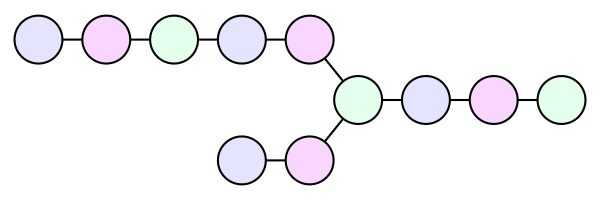
<p>My collider works very similarly. A hash chain works like this: Start
with a 64-bit seed as before, generate a key, get the long key ID,
<strong>then use the long key ID as the seed for the next key</strong>.</p>

<p><img src="/img/diagram/collider-chain.svg" alt="" /></p>

<p>There’s one big difference. In the rainbow table the purpose is to run
the hash function backwards by looking at the previous step in the
chain. For the collider, I want to know if any of the hash chains
collide. So long as each chain starts from a unique seed, it would mean
we’ve found <strong>two different seeds that lead to the same long key ID</strong>.</p>

<p>Alternatively, it could be two different seeds that lead to the same
key, which wouldn’t be useful, but that’s trivial to avoid.</p>

<p>A simple and efficient way to check if two chains contain the same
sequence is to stop them at the same place in that sequence. Rather than
run the hash chains for some fixed number of steps, they stop when they
reach a <em>distinguishing point</em>. In my collider a distinguishing point is
where the long key ID ends with at least N 0 bits, where N determines
the average chain length. I chose 17 bits.</p>

<div class="language-plaintext highlighter-rouge"><div class="highlight"><pre class="highlight"><code>func computeChain(seed) {
    loop forever {
        key := generateKey(seed)
        longID := key.ID[12:20]
        if distinguished(longID) {
            return longID
        }
        seed = longID
    }
}
</code></pre></div></div>

<p>If two different hash chains end on the same distinguishing point,
they’re guaranteed to have collided somewhere in the middle.</p>

<p><img src="/img/diagram/collision.svg" alt="" /></p>

<p>To determine where two chains collided, regenerate each chain and find
the first long key ID that they have in common. The step just before are
the colliding keys.</p>

<div class="language-plaintext highlighter-rouge"><div class="highlight"><pre class="highlight"><code>counter := rand64()
seen := map of long key IDs to 64-bit seeds
loop forever {
    seed := counter
    counter++
    longID := computeChain(seed)
    if longID in seen {
        output findCollision(seed, seen[longID])
        break
    } else {
        seen[longID] = seed
    }
}
</code></pre></div></div>

<p>Hash chains computation is embarrassingly parallel, so the load can be
spread efficiently across CPU cores. With these rainbow(-like) tables,
my tool can generate and track billions of keys in mere megabytes of
memory. The additional computational cost is the time it takes to
generate a couple more chains than otherwise necessary.</p>

]]>
    </content>
  </entry>


  <entry>
    <title>Predictable, Passphrase-Derived PGP Keys</title>
    <link rel="alternate" type="text/html" href="https://nullprogram.com/blog/2019/07/10/"/>
    <id>urn:uuid:cae3111c-2887-404a-bc0e-80b8c45a2d06</id>
    <updated>2019-07-10T04:18:29Z</updated>
    <category term="crypto"/><category term="openpgp"/><category term="go"/>
    <content type="html">
      <![CDATA[<p><em>tl;dr</em>: <strong><a href="https://github.com/skeeto/passphrase2pgp">passphrase2pgp</a></strong>.</p>

<p>One of my long-term concerns has been losing my core cryptographic keys,
or just not having access to them when I need them. I keep my important
data backed up, and if that data is private then I store it encrypted.
My keys are private, but how am I supposed to encrypt them? The chicken
or the egg?</p>

<p>The OpenPGP solution is to (optionally) encrypt secret keys using a key
derived from a passphrase. GnuPG prompts the user for this passphrase
when generating keys and when using secret keys. This protects the keys
at rest, and, with some caution, they can be included as part of regular
backups. The <a href="https://tools.ietf.org/html/rfc4880">OpenPGP specification, RFC 4880</a> has many options
for deriving a key from this passphrase, called <em>String-to-Key</em>, or S2K,
algorithms. None of the options are great.</p>

<p>In 2012, I selected the strongest S2K configuration at the time and,
along with a very strong passphrase, put my GnuPG keyring on the
internet as part of <a href="/blog/2012/06/23/">my public dotfiles repository</a>. It was a
kind of super-backup that would guarantee their availability anywhere
I’d need them.</p>

<p>My timing was bad because, with the release of GnuPG 2.1 in 2014, GnuPG
fundamentally changed its secret keyring format. <a href="https://dev.gnupg.org/T1800">S2K options are now
(quietly!) ignored</a> when deriving the protection keys. Instead it
auto-calibrates to much weaker settings. With this new version of GnuPG,
I could no longer update the keyring in my dotfiles repository without
significantly downgrading its protection.</p>

<p>By 2017 I was pretty irritated with the whole situation. I let my
OpenPGP keys expire, and then <a href="/blog/2017/03/12/">I wrote my own tool</a> to replace
the only feature of GnuPG I was actively using: encrypting my backups
with asymmetric encryption. One of its core features is that the
asymmetric keypair can be derived from a passphrase using a memory-hard
key derivation function (KDF). Attackers must commit a significant
quantity of memory (expensive) when attempting to crack the passphrase,
making the passphrase that much more effective.</p>

<p>Since the asymmetric keys themselves, not just the keys protecting them,
are derived from a passphrase, I never need to back them up! They’re
also always available whenever I need them. <strong>My keys are essentially
stored entirely in my brain</strong> as if I was a character in a William
Gibson story.</p>

<h3 id="tackling-openpgp-key-generation">Tackling OpenPGP key generation</h3>

<p>At the time I had expressed my interest in having this feature for
OpenPGP keys. It’s something I’ve wanted for a long time. I first <a href="https://github.com/skeeto/passphrase2pgp/tree/old-version">took
a crack at it in 2013</a> (now the the <code class="language-plaintext highlighter-rouge">old-version</code> branch) for
generating RSA keys. <a href="/blog/2015/10/30/">RSA isn’t that complicated</a> but <a href="https://blog.trailofbits.com/2019/07/08/fuck-rsa/">it’s very
easy to screw up</a>. Since I was rolling it from scratch, I didn’t
really trust myself not to subtly get it wrong. Plus I never figured out
how to self-sign the key. GnuPG doesn’t accept secret keys that aren’t
self-signed, so it was never useful.</p>

<p>I took another crack at it in 2018 with a much more brute force
approach. When a program needs to generate keys, it will either read
from <code class="language-plaintext highlighter-rouge">/dev/u?random</code> or, on more modern systems, call <code class="language-plaintext highlighter-rouge">getentropy(3)</code>.
These are all ultimately system calls, and <a href="/blog/2018/06/23/">I know how to intercept
those with Ptrace</a>. If I want to control key generation for <em>any</em>
program, not just GnuPG, I could intercept these inputs and replace them
with the output of a CSPRNG keyed by a passphrase.</p>

<p><strong><a href="https://github.com/skeeto/keyed">Keyed</a>: Linux Entropy Interception</strong></p>

<p>In practice this doesn’t work at all. Real programs like GnuPG and
OpenSSH’s <code class="language-plaintext highlighter-rouge">ssh-keygen</code> don’t rely solely on these entropy inputs. They
<a href="/blog/2019/04/30/">also grab entropy from other places</a>, like <code class="language-plaintext highlighter-rouge">getpid(2)</code>,
<code class="language-plaintext highlighter-rouge">gettimeofday(2)</code>, and even extract their own scheduler and execution
time noise. Without modifying these programs I couldn’t realistically
control their key generation.</p>

<p>Besides, even if it <em>did</em> work, it would still be fragile and unreliable
since these programs could always change how they use the inputs. So,
ultimately, it was more of an experiment than something practical.</p>

<h3 id="passphrase2pgp">passphrase2pgp</h3>

<p>For regular readers, it’s probably obvious that I <a href="/tags/go/">recently learned
Go</a>. While searching for good projects idea for cutting my teeth, I
noticed that <a href="https://golang.org/x/">Go’s “extended” standard library</a> has a lot of useful
cryptographic support, so the idea of generating the keys myself may be
worth revisiting.</p>

<p>Something else also happened since my previous attempt: The OpenPGP
ecosystem now has widespread support for elliptic curve cryptography. So
instead of RSA, I could generate a Curve25519 keypair, which, by design,
is basically impossible to screw up. <strong>Not only would I be generating
keys on my own terms, I’d being doing it <em>in style</em>, baby.</strong></p>

<p>There are two different ways to use Curve25519:</p>

<ol>
  <li>Digital signatures: Ed25519 (EdDSA)</li>
  <li>Diffie–Hellman (encryption): X25519 (ECDH)</li>
</ol>

<p>In GnuPG terms, the first would be a “sign only” key and the second is
an “encrypt only” key. But can’t you usually do both after you generate
a new OpenPGP key? If you’ve used GnuPG, you’ve probably seen the terms
“primary key” and “subkey”, but you probably haven’t had think about
them since it’s all usually automated.</p>

<p>The <em>primary key</em> is the one associated directly with your identity.
It’s always a signature key. The OpenPGP specification says this is a
signature key only by convention, but, practically speaking, it really
must be since signatures is what holds everything together. Like
packaging tape.</p>

<p>If you want to use encryption, independently generate an encryption key,
then sign that key with the primary key, binding that key as a <em>subkey</em>
to the primary key. This all happens automatically with GnuPG.</p>

<p>Fun fact: Two different primary keys can have the same subkey. Anyone
could even bind any of your subkeys to their primary key! They only need
to sign the public key! Though, of course, they couldn’t actually use
your key since they’d lack the secret key. It would just be really
confusing, and could, perhaps in certain situations, even cause some
OpenPGP clients to malfunction. (Note to self: This demands
investigation!)</p>

<p>It’s also possible to have signature subkeys. What good is that?
Paranoid folks will keep their primary key only on a secure, air-gapped,
then use only subkeys on regular systems. The subkeys can be revoked and
replaced independently of the primary key if something were to go wrong.</p>

<p>In Go, generating an X25519 key pair is this simple (yes, it actually
takes array pointers, <a href="https://github.com/golang/go/issues/32670">which is rather weird</a>):</p>

<div class="language-go highlighter-rouge"><div class="highlight"><pre class="highlight"><code><span class="k">package</span> <span class="n">main</span>

<span class="k">import</span> <span class="p">(</span>
	<span class="s">"crypto/rand"</span>
	<span class="s">"fmt"</span>

	<span class="s">"golang.org/x/crypto/curve25519"</span>
<span class="p">)</span>

<span class="k">func</span> <span class="n">main</span><span class="p">()</span> <span class="p">{</span>
	<span class="k">var</span> <span class="n">seckey</span><span class="p">,</span> <span class="n">pubkey</span> <span class="p">[</span><span class="m">32</span><span class="p">]</span><span class="kt">byte</span>
	<span class="n">rand</span><span class="o">.</span><span class="n">Read</span><span class="p">(</span><span class="n">seckey</span><span class="p">[</span><span class="o">:</span><span class="p">])</span> <span class="c">// FIXME: check for error</span>
	<span class="n">seckey</span><span class="p">[</span><span class="m">0</span><span class="p">]</span> <span class="o">&amp;=</span> <span class="m">248</span>
	<span class="n">seckey</span><span class="p">[</span><span class="m">31</span><span class="p">]</span> <span class="o">&amp;=</span> <span class="m">127</span>
	<span class="n">seckey</span><span class="p">[</span><span class="m">31</span><span class="p">]</span> <span class="o">|=</span> <span class="m">64</span>
	<span class="n">curve25519</span><span class="o">.</span><span class="n">ScalarBaseMult</span><span class="p">(</span><span class="o">&amp;</span><span class="n">pubkey</span><span class="p">,</span> <span class="o">&amp;</span><span class="n">seckey</span><span class="p">)</span>
	<span class="n">fmt</span><span class="o">.</span><span class="n">Printf</span><span class="p">(</span><span class="s">"pub %x</span><span class="se">\n</span><span class="s">"</span><span class="p">,</span> <span class="n">pubkey</span><span class="p">[</span><span class="o">:</span><span class="p">])</span>
	<span class="n">fmt</span><span class="o">.</span><span class="n">Printf</span><span class="p">(</span><span class="s">"sec %x</span><span class="se">\n</span><span class="s">"</span><span class="p">,</span> <span class="n">seckey</span><span class="p">[</span><span class="o">:</span><span class="p">])</span>
<span class="p">}</span>
</code></pre></div></div>

<p>The three bitwise operations are optional since it will do these
internally, but it ensures that the secret key is in its canonical form.
The actual Diffie–Hellman exchange requires just one more function call:
<code class="language-plaintext highlighter-rouge">curve25519.ScalarMult()</code>.</p>

<p>For Ed25519, the API is higher-level:</p>

<div class="language-go highlighter-rouge"><div class="highlight"><pre class="highlight"><code><span class="k">package</span> <span class="n">main</span>

<span class="k">import</span> <span class="p">(</span>
	<span class="s">"crypto/rand"</span>
	<span class="s">"fmt"</span>

	<span class="s">"golang.org/x/crypto/ed25519"</span>
<span class="p">)</span>

<span class="k">func</span> <span class="n">main</span><span class="p">()</span> <span class="p">{</span>
	<span class="n">seed</span> <span class="o">:=</span> <span class="nb">make</span><span class="p">([]</span><span class="kt">byte</span><span class="p">,</span> <span class="n">ed25519</span><span class="o">.</span><span class="n">SeedSize</span><span class="p">)</span>
	<span class="n">rand</span><span class="o">.</span><span class="n">Read</span><span class="p">(</span><span class="n">seed</span><span class="p">)</span> <span class="c">// FIXME: check for error</span>
	<span class="n">key</span> <span class="o">:=</span> <span class="n">ed25519</span><span class="o">.</span><span class="n">NewKeyFromSeed</span><span class="p">(</span><span class="n">seed</span><span class="p">)</span>
	<span class="n">fmt</span><span class="o">.</span><span class="n">Printf</span><span class="p">(</span><span class="s">"pub %x</span><span class="se">\n</span><span class="s">"</span><span class="p">,</span> <span class="n">key</span><span class="p">[</span><span class="m">32</span><span class="o">:</span><span class="p">])</span>
	<span class="n">fmt</span><span class="o">.</span><span class="n">Printf</span><span class="p">(</span><span class="s">"sec %x</span><span class="se">\n</span><span class="s">"</span><span class="p">,</span> <span class="n">key</span><span class="p">[</span><span class="o">:</span><span class="m">32</span><span class="p">])</span>
<span class="p">}</span>
</code></pre></div></div>

<p>Signing a message with this key is just one function call:
<code class="language-plaintext highlighter-rouge">ed25519.Sign()</code>.</p>

<p>Unfortunately that’s the easy part. The other 400 lines of the real
program are concerned only with encoding these values in the complex
OpenPGP format. That’s the hard part. GnuPG’s <code class="language-plaintext highlighter-rouge">--list-packets</code> option
was really useful for debugging this part.</p>

<h3 id="openpgp-specification">OpenPGP specification</h3>

<p>(Feel free to skip this section if the OpenPGP wire format isn’t
interesting to you.)</p>

<p>Following the specification was a real challenge, especially since many
of the details for Curve25519 only appear in still incomplete (and still
erroneous) updates to the specification. I certainly don’t envy the
people who have to parse arbitrary OpenPGP packets. It’s finicky and has
arbitrary parts that don’t seem to serve any purpose, such as redundant
prefix and suffix bytes on signature inputs. Fortunately I only had to
worry about the subset that represents an unencrypted secret key export.</p>

<p>OpenPGP data is broken up into <em>packets</em>. Each packet begins with a tag
identifying its type, followed by a length, which itself is a variable
length. All the packets produced by passphrase2pgp are short, so I could
pretend lengths were all a single byte long.</p>

<p>For a secret key export with one subkey, we need the following packets
in this order:</p>

<ol>
  <li>Secret-Key: Public-Key packet with secret key appended</li>
  <li>User ID: just a length-prefixed, UTF-8 string</li>
  <li>Signature: binds Public-Key packet (1) and User ID packet (2)</li>
  <li>Secret-Subkey: Public-Subkey packet with secret subkey appended</li>
  <li>Signature: binds Public-Key packet (1) and Public-Subkey packet (4)</li>
</ol>

<p>A Public-Key packet contains the creation date, key type, and public key
data. A Secret-Key packet is the same, but with the secret key literally
appended on the end and a different tag. The Key ID is (essentially) a
SHA-1 hash of the Public-Key packet, meaning <strong>the creation date is part
of the Key ID</strong>. That’s important for later.</p>

<p>I had wondered if the <a href="https://shattered.io/">SHAttered</a> attack could be used to create
two different keys with the same full Key ID. However, there’s no slack
space anywhere in the input, so I doubt it.</p>

<p>User IDs are usually a RFC 2822 name and email address, but that’s only
convention. It can literally be an empty string, though that wouldn’t be
useful. OpenPGP clients that require anything more than an empty string,
such as GnuPG during key generation, are adding artificial restrictions.</p>

<p>The first Signature packet indicates the signature date, the signature
issuer’s Key ID, and then optional metadata about how the primary key is
to be used and the capabilities the key owner’s client. The signature
itself is formed by appending the Public-Key packet portion of the
Secret-Key packet, the User ID packet, and the previously described
contents of the signature packet. The concatenation is hashed, the hash
is signed, and the signature is appended to the packet. Since the
options are included in the signature, they can’t be changed by another
person.</p>

<p>In theory the signature is redundant. A client could accept the
Secret-Key packet and User ID packet and consider the key imported. It
would then create its own self-signature since it has everything it
needs. However, my primary target for passphrase2pgp is GnuPG, and it
will not accept secret keys that are not self-signed.</p>

<p>The Secret-Subkey packet is exactly the same as the Secret-Key packet
except that it uses a different tag to indicate it’s a subkey.</p>

<p>The second Signature packet is constructed the same as the previous
signature packet. However, it signs the concatenation of the Public-Key
and Public-Subkey packets, binding the subkey to that primary key. This
key may similarly have its own options.</p>

<p>To create a public key export from this input, a client need only chop
off the secret keys and fix up the packet tags and lengths. The
signatures remain untouched since they didn’t include the secret keys.
That’s essentially what other people will receive about your key.</p>

<p>If someone else were to create a Signature packet binding your
Public-Subkey packet with their Public-Key packet, they could set their
own options on their version of the key. So my question is: Do clients
properly track this separate set of options and separate owner for the
same key? If not, they have a problem!</p>

<p>The format may not sound so complex from this description, but there are
a ton of little details that all need to be correct. To make matters
worse, the feedback is usually just a binary “valid” or “invalid”. The
world could use an OpenPGP format debugger.</p>

<h3 id="usage">Usage</h3>

<p>There is one required argument: either <code class="language-plaintext highlighter-rouge">--uid</code> (<code class="language-plaintext highlighter-rouge">-u</code>) or <code class="language-plaintext highlighter-rouge">--load</code>
(<code class="language-plaintext highlighter-rouge">-l</code>). The former specifies a User ID since a key with an empty User ID
is pretty useless. It’s my own artificial restriction on the User ID.
The latter loads a previously-generated key which will come with a User
ID.</p>

<p>To generate a key for use in GnuPG, just pipe the output straight into
GnuPG:</p>

<div class="language-plaintext highlighter-rouge"><div class="highlight"><pre class="highlight"><code>$ passphrase2pgp --uid "Foo &lt;foo@example.com&gt;" | gpg --import
</code></pre></div></div>

<p>You will be prompted for a passphrase. That passphrase is run through
<a href="https://github.com/P-H-C/phc-winner-argon2">Argon2id</a>, a memory-hard KDF, with the User ID as the salt.
Deriving the key requires 8 passes over 1GB of state, which takes my
current computers around 8 seconds. With the <code class="language-plaintext highlighter-rouge">--paranoid</code> (<code class="language-plaintext highlighter-rouge">-x</code>) option
enabled, that becomes 16 passes over 2GB (perhaps not paranoid enough?).
The output is 64 bytes: 32 bytes to seed the primary key and 32 bytes to
seed the subkey.</p>

<p>Despite the aggressive KDF settings, you will still need to choose a
strong passphrase. Anyone who has your public key can mount an offline
attack. A 10-word Diceware or <a href="/blog/2017/07/27/">Pokerware</a> passphrase is more than
sufficient (~128 bits) while also being quite reasonable to memorize.</p>

<p>Since the User ID is the salt, an attacker couldn’t build a single
rainbow table to attack passphrases for different people. (Though your
passphrase really should be strong enough that this won’t matter!) The
cost is that you’ll need to use exactly the same User ID again to
reproduce the key. <em>In theory</em> you could change the User ID afterward to
whatever you like without affecting the Key ID, though it will require a
new self-signature.</p>

<p>The keys are not encrypted (no S2K), and there are few options you can
choose when generating the keys. If you want to change any of this, use
GnuPG’s <code class="language-plaintext highlighter-rouge">--edit-key</code> tool after importing. For example, to set a
protection passphrase:</p>

<div class="language-plaintext highlighter-rouge"><div class="highlight"><pre class="highlight"><code>$ gpg --edit-key Foo
gpg&gt; passwd
</code></pre></div></div>

<p>There’s a lot that can be configured from this interface.</p>

<p>If you just need the public key to publish or share, the <code class="language-plaintext highlighter-rouge">--public</code>
(<code class="language-plaintext highlighter-rouge">-p</code>) option will suppress the private parts and output only a public
key. It works well in combination with ASCII armor, <code class="language-plaintext highlighter-rouge">--armor</code> (<code class="language-plaintext highlighter-rouge">-a</code>).
For example, to put your public key on the clipboard:</p>

<div class="language-plaintext highlighter-rouge"><div class="highlight"><pre class="highlight"><code>$ passphrase2pgp -u '...' -ap | xclip
</code></pre></div></div>

<p>The tool can create detached signatures (<code class="language-plaintext highlighter-rouge">--sign</code>, <code class="language-plaintext highlighter-rouge">-S</code>) entirely on its
own, too, so you don’t need to import the keys into GnuPG just to make
signatures:</p>

<div class="language-plaintext highlighter-rouge"><div class="highlight"><pre class="highlight"><code>$ passphrase2pgp --sign --uid '...' program.exe
</code></pre></div></div>

<p>This would create a file named <code class="language-plaintext highlighter-rouge">program.exe.sig</code> with the detached
signature, ready to be verified by another OpenPGP implementation. In
fact, you can hook it directly up to Git for signing your tags and
commits without GnuPG:</p>

<div class="language-plaintext highlighter-rouge"><div class="highlight"><pre class="highlight"><code>$ git config --global gpg.program passphrase2pgp
</code></pre></div></div>

<p>This only works for signing, and it cannot verify (<code class="language-plaintext highlighter-rouge">verify-tag</code> or
<code class="language-plaintext highlighter-rouge">verify-commit</code>).</p>

<p>It’s pretty tedious to enter the <code class="language-plaintext highlighter-rouge">--uid</code> option all the time, so, if
omitted, passphrase2pgp will infer the User ID from the environment
variables REALNAME and EMAIL. Combined with the KEYID environment
variable (see the README for details), you can easily get away with
<em>never</em> storing your keys: only generate them on demand when needed.</p>

<p>That’s how I intend to use passphrase2pgp. When I want to sign a file,
I’ll only need one option, one passphrase prompt, and a few seconds of
patience:</p>

<div class="language-plaintext highlighter-rouge"><div class="highlight"><pre class="highlight"><code>$ passphrase2pgp -S path/to/file
</code></pre></div></div>

<h4 id="january-1-1970">January 1, 1970</h4>

<p>The first time you run the tool you might notice one offensive aspect of
its output: Your key will be dated January 1, 1970 — i.e. unix epoch
zero. This predates PGP itself by more than two decades, so it might
alarm people who receive your key.</p>

<p>Why do this? As I noted before, the creation date is part of the Key ID.
Use a different date, and, as far as OpenPGP is concerned, you have a
different key. Since users probably don’t want to remember a specific
datetime, <em>at seconds resolution</em>, in addition to their passphrase,
passphrase2pgp uses the same hard-coded date by default. A date of
January 1, 1970 is like NULL in a database: no data.</p>

<p>If you don’t like this, you can override it with the <code class="language-plaintext highlighter-rouge">--time</code> (<code class="language-plaintext highlighter-rouge">-t</code>) or
<code class="language-plaintext highlighter-rouge">--now</code> (<code class="language-plaintext highlighter-rouge">-n</code>) options, but it’s up to you to remain consistent.</p>

<h4 id="vanity-keys">Vanity Keys</h4>

<p>If you’re interested in vanity keys — e.g. where the Key ID spells out
words or looks unusual — it wouldn’t take much work to hack up the
passphrase2pgp source into generating your preferred vanity keys. It
would easily beat anything else I could find online.</p>

<h3 id="reconsidering-limited-openpgp">Reconsidering limited OpenPGP</h3>

<p>Initially my intention was <em>never</em> to output an encryption subkey, and
passphrase2pgp would only be useful for signatures. By default it still
only produces a sign key, but you can still get an encryption subkey
with the <code class="language-plaintext highlighter-rouge">--subkey</code> (<code class="language-plaintext highlighter-rouge">-s</code>) option. I figured it might be useful to
generate an encryption key, even if it’s not output by default. Users
can always ask for it later if they have a need for it.</p>

<p>Why only a signing key? Nobody should be using OpenPGP for encryption
anymore. Use better tools instead and retire the <a href="https://blog.cryptographyengineering.com/2014/08/13/whats-matter-with-pgp/">20th century
cryptography</a>. If you don’t have an encryption subkey, nobody can
send you OpenPGP-encrypted messages.</p>

<p>In contrast, OpenPGP signatures are still kind of useful and lack a
practical alternative. The Web of Trust failed to reach critical mass,
but that doesn’t seem to matter much in practice. Important OpenPGP keys
can be bootstrapped off TLS by strategically publishing them on HTTPS
servers. Keybase.io has done interesting things in this area.</p>

<p>Further, <a href="https://github.blog/2016-04-05-gpg-signature-verification/">GitHub officially supports OpenPGP signatures</a>, and I
believe GitLab does too. This is another way to establish trust for a
key. IMHO, there’s generally too much emphasis on binding a person’s
legal identity to their OpenPGP key (e.g. the idea behind key-signing
parties). I suppose that’s useful for holding a person legally
accountable if they do something wrong. I’d prefer trust a key with has
an established history of valuable community contributions, even if done
so <a href="https://en.wikipedia.org/wiki/Why_the_lucky_stiff">only under a pseudonym</a>.</p>

<p>So sometime in the future I may again advertise an OpenPGP public key.
If I do, those keys would certainly be generated with passphrase2pgp. I
may not even store the secret keys on a keyring, and instead generate
them on the fly only when I occasionally need them.</p>

]]>
    </content>
  </entry>


  <entry>
    <title>Why I've Retired My PGP Keys and What's Replaced It</title>
    <link rel="alternate" type="text/html" href="https://nullprogram.com/blog/2017/03/12/"/>
    <id>urn:uuid:d8fc83d0-4f6e-31dc-95b9-3ec4427725e1</id>
    <updated>2017-03-12T21:54:38Z</updated>
    <category term="crypto"/><category term="openpgp"/>
    <content type="html">
      <![CDATA[<p><em>Update August 2019: I’ve got a PGP key again but only for signing. <a href="/blog/2019/07/10/">I
use another of my own tools, <strong>passphrase2pgp</strong></a>, to manage it.</em></p>

<p><strong>tl;dr</strong>: <a href="https://github.com/skeeto/enchive">Enchive</a> (rhymes with “archive”) has replaced my
use of GnuPG.</p>

<p>Two weeks ago I tried to encrypt a tax document for archival and
noticed my PGP keys had just expired. GnuPG had (correctly) forbidden
the action, requiring that I first edit the key and extend the
expiration date. Rather than do so, I decided to take this opportunity
to retire my PGP keys for good. Over time I’ve come to view PGP as
largely a failure — it <a href="https://blog.filippo.io/giving-up-on-long-term-pgp/">never reached the critical mass</a>, the
tooling has always <a href="https://blog.cryptographyengineering.com/2014/08/13/whats-matter-with-pgp/">been problematic</a>, and it’s now <a href="https://moxie.org/blog/gpg-and-me/">a dead
end</a>. The only thing it’s been successful at is signing Linux
packages, and even there it could be replaced with something simpler
and better.</p>

<p>I still have a use for PGP: encrypting sensitive files to myself for
long term storage. I’ve also been using it to consistently to sign Git
tags for software releases. However, very recently <a href="https://shattered.io/">this lost its
value</a>, though I doubt anyone was verifying these signatures
anyway. It’s never been useful for secure email, especially when <a href="https://josefsson.org/inline-openpgp-considered-harmful.html">most
people use it incorrectly</a>. I only need to find a replacement
for archival encryption.</p>

<p>I could use an encrypted filesystem, but which do I use? I use LUKS to
protect my laptop’s entire hard drive in the event of a theft, but for
archival I want something a little more universal. Basically I want the
following properties:</p>

<ul>
  <li>
    <p>Sensitive content must not normally be in a decrypted state. PGP
solves this by encrypting files individually. The archive filesystem
can always be mounted. An encrypted volume would need to be mounted
just prior to accessing it, during which everything would be
exposed.</p>
  </li>
  <li>
    <p>I should be able to encrypt files from any machine, even
less-trusted ones. With PGP I can load my public key on any machine
and encrypt files to myself. It’s like a good kind of ransomware.</p>
  </li>
  <li>
    <p>It should be easy to back these files up elsewhere, even on
less-trusted machines/systems. This isn’t reasonably possible with an
encrypted filesystem which would need to be backed up as a huge
monolithic block of data. With PGP I can toss encrypted files
anywhere.</p>
  </li>
  <li>
    <p>I don’t want to worry about per-file passphrases. Everything should
be encrypted with/to the same key. PGP solves this by encrypting
files to a recipient. This requirement prevents most stand-alone
crypto tools from qualifying.</p>
  </li>
</ul>

<p>I couldn’t find anything that fit the bill, so I did <strong>exactly what
you’re not supposed to do and rolled my own: <a href="https://github.com/skeeto/enchive">Enchive</a></strong>. It
was loosely inspired by <a href="http://www.tedunangst.com/flak/post/signify">OpenBSD’s signify</a>. It has the tiny
subset of PGP features that I need — using modern algorithms — plus
one more feature I’ve always wanted: the ability to <strong>generate a
keypair from a passphrase</strong>. This means I can reliably access my
archive keypair anywhere.</p>

<h3 id="on-enchive">On Enchive</h3>

<p>Here’s where I’d put the usual disclaimer about not using it for
anything serious, blah blah blah. But really, I don’t care if anyone
else uses Enchive. It exists just to scratch my own personal itch. If
you have any doubts, don’t use it. I’m putting it out there in case
anyone else is in the same boat. It would also be nice if any glaring
flaws I may have missed were pointed out.</p>

<p>Not expecting it to be available as a nice package, I wanted to make it
trivial to build Enchive anywhere I’d need it. Except for including
stdint.h in exactly one place to get the correct integers for crypto,
it’s written in straight C89. All the crypto libraries are embedded, and
there are no external dependencies. There’s even an “amalgamation” build,
so <code class="language-plaintext highlighter-rouge">make</code> isn’t required: just point your system’s <code class="language-plaintext highlighter-rouge">cc</code> at it and you’re
done.</p>

<h4 id="algorithms">Algorithms</h4>

<p>For encryption, Enchive uses <a href="https://cr.yp.to/ecdh.html">Curve25519</a>, <a href="https://cr.yp.to/chacha.html">ChaCha20</a>,
and <a href="https://tools.ietf.org/html/rfc2104">HMAC-SHA256</a>.</p>

<p>Rather than the prime-number-oriented RSA as used in classical PGP
(yes, GPG 2 <em>can</em> do better), Curve25519 is used for the asymmetric
cryptography role, using the relatively new elliptic curve
cryptography. It’s stronger cryptography and the keys are <em>much</em>
smaller. It’s a Diffie-Hellman function — an algorithm used to
exchange cryptographic keys over a public channel — so files are
encrypted by generating an ephemeral keypair and using this ephemeral
keypair to perform a key exchange with the master keys. The ephemeral
public key is included with the encrypted file and the ephemeral
private key is discarded.</p>

<p>I used the <a href="https://github.com/agl/curve25519-donna">“donna” implementation</a> in Enchive. Despite being
the hardest to understand (mathematically), this is the easiest to
use. It’s literally just one function of two arguments to do
everything.</p>

<p>Curve25519 only establishes the shared key, so next is the stream
cipher ChaCha20. It’s keyed by the shared key to actually encrypt the
data. This algorithm has the same author as Curve25519 (<a href="https://cr.yp.to/djb.html">djb</a>),
so it’s natural to use these together. It’s really straightforward, so
there’s not much to say about it.</p>

<p>For the Message Authentication Code (MAC), I chose HMAC-SHA256. It
prevents anyone from modifying the message. Note: This doesn’t prevent
anyone who knows the master public key from replacing the file
wholesale. That would be solved with a digital signature, but this
conflicts with my goal of encrypting files without the need of my secret
key. The MAC goes at the end of the file, allowing arbitrarily large
files to be encrypted single-pass as a stream.</p>

<p>There’s a little more to it (IV, etc.) and is described in detail in the
README.</p>

<h4 id="usage">Usage</h4>

<p>The first thing you’d do is generate a keypair. By default this is done
from <code class="language-plaintext highlighter-rouge">/dev/urandom</code>, in which case you should immediately back them up.
But if you’re like me, you’ll be using Enchive’s <code class="language-plaintext highlighter-rouge">--derive</code> (<code class="language-plaintext highlighter-rouge">-d</code>)
feature to create it from a passphrase. In that case, the keys are
backed up in your brain!</p>

<div class="language-plaintext highlighter-rouge"><div class="highlight"><pre class="highlight"><code>$ enchive keygen --derive
secret key passphrase:
secret key passphrase (repeat):
passphrase (empty for none):
passphrase (repeat):
</code></pre></div></div>

<p>The first prompt is for the secret key passphrase. This is converted
into a Curve25519 keypair using an scrypt-like key derivation algorithm.
The process requires 512MB of memory (to foil hardware-based attacks)
and takes around 20 seconds.</p>

<p>The second passphrase (or the only one when <code class="language-plaintext highlighter-rouge">--derive</code> isn’t used), is
the <em>protection key</em> passphrase. The secret key is encrypted with this
passphrase to protect it at rest. You’ll need to enter it any time you
decrypt a file. The key derivation step is less aggressive for this key,
but you could also crank it up if you like.</p>

<p>At the end of this process you’ll have two new files under
<code class="language-plaintext highlighter-rouge">$XDG_CONFIG_DIR/enchive</code>: <code class="language-plaintext highlighter-rouge">enchive.pub</code> (32 bytes) and <code class="language-plaintext highlighter-rouge">enchive.sec</code>
(64 bytes). The first you can distribute anywhere you’d like to encrypt
files; it’s not particularly sensitive. The second is needed to decrypt
files.</p>

<p>To encrypt a file for archival:</p>

<div class="language-plaintext highlighter-rouge"><div class="highlight"><pre class="highlight"><code>$ enchive archive sensitive.zip
</code></pre></div></div>

<p>No prompt for passphrase. This will create <code class="language-plaintext highlighter-rouge">sensitive.zip.enchive</code>.</p>

<p>To decrypt later:</p>

<div class="language-plaintext highlighter-rouge"><div class="highlight"><pre class="highlight"><code>$ enchive extract sensitive.zip.enchive
passphrase:
</code></pre></div></div>

<p>If you’ve got many files to decrypt, entering your passphrase over and
over would get tiresome, so Enchive includes a key agent that keeps
the protection key in memory for a period of time (15 minutes by
default). Enable it with the <code class="language-plaintext highlighter-rouge">--agent</code> flag (it may be enabled by
default someday).</p>

<div class="language-plaintext highlighter-rouge"><div class="highlight"><pre class="highlight"><code>$ enchive --agent extract sensitive.zip.enchive
</code></pre></div></div>

<p>Unlike ssh-agent and gpg-agent, there’s no need to start the agent
ahead of time. It’s started on demand as needed and terminates after
the timeout. It’s completely painless.</p>

<p>Both <code class="language-plaintext highlighter-rouge">archive</code> and <code class="language-plaintext highlighter-rouge">extract</code> operate stdin to stdout when no file is
given.</p>

<h3 id="feature-complete">Feature complete</h3>

<p>As far as I’m concerned, Enchive is feature complete. It does
everything I need, I don’t want it to do anything more, and at least
two of us have already started putting it to use. The interface and
file formats won’t change unless someone finds a rather significant
flaw. There <em>is</em> some wiggle room to replace the algorithms in the
future should Enchive have that sort of longevity.</p>

]]>
    </content>
  </entry>


  <entry>
    <title>Publishing My Private Keys</title>
    <link rel="alternate" type="text/html" href="https://nullprogram.com/blog/2012/06/24/"/>
    <id>urn:uuid:cb40de11-5f3c-306f-b792-6214d65605a1</id>
    <updated>2012-06-24T00:00:00Z</updated>
    <category term="crypto"/><category term="openpgp"/><category term="tutorial"/>
    <content type="html">
      <![CDATA[<p><em>Update March 2017: I <a href="/blog/2017/03/12/">no longer use PGP</a>. Also, there’s a
bug in GnuPG <a href="https://dev.gnupg.org/T1800">that silently discards these security settings</a>,
and it’s unlikely to ever get fixed. You’ll need to find/build an old
version of GnuPG if you want to properly protect your secret keys.</em></p>

<p><em>Update August 2019: I’ve got a PGP key again, but <a href="/blog/2019/07/10/">I’m using my own
tool, <strong>passphrase2pgp</strong></a>, to manage it. This tool allows for a
particular workflow that GnuPG has never and will never provide. It
doesn’t rely on S2K as described below.</em></p>

<p>One of the items <a href="/blog/2012/06/23/">in my dotfiles repository</a> is my
PGP keys, both private and public. I believe this is a unique approach
that hasn’t been done before — a public experiment. It may <em>seem</em>
dangerous, but I’ve given it careful thought and I’m only using the
tools already available from GnuPG. It ensures my keys are well
backed-up (via the
<a href="http://markmail.org/message/bupvay4lmlxkbphr">Torvalds method</a>) and
available wherever I should need them.</p>

<p>In your GnuPG directory there are two core files: <code class="language-plaintext highlighter-rouge">secring.gpg</code> and
<code class="language-plaintext highlighter-rouge">pubring.gpg</code>. The first contains your secret keys and the second
contains public keys. <code class="language-plaintext highlighter-rouge">secring.gpg</code> is not itself encrypted. You can
(should) have different passphrases for each key, after all. These
files (or any PGP file) can be inspected with <code class="language-plaintext highlighter-rouge">--list-packets</code>. Notice
it won’t prompt for a passphrase in order to get this data,</p>

<div class="language-plaintext highlighter-rouge"><div class="highlight"><pre class="highlight"><code>$ gpg --list-packets ~/.gnupg/secring.gpg
:secret key packet:
    version 4, algo 1, created 1298734547, expires 0
    skey[0]: [2048 bits]
    skey[1]: [17 bits]
    iter+salt S2K, algo: 9, SHA1 protection, hash: 10, salt: ...
    protect count: 10485760 (212)
    protect IV:  a6 61 4a 95 44 1e 7e 90 88 c3 01 70 8d 56 2e 11
    encrypted stuff follows
:user ID packet: "Christopher Wellons &lt;...&gt;"
:signature packet: algo 1, keyid 613382C548B2B841
... and so on ...
</code></pre></div></div>

<p>Each key is encrypted <em>individually</em> within this file with a
passphrase. If you try to use the key, GPG will attempt to decrypt it
by asking for the passphrase. If someone were to somehow gain access
to your <code class="language-plaintext highlighter-rouge">secring.gpg</code>, they’d still need to get your passphrase, so
pick a strong one. The official documentation
advises you to keep your <code class="language-plaintext highlighter-rouge">secring.gpg</code> well-guarded and only rely on
the passphrase as a cautionary measure. I’m ignoring that part.</p>

<p>If you’re using GPG’s defaults, your secret key is encrypted with
CAST5, a symmetric block cipher. The encryption key is your passphrase
salted (mixed with a non-secret random number) and hashed with SHA-1
65,536 times. Using the hash function over and over is called
<a href="http://en.wikipedia.org/wiki/Key_stretching">key stretching</a>. It
greatly increases the amount of required work for a brute-force
attack, making your passphrase more effective. All of these settings
can be adjusted to better protect the secret key at the cost of less
portability. Since I’ve chosen to publish my <code class="language-plaintext highlighter-rouge">secring.gpg</code> in my
dotfiles repository I cranked up the settings as far as I can.</p>

<p>I changed the cipher to AES256, which is more modern, more trusted,
and more widely used than CAST5. For the passphrase digest, I selected
SHA-512. There are better passphrase digest algorithms out there but
this is the longest, slowest one that GPG offers. The PGP spec
supports between 1024 and 65,011,712 digest iterations, so I picked
one of the largest. 65 million iterations takes my laptop over a
second to process — absolutely brutal for someone attempting a
brute-force attack. Here’s the command to change to this configuration
on an existing key,</p>

<div class="language-plaintext highlighter-rouge"><div class="highlight"><pre class="highlight"><code>gpg --s2k-cipher-algo AES256 --s2k-digest-algo SHA512 --s2k-mode 3 \
    --s2k-count 65000000 --edit-key &lt;key id&gt;
</code></pre></div></div>

<p>When the edit key prompt comes up, enter <code class="language-plaintext highlighter-rouge">passwd</code> to change your
passphrase. You can enter the same passphrase again and it will re-use
it with the new configuration.</p>

<p>I’m feeling quite secure with my secret key, despite publishing my
<code class="language-plaintext highlighter-rouge">secring.gpg</code>. Before now, I was much more at risk of losing it to
disk failure than having it exposed. I challenge anyone who doubts my
security to crack my secret key. I’d rather learn that I’m wrong
sooner than later!</p>

<p>With this established in my dotfiles repository, I can more easily
include private dotfiles. Rather than use a symmetric cipher with an
individual passphrase on each file, I encrypt the private dotfiles
<em>to</em> myself. All my private dotfiles are managed with one key: my PGP
key. This also plays better with Emacs. While it supports transparent
encryption, it doesn’t even attempt to manage your passphrase (with
good reason). If the file is encrypted with a symmetric cipher, Emacs
will prompt for a passphrase on each save. If I encrypt them with my
public key, I only need the passphrase when I first open the file.</p>

<p>How it works right now is any dotfile that ends with <code class="language-plaintext highlighter-rouge">.priv.pgp</code> will
be decrypted into place — not symlinked, unfortunately, since this is
impossible. The install script has a <code class="language-plaintext highlighter-rouge">-p</code> switch to disable private
dotfiles, such as when I’m using an untrusted computer. <code class="language-plaintext highlighter-rouge">gpg-agent</code>
ensures that I only need to enter my passphrase once during the
install process no matter how many private dotfiles there are.</p>

]]>
    </content>
  </entry>


</feed>