<?xml version="1.0" encoding="UTF-8"?>
<feed xmlns="http://www.w3.org/2005/Atom">

  <title>Articles tagged tutorial at null program</title>
  <link rel="alternate" type="text/html"
        href="https://nullprogram.com/tags/tutorial/"/>
  <link rel="self" type="application/atom+xml"
        href="https://nullprogram.com/tags/tutorial/feed/"/>
  <updated>2026-04-07T03:24:16Z</updated>
  <id>urn:uuid:3e3ec37f-9de8-40de-b725-2f1f16b203c8</id>

  <author>
    <name>Christopher Wellons</name>
    <uri>https://nullprogram.com</uri>
    <email>wellons@nullprogram.com</email>
  </author>


  <entry>
    <title>Lessons learned from my first dive into WebAssembly</title>
    <link rel="alternate" type="text/html" href="https://nullprogram.com/blog/2025/04/04/"/>
    <id>urn:uuid:9881d125-2f2c-4fee-a959-222c9449399b</id>
    <updated>2025-04-04T04:01:20Z</updated>
    <category term="c"/><category term="tutorial"/>
    <content type="html">
      <![CDATA[<p>It began as a <a href="https://www.coolmathgames.com/blog/how-to-play-lipuzz-water-sort">water sort puzzle</a> solver, constructed similarly to
<a href="/blog/2020/10/19/">my British Square solver</a>. It was nearly playable, so I added a user
interface <a href="/blog/2023/01/08/">with SDL2</a>. My wife enjoyed it on her desktop, but wished
to play on her phone. So then I needed to either rewrite it in JavaScript
and hope the solver was still fast enough for real-time use, or figure out
WebAssembly (Wasm). I succeeded, and now <a href="/water-sort/">my game runs in browsers</a>
(<a href="https://github.com/skeeto/scratch/tree/master/water-sort">source</a>). Like <a href="/blog/2025/03/06/">before</a>, next I ported <a href="/blog/2023/01/18/">my pkg-config clone</a>
to the Wasm System Interface (<a href="https://wasi.dev/">WASI</a>), whipped up a proof-of-concept UI,
and <a href="https://skeeto.github.io/u-config/">it too runs in browsers</a>. Neither use a language runtime,
resulting in little 8kB and 28kB Wasm binaries respectively. In this
article I share my experiences and techniques.</p>

<p>Wasm is a <a href="https://webassembly.github.io/spec/">specification</a> defining an abstract stack machine with a
Harvard architecture, and related formats. There are just four types, i32,
i64, f32, and f64. It also has “linear” octet-addressable memory starting
at zero, with no alignment restrictions on loads and stores. Address zero
is a valid, writable address, which resurfaces some, old school, high
level language challenges regarding null pointers. There are 32-bit and
64-bit flavors, though the latter remains experimental. That suits me: I
appreciate smaller pointers on 64-bit hosts, and I wish I could opt into
it more often (e.g. x32).</p>

<p>As browser tech goes, they chose an apt name: WebAssembly is to the web as
JavaScript is to Java.</p>

<p>There are distinct components at play, and much of the online discussion
doesn’t do a great job drawing lines between them:</p>

<ul>
  <li>
    <p>Wasm module: A compiled and linked image — like ELF or PE — containing
sections for code, types, globals, import table, export table, and so
on. The export table lists the module’s entry points. It has an optional
<em>start section</em> indicating which function initializes a loaded image.
(In practice almost nobody actually uses the start section.) A Wasm
module can only affect the outside world through imported functions.
Wasm itself defines no external interfaces for Wasm programs, not even
printing or logging.</p>
  </li>
  <li>
    <p>Wasm runtime: Loads Wasm modules, linking import table entries into the
module. Because Wasm modules include types, the runtime can type check
this linkage at load time. With imports resolved, it executes the start
function, if any, then executes zero or more of its entry points, which
hopefully invokes import functions such a way as to produce useful
results, or perhaps simply return useful outputs.</p>
  </li>
  <li>
    <p>Wasm compiler: Converts a high-level language to low-level Wasm. In
order to do so, it requires some kind of Application Binary Interface
(ABI) to map the high-level language concepts onto the machine. This
typically introduces additional execution elements, and it’s important
that we distinguish them from the abstract machine’s execution elements.
Clang is the only compiler we’ll be discussing in this article, though
there are many. During compilation the <em>function indices</em> are yet
unknown and so references will need to be patched in by a linker.</p>
  </li>
  <li>
    <p>Wasm linker: Settles the shape of the Wasm module and links up the
functions emitted by the compiler. LLVM comes with <code class="language-plaintext highlighter-rouge">wasm-ld</code>, and it
goes hand-in-hand with Clang as a compiler.</p>
  </li>
  <li>
    <p>Language runtime: Unless you’re hand-writing raw Wasm, your high-level
language probably has a standard library with operating system
interfaces. C standard library, POSIX interfaces, etc. This runtime
likely maps onto some standardized set of imports, most likely the
aforementioned WASI, which defines a set of POSIX-like functions that
Wasm modules may import. Because I <a href="/blog/2023/02/11/">think we could do better</a>,
<a href="/blog/2023/02/15/">as usual</a> <a href="/blog/2023/03/23/">around here</a>, in this article we’re going to
eschew the language runtime and code directly against raw WASI. You
still have <a href="/blog/2025/01/19/">easy access hash tables and dynamic arrays</a>.</p>
  </li>
</ul>

<p>A combination of compiler-linker-runtime is conventionally called a
<em>toolchain</em>. However, because almost any Clang installation can target
Wasm out-of-the-box, and we’re skipping the language runtime, you can
compile any of programs discussed in this article, including my game, with
nothing more than Clang (invoking <code class="language-plaintext highlighter-rouge">wasm-ld</code> implicitly). If you have a
Wasm runtime, which includes your browser, you can run them, too! Though
this article will mostly focus on WASI, and you’ll need a WASI-capable
runtime to run those examples, which doesn’t include browsers (short of
implementing the API with JavaScript).</p>

<p>I wasn’t particularly happy with the Wasm runtimes I tried, so I cannot
enthusiastically recommend one. I’d love if I could point to one and say,
“Use the same Clang to compile the runtime that you’re using to compile
Wasm!” Alas, I had issues compiling, the runtime was buggy, or WASI was
incomplete. However, <a href="https://wazero.io/">wazero</a> (Go) was the easiest for me to use and it
worked well enough, so I will use it in examples:</p>

<div class="language-plaintext highlighter-rouge"><div class="highlight"><pre class="highlight"><code>$ go install github.com/tetratelabs/wazero/cmd/wazero@latest
</code></pre></div></div>

<p>The Wasm Binary Toolkit (<a href="https://github.com/WebAssembly/wabt">WABT</a>) is good to have on hand when working
with Wasm, particularly <code class="language-plaintext highlighter-rouge">wasm2wat</code> to inspect Wasm modules, sort of like
<code class="language-plaintext highlighter-rouge">objdump</code> or <code class="language-plaintext highlighter-rouge">readelf</code>. It converts Wasm to the WebAssembly Text Format
(WAT).</p>

<p>Learning Wasm I had quite some difficulty finding information. Outside of
the Wasm specification, which, despite its length, is merely a narrow
slice of the ecosystem, important technical details are scattered all over
the place. Some is only available as source code, some buried comments in
GitHub issues, and some lost behind dead links as repositories have moved.
Large parts of LLVM are undocumented beyond an mention of existence. WASI
has no documentation in a web-friendly format — so I have nothing to link
from here when I mention its system calls — just some IDL sources in a Git
repository. An old <a href="https://github.com/WebAssembly/wasi-libc/blob/e9524a09/libc-bottom-half/headers/public/wasi/api.h"><code class="language-plaintext highlighter-rouge">wasi.h</code></a> was the most readable, complete
source of truth I could find.</p>

<p>Fortunately Wasm is old enough that <a href="/blog/2024/11/10/">LLMs</a> are well-versed in it, and
simply asking questions, or for usage examples, was more effective than
searching online. If you’re stumped on how to achieve something in the
Wasm ecosystem, try asking a state-of-the-art LLM for help.</p>

<h3 id="example-programs">Example programs</h3>

<p>Let’s go over concrete examples to lay some foundations. Consider this
simple C function:</p>

<div class="language-c highlighter-rouge"><div class="highlight"><pre class="highlight"><code><span class="kt">float</span> <span class="nf">norm</span><span class="p">(</span><span class="kt">float</span> <span class="n">x</span><span class="p">,</span> <span class="kt">float</span> <span class="n">y</span><span class="p">)</span>
<span class="p">{</span>
    <span class="k">return</span> <span class="n">x</span><span class="o">*</span><span class="n">x</span> <span class="o">+</span> <span class="n">y</span><span class="o">*</span><span class="n">y</span><span class="p">;</span>
<span class="p">}</span>
</code></pre></div></div>

<p>To compile to Wasm (32-bit) with Clang, we use the <code class="language-plaintext highlighter-rouge">--target=wasm32</code>:</p>

<div class="language-plaintext highlighter-rouge"><div class="highlight"><pre class="highlight"><code>$ clang -c --target=wasm32 -O example.c
</code></pre></div></div>

<p>The object file <code class="language-plaintext highlighter-rouge">example.o</code> is in Wasm format, so WABT can examine it.
Here’s the output of <code class="language-plaintext highlighter-rouge">wasm2wat -f</code>, where <code class="language-plaintext highlighter-rouge">-f</code> produces output in the
“folded” format, which is how I prefer to read it.</p>

<div class="language-racket highlighter-rouge"><div class="highlight"><pre class="highlight"><code><span class="p">(</span><span class="k">module</span>
  <span class="p">(</span><span class="nf">type</span> <span class="p">(</span><span class="nf">;0;</span><span class="p">)</span> <span class="p">(</span><span class="nf">func</span> <span class="p">(</span><span class="nf">param</span> <span class="nv">f32</span> <span class="nv">f32</span><span class="p">)</span> <span class="p">(</span><span class="nf">result</span> <span class="nv">f32</span><span class="p">)))</span>
  <span class="p">(</span><span class="nf">import</span> <span class="s">"env"</span> <span class="s">"__linear_memory"</span> <span class="p">(</span><span class="nf">memory</span> <span class="p">(</span><span class="nf">;0;</span><span class="p">)</span> <span class="mi">0</span><span class="p">))</span>
  <span class="p">(</span><span class="nf">func</span> <span class="nv">$norm</span> <span class="p">(</span><span class="nf">type</span> <span class="mi">0</span><span class="p">)</span> <span class="p">(</span><span class="nf">param</span> <span class="nv">f32</span> <span class="nv">f32</span><span class="p">)</span> <span class="p">(</span><span class="nf">result</span> <span class="nv">f32</span><span class="p">)</span>
    <span class="p">(</span><span class="nf">f32</span><span class="o">.</span><span class="nv">add</span>
      <span class="p">(</span><span class="nf">f32</span><span class="o">.</span><span class="nv">mul</span>
        <span class="p">(</span><span class="nf">local</span><span class="o">.</span><span class="nv">get</span> <span class="mi">0</span><span class="p">)</span>
        <span class="p">(</span><span class="nf">local</span><span class="o">.</span><span class="nv">get</span> <span class="mi">0</span><span class="p">))</span>
      <span class="p">(</span><span class="nf">f32</span><span class="o">.</span><span class="nv">mul</span>
        <span class="p">(</span><span class="nf">local</span><span class="o">.</span><span class="nv">get</span> <span class="mi">1</span><span class="p">)</span>
        <span class="p">(</span><span class="nf">local</span><span class="o">.</span><span class="nv">get</span> <span class="mi">1</span><span class="p">)))))</span>
</code></pre></div></div>

<p>We can see <a href="https://github.com/WebAssembly/tool-conventions/blob/main/BasicCABI.md">the ABI</a> taking shape: Clang has predictably mapped
<code class="language-plaintext highlighter-rouge">float</code> into <code class="language-plaintext highlighter-rouge">f32</code>. It similarly maps <code class="language-plaintext highlighter-rouge">char</code>, <code class="language-plaintext highlighter-rouge">short</code>, <code class="language-plaintext highlighter-rouge">int</code> and <code class="language-plaintext highlighter-rouge">long</code>
onto <code class="language-plaintext highlighter-rouge">i32</code>. In 64-bit Wasm, the Clang ABI is LP64 and maps <code class="language-plaintext highlighter-rouge">long</code> onto
<code class="language-plaintext highlighter-rouge">i64</code>. There’s a also <code class="language-plaintext highlighter-rouge">$norm</code> function which takes two <code class="language-plaintext highlighter-rouge">f32</code> parameters
and returns an <code class="language-plaintext highlighter-rouge">f32</code>.</p>

<p>Getting a little more complex:</p>

<div class="language-c highlighter-rouge"><div class="highlight"><pre class="highlight"><code><span class="n">__attribute</span><span class="p">((</span><span class="n">import_name</span><span class="p">(</span><span class="s">"f"</span><span class="p">)))</span>
<span class="kt">void</span> <span class="nf">f</span><span class="p">(</span><span class="kt">int</span> <span class="o">*</span><span class="p">);</span>

<span class="n">__attribute</span><span class="p">((</span><span class="n">export_name</span><span class="p">(</span><span class="s">"example"</span><span class="p">)))</span>
<span class="kt">void</span> <span class="nf">example</span><span class="p">(</span><span class="kt">int</span> <span class="n">x</span><span class="p">)</span>
<span class="p">{</span>
    <span class="n">f</span><span class="p">(</span><span class="o">&amp;</span><span class="n">x</span><span class="p">);</span>
<span class="p">}</span>
</code></pre></div></div>

<p>The <code class="language-plaintext highlighter-rouge">import_name</code> function attribute indicates the module will not define
it, even in another translation unit, and that it intends to import it.
That is, <code class="language-plaintext highlighter-rouge">wasm-ld</code> will place it in the import table. The <code class="language-plaintext highlighter-rouge">export_name</code>
function attribute indicates it’s an entry point, and so <code class="language-plaintext highlighter-rouge">wasm-ld</code> will
list it in the export table. Linking it will make things a little clearer:</p>

<div class="language-plaintext highlighter-rouge"><div class="highlight"><pre class="highlight"><code>$ clang --target=wasm32 -nostdlib -Wl,--no-entry -O example.c
</code></pre></div></div>

<p>The <code class="language-plaintext highlighter-rouge">-nostdlib</code> is because we won’t be using a language runtime, and
<code class="language-plaintext highlighter-rouge">--no-entry</code> to tell the linker not to implicitly export a function
(default: <code class="language-plaintext highlighter-rouge">_start</code>) as an entry point. You might think this is connected
with the Wasm <em>start function</em>, but <code class="language-plaintext highlighter-rouge">wasm-ld</code> does not support the <em>start
section</em> at all! We’ll have use for an entry point later. The folded WAT:</p>

<div class="language-racket highlighter-rouge"><div class="highlight"><pre class="highlight"><code><span class="p">(</span><span class="k">module</span> <span class="nv">$a</span><span class="o">.</span><span class="nv">out</span>
  <span class="p">(</span><span class="nf">type</span> <span class="p">(</span><span class="nf">;0;</span><span class="p">)</span> <span class="p">(</span><span class="nf">func</span> <span class="p">(</span><span class="nf">param</span> <span class="nv">i32</span><span class="p">)))</span>
  <span class="p">(</span><span class="nf">import</span> <span class="s">"env"</span> <span class="s">"f"</span> <span class="p">(</span><span class="nf">func</span> <span class="nv">$f</span> <span class="p">(</span><span class="nf">type</span> <span class="mi">0</span><span class="p">)))</span>
  <span class="p">(</span><span class="nf">func</span> <span class="nv">$example</span> <span class="p">(</span><span class="nf">type</span> <span class="mi">0</span><span class="p">)</span> <span class="p">(</span><span class="nf">param</span> <span class="nv">i32</span><span class="p">)</span>
    <span class="p">(</span><span class="nf">local</span> <span class="nv">i32</span><span class="p">)</span>
    <span class="p">(</span><span class="nf">global</span><span class="o">.</span><span class="nv">set</span> <span class="nv">$__stack_pointer</span>
      <span class="p">(</span><span class="nf">local</span><span class="o">.</span><span class="nv">tee</span> <span class="mi">1</span>
        <span class="p">(</span><span class="nf">i32</span><span class="o">.</span><span class="nv">sub</span>
          <span class="p">(</span><span class="nf">global</span><span class="o">.</span><span class="nv">get</span> <span class="nv">$__stack_pointer</span><span class="p">)</span>
          <span class="p">(</span><span class="nf">i32</span><span class="o">.</span><span class="nv">const</span> <span class="mi">16</span><span class="p">))))</span>
    <span class="p">(</span><span class="nf">i32</span><span class="o">.</span><span class="nv">store</span> <span class="nv">offset=12</span>
      <span class="p">(</span><span class="nf">local</span><span class="o">.</span><span class="nv">get</span> <span class="mi">1</span><span class="p">)</span>
      <span class="p">(</span><span class="nf">local</span><span class="o">.</span><span class="nv">get</span> <span class="mi">0</span><span class="p">))</span>
    <span class="p">(</span><span class="nf">call</span> <span class="nv">$f</span>
      <span class="p">(</span><span class="nf">i32</span><span class="o">.</span><span class="nv">add</span>
        <span class="p">(</span><span class="nf">local</span><span class="o">.</span><span class="nv">get</span> <span class="mi">1</span><span class="p">)</span>
        <span class="p">(</span><span class="nf">i32</span><span class="o">.</span><span class="nv">const</span> <span class="mi">12</span><span class="p">)))</span>
    <span class="p">(</span><span class="nf">global</span><span class="o">.</span><span class="nv">set</span> <span class="nv">$__stack_pointer</span>
      <span class="p">(</span><span class="nf">i32</span><span class="o">.</span><span class="nv">add</span>
        <span class="p">(</span><span class="nf">local</span><span class="o">.</span><span class="nv">get</span> <span class="mi">1</span><span class="p">)</span>
        <span class="p">(</span><span class="nf">i32</span><span class="o">.</span><span class="nv">const</span> <span class="mi">16</span><span class="p">))))</span>
  <span class="p">(</span><span class="nf">table</span> <span class="p">(</span><span class="nf">;0;</span><span class="p">)</span> <span class="mi">1</span> <span class="mi">1</span> <span class="nv">funcref</span><span class="p">)</span>
  <span class="p">(</span><span class="nf">memory</span> <span class="p">(</span><span class="nf">;0;</span><span class="p">)</span> <span class="mi">2</span><span class="p">)</span>
  <span class="p">(</span><span class="nf">global</span> <span class="nv">$__stack_pointer</span> <span class="p">(</span><span class="nf">mut</span> <span class="nv">i32</span><span class="p">)</span> <span class="p">(</span><span class="nf">i32</span><span class="o">.</span><span class="nv">const</span> <span class="mi">66560</span><span class="p">))</span>
  <span class="p">(</span><span class="nf">export</span> <span class="s">"memory"</span> <span class="p">(</span><span class="nf">memory</span> <span class="mi">0</span><span class="p">))</span>
  <span class="p">(</span><span class="nf">export</span> <span class="s">"example"</span> <span class="p">(</span><span class="nf">func</span> <span class="nv">$example</span><span class="p">)))</span>
</code></pre></div></div>

<p>There’s a lot to unfold:</p>

<ul>
  <li>
    <p>Pointers were mapped onto <code class="language-plaintext highlighter-rouge">i32</code>. Pointers are a high-level concept, and
linear memory is addressed by an integral offset. This is typical of
assembly after all.</p>
  </li>
  <li>
    <p>There’s now a <code class="language-plaintext highlighter-rouge">__stack_pointer</code>, which is part of the Clang ABI, not
Wasm. The Wasm abstract machine is a stack machine, but that stack
doesn’t exist in linear memory. So you cannot take the address of values
on the Wasm stack. There are lots of things C needs from a stack that
Wasm doesn’t provide. So, <em>in addition to the Wasm stack</em>, Clang
maintains another downward-growing stack in linear memory for these
purposes, and the <code class="language-plaintext highlighter-rouge">__stack_pointer</code> global is the stack register of its
ABI. We can see it’s allocated something like 64kB for the stack. (It’s
a little more because program data is placed below the stack.)</p>
  </li>
  <li>
    <p>It should be mostly readable without knowing Wasm: The function
subtracts a 16-byte stack frame, stores a copy of the argument in it,
then uses its memory offset for the first parameter to the import <code class="language-plaintext highlighter-rouge">f</code>.
Why 16 bytes when it only needs 4? Because the stack is kept 16-byte
aligned. Before returning, the function restores the stack pointer.</p>
  </li>
</ul>

<p>As mentioned earlier, address zero is valid as far as the Wasm runtime is
concerned, though dereferences are still undefined in C. This makes it
more difficult to catch bugs. Given a null pointer this function would
most likely read a zero at address zero and the program keeps running:</p>

<div class="language-c highlighter-rouge"><div class="highlight"><pre class="highlight"><code><span class="kt">int</span> <span class="nf">get</span><span class="p">(</span><span class="kt">int</span> <span class="o">*</span><span class="n">p</span><span class="p">)</span>
<span class="p">{</span>
    <span class="k">return</span> <span class="o">*</span><span class="n">p</span><span class="p">;</span>
<span class="p">}</span>
</code></pre></div></div>

<p>In WAT:</p>

<div class="language-racket highlighter-rouge"><div class="highlight"><pre class="highlight"><code><span class="p">(</span><span class="nf">func</span> <span class="nv">$get</span> <span class="p">(</span><span class="nf">type</span> <span class="mi">0</span><span class="p">)</span> <span class="p">(</span><span class="nf">param</span> <span class="nv">i32</span><span class="p">)</span> <span class="p">(</span><span class="nf">result</span> <span class="nv">i32</span><span class="p">)</span>
  <span class="p">(</span><span class="nf">i32</span><span class="o">.</span><span class="nv">load</span>
    <span class="p">(</span><span class="nf">local</span><span class="o">.</span><span class="nv">get</span> <span class="mi">0</span><span class="p">)))</span>
</code></pre></div></div>

<p>Since the “hardware” won’t fault for us, ask Clang to do it instead:</p>

<div class="language-plaintext highlighter-rouge"><div class="highlight"><pre class="highlight"><code>$ clang ... -fsanitize=undefined -fsanitize-trap ...
</code></pre></div></div>

<p>Now in WAT:</p>

<div class="language-racket highlighter-rouge"><div class="highlight"><pre class="highlight"><code><span class="p">(</span><span class="k">module</span>
  <span class="p">(</span><span class="nf">type</span> <span class="p">(</span><span class="nf">;0;</span><span class="p">)</span> <span class="p">(</span><span class="nf">func</span> <span class="p">(</span><span class="nf">param</span> <span class="nv">i32</span><span class="p">)</span> <span class="p">(</span><span class="nf">result</span> <span class="nv">i32</span><span class="p">)))</span>
  <span class="p">(</span><span class="nf">import</span> <span class="s">"env"</span> <span class="s">"__linear_memory"</span> <span class="p">(</span><span class="nf">memory</span> <span class="p">(</span><span class="nf">;0;</span><span class="p">)</span> <span class="mi">0</span><span class="p">))</span>
  <span class="p">(</span><span class="nf">func</span> <span class="nv">$get</span> <span class="p">(</span><span class="nf">type</span> <span class="mi">0</span><span class="p">)</span> <span class="p">(</span><span class="nf">param</span> <span class="nv">i32</span><span class="p">)</span> <span class="p">(</span><span class="nf">result</span> <span class="nv">i32</span><span class="p">)</span>
    <span class="p">(</span><span class="nf">block</span>  <span class="c1">;; label = @1</span>
      <span class="p">(</span><span class="nf">block</span>  <span class="c1">;; label = @2</span>
        <span class="p">(</span><span class="nf">br_if</span> <span class="mi">0</span> <span class="p">(</span><span class="nf">;@2;</span><span class="p">)</span>
          <span class="p">(</span><span class="nf">i32</span><span class="o">.</span><span class="nv">eqz</span>
            <span class="p">(</span><span class="nf">local</span><span class="o">.</span><span class="nv">get</span> <span class="mi">0</span><span class="p">)))</span>
        <span class="p">(</span><span class="nf">br_if</span> <span class="mi">1</span> <span class="p">(</span><span class="nf">;@1;</span><span class="p">)</span>
          <span class="p">(</span><span class="nf">i32</span><span class="o">.</span><span class="nv">eqz</span>
            <span class="p">(</span><span class="nf">i32</span><span class="o">.</span><span class="nv">and</span>
              <span class="p">(</span><span class="nf">local</span><span class="o">.</span><span class="nv">get</span> <span class="mi">0</span><span class="p">)</span>
              <span class="p">(</span><span class="nf">i32</span><span class="o">.</span><span class="nv">const</span> <span class="mi">3</span><span class="p">)))))</span>
      <span class="p">(</span><span class="nf">unreachable</span><span class="p">))</span>
    <span class="p">(</span><span class="nf">i32</span><span class="o">.</span><span class="nv">load</span>
      <span class="p">(</span><span class="nf">local</span><span class="o">.</span><span class="nv">get</span> <span class="mi">0</span><span class="p">))))</span>
</code></pre></div></div>

<p>Given a null pointer, <code class="language-plaintext highlighter-rouge">get</code> executes the <code class="language-plaintext highlighter-rouge">unreachable</code> instruction,
causing the runtime to trap. In practice this is unrecoverable. Consider:
nothing will restore <code class="language-plaintext highlighter-rouge">__stack_pointer</code>, and so the stack will “leak” the
existing frames. (This can be worked around by exporting <code class="language-plaintext highlighter-rouge">__stack_pointer</code>
and <code class="language-plaintext highlighter-rouge">__stack_high</code> via the <code class="language-plaintext highlighter-rouge">--export</code> linker flag, then restoring the
stack pointer in the runtime after traps.)</p>

<p>Wasm was extended with <a href="https://github.com/WebAssembly/bulk-memory-operations">bulk memory operations</a>, and so there are
single instructions for <code class="language-plaintext highlighter-rouge">memset</code> and <code class="language-plaintext highlighter-rouge">memmove</code>, which Clang maps onto the
built-ins:</p>

<div class="language-c highlighter-rouge"><div class="highlight"><pre class="highlight"><code><span class="kt">void</span> <span class="nf">clear</span><span class="p">(</span><span class="kt">void</span> <span class="o">*</span><span class="n">buf</span><span class="p">,</span> <span class="kt">long</span> <span class="n">len</span><span class="p">)</span>
<span class="p">{</span>
    <span class="n">__builtin_memset</span><span class="p">(</span><span class="n">buf</span><span class="p">,</span> <span class="mi">0</span><span class="p">,</span> <span class="n">len</span><span class="p">);</span>
<span class="p">}</span>
</code></pre></div></div>

<p>(<a href="https://releases.llvm.org/20.1.0/docs/ReleaseNotes.html#changes-to-the-webassembly-backend">Below LLVM 20</a> you will need the undocumented <code class="language-plaintext highlighter-rouge">-mbulk-memory</code>
option.) In WAT we see this as <code class="language-plaintext highlighter-rouge">memory.fill</code>:</p>

<div class="language-racket highlighter-rouge"><div class="highlight"><pre class="highlight"><code><span class="p">(</span><span class="k">module</span>
  <span class="p">(</span><span class="nf">type</span> <span class="p">(</span><span class="nf">;0;</span><span class="p">)</span> <span class="p">(</span><span class="nf">func</span> <span class="p">(</span><span class="nf">param</span> <span class="nv">i32</span> <span class="nv">i32</span><span class="p">)))</span>
  <span class="p">(</span><span class="nf">import</span> <span class="s">"env"</span> <span class="s">"__linear_memory"</span> <span class="p">(</span><span class="nf">memory</span> <span class="p">(</span><span class="nf">;0;</span><span class="p">)</span> <span class="mi">0</span><span class="p">))</span>
  <span class="p">(</span><span class="nf">func</span> <span class="nv">$clear</span> <span class="p">(</span><span class="nf">type</span> <span class="mi">0</span><span class="p">)</span> <span class="p">(</span><span class="nf">param</span> <span class="nv">i32</span> <span class="nv">i32</span><span class="p">)</span>
    <span class="p">(</span><span class="nf">block</span>  <span class="c1">;; label = @1</span>
      <span class="p">(</span><span class="nf">br_if</span> <span class="mi">0</span> <span class="p">(</span><span class="nf">;@1;</span><span class="p">)</span>
        <span class="p">(</span><span class="nf">i32</span><span class="o">.</span><span class="nv">eqz</span>
          <span class="p">(</span><span class="nf">local</span><span class="o">.</span><span class="nv">get</span> <span class="mi">1</span><span class="p">)))</span>
      <span class="p">(</span><span class="nf">memory</span><span class="o">.</span><span class="nv">fill</span>
        <span class="p">(</span><span class="nf">local</span><span class="o">.</span><span class="nv">get</span> <span class="mi">0</span><span class="p">)</span>
        <span class="p">(</span><span class="nf">i32</span><span class="o">.</span><span class="nv">const</span> <span class="mi">0</span><span class="p">)</span>
        <span class="p">(</span><span class="nf">local</span><span class="o">.</span><span class="nv">get</span> <span class="mi">1</span><span class="p">)))))</span>
</code></pre></div></div>

<p>That’s great! I wish this worked so well outside of Wasm. It’s one reason
<a href="https://github.com/skeeto/w64devkit">w64devkit</a> has <code class="language-plaintext highlighter-rouge">-lmemory</code>, after all. Similarly <code class="language-plaintext highlighter-rouge">__builtin_trap()</code> maps
onto the <code class="language-plaintext highlighter-rouge">unreachable</code> instruction, so we can reliably generate those as
well.</p>

<p>What about structures? They’re passed by address. Parameter structures go
on the stack, then its address passed. To return a structure, a function
accepts an implicit <em>out</em> parameter in which to write the return. This
isn’t unusual, except that it’s challenging to manage across module
boundaries, i.e. in imports and exports, because caller and callee are in
different address spaces. It’s especially tricky to return a structure
from an export, as the caller must somehow allocate space in the callee’s
address space for the result. The <a href="https://github.com/WebAssembly/multi-value/blob/master/proposals/multi-value/Overview.md">multi-value extension</a>
solves this, but using it in C involves an ABI change, which is still
experimental.</p>

<h3 id="water-sort-game">Water Sort Game</h3>

<p>Something you might not have expected: My water sort game imports no
functions! It only exports three functions:</p>

<div class="language-c highlighter-rouge"><div class="highlight"><pre class="highlight"><code><span class="kt">void</span>      <span class="nf">game_init</span><span class="p">(</span><span class="n">i32</span> <span class="n">seed</span><span class="p">);</span>
<span class="n">DrawList</span> <span class="o">*</span><span class="nf">game_render</span><span class="p">(</span><span class="n">i32</span> <span class="n">width</span><span class="p">,</span> <span class="n">i32</span> <span class="n">height</span><span class="p">,</span> <span class="n">i32</span> <span class="n">mousex</span><span class="p">,</span> <span class="n">i32</span> <span class="n">mousey</span><span class="p">);</span>
<span class="kt">void</span>      <span class="nf">game_update</span><span class="p">(</span><span class="n">i32</span> <span class="n">input</span><span class="p">,</span> <span class="n">i32</span> <span class="n">mousex</span><span class="p">,</span> <span class="n">i32</span> <span class="n">mousey</span><span class="p">,</span> <span class="n">i64</span> <span class="n">now</span><span class="p">);</span>
</code></pre></div></div>

<p>The game uses <a href="https://www.youtube.com/watch?v=DYWTw19_8r4">IMGUI-style</a> rendering. The caller passes in the
inputs, and the game returns a kind of <em>display list</em> telling it what to
draw. In the SDL version these turn into SDL renderer calls. In the web
version, these turn into canvas draws, and “mouse” inputs may be touch
events. It plays and feels the same on both platforms. Simple!</p>

<p>I didn’t realize it at the time, but building the SDL version first was
critical to my productivity. <strong>Debugging Wasm programs is really dang
hard!</strong> Wasm tooling has yet to catch up with 1995, let alone 2025.
Source-level debugging is still experimental and impractical. Developing
applications on the Wasm platform. It’s about as ergonomic as <a href="/blog/2018/04/13/">developing
in MS-DOS</a>. Instead, develop on a platform much better suited for
it, then <em>port</em> your application to Wasm after you’ve <a href="/blog/2025/02/05/">got the issues
worked out</a>. The less Wasm-specific code you write, the better, even
if it means writing more code overall. Treat it as you would some weird
embedded target.</p>

<p>The game comes with 10,000 seeds. I generated ~200 million puzzles, sorted
them by difficulty, and skimmed the top 10k most challenging. In the game
they’re still sorted by increading difficulty, so it gets harder as you
make progress.</p>

<h3 id="wasm-system-interface">Wasm System Interface</h3>

<p>WASI allows us to get a little more hands on. Let’s start with a Hello
World program. A WASI application exports a traditional <code class="language-plaintext highlighter-rouge">_start</code> entry
point which returns nothing and takes no arguments. I’m also going to set
up some basic typedefs:</p>

<div class="language-c highlighter-rouge"><div class="highlight"><pre class="highlight"><code><span class="k">typedef</span> <span class="kt">unsigned</span> <span class="kt">char</span>       <span class="n">u8</span><span class="p">;</span>
<span class="k">typedef</span>   <span class="kt">signed</span> <span class="kt">int</span>        <span class="n">i32</span><span class="p">;</span>
<span class="k">typedef</span>   <span class="kt">signed</span> <span class="kt">long</span> <span class="kt">long</span>  <span class="n">i64</span><span class="p">;</span>
<span class="k">typedef</span>   <span class="kt">signed</span> <span class="kt">long</span>       <span class="n">iz</span><span class="p">;</span>

<span class="kt">void</span> <span class="nf">_start</span><span class="p">(</span><span class="kt">void</span><span class="p">)</span>
<span class="p">{</span>
<span class="p">}</span>
</code></pre></div></div>

<p><code class="language-plaintext highlighter-rouge">wasm-ld</code> will automatically export this function, so we don’t need an
<code class="language-plaintext highlighter-rouge">export_name</code> attribute. This program successfully does nothing:</p>

<div class="language-plaintext highlighter-rouge"><div class="highlight"><pre class="highlight"><code>$ clang --target=wasm32 -nostdlib -o hello.wasm hello.c
$ wazero run hello.wasm &amp;&amp; echo ok
ok
</code></pre></div></div>

<p>To write output WASI defines <code class="language-plaintext highlighter-rouge">fd_write()</code>:</p>

<div class="language-c highlighter-rouge"><div class="highlight"><pre class="highlight"><code><span class="k">typedef</span> <span class="k">struct</span> <span class="p">{</span>
    <span class="n">u8</span> <span class="o">*</span><span class="n">buf</span><span class="p">;</span>
    <span class="n">iz</span>  <span class="n">len</span><span class="p">;</span>
<span class="p">}</span> <span class="n">IoVec</span><span class="p">;</span>

<span class="cp">#define WASI(s) __attribute((import_module("wasi_unstable"),import_name(s)))
</span><span class="n">WASI</span><span class="p">(</span><span class="s">"fd_write"</span><span class="p">)</span>  <span class="n">i32</span>  <span class="nf">fd_write</span><span class="p">(</span><span class="n">i32</span><span class="p">,</span> <span class="n">IoVec</span> <span class="o">*</span><span class="p">,</span> <span class="n">iz</span><span class="p">,</span> <span class="n">iz</span> <span class="o">*</span><span class="p">);</span>
</code></pre></div></div>

<p>Technically those <code class="language-plaintext highlighter-rouge">iz</code> variables are supposed to be <code class="language-plaintext highlighter-rouge">size_t</code>, passed
through Wasm as <code class="language-plaintext highlighter-rouge">i32</code>, but this is a foreign function, I know the ABI, and
so <a href="/blog/2023/05/31/">I can do as I please</a>. I absolutely love that WASI barely uses
null-terminated strings, not even for paths, which is a breath of fresh
air, but they still <a href="https://www.youtube.com/watch?v=wvtFGa6XJDU">marred the API with unsigned sizes</a>. Which I
choose to ignore.</p>

<p>This function is shaped like <a href="https://pubs.opengroup.org/onlinepubs/9799919799/functions/writev.html">POSIX <code class="language-plaintext highlighter-rouge">writev()</code></a>. I’ve also set it
up for import, including a module name. The oldest, most stable version of
WASI is called <code class="language-plaintext highlighter-rouge">wasi_unstable</code>. (I suppose it shouldn’t be surprising that
finding information in this ecosystem is difficult.)</p>

<p>Every returning WASI function returns an <code class="language-plaintext highlighter-rouge">errno</code> value, with zero as
success rather than some kind of <a href="/blog/2016/09/23/">in-band signaling</a>. Hence the
final out parameter unlike POSIX <code class="language-plaintext highlighter-rouge">writev()</code>.</p>

<p>Armed with this function, let’s use it:</p>

<div class="language-c highlighter-rouge"><div class="highlight"><pre class="highlight"><code><span class="kt">void</span> <span class="nf">_start</span><span class="p">(</span><span class="kt">void</span><span class="p">)</span>
<span class="p">{</span>
    <span class="n">u8</span>    <span class="n">msg</span><span class="p">[]</span> <span class="o">=</span> <span class="s">"hello world</span><span class="se">\n</span><span class="s">"</span><span class="p">;</span>
    <span class="n">IoVec</span> <span class="n">iov</span>   <span class="o">=</span> <span class="p">{</span><span class="n">msg</span><span class="p">,</span> <span class="k">sizeof</span><span class="p">(</span><span class="n">msg</span><span class="p">)</span><span class="o">-</span><span class="mi">1</span><span class="p">};</span>
    <span class="n">iz</span>    <span class="n">len</span>   <span class="o">=</span> <span class="mi">0</span><span class="p">;</span>
    <span class="n">fd_write</span><span class="p">(</span><span class="mi">1</span><span class="p">,</span> <span class="o">&amp;</span><span class="n">iov</span><span class="p">,</span> <span class="mi">1</span><span class="p">,</span> <span class="o">&amp;</span><span class="n">len</span><span class="p">);</span>
<span class="p">}</span>
</code></pre></div></div>

<p>Then:</p>

<div class="language-plaintext highlighter-rouge"><div class="highlight"><pre class="highlight"><code>$ clang --target=wasm32 -nostdlib -o hello.wasm hello.c
$ wazero run hello.wasm
hello world
</code></pre></div></div>

<p>Keep going and you’ll have <a href="/blog/2023/02/13/">something like <code class="language-plaintext highlighter-rouge">printf</code></a> before long. If
the write fails, we should probably communicate the error with at least
the exit status. Because <code class="language-plaintext highlighter-rouge">_start</code> doesn’t return a status, we need to
exit, for which we have <code class="language-plaintext highlighter-rouge">proc_exit</code>. It doesn’t return, so no <code class="language-plaintext highlighter-rouge">errno</code>
return value.</p>

<div class="language-c highlighter-rouge"><div class="highlight"><pre class="highlight"><code><span class="n">WASI</span><span class="p">(</span><span class="s">"proc_exit"</span><span class="p">)</span> <span class="kt">void</span> <span class="nf">proc_exit</span><span class="p">(</span><span class="n">i32</span><span class="p">);</span>

<span class="kt">void</span> <span class="nf">_start</span><span class="p">(</span><span class="kt">void</span><span class="p">)</span>
<span class="p">{</span>
    <span class="c1">// ...</span>
    <span class="n">i32</span> <span class="n">err</span> <span class="o">=</span> <span class="n">fd_write</span><span class="p">(</span><span class="mi">1</span><span class="p">,</span> <span class="o">&amp;</span><span class="n">iov</span><span class="p">,</span> <span class="mi">1</span><span class="p">,</span> <span class="o">&amp;</span><span class="n">len</span><span class="p">);</span>
    <span class="n">proc_exit</span><span class="p">(</span><span class="o">!!</span><span class="n">err</span><span class="p">);</span>
<span class="p">}</span>
</code></pre></div></div>

<p>To get the command line arguments, call <code class="language-plaintext highlighter-rouge">args_sizes_get</code> to get the size,
allocate some memory, then <code class="language-plaintext highlighter-rouge">args_get</code> to read the arguments. Same goes for
the environment with a similar pair of functions. The sizes do not include
a null pointer terminator, which is sensible.</p>

<p>Now that you know how to find and use these functions, you don’t need me
to go through each one. However, <em>opening files</em> is a special, complicated
case:</p>

<div class="language-c highlighter-rouge"><div class="highlight"><pre class="highlight"><code><span class="n">WASI</span><span class="p">(</span><span class="s">"path_open"</span><span class="p">)</span> <span class="n">i32</span> <span class="nf">path_open</span><span class="p">(</span><span class="n">i32</span><span class="p">,</span><span class="n">i32</span><span class="p">,</span><span class="n">u8</span><span class="o">*</span><span class="p">,</span><span class="n">iz</span><span class="p">,</span><span class="n">i32</span><span class="p">,</span><span class="n">i64</span><span class="p">,</span><span class="n">i64</span><span class="p">,</span><span class="n">i32</span><span class="p">,</span><span class="n">i32</span><span class="o">*</span><span class="p">);</span>
</code></pre></div></div>

<p>That’s 9 parameters — and I had thought <a href="https://learn.microsoft.com/en-us/windows/win32/api/fileapi/nf-fileapi-createfilew">Win32 <code class="language-plaintext highlighter-rouge">CreateFileW</code></a> was
over the top. It’s even more complex than it looks. It works more like
<a href="https://pubs.opengroup.org/onlinepubs/9799919799/functions/openat.html">POSIX <code class="language-plaintext highlighter-rouge">openat()</code></a>, except there’s no current working directory
and so no <code class="language-plaintext highlighter-rouge">AT_FDCWD</code>. Every file and directory is opened <em>relative to</em>
another directory, and absolute paths are invalid. If there’s no
<code class="language-plaintext highlighter-rouge">AT_FDCWD</code>, how does one open the <em>first</em> directory? That’s called a
<em>preopen</em> and it’s core to the file system security mechanism of WASI.</p>

<p>The Wasm runtime preopens zero or more directories before starting the
program and assigns them the lowest numbered file descriptors starting at
file descriptor 3 (after standard input, output, and error). A program
intending to use <code class="language-plaintext highlighter-rouge">path_open</code> must first traverse the file descriptors,
probing for preopens with <code class="language-plaintext highlighter-rouge">fd_prestat_get</code> and retrieving their path name
with <code class="language-plaintext highlighter-rouge">fd_prestat_dir_name</code>. This name may or may not map back onto a real
system path, and so this is a kind of virtual file system for the Wasm
module. The probe stops on the first error.</p>

<p>To open an absolute path, it must find a matching preopen, then from it
construct a path relative to that directory. This part I much dislike, as
the module must contain complex path parsing functionality even in the
simple case. Opening files is the most complex piece of the whole API.</p>

<p>I mentioned before that program data is below the Clang stack. With the
stack growing down, this sounds like a bad idea. A stack overflow quietly
clobbers your data, and is difficult to recognize. More sensible to put
the stack at the bottom so that it overflows off the bottom of memory and
causes a fast fault. Fortunately there’s a switch for that:</p>

<div class="language-plaintext highlighter-rouge"><div class="highlight"><pre class="highlight"><code>$ clang --target=wasm32 ... -Wl,--stack-first ...
</code></pre></div></div>

<p>This is what you want by default. The actual default layout is left over
from an early design flaw in <code class="language-plaintext highlighter-rouge">wasm-ld</code>, and it’s an oversight that it has
not yet been corrected.</p>

<h3 id="u-config">u-config</h3>

<p>The above is in action in the <a href="https://github.com/skeeto/u-config/blob/0c86829e/main_wasm.c">u-config Wasm port</a>. You can download
the Wasm module, <a href="https://skeeto.github.io/u-config/pkg-config.wasm">pkg-config.wasm</a>, used in the web demo to run it in
your favorite WASI-capable Wasm runtime:</p>

<div class="language-plaintext highlighter-rouge"><div class="highlight"><pre class="highlight"><code>$ wazero run pkg-config.wasm --modversion pkg-config
0.33.3
</code></pre></div></div>

<p>Though there are no preopens, so it cannot read any files. The <code class="language-plaintext highlighter-rouge">-mount</code>
option maps real file system paths to preopens. This mounts the entire
root file system read-only (<code class="language-plaintext highlighter-rouge">ro</code>) as <code class="language-plaintext highlighter-rouge">/</code>.</p>

<div class="language-plaintext highlighter-rouge"><div class="highlight"><pre class="highlight"><code>$ wazero run -mount /::ro pkg-config.wasm --cflags sdl2
-I/usr/include/SDL2 -D_REENTRANT
</code></pre></div></div>

<p>I doubt this is useful for anything, but it was a vehicle for learning and
trying Wasm, and the results are pretty neat.</p>

<p>In the next article I discuss <a href="/blog/2025/04/19/">allocating the allocator</a>.</p>

]]>
    </content>
  </entry>


  <entry>
    <title>Robust Wavefront OBJ model parsing in C</title>
    <link rel="alternate" type="text/html" href="https://nullprogram.com/blog/2025/03/02/"/>
    <id>urn:uuid:852fe937-3510-4752-a9a8-97fde5321e7e</id>
    <updated>2025-03-02T23:22:58Z</updated>
    <category term="c"/><category term="tutorial"/>
    <content type="html">
      <![CDATA[<p><a href="https://en.wikipedia.org/wiki/Wavefront_.obj_file">Wavefront OBJ</a> is a line-oriented, text format for 3D geometry. It’s
widely supported by modeling software, easy to parse, and trivial to emit,
much like <a href="/blog/2017/11/03/">Netpbm for 2D image data</a>. Poke around hobby 3D graphics
projects and you’re likely to find a bespoke OBJ parser. While typically
only loading their own model data, so robustness doesn’t much matter, they
usually have hard limitations and don’t stand up to <a href="/blog/2025/02/05/">fuzz testing</a>.
This article presents a robust, partial OBJ parser in C with no hard-coded
limitations, written from scratch. Like <a href="/blog/2025/01/19/">similar articles</a>, it’s not
<em>really</em> about OBJ but demonstrating some techniques you’ve probably never
seen before.</p>

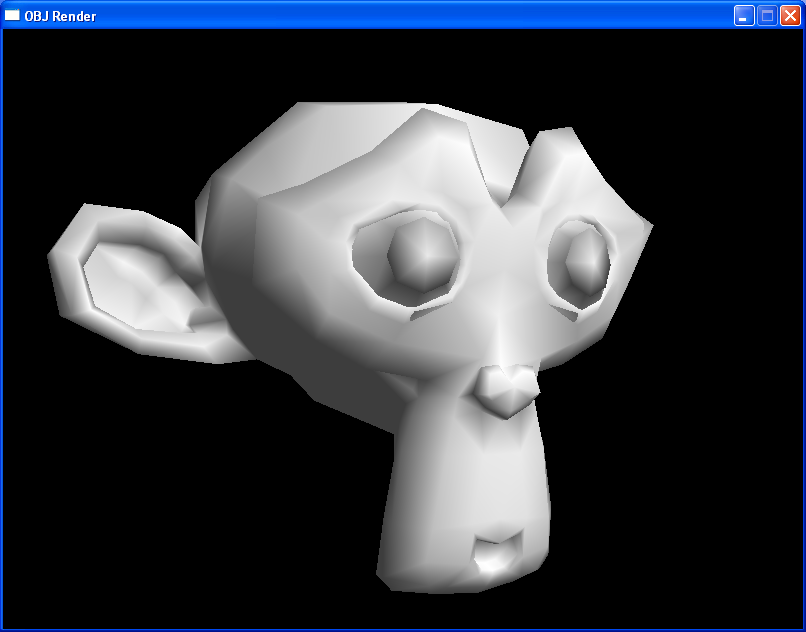
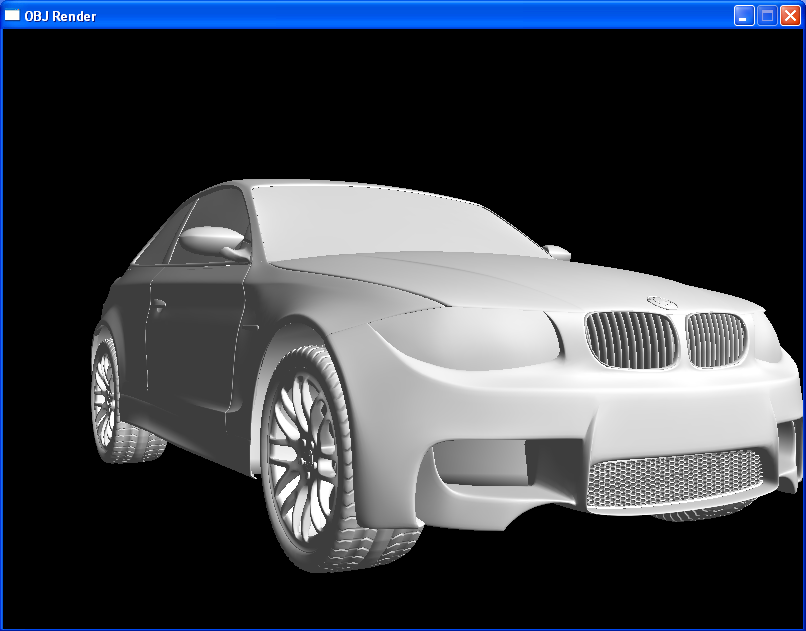
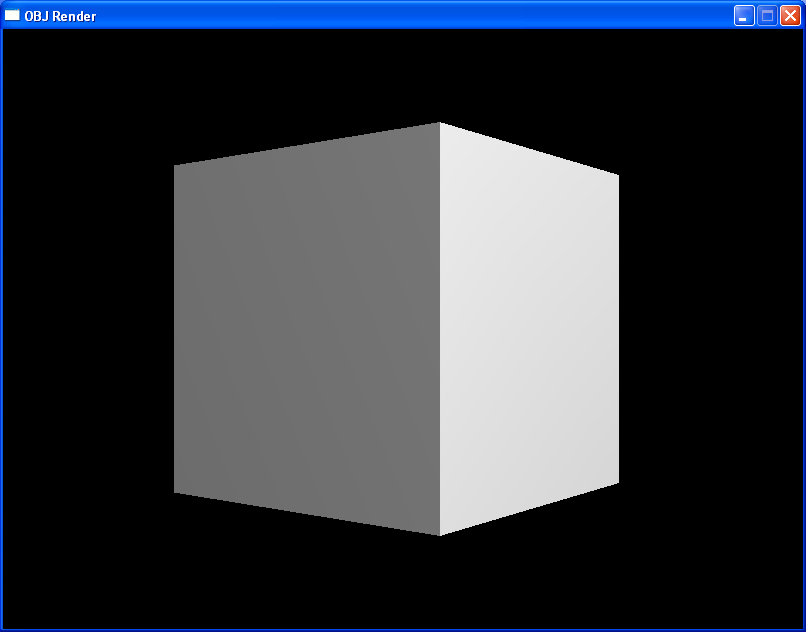
<p>If you’d like to see the ready-to-run full source: <a href="https://github.com/skeeto/scratch/blob/master/misc/objrender.c"><code class="language-plaintext highlighter-rouge">objrender.c</code></a>.
All images are screenshots of this program.</p>

<p>First let’s establish the requirements. By <em>robust</em> I mean no undefined
behavior for any input, valid or invalid; no out of bounds accesses, no
signed overflows. Input is otherwise not validated. Invalid input may load
as valid by chance, which will render as either garbage or nothing. The
behavior will also not vary by locale.</p>

<p>We’re also only worried about vertices, normals, and triangle faces with
normals. In OBJ these are <code class="language-plaintext highlighter-rouge">v</code>, <code class="language-plaintext highlighter-rouge">vn</code>, and <code class="language-plaintext highlighter-rouge">f</code> elements. Normals let us
light the model effectively while checking our work. A cube fitting this
subset of OBJ might look like:</p>

<pre><code class="language-obj">v  -1.00 -1.00 -1.00
v  -1.00 +1.00 -1.00
v  +1.00 +1.00 -1.00
v  +1.00 -1.00 -1.00
v  -1.00 -1.00 +1.00
v  -1.00 +1.00 +1.00
v  +1.00 +1.00 +1.00
v  +1.00 -1.00 +1.00

vn +1.00  0.00  0.00
vn -1.00  0.00  0.00
vn  0.00 +1.00  0.00
vn  0.00 -1.00  0.00
vn  0.00  0.00 +1.00
vn  0.00  0.00 -1.00

f   3//1  7//1  8//1
f   3//1  8//1  4//1
f   1//2  5//2  6//2
f   1//2  6//2  2//2
f   7//3  3//3  2//3
f   7//3  2//3  6//3
f   4//4  8//4  5//4
f   4//4  5//4  1//4
f   8//5  7//5  6//5
f   8//5  6//5  5//5
f   3//6  4//6  1//6
f   3//6  1//6  2//6
</code></pre>

<p><img src="/img/objrender/cube.png" alt="" /></p>

<p>Take note:</p>

<ul>
  <li>Some fields are separated by more than one space.</li>
  <li>Vertices and normals are fractional (floating point).</li>
  <li>Faces use 1-indexing instead of 0-indexing.</li>
  <li>Faces in this model lack a texture index, hence <code class="language-plaintext highlighter-rouge">//</code> (empty).</li>
</ul>

<p>Inputs may have other data, but we’ll skip over it, including face texture
indices, or face elements beyond the third. Some of the models I’d like to
test have <em>relative</em> indices, so I want to support those, too. A relative
index refers <em>backwards</em> from the last vertex, so the order of the lines
in an OBJ matter. For example, the cube faces above could have instead
been written:</p>

<pre><code class="language-obj">f  -6//-6 -2//-6 -1//-6
f  -6//-6 -1//-6 -5//-6
f  -8//-5 -4//-5 -3//-5
f  -8//-5 -3//-5 -7//-5
f  -2//-4 -6//-4 -7//-4
f  -2//-4 -7//-4 -3//-4
f  -5//-3 -1//-3 -4//-3
f  -5//-3 -4//-3 -8//-3
f  -1//-2 -2//-2 -3//-2
f  -1//-2 -3//-2 -4//-2
f  -6//-1 -5//-1 -8//-1
f  -6//-1 -8//-1 -7//-1
</code></pre>

<p>Due to this the parser cannot be blind to line order, and it must handle
negative indices. Relative indexing has the nice effect that we can group
faces, and those groups are <em>relocatable</em>. We can reorder them without
renumbering the faces, or concatenate models just by concatenating their
OBJ files.</p>

<h3 id="the-fundamentals">The fundamentals</h3>

<p>To start off, we’ll be <a href="/blog/2023/09/27/">using an arena</a> of course, trivializing
memory management while swiping aside all hard-coded limits. A quick
reminder of the interface:</p>

<div class="language-c highlighter-rouge"><div class="highlight"><pre class="highlight"><code><span class="cp">#define new(a, n, t)    (t *)alloc(a, n, sizeof(t), _Alignof(t))
</span>
<span class="k">typedef</span> <span class="k">struct</span> <span class="p">{</span>
    <span class="kt">char</span> <span class="o">*</span><span class="n">beg</span><span class="p">;</span>
    <span class="kt">char</span> <span class="o">*</span><span class="n">end</span><span class="p">;</span>
<span class="p">}</span> <span class="n">Arena</span><span class="p">;</span>

<span class="c1">// Always returns an aligned pointer inside the arena. Allocations are</span>
<span class="c1">// zeroed. Does not return on OOM (never returns a null pointer).</span>
<span class="kt">void</span> <span class="o">*</span><span class="nf">alloc</span><span class="p">(</span><span class="n">Arena</span> <span class="o">*</span><span class="p">,</span> <span class="kt">ptrdiff_t</span> <span class="n">count</span><span class="p">,</span> <span class="kt">ptrdiff_t</span> <span class="n">size</span><span class="p">,</span> <span class="kt">ptrdiff_t</span> <span class="n">align</span><span class="p">);</span>
</code></pre></div></div>

<p>Also, no null terminated strings, perhaps the main source of problems with
bespoke parsers.</p>

<div class="language-c highlighter-rouge"><div class="highlight"><pre class="highlight"><code><span class="cp">#define S(s)    (Str){s, sizeof(s)-1}
</span>
<span class="k">typedef</span> <span class="k">struct</span> <span class="p">{</span>
    <span class="kt">char</span>     <span class="o">*</span><span class="n">data</span><span class="p">;</span>
    <span class="kt">ptrdiff_t</span> <span class="n">len</span><span class="p">;</span>
<span class="p">}</span> <span class="n">Str</span><span class="p">;</span>
</code></pre></div></div>

<p>Pointer arithmetic is error prone, so the tricky stuff is relegated to a
handful of functions, each of which can be exhaustively validated almost
at a glance:</p>

<div class="language-c highlighter-rouge"><div class="highlight"><pre class="highlight"><code><span class="n">Str</span> <span class="nf">span</span><span class="p">(</span><span class="kt">char</span> <span class="o">*</span><span class="n">beg</span><span class="p">,</span> <span class="kt">char</span> <span class="o">*</span><span class="n">end</span><span class="p">)</span>
<span class="p">{</span>
    <span class="n">Str</span> <span class="n">r</span> <span class="o">=</span> <span class="p">{</span><span class="mi">0</span><span class="p">};</span>
    <span class="n">r</span><span class="p">.</span><span class="n">data</span> <span class="o">=</span> <span class="n">beg</span><span class="p">;</span>
    <span class="n">r</span><span class="p">.</span><span class="n">len</span>  <span class="o">=</span> <span class="n">beg</span> <span class="o">?</span> <span class="n">end</span><span class="o">-</span><span class="n">beg</span> <span class="o">:</span> <span class="mi">0</span><span class="p">;</span>
    <span class="k">return</span> <span class="n">r</span><span class="p">;</span>
<span class="p">}</span>

<span class="kt">_Bool</span> <span class="nf">equals</span><span class="p">(</span><span class="n">Str</span> <span class="n">a</span><span class="p">,</span> <span class="n">Str</span> <span class="n">b</span><span class="p">)</span>
<span class="p">{</span>
    <span class="k">return</span> <span class="n">a</span><span class="p">.</span><span class="n">len</span><span class="o">==</span><span class="n">b</span><span class="p">.</span><span class="n">len</span> <span class="o">&amp;&amp;</span> <span class="p">(</span><span class="o">!</span><span class="n">a</span><span class="p">.</span><span class="n">len</span> <span class="o">||</span> <span class="o">!</span><span class="n">memcmp</span><span class="p">(</span><span class="n">a</span><span class="p">.</span><span class="n">data</span><span class="p">,</span> <span class="n">b</span><span class="p">.</span><span class="n">data</span><span class="p">,</span> <span class="n">a</span><span class="p">.</span><span class="n">len</span><span class="p">));</span>
<span class="p">}</span>

<span class="n">Str</span> <span class="nf">trimleft</span><span class="p">(</span><span class="n">Str</span> <span class="n">s</span><span class="p">)</span>
<span class="p">{</span>
    <span class="k">for</span> <span class="p">(;</span> <span class="n">s</span><span class="p">.</span><span class="n">len</span> <span class="o">&amp;&amp;</span> <span class="o">*</span><span class="n">s</span><span class="p">.</span><span class="n">data</span><span class="o">&lt;=</span><span class="sc">' '</span><span class="p">;</span> <span class="n">s</span><span class="p">.</span><span class="n">data</span><span class="o">++</span><span class="p">,</span> <span class="n">s</span><span class="p">.</span><span class="n">len</span><span class="o">--</span><span class="p">)</span> <span class="p">{}</span>
    <span class="k">return</span> <span class="n">s</span><span class="p">;</span>
<span class="p">}</span>

<span class="n">Str</span> <span class="nf">trimright</span><span class="p">(</span><span class="n">Str</span> <span class="n">s</span><span class="p">)</span>
<span class="p">{</span>
    <span class="k">for</span> <span class="p">(;</span> <span class="n">s</span><span class="p">.</span><span class="n">len</span> <span class="o">&amp;&amp;</span> <span class="n">s</span><span class="p">.</span><span class="n">data</span><span class="p">[</span><span class="n">s</span><span class="p">.</span><span class="n">len</span><span class="o">-</span><span class="mi">1</span><span class="p">]</span><span class="o">&lt;=</span><span class="sc">' '</span><span class="p">;</span> <span class="n">s</span><span class="p">.</span><span class="n">len</span><span class="o">--</span><span class="p">)</span> <span class="p">{}</span>
    <span class="k">return</span> <span class="n">s</span><span class="p">;</span>
<span class="p">}</span>

<span class="n">Str</span> <span class="nf">substring</span><span class="p">(</span><span class="n">Str</span> <span class="n">s</span><span class="p">,</span> <span class="kt">ptrdiff_t</span> <span class="n">i</span><span class="p">)</span>
<span class="p">{</span>
    <span class="k">if</span> <span class="p">(</span><span class="n">i</span><span class="p">)</span> <span class="p">{</span>
        <span class="n">s</span><span class="p">.</span><span class="n">data</span> <span class="o">+=</span> <span class="n">i</span><span class="p">;</span>
        <span class="n">s</span><span class="p">.</span><span class="n">len</span>  <span class="o">-=</span> <span class="n">i</span><span class="p">;</span>
    <span class="p">}</span>
    <span class="k">return</span> <span class="n">s</span><span class="p">;</span>
<span class="p">}</span>
</code></pre></div></div>

<p>Each avoids the purposeless special cases around null pointers (i.e.
zero-initialized <code class="language-plaintext highlighter-rouge">Str</code> objects) that would otherwise work out naturally.
The space character and all control characters are treated as whitespace
for simplicity. When I started writing this parser, I didn’t define all
these functions up front. I defined them as needed. (A <a href="/blog/2023/02/11/">good standard
library</a> would have provided similar definitions out-of-the-box.) If
you’re worried about misuse, add the appropriate assertions.</p>

<p>A powerful and useful string function I’ve discovered, and which I use in
every string-heavy program, is <code class="language-plaintext highlighter-rouge">cut</code>, a concept I shamelessly stole <a href="https://pkg.go.dev/strings#Cut">from
the Go standard library</a>:</p>

<div class="language-c highlighter-rouge"><div class="highlight"><pre class="highlight"><code><span class="k">typedef</span> <span class="k">struct</span> <span class="p">{</span>
    <span class="n">Str</span>   <span class="n">head</span><span class="p">;</span>
    <span class="n">Str</span>   <span class="n">tail</span><span class="p">;</span>
    <span class="kt">_Bool</span> <span class="n">ok</span><span class="p">;</span>
<span class="p">}</span> <span class="n">Cut</span><span class="p">;</span>

<span class="n">Cut</span> <span class="nf">cut</span><span class="p">(</span><span class="n">Str</span> <span class="n">s</span><span class="p">,</span> <span class="kt">char</span> <span class="n">c</span><span class="p">)</span>
<span class="p">{</span>
    <span class="n">Cut</span> <span class="n">r</span> <span class="o">=</span> <span class="p">{</span><span class="mi">0</span><span class="p">};</span>
    <span class="k">if</span> <span class="p">(</span><span class="o">!</span><span class="n">s</span><span class="p">.</span><span class="n">len</span><span class="p">)</span> <span class="k">return</span> <span class="n">r</span><span class="p">;</span>  <span class="c1">// null pointer special case</span>
    <span class="kt">char</span> <span class="o">*</span><span class="n">beg</span> <span class="o">=</span> <span class="n">s</span><span class="p">.</span><span class="n">data</span><span class="p">;</span>
    <span class="kt">char</span> <span class="o">*</span><span class="n">end</span> <span class="o">=</span> <span class="n">s</span><span class="p">.</span><span class="n">data</span> <span class="o">+</span> <span class="n">s</span><span class="p">.</span><span class="n">len</span><span class="p">;</span>
    <span class="kt">char</span> <span class="o">*</span><span class="n">cut</span> <span class="o">=</span> <span class="n">beg</span><span class="p">;</span>
    <span class="k">for</span> <span class="p">(;</span> <span class="n">cut</span><span class="o">&lt;</span><span class="n">end</span> <span class="o">&amp;&amp;</span> <span class="o">*</span><span class="n">cut</span><span class="o">!=</span><span class="n">c</span><span class="p">;</span> <span class="n">cut</span><span class="o">++</span><span class="p">)</span> <span class="p">{}</span>
    <span class="n">r</span><span class="p">.</span><span class="n">ok</span>   <span class="o">=</span> <span class="n">cut</span> <span class="o">&lt;</span> <span class="n">end</span><span class="p">;</span>
    <span class="n">r</span><span class="p">.</span><span class="n">head</span> <span class="o">=</span> <span class="n">span</span><span class="p">(</span><span class="n">beg</span><span class="p">,</span> <span class="n">cut</span><span class="p">);</span>
    <span class="n">r</span><span class="p">.</span><span class="n">tail</span> <span class="o">=</span> <span class="n">span</span><span class="p">(</span><span class="n">cut</span><span class="o">+</span><span class="n">r</span><span class="p">.</span><span class="n">ok</span><span class="p">,</span> <span class="n">end</span><span class="p">);</span>
    <span class="k">return</span> <span class="n">r</span><span class="p">;</span>
<span class="p">}</span>
</code></pre></div></div>

<p>It slices, it dices, it juliennes! Need to iterate over lines? Cut it up:</p>

<div class="language-c highlighter-rouge"><div class="highlight"><pre class="highlight"><code>    <span class="n">Cut</span> <span class="n">c</span> <span class="o">=</span> <span class="p">{</span><span class="mi">0</span><span class="p">};</span>
    <span class="n">c</span><span class="p">.</span><span class="n">tail</span> <span class="o">=</span> <span class="n">input</span><span class="p">;</span>
    <span class="k">while</span> <span class="p">(</span><span class="n">c</span><span class="p">.</span><span class="n">tail</span><span class="p">.</span><span class="n">len</span><span class="p">)</span> <span class="p">{</span>
        <span class="n">c</span> <span class="o">=</span> <span class="n">cut</span><span class="p">(</span><span class="n">c</span><span class="p">.</span><span class="n">tail</span><span class="p">,</span> <span class="sc">'\n'</span><span class="p">);</span>
        <span class="n">Str</span> <span class="n">line</span> <span class="o">=</span> <span class="n">c</span><span class="p">.</span><span class="n">head</span><span class="p">;</span>
        <span class="c1">// ... process line ...</span>
    <span class="p">}</span>
</code></pre></div></div>

<p>Need to iterate over the fields in a line? Cut the line on the field
separator. Then cut the field on the element separator. No allocation, no
mutation (<code class="language-plaintext highlighter-rouge">strtok</code>).</p>

<h3 id="reading-input">Reading input</h3>

<p>Unlike <a href="/blog/2025/02/17/">a program designed to process arbitrarily large inputs</a>, the
intention here is to load the entire model into memory. We don’t need to
fiddle around with loading a line of input at at time (<code class="language-plaintext highlighter-rouge">fgets</code>, <code class="language-plaintext highlighter-rouge">getline</code>,
etc.) — the usual approach with OBJ parsers. If the OBJ source cannot fit
in memory, then the model won’t fit in memory. This greatly simplifies the
parser, not to mention faster while lifting hard-coded limits like maximum
line length.</p>

<p>The simple arena I use makes whole-file loading <em>so easy</em>. Read straight
into the arena without checking the file size (<code class="language-plaintext highlighter-rouge">ftell</code>, etc.), which means
streaming inputs (i.e. pipes) work automatically.</p>

<div class="language-c highlighter-rouge"><div class="highlight"><pre class="highlight"><code><span class="n">Str</span> <span class="nf">loadfile</span><span class="p">(</span><span class="n">Arena</span> <span class="o">*</span><span class="n">a</span><span class="p">,</span> <span class="kt">FILE</span> <span class="o">*</span><span class="n">f</span><span class="p">)</span>
<span class="p">{</span>
    <span class="n">Str</span> <span class="n">r</span>  <span class="o">=</span> <span class="p">{</span><span class="mi">0</span><span class="p">};</span>
    <span class="n">r</span><span class="p">.</span><span class="n">data</span> <span class="o">=</span> <span class="n">a</span><span class="o">-&gt;</span><span class="n">beg</span><span class="p">;</span>
    <span class="n">r</span><span class="p">.</span><span class="n">len</span>  <span class="o">=</span> <span class="n">a</span><span class="o">-&gt;</span><span class="n">end</span> <span class="o">-</span> <span class="n">a</span><span class="o">-&gt;</span><span class="n">beg</span><span class="p">;</span>
    <span class="n">r</span><span class="p">.</span><span class="n">len</span>  <span class="o">=</span> <span class="n">fread</span><span class="p">(</span><span class="n">r</span><span class="p">.</span><span class="n">data</span><span class="p">,</span> <span class="mi">1</span><span class="p">,</span> <span class="n">r</span><span class="p">.</span><span class="n">len</span><span class="p">,</span> <span class="n">f</span><span class="p">);</span>
    <span class="k">return</span> <span class="n">r</span><span class="p">;</span>
<span class="p">}</span>
</code></pre></div></div>

<p>Without buffered input, you may need a loop around the read:</p>

<div class="language-c highlighter-rouge"><div class="highlight"><pre class="highlight"><code><span class="n">Str</span> <span class="nf">loadfile</span><span class="p">(</span><span class="n">Arena</span> <span class="o">*</span><span class="n">a</span><span class="p">,</span> <span class="kt">int</span> <span class="n">fd</span><span class="p">)</span>
<span class="p">{</span>
    <span class="n">Str</span> <span class="n">r</span> <span class="o">=</span> <span class="p">{</span><span class="mi">0</span><span class="p">};</span>
    <span class="n">r</span><span class="p">.</span><span class="n">data</span> <span class="o">=</span> <span class="n">a</span><span class="p">.</span><span class="n">beg</span><span class="p">;</span>
    <span class="kt">ptrdiff_t</span> <span class="n">cap</span> <span class="o">=</span> <span class="n">a</span><span class="o">-&gt;</span><span class="n">end</span> <span class="o">-</span> <span class="n">a</span><span class="o">-&gt;</span><span class="n">beg</span><span class="p">;</span>
    <span class="k">for</span> <span class="p">(;;)</span> <span class="p">{</span>
        <span class="kt">ptrdiff_t</span> <span class="n">r</span> <span class="o">=</span> <span class="n">read</span><span class="p">(</span><span class="n">fd</span><span class="p">,</span> <span class="n">r</span><span class="p">.</span><span class="n">data</span><span class="o">+</span><span class="n">r</span><span class="p">.</span><span class="n">len</span><span class="p">,</span> <span class="n">cap</span><span class="o">-</span><span class="n">r</span><span class="p">.</span><span class="n">len</span><span class="p">);</span>
        <span class="k">if</span> <span class="p">(</span><span class="n">r</span> <span class="o">&lt;</span> <span class="mi">1</span><span class="p">)</span> <span class="p">{</span>
            <span class="k">return</span> <span class="n">r</span><span class="p">;</span>  <span class="c1">// ignoring read errors</span>
        <span class="p">}</span>
        <span class="n">r</span><span class="p">.</span><span class="n">len</span> <span class="o">+=</span> <span class="n">r</span><span class="p">;</span>
    <span class="p">}</span>
<span class="p">}</span>
</code></pre></div></div>

<p>You might consider triggering an out-of-memory error if the arena was
filled to the brim, which almost certainly means the input was truncated.
Though that’s likely to happen anyway because the next allocation from
that arena will fail.</p>

<p>Side note: When using a multi GB arena, issuing such huge read requests
stress tests the underlying IO system. I’ve found libc bugs this way. In
this case I <a href="/blog/2023/01/08/">used SDL2</a> for the demo, and SDL lost the ability to
read files after I increased the arena size to 4GB in order to test a
<a href="https://casual-effects.com/data/">gigantic model</a> (“Power Plant”). I’ve run into this before, and
I assumed it was another Microsoft CRT bug. After investigating deeper for
this article, I learned it’s an ancient SDL bug that’s made it all the way
into SDL3. <code class="language-plaintext highlighter-rouge">-Wconversion</code> warns about it, but <a href="https://github.com/libsdl-org/SDL-historical-archive/commit/e6ab3592e">was accidentally squelched
in the 64-bit port back in 2009</a>. It seems nobody else loads files
this way, so watch out for platform bugs if you use this technique!</p>

<h3 id="parsing-data">Parsing data</h3>

<p>In practice, rendering systems limit counts to the 32-bit range, which is
reasonable. So in the OBJ parser, vertex and normal indices will be 32-bit
integers. Negatives will be needed for at least relative indexing. Parsing
from a <code class="language-plaintext highlighter-rouge">Str</code> means null-terminated functions like <code class="language-plaintext highlighter-rouge">strtol</code> are off limits.
So here’s a function to parse a signed integer out of a <code class="language-plaintext highlighter-rouge">Str</code>:</p>

<div class="language-c highlighter-rouge"><div class="highlight"><pre class="highlight"><code><span class="kt">int32_t</span> <span class="nf">parseint</span><span class="p">(</span><span class="n">Str</span> <span class="n">s</span><span class="p">)</span>
<span class="p">{</span>
    <span class="kt">uint32_t</span> <span class="n">r</span>    <span class="o">=</span> <span class="mi">0</span><span class="p">;</span>
    <span class="kt">int32_t</span>  <span class="n">sign</span> <span class="o">=</span> <span class="mi">1</span><span class="p">;</span>
    <span class="k">for</span> <span class="p">(</span><span class="kt">ptrdiff_t</span> <span class="n">i</span> <span class="o">=</span> <span class="mi">0</span><span class="p">;</span> <span class="n">i</span> <span class="o">&lt;</span> <span class="n">s</span><span class="p">.</span><span class="n">len</span><span class="p">;</span> <span class="n">i</span><span class="o">++</span><span class="p">)</span> <span class="p">{</span>
        <span class="k">switch</span> <span class="p">(</span><span class="n">s</span><span class="p">.</span><span class="n">data</span><span class="p">[</span><span class="n">i</span><span class="p">])</span> <span class="p">{</span>
        <span class="k">case</span> <span class="sc">'+'</span><span class="p">:</span>            <span class="k">break</span><span class="p">;</span>
        <span class="k">case</span> <span class="sc">'-'</span><span class="p">:</span> <span class="n">sign</span> <span class="o">=</span> <span class="o">-</span><span class="mi">1</span><span class="p">;</span> <span class="k">break</span><span class="p">;</span>
        <span class="k">default</span> <span class="o">:</span> <span class="n">r</span> <span class="o">=</span> <span class="mi">10</span><span class="o">*</span><span class="n">r</span> <span class="o">+</span> <span class="n">s</span><span class="p">.</span><span class="n">data</span><span class="p">[</span><span class="n">i</span><span class="p">]</span> <span class="o">-</span> <span class="sc">'0'</span><span class="p">;</span>
        <span class="p">}</span>
    <span class="p">}</span>
    <span class="k">return</span> <span class="n">r</span> <span class="o">*</span> <span class="n">sign</span><span class="p">;</span>
<span class="p">}</span>
</code></pre></div></div>

<p>The <code class="language-plaintext highlighter-rouge">uint32_t</code> means its free to overflow. If it overflows, the input was
invalid. If it doesn’t hold an integer, the input was invalid. In either
case it will read a harmless, garbage result. Despite being unsigned, it
works just fine with negative inputs thanks to two’s complement.</p>

<p>For floats I didn’t intend to parse exponential notation, but some models
I wanted to test actually <em>did</em> use it — probably by accident — so I added
it anyway. That requires a function to compute the exponent.</p>

<div class="language-c highlighter-rouge"><div class="highlight"><pre class="highlight"><code><span class="kt">float</span> <span class="nf">expt10</span><span class="p">(</span><span class="kt">int32_t</span> <span class="n">e</span><span class="p">)</span>
<span class="p">{</span>
    <span class="kt">float</span>   <span class="n">y</span> <span class="o">=</span> <span class="mi">1</span><span class="p">.</span><span class="mi">0</span><span class="n">f</span><span class="p">;</span>
    <span class="kt">float</span>   <span class="n">x</span> <span class="o">=</span> <span class="n">e</span><span class="o">&lt;</span><span class="mi">0</span> <span class="o">?</span> <span class="mi">0</span><span class="p">.</span><span class="mi">1</span><span class="n">f</span> <span class="o">:</span> <span class="n">e</span><span class="o">&gt;</span><span class="mi">0</span> <span class="o">?</span> <span class="mi">10</span><span class="p">.</span><span class="mi">0</span><span class="n">f</span> <span class="o">:</span> <span class="mi">1</span><span class="p">.</span><span class="mi">0</span><span class="n">f</span><span class="p">;</span>
    <span class="kt">int32_t</span> <span class="n">n</span> <span class="o">=</span> <span class="n">e</span><span class="o">&lt;</span><span class="mi">0</span> <span class="o">?</span> <span class="n">e</span> <span class="o">:</span> <span class="o">-</span><span class="n">e</span><span class="p">;</span>
    <span class="k">for</span> <span class="p">(;</span> <span class="n">n</span> <span class="o">&lt;</span> <span class="o">-</span><span class="mi">1</span><span class="p">;</span> <span class="n">n</span> <span class="o">/=</span> <span class="mi">2</span><span class="p">)</span> <span class="p">{</span>
        <span class="n">y</span> <span class="o">*=</span> <span class="n">n</span><span class="o">%</span><span class="mi">2</span> <span class="o">?</span> <span class="n">x</span> <span class="o">:</span> <span class="mi">1</span><span class="p">.</span><span class="mi">0</span><span class="n">f</span><span class="p">;</span>
        <span class="n">x</span> <span class="o">*=</span> <span class="n">x</span><span class="p">;</span>
    <span class="p">}</span>
    <span class="k">return</span> <span class="n">x</span> <span class="o">*</span> <span class="n">y</span><span class="p">;</span>
<span class="p">}</span>
</code></pre></div></div>

<p>That’s exponentiation by squaring, <a href="/blog/2024/05/24/">avoiding signed overflow</a> on the
exponent. Traditionally a negative exponent is inverted, but applying
unary <code class="language-plaintext highlighter-rouge">-</code> to an arbitrary integer might overflow (consider -2147483648).
So instead I iterate from the negative end. The negative range is larger
than the positive, after all. Finally we can parse floats:</p>

<div class="language-c highlighter-rouge"><div class="highlight"><pre class="highlight"><code><span class="kt">float</span> <span class="nf">parsefloat</span><span class="p">(</span><span class="n">Str</span> <span class="n">s</span><span class="p">)</span>
<span class="p">{</span>
    <span class="kt">float</span> <span class="n">r</span>    <span class="o">=</span> <span class="mi">0</span><span class="p">.</span><span class="mi">0</span><span class="n">f</span><span class="p">;</span>
    <span class="kt">float</span> <span class="n">sign</span> <span class="o">=</span> <span class="mi">1</span><span class="p">.</span><span class="mi">0</span><span class="n">f</span><span class="p">;</span>
    <span class="kt">float</span> <span class="n">exp</span>  <span class="o">=</span> <span class="mi">0</span><span class="p">.</span><span class="mi">0</span><span class="n">f</span><span class="p">;</span>
    <span class="k">for</span> <span class="p">(</span><span class="kt">ptrdiff_t</span> <span class="n">i</span> <span class="o">=</span> <span class="mi">0</span><span class="p">;</span> <span class="n">i</span> <span class="o">&lt;</span> <span class="n">s</span><span class="p">.</span><span class="n">len</span><span class="p">;</span> <span class="n">i</span><span class="o">++</span><span class="p">)</span> <span class="p">{</span>
        <span class="k">switch</span> <span class="p">(</span><span class="n">s</span><span class="p">.</span><span class="n">data</span><span class="p">[</span><span class="n">i</span><span class="p">])</span> <span class="p">{</span>
        <span class="k">case</span> <span class="sc">'+'</span><span class="p">:</span>            <span class="k">break</span><span class="p">;</span>
        <span class="k">case</span> <span class="sc">'-'</span><span class="p">:</span> <span class="n">sign</span> <span class="o">=</span> <span class="o">-</span><span class="mi">1</span><span class="p">;</span> <span class="k">break</span><span class="p">;</span>
        <span class="k">case</span> <span class="sc">'.'</span><span class="p">:</span> <span class="n">exp</span>  <span class="o">=</span>  <span class="mi">1</span><span class="p">;</span> <span class="k">break</span><span class="p">;</span>
        <span class="k">case</span> <span class="sc">'E'</span><span class="p">:</span>
        <span class="k">case</span> <span class="sc">'e'</span><span class="p">:</span> <span class="n">exp</span>  <span class="o">=</span> <span class="n">exp</span> <span class="o">?</span> <span class="n">exp</span> <span class="o">:</span> <span class="mi">1</span><span class="p">.</span><span class="mi">0</span><span class="n">f</span><span class="p">;</span>
                  <span class="n">exp</span> <span class="o">*=</span> <span class="n">expt10</span><span class="p">(</span><span class="n">parseint</span><span class="p">(</span><span class="n">substring</span><span class="p">(</span><span class="n">s</span><span class="p">,</span> <span class="n">i</span><span class="o">+</span><span class="mi">1</span><span class="p">)));</span>
                  <span class="n">i</span>    <span class="o">=</span> <span class="n">s</span><span class="p">.</span><span class="n">len</span><span class="p">;</span>
                  <span class="k">break</span><span class="p">;</span>
        <span class="k">default</span> <span class="o">:</span> <span class="n">r</span> <span class="o">=</span> <span class="mi">10</span><span class="p">.</span><span class="mi">0</span><span class="n">f</span><span class="o">*</span><span class="n">r</span> <span class="o">+</span> <span class="p">(</span><span class="n">s</span><span class="p">.</span><span class="n">data</span><span class="p">[</span><span class="n">i</span><span class="p">]</span> <span class="o">-</span> <span class="sc">'0'</span><span class="p">);</span>
                  <span class="n">exp</span> <span class="o">*=</span> <span class="mi">0</span><span class="p">.</span><span class="mi">1</span><span class="n">f</span><span class="p">;</span>
        <span class="p">}</span>
    <span class="p">}</span>
    <span class="k">return</span> <span class="n">sign</span> <span class="o">*</span> <span class="n">r</span> <span class="o">*</span> <span class="p">(</span><span class="n">exp</span> <span class="o">?</span> <span class="n">exp</span> <span class="o">:</span> <span class="mi">1</span><span class="p">.</span><span class="mi">0</span><span class="n">f</span><span class="p">);</span>
<span class="p">}</span>
</code></pre></div></div>

<p>Probably not as precise as <code class="language-plaintext highlighter-rouge">strtof</code>, but good enough for loading a model.
It’s also ~30% faster for this purpose than my system’s <code class="language-plaintext highlighter-rouge">strtof</code>. If it
hits an exponent, it combines <code class="language-plaintext highlighter-rouge">parseint</code> and <code class="language-plaintext highlighter-rouge">expt10</code> to augment the
result so far. At least for all the models I tried, the exponent only
appeared for tiny values. They round to zero with no visible effects, so
you can cut the implementation by more than half in one fell swoop if you
wish (no more <code class="language-plaintext highlighter-rouge">expt10</code> nor <code class="language-plaintext highlighter-rouge">substring</code> either):</p>

<div class="language-c highlighter-rouge"><div class="highlight"><pre class="highlight"><code>        <span class="k">switch</span> <span class="p">(</span><span class="n">s</span><span class="p">.</span><span class="n">data</span><span class="p">[</span><span class="n">i</span><span class="p">])</span> <span class="p">{</span>
        <span class="c1">// ...</span>
        <span class="k">case</span> <span class="sc">'E'</span><span class="p">:</span>
        <span class="k">case</span> <span class="sc">'e'</span><span class="p">:</span> <span class="k">return</span> <span class="mi">0</span><span class="p">;</span>  <span class="c1">// probably small *shrug*</span>
        <span class="c1">// ...</span>
        <span class="p">}</span>
</code></pre></div></div>

<p>Why not <code class="language-plaintext highlighter-rouge">strtof</code>? That has the rather annoying requirement that input is
null terminated, which is not the case here. Worse, it’s <a href="https://github.com/mpv-player/mpv/commit/1e70e82b">affected by the
locale</a> and doesn’t behave consistently nor reliably.</p>

<p>A vertex is three floats separated by whitespace. So combine <code class="language-plaintext highlighter-rouge">cut</code> and
<code class="language-plaintext highlighter-rouge">parsefloat</code> to parse one.</p>

<div class="language-c highlighter-rouge"><div class="highlight"><pre class="highlight"><code><span class="k">typedef</span> <span class="k">struct</span> <span class="p">{</span>
    <span class="kt">float</span> <span class="n">v</span><span class="p">[</span><span class="mi">3</span><span class="p">];</span>
<span class="p">}</span> <span class="n">Vert</span><span class="p">;</span>

<span class="n">Vert</span> <span class="nf">parsevert</span><span class="p">(</span><span class="n">Str</span> <span class="n">s</span><span class="p">)</span>
<span class="p">{</span>
    <span class="n">Vert</span> <span class="n">r</span> <span class="o">=</span> <span class="p">{</span><span class="mi">0</span><span class="p">};</span>
    <span class="n">Cut</span> <span class="n">c</span> <span class="o">=</span> <span class="n">cut</span><span class="p">(</span><span class="n">trimleft</span><span class="p">(</span><span class="n">s</span><span class="p">),</span> <span class="sc">' '</span><span class="p">);</span>
    <span class="n">r</span><span class="p">.</span><span class="n">v</span><span class="p">[</span><span class="mi">0</span><span class="p">]</span> <span class="o">=</span> <span class="n">parsefloat</span><span class="p">(</span><span class="n">c</span><span class="p">.</span><span class="n">head</span><span class="p">);</span>
    <span class="n">c</span> <span class="o">=</span> <span class="n">cut</span><span class="p">(</span><span class="n">trimleft</span><span class="p">(</span><span class="n">c</span><span class="p">.</span><span class="n">tail</span><span class="p">),</span> <span class="sc">' '</span><span class="p">);</span>
    <span class="n">r</span><span class="p">.</span><span class="n">v</span><span class="p">[</span><span class="mi">1</span><span class="p">]</span> <span class="o">=</span> <span class="n">parsefloat</span><span class="p">(</span><span class="n">c</span><span class="p">.</span><span class="n">head</span><span class="p">);</span>
    <span class="n">c</span> <span class="o">=</span> <span class="n">cut</span><span class="p">(</span><span class="n">trimleft</span><span class="p">(</span><span class="n">c</span><span class="p">.</span><span class="n">tail</span><span class="p">),</span> <span class="sc">' '</span><span class="p">);</span>
    <span class="n">r</span><span class="p">.</span><span class="n">v</span><span class="p">[</span><span class="mi">2</span><span class="p">]</span> <span class="o">=</span> <span class="n">parsefloat</span><span class="p">(</span><span class="n">c</span><span class="p">.</span><span class="n">head</span><span class="p">);</span>
    <span class="k">return</span> <span class="n">r</span><span class="p">;</span>
<span class="p">}</span>
</code></pre></div></div>

<p><code class="language-plaintext highlighter-rouge">cut</code> parses a field between every space, including empty fields between
adjacent spaces, so <code class="language-plaintext highlighter-rouge">trimleft</code> discards extra space before cutting. If the
line ends early, this passes empty strings into <code class="language-plaintext highlighter-rouge">parsefloat</code> which come
out as zeros. No special checks required for invalid input.</p>

<p>Faces are a set of three vertex indices and three normal indices, and
parses almost the same way. Relative indices are immediately converted to
absolute indices using the number of vertices/normals so far.</p>

<div class="language-c highlighter-rouge"><div class="highlight"><pre class="highlight"><code><span class="k">typedef</span> <span class="k">struct</span> <span class="p">{</span>
    <span class="kt">int32_t</span> <span class="n">v</span><span class="p">[</span><span class="mi">3</span><span class="p">];</span>
    <span class="kt">int32_t</span> <span class="n">n</span><span class="p">[</span><span class="mi">3</span><span class="p">];</span>
<span class="p">}</span> <span class="n">Face</span><span class="p">;</span>

<span class="k">static</span> <span class="n">Face</span> <span class="nf">parseface</span><span class="p">(</span><span class="n">Str</span> <span class="n">s</span><span class="p">,</span> <span class="kt">ptrdiff_t</span> <span class="n">nverts</span><span class="p">,</span> <span class="kt">ptrdiff_t</span> <span class="n">nnorms</span><span class="p">)</span>
<span class="p">{</span>
    <span class="n">Face</span> <span class="n">r</span>      <span class="o">=</span> <span class="p">{</span><span class="mi">0</span><span class="p">};</span>
    <span class="n">Cut</span>  <span class="n">fields</span> <span class="o">=</span> <span class="p">{</span><span class="mi">0</span><span class="p">};</span>
    <span class="n">fields</span><span class="p">.</span><span class="n">tail</span> <span class="o">=</span> <span class="n">s</span><span class="p">;</span>
    <span class="k">for</span> <span class="p">(</span><span class="kt">int</span> <span class="n">i</span> <span class="o">=</span> <span class="mi">0</span><span class="p">;</span> <span class="n">i</span> <span class="o">&lt;</span> <span class="mi">3</span><span class="p">;</span> <span class="n">i</span><span class="o">++</span><span class="p">)</span> <span class="p">{</span>
        <span class="n">fields</span> <span class="o">=</span> <span class="n">cut</span><span class="p">(</span><span class="n">trimleft</span><span class="p">(</span><span class="n">fields</span><span class="p">.</span><span class="n">tail</span><span class="p">),</span> <span class="sc">' '</span><span class="p">);</span>
        <span class="n">Cut</span> <span class="n">elem</span> <span class="o">=</span> <span class="n">cut</span><span class="p">(</span><span class="n">fields</span><span class="p">.</span><span class="n">head</span><span class="p">,</span> <span class="sc">'/'</span><span class="p">);</span>
        <span class="n">r</span><span class="p">.</span><span class="n">v</span><span class="p">[</span><span class="n">i</span><span class="p">]</span> <span class="o">=</span> <span class="n">parseint</span><span class="p">(</span><span class="n">elem</span><span class="p">.</span><span class="n">head</span><span class="p">);</span>
        <span class="n">elem</span> <span class="o">=</span> <span class="n">cut</span><span class="p">(</span><span class="n">elem</span><span class="p">.</span><span class="n">tail</span><span class="p">,</span> <span class="sc">'/'</span><span class="p">);</span>  <span class="c1">// skip texture</span>
        <span class="n">elem</span> <span class="o">=</span> <span class="n">cut</span><span class="p">(</span><span class="n">elem</span><span class="p">.</span><span class="n">tail</span><span class="p">,</span> <span class="sc">'/'</span><span class="p">);</span>
        <span class="n">r</span><span class="p">.</span><span class="n">n</span><span class="p">[</span><span class="n">i</span><span class="p">]</span> <span class="o">=</span> <span class="n">parseint</span><span class="p">(</span><span class="n">elem</span><span class="p">.</span><span class="n">head</span><span class="p">);</span>

        <span class="c1">// Process relative subscripts</span>
        <span class="k">if</span> <span class="p">(</span><span class="n">r</span><span class="p">.</span><span class="n">v</span><span class="p">[</span><span class="n">i</span><span class="p">]</span> <span class="o">&lt;</span> <span class="mi">0</span><span class="p">)</span> <span class="p">{</span>
            <span class="n">r</span><span class="p">.</span><span class="n">v</span><span class="p">[</span><span class="n">i</span><span class="p">]</span> <span class="o">=</span> <span class="p">(</span><span class="kt">int32_t</span><span class="p">)(</span><span class="n">r</span><span class="p">.</span><span class="n">v</span><span class="p">[</span><span class="n">i</span><span class="p">]</span> <span class="o">+</span> <span class="mi">1</span> <span class="o">+</span> <span class="n">nverts</span><span class="p">);</span>
        <span class="p">}</span>
        <span class="k">if</span> <span class="p">(</span><span class="n">r</span><span class="p">.</span><span class="n">n</span><span class="p">[</span><span class="n">i</span><span class="p">]</span> <span class="o">&lt;</span> <span class="mi">0</span><span class="p">)</span> <span class="p">{</span>
            <span class="n">r</span><span class="p">.</span><span class="n">n</span><span class="p">[</span><span class="n">i</span><span class="p">]</span> <span class="o">=</span> <span class="p">(</span><span class="kt">int32_t</span><span class="p">)(</span><span class="n">r</span><span class="p">.</span><span class="n">n</span><span class="p">[</span><span class="n">i</span><span class="p">]</span> <span class="o">+</span> <span class="mi">1</span> <span class="o">+</span> <span class="n">nnorms</span><span class="p">);</span>
        <span class="p">}</span>
    <span class="p">}</span>
    <span class="k">return</span> <span class="n">r</span><span class="p">;</span>
<span class="p">}</span>
</code></pre></div></div>

<p>Since <code class="language-plaintext highlighter-rouge">nverts</code> must be non-negative, and a relative index is negative by
definition, adding them together can never overflow. If there are too many
vertices, the result might be truncated, as indicated by the cast. That’s
fine. Just invalid input.</p>

<p>There’s an interesting interview question here: Consider this alternative
to the above, maintaining the explicit cast to dismiss the <code class="language-plaintext highlighter-rouge">-Wconversion</code>
warning.</p>

<div class="language-c highlighter-rouge"><div class="highlight"><pre class="highlight"><code>            <span class="n">r</span><span class="p">.</span><span class="n">v</span><span class="p">[</span><span class="n">i</span><span class="p">]</span> <span class="o">+=</span> <span class="p">(</span><span class="kt">int32_t</span><span class="p">)(</span><span class="mi">1</span> <span class="o">+</span> <span class="n">nverts</span><span class="p">);</span>
</code></pre></div></div>

<p>Is it equivalent? Can this overflow? (Answers: No and yes.) If yes, under
what conditions? Unfortunately a fuzz test would never hit it.</p>

<h3 id="putting-it-together">Putting it together</h3>

<p>For this case, a model is three arrays of vertices, normals, and indices.
While faces only support 32-bit indexing, I use <code class="language-plaintext highlighter-rouge">ptrdiff_t</code> in order to
skip overflow checks. There cannot possibly be more vertices than bytes of
source, so these counts cannot overflow.</p>

<div class="language-c highlighter-rouge"><div class="highlight"><pre class="highlight"><code><span class="k">typedef</span> <span class="k">struct</span> <span class="p">{</span>
    <span class="n">Vert</span>     <span class="o">*</span><span class="n">verts</span><span class="p">;</span>
    <span class="kt">ptrdiff_t</span> <span class="n">nverts</span><span class="p">;</span>
    <span class="n">Vert</span>     <span class="o">*</span><span class="n">norms</span><span class="p">;</span>
    <span class="kt">ptrdiff_t</span> <span class="n">nnorms</span><span class="p">;</span>
    <span class="n">Face</span>     <span class="o">*</span><span class="n">faces</span><span class="p">;</span>
    <span class="kt">ptrdiff_t</span> <span class="n">nfaces</span><span class="p">;</span>
<span class="p">}</span> <span class="n">Model</span><span class="p">;</span>

<span class="n">Model</span> <span class="nf">parseobj</span><span class="p">(</span><span class="n">Arena</span> <span class="o">*</span><span class="p">,</span> <span class="n">Str</span><span class="p">);</span>
</code></pre></div></div>

<p>They’d probably look a little nicer as <a href="/blog/2023/10/05/">dynamic arrays</a>, but we won’t
need that machinery. That’s because the parser makes two passes over the
OBJ source, the first time to count:</p>

<div class="language-c highlighter-rouge"><div class="highlight"><pre class="highlight"><code>    <span class="n">Model</span> <span class="n">m</span>     <span class="o">=</span> <span class="p">{</span><span class="mi">0</span><span class="p">};</span>
    <span class="n">Cut</span>   <span class="n">lines</span> <span class="o">=</span> <span class="p">{</span><span class="mi">0</span><span class="p">};</span>

    <span class="n">lines</span><span class="p">.</span><span class="n">tail</span> <span class="o">=</span> <span class="n">obj</span><span class="p">;</span>
    <span class="k">while</span> <span class="p">(</span><span class="n">lines</span><span class="p">.</span><span class="n">tail</span><span class="p">.</span><span class="n">len</span><span class="p">)</span> <span class="p">{</span>
        <span class="n">lines</span> <span class="o">=</span> <span class="n">cut</span><span class="p">(</span><span class="n">lines</span><span class="p">.</span><span class="n">tail</span><span class="p">,</span> <span class="sc">'\n'</span><span class="p">);</span>
        <span class="n">Cut</span> <span class="n">fields</span> <span class="o">=</span> <span class="n">cut</span><span class="p">(</span><span class="n">trimright</span><span class="p">(</span><span class="n">lines</span><span class="p">.</span><span class="n">head</span><span class="p">),</span> <span class="sc">' '</span><span class="p">);</span>
        <span class="n">Str</span> <span class="n">kind</span> <span class="o">=</span> <span class="n">fields</span><span class="p">.</span><span class="n">head</span><span class="p">;</span>
        <span class="k">if</span> <span class="p">(</span><span class="n">equals</span><span class="p">(</span><span class="n">S</span><span class="p">(</span><span class="s">"v"</span><span class="p">),</span> <span class="n">kind</span><span class="p">))</span> <span class="p">{</span>
            <span class="n">m</span><span class="p">.</span><span class="n">nverts</span><span class="o">++</span><span class="p">;</span>
        <span class="p">}</span> <span class="k">else</span> <span class="k">if</span> <span class="p">(</span><span class="n">equals</span><span class="p">(</span><span class="n">S</span><span class="p">(</span><span class="s">"vn"</span><span class="p">),</span> <span class="n">kind</span><span class="p">))</span> <span class="p">{</span>
            <span class="n">m</span><span class="p">.</span><span class="n">nnorms</span><span class="o">++</span><span class="p">;</span>
        <span class="p">}</span> <span class="k">else</span> <span class="k">if</span> <span class="p">(</span><span class="n">equals</span><span class="p">(</span><span class="n">S</span><span class="p">(</span><span class="s">"f"</span><span class="p">),</span> <span class="n">kind</span><span class="p">))</span> <span class="p">{</span>
            <span class="n">m</span><span class="p">.</span><span class="n">nfaces</span><span class="o">++</span><span class="p">;</span>
        <span class="p">}</span>
    <span class="p">}</span>
</code></pre></div></div>

<p>It’s a lightweight pass, skipping over the numeric data. With that
information collected, we can allocate the model:</p>

<div class="language-c highlighter-rouge"><div class="highlight"><pre class="highlight"><code>    <span class="n">m</span><span class="p">.</span><span class="n">verts</span>  <span class="o">=</span> <span class="n">new</span><span class="p">(</span><span class="n">a</span><span class="p">,</span> <span class="n">m</span><span class="p">.</span><span class="n">nverts</span><span class="p">,</span> <span class="n">Vert</span><span class="p">);</span>
    <span class="n">m</span><span class="p">.</span><span class="n">norms</span>  <span class="o">=</span> <span class="n">new</span><span class="p">(</span><span class="n">a</span><span class="p">,</span> <span class="n">m</span><span class="p">.</span><span class="n">nnorms</span><span class="p">,</span> <span class="n">Vert</span><span class="p">);</span>
    <span class="n">m</span><span class="p">.</span><span class="n">faces</span>  <span class="o">=</span> <span class="n">new</span><span class="p">(</span><span class="n">a</span><span class="p">,</span> <span class="n">m</span><span class="p">.</span><span class="n">nfaces</span><span class="p">,</span> <span class="n">Face</span><span class="p">);</span>
    <span class="n">m</span><span class="p">.</span><span class="n">nverts</span> <span class="o">=</span> <span class="n">m</span><span class="p">.</span><span class="n">nnorms</span> <span class="o">=</span> <span class="n">m</span><span class="p">.</span><span class="n">nfaces</span> <span class="o">=</span> <span class="mi">0</span><span class="p">;</span>
</code></pre></div></div>

<p>On the next pass we call <code class="language-plaintext highlighter-rouge">parsevert</code> and <code class="language-plaintext highlighter-rouge">parseface</code> to fill it out.</p>

<div class="language-c highlighter-rouge"><div class="highlight"><pre class="highlight"><code>    <span class="n">lines</span><span class="p">.</span><span class="n">tail</span> <span class="o">=</span> <span class="n">obj</span><span class="p">;</span>
    <span class="k">while</span> <span class="p">(</span><span class="n">lines</span><span class="p">.</span><span class="n">tail</span><span class="p">.</span><span class="n">len</span><span class="p">)</span> <span class="p">{</span>
        <span class="n">lines</span> <span class="o">=</span> <span class="n">cut</span><span class="p">(</span><span class="n">lines</span><span class="p">.</span><span class="n">tail</span><span class="p">,</span> <span class="sc">'\n'</span><span class="p">);</span>
        <span class="n">Cut</span> <span class="n">fields</span> <span class="o">=</span> <span class="n">cut</span><span class="p">(</span><span class="n">trimright</span><span class="p">(</span><span class="n">lines</span><span class="p">.</span><span class="n">head</span><span class="p">),</span> <span class="sc">' '</span><span class="p">);</span>
        <span class="n">Str</span> <span class="n">kind</span> <span class="o">=</span> <span class="n">fields</span><span class="p">.</span><span class="n">head</span><span class="p">;</span>
        <span class="k">if</span> <span class="p">(</span><span class="n">equals</span><span class="p">(</span><span class="n">S</span><span class="p">(</span><span class="s">"v"</span><span class="p">),</span> <span class="n">kind</span><span class="p">))</span> <span class="p">{</span>
            <span class="n">m</span><span class="p">.</span><span class="n">verts</span><span class="p">[</span><span class="n">m</span><span class="p">.</span><span class="n">nverts</span><span class="o">++</span><span class="p">]</span> <span class="o">=</span> <span class="n">parsevert</span><span class="p">(</span><span class="n">fields</span><span class="p">.</span><span class="n">tail</span><span class="p">);</span>
        <span class="p">}</span> <span class="k">else</span> <span class="k">if</span> <span class="p">(</span><span class="n">equals</span><span class="p">(</span><span class="n">S</span><span class="p">(</span><span class="s">"vn"</span><span class="p">),</span> <span class="n">kind</span><span class="p">))</span> <span class="p">{</span>
            <span class="n">m</span><span class="p">.</span><span class="n">norms</span><span class="p">[</span><span class="n">m</span><span class="p">.</span><span class="n">nnorms</span><span class="o">++</span><span class="p">]</span> <span class="o">=</span> <span class="n">parsevert</span><span class="p">(</span><span class="n">fields</span><span class="p">.</span><span class="n">tail</span><span class="p">);</span>
        <span class="p">}</span> <span class="k">else</span> <span class="k">if</span> <span class="p">(</span><span class="n">equals</span><span class="p">(</span><span class="n">S</span><span class="p">(</span><span class="s">"f"</span><span class="p">),</span> <span class="n">kind</span><span class="p">))</span> <span class="p">{</span>
            <span class="n">m</span><span class="p">.</span><span class="n">faces</span><span class="p">[</span><span class="n">m</span><span class="p">.</span><span class="n">nfaces</span><span class="o">++</span><span class="p">]</span> <span class="o">=</span> <span class="n">parseface</span><span class="p">(</span><span class="n">fields</span><span class="p">.</span><span class="n">tail</span><span class="p">,</span> <span class="n">m</span><span class="p">.</span><span class="n">nverts</span><span class="p">,</span> <span class="n">m</span><span class="p">.</span><span class="n">nnorms</span><span class="p">);</span>
        <span class="p">}</span>
    <span class="p">}</span>
</code></pre></div></div>

<p>At this point the model is parsed, though its not necessarily consistent.
Faces indices may still be out of range. The next step is to transform it
into a more useful representation.</p>

<h3 id="transformation">Transformation</h3>

<p>Rendering the model is the easiest way to verify it came out alright, and
it’s generally useful for debugging problems. Because it basically does
all the hard work for us, and doesn’t require <a href="https://www.khronos.org/opengl/wiki/OpenGL_Loading_Library">ridiculous contortions to
access</a>, I’m going to render with old school OpenGL 1.1. It provides a
<a href="https://registry.khronos.org/OpenGL-Refpages/gl2.1/xhtml/glInterleavedArrays.xml"><code class="language-plaintext highlighter-rouge">glInterleavedArrays</code></a> function with a bunch of predefined formats.
The one that interests me is <code class="language-plaintext highlighter-rouge">GL_N3F_V3F</code>, where each vertex is a normal
and a position. Each face is three such elements. I came up with this:</p>

<div class="language-c highlighter-rouge"><div class="highlight"><pre class="highlight"><code><span class="k">typedef</span> <span class="k">struct</span> <span class="p">{</span>  <span class="c1">// GL_N3F_V3F</span>
    <span class="n">Vert</span> <span class="n">n</span><span class="p">,</span> <span class="n">v</span><span class="p">;</span>
<span class="p">}</span> <span class="n">N3FV3F</span><span class="p">[</span><span class="mi">3</span><span class="p">];</span>

<span class="k">typedef</span> <span class="k">struct</span> <span class="p">{</span>
    <span class="n">N3FV3F</span>   <span class="o">*</span><span class="n">data</span><span class="p">;</span>
    <span class="kt">ptrdiff_t</span> <span class="n">len</span><span class="p">;</span>
<span class="p">}</span> <span class="n">N3FV3Fs</span><span class="p">;</span>

<span class="c1">// Transform a model into a GL_N3F_V3F representation.</span>
<span class="n">N3FV3Fs</span> <span class="nf">n3fv3fize</span><span class="p">(</span><span class="n">Arena</span> <span class="o">*</span><span class="p">,</span> <span class="n">Model</span><span class="p">);</span>
</code></pre></div></div>

<p>If you’re being precise you’d use <code class="language-plaintext highlighter-rouge">GLfloat</code>, but this is good enough for
me. By using a different arena for this step, we can discard the OBJ data
once it’s in the “local” format. For example:</p>

<div class="language-c highlighter-rouge"><div class="highlight"><pre class="highlight"><code>    <span class="n">Arena</span> <span class="n">perm</span>    <span class="o">=</span> <span class="p">{...};</span>
    <span class="n">Arena</span> <span class="n">scratch</span> <span class="o">=</span> <span class="p">{...};</span>

    <span class="n">N3FV3Fs</span> <span class="o">*</span><span class="n">scene</span> <span class="o">=</span> <span class="n">new</span><span class="p">(</span><span class="o">&amp;</span><span class="n">perm</span><span class="p">,</span> <span class="n">nmodels</span><span class="p">,</span> <span class="n">N3FV3Fs</span><span class="p">);</span>
    <span class="k">for</span> <span class="p">(</span><span class="kt">int</span> <span class="n">i</span> <span class="o">=</span> <span class="mi">0</span><span class="p">;</span> <span class="n">i</span> <span class="o">&lt;</span> <span class="n">nmodels</span><span class="p">;</span> <span class="n">i</span><span class="o">++</span><span class="p">)</span> <span class="p">{</span>
        <span class="n">Arena</span> <span class="n">temp</span>  <span class="o">=</span> <span class="n">scratch</span><span class="p">;</span>  <span class="c1">// free OBJ at end of iteration</span>
        <span class="n">Str</span>   <span class="n">obj</span>   <span class="o">=</span> <span class="n">loadfile</span><span class="p">(</span><span class="o">&amp;</span><span class="n">temp</span><span class="p">,</span> <span class="n">path</span><span class="p">[</span><span class="n">i</span><span class="p">]);</span>
        <span class="n">Model</span> <span class="n">model</span> <span class="o">=</span> <span class="n">parseobj</span><span class="p">(</span><span class="o">&amp;</span><span class="n">temp</span><span class="p">,</span> <span class="n">obj</span><span class="p">);</span>
        <span class="n">scene</span><span class="p">[</span><span class="n">i</span><span class="p">]</span>    <span class="o">=</span> <span class="n">n3fv3fize</span><span class="p">(</span><span class="o">&amp;</span><span class="n">perm</span><span class="p">,</span> <span class="n">model</span><span class="p">);</span>
    <span class="p">}</span>
</code></pre></div></div>

<p>The conversion allocates the <code class="language-plaintext highlighter-rouge">GL_N3F_V3F</code> array, discards invalid faces,
and copies the valid faces into the array:</p>

<div class="language-c highlighter-rouge"><div class="highlight"><pre class="highlight"><code><span class="n">N3FV3Fs</span> <span class="nf">n3fv3fize</span><span class="p">(</span><span class="n">Arena</span> <span class="o">*</span><span class="n">a</span><span class="p">,</span> <span class="n">Model</span> <span class="n">m</span><span class="p">)</span>
<span class="p">{</span>
    <span class="n">N3FV3Fs</span> <span class="n">r</span> <span class="o">=</span> <span class="p">{</span><span class="mi">0</span><span class="p">};</span>
    <span class="n">r</span><span class="p">.</span><span class="n">data</span> <span class="o">=</span> <span class="n">new</span><span class="p">(</span><span class="n">a</span><span class="p">,</span> <span class="n">m</span><span class="p">.</span><span class="n">nfaces</span><span class="p">,</span> <span class="n">N3FV3F</span><span class="p">);</span>
    <span class="k">for</span> <span class="p">(</span><span class="kt">ptrdiff_t</span> <span class="n">f</span> <span class="o">=</span> <span class="mi">0</span><span class="p">;</span> <span class="n">f</span> <span class="o">&lt;</span> <span class="n">m</span><span class="p">.</span><span class="n">nfaces</span><span class="p">;</span> <span class="n">f</span><span class="o">++</span><span class="p">)</span> <span class="p">{</span>
        <span class="kt">_Bool</span> <span class="n">valid</span> <span class="o">=</span> <span class="mi">1</span><span class="p">;</span>
        <span class="k">for</span> <span class="p">(</span><span class="kt">int</span> <span class="n">i</span> <span class="o">=</span> <span class="mi">0</span><span class="p">;</span> <span class="n">i</span> <span class="o">&lt;</span> <span class="mi">3</span><span class="p">;</span> <span class="n">i</span><span class="o">++</span><span class="p">)</span> <span class="p">{</span>
            <span class="n">valid</span> <span class="o">&amp;=</span> <span class="n">m</span><span class="p">.</span><span class="n">faces</span><span class="p">[</span><span class="n">f</span><span class="p">].</span><span class="n">v</span><span class="p">[</span><span class="n">i</span><span class="p">]</span><span class="o">&gt;</span><span class="mi">0</span> <span class="o">&amp;&amp;</span> <span class="n">m</span><span class="p">.</span><span class="n">faces</span><span class="p">[</span><span class="n">f</span><span class="p">].</span><span class="n">v</span><span class="p">[</span><span class="n">i</span><span class="p">]</span><span class="o">&lt;=</span><span class="n">m</span><span class="p">.</span><span class="n">nverts</span><span class="p">;</span>
            <span class="n">valid</span> <span class="o">&amp;=</span> <span class="n">m</span><span class="p">.</span><span class="n">faces</span><span class="p">[</span><span class="n">f</span><span class="p">].</span><span class="n">n</span><span class="p">[</span><span class="n">i</span><span class="p">]</span><span class="o">&gt;</span><span class="mi">0</span> <span class="o">&amp;&amp;</span> <span class="n">m</span><span class="p">.</span><span class="n">faces</span><span class="p">[</span><span class="n">f</span><span class="p">].</span><span class="n">n</span><span class="p">[</span><span class="n">i</span><span class="p">]</span><span class="o">&lt;=</span><span class="n">m</span><span class="p">.</span><span class="n">nnorms</span><span class="p">;</span>
        <span class="p">}</span>

        <span class="k">if</span> <span class="p">(</span><span class="n">valid</span><span class="p">)</span> <span class="p">{</span>
            <span class="kt">ptrdiff_t</span> <span class="n">t</span> <span class="o">=</span> <span class="n">r</span><span class="p">.</span><span class="n">len</span><span class="o">++</span><span class="p">;</span>
            <span class="k">for</span> <span class="p">(</span><span class="kt">int</span> <span class="n">i</span> <span class="o">=</span> <span class="mi">0</span><span class="p">;</span> <span class="n">i</span> <span class="o">&lt;</span> <span class="mi">3</span><span class="p">;</span> <span class="n">i</span><span class="o">++</span><span class="p">)</span> <span class="p">{</span>
                <span class="n">r</span><span class="p">.</span><span class="n">data</span><span class="p">[</span><span class="n">t</span><span class="p">][</span><span class="n">i</span><span class="p">].</span><span class="n">n</span> <span class="o">=</span> <span class="n">m</span><span class="p">.</span><span class="n">norms</span><span class="p">[</span><span class="n">m</span><span class="p">.</span><span class="n">faces</span><span class="p">[</span><span class="n">f</span><span class="p">].</span><span class="n">n</span><span class="p">[</span><span class="n">i</span><span class="p">]</span><span class="o">-</span><span class="mi">1</span><span class="p">];</span>
                <span class="n">r</span><span class="p">.</span><span class="n">data</span><span class="p">[</span><span class="n">t</span><span class="p">][</span><span class="n">i</span><span class="p">].</span><span class="n">v</span> <span class="o">=</span> <span class="n">m</span><span class="p">.</span><span class="n">verts</span><span class="p">[</span><span class="n">m</span><span class="p">.</span><span class="n">faces</span><span class="p">[</span><span class="n">f</span><span class="p">].</span><span class="n">v</span><span class="p">[</span><span class="n">i</span><span class="p">]</span><span class="o">-</span><span class="mi">1</span><span class="p">];</span>
            <span class="p">}</span>
        <span class="p">}</span>
    <span class="p">}</span>
    <span class="k">return</span> <span class="n">r</span><span class="p">;</span>
<span class="p">}</span>
</code></pre></div></div>

<p>Here’s what that looks like in OpenGL with <a href="https://chuck.stanford.edu/chugl/examples/data/models/suzanne.obj"><code class="language-plaintext highlighter-rouge">suzanne.obj</code></a> and
<a href="https://casual-effects.com/data/"><code class="language-plaintext highlighter-rouge">bmw.obj</code></a>:</p>

<p><img src="/img/objrender/suzanne.png" alt="" /></p>

<p><img src="/img/objrender/bmw.png" alt="" /></p>

<p>This was a fun little project, and perhaps you learned a new technique or
two after checking it out.</p>

]]>
    </content>
  </entry>


  <entry>
    <title>Tips for more effective fuzz testing with AFL++</title>
    <link rel="alternate" type="text/html" href="https://nullprogram.com/blog/2025/02/05/"/>
    <id>urn:uuid:eff3b773-99ee-4c38-9f9c-f51294a1b9e0</id>
    <updated>2025-02-05T18:03:55Z</updated>
    <category term="c"/><category term="cpp"/><category term="tutorial"/>
    <content type="html">
      <![CDATA[<p>Fuzz testing is incredibly effective for mechanically discovering software
defects, yet remains underused and neglected. Pick any program that must
gracefully accept complex input, written <em>in any language</em>, which has not
yet been been fuzzed, and fuzz testing usually reveals at least one bug.
At least one program currently installed on your own computer certainly
qualifies. Perhaps even most of them. <a href="https://danluu.com/everything-is-broken/">Everything is broken</a> and
low-hanging fruit is everywhere. After fuzz testing ~1,000 projects <a href="/blog/2019/01/25/">over
the past six years</a>, I’ve accumulated tips for picking that fruit.
The checklist format has worked well in the past (<a href="/blog/2024/12/20/">1</a>, <a href="/blog/2023/01/08/">2</a>), so
I’ll use it again. This article discusses <a href="https://aflplus.plus/">AFL++</a> on source-available
C and C++ targets, running on glibc-based Linux distributions, currently
the <em>indisputable</em> best fuzzing platform for C and C++.</p>

<p>My tips complement the official, upstream documentation, so consult them,
too:</p>

<ul>
  <li><a href="https://afl-1.readthedocs.io/en/latest/tips.html">Performance Tips</a> on the AFL++ website</li>
  <li><a href="https://lcamtuf.coredump.cx/afl/technical_details.txt">Technical “whitepaper” for afl-fuzz</a></li>
</ul>

<p>Even if a program has been fuzz tested, applying the techniques in this
article may reveal defects missed by previous fuzz testing.</p>

<h3 id="1-configure-sanitizers-and-assertions">(1) Configure sanitizers and assertions</h3>

<p>More assertions means more effective fuzzing, and sanitizers are a kind of
automatically-inserted assertions. By default, fuzz with both Address
Sanitizer (ASan) and Undefined Behavior Sanitizer (UBSan):</p>

<div class="language-plaintext highlighter-rouge"><div class="highlight"><pre class="highlight"><code>$ afl-gcc-fast -g3 -fsanitize=address,undefined ...
</code></pre></div></div>

<p>ASan’s default configuration is not ideal, and should be adjusted via the
<code class="language-plaintext highlighter-rouge">ASAN_OPTIONS</code> environment variable. If customized at all, AFL++ requires
at least these options:</p>

<div class="language-plaintext highlighter-rouge"><div class="highlight"><pre class="highlight"><code>export ASAN_OPTIONS="abort_on_error=1:halt_on_error=1:symbolize=0"
</code></pre></div></div>

<p>Except <code class="language-plaintext highlighter-rouge">symbolize=0</code>, <a href="/blog/2022/06/26/">this <em>ought to be</em> the ASan default</a>. When
debugging a discovered crash, you’ll want UBSan set up the same way so
that it behaves under in a debugger. To improve fuzzing, make ASan even
more sensitive to defects by detecting use-after-return bugs. It slows
fuzzing slightly, but it’s well worth the cost:</p>

<div class="language-plaintext highlighter-rouge"><div class="highlight"><pre class="highlight"><code>ASAN_OPTIONS+=":detect_stack_use_after_return=1"
</code></pre></div></div>

<p>By default ASan fills the first 4KiB of fresh allocations with a pattern,
to help detect use-after-free bugs. That’s not nearly enough for fuzzing.
Crank it up to completely fill virtually all allocations with a pattern:</p>

<div class="language-plaintext highlighter-rouge"><div class="highlight"><pre class="highlight"><code>ASAN_OPTIONS+=":max_malloc_fill_size=$((1&lt;&lt;30))"
</code></pre></div></div>

<p>In the default configuration, if a program allocates more than 4KiB with
<code class="language-plaintext highlighter-rouge">malloc</code> then, say, uses <code class="language-plaintext highlighter-rouge">strlen</code> on the uninitialized memory, no bug will
be detected. There’s almost certainly a zero somewhere after 4KiB. Until I
noticed it, the 4KiB limit hid a number of bugs from my fuzz testing. Per
(4), fulling filling allocations with a pattern better isolates tests when
using persistent mode.</p>

<p>When fuzzing C++ and linking GCC’s libstdc++, consider <code class="language-plaintext highlighter-rouge">-D_GLIBCXX_DEBUG</code>.
ASan cannot “see” out-of-bounds accesses within a container’s capacity,
and the extra assertions fill in the gaps. Mind that it changes the ABI,
though fuzz testing will instantly highlight such mismatches.</p>

<h3 id="2-prefer-the-persistent-mode">(2) Prefer the persistent mode</h3>

<p>While AFL++ can fuzz many programs in-place without writing a single line
of code (<code class="language-plaintext highlighter-rouge">afl-gcc</code>, <code class="language-plaintext highlighter-rouge">afl-clang</code>), prefer AFL++’s <a href="https://github.com/AFLplusplus/AFLplusplus/blob/stable/instrumentation/README.persistent_mode.md">persistent mode</a>
(<code class="language-plaintext highlighter-rouge">afl-gcc-fast</code>, <code class="language-plaintext highlighter-rouge">afl-clang-fast</code>). It’s typically an order of magnitude
faster and worth the effort. Though it also has pitfalls (see (4), (5)). I
keep a file on hand, <code class="language-plaintext highlighter-rouge">fuzztmpl.c</code> — the progenitor of all my fuzz testers:</p>

<div class="language-c highlighter-rouge"><div class="highlight"><pre class="highlight"><code><span class="cp">#include</span> <span class="cpf">&lt;unistd.h&gt;</span><span class="cp">
</span>
<span class="n">__AFL_FUZZ_INIT</span><span class="p">();</span>

<span class="kt">int</span> <span class="nf">main</span><span class="p">(</span><span class="kt">void</span><span class="p">)</span>
<span class="p">{</span>
    <span class="n">__AFL_INIT</span><span class="p">();</span>
    <span class="kt">char</span> <span class="o">*</span><span class="n">src</span> <span class="o">=</span> <span class="mi">0</span><span class="p">;</span>
    <span class="kt">unsigned</span> <span class="kt">char</span> <span class="o">*</span><span class="n">buf</span> <span class="o">=</span> <span class="n">__AFL_FUZZ_TESTCASE_BUF</span><span class="p">;</span>
    <span class="k">while</span> <span class="p">(</span><span class="n">__AFL_LOOP</span><span class="p">(</span><span class="mi">10000</span><span class="p">))</span> <span class="p">{</span>
        <span class="kt">int</span> <span class="n">len</span> <span class="o">=</span> <span class="n">__AFL_FUZZ_TESTCASE_LEN</span><span class="p">;</span>
        <span class="n">src</span> <span class="o">=</span> <span class="n">realloc</span><span class="p">(</span><span class="n">src</span><span class="p">,</span> <span class="n">len</span><span class="p">);</span>
        <span class="n">memcpy</span><span class="p">(</span><span class="n">src</span><span class="p">,</span> <span class="n">buf</span><span class="p">,</span> <span class="n">len</span><span class="p">);</span>
        <span class="c1">// ... send src to target ...</span>
    <span class="p">}</span>
<span class="p">}</span>
</code></pre></div></div>

<p>I <a href="https://vimhelp.org/insert.txt.html#%3Aread"><code class="language-plaintext highlighter-rouge">:r</code></a> this into my Vim buffer, then modify as needed. It’s a
stripped and improved version of the official template, which itself has a
serious flaw (see (5)). There are unstated constraints about the position
of <code class="language-plaintext highlighter-rouge">buf</code> and <code class="language-plaintext highlighter-rouge">len</code> in the code, so if in doubt, refer to the original
template.</p>

<h3 id="3-include-source-files-not-header-files">(3) Include source files, not header files</h3>

<p>We’re well into the 21st century. Nobody is compiling software on 16-bit
machines anymore. Don’t get hung up on the one translation unit (TU) per
source file mindset. When fuzz testing, we need at most two TUs: One TU
for instrumented code and one TU for uninstrumented code. In most cases
the latter takes the form of a library (libc, libstdc++, etc.) and we
don’t need to think about it.</p>

<p>Fuzz testing typically requires only a subset of the program. Including
just those sources straight in the template is both effective and simple.
In my template I put includes just <em>above</em> <code class="language-plaintext highlighter-rouge">unistd.h</code> so that the header
isn’t visible to the sources unless they include it themselves.</p>

<div class="language-c highlighter-rouge"><div class="highlight"><pre class="highlight"><code><span class="cp">#include</span> <span class="cpf">"src/utils.c"</span><span class="cp">
#include</span> <span class="cpf">"src/parser.c"</span><span class="cp">
#include</span> <span class="cpf">&lt;unistd.h&gt;</span><span class="cp">
</span></code></pre></div></div>

<p>I know, if you’ve never seen this before it looks bonkers. This isn’t what
they taught you in college. Trust me, <a href="https://en.wikipedia.org/wiki/Unity_build">this simple technique</a> will
save you a thousand lines of build configuration. Otherwise you’ll need to
manage different object files between fuzz testing and otherwise.</p>

<p>Perhaps more importantly, you can now fuzz test <em>any arbitrary function</em>
in the program, including static functions! They’re all right there in the
same TU. You’re not limited to public-facing interfaces. Perhaps you can
skip (7) and test against a better internal interface. It also gives you
direct access to static variables so that you can clear/reset them between
tests, per (4).</p>

<p>Programs are often not designed for fuzz testing, or testing generally,
and it may be difficult to tease apart tightly-coupled components. Many of
the programs I’ve fuzz tested look like this. This technique lets you take
a hacksaw to the program and substitute troublesome symbols just for fuzz
testing without modifying a single original source line. For example, if
the source I’m testing contains a <code class="language-plaintext highlighter-rouge">main</code> function, I can remove it:</p>

<div class="language-c highlighter-rouge"><div class="highlight"><pre class="highlight"><code><span class="cp">#define main oldmain
#  include "src/utils.c"
#  include "src/parser.c"
#undef main
#include</span> <span class="cpf">&lt;unistd.h&gt;</span><span class="cp">
</span></code></pre></div></div>

<p>Sure, better to improve the program so that such hacks are unnecessary,
but most cases I’m fuzz testing as part of a drive-by review of some open
source project. It allows me to quickly discover defects in the original,
unmodified program, and produces simpler bug reports like, “Compile with
ASan, open this 50-byte file, and then the program will crash.”</p>

<h3 id="4-isolate-fuzz-tests-from-each-other">(4) Isolate fuzz tests from each other</h3>

<p>Tests should be unaffected by previous tests. This is challenging in
persistent mode, sometimes even impractical. That means resetting all
global state, even something like the internal <code class="language-plaintext highlighter-rouge">strtok</code> buffer if that
function is used. Add fuzz testing to your list of reasons to eschew
global variables.</p>

<p>It’s mitigated by (1), but otherwise uninitialized heap memory may hold
contents from previous tests, breaking isolation. Besides interference
with fuzzing instrumentation, bugs found this way are wickedly difficult
to reproduce.</p>

<p>Don’t pass uninitialized memory into a test, e.g. an output parameter
allocated on the stack. Zero-initialize or fill it with a pattern. If it
accepts an arena, fill it with a pattern before each test.</p>

<p>Typically you have little control over heap addresses, which likely varies
across tests and depends on the behavior previous tests. If the program
<a href="/blog/2025/01/19/#hash-hardening-bonus">depends on address values</a>, this may affect the results and make
reproduction difficult, so watch for that.</p>

<h3 id="5-do-not-test-directly-on-the-fuzz-test-buffer">(5) Do not test directly on the fuzz test buffer</h3>

<p>Passing <code class="language-plaintext highlighter-rouge">buf</code> and <code class="language-plaintext highlighter-rouge">len</code> straight into the target is the most common
mistake, especially when fuzzing better-designed C programs, and
particularly because the official template encourages it.</p>

<div class="language-c highlighter-rouge"><div class="highlight"><pre class="highlight"><code>    <span class="n">myprogram</span><span class="p">(</span><span class="n">buf</span><span class="p">,</span> <span class="n">len</span><span class="p">);</span>  <span class="c1">// BAD!</span>
</code></pre></div></div>

<p>While it’s a great sign the program doesn’t depend on null termination, it
creates a subtle trap. The underlying buffer allocated by AFL++ is larger
than <code class="language-plaintext highlighter-rouge">len</code>, and ASan will not detect read overflows on inputs! Instead
pass a copy sized to fit, which is the purpose of <code class="language-plaintext highlighter-rouge">src</code> in my template.
Adjust the type of <code class="language-plaintext highlighter-rouge">src</code> as needed.</p>

<p>If the program expects null-terminated input then you’ll need to do this
anyway in order to append the null byte. If it accepts an “owning” type
like <code class="language-plaintext highlighter-rouge">std::string</code>, then it’s also already done on your behalf. With
“non-owning” views like <code class="language-plaintext highlighter-rouge">std::string_view</code> you’ll still want to your own
size-fit copy.</p>

<p>If you see a program’s checked in fuzz test using <code class="language-plaintext highlighter-rouge">buf</code> directly, make
this change and see if anything new pops out. It’s worked for me on a
number of occasions.</p>

<h3 id="6-dont-bother-freeing-memory">(6) Don’t bother freeing memory</h3>

<p>In general, avoid doing work irrelevant to the fuzz test. The official
tips say to “use a simpler target” and “instrument just what you need,”
and keeping destructors out of the tests helps in both cases. Unless the
program is especially memory-hungry, you won’t run out of memory before
AFL++ resets the target process.</p>

<p>If not for (1), it also helps with isolation (4), as different tests are
less likely contaminated with uninitialized memory from previous tests.</p>

<p>As an exception, if you want your destructor included in the fuzz test,
then use it in the test. Also, it’s easy to exhaust non-memory resources,
particularly file descriptors, and you may need to <a href="https://man7.org/linux/man-pages/man2/close_range.2.html">clean those up</a>
in order to fuzz test reliably.</p>

<p>Of course, if the target uses <a href="/blog/2023/09/27/">arena allocation</a> then none of this
matters! It also makes for perfect isolation, as even addresses won’t vary
between tests.</p>

<h3 id="7-use-a-memory-file-descriptor-to-back-named-paths">(7) Use a memory file descriptor to back named paths</h3>

<p>Many interfaces are, shall we say, <em>not so well-designed</em> and only accept
input from a named file system path, insisting on opening and reading the
file themselves. Testing such interfaces presents challenges, especially
if you’re interested in parallel fuzzing. Fortunately there’s usually an
easy out: Create a memory file descriptor and use its <code class="language-plaintext highlighter-rouge">/proc</code> name.</p>

<div class="language-c highlighter-rouge"><div class="highlight"><pre class="highlight"><code><span class="kt">int</span> <span class="n">fd</span> <span class="o">=</span> <span class="n">memfd_create</span><span class="p">(</span><span class="s">"fuzz"</span><span class="p">,</span> <span class="mi">0</span><span class="p">);</span>
<span class="n">assert</span><span class="p">(</span><span class="n">fd</span> <span class="o">==</span> <span class="mi">3</span><span class="p">);</span>
<span class="k">while</span> <span class="p">(...)</span> <span class="p">{</span>
    <span class="c1">// ...</span>
    <span class="n">ftruncate</span><span class="p">(</span><span class="n">fd</span><span class="p">,</span> <span class="mi">0</span><span class="p">);</span>
    <span class="n">pwrite</span><span class="p">(</span><span class="n">fd</span><span class="p">,</span> <span class="n">buf</span><span class="p">,</span> <span class="n">len</span><span class="p">,</span> <span class="mi">0</span><span class="p">);</span>
    <span class="n">myprogram</span><span class="p">(</span><span class="s">"/proc/self/fd/3"</span><span class="p">);</span>
<span class="p">}</span>
</code></pre></div></div>

<p>With standard input as 0, output as 1, and error as 2, I’ve assumed the
memory file descriptor will land on 3, which makes the test code a little
simpler. If it’s not 3 then something’s probably gone wrong anyway, and
aborting is the best option. If you don’t want to assume, use <code class="language-plaintext highlighter-rouge">snprintf</code>
or whatever to construct the path name from <code class="language-plaintext highlighter-rouge">fd</code>.</p>

<p>Using <code class="language-plaintext highlighter-rouge">pwrite</code> (instead of <code class="language-plaintext highlighter-rouge">write</code>) leaves the file description offset at
the beginning of the file.</p>

<p>Thanks to the memory file descriptor, fuzz test data doesn’t land in
permanent storage, so less wear and tear on your SSD from the occasional
flush. Because of <code class="language-plaintext highlighter-rouge">/proc</code>, the file is unique to the process despite the
common path name, so no problems parallel fuzzing. No cleanup needed,
either.</p>

<p>If the program wants a file descriptor — i.e. it wants a socket because
you’re fuzzing some internal function — pass the file descriptor directly:</p>

<div class="language-c highlighter-rouge"><div class="highlight"><pre class="highlight"><code>    <span class="n">myprogram</span><span class="p">(</span><span class="n">fd</span><span class="p">);</span>
</code></pre></div></div>

<p>If it accepts a <code class="language-plaintext highlighter-rouge">FILE *</code>, you <em>could</em> <code class="language-plaintext highlighter-rouge">fopen</code> the <code class="language-plaintext highlighter-rouge">/proc</code> path, but better
to use <code class="language-plaintext highlighter-rouge">fdmemopen</code> to create a <code class="language-plaintext highlighter-rouge">FILE *</code> on the object:</p>

<div class="language-c highlighter-rouge"><div class="highlight"><pre class="highlight"><code>    <span class="n">myprogram</span><span class="p">(</span><span class="n">fdmemopen</span><span class="p">(</span><span class="n">buf</span><span class="p">,</span> <span class="n">len</span><span class="p">,</span> <span class="s">"rb"</span><span class="p">));</span>
</code></pre></div></div>

<p>Note how, per (6), we don’t need to bother with <code class="language-plaintext highlighter-rouge">fclose</code> because it’s not
associated with a file descriptor.</p>

<h3 id="8-configure-the-target-for-smaller-buffers">(8) Configure the target for smaller buffers</h3>

<p>A common sight in <a href="http://catb.org/jargon/html/C/C-Programmers-Disease.html">diseased programs</a> are “generous” fixed buffer
sizes:</p>

<div class="language-c highlighter-rouge"><div class="highlight"><pre class="highlight"><code><span class="cp">#define MY_MAX_BUFFER_LENGTH 65536
</span>
<span class="kt">void</span> <span class="nf">example</span><span class="p">(...)</span>
<span class="p">{</span>
    <span class="kt">char</span> <span class="n">path</span><span class="p">[</span><span class="n">PATH_MAX</span><span class="p">];</span>  <span class="c1">// typically 4,096</span>
    <span class="kt">char</span> <span class="n">buf</span><span class="p">[</span><span class="n">MY_MAX_BUFFER_LENGTH</span><span class="p">];</span>
    <span class="c1">// ...</span>
<span class="p">}</span>
</code></pre></div></div>

<p>These huge buffers tend to hide bugs. Turn those stones over! It takes a
lot of fuzzing time to max them out and excite the unhappy paths — or the
super-unhappy paths, overflows. Better if the fuzz test can reach worst
case conditions quickly and explore the execution paths out of it.</p>

<p>So when you see these, cut them way down, possibly using (3). Change 65536
to, say, 16 and see what happens. If fuzzing finds a crash on the short
buffer, typically extending the input to crash on the original buffer size
is straightforward, e.g. repeat one of the bytes even more than it already
repeats.</p>

<h3 id="conclusion-and-samples">Conclusion and samples</h3>

<p>Hopefully something here will help you catch a defect that would have
otherwise gone unnoticed. Even better, perhaps awareness of these fuzzing
techniques will prevent the bug in the first place. Thanks to my template,
some solid tooling, and the know-how in this article, I can whip up a fuzz
test in a couple of minutes. But that ease means I discard it as just as
casually, and so I don’t take time to capture and catalog most. If you’d
like to see some samples, <a href="https://old.reddit.com/r/C_Programming/comments/15wouat/_/jx2ld4a/">I do have an old, short list</a>. Perhaps
after another kiloproject of fuzz testing I’ll pick up more techniques.</p>

]]>

    </content>
  </entry>


  <entry>
    <title>Examples of quick hash tables and dynamic arrays in C</title>
    <link rel="alternate" type="text/html" href="https://nullprogram.com/blog/2025/01/19/"/>
    <id>urn:uuid:d139d0bc-af7b-4e0e-94f2-566312f92290</id>
    <updated>2025-01-19T04:10:33Z</updated>
    <category term="c"/><category term="tutorial"/>
    <content type="html">
      <![CDATA[<p>This article durably captures <a href="https://old.reddit.com/r/C_Programming/comments/1hrvhfl/_/m51saq2/">my reddit comment</a> showing techniques
for <code class="language-plaintext highlighter-rouge">std::unordered_map</code> and <code class="language-plaintext highlighter-rouge">std::vector</code> equivalents in C programs. The
core, important features of these data structures require only a dozen or
so lines of code apiece. They compile quickly, and tend to run faster in
debug builds than <em>release builds</em> of their C++ equivalents. What they
lack in genericity they compensate in simplicity. Nothing here will be
new. Everything has been covered in greater detail previously, which I
will reference when appropriate.</p>

<p>For a concrete goal, we will build a data structure representing an
process environment, along with related functionality to make it more
interesting. That is, we’ll build a string-to-string map.</p>

<h3 id="allocator">Allocator</h3>

<p>The foundation is our allocator, a simple <a href="/blog/2023/09/27/">bump allocator</a>, so
we’ll start there:</p>

<div class="language-c highlighter-rouge"><div class="highlight"><pre class="highlight"><code><span class="cp">#define new(a, n, t)    (t *)alloc(a, n, sizeof(t), _Alignof(t))
</span>
<span class="k">typedef</span> <span class="k">struct</span> <span class="p">{</span>
    <span class="kt">char</span> <span class="o">*</span><span class="n">beg</span><span class="p">;</span>
    <span class="kt">char</span> <span class="o">*</span><span class="n">end</span><span class="p">;</span>
<span class="p">}</span> <span class="n">Arena</span><span class="p">;</span>

<span class="kt">void</span> <span class="o">*</span><span class="nf">alloc</span><span class="p">(</span><span class="n">Arena</span> <span class="o">*</span><span class="n">a</span><span class="p">,</span> <span class="kt">ptrdiff_t</span> <span class="n">count</span><span class="p">,</span> <span class="kt">ptrdiff_t</span> <span class="n">size</span><span class="p">,</span> <span class="kt">ptrdiff_t</span> <span class="n">align</span><span class="p">)</span>
<span class="p">{</span>
    <span class="kt">ptrdiff_t</span> <span class="n">pad</span> <span class="o">=</span> <span class="o">-</span><span class="p">(</span><span class="kt">uintptr_t</span><span class="p">)</span><span class="n">a</span><span class="o">-&gt;</span><span class="n">beg</span> <span class="o">&amp;</span> <span class="p">(</span><span class="n">align</span> <span class="o">-</span> <span class="mi">1</span><span class="p">);</span>
    <span class="n">assert</span><span class="p">(</span><span class="n">count</span> <span class="o">&lt;</span> <span class="p">(</span><span class="n">a</span><span class="o">-&gt;</span><span class="n">end</span> <span class="o">-</span> <span class="n">a</span><span class="o">-&gt;</span><span class="n">beg</span> <span class="o">-</span> <span class="n">pad</span><span class="p">)</span><span class="o">/</span><span class="n">size</span><span class="p">);</span>  <span class="c1">// TODO: OOM policy</span>
    <span class="kt">void</span> <span class="o">*</span><span class="n">r</span> <span class="o">=</span> <span class="n">a</span><span class="o">-&gt;</span><span class="n">beg</span> <span class="o">+</span> <span class="n">pad</span><span class="p">;</span>
    <span class="n">a</span><span class="o">-&gt;</span><span class="n">beg</span> <span class="o">+=</span> <span class="n">pad</span> <span class="o">+</span> <span class="n">count</span><span class="o">*</span><span class="n">size</span><span class="p">;</span>
    <span class="k">return</span> <span class="n">memset</span><span class="p">(</span><span class="n">r</span><span class="p">,</span> <span class="mi">0</span><span class="p">,</span> <span class="n">count</span><span class="o">*</span><span class="n">size</span><span class="p">);</span>
<span class="p">}</span>
</code></pre></div></div>

<p>Allocating through the <code class="language-plaintext highlighter-rouge">new</code> macro eliminates several classes of common
defects in C programs. If we get our types mixed up we get errors, or at
least warnings. Our <a href="/blog/2024/05/24/">size calculations cannot overflow</a>. We cannot
accidentally use uninitialized memory. We cannot leak memory; deallocating
is implicit. The main downside is that it doesn’t fit some less common
allocator requirements.</p>

<h3 id="strings">Strings</h3>

<p>Next, a string representation. Classic <a href="https://www.symas.com/post/the-sad-state-of-c-strings">null-terminated strings are an
error-prone paradigm</a>, so we’ll use <a href="/blog/2024/04/14/">counted strings</a> instead:</p>

<div class="language-c highlighter-rouge"><div class="highlight"><pre class="highlight"><code><span class="cp">#define S(s)    (Str){s, sizeof(s)-1}
</span>
<span class="k">typedef</span> <span class="k">struct</span> <span class="p">{</span>
    <span class="kt">char</span>     <span class="o">*</span><span class="n">data</span><span class="p">;</span>
    <span class="kt">ptrdiff_t</span> <span class="n">len</span><span class="p">;</span>
<span class="p">}</span> <span class="n">Str</span><span class="p">;</span>
</code></pre></div></div>

<p>This is equivalent to a <code class="language-plaintext highlighter-rouge">std::string_view</code> in C++. The macro allows us to
efficiently convert string literals into <code class="language-plaintext highlighter-rouge">Str</code> objects. Because our data
structures are backed by arenas, we won’t care whether a particular string
is backed by a static string, arena, memory map, etc. We’ll also need a
function to compare strings for equality:</p>

<div class="language-c highlighter-rouge"><div class="highlight"><pre class="highlight"><code><span class="kt">_Bool</span> <span class="nf">equals</span><span class="p">(</span><span class="n">Str</span> <span class="n">a</span><span class="p">,</span> <span class="n">Str</span> <span class="n">b</span><span class="p">)</span>
<span class="p">{</span>
    <span class="k">if</span> <span class="p">(</span><span class="n">a</span><span class="p">.</span><span class="n">len</span> <span class="o">!=</span> <span class="n">b</span><span class="p">.</span><span class="n">len</span><span class="p">)</span> <span class="p">{</span>
        <span class="k">return</span> <span class="mi">0</span><span class="p">;</span>
    <span class="p">}</span>
    <span class="k">return</span> <span class="o">!</span><span class="n">a</span><span class="p">.</span><span class="n">len</span> <span class="o">||</span> <span class="o">!</span><span class="n">memcmp</span><span class="p">(</span><span class="n">a</span><span class="p">.</span><span class="n">data</span><span class="p">,</span> <span class="n">b</span><span class="p">.</span><span class="n">data</span><span class="p">,</span> <span class="n">a</span><span class="p">.</span><span class="n">len</span><span class="p">);</span>
<span class="p">}</span>
</code></pre></div></div>

<p><code class="language-plaintext highlighter-rouge">!a.len</code> appears superfluous, but it’s necessary: <code class="language-plaintext highlighter-rouge">memcmp</code> <a href="/blog/2023/02/11/#strings">arbitrarily
forbids null pointers</a>, and we may be passed a zero-initialized
<code class="language-plaintext highlighter-rouge">Str</code>. Though <a href="https://developers.redhat.com/articles/2024/12/11/making-memcpynull-null-0-well-defined">this is scheduled to be corrected</a>.</p>

<p>We’ll need a string hash function, too:</p>

<div class="language-c highlighter-rouge"><div class="highlight"><pre class="highlight"><code><span class="kt">uint64_t</span> <span class="nf">hash64</span><span class="p">(</span><span class="n">Str</span> <span class="n">s</span><span class="p">)</span>
<span class="p">{</span>
    <span class="kt">uint64_t</span> <span class="n">h</span> <span class="o">=</span> <span class="mh">0x100</span><span class="p">;</span>
    <span class="k">for</span> <span class="p">(</span><span class="kt">ptrdiff_t</span> <span class="n">i</span> <span class="o">=</span> <span class="mi">0</span><span class="p">;</span> <span class="n">i</span> <span class="o">&lt;</span> <span class="n">s</span><span class="p">.</span><span class="n">len</span><span class="p">;</span> <span class="n">i</span><span class="o">++</span><span class="p">)</span> <span class="p">{</span>
        <span class="n">h</span> <span class="o">^=</span> <span class="n">s</span><span class="p">.</span><span class="n">data</span><span class="p">[</span><span class="n">i</span><span class="p">]</span> <span class="o">&amp;</span> <span class="mi">255</span><span class="p">;</span>
        <span class="n">h</span> <span class="o">*=</span> <span class="mi">1111111111111111111</span><span class="p">;</span>
    <span class="p">}</span>
    <span class="k">return</span> <span class="n">h</span><span class="p">;</span>
<span class="p">}</span>
</code></pre></div></div>

<p>This is an FNV-style hash. The “basis” keeps strings of nulls from getting
stuck at zero, and the multiplier is my favorite prime number. Character
data is fixed to 0–255 rather than allowing the signedness of <code class="language-plaintext highlighter-rouge">char</code> to
influence the results. As a multiplicative hash, the high bits are mixed
better than the low bits, and our maps will take that into account.</p>

<h3 id="flat-hash-map">Flat hash map</h3>

<p>We have a couple string-to-string map options. The more restrictive, but
more efficient — in terms of memory use and speed — is a <a href="/blog/2022/08/08/">Mask-Step-Index
(MSI) hash table</a>. I don’t think it fits our problem as well as the
next option, particularly because it puts a hard limit on unique keys, but
it’s worth evaluating. Let’s call it <code class="language-plaintext highlighter-rouge">FlatEnv</code>:</p>

<div class="language-c highlighter-rouge"><div class="highlight"><pre class="highlight"><code><span class="k">enum</span> <span class="p">{</span> <span class="n">ENVEXP</span> <span class="o">=</span> <span class="mi">10</span> <span class="p">};</span>  <span class="c1">// support up to 1,000 unique keys</span>
<span class="k">typedef</span> <span class="k">struct</span> <span class="p">{</span>
    <span class="n">Str</span> <span class="n">keys</span><span class="p">[</span><span class="mi">1</span><span class="o">&lt;&lt;</span><span class="n">ENVEXP</span><span class="p">];</span>
    <span class="n">Str</span> <span class="n">vals</span><span class="p">[</span><span class="mi">1</span><span class="o">&lt;&lt;</span><span class="n">ENVEXP</span><span class="p">];</span>
<span class="p">}</span> <span class="n">FlatEnv</span><span class="p">;</span>
</code></pre></div></div>

<p>It’s nothing more than two fixed-length arrays, storing keys and values
separately. Keys with null pointers are empty slots, so a zero-initialized
<code class="language-plaintext highlighter-rouge">FlatEnv</code> is an empty table. They come out of an arena ready-to-use:</p>

<div class="language-c highlighter-rouge"><div class="highlight"><pre class="highlight"><code>    <span class="n">FlatEnv</span> <span class="o">*</span><span class="n">env</span> <span class="o">=</span> <span class="n">new</span><span class="p">(</span><span class="n">a</span><span class="p">,</span> <span class="mi">1</span><span class="p">,</span> <span class="n">FlatEnv</span><span class="p">);</span>  <span class="c1">// new, empty environment</span>
</code></pre></div></div>

<p>Now we leverage <code class="language-plaintext highlighter-rouge">equals</code> and <code class="language-plaintext highlighter-rouge">hash64</code> for a double-hashed, open address
search on the keys array:</p>

<div class="language-c highlighter-rouge"><div class="highlight"><pre class="highlight"><code><span class="n">Str</span> <span class="o">*</span><span class="nf">flatlookup</span><span class="p">(</span><span class="n">FlatEnv</span> <span class="o">*</span><span class="n">env</span><span class="p">,</span> <span class="n">Str</span> <span class="n">key</span><span class="p">)</span>
<span class="p">{</span>
    <span class="kt">uint64_t</span> <span class="n">hash</span> <span class="o">=</span> <span class="n">hash64</span><span class="p">(</span><span class="n">key</span><span class="p">);</span>
    <span class="kt">uint32_t</span> <span class="n">mask</span> <span class="o">=</span> <span class="p">(</span><span class="mi">1</span><span class="o">&lt;&lt;</span><span class="n">ENVEXP</span><span class="p">)</span> <span class="o">-</span> <span class="mi">1</span><span class="p">;</span>
    <span class="kt">uint32_t</span> <span class="n">step</span> <span class="o">=</span> <span class="p">(</span><span class="n">hash</span><span class="o">&gt;&gt;</span><span class="p">(</span><span class="mi">64</span> <span class="o">-</span> <span class="n">ENVEXP</span><span class="p">))</span> <span class="o">|</span> <span class="mi">1</span><span class="p">;</span>
    <span class="k">for</span> <span class="p">(</span><span class="kt">int32_t</span> <span class="n">i</span> <span class="o">=</span> <span class="n">hash</span><span class="p">;;)</span> <span class="p">{</span>
        <span class="n">i</span> <span class="o">=</span> <span class="p">(</span><span class="n">i</span> <span class="o">+</span> <span class="n">step</span><span class="p">)</span> <span class="o">&amp;</span> <span class="n">mask</span><span class="p">;</span>
        <span class="k">if</span> <span class="p">(</span><span class="o">!</span><span class="n">env</span><span class="o">-&gt;</span><span class="n">keys</span><span class="p">[</span><span class="n">i</span><span class="p">].</span><span class="n">data</span><span class="p">)</span> <span class="p">{</span>
            <span class="n">env</span><span class="o">-&gt;</span><span class="n">keys</span><span class="p">[</span><span class="n">i</span><span class="p">]</span> <span class="o">=</span> <span class="n">key</span><span class="p">;</span>
            <span class="k">return</span> <span class="n">env</span><span class="o">-&gt;</span><span class="n">vals</span> <span class="o">+</span> <span class="n">i</span><span class="p">;</span>
        <span class="p">}</span> <span class="k">else</span> <span class="k">if</span> <span class="p">(</span><span class="n">equals</span><span class="p">(</span><span class="n">env</span><span class="o">-&gt;</span><span class="n">keys</span><span class="p">[</span><span class="n">i</span><span class="p">],</span> <span class="n">key</span><span class="p">))</span> <span class="p">{</span>
            <span class="k">return</span> <span class="n">env</span><span class="o">-&gt;</span><span class="n">vals</span> <span class="o">+</span> <span class="n">i</span><span class="p">;</span>
        <span class="p">}</span>
    <span class="p">}</span>
<span class="p">}</span>
</code></pre></div></div>

<p>By returning a pointer to the unmodified value slot, this function covers
both lookup and insertion. So that’s the entire hash table implementation.
To insert, the caller assigns the slot. For mere lookup, check the slot
for a null pointer.</p>

<div class="language-c highlighter-rouge"><div class="highlight"><pre class="highlight"><code>    <span class="n">FlatEnv</span> <span class="o">*</span><span class="n">env</span> <span class="o">=</span> <span class="n">new</span><span class="p">(</span><span class="n">a</span><span class="p">,</span> <span class="mi">1</span><span class="p">,</span> <span class="n">FlatEnv</span><span class="p">);</span>

    <span class="c1">// insert</span>
    <span class="o">*</span><span class="n">flatlookup</span><span class="p">(</span><span class="n">env</span><span class="p">,</span> <span class="n">S</span><span class="p">(</span><span class="s">"hello"</span><span class="p">))</span> <span class="o">=</span> <span class="n">S</span><span class="p">(</span><span class="s">"world"</span><span class="p">);</span>

    <span class="c1">// lookup</span>
    <span class="n">Str</span> <span class="n">val</span> <span class="o">=</span> <span class="o">*</span><span class="n">flatlookup</span><span class="p">(</span><span class="n">env</span><span class="p">,</span> <span class="n">key</span><span class="p">);</span>
    <span class="k">if</span> <span class="p">(</span><span class="n">val</span><span class="p">.</span><span class="n">data</span><span class="p">)</span> <span class="p">{</span>
        <span class="n">printf</span><span class="p">(</span><span class="s">"%.*s = %.*s</span><span class="se">\n</span><span class="s">"</span><span class="p">,</span> <span class="p">(</span><span class="kt">int</span><span class="p">)</span><span class="n">key</span><span class="p">.</span><span class="n">len</span><span class="p">,</span> <span class="n">key</span><span class="p">.</span><span class="n">data</span><span class="p">,</span>
                                <span class="p">(</span><span class="kt">int</span><span class="p">)</span><span class="n">val</span><span class="p">.</span><span class="n">len</span><span class="p">,</span> <span class="n">val</span><span class="p">.</span><span class="n">data</span><span class="p">);</span>
    <span class="p">}</span>
</code></pre></div></div>

<p>To iterate over the map entries, iterate over the arrays, skipping null
entries. Per the <code class="language-plaintext highlighter-rouge">ENVEXP</code> comment, it’s hard-coded to support up to 1,000
unique keys (1,024 slots, leaving some to spare). The table itself doesn’t
enforce this limit and will turn into an infinite loop if you insert too
many keys. To support scaling, we could design the map to have dynamic
table sizes, track the number of unique keys, and resize the table
(allocate new arrays) when the load factor crosses a threshold. Resizing
sounds messy and complicated, so fortunately there’s another option.</p>

<h3 id="hierarchical-hash-map">Hierarchical hash map</h3>

<p>If the number of keys is unbounded, <a href="/blog/2023/09/30/">hash tries</a> work better. Trees
scale well, and we can allocate nodes out of the arena as it grows. We’ll
use a 4-ary trie, a good default that balances size and performance:</p>

<div class="language-c highlighter-rouge"><div class="highlight"><pre class="highlight"><code><span class="k">typedef</span> <span class="k">struct</span> <span class="n">Env</span> <span class="n">Env</span><span class="p">;</span>
<span class="k">struct</span> <span class="n">Env</span> <span class="p">{</span>
    <span class="n">Env</span> <span class="o">*</span><span class="n">child</span><span class="p">[</span><span class="mi">4</span><span class="p">];</span>
    <span class="n">Str</span>  <span class="n">key</span><span class="p">;</span>
    <span class="n">Str</span>  <span class="n">value</span><span class="p">;</span>
<span class="p">};</span>
</code></pre></div></div>

<p>An empty map is just a null pointer, and so, again, these maps come
ready-to-use in their zero state:</p>

<div class="language-c highlighter-rouge"><div class="highlight"><pre class="highlight"><code>    <span class="n">Env</span> <span class="o">*</span><span class="n">env</span> <span class="o">=</span> <span class="mi">0</span><span class="p">;</span>  <span class="c1">// new, empty environment</span>
</code></pre></div></div>

<p>The implementation is equally as brief:</p>

<div class="language-c highlighter-rouge"><div class="highlight"><pre class="highlight"><code><span class="n">Str</span> <span class="o">*</span><span class="nf">lookup</span><span class="p">(</span><span class="n">Env</span> <span class="o">**</span><span class="n">env</span><span class="p">,</span> <span class="n">Str</span> <span class="n">key</span><span class="p">,</span> <span class="n">Arena</span> <span class="o">*</span><span class="n">a</span><span class="p">)</span>
<span class="p">{</span>
    <span class="k">for</span> <span class="p">(</span><span class="kt">uint64_t</span> <span class="n">h</span> <span class="o">=</span> <span class="n">hash64</span><span class="p">(</span><span class="n">key</span><span class="p">);</span> <span class="o">*</span><span class="n">env</span><span class="p">;</span> <span class="n">h</span> <span class="o">&lt;&lt;=</span> <span class="mi">2</span><span class="p">)</span> <span class="p">{</span>
        <span class="k">if</span> <span class="p">(</span><span class="n">equals</span><span class="p">(</span><span class="n">key</span><span class="p">,</span> <span class="p">(</span><span class="o">*</span><span class="n">env</span><span class="p">)</span><span class="o">-&gt;</span><span class="n">key</span><span class="p">))</span> <span class="p">{</span>
            <span class="k">return</span> <span class="o">&amp;</span><span class="p">(</span><span class="o">*</span><span class="n">env</span><span class="p">)</span><span class="o">-&gt;</span><span class="n">value</span><span class="p">;</span>
        <span class="p">}</span>
        <span class="n">env</span> <span class="o">=</span> <span class="o">&amp;</span><span class="p">(</span><span class="o">*</span><span class="n">env</span><span class="p">)</span><span class="o">-&gt;</span><span class="n">child</span><span class="p">[</span><span class="n">h</span><span class="o">&gt;&gt;</span><span class="mi">62</span><span class="p">];</span>
    <span class="p">}</span>
    <span class="k">if</span> <span class="p">(</span><span class="o">!</span><span class="n">a</span><span class="p">)</span> <span class="k">return</span> <span class="mi">0</span><span class="p">;</span>
    <span class="o">*</span><span class="n">env</span> <span class="o">=</span> <span class="n">new</span><span class="p">(</span><span class="n">a</span><span class="p">,</span> <span class="mi">1</span><span class="p">,</span> <span class="n">Env</span><span class="p">);</span>
    <span class="p">(</span><span class="o">*</span><span class="n">env</span><span class="p">)</span><span class="o">-&gt;</span><span class="n">key</span> <span class="o">=</span> <span class="n">key</span><span class="p">;</span>
    <span class="k">return</span> <span class="o">&amp;</span><span class="p">(</span><span class="o">*</span><span class="n">env</span><span class="p">)</span><span class="o">-&gt;</span><span class="n">value</span><span class="p">;</span>
<span class="p">}</span>
</code></pre></div></div>

<p>Like before, this covers both lookup and insertion, though the mode is
determined explicitly by the arena pointer. Without an arena, it’s a
lookup, which doesn’t require allocation. With an arena, it creates an
entry if necessary and, like before, returns a pointer into the map so
that the caller can assign it. Usage differs only slightly:</p>

<div class="language-c highlighter-rouge"><div class="highlight"><pre class="highlight"><code>    <span class="n">Env</span> <span class="o">*</span><span class="n">env</span> <span class="o">=</span> <span class="mi">0</span><span class="p">;</span>

    <span class="c1">// insert</span>
    <span class="o">*</span><span class="n">lookup</span><span class="p">(</span><span class="n">env</span><span class="p">,</span> <span class="n">S</span><span class="p">(</span><span class="s">"hello"</span><span class="p">),</span> <span class="o">&amp;</span><span class="n">scratch</span><span class="p">)</span> <span class="o">=</span> <span class="n">S</span><span class="p">(</span><span class="s">"world"</span><span class="p">);</span>

    <span class="c1">// lookup</span>
    <span class="n">Str</span> <span class="o">*</span><span class="n">val</span> <span class="o">=</span> <span class="n">lookup</span><span class="p">(</span><span class="n">env</span><span class="p">,</span> <span class="n">key</span><span class="p">,</span> <span class="mi">0</span><span class="p">);</span>
    <span class="k">if</span> <span class="p">(</span><span class="n">val</span><span class="p">)</span> <span class="p">{</span>
        <span class="n">printf</span><span class="p">(</span><span class="s">"%.*s = %.*s</span><span class="se">\n</span><span class="s">"</span><span class="p">,</span> <span class="p">(</span><span class="kt">int</span><span class="p">)</span><span class="n">key</span><span class="p">.</span><span class="n">len</span><span class="p">,</span> <span class="n">key</span><span class="p">.</span><span class="n">data</span><span class="p">,</span>
                                <span class="p">(</span><span class="kt">int</span><span class="p">)</span><span class="n">val</span><span class="o">-&gt;</span><span class="n">len</span><span class="p">,</span> <span class="n">val</span><span class="o">-&gt;</span><span class="n">data</span><span class="p">);</span>
    <span class="p">}</span>
</code></pre></div></div>

<p>We’ll come back around to iteration later.</p>

<h3 id="string-concatenation">String concatenation</h3>

<p>Next I’d like a function that takes an <code class="language-plaintext highlighter-rouge">Env</code> and produces an <code class="language-plaintext highlighter-rouge">envp</code> data
structure as expected by <a href="https://man7.org/linux/man-pages/man2/execve.2.html"><code class="language-plaintext highlighter-rouge">execve(2)</code></a>. Then we can use this map as
the environment in a child process. We’ll need some string manipulation,
particularly <a href="/blog/2024/05/25/">string concatenation</a>. The core is a copy function:</p>

<div class="language-c highlighter-rouge"><div class="highlight"><pre class="highlight"><code><span class="n">Str</span> <span class="nf">copy</span><span class="p">(</span><span class="n">Arena</span> <span class="o">*</span><span class="n">a</span><span class="p">,</span> <span class="n">Str</span> <span class="n">s</span><span class="p">)</span>
<span class="p">{</span>
    <span class="n">Str</span> <span class="n">r</span> <span class="o">=</span> <span class="n">s</span><span class="p">;</span>
    <span class="n">r</span><span class="p">.</span><span class="n">data</span> <span class="o">=</span> <span class="n">new</span><span class="p">(</span><span class="n">a</span><span class="p">,</span> <span class="n">s</span><span class="p">.</span><span class="n">len</span><span class="p">,</span> <span class="kt">char</span><span class="p">);</span>
    <span class="k">if</span> <span class="p">(</span><span class="n">r</span><span class="p">.</span><span class="n">len</span><span class="p">)</span> <span class="n">memcpy</span><span class="p">(</span><span class="n">r</span><span class="p">.</span><span class="n">data</span><span class="p">,</span> <span class="n">s</span><span class="p">.</span><span class="n">data</span><span class="p">,</span> <span class="n">r</span><span class="p">.</span><span class="n">len</span><span class="p">);</span>
    <span class="k">return</span> <span class="n">r</span><span class="p">;</span>
<span class="p">}</span>
</code></pre></div></div>

<p>Like with <code class="language-plaintext highlighter-rouge">memcmp</code>, because it’s <code class="language-plaintext highlighter-rouge">memcpy</code> we need to handle the arbitrary
special case around null pointers should the input be a zero <code class="language-plaintext highlighter-rouge">Str</code>. Now we
can easily concatenate strings, <em>in-place if possible</em>:</p>

<div class="language-c highlighter-rouge"><div class="highlight"><pre class="highlight"><code><span class="n">Str</span> <span class="nf">concat</span><span class="p">(</span><span class="n">Arena</span> <span class="o">*</span><span class="n">a</span><span class="p">,</span> <span class="n">Str</span> <span class="n">head</span><span class="p">,</span> <span class="n">Str</span> <span class="n">tail</span><span class="p">)</span>
<span class="p">{</span>
    <span class="k">if</span> <span class="p">(</span><span class="o">!</span><span class="n">head</span><span class="p">.</span><span class="n">data</span> <span class="o">||</span> <span class="n">head</span><span class="p">.</span><span class="n">data</span><span class="o">+</span><span class="n">head</span><span class="p">.</span><span class="n">len</span> <span class="o">!=</span> <span class="n">a</span><span class="o">-&gt;</span><span class="n">beg</span><span class="p">)</span> <span class="p">{</span>
        <span class="n">head</span> <span class="o">=</span> <span class="n">copy</span><span class="p">(</span><span class="n">a</span><span class="p">,</span> <span class="n">head</span><span class="p">);</span>
    <span class="p">}</span>
    <span class="n">head</span><span class="p">.</span><span class="n">len</span> <span class="o">+=</span> <span class="n">copy</span><span class="p">(</span><span class="n">a</span><span class="p">,</span> <span class="n">tail</span><span class="p">).</span><span class="n">len</span><span class="p">;</span>
    <span class="k">return</span> <span class="n">head</span><span class="p">;</span>
<span class="p">}</span>
</code></pre></div></div>

<p>Yet again, <code class="language-plaintext highlighter-rouge">!head.data</code> is special check because pointer arithmetic on
null (i.e. adding zero to null) is arbitrarily disallowed. Worrying about
this is exhausting, isn’t it? That language fix can’t come soon enough.
This one’s already fixed in C++.</p>

<p>That’s enough to get the ball rolling on <code class="language-plaintext highlighter-rouge">FlatEnv</code>:</p>

<div class="language-c highlighter-rouge"><div class="highlight"><pre class="highlight"><code><span class="kt">char</span> <span class="o">**</span><span class="nf">flat_to_envp</span><span class="p">(</span><span class="n">FlatEnv</span> <span class="o">*</span><span class="n">env</span><span class="p">,</span> <span class="n">Arena</span> <span class="o">*</span><span class="n">a</span><span class="p">)</span>
<span class="p">{</span>
    <span class="kt">int</span>    <span class="n">cap</span>  <span class="o">=</span> <span class="mi">1</span><span class="o">&lt;&lt;</span><span class="n">ENVEXP</span><span class="p">;</span>
    <span class="kt">char</span> <span class="o">**</span><span class="n">envp</span> <span class="o">=</span> <span class="n">new</span><span class="p">(</span><span class="n">a</span><span class="p">,</span> <span class="n">cap</span><span class="p">,</span> <span class="kt">char</span> <span class="o">*</span><span class="p">);</span>
    <span class="kt">int</span>    <span class="n">len</span>  <span class="o">=</span> <span class="mi">0</span><span class="p">;</span>
    <span class="k">for</span> <span class="p">(</span><span class="kt">int</span> <span class="n">i</span> <span class="o">=</span> <span class="mi">0</span><span class="p">;</span> <span class="n">i</span> <span class="o">&lt;</span> <span class="n">cap</span><span class="p">;</span> <span class="n">i</span><span class="o">++</span><span class="p">)</span> <span class="p">{</span>
        <span class="k">if</span> <span class="p">(</span><span class="n">env</span><span class="o">-&gt;</span><span class="n">vals</span><span class="p">[</span><span class="n">i</span><span class="p">].</span><span class="n">data</span><span class="p">)</span> <span class="p">{</span>
            <span class="n">Str</span> <span class="n">pair</span> <span class="o">=</span> <span class="n">env</span><span class="o">-&gt;</span><span class="n">keys</span><span class="p">[</span><span class="n">i</span><span class="p">];</span>
            <span class="n">pair</span> <span class="o">=</span> <span class="n">concat</span><span class="p">(</span><span class="n">a</span><span class="p">,</span> <span class="n">pair</span><span class="p">,</span> <span class="n">S</span><span class="p">(</span><span class="s">"="</span><span class="p">));</span>
            <span class="n">pair</span> <span class="o">=</span> <span class="n">concat</span><span class="p">(</span><span class="n">a</span><span class="p">,</span> <span class="n">pair</span><span class="p">,</span> <span class="n">env</span><span class="o">-&gt;</span><span class="n">vals</span><span class="p">[</span><span class="n">i</span><span class="p">]);</span>
            <span class="n">pair</span> <span class="o">=</span> <span class="n">concat</span><span class="p">(</span><span class="n">a</span><span class="p">,</span> <span class="n">pair</span><span class="p">,</span> <span class="n">S</span><span class="p">(</span><span class="s">"</span><span class="se">\0</span><span class="s">"</span><span class="p">));</span>
            <span class="n">envp</span><span class="p">[</span><span class="n">len</span><span class="o">++</span><span class="p">]</span> <span class="o">=</span> <span class="n">pair</span><span class="p">.</span><span class="n">data</span><span class="p">;</span>
        <span class="p">}</span>
    <span class="p">}</span>
    <span class="k">return</span> <span class="n">envp</span><span class="p">;</span>
<span class="p">}</span>
</code></pre></div></div>

<p>Simple, right? Traditional string handling in C is an error-prone pain,
but with a better set of primitives it’s a breeze. Plus we’re doing this
all with essentially no runtime. In use this might look like:</p>

<div class="language-c highlighter-rouge"><div class="highlight"><pre class="highlight"><code><span class="kt">void</span> <span class="nf">shellexec</span><span class="p">(</span><span class="kt">char</span> <span class="o">*</span><span class="n">cmd</span><span class="p">,</span> <span class="n">FlatEnv</span> <span class="o">*</span><span class="n">env</span><span class="p">,</span> <span class="n">Arena</span> <span class="n">scratch</span><span class="p">)</span>
<span class="p">{</span>
    <span class="kt">char</span>  <span class="o">*</span><span class="n">argv</span><span class="p">[]</span> <span class="o">=</span> <span class="p">{</span><span class="s">"sh"</span><span class="p">,</span> <span class="s">"-c"</span><span class="p">,</span> <span class="n">cmd</span><span class="p">,</span> <span class="mi">0</span><span class="p">};</span>
    <span class="kt">char</span> <span class="o">**</span><span class="n">envp</span>   <span class="o">=</span> <span class="n">flat_to_envp</span><span class="p">(</span><span class="n">env</span><span class="p">,</span> <span class="o">&amp;</span><span class="n">scratch</span><span class="p">);</span>
    <span class="n">execve</span><span class="p">(</span><span class="s">"/bin/sh"</span><span class="p">,</span> <span class="n">argv</span><span class="p">,</span> <span class="n">envp</span><span class="p">);</span>
<span class="p">}</span>
</code></pre></div></div>

<p>By virtue of the scratch arena, the <code class="language-plaintext highlighter-rouge">envp</code> object is automatically freed
should <code class="language-plaintext highlighter-rouge">execve</code> fail. (If that should even matter.) Considering this, if
you’re itching to write the fastest shell ever devised, arena allocation
and the techniques in this article would probably get you most of the way
there. Nobody writes shells this way.</p>

<h3 id="dynamic-arrays">Dynamic arrays</h3>

<p>To implement the <code class="language-plaintext highlighter-rouge">envp</code> conversion for the hash trie <code class="language-plaintext highlighter-rouge">Env</code>, let’s add one
more tool to our toolbox: dynamic arrays. Our <code class="language-plaintext highlighter-rouge">std::vector</code> equivalent.
We’ll start with <a href="/blog/2023/10/05/">a familiar slice header</a>:</p>

<div class="language-c highlighter-rouge"><div class="highlight"><pre class="highlight"><code><span class="k">typedef</span> <span class="k">struct</span> <span class="p">{</span>
    <span class="kt">char</span>    <span class="o">**</span><span class="n">data</span><span class="p">;</span>
    <span class="kt">ptrdiff_t</span> <span class="n">len</span><span class="p">;</span>
    <span class="kt">ptrdiff_t</span> <span class="n">cap</span><span class="p">;</span>
<span class="p">}</span> <span class="n">EnvpSlice</span><span class="p">;</span>
</code></pre></div></div>

<p>The bad news is that we don’t have templates, and so we’ll need to define
one such structure for each type of which we want a dynamic array. This
one is set up to create an <code class="language-plaintext highlighter-rouge">envp</code> array. The good news is that manipulation
occurs through generic code, so everything else is reusable.</p>

<p>I want a <code class="language-plaintext highlighter-rouge">push</code> macro that creates an empty slot in which to insert a new
value, evaluating to a pointer to this slot. Usually that means
incrementing <code class="language-plaintext highlighter-rouge">len</code>, but when out of room it will need to expand the
underlying storage. It’s clearer to start with example usage. Imagine
using it with the previous <code class="language-plaintext highlighter-rouge">flat_to_envp</code>:</p>

<div class="language-c highlighter-rouge"><div class="highlight"><pre class="highlight"><code><span class="kt">char</span> <span class="o">**</span><span class="nf">flat_to_envp</span><span class="p">(</span><span class="n">FlatEnv</span> <span class="o">*</span><span class="n">env</span><span class="p">,</span> <span class="n">Arena</span> <span class="o">*</span><span class="n">a</span><span class="p">)</span>
<span class="p">{</span>
    <span class="n">EnvpSlice</span> <span class="n">r</span> <span class="o">=</span> <span class="p">{</span><span class="mi">0</span><span class="p">};</span>
    <span class="k">for</span> <span class="p">(</span><span class="kt">int</span> <span class="n">i</span> <span class="o">=</span> <span class="mi">0</span><span class="p">;</span> <span class="n">i</span> <span class="o">&lt;</span> <span class="mi">1</span><span class="o">&lt;&lt;</span><span class="n">ENVEXP</span><span class="p">;</span> <span class="n">i</span><span class="o">++</span><span class="p">)</span> <span class="p">{</span>
        <span class="k">if</span> <span class="p">(</span><span class="n">env</span><span class="o">-&gt;</span><span class="n">vals</span><span class="p">[</span><span class="n">i</span><span class="p">].</span><span class="n">data</span><span class="p">)</span> <span class="p">{</span>
            <span class="c1">// ... concat as before ...</span>
            <span class="o">*</span><span class="n">push</span><span class="p">(</span><span class="n">a</span><span class="p">,</span> <span class="o">&amp;</span><span class="n">r</span><span class="p">)</span> <span class="o">=</span> <span class="n">pair</span><span class="p">.</span><span class="n">data</span><span class="p">;</span>
        <span class="p">}</span>
    <span class="p">}</span>
    <span class="n">push</span><span class="p">(</span><span class="n">a</span><span class="p">,</span> <span class="o">&amp;</span><span class="n">r</span><span class="p">);</span>  <span class="c1">// terminal null pointer</span>
    <span class="k">return</span> <span class="n">r</span><span class="p">.</span><span class="n">data</span><span class="p">;</span>
<span class="p">}</span>
</code></pre></div></div>

<p>Continuing the theme, a zero-initialized slice is a ready-to-use empty
slice, and most begin life this way. The immediate dereference on <code class="language-plaintext highlighter-rouge">push</code>
is just like those calls to <code class="language-plaintext highlighter-rouge">lookup</code>. If expansion is needed, the <code class="language-plaintext highlighter-rouge">push</code>
macro’s job is to pull fields off the slice, pass them into a helper
function which agnostically, strict-aliasing-legally, manipulates the
slice header:</p>

<div class="language-c highlighter-rouge"><div class="highlight"><pre class="highlight"><code><span class="kt">void</span> <span class="o">*</span><span class="nf">push_</span><span class="p">(</span><span class="n">Arena</span> <span class="o">*</span><span class="p">,</span> <span class="kt">void</span> <span class="o">*</span><span class="n">data</span><span class="p">,</span> <span class="kt">ptrdiff_t</span> <span class="o">*</span><span class="n">pcap</span><span class="p">,</span> <span class="kt">ptrdiff_t</span> <span class="n">size</span><span class="p">);</span>

<span class="cp">#define push(a, s) \
  ((s)-&gt;len == (s)-&gt;cap \
    ? (s)-&gt;data = push_((a), (s)-&gt;data, &amp;(s)-&gt;cap, sizeof(*(s)-&gt;data)), \
      (s)-&gt;data + (s)-&gt;len++ \
    : (s)-&gt;data + (s)-&gt;len++)
</span></code></pre></div></div>

<p>The internals of that helper look an awful lot like <code class="language-plaintext highlighter-rouge">concat</code>, with the
same in-place-if-possible behavior:</p>

<div class="language-c highlighter-rouge"><div class="highlight"><pre class="highlight"><code><span class="k">enum</span> <span class="p">{</span> <span class="n">SLICE_INITIAL_CAP</span> <span class="o">=</span> <span class="mi">4</span> <span class="p">};</span>

<span class="kt">void</span> <span class="o">*</span><span class="nf">push_</span><span class="p">(</span><span class="n">Arena</span> <span class="o">*</span><span class="n">a</span><span class="p">,</span> <span class="kt">void</span> <span class="o">*</span><span class="n">data</span><span class="p">,</span> <span class="kt">ptrdiff_t</span> <span class="o">*</span><span class="n">pcap</span><span class="p">,</span> <span class="kt">ptrdiff_t</span> <span class="n">size</span><span class="p">)</span>
<span class="p">{</span>
    <span class="kt">ptrdiff_t</span> <span class="n">cap</span>   <span class="o">=</span> <span class="o">*</span><span class="n">pcap</span><span class="p">;</span>
    <span class="kt">ptrdiff_t</span> <span class="n">align</span> <span class="o">=</span> <span class="k">_Alignof</span><span class="p">(</span><span class="kt">void</span> <span class="o">*</span><span class="p">);</span>

    <span class="k">if</span> <span class="p">(</span><span class="o">!</span><span class="n">data</span> <span class="o">||</span> <span class="n">a</span><span class="o">-&gt;</span><span class="n">beg</span> <span class="o">!=</span> <span class="p">(</span><span class="kt">char</span> <span class="o">*</span><span class="p">)</span><span class="n">data</span> <span class="o">+</span> <span class="n">cap</span><span class="o">*</span><span class="n">size</span><span class="p">)</span> <span class="p">{</span>
        <span class="kt">void</span> <span class="o">*</span><span class="n">copy</span> <span class="o">=</span> <span class="n">alloc</span><span class="p">(</span><span class="n">a</span><span class="p">,</span> <span class="n">cap</span><span class="p">,</span> <span class="n">size</span><span class="p">,</span> <span class="n">align</span><span class="p">);</span>
        <span class="k">if</span> <span class="p">(</span><span class="n">data</span><span class="p">)</span> <span class="n">memcpy</span><span class="p">(</span><span class="n">copy</span><span class="p">,</span> <span class="n">data</span><span class="p">,</span> <span class="n">cap</span><span class="o">*</span><span class="n">size</span><span class="p">);</span>
        <span class="n">data</span> <span class="o">=</span> <span class="n">copy</span><span class="p">;</span>
    <span class="p">}</span>

    <span class="kt">ptrdiff_t</span> <span class="n">extend</span> <span class="o">=</span> <span class="n">cap</span> <span class="o">?</span> <span class="n">cap</span> <span class="o">:</span> <span class="n">SLICE_INITIAL_CAP</span><span class="p">;</span>
    <span class="n">alloc</span><span class="p">(</span><span class="n">a</span><span class="p">,</span> <span class="n">extend</span><span class="p">,</span> <span class="n">size</span><span class="p">,</span> <span class="mi">1</span><span class="p">);</span>  <span class="c1">// already aligned</span>
    <span class="o">*</span><span class="n">pcap</span> <span class="o">=</span> <span class="n">cap</span> <span class="o">+</span> <span class="n">extend</span><span class="p">;</span>
    <span class="k">return</span> <span class="n">data</span><span class="p">;</span>
<span class="p">}</span>
</code></pre></div></div>

<p>(<strong>Update</strong>: Aleh pointed out an inefficiency in the original code:
<a href="https://lists.sr.ht/~skeeto/public-inbox/%3CCAB2_dQWNOKCSCa8L8khH2W0eunsKK-_CkJZaDUpRAA4AFMG8Jg@mail.gmail.com%3E">applying alignment in the second <code class="language-plaintext highlighter-rouge">alloc</code> may introduce unnecessary
fragmentation</a>. This has been corrected above.)</p>

<p>For unfathomable reasons, standard C does not permit <code class="language-plaintext highlighter-rouge">_Alignof</code> on
expressions, so slice data is simply pointer-aligned. (The more shrewd
might consider <code class="language-plaintext highlighter-rouge">max_align_t</code>.) Like concatenation, we copy the object to
the beginning of the arena if necessary, and extend the allocation by
allocating the usual way, being careful not to increment the capacity
until after it succeeds.</p>

<p><strong>Update</strong>: <a href="https://old.reddit.com/r/C_Programming/comments/1i74hii/_/m8l40fo/">NRK points out</a> we can use <code class="language-plaintext highlighter-rouge">__typeof__</code> (extension) or
<code class="language-plaintext highlighter-rouge">typeof</code> (C23), to work around this syntactical limitation of <code class="language-plaintext highlighter-rouge">_Alignof</code>.
Convert the <code class="language-plaintext highlighter-rouge">align</code> local variable into a parameter:</p>

<div class="language-c highlighter-rouge"><div class="highlight"><pre class="highlight"><code><span class="kt">void</span> <span class="o">*</span><span class="nf">push_</span><span class="p">(...,</span> <span class="kt">ptrdiff_t</span> <span class="n">align</span><span class="p">);</span>
</code></pre></div></div>

<p>Then in the macro pass it via <code class="language-plaintext highlighter-rouge">_Alignof(__typeof__(…))</code>:</p>

<div class="language-c highlighter-rouge"><div class="highlight"><pre class="highlight"><code><span class="cp">#define push(a, s) \
  ((s)-&gt;len == (s)-&gt;cap \
    ? (s)-&gt;data = push_((a), (s)-&gt;data, &amp;(s)-&gt;cap, \
          sizeof(*(s)-&gt;data), _Alignof(__typeof__(*(s)-&gt;data))), \
      (s)-&gt;data + (s)-&gt;len++ \
    : (s)-&gt;data + (s)-&gt;len++)
</span></code></pre></div></div>

<p>Spelled as an extension, it already works with all major C compilers from
the past decade, and without requiring special compiler flags.</p>

<p>We can now use <code class="language-plaintext highlighter-rouge">push</code> on any structure with <code class="language-plaintext highlighter-rouge">data</code>, <code class="language-plaintext highlighter-rouge">len</code>, and <code class="language-plaintext highlighter-rouge">cap</code>
fields of the appropriate types.</p>

<h3 id="putting-it-all-together">Putting it all together</h3>

<p>With that in place, we can define a simple, recursive version of the
<code class="language-plaintext highlighter-rouge">envp</code> builder for <code class="language-plaintext highlighter-rouge">Env</code>:</p>

<div class="language-c highlighter-rouge"><div class="highlight"><pre class="highlight"><code><span class="cp">#define countof(a)  ((ptrdiff_t)(sizeof(a) / sizeof(*(a))))
</span>
<span class="n">EnvpSlice</span> <span class="nf">env_to_envp_</span><span class="p">(</span><span class="n">EnvpSlice</span> <span class="n">r</span><span class="p">,</span> <span class="n">Env</span> <span class="o">*</span><span class="n">env</span><span class="p">,</span> <span class="n">Arena</span> <span class="o">*</span><span class="n">a</span><span class="p">)</span>
<span class="p">{</span>
    <span class="k">if</span> <span class="p">(</span><span class="n">env</span><span class="p">)</span> <span class="p">{</span>
        <span class="n">Str</span> <span class="n">pair</span> <span class="o">=</span> <span class="n">env</span><span class="o">-&gt;</span><span class="n">key</span><span class="p">;</span>
        <span class="n">pair</span> <span class="o">=</span> <span class="n">concat</span><span class="p">(</span><span class="n">a</span><span class="p">,</span> <span class="n">pair</span><span class="p">,</span> <span class="n">S</span><span class="p">(</span><span class="s">"="</span><span class="p">));</span>
        <span class="n">pair</span> <span class="o">=</span> <span class="n">concat</span><span class="p">(</span><span class="n">a</span><span class="p">,</span> <span class="n">pair</span><span class="p">,</span> <span class="n">env</span><span class="o">-&gt;</span><span class="n">value</span><span class="p">);</span>
        <span class="n">pair</span> <span class="o">=</span> <span class="n">concat</span><span class="p">(</span><span class="n">a</span><span class="p">,</span> <span class="n">pair</span><span class="p">,</span> <span class="n">S</span><span class="p">(</span><span class="s">"</span><span class="se">\0</span><span class="s">"</span><span class="p">));</span>
        <span class="o">*</span><span class="n">push</span><span class="p">(</span><span class="n">a</span><span class="p">,</span> <span class="o">&amp;</span><span class="n">r</span><span class="p">)</span> <span class="o">=</span> <span class="n">pair</span><span class="p">.</span><span class="n">data</span><span class="p">;</span>
        <span class="k">for</span> <span class="p">(</span><span class="kt">int</span> <span class="n">i</span> <span class="o">=</span> <span class="mi">0</span><span class="p">;</span> <span class="n">i</span> <span class="o">&lt;</span> <span class="n">countof</span><span class="p">(</span><span class="n">env</span><span class="o">-&gt;</span><span class="n">child</span><span class="p">);</span> <span class="n">i</span><span class="o">++</span><span class="p">)</span> <span class="p">{</span>
            <span class="n">r</span> <span class="o">=</span> <span class="n">env_to_envp_</span><span class="p">(</span><span class="n">r</span><span class="p">,</span> <span class="n">env</span><span class="o">-&gt;</span><span class="n">child</span><span class="p">[</span><span class="n">i</span><span class="p">],</span> <span class="n">a</span><span class="p">);</span>
        <span class="p">}</span>
    <span class="p">}</span>
    <span class="k">return</span> <span class="n">r</span><span class="p">;</span>
<span class="p">}</span>

<span class="kt">char</span> <span class="o">**</span><span class="nf">env_to_envp</span><span class="p">(</span><span class="n">Env</span> <span class="o">*</span><span class="n">env</span><span class="p">,</span> <span class="n">Arena</span> <span class="o">*</span><span class="n">a</span><span class="p">)</span>
<span class="p">{</span>
    <span class="n">EnvpSlice</span> <span class="n">r</span> <span class="o">=</span> <span class="p">{</span><span class="mi">0</span><span class="p">};</span>
    <span class="n">r</span> <span class="o">=</span> <span class="n">env_to_envp_</span><span class="p">(</span><span class="n">r</span><span class="p">,</span> <span class="n">env</span><span class="p">,</span> <span class="n">a</span><span class="p">);</span>
    <span class="n">push</span><span class="p">(</span><span class="n">a</span><span class="p">,</span> <span class="o">&amp;</span><span class="n">r</span><span class="p">);</span>  <span class="c1">// null pointer terminator</span>
    <span class="k">return</span> <span class="n">r</span><span class="p">.</span><span class="n">data</span><span class="p">;</span>
<span class="p">}</span>
</code></pre></div></div>

<p>As is often the case, the recursive part doesn’t fit the final interface,
so the core is a helper, and the caller-facing part is an adapter. I’m not
<em>entirely</em> comfortable with this function, though. When working with huge
environments — over a ~100k entries — then the recursive implementation
will non-deterministically blow the stack if the trie winds up lopsided.
Or deterministically for chosen pathological inputs, because the hash
function isn’t seeded.</p>

<p>Instead we could use a stack data structure backed by the arena to
traverse the trie. If passed a secondary scratch arena, we’d use that
arena for this stack, but I’m sticking to the original interface. Here’s
what that looks like, with an extra trick thrown in just to show off:</p>

<div class="language-c highlighter-rouge"><div class="highlight"><pre class="highlight"><code><span class="kt">char</span> <span class="o">**</span><span class="nf">env_to_envp_safe</span><span class="p">(</span><span class="n">Env</span> <span class="o">*</span><span class="n">env</span><span class="p">,</span> <span class="n">Arena</span> <span class="o">*</span><span class="n">a</span><span class="p">)</span>
<span class="p">{</span>
    <span class="n">EnvpSlice</span> <span class="n">r</span> <span class="o">=</span> <span class="p">{</span><span class="mi">0</span><span class="p">};</span>

    <span class="k">typedef</span> <span class="k">struct</span> <span class="p">{</span>
        <span class="n">Env</span> <span class="o">*</span><span class="n">env</span><span class="p">;</span>
        <span class="kt">int</span>  <span class="n">index</span><span class="p">;</span>
    <span class="p">}</span> <span class="n">Frame</span><span class="p">;</span>
    <span class="n">Frame</span> <span class="n">init</span><span class="p">[</span><span class="mi">16</span><span class="p">];</span>  <span class="c1">// small size optimization</span>

    <span class="k">struct</span> <span class="p">{</span>
        <span class="n">Frame</span>    <span class="o">*</span><span class="n">data</span><span class="p">;</span>
        <span class="kt">ptrdiff_t</span> <span class="n">len</span><span class="p">;</span>
        <span class="kt">ptrdiff_t</span> <span class="n">cap</span><span class="p">;</span>
    <span class="p">}</span> <span class="n">stack</span> <span class="o">=</span> <span class="p">{</span><span class="n">init</span><span class="p">,</span> <span class="mi">0</span><span class="p">,</span> <span class="n">countof</span><span class="p">(</span><span class="n">init</span><span class="p">)};</span>

    <span class="o">*</span><span class="n">push</span><span class="p">(</span><span class="n">a</span><span class="p">,</span> <span class="o">&amp;</span><span class="n">stack</span><span class="p">)</span> <span class="o">=</span> <span class="p">(</span><span class="n">Frame</span><span class="p">){</span><span class="n">env</span><span class="p">,</span> <span class="mi">0</span><span class="p">};</span>
    <span class="k">while</span> <span class="p">(</span><span class="n">stack</span><span class="p">.</span><span class="n">len</span><span class="p">)</span> <span class="p">{</span>
        <span class="n">Frame</span> <span class="o">*</span><span class="n">top</span> <span class="o">=</span> <span class="n">stack</span><span class="p">.</span><span class="n">data</span> <span class="o">+</span> <span class="n">stack</span><span class="p">.</span><span class="n">len</span> <span class="o">-</span> <span class="mi">1</span><span class="p">;</span>

        <span class="k">if</span> <span class="p">(</span><span class="o">!</span><span class="n">top</span><span class="o">-&gt;</span><span class="n">env</span><span class="p">)</span> <span class="p">{</span>
            <span class="n">stack</span><span class="p">.</span><span class="n">len</span><span class="o">--</span><span class="p">;</span>

        <span class="p">}</span> <span class="k">else</span> <span class="k">if</span> <span class="p">(</span><span class="n">top</span><span class="o">-&gt;</span><span class="n">index</span> <span class="o">==</span> <span class="n">countof</span><span class="p">(</span><span class="n">top</span><span class="o">-&gt;</span><span class="n">env</span><span class="o">-&gt;</span><span class="n">child</span><span class="p">))</span> <span class="p">{</span>
            <span class="n">Str</span> <span class="n">pair</span> <span class="o">=</span> <span class="n">top</span><span class="o">-&gt;</span><span class="n">env</span><span class="o">-&gt;</span><span class="n">key</span><span class="p">;</span>
            <span class="n">pair</span> <span class="o">=</span> <span class="n">concat</span><span class="p">(</span><span class="n">a</span><span class="p">,</span> <span class="n">pair</span><span class="p">,</span> <span class="n">S</span><span class="p">(</span><span class="s">"="</span><span class="p">));</span>
            <span class="n">pair</span> <span class="o">=</span> <span class="n">concat</span><span class="p">(</span><span class="n">a</span><span class="p">,</span> <span class="n">pair</span><span class="p">,</span> <span class="n">top</span><span class="o">-&gt;</span><span class="n">env</span><span class="o">-&gt;</span><span class="n">value</span><span class="p">);</span>
            <span class="n">pair</span> <span class="o">=</span> <span class="n">concat</span><span class="p">(</span><span class="n">a</span><span class="p">,</span> <span class="n">pair</span><span class="p">,</span> <span class="n">S</span><span class="p">(</span><span class="s">"</span><span class="se">\0</span><span class="s">"</span><span class="p">));</span>
            <span class="o">*</span><span class="n">push</span><span class="p">(</span><span class="n">a</span><span class="p">,</span> <span class="o">&amp;</span><span class="n">r</span><span class="p">)</span> <span class="o">=</span> <span class="n">pair</span><span class="p">.</span><span class="n">data</span><span class="p">;</span>
            <span class="n">stack</span><span class="p">.</span><span class="n">len</span><span class="o">--</span><span class="p">;</span>

        <span class="p">}</span> <span class="k">else</span> <span class="p">{</span>
            <span class="kt">int</span> <span class="n">i</span> <span class="o">=</span> <span class="n">top</span><span class="o">-&gt;</span><span class="n">index</span><span class="o">++</span><span class="p">;</span>
            <span class="o">*</span><span class="n">push</span><span class="p">(</span><span class="n">a</span><span class="p">,</span> <span class="o">&amp;</span><span class="n">stack</span><span class="p">)</span> <span class="o">=</span> <span class="p">(</span><span class="n">Frame</span><span class="p">){</span><span class="n">top</span><span class="o">-&gt;</span><span class="n">env</span><span class="o">-&gt;</span><span class="n">child</span><span class="p">[</span><span class="n">i</span><span class="p">],</span> <span class="mi">0</span><span class="p">};</span>
        <span class="p">}</span>
    <span class="p">}</span>

    <span class="n">push</span><span class="p">(</span><span class="n">a</span><span class="p">,</span> <span class="o">&amp;</span><span class="n">r</span><span class="p">);</span>
    <span class="k">return</span> <span class="n">r</span><span class="p">.</span><span class="n">data</span><span class="p">;</span>
<span class="p">}</span>
</code></pre></div></div>

<p>The <code class="language-plaintext highlighter-rouge">init</code> array is a form of <a href="/blog/2016/10/07/">small-size optimization</a>. It’s used at
first, and sufficient for nearly all inputs. So no stack litter in the
arena. If it’s not enough, then <code class="language-plaintext highlighter-rouge">push</code> will <em>automatically move the stack
into the arena</em>. I think that’s a super duper neato trick!</p>

<p>Alternative to this, and as discussed in the original hash trie article,
we could instead add a <code class="language-plaintext highlighter-rouge">next</code> field to <code class="language-plaintext highlighter-rouge">Env</code> as an intrusive linked list
that chains the nodes together in insertion order. Or another way to look
at it, <code class="language-plaintext highlighter-rouge">Env</code> is a linked list with an <em>intrusive hash trie</em> for O(log n)
searches on the list. That’s a lot simpler, has other useful properties,
and only costs one extra pointer per entry. And we wouldn’t need slices,
which was my motivation for choosing non-linked-list approach above.</p>

<h3 id="hash-hardening-bonus">Hash hardening (bonus)</h3>

<p>Okay, I lied, this is something new. Think of it as your special treat for
sticking with me so far.</p>

<p>Hash map non-determinism comes with a classic security vulnerability: If
populated with untrusted keys, an attacker could choose colliding keys and
produce worst case behavior in the hash map. That is, MSI hash tables
reduce to linear scans, and hash tries reduce to linked lists. Worse, the
recursive <code class="language-plaintext highlighter-rouge">envp</code> function blows the stack, though we already solved that
issue.</p>

<p>If we want to foil such attacks, we can seed the hash so that an attacker
cannot devise collisions. They’d need to discover the seed. We might even
call that seed a “key,” but this is a non-cryprographic hash so I’m going
to avoid that term. The usual implementation of this concept involves
generating a seed, sometimes per table, and storing it somewhere. However,
we can leverage an existing security mechanism, gaining this feature at
basically no cost: Address Space Layout Randomization (ASLR). First, let’s
augment the string hash function:</p>

<div class="language-c highlighter-rouge"><div class="highlight"><pre class="highlight"><code><span class="kt">uint64_t</span> <span class="nf">hash64</span><span class="p">(</span><span class="n">Str</span> <span class="n">s</span><span class="p">,</span> <span class="kt">uint64_t</span> <span class="n">seed</span><span class="p">)</span>
<span class="p">{</span>
    <span class="kt">uint64_t</span> <span class="n">h</span> <span class="o">=</span> <span class="n">seed</span><span class="p">;</span>
    <span class="k">for</span> <span class="p">(</span><span class="kt">ptrdiff_t</span> <span class="n">i</span> <span class="o">=</span> <span class="mi">0</span><span class="p">;</span> <span class="n">i</span> <span class="o">&lt;</span> <span class="n">s</span><span class="p">.</span><span class="n">len</span><span class="p">;</span> <span class="n">i</span><span class="o">++</span><span class="p">)</span> <span class="p">{</span>
        <span class="n">h</span> <span class="o">^=</span> <span class="n">s</span><span class="p">.</span><span class="n">data</span><span class="p">[</span><span class="n">i</span><span class="p">]</span> <span class="o">&amp;</span> <span class="mi">255</span><span class="p">;</span>
        <span class="n">h</span> <span class="o">*=</span> <span class="mi">1111111111111111111</span><span class="p">;</span>
    <span class="p">}</span>
    <span class="k">return</span> <span class="n">h</span><span class="p">;</span>
<span class="p">}</span>
</code></pre></div></div>

<p>In <code class="language-plaintext highlighter-rouge">flatlookup</code> we can use the address of the <code class="language-plaintext highlighter-rouge">FlatEnv</code> as our seed:</p>

<div class="language-c highlighter-rouge"><div class="highlight"><pre class="highlight"><code><span class="n">Str</span> <span class="o">*</span><span class="nf">flatlookup</span><span class="p">(</span><span class="n">FlatEnv</span> <span class="o">*</span><span class="n">env</span><span class="p">,</span> <span class="n">Str</span> <span class="n">key</span><span class="p">)</span>
<span class="p">{</span>
    <span class="kt">uint64_t</span> <span class="n">hash</span> <span class="o">=</span> <span class="n">hash64</span><span class="p">(</span><span class="n">key</span><span class="p">,</span> <span class="p">(</span><span class="kt">uintptr_t</span><span class="p">)</span><span class="n">env</span><span class="p">);</span>
    <span class="c1">// ...</span>
<span class="p">}</span>
</code></pre></div></div>

<p>Recall it’s allocated out of our arena (via <code class="language-plaintext highlighter-rouge">new</code>), and ASLR gives our
arena a random offset. On top of that, a <code class="language-plaintext highlighter-rouge">FlatEnv</code> seed depends precisely
on the amount of memory allocated earlier. An environment variable name or
value being slightly longer or shorter will reshuffle the whole table if
allocated in the arena before the <code class="language-plaintext highlighter-rouge">FlatEnv</code>.</p>

<p>It’s slightly trickier with hash tries. The root pointer isn’t required to
be fixed. For example:</p>

<div class="language-c highlighter-rouge"><div class="highlight"><pre class="highlight"><code>    <span class="n">Env</span> <span class="o">*</span><span class="n">env</span> <span class="o">=</span> <span class="mi">0</span><span class="p">;</span>
    <span class="c1">// ... insert keys ...</span>
    <span class="n">Env</span> <span class="o">*</span><span class="n">myenv</span> <span class="o">=</span> <span class="n">env</span><span class="p">;</span>
    <span class="c1">// ... lookup keys in myenv ...</span>
</code></pre></div></div>

<p>We could disallow this, but it would be easy to forget (e.g. while you’re
refactoring and not thinking about it) and difficult to detect.
Difficult-to-detect bugs keep me awake at night. Instead we can use the
root node to seed the trie:</p>

<div class="language-c highlighter-rouge"><div class="highlight"><pre class="highlight"><code><span class="n">Str</span> <span class="o">*</span><span class="nf">lookup</span><span class="p">(</span><span class="n">Env</span> <span class="o">**</span><span class="n">env</span><span class="p">,</span> <span class="n">Str</span> <span class="n">key</span><span class="p">,</span> <span class="n">Arena</span> <span class="o">*</span><span class="n">a</span><span class="p">)</span>
<span class="p">{</span>
    <span class="kt">uint64_t</span> <span class="n">seed</span> <span class="o">=</span> <span class="n">env</span> <span class="o">?</span> <span class="p">(</span><span class="kt">uintptr_t</span><span class="p">)</span><span class="o">*</span><span class="n">env</span> <span class="o">:</span> <span class="mi">0</span><span class="p">;</span>
    <span class="k">for</span> <span class="p">(</span><span class="kt">uint64_t</span> <span class="n">h</span> <span class="o">=</span> <span class="n">hash64</span><span class="p">(</span><span class="n">key</span><span class="p">,</span> <span class="n">seed</span><span class="p">);</span> <span class="o">*</span><span class="n">env</span><span class="p">;</span> <span class="n">h</span> <span class="o">&lt;&lt;=</span> <span class="mi">2</span><span class="p">)</span> <span class="p">{</span>
    <span class="c1">// ...</span>
<span class="p">}</span>
</code></pre></div></div>

<p>At first this seems like it couldn’t work, like a chicken-and-egg problem.
There’s no root node at first, so we can’t know the seed yet. Though think
about it a little longer and it should be obvious: The hash is unused when
inserting the very first element. It simply becomes the root of the trie.
The seed is irrelevant until the second insert, at which point we’ve
established a seed. This delay establishing the seed means hash tries are
even more randomized.</p>

<p>With the proper tools and representations, working in C isn’t difficult
even if you need containers and string manipulation. Aside from <code class="language-plaintext highlighter-rouge">memcmp</code>
and <code class="language-plaintext highlighter-rouge">memcpy</code> — each easily replaceable — we did all this without runtime
assistance, not even its allocator. What a pleasant way to work!</p>

<p>Source from this article in runnable form, which I used to test my samples:
<a href="https://gist.github.com/skeeto/42d8a23871642696b6b8de30d9222328"><code class="language-plaintext highlighter-rouge">example.c</code></a></p>

]]>

    </content>
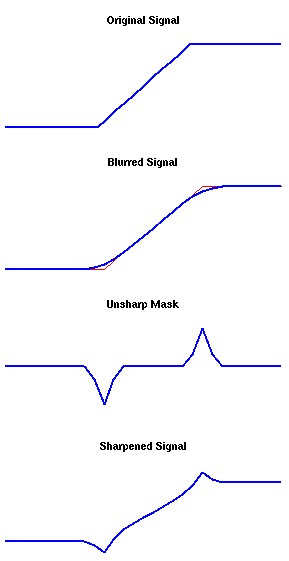
  </entry>


  <entry>
    <title>Everything I've learned so far about running local LLMs</title>
    <link rel="alternate" type="text/html" href="https://nullprogram.com/blog/2024/11/10/"/>
    <id>urn:uuid:975c2748-2c8f-4bb8-a108-b2be68a10fc5</id>
    <updated>2024-11-10T05:05:20Z</updated>
    <category term="ai"/><category term="rant"/><category term="tutorial"/>
    <content type="html">
      <![CDATA[<p><em>This article was discussed <a href="https://news.ycombinator.com/item?id=42100560">on Hacker News</a>.</em></p>

<p>Over the past month I’ve been exploring the rapidly evolving world of
Large Language Models (LLM). It’s now accessible enough to run a LLM on a
Raspberry Pi smarter than the original ChatGPT (November 2022). A modest
desktop or laptop supports even smarter AI. It’s also private, offline,
unlimited, and registration-free. The technology is improving at breakneck
speed, and information is outdated in a matter of months. This article
snapshots my practical, hands-on knowledge and experiences — information I
wish I had when starting. Keep in mind that I’m a LLM layman, I have no
novel insights to share, and it’s likely I’ve misunderstood certain
aspects. In a year this article will mostly be a historical footnote,
which is simultaneously exciting and scary.</p>

<!--more-->

<p>In case you’ve been living under a rock — as an under-the-rock inhabitant
myself, welcome! — LLMs are neural networks that underwent a breakthrough
in 2022 when trained for conversational “chat.” Through it, users converse
with a wickedly creative artificial intelligence indistinguishable from a
human, which smashes the Turing test and can be wickedly creative.
Interacting with one for the first time is unsettling, a feeling which
will last for days. When you bought your most recent home computer, you
probably did not expect to have a meaningful conversation with it.</p>

<p>I’ve found this experience reminiscent of the desktop computing revolution
of the 1990s, where your newly purchased computer seemed obsolete by the
time you got it home from the store. There are new developments each week,
and as a rule I ignore almost any information more than a year old. The
best way to keep up has been <a href="https://old.reddit.com/r/LocalLLaMA">r/LocalLLaMa</a>. Everything is hyped to the
stratosphere, so take claims with a grain of salt.</p>

<p>I’m wary of vendor lock-in, having experienced the rug pulled out from
under me by services shutting down, changing, or otherwise dropping my use
case. I want the option to continue, even if it means changing providers.
So for a couple of years I’d ignored LLMs. The “closed” models, accessibly
only as a service, have the classic lock-in problem, including <a href="https://arxiv.org/pdf/2307.09009">silent
degradation</a>. That changed when I learned I can run models close
to the state-of-the-art on my own hardware — the exact opposite of vendor
lock-in.</p>

<p>This article is about running LLMs, not fine-tuning, and definitely not
training. It’s also only about <em>text</em>, and not vision, voice, or other
“multimodal” capabilities, which aren’t nearly so useful to me personally.</p>

<p>To run a LLM on your own hardware you need <strong>software</strong> and a <strong>model</strong>.</p>

<h3 id="the-software">The software</h3>

<p>I’ve exclusively used the <em>astounding</em> <a href="https://github.com/ggerganov/llama.cpp">llama.cpp</a>. Other options exist,
but for basic CPU inference — that is, generating tokens using a CPU
rather than a GPU — llama.cpp requires nothing beyond a C++ toolchain. In
particular, no Python fiddling that plagues much of the ecosystem. On
Windows it will be a 5MB <code class="language-plaintext highlighter-rouge">llama-server.exe</code> with no runtime dependencies.
From just two files, EXE and GGUF (model), both designed to <a href="https://justine.lol/mmap/">load via
memory map</a>, you could likely still run the same LLM 25 years from
now, in exactly the same way, out-of-the-box on some future Windows OS.</p>

<p>Full disclosure: I’m biased because <a href="https://github.com/ggerganov/llama.cpp/blob/ec450d3b/docs/build.md">the official Windows build process is
w64devkit</a>. What can I say? These folks have good taste! That being
said, you should only do CPU inference if GPU inference is impractical. It
works reasonably up to ~10B parameter models on a desktop or laptop, but
it’s slower. My primary use case is not built with w64devkit because I’m
using CUDA for inference, which requires a MSVC toolchain. Just for fun, I
ported llama.cpp to Windows XP and ran <a href="https://huggingface.co/HuggingFaceTB/SmolLM2-360M-Instruct">a 360M model</a> on a 2008-era
laptop. It was magical to load that old laptop with technology that, at
the time it was new, would have been worth billions of dollars.</p>

<p>The bottleneck for GPU inference is video RAM, or VRAM. These models are,
well, <em>large</em>. The more RAM you have, the larger the model and the longer
the context window. Larger models are smarter, and longer contexts let you
process more information at once. <strong>GPU inference is not worth it below
8GB of VRAM</strong>. If <a href="https://huggingface.co/spaces/k-mktr/gpu-poor-llm-arena">“GPU poor”</a>, stick with CPU inference. On the
plus side, it’s simpler and easier to get started with CPU inference.</p>

<p>There are many utilities in llama.cpp, but this article is concerned with
just one: <strong><code class="language-plaintext highlighter-rouge">llama-server</code> is the program you want to run.</strong> It’s an HTTP
server (default port 8080) with a chat UI at its root, and <a href="https://github.com/ggerganov/llama.cpp/blob/ec450d3b/examples/server/README.md#api-endpoints">APIs for use
by programs</a>, including other user interfaces. A typical invocation:</p>

<div class="language-plaintext highlighter-rouge"><div class="highlight"><pre class="highlight"><code>$ llama-server --flash-attn --ctx-size 0 --model MODEL.gguf
</code></pre></div></div>

<p>The context size is the largest number of tokens the LLM can handle at
once, input plus output. Contexts typically range from 8K to 128K tokens,
and depending on the model’s tokenizer, normal English text is ~1.6 tokens
per word as counted by <code class="language-plaintext highlighter-rouge">wc -w</code>. If the model supports a large context you
may run out of memory. If so, set a smaller context size, like <code class="language-plaintext highlighter-rouge">--ctx-size
$((1&lt;&lt;13))</code> (i.e. 8K tokens).</p>

<p>I do not yet understand what flash attention is about, and I don’t know
why <code class="language-plaintext highlighter-rouge">--flash-attn</code>/<code class="language-plaintext highlighter-rouge">-fa</code> is not the default (lower accuracy?), but you
should always request it because it reduces memory requirements when
active and is well worth the cost.</p>

<p>If the server started successfully, visit it (<a href="http://localhost:8080/">http://localhost:8080/</a>) to
try it out. Though of course you’ll need a model first.</p>

<h3 id="the-models">The models</h3>

<p><a href="https://huggingface.co/">Hugging Face</a> (HF) is “the GitHub of LLMs.” It’s an incredible
service that has earned that title. “Small” models are around a few GBs,
large models are hundreds of GBs, and HF <em>hosts it all for free</em>. With a
few exceptions that do not matter in practice, you don’t even need to sign
up to download models! (I’ve been so impressed that after a few days they
got a penny-pincher like me to pay for pro account.) That means you can
immediately download and try any of the stuff I’m about to discuss.</p>

<p>If you look now, you’ll wonder, “There’s a lot of stuff here, so what the
heck am I supposed to download?” That was me one month ago. For llama.cpp,
the answer is <a href="https://github.com/ggerganov/ggml/blob/8a3d7994/docs/gguf.md">GGUF</a>. None of the models are natively in GGUF.
Instead GGUFs are in a repository with “GGUF” in the name, usually by a
third party: one of the heroic, prolific GGUF quantizers.</p>

<p>(Note how nowhere does the official documentation define what “GGUF”
stands for. Get used that. This is a technological frontier, and if the
information exists at all, it’s not in the obvious place. If you’re
considering asking your LLM about this once it’s running: Sweet summer
child, we’ll soon talk about why that doesn’t work. As far as I can tell,
“GGUF” has no authoritative definition (<strong>update</strong>: <a href="https://github.com/ggerganov/ggml/issues/220">the U stands for
“Unified”</a>, but the rest is still ambiguous).)</p>

<p>Since llama.cpp is named after the Meta’s flagship model, their model is a
reasonable start, though it’s not my personal favorite. The latest is
Llama 3.2, but at the moment only the 1B and 3B models — that is, ~1
billion and ~3 billion parameters — work in Llama.cpp. Those are a little
<em>too</em> small to be of much use, and your computer can likely to better if
it’s not a Raspberry Pi, even with CPU inference. Llama 3.1 8B is a better
option. (If you’ve got at least 24GB of VRAM then maybe you can even do
Llama 3.1 70B.)</p>

<p>If you search for Llama 3.1 8B you’ll find two options, one qualified
“instruct” and one with no qualifier. Instruct means it was trained to
follow instructions, i.e. to chat, and that’s nearly always what you want.
The other is the “base” model which can only continue a text. (Technically
the instruct model is still just completion, but we’ll get to that later.)
It would be great if base models were qualified “Base” but, for dumb path
dependency reasons, they’re usually not.</p>

<p>You will not find GGUF in the “Files” for the instruct model, nor can you
download the model without signing up in order to agree to the community
license. Go back to the search, add GGUF, and look for the matching GGUF
model: <a href="https://huggingface.co/bartowski/Meta-Llama-3.1-8B-Instruct-GGUF">bartowski/Meta-Llama-3.1-8B-Instruct-GGUF</a>. bartowski is
one of the prolific and well-regarded GGUF quantizers. Not only will this
be in the right format for llama.cpp, you won’t need to sign up.</p>

<p>In “Files” you will now see many GGUFs. These are different quantizations
of the same model. The original model has <a href="https://en.wikipedia.org/wiki/Bfloat16_floating-point_format">bfloat16</a> tensors, but for
merely running the model we can throw away most of that precision with
minimal damage. It will be a tiny bit dumber and less knowledgeable, but
will require substantially fewer resources. <strong>The general recommendation,
which fits my experience, is to use <code class="language-plaintext highlighter-rouge">Q4_K_M</code></strong>, a 4-bit quantization. In
general, better to run a 4-bit quant of a larger model than an 8-bit quant
of a smaller model. Once you’ve got the basics understood, experiment with
different quants and see what you like!</p>

<h3 id="my-favorite-models">My favorite models</h3>

<p>Models are trained for different trade-offs and differ in strengths and
weaknesses, so no model is best at everything — especially on “GPU-poor”
configurations. My desktop system has an RTX 3050 Ti with 8GB VRAM, and
its limitations have shaped my choices. I can comfortably run ~10B models,
and ~30B models just barely enough to test their capabilities. For ~70B I
rely on third-party hosts. My “t/s” numbers are all on this system running
4-bit quants.</p>

<p>This list omits “instruct” from the model name, but assume the instruct
model unless I say otherwise. A few are <em>bona fide</em> open source, at least
as far as LLMs practically can be, and I’ve noted the license when that’s
the case. The rest place restrictions on both use and distribution.</p>

<ul>
  <li>
    <p>Mistral-Nemo-2407 (12B) [Apache 2.0]</p>

    <p>A collaboration between <a href="https://mistral.ai/">Mistral AI</a> and Nvidia (“Nemo”), the
most well-rounded ~10B model I’ve used, and my default. Inference starts
at a comfortable 30 t/s. It’s strengths are writing and proofreading,
and it can review code nearly as well as ~70B models. It was trained for
a context length of 128K, but its <a href="https://github.com/NVIDIA/RULER">effective context length is closer to
16K</a> — a limitation I’ve personally observed.</p>

    <p>The “2407” is a date (July 2024) as version number, a versioning scheme
I wholeheartedly support. A date tells you about its knowledge cut-off
and tech level. It sorts well. Otherwise LLM versioning is a mess. Just
as open source is bad with naming, AI companies do not comprehend
versioning.</p>
  </li>
  <li>
    <p>Qwen2.5-14B [Apache 2.0]</p>

    <p>Qwen models, by Alibaba Cloud, impressively punch above their weight at
all sizes. 14B inference starts at 11 t/s, with capabilities on par with
Mistral Nemo. If I could run 72B on my own hardware, it would probably
be my default. I’ve been trying it through Hugging Face’s inference API.
There’s a 32B model, but it’s impractical for my hardware, so I haven’t
spent much time with it.</p>
  </li>
  <li>
    <p>Gemma-2-2B</p>

    <p>Google’s model is popular, perhaps due to its playful demeanor. For me,
the 2B model <a href="https://github.com/skeeto/scratch/blob/master/userscript/reddit-llm-translate.user.js">is great for fast translation</a>. It’s amazing that LLMs
have nearly obsoleted Google Translate, and you can run it on your home
computer. Though it’s more resource-intensive, and refuses to translate
texts it finds offensive, which sounds like a plot element from a sci-fi
story. In my translation script, I send it text marked up with HTML.
Simply <em>asking</em> Gemma to preserve the markup Just Works! The 9B model is
even better, but slower, and I’d use it instead of 2B for translating my
own messages into another language.</p>
  </li>
  <li>
    <p>Phi3.5-Mini (4B) [MIT]</p>

    <p>Microsoft’s niche is training on synthetic data. The result is a model
that does well in tests, but doesn’t work so well in practice. For me,
its strength is document evaluation. I’ve loaded the context with up to
40K-token documents — it helps that it’s a 4B model — and successfully
queried accurate summaries and data listings.</p>
  </li>
  <li>
    <p>SmolLM2-360M [Apache 2.0]</p>

    <p>Hugging Face doesn’t just host models; their 360M model is unusually
good for its size. It fits on my 2008-era, 1G RAM, Celeron, and 32-bit
operating system laptop. It also runs well on older Raspberry Pis. It’s
creative, fast, converses competently, can write poetry, and a fun toy
in cramped spaces.</p>
  </li>
  <li>
    <p>Mixtral-8x7B (48B) [Apache 2.0]</p>

    <p>Another Mistral AI model, and more of a runner up. 48B seems too large,
but this is a <a href="https://mistral.ai/news/mixtral-of-experts/">Mixture of Experts</a> (MoE) model. Inference uses only
13B parameters at a time. It’s reasonably-suited to CPU inference on a
machine with at least 32G of RAM. The model retains more of its training
inputs, more like a database, but for reasons we’ll see soon, it isn’t
as useful as it might seem.</p>
  </li>
  <li>
    <p>Llama-3.1-70B and Llama-3.1-Nemotron-70B</p>

    <p>More models I cannot run myself, but which I access remotely. The latter
bears “Nemo” because it’s an Nvidia fine-tune. If I could run 70B models
myself, Nemotron might just be my default. I’d need to spent more time
evaluating it against Qwen2.5-72B.</p>
  </li>
</ul>

<p>Most of these models have <a href="https://huggingface.co/blog/mlabonne/abliteration">abliterated</a> or “uncensored” versions, in
which refusal is partially fine-tuned out at a cost of model degradation.
Refusals are annoying — such as Gemma refusing to translate texts it
dislikes — but doesn’t happen enough for me to make that trade-off. Maybe
I’m just boring. Also refusals seem to decrease with larger contexts, as
though “in for a penny, in for a pound.”</p>

<p>The next group are “coder” models trained for programming. In particular,
they have <em>fill-in-the-middle</em> (FIM) training for generating code inside
an existing program. I’ll discuss what that entails in a moment. As far as
I can tell, they’re no better at code review nor other instruct-oriented
tasks. It’s the opposite: FIM training is done in the base model, with
instruct training applied later on top, so instruct works <em>against</em> FIM!
In other words, <strong>base model FIM outputs are markedly better</strong>, though you
lose the ability to converse with them.</p>

<p>There will be a section on evaluation later, but I want to note now that
<em>LLMs produce mediocre code</em>, even at the state-of-the-art. The rankings
here are relative to other models, not about overall capability.</p>

<ul>
  <li>
    <p>DeepSeek-Coder-V2-Lite (16B)</p>

    <p>A self-titled MoE model from <a href="https://www.deepseek.com/">DeepSeek</a>. It uses 2B parameters
during inference, making it as fast as Gemma 2 2B but as smart as
Mistral Nemo, striking a great balance, especially because it
out-competes ~30B models at code generation. If I’m playing around with
FIM, this is my default choice.</p>
  </li>
  <li>
    <p>Qwen2.5-Coder-7B [Apache 2.0]</p>

    <p>Qwen Coder is a close second. Output is nearly as good, but slightly
slower since it’s not MoE. It’s a better choice than DeepSeek if you’re
memory-constrained. While writing this article, Alibaba Cloud released a
new Qwen2.5-Coder-7B but failed to increment the version number, which
is horribly confusing. The community has taken to calling it Qwen2.5.1.
Remember what I said about AI companies and versions? (<strong>Update</strong>: One
day publication, 14B and 32B coder models were released. I tried both,
and neither are quite as good as DeepSeek-Coder-V2-Lite, so my rankings
are unchanged.)</p>
  </li>
  <li>
    <p>Granite-8B-Code [Apache 2.0]</p>

    <p>IBM’s line of models is named Granite. In general Granite models are
disappointing, <em>except</em> that they’re unusually good at FIM. It’s tied
in second place with Qwen2.5 7B in my experience.</p>
  </li>
</ul>

<p>I also evaluated CodeLlama, CodeGemma, Codestral, and StarCoder. Their FIM
outputs were so poor as to be effectively worthless at that task, and I
found no reason to use these models. The negative effects of instruct
training were most pronounced for CodeLlama.</p>

<h3 id="the-user-interfaces">The user interfaces</h3>

<p>I pointed out Llama.cpp’s built-in UI, and I’d used similar UIs with other
LLM software. As is typical, no UI is to my liking, especially in matters
of productivity, so I built my own, <strong><a href="https://github.com/skeeto/illume">Illume</a></strong>. This command
line program converts standard input into an API query, makes the query,
and streams the response to standard output. Should be simple enough to
integrate into any extensible text editor, but I only needed it for Vim.
Vimscript is miserable, probably the second worst programming language
I’ve ever touched, so my goal was to write as little as possible.</p>

<p>I created Illume to scratch my own itch, to support my exploration of the
LLM ecosystem. I actively break things and add features as needed, and I
make no promises about interface stability. <em>You probably don’t want to
use it.</em></p>

<p>Lines that begin with <code class="language-plaintext highlighter-rouge">!</code> are directives interpreted by Illume, chosen
because it’s unlikely to appear in normal text. A conversation alternates
between <code class="language-plaintext highlighter-rouge">!user</code> and <code class="language-plaintext highlighter-rouge">!assistant</code> in a buffer.</p>

<div class="language-plaintext highlighter-rouge"><div class="highlight"><pre class="highlight"><code>!user
Write a Haiku about time travelers disguised as frogs.

!assistant
Green, leaping through time,
Frog tongues lick the future's rim,
Disguised in pond's guise.
</code></pre></div></div>

<p>It’s still a text editor buffer, so I can edit the assistant response,
reword my original request, etc. before continuing the conversation. For
composing fiction, I can request it to continue some text (which does not
require instruct training):</p>

<div class="language-plaintext highlighter-rouge"><div class="highlight"><pre class="highlight"><code>!completion
Din the Wizard stalked the dim castle
</code></pre></div></div>

<p>I can stop it, make changes, add my own writing, and keep going. I ought
to spend more time practicing with it. If you introduce out-of-story note
syntax, the LLM will pick up on it, and then you can use notes to guide
the LLM’s writing.</p>

<p>While the main target is llama.cpp, I query different APIs, implemented by
different LLM software, with incompatibilities across APIs (a parameter
required by one API is forbidden by another), so directives must be
flexible and powerful. So directives can set arbitrary HTTP and JSON
parameters. Illume doesn’t try to abstract the API, but exposes it at a
low level, so effective use requires knowing the remote API. For example,
the “profile” for talking to llama.cpp looks like this:</p>

<div class="language-plaintext highlighter-rouge"><div class="highlight"><pre class="highlight"><code>!api http://localhost:8080/v1
!:cache_prompt true
</code></pre></div></div>

<p>Where <code class="language-plaintext highlighter-rouge">cache_prompt</code> is a llama.cpp-specific JSON parameter (<code class="language-plaintext highlighter-rouge">!:</code>). Prompt
cache nearly always better enabled, yet for some reason it’s disabled by
default. Other APIs refuse requests with this parameter, so then I must
omit or otherwise disable it. The Hugging Face “profile” looks like this:</p>

<div class="language-plaintext highlighter-rouge"><div class="highlight"><pre class="highlight"><code>!api https://api-inference.huggingface.co/models/{model}/v1
!:model Qwen/Qwen2.5-72B-Instruct
!&gt;x-use-cache false
</code></pre></div></div>

<p>For the sake of HF, Illume can interpolate JSON parameters into the URL.
The HF API caches also aggressively caches. I never want this, so I supply
an HTTP parameter (<code class="language-plaintext highlighter-rouge">!&gt;</code>) to turn it off.</p>

<p>Unique to llama.cpp is an <code class="language-plaintext highlighter-rouge">/infill</code> endpoint for FIM. It requires a model
with extra metadata, trained a certain way, but this is usually not the
case. So while Illume can use <code class="language-plaintext highlighter-rouge">/infill</code>, I also added FIM configuration
so, after reading the model’s documentation and configuring Illume for
that model’s FIM behavior, I can do FIM completion through the normal
completion API on any FIM-trained model, even on non-llama.cpp APIs.</p>

<h3 id="fill-in-the-middle-fim-tokens">Fill-in-the-Middle (FIM) tokens</h3>

<p>It’s time to discuss FIM. To get to the bottom of FIM I needed to go to
the source of truth, the original FIM paper: <a href="https://arxiv.org/abs/2207.14255">Efficient Training of
Language Models to Fill in the Middle</a>. This allowed me to understand
how these models are FIM-trained, at least enough to put that training to
use. Even so, model documentation tends to be thin on FIM because they
expect you to run their code.</p>

<p>Ultimately an LLM can only predict the next token. So pick some special
tokens that don’t appear in inputs, use them to delimit a prefix and
suffix, and middle (PSM) — or sometimes ordered suffix-prefix-middle (SPM)
— in a large training corpus. Later in inference we can use those tokens
to provide a prefix, suffix, and let it “predict” the middle. Crazy, but
<em>this actually works!</em></p>

<div class="language-plaintext highlighter-rouge"><div class="highlight"><pre class="highlight"><code>&lt;PRE&gt;{prefix}&lt;SUF&gt;{suffix}&lt;MID&gt;
</code></pre></div></div>

<p>For example when filling the parentheses of <code class="language-plaintext highlighter-rouge">dist = sqrt(x*x + y*y)</code>:</p>

<div class="language-plaintext highlighter-rouge"><div class="highlight"><pre class="highlight"><code>&lt;PRE&gt;dist = sqrt(&lt;SUF&gt;)&lt;MID&gt;x*x + y*y
</code></pre></div></div>

<p>To have the LLM fill in the parentheses, we’d stop at <code class="language-plaintext highlighter-rouge">&lt;MID&gt;</code> and let the
LLM predict from there. Note how <code class="language-plaintext highlighter-rouge">&lt;SUF&gt;</code> is essentially the cursor. By the
way, this is basically how instruct training works, but instead of prefix
and suffix, special tokens delimit instructions and conversation.</p>

<p>Some LLM folks interpret the paper quite literally and use <code class="language-plaintext highlighter-rouge">&lt;PRE&gt;</code>, etc.
for their FIM tokens, although these look nothing like their other special
tokens. More thoughtful trainers picked <code class="language-plaintext highlighter-rouge">&lt;|fim_prefix|&gt;</code>, etc. Illume
accepts FIM templates, and I wrote templates for the popular models. For
example, here’s Qwen (PSM):</p>

<div class="language-plaintext highlighter-rouge"><div class="highlight"><pre class="highlight"><code>&lt;|fim_prefix|&gt;{prefix}&lt;|fim_suffix|&gt;{suffix}&lt;|fim_middle|&gt;
</code></pre></div></div>

<p>Mistral AI prefers square brackets, SPM, and no “middle” token:</p>

<div class="language-plaintext highlighter-rouge"><div class="highlight"><pre class="highlight"><code>[SUFFIX]{suffix}[PREFIX]{prefix}
</code></pre></div></div>

<p>With these templates I could access the FIM training in models unsupported
by llama.cpp’s <code class="language-plaintext highlighter-rouge">/infill</code> API.</p>

<p>Besides just failing the prompt, the biggest problem I’ve had with FIM is
LLMs not know when to stop. For example, if I ask it to fill out this
function (i.e. assign something <code class="language-plaintext highlighter-rouge">r</code>):</p>

<div class="language-py highlighter-rouge"><div class="highlight"><pre class="highlight"><code><span class="k">def</span> <span class="nf">norm</span><span class="p">(</span><span class="n">x</span><span class="p">:</span> <span class="nb">float</span><span class="p">,</span> <span class="n">y</span><span class="p">:</span> <span class="nb">float</span><span class="p">)</span> <span class="o">-&gt;</span> <span class="nb">float</span><span class="p">):</span>
    <span class="k">return</span> <span class="n">r</span>
</code></pre></div></div>

<p>(Side note: Static types, including the hints here, produce better results
from LLMs, acting as guardrails.) It’s not unusual to get something like:</p>

<div class="language-py highlighter-rouge"><div class="highlight"><pre class="highlight"><code><span class="k">def</span> <span class="nf">norm</span><span class="p">(</span><span class="n">x</span><span class="p">:</span> <span class="nb">float</span><span class="p">,</span> <span class="n">y</span><span class="p">:</span> <span class="nb">float</span><span class="p">)</span> <span class="o">-&gt;</span> <span class="nb">float</span><span class="p">):</span>
    <span class="n">r</span> <span class="o">=</span> <span class="n">sqrt</span><span class="p">(</span><span class="n">x</span><span class="o">*</span><span class="n">x</span> <span class="o">+</span> <span class="n">y</span><span class="o">*</span><span class="n">y</span><span class="p">)</span>
    <span class="k">return</span> <span class="n">r</span>

<span class="k">def</span> <span class="nf">norm3</span><span class="p">(</span><span class="n">x</span><span class="p">:</span> <span class="nb">float</span><span class="p">,</span> <span class="n">y</span><span class="p">:</span> <span class="nb">float</span><span class="p">,</span> <span class="n">z</span><span class="p">:</span> <span class="nb">float</span><span class="p">)</span> <span class="o">-&gt;</span> <span class="nb">float</span><span class="p">):</span>
    <span class="n">r</span> <span class="o">=</span> <span class="n">sqrt</span><span class="p">(</span><span class="n">x</span><span class="o">*</span><span class="n">x</span> <span class="o">+</span> <span class="n">y</span><span class="o">*</span><span class="n">y</span> <span class="o">+</span> <span class="n">z</span><span class="o">*</span><span class="n">z</span><span class="p">)</span>
    <span class="k">return</span> <span class="n">r</span>

<span class="k">def</span> <span class="nf">norm4</span><span class="p">(</span><span class="n">x</span><span class="p">:</span> <span class="nb">float</span><span class="p">,</span> <span class="n">y</span><span class="p">:</span> <span class="nb">float</span><span class="p">,</span> <span class="n">z</span><span class="p">:</span> <span class="nb">float</span><span class="p">,</span> <span class="n">w</span><span class="p">:</span> <span class="nb">float</span><span class="p">)</span> <span class="o">-&gt;</span> <span class="nb">float</span><span class="p">):</span>
    <span class="n">r</span> <span class="o">=</span> <span class="n">sqrt</span><span class="p">(</span><span class="n">x</span><span class="o">*</span><span class="n">x</span> <span class="o">+</span> <span class="n">y</span><span class="o">*</span><span class="n">y</span> <span class="o">+</span> <span class="n">z</span><span class="o">*</span><span class="n">z</span> <span class="o">+</span> <span class="n">w</span><span class="o">*</span><span class="n">w</span><span class="p">)</span>
    <span class="k">return</span> <span class="n">r</span>
</code></pre></div></div>

<p>Where the original <code class="language-plaintext highlighter-rouge">return r</code> became the return for <code class="language-plaintext highlighter-rouge">norm4</code>. Technically
it fits the prompt, but it’s obviously not what I want. So be ready to
mash the “stop” button when it gets out of control. The three coder models
I recommended exhibit this behavior less often. It might be more robust to
combine it with a non-LLM system that understands the code semantically
and automatically stops generation when the LLM begins generating tokens
in a higher scope. That would make more coder models viable, but this goes
beyond my own fiddling.</p>

<p>Figuring out FIM and putting it into action revealed to me that FIM is
still in its early stages, and hardly anyone is generating code via FIM. I
guess everyone’s just using plain old completion?</p>

<h3 id="so-what-are-llms-good-for">So what are LLMs good for?</h3>

<p>LLMs are fun, but what the productive uses do they have? That’s a question
I’ve been trying to answer this past month, and it’s come up shorter than
I hoped. It might be useful to establish boundaries — tasks that LLMs
definitely cannot do.</p>

<p>First, <strong>LLMs are no good if correctness cannot be readily verified</strong>.
They are untrustworthy hallucinators. Often if you’re in position to
verify LLM output, you didn’t need it in the first place. This is why
Mixtral, with its large “database” of knowledge, isn’t so useful. It also
means it’s <em>reckless and irresponsible to inject LLM output into search
results</em> — just shameful.</p>

<p>LLM enthusiasts, who ought to know better, fall into this trap anyway and
propagate hallucinations. It makes discourse around LLMs less trustworthy
than normal, and I need to approach LLM information with extra skepticism.
Case in point: Recall how “GGUF” doesn’t have an authoritative definition.
Search for one and you’ll find an obvious hallucination that made it all
the way into official IBM documentation. I won’t repeat it hear as to not
make things worse.</p>

<p>Second, <strong>LLMs have goldfish-sized working memory</strong>. That is, they’re held
back by small context lengths. Some models are trained on larger contexts,
but their <a href="https://github.com/NVIDIA/RULER">effective context length</a> is usually much smaller. In
practice, an LLM can hold several book chapters worth of comprehension “in
its head” at a time. For code it’s 2k or 3k lines (code is token-dense).
That’s the most you can work with at once. Compared to a human, it’s tiny.
There are tools like <a href="https://en.wikipedia.org/wiki/Retrieval-augmented_generation">retrieval-augmented generation</a> and fine-tuning
to mitigate it… <em>slightly</em>.</p>

<p>Third, <strong>LLMs are poor programmers</strong>. At best they write code at maybe an
undergraduate student level who’s read a lot of documentation. That sounds
better than it is. The typical fresh graduate enters the workforce knowing
practically nothing about software engineering. Day one on the job is the
first day of their <a href="/blog/2016/09/02/">real education</a>. In that sense, LLMs today
haven’t even begun their education.</p>

<p>To be fair, that LLMs work as well as they do is amazing! Thrown into the
middle of a program in <a href="/blog/2023/10/08/">my unconvential style</a>, LLMs figure it out
and make use of the custom interfaces. (Caveat: My code and writing is in
the training data of most of these LLMs.) So the more context, the better,
within the effective context length. The challenge is getting something
useful out of an LLM in less time than writing it myself.</p>

<p><em>Writing new code is the easy part</em>. The hard part is maintaining code,
and writing new code with that maintenance in mind. Even when an LLM
produces code that works, there’s no thought to maintenance, nor could
there be. In general the reliability of generate code follows the inverse
square law by length, and generating more than a dozen lines at a time is
fraught. I really tried, but never saw LLM output beyond 2–3 lines of code
which I would consider acceptable.</p>

<p>Quality varies substantially by language. LLMs are better at Python than
C, and better at C than assembly. I suspect it’s related to the difficulty
of the language and the quality of the input. It’s trained on lots of
terrible C — the internet is loaded with it after all — and probably the
only labeled x86 assembly it’s seen is crummy beginner tutorials. Ask it
to use SDL2 and it <a href="/blog/2023/01/08/">reliably produces the common mistakes</a> because
it’s been trained to do so.</p>

<p>What about boilerplate? That’s something an LLM could probably do with a
low error rate, and perhaps there’s merit to it. Though the fastest way to
deal with boilerplate is to not write it at all. Change your problem to
not require boilerplate.</p>

<p>Without taking my word for it, consider how it show up in the economics:
If AI companies could deliver the productivity gains they claim, they
wouldn’t sell AI. They’d keep it to themselves and gobble up the software
industry. Or consider the software products produced by companies on the
bleeding edge of AI. It’s still the same old, bloated web garbage everyone
else is building. (My LLM research has involved navigating their awful web
sites, and it’s made be bitter.)</p>

<p>In code generation, hallucinations are less concerning. You already knew
what you wanted when you asked, so you can review it, and your compiler
will help catch problems you miss (e.g. calling a hallucinated method).
However, small context and poor code generation remain roadblocks, and I
haven’t yet made this work effectively.</p>

<p>So then, what can I do with LLMs? A list is apt because LLMs love lists:</p>

<ul>
  <li>
    <p>Proofreading has been most useful for me. I give it a document such as
an email or this article (~8,000 tokens), tell it to look over grammar,
call out passive voice, and so on, and suggest changes. I accept or
reject its suggestions and move on. Most suggestions will be poor, and
this very article was long enough that even ~70B models suggested
changes to hallucinated sentences. Regardless, there’s signal in the
noise, and it fits within the limitations outlined above. I’m still
trying to apply this technique (“find bugs, please”) to code review, but
so far success is elusive.</p>
  </li>
  <li>
    <p>Writing short fiction. Hallucinations are not a problem; they’re a
feature! Context lengths are the limiting factor, though perhaps you can
stretch it by supplying chapter summaries, also written by LLM. I’m
still exploring this. If you’re feeling lazy, tell it to offer you three
possible story branches at each turn, and you pick the most interesting.
Or even tell it to combine two of them! LLMs are clever and will figure
it out. Some genres work better than others, and concrete works better
than abstract. (I wonder if professional writers judge its writing as
poor as I judge its programming.)</p>
  </li>
  <li>
    <p>Generative fun. Have an argument with Benjamin Franklin (note: this
probably violates the <a href="https://ai.meta.com/llama/use-policy/">Acceptable Use Policy</a> of some models), hang
out with a character from your favorite book, or generate a new scene of
<a href="/blog/2023/06/22/#76-henry-iv">Falstaff’s blustering antics</a>. Talking to historical figures
has been educational: The character says something unexpected, I look it
up the old-fashioned way to see what it’s about, then learn something
new.</p>
  </li>
  <li>
    <p>Language translation. I’ve been browsing foreign language subreddits
through Gemma-2-2B translation, and it’s been insightful. (I had no idea
German speakers were so distrustful of artificial sweeteners.)</p>
  </li>
</ul>

<p>Despite the short list of useful applications, this is the most excited
I’ve been about a new technology in years!</p>

]]>
    </content>
  </entry>


  <entry>
    <title>Guidelines for computing sizes and subscripts</title>
    <link rel="alternate" type="text/html" href="https://nullprogram.com/blog/2024/05/24/"/>
    <id>urn:uuid:df6214e0-e408-4254-bd65-49d64e06a93e</id>
    <updated>2024-05-24T22:25:10Z</updated>
    <category term="c"/><category term="cpp"/><category term="go"/><category term="tutorial"/>
    <content type="html">
      <![CDATA[<p>Occasionally we need to compute the size of an object that does not yet
exist, or a subscript <a href="https://research.google/blog/extra-extra-read-all-about-it-nearly-all-binary-searches-and-mergesorts-are-broken/">that may fall out of bounds</a>. It’s easy to miss
the edge cases where results overflow, creating a nasty, subtle bug, <a href="https://blog.carlana.net/post/2024/golang-slices-concat/">even
in the presence of type safety</a>. Ideally such computations happen in
specialized code, such as <em>inside</em> an allocator (<code class="language-plaintext highlighter-rouge">calloc</code>, <code class="language-plaintext highlighter-rouge">reallocarray</code>)
and not <em>outside</em> by the allocatee (i.e. <code class="language-plaintext highlighter-rouge">malloc</code>). Mitigations exist with
different trade-offs: arbitrary precision, or using a wider fixed integer
— i.e. 128-bit integers on 64-bit hosts. In the typical case, working only
with fixed size-type integers, I’ve come up with a set of guidelines to
avoid overflows in the edge cases.</p>

<ol>
  <li>Range check <em>before</em> computing a result. No exceptions.</li>
  <li>Do not cast unless you know <em>a priori</em> the operand is in range.</li>
  <li>Never mix unsigned and signed operands. <a href="https://www.youtube.com/watch?v=wvtFGa6XJDU">Prefer signed.</a> If you
need to convert an operand, see (2).</li>
  <li>Do not add unless you know <em>a priori</em> the result is in range.</li>
  <li>Do not multiply unless you know <em>a priori</em> the result is in range.</li>
  <li>Do not subtract unless you know <em>a priori</em> both signed operands
are non-negative. For unsigned, that the second operand is not larger
than the first (treat it like (4)).</li>
  <li>Do not divide unless you know <em>a prior</em> the denominator is positive.</li>
  <li>Make it correct first. Make it fast later, if needed.</li>
</ol>

<p>These guidelines are also useful when <em>reviewing</em> code, tracking in your
mind whether the invariants are held at each step. If not, you’ve likely
found a bug. If in doubt, use assertions to document and check invariants.
I compiled this list during code review, so for me that’s where it’s most
useful.</p>

<h3 id="range-check-then-compute">Range check, then compute</h3>

<p>Not strictly necessary when overflow is well-defined, i.e. wraparound, but
it’s like defensive driving. It’s simpler and clearer to check with basic
arithmetic rather than reason from a wraparound, i.e. a negative result.
Checked math functions are fine, too, if you check the overflow boolean
before accessing the result.</p>

<div class="language-plaintext highlighter-rouge"><div class="highlight"><pre class="highlight"><code>// bad
len++;
if (len &lt;= 0) error();

// good
if (len == MAX) error();
len++;
</code></pre></div></div>

<h3 id="casting">Casting</h3>

<p>Casting from signed to unsigned, it’s as simple as knowing the value is
non-negative, which is likely if you’re following (1). If a negative size
has appeared, there’s already been a bug earlier in the program, and the
only reasonable course of action is to abort, not handle it like an error.</p>

<h3 id="addition">Addition</h3>

<p>To check if addition will overflow, subtract one of the operands from the
maximum value.</p>

<div class="language-plaintext highlighter-rouge"><div class="highlight"><pre class="highlight"><code>if (b &gt; MAX - a) error();
r = a + b;
</code></pre></div></div>

<p>In pointer arithmetic addition, it’s a common mistake to compute the
result pointer then compare it to the bounds. If the check failed, then
the pointer <em>already</em> overflowed, i.e. undefined behavior. Major pieces
software, <a href="https://sourcegraph.com/search?q=context:global+%22%3E+outend%22+repo:%5Egithub%5C.com/bminor/glibc%24+&amp;patternType=keyword&amp;sm=0">like glibc</a>, are riddled with such pointer overflows.
(Now that you’re aware of it, you’ll start noticing it everywhere. Sorry.)</p>

<div class="language-plaintext highlighter-rouge"><div class="highlight"><pre class="highlight"><code>// bad: never do this
beg += size;
if (beg &gt; end) error();
</code></pre></div></div>

<p>To do this correctly, <strong>check integers not pointers</strong>. Like before,
subtract before adding.</p>

<div class="language-plaintext highlighter-rouge"><div class="highlight"><pre class="highlight"><code>available = end - beg;
if (size &gt; available) error();
beg += size;
</code></pre></div></div>

<p>Mind mixing signed and unsigned operands for the comparison operator (3),
e.g. an unsigned size on the left and signed difference on the right.</p>

<h3 id="multiplication-and-division">Multiplication and division</h3>

<p>If you’re working this out on your own, multiplication seems tricky until
you’ve internalized a simple pattern. Just as we subtracted before adding,
we need to divide before multiplying. Divide the maximum value by one of
the operands:</p>

<div class="language-plaintext highlighter-rouge"><div class="highlight"><pre class="highlight"><code>if (a&gt;0 &amp;&amp; b&gt;MAX/a) error();
r = a * b;
</code></pre></div></div>

<p>It’s often permitted for one or both to be zero, so mind divide-by-zero,
which is handled above by the first condition. Sometimes size must be
positive, e.g. the result of the <code class="language-plaintext highlighter-rouge">sizeof</code> operator in C, in which case we
should prefer it as the denominator.</p>

<div class="language-plaintext highlighter-rouge"><div class="highlight"><pre class="highlight"><code>assert(size  &gt;  0);
assert(count &gt;= 0);
if (count &gt; MAX/size) error();
total = count * size;
</code></pre></div></div>

<p>With <a href="/blog/2023/09/27/">arena allocation</a> there are usually two concerns. First, will
it overflow when computing the total size, i.e. <code class="language-plaintext highlighter-rouge">count * size</code>? Second, is
the total size within the arena capacity. Naively that’s two checks, but
we can kill two birds with one stone: Check both at once by using the
current arena capacity as the maximum value when considering overflow.</p>

<div class="language-plaintext highlighter-rouge"><div class="highlight"><pre class="highlight"><code>if (count &gt; (end - beg)/size) error();
total = count * size;
</code></pre></div></div>

<p>One condition pulling double duty.</p>

<h3 id="subtraction">Subtraction</h3>

<p>With signed sizes, the negative range is a long “runway” allowing a single
unchecked subtraction before overflow might occur. In essence, we were
exploiting this in order to check addition. The most common mistake with
unsigned subtraction is not accounting for overflow when going below zero.</p>

<div class="language-plaintext highlighter-rouge"><div class="highlight"><pre class="highlight"><code>// note: signed "i" only
for (i = end - stride; i &gt;= beg; i -= stride) ...
</code></pre></div></div>

<p>This loop will go awry if <code class="language-plaintext highlighter-rouge">i</code> is unsigned and <code class="language-plaintext highlighter-rouge">beg &lt;= stride</code>.</p>

<p>In special cases we can get away with a second subtraction without an
overflow check if we know some properties of our operands. For example, my
arena allocators look like this:</p>

<div class="language-plaintext highlighter-rouge"><div class="highlight"><pre class="highlight"><code>padding = -beg &amp; (align - 1);
if (count &gt;= (end - beg - padding)/size) error();
</code></pre></div></div>

<p>That’s two subtractions in a row. However, <code class="language-plaintext highlighter-rouge">end - beg</code> describes the size
of a realized object, and <code class="language-plaintext highlighter-rouge">align</code> is a small constant (e.g. 2^(0–6)). It
could only overflow if the entirety of memory was occupied by the arena.</p>

<p>Bonus, advanced note: This check is actually pulling <em>triple duty</em>. Notice
that I used <code class="language-plaintext highlighter-rouge">&gt;=</code> instead of <code class="language-plaintext highlighter-rouge">&gt;</code>. The arena can’t fill exactly to the brim,
but it handles the extreme edge case where <code class="language-plaintext highlighter-rouge">count</code> is zero, the arena is
nearly full, but the bump pointer is unaligned. The result of subtracting
<code class="language-plaintext highlighter-rouge">padding</code> is negative, which rounds to zero by integer division, and would
pass a <code class="language-plaintext highlighter-rouge">&gt;</code> check. That wouldn’t be a problem except that aligning the bump
pointer would break the invariant <code class="language-plaintext highlighter-rouge">beg &lt;= end</code>.</p>

<h3 id="try-it-for-yourself">Try it for yourself</h3>

<p>Next time you’re reviewing code that computes sizes or subscripts, bring
the list up and see how well it follows the guidelines. If it misses one,
try to contrive an input that causes an overflow. If it follows guidelines
and you can still contrive such an input, then perhaps the list could use
another item!</p>

]]>
    </content>
  </entry>


  <entry>
    <title>Conventions for Command Line Options</title>
    <link rel="alternate" type="text/html" href="https://nullprogram.com/blog/2020/08/01/"/>
    <id>urn:uuid:9be2ce0e-298e-4085-8789-49674aecfeeb</id>
    <updated>2020-08-01T00:34:23Z</updated>
    <category term="tutorial"/><category term="posix"/><category term="c"/><category term="python"/><category term="go"/>
    <content type="html">
      <![CDATA[<p><em>This article was discussed <a href="https://news.ycombinator.com/item?id=24020952">on Hacker News</a> and critiqued <a href="https://utcc.utoronto.ca/~cks/space/blog/unix/MyOptionsConventions">on
Wandering Thoughts</a> (<a href="https://utcc.utoronto.ca/~cks/space/blog/unix/UnixOptionsConventions">2</a>, <a href="https://utcc.utoronto.ca/~cks/space/blog/python/ArgparseSomeUnixNotes">3</a>).</em></p>

<p>Command line interfaces have varied throughout their brief history but
have largely converged to some common, sound conventions. The core
<a href="https://pubs.opengroup.org/onlinepubs/9699919799/basedefs/V1_chap12.html">originates from unix</a>, and the Linux ecosystem extended it,
particularly via the GNU project. Unfortunately some tools initially
<em>appear</em> to follow the conventions, but subtly get them wrong, usually
for no practical benefit. I believe in many cases the authors simply
didn’t know any better, so I’d like to review the conventions.</p>

<!--more-->

<h3 id="short-options">Short Options</h3>

<p>The simplest case is the <em>short option</em> flag. An option is a hyphen —
specifically HYPHEN-MINUS U+002D — followed by one alphanumeric
character. Capital letters are acceptable. The letters themselves <a href="http://www.catb.org/~esr/writings/taoup/html/ch10s05.html">have
conventional meanings</a> and are worth following if possible.</p>

<div class="language-plaintext highlighter-rouge"><div class="highlight"><pre class="highlight"><code>program -a -b -c
</code></pre></div></div>

<p>Flags can be grouped together into one program argument. This is both
convenient and unambiguous. It’s also one of those often missed details
when programs use hand-coded argument parsers, and the lack of support
irritates me.</p>

<div class="language-plaintext highlighter-rouge"><div class="highlight"><pre class="highlight"><code>program -abc
program -acb
</code></pre></div></div>

<p>The next simplest case are short options that take arguments. The
argument follows the option.</p>

<div class="language-plaintext highlighter-rouge"><div class="highlight"><pre class="highlight"><code>program -i input.txt -o output.txt
</code></pre></div></div>

<p>The space is optional, so the option and argument can be packed together
into one program argument. Since the argument is required, this is still
unambiguous. This is another often-missed feature in hand-coded parsers.</p>

<div class="language-plaintext highlighter-rouge"><div class="highlight"><pre class="highlight"><code>program -iinput.txt -ooutput.txt
</code></pre></div></div>

<p>This does not prohibit grouping. When grouped, the option accepting an
argument must be last.</p>

<div class="language-plaintext highlighter-rouge"><div class="highlight"><pre class="highlight"><code>program -abco output.txt
program -abcooutput.txt
</code></pre></div></div>

<p>This technique is used to create another category, <em>optional option
arguments</em>. The option’s argument can be optional but still unambiguous
so long as the space is always omitted when the argument is present.</p>

<div class="language-plaintext highlighter-rouge"><div class="highlight"><pre class="highlight"><code>program -c       # omitted
program -cblue   # provided
program -c blue  # omitted (blue is a new argument)

program -c -x   # two separate flags
program -c-x    # -c with argument "-x"
</code></pre></div></div>

<p>Optional option arguments should be used judiciously since they can be
surprising, but they have their uses.</p>

<p>Options can typically appear in any order — something parsers often
achieve via <em>permutation</em> — but non-options typically follow options.</p>

<div class="language-plaintext highlighter-rouge"><div class="highlight"><pre class="highlight"><code>program -a -b foo bar
program -b -a foo bar
</code></pre></div></div>

<p>GNU-style programs usually allow options and non-options to be mixed,
though I don’t consider this to be essential.</p>

<div class="language-plaintext highlighter-rouge"><div class="highlight"><pre class="highlight"><code>program -a foo -b bar
program foo -a -b bar
program foo bar -a -b
</code></pre></div></div>

<p>If a non-option looks like an option because it starts with a hyphen,
use <code class="language-plaintext highlighter-rouge">--</code> to demarcate options from non-options.</p>

<div class="language-plaintext highlighter-rouge"><div class="highlight"><pre class="highlight"><code>program -a -b -- -x foo bar
</code></pre></div></div>

<p>An advantage of requiring that non-options follow options is that the
first non-option demarcates the two groups, so <code class="language-plaintext highlighter-rouge">--</code> is less often
needed.</p>

<div class="language-plaintext highlighter-rouge"><div class="highlight"><pre class="highlight"><code># note: without argument permutation
program -a -b foo -x bar  # 2 options, 3 non-options
</code></pre></div></div>

<h3 id="long-options">Long options</h3>

<p>Since short options can be cryptic, and there are such a limited number
of them, more complex programs support long options. A long option
starts with two hyphens followed by one or more alphanumeric, lowercase
words. Hyphens separate words. Using two hyphens prevents long options
from being confused for grouped short options.</p>

<div class="language-plaintext highlighter-rouge"><div class="highlight"><pre class="highlight"><code>program --reverse --ignore-backups
</code></pre></div></div>

<p>Occasionally flags are paired with a mutually exclusive inverse flag
that begins with <code class="language-plaintext highlighter-rouge">--no-</code>. This avoids a future <em>flag day</em> where the
default is changed in the release that also adds the flag implementing
the original behavior.</p>

<div class="language-plaintext highlighter-rouge"><div class="highlight"><pre class="highlight"><code>program --sort
program --no-sort
</code></pre></div></div>

<p>Long options can similarly accept arguments.</p>

<div class="language-plaintext highlighter-rouge"><div class="highlight"><pre class="highlight"><code>program --output output.txt --block-size 1024
</code></pre></div></div>

<p>These may optionally be connected to the argument with an equals sign
<code class="language-plaintext highlighter-rouge">=</code>, much like omitting the space for a short option argument.</p>

<div class="language-plaintext highlighter-rouge"><div class="highlight"><pre class="highlight"><code>program --output=output.txt --block-size=1024
</code></pre></div></div>

<p>Like before, this opens up the doors for optional option arguments. Due
to the required <code class="language-plaintext highlighter-rouge">=</code> this is still unambiguous.</p>

<div class="language-plaintext highlighter-rouge"><div class="highlight"><pre class="highlight"><code>program --color --reverse
program --color=never --reverse
</code></pre></div></div>

<p>The <code class="language-plaintext highlighter-rouge">--</code> retains its original behavior of disambiguating option-like
non-option arguments:</p>

<div class="language-plaintext highlighter-rouge"><div class="highlight"><pre class="highlight"><code>program --reverse -- --foo bar
</code></pre></div></div>

<h3 id="subcommands">Subcommands</h3>

<p>Some programs, such as Git, have subcommands each with their own
options. The main program itself may still have its own options distinct
from subcommand options. The program’s options come before the
subcommand and subcommand options follow the subcommand. Options are
never permuted around the subcommand.</p>

<div class="language-plaintext highlighter-rouge"><div class="highlight"><pre class="highlight"><code>program -a -b -c subcommand -x -y -z
program -abc subcommand -xyz
</code></pre></div></div>

<p>Above, the <code class="language-plaintext highlighter-rouge">-a</code>, <code class="language-plaintext highlighter-rouge">-b</code>, and <code class="language-plaintext highlighter-rouge">-c</code> options are for <code class="language-plaintext highlighter-rouge">program</code>, and the
others are for <code class="language-plaintext highlighter-rouge">subcommand</code>. So, really, the subcommand is another
command line of its own.</p>

<h3 id="option-parsing-libraries">Option parsing libraries</h3>

<p>There’s little excuse for not getting these conventions right assuming
you’re interested in following the conventions. Short options can be
parsed correctly in <a href="https://github.com/skeeto/getopt">just ~60 lines of C code</a>. Long options are
<a href="https://github.com/skeeto/optparse">just slightly more complex</a>.</p>

<p>GNU’s <code class="language-plaintext highlighter-rouge">getopt_long()</code> supports long option abbreviation — with no way to
disable it (!) — but <a href="https://utcc.utoronto.ca/~cks/space/blog/python/ArgparseAbbreviatedOptions">this should be avoided</a>.</p>

<p>Go’s <a href="https://golang.org/pkg/flag/">flag package</a> intentionally deviates from the conventions.
It only supports long option semantics, via a single hyphen. This makes
it impossible to support grouping even if all options are only one
letter. Also, the only way to combine option and argument into a single
command line argument is with <code class="language-plaintext highlighter-rouge">=</code>. It’s sound, but I miss both features
every time I write programs in Go. That’s why I <a href="https://github.com/skeeto/optparse-go">wrote my own argument
parser</a>. Not only does it have a nicer feature set, I like the API a
lot more, too.</p>

<p>Python’s primary option parsing library is <code class="language-plaintext highlighter-rouge">argparse</code>, and I just can’t
stand it. Despite appearing to follow convention, it actually breaks
convention <em>and</em> its behavior is unsound. For instance, the following
program has two options, <code class="language-plaintext highlighter-rouge">--foo</code> and <code class="language-plaintext highlighter-rouge">--bar</code>. The <code class="language-plaintext highlighter-rouge">--foo</code> option accepts
an optional argument, and the <code class="language-plaintext highlighter-rouge">--bar</code> option is a simple flag.</p>

<div class="language-py highlighter-rouge"><div class="highlight"><pre class="highlight"><code><span class="kn">import</span> <span class="nn">argparse</span>
<span class="kn">import</span> <span class="nn">sys</span>

<span class="n">parser</span> <span class="o">=</span> <span class="n">argparse</span><span class="p">.</span><span class="n">ArgumentParser</span><span class="p">()</span>
<span class="n">parser</span><span class="p">.</span><span class="n">add_argument</span><span class="p">(</span><span class="s">'--foo'</span><span class="p">,</span> <span class="nb">type</span><span class="o">=</span><span class="nb">str</span><span class="p">,</span> <span class="n">nargs</span><span class="o">=</span><span class="s">'?'</span><span class="p">,</span> <span class="n">default</span><span class="o">=</span><span class="s">'X'</span><span class="p">)</span>
<span class="n">parser</span><span class="p">.</span><span class="n">add_argument</span><span class="p">(</span><span class="s">'--bar'</span><span class="p">,</span> <span class="n">action</span><span class="o">=</span><span class="s">'store_true'</span><span class="p">)</span>
<span class="k">print</span><span class="p">(</span><span class="n">parser</span><span class="p">.</span><span class="n">parse_args</span><span class="p">(</span><span class="n">sys</span><span class="p">.</span><span class="n">argv</span><span class="p">[</span><span class="mi">1</span><span class="p">:]))</span>
</code></pre></div></div>

<p>Here are some example runs:</p>

<div class="language-plaintext highlighter-rouge"><div class="highlight"><pre class="highlight"><code>$ python parse.py
Namespace(bar=False, foo='X')

$ python parse.py --foo
Namespace(bar=False, foo=None)

$ python parse.py --foo=arg
Namespace(bar=False, foo='arg')

$ python parse.py --bar --foo
Namespace(bar=True, foo=None)

$ python parse.py --foo arg
Namespace(bar=False, foo='arg')
</code></pre></div></div>

<p>Everything looks good except the last. If the <code class="language-plaintext highlighter-rouge">--foo</code> argument is
optional then why did it consume <code class="language-plaintext highlighter-rouge">arg</code>? What happens if I follow it with
<code class="language-plaintext highlighter-rouge">--bar</code>? Will it consume it as the argument?</p>

<div class="language-plaintext highlighter-rouge"><div class="highlight"><pre class="highlight"><code>$ python parse.py --foo --bar
Namespace(bar=True, foo=None)
</code></pre></div></div>

<p>Nope! Unlike <code class="language-plaintext highlighter-rouge">arg</code>, it left <code class="language-plaintext highlighter-rouge">--bar</code> alone, so instead of following the
unambiguous conventions, it has its own ambiguous semantics and attempts
to remedy them with a “smart” heuristic: “If an optional argument <em>looks
like</em> an option, then it must be an option!” Non-option arguments can
never follow an option with an optional argument, which makes that
feature pretty useless. Since <code class="language-plaintext highlighter-rouge">argparse</code> does not properly support <code class="language-plaintext highlighter-rouge">--</code>,
that does not help.</p>

<div class="language-plaintext highlighter-rouge"><div class="highlight"><pre class="highlight"><code>$ python parse.py --foo -- arg
usage: parse.py [-h] [--foo [FOO]] [--bar]
parse.py: error: unrecognized arguments: -- arg
</code></pre></div></div>

<p>Please, stick to the conventions unless you have <em>really</em> good reasons
to break them!</p>

]]>
    </content>
  </entry>


  <entry>
    <title>How to Read UTF-8 Passwords on the Windows Console</title>
    <link rel="alternate" type="text/html" href="https://nullprogram.com/blog/2020/05/04/"/>
    <id>urn:uuid:338ca754-e19e-4ae0-add8-639d69967c22</id>
    <updated>2020-05-04T02:14:34Z</updated>
    <category term="win32"/><category term="c"/><category term="tutorial"/>
    <content type="html">
      <![CDATA[<p><em>This article was discussed <a href="https://news.ycombinator.com/item?id=23064864">on Hacker News</a>.</em></p>

<p>Suppose you’re writing a command line program that <a href="/blog/2017/03/12/">prompts the user for
a password or passphrase</a>, and Windows is one of the supported
platforms (<a href="/blog/2018/04/13/">even very old versions</a>). This program uses <a href="/blog/2019/05/29/">UTF-8
for its string representation</a>, <a href="http://utf8everywhere.org/">as it should</a>, and so
ideally it receives the password from the user encoded as UTF-8. On most
platforms this is, for the most part, automatic. However, on Windows
finding the correct answer to this problem is a maze where all the signs
lead towards dead ends. I recently navigated this maze and found the way
out.</p>

<!--more-->

<p>I knew it was possible because <a href="/blog/2019/07/10/">my passphrase2pgp tool</a> has been
using the <a href="https://pkg.go.dev/golang.org/x/crypto/ssh/terminal">golang.org/x/crypto/ssh/terminal</a> package, which gets it
very nearly perfect. Though they were still fixing subtle bugs <a href="https://github.com/golang/crypto/commit/6d4e4cb37c7d6416dfea8472e751c7b6615267a6">as
recently as 6 months ago</a>.</p>

<p>The first step is to ignore just everything you find online, because
it’s either wrong or it’s solving a slightly different problem. I’ll
discuss the dead ends later and focus on the solution first. Ultimately
I want to implement this on Windows:</p>

<div class="language-c highlighter-rouge"><div class="highlight"><pre class="highlight"><code><span class="c1">// Display prompt then read zero-terminated, UTF-8 password.</span>
<span class="c1">// Return password length with terminator, or zero on error.</span>
<span class="kt">int</span> <span class="nf">read_password</span><span class="p">(</span><span class="kt">char</span> <span class="o">*</span><span class="n">buf</span><span class="p">,</span> <span class="kt">int</span> <span class="n">len</span><span class="p">,</span> <span class="k">const</span> <span class="kt">char</span> <span class="o">*</span><span class="n">prompt</span><span class="p">);</span>
</code></pre></div></div>

<p>I chose <code class="language-plaintext highlighter-rouge">int</code> for the length rather than <code class="language-plaintext highlighter-rouge">size_t</code> because it’s a
password and should not even approach <code class="language-plaintext highlighter-rouge">INT_MAX</code>.</p>

<h3 id="the-correct-way">The correct way</h3>

<p>For the impatient:
<a href="https://github.com/skeeto/scratch/blob/master/misc/read-password-w32.c" class="download"><strong>complete, working, ready-to-use example</strong></a></p>

<p>On a unix-like system, the program would:</p>

<ol>
  <li><code class="language-plaintext highlighter-rouge">open(2)</code> the special <code class="language-plaintext highlighter-rouge">/dev/tty</code> file for reading and writing</li>
  <li><code class="language-plaintext highlighter-rouge">write(2)</code> the prompt</li>
  <li><code class="language-plaintext highlighter-rouge">tcgetattr(3)</code> and <code class="language-plaintext highlighter-rouge">tcsetattr(3)</code> to disable <code class="language-plaintext highlighter-rouge">ECHO</code></li>
  <li><code class="language-plaintext highlighter-rouge">read(2)</code> a line of input</li>
  <li>Restore the old terminal attributes with <code class="language-plaintext highlighter-rouge">tcsetattr(3)</code></li>
  <li><code class="language-plaintext highlighter-rouge">close(2)</code> the file</li>
</ol>

<p>A great advantage of this approach is that it doesn’t depend on standard
input and standard output. Either or both can be redirected elsewhere,
and this function still interacts with the user’s terminal. The Windows
version will have the same advantage.</p>

<p>Despite some tempting shortcuts that don’t work, the steps on Windows
are basically the same but with different names. There are a couple
subtleties and extra steps. I’ll be ignoring errors in my code snippets
below, but the complete example has full error handling.</p>

<h4 id="create-console-handles">Create console handles</h4>

<p>Instead of <code class="language-plaintext highlighter-rouge">/dev/tty</code>, the program opens two files: <code class="language-plaintext highlighter-rouge">CONIN$</code> and
<code class="language-plaintext highlighter-rouge">CONOUT$</code> using <a href="https://docs.microsoft.com/en-us/windows/win32/api/fileapi/nf-fileapi-createfilea"><code class="language-plaintext highlighter-rouge">CreateFileA()</code></a>. Note: The “A” stands for ANSI,
as opposed to “W” for wide (Unicode). This refers to the encoding of the
file name, not to how the file contents are encoded. <code class="language-plaintext highlighter-rouge">CONIN$</code> is opened
for both reading and writing because write permissions are needed to
change the console’s mode.</p>

<div class="language-c highlighter-rouge"><div class="highlight"><pre class="highlight"><code><span class="n">HANDLE</span> <span class="n">hi</span> <span class="o">=</span> <span class="n">CreateFileA</span><span class="p">(</span>
    <span class="s">"CONIN$"</span><span class="p">,</span>
    <span class="n">GENERIC_READ</span> <span class="o">|</span> <span class="n">GENERIC_WRITE</span><span class="p">,</span>
    <span class="mi">0</span><span class="p">,</span>
    <span class="mi">0</span><span class="p">,</span>
    <span class="n">OPEN_EXISTING</span><span class="p">,</span>
    <span class="mi">0</span><span class="p">,</span>
    <span class="mi">0</span>
<span class="p">);</span>
<span class="n">HANDLE</span> <span class="n">ho</span> <span class="o">=</span> <span class="n">CreateFileA</span><span class="p">(</span>
    <span class="s">"CONOUT$"</span><span class="p">,</span>
    <span class="n">GENERIC_WRITE</span><span class="p">,</span>
    <span class="mi">0</span><span class="p">,</span>
    <span class="mi">0</span><span class="p">,</span>
    <span class="n">OPEN_EXISTING</span><span class="p">,</span>
    <span class="mi">0</span><span class="p">,</span>
    <span class="mi">0</span>
<span class="p">);</span>
</code></pre></div></div>

<h4 id="print-the-prompt">Print the prompt</h4>

<p>To write the prompt, call <a href="https://docs.microsoft.com/en-us/windows/console/writeconsole"><code class="language-plaintext highlighter-rouge">WriteConsoleA()</code></a> on the output handle.
On its own, this assumes the prompt is plain ASCII (i.e. <code class="language-plaintext highlighter-rouge">"password:
"</code>), not UTF-8 (i.e. <code class="language-plaintext highlighter-rouge">"contraseña: "</code>):</p>

<div class="language-c highlighter-rouge"><div class="highlight"><pre class="highlight"><code><span class="n">WriteConsoleA</span><span class="p">(</span><span class="n">ho</span><span class="p">,</span> <span class="n">prompt</span><span class="p">,</span> <span class="n">strlen</span><span class="p">(</span><span class="n">prompt</span><span class="p">),</span> <span class="mi">0</span><span class="p">,</span> <span class="mi">0</span><span class="p">);</span>
</code></pre></div></div>

<p>If the prompt may contain UTF-8 data, perhaps because it displays a
username or isn’t in English, you have two options:</p>

<ul>
  <li>Convert the prompt to UTF-16 and call <code class="language-plaintext highlighter-rouge">WriteConsoleW()</code> instead.</li>
  <li>Use <code class="language-plaintext highlighter-rouge">SetConsoleOutputCP()</code> with <code class="language-plaintext highlighter-rouge">CP_UTF8</code> (65001). This is a global
(to the console) setting and should be restored when done.</li>
</ul>

<h4 id="disable-echo">Disable echo</h4>

<p>Next use <a href="https://docs.microsoft.com/en-us/windows/console/getconsolemode"><code class="language-plaintext highlighter-rouge">GetConsoleMode()</code></a> and <a href="https://docs.microsoft.com/en-us/windows/console/setconsolemode"><code class="language-plaintext highlighter-rouge">SetConsoleMode()</code></a> to
disable echo. The console usually has <code class="language-plaintext highlighter-rouge">ENABLE_PROCESSED_INPUT</code> already
set, which tells the console to handle CTRL-C and such, but I set it
explicitly just in case. I also set <code class="language-plaintext highlighter-rouge">ENABLE_LINE_INPUT</code> so that the user
can use backspace and so that the entire line is delivered at once.</p>

<div class="language-c highlighter-rouge"><div class="highlight"><pre class="highlight"><code><span class="n">DWORD</span> <span class="n">orig</span> <span class="o">=</span> <span class="mi">0</span><span class="p">;</span>
<span class="n">GetConsoleMode</span><span class="p">(</span><span class="n">hi</span><span class="p">,</span> <span class="o">&amp;</span><span class="n">orig</span><span class="p">);</span>

<span class="n">DWORD</span> <span class="n">mode</span> <span class="o">=</span> <span class="n">orig</span><span class="p">;</span>
<span class="n">mode</span> <span class="o">|=</span> <span class="n">ENABLE_PROCESSED_INPUT</span><span class="p">;</span>
<span class="n">mode</span> <span class="o">&amp;=</span> <span class="o">~</span><span class="n">ENABLE_ECHO_INPUT</span><span class="p">;</span>
<span class="n">SetConsoleMode</span><span class="p">(</span><span class="n">hi</span><span class="p">,</span> <span class="n">mode</span><span class="p">);</span>
</code></pre></div></div>

<p>There are reports that <code class="language-plaintext highlighter-rouge">ENABLE_LINE_INPUT</code> limits reads to 254 bytes,
but I was unable to reproduce it. My full example can read huge
passwords without trouble.</p>

<p>The old mode is saved in <code class="language-plaintext highlighter-rouge">orig</code> so that it can be restored later.</p>

<h4 id="read-the-password">Read the password</h4>

<p>Here’s where you have to pay the piper. As of the date of this article,
<strong>the Windows API offers no method for reading UTF-8 input from the
console</strong>. Give up on that hope now. If you use the “ANSI” functions to
read input under any configuration, they will to the usual Windows thing
of <em>silently mangling your input</em>.</p>

<p>So you <em>must</em> use the UTF-16 API, <a href="https://docs.microsoft.com/en-us/windows/console/readconsole"><code class="language-plaintext highlighter-rouge">ReadConsoleW()</code></a>, and then
<a href="/blog/2017/10/06/">encode it</a> yourself. Fortunately Win32 provides a UTF-8 encoder,
<a href="https://docs.microsoft.com/en-us/windows/win32/api/stringapiset/nf-stringapiset-widechartomultibyte"><code class="language-plaintext highlighter-rouge">WideCharToMultiByte()</code></a>, which will even handle surrogate pairs
for all those people who like putting <code class="language-plaintext highlighter-rouge">PILE OF POO</code> (<code class="language-plaintext highlighter-rouge">U+1F4A9</code>) in their
passwords:</p>

<div class="language-c highlighter-rouge"><div class="highlight"><pre class="highlight"><code><span class="n">SIZE_T</span> <span class="n">wbuf_len</span> <span class="o">=</span> <span class="p">(</span><span class="n">len</span> <span class="o">-</span> <span class="mi">1</span> <span class="o">+</span> <span class="mi">2</span><span class="p">)</span><span class="o">*</span><span class="k">sizeof</span><span class="p">(</span><span class="o">*</span><span class="n">wbuf</span><span class="p">);</span>
<span class="n">WCHAR</span> <span class="o">*</span><span class="n">wbuf</span> <span class="o">=</span> <span class="n">HeapAlloc</span><span class="p">(</span><span class="n">GetProcessHeap</span><span class="p">(),</span> <span class="mi">0</span><span class="p">,</span> <span class="n">wbuf_len</span><span class="p">);</span>
<span class="n">DWORD</span> <span class="n">nread</span><span class="p">;</span>
<span class="n">ReadConsoleW</span><span class="p">(</span><span class="n">hi</span><span class="p">,</span> <span class="n">wbuf</span><span class="p">,</span> <span class="n">len</span> <span class="o">-</span> <span class="mi">1</span> <span class="o">+</span> <span class="mi">2</span><span class="p">,</span> <span class="o">&amp;</span><span class="n">nread</span><span class="p">,</span> <span class="mi">0</span><span class="p">);</span>
<span class="n">wbuf</span><span class="p">[</span><span class="n">nread</span><span class="o">-</span><span class="mi">2</span><span class="p">]</span> <span class="o">=</span> <span class="mi">0</span><span class="p">;</span>  <span class="c1">// truncate "\r\n"</span>
<span class="kt">int</span> <span class="n">r</span> <span class="o">=</span> <span class="n">WideCharToMultiByte</span><span class="p">(</span><span class="n">CP_UTF8</span><span class="p">,</span> <span class="mi">0</span><span class="p">,</span> <span class="n">wbuf</span><span class="p">,</span> <span class="o">-</span><span class="mi">1</span><span class="p">,</span> <span class="n">buf</span><span class="p">,</span> <span class="n">len</span><span class="p">,</span> <span class="mi">0</span><span class="p">,</span> <span class="mi">0</span><span class="p">);</span>
<span class="n">SecureZeroMemory</span><span class="p">(</span><span class="n">wbuf</span><span class="p">,</span> <span class="n">wbuf_len</span><span class="p">);</span>
<span class="n">HeapFree</span><span class="p">(</span><span class="n">GetProcessHeap</span><span class="p">(),</span> <span class="mi">0</span><span class="p">,</span> <span class="n">wbuf</span><span class="p">);</span>
</code></pre></div></div>

<p>I use <a href="https://docs.microsoft.com/en-us/windows-hardware/drivers/ddi/wdm/nf-wdm-rtlsecurezeromemory"><code class="language-plaintext highlighter-rouge">SecureZeroMemory()</code></a> to erase the UTF-16 version of the
password before freeing the buffer. The <code class="language-plaintext highlighter-rouge">+ 2</code> in the allocation is for
the CRLF line ending that will later be chopped off. The error handling
version checks that the input did indeed end with CRLF. Otherwise it was
truncated (too long).</p>

<h4 id="clean-up">Clean up</h4>

<p>Finally print a newline since the user-typed one wasn’t echoed, restore
the old console mode, close the console handles, and return the final
encoded length:</p>

<div class="language-plaintext highlighter-rouge"><div class="highlight"><pre class="highlight"><code>WriteConsoleA(ho, "\n", 1, 0, 0);
SetConsoleMode(hi, orig);
CloseHandle(ho);
CloseHandle(hi);
return r;
</code></pre></div></div>

<p>The error checking version doesn’t check for errors from any of these
functions since either they cannot fail, or there’s nothing reasonable
to do in the event of an error.</p>

<h3 id="dead-ends">Dead ends</h3>

<p>If you look around the Win32 API you might notice <code class="language-plaintext highlighter-rouge">SetConsoleCP()</code>. A
reasonable person might think that setting the “code page” to UTF-8
(<code class="language-plaintext highlighter-rouge">CP_UTF8</code>) might configure the console to encode input in UTF-8. The
good news is Windows will no longer mangle your input as before. The bad
news is that it will be mangled differently.</p>

<p>You might think you can use the CRT function <code class="language-plaintext highlighter-rouge">_setmode()</code> with
<code class="language-plaintext highlighter-rouge">_O_U8TEXT</code> on the <code class="language-plaintext highlighter-rouge">FILE *</code> connected to the console. This does nothing
useful. (The only use for <code class="language-plaintext highlighter-rouge">_setmode()</code> is with <code class="language-plaintext highlighter-rouge">_O_BINARY</code>, to disable
braindead character translation on standard input and output.) The best
you’ll be able to do with the CRT is the same sort of wide character
read using non-standard functions, followed by conversion to UTF-8.</p>

<p><a href="https://docs.microsoft.com/en-us/windows/win32/api/wincred/nf-wincred-creduicmdlinepromptforcredentialsa"><code class="language-plaintext highlighter-rouge">CredUICmdLinePromptForCredentials()</code></a> promises to be both a
mouthful of a function name, and a prepacked solution to this problem.
It only delivers on the first. This function seems to have broken some
time ago and nobody at Microsoft noticed — probably because <em>nobody has
ever used this function</em>. I couldn’t find a working example, nor a use
in any real application. When I tried to use it, I got a nonsense error
code it never worked. There’s a GUI version of this function that <em>does</em>
work, and it’s a viable alternative for certain situations, though not
mine.</p>

<p>At my most desperate, I hoped <code class="language-plaintext highlighter-rouge">ENABLE_VIRTUAL_TERMINAL_PROCESSING</code> would
be a magical switch. On Windows 10 it magically enables some ANSI escape
sequences. The documentation in no way suggests it <em>would</em> work, and I
confirmed by experimentation that it does not. Pity.</p>

<p>I spent a lot of time searching down these dead ends until finally
settling with <code class="language-plaintext highlighter-rouge">ReadConsoleW()</code> above. I hoped it would be more
automatic, but I’m glad I have at least <em>some</em> solution figured out.</p>

]]>
    </content>
  </entry>


  <entry>
    <title>Render Multimedia in Pure C</title>
    <link rel="alternate" type="text/html" href="https://nullprogram.com/blog/2017/11/03/"/>
    <id>urn:uuid:4b36dd78-e85d-3637-8cd5-e44a2d3e683a</id>
    <updated>2017-11-03T22:31:15Z</updated>
    <category term="c"/><category term="media"/><category term="trick"/><category term="tutorial"/>
    <content type="html">
      <![CDATA[<p><em>Update 2020</em>: I’ve produced <a href="/blog/2020/06/29/">many more examples</a> over the years
(<a href="https://github.com/skeeto/scratch/tree/master/animation">even more</a>).</p>

<p>In a previous article <a href="/blog/2017/07/02/">I demonstrated video filtering with C and a
unix pipeline</a>. Thanks to the ubiquitous support for the
ridiculously simple <a href="https://en.wikipedia.org/wiki/Netpbm_format">Netpbm formats</a> — specifically the “Portable
PixMap” (<code class="language-plaintext highlighter-rouge">.ppm</code>, <code class="language-plaintext highlighter-rouge">P6</code>) binary format — it’s trivial to parse and
produce image data in any language without image libraries. Video
decoders and encoders at the ends of the pipeline do the heavy lifting
of processing the complicated video formats actually used to store and
transmit video.</p>

<p>Naturally this same technique can be used to <em>produce</em> new video in a
simple program. All that’s needed are a few functions to render
artifacts — lines, shapes, etc. — to an RGB buffer. With a bit of
basic sound synthesis, the same concept can be applied to create audio
in a separate audio stream — in this case using the simple (but not as
simple as Netpbm) WAV format. Put them together and a small,
standalone program can create multimedia.</p>

<p>Here’s the demonstration video I’ll be going through in this article.
It animates and visualizes various in-place sorting algorithms (<a href="/blog/2016/09/05/">see
also</a>). The elements are rendered as colored dots, ordered by
hue, with red at 12 o’clock. A dot’s distance from the center is
proportional to its corresponding element’s distance from its correct
position. Each dot emits a sinusoidal tone with a unique frequency
when it swaps places in a particular frame.</p>

<p><a href="/video/?v=sort-circle"><img src="/img/sort-circle/video.png" alt="" /></a></p>

<p>Original credit for this visualization concept goes to <a href="https://www.youtube.com/watch?v=sYd_-pAfbBw">w0rthy</a>.</p>

<p>All of the source code (less than 600 lines of C), ready to run, can be
found here:</p>

<ul>
  <li><strong><a href="https://github.com/skeeto/sort-circle">https://github.com/skeeto/sort-circle</a></strong></li>
</ul>

<p>On any modern computer, rendering is real-time, even at 60 FPS, so you
may be able to pipe the program’s output directly into your media player
of choice. (If not, consider getting a better media player!)</p>

<div class="language-plaintext highlighter-rouge"><div class="highlight"><pre class="highlight"><code>$ ./sort | mpv --no-correct-pts --fps=60 -
</code></pre></div></div>

<p>VLC requires some help from <a href="http://mjpeg.sourceforge.net/">ppmtoy4m</a>:</p>

<div class="language-plaintext highlighter-rouge"><div class="highlight"><pre class="highlight"><code>$ ./sort | ppmtoy4m -F60:1 | vlc -
</code></pre></div></div>

<p>Or you can just encode it to another format. Recent versions of
libavformat can input PPM images directly, which means <code class="language-plaintext highlighter-rouge">x264</code> can read
the program’s output directly:</p>

<div class="language-plaintext highlighter-rouge"><div class="highlight"><pre class="highlight"><code>$ ./sort | x264 --fps 60 -o video.mp4 /dev/stdin
</code></pre></div></div>

<p>By default there is no audio output. I wish there was a nice way to
embed audio with the video stream, but this requires a container and
that would destroy all the simplicity of this project. So instead, the
<code class="language-plaintext highlighter-rouge">-a</code> option captures the audio in a separate file. Use <code class="language-plaintext highlighter-rouge">ffmpeg</code> to
combine the audio and video into a single media file:</p>

<div class="language-plaintext highlighter-rouge"><div class="highlight"><pre class="highlight"><code>$ ./sort -a audio.wav | x264 --fps 60 -o video.mp4 /dev/stdin
$ ffmpeg -i video.mp4 -i audio.wav -vcodec copy -acodec mp3 \
         combined.mp4
</code></pre></div></div>

<p>You might think you’ll be clever by using <code class="language-plaintext highlighter-rouge">mkfifo</code> (i.e. a named pipe)
to pipe both audio and video into ffmpeg at the same time. This will
only result in a deadlock since neither program is prepared for this.
One will be blocked writing one stream while the other is blocked
reading on the other stream.</p>

<p>Several years ago <a href="/blog/2016/09/02/">my intern and I</a> used the exact same pure C
rendering technique to produce these raytracer videos:</p>

<p>
<video width="600" controls="controls">
  <source type="video/webm" src="https://skeeto.s3.amazonaws.com/netray/bigdemo_full.webm" />
</video>
</p>

<p>
<video width="600" controls="controls">
  <source type="video/webm" src="https://skeeto.s3.amazonaws.com/netray/bounce720.webm" />
</video>
</p>

<p>I also used this technique to <a href="/blog/2017/09/07/">illustrate gap buffers</a>.</p>

<h3 id="pixel-format-and-rendering">Pixel format and rendering</h3>

<p>This program really only has one purpose: rendering a sorting video
with a fixed, square resolution. So rather than write generic image
rendering functions, some assumptions will be hard coded. For example,
the video size will just be hard coded and assumed square, making it
simpler and faster. I chose 800x800 as the default:</p>

<div class="language-c highlighter-rouge"><div class="highlight"><pre class="highlight"><code><span class="cp">#define S     800
</span></code></pre></div></div>

<p>Rather than define some sort of color struct with red, green, and blue
fields, color will be represented by a 24-bit integer (<code class="language-plaintext highlighter-rouge">long</code>). I
arbitrarily chose red to be the most significant 8 bits. This has
nothing to do with the order of the individual channels in Netpbm
since these integers are never dumped out. (This would have stupid
byte-order issues anyway.) “Color literals” are particularly
convenient and familiar in this format. For example, the constant for
pink: <code class="language-plaintext highlighter-rouge">0xff7f7fUL</code>.</p>

<p>In practice the color channels will be operated upon separately, so
here are a couple of helper functions to convert the channels between
this format and normalized floats (0.0–1.0).</p>

<div class="language-c highlighter-rouge"><div class="highlight"><pre class="highlight"><code><span class="k">static</span> <span class="kt">void</span>
<span class="nf">rgb_split</span><span class="p">(</span><span class="kt">unsigned</span> <span class="kt">long</span> <span class="n">c</span><span class="p">,</span> <span class="kt">float</span> <span class="o">*</span><span class="n">r</span><span class="p">,</span> <span class="kt">float</span> <span class="o">*</span><span class="n">g</span><span class="p">,</span> <span class="kt">float</span> <span class="o">*</span><span class="n">b</span><span class="p">)</span>
<span class="p">{</span>
    <span class="o">*</span><span class="n">r</span> <span class="o">=</span> <span class="p">((</span><span class="n">c</span> <span class="o">&gt;&gt;</span> <span class="mi">16</span><span class="p">)</span> <span class="o">/</span> <span class="mi">255</span><span class="p">.</span><span class="mi">0</span><span class="n">f</span><span class="p">);</span>
    <span class="o">*</span><span class="n">g</span> <span class="o">=</span> <span class="p">(((</span><span class="n">c</span> <span class="o">&gt;&gt;</span> <span class="mi">8</span><span class="p">)</span> <span class="o">&amp;</span> <span class="mh">0xff</span><span class="p">)</span> <span class="o">/</span> <span class="mi">255</span><span class="p">.</span><span class="mi">0</span><span class="n">f</span><span class="p">);</span>
    <span class="o">*</span><span class="n">b</span> <span class="o">=</span> <span class="p">((</span><span class="n">c</span> <span class="o">&amp;</span> <span class="mh">0xff</span><span class="p">)</span> <span class="o">/</span> <span class="mi">255</span><span class="p">.</span><span class="mi">0</span><span class="n">f</span><span class="p">);</span>
<span class="p">}</span>

<span class="k">static</span> <span class="kt">unsigned</span> <span class="kt">long</span>
<span class="nf">rgb_join</span><span class="p">(</span><span class="kt">float</span> <span class="n">r</span><span class="p">,</span> <span class="kt">float</span> <span class="n">g</span><span class="p">,</span> <span class="kt">float</span> <span class="n">b</span><span class="p">)</span>
<span class="p">{</span>
    <span class="kt">unsigned</span> <span class="kt">long</span> <span class="n">ir</span> <span class="o">=</span> <span class="n">roundf</span><span class="p">(</span><span class="n">r</span> <span class="o">*</span> <span class="mi">255</span><span class="p">.</span><span class="mi">0</span><span class="n">f</span><span class="p">);</span>
    <span class="kt">unsigned</span> <span class="kt">long</span> <span class="n">ig</span> <span class="o">=</span> <span class="n">roundf</span><span class="p">(</span><span class="n">g</span> <span class="o">*</span> <span class="mi">255</span><span class="p">.</span><span class="mi">0</span><span class="n">f</span><span class="p">);</span>
    <span class="kt">unsigned</span> <span class="kt">long</span> <span class="n">ib</span> <span class="o">=</span> <span class="n">roundf</span><span class="p">(</span><span class="n">b</span> <span class="o">*</span> <span class="mi">255</span><span class="p">.</span><span class="mi">0</span><span class="n">f</span><span class="p">);</span>
    <span class="k">return</span> <span class="p">(</span><span class="n">ir</span> <span class="o">&lt;&lt;</span> <span class="mi">16</span><span class="p">)</span> <span class="o">|</span> <span class="p">(</span><span class="n">ig</span> <span class="o">&lt;&lt;</span> <span class="mi">8</span><span class="p">)</span> <span class="o">|</span> <span class="n">ib</span><span class="p">;</span>
<span class="p">}</span>
</code></pre></div></div>

<p>Originally I decided the integer form would be sRGB, and these
functions handled the conversion to and from sRGB. Since it had no
noticeable effect on the output video, I discarded it. In more
sophisticated rendering you may want to take this into account.</p>

<p>The RGB buffer where images are rendered is just a plain old byte
buffer with the same pixel format as PPM. The <code class="language-plaintext highlighter-rouge">ppm_set()</code> function
writes a color to a particular pixel in the buffer, assumed to be <code class="language-plaintext highlighter-rouge">S</code>
by <code class="language-plaintext highlighter-rouge">S</code> pixels. The complement to this function is <code class="language-plaintext highlighter-rouge">ppm_get()</code>, which
will be needed for blending.</p>

<div class="language-c highlighter-rouge"><div class="highlight"><pre class="highlight"><code><span class="k">static</span> <span class="kt">void</span>
<span class="nf">ppm_set</span><span class="p">(</span><span class="kt">unsigned</span> <span class="kt">char</span> <span class="o">*</span><span class="n">buf</span><span class="p">,</span> <span class="kt">int</span> <span class="n">x</span><span class="p">,</span> <span class="kt">int</span> <span class="n">y</span><span class="p">,</span> <span class="kt">unsigned</span> <span class="kt">long</span> <span class="n">color</span><span class="p">)</span>
<span class="p">{</span>
    <span class="n">buf</span><span class="p">[</span><span class="n">y</span> <span class="o">*</span> <span class="n">S</span> <span class="o">*</span> <span class="mi">3</span> <span class="o">+</span> <span class="n">x</span> <span class="o">*</span> <span class="mi">3</span> <span class="o">+</span> <span class="mi">0</span><span class="p">]</span> <span class="o">=</span> <span class="n">color</span> <span class="o">&gt;&gt;</span> <span class="mi">16</span><span class="p">;</span>
    <span class="n">buf</span><span class="p">[</span><span class="n">y</span> <span class="o">*</span> <span class="n">S</span> <span class="o">*</span> <span class="mi">3</span> <span class="o">+</span> <span class="n">x</span> <span class="o">*</span> <span class="mi">3</span> <span class="o">+</span> <span class="mi">1</span><span class="p">]</span> <span class="o">=</span> <span class="n">color</span> <span class="o">&gt;&gt;</span>  <span class="mi">8</span><span class="p">;</span>
    <span class="n">buf</span><span class="p">[</span><span class="n">y</span> <span class="o">*</span> <span class="n">S</span> <span class="o">*</span> <span class="mi">3</span> <span class="o">+</span> <span class="n">x</span> <span class="o">*</span> <span class="mi">3</span> <span class="o">+</span> <span class="mi">2</span><span class="p">]</span> <span class="o">=</span> <span class="n">color</span> <span class="o">&gt;&gt;</span>  <span class="mi">0</span><span class="p">;</span>
<span class="p">}</span>

<span class="k">static</span> <span class="kt">unsigned</span> <span class="kt">long</span>
<span class="nf">ppm_get</span><span class="p">(</span><span class="kt">unsigned</span> <span class="kt">char</span> <span class="o">*</span><span class="n">buf</span><span class="p">,</span> <span class="kt">int</span> <span class="n">x</span><span class="p">,</span> <span class="kt">int</span> <span class="n">y</span><span class="p">)</span>
<span class="p">{</span>
    <span class="kt">unsigned</span> <span class="kt">long</span> <span class="n">r</span> <span class="o">=</span> <span class="n">buf</span><span class="p">[</span><span class="n">y</span> <span class="o">*</span> <span class="n">S</span> <span class="o">*</span> <span class="mi">3</span> <span class="o">+</span> <span class="n">x</span> <span class="o">*</span> <span class="mi">3</span> <span class="o">+</span> <span class="mi">0</span><span class="p">];</span>
    <span class="kt">unsigned</span> <span class="kt">long</span> <span class="n">g</span> <span class="o">=</span> <span class="n">buf</span><span class="p">[</span><span class="n">y</span> <span class="o">*</span> <span class="n">S</span> <span class="o">*</span> <span class="mi">3</span> <span class="o">+</span> <span class="n">x</span> <span class="o">*</span> <span class="mi">3</span> <span class="o">+</span> <span class="mi">1</span><span class="p">];</span>
    <span class="kt">unsigned</span> <span class="kt">long</span> <span class="n">b</span> <span class="o">=</span> <span class="n">buf</span><span class="p">[</span><span class="n">y</span> <span class="o">*</span> <span class="n">S</span> <span class="o">*</span> <span class="mi">3</span> <span class="o">+</span> <span class="n">x</span> <span class="o">*</span> <span class="mi">3</span> <span class="o">+</span> <span class="mi">2</span><span class="p">];</span>
    <span class="k">return</span> <span class="p">(</span><span class="n">r</span> <span class="o">&lt;&lt;</span> <span class="mi">16</span><span class="p">)</span> <span class="o">|</span> <span class="p">(</span><span class="n">g</span> <span class="o">&lt;&lt;</span> <span class="mi">8</span><span class="p">)</span> <span class="o">|</span> <span class="n">b</span><span class="p">;</span>
<span class="p">}</span>
</code></pre></div></div>

<p>Since the buffer is already in the right format, writing an image is
dead simple. I like to flush after each frame so that observers
generally see clean, complete frames. It helps in debugging.</p>

<div class="language-c highlighter-rouge"><div class="highlight"><pre class="highlight"><code><span class="k">static</span> <span class="kt">void</span>
<span class="nf">ppm_write</span><span class="p">(</span><span class="k">const</span> <span class="kt">unsigned</span> <span class="kt">char</span> <span class="o">*</span><span class="n">buf</span><span class="p">,</span> <span class="kt">FILE</span> <span class="o">*</span><span class="n">f</span><span class="p">)</span>
<span class="p">{</span>
    <span class="n">fprintf</span><span class="p">(</span><span class="n">f</span><span class="p">,</span> <span class="s">"P6</span><span class="se">\n</span><span class="s">%d %d</span><span class="se">\n</span><span class="s">255</span><span class="se">\n</span><span class="s">"</span><span class="p">,</span> <span class="n">S</span><span class="p">,</span> <span class="n">S</span><span class="p">);</span>
    <span class="n">fwrite</span><span class="p">(</span><span class="n">buf</span><span class="p">,</span> <span class="n">S</span> <span class="o">*</span> <span class="mi">3</span><span class="p">,</span> <span class="n">S</span><span class="p">,</span> <span class="n">f</span><span class="p">);</span>
    <span class="n">fflush</span><span class="p">(</span><span class="n">f</span><span class="p">);</span>
<span class="p">}</span>
</code></pre></div></div>

<h3 id="dot-rendering">Dot rendering</h3>

<p>If you zoom into one of those dots, you may notice it has a nice
smooth edge. Here’s one rendered at 30x the normal resolution. I did
not render, then scale this image in another piece of software. This
is straight out of the C program.</p>

<p><img src="/img/sort-circle/dot.png" alt="" /></p>

<p>In an early version of this program I used a dumb dot rendering
routine. It took a color and a hard, integer pixel coordinate. All the
pixels within a certain distance of this coordinate were set to the
color, everything else was left alone. This had two bad effects:</p>

<ul>
  <li>
    <p>Dots <em>jittered</em> as they moved around since their positions were
rounded to the nearest pixel for rendering. A dot would be centered on
one pixel, then suddenly centered on another pixel. This looked bad
even when those pixels were adjacent.</p>
  </li>
  <li>
    <p>There’s no blending between dots when they overlap, making the lack of
anti-aliasing even more pronounced.</p>
  </li>
</ul>

<video src="/img/sort-circle/flyby.mp4" loop="loop" autoplay="autoplay" width="600">
</video>

<p>Instead the dot’s position is computed in floating point and is
actually rendered as if it were between pixels. This is done with a
shader-like routine that uses <a href="https://en.wikipedia.org/wiki/Smoothstep">smoothstep</a> — just as <a href="/tags/opengl/">found in
shader languages</a> — to give the dot a smooth edge. That edge
is blended into the image, whether that’s the background or a
previously-rendered dot. The input to the smoothstep is the distance
from the floating point coordinate to the center (or corner?) of the
pixel being rendered, maintaining that between-pixel smoothness.</p>

<p>Rather than dump the whole function here, let’s look at it piece by
piece. I have two new constants to define the inner dot radius and the
outer dot radius. It’s smooth between these radii.</p>

<div class="language-c highlighter-rouge"><div class="highlight"><pre class="highlight"><code><span class="cp">#define R0    (S / 400.0f)  // dot inner radius
#define R1    (S / 200.0f)  // dot outer radius
</span></code></pre></div></div>

<p>The dot-drawing function takes the image buffer, the dot’s coordinates,
and its foreground color.</p>

<div class="language-c highlighter-rouge"><div class="highlight"><pre class="highlight"><code><span class="k">static</span> <span class="kt">void</span>
<span class="nf">ppm_dot</span><span class="p">(</span><span class="kt">unsigned</span> <span class="kt">char</span> <span class="o">*</span><span class="n">buf</span><span class="p">,</span> <span class="kt">float</span> <span class="n">x</span><span class="p">,</span> <span class="kt">float</span> <span class="n">y</span><span class="p">,</span> <span class="kt">unsigned</span> <span class="kt">long</span> <span class="n">fgc</span><span class="p">);</span>
</code></pre></div></div>

<p>The first thing to do is extract the color components.</p>

<div class="language-c highlighter-rouge"><div class="highlight"><pre class="highlight"><code>    <span class="kt">float</span> <span class="n">fr</span><span class="p">,</span> <span class="n">fg</span><span class="p">,</span> <span class="n">fb</span><span class="p">;</span>
    <span class="n">rgb_split</span><span class="p">(</span><span class="n">fgc</span><span class="p">,</span> <span class="o">&amp;</span><span class="n">fr</span><span class="p">,</span> <span class="o">&amp;</span><span class="n">fg</span><span class="p">,</span> <span class="o">&amp;</span><span class="n">fb</span><span class="p">);</span>
</code></pre></div></div>

<p>Next determine the range of pixels over which the dot will be draw.
These are based on the two radii and will be used for looping.</p>

<div class="language-c highlighter-rouge"><div class="highlight"><pre class="highlight"><code>    <span class="kt">int</span> <span class="n">miny</span> <span class="o">=</span> <span class="n">floorf</span><span class="p">(</span><span class="n">y</span> <span class="o">-</span> <span class="n">R1</span> <span class="o">-</span> <span class="mi">1</span><span class="p">);</span>
    <span class="kt">int</span> <span class="n">maxy</span> <span class="o">=</span> <span class="n">ceilf</span><span class="p">(</span><span class="n">y</span> <span class="o">+</span> <span class="n">R1</span> <span class="o">+</span> <span class="mi">1</span><span class="p">);</span>
    <span class="kt">int</span> <span class="n">minx</span> <span class="o">=</span> <span class="n">floorf</span><span class="p">(</span><span class="n">x</span> <span class="o">-</span> <span class="n">R1</span> <span class="o">-</span> <span class="mi">1</span><span class="p">);</span>
    <span class="kt">int</span> <span class="n">maxx</span> <span class="o">=</span> <span class="n">ceilf</span><span class="p">(</span><span class="n">x</span> <span class="o">+</span> <span class="n">R1</span> <span class="o">+</span> <span class="mi">1</span><span class="p">);</span>
</code></pre></div></div>

<p>Here’s the loop structure. Everything else will be inside the innermost
loop. The <code class="language-plaintext highlighter-rouge">dx</code> and <code class="language-plaintext highlighter-rouge">dy</code> are the floating point distances from the center
of the dot.</p>

<div class="language-c highlighter-rouge"><div class="highlight"><pre class="highlight"><code>    <span class="k">for</span> <span class="p">(</span><span class="kt">int</span> <span class="n">py</span> <span class="o">=</span> <span class="n">miny</span><span class="p">;</span> <span class="n">py</span> <span class="o">&lt;=</span> <span class="n">maxy</span><span class="p">;</span> <span class="n">py</span><span class="o">++</span><span class="p">)</span> <span class="p">{</span>
        <span class="kt">float</span> <span class="n">dy</span> <span class="o">=</span> <span class="n">py</span> <span class="o">-</span> <span class="n">y</span><span class="p">;</span>
        <span class="k">for</span> <span class="p">(</span><span class="kt">int</span> <span class="n">px</span> <span class="o">=</span> <span class="n">minx</span><span class="p">;</span> <span class="n">px</span> <span class="o">&lt;=</span> <span class="n">maxx</span><span class="p">;</span> <span class="n">px</span><span class="o">++</span><span class="p">)</span> <span class="p">{</span>
            <span class="kt">float</span> <span class="n">dx</span> <span class="o">=</span> <span class="n">px</span> <span class="o">-</span> <span class="n">x</span><span class="p">;</span>
            <span class="cm">/* ... */</span>
        <span class="p">}</span>
    <span class="p">}</span>
</code></pre></div></div>

<p>Use the x and y distances to compute the distance and smoothstep
value, which will be the alpha. Within the inner radius the color is
on 100%. Outside the outer radius it’s 0%. Elsewhere it’s something in
between.</p>

<div class="language-c highlighter-rouge"><div class="highlight"><pre class="highlight"><code>            <span class="kt">float</span> <span class="n">d</span> <span class="o">=</span> <span class="n">sqrtf</span><span class="p">(</span><span class="n">dy</span> <span class="o">*</span> <span class="n">dy</span> <span class="o">+</span> <span class="n">dx</span> <span class="o">*</span> <span class="n">dx</span><span class="p">);</span>
            <span class="kt">float</span> <span class="n">a</span> <span class="o">=</span> <span class="n">smoothstep</span><span class="p">(</span><span class="n">R1</span><span class="p">,</span> <span class="n">R0</span><span class="p">,</span> <span class="n">d</span><span class="p">);</span>
</code></pre></div></div>

<p>Get the background color, extract its components, and blend the
foreground and background according to the computed alpha value. Finally
write the pixel back into the buffer.</p>

<div class="language-c highlighter-rouge"><div class="highlight"><pre class="highlight"><code>            <span class="kt">unsigned</span> <span class="kt">long</span> <span class="n">bgc</span> <span class="o">=</span> <span class="n">ppm_get</span><span class="p">(</span><span class="n">buf</span><span class="p">,</span> <span class="n">px</span><span class="p">,</span> <span class="n">py</span><span class="p">);</span>
            <span class="kt">float</span> <span class="n">br</span><span class="p">,</span> <span class="n">bg</span><span class="p">,</span> <span class="n">bb</span><span class="p">;</span>
            <span class="n">rgb_split</span><span class="p">(</span><span class="n">bgc</span><span class="p">,</span> <span class="o">&amp;</span><span class="n">br</span><span class="p">,</span> <span class="o">&amp;</span><span class="n">bg</span><span class="p">,</span> <span class="o">&amp;</span><span class="n">bb</span><span class="p">);</span>

            <span class="kt">float</span> <span class="n">r</span> <span class="o">=</span> <span class="n">a</span> <span class="o">*</span> <span class="n">fr</span> <span class="o">+</span> <span class="p">(</span><span class="mi">1</span> <span class="o">-</span> <span class="n">a</span><span class="p">)</span> <span class="o">*</span> <span class="n">br</span><span class="p">;</span>
            <span class="kt">float</span> <span class="n">g</span> <span class="o">=</span> <span class="n">a</span> <span class="o">*</span> <span class="n">fg</span> <span class="o">+</span> <span class="p">(</span><span class="mi">1</span> <span class="o">-</span> <span class="n">a</span><span class="p">)</span> <span class="o">*</span> <span class="n">bg</span><span class="p">;</span>
            <span class="kt">float</span> <span class="n">b</span> <span class="o">=</span> <span class="n">a</span> <span class="o">*</span> <span class="n">fb</span> <span class="o">+</span> <span class="p">(</span><span class="mi">1</span> <span class="o">-</span> <span class="n">a</span><span class="p">)</span> <span class="o">*</span> <span class="n">bb</span><span class="p">;</span>
            <span class="n">ppm_set</span><span class="p">(</span><span class="n">buf</span><span class="p">,</span> <span class="n">px</span><span class="p">,</span> <span class="n">py</span><span class="p">,</span> <span class="n">rgb_join</span><span class="p">(</span><span class="n">r</span><span class="p">,</span> <span class="n">g</span><span class="p">,</span> <span class="n">b</span><span class="p">));</span>
</code></pre></div></div>

<p>That’s all it takes to render a smooth dot anywhere in the image.</p>

<h3 id="rendering-the-array">Rendering the array</h3>

<p>The array being sorted is just a global variable. This simplifies some
of the sorting functions since a few are implemented recursively. They
can call for a frame to be rendered without needing to pass the full
array. With the dot-drawing routine done, rendering a frame is easy:</p>

<div class="language-c highlighter-rouge"><div class="highlight"><pre class="highlight"><code><span class="cp">#define N     360           // number of dots
</span>
<span class="k">static</span> <span class="kt">int</span> <span class="n">array</span><span class="p">[</span><span class="n">N</span><span class="p">];</span>

<span class="k">static</span> <span class="kt">void</span>
<span class="nf">frame</span><span class="p">(</span><span class="kt">void</span><span class="p">)</span>
<span class="p">{</span>
    <span class="k">static</span> <span class="kt">unsigned</span> <span class="kt">char</span> <span class="n">buf</span><span class="p">[</span><span class="n">S</span> <span class="o">*</span> <span class="n">S</span> <span class="o">*</span> <span class="mi">3</span><span class="p">];</span>
    <span class="n">memset</span><span class="p">(</span><span class="n">buf</span><span class="p">,</span> <span class="mi">0</span><span class="p">,</span> <span class="k">sizeof</span><span class="p">(</span><span class="n">buf</span><span class="p">));</span>
    <span class="k">for</span> <span class="p">(</span><span class="kt">int</span> <span class="n">i</span> <span class="o">=</span> <span class="mi">0</span><span class="p">;</span> <span class="n">i</span> <span class="o">&lt;</span> <span class="n">N</span><span class="p">;</span> <span class="n">i</span><span class="o">++</span><span class="p">)</span> <span class="p">{</span>
        <span class="kt">float</span> <span class="n">delta</span> <span class="o">=</span> <span class="n">abs</span><span class="p">(</span><span class="n">i</span> <span class="o">-</span> <span class="n">array</span><span class="p">[</span><span class="n">i</span><span class="p">])</span> <span class="o">/</span> <span class="p">(</span><span class="n">N</span> <span class="o">/</span> <span class="mi">2</span><span class="p">.</span><span class="mi">0</span><span class="n">f</span><span class="p">);</span>
        <span class="kt">float</span> <span class="n">x</span> <span class="o">=</span> <span class="o">-</span><span class="n">sinf</span><span class="p">(</span><span class="n">i</span> <span class="o">*</span> <span class="mi">2</span><span class="p">.</span><span class="mi">0</span><span class="n">f</span> <span class="o">*</span> <span class="n">PI</span> <span class="o">/</span> <span class="n">N</span><span class="p">);</span>
        <span class="kt">float</span> <span class="n">y</span> <span class="o">=</span> <span class="o">-</span><span class="n">cosf</span><span class="p">(</span><span class="n">i</span> <span class="o">*</span> <span class="mi">2</span><span class="p">.</span><span class="mi">0</span><span class="n">f</span> <span class="o">*</span> <span class="n">PI</span> <span class="o">/</span> <span class="n">N</span><span class="p">);</span>
        <span class="kt">float</span> <span class="n">r</span> <span class="o">=</span> <span class="n">S</span> <span class="o">*</span> <span class="mi">15</span><span class="p">.</span><span class="mi">0</span><span class="n">f</span> <span class="o">/</span> <span class="mi">32</span><span class="p">.</span><span class="mi">0</span><span class="n">f</span> <span class="o">*</span> <span class="p">(</span><span class="mi">1</span><span class="p">.</span><span class="mi">0</span><span class="n">f</span> <span class="o">-</span> <span class="n">delta</span><span class="p">);</span>
        <span class="kt">float</span> <span class="n">px</span> <span class="o">=</span> <span class="n">r</span> <span class="o">*</span> <span class="n">x</span> <span class="o">+</span> <span class="n">S</span> <span class="o">/</span> <span class="mi">2</span><span class="p">.</span><span class="mi">0</span><span class="n">f</span><span class="p">;</span>
        <span class="kt">float</span> <span class="n">py</span> <span class="o">=</span> <span class="n">r</span> <span class="o">*</span> <span class="n">y</span> <span class="o">+</span> <span class="n">S</span> <span class="o">/</span> <span class="mi">2</span><span class="p">.</span><span class="mi">0</span><span class="n">f</span><span class="p">;</span>
        <span class="n">ppm_dot</span><span class="p">(</span><span class="n">buf</span><span class="p">,</span> <span class="n">px</span><span class="p">,</span> <span class="n">py</span><span class="p">,</span> <span class="n">hue</span><span class="p">(</span><span class="n">array</span><span class="p">[</span><span class="n">i</span><span class="p">]));</span>
    <span class="p">}</span>
    <span class="n">ppm_write</span><span class="p">(</span><span class="n">buf</span><span class="p">,</span> <span class="n">stdout</span><span class="p">);</span>
<span class="p">}</span>
</code></pre></div></div>

<p>The buffer is <code class="language-plaintext highlighter-rouge">static</code> since it will be rather large, especially if <code class="language-plaintext highlighter-rouge">S</code>
is cranked up. Otherwise it’s likely to overflow the stack. The
<code class="language-plaintext highlighter-rouge">memset()</code> fills it with black. If you wanted a different background
color, here’s where you change it.</p>

<p>For each element, compute its delta from the proper array position,
which becomes its distance from the center of the image. The angle is
based on its actual position. The <code class="language-plaintext highlighter-rouge">hue()</code> function (not shown in this
article) returns the color for the given element.</p>

<p>With the <code class="language-plaintext highlighter-rouge">frame()</code> function complete, all I need is a sorting function
that calls <code class="language-plaintext highlighter-rouge">frame()</code> at appropriate times. Here are a couple of
examples:</p>

<div class="language-c highlighter-rouge"><div class="highlight"><pre class="highlight"><code><span class="k">static</span> <span class="kt">void</span>
<span class="nf">shuffle</span><span class="p">(</span><span class="kt">int</span> <span class="n">array</span><span class="p">[</span><span class="n">N</span><span class="p">],</span> <span class="kt">uint64_t</span> <span class="o">*</span><span class="n">rng</span><span class="p">)</span>
<span class="p">{</span>
    <span class="k">for</span> <span class="p">(</span><span class="kt">int</span> <span class="n">i</span> <span class="o">=</span> <span class="n">N</span> <span class="o">-</span> <span class="mi">1</span><span class="p">;</span> <span class="n">i</span> <span class="o">&gt;</span> <span class="mi">0</span><span class="p">;</span> <span class="n">i</span><span class="o">--</span><span class="p">)</span> <span class="p">{</span>
        <span class="kt">uint32_t</span> <span class="n">r</span> <span class="o">=</span> <span class="n">pcg32</span><span class="p">(</span><span class="n">rng</span><span class="p">)</span> <span class="o">%</span> <span class="p">(</span><span class="n">i</span> <span class="o">+</span> <span class="mi">1</span><span class="p">);</span>
        <span class="n">swap</span><span class="p">(</span><span class="n">array</span><span class="p">,</span> <span class="n">i</span><span class="p">,</span> <span class="n">r</span><span class="p">);</span>
        <span class="n">frame</span><span class="p">();</span>
    <span class="p">}</span>
<span class="p">}</span>

<span class="k">static</span> <span class="kt">void</span>
<span class="nf">sort_bubble</span><span class="p">(</span><span class="kt">int</span> <span class="n">array</span><span class="p">[</span><span class="n">N</span><span class="p">])</span>
<span class="p">{</span>
    <span class="kt">int</span> <span class="n">c</span><span class="p">;</span>
    <span class="k">do</span> <span class="p">{</span>
        <span class="n">c</span> <span class="o">=</span> <span class="mi">0</span><span class="p">;</span>
        <span class="k">for</span> <span class="p">(</span><span class="kt">int</span> <span class="n">i</span> <span class="o">=</span> <span class="mi">1</span><span class="p">;</span> <span class="n">i</span> <span class="o">&lt;</span> <span class="n">N</span><span class="p">;</span> <span class="n">i</span><span class="o">++</span><span class="p">)</span> <span class="p">{</span>
            <span class="k">if</span> <span class="p">(</span><span class="n">array</span><span class="p">[</span><span class="n">i</span> <span class="o">-</span> <span class="mi">1</span><span class="p">]</span> <span class="o">&gt;</span> <span class="n">array</span><span class="p">[</span><span class="n">i</span><span class="p">])</span> <span class="p">{</span>
                <span class="n">swap</span><span class="p">(</span><span class="n">array</span><span class="p">,</span> <span class="n">i</span> <span class="o">-</span> <span class="mi">1</span><span class="p">,</span> <span class="n">i</span><span class="p">);</span>
                <span class="n">c</span> <span class="o">=</span> <span class="mi">1</span><span class="p">;</span>
            <span class="p">}</span>
        <span class="p">}</span>
        <span class="n">frame</span><span class="p">();</span>
    <span class="p">}</span> <span class="k">while</span> <span class="p">(</span><span class="n">c</span><span class="p">);</span>
<span class="p">}</span>
</code></pre></div></div>

<h3 id="synthesizing-audio">Synthesizing audio</h3>

<p>To add audio I need to keep track of which elements were swapped in
this frame. When producing a frame I need to generate and mix tones
for each element that was swapped.</p>

<p>Notice the <code class="language-plaintext highlighter-rouge">swap()</code> function above? That’s not just for convenience.
That’s also how things are tracked for the audio.</p>

<div class="language-c highlighter-rouge"><div class="highlight"><pre class="highlight"><code><span class="k">static</span> <span class="kt">int</span> <span class="n">swaps</span><span class="p">[</span><span class="n">N</span><span class="p">];</span>

<span class="k">static</span> <span class="kt">void</span>
<span class="nf">swap</span><span class="p">(</span><span class="kt">int</span> <span class="n">a</span><span class="p">[</span><span class="n">N</span><span class="p">],</span> <span class="kt">int</span> <span class="n">i</span><span class="p">,</span> <span class="kt">int</span> <span class="n">j</span><span class="p">)</span>
<span class="p">{</span>
    <span class="kt">int</span> <span class="n">tmp</span> <span class="o">=</span> <span class="n">a</span><span class="p">[</span><span class="n">i</span><span class="p">];</span>
    <span class="n">a</span><span class="p">[</span><span class="n">i</span><span class="p">]</span> <span class="o">=</span> <span class="n">a</span><span class="p">[</span><span class="n">j</span><span class="p">];</span>
    <span class="n">a</span><span class="p">[</span><span class="n">j</span><span class="p">]</span> <span class="o">=</span> <span class="n">tmp</span><span class="p">;</span>
    <span class="n">swaps</span><span class="p">[(</span><span class="n">a</span> <span class="o">-</span> <span class="n">array</span><span class="p">)</span> <span class="o">+</span> <span class="n">i</span><span class="p">]</span><span class="o">++</span><span class="p">;</span>
    <span class="n">swaps</span><span class="p">[(</span><span class="n">a</span> <span class="o">-</span> <span class="n">array</span><span class="p">)</span> <span class="o">+</span> <span class="n">j</span><span class="p">]</span><span class="o">++</span><span class="p">;</span>
<span class="p">}</span>
</code></pre></div></div>

<p>Before we get ahead of ourselves I need to write a <a href="http://soundfile.sapp.org/doc/WaveFormat/">WAV header</a>.
Without getting into the purpose of each field, just note that the
header has 13 fields, followed immediately by 16-bit little endian PCM
samples. There will be only one channel (monotone).</p>

<div class="language-c highlighter-rouge"><div class="highlight"><pre class="highlight"><code><span class="cp">#define HZ    44100         // audio sample rate
</span>
<span class="k">static</span> <span class="kt">void</span>
<span class="nf">wav_init</span><span class="p">(</span><span class="kt">FILE</span> <span class="o">*</span><span class="n">f</span><span class="p">)</span>
<span class="p">{</span>
    <span class="n">emit_u32be</span><span class="p">(</span><span class="mh">0x52494646UL</span><span class="p">,</span> <span class="n">f</span><span class="p">);</span> <span class="c1">// "RIFF"</span>
    <span class="n">emit_u32le</span><span class="p">(</span><span class="mh">0xffffffffUL</span><span class="p">,</span> <span class="n">f</span><span class="p">);</span> <span class="c1">// file length</span>
    <span class="n">emit_u32be</span><span class="p">(</span><span class="mh">0x57415645UL</span><span class="p">,</span> <span class="n">f</span><span class="p">);</span> <span class="c1">// "WAVE"</span>
    <span class="n">emit_u32be</span><span class="p">(</span><span class="mh">0x666d7420UL</span><span class="p">,</span> <span class="n">f</span><span class="p">);</span> <span class="c1">// "fmt "</span>
    <span class="n">emit_u32le</span><span class="p">(</span><span class="mi">16</span><span class="p">,</span>           <span class="n">f</span><span class="p">);</span> <span class="c1">// struct size</span>
    <span class="n">emit_u16le</span><span class="p">(</span><span class="mi">1</span><span class="p">,</span>            <span class="n">f</span><span class="p">);</span> <span class="c1">// PCM</span>
    <span class="n">emit_u16le</span><span class="p">(</span><span class="mi">1</span><span class="p">,</span>            <span class="n">f</span><span class="p">);</span> <span class="c1">// mono</span>
    <span class="n">emit_u32le</span><span class="p">(</span><span class="n">HZ</span><span class="p">,</span>           <span class="n">f</span><span class="p">);</span> <span class="c1">// sample rate (i.e. 44.1 kHz)</span>
    <span class="n">emit_u32le</span><span class="p">(</span><span class="n">HZ</span> <span class="o">*</span> <span class="mi">2</span><span class="p">,</span>       <span class="n">f</span><span class="p">);</span> <span class="c1">// byte rate</span>
    <span class="n">emit_u16le</span><span class="p">(</span><span class="mi">2</span><span class="p">,</span>            <span class="n">f</span><span class="p">);</span> <span class="c1">// block size</span>
    <span class="n">emit_u16le</span><span class="p">(</span><span class="mi">16</span><span class="p">,</span>           <span class="n">f</span><span class="p">);</span> <span class="c1">// bits per sample</span>
    <span class="n">emit_u32be</span><span class="p">(</span><span class="mh">0x64617461UL</span><span class="p">,</span> <span class="n">f</span><span class="p">);</span> <span class="c1">// "data"</span>
    <span class="n">emit_u32le</span><span class="p">(</span><span class="mh">0xffffffffUL</span><span class="p">,</span> <span class="n">f</span><span class="p">);</span> <span class="c1">// byte length</span>
<span class="p">}</span>
</code></pre></div></div>

<p>Rather than tackle the annoying problem of figuring out the total
length of the audio ahead of time, I just wave my hands and write the
maximum possible number of bytes (<code class="language-plaintext highlighter-rouge">0xffffffff</code>). Most software that
can read WAV files will understand this to mean the entire rest of the
file contains samples.</p>

<p>With the header out of the way all I have to do is write 1/60th of a
second worth of samples to this file each time a frame is produced.
That’s 735 samples (1,470 bytes) at 44.1kHz.</p>

<p>The simplest place to do audio synthesis is in <code class="language-plaintext highlighter-rouge">frame()</code> right after
rendering the image.</p>

<div class="language-c highlighter-rouge"><div class="highlight"><pre class="highlight"><code><span class="cp">#define FPS   60            // output framerate
#define MINHZ 20            // lowest tone
#define MAXHZ 1000          // highest tone
</span>
<span class="k">static</span> <span class="kt">void</span>
<span class="nf">frame</span><span class="p">(</span><span class="kt">void</span><span class="p">)</span>
<span class="p">{</span>
    <span class="cm">/* ... rendering ... */</span>

    <span class="cm">/* ... synthesis ... */</span>
<span class="p">}</span>
</code></pre></div></div>

<p>With the largest tone frequency at 1kHz, <a href="https://en.wikipedia.org/wiki/Nyquist_frequency">Nyquist</a> says we only
need to sample at 2kHz. 8kHz is a very common sample rate and gives
some overhead space, making it a good choice. However, I found that
audio encoding software was a lot happier to accept the standard CD
sample rate of 44.1kHz, so I stuck with that.</p>

<p>The first thing to do is to allocate and zero a buffer for this
frame’s samples.</p>

<div class="language-c highlighter-rouge"><div class="highlight"><pre class="highlight"><code>    <span class="kt">int</span> <span class="n">nsamples</span> <span class="o">=</span> <span class="n">HZ</span> <span class="o">/</span> <span class="n">FPS</span><span class="p">;</span>
    <span class="k">static</span> <span class="kt">float</span> <span class="n">samples</span><span class="p">[</span><span class="n">HZ</span> <span class="o">/</span> <span class="n">FPS</span><span class="p">];</span>
    <span class="n">memset</span><span class="p">(</span><span class="n">samples</span><span class="p">,</span> <span class="mi">0</span><span class="p">,</span> <span class="k">sizeof</span><span class="p">(</span><span class="n">samples</span><span class="p">));</span>
</code></pre></div></div>

<p>Next determine how many “voices” there are in this frame. This is used
to mix the samples by averaging them. If an element was swapped more
than once this frame, it’s a little louder than the others — i.e. it’s
played twice at the same time, in phase.</p>

<div class="language-c highlighter-rouge"><div class="highlight"><pre class="highlight"><code>    <span class="kt">int</span> <span class="n">voices</span> <span class="o">=</span> <span class="mi">0</span><span class="p">;</span>
    <span class="k">for</span> <span class="p">(</span><span class="kt">int</span> <span class="n">i</span> <span class="o">=</span> <span class="mi">0</span><span class="p">;</span> <span class="n">i</span> <span class="o">&lt;</span> <span class="n">N</span><span class="p">;</span> <span class="n">i</span><span class="o">++</span><span class="p">)</span>
        <span class="n">voices</span> <span class="o">+=</span> <span class="n">swaps</span><span class="p">[</span><span class="n">i</span><span class="p">];</span>
</code></pre></div></div>

<p>Here’s the most complicated part. I use <code class="language-plaintext highlighter-rouge">sinf()</code> to produce the
sinusoidal wave based on the element’s frequency. I also use a parabola
as an <em>envelope</em> to shape the beginning and ending of this tone so that
it fades in and fades out. Otherwise you get the nasty, high-frequency
“pop” sound as the wave is given a hard cut off.</p>

<p><img src="/img/sort-circle/envelope.svg" alt="" /></p>

<div class="language-c highlighter-rouge"><div class="highlight"><pre class="highlight"><code>    <span class="k">for</span> <span class="p">(</span><span class="kt">int</span> <span class="n">i</span> <span class="o">=</span> <span class="mi">0</span><span class="p">;</span> <span class="n">i</span> <span class="o">&lt;</span> <span class="n">N</span><span class="p">;</span> <span class="n">i</span><span class="o">++</span><span class="p">)</span> <span class="p">{</span>
        <span class="k">if</span> <span class="p">(</span><span class="n">swaps</span><span class="p">[</span><span class="n">i</span><span class="p">])</span> <span class="p">{</span>
            <span class="kt">float</span> <span class="n">hz</span> <span class="o">=</span> <span class="n">i</span> <span class="o">*</span> <span class="p">(</span><span class="n">MAXHZ</span> <span class="o">-</span> <span class="n">MINHZ</span><span class="p">)</span> <span class="o">/</span> <span class="p">(</span><span class="kt">float</span><span class="p">)</span><span class="n">N</span> <span class="o">+</span> <span class="n">MINHZ</span><span class="p">;</span>
            <span class="k">for</span> <span class="p">(</span><span class="kt">int</span> <span class="n">j</span> <span class="o">=</span> <span class="mi">0</span><span class="p">;</span> <span class="n">j</span> <span class="o">&lt;</span> <span class="n">nsamples</span><span class="p">;</span> <span class="n">j</span><span class="o">++</span><span class="p">)</span> <span class="p">{</span>
                <span class="kt">float</span> <span class="n">u</span> <span class="o">=</span> <span class="mi">1</span><span class="p">.</span><span class="mi">0</span><span class="n">f</span> <span class="o">-</span> <span class="n">j</span> <span class="o">/</span> <span class="p">(</span><span class="kt">float</span><span class="p">)(</span><span class="n">nsamples</span> <span class="o">-</span> <span class="mi">1</span><span class="p">);</span>
                <span class="kt">float</span> <span class="n">parabola</span> <span class="o">=</span> <span class="mi">1</span><span class="p">.</span><span class="mi">0</span><span class="n">f</span> <span class="o">-</span> <span class="p">(</span><span class="n">u</span> <span class="o">*</span> <span class="mi">2</span> <span class="o">-</span> <span class="mi">1</span><span class="p">)</span> <span class="o">*</span> <span class="p">(</span><span class="n">u</span> <span class="o">*</span> <span class="mi">2</span> <span class="o">-</span> <span class="mi">1</span><span class="p">);</span>
                <span class="kt">float</span> <span class="n">envelope</span> <span class="o">=</span> <span class="n">parabola</span> <span class="o">*</span> <span class="n">parabola</span> <span class="o">*</span> <span class="n">parabola</span><span class="p">;</span>
                <span class="kt">float</span> <span class="n">v</span> <span class="o">=</span> <span class="n">sinf</span><span class="p">(</span><span class="n">j</span> <span class="o">*</span> <span class="mi">2</span><span class="p">.</span><span class="mi">0</span><span class="n">f</span> <span class="o">*</span> <span class="n">PI</span> <span class="o">/</span> <span class="n">HZ</span> <span class="o">*</span> <span class="n">hz</span><span class="p">)</span> <span class="o">*</span> <span class="n">envelope</span><span class="p">;</span>
                <span class="n">samples</span><span class="p">[</span><span class="n">j</span><span class="p">]</span> <span class="o">+=</span> <span class="n">swaps</span><span class="p">[</span><span class="n">i</span><span class="p">]</span> <span class="o">*</span> <span class="n">v</span> <span class="o">/</span> <span class="n">voices</span><span class="p">;</span>
            <span class="p">}</span>
        <span class="p">}</span>
    <span class="p">}</span>
</code></pre></div></div>

<p>Finally I write out each sample as a signed 16-bit value. I flush the
frame audio just like I flushed the frame image, keeping them somewhat
in sync from an outsider’s perspective.</p>

<div class="language-c highlighter-rouge"><div class="highlight"><pre class="highlight"><code>    <span class="k">for</span> <span class="p">(</span><span class="kt">int</span> <span class="n">i</span> <span class="o">=</span> <span class="mi">0</span><span class="p">;</span> <span class="n">i</span> <span class="o">&lt;</span> <span class="n">nsamples</span><span class="p">;</span> <span class="n">i</span><span class="o">++</span><span class="p">)</span> <span class="p">{</span>
        <span class="kt">int</span> <span class="n">s</span> <span class="o">=</span> <span class="n">samples</span><span class="p">[</span><span class="n">i</span><span class="p">]</span> <span class="o">*</span> <span class="mh">0x7fff</span><span class="p">;</span>
        <span class="n">emit_u16le</span><span class="p">(</span><span class="n">s</span><span class="p">,</span> <span class="n">wav</span><span class="p">);</span>
    <span class="p">}</span>
    <span class="n">fflush</span><span class="p">(</span><span class="n">wav</span><span class="p">);</span>
</code></pre></div></div>

<p>Before returning, reset the swap counter for the next frame.</p>

<div class="language-c highlighter-rouge"><div class="highlight"><pre class="highlight"><code>    <span class="n">memset</span><span class="p">(</span><span class="n">swaps</span><span class="p">,</span> <span class="mi">0</span><span class="p">,</span> <span class="k">sizeof</span><span class="p">(</span><span class="n">swaps</span><span class="p">));</span>
</code></pre></div></div>

<h3 id="font-rendering">Font rendering</h3>

<p>You may have noticed there was text rendered in the corner of the video
announcing the sort function. There’s font bitmap data in <code class="language-plaintext highlighter-rouge">font.h</code> which
gets sampled to render that text. It’s not terribly complicated, but
you’ll have to study the code on your own to see how that works.</p>

<h3 id="learning-more">Learning more</h3>

<p>This simple video rendering technique has served me well for some
years now. All it takes is a bit of knowledge about rendering. I
learned quite a bit just from watching <a href="https://www.youtube.com/user/handmadeheroarchive">Handmade Hero</a>, where
Casey writes a software renderer from scratch, then implements a
nearly identical renderer with OpenGL. The more I learn about
rendering, the better this technique works.</p>

<p>Before writing this post I spent some time experimenting with using a
media player as a interface to a game. For example, rather than render
the game using OpenGL or similar, render it as PPM frames and send it
to the media player to be displayed, just as game consoles drive
television sets. Unfortunately the latency is <em>horrible</em> — multiple
seconds — so that idea just doesn’t work. So while this technique is
fast enough for real time rendering, it’s no good for interaction.</p>

]]>
    </content>
  </entry>


  <entry>
    <title>A Tutorial on Portable Makefiles</title>
    <link rel="alternate" type="text/html" href="https://nullprogram.com/blog/2017/08/20/"/>
    <id>urn:uuid:dc6580f0-1703-389b-7bb2-ac29899fd22c</id>
    <updated>2017-08-20T03:03:51Z</updated>
    <category term="tutorial"/><category term="c"/><category term="posix"/>
    <content type="html">
      <![CDATA[<p>In my first decade writing Makefiles, I developed the bad habit of
liberally using GNU Make’s extensions. I didn’t know the line between
GNU Make and the portable features guaranteed by POSIX. Usually it
didn’t matter much, but it would become an annoyance when building on
non-Linux systems, such as on the various BSDs. I’d have to specifically
install GNU Make, then remember to invoke it (i.e. as <code class="language-plaintext highlighter-rouge">gmake</code>) instead
of the system’s make.</p>

<p>I’ve since become familiar and comfortable with <a href="http://pubs.opengroup.org/onlinepubs/9699919799/utilities/make.html">make’s official
specification</a>, and I’ve spend the last year writing strictly
portable Makefiles. Not only has are my builds now portable across all
unix-like systems, my Makefiles are cleaner and more robust. Many of the
common make extensions — conditionals in particular — lead to fragile,
complicated Makefiles and are best avoided anyway. It’s important to be
able to trust your build system to do its job correctly.</p>

<p><strong>This tutorial should be suitable for make beginners who have never
written their own Makefiles before, as well as experienced developers
who want to learn how to write portable Makefiles.</strong> Regardless, in
order to understand the examples you must be familiar with the usual
steps for building programs on the command line (compiler, linker,
object files, etc.). I’m not going to suggest any fancy tricks nor
provide any sort of standard starting template. Makefiles should be dead
simple when the project is small, and grow in a predictable, clean
fashion alongside the project.</p>

<p>I’m not going to cover every feature. You’ll need to read the
specification for yourself to learn it all. This tutorial will go over
the important features as well as the common conventions. It’s important
to follow established conventions so that people using your Makefiles
will know what to expect and how to accomplish the basic tasks.</p>

<p>If you’re running Debian, or a Debian derivative such as Ubuntu, the
<code class="language-plaintext highlighter-rouge">bmake</code> and <code class="language-plaintext highlighter-rouge">freebsd-buildutils</code> packages will provide the <code class="language-plaintext highlighter-rouge">bmake</code> and
<code class="language-plaintext highlighter-rouge">fmake</code> programs respectively. These alternative make implementations
are very useful for testing your Makefiles’ portability, should you
accidentally make use of a GNU Make feature. It’s not perfect since each
implements some of the same extensions as GNU Make, but it will catch
some common mistakes.</p>

<h3 id="whats-in-a-makefile">What’s in a Makefile?</h3>

<blockquote>
  <p>I am free, no matter what rules surround me. If I find them tolerable,
I tolerate them; if I find them too obnoxious, I break them. I am free
because I know that I alone am morally responsible for everything I
do. ―Robert A. Heinlein</p>
</blockquote>

<p>At make’s core are one or more dependency trees, constructed from
<em>rules</em>. Each vertex in the tree is called a <em>target</em>. The final
products of the build (executable, document, etc.) are the tree roots. A
Makefile specifies the dependency trees and supplies the shell commands
to produce a target from its <em>prerequisites</em>.</p>

<p><img src="/img/make/game.svg" alt="" /></p>

<p>In this illustration, the “.c” files are source files that are written
by hand, not generated by commands, so they have no prerequisites. The
syntax for specifying one or more edges in this dependency tree is
simple:</p>

<div class="language-plaintext highlighter-rouge"><div class="highlight"><pre class="highlight"><code>target [target...]: [prerequisite...]
</code></pre></div></div>

<p>While technically multiple targets can be specified in a single rule,
this is unusual. Typically each target is specified in its own rule. To
specify the tree in the illustration above:</p>

<div class="language-make highlighter-rouge"><div class="highlight"><pre class="highlight"><code><span class="nl">game</span><span class="o">:</span> <span class="nf">graphics.o physics.o input.o</span>
<span class="nl">graphics.o</span><span class="o">:</span> <span class="nf">graphics.c</span>
<span class="nl">physics.o</span><span class="o">:</span> <span class="nf">physics.c</span>
<span class="nl">input.o</span><span class="o">:</span> <span class="nf">input.c</span>
</code></pre></div></div>

<p>The order of these rules doesn’t matter. The entire Makefile is parsed
before any actions are taken, so the tree’s vertices and edges can be
specified in any order. There’s one exception: the first non-special
target in a Makefile is the <em>default target</em>. This target is selected
implicitly when make is invoked without choosing a target. It should be
something sensible, so that a user can blindly run make and get a useful
result.</p>

<p>A target can be specified more than once. Any new prerequisites are
appended to the previously-given prerequisites. For example, this
Makefile is identical to the previous, though it’s typically not written
this way:</p>

<div class="language-make highlighter-rouge"><div class="highlight"><pre class="highlight"><code><span class="nl">game</span><span class="o">:</span> <span class="nf">graphics.o</span>
<span class="nl">game</span><span class="o">:</span> <span class="nf">physics.o</span>
<span class="nl">game</span><span class="o">:</span> <span class="nf">input.o</span>
<span class="nl">graphics.o</span><span class="o">:</span> <span class="nf">graphics.c</span>
<span class="nl">physics.o</span><span class="o">:</span> <span class="nf">physics.c</span>
<span class="nl">input.o</span><span class="o">:</span> <span class="nf">input.c</span>
</code></pre></div></div>

<p>There are six <em>special targets</em> that are used to change the behavior
of make itself. All have uppercase names and start with a period.
Names fitting this pattern are reserved for use by make. According to
the standard, in order to get reliable POSIX behavior, the first
non-comment line of the Makefile <em>must</em> be <code class="language-plaintext highlighter-rouge">.POSIX</code>. Since this is a
special target, it’s not a candidate for the default target, so <code class="language-plaintext highlighter-rouge">game</code>
will remain the default target:</p>

<div class="language-make highlighter-rouge"><div class="highlight"><pre class="highlight"><code><span class="nl">.POSIX</span><span class="o">:</span>
<span class="nl">game</span><span class="o">:</span> <span class="nf">graphics.o physics.o input.o</span>
<span class="nl">graphics.o</span><span class="o">:</span> <span class="nf">graphics.c</span>
<span class="nl">physics.o</span><span class="o">:</span> <span class="nf">physics.c</span>
<span class="nl">input.o</span><span class="o">:</span> <span class="nf">input.c</span>
</code></pre></div></div>

<p>In practice, even a simple program will have header files, and sources
that include a header file should also have an edge on the dependency
tree for it. If the header file changes, targets that include it should
also be rebuilt.</p>

<div class="language-make highlighter-rouge"><div class="highlight"><pre class="highlight"><code><span class="nl">.POSIX</span><span class="o">:</span>
<span class="nl">game</span><span class="o">:</span> <span class="nf">graphics.o physics.o input.o</span>
<span class="nl">graphics.o</span><span class="o">:</span> <span class="nf">graphics.c graphics.h</span>
<span class="nl">physics.o</span><span class="o">:</span> <span class="nf">physics.c physics.h</span>
<span class="nl">input.o</span><span class="o">:</span> <span class="nf">input.c input.h graphics.h physics.h</span>
</code></pre></div></div>

<h3 id="adding-commands-to-rules">Adding commands to rules</h3>

<p>We’ve constructed a dependency tree, but we still haven’t told make how
to actually build any targets from its prerequisites. The rules also
need to specify the shell commands that produce a target from its
prerequisites.</p>

<p>If you were to create the source files in the example and invoke make,
you will find that it actually <em>does</em> know how to build the object
files. This is because make is initially configured with certain
<em>inference rules</em>, a topic which will be covered later. For now, we’ll
add the <code class="language-plaintext highlighter-rouge">.SUFFIXES</code> special target to the top, erasing all the built-in
inference rules.</p>

<p>Commands immediately follow the target/prerequisite line in a rule. Each
command line must start with a tab character. This can be awkward if
your text editor isn’t configured for it, and it will be awkward if you
try to copy the examples from this page.</p>

<p>Each line is run in its own shell, so be mindful of using commands like
<code class="language-plaintext highlighter-rouge">cd</code>, which won’t affect later lines.</p>

<p>The simplest thing to do is literally specify the same commands you’d
type at the shell:</p>

<div class="language-make highlighter-rouge"><div class="highlight"><pre class="highlight"><code><span class="nl">.POSIX</span><span class="o">:</span>
<span class="nl">.SUFFIXES</span><span class="o">:</span>
<span class="nl">game</span><span class="o">:</span> <span class="nf">graphics.o physics.o input.o</span>
    <span class="err">cc</span> <span class="err">-o</span> <span class="err">game</span> <span class="err">graphics.o</span> <span class="err">physics.o</span> <span class="err">input.o</span>
<span class="nl">graphics.o</span><span class="o">:</span> <span class="nf">graphics.c graphics.h</span>
    <span class="err">cc</span> <span class="err">-c</span> <span class="err">graphics.c</span>
<span class="nl">physics.o</span><span class="o">:</span> <span class="nf">physics.c physics.h</span>
    <span class="err">cc</span> <span class="err">-c</span> <span class="err">physics.c</span>
<span class="nl">input.o</span><span class="o">:</span> <span class="nf">input.c input.h graphics.h physics.h</span>
    <span class="err">cc</span> <span class="err">-c</span> <span class="err">input.c</span>
</code></pre></div></div>

<h3 id="invoking-make-and-choosing-targets">Invoking make and choosing targets</h3>

<blockquote>
  <p>I tried to walk into Target, but I missed. ―Mitch Hedberg</p>
</blockquote>

<p>When invoking make, it accepts zero or more targets from the dependency
tree, and it will build these targets — e.g. run the commands in the
target’s rule — if the target is <em>out-of-date</em>. A target is out-of-date
if it is older than any of its prerequisites.</p>

<div class="language-plaintext highlighter-rouge"><div class="highlight"><pre class="highlight"><code># build the "game" binary (default target)
$ make

# build just the object files
$ make graphics.o physics.o input.o
</code></pre></div></div>

<p>This effect cascades up the dependency tree and causes further targets
to be rebuilt until all of the requested targets are up-to-date. There’s
a lot of room for parallelism since different branches of the tree can
be updated independently. It’s common for make implementations to
support parallel builds with the <code class="language-plaintext highlighter-rouge">-j</code> option. This is non-standard, but
it’s a fantastic feature that doesn’t require anything special in the
Makefile to work correctly.</p>

<p>Similar to parallel builds is make’s <code class="language-plaintext highlighter-rouge">-k</code> (“keep going”) option, which
<em>is</em> standard. This tells make not to stop on the first error, and to
continue updating targets that are unaffected by the error. This is nice
for fully populating <a href="http://vimdoc.sourceforge.net/htmldoc/quickfix.html">Vim’s quickfix list</a> or <a href="https://www.gnu.org/software/emacs/manual/html_node/emacs/Compilation.html">Emacs’ compilation
buffer</a>.</p>

<p>It’s common to have multiple targets that should be built by default. If
the first rule selects the default target, how do we solve the problem
of needing multiple default targets? The convention is to use <em>phony
targets</em>. These are called “phony” because there is no corresponding
file, and so phony targets are never up-to-date. It’s convention for a
phony “all” target to be the default target.</p>

<p>I’ll make <code class="language-plaintext highlighter-rouge">game</code> a prerequisite of a new “all” target. More real targets
could be added as necessary to turn them into defaults. Users of this
Makefile will also expect <code class="language-plaintext highlighter-rouge">make all</code> to build the entire project.</p>

<p>Another common phony target is “clean” which removes all of the built
files. Users will expect <code class="language-plaintext highlighter-rouge">make clean</code> to delete all generated files.</p>

<div class="language-make highlighter-rouge"><div class="highlight"><pre class="highlight"><code><span class="nl">.POSIX</span><span class="o">:</span>
<span class="nl">.SUFFIXES</span><span class="o">:</span>
<span class="nl">all</span><span class="o">:</span> <span class="nf">game</span>
<span class="nl">game</span><span class="o">:</span> <span class="nf">graphics.o physics.o input.o</span>
    <span class="err">cc</span> <span class="err">-o</span> <span class="err">game</span> <span class="err">graphics.o</span> <span class="err">physics.o</span> <span class="err">input.o</span>
<span class="nl">graphics.o</span><span class="o">:</span> <span class="nf">graphics.c graphics.h</span>
    <span class="err">cc</span> <span class="err">-c</span> <span class="err">graphics.c</span>
<span class="nl">physics.o</span><span class="o">:</span> <span class="nf">physics.c physics.h</span>
    <span class="err">cc</span> <span class="err">-c</span> <span class="err">physics.c</span>
<span class="nl">input.o</span><span class="o">:</span> <span class="nf">input.c input.h graphics.h physics.h</span>
    <span class="err">cc</span> <span class="err">-c</span> <span class="err">input.c</span>
<span class="nl">clean</span><span class="o">:</span>
    <span class="err">rm</span> <span class="err">-f</span> <span class="err">game</span> <span class="err">graphics.o</span> <span class="err">physics.o</span> <span class="err">input.o</span>
</code></pre></div></div>

<h3 id="customize-the-build-with-macros">Customize the build with macros</h3>

<p>So far the Makefile hardcodes <code class="language-plaintext highlighter-rouge">cc</code> as the compiler, and doesn’t use any
compiler flags (warnings, optimization, hardening, etc.). The user
should be able to easily control all these things, but right now they’d
have to edit the entire Makefile to do so. Perhaps the user has both
<code class="language-plaintext highlighter-rouge">gcc</code> and <code class="language-plaintext highlighter-rouge">clang</code> installed, and wants to choose one or the other
without changing which is installed as <code class="language-plaintext highlighter-rouge">cc</code>.</p>

<p>To solve this, make has <em>macros</em> that expand into strings when
referenced. The convention is to use the macro named <code class="language-plaintext highlighter-rouge">CC</code> when talking
about the C compiler, <code class="language-plaintext highlighter-rouge">CFLAGS</code> when talking about flags passed to the C
compiler, <code class="language-plaintext highlighter-rouge">LDFLAGS</code> for flags passed to the C compiler when linking, and
<code class="language-plaintext highlighter-rouge">LDLIBS</code> for flags about libraries when linking. The Makefile should
supply defaults as needed.</p>

<p>A macro is expanded with <code class="language-plaintext highlighter-rouge">$(...)</code>. It’s valid (and normal) to reference
a macro that hasn’t been defined, which will be an empty string. This
will be the case with <code class="language-plaintext highlighter-rouge">LDFLAGS</code> below.</p>

<p>Macro values can contain other macros, which will be expanded
recursively each time the macro is expanded. Some make implementations
allow the name of the macro being expanded to itself be a macro, which
<a href="/blog/2016/04/30/">is turing complete</a>, but this behavior is non-standard.</p>

<div class="language-make highlighter-rouge"><div class="highlight"><pre class="highlight"><code><span class="nl">.POSIX</span><span class="o">:</span>
<span class="nl">.SUFFIXES</span><span class="o">:</span>
<span class="nv">CC</span>     <span class="o">=</span> cc
<span class="nv">CFLAGS</span> <span class="o">=</span> <span class="nt">-W</span> <span class="nt">-O</span>
<span class="nv">LDLIBS</span> <span class="o">=</span> <span class="nt">-lm</span>

<span class="nl">all</span><span class="o">:</span> <span class="nf">game</span>
<span class="nl">game</span><span class="o">:</span> <span class="nf">graphics.o physics.o input.o</span>
    <span class="err">$(CC)</span> <span class="err">$(LDFLAGS)</span> <span class="err">-o</span> <span class="err">game</span> <span class="err">graphics.o</span> <span class="err">physics.o</span> <span class="err">input.o</span> <span class="err">$(LDLIBS)</span>
<span class="nl">graphics.o</span><span class="o">:</span> <span class="nf">graphics.c graphics.h</span>
    <span class="err">$(CC)</span> <span class="err">-c</span> <span class="err">$(CFLAGS)</span> <span class="err">graphics.c</span>
<span class="nl">physics.o</span><span class="o">:</span> <span class="nf">physics.c physics.h</span>
    <span class="err">$(CC)</span> <span class="err">-c</span> <span class="err">$(CFLAGS)</span> <span class="err">physics.c</span>
<span class="nl">input.o</span><span class="o">:</span> <span class="nf">input.c input.h graphics.h physics.h</span>
    <span class="err">$(CC)</span> <span class="err">-c</span> <span class="err">$(CFLAGS)</span> <span class="err">input.c</span>
<span class="nl">clean</span><span class="o">:</span>
    <span class="err">rm</span> <span class="err">-f</span> <span class="err">game</span> <span class="err">graphics.o</span> <span class="err">physics.o</span> <span class="err">input.o</span>
</code></pre></div></div>

<p>Macros are overridden by macro definitions given as command line
arguments in the form <code class="language-plaintext highlighter-rouge">name=value</code>. This allows the user to select their
own build configuration. <strong>This is one of make’s most powerful and
under-appreciated features.</strong></p>

<div class="language-plaintext highlighter-rouge"><div class="highlight"><pre class="highlight"><code>$ make CC=clang CFLAGS='-O3 -march=native'
</code></pre></div></div>

<p>If the user doesn’t want to specify these macros on every invocation,
they can (cautiously) use make’s <code class="language-plaintext highlighter-rouge">-e</code> flag to set overriding macros
definitions from the environment.</p>

<div class="language-plaintext highlighter-rouge"><div class="highlight"><pre class="highlight"><code>$ export CC=clang
$ export CFLAGS=-O3
$ make -e all
</code></pre></div></div>

<p>Some make implementations have other special kinds of macro assignment
operators beyond simple assignment (<code class="language-plaintext highlighter-rouge">=</code>). These are unnecessary, so
don’t worry about them.</p>

<h3 id="inference-rules-so-that-you-can-stop-repeating-yourself">Inference rules so that you can stop repeating yourself</h3>

<blockquote>
  <p>The road itself tells us far more than signs do. ―Tom Vanderbilt,
Traffic: Why We Drive the Way We Do</p>
</blockquote>

<p>There’s repetition across the three different object files. Wouldn’t it
be nice if there was a way to communicate this pattern? Fortunately
there is, in the form of <em>inference rules</em>. It says that a target with
a certain extension, with a prerequisite with another certain extension,
is built a certain way. This will make more sense with an example.</p>

<p>In an inference rule, the target indicates the extensions. The <code class="language-plaintext highlighter-rouge">$&lt;</code>
macro expands to the prerequisite, which is essential to making
inference rules work generically. Unfortunately this macro is not
available in target rules, as much as that would be useful.</p>

<p>For example, here’s an inference rule that teaches make how to build an
object file from a C source file. This particular rule is one that
is pre-defined by make, so you’ll never need to write this one yourself.
I’ll include it for completeness.</p>

<div class="language-make highlighter-rouge"><div class="highlight"><pre class="highlight"><code><span class="nl">.c.o</span><span class="o">:</span>
    <span class="err">$(CC)</span> <span class="err">$(CFLAGS)</span> <span class="err">-c</span> <span class="err">$&lt;</span>
</code></pre></div></div>

<p>These extensions must be added to <code class="language-plaintext highlighter-rouge">.SUFFIXES</code> before they will work.
With that, the commands for the rules about object files can be omitted.</p>

<div class="language-make highlighter-rouge"><div class="highlight"><pre class="highlight"><code><span class="nl">.POSIX</span><span class="o">:</span>
<span class="nl">.SUFFIXES</span><span class="o">:</span>
<span class="nv">CC</span>     <span class="o">=</span> cc
<span class="nv">CFLAGS</span> <span class="o">=</span> <span class="nt">-W</span> <span class="nt">-O</span>
<span class="nv">LDLIBS</span> <span class="o">=</span> <span class="nt">-lm</span>

<span class="nl">all</span><span class="o">:</span> <span class="nf">game</span>
<span class="nl">game</span><span class="o">:</span> <span class="nf">graphics.o physics.o input.o</span>
    <span class="err">$(CC)</span> <span class="err">$(LDFLAGS)</span> <span class="err">-o</span> <span class="err">game</span> <span class="err">graphics.o</span> <span class="err">physics.o</span> <span class="err">input.o</span> <span class="err">$(LDLIBS)</span>
<span class="nl">graphics.o</span><span class="o">:</span> <span class="nf">graphics.c graphics.h</span>
<span class="nl">physics.o</span><span class="o">:</span> <span class="nf">physics.c physics.h</span>
<span class="nl">input.o</span><span class="o">:</span> <span class="nf">input.c input.h graphics.h physics.h</span>
<span class="nl">clean</span><span class="o">:</span>
    <span class="err">rm</span> <span class="err">-f</span> <span class="err">game</span> <span class="err">graphics.o</span> <span class="err">physics.o</span> <span class="err">input.o</span>

<span class="nl">.SUFFIXES</span><span class="o">:</span> <span class="nf">.c .o</span>
<span class="nl">.c.o</span><span class="o">:</span>
    <span class="err">$(CC)</span> <span class="err">$(CFLAGS)</span> <span class="err">-c</span> <span class="err">$&lt;</span>
</code></pre></div></div>

<p>The first empty <code class="language-plaintext highlighter-rouge">.SUFFIXES</code> clears the suffix list. The second one adds
<code class="language-plaintext highlighter-rouge">.c</code> and <code class="language-plaintext highlighter-rouge">.o</code> to the now-empty suffix list.</p>

<h3 id="other-target-conventions">Other target conventions</h3>

<blockquote>
  <p>Conventions are, indeed, all that shield us from the shivering void,
though often they do so but poorly and desperately. ―Robert Aickman</p>
</blockquote>

<p>Users usually expect an “install” target that installs the built
program, libraries, man pages, etc. By convention this target should use
the <code class="language-plaintext highlighter-rouge">PREFIX</code> and <code class="language-plaintext highlighter-rouge">DESTDIR</code> macros.</p>

<p>The <code class="language-plaintext highlighter-rouge">PREFIX</code> macro should default to <code class="language-plaintext highlighter-rouge">/usr/local</code>, and since it’s a
macro the user can override it to install elsewhere, <a href="/blog/2017/06/19/">such as in their
home directory</a>. The user should override it for both building and
installing, since the prefix may need to be built into the binary (e.g.
<code class="language-plaintext highlighter-rouge">-DPREFIX=$(PREFIX)</code>).</p>

<p>The <code class="language-plaintext highlighter-rouge">DESTDIR</code> is macro is used for <em>staged builds</em>, so that it gets
installed under a fake root directory for the sake of packaging. Unlike
PREFIX, it will not actually be run from this directory.</p>

<div class="language-make highlighter-rouge"><div class="highlight"><pre class="highlight"><code><span class="nl">.POSIX</span><span class="o">:</span>
<span class="nv">CC</span>     <span class="o">=</span> cc
<span class="nv">CFLAGS</span> <span class="o">=</span> <span class="nt">-W</span> <span class="nt">-O</span>
<span class="nv">LDLIBS</span> <span class="o">=</span> <span class="nt">-lm</span>
<span class="nv">PREFIX</span> <span class="o">=</span> /usr/local

<span class="nl">all</span><span class="o">:</span> <span class="nf">game</span>
<span class="nl">install</span><span class="o">:</span> <span class="nf">game</span>
    <span class="err">mkdir</span> <span class="err">-p</span> <span class="err">$(DESTDIR)$(PREFIX)/bin</span>
    <span class="err">mkdir</span> <span class="err">-p</span> <span class="err">$(DESTDIR)$(PREFIX)/share/man/man1</span>
    <span class="err">cp</span> <span class="err">-f</span> <span class="err">game</span> <span class="err">$(DESTDIR)$(PREFIX)/bin</span>
    <span class="err">gzip</span> <span class="err">&lt;</span> <span class="err">game.1</span> <span class="err">&gt;</span> <span class="err">$(DESTDIR)$(PREFIX)/share/man/man1/game.1.gz</span>
<span class="nl">game</span><span class="o">:</span> <span class="nf">graphics.o physics.o input.o</span>
    <span class="err">$(CC)</span> <span class="err">$(LDFLAGS)</span> <span class="err">-o</span> <span class="err">game</span> <span class="err">graphics.o</span> <span class="err">physics.o</span> <span class="err">input.o</span> <span class="err">$(LDLIBS)</span>
<span class="nl">graphics.o</span><span class="o">:</span> <span class="nf">graphics.c graphics.h</span>
<span class="nl">physics.o</span><span class="o">:</span> <span class="nf">physics.c physics.h</span>
<span class="nl">input.o</span><span class="o">:</span> <span class="nf">input.c input.h graphics.h physics.h</span>
<span class="nl">clean</span><span class="o">:</span>
    <span class="err">rm</span> <span class="err">-f</span> <span class="err">game</span> <span class="err">graphics.o</span> <span class="err">physics.o</span> <span class="err">input.o</span>
</code></pre></div></div>

<p>You may also want to provide an “uninstall” phony target that does the
opposite.</p>

<div class="language-plaintext highlighter-rouge"><div class="highlight"><pre class="highlight"><code>make PREFIX=$HOME/.local install
</code></pre></div></div>

<p>Other common targets are “mostlyclean” (like “clean” but don’t delete
some slow-to-build targets), “distclean” (delete even more than
“clean”), “test” or “check” (run the test suite), and “dist” (create a
package).</p>

<h3 id="complexity-and-growing-pains">Complexity and growing pains</h3>

<p>One of make’s big weak points is scaling up as a project grows in size.</p>

<h4 id="recursive-makefiles">Recursive Makefiles</h4>

<p>As your growing project is broken into subdirectories, you may be
tempted to put a Makefile in each subdirectory and invoke them
recursively.</p>

<p><a href="http://aegis.sourceforge.net/auug97.pdf"><strong>Don’t use recursive Makefiles</strong></a>. It breaks the dependency
tree across separate instances of make and typically results in a
fragile build. There’s nothing good about it. Have one Makefile at the
root of your project and invoke make there. You may have to teach your
text editor how to do this.</p>

<p>When talking about files in subdirectories, just include the
subdirectory in the name. Everything will work the same as far as make
is concerned, including inference rules.</p>

<div class="language-make highlighter-rouge"><div class="highlight"><pre class="highlight"><code><span class="nl">src/graphics.o</span><span class="o">:</span> <span class="nf">src/graphics.c</span>
<span class="nl">src/physics.o</span><span class="o">:</span> <span class="nf">src/physics.c</span>
<span class="nl">src/input.o</span><span class="o">:</span> <span class="nf">src/input.c</span>
</code></pre></div></div>

<h4 id="out-of-source-builds">Out-of-source builds</h4>

<p>Keeping your object files separate from your source files is a nice
idea. When it comes to make, there’s good news and bad news.</p>

<p>The good news is that make can do this. You can pick whatever file names
you like for targets and prerequisites.</p>

<div class="language-make highlighter-rouge"><div class="highlight"><pre class="highlight"><code><span class="nl">obj/input.o</span><span class="o">:</span> <span class="nf">src/input.c</span>
</code></pre></div></div>

<p>The bad news is that inference rules are not compatible with
out-of-source builds. You’ll need to repeat the same commands for each
rule as if inference rules didn’t exist. This is tedious for large
projects, so you may want to have some sort of “configure” script, even
if hand-written, to generate all this for you. This is essentially what
CMake is all about. That, plus dependency management.</p>

<h4 id="dependency-management">Dependency management</h4>

<p>Another problem with scaling up is tracking the project’s ever-changing
dependencies across all the source files. Missing a dependency means the
build may not be correct unless you <code class="language-plaintext highlighter-rouge">make clean</code> first.</p>

<p>If you go the route of using a script to generate the tedious parts of
the Makefile, both GCC and Clang have a nice feature for generating all
the Makefile dependencies for you (<code class="language-plaintext highlighter-rouge">-MM</code>, <code class="language-plaintext highlighter-rouge">-MT</code>), at least for C and
C++. There are lots of tutorials for doing this dependency generation on
the fly as part of the build, but it’s fragile and slow. Much better to
do it all up front and “bake” the dependencies into the Makefile so that
make can do its job properly. If the dependencies change, rebuild your
Makefile.</p>

<p>For example, here’s what it looks like invoking gcc’s dependency
generator against the imaginary <code class="language-plaintext highlighter-rouge">input.c</code> for an out-of-source build:</p>

<div class="language-plaintext highlighter-rouge"><div class="highlight"><pre class="highlight"><code>$ gcc $CFLAGS -MM -MT '$(BUILD)/input.o' input.c
$(BUILD)/input.o: input.c input.h graphics.h physics.h
</code></pre></div></div>

<p>Notice the output is in Makefile’s rule format.</p>

<p>Unfortunately this feature strips the leading paths from the target, so,
in practice, using it is always more complicated than it should be (e.g.
it requires the use of <code class="language-plaintext highlighter-rouge">-MT</code>).</p>

<h4 id="microsofts-nmake">Microsoft’s Nmake</h4>

<p>Microsoft has an implementation of make called Nmake, which <a href="/blog/2016/06/13/">comes with
Visual Studio</a>. It’s <em>nearly</em> a POSIX-compatible make, but
necessarily breaks from the standard in some places. Their cl.exe
compiler uses <code class="language-plaintext highlighter-rouge">.obj</code> as the object file extension and <code class="language-plaintext highlighter-rouge">.exe</code> for
binaries, both of which differ from the unix world, so it has different
built-in inference rules. Windows also lacks a Bourne shell and the
standard unix tools, so all of the commands will necessarily be
different.</p>

<p>There’s no equivalent of <code class="language-plaintext highlighter-rouge">rm -f</code> on Windows, so good luck writing a
proper “clean” target. No, <code class="language-plaintext highlighter-rouge">del /f</code> isn’t the same.</p>

<p>So while it’s close to POSIX make, it’s not practical to write a
Makefile that will simultaneously work properly with both POSIX make
and Nmake. These need to be separate Makefiles.</p>

<h3 id="may-your-makefiles-be-portable">May your Makefiles be portable</h3>

<p>It’s nice to have reliable, portable Makefiles that just work anywhere.
<a href="/blog/2017/03/30/">Code to the standards</a> and you don’t need feature tests or
other sorts of special treatment.</p>

]]>
    </content>
  </entry>


  <entry>
    <title>Rolling Shutter Simulation in C</title>
    <link rel="alternate" type="text/html" href="https://nullprogram.com/blog/2017/07/02/"/>
    <id>urn:uuid:</id>
    <updated>2017-07-02T18:35:16Z</updated>
    <category term="c"/><category term="media"/><category term="tutorial"/><category term="trick"/>
    <content type="html">
      <![CDATA[<p>The most recent <a href="https://www.youtube.com/watch?v=dNVtMmLlnoE">Smarter Every Day (#172)</a> explains a phenomenon
that results from <em>rolling shutter</em>. You’ve likely seen this effect in
some of your own digital photographs. When a CMOS digital camera
captures a picture, it reads one row of the sensor at a time. If the
subject of the picture is a fast-moving object (relative to the
camera), then the subject will change significantly while the image is
being captured, giving strange, unreal results:</p>

<p><a href="/img/rolling-shutter/rolling-shutter.jpg"><img src="/img/rolling-shutter/rolling-shutter-thumb.jpg" alt="" /></a></p>

<p>In the <em>Smarter Every Day</em> video, Destin illustrates the effect by
simulating rolling shutter using a short video clip. In each frame of
the video, a few additional rows are locked in place, showing the
effect in slow motion, making it easier to understand.</p>

<video src="https://nullprogram.s3.amazonaws.com/rolling-shutter/rolling-shutter-5.mp4" width="500" height="500" loop="loop" controls="controls" autoplay="autoplay">
</video>

<p>At the end of the video he thanks a friend for figuring out how to get
After Effects to simulate rolling shutter. After thinking about this
for a moment, I figured I could easily accomplish this myself with
just a bit of C, without any libraries. The video above this paragraph
is the result.</p>

<p>I <a href="/blog/2011/11/28/">previously described a technique</a> to edit and manipulate
video without any formal video editing tools. A unix pipeline is
sufficient for doing minor video editing, especially without sound.
The program at the front of the pipe decodes the video into a raw,
uncompressed format, such as YUV4MPEG or <a href="https://en.wikipedia.org/wiki/Netpbm_format">PPM</a>. The tools in
the middle losslessly manipulate this data to achieve the desired
effect (watermark, scaling, etc.). Finally, the tool at the end
encodes the video into a standard format.</p>

<div class="language-plaintext highlighter-rouge"><div class="highlight"><pre class="highlight"><code>$ decode video.mp4 | xform-a | xform-b | encode out.mp4
</code></pre></div></div>

<p>For the “decode” program I’ll be using ffmpeg now that it’s <a href="https://lwn.net/Articles/650816/">back in
the Debian repositories</a>. You can throw a video in virtually any
format at it and it will write PPM frames to standard output. For the
encoder I’ll be using the <code class="language-plaintext highlighter-rouge">x264</code> command line program, though ffmpeg
could handle this part as well. Without any filters in the middle,
this example will just re-encode a video:</p>

<div class="language-plaintext highlighter-rouge"><div class="highlight"><pre class="highlight"><code>$ ffmpeg -i input.mp4 -f image2pipe -vcodec ppm pipe:1 | \
    x264 -o output.mp4 /dev/stdin
</code></pre></div></div>

<p>The filter tools in the middle only need to read and write in the raw
image format. They’re a little bit like shaders, and they’re easy to
write. In this case, I’ll write C program that simulates rolling
shutter. The filter could be written in any language that can read and
write binary data from standard input to standard output.</p>

<p><em>Update</em>: It appears that input PPM streams are a rather recent
feature of libavformat (a.k.a lavf, used by <code class="language-plaintext highlighter-rouge">x264</code>). Support for PPM
input first appeared in libavformat 3.1 (released June 26th, 2016). If
you’re using an older version of libavformat, you’ll need to stick
<code class="language-plaintext highlighter-rouge">ppmtoy4m</code> in front of <code class="language-plaintext highlighter-rouge">x264</code> in the processing pipeline.</p>

<div class="language-plaintext highlighter-rouge"><div class="highlight"><pre class="highlight"><code>$ ffmpeg -i input.mp4 -f image2pipe -vcodec ppm pipe:1 | \
    ppmtoy4m | \
    x264 -o output.mp4 /dev/stdin
</code></pre></div></div>

<h3 id="video-filtering-in-c">Video filtering in C</h3>

<p>In the past, my go to for raw video data has been loose PPM frames and
YUV4MPEG streams (via <code class="language-plaintext highlighter-rouge">ppmtoy4m</code>). Fortunately, over the years a lot
of tools have gained the ability to manipulate streams of PPM images,
which is a much more convenient format. Despite being raw video data,
YUV4MPEG is still a fairly complex format with lots of options and
annoying colorspace concerns. <a href="http://netpbm.sourceforge.net/doc/ppm.html">PPM is simple RGB</a> without
complications. The header is just text:</p>

<div class="language-plaintext highlighter-rouge"><div class="highlight"><pre class="highlight"><code>P6
&lt;width&gt; &lt;height&gt;
&lt;maxdepth&gt;
&lt;width * height * 3 binary RGB data&gt;
</code></pre></div></div>

<p>The maximum depth is virtually always 255. A smaller value reduces the
image’s dynamic range without reducing the size. A larger value involves
byte-order issues (endian). For video frame data, the file will
typically look like:</p>

<div class="language-plaintext highlighter-rouge"><div class="highlight"><pre class="highlight"><code>P6
1920 1080
255
&lt;frame RGB&gt;
</code></pre></div></div>

<p>Unfortunately the format is actually a little more flexible than this.
Except for the new line (LF, 0x0A) after the maximum depth, the
whitespace is arbitrary and comments starting with <code class="language-plaintext highlighter-rouge">#</code> are permitted.
Since the tools I’m using won’t produce comments, I’m going to ignore
that detail. I’ll also assume the maximum depth is always 255.</p>

<p>Here’s the structure I used to represent a PPM image, just one frame
of video. I’m using a <em>flexible array member</em> to pack the data at the
end of the structure.</p>

<div class="language-c highlighter-rouge"><div class="highlight"><pre class="highlight"><code><span class="k">struct</span> <span class="n">frame</span> <span class="p">{</span>
    <span class="kt">size_t</span> <span class="n">width</span><span class="p">;</span>
    <span class="kt">size_t</span> <span class="n">height</span><span class="p">;</span>
    <span class="kt">unsigned</span> <span class="kt">char</span> <span class="n">data</span><span class="p">[];</span>
<span class="p">};</span>
</code></pre></div></div>

<p>Next a function to allocate a frame:</p>

<div class="language-c highlighter-rouge"><div class="highlight"><pre class="highlight"><code><span class="k">static</span> <span class="k">struct</span> <span class="n">frame</span> <span class="o">*</span>
<span class="nf">frame_create</span><span class="p">(</span><span class="kt">size_t</span> <span class="n">width</span><span class="p">,</span> <span class="kt">size_t</span> <span class="n">height</span><span class="p">)</span>
<span class="p">{</span>
    <span class="k">struct</span> <span class="n">frame</span> <span class="o">*</span><span class="n">f</span> <span class="o">=</span> <span class="n">malloc</span><span class="p">(</span><span class="k">sizeof</span><span class="p">(</span><span class="o">*</span><span class="n">f</span><span class="p">)</span> <span class="o">+</span> <span class="n">width</span> <span class="o">*</span> <span class="n">height</span> <span class="o">*</span> <span class="mi">3</span><span class="p">);</span>
    <span class="n">f</span><span class="o">-&gt;</span><span class="n">width</span> <span class="o">=</span> <span class="n">width</span><span class="p">;</span>
    <span class="n">f</span><span class="o">-&gt;</span><span class="n">height</span> <span class="o">=</span> <span class="n">height</span><span class="p">;</span>
    <span class="k">return</span> <span class="n">f</span><span class="p">;</span>
<span class="p">}</span>
</code></pre></div></div>

<p>We’ll need a way to write the frames we’ve created.</p>

<div class="language-c highlighter-rouge"><div class="highlight"><pre class="highlight"><code><span class="k">static</span> <span class="kt">void</span>
<span class="nf">frame_write</span><span class="p">(</span><span class="k">struct</span> <span class="n">frame</span> <span class="o">*</span><span class="n">f</span><span class="p">)</span>
<span class="p">{</span>
    <span class="n">printf</span><span class="p">(</span><span class="s">"P6</span><span class="se">\n</span><span class="s">%zu %zu</span><span class="se">\n</span><span class="s">255</span><span class="se">\n</span><span class="s">"</span><span class="p">,</span> <span class="n">f</span><span class="o">-&gt;</span><span class="n">width</span><span class="p">,</span> <span class="n">f</span><span class="o">-&gt;</span><span class="n">height</span><span class="p">);</span>
    <span class="n">fwrite</span><span class="p">(</span><span class="n">f</span><span class="o">-&gt;</span><span class="n">data</span><span class="p">,</span> <span class="n">f</span><span class="o">-&gt;</span><span class="n">width</span> <span class="o">*</span> <span class="n">f</span><span class="o">-&gt;</span><span class="n">height</span><span class="p">,</span> <span class="mi">3</span><span class="p">,</span> <span class="n">stdout</span><span class="p">);</span>
<span class="p">}</span>
</code></pre></div></div>

<p>Finally, a function to read a frame, reusing an existing buffer if
possible. The most complex part of the whole program is just parsing
the PPM header. The <code class="language-plaintext highlighter-rouge">%*c</code> in the <code class="language-plaintext highlighter-rouge">scanf()</code> specifically consumes the
line feed immediately following the maximum depth.</p>

<div class="language-c highlighter-rouge"><div class="highlight"><pre class="highlight"><code><span class="k">static</span> <span class="k">struct</span> <span class="n">frame</span> <span class="o">*</span>
<span class="nf">frame_read</span><span class="p">(</span><span class="k">struct</span> <span class="n">frame</span> <span class="o">*</span><span class="n">f</span><span class="p">)</span>
<span class="p">{</span>
    <span class="kt">size_t</span> <span class="n">width</span><span class="p">,</span> <span class="n">height</span><span class="p">;</span>
    <span class="k">if</span> <span class="p">(</span><span class="n">scanf</span><span class="p">(</span><span class="s">"P6 %zu%zu%*d%*c"</span><span class="p">,</span> <span class="o">&amp;</span><span class="n">width</span><span class="p">,</span> <span class="o">&amp;</span><span class="n">height</span><span class="p">)</span> <span class="o">&lt;</span> <span class="mi">2</span><span class="p">)</span> <span class="p">{</span>
        <span class="n">free</span><span class="p">(</span><span class="n">f</span><span class="p">);</span>
        <span class="k">return</span> <span class="mi">0</span><span class="p">;</span>
    <span class="p">}</span>
    <span class="k">if</span> <span class="p">(</span><span class="o">!</span><span class="n">f</span> <span class="o">||</span> <span class="n">f</span><span class="o">-&gt;</span><span class="n">width</span> <span class="o">!=</span> <span class="n">width</span> <span class="o">||</span> <span class="n">f</span><span class="o">-&gt;</span><span class="n">height</span> <span class="o">!=</span> <span class="n">height</span><span class="p">)</span> <span class="p">{</span>
        <span class="n">free</span><span class="p">(</span><span class="n">f</span><span class="p">);</span>
        <span class="n">f</span> <span class="o">=</span> <span class="n">frame_create</span><span class="p">(</span><span class="n">width</span><span class="p">,</span> <span class="n">height</span><span class="p">);</span>
    <span class="p">}</span>
    <span class="n">fread</span><span class="p">(</span><span class="n">f</span><span class="o">-&gt;</span><span class="n">data</span><span class="p">,</span> <span class="n">width</span> <span class="o">*</span> <span class="n">height</span><span class="p">,</span> <span class="mi">3</span><span class="p">,</span> <span class="n">stdin</span><span class="p">);</span>
    <span class="k">return</span> <span class="n">f</span><span class="p">;</span>
<span class="p">}</span>
</code></pre></div></div>

<p>Since this program will only be part of a pipeline, I’m not worried
about checking the results of <code class="language-plaintext highlighter-rouge">fwrite()</code> and <code class="language-plaintext highlighter-rouge">fread()</code>. The process
will be killed by the shell if something goes wrong with the pipes.
However, if we’re out of video data and get an EOF, <code class="language-plaintext highlighter-rouge">scanf()</code> will
fail, indicating the EOF, which is normal and can be handled cleanly.</p>

<h4 id="an-identity-filter">An identity filter</h4>

<p>That’s all the infrastructure we need to built an identity filter that
passes frames through unchanged:</p>

<div class="language-c highlighter-rouge"><div class="highlight"><pre class="highlight"><code><span class="kt">int</span> <span class="nf">main</span><span class="p">(</span><span class="kt">void</span><span class="p">)</span>
<span class="p">{</span>
    <span class="k">struct</span> <span class="n">frame</span> <span class="o">*</span><span class="n">frame</span> <span class="o">=</span> <span class="mi">0</span><span class="p">;</span>
    <span class="k">while</span> <span class="p">((</span><span class="n">frame</span> <span class="o">=</span> <span class="n">frame_read</span><span class="p">(</span><span class="n">frame</span><span class="p">)))</span>
        <span class="n">frame_write</span><span class="p">(</span><span class="n">frame</span><span class="p">);</span>
<span class="p">}</span>
</code></pre></div></div>

<p>Processing a frame is just matter of adding some stuff to the body of
the <code class="language-plaintext highlighter-rouge">while</code> loop.</p>

<h4 id="a-rolling-shutter-filter">A rolling shutter filter</h4>

<p>For the rolling shutter filter, in addition to the input frame we need
an image to hold the result of the rolling shutter. Each input frame
will be copied into the rolling shutter frame, but a little less will be
copied from each frame, locking a little bit more of the image in place.</p>

<div class="language-c highlighter-rouge"><div class="highlight"><pre class="highlight"><code><span class="kt">int</span>
<span class="nf">main</span><span class="p">(</span><span class="kt">void</span><span class="p">)</span>
<span class="p">{</span>
    <span class="kt">int</span> <span class="n">shutter_step</span> <span class="o">=</span> <span class="mi">3</span><span class="p">;</span>
    <span class="kt">size_t</span> <span class="n">shutter</span> <span class="o">=</span> <span class="mi">0</span><span class="p">;</span>
    <span class="k">struct</span> <span class="n">frame</span> <span class="o">*</span><span class="n">f</span> <span class="o">=</span> <span class="n">frame_read</span><span class="p">(</span><span class="mi">0</span><span class="p">);</span>
    <span class="k">struct</span> <span class="n">frame</span> <span class="o">*</span><span class="n">out</span> <span class="o">=</span> <span class="n">frame_create</span><span class="p">(</span><span class="n">f</span><span class="o">-&gt;</span><span class="n">width</span><span class="p">,</span> <span class="n">f</span><span class="o">-&gt;</span><span class="n">height</span><span class="p">);</span>
    <span class="k">while</span> <span class="p">(</span><span class="n">shutter</span> <span class="o">&lt;</span> <span class="n">f</span><span class="o">-&gt;</span><span class="n">height</span> <span class="o">&amp;&amp;</span> <span class="p">(</span><span class="n">f</span> <span class="o">=</span> <span class="n">frame_read</span><span class="p">(</span><span class="n">f</span><span class="p">)))</span> <span class="p">{</span>
        <span class="kt">size_t</span> <span class="n">offset</span> <span class="o">=</span> <span class="n">shutter</span> <span class="o">*</span> <span class="n">f</span><span class="o">-&gt;</span><span class="n">width</span> <span class="o">*</span> <span class="mi">3</span><span class="p">;</span>
        <span class="kt">size_t</span> <span class="n">length</span> <span class="o">=</span> <span class="n">f</span><span class="o">-&gt;</span><span class="n">height</span> <span class="o">*</span> <span class="n">f</span><span class="o">-&gt;</span><span class="n">width</span> <span class="o">*</span> <span class="mi">3</span> <span class="o">-</span> <span class="n">offset</span><span class="p">;</span>
        <span class="n">memcpy</span><span class="p">(</span><span class="n">out</span><span class="o">-&gt;</span><span class="n">data</span> <span class="o">+</span> <span class="n">offset</span><span class="p">,</span> <span class="n">f</span><span class="o">-&gt;</span><span class="n">data</span> <span class="o">+</span> <span class="n">offset</span><span class="p">,</span> <span class="n">length</span><span class="p">);</span>
        <span class="n">frame_write</span><span class="p">(</span><span class="n">out</span><span class="p">);</span>
        <span class="n">shutter</span> <span class="o">+=</span> <span class="n">shutter_step</span><span class="p">;</span>
    <span class="p">}</span>
    <span class="n">free</span><span class="p">(</span><span class="n">out</span><span class="p">);</span>
    <span class="n">free</span><span class="p">(</span><span class="n">f</span><span class="p">);</span>
<span class="p">}</span>
</code></pre></div></div>

<p>The <code class="language-plaintext highlighter-rouge">shutter_step</code> controls how many rows are capture per frame of
video. Generally capturing one row per frame is too slow for the
simulation. For a 1080p video, that’s 1,080 frames for the entire
simulation: 18 seconds at 60 FPS or 36 seconds at 30 FPS. If this
program were to accept command line arguments, controlling the shutter
rate would be one of the options.</p>

<p>Putting it all together:</p>

<div class="language-plaintext highlighter-rouge"><div class="highlight"><pre class="highlight"><code>$ ffmpeg -i input.mp4 -f image2pipe -vcodec ppm pipe:1 | \
    ./rolling-shutter | \
    x264 -o output.mp4 /dev/stdin
</code></pre></div></div>

<p>Here are some of the results for different shutter rates: 1, 3, 5, 8,
10, and 15 rows per frame. Feel free to right-click and “View Video”
to see the full resolution video.</p>

<div class="grid">
<video src="https://nullprogram.s3.amazonaws.com/rolling-shutter/rolling-shutter-1.mp4" width="300" height="300" controls="controls">
</video>
<video src="https://nullprogram.s3.amazonaws.com/rolling-shutter/rolling-shutter-3.mp4" width="300" height="300" controls="controls">
</video>
<video src="https://nullprogram.s3.amazonaws.com/rolling-shutter/rolling-shutter-5.mp4" width="300" height="300" controls="controls">
</video>
<video src="https://nullprogram.s3.amazonaws.com/rolling-shutter/rolling-shutter-8.mp4" width="300" height="300" controls="controls">
</video>
<video src="https://nullprogram.s3.amazonaws.com/rolling-shutter/rolling-shutter-10.mp4" width="300" height="300" controls="controls">
</video>
<video src="https://nullprogram.s3.amazonaws.com/rolling-shutter/rolling-shutter-15.mp4" width="300" height="300" controls="controls">
</video>
</div>

<h3 id="source-and-original-input">Source and original input</h3>

<p>This post contains the full source in parts, but here it is all together:</p>

<ul>
  <li><a href="/download/rshutter.c" class="download">rshutter.c</a></li>
</ul>

<p>Here’s the original video, filmed by my wife using her Nikon D5500, in
case you want to try it for yourself:</p>

<video src="https://nullprogram.s3.amazonaws.com/rolling-shutter/original.mp4" width="300" height="300" controls="controls">
</video>

<p>It took much longer to figure out the string-pulling contraption to
slowly spin the fan at a constant rate than it took to write the C
filter program.</p>

<h3 id="followup-links">Followup Links</h3>

<p>On Hacker News, <a href="https://news.ycombinator.com/item?id=14684793">morecoffee shared a video of the second order
effect</a> (<a href="http://antidom.com/fan.webm">direct link</a>), where the rolling shutter
speed changes over time.</p>

<p>A deeper analysis of rolling shutter: <a href="http://danielwalsh.tumblr.com/post/54400376441/playing-detective-with-rolling-shutter-photos"><em>Playing detective with rolling
shutter photos</em></a>.</p>

]]>
    </content>
  </entry>


  <entry>
    <title>Building and Installing Software in $HOME</title>
    <link rel="alternate" type="text/html" href="https://nullprogram.com/blog/2017/06/19/"/>
    <id>urn:uuid:ae490550-a3b8-3b8f-4338-c2aba7306c8f</id>
    <updated>2017-06-19T02:34:39Z</updated>
    <category term="linux"/><category term="tutorial"/><category term="debian"/><category term="c"/><category term="cpp"/>
    <content type="html">
      <![CDATA[<p>For more than 5 years now I’ve kept a private “root” filesystem within
my home directory under <code class="language-plaintext highlighter-rouge">$HOME/.local/</code>. Within are the standard
<code class="language-plaintext highlighter-rouge">/usr</code> directories, such as <code class="language-plaintext highlighter-rouge">bin/</code>, <code class="language-plaintext highlighter-rouge">include/</code>, <code class="language-plaintext highlighter-rouge">lib/</code>, etc.,
containing my own software, libraries, and man pages. These are
first-class citizens, indistinguishable from the system-installed
programs and libraries. With one exception (setuid programs), none of
this requires root privileges.</p>

<p>Installing software in $HOME serves two important purposes, both of
which are indispensable to me on a regular basis.</p>

<ul>
  <li><strong>No root access</strong>: Sometimes I’m using a system administered by
someone else, and I don’t have root access.</li>
</ul>

<p>This prevents me from installing packaged software myself through the
system’s package manager. Building and installing the software myself in
my home directory, without involvement from the system administrator,
neatly works around this issue. As a software developer, it’s already
perfectly normal for me to build and run custom software, and this is
just an extension of that behavior.</p>

<p>In the most desperate situation, all I need from the sysadmin is a
decent C compiler and at least a minimal POSIX environment. I can
<a href="/blog/2016/11/17/">bootstrap anything I might need</a>, both libraries and
programs, including a better C compiler along the way. This is one
major strength of open source software.</p>

<p>I have noticed one alarming trend: Both GCC (since 4.8) and Clang are
written in C++, so it’s becoming less and less reasonable to bootstrap
a C++ compiler from a C compiler, or even from a C++ compiler that’s
more than a few years old. So you may also need your sysadmin to
supply a fairly recent C++ compiler if you want to bootstrap an
environment that includes C++. I’ve had to avoid some C++ software
(such as CMake) for this reason.</p>

<ul>
  <li><strong>Custom software builds</strong>: Even if I <em>am</em> root, I may still want to
install software not available through the package manager, a version
not available in the package manager, or a version with custom
patches.</li>
</ul>

<p>In theory this is what <code class="language-plaintext highlighter-rouge">/usr/local</code> is all about. It’s typically the
location for software not managed by the system’s package manager.
However, I think it’s cleaner to put this in <code class="language-plaintext highlighter-rouge">$HOME/.local</code>, so long
as other system users don’t need it.</p>

<p>For example, I have an installation of each version of Emacs between
24.3 (the oldest version worth supporting) through the latest stable
release, each suffixed with its version number, under <code class="language-plaintext highlighter-rouge">$HOME/.local</code>.
This is useful for quickly running a test suite under different
releases.</p>

<div class="language-plaintext highlighter-rouge"><div class="highlight"><pre class="highlight"><code>$ git clone https://github.com/skeeto/elfeed
$ cd elfeed/
$ make EMACS=emacs24.3 clean test
...
$ make EMACS=emacs25.2 clean test
...
</code></pre></div></div>

<p>Another example is NetHack, which I prefer to play with a couple of
custom patches (<a href="https://bilious.alt.org/?11">Menucolors</a>, <a href="https://gist.github.com/skeeto/11fed852dbfe9889a5fce80e9f6576ac">wchar</a>). The install to
<code class="language-plaintext highlighter-rouge">$HOME/.local</code> <a href="https://gist.github.com/skeeto/5cb9d5e774ce62655aff3507cb806981">is also captured as a patch</a>.</p>

<div class="language-plaintext highlighter-rouge"><div class="highlight"><pre class="highlight"><code>$ tar xzf nethack-343-src.tar.gz
$ cd nethack-3.4.3/
$ patch -p1 &lt; ~/nh343-menucolor.diff
$ patch -p1 &lt; ~/nh343-wchar.diff
$ patch -p1 &lt; ~/nh343-home-install.diff
$ sh sys/unix/setup.sh
$ make -j$(nproc) install
</code></pre></div></div>

<p>Normally NetHack wants to be setuid (e.g. run as the “games” user) in
order to restrict access to high scores, saves, and bones — saved levels
where a player died, to be inserted randomly into other players’ games.
This prevents cheating, but requires root to set up. Fortunately, when I
install NetHack in my home directory, this isn’t a feature I actually
care about, so I can ignore it.</p>

<p><a href="/blog/2017/06/15/">Mutt</a> is in a similar situation, since it wants to install a
special setgid program (<code class="language-plaintext highlighter-rouge">mutt_dotlock</code>) that synchronizes mailbox
access. All MUAs need something like this.</p>

<p>Everything described below is relevant to basically any modern
unix-like system: Linux, BSD, etc. I personally install software in
$HOME across a variety of systems and, fortunately, it mostly works
the same way everywhere. This is probably in large part due to
everyone standardizing around the GCC and GNU binutils interfaces,
even if the system compiler is actually LLVM/Clang.</p>

<h3 id="configuring-for-home-installs">Configuring for $HOME installs</h3>

<p>Out of the box, installing things in <code class="language-plaintext highlighter-rouge">$HOME/.local</code> won’t do anything
useful. You need to set up some environment variables in your shell
configuration (i.e. <code class="language-plaintext highlighter-rouge">.profile</code>, <code class="language-plaintext highlighter-rouge">.bashrc</code>, etc.) to tell various
programs, such as your shell, about it. The most obvious variable is
$PATH:</p>

<div class="language-sh highlighter-rouge"><div class="highlight"><pre class="highlight"><code><span class="nb">export </span><span class="nv">PATH</span><span class="o">=</span><span class="nv">$HOME</span>/.local/bin:<span class="nv">$PATH</span>
</code></pre></div></div>

<p>Notice I put it in the front of the list. This is because I want my
home directory programs to override system programs with the same
name. For what other reason would I install a program with the same
name if not to override the system program?</p>

<p>In the simplest situation this is good enough, but in practice you’ll
probably need to set a few more things. If you install libraries in
your home directory and expect to use them just as if they were
installed on the system, you’ll need to tell the compiler where else
to look for those headers and libraries, both for C and C++.</p>

<div class="language-sh highlighter-rouge"><div class="highlight"><pre class="highlight"><code><span class="nb">export </span><span class="nv">C_INCLUDE_PATH</span><span class="o">=</span><span class="nv">$HOME</span>/.local/include
<span class="nb">export </span><span class="nv">CPLUS_INCLUDE_PATH</span><span class="o">=</span><span class="nv">$HOME</span>/.local/include
<span class="nb">export </span><span class="nv">LIBRARY_PATH</span><span class="o">=</span><span class="nv">$HOME</span>/.local/lib
</code></pre></div></div>

<p>The first two are like the <code class="language-plaintext highlighter-rouge">-I</code> compiler option and the third is like
<code class="language-plaintext highlighter-rouge">-L</code> linker option, except you <em>usually</em> won’t need to use them
explicitly. Unfortunately <code class="language-plaintext highlighter-rouge">LIBRARY_PATH</code> doesn’t override the system
library paths, so in some cases, you will need to explicitly set
<code class="language-plaintext highlighter-rouge">-L</code>. Otherwise you will still end up linking against the system library
rather than the custom packaged version. I really wish GCC and Clang
didn’t behave this way.</p>

<p>Some software uses <code class="language-plaintext highlighter-rouge">pkg-config</code> to determine its compiler and linker
flags, and your home directory will contain some of the needed
information. So set that up too:</p>

<div class="language-sh highlighter-rouge"><div class="highlight"><pre class="highlight"><code><span class="nb">export </span><span class="nv">PKG_CONFIG_PATH</span><span class="o">=</span><span class="nv">$HOME</span>/.local/lib/pkgconfig
</code></pre></div></div>

<h4 id="run-time-linker">Run-time linker</h4>

<p>Finally, when you install libraries in your home directory, the run-time
dynamic linker will need to know where to find them. There are three
ways to deal with this:</p>

<ol>
  <li>The <a href="https://web.archive.org/web/20090312014334/http://blogs.sun.com/rie/entry/tt_ld_library_path_tt">crude, easy way</a>: <code class="language-plaintext highlighter-rouge">LD_LIBRARY_PATH</code>.</li>
  <li>The elegant, difficult way: ELF runpath.</li>
  <li>Screw it, just statically link the bugger. (Not always possible.)</li>
</ol>

<p>For the crude way, point the run-time linker at your <code class="language-plaintext highlighter-rouge">lib/</code> and you’re
done:</p>

<div class="language-sh highlighter-rouge"><div class="highlight"><pre class="highlight"><code><span class="nb">export </span><span class="nv">LD_LIBRARY_PATH</span><span class="o">=</span><span class="nv">$HOME</span>/.local/lib
</code></pre></div></div>

<p>However, this is like using a shotgun to kill a fly. If you install a
library in your home directory that is also installed on the system,
and then run a system program, it may be linked against <em>your</em> library
rather than the library installed on the system as was originally
intended. This could have detrimental effects.</p>

<p>The precision method is to set the ELF “runpath” value. It’s like a
per-binary <code class="language-plaintext highlighter-rouge">LD_LIBRARY_PATH</code>. The run-time linker uses this path first
in its search for libraries, and it will only have an effect on that
particular program/library. This also applies to <code class="language-plaintext highlighter-rouge">dlopen()</code>.</p>

<p>Some software will configure the runpath by default in their build
system, but often you need to configure this yourself. The simplest way
is to set the <code class="language-plaintext highlighter-rouge">LD_RUN_PATH</code> environment variable when building software.
Another option is to manually pass <code class="language-plaintext highlighter-rouge">-rpath</code> options to the linker via
<code class="language-plaintext highlighter-rouge">LDFLAGS</code>. It’s used directly like this:</p>

<div class="language-plaintext highlighter-rouge"><div class="highlight"><pre class="highlight"><code>$ gcc -Wl,-rpath=$HOME/.local/lib -o foo bar.o baz.o -lquux
</code></pre></div></div>

<p>Verify with <code class="language-plaintext highlighter-rouge">readelf</code>:</p>

<div class="language-plaintext highlighter-rouge"><div class="highlight"><pre class="highlight"><code>$ readelf -d foo | grep runpath
Library runpath: [/home/username/.local/lib]
</code></pre></div></div>

<p>ELF supports a special <code class="language-plaintext highlighter-rouge">$ORIGIN</code> “variable” set to the binary’s
location. This allows the program and associated libraries to be
installed anywhere without changes, so long as they have the same
relative position to each other . (Note the quotes to prevent shell
interpolation.)</p>

<div class="language-plaintext highlighter-rouge"><div class="highlight"><pre class="highlight"><code>$ gcc -Wl,-rpath='$ORIGIN/../lib' -o foo bar.o baz.o -lquux
</code></pre></div></div>

<p>There is one situation where <code class="language-plaintext highlighter-rouge">runpath</code> won’t work: when you want a
system-installed program to find a home directory library with
<code class="language-plaintext highlighter-rouge">dlopen()</code> — e.g. as an extension to that program. You either need to
ensure it uses a relative or absolute path (i.e. the argument to
<code class="language-plaintext highlighter-rouge">dlopen()</code> contains a slash) or you must use <code class="language-plaintext highlighter-rouge">LD_LIBRARY_PATH</code>.</p>

<p>Personally, I always use the <a href="https://www.jwz.org/doc/worse-is-better.html">Worse is Better</a> <code class="language-plaintext highlighter-rouge">LD_LIBRARY_PATH</code>
shotgun. Occasionally it’s caused some annoying issues, but the vast
majority of the time it gets the job done with little fuss. This is
just my personal development environment, after all, not a production
server.</p>

<h4 id="manual-pages">Manual pages</h4>

<p>Another potentially tricky issue is man pages. When a program or
library installs a man page in your home directory, it would certainly
be nice to access it with <code class="language-plaintext highlighter-rouge">man &lt;topic&gt;</code> just like it was installed on
the system. Fortunately, Debian and Debian-derived systems, using a
mechanism I haven’t yet figured out, discover home directory man pages
automatically without any assistance. No configuration needed.</p>

<p>It’s more complicated on other systems, such as the BSDs. You’ll need to
set the <code class="language-plaintext highlighter-rouge">MANPATH</code> variable to include <code class="language-plaintext highlighter-rouge">$HOME/.local/share/man</code>. It’s
unset by default and it overrides the system settings, which means you
need to manually include the system paths. The <code class="language-plaintext highlighter-rouge">manpath</code> program can
help with this … if it’s available.</p>

<div class="language-sh highlighter-rouge"><div class="highlight"><pre class="highlight"><code><span class="nb">export </span><span class="nv">MANPATH</span><span class="o">=</span><span class="nv">$HOME</span>/.local/share/man:<span class="si">$(</span>manpath<span class="si">)</span>
</code></pre></div></div>

<p>I haven’t figured out a portable way to deal with this issue, so I
mostly ignore it.</p>

<h3 id="how-to-install-software-in-home">How to install software in $HOME</h3>

<p>While I’ve <a href="/blog/2017/03/30/">poo-pooed autoconf</a> in the past, the standard
<code class="language-plaintext highlighter-rouge">configure</code> script usually makes it trivial to build and install
software in $HOME. The key ingredient is the <code class="language-plaintext highlighter-rouge">--prefix</code> option:</p>

<div class="language-plaintext highlighter-rouge"><div class="highlight"><pre class="highlight"><code>$ tar xzf name-version.tar.gz
$ cd name-version/
$ ./configure --prefix=$HOME/.local
$ make -j$(nproc)
$ make install
</code></pre></div></div>

<p>Most of the time it’s that simple! If you’re linking against your own
libraries and want to use <code class="language-plaintext highlighter-rouge">runpath</code>, it’s a little more complicated:</p>

<div class="language-plaintext highlighter-rouge"><div class="highlight"><pre class="highlight"><code>$ ./configure --prefix=$HOME/.local \
              LDFLAGS="-Wl,-rpath=$HOME/.local/lib"
</code></pre></div></div>

<p>For <a href="https://cmake.org/">CMake</a>, there’s <code class="language-plaintext highlighter-rouge">CMAKE_INSTALL_PREFIX</code>:</p>

<div class="language-plaintext highlighter-rouge"><div class="highlight"><pre class="highlight"><code>$ cmake -DCMAKE_INSTALL_PREFIX=$HOME/.local ..
</code></pre></div></div>

<p>The CMake builds I’ve seen use ELF runpath by default, and no further
configuration may be required to make that work. I’m sure that’s not
always the case, though.</p>

<p>Some software is just a single, static, standalone binary with
<a href="/blog/2016/11/15/">everything baked in</a>. It doesn’t need to be given a prefix, and
installation is as simple as copying the binary into place. For example,
<a href="https://github.com/skeeto/enchive">Enchive</a> works like this:</p>

<div class="language-plaintext highlighter-rouge"><div class="highlight"><pre class="highlight"><code>$ git clone https://github.com/skeeto/enchive
$ cd enchive/
$ make
$ cp enchive ~/.local/bin
</code></pre></div></div>

<p>Some software uses its own unique configuration interface. I can respect
that, but it does add some friction for users who now have something
additional and non-transferable to learn. I demonstrated a NetHack build
above, which has a configuration much more involved than it really
should be. Another example is LuaJIT, which uses <code class="language-plaintext highlighter-rouge">make</code> variables that
must be provided consistently on every invocation:</p>

<div class="language-plaintext highlighter-rouge"><div class="highlight"><pre class="highlight"><code>$ tar xzf LuaJIT-2.0.5.tar.gz
$ cd LuaJIT-2.0.5/
$ make -j$(nproc) PREFIX=$HOME/.local
$ make PREFIX=$HOME/.local install
</code></pre></div></div>

<p>(You <em>can</em> use the “install” target to both build and install, but I
wanted to illustrate the repetition of <code class="language-plaintext highlighter-rouge">PREFIX</code>.)</p>

<p>Some libraries aren’t so smart about <code class="language-plaintext highlighter-rouge">pkg-config</code> and need some
handholding — for example, <a href="https://www.gnu.org/software/ncurses/">ncurses</a>. I mention it because
it’s required for both Vim and Emacs, among many others, so I’m often
building it myself. It ignores <code class="language-plaintext highlighter-rouge">--prefix</code> and needs to be told a
second time where to install things:</p>

<div class="language-plaintext highlighter-rouge"><div class="highlight"><pre class="highlight"><code>$ ./configure --prefix=$HOME/.local \
              --enable-pc-files \
              --with-pkg-config-libdir=$PKG_CONFIG_PATH
</code></pre></div></div>

<p>Another issue is that a whole lot of software has been hardcoded for
ncurses 5.x (i.e. <code class="language-plaintext highlighter-rouge">ncurses5-config</code>), and it requires hacks/patching
to make it behave properly with ncurses 6.x. I’ve avoided ncurses 6.x
for this reason.</p>

<h3 id="learning-through-experience">Learning through experience</h3>

<p>I could go on and on like this, discussing the quirks for the various
libraries and programs that I use. Over the years I’ve gotten used to
many of these issues, committing the solutions to memory.
Unfortunately, even within the same version of a piece of software,
the quirks can change <a href="https://www.debian.org/News/2017/20170617.en.html">between major operating system
releases</a>, so I’m continuously learning my way around new
issues. It’s really given me an appreciation for all the hard work
that package maintainers put into customizing and maintaining software
builds to <a href="https://www.debian.org/doc/manuals/maint-guide/">fit properly into a larger ecosystem</a>.</p>

]]>
    </content>
  </entry>


  <entry>
    <title>Raw Linux Threads via System Calls</title>
    <link rel="alternate" type="text/html" href="https://nullprogram.com/blog/2015/05/15/"/>
    <id>urn:uuid:9d5de15b-9308-3715-2bd7-565d6649ab2f</id>
    <updated>2015-05-15T17:33:40Z</updated>
    <category term="x86"/><category term="linux"/><category term="c"/><category term="tutorial"/>
    <content type="html">
      <![CDATA[<p><em>This article has <a href="/blog/2016/09/23/">a followup</a>.</em></p>

<p>Linux has an elegant and beautiful design when it comes to threads:
threads are nothing more than processes that share a virtual address
space and file descriptor table. Threads spawned by a process are
additional child processes of the main “thread’s” parent process.
They’re manipulated through the same process management system calls,
eliminating the need for a separate set of thread-related system
calls. It’s elegant in the same way file descriptors are elegant.</p>

<p>Normally on Unix-like systems, processes are created with fork(). The
new process gets its own address space and file descriptor table that
starts as a copy of the original. (Linux uses copy-on-write to do this
part efficiently.) However, this is too high level for creating
threads, so Linux has a separate <a href="http://man7.org/linux/man-pages/man2/clone.2.html">clone()</a> system call. It
works just like fork() except that it accepts a number of flags to
adjust its behavior, primarily to share parts of the parent’s
execution context with the child.</p>

<p>It’s <em>so</em> simple that <strong>it takes less than 15 instructions to spawn a
thread with its own stack</strong>, no libraries needed, and no need to call
Pthreads! In this article I’ll demonstrate how to do this on x86-64.
All of the code with be written in <a href="http://www.nasm.us/">NASM</a> syntax since, IMHO,
it’s by far the best (see: <a href="/blog/2015/04/19/">nasm-mode</a>).</p>

<p>I’ve put the complete demo here if you want to see it all at once:</p>

<ul>
  <li><a href="https://github.com/skeeto/pure-linux-threads-demo">Pure assembly, library-free Linux threading demo</a></li>
</ul>

<h3 id="an-x86-64-primer">An x86-64 Primer</h3>

<p>I want you to be able to follow along even if you aren’t familiar with
x86_64 assembly, so here’s a short primer of the relevant pieces. If
you already know x86-64 assembly, feel free to skip to the next
section.</p>

<p>x86-64 has 16 64-bit <em>general purpose registers</em>, primarily used to
manipulate integers, including memory addresses. There are <em>many</em> more
registers than this with more specific purposes, but we won’t need
them for threading.</p>

<ul>
  <li><code class="language-plaintext highlighter-rouge">rsp</code> : stack pointer</li>
  <li><code class="language-plaintext highlighter-rouge">rbp</code> : “base” pointer (still used in debugging and profiling)</li>
  <li><code class="language-plaintext highlighter-rouge">rax</code> <code class="language-plaintext highlighter-rouge">rbx</code> <code class="language-plaintext highlighter-rouge">rcx</code> <code class="language-plaintext highlighter-rouge">rdx</code> : general purpose (notice: a, b, c, d)</li>
  <li><code class="language-plaintext highlighter-rouge">rdi</code> <code class="language-plaintext highlighter-rouge">rsi</code> : “destination” and “source”, now meaningless names</li>
  <li><code class="language-plaintext highlighter-rouge">r8</code> <code class="language-plaintext highlighter-rouge">r9</code> <code class="language-plaintext highlighter-rouge">r10</code> <code class="language-plaintext highlighter-rouge">r11</code> <code class="language-plaintext highlighter-rouge">r12</code> <code class="language-plaintext highlighter-rouge">r13</code> <code class="language-plaintext highlighter-rouge">r14</code> <code class="language-plaintext highlighter-rouge">r15</code> : added for x86-64</li>
</ul>

<p><img src="/img/x86/register.png" alt="" /></p>

<p>The “r” prefix indicates that they’re 64-bit registers. It won’t be
relevant in this article, but the same name prefixed with “e”
indicates the lower 32-bits of these same registers, and no prefix
indicates the lowest 16 bits. This is because x86 was <a href="/blog/2014/12/09/">originally a
16-bit architecture</a>, extended to 32-bits, then to 64-bits.
Historically each of of these registers had a specific, unique
purpose, but on x86-64 they’re almost completely interchangeable.</p>

<p>There’s also a “rip” instruction pointer register that conceptually
walks along the machine instructions as they’re being executed, but,
unlike the other registers, it can only be manipulated indirectly.
Remember that data and code <a href="http://en.wikipedia.org/wiki/Von_Neumann_architecture">live in the same address space</a>, so
rip is not much different than any other data pointer.</p>

<h4 id="the-stack">The Stack</h4>

<p>The rsp register points to the “top” of the call stack. The stack
keeps track of who called the current function, in addition to local
variables and other function state (a <em>stack frame</em>). I put “top” in
quotes because the stack actually grows <em>downward</em> on x86 towards
lower addresses, so the stack pointer points to the lowest address on
the stack. This piece of information is critical when talking about
threads, since we’ll be allocating our own stacks.</p>

<p>The stack is also sometimes used to pass arguments to another
function. This happens much less frequently on x86-64, especially with
the <a href="http://wiki.osdev.org/System_V_ABI">System V ABI</a> used by Linux, where the first 6 arguments are
passed via registers. The return value is passed back via rax. When
calling another function function, integer/pointer arguments are
passed in these registers in this order:</p>

<ul>
  <li>rdi, rsi, rdx, rcx, r8, r9</li>
</ul>

<p>So, for example, to perform a function call like <code class="language-plaintext highlighter-rouge">foo(1, 2, 3)</code>, store
1, 2 and 3 in rdi, rsi, and rdx, then <code class="language-plaintext highlighter-rouge">call</code> the function. The <code class="language-plaintext highlighter-rouge">mov</code>
instruction stores the source (second) operand in its destination
(first) operand. The <code class="language-plaintext highlighter-rouge">call</code> instruction pushes the current value of
rip onto the stack, then sets rip (<em>jumps</em>) to the address of the
target function. When the callee is ready to return, it uses the <code class="language-plaintext highlighter-rouge">ret</code>
instruction to <em>pop</em> the original rip value off the stack and back
into rip, returning control to the caller.</p>

<div class="language-nasm highlighter-rouge"><div class="highlight"><pre class="highlight"><code>    <span class="nf">mov</span> <span class="nb">rdi</span><span class="p">,</span> <span class="mi">1</span>
    <span class="nf">mov</span> <span class="nb">rsi</span><span class="p">,</span> <span class="mi">2</span>
    <span class="nf">mov</span> <span class="nb">rdx</span><span class="p">,</span> <span class="mi">3</span>
    <span class="nf">call</span> <span class="nv">foo</span>
</code></pre></div></div>

<p>Called functions <em>must</em> preserve the contents of these registers (the
same value must be stored when the function returns):</p>

<ul>
  <li>rbx, rsp, rbp, r12, r13, r14, r15</li>
</ul>

<h4 id="system-calls">System Calls</h4>

<p>When making a <em>system call</em>, the argument registers are <a href="http://man7.org/linux/man-pages/man2/syscall.2.html">slightly
different</a>. Notice rcx has been changed to r10.</p>

<ul>
  <li>rdi, rsi, rdx, r10, r8, r9</li>
</ul>

<p>Each system call has an integer identifying it. This number is
different on each platform, but, in Linux’s case, <a href="https://www.youtube.com/watch?v=1Mg5_gxNXTo#t=8m28">it will <em>never</em>
change</a>. Instead of <code class="language-plaintext highlighter-rouge">call</code>, rax is set to the number of the
desired system call and the <code class="language-plaintext highlighter-rouge">syscall</code> instruction makes the request to
the OS kernel. Prior to x86-64, this was done with an old-fashioned
interrupt. Because interrupts are slow, a special,
statically-positioned “vsyscall” page (now deprecated as a <a href="http://en.wikipedia.org/wiki/Return-oriented_programming">security
hazard</a>), later <a href="https://lwn.net/Articles/446528/">vDSO</a>, is provided to allow certain system
calls to be made as function calls. We’ll only need the <code class="language-plaintext highlighter-rouge">syscall</code>
instruction in this article.</p>

<p>So, for example, the write() system call has this C prototype.</p>

<div class="language-c highlighter-rouge"><div class="highlight"><pre class="highlight"><code><span class="kt">ssize_t</span> <span class="nf">write</span><span class="p">(</span><span class="kt">int</span> <span class="n">fd</span><span class="p">,</span> <span class="k">const</span> <span class="kt">void</span> <span class="o">*</span><span class="n">buf</span><span class="p">,</span> <span class="kt">size_t</span> <span class="n">count</span><span class="p">);</span>
</code></pre></div></div>

<p>On x86-64, the write() system call is at the top of <a href="https://filippo.io/linux-syscall-table/">the system call
table</a> as call 1 (read() is 0). Standard output is file
descriptor 1 by default (standard input is 0). The following bit of
code will write 10 bytes of data from the memory address <code class="language-plaintext highlighter-rouge">buffer</code> (a
symbol defined elsewhere in the assembly program) to standard output.
The number of bytes written, or -1 for error, will be returned in rax.</p>

<div class="language-nasm highlighter-rouge"><div class="highlight"><pre class="highlight"><code>    <span class="nf">mov</span> <span class="nb">rdi</span><span class="p">,</span> <span class="mi">1</span>        <span class="c1">; fd</span>
    <span class="nf">mov</span> <span class="nb">rsi</span><span class="p">,</span> <span class="nv">buffer</span>
    <span class="nf">mov</span> <span class="nb">rdx</span><span class="p">,</span> <span class="mi">10</span>       <span class="c1">; 10 bytes</span>
    <span class="nf">mov</span> <span class="nb">rax</span><span class="p">,</span> <span class="mi">1</span>        <span class="c1">; SYS_write</span>
    <span class="nf">syscall</span>
</code></pre></div></div>

<h4 id="effective-addresses">Effective Addresses</h4>

<p>There’s one last thing you need to know: registers often hold a memory
address (i.e. a pointer), and you need a way to read the data behind
that address. In NASM syntax, wrap the register in brackets (e.g.
<code class="language-plaintext highlighter-rouge">[rax]</code>), which, if you’re familiar with C, would be the same as
<em>dereferencing</em> the pointer.</p>

<p>These bracket expressions, called an <em>effective address</em>, may be
limited mathematical expressions to offset that <em>base</em> address
entirely within a single instruction. This expression can include
another register (<em>index</em>), a power-of-two <em>scalar</em> (bit shift), and
an immediate signed <em>offset</em>. For example, <code class="language-plaintext highlighter-rouge">[rax + rdx*8 + 12]</code>. If
rax is a pointer to a struct, and rdx is an array index to an element
in array on that struct, only a single instruction is needed to read
that element. NASM is smart enough to allow the assembly programmer to
break this mold a little bit with more complex expressions, so long as
it can reduce it to the <code class="language-plaintext highlighter-rouge">[base + index*2^exp + offset]</code> form.</p>

<p>The details of addressing aren’t important this for this article, so
don’t worry too much about it if that didn’t make sense.</p>

<h3 id="allocating-a-stack">Allocating a Stack</h3>

<p>Threads share everything except for registers, a stack, and
thread-local storage (TLS). The OS and underlying hardware will
automatically ensure that registers are per-thread. Since it’s not
essential, I won’t cover thread-local storage in this article. In
practice, the stack is often used for thread-local data anyway. The
leaves the stack, and before we can span a new thread, we need to
allocate a stack, which is nothing more than a memory buffer.</p>

<p>The trivial way to do this would be to reserve some fixed .bss
(zero-initialized) storage for threads in the executable itself, but I
want to do it the Right Way and allocate the stack dynamically, just
as Pthreads, or any other threading library, would. Otherwise the
application would be limited to a compile-time fixed number of
threads.</p>

<p>You <a href="http://marek.vavrusa.com/c/memory/2015/02/20/memory/">can’t just read from and write to arbitrary addresses</a> in
virtual memory, you first <a href="/blog/2015/03/19/">have to ask the kernel to allocate
pages</a>. There are two system calls this on Linux to do this:</p>

<ul>
  <li>
    <p>brk(): Extends (or shrinks) the heap of a running process, typically
located somewhere shortly after the .bss segment. Many allocators
will do this for small or initial allocations. This is a less
optimal choice for thread stacks because the stacks will be very
near other important data, near other stacks, and lack a guard page
(by default). It would be somewhat easier for an attacker to exploit
a buffer overflow. A guard page is a locked-down page just past the
absolute end of the stack that will trigger a segmentation fault on
a stack overflow, rather than allow a stack overflow to trash other
memory undetected. A guard page could still be created manually with
mprotect(). Also, there’s also no room for these stacks to grow.</p>
  </li>
  <li>
    <p>mmap(): Use an anonymous mapping to allocate a contiguous set of
pages at some randomized memory location. As we’ll see, you can even
tell the kernel specifically that you’re going to use this memory as
a stack. Also, this is simpler than using brk() anyway.</p>
  </li>
</ul>

<p>On x86-64, mmap() is system call 9. I’ll define a function to allocate
a stack with this C prototype.</p>

<div class="language-c highlighter-rouge"><div class="highlight"><pre class="highlight"><code><span class="kt">void</span> <span class="o">*</span><span class="nf">stack_create</span><span class="p">(</span><span class="kt">void</span><span class="p">);</span>
</code></pre></div></div>

<p>The mmap() system call takes 6 arguments, but when creating an
anonymous memory map the last two arguments are ignored. For our
purposes, it looks like this C prototype.</p>

<div class="language-c highlighter-rouge"><div class="highlight"><pre class="highlight"><code><span class="kt">void</span> <span class="o">*</span><span class="nf">mmap</span><span class="p">(</span><span class="kt">void</span> <span class="o">*</span><span class="n">addr</span><span class="p">,</span> <span class="kt">size_t</span> <span class="n">length</span><span class="p">,</span> <span class="kt">int</span> <span class="n">prot</span><span class="p">,</span> <span class="kt">int</span> <span class="n">flags</span><span class="p">);</span>
</code></pre></div></div>

<p>For <code class="language-plaintext highlighter-rouge">flags</code>, we’ll choose a private, anonymous mapping that, being a
stack, grows downward. Even with that last flag, the system call will
still return the bottom address of the mapping, which will be
important to remember later. It’s just a simple matter of setting the
arguments in the registers and making the system call.</p>

<div class="language-nasm highlighter-rouge"><div class="highlight"><pre class="highlight"><code><span class="cp">%define SYS_mmap	9
%define STACK_SIZE	(4096 * 1024)	</span><span class="c1">; 4 MB
</span>
<span class="nl">stack_create:</span>
    <span class="nf">mov</span> <span class="nb">rdi</span><span class="p">,</span> <span class="mi">0</span>
    <span class="nf">mov</span> <span class="nb">rsi</span><span class="p">,</span> <span class="nv">STACK_SIZE</span>
    <span class="nf">mov</span> <span class="nb">rdx</span><span class="p">,</span> <span class="nv">PROT_WRITE</span> <span class="o">|</span> <span class="nv">PROT_READ</span>
    <span class="nf">mov</span> <span class="nv">r10</span><span class="p">,</span> <span class="nv">MAP_ANONYMOUS</span> <span class="o">|</span> <span class="nv">MAP_PRIVATE</span> <span class="o">|</span> <span class="nv">MAP_GROWSDOWN</span>
    <span class="nf">mov</span> <span class="nb">rax</span><span class="p">,</span> <span class="nv">SYS_mmap</span>
    <span class="nf">syscall</span>
    <span class="nf">ret</span>
</code></pre></div></div>

<p>Now we can allocate new stacks (or stack-sized buffers) as needed.</p>

<h3 id="spawning-a-thread">Spawning a Thread</h3>

<p>Spawning a thread is so simple that it doesn’t even require a branch
instruction! It’s a call to clone() with two arguments: clone flags
and a pointer to the new thread’s stack. It’s important to note that,
as in many cases, the glibc wrapper function has the arguments in a
different order than the system call. With the set of flags we’re
using, it takes two arguments.</p>

<div class="language-c highlighter-rouge"><div class="highlight"><pre class="highlight"><code><span class="kt">long</span> <span class="nf">sys_clone</span><span class="p">(</span><span class="kt">unsigned</span> <span class="kt">long</span> <span class="n">flags</span><span class="p">,</span> <span class="kt">void</span> <span class="o">*</span><span class="n">child_stack</span><span class="p">);</span>
</code></pre></div></div>

<p>Our thread spawning function will have this C prototype. It takes a
function as its argument and starts the thread running that function.</p>

<div class="language-c highlighter-rouge"><div class="highlight"><pre class="highlight"><code><span class="kt">long</span> <span class="nf">thread_create</span><span class="p">(</span><span class="kt">void</span> <span class="p">(</span><span class="o">*</span><span class="p">)(</span><span class="kt">void</span><span class="p">));</span>
</code></pre></div></div>

<p>The function pointer argument is passed via rdi, per the ABI. Store
this for safekeeping on the stack (<code class="language-plaintext highlighter-rouge">push</code>) in preparation for calling
stack_create(). When it returns, the address of the low end of stack
will be in rax.</p>

<div class="language-nasm highlighter-rouge"><div class="highlight"><pre class="highlight"><code><span class="nl">thread_create:</span>
    <span class="nf">push</span> <span class="nb">rdi</span>
    <span class="nf">call</span> <span class="nv">stack_create</span>
    <span class="nf">lea</span> <span class="nb">rsi</span><span class="p">,</span> <span class="p">[</span><span class="nb">rax</span> <span class="o">+</span> <span class="nv">STACK_SIZE</span> <span class="o">-</span> <span class="mi">8</span><span class="p">]</span>
    <span class="nf">pop</span> <span class="kt">qword</span> <span class="p">[</span><span class="nb">rsi</span><span class="p">]</span>
    <span class="nf">mov</span> <span class="nb">rdi</span><span class="p">,</span> <span class="nb">CL</span><span class="nv">ONE_VM</span> <span class="o">|</span> <span class="nb">CL</span><span class="nv">ONE_FS</span> <span class="o">|</span> <span class="nb">CL</span><span class="nv">ONE_FILES</span> <span class="o">|</span> <span class="nb">CL</span><span class="nv">ONE_SIGHAND</span> <span class="o">|</span> <span class="err">\</span>
             <span class="nf">CLONE_PARENT</span> <span class="o">|</span> <span class="nb">CL</span><span class="nv">ONE_THREAD</span> <span class="o">|</span> <span class="nb">CL</span><span class="nv">ONE_IO</span>
    <span class="nf">mov</span> <span class="nb">rax</span><span class="p">,</span> <span class="nv">SYS_clone</span>
    <span class="nf">syscall</span>
    <span class="nf">ret</span>
</code></pre></div></div>

<p>The second argument to clone() is a pointer to the <em>high address</em> of
the stack (specifically, just above the stack). So we need to add
<code class="language-plaintext highlighter-rouge">STACK_SIZE</code> to rax to get the high end. This is done with the <code class="language-plaintext highlighter-rouge">lea</code>
instruction: <strong>l</strong>oad <strong>e</strong>ffective <strong>a</strong>ddress. Despite the brackets,
it doesn’t actually read memory at that address, but instead stores
the address in the destination register (rsi). I’ve moved it back by 8
bytes because I’m going to place the thread function pointer at the
“top” of the new stack in the next instruction. You’ll see why in a
moment.</p>

<p><img src="/img/x86/clone.png" alt="" /></p>

<p>Remember that the function pointer was pushed onto the stack for
safekeeping. This is popped off the current stack and written to that
reserved space on the new stack.</p>

<p>As you can see, it takes a lot of flags to create a thread with
clone(). Most things aren’t shared with the callee by default, so lots
of options need to be enabled. See the clone(2) man page for full
details on these flags.</p>

<ul>
  <li><code class="language-plaintext highlighter-rouge">CLONE_THREAD</code>: Put the new process in the same thread group.</li>
  <li><code class="language-plaintext highlighter-rouge">CLONE_VM</code>: Runs in the same virtual memory space.</li>
  <li><code class="language-plaintext highlighter-rouge">CLONE_PARENT</code>: Share a parent with the callee.</li>
  <li><code class="language-plaintext highlighter-rouge">CLONE_SIGHAND</code>: Share signal handlers.</li>
  <li><code class="language-plaintext highlighter-rouge">CLONE_FS</code>, <code class="language-plaintext highlighter-rouge">CLONE_FILES</code>, <code class="language-plaintext highlighter-rouge">CLONE_IO</code>: Share filesystem information.</li>
</ul>

<p>A new thread will be created and the syscall will return in each of
the two threads at the same instruction, <em>exactly</em> like fork(). All
registers will be identical between the threads, except for rax, which
will be 0 in the new thread, and rsp which has the same value as rsi
in the new thread (the pointer to the new stack).</p>

<p><strong>Now here’s the really cool part</strong>, and the reason branching isn’t
needed. There’s no reason to check rax to determine if we are the
original thread (in which case we return to the caller) or if we’re
the new thread (in which case we jump to the thread function).
Remember how we seeded the new stack with the thread function? When
the new thread returns (<code class="language-plaintext highlighter-rouge">ret</code>), it will jump to the thread function
with a completely empty stack. The original thread, using the original
stack, will return to the caller.</p>

<p>The value returned by thread_create() is the process ID of the new
thread, which is essentially the thread object (e.g. Pthread’s
<code class="language-plaintext highlighter-rouge">pthread_t</code>).</p>

<h3 id="cleaning-up">Cleaning Up</h3>

<p>The thread function has to be careful not to return (<code class="language-plaintext highlighter-rouge">ret</code>) since
there’s nowhere to return. It will fall off the stack and terminate
the program with a segmentation fault. Remember that threads are just
processes? It must use the exit() syscall to terminate. This won’t
terminate the other threads.</p>

<div class="language-nasm highlighter-rouge"><div class="highlight"><pre class="highlight"><code><span class="cp">%define SYS_exit	60
</span>
<span class="nl">exit:</span>
    <span class="nf">mov</span> <span class="nb">rax</span><span class="p">,</span> <span class="nv">SYS_exit</span>
    <span class="nf">syscall</span>
</code></pre></div></div>

<p>Before exiting, it should free its stack with the munmap() system
call, so that no resources are leaked by the terminated thread. The
equivalent of pthread_join() by the main parent would be to use the
wait4() system call on the thread process.</p>

<h3 id="more-exploration">More Exploration</h3>

<p>If you found this interesting, be sure to check out the full demo link
at the top of this article. Now with the ability to spawn threads,
it’s a great opportunity to explore and experiment with x86’s
synchronization primitives, such as the <code class="language-plaintext highlighter-rouge">lock</code> instruction prefix,
<code class="language-plaintext highlighter-rouge">xadd</code>, and <a href="/blog/2014/09/02/">compare-and-exchange</a> (<code class="language-plaintext highlighter-rouge">cmpxchg</code>). I’ll discuss
these in a future article.</p>

]]>
    </content>
  </entry>


  <entry>
    <title>A Basic Just-In-Time Compiler</title>
    <link rel="alternate" type="text/html" href="https://nullprogram.com/blog/2015/03/19/"/>
    <id>urn:uuid:95e0437f-61f0-3932-55b7-f828e171d9ca</id>
    <updated>2015-03-19T04:57:55Z</updated>
    <category term="c"/><category term="tutorial"/><category term="netsec"/><category term="x86"/><category term="posix"/><category term="optimization"/>
    <content type="html">
      <![CDATA[<p><em>This article was discussed <a href="https://news.ycombinator.com/item?id=17747759">on Hacker News</a> and <a href="https://old.reddit.com/r/programming/comments/akxq8q/a_basic_justintime_compiler/">on reddit</a>.</em></p>

<p><a href="http://redd.it/2z68di">Monday’s /r/dailyprogrammer challenge</a> was to write a program to
read a recurrence relation definition and, through interpretation,
iterate it to some number of terms. It’s given an initial term
(<code class="language-plaintext highlighter-rouge">u(0)</code>) and a sequence of operations, <code class="language-plaintext highlighter-rouge">f</code>, to apply to the previous
term (<code class="language-plaintext highlighter-rouge">u(n + 1) = f(u(n))</code>) to compute the next term. Since it’s an
easy challenge, the operations are limited to addition, subtraction,
multiplication, and division, with one operand each.</p>

<!--more-->

<p>For example, the relation <code class="language-plaintext highlighter-rouge">u(n + 1) = (u(n) + 2) * 3 - 5</code> would be
input as <code class="language-plaintext highlighter-rouge">+2 *3 -5</code>. If <code class="language-plaintext highlighter-rouge">u(0) = 0</code> then,</p>

<ul>
  <li><code class="language-plaintext highlighter-rouge">u(1) = 1</code></li>
  <li><code class="language-plaintext highlighter-rouge">u(2) = 4</code></li>
  <li><code class="language-plaintext highlighter-rouge">u(3) = 13</code></li>
  <li><code class="language-plaintext highlighter-rouge">u(4) = 40</code></li>
  <li><code class="language-plaintext highlighter-rouge">u(5) = 121</code></li>
  <li>…</li>
</ul>

<p>Rather than write an interpreter to apply the sequence of operations,
for <a href="https://gist.github.com/skeeto/3a1aa3df31896c9956dc">my submission</a> (<a href="/download/jit.c">mirror</a>) I took the opportunity to
write a simple x86-64 Just-In-Time (JIT) compiler. So rather than
stepping through the operations one by one, my program converts the
operations into native machine code and lets the hardware do the work
directly. In this article I’ll go through how it works and how I did
it.</p>

<p><strong>Update</strong>: The <a href="http://redd.it/2zna5q">follow-up challenge</a> uses Reverse Polish
notation to allow for more complicated expressions. I wrote another
JIT compiler for <a href="https://gist.github.com/anonymous/f7e4a5086a2b0acc83aa">my submission</a> (<a href="/download/rpn-jit.c">mirror</a>).</p>

<h3 id="allocating-executable-memory">Allocating Executable Memory</h3>

<p>Modern operating systems have page-granularity protections for
different parts of <a href="http://marek.vavrusa.com/c/memory/2015/02/20/memory/">process memory</a>: read, write, and execute.
Code can only be executed from memory with the execute bit set on its
page, memory can only be changed when its write bit is set, and some
pages aren’t allowed to be read. In a running process, the pages
holding program code and loaded libraries will have their write bit
cleared and execute bit set. Most of the other pages will have their
execute bit cleared and their write bit set.</p>

<p>The reason for this is twofold. First, it significantly increases the
security of the system. If untrusted input was read into executable
memory, an attacker could input machine code (<em>shellcode</em>) into the
buffer, then exploit a flaw in the program to cause control flow to
jump to and execute that code. If the attacker is only able to write
code to non-executable memory, this attack becomes a lot harder. The
attacker has to rely on code already loaded into executable pages
(<a href="http://en.wikipedia.org/wiki/Return-oriented_programming"><em>return-oriented programming</em></a>).</p>

<p>Second, it catches program bugs sooner and reduces their impact, so
there’s less chance for a flawed program to accidentally corrupt user
data. Accessing memory in an invalid way will causes a segmentation
fault, usually leading to program termination. For example, <code class="language-plaintext highlighter-rouge">NULL</code>
points to a special page with read, write, and execute disabled.</p>

<h4 id="an-instruction-buffer">An Instruction Buffer</h4>

<p>Memory returned by <code class="language-plaintext highlighter-rouge">malloc()</code> and friends will be writable and
readable, but non-executable. If the JIT compiler allocates memory
through <code class="language-plaintext highlighter-rouge">malloc()</code>, fills it with machine instructions, and jumps to
it without doing any additional work, there will be a segmentation
fault. So some different memory allocation calls will be made instead,
with the details hidden behind an <code class="language-plaintext highlighter-rouge">asmbuf</code> struct.</p>

<div class="language-c highlighter-rouge"><div class="highlight"><pre class="highlight"><code><span class="cp">#define PAGE_SIZE 4096
</span>
<span class="k">struct</span> <span class="n">asmbuf</span> <span class="p">{</span>
    <span class="kt">uint8_t</span> <span class="n">code</span><span class="p">[</span><span class="n">PAGE_SIZE</span> <span class="o">-</span> <span class="k">sizeof</span><span class="p">(</span><span class="kt">uint64_t</span><span class="p">)];</span>
    <span class="kt">uint64_t</span> <span class="n">count</span><span class="p">;</span>
<span class="p">};</span>
</code></pre></div></div>

<p>To keep things simple here, I’m just assuming the page size is 4kB. In
a real program, we’d use <code class="language-plaintext highlighter-rouge">sysconf(_SC_PAGESIZE)</code> to discover the page
size at run time. On x86-64, pages may be 4kB, 2MB, or 1GB, but this
program will work correctly as-is regardless.</p>

<p>Instead of <code class="language-plaintext highlighter-rouge">malloc()</code>, the compiler allocates memory as an anonymous
memory map (<code class="language-plaintext highlighter-rouge">mmap()</code>). It’s anonymous because it’s not backed by a
file.</p>

<div class="language-c highlighter-rouge"><div class="highlight"><pre class="highlight"><code><span class="k">struct</span> <span class="n">asmbuf</span> <span class="o">*</span>
<span class="nf">asmbuf_create</span><span class="p">(</span><span class="kt">void</span><span class="p">)</span>
<span class="p">{</span>
    <span class="kt">int</span> <span class="n">prot</span> <span class="o">=</span> <span class="n">PROT_READ</span> <span class="o">|</span> <span class="n">PROT_WRITE</span><span class="p">;</span>
    <span class="kt">int</span> <span class="n">flags</span> <span class="o">=</span> <span class="n">MAP_ANONYMOUS</span> <span class="o">|</span> <span class="n">MAP_PRIVATE</span><span class="p">;</span>
    <span class="k">return</span> <span class="n">mmap</span><span class="p">(</span><span class="nb">NULL</span><span class="p">,</span> <span class="n">PAGE_SIZE</span><span class="p">,</span> <span class="n">prot</span><span class="p">,</span> <span class="n">flags</span><span class="p">,</span> <span class="o">-</span><span class="mi">1</span><span class="p">,</span> <span class="mi">0</span><span class="p">);</span>
<span class="p">}</span>
</code></pre></div></div>

<p>Windows doesn’t have POSIX <code class="language-plaintext highlighter-rouge">mmap()</code>, so on that platform we use
<code class="language-plaintext highlighter-rouge">VirtualAlloc()</code> instead. Here’s the equivalent in Win32.</p>

<div class="language-c highlighter-rouge"><div class="highlight"><pre class="highlight"><code><span class="k">struct</span> <span class="n">asmbuf</span> <span class="o">*</span>
<span class="nf">asmbuf_create</span><span class="p">(</span><span class="kt">void</span><span class="p">)</span>
<span class="p">{</span>
    <span class="n">DWORD</span> <span class="n">type</span> <span class="o">=</span> <span class="n">MEM_RESERVE</span> <span class="o">|</span> <span class="n">MEM_COMMIT</span><span class="p">;</span>
    <span class="k">return</span> <span class="n">VirtualAlloc</span><span class="p">(</span><span class="nb">NULL</span><span class="p">,</span> <span class="n">PAGE_SIZE</span><span class="p">,</span> <span class="n">type</span><span class="p">,</span> <span class="n">PAGE_READWRITE</span><span class="p">);</span>
<span class="p">}</span>
</code></pre></div></div>

<p>Anyone reading closely should notice that I haven’t actually requested
that the memory be executable, which is, like, the whole point of all
this! This was intentional. Some operating systems employ a security
feature called W^X: “write xor execute.” That is, memory is either
writable or executable, but never both at the same time. This makes
the shellcode attack I described before even harder. For <a href="http://www.tedunangst.com/flak/post/now-or-never-exec">well-behaved
JIT compilers</a> it means memory protections need to be adjusted
after code generation and before execution.</p>

<p>The POSIX <code class="language-plaintext highlighter-rouge">mprotect()</code> function is used to change memory protections.</p>

<div class="language-c highlighter-rouge"><div class="highlight"><pre class="highlight"><code><span class="kt">void</span>
<span class="nf">asmbuf_finalize</span><span class="p">(</span><span class="k">struct</span> <span class="n">asmbuf</span> <span class="o">*</span><span class="n">buf</span><span class="p">)</span>
<span class="p">{</span>
    <span class="n">mprotect</span><span class="p">(</span><span class="n">buf</span><span class="p">,</span> <span class="k">sizeof</span><span class="p">(</span><span class="o">*</span><span class="n">buf</span><span class="p">),</span> <span class="n">PROT_READ</span> <span class="o">|</span> <span class="n">PROT_EXEC</span><span class="p">);</span>
<span class="p">}</span>
</code></pre></div></div>

<p>Or on Win32 (that last parameter is not allowed to be <code class="language-plaintext highlighter-rouge">NULL</code>),</p>

<div class="language-c highlighter-rouge"><div class="highlight"><pre class="highlight"><code><span class="kt">void</span>
<span class="nf">asmbuf_finalize</span><span class="p">(</span><span class="k">struct</span> <span class="n">asmbuf</span> <span class="o">*</span><span class="n">buf</span><span class="p">)</span>
<span class="p">{</span>
    <span class="n">DWORD</span> <span class="n">old</span><span class="p">;</span>
    <span class="n">VirtualProtect</span><span class="p">(</span><span class="n">buf</span><span class="p">,</span> <span class="k">sizeof</span><span class="p">(</span><span class="o">*</span><span class="n">buf</span><span class="p">),</span> <span class="n">PAGE_EXECUTE_READ</span><span class="p">,</span> <span class="o">&amp;</span><span class="n">old</span><span class="p">);</span>
<span class="p">}</span>
</code></pre></div></div>

<p>Finally, instead of <code class="language-plaintext highlighter-rouge">free()</code> it gets unmapped.</p>

<div class="language-c highlighter-rouge"><div class="highlight"><pre class="highlight"><code><span class="kt">void</span>
<span class="nf">asmbuf_free</span><span class="p">(</span><span class="k">struct</span> <span class="n">asmbuf</span> <span class="o">*</span><span class="n">buf</span><span class="p">)</span>
<span class="p">{</span>
    <span class="n">munmap</span><span class="p">(</span><span class="n">buf</span><span class="p">,</span> <span class="n">PAGE_SIZE</span><span class="p">);</span>
<span class="p">}</span>
</code></pre></div></div>

<p>And on Win32,</p>

<div class="language-c highlighter-rouge"><div class="highlight"><pre class="highlight"><code><span class="kt">void</span>
<span class="nf">asmbuf_free</span><span class="p">(</span><span class="k">struct</span> <span class="n">asmbuf</span> <span class="o">*</span><span class="n">buf</span><span class="p">)</span>
<span class="p">{</span>
    <span class="n">VirtualFree</span><span class="p">(</span><span class="n">buf</span><span class="p">,</span> <span class="mi">0</span><span class="p">,</span> <span class="n">MEM_RELEASE</span><span class="p">);</span>
<span class="p">}</span>
</code></pre></div></div>

<p>I won’t list the definitions here, but there are two “methods” for
inserting instructions and immediate values into the buffer. This will
be raw machine code, so the caller will be acting a bit like an
assembler.</p>

<div class="language-c highlighter-rouge"><div class="highlight"><pre class="highlight"><code><span class="n">asmbuf_ins</span><span class="p">(</span><span class="k">struct</span> <span class="n">asmbuf</span> <span class="o">*</span><span class="p">,</span> <span class="kt">int</span> <span class="n">size</span><span class="p">,</span> <span class="kt">uint64_t</span> <span class="n">ins</span><span class="p">);</span>
<span class="n">asmbuf_immediate</span><span class="p">(</span><span class="k">struct</span> <span class="n">asmbuf</span> <span class="o">*</span><span class="p">,</span> <span class="kt">int</span> <span class="n">size</span><span class="p">,</span> <span class="k">const</span> <span class="kt">void</span> <span class="o">*</span><span class="n">value</span><span class="p">);</span>
</code></pre></div></div>

<h3 id="calling-conventions">Calling Conventions</h3>

<p>We’re only going to be concerned with three of x86-64’s many
registers: <code class="language-plaintext highlighter-rouge">rdi</code>, <code class="language-plaintext highlighter-rouge">rax</code>, and <code class="language-plaintext highlighter-rouge">rdx</code>. These are 64-bit (<code class="language-plaintext highlighter-rouge">r</code>) extensions
of <a href="/blog/2014/12/09/">the original 16-bit 8086 registers</a>. The sequence of
operations will be compiled into a function that we’ll be able to call
from C like a normal function. Here’s what it’s prototype will look
like. It takes a signed 64-bit integer and returns a signed 64-bit
integer.</p>

<div class="language-c highlighter-rouge"><div class="highlight"><pre class="highlight"><code><span class="kt">long</span> <span class="nf">recurrence</span><span class="p">(</span><span class="kt">long</span><span class="p">);</span>
</code></pre></div></div>

<p><a href="http://en.wikipedia.org/wiki/X86_calling_conventions#x86-64_calling_conventions">The System V AMD64 ABI calling convention</a> says that the first
integer/pointer function argument is passed in the <code class="language-plaintext highlighter-rouge">rdi</code> register.
When our JIT compiled program gets control, that’s where its input
will be waiting. According to the ABI, the C program will be expecting
the result to be in <code class="language-plaintext highlighter-rouge">rax</code> when control is returned. If our recurrence
relation is merely the identity function (it has no operations), the
only thing it will do is copy <code class="language-plaintext highlighter-rouge">rdi</code> to <code class="language-plaintext highlighter-rouge">rax</code>.</p>

<div class="language-nasm highlighter-rouge"><div class="highlight"><pre class="highlight"><code><span class="nf">mov</span>   <span class="nb">rax</span><span class="p">,</span> <span class="nb">rdi</span>
</code></pre></div></div>

<p>There’s a catch, though. You might think all the mucky
platform-dependent stuff was encapsulated in <code class="language-plaintext highlighter-rouge">asmbuf</code>. Not quite. As
usual, Windows is the oddball and has its own unique calling
convention. For our purposes here, the only difference is that the
first argument comes in <code class="language-plaintext highlighter-rouge">rcx</code> rather than <code class="language-plaintext highlighter-rouge">rdi</code>. Fortunately this only
affects the very first instruction and the rest of the assembly
remains the same.</p>

<p>The very last thing it will do, assuming the result is in <code class="language-plaintext highlighter-rouge">rax</code>, is
return to the caller.</p>

<div class="language-nasm highlighter-rouge"><div class="highlight"><pre class="highlight"><code><span class="nf">ret</span>
</code></pre></div></div>

<p>So we know the assembly, but what do we pass to <code class="language-plaintext highlighter-rouge">asmbuf_ins()</code>? This
is where we get our hands dirty.</p>

<h4 id="finding-the-code">Finding the Code</h4>

<p>If you want to do this the Right Way, you go download the x86-64
documentation, look up the instructions we’re using, and manually work
out the bytes we need and how the operands fit into it. You know, like
they used to do <a href="/blog/2016/11/17/">out of necessity</a> back in the 60’s.</p>

<p>Fortunately there’s a much easier way. We’ll have an actual assembler
do it and just copy what it does. Put both of the instructions above
in a file <code class="language-plaintext highlighter-rouge">peek.s</code> and hand it to <code class="language-plaintext highlighter-rouge">nasm</code>. It will produce a raw binary
with the machine code, which we’ll disassemble with <code class="language-plaintext highlighter-rouge">nidsasm</code> (the
NASM disassembler).</p>

<div class="language-plaintext highlighter-rouge"><div class="highlight"><pre class="highlight"><code>$ nasm peek.s
$ ndisasm -b64 peek
00000000  4889F8            mov rax,rdi
00000003  C3                ret
</code></pre></div></div>

<p>That’s straightforward. The first instruction is 3 bytes and the
return is 1 byte.</p>

<div class="language-c highlighter-rouge"><div class="highlight"><pre class="highlight"><code><span class="n">asmbuf_ins</span><span class="p">(</span><span class="n">buf</span><span class="p">,</span> <span class="mi">3</span><span class="p">,</span> <span class="mh">0x4889f8</span><span class="p">);</span>  <span class="c1">// mov   rax, rdi</span>
<span class="c1">// ... generate code ...</span>
<span class="n">asmbuf_ins</span><span class="p">(</span><span class="n">buf</span><span class="p">,</span> <span class="mi">1</span><span class="p">,</span> <span class="mh">0xc3</span><span class="p">);</span>      <span class="c1">// ret</span>
</code></pre></div></div>

<p>For each operation, we’ll set it up so the operand will already be
loaded into <code class="language-plaintext highlighter-rouge">rdi</code> regardless of the operator, similar to how the
argument was passed in the first place. A smarter compiler would embed
the immediate in the operator’s instruction if it’s small (32-bits or
fewer), but I’m keeping it simple. To sneakily capture the “template”
for this instruction I’m going to use <code class="language-plaintext highlighter-rouge">0x0123456789abcdef</code> as the
operand.</p>

<div class="language-nasm highlighter-rouge"><div class="highlight"><pre class="highlight"><code><span class="nf">mov</span>   <span class="nb">rdi</span><span class="p">,</span> <span class="mh">0x0123456789abcdef</span>
</code></pre></div></div>

<p>Which disassembled with <code class="language-plaintext highlighter-rouge">ndisasm</code> is,</p>

<div class="language-plaintext highlighter-rouge"><div class="highlight"><pre class="highlight"><code>00000000  48BFEFCDAB896745  mov rdi,0x123456789abcdef
         -2301
</code></pre></div></div>

<p>Notice the operand listed little endian immediately after the
instruction. That’s also easy!</p>

<div class="language-c highlighter-rouge"><div class="highlight"><pre class="highlight"><code><span class="kt">long</span> <span class="n">operand</span><span class="p">;</span>
<span class="n">scanf</span><span class="p">(</span><span class="s">"%ld"</span><span class="p">,</span> <span class="o">&amp;</span><span class="n">operand</span><span class="p">);</span>
<span class="n">asmbuf_ins</span><span class="p">(</span><span class="n">buf</span><span class="p">,</span> <span class="mi">2</span><span class="p">,</span> <span class="mh">0x48bf</span><span class="p">);</span>         <span class="c1">// mov   rdi, operand</span>
<span class="n">asmbuf_immediate</span><span class="p">(</span><span class="n">buf</span><span class="p">,</span> <span class="mi">8</span><span class="p">,</span> <span class="o">&amp;</span><span class="n">operand</span><span class="p">);</span>
</code></pre></div></div>

<p>Apply the same discovery process individually for each operator you
want to support, accumulating the result in <code class="language-plaintext highlighter-rouge">rax</code> for each.</p>

<div class="language-c highlighter-rouge"><div class="highlight"><pre class="highlight"><code><span class="k">switch</span> <span class="p">(</span><span class="n">operator</span><span class="p">)</span> <span class="p">{</span>
    <span class="k">case</span> <span class="sc">'+'</span><span class="p">:</span>
        <span class="n">asmbuf_ins</span><span class="p">(</span><span class="n">buf</span><span class="p">,</span> <span class="mi">3</span><span class="p">,</span> <span class="mh">0x4801f8</span><span class="p">);</span>   <span class="c1">// add   rax, rdi</span>
        <span class="k">break</span><span class="p">;</span>
    <span class="k">case</span> <span class="sc">'-'</span><span class="p">:</span>
        <span class="n">asmbuf_ins</span><span class="p">(</span><span class="n">buf</span><span class="p">,</span> <span class="mi">3</span><span class="p">,</span> <span class="mh">0x4829f8</span><span class="p">);</span>   <span class="c1">// sub   rax, rdi</span>
        <span class="k">break</span><span class="p">;</span>
    <span class="k">case</span> <span class="sc">'*'</span><span class="p">:</span>
        <span class="n">asmbuf_ins</span><span class="p">(</span><span class="n">buf</span><span class="p">,</span> <span class="mi">4</span><span class="p">,</span> <span class="mh">0x480fafc7</span><span class="p">);</span> <span class="c1">// imul  rax, rdi</span>
        <span class="k">break</span><span class="p">;</span>
    <span class="k">case</span> <span class="sc">'/'</span><span class="p">:</span>
        <span class="n">asmbuf_ins</span><span class="p">(</span><span class="n">buf</span><span class="p">,</span> <span class="mi">3</span><span class="p">,</span> <span class="mh">0x4831d2</span><span class="p">);</span>   <span class="c1">// xor   rdx, rdx</span>
        <span class="n">asmbuf_ins</span><span class="p">(</span><span class="n">buf</span><span class="p">,</span> <span class="mi">3</span><span class="p">,</span> <span class="mh">0x48f7ff</span><span class="p">);</span>   <span class="c1">// idiv  rdi</span>
        <span class="k">break</span><span class="p">;</span>
<span class="p">}</span>
</code></pre></div></div>

<p>As an exercise, try adding support for modulus operator (<code class="language-plaintext highlighter-rouge">%</code>), XOR
(<code class="language-plaintext highlighter-rouge">^</code>), and bit shifts (<code class="language-plaintext highlighter-rouge">&lt;</code>, <code class="language-plaintext highlighter-rouge">&gt;</code>). With the addition of these
operators, you could define a decent PRNG as a recurrence relation. It
will also eliminate the <a href="https://old.reddit.com/r/dailyprogrammer/comments/2z68di/_/cpgkcx7">closed form solution</a> to this problem so
that we actually have a reason to do all this! Or, alternatively,
switch it all to floating point.</p>

<h3 id="calling-the-generated-code">Calling the Generated Code</h3>

<p>Once we’re all done generating code, finalize the buffer to make it
executable, cast it to a function pointer, and call it. (I cast it as
a <code class="language-plaintext highlighter-rouge">void *</code> just to avoid repeating myself, since that will implicitly
cast to the correct function pointer prototype.)</p>

<div class="language-c highlighter-rouge"><div class="highlight"><pre class="highlight"><code><span class="n">asmbuf_finalize</span><span class="p">(</span><span class="n">buf</span><span class="p">);</span>
<span class="kt">long</span> <span class="p">(</span><span class="o">*</span><span class="n">recurrence</span><span class="p">)(</span><span class="kt">long</span><span class="p">)</span> <span class="o">=</span> <span class="p">(</span><span class="kt">void</span> <span class="o">*</span><span class="p">)</span><span class="n">buf</span><span class="o">-&gt;</span><span class="n">code</span><span class="p">;</span>
<span class="c1">// ...</span>
<span class="n">x</span><span class="p">[</span><span class="n">n</span> <span class="o">+</span> <span class="mi">1</span><span class="p">]</span> <span class="o">=</span> <span class="n">recurrence</span><span class="p">(</span><span class="n">x</span><span class="p">[</span><span class="n">n</span><span class="p">]);</span>
</code></pre></div></div>

<p>That’s pretty cool if you ask me! Now this was an extremely simplified
situation. There’s no branching, no intermediate values, no function
calls, and I didn’t even touch the stack (push, pop). The recurrence
relation definition in this challenge is practically an assembly
language itself, so after the initial setup it’s a 1:1 translation.</p>

<p>I’d like to build a JIT compiler more advanced than this in the
future. I just need to find a suitable problem that’s more complicated
than this one, warrants having a JIT compiler, but is still simple
enough that I could, on some level, justify not using LLVM.</p>

]]>
    </content>
  </entry>


  <entry>
    <title>Interactive Programming in C</title>
    <link rel="alternate" type="text/html" href="https://nullprogram.com/blog/2014/12/23/"/>
    <id>urn:uuid:203e981d-b086-393e-27c0-db18dacfc4bf</id>
    <updated>2014-12-23T05:43:41Z</updated>
    <category term="c"/><category term="tutorial"/>
    <content type="html">
      <![CDATA[<p>I’m a huge fan of interactive programming (see: <a href="/blog/2012/10/31/">JavaScript</a>,
<a href="/blog/2011/08/30/">Java</a>, <a href="http://common-lisp.net/project/slime/">Lisp</a>, <a href="https://github.com/clojure-emacs/cider">Clojure</a>). That is, modifying and
extending a program while it’s running. For certain kinds of non-batch
applications, it takes much of the tedium out of testing and tweaking
during development. Until last week I didn’t know how to apply
interactive programming to C. How does one go about redefining
functions in a running C program?</p>

<p>Last week in <a href="http://handmadehero.org/">Handmade Hero</a> (days 21-25), Casey Muratori added
interactive programming to the game engine. This is especially useful
in game development, where the developer might want to tweak, say, a
boss fight without having to restart the entire game after each tweak.
Now that I’ve seen it done, it seems so obvious. <strong>The secret is to
build almost the entire application as a shared library.</strong></p>

<p>This puts a serious constraint on the design of the program: <strong>it
cannot keep any state in global or static variables</strong>, though this
<a href="/blog/2014/10/12/">should be avoided anyway</a>. Global state will be lost each
time the shared library is reloaded. In some situations, this can also
restrict use of the C standard library, including functions like
<code class="language-plaintext highlighter-rouge">malloc()</code>, depending on how these functions are implemented or
linked. For example, if the C standard library is statically linked,
functions with global state may introduce global state into the shared
library. It’s difficult to know what’s safe to use. This works fine in
Handmade Hero because the core game, the part loaded as a shared
library, makes no use of external libraries, including the standard
library.</p>

<p>Additionally, the shared library must be careful with its use of
function pointers. The functions being pointed at will no longer exist
after a reload. This is a real issue when combining interactive
programming with <a href="/blog/2014/10/21/">object oriented C</a>.</p>

<h3 id="an-example-with-the-game-of-life">An example with the Game of Life</h3>

<p>To demonstrate how this works, let’s go through an example. I wrote a
simple ncurses Game of Life demo that’s easy to modify. You can get
the entire source here if you’d like to play around with it yourself
on a Unix-like system.</p>

<ul>
  <li><a href="https://github.com/skeeto/interactive-c-demo">https://github.com/skeeto/interactive-c-demo</a></li>
</ul>

<p><strong>Quick start</strong>:</p>

<ol>
  <li>In a terminal run <code class="language-plaintext highlighter-rouge">make</code> then <code class="language-plaintext highlighter-rouge">./main</code>. Press <code class="language-plaintext highlighter-rouge">r</code> randomize and <code class="language-plaintext highlighter-rouge">q</code>
to quit.</li>
  <li>Edit <code class="language-plaintext highlighter-rouge">game.c</code> to change the Game of Life rules, add colors, etc.</li>
  <li>In a second terminal run <code class="language-plaintext highlighter-rouge">make</code>. Your changes will be reflected
immediately in the original program!</li>
</ol>

<p><img src="/img/screenshot/live-c.gif" alt="" /></p>

<p>As of this writing, Handmade Hero is being written on Windows, so
Casey is using a DLL and the Win32 API, but the same technique can be
applied on Linux, or any other Unix-like system, using libdl. That’s
what I’ll be using here.</p>

<p>The program will be broken into two parts: the Game of Life shared
library (“game”) and a wrapper (“main”) whose job is only to load the
shared library, reload it when it updates, and call it at a regular
interval. The wrapper is agnostic about the operation of the “game”
portion, so it could be re-used almost untouched in another project.</p>

<p>To avoid maintaining a whole bunch of function pointer assignments in
several places, the API to the “game” is enclosed in a struct. This
also eliminates warnings from the C compiler about mixing data and
function pointers. The layout and contents of the <code class="language-plaintext highlighter-rouge">game_state</code>
struct is private to the game itself. The wrapper will only handle a
pointer to this struct.</p>

<div class="language-c highlighter-rouge"><div class="highlight"><pre class="highlight"><code><span class="k">struct</span> <span class="n">game_state</span><span class="p">;</span>

<span class="k">struct</span> <span class="n">game_api</span> <span class="p">{</span>
    <span class="k">struct</span> <span class="n">game_state</span> <span class="o">*</span><span class="p">(</span><span class="o">*</span><span class="n">init</span><span class="p">)();</span>
    <span class="kt">void</span> <span class="p">(</span><span class="o">*</span><span class="n">finalize</span><span class="p">)(</span><span class="k">struct</span> <span class="n">game_state</span> <span class="o">*</span><span class="n">state</span><span class="p">);</span>
    <span class="kt">void</span> <span class="p">(</span><span class="o">*</span><span class="n">reload</span><span class="p">)(</span><span class="k">struct</span> <span class="n">game_state</span> <span class="o">*</span><span class="n">state</span><span class="p">);</span>
    <span class="kt">void</span> <span class="p">(</span><span class="o">*</span><span class="n">unload</span><span class="p">)(</span><span class="k">struct</span> <span class="n">game_state</span> <span class="o">*</span><span class="n">state</span><span class="p">);</span>
    <span class="n">bool</span> <span class="p">(</span><span class="o">*</span><span class="n">step</span><span class="p">)(</span><span class="k">struct</span> <span class="n">game_state</span> <span class="o">*</span><span class="n">state</span><span class="p">);</span>
<span class="p">};</span>
</code></pre></div></div>

<p>In the demo the API is made of 5 functions. The first 4 are primarily
concerned with loading and unloading.</p>

<ul>
  <li>
    <p><code class="language-plaintext highlighter-rouge">init()</code>: Allocate and return a state to be passed to every other
API call. This will be called once when the program starts and never
again, even after reloading. If we were concerned about using
<code class="language-plaintext highlighter-rouge">malloc()</code> in the shared library, the wrapper would be responsible
for performing the actual memory allocation.</p>
  </li>
  <li>
    <p><code class="language-plaintext highlighter-rouge">finalize()</code>: The opposite of <code class="language-plaintext highlighter-rouge">init()</code>, to free all resources held
by the game state.</p>
  </li>
  <li>
    <p><code class="language-plaintext highlighter-rouge">reload()</code>: Called immediately after the library is reloaded. This
is the chance to sneak in some additional initialization in the
running program. Normally this function will be empty. It’s only
used temporarily during development.</p>
  </li>
  <li>
    <p><code class="language-plaintext highlighter-rouge">unload()</code>: Called just before the library is unloaded, before a new
version is loaded. This is a chance to prepare the state for use by
the next version of the library. This can be used to update structs
and such, if you wanted to be really careful. This would also
normally be empty.</p>
  </li>
  <li>
    <p><code class="language-plaintext highlighter-rouge">step()</code>: Called at a regular interval to run the game. A real game
will likely have a few more functions like this.</p>
  </li>
</ul>

<p>The library will provide a filled out API struct as a global variable,
<code class="language-plaintext highlighter-rouge">GAME_API</code>. <strong>This is the only exported symbol in the entire shared
library!</strong> All functions will be declared static, including the ones
referenced by the structure.</p>

<div class="language-c highlighter-rouge"><div class="highlight"><pre class="highlight"><code><span class="k">const</span> <span class="k">struct</span> <span class="n">game_api</span> <span class="n">GAME_API</span> <span class="o">=</span> <span class="p">{</span>
    <span class="p">.</span><span class="n">init</span>     <span class="o">=</span> <span class="n">game_init</span><span class="p">,</span>
    <span class="p">.</span><span class="n">finalize</span> <span class="o">=</span> <span class="n">game_finalize</span><span class="p">,</span>
    <span class="p">.</span><span class="n">reload</span>   <span class="o">=</span> <span class="n">game_reload</span><span class="p">,</span>
    <span class="p">.</span><span class="n">unload</span>   <span class="o">=</span> <span class="n">game_unload</span><span class="p">,</span>
    <span class="p">.</span><span class="n">step</span>     <span class="o">=</span> <span class="n">game_step</span>
<span class="p">};</span>
</code></pre></div></div>

<h4 id="dlopen-dlsym-and-dlclose">dlopen, dlsym, and dlclose</h4>

<p>The wrapper is focused on calling <code class="language-plaintext highlighter-rouge">dlopen()</code>, <code class="language-plaintext highlighter-rouge">dlsym()</code>, and
<code class="language-plaintext highlighter-rouge">dlclose()</code> in the right order at the right time. The game will be
compiled to the file <code class="language-plaintext highlighter-rouge">libgame.so</code>, so that’s what will be loaded. It’s
written in the source with a <code class="language-plaintext highlighter-rouge">./</code> to force the name to be used as a
filename. The wrapper keeps track of everything in a <code class="language-plaintext highlighter-rouge">game</code> struct.</p>

<div class="language-c highlighter-rouge"><div class="highlight"><pre class="highlight"><code><span class="k">const</span> <span class="kt">char</span> <span class="o">*</span><span class="n">GAME_LIBRARY</span> <span class="o">=</span> <span class="s">"./libgame.so"</span><span class="p">;</span>

<span class="k">struct</span> <span class="n">game</span> <span class="p">{</span>
    <span class="kt">void</span> <span class="o">*</span><span class="n">handle</span><span class="p">;</span>
    <span class="n">ino_t</span> <span class="n">id</span><span class="p">;</span>
    <span class="k">struct</span> <span class="n">game_api</span> <span class="n">api</span><span class="p">;</span>
    <span class="k">struct</span> <span class="n">game_state</span> <span class="o">*</span><span class="n">state</span><span class="p">;</span>
<span class="p">};</span>
</code></pre></div></div>

<p>The <code class="language-plaintext highlighter-rouge">handle</code> is the value returned by <code class="language-plaintext highlighter-rouge">dlopen()</code>. The <code class="language-plaintext highlighter-rouge">id</code> is the
inode of the shared library, as returned by <code class="language-plaintext highlighter-rouge">stat()</code>. The rest is
defined above. Why the inode? We could use a timestamp instead, but
that’s indirect. What we really care about is if the shared object
file is actually a different file than the one that was loaded. The
file will never be updated in place, it will be replaced by the
compiler/linker, so the timestamp isn’t what’s important.</p>

<p>Using the inode is a much simpler situation than in Handmade Hero. Due
to Windows’ broken file locking behavior, the game DLL can’t be
replaced while it’s being used. To work around this limitation, the
build system and the loader have to rely on randomly-generated
filenames.</p>

<div class="language-c highlighter-rouge"><div class="highlight"><pre class="highlight"><code><span class="kt">void</span> <span class="n">game_load</span><span class="p">(</span><span class="k">struct</span> <span class="n">game</span> <span class="o">*</span><span class="n">game</span><span class="p">)</span>
</code></pre></div></div>

<p>The purpose of the <code class="language-plaintext highlighter-rouge">game_load()</code> function is to load the game API into
a <code class="language-plaintext highlighter-rouge">game</code> struct, but only if either it hasn’t been loaded yet or if
it’s been updated. Since it has several independent failure
conditions, let’s examine it in parts.</p>

<div class="language-c highlighter-rouge"><div class="highlight"><pre class="highlight"><code><span class="k">struct</span> <span class="n">stat</span> <span class="n">attr</span><span class="p">;</span>
<span class="k">if</span> <span class="p">((</span><span class="n">stat</span><span class="p">(</span><span class="n">GAME_LIBRARY</span><span class="p">,</span> <span class="o">&amp;</span><span class="n">attr</span><span class="p">)</span> <span class="o">==</span> <span class="mi">0</span><span class="p">)</span> <span class="o">&amp;&amp;</span> <span class="p">(</span><span class="n">game</span><span class="o">-&gt;</span><span class="n">id</span> <span class="o">!=</span> <span class="n">attr</span><span class="p">.</span><span class="n">st_ino</span><span class="p">))</span> <span class="p">{</span>
</code></pre></div></div>

<p>First, use <code class="language-plaintext highlighter-rouge">stat()</code> to determine if the library’s inode is different
than the one that’s already loaded. The <code class="language-plaintext highlighter-rouge">id</code> field will be 0
initially, so as long as <code class="language-plaintext highlighter-rouge">stat()</code> succeeds, this will load the library
the first time.</p>

<div class="language-c highlighter-rouge"><div class="highlight"><pre class="highlight"><code>    <span class="k">if</span> <span class="p">(</span><span class="n">game</span><span class="o">-&gt;</span><span class="n">handle</span><span class="p">)</span> <span class="p">{</span>
        <span class="n">game</span><span class="o">-&gt;</span><span class="n">api</span><span class="p">.</span><span class="n">unload</span><span class="p">(</span><span class="n">game</span><span class="o">-&gt;</span><span class="n">state</span><span class="p">);</span>
        <span class="n">dlclose</span><span class="p">(</span><span class="n">game</span><span class="o">-&gt;</span><span class="n">handle</span><span class="p">);</span>
    <span class="p">}</span>
</code></pre></div></div>

<p>If a library is already loaded, unload it first, being sure to call
<code class="language-plaintext highlighter-rouge">unload()</code> to inform the library that it’s being updated. <strong>It’s
critically important that <code class="language-plaintext highlighter-rouge">dlclose()</code> happens before <code class="language-plaintext highlighter-rouge">dlopen()</code>.</strong> On
my system, <code class="language-plaintext highlighter-rouge">dlopen()</code> looks only at the string it’s given, not the
file behind it. Even though the file has been replaced on the
filesystem, <code class="language-plaintext highlighter-rouge">dlopen()</code> will see that the string matches a library
already opened and return a pointer to the old library. (Is this a
bug?) The handles are reference counted internally by libdl.</p>

<div class="language-c highlighter-rouge"><div class="highlight"><pre class="highlight"><code>    <span class="kt">void</span> <span class="o">*</span><span class="n">handle</span> <span class="o">=</span> <span class="n">dlopen</span><span class="p">(</span><span class="n">GAME_LIBRARY</span><span class="p">,</span> <span class="n">RTLD_NOW</span><span class="p">);</span>
</code></pre></div></div>

<p>Finally load the game library. There’s a race condition here that
cannot be helped due to limitations of <code class="language-plaintext highlighter-rouge">dlopen()</code>. The library may
have been updated <em>again</em> since the call to <code class="language-plaintext highlighter-rouge">stat()</code>. Since we can’t
ask <code class="language-plaintext highlighter-rouge">dlopen()</code> about the inode of the library it opened, we can’t
know. But as this is only used during development, not in production,
it’s not a big deal.</p>

<div class="language-c highlighter-rouge"><div class="highlight"><pre class="highlight"><code>    <span class="k">if</span> <span class="p">(</span><span class="n">handle</span><span class="p">)</span> <span class="p">{</span>
        <span class="n">game</span><span class="o">-&gt;</span><span class="n">handle</span> <span class="o">=</span> <span class="n">handle</span><span class="p">;</span>
        <span class="n">game</span><span class="o">-&gt;</span><span class="n">id</span> <span class="o">=</span> <span class="n">attr</span><span class="p">.</span><span class="n">st_ino</span><span class="p">;</span>
        <span class="cm">/* ... more below ... */</span>
    <span class="p">}</span> <span class="k">else</span> <span class="p">{</span>
        <span class="n">game</span><span class="o">-&gt;</span><span class="n">handle</span> <span class="o">=</span> <span class="nb">NULL</span><span class="p">;</span>
        <span class="n">game</span><span class="o">-&gt;</span><span class="n">id</span> <span class="o">=</span> <span class="mi">0</span><span class="p">;</span>
    <span class="p">}</span>
</code></pre></div></div>

<p>If <code class="language-plaintext highlighter-rouge">dlopen()</code> fails, it will return <code class="language-plaintext highlighter-rouge">NULL</code>. In the case of ELF, this
will happen if the compiler/linker is still in the process of writing
out the shared library. Since the unload was already done, this means
no game will be loaded when <code class="language-plaintext highlighter-rouge">game_load</code> returns. The user of the
struct needs to be prepared for this eventuality. It will need to try
loading again later (i.e. a few milliseconds). It may be worth filling
the API with stub functions when no library is loaded.</p>

<div class="language-c highlighter-rouge"><div class="highlight"><pre class="highlight"><code>    <span class="k">const</span> <span class="k">struct</span> <span class="n">game_api</span> <span class="o">*</span><span class="n">api</span> <span class="o">=</span> <span class="n">dlsym</span><span class="p">(</span><span class="n">game</span><span class="o">-&gt;</span><span class="n">handle</span><span class="p">,</span> <span class="s">"GAME_API"</span><span class="p">);</span>
    <span class="k">if</span> <span class="p">(</span><span class="n">api</span> <span class="o">!=</span> <span class="nb">NULL</span><span class="p">)</span> <span class="p">{</span>
        <span class="n">game</span><span class="o">-&gt;</span><span class="n">api</span> <span class="o">=</span> <span class="o">*</span><span class="n">api</span><span class="p">;</span>
        <span class="k">if</span> <span class="p">(</span><span class="n">game</span><span class="o">-&gt;</span><span class="n">state</span> <span class="o">==</span> <span class="nb">NULL</span><span class="p">)</span>
            <span class="n">game</span><span class="o">-&gt;</span><span class="n">state</span> <span class="o">=</span> <span class="n">game</span><span class="o">-&gt;</span><span class="n">api</span><span class="p">.</span><span class="n">init</span><span class="p">();</span>
        <span class="n">game</span><span class="o">-&gt;</span><span class="n">api</span><span class="p">.</span><span class="n">reload</span><span class="p">(</span><span class="n">game</span><span class="o">-&gt;</span><span class="n">state</span><span class="p">);</span>
    <span class="p">}</span> <span class="k">else</span> <span class="p">{</span>
        <span class="n">dlclose</span><span class="p">(</span><span class="n">game</span><span class="o">-&gt;</span><span class="n">handle</span><span class="p">);</span>
        <span class="n">game</span><span class="o">-&gt;</span><span class="n">handle</span> <span class="o">=</span> <span class="nb">NULL</span><span class="p">;</span>
        <span class="n">game</span><span class="o">-&gt;</span><span class="n">id</span> <span class="o">=</span> <span class="mi">0</span><span class="p">;</span>
    <span class="p">}</span>
</code></pre></div></div>

<p>When the library loads without error, look up the <code class="language-plaintext highlighter-rouge">GAME_API</code> struct
that was mentioned before and copy it into the local struct. Copying
rather than using the pointer avoids one more layer of redirection
when making function calls. The game state is initialized if it hasn’t
been already, and the <code class="language-plaintext highlighter-rouge">reload()</code> function is called to inform the game
it’s just been reloaded.</p>

<p>If looking up the <code class="language-plaintext highlighter-rouge">GAME_API</code> fails, close the handle and consider it
a failure.</p>

<p>The main loop calls <code class="language-plaintext highlighter-rouge">game_load()</code> each time around. And that’s it!</p>

<div class="language-c highlighter-rouge"><div class="highlight"><pre class="highlight"><code><span class="kt">int</span> <span class="nf">main</span><span class="p">(</span><span class="kt">void</span><span class="p">)</span>
<span class="p">{</span>
    <span class="k">struct</span> <span class="n">game</span> <span class="n">game</span> <span class="o">=</span> <span class="p">{</span><span class="mi">0</span><span class="p">};</span>
    <span class="k">for</span> <span class="p">(;;)</span> <span class="p">{</span>
        <span class="n">game_load</span><span class="p">(</span><span class="o">&amp;</span><span class="n">game</span><span class="p">);</span>
        <span class="k">if</span> <span class="p">(</span><span class="n">game</span><span class="p">.</span><span class="n">handle</span><span class="p">)</span>
            <span class="k">if</span> <span class="p">(</span><span class="o">!</span><span class="n">game</span><span class="p">.</span><span class="n">api</span><span class="p">.</span><span class="n">step</span><span class="p">(</span><span class="n">game</span><span class="p">.</span><span class="n">state</span><span class="p">))</span>
                <span class="k">break</span><span class="p">;</span>
        <span class="n">usleep</span><span class="p">(</span><span class="mi">100000</span><span class="p">);</span>
    <span class="p">}</span>
    <span class="n">game_unload</span><span class="p">(</span><span class="o">&amp;</span><span class="n">game</span><span class="p">);</span>
    <span class="k">return</span> <span class="mi">0</span><span class="p">;</span>
<span class="p">}</span>
</code></pre></div></div>

<p>Now that I have this technique in by toolbelt, it has me itching to
develop a proper, full game in C with OpenGL and all, perhaps in
<a href="/blog/2014/12/09/">another Ludum Dare</a>. The ability to develop interactively is very
appealing.</p>

]]>
    </content>
  </entry>


  <entry>
    <title>How to build DOS COM files with GCC</title>
    <link rel="alternate" type="text/html" href="https://nullprogram.com/blog/2014/12/09/"/>
    <id>urn:uuid:cff7d942-a91d-38b8-46fd-d05bbce0e212</id>
    <updated>2014-12-09T23:50:10Z</updated>
    <category term="c"/><category term="debian"/><category term="tutorial"/><category term="game"/>
    <content type="html">
      <![CDATA[<p><em>Update 2018: RenéRebe builds upon this article in an <a href="https://www.youtube.com/watch?v=Y7vU5T6rKHE">interesting
follow-up video</a> (<a href="https://www.youtube.com/watch?v=EXiF7g8Hmt4">part 2</a>).</em></p>

<p><em>Update 2020: DOS Defender <a href="https://www.youtube.com/watch?v=6UjuFnZYkG4">was featured on GET OFF MY LAWN</a>.</em></p>

<p>This past weekend I participated in <a href="http://ludumdare.com/compo/2014/12/03/welcome-to-ludum-dare-31/">Ludum Dare #31</a>. Before the
theme was even announced, due to <a href="/blog/2014/11/22/">recent fascination</a> I wanted
to make an old school DOS game. DOSBox would be the target platform
since it’s the most practical way to run DOS applications anymore,
despite modern x86 CPUs still being fully backwards compatible all the
way back to the 16-bit 8086.</p>

<p>I successfully created and submitted a DOS game called <a href="http://ludumdare.com/compo/ludum-dare-31/?uid=8472">DOS
Defender</a>. It’s a 32-bit 80386 real mode DOS COM program. All
assets are embedded in the executable and there are no external
dependencies, so the entire game is packed into that 10kB binary.</p>

<ul>
  <li><a href="https://github.com/skeeto/dosdefender-ld31">https://github.com/skeeto/dosdefender-ld31</a></li>
  <li><a href="https://github.com/skeeto/dosdefender-ld31/releases/download/1.1.0/DOSDEF.COM">DOSDEF.COM</a> (10kB, v1.1.0, run in DOSBox)</li>
</ul>

<p><img src="/img/screenshot/dosdefender.gif" alt="" /></p>

<p>You’ll need a joystick/gamepad in order to play. I included mouse
support in the Ludum Dare release in order to make it easier to
review, but this was removed because it doesn’t work well.</p>

<p>The most technically interesting part is that <strong>I didn’t need <em>any</em>
DOS development tools to create this</strong>! I only used my every day Linux
C compiler (<code class="language-plaintext highlighter-rouge">gcc</code>). It’s not actually possible to build DOS Defender
in DOS. Instead, I’m treating DOS as an embedded platform, which is
the only form in which <a href="http://www.freedos.org/">DOS still exists today</a>. Along with
DOSBox and <a href="http://www.dosemu.org/">DOSEMU</a>, this is a pretty comfortable toolchain.</p>

<p>If all you care about is how to do this yourself, skip to the
“Tricking GCC” section, where we’ll write a “Hello, World” DOS COM
program with Linux’s GCC.</p>

<h3 id="finding-the-right-tools">Finding the right tools</h3>

<p>I didn’t have GCC in mind when I started this project. What really
triggered all of this was that I had noticed Debian’s <a href="http://linux.die.net/man/1/bcc">bcc</a>
package, Bruce’s C Compiler, that builds 16-bit 8086 binaries. It’s
kept around for compiling x86 bootloaders and such, but it can also be
used to compile DOS COM files, which was the part that interested me.</p>

<p>For some background: the Intel 8086 was a 16-bit microprocessor
released in 1978. It had none of the fancy features of today’s CPU: no
memory protection, no floating point instructions, and only up to 1MB
of RAM addressable. All modern x86 desktops and laptops can still
pretend to be a 40-year-old 16-bit 8086 microprocessor, with the same
limited addressing and all. That’s some serious backwards
compatibility. This feature is called <em>real mode</em>. It’s the mode in
which all x86 computers boot. Modern operating systems switch to
<em>protected mode</em> as soon as possible, which provides virtual
addressing and safe multi-tasking. DOS is not one of these operating
systems.</p>

<p>Unfortunately, bcc is not an ANSI C compiler. It supports a subset of
K&amp;R C, along with inline x86 assembly. Unlike other 8086 C compilers,
it has no notion of “far” or “long” pointers, so inline assembly is
required to access <a href="http://en.wikipedia.org/wiki/X86_memory_segmentation">other memory segments</a> (VGA, clock, etc.).
Side note: the remnants of these 8086 “long pointers” still exists
today in the Win32 API: <code class="language-plaintext highlighter-rouge">LPSTR</code>, <code class="language-plaintext highlighter-rouge">LPWORD</code>, <code class="language-plaintext highlighter-rouge">LPDWORD</code>, etc. The inline
assembly isn’t anywhere near as nice as GCC’s inline assembly. The
assembly code has to manually load variables from the stack so, since
bcc supports two different calling conventions, the assembly ends up
being hard-coded to one calling convention or the other.</p>

<p>Given all its limitations, I went looking for alternatives.</p>

<h3 id="djgpp">DJGPP</h3>

<p><a href="http://www.delorie.com/djgpp/">DJGPP</a> is the DOS port of GCC. It’s a very impressive project,
bringing almost all of POSIX to DOS. The DOS ports of many programs
are built with DJGPP. In order to achieve this, it only produces
32-bit protected mode programs. If a protected mode program needs to
manipulate hardware (i.e. VGA), it must make requests to a <a href="http://en.wikipedia.org/wiki/DOS_Protected_Mode_Interface">DOS
Protected Mode Interface</a> (DPMI) service. If I used DJGPP, I
couldn’t make a single, standalone binary as I had wanted, since I’d
need to include a DPMI server. There’s also a performance penalty for
making DPMI requests.</p>

<p>Getting a DJGPP toolchain working can be difficult, to put it kindly.
Fortunately I found a useful project, <a href="https://github.com/andrewwutw/build-djgpp">build-djgpp</a>, that makes
it easy, at least on Linux.</p>

<p>Either there’s a serious bug or the official DJGPP binaries <a href="http://www.delorie.com/djgpp/v2faq/faq6_7.html">have
become infected again</a>, because in my testing I kept getting
the “Not COFF: check for viruses” error message when running my
programs in DOSBox. To double check that it’s not an infection on my
own machine, I set up a DJGPP toolchain on my Raspberry Pi, to act as
a clean room. It’s impossible for this ARM-based device to get
infected with an x86 virus. It still had the same problem, and all the
binary hashes matched up between the machines, so it’s not my fault.</p>

<p>So given the DPMI issue and the above, I moved on.</p>

<h3 id="tricking-gcc">Tricking GCC</h3>

<p>What I finally settled on is a neat hack that involves “tricking” GCC
into producing real mode DOS COM files, so long as it can target 80386
(as is usually the case). The 80386 was released in 1985 and was the
first 32-bit x86 microprocessor. GCC still targets this instruction
set today, even in the x86-64 toolchain. Unfortunately, GCC cannot
actually produce 16-bit code, so my main goal of targeting 8086 would
not be achievable. This doesn’t matter, though, since DOSBox, my
intended platform, is an 80386 emulator.</p>

<p>In theory this should even work unchanged with MinGW, but there’s a
long-standing MinGW bug that prevents it from working right (“cannot
perform PE operations on non PE output file”). It’s still do-able, and
I did it myself, but you’ll need to drop the <code class="language-plaintext highlighter-rouge">OUTPUT_FORMAT</code> directive
and add an extra <code class="language-plaintext highlighter-rouge">objcopy</code> step (<code class="language-plaintext highlighter-rouge">objcopy -O binary</code>).</p>

<h4 id="hello-world-in-dos">Hello World in DOS</h4>

<p>To demonstrate how to do all this, let’s make a DOS “Hello, World” COM
program using GCC on Linux.</p>

<p>There’s a significant burden with this technique: <strong>there will be no
standard library</strong>. It’s basically like writing an operating system
from scratch, except for the few services DOS provides. This means no
<code class="language-plaintext highlighter-rouge">printf()</code> or anything of the sort. Instead we’ll ask DOS to print a
string to the terminal. Making a request to DOS means firing an
interrupt, which means inline assembly!</p>

<p>DOS has nine interrupts: 0x20, 0x21, 0x22, 0x23, 0x24, 0x25, 0x26,
0x27, 0x2F. The big one, and the one we’re interested in, is 0x21,
function 0x09 (print string). Between DOS and BIOS, there are
<a href="http://www.o3one.org/hwdocs/bios_doc/dosref22.html">thousands of functions called this way</a>. I’m not going to try
to explain x86 assembly, but in short the function number is stuffed
into register <code class="language-plaintext highlighter-rouge">ah</code> and interrupt 0x21 is fired. Function 0x09 also
takes an argument, the pointer to the string to be printed, which is
passed in registers <code class="language-plaintext highlighter-rouge">dx</code> and <code class="language-plaintext highlighter-rouge">ds</code>.</p>

<p>Here’s the GCC inline assembly <code class="language-plaintext highlighter-rouge">print()</code> function. Strings passed to
this function must be terminated with a <code class="language-plaintext highlighter-rouge">$</code>. Why? Because DOS.</p>

<div class="language-c highlighter-rouge"><div class="highlight"><pre class="highlight"><code><span class="k">static</span> <span class="kt">void</span> <span class="nf">print</span><span class="p">(</span><span class="kt">char</span> <span class="o">*</span><span class="n">string</span><span class="p">)</span>
<span class="p">{</span>
    <span class="n">asm</span> <span class="k">volatile</span> <span class="p">(</span><span class="s">"mov   $0x09, %%ah</span><span class="se">\n</span><span class="s">"</span>
                  <span class="s">"int   $0x21</span><span class="se">\n</span><span class="s">"</span>
                  <span class="o">:</span> <span class="cm">/* no output */</span>
                  <span class="o">:</span> <span class="s">"d"</span><span class="p">(</span><span class="n">string</span><span class="p">)</span>
                  <span class="o">:</span> <span class="s">"ah"</span><span class="p">);</span>
<span class="p">}</span>
</code></pre></div></div>

<p>The assembly is declared <code class="language-plaintext highlighter-rouge">volatile</code> because it has a side effect
(printing the string). To GCC, the assembly is an opaque hunk, and the
optimizer relies in the output/input/clobber constraints (the last
three lines). For DOS programs like this, all inline assembly will
have side effects. This is because it’s not being written for
optimization but to access hardware and DOS, things not accessible to
plain C.</p>

<p>Care must also be taken by the caller, because GCC doesn’t know that
the memory pointed to by <code class="language-plaintext highlighter-rouge">string</code> is ever read. It’s likely the array
that backs the string needs to be declared <code class="language-plaintext highlighter-rouge">volatile</code> too. This is all
foreshadowing into what’s to come: doing anything in this environment
is an endless struggle against the optimizer. Not all of these battles
can be won.</p>

<p>Now for the main function. The name of this function shouldn’t matter,
but I’m avoiding calling it <code class="language-plaintext highlighter-rouge">main()</code> since MinGW has a funny ideas
about mangling this particular symbol, even when it’s asked not to.</p>

<div class="language-c highlighter-rouge"><div class="highlight"><pre class="highlight"><code><span class="kt">int</span> <span class="nf">dosmain</span><span class="p">(</span><span class="kt">void</span><span class="p">)</span>
<span class="p">{</span>
    <span class="n">print</span><span class="p">(</span><span class="s">"Hello, World!</span><span class="se">\n</span><span class="s">$"</span><span class="p">);</span>
    <span class="k">return</span> <span class="mi">0</span><span class="p">;</span>
<span class="p">}</span>
</code></pre></div></div>

<p>COM files are limited to 65,279 bytes in size. This is because an x86
memory segment is 64kB and COM files are simply loaded by DOS to
0x0100 in the segment and executed. There are no headers, it’s just a
raw binary. Since a COM program can never be of any significant size,
and no real linking needs to occur (freestanding), the entire thing
will be compiled as one translation unit. It will be one call to GCC
with a bunch of options.</p>

<h4 id="compiler-options">Compiler Options</h4>

<p>Here are the essential compiler options.</p>

<div class="language-plaintext highlighter-rouge"><div class="highlight"><pre class="highlight"><code>-std=gnu99 -Os -nostdlib -m32 -march=i386 -ffreestanding
</code></pre></div></div>

<p>Since no standard libraries are in use, the only difference between
gnu99 and c99 is that trigraphs are disabled (as they should be) and
inline assembly can be written as <code class="language-plaintext highlighter-rouge">asm</code> instead of <code class="language-plaintext highlighter-rouge">__asm__</code>. It’s a
no brainer. This project will be so closely tied to GCC that I don’t
care about using GCC extensions anyway.</p>

<p>I’m using <code class="language-plaintext highlighter-rouge">-Os</code> to keep the compiled output as small as possible. It
will also make the program run faster. This is important when
targeting DOSBox because, by default, it will deliberately run as slow
as a machine from the 1980’s. I want to be able to fit in that
constraint. If the optimizer is causing problems, you may need to
temporarily make this <code class="language-plaintext highlighter-rouge">-O0</code> to determine if the problem is your fault
or the optimizer’s fault.</p>

<p>You see, the optimizer doesn’t understand that the program will be
running in real mode, and under its addressing constraints. <strong>It will
perform all sorts of invalid optimizations that break your perfectly
valid programs.</strong> It’s not a GCC bug since we’re doing crazy stuff
here. I had to rework my code a number of times to stop the optimizer
from breaking my program. For example, I had to avoid returning
complex structs from functions because they’d sometimes be filled with
garbage. The real danger here is that a future version of GCC will be
more clever and will break more stuff. In this battle, <code class="language-plaintext highlighter-rouge">volatile</code> is
your friend.</p>

<p>Th next option is <code class="language-plaintext highlighter-rouge">-nostdlib</code>, since there are no valid libraries for
us to link against, even statically.</p>

<p>The options <code class="language-plaintext highlighter-rouge">-m32 -march=i386</code> set the compiler to produce 80386 code.
If I was writing a bootloader for a modern computer, targeting 80686
would be fine, too, but DOSBox is 80386.</p>

<p>The <code class="language-plaintext highlighter-rouge">-ffreestanding</code> argument requires that GCC not emit code that
calls built-in standard library helper functions. Sometimes instead of
emitting code to do something, it emits code that calls a built-in
function to do it, especially with math operators. This was one of the
main problems I had with bcc, where this behavior couldn’t be
disabled. This is most commonly used in writing bootloaders and
kernels. And now DOS COM files.</p>

<h4 id="linker-options">Linker Options</h4>

<p>The <code class="language-plaintext highlighter-rouge">-Wl</code> option is used to pass arguments to the linker (<code class="language-plaintext highlighter-rouge">ld</code>). We
need it since we’re doing all this in one call to GCC.</p>

<div class="language-plaintext highlighter-rouge"><div class="highlight"><pre class="highlight"><code>-Wl,--nmagic,--script=com.ld
</code></pre></div></div>

<p>The <code class="language-plaintext highlighter-rouge">--nmagic</code> turns off page alignment of sections. One, we don’t
need this. Two, that would waste precious space. In my tests it
doesn’t appear to be necessary, but I’m including it just in case.</p>

<p>The <code class="language-plaintext highlighter-rouge">--script</code> option tells the linker that we want to use a custom
<a href="http://wiki.osdev.org/Linker_Scripts">linker script</a>. This allows us to precisely lay out the sections
(<code class="language-plaintext highlighter-rouge">text</code>, <code class="language-plaintext highlighter-rouge">data</code>, <code class="language-plaintext highlighter-rouge">bss</code>, <code class="language-plaintext highlighter-rouge">rodata</code>) of our program. Here’s the <code class="language-plaintext highlighter-rouge">com.ld</code>
script.</p>

<div class="language-plaintext highlighter-rouge"><div class="highlight"><pre class="highlight"><code>OUTPUT_FORMAT(binary)
SECTIONS
{
    . = 0x0100;
    .text :
    {
        *(.text);
    }
    .data :
    {
        *(.data);
        *(.bss);
        *(.rodata);
    }
    _heap = ALIGN(4);
}
</code></pre></div></div>

<p>The <code class="language-plaintext highlighter-rouge">OUTPUT_FORMAT(binary)</code> says not to put this into an ELF (or PE,
etc.) file. The linker should just dump the raw code. A COM file is
just raw code, so this means the linker will produce a COM file!</p>

<p>I had said that COM files are loaded to <code class="language-plaintext highlighter-rouge">0x0100</code>. The fourth line
offsets the binary to this location. The first byte of the COM file
will still be the first byte of code, but it will be designed to run
from that offset in memory.</p>

<p>What follows is all the sections, <code class="language-plaintext highlighter-rouge">text</code> (program), <code class="language-plaintext highlighter-rouge">data</code> (static
data), <code class="language-plaintext highlighter-rouge">bss</code> (zero-initialized data), <code class="language-plaintext highlighter-rouge">rodata</code> (strings). Finally I
mark the end of the binary with the symbol <code class="language-plaintext highlighter-rouge">_heap</code>. This will come in
handy later for writing <code class="language-plaintext highlighter-rouge">sbrk()</code>, after we’re done with “Hello,
World.” I’ve asked for the <code class="language-plaintext highlighter-rouge">_heap</code> position to be 4-byte aligned.</p>

<p>We’re almost there.</p>

<h4 id="program-startup">Program Startup</h4>

<p>The linker is usually aware of our entry point (<code class="language-plaintext highlighter-rouge">main</code>) and sets that
up for us. But since we asked for “binary” output, we’re on our own.
If the <code class="language-plaintext highlighter-rouge">print()</code> function is emitted first, our program’s execution
will begin with executing that function, which is invalid. Our program
needs a little header stanza to get things started.</p>

<p>The linker script has a <code class="language-plaintext highlighter-rouge">STARTUP</code> option for handling this, but to
keep it simple we’ll put that right in the program. This is usually
called <code class="language-plaintext highlighter-rouge">crt0.o</code> or <code class="language-plaintext highlighter-rouge">Boot.o</code>, in case those names every come up in your
own reading. This inline assembly <em>must</em> be the very first thing in
our code, before any includes and such. DOS will do most of the setup
for us, we really just have to jump to the entry point.</p>

<div class="language-c highlighter-rouge"><div class="highlight"><pre class="highlight"><code><span class="n">asm</span> <span class="p">(</span><span class="s">".code16gcc</span><span class="se">\n</span><span class="s">"</span>
     <span class="s">"call  dosmain</span><span class="se">\n</span><span class="s">"</span>
     <span class="s">"mov   $0x4C, %ah</span><span class="se">\n</span><span class="s">"</span>
     <span class="s">"int   $0x21</span><span class="se">\n</span><span class="s">"</span><span class="p">);</span>
</code></pre></div></div>

<p>The <code class="language-plaintext highlighter-rouge">.code16gcc</code> tells the assembler that we’re going to be running in
real mode, so that it makes the proper adjustment. Despite the name,
this will <em>not</em> make it produce 16-bit code! First it calls <code class="language-plaintext highlighter-rouge">dosmain</code>,
the function we wrote above. Then it informs DOS, using function
<code class="language-plaintext highlighter-rouge">0x4C</code> (terminate with return code), that we’re done, passing the exit
code along in the 1-byte register <code class="language-plaintext highlighter-rouge">al</code> (already set by <code class="language-plaintext highlighter-rouge">dosmain</code>).
This inline assembly is automatically <code class="language-plaintext highlighter-rouge">volatile</code> because it has no
inputs or outputs.</p>

<h4 id="everything-at-once">Everything at Once</h4>

<p>Here’s the entire C program.</p>

<div class="language-c highlighter-rouge"><div class="highlight"><pre class="highlight"><code><span class="n">asm</span> <span class="p">(</span><span class="s">".code16gcc</span><span class="se">\n</span><span class="s">"</span>
     <span class="s">"call  dosmain</span><span class="se">\n</span><span class="s">"</span>
     <span class="s">"mov   $0x4C,%ah</span><span class="se">\n</span><span class="s">"</span>
     <span class="s">"int   $0x21</span><span class="se">\n</span><span class="s">"</span><span class="p">);</span>

<span class="k">static</span> <span class="kt">void</span> <span class="nf">print</span><span class="p">(</span><span class="kt">char</span> <span class="o">*</span><span class="n">string</span><span class="p">)</span>
<span class="p">{</span>
    <span class="n">asm</span> <span class="k">volatile</span> <span class="p">(</span><span class="s">"mov   $0x09, %%ah</span><span class="se">\n</span><span class="s">"</span>
                  <span class="s">"int   $0x21</span><span class="se">\n</span><span class="s">"</span>
                  <span class="o">:</span> <span class="cm">/* no output */</span>
                  <span class="o">:</span> <span class="s">"d"</span><span class="p">(</span><span class="n">string</span><span class="p">)</span>
                  <span class="o">:</span> <span class="s">"ah"</span><span class="p">);</span>
<span class="p">}</span>

<span class="kt">int</span> <span class="nf">dosmain</span><span class="p">(</span><span class="kt">void</span><span class="p">)</span>
<span class="p">{</span>
    <span class="n">print</span><span class="p">(</span><span class="s">"Hello, World!</span><span class="se">\n</span><span class="s">$"</span><span class="p">);</span>
    <span class="k">return</span> <span class="mi">0</span><span class="p">;</span>
<span class="p">}</span>
</code></pre></div></div>

<p>I won’t repeat <code class="language-plaintext highlighter-rouge">com.ld</code>. Here’s the call to GCC.</p>

<div class="language-plaintext highlighter-rouge"><div class="highlight"><pre class="highlight"><code>gcc -std=gnu99 -Os -nostdlib -m32 -march=i386 -ffreestanding \
    -o hello.com -Wl,--nmagic,--script=com.ld hello.c
</code></pre></div></div>

<p>And testing it in DOSBox:</p>

<p><img src="/img/screenshot/dosbox-hello.png" alt="" /></p>

<p>From here if you want fancy graphics, it’s just a matter of making an
interrupt and <a href="http://www.brackeen.com/vga/index.html">writing to VGA memory</a>. If you want sound you can
perform an interrupt for the PC speaker. I haven’t sorted out how to
call Sound Blaster yet. It was from this point that I grew DOS
Defender.</p>

<h3 id="memory-allocation">Memory Allocation</h3>

<p>To cover one more thing, remember that <code class="language-plaintext highlighter-rouge">_heap</code> symbol? We can use it
to implement <code class="language-plaintext highlighter-rouge">sbrk()</code> for dynamic memory allocation within the main
program segment. This is real mode, and there’s no virtual memory, so
we’re free to write to any memory we can address at any time. Some of
this is reserved (i.e. low and high memory) for hardware. So using
<code class="language-plaintext highlighter-rouge">sbrk()</code> specifically isn’t <em>really</em> necessary, but it’s interesting
to implement ourselves.</p>

<p>As is normal on x86, your text and segments are at a low address
(0x0100 in this case) and the stack is at a high address (around
0xffff in this case). On Unix-like systems, the memory returned by
<code class="language-plaintext highlighter-rouge">malloc()</code> comes from two places: <code class="language-plaintext highlighter-rouge">sbrk()</code> and <code class="language-plaintext highlighter-rouge">mmap()</code>. What <code class="language-plaintext highlighter-rouge">sbrk()</code>
does is allocates memory just above the text/data segments, growing
“up” towards the stack. Each call to <code class="language-plaintext highlighter-rouge">sbrk()</code> will grow this space (or
leave it exactly the same). That memory would then managed by
<code class="language-plaintext highlighter-rouge">malloc()</code> and friends.</p>

<p>Here’s how we can get <code class="language-plaintext highlighter-rouge">sbrk()</code> in a COM program. Notice I have to
define my own <code class="language-plaintext highlighter-rouge">size_t</code>, since we don’t have a standard library.</p>

<div class="language-c highlighter-rouge"><div class="highlight"><pre class="highlight"><code><span class="k">typedef</span> <span class="kt">unsigned</span> <span class="kt">short</span>  <span class="kt">size_t</span><span class="p">;</span>

<span class="k">extern</span> <span class="kt">char</span> <span class="n">_heap</span><span class="p">;</span>
<span class="k">static</span> <span class="kt">char</span> <span class="o">*</span><span class="n">hbreak</span> <span class="o">=</span> <span class="o">&amp;</span><span class="n">_heap</span><span class="p">;</span>

<span class="k">static</span> <span class="kt">void</span> <span class="o">*</span><span class="nf">sbrk</span><span class="p">(</span><span class="kt">size_t</span> <span class="n">size</span><span class="p">)</span>
<span class="p">{</span>
    <span class="kt">char</span> <span class="o">*</span><span class="n">ptr</span> <span class="o">=</span> <span class="n">hbreak</span><span class="p">;</span>
    <span class="n">hbreak</span> <span class="o">+=</span> <span class="n">size</span><span class="p">;</span>
    <span class="k">return</span> <span class="n">ptr</span><span class="p">;</span>
<span class="p">}</span>
</code></pre></div></div>

<p>It just sets a pointer to <code class="language-plaintext highlighter-rouge">_heap</code> and grows it as needed. A slightly
smarter <code class="language-plaintext highlighter-rouge">sbrk()</code> would be careful about alignment as well.</p>

<p>In the making of DOS Defender an interesting thing happened. I was
(incorrectly) counting on the memory return by my <code class="language-plaintext highlighter-rouge">sbrk()</code> being
zeroed. This was the case the first time the game ran. However, DOS
doesn’t zero this memory between programs. When I would run my game
again, <em>it would pick right up where it left off</em>, because the same
data structures with the same contents were loaded back into place. A
pretty cool accident! It’s part of what makes this a fun embedded
platform.</p>

]]>
    </content>
  </entry>


  <entry>
    <title>C Object Oriented Programming</title>
    <link rel="alternate" type="text/html" href="https://nullprogram.com/blog/2014/10/21/"/>
    <id>urn:uuid:3851ee30-1f9d-35af-e59f-e4be5023b2d5</id>
    <updated>2014-10-21T03:52:43Z</updated>
    <category term="c"/><category term="cpp"/><category term="tutorial"/>
    <content type="html">
      <![CDATA[<p><del>Object oriented programming, polymorphism in particular, is
essential to nearly any large, complex software system. Without it,
decoupling different system components is difficult.</del> (<em>Update in
2017</em>: I no longer agree with this statement.) C doesn’t come with
object oriented capabilities, so large C programs tend to grow their
own out of C’s primitives. This includes huge C projects like the
Linux kernel, BSD kernels, and SQLite.</p>

<h3 id="starting-simple">Starting Simple</h3>

<p>Suppose you’re writing a function <code class="language-plaintext highlighter-rouge">pass_match()</code> that takes an input
stream, an output stream, and a pattern. It works sort of like grep.
It passes to the output each line of input that matches the pattern.
The pattern string contains a shell glob pattern to be handled by
<a href="http://man7.org/linux/man-pages/man3/fnmatch.3.html">POSIX <code class="language-plaintext highlighter-rouge">fnmatch()</code></a>. Here’s what the interface looks like.</p>

<div class="language-c highlighter-rouge"><div class="highlight"><pre class="highlight"><code><span class="kt">void</span> <span class="nf">pass_match</span><span class="p">(</span><span class="kt">FILE</span> <span class="o">*</span><span class="n">in</span><span class="p">,</span> <span class="kt">FILE</span> <span class="o">*</span><span class="n">out</span><span class="p">,</span> <span class="k">const</span> <span class="kt">char</span> <span class="o">*</span><span class="n">pattern</span><span class="p">);</span>
</code></pre></div></div>

<p>Glob patterns are simple enough that pre-compilation, as would be done
for a regular expression, is unnecessary. The bare string is enough.</p>

<p>Some time later the customer wants the program to support regular
expressions in addition to shell-style glob patterns. For efficiency’s
sake, regular expressions need to be pre-compiled and so will not be
passed to the function as a string. It will instead be a <a href="http://man7.org/linux/man-pages/man3/regexec.3.html">POSIX
<code class="language-plaintext highlighter-rouge">regex_t</code></a> object. A quick-and-dirty approach might be to
accept both and match whichever one isn’t NULL.</p>

<div class="language-c highlighter-rouge"><div class="highlight"><pre class="highlight"><code><span class="kt">void</span> <span class="nf">pass_match</span><span class="p">(</span><span class="kt">FILE</span> <span class="o">*</span><span class="n">in</span><span class="p">,</span> <span class="kt">FILE</span> <span class="o">*</span><span class="n">out</span><span class="p">,</span> <span class="k">const</span> <span class="kt">char</span> <span class="o">*</span><span class="n">pattern</span><span class="p">,</span> <span class="n">regex_t</span> <span class="o">*</span><span class="n">re</span><span class="p">);</span>
</code></pre></div></div>

<p>Bleh. This is ugly and won’t scale well. What happens when more kinds
of filters are needed? It would be much better to accept a single
object that covers both cases, and possibly even another kind of
filter in the future.</p>

<h3 id="a-generalized-filter">A Generalized Filter</h3>

<p>One of the most common ways to customize the the behavior of a
function in C is to pass a function pointer. For example, the final
argument to <a href="http://man7.org/linux/man-pages/man3/qsort.3.html"><code class="language-plaintext highlighter-rouge">qsort()</code></a> is a comparator that determines how
objects get sorted.</p>

<p>For <code class="language-plaintext highlighter-rouge">pass_match()</code>, this function would accept a string and return a
boolean value deciding if the string should be passed to the output
stream. It gets called once on each line of input.</p>

<div class="language-c highlighter-rouge"><div class="highlight"><pre class="highlight"><code><span class="kt">void</span> <span class="nf">pass_match</span><span class="p">(</span><span class="kt">FILE</span> <span class="o">*</span><span class="n">in</span><span class="p">,</span> <span class="kt">FILE</span> <span class="o">*</span><span class="n">out</span><span class="p">,</span> <span class="n">bool</span> <span class="p">(</span><span class="o">*</span><span class="n">match</span><span class="p">)(</span><span class="k">const</span> <span class="kt">char</span> <span class="o">*</span><span class="p">));</span>
</code></pre></div></div>

<p>However, this has one of the <a href="/blog/2014/08/29/">same problems as <code class="language-plaintext highlighter-rouge">qsort()</code></a>:
the passed function lacks context. It needs a pattern string or
<code class="language-plaintext highlighter-rouge">regex_t</code> object to operate on. In other languages these would be
attached to the function as a closure, but C doesn’t have closures. It
would need to be smuggled in via a global variable, <a href="/blog/2014/10/12/">which is not
good</a>.</p>

<div class="language-c highlighter-rouge"><div class="highlight"><pre class="highlight"><code><span class="k">static</span> <span class="n">regex_t</span> <span class="n">regex</span><span class="p">;</span>  <span class="c1">// BAD!!!</span>

<span class="n">bool</span> <span class="nf">regex_match</span><span class="p">(</span><span class="k">const</span> <span class="kt">char</span> <span class="o">*</span><span class="n">string</span><span class="p">)</span>
<span class="p">{</span>
    <span class="k">return</span> <span class="n">regexec</span><span class="p">(</span><span class="o">&amp;</span><span class="n">regex</span><span class="p">,</span> <span class="n">string</span><span class="p">,</span> <span class="mi">0</span><span class="p">,</span> <span class="nb">NULL</span><span class="p">,</span> <span class="mi">0</span><span class="p">)</span> <span class="o">==</span> <span class="mi">0</span><span class="p">;</span>
<span class="p">}</span>
</code></pre></div></div>

<p>Because of the global variable, in practice <code class="language-plaintext highlighter-rouge">pass_match()</code> would be
neither reentrant nor thread-safe. We could take a lesson from GNU’s
<code class="language-plaintext highlighter-rouge">qsort_r()</code> and accept a context to be passed to the filter function.
This simulates a closure.</p>

<div class="language-c highlighter-rouge"><div class="highlight"><pre class="highlight"><code><span class="kt">void</span> <span class="nf">pass_match</span><span class="p">(</span><span class="kt">FILE</span> <span class="o">*</span><span class="n">in</span><span class="p">,</span> <span class="kt">FILE</span> <span class="o">*</span><span class="n">out</span><span class="p">,</span>
                <span class="n">bool</span> <span class="p">(</span><span class="o">*</span><span class="n">match</span><span class="p">)(</span><span class="k">const</span> <span class="kt">char</span> <span class="o">*</span><span class="p">,</span> <span class="kt">void</span> <span class="o">*</span><span class="p">),</span> <span class="kt">void</span> <span class="o">*</span><span class="n">context</span><span class="p">);</span>
</code></pre></div></div>

<p>The provided context pointer would be passed to the filter function as
the second argument, and no global variables are needed. This would
probably be good enough for most purposes and it’s about as simple as
possible. The interface to <code class="language-plaintext highlighter-rouge">pass_match()</code> would cover any kind of
filter.</p>

<p>But wouldn’t it be nice to package the function and context together
as one object?</p>

<h3 id="more-abstraction">More Abstraction</h3>

<p>How about putting the context on a struct and making an interface out
of that? Here’s a tagged union that behaves as one or the other.</p>

<div class="language-c highlighter-rouge"><div class="highlight"><pre class="highlight"><code><span class="k">enum</span> <span class="n">filter_type</span> <span class="p">{</span> <span class="n">GLOB</span><span class="p">,</span> <span class="n">REGEX</span> <span class="p">};</span>

<span class="k">struct</span> <span class="n">filter</span> <span class="p">{</span>
    <span class="k">enum</span> <span class="n">filter_type</span> <span class="n">type</span><span class="p">;</span>
    <span class="k">union</span> <span class="p">{</span>
        <span class="k">const</span> <span class="kt">char</span> <span class="o">*</span><span class="n">pattern</span><span class="p">;</span>
        <span class="n">regex_t</span> <span class="n">regex</span><span class="p">;</span>
    <span class="p">}</span> <span class="n">context</span><span class="p">;</span>
<span class="p">};</span>
</code></pre></div></div>

<p>There’s one function for interacting with this struct:
<code class="language-plaintext highlighter-rouge">filter_match()</code>. It checks the <code class="language-plaintext highlighter-rouge">type</code> member and calls the correct
function with the correct context.</p>

<div class="language-c highlighter-rouge"><div class="highlight"><pre class="highlight"><code><span class="n">bool</span> <span class="nf">filter_match</span><span class="p">(</span><span class="k">struct</span> <span class="n">filter</span> <span class="o">*</span><span class="n">filter</span><span class="p">,</span> <span class="k">const</span> <span class="kt">char</span> <span class="o">*</span><span class="n">string</span><span class="p">)</span>
<span class="p">{</span>
    <span class="k">switch</span> <span class="p">(</span><span class="n">filter</span><span class="o">-&gt;</span><span class="n">type</span><span class="p">)</span> <span class="p">{</span>
    <span class="k">case</span> <span class="n">GLOB</span><span class="p">:</span>
        <span class="k">return</span> <span class="n">fnmatch</span><span class="p">(</span><span class="n">filter</span><span class="o">-&gt;</span><span class="n">context</span><span class="p">.</span><span class="n">pattern</span><span class="p">,</span> <span class="n">string</span><span class="p">,</span> <span class="mi">0</span><span class="p">)</span> <span class="o">==</span> <span class="mi">0</span><span class="p">;</span>
    <span class="k">case</span> <span class="n">REGEX</span><span class="p">:</span>
        <span class="k">return</span> <span class="n">regexec</span><span class="p">(</span><span class="o">&amp;</span><span class="n">filter</span><span class="o">-&gt;</span><span class="n">context</span><span class="p">.</span><span class="n">regex</span><span class="p">,</span> <span class="n">string</span><span class="p">,</span> <span class="mi">0</span><span class="p">,</span> <span class="nb">NULL</span><span class="p">,</span> <span class="mi">0</span><span class="p">)</span> <span class="o">==</span> <span class="mi">0</span><span class="p">;</span>
    <span class="p">}</span>
    <span class="n">abort</span><span class="p">();</span> <span class="c1">// programmer error</span>
<span class="p">}</span>
</code></pre></div></div>

<p>And the <code class="language-plaintext highlighter-rouge">pass_match()</code> API now looks like this. This will be the final
change to <code class="language-plaintext highlighter-rouge">pass_match()</code>, both in implementation and interface.</p>

<div class="language-c highlighter-rouge"><div class="highlight"><pre class="highlight"><code><span class="kt">void</span> <span class="nf">pass_match</span><span class="p">(</span><span class="kt">FILE</span> <span class="o">*</span><span class="n">input</span><span class="p">,</span> <span class="kt">FILE</span> <span class="o">*</span><span class="n">output</span><span class="p">,</span> <span class="k">struct</span> <span class="n">filter</span> <span class="o">*</span><span class="n">filter</span><span class="p">);</span>
</code></pre></div></div>

<p>It still doesn’t care how the filter works, so it’s good enough to
cover all future cases. It just calls <code class="language-plaintext highlighter-rouge">filter_match()</code> on the pointer
it was given. However, the <code class="language-plaintext highlighter-rouge">switch</code> and tagged union aren’t friendly
to extension. Really, it’s outright hostile. We finally have some
degree of polymorphism, but it’s crude. It’s like building duct tape
into a design. Adding new behavior means adding another <code class="language-plaintext highlighter-rouge">switch</code> case.
This is a step backwards. We can do better.</p>

<h4 id="methods">Methods</h4>

<p>With the <code class="language-plaintext highlighter-rouge">switch</code> we’re no longer taking advantage of function
pointers. So what about putting a function pointer on the struct?</p>

<div class="language-c highlighter-rouge"><div class="highlight"><pre class="highlight"><code><span class="k">struct</span> <span class="n">filter</span> <span class="p">{</span>
    <span class="n">bool</span> <span class="p">(</span><span class="o">*</span><span class="n">match</span><span class="p">)(</span><span class="k">struct</span> <span class="n">filter</span> <span class="o">*</span><span class="p">,</span> <span class="k">const</span> <span class="kt">char</span> <span class="o">*</span><span class="p">);</span>
<span class="p">};</span>
</code></pre></div></div>

<p>The filter itself is passed as the first argument, providing context.
In object oriented languages, that’s the implicit <code class="language-plaintext highlighter-rouge">this</code> argument. To
avoid requiring the caller to worry about this detail, we’ll hide it
in a new <code class="language-plaintext highlighter-rouge">switch</code>-free version of <code class="language-plaintext highlighter-rouge">filter_match()</code>.</p>

<div class="language-c highlighter-rouge"><div class="highlight"><pre class="highlight"><code><span class="n">bool</span> <span class="nf">filter_match</span><span class="p">(</span><span class="k">struct</span> <span class="n">filter</span> <span class="o">*</span><span class="n">filter</span><span class="p">,</span> <span class="k">const</span> <span class="kt">char</span> <span class="o">*</span><span class="n">string</span><span class="p">)</span>
<span class="p">{</span>
    <span class="k">return</span> <span class="n">filter</span><span class="o">-&gt;</span><span class="n">match</span><span class="p">(</span><span class="n">filter</span><span class="p">,</span> <span class="n">string</span><span class="p">);</span>
<span class="p">}</span>
</code></pre></div></div>

<p>Notice we’re still lacking the actual context, the pattern string or
the regex object. Those will be different structs that embed the
filter struct.</p>

<div class="language-c highlighter-rouge"><div class="highlight"><pre class="highlight"><code><span class="k">struct</span> <span class="n">filter_regex</span> <span class="p">{</span>
    <span class="k">struct</span> <span class="n">filter</span> <span class="n">filter</span><span class="p">;</span>
    <span class="n">regex_t</span> <span class="n">regex</span><span class="p">;</span>
<span class="p">};</span>

<span class="k">struct</span> <span class="n">filter_glob</span> <span class="p">{</span>
    <span class="k">struct</span> <span class="n">filter</span> <span class="n">filter</span><span class="p">;</span>
    <span class="k">const</span> <span class="kt">char</span> <span class="o">*</span><span class="n">pattern</span><span class="p">;</span>
<span class="p">};</span>
</code></pre></div></div>

<p>For both the original filter struct is the first member. This is
critical. We’re going to be using a trick called <em>type punning</em>. The
first member is guaranteed to be positioned at the beginning of the
struct, so a pointer to a <code class="language-plaintext highlighter-rouge">struct filter_glob</code> is also a pointer to a
<code class="language-plaintext highlighter-rouge">struct filter</code>. Notice any resemblance to inheritance?</p>

<p>Each type, glob and regex, needs its own match method.</p>

<div class="language-c highlighter-rouge"><div class="highlight"><pre class="highlight"><code><span class="k">static</span> <span class="n">bool</span>
<span class="nf">method_match_regex</span><span class="p">(</span><span class="k">struct</span> <span class="n">filter</span> <span class="o">*</span><span class="n">filter</span><span class="p">,</span> <span class="k">const</span> <span class="kt">char</span> <span class="o">*</span><span class="n">string</span><span class="p">)</span>
<span class="p">{</span>
    <span class="k">struct</span> <span class="n">filter_regex</span> <span class="o">*</span><span class="n">regex</span> <span class="o">=</span> <span class="p">(</span><span class="k">struct</span> <span class="n">filter_regex</span> <span class="o">*</span><span class="p">)</span> <span class="n">filter</span><span class="p">;</span>
    <span class="k">return</span> <span class="n">regexec</span><span class="p">(</span><span class="o">&amp;</span><span class="n">regex</span><span class="o">-&gt;</span><span class="n">regex</span><span class="p">,</span> <span class="n">string</span><span class="p">,</span> <span class="mi">0</span><span class="p">,</span> <span class="nb">NULL</span><span class="p">,</span> <span class="mi">0</span><span class="p">)</span> <span class="o">==</span> <span class="mi">0</span><span class="p">;</span>
<span class="p">}</span>

<span class="k">static</span> <span class="n">bool</span>
<span class="nf">method_match_glob</span><span class="p">(</span><span class="k">struct</span> <span class="n">filter</span> <span class="o">*</span><span class="n">filter</span><span class="p">,</span> <span class="k">const</span> <span class="kt">char</span> <span class="o">*</span><span class="n">string</span><span class="p">)</span>
<span class="p">{</span>
    <span class="k">struct</span> <span class="n">filter_glob</span> <span class="o">*</span><span class="n">glob</span> <span class="o">=</span> <span class="p">(</span><span class="k">struct</span> <span class="n">filter_glob</span> <span class="o">*</span><span class="p">)</span> <span class="n">filter</span><span class="p">;</span>
    <span class="k">return</span> <span class="n">fnmatch</span><span class="p">(</span><span class="n">glob</span><span class="o">-&gt;</span><span class="n">pattern</span><span class="p">,</span> <span class="n">string</span><span class="p">,</span> <span class="mi">0</span><span class="p">)</span> <span class="o">==</span> <span class="mi">0</span><span class="p">;</span>
<span class="p">}</span>
</code></pre></div></div>

<p>I’ve prefixed them with <code class="language-plaintext highlighter-rouge">method_</code> to indicate their intended usage. I
declared these <code class="language-plaintext highlighter-rouge">static</code> because they’re completely private. Other
parts of the program will only be accessing them through a function
pointer on the struct. This means we need some constructors in order
to set up those function pointers. (For simplicity, I’m not error
checking.)</p>

<div class="language-c highlighter-rouge"><div class="highlight"><pre class="highlight"><code><span class="k">struct</span> <span class="n">filter</span> <span class="o">*</span><span class="nf">filter_regex_create</span><span class="p">(</span><span class="k">const</span> <span class="kt">char</span> <span class="o">*</span><span class="n">pattern</span><span class="p">)</span>
<span class="p">{</span>
    <span class="k">struct</span> <span class="n">filter_regex</span> <span class="o">*</span><span class="n">regex</span> <span class="o">=</span> <span class="n">malloc</span><span class="p">(</span><span class="k">sizeof</span><span class="p">(</span><span class="o">*</span><span class="n">regex</span><span class="p">));</span>
    <span class="n">regcomp</span><span class="p">(</span><span class="o">&amp;</span><span class="n">regex</span><span class="o">-&gt;</span><span class="n">regex</span><span class="p">,</span> <span class="n">pattern</span><span class="p">,</span> <span class="n">REG_EXTENDED</span><span class="p">);</span>
    <span class="n">regex</span><span class="o">-&gt;</span><span class="n">filter</span><span class="p">.</span><span class="n">match</span> <span class="o">=</span> <span class="n">method_match_regex</span><span class="p">;</span>
    <span class="k">return</span> <span class="o">&amp;</span><span class="n">regex</span><span class="o">-&gt;</span><span class="n">filter</span><span class="p">;</span>
<span class="p">}</span>

<span class="k">struct</span> <span class="n">filter</span> <span class="o">*</span><span class="nf">filter_glob_create</span><span class="p">(</span><span class="k">const</span> <span class="kt">char</span> <span class="o">*</span><span class="n">pattern</span><span class="p">)</span>
<span class="p">{</span>
    <span class="k">struct</span> <span class="n">filter_glob</span> <span class="o">*</span><span class="n">glob</span> <span class="o">=</span> <span class="n">malloc</span><span class="p">(</span><span class="k">sizeof</span><span class="p">(</span><span class="o">*</span><span class="n">glob</span><span class="p">));</span>
    <span class="n">glob</span><span class="o">-&gt;</span><span class="n">pattern</span> <span class="o">=</span> <span class="n">pattern</span><span class="p">;</span>
    <span class="n">glob</span><span class="o">-&gt;</span><span class="n">filter</span><span class="p">.</span><span class="n">match</span> <span class="o">=</span> <span class="n">method_match_glob</span><span class="p">;</span>
    <span class="k">return</span> <span class="o">&amp;</span><span class="n">glob</span><span class="o">-&gt;</span><span class="n">filter</span><span class="p">;</span>
<span class="p">}</span>
</code></pre></div></div>

<p>Now this is real polymorphism. It’s really simple from the user’s
perspective. They call the correct constructor and get a filter object
that has the desired behavior. This object can be passed around
trivially, and no other part of the program worries about how it’s
implemented. Best of all, since each method is a separate function
rather than a <code class="language-plaintext highlighter-rouge">switch</code> case, new kinds of filter subtypes can be
defined independently. Users can create their own filter types that
work just as well as the two “built-in” filters.</p>

<h4 id="cleaning-up">Cleaning Up</h4>

<p>Oops, the regex filter needs to be cleaned up when it’s done, but the
user, by design, won’t know how to do it. Let’s add a <code class="language-plaintext highlighter-rouge">free()</code> method.</p>

<div class="language-c highlighter-rouge"><div class="highlight"><pre class="highlight"><code><span class="k">struct</span> <span class="n">filter</span> <span class="p">{</span>
    <span class="n">bool</span> <span class="p">(</span><span class="o">*</span><span class="n">match</span><span class="p">)(</span><span class="k">struct</span> <span class="n">filter</span> <span class="o">*</span><span class="p">,</span> <span class="k">const</span> <span class="kt">char</span> <span class="o">*</span><span class="p">);</span>
    <span class="kt">void</span> <span class="p">(</span><span class="o">*</span><span class="n">free</span><span class="p">)(</span><span class="k">struct</span> <span class="n">filter</span> <span class="o">*</span><span class="p">);</span>
<span class="p">};</span>

<span class="kt">void</span> <span class="nf">filter_free</span><span class="p">(</span><span class="k">struct</span> <span class="n">filter</span> <span class="o">*</span><span class="n">filter</span><span class="p">)</span>
<span class="p">{</span>
    <span class="k">return</span> <span class="n">filter</span><span class="o">-&gt;</span><span class="n">free</span><span class="p">(</span><span class="n">filter</span><span class="p">);</span>
<span class="p">}</span>
</code></pre></div></div>

<p>And the methods for each. These would also be assigned in the
constructor.</p>

<div class="language-c highlighter-rouge"><div class="highlight"><pre class="highlight"><code><span class="k">static</span> <span class="kt">void</span>
<span class="nf">method_free_regex</span><span class="p">(</span><span class="k">struct</span> <span class="n">filter</span> <span class="o">*</span><span class="n">f</span><span class="p">)</span>
<span class="p">{</span>
    <span class="k">struct</span> <span class="n">filter_regex</span> <span class="o">*</span><span class="n">regex</span> <span class="o">=</span> <span class="p">(</span><span class="k">struct</span> <span class="n">filter_regex</span> <span class="o">*</span><span class="p">)</span> <span class="n">f</span><span class="p">;</span>
    <span class="n">regfree</span><span class="p">(</span><span class="o">&amp;</span><span class="n">regex</span><span class="o">-&gt;</span><span class="n">regex</span><span class="p">);</span>
    <span class="n">free</span><span class="p">(</span><span class="n">f</span><span class="p">);</span>
<span class="p">}</span>

<span class="k">static</span> <span class="kt">void</span>
<span class="nf">method_free_glob</span><span class="p">(</span><span class="k">struct</span> <span class="n">filter</span> <span class="o">*</span><span class="n">f</span><span class="p">)</span>
<span class="p">{</span>
    <span class="n">free</span><span class="p">(</span><span class="n">f</span><span class="p">);</span>
<span class="p">}</span>
</code></pre></div></div>

<p>The glob constructor should perhaps <code class="language-plaintext highlighter-rouge">strdup()</code> its pattern as a
private copy, in which case it would be freed here.</p>

<h3 id="object-composition">Object Composition</h3>

<p>A good rule of thumb is to prefer composition over inheritance. Having
tidy filter objects opens up some interesting possibilities for
composition. Here’s an AND filter that composes two arbitrary filter
objects. It only matches when both its subfilters match. It supports
short circuiting, so put the faster, or most discriminating, filter
first in the constructor (user’s responsibility).</p>

<div class="language-c highlighter-rouge"><div class="highlight"><pre class="highlight"><code><span class="k">struct</span> <span class="n">filter_and</span> <span class="p">{</span>
    <span class="k">struct</span> <span class="n">filter</span> <span class="n">filter</span><span class="p">;</span>
    <span class="k">struct</span> <span class="n">filter</span> <span class="o">*</span><span class="n">sub</span><span class="p">[</span><span class="mi">2</span><span class="p">];</span>
<span class="p">};</span>

<span class="k">static</span> <span class="n">bool</span>
<span class="nf">method_match_and</span><span class="p">(</span><span class="k">struct</span> <span class="n">filter</span> <span class="o">*</span><span class="n">f</span><span class="p">,</span> <span class="k">const</span> <span class="kt">char</span> <span class="o">*</span><span class="n">s</span><span class="p">)</span>
<span class="p">{</span>
    <span class="k">struct</span> <span class="n">filter_and</span> <span class="o">*</span><span class="n">and</span> <span class="o">=</span> <span class="p">(</span><span class="k">struct</span> <span class="n">filter_and</span> <span class="o">*</span><span class="p">)</span> <span class="n">f</span><span class="p">;</span>
    <span class="k">return</span> <span class="n">filter_match</span><span class="p">(</span><span class="n">and</span><span class="o">-&gt;</span><span class="n">sub</span><span class="p">[</span><span class="mi">0</span><span class="p">],</span> <span class="n">s</span><span class="p">)</span> <span class="o">&amp;&amp;</span> <span class="n">filter_match</span><span class="p">(</span><span class="n">and</span><span class="o">-&gt;</span><span class="n">sub</span><span class="p">[</span><span class="mi">1</span><span class="p">],</span> <span class="n">s</span><span class="p">);</span>
<span class="p">}</span>

<span class="k">static</span> <span class="kt">void</span>
<span class="nf">method_free_and</span><span class="p">(</span><span class="k">struct</span> <span class="n">filter</span> <span class="o">*</span><span class="n">f</span><span class="p">)</span>
<span class="p">{</span>
    <span class="k">struct</span> <span class="n">filter_and</span> <span class="o">*</span><span class="n">and</span> <span class="o">=</span> <span class="p">(</span><span class="k">struct</span> <span class="n">filter_and</span> <span class="o">*</span><span class="p">)</span> <span class="n">f</span><span class="p">;</span>
    <span class="n">filter_free</span><span class="p">(</span><span class="n">and</span><span class="o">-&gt;</span><span class="n">sub</span><span class="p">[</span><span class="mi">0</span><span class="p">]);</span>
    <span class="n">filter_free</span><span class="p">(</span><span class="n">and</span><span class="o">-&gt;</span><span class="n">sub</span><span class="p">[</span><span class="mi">1</span><span class="p">]);</span>
    <span class="n">free</span><span class="p">(</span><span class="n">f</span><span class="p">);</span>
<span class="p">}</span>

<span class="k">struct</span> <span class="n">filter</span> <span class="o">*</span><span class="nf">filter_and</span><span class="p">(</span><span class="k">struct</span> <span class="n">filter</span> <span class="o">*</span><span class="n">a</span><span class="p">,</span> <span class="k">struct</span> <span class="n">filter</span> <span class="o">*</span><span class="n">b</span><span class="p">)</span>
<span class="p">{</span>
    <span class="k">struct</span> <span class="n">filter_and</span> <span class="o">*</span><span class="n">and</span> <span class="o">=</span> <span class="n">malloc</span><span class="p">(</span><span class="k">sizeof</span><span class="p">(</span><span class="o">*</span><span class="n">and</span><span class="p">));</span>
    <span class="n">and</span><span class="o">-&gt;</span><span class="n">sub</span><span class="p">[</span><span class="mi">0</span><span class="p">]</span> <span class="o">=</span> <span class="n">a</span><span class="p">;</span>
    <span class="n">and</span><span class="o">-&gt;</span><span class="n">sub</span><span class="p">[</span><span class="mi">1</span><span class="p">]</span> <span class="o">=</span> <span class="n">b</span><span class="p">;</span>
    <span class="n">and</span><span class="o">-&gt;</span><span class="n">filter</span><span class="p">.</span><span class="n">match</span> <span class="o">=</span> <span class="n">method_match_and</span><span class="p">;</span>
    <span class="n">and</span><span class="o">-&gt;</span><span class="n">filter</span><span class="p">.</span><span class="n">free</span> <span class="o">=</span> <span class="n">method_free_and</span><span class="p">;</span>
    <span class="k">return</span> <span class="o">&amp;</span><span class="n">and</span><span class="o">-&gt;</span><span class="n">filter</span><span class="p">;</span>
<span class="p">}</span>
</code></pre></div></div>

<p>It can combine a regex filter and a glob filter, or two regex filters,
or two glob filters, or even other AND filters. It doesn’t care what
the subfilters are. Also, the <code class="language-plaintext highlighter-rouge">free()</code> method here frees its
subfilters. This means that the user doesn’t need to keep hold of
every filter created, just the “top” one in the composition.</p>

<p>To make composition filters easier to use, here are two “constant”
filters. These are statically allocated, shared, and are never
actually freed.</p>

<div class="language-c highlighter-rouge"><div class="highlight"><pre class="highlight"><code><span class="k">static</span> <span class="n">bool</span>
<span class="nf">method_match_any</span><span class="p">(</span><span class="k">struct</span> <span class="n">filter</span> <span class="o">*</span><span class="n">f</span><span class="p">,</span> <span class="k">const</span> <span class="kt">char</span> <span class="o">*</span><span class="n">string</span><span class="p">)</span>
<span class="p">{</span>
    <span class="k">return</span> <span class="nb">true</span><span class="p">;</span>
<span class="p">}</span>

<span class="k">static</span> <span class="n">bool</span>
<span class="nf">method_match_none</span><span class="p">(</span><span class="k">struct</span> <span class="n">filter</span> <span class="o">*</span><span class="n">f</span><span class="p">,</span> <span class="k">const</span> <span class="kt">char</span> <span class="o">*</span><span class="n">string</span><span class="p">)</span>
<span class="p">{</span>
    <span class="k">return</span> <span class="nb">false</span><span class="p">;</span>
<span class="p">}</span>

<span class="k">static</span> <span class="kt">void</span>
<span class="nf">method_free_noop</span><span class="p">(</span><span class="k">struct</span> <span class="n">filter</span> <span class="o">*</span><span class="n">f</span><span class="p">)</span>
<span class="p">{</span>
<span class="p">}</span>

<span class="k">struct</span> <span class="n">filter</span> <span class="n">FILTER_ANY</span>  <span class="o">=</span> <span class="p">{</span> <span class="n">method_match_any</span><span class="p">,</span>  <span class="n">method_free_noop</span> <span class="p">};</span>
<span class="k">struct</span> <span class="n">filter</span> <span class="n">FILTER_NONE</span> <span class="o">=</span> <span class="p">{</span> <span class="n">method_match_none</span><span class="p">,</span> <span class="n">method_free_noop</span> <span class="p">};</span>
</code></pre></div></div>

<p>The <code class="language-plaintext highlighter-rouge">FILTER_NONE</code> filter will generally be used with a (theoretical)
<code class="language-plaintext highlighter-rouge">filter_or()</code> and <code class="language-plaintext highlighter-rouge">FILTER_ANY</code> will generally be used with the
previously defined <code class="language-plaintext highlighter-rouge">filter_and()</code>.</p>

<p>Here’s a simple program that composes multiple glob filters into a
single filter, one for each program argument.</p>

<div class="language-c highlighter-rouge"><div class="highlight"><pre class="highlight"><code><span class="kt">int</span> <span class="nf">main</span><span class="p">(</span><span class="kt">int</span> <span class="n">argc</span><span class="p">,</span> <span class="kt">char</span> <span class="o">**</span><span class="n">argv</span><span class="p">)</span>
<span class="p">{</span>
    <span class="k">struct</span> <span class="n">filter</span> <span class="o">*</span><span class="n">filter</span> <span class="o">=</span> <span class="o">&amp;</span><span class="n">FILTER_ANY</span><span class="p">;</span>
    <span class="k">for</span> <span class="p">(</span><span class="kt">char</span> <span class="o">**</span><span class="n">p</span> <span class="o">=</span> <span class="n">argv</span> <span class="o">+</span> <span class="mi">1</span><span class="p">;</span> <span class="o">*</span><span class="n">p</span><span class="p">;</span> <span class="n">p</span><span class="o">++</span><span class="p">)</span>
        <span class="n">filter</span> <span class="o">=</span> <span class="n">filter_and</span><span class="p">(</span><span class="n">filter_glob_create</span><span class="p">(</span><span class="o">*</span><span class="n">p</span><span class="p">),</span> <span class="n">filter</span><span class="p">);</span>
    <span class="n">pass_match</span><span class="p">(</span><span class="n">stdin</span><span class="p">,</span> <span class="n">stdout</span><span class="p">,</span> <span class="n">filter</span><span class="p">);</span>
    <span class="n">filter_free</span><span class="p">(</span><span class="n">filter</span><span class="p">);</span>
    <span class="k">return</span> <span class="mi">0</span><span class="p">;</span>
<span class="p">}</span>
</code></pre></div></div>

<p>Notice only one call to <code class="language-plaintext highlighter-rouge">filter_free()</code> is needed to clean up the
entire filter.</p>

<h3 id="multiple-inheritance">Multiple Inheritance</h3>

<p>As I mentioned before, the filter struct must be the first member of
filter subtype structs in order for type punning to work. If we want
to “inherit” from two different types like this, they would both need
to be in this position: a contradiction.</p>

<p>Fortunately type punning can be generalized such that it the
first-member constraint isn’t necessary. This is commonly done through
a <code class="language-plaintext highlighter-rouge">container_of()</code> macro. Here’s a C99-conforming definition.</p>

<div class="language-c highlighter-rouge"><div class="highlight"><pre class="highlight"><code><span class="cp">#include</span> <span class="cpf">&lt;stddef.h&gt;</span><span class="cp">
</span>
<span class="cp">#define container_of(ptr, type, member) \
    ((type *)((char *)(ptr) - offsetof(type, member)))
</span></code></pre></div></div>

<p>Given a pointer to a member of a struct, the <code class="language-plaintext highlighter-rouge">container_of()</code> macro
allows us to back out to the containing struct. Suppose the regex
struct was defined differently, so that the <code class="language-plaintext highlighter-rouge">regex_t</code> member came
first.</p>

<div class="language-c highlighter-rouge"><div class="highlight"><pre class="highlight"><code><span class="k">struct</span> <span class="n">filter_regex</span> <span class="p">{</span>
    <span class="n">regex_t</span> <span class="n">regex</span><span class="p">;</span>
    <span class="k">struct</span> <span class="n">filter</span> <span class="n">filter</span><span class="p">;</span>
<span class="p">};</span>
</code></pre></div></div>

<p>The constructor remains unchanged. The casts in the methods change to
the macro.</p>

<div class="language-c highlighter-rouge"><div class="highlight"><pre class="highlight"><code><span class="k">static</span> <span class="n">bool</span>
<span class="nf">method_match_regex</span><span class="p">(</span><span class="k">struct</span> <span class="n">filter</span> <span class="o">*</span><span class="n">f</span><span class="p">,</span> <span class="k">const</span> <span class="kt">char</span> <span class="o">*</span><span class="n">string</span><span class="p">)</span>
<span class="p">{</span>
    <span class="k">struct</span> <span class="n">filter_regex</span> <span class="o">*</span><span class="n">regex</span> <span class="o">=</span> <span class="n">container_of</span><span class="p">(</span><span class="n">f</span><span class="p">,</span> <span class="k">struct</span> <span class="n">filter_regex</span><span class="p">,</span> <span class="n">filter</span><span class="p">);</span>
    <span class="k">return</span> <span class="n">regexec</span><span class="p">(</span><span class="o">&amp;</span><span class="n">regex</span><span class="o">-&gt;</span><span class="n">regex</span><span class="p">,</span> <span class="n">string</span><span class="p">,</span> <span class="mi">0</span><span class="p">,</span> <span class="nb">NULL</span><span class="p">,</span> <span class="mi">0</span><span class="p">)</span> <span class="o">==</span> <span class="mi">0</span><span class="p">;</span>
<span class="p">}</span>

<span class="k">static</span> <span class="kt">void</span>
<span class="nf">method_free_regex</span><span class="p">(</span><span class="k">struct</span> <span class="n">filter</span> <span class="o">*</span><span class="n">f</span><span class="p">)</span>
<span class="p">{</span>
    <span class="k">struct</span> <span class="n">filter_regex</span> <span class="o">*</span><span class="n">regex</span> <span class="o">=</span> <span class="n">container_of</span><span class="p">(</span><span class="n">f</span><span class="p">,</span> <span class="k">struct</span> <span class="n">filter_regex</span><span class="p">,</span> <span class="n">filter</span><span class="p">);</span>
    <span class="n">regfree</span><span class="p">(</span><span class="o">&amp;</span><span class="n">regex</span><span class="o">-&gt;</span><span class="n">regex</span><span class="p">);</span>
    <span class="n">free</span><span class="p">(</span><span class="n">f</span><span class="p">);</span>

<span class="p">}</span>
</code></pre></div></div>

<p>It’s a constant, compile-time computed offset, so there should be no
practical performance impact. The filter can now participate freely in
other <em>intrusive</em> data structures, like linked lists and such. It’s
analogous to multiple inheritance.</p>

<h3 id="vtables">Vtables</h3>

<p>Say we want to add a third method, <code class="language-plaintext highlighter-rouge">clone()</code>, to the filter API, to
make an independent copy of a filter, one that will need to be
separately freed. It will be like the copy assignment operator in C++.
Each kind of filter will need to define an appropriate “method” for
it. As long as new methods like this are added at the end, this
doesn’t break the API, but it does break the ABI regardless.</p>

<div class="language-c highlighter-rouge"><div class="highlight"><pre class="highlight"><code><span class="k">struct</span> <span class="n">filter</span> <span class="p">{</span>
    <span class="n">bool</span> <span class="p">(</span><span class="o">*</span><span class="n">match</span><span class="p">)(</span><span class="k">struct</span> <span class="n">filter</span> <span class="o">*</span><span class="p">,</span> <span class="k">const</span> <span class="kt">char</span> <span class="o">*</span><span class="p">);</span>
    <span class="kt">void</span> <span class="p">(</span><span class="o">*</span><span class="n">free</span><span class="p">)(</span><span class="k">struct</span> <span class="n">filter</span> <span class="o">*</span><span class="p">);</span>
    <span class="k">struct</span> <span class="n">filter</span> <span class="o">*</span><span class="p">(</span><span class="o">*</span><span class="n">clone</span><span class="p">)(</span><span class="k">struct</span> <span class="n">filter</span> <span class="o">*</span><span class="p">);</span>
<span class="p">};</span>
</code></pre></div></div>

<p>The filter object is starting to get big. It’s got three pointers —
24 bytes on modern systems — and these pointers are the same between
all instances of the same type. That’s a lot of redundancy. Instead,
these pointers could be shared between instances in a common table
called a <em>virtual method table</em>, commonly known as a <em>vtable</em>.</p>

<p>Here’s a vtable version of the filter API. The overhead is now only
one pointer regardless of the number of methods in the interface.</p>

<div class="language-c highlighter-rouge"><div class="highlight"><pre class="highlight"><code><span class="k">struct</span> <span class="n">filter</span> <span class="p">{</span>
    <span class="k">struct</span> <span class="n">filter_vtable</span> <span class="o">*</span><span class="n">vtable</span><span class="p">;</span>
<span class="p">};</span>

<span class="k">struct</span> <span class="n">filter_vtable</span> <span class="p">{</span>
    <span class="n">bool</span> <span class="p">(</span><span class="o">*</span><span class="n">match</span><span class="p">)(</span><span class="k">struct</span> <span class="n">filter</span> <span class="o">*</span><span class="p">,</span> <span class="k">const</span> <span class="kt">char</span> <span class="o">*</span><span class="p">);</span>
    <span class="kt">void</span> <span class="p">(</span><span class="o">*</span><span class="n">free</span><span class="p">)(</span><span class="k">struct</span> <span class="n">filter</span> <span class="o">*</span><span class="p">);</span>
    <span class="k">struct</span> <span class="n">filter</span> <span class="o">*</span><span class="p">(</span><span class="o">*</span><span class="n">clone</span><span class="p">)(</span><span class="k">struct</span> <span class="n">filter</span> <span class="o">*</span><span class="p">);</span>
<span class="p">};</span>
</code></pre></div></div>

<p>Each type creates its own vtable and links to it in the constructor.
Here’s the regex filter re-written for the new vtable API and clone
method. This is all the tricks in one basket for a big object oriented
C finale!</p>

<div class="language-c highlighter-rouge"><div class="highlight"><pre class="highlight"><code><span class="k">struct</span> <span class="n">filter</span> <span class="o">*</span><span class="nf">filter_regex_create</span><span class="p">(</span><span class="k">const</span> <span class="kt">char</span> <span class="o">*</span><span class="n">pattern</span><span class="p">);</span>

<span class="k">struct</span> <span class="n">filter_regex</span> <span class="p">{</span>
    <span class="n">regex_t</span> <span class="n">regex</span><span class="p">;</span>
    <span class="k">const</span> <span class="kt">char</span> <span class="o">*</span><span class="n">pattern</span><span class="p">;</span>
    <span class="k">struct</span> <span class="n">filter</span> <span class="n">filter</span><span class="p">;</span>
<span class="p">};</span>

<span class="k">static</span> <span class="n">bool</span>
<span class="nf">method_match_regex</span><span class="p">(</span><span class="k">struct</span> <span class="n">filter</span> <span class="o">*</span><span class="n">f</span><span class="p">,</span> <span class="k">const</span> <span class="kt">char</span> <span class="o">*</span><span class="n">string</span><span class="p">)</span>
<span class="p">{</span>
    <span class="k">struct</span> <span class="n">filter_regex</span> <span class="o">*</span><span class="n">regex</span> <span class="o">=</span> <span class="n">container_of</span><span class="p">(</span><span class="n">f</span><span class="p">,</span> <span class="k">struct</span> <span class="n">filter_regex</span><span class="p">,</span> <span class="n">filter</span><span class="p">);</span>
    <span class="k">return</span> <span class="n">regexec</span><span class="p">(</span><span class="o">&amp;</span><span class="n">regex</span><span class="o">-&gt;</span><span class="n">regex</span><span class="p">,</span> <span class="n">string</span><span class="p">,</span> <span class="mi">0</span><span class="p">,</span> <span class="nb">NULL</span><span class="p">,</span> <span class="mi">0</span><span class="p">)</span> <span class="o">==</span> <span class="mi">0</span><span class="p">;</span>
<span class="p">}</span>

<span class="k">static</span> <span class="kt">void</span>
<span class="nf">method_free_regex</span><span class="p">(</span><span class="k">struct</span> <span class="n">filter</span> <span class="o">*</span><span class="n">f</span><span class="p">)</span>
<span class="p">{</span>
    <span class="k">struct</span> <span class="n">filter_regex</span> <span class="o">*</span><span class="n">regex</span> <span class="o">=</span> <span class="n">container_of</span><span class="p">(</span><span class="n">f</span><span class="p">,</span> <span class="k">struct</span> <span class="n">filter_regex</span><span class="p">,</span> <span class="n">filter</span><span class="p">);</span>
    <span class="n">regfree</span><span class="p">(</span><span class="o">&amp;</span><span class="n">regex</span><span class="o">-&gt;</span><span class="n">regex</span><span class="p">);</span>
    <span class="n">free</span><span class="p">(</span><span class="n">f</span><span class="p">);</span>
<span class="p">}</span>

<span class="k">static</span> <span class="k">struct</span> <span class="n">filter</span> <span class="o">*</span>
<span class="nf">method_clone_regex</span><span class="p">(</span><span class="k">struct</span> <span class="n">filter</span> <span class="o">*</span><span class="n">f</span><span class="p">)</span>
<span class="p">{</span>
    <span class="k">struct</span> <span class="n">filter_regex</span> <span class="o">*</span><span class="n">regex</span> <span class="o">=</span> <span class="n">container_of</span><span class="p">(</span><span class="n">f</span><span class="p">,</span> <span class="k">struct</span> <span class="n">filter_regex</span><span class="p">,</span> <span class="n">filter</span><span class="p">);</span>
    <span class="k">return</span> <span class="n">filter_regex_create</span><span class="p">(</span><span class="n">regex</span><span class="o">-&gt;</span><span class="n">pattern</span><span class="p">);</span>
<span class="p">}</span>

<span class="cm">/* vtable */</span>
<span class="k">struct</span> <span class="n">filter_vtable</span> <span class="n">filter_regex_vtable</span> <span class="o">=</span> <span class="p">{</span>
    <span class="n">method_match_regex</span><span class="p">,</span> <span class="n">method_free_regex</span><span class="p">,</span> <span class="n">method_clone_regex</span>
<span class="p">};</span>

<span class="cm">/* constructor */</span>
<span class="k">struct</span> <span class="n">filter</span> <span class="o">*</span><span class="nf">filter_regex_create</span><span class="p">(</span><span class="k">const</span> <span class="kt">char</span> <span class="o">*</span><span class="n">pattern</span><span class="p">)</span>
<span class="p">{</span>
    <span class="k">struct</span> <span class="n">filter_regex</span> <span class="o">*</span><span class="n">regex</span> <span class="o">=</span> <span class="n">malloc</span><span class="p">(</span><span class="k">sizeof</span><span class="p">(</span><span class="o">*</span><span class="n">regex</span><span class="p">));</span>
    <span class="n">regex</span><span class="o">-&gt;</span><span class="n">pattern</span> <span class="o">=</span> <span class="n">pattern</span><span class="p">;</span>
    <span class="n">regcomp</span><span class="p">(</span><span class="o">&amp;</span><span class="n">regex</span><span class="o">-&gt;</span><span class="n">regex</span><span class="p">,</span> <span class="n">pattern</span><span class="p">,</span> <span class="n">REG_EXTENDED</span><span class="p">);</span>
    <span class="n">regex</span><span class="o">-&gt;</span><span class="n">filter</span><span class="p">.</span><span class="n">vtable</span> <span class="o">=</span> <span class="o">&amp;</span><span class="n">filter_regex_vtable</span><span class="p">;</span>
    <span class="k">return</span> <span class="o">&amp;</span><span class="n">regex</span><span class="o">-&gt;</span><span class="n">filter</span><span class="p">;</span>
<span class="p">}</span>
</code></pre></div></div>

<p>This is almost exactly what’s going on behind the scenes in C++. When
a method/function is declared <code class="language-plaintext highlighter-rouge">virtual</code>, and therefore dispatches
based on the run-time type of its left-most argument, it’s listed in
the vtables for classes that implement it. Otherwise it’s just a
normal function. This is why functions need to be declared <code class="language-plaintext highlighter-rouge">virtual</code>
ahead of time in C++.</p>

<p>In conclusion, it’s relatively easy to get the core benefits of object
oriented programming in plain old C. It doesn’t require heavy use of
macros, nor do users of these systems need to know that underneath
it’s an object system, unless they want to extend it for themselves.</p>

<p>Here’s the whole example program once if you’re interested in poking:</p>

<ul>
  <li><a href="https://gist.github.com/skeeto/5faa131b19673549d8ca">https://gist.github.com/skeeto/5faa131b19673549d8ca</a></li>
</ul>

]]>
    </content>
  </entry>


  <entry>
    <title>C11 Lock-free Stack</title>
    <link rel="alternate" type="text/html" href="https://nullprogram.com/blog/2014/09/02/"/>
    <id>urn:uuid:743811a4-aaf7-32e3-8a0c-62f1e8dbaf66</id>
    <updated>2014-09-02T03:10:01Z</updated>
    <category term="c"/><category term="tutorial"/><category term="optimization"/>
    <content type="html">
      <![CDATA[<p>C11, the <a href="http://en.wikipedia.org/wiki/C11_(C_standard_revision)">latest C standard revision</a>, hasn’t received anywhere
near the same amount of fanfare as C++11. I’m not sure why this is.
Some of the updates to each language are very similar, such as formal
support for threading and atomic object access. Three years have
passed and some parts of C11 still haven’t been implemented by any
compilers or standard libraries yet. Since there’s not yet a lot of
discussion online about C11, I’m basing much of this article on my own
understanding of the <a href="https://www.open-std.org/jtc1/sc22/wg14/www/docs/n1570.pdf">C11 draft</a>. I <em>may</em> be under-using the
<code class="language-plaintext highlighter-rouge">_Atomic</code> type specifier and not paying enough attention to memory
ordering constraints.</p>

<p>Still, this is a good opportunity to break new ground with a
demonstration of C11. I’m going to use the new
<a href="http://en.cppreference.com/w/c/atomic"><code class="language-plaintext highlighter-rouge">stdatomic.h</code></a> portion of C11 to build a lock-free data
structure. To compile this code you’ll need a C compiler and C library
with support for both C11 and the optional <code class="language-plaintext highlighter-rouge">stdatomic.h</code> features. As
of this writing, as far as I know only <a href="https://gcc.gnu.org/gcc-4.9/changes.html">GCC 4.9</a>, released April
2014, supports this. It’s in Debian unstable but not in Wheezy.</p>

<p>If you want to take a look before going further, here’s the source.
The test code in the repository uses plain old pthreads because C11
threads haven’t been implemented by anyone yet.</p>

<ul>
  <li><a href="https://github.com/skeeto/lstack">https://github.com/skeeto/lstack</a></li>
</ul>

<p>I was originally going to write this article a couple weeks ago, but I
was having trouble getting it right. Lock-free data structures are
trickier and nastier than I expected, more so than traditional mutex
locks. Getting it right requires very specific help from the hardware,
too, so it won’t run just anywhere. I’ll discuss all this below. So
sorry for the long article. It’s just a lot more complex a topic than
I had anticipated!</p>

<h3 id="lock-free">Lock-free</h3>

<p>A lock-free data structure doesn’t require the use of mutex locks.
More generally, it’s a data structure that can be accessed from
multiple threads without blocking. This is accomplished through the
use of atomic operations — transformations that cannot be
interrupted. Lock-free data structures will generally provide better
throughput than mutex locks. And it’s usually safer, because there’s
no risk of getting stuck on a lock that will never be freed, such as a
deadlock situation. On the other hand there’s additional risk of
starvation (livelock), where a thread is unable to make progress.</p>

<p>As a demonstration, I’ll build up a lock-free stack, a sequence with
last-in, first-out (LIFO) behavior. Internally it’s going to be
implemented as a linked-list, so pushing and popping is O(1) time,
just a matter of consing a new element on the head of the list. It
also means there’s only one value to be updated when pushing and
popping: the pointer to the head of the list.</p>

<p>Here’s what the API will look like. I’ll define <code class="language-plaintext highlighter-rouge">lstack_t</code> shortly.
I’m making it an opaque type because its fields should never be
accessed directly. The goal is to completely hide the atomic
semantics from the users of the stack.</p>

<div class="language-c highlighter-rouge"><div class="highlight"><pre class="highlight"><code><span class="kt">int</span>     <span class="nf">lstack_init</span><span class="p">(</span><span class="n">lstack_t</span> <span class="o">*</span><span class="n">lstack</span><span class="p">,</span> <span class="kt">size_t</span> <span class="n">max_size</span><span class="p">);</span>
<span class="kt">void</span>    <span class="nf">lstack_free</span><span class="p">(</span><span class="n">lstack_t</span> <span class="o">*</span><span class="n">lstack</span><span class="p">);</span>
<span class="kt">size_t</span>  <span class="nf">lstack_size</span><span class="p">(</span><span class="n">lstack_t</span> <span class="o">*</span><span class="n">lstack</span><span class="p">);</span>
<span class="kt">int</span>     <span class="nf">lstack_push</span><span class="p">(</span><span class="n">lstack_t</span> <span class="o">*</span><span class="n">lstack</span><span class="p">,</span> <span class="kt">void</span> <span class="o">*</span><span class="n">value</span><span class="p">);</span>
<span class="kt">void</span>   <span class="o">*</span><span class="nf">lstack_pop</span> <span class="p">(</span><span class="n">lstack_t</span> <span class="o">*</span><span class="n">lstack</span><span class="p">);</span>
</code></pre></div></div>

<p>Users can push void pointers onto the stack, check the size of the
stack, and pop void pointers back off the stack. Except for
initialization and destruction, these operations are all safe to use
from multiple threads. Two different threads will never receive the
same item when popping. No elements will ever be lost if two threads
attempt to push at the same time. Most importantly a thread will never
block on a lock when accessing the stack.</p>

<p>Notice there’s a maximum size declared at initialization time. While
<a href="http://www.research.ibm.com/people/m/michael/pldi-2004.pdf">lock-free allocation is possible</a> [PDF], C makes no
guarantees that <code class="language-plaintext highlighter-rouge">malloc()</code> is lock-free, so being truly lock-free
means not calling <code class="language-plaintext highlighter-rouge">malloc()</code>. An important secondary benefit to
pre-allocating the stack’s memory is that this implementation doesn’t
require the use of <a href="http://en.wikipedia.org/wiki/Hazard_pointer">hazard pointers</a>, which would be far more
complicated than the stack itself.</p>

<p>The declared maximum size should actually be the desired maximum size
plus the number of threads accessing the stack. This is because a
thread might remove a node from the stack and before the node can
freed for reuse, another thread attempts a push. This other thread
might not find any free nodes, causing it to give up without the stack
actually being “full.”</p>

<p>The <code class="language-plaintext highlighter-rouge">int</code> return value of <code class="language-plaintext highlighter-rouge">lstack_init()</code> and <code class="language-plaintext highlighter-rouge">lstack_push()</code> is for
error codes, returning 0 for success. The only way these can fail is
by running out of memory. This is an issue regardless of being
lock-free: systems can simply run out of memory. In the push case it
means the stack is full.</p>

<h3 id="structures">Structures</h3>

<p>Here’s the definition for a node in the stack. Neither field needs to
be accessed atomically, so they’re not special in any way. In fact,
the fields are <em>never</em> updated while on the stack and visible to
multiple threads, so it’s effectively immutable (outside of reuse).
Users never need to touch this structure.</p>

<div class="language-c highlighter-rouge"><div class="highlight"><pre class="highlight"><code><span class="k">struct</span> <span class="n">lstack_node</span> <span class="p">{</span>
    <span class="kt">void</span> <span class="o">*</span><span class="n">value</span><span class="p">;</span>
    <span class="k">struct</span> <span class="n">lstack_node</span> <span class="o">*</span><span class="n">next</span><span class="p">;</span>
<span class="p">};</span>
</code></pre></div></div>

<p>Internally a <code class="language-plaintext highlighter-rouge">lstack_t</code> is composed of <em>two</em> stacks: the value stack
(<code class="language-plaintext highlighter-rouge">head</code>) and the free node stack (<code class="language-plaintext highlighter-rouge">free</code>). These will be handled
identically by the atomic functions, so it’s really a matter of
convention which stack is which. All nodes are initially placed on the
free stack and the value stack starts empty. Here’s what an internal
stack looks like.</p>

<div class="language-c highlighter-rouge"><div class="highlight"><pre class="highlight"><code><span class="k">struct</span> <span class="n">lstack_head</span> <span class="p">{</span>
    <span class="kt">uintptr_t</span> <span class="n">aba</span><span class="p">;</span>
    <span class="k">struct</span> <span class="n">lstack_node</span> <span class="o">*</span><span class="n">node</span><span class="p">;</span>
<span class="p">};</span>
</code></pre></div></div>

<p>There’s still no atomic declaration here because the struct is going
to be handled as an entire unit. The <code class="language-plaintext highlighter-rouge">aba</code> field is critically
important for correctness and I’ll go over it shortly. It’s declared
as a <code class="language-plaintext highlighter-rouge">uintptr_t</code> because it needs to be the same size as a pointer.
Now, this is not guaranteed by C11 — it’s only guaranteed to be large
enough to hold any valid <code class="language-plaintext highlighter-rouge">void *</code> pointer, so it could be even larger
— but this will be the case on any system that has the required
hardware support for this lock-free stack. This struct is therefore
the size of two pointers. If that’s not true for any reason, this code
will not link. Users will never directly access or handle this struct
either.</p>

<p>Finally, here’s the actual stack structure.</p>

<div class="language-c highlighter-rouge"><div class="highlight"><pre class="highlight"><code><span class="k">typedef</span> <span class="k">struct</span> <span class="p">{</span>
    <span class="k">struct</span> <span class="n">lstack_node</span> <span class="o">*</span><span class="n">node_buffer</span><span class="p">;</span>
    <span class="k">_Atomic</span> <span class="k">struct</span> <span class="n">lstack_head</span> <span class="n">head</span><span class="p">,</span> <span class="n">free</span><span class="p">;</span>
    <span class="k">_Atomic</span> <span class="kt">size_t</span> <span class="n">size</span><span class="p">;</span>
<span class="p">}</span> <span class="n">lstack_t</span><span class="p">;</span>
</code></pre></div></div>

<p>Notice the use of the new <code class="language-plaintext highlighter-rouge">_Atomic</code> qualifier. Atomic values may have
different size, representation, and alignment requirements in order to
satisfy atomic access. These values should never be accessed directly,
even just for reading (use <code class="language-plaintext highlighter-rouge">atomic_load()</code>).</p>

<p>The <code class="language-plaintext highlighter-rouge">size</code> field is for convenience to check the number of elements on
the stack. It’s accessed separately from the stack nodes themselves,
so it’s not safe to read <code class="language-plaintext highlighter-rouge">size</code> and use the information to make
assumptions about future accesses (e.g. checking if the stack is empty
before popping off an element). Since there’s no way to lock the
lock-free stack, there’s otherwise no way to estimate the size of the
stack during concurrent access without completely disassembling it via
<code class="language-plaintext highlighter-rouge">lstack_pop()</code>.</p>

<p>There’s <a href="https://www.kernel.org/doc/Documentation/volatile-considered-harmful.txt">no reason to use <code class="language-plaintext highlighter-rouge">volatile</code> here</a>. That’s a
separate issue from atomic operations. The C11 <code class="language-plaintext highlighter-rouge">stdatomic.h</code> macros
and functions will ensure atomic values are accessed appropriately.</p>

<h3 id="stack-functions">Stack Functions</h3>

<p>As stated before, all nodes are initially placed on the internal free
stack. During initialization they’re allocated in one solid chunk,
chained together, and pinned on the <code class="language-plaintext highlighter-rouge">free</code> pointer. The initial
assignments to atomic values are done through <code class="language-plaintext highlighter-rouge">ATOMIC_VAR_INIT</code>, which
deals with memory access ordering concerns. The <code class="language-plaintext highlighter-rouge">aba</code> counters don’t
<em>actually</em> need to be initialized. Garbage, indeterminate values are
just fine, but not initializing them would probably look like a
mistake.</p>

<div class="language-c highlighter-rouge"><div class="highlight"><pre class="highlight"><code><span class="kt">int</span>
<span class="nf">lstack_init</span><span class="p">(</span><span class="n">lstack_t</span> <span class="o">*</span><span class="n">lstack</span><span class="p">,</span> <span class="kt">size_t</span> <span class="n">max_size</span><span class="p">)</span>
<span class="p">{</span>
    <span class="k">struct</span> <span class="n">lstack_head</span> <span class="n">head_init</span> <span class="o">=</span> <span class="p">{</span><span class="mi">0</span><span class="p">,</span> <span class="nb">NULL</span><span class="p">};</span>
    <span class="n">lstack</span><span class="o">-&gt;</span><span class="n">head</span> <span class="o">=</span> <span class="n">ATOMIC_VAR_INIT</span><span class="p">(</span><span class="n">head_init</span><span class="p">);</span>
    <span class="n">lstack</span><span class="o">-&gt;</span><span class="n">size</span> <span class="o">=</span> <span class="n">ATOMIC_VAR_INIT</span><span class="p">(</span><span class="mi">0</span><span class="p">);</span>

    <span class="cm">/* Pre-allocate all nodes. */</span>
    <span class="n">lstack</span><span class="o">-&gt;</span><span class="n">node_buffer</span> <span class="o">=</span> <span class="n">malloc</span><span class="p">(</span><span class="n">max_size</span> <span class="o">*</span> <span class="k">sizeof</span><span class="p">(</span><span class="k">struct</span> <span class="n">lstack_node</span><span class="p">));</span>
    <span class="k">if</span> <span class="p">(</span><span class="n">lstack</span><span class="o">-&gt;</span><span class="n">node_buffer</span> <span class="o">==</span> <span class="nb">NULL</span><span class="p">)</span>
        <span class="k">return</span> <span class="n">ENOMEM</span><span class="p">;</span>
    <span class="k">for</span> <span class="p">(</span><span class="kt">size_t</span> <span class="n">i</span> <span class="o">=</span> <span class="mi">0</span><span class="p">;</span> <span class="n">i</span> <span class="o">&lt;</span> <span class="n">max_size</span> <span class="o">-</span> <span class="mi">1</span><span class="p">;</span> <span class="n">i</span><span class="o">++</span><span class="p">)</span>
        <span class="n">lstack</span><span class="o">-&gt;</span><span class="n">node_buffer</span><span class="p">[</span><span class="n">i</span><span class="p">].</span><span class="n">next</span> <span class="o">=</span> <span class="n">lstack</span><span class="o">-&gt;</span><span class="n">node_buffer</span> <span class="o">+</span> <span class="n">i</span> <span class="o">+</span> <span class="mi">1</span><span class="p">;</span>
    <span class="n">lstack</span><span class="o">-&gt;</span><span class="n">node_buffer</span><span class="p">[</span><span class="n">max_size</span> <span class="o">-</span> <span class="mi">1</span><span class="p">].</span><span class="n">next</span> <span class="o">=</span> <span class="nb">NULL</span><span class="p">;</span>
    <span class="k">struct</span> <span class="n">lstack_head</span> <span class="n">free_init</span> <span class="o">=</span> <span class="p">{</span><span class="mi">0</span><span class="p">,</span> <span class="n">lstack</span><span class="o">-&gt;</span><span class="n">node_buffer</span><span class="p">};</span>
    <span class="n">lstack</span><span class="o">-&gt;</span><span class="n">free</span> <span class="o">=</span> <span class="n">ATOMIC_VAR_INIT</span><span class="p">(</span><span class="n">free_init</span><span class="p">);</span>
    <span class="k">return</span> <span class="mi">0</span><span class="p">;</span>
<span class="p">}</span>
</code></pre></div></div>

<p>The free nodes will not necessarily be used in the same order that
they’re placed on the free stack. Several threads may pop off nodes
from the free stack and, as a separate operation, push them onto the
value stack in a different order. Over time with multiple threads
pushing and popping, the nodes are likely to get shuffled around quite
a bit. This is why a linked listed is still necessary even though
allocation is contiguous.</p>

<p>The reverse of <code class="language-plaintext highlighter-rouge">lstack_init()</code> is simple, and it’s assumed concurrent
access has terminated. The stack is no longer valid, at least not
until <code class="language-plaintext highlighter-rouge">lstack_init()</code> is used again. This one is declared <code class="language-plaintext highlighter-rouge">inline</code> and
put in the header.</p>

<div class="language-c highlighter-rouge"><div class="highlight"><pre class="highlight"><code><span class="k">static</span> <span class="kr">inline</span> <span class="kt">void</span>
<span class="nf">stack_free</span><span class="p">(</span><span class="n">lstack_t</span> <span class="o">*</span><span class="n">lstack</span><span class="p">)</span>
<span class="p">{</span>
    <span class="n">free</span><span class="p">(</span><span class="n">lstack</span><span class="o">-&gt;</span><span class="n">node_buffer</span><span class="p">);</span>
<span class="p">}</span>
</code></pre></div></div>

<p>To read an atomic value we need to use <code class="language-plaintext highlighter-rouge">atomic_load()</code>. Give it a
pointer to an atomic value, it dereferences the pointer and returns
the value. This is used in another inline function for reading the
size of the stack.</p>

<div class="language-c highlighter-rouge"><div class="highlight"><pre class="highlight"><code><span class="k">static</span> <span class="kr">inline</span> <span class="kt">size_t</span>
<span class="nf">lstack_size</span><span class="p">(</span><span class="n">lstack_t</span> <span class="o">*</span><span class="n">lstack</span><span class="p">)</span>
<span class="p">{</span>
    <span class="k">return</span> <span class="n">atomic_load</span><span class="p">(</span><span class="o">&amp;</span><span class="n">lstack</span><span class="o">-&gt;</span><span class="n">size</span><span class="p">);</span>
<span class="p">}</span>
</code></pre></div></div>

<h4 id="push-and-pop">Push and Pop</h4>

<p>For operating on the two stacks there will be two internal, static
functions, <code class="language-plaintext highlighter-rouge">push</code> and <code class="language-plaintext highlighter-rouge">pop</code>. These deal directly in nodes, accepting
and returning them, so they’re not suitable to expose in the API
(users aren’t meant to be aware of nodes). This is the most complex
part of lock-free stacks. Here’s <code class="language-plaintext highlighter-rouge">pop()</code>.</p>

<div class="language-c highlighter-rouge"><div class="highlight"><pre class="highlight"><code><span class="k">static</span> <span class="k">struct</span> <span class="n">lstack_node</span> <span class="o">*</span>
<span class="nf">pop</span><span class="p">(</span><span class="k">_Atomic</span> <span class="k">struct</span> <span class="n">lstack_head</span> <span class="o">*</span><span class="n">head</span><span class="p">)</span>
<span class="p">{</span>
    <span class="k">struct</span> <span class="n">lstack_head</span> <span class="n">next</span><span class="p">,</span> <span class="n">orig</span> <span class="o">=</span> <span class="n">atomic_load</span><span class="p">(</span><span class="n">head</span><span class="p">);</span>
    <span class="k">do</span> <span class="p">{</span>
        <span class="k">if</span> <span class="p">(</span><span class="n">orig</span><span class="p">.</span><span class="n">node</span> <span class="o">==</span> <span class="nb">NULL</span><span class="p">)</span>
            <span class="k">return</span> <span class="nb">NULL</span><span class="p">;</span>  <span class="c1">// empty stack</span>
        <span class="n">next</span><span class="p">.</span><span class="n">aba</span> <span class="o">=</span> <span class="n">orig</span><span class="p">.</span><span class="n">aba</span> <span class="o">+</span> <span class="mi">1</span><span class="p">;</span>
        <span class="n">next</span><span class="p">.</span><span class="n">node</span> <span class="o">=</span> <span class="n">orig</span><span class="p">.</span><span class="n">node</span><span class="o">-&gt;</span><span class="n">next</span><span class="p">;</span>
    <span class="p">}</span> <span class="k">while</span> <span class="p">(</span><span class="o">!</span><span class="n">atomic_compare_exchange_weak</span><span class="p">(</span><span class="n">head</span><span class="p">,</span> <span class="o">&amp;</span><span class="n">orig</span><span class="p">,</span> <span class="n">next</span><span class="p">));</span>
    <span class="k">return</span> <span class="n">orig</span><span class="p">.</span><span class="n">node</span><span class="p">;</span>
<span class="p">}</span>
</code></pre></div></div>

<p>It’s centered around the new C11 <code class="language-plaintext highlighter-rouge">stdatomic.h</code> function
<code class="language-plaintext highlighter-rouge">atomic_compare_exchange_weak()</code>. This is an atomic operation more
generally called <a href="http://en.wikipedia.org/wiki/Compare-and-swap">compare-and-swap</a> (CAS). On x86 there’s an
instruction specifically for this, <code class="language-plaintext highlighter-rouge">cmpxchg</code>. Give it a pointer to the
atomic value to be updated (<code class="language-plaintext highlighter-rouge">head</code>), a pointer to the value it’s
expected to be (<code class="language-plaintext highlighter-rouge">orig</code>), and a desired new value (<code class="language-plaintext highlighter-rouge">next</code>). If the
expected and actual values match, it’s updated to the new value. If
not, it reports a failure and updates the expected value to the latest
value. In the event of a failure we start all over again, which
requires the <code class="language-plaintext highlighter-rouge">while</code> loop. This is an <em>optimistic</em> strategy.</p>

<p>The “weak” part means it will sometimes spuriously fail where the
“strong” version would otherwise succeed. In exchange for more
failures, calling the weak version is faster. Use the weak version
when the body of your <code class="language-plaintext highlighter-rouge">do ... while</code> loop is fast and the strong
version when it’s slow (when trying again is expensive), or if you
don’t need a loop at all. You usually want to use weak.</p>

<p>The alternative to CAS is <a href="http://en.wikipedia.org/wiki/Load-link/store-conditional">load-link/store-conditional</a>. It’s a
stronger primitive that doesn’t suffer from the ABA problem described
next, but it’s also not available on x86-64. On other platforms, one
or both of <code class="language-plaintext highlighter-rouge">atomic_compare_exchange_*()</code> will be implemented using
LL/SC, but we still have to code for the worst case (CAS).</p>

<h5 id="the-aba-problem">The ABA Problem</h5>

<p>The <code class="language-plaintext highlighter-rouge">aba</code> field is here to solve <a href="http://en.wikipedia.org/wiki/ABA_problem">the ABA problem</a> by counting
the number of changes that have been made to the stack. It will be
updated atomically alongside the pointer. Reasoning about the ABA
problem is where I got stuck last time writing this article.</p>

<p>Suppose <code class="language-plaintext highlighter-rouge">aba</code> didn’t exist and it was just a pointer being swapped.
Say we have two threads, A and B.</p>

<ul>
  <li>
    <p>Thread A copies the current <code class="language-plaintext highlighter-rouge">head</code> into <code class="language-plaintext highlighter-rouge">orig</code>, enters the loop body
to update <code class="language-plaintext highlighter-rouge">next.node</code> to <code class="language-plaintext highlighter-rouge">orig.node-&gt;next</code>, then gets preempted
before the CAS. The scheduler pauses the thread.</p>
  </li>
  <li>
    <p>Thread B comes along performs a <code class="language-plaintext highlighter-rouge">pop()</code> changing the value pointed
to by <code class="language-plaintext highlighter-rouge">head</code>. At this point A’s CAS will fail, which is fine. It
would reconstruct a new updated value and try again. While A is
still asleep, B puts the popped node back on the free node stack.</p>
  </li>
  <li>
    <p>Some time passes with A still paused. The freed node gets re-used
and pushed back on top of the stack, which is likely given that
nodes are allocated FIFO. Now <code class="language-plaintext highlighter-rouge">head</code> has its original value again,
but the <code class="language-plaintext highlighter-rouge">head-&gt;node-&gt;next</code> pointer is pointing somewhere completely
new! <em>This is very bad</em> because A’s CAS will now succeed despite
<code class="language-plaintext highlighter-rouge">next.node</code> having the wrong value.</p>
  </li>
  <li>
    <p>A wakes up and it’s CAS succeeds. At least one stack value has been
lost and at least one node struct was leaked (it will be on neither
stack, nor currently being held by a thread). This is the ABA
problem.</p>
  </li>
</ul>

<p>The core problem is that, unlike integral values, pointers have
meaning beyond their intrinsic numeric value. The meaning of a
particular pointer changes when the pointer is reused, making it
suspect when used in CAS. The unfortunate effect is that, <strong>by itself,
atomic pointer manipulation is nearly useless</strong>. They’ll work with
append-only data structures, where pointers are never recycled, but
that’s it.</p>

<p>The <code class="language-plaintext highlighter-rouge">aba</code> field solves the problem because it’s incremented every time
the pointer is updated. Remember that this internal stack struct is
two pointers wide? That’s 16 bytes on a 64-bit system. The entire 16
bytes is compared by CAS and they all have to match for it to succeed.
Since B, or other threads, will increment <code class="language-plaintext highlighter-rouge">aba</code> at least twice (once
to remove the node, and once to put it back in place), A will never
mistake the recycled pointer for the old one. There’s a special
double-width CAS instruction specifically for this purpose,
<code class="language-plaintext highlighter-rouge">cmpxchg16</code>. This is generally called DWCAS. It’s available on most
x86-64 processors. On Linux you can check <code class="language-plaintext highlighter-rouge">/proc/cpuinfo</code> for support.
It will be listed as <code class="language-plaintext highlighter-rouge">cx16</code>.</p>

<p>If it’s not available at compile-time this program won’t link. The
function that wraps <code class="language-plaintext highlighter-rouge">cmpxchg16</code> won’t be there. You can tell GCC to
<em>assume</em> it’s there with the <code class="language-plaintext highlighter-rouge">-mcx16</code> flag. The same rule here applies
to C++11’s new std::atomic.</p>

<p>There’s still a tiny, tiny possibility of the ABA problem still
cropping up. On 32-bit systems A may get preempted for over 4 billion
(2^32) stack operations, such that the ABA counter wraps around to the
same value. There’s nothing we can do about this, but if you witness
this in the wild you need to immediately stop what you’re doing and go
buy a lottery ticket. Also avoid any lightning storms on the way to
the store.</p>

<h5 id="hazard-pointers-and-garbage-collection">Hazard Pointers and Garbage Collection</h5>

<p>Another problem in <code class="language-plaintext highlighter-rouge">pop()</code> is dereferencing <code class="language-plaintext highlighter-rouge">orig.node</code> to access its
<code class="language-plaintext highlighter-rouge">next</code> field. By the time we get to it, the node pointed to by
<code class="language-plaintext highlighter-rouge">orig.node</code> may have already been removed from the stack and freed. If
the stack was using <code class="language-plaintext highlighter-rouge">malloc()</code> and <code class="language-plaintext highlighter-rouge">free()</code> for allocations, it may
even have had <code class="language-plaintext highlighter-rouge">free()</code> called on it. If so, the dereference would be
undefined behavior — a segmentation fault, or worse.</p>

<p>There are three ways to deal with this.</p>

<ol>
  <li>
    <p>Garbage collection. If memory is automatically managed, the node
will never be freed as long as we can access it, so this won’t be a
problem. However, if we’re interacting with a garbage collector
we’re not really lock-free.</p>
  </li>
  <li>
    <p>Hazard pointers. Each thread keeps track of what nodes it’s
currently accessing and other threads aren’t allowed to free nodes
on this list. This is messy and complicated.</p>
  </li>
  <li>
    <p>Never free nodes. This implementation recycles nodes, but they’re
never truly freed until <code class="language-plaintext highlighter-rouge">lstack_free()</code>. It’s always safe to
dereference a node pointer because there’s always a node behind it.
It may point to a node that’s on the free list or one that was even
recycled since we got the pointer, but the <code class="language-plaintext highlighter-rouge">aba</code> field deals with
any of those issues.</p>
  </li>
</ol>

<p>Reference counting on the node won’t work here because we can’t get to
the counter fast enough (atomically). It too would require
dereferencing in order to increment. The reference counter could
potentially be packed alongside the pointer and accessed by a DWCAS,
but we’re already using those bytes for <code class="language-plaintext highlighter-rouge">aba</code>.</p>

<h5 id="push">Push</h5>

<p>Push is a lot like pop.</p>

<div class="language-c highlighter-rouge"><div class="highlight"><pre class="highlight"><code><span class="k">static</span> <span class="kt">void</span>
<span class="nf">push</span><span class="p">(</span><span class="k">_Atomic</span> <span class="k">struct</span> <span class="n">lstack_head</span> <span class="o">*</span><span class="n">head</span><span class="p">,</span> <span class="k">struct</span> <span class="n">lstack_node</span> <span class="o">*</span><span class="n">node</span><span class="p">)</span>
<span class="p">{</span>
    <span class="k">struct</span> <span class="n">lstack_head</span> <span class="n">next</span><span class="p">,</span> <span class="n">orig</span> <span class="o">=</span> <span class="n">atomic_load</span><span class="p">(</span><span class="n">head</span><span class="p">);</span>
    <span class="k">do</span> <span class="p">{</span>
        <span class="n">node</span><span class="o">-&gt;</span><span class="n">next</span> <span class="o">=</span> <span class="n">orig</span><span class="p">.</span><span class="n">node</span><span class="p">;</span>
        <span class="n">next</span><span class="p">.</span><span class="n">aba</span> <span class="o">=</span> <span class="n">orig</span><span class="p">.</span><span class="n">aba</span> <span class="o">+</span> <span class="mi">1</span><span class="p">;</span>
        <span class="n">next</span><span class="p">.</span><span class="n">node</span> <span class="o">=</span> <span class="n">node</span><span class="p">;</span>
    <span class="p">}</span> <span class="k">while</span> <span class="p">(</span><span class="o">!</span><span class="n">atomic_compare_exchange_weak</span><span class="p">(</span><span class="n">head</span><span class="p">,</span> <span class="o">&amp;</span><span class="n">orig</span><span class="p">,</span> <span class="n">next</span><span class="p">));</span>
<span class="p">}</span>
</code></pre></div></div>

<p>It’s counter-intuitive, but adding a <a href="http://blog.memsql.com/common-pitfalls-in-writing-lock-free-algorithms/">few microseconds of
sleep</a> after CAS failures would probably <em>increase</em>
throughput. Under high contention, threads wouldn’t take turns
clobbering each other as fast as possible. It would be a bit like
exponential backoff.</p>

<h4 id="api-push-and-pop">API Push and Pop</h4>

<p>The API push and pop functions are built on these internal atomic
functions.</p>

<div class="language-c highlighter-rouge"><div class="highlight"><pre class="highlight"><code><span class="kt">int</span>
<span class="nf">lstack_push</span><span class="p">(</span><span class="n">lstack_t</span> <span class="o">*</span><span class="n">lstack</span><span class="p">,</span> <span class="kt">void</span> <span class="o">*</span><span class="n">value</span><span class="p">)</span>
<span class="p">{</span>
    <span class="k">struct</span> <span class="n">lstack_node</span> <span class="o">*</span><span class="n">node</span> <span class="o">=</span> <span class="n">pop</span><span class="p">(</span><span class="o">&amp;</span><span class="n">lstack</span><span class="o">-&gt;</span><span class="n">free</span><span class="p">);</span>
    <span class="k">if</span> <span class="p">(</span><span class="n">node</span> <span class="o">==</span> <span class="nb">NULL</span><span class="p">)</span>
        <span class="k">return</span> <span class="n">ENOMEM</span><span class="p">;</span>
    <span class="n">node</span><span class="o">-&gt;</span><span class="n">value</span> <span class="o">=</span> <span class="n">value</span><span class="p">;</span>
    <span class="n">push</span><span class="p">(</span><span class="o">&amp;</span><span class="n">lstack</span><span class="o">-&gt;</span><span class="n">head</span><span class="p">,</span> <span class="n">node</span><span class="p">);</span>
    <span class="n">atomic_fetch_add</span><span class="p">(</span><span class="o">&amp;</span><span class="n">lstack</span><span class="o">-&gt;</span><span class="n">size</span><span class="p">,</span> <span class="mi">1</span><span class="p">);</span>
    <span class="k">return</span> <span class="mi">0</span><span class="p">;</span>
<span class="p">}</span>
</code></pre></div></div>

<p>Push removes a node from the free stack. If the free stack is empty it
reports an out-of-memory error. It assigns the value and pushes it
onto the value stack where it will be visible to other threads.
Finally, the stack size is incremented atomically. This means there’s
an instant where the stack size is listed as one shorter than it
actually is. However, since there’s no way to access both the stack
size and the stack itself at the same instant, this is fine. The stack
size is really only an estimate.</p>

<p>Popping is the same thing in reverse.</p>

<div class="language-c highlighter-rouge"><div class="highlight"><pre class="highlight"><code><span class="kt">void</span> <span class="o">*</span>
<span class="nf">lstack_pop</span><span class="p">(</span><span class="n">lstack_t</span> <span class="o">*</span><span class="n">lstack</span><span class="p">)</span>
<span class="p">{</span>
    <span class="k">struct</span> <span class="n">lstack_node</span> <span class="o">*</span><span class="n">node</span> <span class="o">=</span> <span class="n">pop</span><span class="p">(</span><span class="o">&amp;</span><span class="n">lstack</span><span class="o">-&gt;</span><span class="n">head</span><span class="p">);</span>
    <span class="k">if</span> <span class="p">(</span><span class="n">node</span> <span class="o">==</span> <span class="nb">NULL</span><span class="p">)</span>
        <span class="k">return</span> <span class="nb">NULL</span><span class="p">;</span>
    <span class="n">atomic_fetch_sub</span><span class="p">(</span><span class="o">&amp;</span><span class="n">lstack</span><span class="o">-&gt;</span><span class="n">size</span><span class="p">,</span> <span class="mi">1</span><span class="p">);</span>
    <span class="kt">void</span> <span class="o">*</span><span class="n">value</span> <span class="o">=</span> <span class="n">node</span><span class="o">-&gt;</span><span class="n">value</span><span class="p">;</span>
    <span class="n">push</span><span class="p">(</span><span class="o">&amp;</span><span class="n">lstack</span><span class="o">-&gt;</span><span class="n">free</span><span class="p">,</span> <span class="n">node</span><span class="p">);</span>
    <span class="k">return</span> <span class="n">value</span><span class="p">;</span>
<span class="p">}</span>
</code></pre></div></div>

<p>Remove the top node, subtract the size estimate atomically, put the
node on the free list, and return the pointer. It’s really simple with
the primitive push and pop.</p>

<h3 id="sha1-demo">SHA1 Demo</h3>

<p>The lstack repository linked at the top of the article includes a demo
that searches for patterns in SHA-1 hashes (sort of like Bitcoin
mining). It fires off one worker thread for each core and the results
are all collected into the same lock-free stack. It’s not <em>really</em>
exercising the library thoroughly because there are no contended pops,
but I couldn’t think of a better example at the time.</p>

<p>The next thing to try would be implementing a C11, bounded, lock-free
queue. It would also be more generally useful than a stack,
particularly for common consumer-producer scenarios.</p>

]]>
    </content>
  </entry>


  <entry>
    <title>Digispark and Debian</title>
    <link rel="alternate" type="text/html" href="https://nullprogram.com/blog/2014/05/14/"/>
    <id>urn:uuid:154af36e-272c-3e4d-d1f9-91341ec65b5a</id>
    <updated>2014-05-14T17:57:31Z</updated>
    <category term="meatspace"/><category term="tutorial"/>
    <content type="html">
      <![CDATA[<p>Following <a href="http://www.50ply.com/">Brian’s</a> lead, I recently picked up a couple of
<a href="http://digistump.com/products/1">Digispark USB development boards</a>. It’s a cheap, tiny,
Arduino-like microcontroller. There are a couple of interesting
project ideas that I have in mind for these. It’s <a href="/blog/2008/02/04/">been over 6
years</a> since I last hacked on a microcontroller.</p>

<p><img src="/img/misc/digispark-small.jpg" alt="" /></p>

<p>Unfortunately, support for the Digispark on Linux is spotty. Just as
with any hardware project, the details are irreversibly messy. It
can’t make use of the standard Arduino software for programming the
board, so you have to download a customized toolchain. This download
includes files that have the incorrect vendor ID, requiring a manual
fix. Worse, <a href="http://digistump.com/wiki/digispark/tutorials/linuxtroubleshooting">the fix listed in their documentation</a> is incomplete,
at least for Debian and Debian-derived systems.</p>

<p>The main problem is that Linux will <em>not</em> automatically create a
<code class="language-plaintext highlighter-rouge">/dev/ttyACM0</code> device like it normally does for Arduino devices.
Instead it gets a long, hidden, unpredictable device name. The fix is
to ask udev to give it a predictable name by appending the following
to the first line in the provided udev rules file (<code class="language-plaintext highlighter-rouge">49-micronucleus.rules</code>),</p>

<div class="language-plaintext highlighter-rouge"><div class="highlight"><pre class="highlight"><code>SYMLINK+="ttyACM%n"
</code></pre></div></div>

<p>The whole uncommented portion of the rules file should look like this:</p>

<ul>
  <li><a href="http://pastebin.com/2XxmvEaS">49-micronucleus.rules</a> (pastebin since it’s a long line)</li>
</ul>

<p>The <code class="language-plaintext highlighter-rouge">==</code> is a conditional operator, indicating that the rule only
applies when the condition is met. The <code class="language-plaintext highlighter-rouge">:=</code> and <code class="language-plaintext highlighter-rouge">+=</code> are assignment
operators, evaluated when all of the conditions are met. The <code class="language-plaintext highlighter-rouge">SYMLINK</code>
part tells udev put a softlink to the device in <code class="language-plaintext highlighter-rouge">/dev</code> under a
predictable name.</p>

]]>
    </content>
  </entry>


  <entry>
    <title>Publishing My Private Keys</title>
    <link rel="alternate" type="text/html" href="https://nullprogram.com/blog/2012/06/24/"/>
    <id>urn:uuid:cb40de11-5f3c-306f-b792-6214d65605a1</id>
    <updated>2012-06-24T00:00:00Z</updated>
    <category term="crypto"/><category term="openpgp"/><category term="tutorial"/>
    <content type="html">
      <![CDATA[<p><em>Update March 2017: I <a href="/blog/2017/03/12/">no longer use PGP</a>. Also, there’s a
bug in GnuPG <a href="https://dev.gnupg.org/T1800">that silently discards these security settings</a>,
and it’s unlikely to ever get fixed. You’ll need to find/build an old
version of GnuPG if you want to properly protect your secret keys.</em></p>

<p><em>Update August 2019: I’ve got a PGP key again, but <a href="/blog/2019/07/10/">I’m using my own
tool, <strong>passphrase2pgp</strong></a>, to manage it. This tool allows for a
particular workflow that GnuPG has never and will never provide. It
doesn’t rely on S2K as described below.</em></p>

<p>One of the items <a href="/blog/2012/06/23/">in my dotfiles repository</a> is my
PGP keys, both private and public. I believe this is a unique approach
that hasn’t been done before — a public experiment. It may <em>seem</em>
dangerous, but I’ve given it careful thought and I’m only using the
tools already available from GnuPG. It ensures my keys are well
backed-up (via the
<a href="http://markmail.org/message/bupvay4lmlxkbphr">Torvalds method</a>) and
available wherever I should need them.</p>

<p>In your GnuPG directory there are two core files: <code class="language-plaintext highlighter-rouge">secring.gpg</code> and
<code class="language-plaintext highlighter-rouge">pubring.gpg</code>. The first contains your secret keys and the second
contains public keys. <code class="language-plaintext highlighter-rouge">secring.gpg</code> is not itself encrypted. You can
(should) have different passphrases for each key, after all. These
files (or any PGP file) can be inspected with <code class="language-plaintext highlighter-rouge">--list-packets</code>. Notice
it won’t prompt for a passphrase in order to get this data,</p>

<div class="language-plaintext highlighter-rouge"><div class="highlight"><pre class="highlight"><code>$ gpg --list-packets ~/.gnupg/secring.gpg
:secret key packet:
    version 4, algo 1, created 1298734547, expires 0
    skey[0]: [2048 bits]
    skey[1]: [17 bits]
    iter+salt S2K, algo: 9, SHA1 protection, hash: 10, salt: ...
    protect count: 10485760 (212)
    protect IV:  a6 61 4a 95 44 1e 7e 90 88 c3 01 70 8d 56 2e 11
    encrypted stuff follows
:user ID packet: "Christopher Wellons &lt;...&gt;"
:signature packet: algo 1, keyid 613382C548B2B841
... and so on ...
</code></pre></div></div>

<p>Each key is encrypted <em>individually</em> within this file with a
passphrase. If you try to use the key, GPG will attempt to decrypt it
by asking for the passphrase. If someone were to somehow gain access
to your <code class="language-plaintext highlighter-rouge">secring.gpg</code>, they’d still need to get your passphrase, so
pick a strong one. The official documentation
advises you to keep your <code class="language-plaintext highlighter-rouge">secring.gpg</code> well-guarded and only rely on
the passphrase as a cautionary measure. I’m ignoring that part.</p>

<p>If you’re using GPG’s defaults, your secret key is encrypted with
CAST5, a symmetric block cipher. The encryption key is your passphrase
salted (mixed with a non-secret random number) and hashed with SHA-1
65,536 times. Using the hash function over and over is called
<a href="http://en.wikipedia.org/wiki/Key_stretching">key stretching</a>. It
greatly increases the amount of required work for a brute-force
attack, making your passphrase more effective. All of these settings
can be adjusted to better protect the secret key at the cost of less
portability. Since I’ve chosen to publish my <code class="language-plaintext highlighter-rouge">secring.gpg</code> in my
dotfiles repository I cranked up the settings as far as I can.</p>

<p>I changed the cipher to AES256, which is more modern, more trusted,
and more widely used than CAST5. For the passphrase digest, I selected
SHA-512. There are better passphrase digest algorithms out there but
this is the longest, slowest one that GPG offers. The PGP spec
supports between 1024 and 65,011,712 digest iterations, so I picked
one of the largest. 65 million iterations takes my laptop over a
second to process — absolutely brutal for someone attempting a
brute-force attack. Here’s the command to change to this configuration
on an existing key,</p>

<div class="language-plaintext highlighter-rouge"><div class="highlight"><pre class="highlight"><code>gpg --s2k-cipher-algo AES256 --s2k-digest-algo SHA512 --s2k-mode 3 \
    --s2k-count 65000000 --edit-key &lt;key id&gt;
</code></pre></div></div>

<p>When the edit key prompt comes up, enter <code class="language-plaintext highlighter-rouge">passwd</code> to change your
passphrase. You can enter the same passphrase again and it will re-use
it with the new configuration.</p>

<p>I’m feeling quite secure with my secret key, despite publishing my
<code class="language-plaintext highlighter-rouge">secring.gpg</code>. Before now, I was much more at risk of losing it to
disk failure than having it exposed. I challenge anyone who doubts my
security to crack my secret key. I’d rather learn that I’m wrong
sooner than later!</p>

<p>With this established in my dotfiles repository, I can more easily
include private dotfiles. Rather than use a symmetric cipher with an
individual passphrase on each file, I encrypt the private dotfiles
<em>to</em> myself. All my private dotfiles are managed with one key: my PGP
key. This also plays better with Emacs. While it supports transparent
encryption, it doesn’t even attempt to manage your passphrase (with
good reason). If the file is encrypted with a symmetric cipher, Emacs
will prompt for a passphrase on each save. If I encrypt them with my
public key, I only need the passphrase when I first open the file.</p>

<p>How it works right now is any dotfile that ends with <code class="language-plaintext highlighter-rouge">.priv.pgp</code> will
be decrypted into place — not symlinked, unfortunately, since this is
impossible. The install script has a <code class="language-plaintext highlighter-rouge">-p</code> switch to disable private
dotfiles, such as when I’m using an untrusted computer. <code class="language-plaintext highlighter-rouge">gpg-agent</code>
ensures that I only need to enter my passphrase once during the
install process no matter how many private dotfiles there are.</p>

]]>
    </content>
  </entry>


  <entry>
    <title>Making Your Own GIF Image Macros</title>
    <link rel="alternate" type="text/html" href="https://nullprogram.com/blog/2012/04/10/"/>
    <id>urn:uuid:dc4ca81c-6c35-33f6-58c5-a77a645f3fbf</id>
    <updated>2012-04-10T00:00:00Z</updated>
    <category term="media"/><category term="video"/><category term="tutorial"/><category term="reddit"/>
    <content type="html">
      <![CDATA[<p>This tutorial is very similar to my <a href="/blog/2011/11/28/">video editing tutorial</a>.
That’s because the process is the same up until the encoding stage,
where I encode to GIF rather than WebM.</p>

<p>So you want to make your own animated GIFs from a video clip? Well,
it’s a pretty easy process that can be done almost entirely from the
command line. I’m going to show you how to turn the clip into a GIF
and add an image macro overlay. Like this,</p>

<p><img src="https://s3.amazonaws.com/nullprogram/calvin/calvin-macro.gif" alt="" /></p>

<p>The key tool here is going to be Gifsicle, a very excellent
command-line tool for creating and manipulating GIF images. So, the
full list of tools is,</p>

<ul>
  <li><a href="http://www.mplayerhq.hu/">MPlayer</a></li>
  <li><a href="http://www.imagemagick.org/">ImageMagick</a></li>
  <li><a href="http://www.gimp.org/">GIMP</a></li>
  <li><a href="http://www.lcdf.org/gifsicle/">Gifsicle</a></li>
</ul>

<p>Here’s the source video for the tutorial. It’s an awkward video my
wife took of our confused cats, Calvin and Rocc.</p>

<video src="https://s3.amazonaws.com/nullprogram/calvin/calvin-dummy.webm" width="480" height="360" controls="controls">
</video>

<p>My goal is to cut after Calvin looks at the camera, before he looks
away. From roughly 3 seconds to 23 seconds. I’ll have mplayer give me
the frames as JPEG images.</p>

<div class="language-plaintext highlighter-rouge"><div class="highlight"><pre class="highlight"><code>mplayer -vo jpeg -ss 3 -endpos 23 -benchmark calvin-dummy.webm
</code></pre></div></div>

<p>This tells mplayer to output JPEG frames between 3 and 23 seconds,
doing it as fast as it can (<code class="language-plaintext highlighter-rouge">-benchmark</code>). This output almost 800
images. Next I look through the frames and delete the extra images at
the beginning and end that I don’t want to keep. I’m also going to
throw away the even numbered frames, since GIFs can’t have such a high
framerate in practice.</p>

<div class="language-plaintext highlighter-rouge"><div class="highlight"><pre class="highlight"><code>rm *[0,2,4,6,8].jpg
</code></pre></div></div>

<p>There’s also dead space around the cats in the image that I want to
crop. Looking at one of the frames in GIMP, I’ve determined this is a
450 by 340 box, with the top-left corner at (136, 70). We’ll need
this information for ImageMagick.</p>

<p>Gifsicle only knows how to work with GIFs, so we need to batch convert
these frames with ImageMagick’s <code class="language-plaintext highlighter-rouge">convert</code>. This is where we need the
crop dimensions from above, which is given in ImageMagick’s notation.</p>

<div class="language-plaintext highlighter-rouge"><div class="highlight"><pre class="highlight"><code>ls *.jpg | xargs -I{} -P4 \
    convert {} -crop 450x340+136+70 +repage -resize 300 {}.gif
</code></pre></div></div>

<p>This will do four images at a time in parallel. The <code class="language-plaintext highlighter-rouge">+repage</code> is
necessary because ImageMagick keeps track of the original image
“canvas”, and it will simply drop the section of the image we don’t
want rather than completely crop it away. The repage forces it to
resize the canvas as well. I’m also scaling it down slightly to save
on the final file size.</p>

<p>We have our GIF frames, so we’re almost there! Next, we ask Gifsicle
to compile an animated GIF.</p>

<div class="language-plaintext highlighter-rouge"><div class="highlight"><pre class="highlight"><code>gifsicle --loop --delay 5 --dither --colors 32 -O2 *.gif &gt; ../out.gif
</code></pre></div></div>

<p>I’ve found that using 32 colors and dithering the image gives very
nice results at a reasonable file size. Dithering adds noise to the
image to remove the banding that occurs with small color palettes.
I’ve also instructed it to optimize the GIF as fully as it can
(<code class="language-plaintext highlighter-rouge">-O2</code>). If you’re just experimenting and want Gifsicle to go faster,
turning off dithering goes a long way, followed by disabling
optimization.</p>

<p>The delay of 5 gives us the 15-ish frames-per-second we want — since
we cut half the frames from a 30 frames-per-second source video. We
also want to loop indefinitely.</p>

<p><img src="https://s3.amazonaws.com/nullprogram/calvin/calvin-dummy.gif" alt="" /></p>

<p>The result is this 6.7 MB GIF. A little large, but good enough. It’s
basically what I was going for. Next we add some macro text.</p>

<p>In GIMP, make a new image with the same dimensions of the GIF frames,
with a transparent background.</p>

<p><img src="/img/gif-tutorial/blank.png" alt="" /></p>

<p>Add your macro text in white, in the Impact Condensed font.</p>

<p><img src="/img/gif-tutorial/text1.png" alt="" /></p>

<p>Right click the text layer and select “Alpha to Selection,” then under
Select, grow the selection by a few pixels — 3 in this case.</p>

<p><img src="/img/gif-tutorial/text2.png" alt="" /></p>

<p>Select the background layer and fill the selection with black, giving
a black border to the text.</p>

<p><img src="/img/gif-tutorial/text3.png" alt="" /></p>

<p>Save this image as text.png, for our text overlay.</p>

<p><img src="/img/gif-tutorial/text.png" alt="" /></p>

<p>Time to go back and redo the frames, overlaying the text this
time. This is called compositing and ImageMagick can do it without
breaking a sweat. To composite two images is simple.</p>

<div class="language-plaintext highlighter-rouge"><div class="highlight"><pre class="highlight"><code>convert base.png top.png -composite out.png
</code></pre></div></div>

<p>List the image to go on top, then use the <code class="language-plaintext highlighter-rouge">-composite</code> flag, and it’s
placed over top of the base image. In my case, I actually don’t want
the text to appear until Calvin, the orange cat, faces the camera.
This happens quite conveniently at just about frame 500, so I’m only
going to redo those frames.</p>

<div class="language-plaintext highlighter-rouge"><div class="highlight"><pre class="highlight"><code>ls 000005*.jpg | xargs -I{} -P4 \
    convert {} -crop 450x340+136+70 +repage \
               -resize 300 text.png -composite {}.gif
</code></pre></div></div>

<p>Run Gifsicle again and this 6.2 MB image is the result. The text
overlay compresses better, so it’s a tiny bit smaller.</p>

<p><img src="https://s3.amazonaws.com/nullprogram/calvin/calvin-macro.gif" alt="" /></p>

<p>Now it’s time to <a href="http://old.reddit.com/r/funny/comments/s481d/">post it on reddit</a> and
<a href="http://old.reddit.com/r/lolcats/comments/s47qa/">reap that tasty, tasty karma</a>.
(<a href="http://imgur.com/2WhBf">Over 400,000 views!</a>)</p>

]]>
    </content>
  </entry>


  <entry>
    <title>Poor Man's Video Editing</title>
    <link rel="alternate" type="text/html" href="https://nullprogram.com/blog/2011/11/28/"/>
    <id>urn:uuid:61996984-69d4-3615-64f1-1c2363199cbc</id>
    <updated>2011-11-28T00:00:00Z</updated>
    <category term="media"/><category term="tutorial"/><category term="trick"/>
    <content type="html">
      <![CDATA[<p>I’ve done all my video editing in a very old-school, unix-style way. I
actually have no experience with real video editing software, which
may explain why I tolerate the manual process. Instead, I use several
open source tools, none of which are designed specifically for video
editing.</p>

<ul>
  <li><a href="http://www.mplayerhq.hu/">MPlayer</a></li>
  <li><a href="http://www.imagemagick.org/">ImageMagick</a> (or any batch image editing tool)</li>
  <li><a href="http://mjpeg.sourceforge.net/">ppmtoy4m</a></li>
  <li>The <a href="http://www.webmproject.org/">WebM encoder</a> (or your preferred encoder)</li>
</ul>

<p>The first three are usually available from your Linux distribution
repositories, making them trivial to obtain. The last one is easy to
obtain and compile.</p>

<p><del>If you’re using a modern browser, you should have noticed my
portrait on the left-hand side changed recently</del> (update: it’s been
removed). That’s an HTML5 WebM video — currently with Ogg Theora
fallback due to a GitHub issue. To cut the video down to that portrait
size, I used the above four tools on the original video.</p>

<p>WebM seems to be becoming the standard HTML5 video format. Google is
pushing it and it’s supported by all the major browsers, except
Safari. So, unless something big happens, I plan on going with WebM
for web video in the future.</p>

<p>To begin, <a href="/blog/2007/12/11/">as I’ve done before</a>, split the video
into its individual frames,</p>

<div class="language-plaintext highlighter-rouge"><div class="highlight"><pre class="highlight"><code>mplayer -vo jpeg -ao dummy -benchmark video_file
</code></pre></div></div>

<p>The <code class="language-plaintext highlighter-rouge">-benchmark</code> option hints for <code class="language-plaintext highlighter-rouge">mplayer</code> to go as fast as possible,
rather than normal playback speed.</p>

<p>Next look through the output frames and delete any unwanted frames to
keep, such as the first and last few seconds of video. With the
desired frames remaining, use ImageMagick, or any batch image editing
software, to crop out the relevant section of the images. This can be
done in parallel with <code class="language-plaintext highlighter-rouge">xargs</code>’ <code class="language-plaintext highlighter-rouge">-P</code> option — to take advantage of
multiple cores if disk I/O isn’t being the bottleneck.</p>

<div class="language-plaintext highlighter-rouge"><div class="highlight"><pre class="highlight"><code>ls *.jpg | xargs -I{} -P5 convert {} 312x459+177+22 {}.ppm
</code></pre></div></div>

<p>That crops out a 312 by 459 section of the image, with the top-left
corner at (177, 22). Any other <code class="language-plaintext highlighter-rouge">convert</code> filters can be stuck in there
too. Notice the output format is the
<a href="http://en.wikipedia.org/wiki/Netpbm_format">portable pixmap</a> (<code class="language-plaintext highlighter-rouge">ppm</code>),
which is significant because it won’t introduce any additional loss
and, most importantly, it is required by the next tool.</p>

<p>If I’m happy with the result, I use <code class="language-plaintext highlighter-rouge">ppmtoy4m</code> to pipe the new frames
to the encoder,</p>

<div class="language-plaintext highlighter-rouge"><div class="highlight"><pre class="highlight"><code>cat *.ppm | ppmtoy4m | vpxenc --best -o output.webm -
</code></pre></div></div>

<p>As the name implies, <code class="language-plaintext highlighter-rouge">ppmtoy4m</code> converts a series of portable pixmap
files into a
<a href="http://wiki.multimedia.cx/index.php?title=YUV4MPEG2">YUV4MPEG2</a>
(<code class="language-plaintext highlighter-rouge">y4m</code>) video stream. YUV4MPEG2 is the bitmap of the video world:
gigantic, lossless, uncompressed video. It’s exactly the kind of thing
you want to hand to a video encoder. If you need to specify any
video-specific parameters, <code class="language-plaintext highlighter-rouge">ppmtoy4m</code> is the tool that needs to know
it. For example, to set the framerate to 10 FPS,</p>

<div class="language-plaintext highlighter-rouge"><div class="highlight"><pre class="highlight"><code>... | ppmtoy4m -F 10:1 | ...
</code></pre></div></div>

<p><code class="language-plaintext highlighter-rouge">ppmtoy4m</code> is a classically-trained unix tool: stdin to stdout. No
need to dump that raw video to disk, just pipe it right into the WebM
encoder. If you choose a different encoder, it might not support
reading from stdin, especially if you do multiple passes. A possible
workaround would be a named pipe,</p>

<div class="language-plaintext highlighter-rouge"><div class="highlight"><pre class="highlight"><code>mkfifo video.y4m
cat *.ppm | ppmtoy4m &gt; video.y4m &amp;
otherencoder video.4pm
</code></pre></div></div>

<p>For WebM encoding, I like to use the <code class="language-plaintext highlighter-rouge">--best</code> option, telling the
encoder to take its time to do a good job. To do two passes and get
even more quality per byte (<code class="language-plaintext highlighter-rouge">--passes=2</code>) a pipe cannot be used and
you’ll need to write the entire raw video onto the disk. If you try to
pipe it anyway, <code class="language-plaintext highlighter-rouge">vpxenc</code> will simply crash rather than give an error
message (as of this writing). This had me confused for awhile.</p>

<p>To produce Ogg Theora instead of WebM,
<a href="http://v2v.cc/~j/ffmpeg2theora/">ffmpeg2theora</a> is a great tool. It’s
well-behaved on the command line and can be dropped in place of
<code class="language-plaintext highlighter-rouge">vpxenc</code>.</p>

<p>To do audio, encode your audio stream with your favorite audio encoder
(Vorbis, Lame, etc.) then merge them together into your preferred
container. For example, to add audio to a WebM video (i.e. Matroska),
use <code class="language-plaintext highlighter-rouge">mkvmerge</code> from <a href="http://www.bunkus.org/videotools/mkvtoolnix/">MKVToolNix</a>,</p>

<div class="language-plaintext highlighter-rouge"><div class="highlight"><pre class="highlight"><code>mkvmerge --webm -o combined.webm video.webm audio.ogg
</code></pre></div></div>

<p><em>Extra notes update</em>: There’s a bug in imlib2 where it can’t read PPM
files that have no initial comment, so some tools, including GIMP and
QIV, can’t read PPM files produced by ImageMagick. Fortunately
<code class="language-plaintext highlighter-rouge">ppmtoy4m</code> is unaffected. However, there <em>is</em> a bug in <code class="language-plaintext highlighter-rouge">ppmtoy4m</code>
where it can’t read PPM files with a depth other than 8 bits. Fix this
by giving the option <code class="language-plaintext highlighter-rouge">-depth 8</code> to ImageMagick’s <code class="language-plaintext highlighter-rouge">convert</code>.</p>
]]>
    </content>
  </entry>


  <entry>
    <title>Try Out My Java With Emacs Workflow Within Minutes</title>
    <link rel="alternate" type="text/html" href="https://nullprogram.com/blog/2011/11/19/"/>
    <id>urn:uuid:0096ac53-9db1-3aa8-81ed-64497696bdcb</id>
    <updated>2011-11-19T00:00:00Z</updated>
    <category term="emacs"/><category term="java"/><category term="tutorial"/>
    <content type="html">
      <![CDATA[<p><strong>Update January 2013:</strong> I’ve learned more about Java dependency
management and no longer use my old .ant repository. As a result, I
have deleted it, so ignore any references to it below. The only thing
I keep in <code class="language-plaintext highlighter-rouge">$HOME/.ant/lib</code> these days is an up-to-date <code class="language-plaintext highlighter-rouge">ivy.jar</code>.</p>

<hr />

<p>Last month I started <a href="/blog/2011/10/19/">managing my entire Emacs configuration in
Git</a>, which has already paid for itself by saving
me time. I found out a few other people have been using it (including
<a href="http://www.50ply.com/">Brian</a>), so I also <a href="https://github.com/skeeto/.emacs.d#readme">wrote up a README
file</a> describing my
specific changes.</p>

<p>With Emacs being a breeze to synchronize between my computers, I
noticed a new bottleneck emerged: my <code class="language-plaintext highlighter-rouge">.ant</code>
directory. <a href="http://ant.apache.org/">Apache Ant</a> puts everything in
<code class="language-plaintext highlighter-rouge">$ANT_HOME/lib</code> and <code class="language-plaintext highlighter-rouge">$HOME/.ant/lib</code> into its classpath. So, for
example, if you wanted to use <a href="http://www.junit.org/">JUnit</a> with Ant,
you’d toss <code class="language-plaintext highlighter-rouge">junit.jar</code> in either of those directories. <code class="language-plaintext highlighter-rouge">$ANT_HOME</code>
tends to be a system directory, and I prefer to only modify system
directories indirectly through <code class="language-plaintext highlighter-rouge">apt</code>, so I put everything in
<code class="language-plaintext highlighter-rouge">$HOME/.ant/lib</code>. Unfortunately, that’s another directory to keep
track of on my own. Fortunately, I already know how to deal with
that. It’s now another Git repository,</p>

<p><a href="https://github.com/skeeto/.ant">https://github.com/skeeto/.ant</a>
(<a href="https://github.com/skeeto/.ant#readme">README</a>)</p>

<p>With that in place, settling into a new computer for development is
almost as simple as cloning those two repositories. Yesterday I took
the step to eliminate the only significant step that remained:
<a href="/blog/2010/10/14/">setting up <code class="language-plaintext highlighter-rouge">java-docs</code></a>. Before you could really
take advantage of my Java extension, you really needed to have a
Javadoc directory scanned by Emacs. The results of that scan not only
provided an easy way to jump into documentation, but also provided the
lists for class name completion. Now, <code class="language-plaintext highlighter-rouge">java-docs</code> now automatically
loads up the core Java Javadoc, linking to the official website, if
the user never sets it up.</p>

<p>So if you want to see exactly how my Emacs workflow with Java
operates, it’s just a few small steps away. This <em>should</em> work for any
operating system suitable for Java development.</p>

<p>Let’s start by getting Java set up. First, install a JDK and Apache
Ant. This is trivial to do on Debian-based systems,</p>

<div class="language-plaintext highlighter-rouge"><div class="highlight"><pre class="highlight"><code>sudo apt-get install openjdk-6-jdk ant
</code></pre></div></div>

<p>On Windows, the JDK is easy, but Ant needs some help. You probably
need to set <code class="language-plaintext highlighter-rouge">ANT_HOME</code> to point to the install location, and you
definitely need to add it to your <code class="language-plaintext highlighter-rouge">PATH</code>.</p>

<p>Next install Git. This should be straightforward; just make sure its
in your <code class="language-plaintext highlighter-rouge">PATH</code> (so Emacs can find it).</p>

<p>Clone my <code class="language-plaintext highlighter-rouge">.ant</code> repository in your home directory.</p>

<div class="language-plaintext highlighter-rouge"><div class="highlight"><pre class="highlight"><code>cd
git clone https://github.com/skeeto/.ant.git
</code></pre></div></div>

<p>Except for Emacs, that’s really all I need to develop with Java. This
setup should allow you to compile and hack on just about any of my
Java projects. To test it out, anywhere you like clone one of my
projects, such as my
<a href="https://github.com/skeeto/sample-java-project">example project</a>.</p>

<div class="language-plaintext highlighter-rouge"><div class="highlight"><pre class="highlight"><code>git clone https://github.com/skeeto/sample-java-project.git
</code></pre></div></div>

<p>You should be able to build and run it now,</p>

<div class="language-plaintext highlighter-rouge"><div class="highlight"><pre class="highlight"><code>cd sample-java-project
ant run
</code></pre></div></div>

<p>If that works, you’re ready to set up Emacs. First, install Emacs. If
you’re not familiar with Emacs, now would be the time to go through
the tutorial to pick up the basics. Fire it up and type <code class="language-plaintext highlighter-rouge">CTRL + h</code> and
then <code class="language-plaintext highlighter-rouge">t</code> (in Emacs’ terms: <code class="language-plaintext highlighter-rouge">C-h t</code>), or select the tutorial from the
menu.</p>

<p>Move any existing configuration out of the way,</p>

<div class="language-plaintext highlighter-rouge"><div class="highlight"><pre class="highlight"><code>mv .emacs .old.emacs
mv .emacs.d .old.emacs.d
</code></pre></div></div>

<p>Clone my configuration,</p>

<div class="language-plaintext highlighter-rouge"><div class="highlight"><pre class="highlight"><code>git clone https://github.com/skeeto/.emacs.d.git
</code></pre></div></div>

<p>Then run Emacs. You should be greeted with a plain, gray window: the
wombat theme. No menu bar, no toolbar, just a minibuffer, mode line,
and wide open window. Anything else is a waste of screen real
estate. This initial empty buffer has a great aesthetic, don’t you
think?</p>

<p><a href="/img/emacs/init.png"><img src="/img/emacs/init-thumb.png" alt="" /></a></p>

<p>Now to go for a test drive: open up that Java project you cloned, with
<code class="language-plaintext highlighter-rouge">M-x open-java-project</code>. That will prompt you for the root directory
of the project. The only thing this does is pre-opens all of the
source files for you, exposing their contents to <code class="language-plaintext highlighter-rouge">dabbrev-expand</code> and
makes jumping to other source files as easy as changing buffers — so
it’s not <em>strictly</em> necessary.</p>

<p>Switch to a buffer with a source file, such as
<code class="language-plaintext highlighter-rouge">SampleJavaProject.java</code> if you used my example project. Change
whatever you like, such as the printed string. You can add import
statements at any time with <code class="language-plaintext highlighter-rouge">C-x I</code> (note: capital <code class="language-plaintext highlighter-rouge">I</code>), where
<code class="language-plaintext highlighter-rouge">java-docs</code> will present you with a huge list of classes from which to
pick. The import will be added at the top of the buffer in the correct
position in the import listing.</p>

<p><a href="/img/emacs/java-import.png"><img src="/img/emacs/java-import-thumb.png" alt="" /></a></p>

<p>Without needing to save, hit <code class="language-plaintext highlighter-rouge">C-x r</code> to run the program from Emacs. A
<code class="language-plaintext highlighter-rouge">*compilation-1*</code> buffer will pop up with all of the output from Ant
and the program. If you just want to compile without running it, type
<code class="language-plaintext highlighter-rouge">C-x c</code> instead. If there were any errors, Ant will report them in the
compilation buffer. You can jump directly to these with <code class="language-plaintext highlighter-rouge">C-x `</code>
(that’s a backtick).</p>

<p><a href="/img/emacs/java-run.png"><img src="/img/emacs/java-run-thumb.png" alt="" /></a></p>

<p>Now open a new source file in the same package (same directory) as the
source file you just edited. Type <code class="language-plaintext highlighter-rouge">cls</code> and hit tab. The boilerplate,
including package statement, will be filled out for you by
YASnippet. There are a bunch of completion snippets available. Try
<code class="language-plaintext highlighter-rouge">jal</code> for example, which completes with information from <code class="language-plaintext highlighter-rouge">java-docs</code>.</p>

<p>When I’m developing a library, I don’t have a main function, so
there’s nothing to “run”. Instead, I drive things from unit tests,
which can be run with <code class="language-plaintext highlighter-rouge">C-x t</code>, which runs the “test” target if there
is one.</p>

<p><a href="/img/emacs/junit-mock.png"><img src="/img/emacs/junit-mock-thumb.png" alt="" /></a></p>

<p>To see your changes, type <code class="language-plaintext highlighter-rouge">C-x g</code> to bring up Magit and type <code class="language-plaintext highlighter-rouge">M-s</code> in
the Magit buffer (to show a full diff). From here you can make
commits, push, pull, merge, switch branches, reset, and so on. To
learn how to do all this, see the
<a href="http://philjackson.github.com/magit/magit.html">Magit manual</a>. You
can type <code class="language-plaintext highlighter-rouge">q</code> to exit the Magit window, or use <code class="language-plaintext highlighter-rouge">S-&lt;arrow key&gt;</code> to move
to an adjacent buffer in any direction.</p>

<p><a href="/img/emacs/magit.png"><img src="/img/emacs/magit-thumb.png" alt="" /></a></p>

<p>And that’s basically my workflow. Developing in C is a very similar
process, but without the <code class="language-plaintext highlighter-rouge">java-docs</code> part.</p>
]]>
    </content>
  </entry>


  <entry>
    <title>Sample Java Project</title>
    <link rel="alternate" type="text/html" href="https://nullprogram.com/blog/2010/10/04/"/>
    <id>urn:uuid:e92e3985-6680-335c-2c69-dc95781f42bd</id>
    <updated>2010-10-04T00:00:00Z</updated>
    <category term="java"/><category term="tutorial"/>
    <content type="html">
      <![CDATA[<!-- 4 October 2010 -->
<p>
Here's a little on-going project I put together recently. It's mostly
for my own future reference, but perhaps someone else may find it
useful.
</p>
<pre>
git clone <a href="https://github.com/skeeto/sample-java-project">git://github.com/skeeto/sample-java-project.git</a>
</pre>
<p>
If you couldn't guess already, I'm strongly against tying a project's
development to a particular IDE. It happens too much: someone starts
the project by firing up their favorite IDE, clicking "Create new
project", and checks in whatever it spits out. It usually creates a
build system integrated tightly into that particular IDE. At work I've
seen it happen on two different large Java projects. There are some
ways around it, like maintaining two build systems side-by-side, but
it's not very pretty. Sometimes the Java IDE can spit out some Ant
build files for the sake of continuous integration, but it remains a
second-class citizen for development.
</p>
<p>
I prefer the other direction: start with a standalone build system,
then stick your own development environment on top of that. Each
developer picks and is responsible for whatever IDE or editor they
want, with the standalone build system providing the canonical build
(and, in my experience, if you <i>must</i> use an IDE, NetBeans has
the smoothest integration with Ant). So in the case of Java, this
means setting up an Ant-based build.
</p>
<p>
I've said before that <a href="/blog/2010/08/13/">I like the Java
platform</a>, I just find the primary language
disappointing. Similarly, I like Ant, I just find the build script
language disappointing (XML). It seems other people like it too, at
least for Java development,
because <a href="http://www.google.com/search?q=ant+sucks">I haven't
been able to find any serious criticisms</a> of it outside of hating
the XML (notice the first result in that search is written by someone
who is Doing It All Wrong). I love that it works on filesets and not
files. It's like getting atomic commits for my build system. If I add
a new source file to my project I don't need to adjust the Ant build
script in any way.
</p>
<p>
One downside of Ant is that, while it's commonly used in a very
standard way, it doesn't guide you in that direction or provide
special shortcuts to make the common cases easier. It's typical to
have a <code>src/</code> directory containing all your source and
a <code>build/</code> directory, created by Ant, that contains all the
built and generated files. With Ant you basically say, "Compile these
sources to here, then jar that directory up." Ant alone doesn't make
this very obvious. Give it to someone standed on a desert island and I
bet they won't derive the same best practice as the rest of the world.
</p>
<p>
Take <code>make</code>, for example. Because building object files
from source is so common, (depending on the implementation) it has
built-in rules for it. This is all you need to say,
and <code>make</code> knows how to do the rest.
</p>
<figure class="highlight"><pre><code class="language-make" data-lang="make"><span class="nl">file.o </span><span class="o">:</span> <span class="nf">file.c</span></code></pre></figure>
<p>
Same for linking, it's so common you don't have to type anything more
than necessary.
</p>
<figure class="highlight"><pre><code class="language-make" data-lang="make"><span class="nl">program </span><span class="o">:</span> <span class="nf">main.o common.o file.o</span></code></pre></figure>
<p>
It guides you in creating good Makefiles. If you want to learn the
best practice for Ant, you have to either buy a book on Ant or look at
what lots of other people are doing. And so I provide my
sample-java-project for this exact purpose.
</p>
<p>
You can use that as a skeleton when creating your own project, and
you'll barely have to customize the build file. It's a big mass of
boilerplate, the kind of stuff that Ant should have built-in by
default. I'll be expanding it over time as I learn more about how to
effectively use Ant.
</p>
<p>
So far, I included two things that you normally won't see: a target to
run a Java indenter
(<a href="http://astyle.sourceforge.net/">AStyle</a>) on your code,
and a target to run the
bureaucratic <a href="http://checkstyle.sourceforge.net/">
Checkstyle</a> on your code.
</p>
]]>
    </content>
  </entry>


  <entry>
    <title>Identifying Files</title>
    <link rel="alternate" type="text/html" href="https://nullprogram.com/blog/2010/05/20/"/>
    <id>urn:uuid:be4f6a39-11d0-3963-8ade-1ff1bbf4d904</id>
    <updated>2010-05-20T00:00:00Z</updated>
    <category term="trick"/><category term="tutorial"/>
    <content type="html">
      <![CDATA[<!-- 20 May 2010 -->
<p>
At work I currently spend about a third of my time
doing <a href="http://en.wikipedia.org/wiki/Data_reduction"> data
reduction</a>, and it's become one of my favorite tasks.
(I've <a href="https://github.com/skeeto/binitools"> done it on my
own</a> too). Data come in from various organizations and sponsors in
all sorts of strange formats. We have a bunch of fancy analysis tools
to work on the data, but they aren't any good if they can't read the
format. So I'm tasked with writing tools to convert incoming data into
a more useful format.
</p>
<p>
If the source file is a text-based file it's usually just a matter of
writing a parser — possibly including a grammar — after carefully
studying the textual structure. Binary files are trickier.
Fortunately, there are a few tools that come in handy for identifying
the format of a strange binary file.
</p>
<p>
The first is the standard utility found on any unix-like
system: <a href="http://packages.debian.org/sid/file"> <code>file</code>
</a>. I have no idea if it has an official website because it's a term
that's impossible to search for. It tries to identify a file based on
the magic numbers and other tests, none based on the actual
file name. I've never been to lucky to have <code>file</code> recognize
a strange format at work. But silence speaks volumes: it means the
data are not packed into something common, like a simple zip archive.
</p>
<p>
Next, I take a look at the file
with <a href="http://www.fourmilab.ch/random/">ent</a>, a pseudo-random
number sequence test program. This will reveal how compressed (or even
encrypted) data are. If ent says the data are very dense, say 7 bits
per byte or more, the format is employing a good compression
algorithm. The next step would be tackling that so I can start over on
the uncompressed contents. If it's something like 4 bits per byte
there's no compression. If it's in between then it might be employing
a weak, custom compression algorithm. I've always seen the latter two.
</p>
<p>
Next I dive in with a hex editor. I use a combination of
Emacs' <code>hexl-mode</code> and the standard BSD
tool <a href="http://code.google.com/p/hexdump/"> hexdump</a> (for
something more static). One of the first things I like to identify is
byte order, and in a hex dump it's often obvious.
</p>
<p>
In general, better designed formats use big endian, also known as
network order. That's the standard ordering used in communication,
regardless of the native byte ordering of the network clients. The
amateur, home-brew formats are generally less thoughtful and dump out
whatever the native format is, usually little endian because that's
what x86 is. Worse, they'll also generate data on architectures that
are big endian, so you can get it both ways without any warning. In
that case your conversion tool has to be sensitive to byte order and
find some way to identify which ordering a file is using. A time-stamp
field is very useful here, because a 64-bit time-stamp read with the
wrong byte order will give a very unreasonable date.
</p>
<p>
For example, here's something I see often.
</p>
<pre>
eb 03 00 00 35 00 00 00 66 1e 00 00
</pre>
<p>
That's most likely 3 4-byte values, in little endian byte order. The
zeros make the integers stand out.
</p>
<pre>
eb 03 00 00 <b>35 00 00 00</b> 66 1e 00 00
</pre>
<p>
We can tell it's little endian because the non-zero digits are on the
left. This information will be useful in identifying more bytes in the
file.
</p>
<p>
Next I'd look for headers, common strings of bytes, so that I can
identify larger structures in the data. I've never had to reverse
engineer a format ... yet. I'm not sure if I could. Once I got this
far I've always been able to research the format further and find
either source code or documentation, revealing everything to me.
</p>
<p>
If the file contains strings I'll dump them out
with <a href="http://en.wikipedia.org/wiki/Strings_(Unix)">
<code>strings</code></a>. I haven't found this too useful at work, but
<a href="/blog/2009/04/18/">it's been useful at home</a>.
</p>
<p>
And there's something still useful beyond these. Something I made
myself at home for a completely different purpose, but I've exploited
its side effects: my <a href="https://github.com/skeeto/pngarch"> PNG
Archiver</a>. The original purpose of the tool is to store a file in
an image, as images are easier to share with others. The side effect
is that by viewing the image I get to see the structure of the
file. For example, here's my laptop's <code>/bin/ls</code>, very
roughly labeled.
</p>
<p class="center">
<img src="/img/pngarch/bin-ls.png" alt="The different segments of the ELF binary are easily visible."/>
</p>
<p>
It's easy to spot the different segments of the ELF format. Higher
entropy sections are more brightly colored. Strings, being composed of
ASCII-like text, have their MSB's unset, which is why they're
darker. Any non-compressed format will have an interesting profile
like this. Here's a Word doc, an infamously horrible format,
</p>
<p class="center">
  <img src="/img/pngarch/word-doc.png" alt=""/>
</p>
<p>
And here's some Emacs bytecode. You can tell the code vectors apart
from the constants section below it.
</p>
<p class="center">
  <img src="/img/pngarch/elc.png" alt=""/>
</p>
<p>
If you find yourself having to inspect strange files, keep these tools
around to make the job easier.
</p>
]]>
    </content>
  </entry>


  <entry>
    <title>The Emacs Calculator</title>
    <link rel="alternate" type="text/html" href="https://nullprogram.com/blog/2009/06/23/"/>
    <id>urn:uuid:f1c60b0a-4b3b-3dd5-fad6-2cfe72c6305e</id>
    <updated>2009-06-23T00:00:00Z</updated>
    <category term="emacs"/><category term="tutorial"/>
    <content type="html">
      <![CDATA[<!-- 23 June 2009 -->
<p>
Did you know that <a
href="http://www.gnu.org/software/emacs/calc.html">Emacs comes with a
calculator</a>? Woop-dee-doo!  Call the presses! Wow, a whole
calculator!  Sounds a bit lame, right?
</p>
<p>
Actually, it's much more than just a simple calculator. It's a <a
href="http://en.wikipedia.org/wiki/Computer_algebra_system"> computer
algebra system</a>! It is officially called a calculator, which isn't
fair. It's an understatement, and I am sure has caused many people to
overlook it. I finally ran into it during a thorough (re)reading of
the Emacs manuals and almost skipped over it myself.
</p>
<p>
Ever see that demonstration by Will Wright for the game <i>Spore</i>
several years ago? The player starts as a single-cell organism and
evolves into a civilization with interstellar presence. When he
started the demo he showed a cell through what looked like a
microscope. No one had any idea yet what the game was about, so every
time he increased the scope, from bacteria to animal, animal to
civilization, civilization to space travel, interplanetary travel to
interstellar travel, there was a huge reaction from the audience. It
was like those infomercials: "But that's not all!!!"
</p>
<p>
As I made my way through the Emacs calc manual I was continually
amazed by its power, with a similar constant increase in scope. Each
new page was almost saying, "But that's not all!!!"
</p>
<p>
Like an infomercial I'm going to run through some of its features. See
the calc manual for a real thorough introduction. It has practice
exercises that shows some gotchas and interesting feature
interactions.
</p>
<p>
Fire it up with <code>C-x * c</code> or <code>M-x calc</code>. There
will be two new windows (Emacs windows, that is), one with the
calculator and the other with usage history (the "trail").
</p>
<p>
First of all, the calculator operates on a stack and so its basic use
is done with RPN. The stack builds vertically, downwards. Type in
numbers and hit enter to push them onto the stack. Operators can be
typed right after the number, so no need to hit enter all the
time. Because negative (<code>-</code>) is reserved for subtraction an
underscore <code>_</code> is used to type a negative number. An
example stack with 3, 4, and 10,
</p>
<pre>
3:  3
2:  4
1:  10
    .
</pre>
<p>
10 is at the "top" of the stack (indicated by the "1:"), so if we type
a <code>*</code> the top two elements are multiplied. Like so,
</p>
<pre>
2:  3
1:  40
    .
</pre>
<p>
The calculator has no limitations on the size of integers, so you work
with large numbers without losing precision. For example, we'll
take <code>2^200</code>.
</p>
<pre>
2:  2
1:  200
    .
</pre>
<p>
Apply the <code>^</code> operator,
</p>
<pre>
1:  1606938044258990275541962092341162602522202993782792835301376
    .
</pre>
<p>
But that's not all!!! It has a complex number type, which is entered
in pairs (real, imaginary) with parenthesis. They can be operated on
like any other number. Take <code>-1 + 2i</code> minus <code>4 +
2i</code>,
</p>
<pre>
2:  (-1, 2)
1:  (4, 2)
    .
</pre>
<p>
Subtract with <code>-</code>,
</p>
<pre>
1:  -5
    .
</pre>
<p>
Then take the square root of that using <code>Q</code>, the square
root function.
</p>
<pre>
1:  (0., 2.2360679775)
    .
</pre>
<p>
We can set the calculator's precision with <code>p</code>. The default
is 12 places, showing here <code>1 / 7</code>.
</p>
<pre>
1:  0.142857142857
    .
</pre>
<p>
If we adjust the precision to 50 and do it again,
</p>
<pre>
2:  0.142857142857
1:  0.14285714285714285714285714285714285714285714285714
    .
</pre>
<p>
Numbers can be displayed in various notations, too, like fixed-point,
scientific notation, and engineering notation. It will switch between
these without losing any information (the stored form is separate from
the displayed form).
</p>
<p>
But that's not all!!! We can represent rational numbers precisely with
ratios. These are entered with a <code>:</code>. Push
on <code>1/7</code>, <code>3/14</code>, and <code>17/29</code>,
</p>
<pre>
3:  1:7
2:  3:13
1:  17:29
    .
</pre>
<p>
And multiply them all together, which displays in the lowest form,
</p>
<pre>
1:  51:2842
    .
</pre>
<p>
There is a mode for working in these automatically.
</p>
<p>
But that's not all!!! We can change the radix. To enter a number with
a different radix, which prefix it with the radix and a
<code>#</code>. Here is how we enter 29 in base-2,
</p>
<pre>
2#11101
</pre>
<p>
We can change the display radix with <code>d r</code>. With 29 on the
stack, here's base-4,
</p>
<pre>
1:  4#131
    .
</pre>
<p>
Base-16,
</p>
<pre>
1:  16#1D
    .
</pre>
<p>
Base-36,
</p>
<pre>
1:  36#T
    .
</pre>
<p>
But that's not all!!! We can enter algebraic expressions onto the
stack with apostrophe, <code>'</code>. Symbols can be entered as part
of the expression. Note: these expressions are not entered in RPN.
</p>
<pre>
1:  a^3 + a^2 b / c d - a / b
    .
</pre>
<p>
There is a "big" mode (<code>d B</code>) for easier reading,
</p>
<pre>
          2
     3   a  b   a
1:  a  + ---- - -
         c d    b

    .
</pre>
<p>
We can assign values to variables to have the expression evaluated. If
we assign <code>a</code> to 10 and use the "evaluates-to" operator,
</p>
<pre>
          2
     3   a  b   a             100 b   10
1:  a  + ---- - -  =>  1000 + ----- - --
         c d    b              c d    b

    .
</pre>
<p>
But that's not all!!! There is a vector type for working with vectors
and matrices and doing linear algebra. They are entered with
brackets, <code>[]</code>.
</p>
<pre>
2:  [4, 1, 5]
1:  [ [ 1, 2, 3 ]
      [ 4, 5, 6 ]
      [ 6, 7, 8 ] ]
    .
</pre>
<p>
And take the dot product, then take cross product of this vector and matrix,
</p>
<pre>
2:  [38, 48, 58]
1:  [ [ -14, -18, -22 ]
      [ -19, -18, -17 ]
      [ 15,  18,  21  ] ]
    .
</pre>
<p>
Any matrix and vector operator you could probably think of is
available, including map and reduce (and you can define your own
expression to apply).
</p>
<p>
We can use this to solve a linear system. Find <code>x</code>
and <code>y</code> in terms of <code>a</code> and <code>b</code>,
</p>
<pre>
x + a y = 6
x + b y = 10
</pre>
<p>
Enter it (note we are using symbols),
</p>
<pre>
2:  [6, 10]
1:  [ [ 1, a ]
      [ 1, b ] ]
    .
</pre>
<p>
And divide,
</p>
<pre>
          4 a     4
1:  [6 + -----, -----]
         a - b  b - a

    .
</pre>
<p>
But that's not all!!! We can create graphs if gnuplot is installed. We
can give it two vectors, or an algebraic expression. This plot
of <code>sin(x)</code> and <code>x cos(x)</code> was made with just a
few keystrokes,
</p>
<p class="center">
<img src="/img/emacs/calc-plot.png" alt="" title="See! Pretty!"/>
</p>
<p>
But that's not all!!! There is an HMS type for handling times and
angles. For 2 hours, 30 minutes, and 4 seconds, and some others,
</p>
<pre>
3:  2@ 30' 4"
2:  4@ 22' 13"
1:  1@ 2' 56"
    .
</pre>
<p>
Of course, the normal operators work as expected. We can add them all up,
</p>
<pre>
1:  7@ 55' 13"
    .
</pre>
<p>
We can convert between this and radians, and degrees, and so on.
</p>
<p>
But that's not all!!! The calculator also has a date type, entered
inside angled brackets, <code>&lt;&gt;</code> (in algebra entry
mode). It is really flexible on input dates. We can insert the current
date with <code>t N</code>.
</p>
<pre>
1:  &lt;6:59:34pm Tue Jun 23, 2009&gt;
    .
</pre>
<p>
If we add numbers they are treated as days. Add 4,
</p>
<pre>
1:  &lt;6:59:34pm Sat Jun 27, 2009&gt;
    .
</pre>
<p>
It works with the HMS format from before too. Subtract <code>2@ 3'
15"</code>.
</p>
<pre>
1:  &lt;4:56:32pm Sat Jun 27, 2009&gt;
    .
</pre>
<p>
But that's not all!!! There is a modulo form for performing modulo
arithmetic. For example, 17 mod 24,
</p>
<pre>
1:  17 mod 24
    .
</pre>
<p>
Add 10,
</p>
<pre>
1:  3 mod 24
    .
</pre>
<p>
This is most useful for forms such as <code>n^p mod M</code>, which
this will handle efficiently. For example, <code>3^100000 mod
24</code>. The naive way would be to find <code>3^100000</code> first,
then take the modulus. This involves a computationally expensive
middle step of calculating <code>3^100000</code>, a huge number. The
modulo form does it smarter.
</p>
<p>
But that's not all!!! The calculator can do unit conversions. The
version of Emacs (22.3.1) I am typing in right now knows about 159
different units. For example, I push 65 mph onto the stack,
</p>
<pre>
1:  65 mph
    .
</pre>
<p>
Convert to meters per second with <code>u c</code>,
</p>
<pre>
1:  29.0576 m / s
    .
</pre>
<p>
It is flexible about mixing type of units. For example, I enter 3
cubic meters,
</p>
<pre>
       3
1:  3 m

    .
</pre>
<p>
I can convert to gallons,
</p>
<pre>
1:  792.516157074 gal
    .
</pre>
<p>
I work in a lab without Internet access during the day, so when I need
to do various conversions Emacs is indispensable.
</p>
<p>
The speed of light is also a unit. I can enter <code>1 c</code> and
convert to meters per second,
</p>
<pre>
1:  299792458 m / s
    .
</pre>
<p>
But that's not all!!! As I said, it's a computer algebra system so it
understands symbolic math. Remember those algebraic expressions from
before? I can operate on those. Let's push some expressions onto the
stack,
</p>
<pre>
3:  ln(x)

       2   a x
2:  a x  + --- + c
            b

1:  y + c

    .
</pre>
<p>
Multiply the top two, then add the third,
</p>
<pre>
                2   a x
1:  ln(x) + (a x  + --- + c) (y + c)
                     b

    .
</pre>
<p>
Expand with <code>a x</code>, then simplify with <code>a s</code>,
</p>
<pre>
                 2   a x y              2   a c x    2
1:  ln(x) + a y x  + ----- + c y + a c x  + ----- + c
                       b                      b

    .
</pre>
<p>
Now, one of the coolest features: calculus. Differentiate with respect
to x, with <code>a d</code>,
</p>
<pre>
    1             a y             a c
1:  - + 2 a y x + --- + 2 a c x + ---
    x              b               b

    .
</pre>
<p>
Or undo that and integrate it,
</p>
<pre>
                       3      2                  3        2
                  a y x    a x  y           a c x    a c x       2
1:  x ln(x) - x + ------ + ------ + c x y + ------ + ------ + x c
                    3       2 b               3       2 b

    .
</pre>
<p>
That's just awesome! That's a text editor ... doing calculus!
</p>
<p>
So, that was most of the main features. It was kind of exhausting
going through all of that, and I am only scratching the surface of
what the calculator can do.
</p>
<p>
Naturally, it can be extended with some elisp. It provides a
<code>defmath</code> macro specifically for this.
</p>
<p>
I bet (hope?) someday it will have a functions for doing Laplace and
Fourier transforms.
</p>
]]>
    </content>
  </entry>


  <entry>
    <title>Linear Spatial Filters with GNU Octave</title>
    <link rel="alternate" type="text/html" href="https://nullprogram.com/blog/2008/02/22/"/>
    <id>urn:uuid:e3b9e7a9-5669-3173-f84d-d8af0d8f8be4</id>
    <updated>2008-02-22T00:00:00Z</updated>
    <category term="octave"/><category term="tutorial"/>
    <content type="html">
      <![CDATA[<!-- 22 February 2008 -->
<p>
  <a href="/img/spatial/image-test.svg">
    <img src="/img/spatial/image-test-small.png" alt=""/>
  </a>
  <img src="/img/spatial/image-test-small-ave.png" alt=""/>
  <img src="/img/spatial/image-test-small-gauss.png" alt=""/>
  <img src="/img/spatial/image-test-small-edge.png" alt=""/>
</p>
<p style="font-style: italic;">
I have gotten several e-mails lately about using GNU Octave. One
specifically was about blurring images in Octave. In response, I am
writing this in-depth post to cover spatial filters, and how to use
them in GNU Octave (a free implementation of the Matlab programming
language). This should be the sort of information you would find near
the beginning of an introductory digital image processing textbook,
but written out more simply. In the future, I will probably be writing
a post covering non-linear spatial and/or frequency domain filters in
Octave.
</p>
<p style="font-style: italic;">
If you want to follow along in Octave, I strongly recommend that you
upgrade to the new Octave 3.0. It is considered stable, but differs
significantly from Octave 2.1, which many people may be used to. You
will also need to install
the <a href="http://octave.sourceforge.net/image/index.html"> image
processing package</a>
from <a href="http://octave.sourceforge.net/">Octave-Forge.</a> To get
help with any Octave function, just type <code>help
&lt;function&gt;</code>.
</p>
<p>
The most common linear spatial image filtering
involves <a href="http://en.wikipedia.org/wiki/Convolution">
convolving</a> a <i>filter mask</i>, sometimes called a <i>convolution
kernel</i>, over an image, which is a two-dimensional matrix. In the
case of an <abbr title="Red, Green, Blue">RGB</abbr> color
image, the image is actually composed of three two-dimensional
grayscale images, each representing a single color, where each is
convolved with the filter mask separately.
</p>
<p>
Convolution is sliding a mask over an image. The new value at the
mask's position is the sum of the value of each element of the mask
multiplied by the value of the image at that position. For an example,
let's start with 1-dimensional convolution. Define a mask,
</p>
<pre>
5 3 2 4 8
</pre>
<p>
The 2 is the anchor for the mask. Define an image,
</p>
<pre>
0 0 1 2 1 0 0
</pre>
<p>
As we convolve, the mask will extend beyond the image at the
edges. One way to handle this is to pad the image with 0's. We start
by placing the mask at the left edge. (zero-padding is underlined)
</p>
<pre>
Mask:   5 3 2 4 8
Image:  <b>0 0</b> 0 0 1 2 1 0 0
</pre>
<p>
The first output value is 8, as every other element of the mask is
multiplied by zero.
</p>
<pre>
Output: 8 x x x x x x
</pre>
<p>
Now, slide the mask over by one position,
</p>
<pre>
Mask:   5 3 2 4 8
Image:  <b>0</b> 0 0 1 2 1 0 0
</pre>
<p>
The output here is 20, because 8*2 + 4*1 = 20;
</p>
<pre>
Output: 8 20 x x x x x
</pre>
<p>
If we continue sliding the mask along, the output becomes,
</p>
<pre>
Output: 8 20 18 11 13 13 5
</pre>
<p>
Here is the correlation done in Octave interactively,
(<code>filter2()</code> is the correlation function).
</p>
<pre>
octave> filter2([5 3 2 4 8], [0 0 1 2 1 0 0])
ans =

    8   20   18   11   13   13    5

</pre>
<p>
The same thing happens in two-dimensional convolution, with the mask
moving in the vertical direction as well, so that each element in the
image is covered.
</p>
<p>
  <img src="/img/spatial/draw-filter.png" alt=""/>
</p>
<p>
Sometimes you will hear this described as correlation
(Octave's <code>filter2</code>) or convolution
(Octave's <code>conv2</code>). The only difference between these
operations is that in convolution the filter masked is rotated 180
degrees. Whoop-dee-doo. Most of the time your filter is probably
symmetrical anyway. So, don't worry much about the difference between
these two. Especially in Octave, where rotating a matrix is easy
(see <code>rot90()</code>).
</p>
<p>
Now that we know convolution, let's introduce the sample image we will
be using. I carefully put this together
in <a href="http://www.inkscape.org/">Inkscape</a>, which should give
us a nice scalable test image. When converting to a raster format,
there is a bit of unwanted anti-aliasing going on (couldn't find a way
to turn that off), but it is minimal.
</p>
<p>
  <a href="/img/spatial/image-test.svg">
    <img src="/img/spatial/image-test.png" alt=""/>
  </a>
</p>
<p>
Save that image (the PNG file, not the linked SVG file) where you can
get to it in Octave. Now, let's load the image into Octave
using <code>imread()</code>.
</p>
<pre>
m = imread("image-test.png");
</pre>
<p>
The image is a grayscale image, so it has only one layer. The size
of <code>m</code> should be 300x300. You can check this like so (note
the lack of semicolon so we can see the output),
</p>
<pre>
size(m)
</pre>
<p>
You can view the image stored in <code>m</code>
with <code>imshow</code>. It doesn't care about the image dimensions
or size, so until you resize the plot window, it will probably be
stretched.
</p>
<pre>
imshow(m);
</pre>
<p>
Now, let's make an extremely simple 5x5 filter mask.
</p>
<pre>
f = ones(5) * 1/25
</pre>
<p>
Octave will show us what this matrix looks like.
</p>
<pre>
f =

   0.040000   0.040000   0.040000   0.040000   0.040000
   0.040000   0.040000   0.040000   0.040000   0.040000
   0.040000   0.040000   0.040000   0.040000   0.040000
   0.040000   0.040000   0.040000   0.040000   0.040000
   0.040000   0.040000   0.040000   0.040000   0.040000
</pre>
<p>
This filter mask is called an <i>averaging filter</i>. It simply
averages all the pixels around the image (think about how this works
out in the convolution). The effect will be to blur the image. It is
important to note here that the sum of the elements is 1 (or 100% if
you are thinking of averages). You can check it like so,
</p>
<pre>
sum(f(:))
</pre>
<p>
Now, to convolve the image with the filter mask
using <code>filter2()</code>.
</p>
<pre>
ave_m = filter2(f, m);
</pre>
<p>
You can view the filtered image again with <code>imshow()</code>
except that we need to first convert the image matrix to a matrix of
8-bit unsigned integers. It is kind of annoying that we need this, but
this is the way it is as of this writing.
</p>
<pre>
ave_m = uint8(ave_m);
imshow(ave_m);
</pre>
<p>
Or, we can save this image to a file
using <code>imwrite()</code>. Just like with <code>imshow()</code>,
you will first need to convert the image to <code>uint8</code>.
</p>
<pre>
imwrite("averaged.png", ave_m);
</pre>
<p>
  <img src="/img/spatial/image-test-ave.png" alt=""/>
</p>
<p>
There are a few things to notice about this image. First there is a
black border around the outside of the filtered image. This is due to
the zero-padding (black border) done by <code>filter2()</code>. The
border of the image had 0's averaged into them. Second, some parts of
the blurred image are "noisy". Here are some selected parts at 4x zoom.
</p>
<p>
  <img src="/img/spatial/ave-zoom.png" alt=""/>
</p>
<p>
Notice how the circle, and the "a" seem a little bit boxy? This is due
to the shape of our filter. Also notice that the blurring isn't as
smooth as it could be. This is because the filter itself isn't very
smooth. We'll fix both these problems with a new filter later.
</p>
<p>
First, here is how we can fix the border problem: we pad the image
with itself. Octave provides us three easy ways to do this. The first
is replicate padding: the padding outside the image is the same as the
nearest border pixel in the image. Circular padding: the padding from
from the opposite side of the image, as if it was wrapped. This would
be a good choice for a periodic image. Last, and probably the most
useful is symmetric: the padding is a mirror reflection of the image
itself.
</p>
<p>
To apply symmetric padding, we use the <code>padarray()</code>
function. We only want to pad the image by the amount that the mask
will "hang off". Let's pad the original image for a 9x9 filter, which
will hang off by 4 pixels each way,
</p>
<pre>
mpad = padarray(m, [4 4], "symmetric");
</pre>
<p>
Next, we will replace the averaging filter with a 2D Gaussian
distribution. The Gaussian, or normal, distribution has many wonderful
and useful properties (as a statistics professor I had once said,
anyone who considers themselves to be educated should know about the
normal distribution). One property that makes it useful is that if we
integrate the Gaussian distribution from minus infinity to infinity,
the result is 1. The easiest way to get the curve without having to
type in the equation is using <code>fspecial()</code>: a special
function for creating image filters.
</p>
<pre>
f_gauss = fspecial("gaussian", 9, 2);
</pre>
<p>
This creates a 9x9 Gaussian filter with variance 2. The variance
controls the effective size of the filter. Increasing the size of the
filter from 9 to 99 will actually have virtually no impact on the
final result. It just needs to be large enough to cover the curve. Six
times the variance covers over 99% of the curve, so for a variance of
2, a filter of size 7x7 (always make your filters odd in size) is
plenty. A larger filter means a longer convolution time. Here is what
the 9x9 filter looks like,
</p>
<p>
  <img src="/img/spatial/gauss2d.png" alt=""/>
</p>
<p>
And to filter with the Gaussian,
</p>
<pre>
gauss_m = filter2(f_gauss, mpad, "valid";
gauss_m = uint8(guass_m);
</pre>
<p>
Notice the extra argument <code>"valid"</code>? Since we padded the
image before filtering, we don't want this padding to be part of the
image result. <code>filter2()</code> normally returns an image of the
same size as the input image, but we only want the part that didn't
undergo (additional) zero-padding. The result is now the same size as
the original image, but without the messy border,
</p>
<p>
  <img src="/img/spatial/image-test-gauss.png" alt=""/>
</p>
<p>
Also, compare the result to the average filter above. See how much
smoother this image is? If you are interested in blurring an image,
you will generally want to go with a Gaussian filter like this.
</p>
<p>
Now I will let you in on a little shortcut. In Matlab, there is a
function called <code>imfilter</code> which does the padding and
filtering in one step. As of this writing, the Octave-Forge image
package doesn't officially include this function, but it is there in
the source repository now, meaning that it will probably appear in the
next version of that package. I actually wrote my own before I found
this one. You can grab the official one
here: <a href="/img/spatial/imfilter.m">
imfilter.m</a>
</p>
<p>
With this new function, we can filter with the Gaussian and save like
this. Notice the flipping of the first two arguments
from <code>filter2</code>, as well as the lack of converting
to <code>uint8</code>.
</p>
<pre>
gauss_m = imfilter(m, f, "symmetric");
imwrite("gauss.png", gauss_m);
</pre>
<p>
<code>imfilter()</code> will also handle the 3-layer color images
seamlessly. Without it, you would need to run <code>filter2()</code>
on each layer separately.
</p>
<p>
So that is just about all there is. <code>fspecial()</code> has many
more filters available including motion
blur, <a href="/blog/2007/12/19#sharpen">
unsharp</a>, and edge detection. For example,
the <a href="http://en.wikipedia.org/wiki/Sobel_operator">Sobel edge
detector</a>,
</p>
<pre>
octave:25> fspecial("sobel")
ans =

   1   2   1
   0   0   0
  -1  -2  -1
</pre>
<p>
It is good at detecting edges in one direction. We can rotate this
each way to detect edges all over the image.
</p>
<pre>
mf = uint8(zeros(size(m)));
for i = 0:3
  mf += imfilter(m, rot90(fspecial("sobel"), i));
end
imshow(mf)
</pre>
<p>
  <img src="/img/spatial/image-test-edge.png" alt=""/>
</p>
<p>
Happy Hacking with Octave!
</p>
]]>
    </content>
  </entry>


  <entry>
    <title>Unsharp Masking</title>
    <link rel="alternate" type="text/html" href="https://nullprogram.com/blog/2007/12/19/"/>
    <id>urn:uuid:e981b7b3-f9f5-3204-3c49-b5b01f5f0bcb</id>
    <updated>2007-12-19T00:00:00Z</updated>
    <category term="tutorial"/><category term="media"/>
    <content type="html">
      <![CDATA[<p><img src="/img/sharpen/moon.png" alt="" />
<img src="/img/sharpen/moon-sharp.png" alt="" /></p>

<p>While studying for my digital image processing final exam yesterday, I
came back across <em>unsharp masking</em>. When I first saw this, I thought
it was really neat. This time around, I took the hands-on approach and
tried it myself in Octave. It has been used by the publishing and
printing industry for years.</p>

<p>Unsharp masking is a method of sharpening an image. The idea is this,</p>

<ol>
  <li>Blur the original image.</li>
  <li>Subtract the blurred image from the original, creating a <em>mask</em>.</li>
  <li>Add the mask to the original image.</li>
</ol>

<p>Here is an example using a 1-dimensional signal. I blurred the signal
with a 1x5 averaging filter: <code class="language-plaintext highlighter-rouge">[1 1 1 1 1] * 1/5</code>. Then I subtracted
the blurred signal from the original to create a mask. Finally, I
added the unsharp mask to the original signal. For images, we do this
in 2-dimensions, as an image is simply a 2-dimensional signal.</p>

<p><img src="/img/sharpen/example.png" alt="" /></p>

<p>When it comes to image processing, we can create the mask in one easy
step! This is done by performing a 2-dimensional convolution with a
<a href="http://en.wikipedia.org/wiki/Laplacian">Laplacian</a> kernel. It does steps 1 and 2 at the same time. This
is the Laplacian I used in the example at the beginning,</p>

<p><img src="/img/sharpen/laplacian.png" alt="" /></p>

<p>So, to do it in Octave, this is all you need,</p>

<div class="language-plaintext highlighter-rouge"><div class="highlight"><pre class="highlight"><code>octave&gt; i = imread("moon.png");
octave&gt; m = conv2(i, [0 -1 0; -1 4 -1; 0 -1 0], "same");
octave&gt; imwrite("moon-sharp.png", i + 2 * uint8(m))
</code></pre></div></div>

<p><code class="language-plaintext highlighter-rouge">i</code> is the image and <code class="language-plaintext highlighter-rouge">m</code> is the mask. The mask created in step 2 looks
like this,</p>

<p><img src="/img/sharpen/moon-mask.png" alt="" /></p>

<p>You could take the above Octave code and drop it into a little
she-bang script to create a simple image sharpening program. I leave
this as an exercise for the reader.</p>

]]>
    </content>
  </entry>


</feed>