<?xml version="1.0" encoding="UTF-8"?>
<feed xmlns="http://www.w3.org/2005/Atom">

  <title>Articles tagged video at null program</title>
  <link rel="alternate" type="text/html"
        href="https://nullprogram.com/tags/video/"/>
  <link rel="self" type="application/atom+xml"
        href="https://nullprogram.com/tags/video/feed/"/>
  <updated>2026-04-07T03:24:16Z</updated>
  <id>urn:uuid:6ca8997d-4783-46f5-9390-8b615eac5b75</id>

  <author>
    <name>Christopher Wellons</name>
    <uri>https://nullprogram.com</uri>
    <email>wellons@nullprogram.com</email>
  </author>


  <entry>
    <title>You might not need machine learning</title>
    <link rel="alternate" type="text/html" href="https://nullprogram.com/blog/2020/11/24/"/>
    <id>urn:uuid:91aa121d-c796-4c11-99d4-41c707637672</id>
    <updated>2020-11-24T04:04:36Z</updated>
    <category term="ai"/><category term="c"/><category term="media"/><category term="compsci"/><category term="video"/>
    <content type="html">
      <![CDATA[<p><em>This article was discussed <a href="https://news.ycombinator.com/item?id=25196574">on Hacker News</a>.</em></p>

<p>Machine learning is a trendy topic, so naturally it’s often used for
inappropriate purposes where a simpler, more efficient, and more reliable
solution suffices. The other day I saw an illustrative and fun example of
this: <a href="https://www.youtube.com/watch?v=-sg-GgoFCP0">Neural Network Cars and Genetic Algorithms</a>. The video
demonstrates 2D cars driven by a neural network with weights determined by
a generic algorithm. However, the entire scheme can be replaced by a
first-degree polynomial without any loss in capability. The machine
learning part is overkill.</p>

<p><a href="https://nullprogram.com/video/?v=racetrack"><img src="/img/screenshot/racetrack.jpg" alt="" /></a></p>

<!--more-->

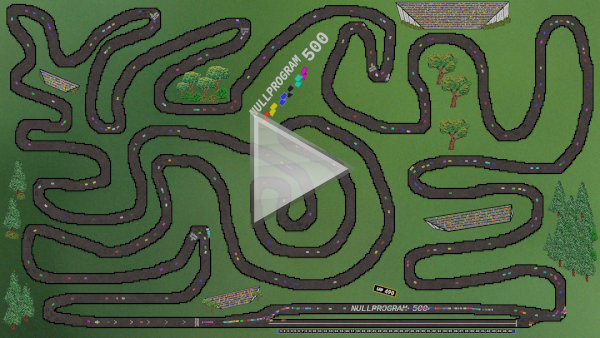
<p>Above demonstrates my implementation using a polynomial to drive the cars.
My wife drew the background. There’s no path-finding; these cars are just
feeling their way along the track, “following the rails” so to speak.</p>

<p>My intention is not to pick on this project in particular. The likely
motivation in the first place was a desire to apply a neural network to
<em>something</em>. Many of my own projects are little more than a vehicle to try
something new, so I can sympathize. Though a professional setting is
different, where machine learning should be viewed with a more skeptical
eye than it’s usually given. For instance, don’t use active learning to
select sample distribution when a <a href="http://extremelearning.com.au/unreasonable-effectiveness-of-quasirandom-sequences/">quasirandom sequence</a> will do.</p>

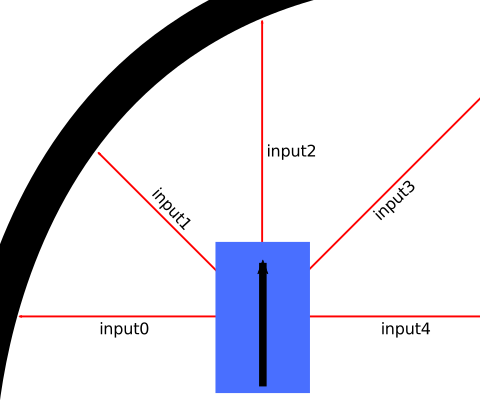
<p>In the video, the car has a limited turn radius, and minimum and maximum
speeds. (I’ve retained these contraints in my own simulation.) There are
five sensors — forward, forward-diagonals, and sides — each sensing the
distance to the nearest wall. These are fed into a 3-layer neural network,
and the outputs determine throttle and steering. Sounds pretty cool!</p>

<p><img src="/img/diagram/racecar.svg" alt="" /></p>

<p>A key feature of neural networks is that the outputs are a nonlinear
function of the inputs. However, steering a 2D car is simple enough that
<strong>a linear function is more than sufficient</strong>, and neural networks are
unnecessary. Here are my equations:</p>

<div class="language-plaintext highlighter-rouge"><div class="highlight"><pre class="highlight"><code>steering = C0*input1 - C0*input3
throttle = C1*input2
</code></pre></div></div>

<p>I only need three of the original inputs — forward for throttle, and
diagonals for steering — and the driver has just two parameters, <code class="language-plaintext highlighter-rouge">C0</code> and
<code class="language-plaintext highlighter-rouge">C1</code>, the polynomial coefficients. Optimal values depend on the track
layout and car configuration, but for my simulation, most values above 0
and below 1 are good enough in most cases. It’s less a matter of crashing
and more about navigating the course quickly.</p>

<p>The lengths of the red lines below are the driver’s three inputs:</p>

<video src="/vid/racecar.mp4" width="530" height="330" loop="" muted="" autoplay="" controls="">
</video>

<p>These polynomials are obviously much faster than a neural network, but
they’re also easy to understand and debug. I can confidently reason about
the entire range of possible inputs rather than worry about a trained
neural network <a href="https://arxiv.org/abs/1903.06638">responding strangely</a> to untested inputs.</p>

<p>Instead of doing anything fancy, my program generates the coefficients at
random to explore the space. If I wanted to generate a good driver for a
course, I’d run a few thousand of these and pick the coefficients that
complete the course in the shortest time. For instance, these coefficients
make for a fast, capable driver for the course featured at the top of the
article:</p>

<div class="language-plaintext highlighter-rouge"><div class="highlight"><pre class="highlight"><code>C0 = 0.896336973, C1 = 0.0354805067
</code></pre></div></div>

<p>Many constants can complete the track, but some will be faster than
others. If I was developing a racing game using this as the AI, I’d not
just pick constants that successfully complete the track, but the ones
that do it quickly. Here’s what the spread can look like:</p>

<video src="/vid/racecars.mp4" width="530" height="330" loop="" muted="" autoplay="" controls="">
</video>

<p>If you want to play around with this yourself, here’s my C source code
that implements this driving AI and <a href="/blog/2017/11/03/">generates the videos and images
above</a>:</p>

<p><strong><a href="https://github.com/skeeto/scratch/blob/master/aidrivers/aidrivers.c">aidrivers.c</a></strong></p>

<p>Racetracks are just images drawn in your favorite image editing program
using the colors documented in the source header.</p>

]]>
    </content>
  </entry>


  <entry>
    <title>Inspecting C's qsort Through Animation</title>
    <link rel="alternate" type="text/html" href="https://nullprogram.com/blog/2016/09/05/"/>
    <id>urn:uuid:7d86c669-ff40-3210-7e28-78b801e35e50</id>
    <updated>2016-09-05T21:17:11Z</updated>
    <category term="c"/><category term="linux"/><category term="media"/><category term="video"/>
    <content type="html">
      <![CDATA[<p>The C standard library includes a qsort() function for sorting
arbitrary buffers given a comparator function. The name comes from its
<a href="https://gallium.inria.fr/~maranget/X/421/09/bentley93engineering.pdf">original Unix implementation, “quicker sort,”</a> a variation of
the well-known quicksort algorithm. The C standard doesn’t specify an
algorithm, except to say that it may be unstable (C99 §7.20.5.2¶4) —
equal elements have an unspecified order. As such, different C
libraries use different algorithms, and even when using the same
algorithm they make different implementation trade-offs.</p>

<p>I added a drawing routine to a comparison function to see what the
sort function was doing for different C libraries. Every time it’s
called for a comparison, it writes out a snapshot of the array as a
Netpbm PPM image. It’s <a href="/blog/2011/11/28/">easy to turn concatenated PPMs into a GIF or
video</a>. Here’s my code if you want to try it yourself:</p>

<ul>
  <li><a href="/download/qsort-animate.c">qsort-animate.c</a></li>
</ul>

<p>Adjust the parameters at the top to taste. Rather than call rand() in
the standard library, I included xorshift64star() with a hard-coded
seed so that the array will be shuffled exactly the same across all
platforms. This makes for a better comparison.</p>

<p>To get an optimized GIF on unix-like systems, run it like so.
(Microsoft’s <a href="https://web.archive.org/web/20161126142829/http://radiance-online.org:82/pipermail/radiance-dev/2016-March/001578.html">UCRT currently has serious bugs</a> with pipes, so it
was run differently in that case.)</p>

<div class="language-plaintext highlighter-rouge"><div class="highlight"><pre class="highlight"><code>./a.out | convert -delay 10 ppm:- gif:- | gifsicle -O3 &gt; sort.gif
</code></pre></div></div>

<p>The number of animation frames reflects the efficiency of the sort,
but this isn’t really a benchmark. The input array is fully shuffled,
and real data often not. For a benchmark, have a look at <a href="http://calmerthanyouare.org/2013/05/31/qsort-shootout.html">a libc
qsort() shootout of sorts</a> instead.</p>

<p>To help you follow along, <strong>clicking on any animation will restart it.</strong></p>

<h3 id="glibc">glibc</h3>

<p><img src="/img/qsort/glibc.gif" alt="" class="resetable" title="glibc" /></p>

<p>Sorted in <strong>307 frames</strong>. glibc prefers to use mergesort, which,
unlike quicksort, isn’t an in-place algorithm, so it has to allocate
memory. That allocation could fail for huge arrays, and, since qsort()
can’t fail, it uses quicksort as a backup. You can really see the
mergesort in action: changes are made that we cannot see until later,
when it’s copied back into the original array.</p>

<h3 id="dietlibc-032">dietlibc (0.32)</h3>

<p>Sorted in <strong>503 frames</strong>. <a href="https://www.fefe.de/dietlibc/">dietlibc</a> is an alternative C
standard library for Linux. It’s optimized for size, which shows
through its slower performance. It looks like a quicksort that always
chooses the last element as the pivot.</p>

<p><img src="/img/qsort/diet.gif" alt="" class="resetable" title="diet" /></p>

<p>Update: Felix von Leitner, the primary author of dietlibc, has alerted
me that, as of version 0.33, it now chooses a random pivot. This
comment from the source describes it:</p>

<blockquote>
  <p>We chose the rightmost element in the array to be sorted as pivot,
which is OK if the data is random, but which is horrible if the data
is already sorted. Try to improve by exchanging it with a random
other pivot.</p>
</blockquote>

<h3 id="musl">musl</h3>

<p>Sort in <strong>637 frames</strong>. <a href="https://www.musl-libc.org/">musl libc</a> is another alternative C
standard library for Linux. It’s my personal preference when I
statically link Linux binaries. Its qsort() looks a lot like a heapsort,
and with some research I see it’s actually <a href="http://www.keithschwarz.com/smoothsort/">smoothsort</a>, a
heapsort variant.</p>

<p><img src="/img/qsort/musl.gif" alt="" class="resetable" title="musl" /></p>

<h3 id="bsd">BSD</h3>

<p>Sorted in <strong>354 frames</strong>. I ran it on both OpenBSD and FreeBSD with
identical results, so, unsurprisingly, they share an implementation.
It’s quicksort, and what’s neat about it is at the beginning you can
see it searching for a median for use as the pivot. This helps avoid
the O(n^2) worst case.</p>

<p><img src="/img/qsort/bsd-qsort.gif" alt="" class="resetable" title="BSD qsort" /></p>

<p>BSD also includes a mergesort() with the same prototype, except with
an <code class="language-plaintext highlighter-rouge">int</code> return for reporting failures. This one sorted in <strong>247
frames</strong>. Like glibc before, there’s some behind-the-scenes that isn’t
captured. But even more, notice how the markers disappear during the
merge? It’s running the comparator against copies, stored outside the
original array. Sneaky!</p>

<p><img src="/img/qsort/bsd-mergesort.gif" alt="" class="resetable" title="BSD mergesort" /></p>

<p>Again, BSD also includes heapsort(), so ran that too. It sorted in
<strong>418 frames</strong>. It definitely looks like a heapsort, and the worse
performance is similar to musl. It seems heapsort is a poor fit for
this data.</p>

<p><img src="/img/qsort/bsd-heapsort.gif" alt="" class="resetable" title="BSD heapsort" /></p>

<h3 id="cygwin">Cygwin</h3>

<p>It turns out Cygwin borrowed its qsort() from BSD. It’s pixel
identical to the above. I hadn’t noticed until I looked at the frame
counts.</p>

<p><img src="/img/qsort/cygwin.gif" alt="" class="resetable" title="Cygwin (BSD)" /></p>

<h3 id="msvcrtdll-mingw-and-ucrt-visual-studio">MSVCRT.DLL (MinGW) and UCRT (Visual Studio)</h3>

<p>MinGW builds against MSVCRT.DLL, found on every Windows system despite
its <a href="https://web.archive.org/web/0/https://blogs.msdn.microsoft.com/oldnewthing/20140411-00/?p=1273">unofficial status</a>. Until recently Microsoft didn’t
include a C standard library as part of the OS, but that changed with
their <a href="https://web.archive.org/web/0/https://blogs.msdn.microsoft.com/vcblog/2015/03/03/introducing-the-universal-crt/">Universal CRT (UCRT) announcement</a>. I thought I’d try
them both.</p>

<p>Turns out they borrowed their old qsort() for the UCRT, and the result
is the same: sorted in <strong>417 frames</strong>. It chooses a pivot from the
median of the ends and the middle, swaps the pivot to the middle, then
partitions. Looking to the middle for the pivot makes sorting
pre-sorted arrays much more efficient.</p>

<p><img src="/img/qsort/ucrt.gif" alt="" class="resetable" title="Microsoft UCRT" /></p>

<h3 id="pelles-c">Pelles C</h3>

<p>Finally I ran it against <a href="http://www.smorgasbordet.com/pellesc/">Pelles C</a>, a C compiler for
Windows. It sorted in <strong>463 frames</strong>. I can’t find any information
about it, but it looks like some sort of hybrid between quicksort and
insertion sort. Like BSD qsort(), it finds a good median for the
pivot, partitions the elements, and if a partition is small enough, it
switches to insertion sort. This should behave well on mostly-sorted
arrays, but poorly on well-shuffled arrays (like this one).</p>

<p><img src="/img/qsort/pellesc.gif" alt="" class="resetable" title="Pelles C" /></p>

<h3 id="more-implementations">More Implementations</h3>

<p>That’s everything that was readily accessible to me. If you can run it
against something new, I’m certainly interested in seeing more
implementations.</p>

<script type="text/javascript">
(function() {
    var r = document.querySelectorAll('.resetable');
    for (var i = 0; i < r.length; i++) {
        r[i].onclick = function() {
            var src = this.src;
            var height = this.height;
            this.src = "";
            this.height = height;
            // setTimeout() required for IE
            var _this = this;
            setTimeout(function() { _this.src = src; }, 0);
        };
    }
}());
</script>

]]>
    </content>
  </entry>


  <entry>
    <title>Emacs Chat with Sacha Chua</title>
    <link rel="alternate" type="text/html" href="https://nullprogram.com/blog/2014/06/04/"/>
    <id>urn:uuid:cbe9f993-8fb1-34a3-e872-f493268135aa</id>
    <updated>2014-06-04T16:51:45Z</updated>
    <category term="video"/><category term="media"/>
    <content type="html">
      <![CDATA[<p>My <a href="/blog/2014/05/26/">previously</a> mentioned <a href="http://sachachua.com/blog/2014/05/emacs-chat-christopher-wellons/"><em>Emacs Chat</em> with Sacha
Chua</a> went well and the recording is available. At my request,
Sacha agreed to put these recordings in the public domain, so they’re
completely free for any purpose with no strings attached.</p>

<ul>
  <li>YouTube: <a href="http://youtu.be/Hr06UDD4mCs">http://youtu.be/Hr06UDD4mCs</a></li>
  <li>Internet Archive: <a href="https://archive.org/details/EmacsChatChristopherWellons">EmacsChatChristopherWellons</a></li>
</ul>

<p><img src="/img/screenshot/emacs-chat-thumb.jpg" alt="" /></p>

<p>A number of my Emacs projects were mentioned, most of which I’ve
previously written articles about here.</p>

<ul>
  <li>Web development with <a href="/blog/2012/10/31/">Skewer</a>.</li>
  <li><a href="/blog/2013/09/04/">Elfeed</a>, an Emacs web feed reader.</li>
  <li>My <a href="/blog/2013/06/02/">with-package</a> macro.</li>
  <li>An <a href="/blog/2014/04/26/">Emacs FFI</a>.</li>
  <li>Collaboration with <a href="/blog/2012/08/20/">impatient-mode</a>.</li>
  <li>My Emacs SQL database front-end, <a href="/blog/2014/02/06/">EmacSQL</a>.</li>
  <li>And one I haven’t written about yet, <a href="https://github.com/skeeto/autotetris-mode">autotetris-mode</a>.</li>
</ul>

<p>If you enjoyed this <em>Emacs Chat</em>, remember that there are <a href="http://sachachua.com/blog/emacs-chat/">a lot more
of them</a>! The <a href="http://sachachua.com/blog/2014/05/emacs-chat-phil-hagelberg/">chat with Phil Hagelberg</a> is probably my
favorite so far.</p>

]]>
    </content>
  </entry>


  <entry>
    <title>A GPU Approach to Voronoi Diagrams</title>
    <link rel="alternate" type="text/html" href="https://nullprogram.com/blog/2014/06/01/"/>
    <id>urn:uuid:97759105-8995-34d3-c914-a84eb7eb762c</id>
    <updated>2014-06-01T21:53:48Z</updated>
    <category term="webgl"/><category term="media"/><category term="video"/><category term="math"/><category term="interactive"/><category term="gpgpu"/><category term="opengl"/>
    <content type="html">
      <![CDATA[<p>I recently got an itch to play around with <a href="http://en.wikipedia.org/wiki/Voronoi_diagram">Voronoi diagrams</a>.
It’s a diagram that divides a space into regions composed of points
closest to one of a set of seed points. There are a couple of
algorithms for computing a Voronoi diagram: Bowyer-Watson and Fortune.
These are complicated and difficult to implement.</p>

<p>However, if we’re interested only in <em>rendering</em> a Voronoi diagram as
a bitmap, there’s a trivial brute for algorithm. For every pixel of
output, determine the closest seed vertex and color that pixel
appropriately. It’s slow, especially as the number of seed vertices
goes up, but it works perfectly and it’s dead simple!</p>

<p>Does this strategy seem familiar? It sure sounds a lot like an OpenGL
<em>fragment shader</em>! With a shader, I can push the workload off to the
GPU, which is intended for this sort of work. Here’s basically what it
looks like.</p>

<div class="language-glsl highlighter-rouge"><div class="highlight"><pre class="highlight"><code><span class="cm">/* voronoi.frag */</span>
<span class="k">uniform</span> <span class="kt">vec2</span> <span class="n">seeds</span><span class="p">[</span><span class="mi">32</span><span class="p">];</span>
<span class="k">uniform</span> <span class="kt">vec3</span> <span class="n">colors</span><span class="p">[</span><span class="mi">32</span><span class="p">];</span>

<span class="kt">void</span> <span class="nf">main</span><span class="p">()</span> <span class="p">{</span>
    <span class="kt">float</span> <span class="n">dist</span> <span class="o">=</span> <span class="n">distance</span><span class="p">(</span><span class="n">seeds</span><span class="p">[</span><span class="mi">0</span><span class="p">],</span> <span class="nb">gl_FragCoord</span><span class="p">.</span><span class="n">xy</span><span class="p">);</span>
    <span class="kt">vec3</span> <span class="n">color</span> <span class="o">=</span> <span class="n">colors</span><span class="p">[</span><span class="mi">0</span><span class="p">];</span>
    <span class="k">for</span> <span class="p">(</span><span class="kt">int</span> <span class="n">i</span> <span class="o">=</span> <span class="mi">1</span><span class="p">;</span> <span class="n">i</span> <span class="o">&lt;</span> <span class="mi">32</span><span class="p">;</span> <span class="n">i</span><span class="o">++</span><span class="p">)</span> <span class="p">{</span>
        <span class="kt">float</span> <span class="n">current</span> <span class="o">=</span> <span class="n">distance</span><span class="p">(</span><span class="n">seeds</span><span class="p">[</span><span class="n">i</span><span class="p">],</span> <span class="nb">gl_FragCoord</span><span class="p">.</span><span class="n">xy</span><span class="p">);</span>
        <span class="k">if</span> <span class="p">(</span><span class="n">current</span> <span class="o">&lt;</span> <span class="n">dist</span><span class="p">)</span> <span class="p">{</span>
            <span class="n">color</span> <span class="o">=</span> <span class="n">colors</span><span class="p">[</span><span class="n">i</span><span class="p">];</span>
            <span class="n">dist</span> <span class="o">=</span> <span class="n">current</span><span class="p">;</span>
        <span class="p">}</span>
    <span class="p">}</span>
    <span class="nb">gl_FragColor</span> <span class="o">=</span> <span class="kt">vec4</span><span class="p">(</span><span class="n">color</span><span class="p">,</span> <span class="mi">1</span><span class="p">.</span><span class="mi">0</span><span class="p">);</span>
<span class="p">}</span>
</code></pre></div></div>

<p>If you have a WebGL-enabled browser, you can see the results for
yourself here. Now, as I’ll explain below, what you see here isn’t
really this shader, but the result looks identical. There are two
different WebGL implementations included, but only the smarter one is
active. (There’s also a really slow HTML5 canvas fallback.)</p>

<ul>
  <li><a href="http://skeeto.github.io/voronoi-toy/">https://skeeto.github.io/voronoi-toy/</a>
(<a href="http://github.com/skeeto/voronoi-toy">source</a>)</li>
</ul>

<p>You can click and drag points around the diagram with your mouse. You
can add and remove points with left and right clicks. And if you press
the “a” key, the seed points will go for a random walk, animating the
whole diagram. Here’s a (HTML5) video showing it off.</p>

<video width="500" height="280" controls="" preload="metadata">
  <source src="https://nullprogram.s3.amazonaws.com/voronoi/voronoi.webm" type="video/webm" />
  <source src="https://nullprogram.s3.amazonaws.com/voronoi/voronoi.mp4" type="video/mp4" />
</video>

<p>Unfortunately, there are some serious problems with this approach. It
has to do with passing seed information as uniforms.</p>

<ol>
  <li>
    <p><strong>The number of seed vertices is hardcoded.</strong> The shader language
requires uniform arrays to have known lengths at compile-time. If I
want to increase the number of seed vertices, I need to generate,
compile, and link a new shader to replace it. My implementation
actually does this. The number is replaced with a <code class="language-plaintext highlighter-rouge">%%MAX%%</code>
template that I fill in using a regular expression before sending
the program off to the GPU.</p>
  </li>
  <li>
    <p><strong>The number of available uniform bindings is very constrained</strong>,
even on high-end GPUs: <code class="language-plaintext highlighter-rouge">GL_MAX_FRAGMENT_UNIFORM_VECTORS</code>. This
value is allowed to be as small as 16! A typical value on high-end
graphics cards is a mere 221. Each array element counts as a
binding, so our shader may be limited to as few as 8 seed vertices.
Even on nice GPUs, we’re absolutely limited to 110 seed vertices.
An alternative approach might be passing seed and color information
as a texture, but I didn’t try this.</p>
  </li>
  <li>
    <p><strong>There’s no way to bail out of the loop early</strong>, at least with
OpenGL ES 2.0 (WebGL) shaders. We can’t <code class="language-plaintext highlighter-rouge">break</code> or do any sort of
branching on the loop variable. Even if we only have 4 seed
vertices, we still have to compare against the full count. The GPU
has plenty of time available, so this wouldn’t be a big issue,
except that we need to skip over the “unused” seeds somehow. They
need to be given unreasonable position values. Infinity would be an
unreasonable value (infinitely far away), but GLSL floats aren’t
guaranteed to be able to represent infinity. We can’t even know
what the maximum floating-point value might be. If we pick
something too large, we get an overflow garbage value, such as 0
(!!!) in my experiments.</p>
  </li>
</ol>

<p>Because of these limitations, this is not a very good way of going
about computing Voronoi diagrams on a GPU. Fortunately there’s a
<em>much</em> much better approach!</p>

<h3 id="a-smarter-approach">A Smarter Approach</h3>

<p>With the above implemented, I was playing around with the fragment
shader, going beyond solid colors. For example, I changed the
shade/color based on distance from the seed vertex. A results of this
was this “blood cell” image, a difference of a couple lines in the
shader.</p>

<p><a href="https://nullprogram.s3.amazonaws.com/voronoi/blood.png">
  <img src="https://nullprogram.s3.amazonaws.com/voronoi/blood.png" width="500" height="312" />
</a></p>

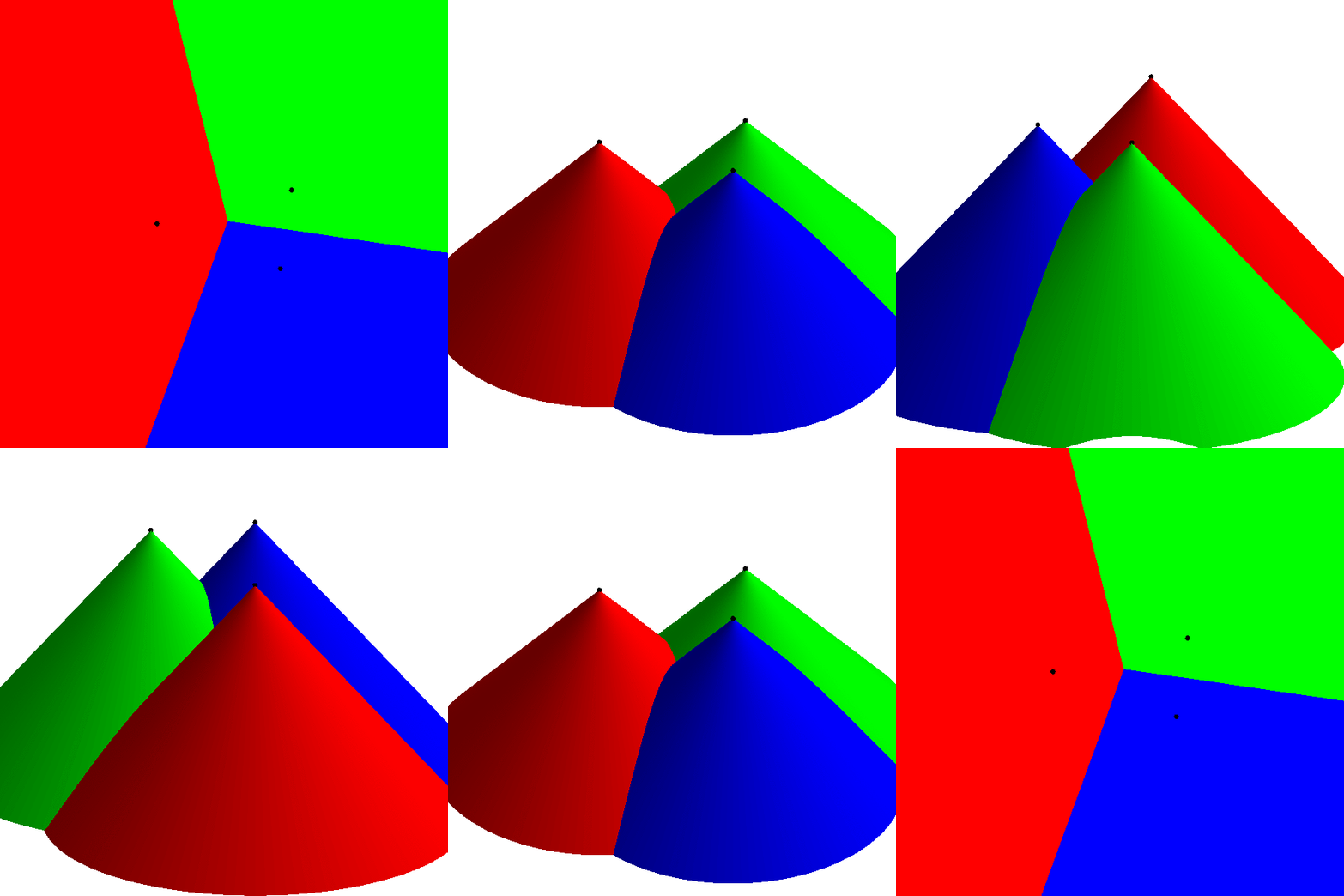
<p>That’s when it hit me! Render each seed as cone pointed towards the
camera in an orthographic projection, coloring each cone according to
the seed’s color. The Voronoi diagram would work itself out
<em>automatically</em> in the depth buffer. That is, rather than do all this
distance comparison in the shader, let OpenGL do its normal job of
figuring out the scene geometry.</p>

<p>Here’s a video (<a href="https://nullprogram.s3.amazonaws.com/voronoi/voronoi-cones.gif">GIF</a>) I made that demonstrates what I mean.</p>

<video width="500" height="500" controls="" preload="metadata">
  <source src="https://nullprogram.s3.amazonaws.com/voronoi/voronoi-cones.webm" type="video/webm" />
  <source src="https://nullprogram.s3.amazonaws.com/voronoi/voronoi-cones.mp4" type="video/mp4" />
  <img src="https://nullprogram.s3.amazonaws.com/voronoi/voronoi-cones.gif" width="500" height="500" />
</video>

<p>Not only is this much faster, it’s also far simpler! Rather than being
limited to a hundred or so seed vertices, this version could literally
do millions of them, limited only by the available memory for
attribute buffers.</p>

<h4 id="the-resolution-catch">The Resolution Catch</h4>

<p>There’s a catch, though. There’s no way to perfectly represent a cone
in OpenGL. (And if there was, we’d be back at the brute force approach
as above anyway.) The cone must be built out of primitive triangles,
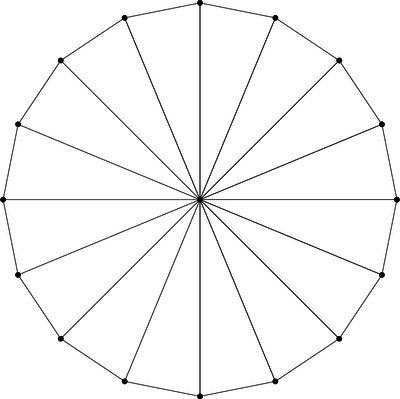
sort of like pizza slices, using <code class="language-plaintext highlighter-rouge">GL_TRIANGLE_FAN</code> mode. Here’s a cone
made of 16 triangles.</p>

<p><img src="https://nullprogram.s3.amazonaws.com/voronoi/triangle-fan.png" alt="" /></p>

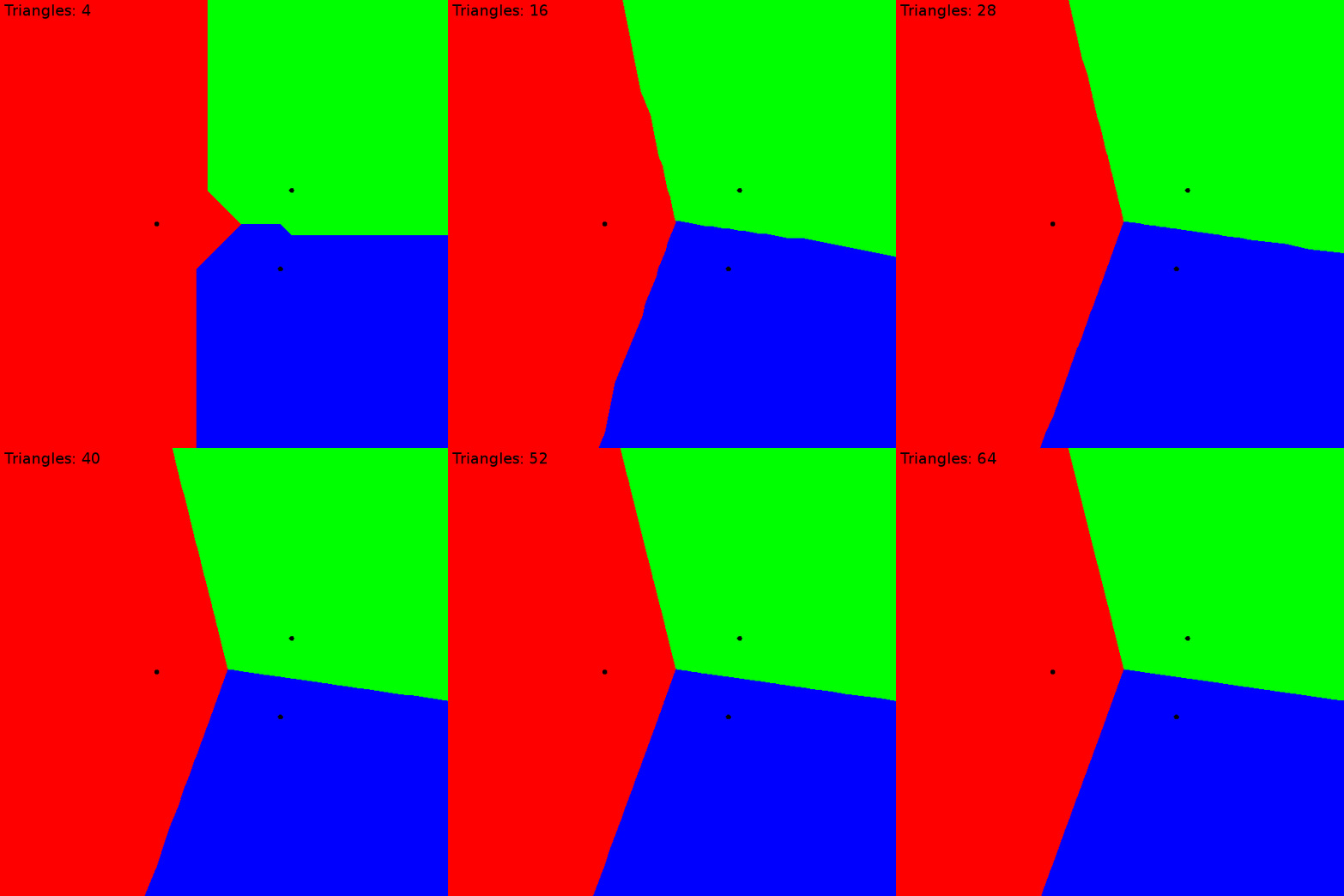
<p>Unlike the previous brute force approach, this is an <em>approximation</em>
of the Voronoi diagram. The more triangles, the better the
approximation, converging on the precision of the initial brute force
approach. I found that for this project, about 64 triangles was
indistinguishable from brute force.</p>

<p><img src="https://nullprogram.s3.amazonaws.com/voronoi/resolution.gif" width="500" height="500" /></p>

<h4 id="instancing-to-the-rescue">Instancing to the Rescue</h4>

<p>At this point things are looking pretty good. On my desktop, I can
maintain 60 frames-per-second for up to about 500 seed vertices moving
around randomly (“a”). After this, it becomes <em>draw-bound</em> because
each seed vertex requires a separate glDrawArrays() call to OpenGL.
The workaround for this is an OpenGL extension called instancing. The
<a href="http://blog.tojicode.com/2013/07/webgl-instancing-with.html">WebGL extension for instancing</a> is <code class="language-plaintext highlighter-rouge">ANGLE_instanced_arrays</code>.</p>

<p>The cone model was already sent to the GPU during initialization, so,
without instancing, the draw loop only has to bind the uniforms and
call draw for each seed. This code uses my <a href="https://github.com/skeeto/igloojs">Igloo WebGL
library</a> to simplify the API.</p>

<div class="language-js highlighter-rouge"><div class="highlight"><pre class="highlight"><code><span class="kd">var</span> <span class="nx">cone</span> <span class="o">=</span> <span class="nx">programs</span><span class="p">.</span><span class="nx">cone</span><span class="p">.</span><span class="nx">use</span><span class="p">()</span>
        <span class="p">.</span><span class="nx">attrib</span><span class="p">(</span><span class="dl">'</span><span class="s1">cone</span><span class="dl">'</span><span class="p">,</span> <span class="nx">buffers</span><span class="p">.</span><span class="nx">cone</span><span class="p">,</span> <span class="mi">3</span><span class="p">);</span>
<span class="k">for</span> <span class="p">(</span><span class="kd">var</span> <span class="nx">i</span> <span class="o">=</span> <span class="mi">0</span><span class="p">;</span> <span class="nx">i</span> <span class="o">&lt;</span> <span class="nx">seeds</span><span class="p">.</span><span class="nx">length</span><span class="p">;</span> <span class="nx">i</span><span class="o">++</span><span class="p">)</span> <span class="p">{</span>
    <span class="nx">cone</span><span class="p">.</span><span class="nx">uniform</span><span class="p">(</span><span class="dl">'</span><span class="s1">color</span><span class="dl">'</span><span class="p">,</span> <span class="nx">seeds</span><span class="p">[</span><span class="nx">i</span><span class="p">].</span><span class="nx">color</span><span class="p">)</span>
        <span class="p">.</span><span class="nx">uniform</span><span class="p">(</span><span class="dl">'</span><span class="s1">position</span><span class="dl">'</span><span class="p">,</span> <span class="nx">seeds</span><span class="p">[</span><span class="nx">i</span><span class="p">].</span><span class="nx">position</span><span class="p">)</span>
        <span class="p">.</span><span class="nx">draw</span><span class="p">(</span><span class="nx">gl</span><span class="p">.</span><span class="nx">TRIANGLE_FAN</span><span class="p">,</span> <span class="mi">66</span><span class="p">);</span>  <span class="c1">// 64 triangles == 66 verts</span>
<span class="p">}</span>
</code></pre></div></div>

<p>It’s driving this pair of shaders.</p>

<div class="language-glsl highlighter-rouge"><div class="highlight"><pre class="highlight"><code><span class="cm">/* cone.vert */</span>
<span class="k">attribute</span> <span class="kt">vec3</span> <span class="n">cone</span><span class="p">;</span>
<span class="k">uniform</span> <span class="kt">vec2</span> <span class="n">position</span><span class="p">;</span>

<span class="kt">void</span> <span class="nf">main</span><span class="p">()</span> <span class="p">{</span>
    <span class="nb">gl_Position</span> <span class="o">=</span> <span class="kt">vec4</span><span class="p">(</span><span class="n">cone</span><span class="p">.</span><span class="n">xy</span> <span class="o">+</span> <span class="n">position</span><span class="p">,</span> <span class="n">cone</span><span class="p">.</span><span class="n">z</span><span class="p">,</span> <span class="mi">1</span><span class="p">.</span><span class="mi">0</span><span class="p">);</span>
<span class="p">}</span>
</code></pre></div></div>

<div class="language-glsl highlighter-rouge"><div class="highlight"><pre class="highlight"><code><span class="cm">/* cone.frag */</span>
<span class="k">uniform</span> <span class="kt">vec3</span> <span class="n">color</span><span class="p">;</span>

<span class="kt">void</span> <span class="nf">main</span><span class="p">()</span> <span class="p">{</span>
    <span class="nb">gl_FragColor</span> <span class="o">=</span> <span class="kt">vec4</span><span class="p">(</span><span class="n">color</span><span class="p">,</span> <span class="mi">1</span><span class="p">.</span><span class="mi">0</span><span class="p">);</span>
<span class="p">}</span>
</code></pre></div></div>

<p>Instancing works by adjusting how attributes are stepped. Normally the
vertex shader runs once per element, but instead we can ask that some
attributes step once per <em>instance</em>, or even once per multiple
instances. Uniforms are then converted to vertex attribs and the
“loop” runs implicitly on the GPU. The instanced glDrawArrays() call
takes one additional argument: the number of instances to draw.</p>

<div class="language-js highlighter-rouge"><div class="highlight"><pre class="highlight"><code><span class="nx">ext</span> <span class="o">=</span> <span class="nx">gl</span><span class="p">.</span><span class="nx">getExtension</span><span class="p">(</span><span class="dl">"</span><span class="s2">ANGLE_instanced_arrays</span><span class="dl">"</span><span class="p">);</span> <span class="c1">// only once</span>

<span class="nx">programs</span><span class="p">.</span><span class="nx">cone</span><span class="p">.</span><span class="nx">use</span><span class="p">()</span>
    <span class="p">.</span><span class="nx">attrib</span><span class="p">(</span><span class="dl">'</span><span class="s1">cone</span><span class="dl">'</span><span class="p">,</span> <span class="nx">buffers</span><span class="p">.</span><span class="nx">cone</span><span class="p">,</span> <span class="mi">3</span><span class="p">)</span>
    <span class="p">.</span><span class="nx">attrib</span><span class="p">(</span><span class="dl">'</span><span class="s1">position</span><span class="dl">'</span><span class="p">,</span> <span class="nx">buffers</span><span class="p">.</span><span class="nx">positions</span><span class="p">,</span> <span class="mi">2</span><span class="p">)</span>
    <span class="p">.</span><span class="nx">attrib</span><span class="p">(</span><span class="dl">'</span><span class="s1">color</span><span class="dl">'</span><span class="p">,</span> <span class="nx">buffers</span><span class="p">.</span><span class="nx">colors</span><span class="p">,</span> <span class="mi">3</span><span class="p">);</span>
<span class="cm">/* Tell OpenGL these iterate once (1) per instance. */</span>
<span class="nx">ext</span><span class="p">.</span><span class="nx">vertexAttribDivisorANGLE</span><span class="p">(</span><span class="nx">cone</span><span class="p">.</span><span class="nx">vars</span><span class="p">[</span><span class="dl">'</span><span class="s1">position</span><span class="dl">'</span><span class="p">],</span> <span class="mi">1</span><span class="p">);</span>
<span class="nx">ext</span><span class="p">.</span><span class="nx">vertexAttribDivisorANGLE</span><span class="p">(</span><span class="nx">cone</span><span class="p">.</span><span class="nx">vars</span><span class="p">[</span><span class="dl">'</span><span class="s1">color</span><span class="dl">'</span><span class="p">],</span> <span class="mi">1</span><span class="p">);</span>
<span class="nx">ext</span><span class="p">.</span><span class="nx">drawArraysInstancedANGLE</span><span class="p">(</span><span class="nx">gl</span><span class="p">.</span><span class="nx">TRIANGLE_FAN</span><span class="p">,</span> <span class="mi">0</span><span class="p">,</span> <span class="mi">66</span><span class="p">,</span> <span class="nx">seeds</span><span class="p">.</span><span class="nx">length</span><span class="p">);</span>
</code></pre></div></div>

<p>The ugly ANGLE names are because this is an extension, not part of
WebGL itself. As such, my program will fall back to use multiple draw
calls when the extension is not available. It’s only there for a speed
boost.</p>

<p>Here are the new shaders. Notice the uniforms are gone.</p>

<div class="language-glsl highlighter-rouge"><div class="highlight"><pre class="highlight"><code><span class="cm">/* cone-instanced.vert */</span>
<span class="k">attribute</span> <span class="kt">vec3</span> <span class="n">cone</span><span class="p">;</span>
<span class="k">attribute</span> <span class="kt">vec2</span> <span class="n">position</span><span class="p">;</span>
<span class="k">attribute</span> <span class="kt">vec3</span> <span class="n">color</span><span class="p">;</span>

<span class="k">varying</span> <span class="kt">vec3</span> <span class="n">vcolor</span><span class="p">;</span>

<span class="kt">void</span> <span class="nf">main</span><span class="p">()</span> <span class="p">{</span>
    <span class="n">vcolor</span> <span class="o">=</span> <span class="n">color</span><span class="p">;</span>
    <span class="nb">gl_Position</span> <span class="o">=</span> <span class="kt">vec4</span><span class="p">(</span><span class="n">cone</span><span class="p">.</span><span class="n">xy</span> <span class="o">+</span> <span class="n">position</span><span class="p">,</span> <span class="n">cone</span><span class="p">.</span><span class="n">z</span><span class="p">,</span> <span class="mi">1</span><span class="p">.</span><span class="mi">0</span><span class="p">);</span>
<span class="p">}</span>
</code></pre></div></div>

<div class="language-glsl highlighter-rouge"><div class="highlight"><pre class="highlight"><code><span class="cm">/* cone-instanced.frag */</span>
<span class="k">varying</span> <span class="kt">vec3</span> <span class="n">vcolor</span><span class="p">;</span>

<span class="kt">void</span> <span class="nf">main</span><span class="p">()</span> <span class="p">{</span>
    <span class="nb">gl_FragColor</span> <span class="o">=</span> <span class="kt">vec4</span><span class="p">(</span><span class="n">vcolor</span><span class="p">,</span> <span class="mi">1</span><span class="p">.</span><span class="mi">0</span><span class="p">);</span>
<span class="p">}</span>
</code></pre></div></div>

<p>On the same machine, the instancing version can do a few thousand seed
vertices (an order of magnitude more) at 60 frames-per-second, after
which it becomes bandwidth saturated. This is because, for the
animation, every vertex position is updated on the GPU on each frame.
At this point it’s overcrowded anyway, so there’s no need to support
more.</p>

]]>
    </content>
  </entry>


  <entry>
    <title>Revisiting an N-body Simulator</title>
    <link rel="alternate" type="text/html" href="https://nullprogram.com/blog/2012/09/19/"/>
    <id>urn:uuid:4e450cd9-5541-3ff4-0c15-351a77926825</id>
    <updated>2012-09-19T00:00:00Z</updated>
    <category term="c"/><category term="video"/>
    <content type="html">
      <![CDATA[<p>Ten years ago I was a high school senior taking my second year of
physics. Having recently reviewed vectors and gravity, as well as
being an avid Visual Basic programmer at the time, I decided to create
my own n-body simulation. I recently came across this old project and
fortunately (since I can no longer compile it) I had left a compiled
version with the source code. Here it is in Wine,</p>

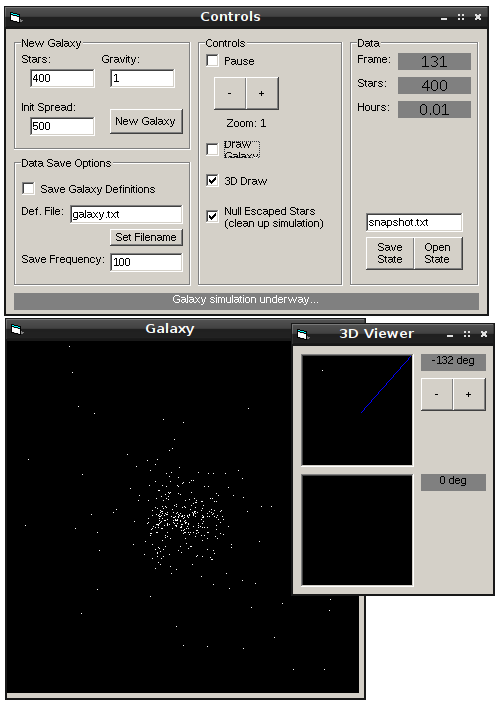
<p><img src="/img/screenshot/galsim.png" alt="" /></p>

<p>Really, it’s really not worth downloading but I’m putting a link here
for my own archival purposes.</p>

<ul>
  <li><a href="https://nullprogram.s3.amazonaws.com/galaxy/galsim.zip">galsim.zip</a> (712 kB)</li>
</ul>

<p>I didn’t quite understand what I was doing so I screwed up the
math. All the vector computations were done independently. Integration
was done by Euler method — a sin I continue to commit regularly to
this day but now I’m at least aware of the limitations. Despite this,
it was still accurate enough to look interesting.</p>

<p>Probably the most advanced thing to come out of it, and something I
<em>did</em> do correctly, was the display. I worked out my own graphics
engine to project three-dimensional star coordinates onto the
two-dimensional drawing surface, re-inventing perspective projection.</p>

<p>As I said, I recently came across it again while digging around my
digital archives. Now that I’m a professional developer I wondered how
much faster I could do the same thing with just a few hours of
coding. I did it in C and my implementation was about an order of
magnitude faster. Not as much as I hoped, but it’s something!</p>

<ul>
  <li><a href="https://gist.github.com/3204862">https://gist.github.com/3204862</a></li>
</ul>

<p>It’s still Euler method integration, the bodies are still point
masses, and there are no collisions so there’s numerical instability
when they get close. However, I did get the vector math right! My goal
was to make something that looked interesting rather than an accurate
simulation, so all of this is alright.</p>

<p>I only wrote the simulation, not a display. To display the output I
just had GNU Octave plot it for me, which I turned into videos. This
first video is a static view of the origin of the coordinate
system. If you watch (or skip) all the way to the end you’ll see that
the galaxy drifts out of view. This is due to a bias in the random
number generator — the galaxy’s mass was lopsided.</p>

<video src="https://nullprogram.s3.amazonaws.com/galaxy/attempt-1.webm" controls="controls" width="480" height="360">
  Video requires WebM support with HTML5.
</video>

<p>After seeing this drift I added dynamic pan and zoom, so that the
camera follows the action. It’s a bit excessive at the beginning (the
camera is <em>too</em> dynamic) and the end (the camera is too far out).</p>

<video src="https://nullprogram.s3.amazonaws.com/galaxy/attempt-2.webm" controls="controls" width="480" height="360">
  Video requires WebM support with HTML5.
</video>

<p>I bit more tweaking of the galaxy start state (normal distribution,
adding initial velocities) and the camera and I got this interesting
result. The galaxy initially bunches into two globs, which then merge.</p>

<video src="https://nullprogram.s3.amazonaws.com/galaxy/v10-z9.webm" controls="controls" width="480" height="360">
  Video requires WebM support with HTML5.
</video>

<p>I wouldn’t have bothered with a post about this but I think these
videos turned out to be interesting.</p>
]]>
    </content>
  </entry>


  <entry>
    <title>Perlin Noise With Octave, Java, and OpenCL</title>
    <link rel="alternate" type="text/html" href="https://nullprogram.com/blog/2012/06/03/"/>
    <id>urn:uuid:830cc950-634a-3661-135a-b932c8c5399e</id>
    <updated>2012-06-03T00:00:00Z</updated>
    <category term="java"/><category term="c"/><category term="octave"/><category term="video"/>
    <content type="html">
      <![CDATA[<p>I recently discovered that I’m an idiot and that my
<a href="/blog/2007/11/20/">old Perlin noise post</a> was not actually describing
Perlin noise at all, but fractional Brownian motion. Perlin noise is
slightly more complicated but much more powerful. To learn the correct
algorithm, I wrote three different implementations
(<a href="https://github.com/skeeto/perlin-noise">perlin-noise</a>).</p>

<div class="language-plaintext highlighter-rouge"><div class="highlight"><pre class="highlight"><code>git clone git://github.com/skeeto/perlin-noise.git
</code></pre></div></div>

<p>In short, Perlin noise is based on a grid of randomly-generated
gradient vectors which describe how the arbitrarily-dimensional
“surface” is sloped at that point. The noise at the grid points is
always 0, though you’d never know it. When sampling the noise at some
point between grid points, a weighted interpolation of the surrounding
gradient vectors is calculated. Vectors are reduced to a single noise
value by dot product.</p>

<p>Rather than waste time trying to explain it myself, I’ll link to an
existing, great tutorial: <a href="https://web.archive.org/web/20150304163452/http://webstaff.itn.liu.se/~stegu/TNM022-2005/perlinnoiselinks/perlin-noise-math-faq.html">The Perlin noise math FAQ</a>. There’s
also the original presentation by Ken Perlin, <a href="(http://www.noisemachine.com/talk1/)">Making Noise</a>,
which is more concise but harder to grok.</p>

<p>When making my own implementation, I started by with Octave. It’s my
“go to language” for creating a prototype when I’m doing something
with vectors or matrices since it has the most concise syntax for
these things. I wrote a two-dimensional generator and it turned out to
be a lot simpler than I thought it would be!</p>

<ul>
  <li><a href="https://github.com/skeeto/perlin-noise/blob/master/octave/perlin2d.m">perlin2d.m</a></li>
</ul>

<p>Because it’s 2D, there are four surrounding grid points to consider
and these are all hard-coded. This leads to an interesting property:
there are no loops. The code is entirely vectorized, which makes it
quite fast. It actually keeps up with my generalized Java solution
(next) when given a grid of points, such as from <code class="language-plaintext highlighter-rouge">meshgrid()</code>.</p>

<p>The grid gradient vectors are generated on the fly by a hash
function. The integer x and y positions of the point are hashed using
a bastardized version of Robert Jenkins’ 96 bit mix function (the one
I used in my <a href="/blog/2011/06/13/">infinite parallax starfield</a>) to
produce a vector. This turned out to be the trickiest part to write,
because any weaknesses in the hash function become very apparent in
the resulting noise.</p>

<p>Using Octave, this took two seconds to generate on my laptop. You
can’t really tell by looking at it, but, as with all Perlin noise,
there is actually a grid pattern.</p>

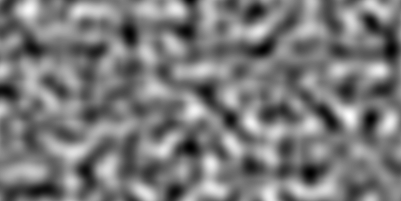
<p><img src="/img/noise/octave-perlin2d.png" alt="" /></p>

<p>I then wrote a generalized version, <code class="language-plaintext highlighter-rouge">perlin.m</code>, that can generate
arbitrarily-dimensional noise. This one is a lot shorter, but it’s not
vectorized, can only sample one point at a time, and is incredibly
slow. For a hash function, I use Octave’s <code class="language-plaintext highlighter-rouge">hashmd5()</code>, so this one
won’t work in Matlab (which provides no hash function
whatsoever). However, it <em>is</em> a lot shorter!</p>

<div class="language-matlab highlighter-rouge"><div class="highlight"><pre class="highlight"><code><span class="c1">%% Returns the Perlin noise value for an arbitrary point.</span>
<span class="k">function</span> <span class="n">v</span> <span class="o">=</span> <span class="n">perlin</span><span class="p">(</span><span class="n">p</span><span class="p">)</span>
  <span class="n">v</span> <span class="o">=</span> <span class="mi">0</span><span class="p">;</span>
  <span class="c1">%% Iterate over each corner</span>
  <span class="k">for</span> <span class="n">dirs</span> <span class="o">=</span> <span class="p">[</span><span class="nb">dec2bin</span><span class="p">(</span><span class="mi">0</span><span class="p">:(</span><span class="mi">2</span> <span class="o">^</span> <span class="nb">length</span><span class="p">(</span><span class="n">p</span><span class="p">)</span> <span class="o">-</span> <span class="mi">1</span><span class="p">))</span> <span class="o">-</span> <span class="mi">48</span><span class="p">]</span><span class="o">'</span>
    <span class="n">q</span> <span class="o">=</span> <span class="nb">floor</span><span class="p">(</span><span class="n">p</span><span class="p">)</span> <span class="o">+</span> <span class="n">dirs</span><span class="s1">'; % This iteration'</span><span class="n">s</span> <span class="n">corner</span>
    <span class="n">g</span> <span class="o">=</span> <span class="n">qgradient</span><span class="p">(</span><span class="n">q</span><span class="p">);</span> <span class="c1">% This corner's gradient</span>
    <span class="n">m</span> <span class="o">=</span> <span class="nb">dot</span><span class="p">(</span><span class="n">g</span><span class="p">,</span> <span class="n">p</span> <span class="o">-</span> <span class="n">q</span><span class="p">);</span>
    <span class="n">t</span> <span class="o">=</span> <span class="mf">1.0</span> <span class="o">-</span> <span class="nb">abs</span><span class="p">(</span><span class="n">p</span> <span class="o">-</span> <span class="n">q</span><span class="p">);</span>
    <span class="n">v</span> <span class="o">+=</span> <span class="n">m</span> <span class="o">*</span> <span class="nb">prod</span><span class="p">(</span><span class="mi">3</span> <span class="o">*</span> <span class="n">t</span> <span class="o">.^</span> <span class="mi">2</span> <span class="o">-</span> <span class="mi">2</span> <span class="o">*</span> <span class="n">t</span> <span class="o">.^</span> <span class="mi">3</span><span class="p">);</span>
  <span class="k">end</span>
<span class="k">end</span>

<span class="c1">%% Return the gradient at the given grid point.</span>
<span class="k">function</span> <span class="n">v</span> <span class="o">=</span> <span class="n">qgradient</span><span class="p">(</span><span class="n">q</span><span class="p">)</span>
  <span class="n">v</span> <span class="o">=</span> <span class="nb">zeros</span><span class="p">(</span><span class="nb">size</span><span class="p">(</span><span class="n">q</span><span class="p">));</span>
  <span class="k">for</span> <span class="n">i</span> <span class="o">=</span> <span class="mi">1</span><span class="p">:</span><span class="nb">length</span><span class="p">(</span><span class="n">q</span><span class="p">);</span>
      <span class="n">v</span><span class="p">(</span><span class="n">i</span><span class="p">)</span> <span class="o">=</span> <span class="n">hashmd5</span><span class="p">([</span><span class="n">i</span> <span class="n">q</span><span class="p">])</span> <span class="o">*</span> <span class="mf">2.0</span> <span class="o">-</span> <span class="mf">1.0</span><span class="p">;</span>
  <span class="k">end</span>
<span class="k">end</span>
</code></pre></div></div>

<p>It took Octave an entire day to generate this “fire” video, which is
ridiculously long. An old graphics card could probably do this in real
time.</p>

<video src="https://nullprogram.s3.amazonaws.com/noise/fire.webm" width="300" height="300" controls="controls">
  Your browser doesn't support HTML5 video with WebM. :-(
</video>

<p>This was produced by viewing a slice of 3D noise. For animation, the
viewing area moves in two dimensions (z and y). One dimension makes
the fire flicker, the other makes it look like it’s rising. A simple
gradient was applied to the resulting noise to fade away towards the
top.</p>

<p>I wanted to achieve this same effect faster, so next I made a
generalized Java implementation, which is the bulk of the
repository. I wrote my own Vector class (completely unlike Java’s
depreciated Vector but more like Apache Commons Math’s RealVector), so
it looks very similar to the Octave version. It’s much, much faster
than the generalized Octave version. It doesn’t use a hash function
for gradients — instead randomly generating them as needed and
keeping track of them for later with a Map.</p>

<p>I wanted to go faster yet, so next I looked at OpenCL for the first
time. OpenCL is an API that allows you to run C-like programs on your
graphics processing unit (GPU), among other things. I was sticking to
Java so I used <a href="http://www.lwjgl.org/">lwjgl</a>’s OpenCL bindings. In
order to use this code you’ll need an OpenCL implementation available
on your system, which, unfortunately, is usually proprietary. My
OpenCL noise generator only generates 3D noise.</p>

<p>Why use the GPU? GPUs have a highly-parallel structure that makes them
faster than CPUs at processing large blocks of data in parallel. This
is really important when it comes to computer graphics, but it can be
useful for other purposes as well, like generating Perlin noise.</p>

<p>I had to change my API a little to make this effective. Before, to
generate noise samples, I passed points in individually to
PerlinNoise. To properly parallelize this for OpenCL, an entire slice
is specified by setting its width, height, step size, and
z-level. This information, along with pre-computed grid gradients, is
sent to the GPU.</p>

<ul>
  <li><a href="https://github.com/skeeto/perlin-noise/blob/opencl/src/com/nullprogram/noise/perlin3d.cl">perlin3d.cl</a></li>
</ul>

<p>This is all in the <code class="language-plaintext highlighter-rouge">opencl</code> branch in the repository. When run, it
will produce a series of slices of 3D noise in a manner similar to the
fire example above. For comparison, it will use the CPU by default,
generating a series of <code class="language-plaintext highlighter-rouge">simple-*.png</code>. Give the program one argument,
“opencl”, and it will use OpenCL instead, generating a series of
<code class="language-plaintext highlighter-rouge">opencl-*.png</code>. You should notice a massive increase in speed when
using OpenCL. In fact, it’s even faster than this. The vast majority
of the time is spent creating these output PNG images. When I disabled
image output for both, OpenCL was 200 times faster than the
(single-core) CPU implementation, still spending a significant amount
of time just loading data off the GPU.</p>

<p>And finally, I turned the OpenCL output into a video,</p>

<video src="https://nullprogram.s3.amazonaws.com/noise/opencl.webm" width="400" height="400" controls="controls">
  Your browser doesn't support HTML5 video with WebM. :-(
</video>

<p>That’s pretty cool!</p>

<p>I still don’t really have a use for Perlin noise, especially not under
constraints that require I use OpenCL to generate it. The big thing I
got out of this project was my first experience with OpenCL, something
that really <em>is</em> useful at work.</p>

]]>
    </content>
  </entry>


  <entry>
    <title>Making Your Own GIF Image Macros</title>
    <link rel="alternate" type="text/html" href="https://nullprogram.com/blog/2012/04/10/"/>
    <id>urn:uuid:dc4ca81c-6c35-33f6-58c5-a77a645f3fbf</id>
    <updated>2012-04-10T00:00:00Z</updated>
    <category term="media"/><category term="video"/><category term="tutorial"/><category term="reddit"/>
    <content type="html">
      <![CDATA[<p>This tutorial is very similar to my <a href="/blog/2011/11/28/">video editing tutorial</a>.
That’s because the process is the same up until the encoding stage,
where I encode to GIF rather than WebM.</p>

<p>So you want to make your own animated GIFs from a video clip? Well,
it’s a pretty easy process that can be done almost entirely from the
command line. I’m going to show you how to turn the clip into a GIF
and add an image macro overlay. Like this,</p>

<p><img src="https://s3.amazonaws.com/nullprogram/calvin/calvin-macro.gif" alt="" /></p>

<p>The key tool here is going to be Gifsicle, a very excellent
command-line tool for creating and manipulating GIF images. So, the
full list of tools is,</p>

<ul>
  <li><a href="http://www.mplayerhq.hu/">MPlayer</a></li>
  <li><a href="http://www.imagemagick.org/">ImageMagick</a></li>
  <li><a href="http://www.gimp.org/">GIMP</a></li>
  <li><a href="http://www.lcdf.org/gifsicle/">Gifsicle</a></li>
</ul>

<p>Here’s the source video for the tutorial. It’s an awkward video my
wife took of our confused cats, Calvin and Rocc.</p>

<video src="https://s3.amazonaws.com/nullprogram/calvin/calvin-dummy.webm" width="480" height="360" controls="controls">
</video>

<p>My goal is to cut after Calvin looks at the camera, before he looks
away. From roughly 3 seconds to 23 seconds. I’ll have mplayer give me
the frames as JPEG images.</p>

<div class="language-plaintext highlighter-rouge"><div class="highlight"><pre class="highlight"><code>mplayer -vo jpeg -ss 3 -endpos 23 -benchmark calvin-dummy.webm
</code></pre></div></div>

<p>This tells mplayer to output JPEG frames between 3 and 23 seconds,
doing it as fast as it can (<code class="language-plaintext highlighter-rouge">-benchmark</code>). This output almost 800
images. Next I look through the frames and delete the extra images at
the beginning and end that I don’t want to keep. I’m also going to
throw away the even numbered frames, since GIFs can’t have such a high
framerate in practice.</p>

<div class="language-plaintext highlighter-rouge"><div class="highlight"><pre class="highlight"><code>rm *[0,2,4,6,8].jpg
</code></pre></div></div>

<p>There’s also dead space around the cats in the image that I want to
crop. Looking at one of the frames in GIMP, I’ve determined this is a
450 by 340 box, with the top-left corner at (136, 70). We’ll need
this information for ImageMagick.</p>

<p>Gifsicle only knows how to work with GIFs, so we need to batch convert
these frames with ImageMagick’s <code class="language-plaintext highlighter-rouge">convert</code>. This is where we need the
crop dimensions from above, which is given in ImageMagick’s notation.</p>

<div class="language-plaintext highlighter-rouge"><div class="highlight"><pre class="highlight"><code>ls *.jpg | xargs -I{} -P4 \
    convert {} -crop 450x340+136+70 +repage -resize 300 {}.gif
</code></pre></div></div>

<p>This will do four images at a time in parallel. The <code class="language-plaintext highlighter-rouge">+repage</code> is
necessary because ImageMagick keeps track of the original image
“canvas”, and it will simply drop the section of the image we don’t
want rather than completely crop it away. The repage forces it to
resize the canvas as well. I’m also scaling it down slightly to save
on the final file size.</p>

<p>We have our GIF frames, so we’re almost there! Next, we ask Gifsicle
to compile an animated GIF.</p>

<div class="language-plaintext highlighter-rouge"><div class="highlight"><pre class="highlight"><code>gifsicle --loop --delay 5 --dither --colors 32 -O2 *.gif &gt; ../out.gif
</code></pre></div></div>

<p>I’ve found that using 32 colors and dithering the image gives very
nice results at a reasonable file size. Dithering adds noise to the
image to remove the banding that occurs with small color palettes.
I’ve also instructed it to optimize the GIF as fully as it can
(<code class="language-plaintext highlighter-rouge">-O2</code>). If you’re just experimenting and want Gifsicle to go faster,
turning off dithering goes a long way, followed by disabling
optimization.</p>

<p>The delay of 5 gives us the 15-ish frames-per-second we want — since
we cut half the frames from a 30 frames-per-second source video. We
also want to loop indefinitely.</p>

<p><img src="https://s3.amazonaws.com/nullprogram/calvin/calvin-dummy.gif" alt="" /></p>

<p>The result is this 6.7 MB GIF. A little large, but good enough. It’s
basically what I was going for. Next we add some macro text.</p>

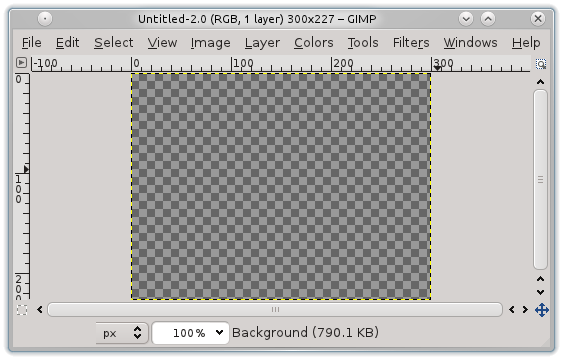
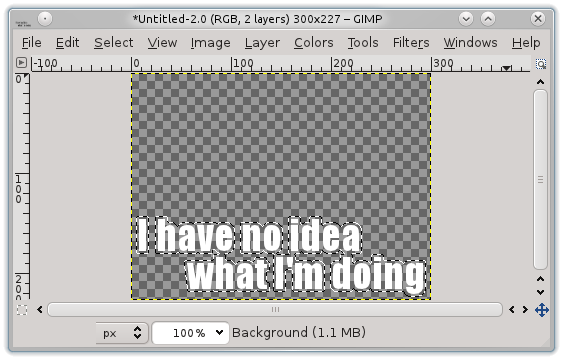
<p>In GIMP, make a new image with the same dimensions of the GIF frames,
with a transparent background.</p>

<p><img src="/img/gif-tutorial/blank.png" alt="" /></p>

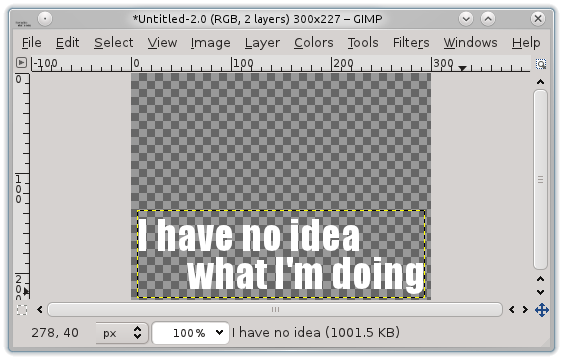
<p>Add your macro text in white, in the Impact Condensed font.</p>

<p><img src="/img/gif-tutorial/text1.png" alt="" /></p>

<p>Right click the text layer and select “Alpha to Selection,” then under
Select, grow the selection by a few pixels — 3 in this case.</p>

<p><img src="/img/gif-tutorial/text2.png" alt="" /></p>

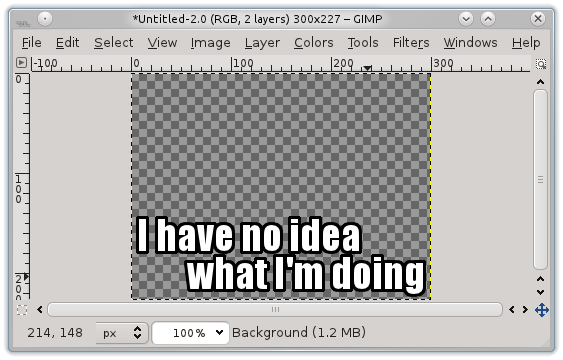
<p>Select the background layer and fill the selection with black, giving
a black border to the text.</p>

<p><img src="/img/gif-tutorial/text3.png" alt="" /></p>

<p>Save this image as text.png, for our text overlay.</p>

<p><img src="/img/gif-tutorial/text.png" alt="" /></p>

<p>Time to go back and redo the frames, overlaying the text this
time. This is called compositing and ImageMagick can do it without
breaking a sweat. To composite two images is simple.</p>

<div class="language-plaintext highlighter-rouge"><div class="highlight"><pre class="highlight"><code>convert base.png top.png -composite out.png
</code></pre></div></div>

<p>List the image to go on top, then use the <code class="language-plaintext highlighter-rouge">-composite</code> flag, and it’s
placed over top of the base image. In my case, I actually don’t want
the text to appear until Calvin, the orange cat, faces the camera.
This happens quite conveniently at just about frame 500, so I’m only
going to redo those frames.</p>

<div class="language-plaintext highlighter-rouge"><div class="highlight"><pre class="highlight"><code>ls 000005*.jpg | xargs -I{} -P4 \
    convert {} -crop 450x340+136+70 +repage \
               -resize 300 text.png -composite {}.gif
</code></pre></div></div>

<p>Run Gifsicle again and this 6.2 MB image is the result. The text
overlay compresses better, so it’s a tiny bit smaller.</p>

<p><img src="https://s3.amazonaws.com/nullprogram/calvin/calvin-macro.gif" alt="" /></p>

<p>Now it’s time to <a href="http://old.reddit.com/r/funny/comments/s481d/">post it on reddit</a> and
<a href="http://old.reddit.com/r/lolcats/comments/s47qa/">reap that tasty, tasty karma</a>.
(<a href="http://imgur.com/2WhBf">Over 400,000 views!</a>)</p>

]]>
    </content>
  </entry>


  <entry>
    <title>Rumor Simulation</title>
    <link rel="alternate" type="text/html" href="https://nullprogram.com/blog/2012/03/09/"/>
    <id>urn:uuid:9fee2022-d273-34d6-0970-546b5e875460</id>
    <updated>2012-03-09T00:00:00Z</updated>
    <category term="java"/><category term="math"/><category term="media"/><category term="video"/><category term="reddit"/>
    <content type="html">
      <![CDATA[<p>A couple months ago someone posted
<a href="http://old.reddit.com/r/javahelp/comments/ngvp4/">an interesting programming homework problem</a> on reddit,
asking for help. Help had already been provided before I got there,
but I thought the problem was an interesting one.</p>

<blockquote>
  <p>Write a program that simulates the spreading of a rumor among a group
of people. At any given time, each person in the group is in one of
three categories:</p>

  <ul>
    <li>IGNORANT - the person has not yet heard the rumor</li>
    <li>SPREADER - the person has heard the rumor and is eager to spread it</li>
    <li>STIFLER - the person has heard the rumor but considers it old news
and will not spread it</li>
  </ul>

  <p>At the very beginning, there is one spreader; everyone else is
ignorant. Then people begin to encounter each other.</p>

  <p>So the encounters go like this:</p>

  <ul>
    <li>If a SPREADER and an IGNORANT meet, IGNORANT becomes a SPREADER.</li>
    <li>If a SPREADER and a STIFLER meet, the SPREADER becomes a STIFLER.</li>
    <li>If a SPREADER and a SPREADER meet, they both become STIFLERS.</li>
    <li>In all other encounters nothing changes.</li>
  </ul>

  <p>Your program should simulate this by repeatedly selecting two people
randomly and having them “meet.”</p>

  <p>There are three questions we want to answer:</p>

  <ul>
    <li>Will everyone eventually hear the rumor, or will it die out before
everyone hears it?</li>
    <li>If it does die out, what percentage of the population hears it?</li>
    <li>How long does it take? i.e. How many encounters occur before the
rumor dies out?</li>
  </ul>
</blockquote>

<p>I wrote a very thorough version to <a href="/blog/2011/11/28/">produce videos</a> of the
simulation in action.</p>

<ul>
  <li><a href="https://github.com/skeeto/rumor-sim">https://github.com/skeeto/rumor-sim</a></li>
</ul>

<p>It accepts some command line arguments, so you don’t need to edit any
code just to try out some simple things.</p>

<p>And here are a couple of videos. Each individual is a cell in a 2D
grid. IGNORANT is black, SPREADER is red, and STIFLER is white. Note
that this is <em>not</em> a cellular automata, because cell neighborship does
not come into play.</p>

<video src="https://s3.amazonaws.com/nullprogram/rumor/rumor-small.webm" controls="controls" width="400" height="250">
</video>

<video src="https://s3.amazonaws.com/nullprogram/rumor/rumor.webm" controls="controls" width="400" height="400">
</video>

<p>Here’s are the statistics for ten different rumors.</p>

<div class="language-plaintext highlighter-rouge"><div class="highlight"><pre class="highlight"><code>Rumor(n=10000, meetups=132380, knowing=0.789)
Rumor(n=10000, meetups=123944, knowing=0.7911)
Rumor(n=10000, meetups=117459, knowing=0.7985)
Rumor(n=10000, meetups=127063, knowing=0.79)
Rumor(n=10000, meetups=124116, knowing=0.8025)
Rumor(n=10000, meetups=115903, knowing=0.7952)
Rumor(n=10000, meetups=137222, knowing=0.7927)
Rumor(n=10000, meetups=134354, knowing=0.797)
Rumor(n=10000, meetups=113887, knowing=0.8025)
Rumor(n=10000, meetups=139534, knowing=0.7938)
</code></pre></div></div>

<p>Except for very small populations, the simulation always terminates
very close to 80% rumor coverage. I don’t understand (yet) why this
is, but I find it very interesting.</p>

]]>
    </content>
  </entry>


  <entry>
    <title>Lisp Let in GNU Octave</title>
    <link rel="alternate" type="text/html" href="https://nullprogram.com/blog/2012/02/08/"/>
    <id>urn:uuid:05e5318e-0cf4-3d80-4bf5-da695dbe9e47</id>
    <updated>2012-02-08T00:00:00Z</updated>
    <category term="octave"/><category term="trick"/><category term="lisp"/><category term="media"/><category term="math"/><category term="video"/>
    <content type="html">
      <![CDATA[<p>In <a href="/blog/2011/01/30/">BrianScheme</a>, the standard Lisp binding form <code class="language-plaintext highlighter-rouge">let</code> isn’t a
special form. That is, it’s not a hard-coded language feature, or
<em>special form</em>. It’s built on top of <code class="language-plaintext highlighter-rouge">lambda</code>. In any lexically-scoped
Lisp, the expression,</p>

<div class="language-cl highlighter-rouge"><div class="highlight"><pre class="highlight"><code><span class="p">(</span><span class="k">let</span> <span class="p">((</span><span class="nv">x</span> <span class="mi">10</span><span class="p">)</span>
      <span class="p">(</span><span class="nv">y</span> <span class="mi">20</span><span class="p">))</span>
  <span class="p">(</span><span class="nb">*</span> <span class="mi">10</span> <span class="mi">20</span><span class="p">))</span>
</code></pre></div></div>

<p>Can also be written as,</p>

<div class="language-cl highlighter-rouge"><div class="highlight"><pre class="highlight"><code><span class="p">((</span><span class="k">lambda</span> <span class="p">(</span><span class="nv">x</span> <span class="nv">y</span><span class="p">)</span>
   <span class="p">(</span><span class="nb">*</span> <span class="nv">x</span> <span class="nv">y</span><span class="p">))</span>
 <span class="mi">10</span> <span class="mi">20</span><span class="p">)</span>
</code></pre></div></div>

<p>BrianScheme’s <code class="language-plaintext highlighter-rouge">let</code> is just a macro that transforms into a lambda
expression. This is also what made it so important to implement lambda
lifting, to optimize these otherwise-expensive forms.</p>

<p>It’s possible to achieve a similar effect in GNU Octave (but not
Matlab, due to <a href="/blog/2008/08/29/">its flawed parser design</a>). The language permits
simple lambda expressions, much like Python.</p>

<div class="language-matlab highlighter-rouge"><div class="highlight"><pre class="highlight"><code><span class="o">&gt;</span> <span class="n">f</span> <span class="o">=</span> <span class="o">@</span><span class="p">(</span><span class="n">x</span><span class="p">)</span> <span class="n">x</span> <span class="o">+</span> <span class="mi">10</span><span class="p">;</span>
<span class="o">&gt;</span> <span class="n">f</span><span class="p">(</span><span class="mi">4</span><span class="p">)</span>
<span class="nb">ans</span> <span class="o">=</span> <span class="mi">14</span>
</code></pre></div></div>

<p>It can be used to create a scope in a language that’s mostly devoid of
scope. For example, I can avoid assigning a value to a temporary
variable just because I need to use it in two places. This one-liner
generates a random 3D unit vector.</p>

<div class="language-matlab highlighter-rouge"><div class="highlight"><pre class="highlight"><code><span class="p">(</span><span class="o">@</span><span class="p">(</span><span class="n">v</span><span class="p">)</span> <span class="n">v</span> <span class="p">/</span> <span class="nb">norm</span><span class="p">(</span><span class="n">v</span><span class="p">))(</span><span class="nb">randn</span><span class="p">(</span><span class="mi">1</span><span class="p">,</span> <span class="mi">3</span><span class="p">))</span>
</code></pre></div></div>

<p>The anonymous function is called inside the same expression where it’s
created. In practice, doing this is stupid. It’s confusing and there’s
really nothing to gain by being clever, doing it in one line instead
of two. Most importantly, there’s no macro system that can turn this
into a new language feature. <em>However</em>, I enjoyed using this technique
to create a one-liner that generates <code class="language-plaintext highlighter-rouge">n</code> random unit vectors.</p>

<div class="language-matlab highlighter-rouge"><div class="highlight"><pre class="highlight"><code><span class="n">n</span> <span class="o">=</span> <span class="mi">1000</span><span class="p">;</span>
<span class="n">p</span> <span class="o">=</span> <span class="p">(</span><span class="o">@</span><span class="p">(</span><span class="n">v</span><span class="p">)</span> <span class="n">v</span> <span class="o">.</span><span class="p">/</span> <span class="nb">repmat</span><span class="p">(</span><span class="nb">sqrt</span><span class="p">(</span><span class="nb">sum</span><span class="p">(</span><span class="nb">abs</span><span class="p">(</span><span class="n">v</span><span class="p">)</span> <span class="o">.^</span> <span class="mi">2</span><span class="p">,</span> <span class="mi">2</span><span class="p">)),</span> <span class="mi">1</span><span class="p">,</span> <span class="mi">3</span><span class="p">))(</span><span class="nb">randn</span><span class="p">(</span><span class="n">n</span><span class="p">,</span> <span class="mi">3</span><span class="p">));</span>
</code></pre></div></div>

<p>Why was I doing this? I was using the Monte Carlo method to
double-check my solution to <a href="http://godplaysdice.blogspot.com/2011/12/geometric-probability-problem.html">this math problem</a>:</p>

<blockquote>
  <p>What is the average straight line distance between two points on a
sphere of radius 1?</p>
</blockquote>

<p>I was also demonstrating to <a href="http://devrand.org/">Gavin</a> that simply choosing two
<em>angles</em> is insufficient, because the points the angles select are not
evenly distributed over the surface of the sphere. I generated this
video, where the poles are clearly visible due to the uneven selection
by two angles.</p>

<video src="https://s3.amazonaws.com/nullprogram/sphere/sphere-dark.webm" controls="controls" height="340" width="340">
</video>

<p>This took hours to render with gnuplot! Here are stylized versions:
<a href="https://s3.amazonaws.com/nullprogram/sphere/dark.html">Dark</a> and <a href="https://s3.amazonaws.com/nullprogram/sphere/light.html">Light</a>.</p>

]]>
    </content>
  </entry>


  <entry>
    <title>Cartoon Liquid Simulation</title>
    <link rel="alternate" type="text/html" href="https://nullprogram.com/blog/2012/02/03/"/>
    <id>urn:uuid:3819c303-f785-3d90-7c85-af2ca32b7ee4</id>
    <updated>2012-02-03T00:00:00Z</updated>
    <category term="interactive"/><category term="java"/><category term="math"/><category term="media"/><category term="video"/>
    <content type="html">
      <![CDATA[<p><strong>Update June 2013</strong>: This program has been <a href="/blog/2012/02/03/">ported to WebGL</a>!!!</p>

<p>The other day I came across this neat visual trick:
<a href="http://www.patrickmatte.com/stuff/physicsLiquid/">How to simulate liquid</a> (Flash). It’s a really simple way to
simulate some natural-looking liquid.</p>

<ul>
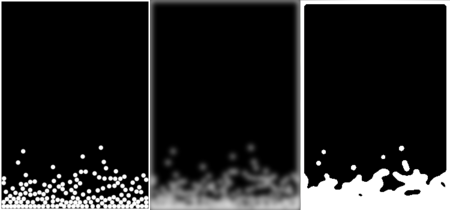
  <li>Perform a physics simulation of a number of circular particles.</li>
  <li>Render this simulation in high contrast.</li>
  <li>Gaussian blur the rendering.</li>
  <li>Threshold the blur.</li>
</ul>

<p><img src="/img/liquid/liquid-thumb.png" alt="" /></p>

<p>I [made my own version][fun] in Java, using <a href="http://jbox2d.org/">JBox2D</a> for the
physics simulation.</p>

<ul>
  <li><a href="https://github.com/skeeto/fun-liquid">https://github.com/skeeto/fun-liquid</a></li>
</ul>

<p>For those of you who don’t want to run a Java applet, here’s a video
demonstration. Gravity is reversed every few seconds, causing the
liquid to slosh up and down over and over. The two triangles on the
sides help mix things up a bit. The video flips through the different
components of the animation.</p>

<video src="https://s3.amazonaws.com/nullprogram/liquid/liquid-overview.webm" poster="https://s3.amazonaws.com/nullprogram/liquid/liquid-poster.png" controls="controls" width="250" height="350">
</video>

<p>It’s not a perfect liquid simulation. The surface never settles down,
so the liquid is lumpy, like curdled milk. There’s also a lack of
cohesion, since JBox2D doesn’t provide cohesion directly. However, I
think I could implement cohesion on my own by writing a custom
contact.</p>

<p>JBox2D is a really nice, easy-to-use 2D physics library. I only had to
read the first two chapters of the <a href="http://box2d.org/">Box2D</a> manual. Everything
else can be figured out through the JBox2D Javadocs. It’s also
available from the Maven repository, which is the reason I initially
selected it. My only complaint so far is that the API doesn’t really
follow best practice, but that’s probably because it follows the Box2D
C++ API so closely.</p>

<p>I’m excited about JBox2D and I plan on using it again for some future
project ideas. Maybe even a game.</p>

<p>The most computationally intensive part of the process <em>isn’t</em> the
physics. That’s really quite cheap. It’s actually blurring, by far.
Blurring involves <a href="/blog/2008/02/22/">convolving a kernel</a> over the image —
O(n^2) time. The graphics card would be ideal for that step, probably
eliminating it as a bottleneck, but it’s unavailable to pure Java. I
could have <a href="/blog/2011/11/06/">pulled in lwjgl</a>, but I wanted to keep it simple,
so that it could be turned into a safe applet.</p>

<p>As a result, it may not run smoothly on computers that are more than a
couple of years old. I’ve been trying to come up with a cheaper
alternative, such as rendering a transparent halo around each ball,
but haven’t found anything yet. Even with that fix, thresholding would
probably be the next bottleneck — something else the graphics card
would be really good at.</p>

]]>
    </content>
  </entry>


  <entry>
    <title>Infinite Parallax Starfield</title>
    <link rel="alternate" type="text/html" href="https://nullprogram.com/blog/2011/06/13/"/>
    <id>urn:uuid:6e9e0ad7-2a63-3c73-bdbc-ced783911f62</id>
    <updated>2011-06-13T00:00:00Z</updated>
    <category term="java"/><category term="video"/>
    <content type="html">
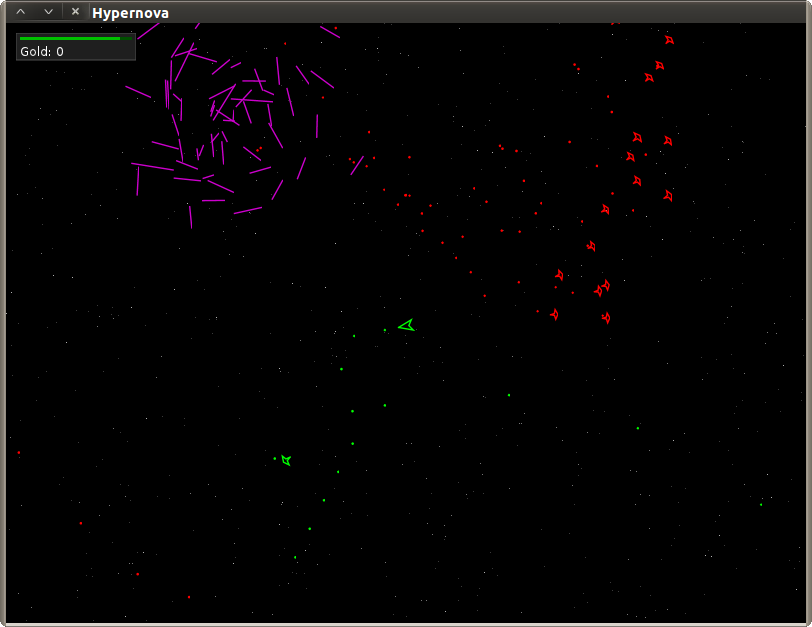
      <![CDATA[<p>In my free time I’ve been working on an unannounced line-art space
shooter game called Hypernova. It looks a little like <em>Asteroids</em>, but
the screen doesn’t wrap around at all. Space is infinite, and there will
be all sorts of things going on out there. Quests, loot, ship upgrades
and enhancements, hirelings.</p>

<p><a href="/img/hypernova/hypernova.png"><img src="/img/hypernova/hypernova-thumb.png" alt="" /></a></p>

<p>It will be using no bitmapped images. All the graphics are vector images
described by text files. I was originally intending to follow the same
path with sound effects, and rely mostly on MIDI. However, I quickly
found out that many computers have no MIDI support at all.</p>

<p>One of the early challenges was a nice starfield background. It has
several constraints:</p>

<ul>
  <li>Can’t use any bitmapped images.</li>
  <li>Must work over practically infinite space.</li>
  <li>I must be able to resize the display</li>
  <li>Must be fast.</li>
</ul>

<p>And in addition, there are some unnecessary, but desirable, properties,</p>

<ul>
  <li>
    <p>When leaving a particular location and returning, I’d like to see the
same starfield pattern again.</p>
  </li>
  <li>
    <p>At the same time, I never want to see that same pattern at a different
position.</p>
  </li>
</ul>

<p>When I was a kid I created the effect as a project, but it didn’t have
the both the desired properties above. It’s also the method I found over
and over when searching the Internet. There is an array of stars. Star
positions are translated as the camera moves. If a star ever exits the
display, replace it at a random position on the edge of the screen. To
create a parallax effect, each star’s translation is scaled by a unique
random factor.</p>

<p>However, there’s another algorithm I like much better, and it has both
the desirable properties. Space is broken up into a grid of square
tiles. To determine the star pattern in any given tile, hash the tile’s
position, and use the hash output to generate a few positions within the
tiles, which is where stars are drawn. To create a parallax effect,
perform it in different layers at different scales.</p>

<p>Here’s what it looks like in the game,</p>

<p><img src="/img/hypernova/starfield.gif" alt="" /></p>

<p>Hypernova is written in Java, with Clojure as a scripting language, so
the starfield drawing function looks like this.</p>

<div class="language-java highlighter-rouge"><div class="highlight"><pre class="highlight"><code><span class="kd">public</span> <span class="kd">static</span> <span class="kd">final</span> <span class="kt">int</span> <span class="no">STAR_SEED</span> <span class="o">=</span> <span class="mh">0x9d2c5680</span><span class="o">;</span>
<span class="kd">public</span> <span class="kd">static</span> <span class="kd">final</span> <span class="kt">int</span> <span class="no">STAR_TILE_SIZE</span> <span class="o">=</span> <span class="mi">256</span><span class="o">;</span>

<span class="kd">public</span> <span class="kt">void</span> <span class="nf">drawStars</span><span class="o">(</span><span class="nc">Graphics2D</span> <span class="n">g</span><span class="o">,</span> <span class="kt">int</span> <span class="n">xoff</span><span class="o">,</span> <span class="kt">int</span> <span class="n">yoff</span><span class="o">,</span> <span class="kt">int</span> <span class="n">starscale</span><span class="o">)</span> <span class="o">{</span>
    <span class="kt">int</span> <span class="n">size</span> <span class="o">=</span> <span class="no">STAR_TILE_SIZE</span> <span class="o">/</span> <span class="n">starscale</span><span class="o">;</span>
    <span class="kt">int</span> <span class="n">w</span> <span class="o">=</span> <span class="n">getWidth</span><span class="o">();</span>
    <span class="kt">int</span> <span class="n">h</span> <span class="o">=</span> <span class="n">getHeight</span><span class="o">();</span>

    <span class="cm">/* Top-left tile's top-left position. */</span>
    <span class="kt">int</span> <span class="n">sx</span> <span class="o">=</span> <span class="o">((</span><span class="n">xoff</span> <span class="o">-</span> <span class="n">w</span><span class="o">/</span><span class="mi">2</span><span class="o">)</span> <span class="o">/</span> <span class="n">size</span><span class="o">)</span> <span class="o">*</span> <span class="n">size</span> <span class="o">-</span> <span class="n">size</span><span class="o">;</span>
    <span class="kt">int</span> <span class="n">sy</span> <span class="o">=</span> <span class="o">((</span><span class="n">yoff</span> <span class="o">-</span> <span class="n">h</span><span class="o">/</span><span class="mi">2</span><span class="o">)</span> <span class="o">/</span> <span class="n">size</span><span class="o">)</span> <span class="o">*</span> <span class="n">size</span> <span class="o">-</span> <span class="n">size</span><span class="o">;</span>

    <span class="cm">/* Draw each tile currently in view. */</span>
    <span class="k">for</span> <span class="o">(</span><span class="kt">int</span> <span class="n">i</span> <span class="o">=</span> <span class="n">sx</span><span class="o">;</span> <span class="n">i</span> <span class="o">&lt;=</span> <span class="n">w</span> <span class="o">+</span> <span class="n">sx</span> <span class="o">+</span> <span class="n">size</span> <span class="o">*</span> <span class="mi">3</span><span class="o">;</span> <span class="n">i</span> <span class="o">+=</span> <span class="n">size</span><span class="o">)</span> <span class="o">{</span>
        <span class="k">for</span> <span class="o">(</span><span class="kt">int</span> <span class="n">j</span> <span class="o">=</span> <span class="n">sy</span><span class="o">;</span> <span class="n">j</span> <span class="o">&lt;=</span> <span class="n">h</span> <span class="o">+</span> <span class="n">sy</span> <span class="o">+</span> <span class="n">size</span> <span class="o">*</span> <span class="mi">3</span><span class="o">;</span> <span class="n">j</span> <span class="o">+=</span> <span class="n">size</span><span class="o">)</span> <span class="o">{</span>
            <span class="kt">int</span> <span class="n">hash</span> <span class="o">=</span> <span class="n">mix</span><span class="o">(</span><span class="no">STAR_SEED</span><span class="o">,</span> <span class="n">i</span><span class="o">,</span> <span class="n">j</span><span class="o">);</span>
            <span class="k">for</span> <span class="o">(</span><span class="kt">int</span> <span class="n">n</span> <span class="o">=</span> <span class="mi">0</span><span class="o">;</span> <span class="n">n</span> <span class="o">&lt;</span> <span class="mi">3</span><span class="o">;</span> <span class="n">n</span><span class="o">++)</span> <span class="o">{</span>
                <span class="kt">int</span> <span class="n">px</span> <span class="o">=</span> <span class="o">(</span><span class="n">hash</span> <span class="o">%</span> <span class="n">size</span><span class="o">)</span> <span class="o">+</span> <span class="o">(</span><span class="n">i</span> <span class="o">-</span> <span class="n">xoff</span><span class="o">);</span>
                <span class="n">hash</span> <span class="o">&gt;&gt;=</span> <span class="mi">3</span><span class="o">;</span>
                <span class="kt">int</span> <span class="n">py</span> <span class="o">=</span> <span class="o">(</span><span class="n">hash</span> <span class="o">%</span> <span class="n">size</span><span class="o">)</span> <span class="o">+</span> <span class="o">(</span><span class="n">j</span> <span class="o">-</span> <span class="n">yoff</span><span class="o">);</span>
                <span class="n">hash</span> <span class="o">&gt;&gt;=</span> <span class="mi">3</span><span class="o">;</span>
                <span class="n">g</span><span class="o">.</span><span class="na">drawLine</span><span class="o">(</span><span class="n">px</span><span class="o">,</span> <span class="n">py</span><span class="o">,</span> <span class="n">px</span><span class="o">,</span> <span class="n">py</span><span class="o">);</span>
            <span class="o">}</span>
        <span class="o">}</span>
    <span class="o">}</span>
<span class="o">}</span>
</code></pre></div></div>

<p>Assuming the origin is in the center of the display, it iterates over
each tile currently covered by the display. Positions are created by
looking at the first couple bits of the hash for X, shift a few off, and
looking at the first few bits again for Y. Repeat until we run out of
bits. It’s called with different <code class="language-plaintext highlighter-rouge">starscale</code>s, back to front (darker to
lighter), to create layers.</p>

<p>The <code class="language-plaintext highlighter-rouge">STAR_SEED</code> is just a Mersenne prime from the Mersenne Twister PRNG.
It probably doesn’t matter much what you choose for the seed, but
changing it by a single bit will drastically alter the starfield.</p>

<p>As far as I know, Java comes with no decent 32-bit (int) hash functions,
which is really one of the biggest roadblocks in implementing effective
<code class="language-plaintext highlighter-rouge">hashCodes()</code>s. Fortunately, I found an excellent hash function, <a href="http://www.concentric.net/~ttwang/tech/inthash.htm">Robert
Jenkins’ 96 bit Mix
Function</a>, to do the
trick.</p>

<div class="language-java highlighter-rouge"><div class="highlight"><pre class="highlight"><code><span class="cm">/** Robert Jenkins' 96 bit Mix Function. */</span>
<span class="kd">private</span> <span class="kd">static</span> <span class="kt">int</span> <span class="nf">mix</span><span class="o">(</span><span class="kt">int</span> <span class="n">a</span><span class="o">,</span> <span class="kt">int</span> <span class="n">b</span><span class="o">,</span> <span class="kt">int</span> <span class="n">c</span><span class="o">)</span> <span class="o">{</span>
    <span class="n">a</span><span class="o">=</span><span class="n">a</span><span class="o">-</span><span class="n">b</span><span class="o">;</span>  <span class="n">a</span><span class="o">=</span><span class="n">a</span><span class="o">-</span><span class="n">c</span><span class="o">;</span>  <span class="n">a</span><span class="o">=</span><span class="n">a</span><span class="o">^(</span><span class="n">c</span> <span class="o">&gt;&gt;&gt;</span> <span class="mi">13</span><span class="o">);</span>
    <span class="n">b</span><span class="o">=</span><span class="n">b</span><span class="o">-</span><span class="n">c</span><span class="o">;</span>  <span class="n">b</span><span class="o">=</span><span class="n">b</span><span class="o">-</span><span class="n">a</span><span class="o">;</span>  <span class="n">b</span><span class="o">=</span><span class="n">b</span><span class="o">^(</span><span class="n">a</span> <span class="o">&lt;&lt;</span> <span class="mi">8</span><span class="o">);</span>
    <span class="n">c</span><span class="o">=</span><span class="n">c</span><span class="o">-</span><span class="n">a</span><span class="o">;</span>  <span class="n">c</span><span class="o">=</span><span class="n">c</span><span class="o">-</span><span class="n">b</span><span class="o">;</span>  <span class="n">c</span><span class="o">=</span><span class="n">c</span><span class="o">^(</span><span class="n">b</span> <span class="o">&gt;&gt;&gt;</span> <span class="mi">13</span><span class="o">);</span>
    <span class="n">a</span><span class="o">=</span><span class="n">a</span><span class="o">-</span><span class="n">b</span><span class="o">;</span>  <span class="n">a</span><span class="o">=</span><span class="n">a</span><span class="o">-</span><span class="n">c</span><span class="o">;</span>  <span class="n">a</span><span class="o">=</span><span class="n">a</span><span class="o">^(</span><span class="n">c</span> <span class="o">&gt;&gt;&gt;</span> <span class="mi">12</span><span class="o">);</span>
    <span class="n">b</span><span class="o">=</span><span class="n">b</span><span class="o">-</span><span class="n">c</span><span class="o">;</span>  <span class="n">b</span><span class="o">=</span><span class="n">b</span><span class="o">-</span><span class="n">a</span><span class="o">;</span>  <span class="n">b</span><span class="o">=</span><span class="n">b</span><span class="o">^(</span><span class="n">a</span> <span class="o">&lt;&lt;</span> <span class="mi">16</span><span class="o">);</span>
    <span class="n">c</span><span class="o">=</span><span class="n">c</span><span class="o">-</span><span class="n">a</span><span class="o">;</span>  <span class="n">c</span><span class="o">=</span><span class="n">c</span><span class="o">-</span><span class="n">b</span><span class="o">;</span>  <span class="n">c</span><span class="o">=</span><span class="n">c</span><span class="o">^(</span><span class="n">b</span> <span class="o">&gt;&gt;&gt;</span> <span class="mi">5</span><span class="o">);</span>
    <span class="n">a</span><span class="o">=</span><span class="n">a</span><span class="o">-</span><span class="n">b</span><span class="o">;</span>  <span class="n">a</span><span class="o">=</span><span class="n">a</span><span class="o">-</span><span class="n">c</span><span class="o">;</span>  <span class="n">a</span><span class="o">=</span><span class="n">a</span><span class="o">^(</span><span class="n">c</span> <span class="o">&gt;&gt;&gt;</span> <span class="mi">3</span><span class="o">);</span>
    <span class="n">b</span><span class="o">=</span><span class="n">b</span><span class="o">-</span><span class="n">c</span><span class="o">;</span>  <span class="n">b</span><span class="o">=</span><span class="n">b</span><span class="o">-</span><span class="n">a</span><span class="o">;</span>  <span class="n">b</span><span class="o">=</span><span class="n">b</span><span class="o">^(</span><span class="n">a</span> <span class="o">&lt;&lt;</span> <span class="mi">10</span><span class="o">);</span>
    <span class="n">c</span><span class="o">=</span><span class="n">c</span><span class="o">-</span><span class="n">a</span><span class="o">;</span>  <span class="n">c</span><span class="o">=</span><span class="n">c</span><span class="o">-</span><span class="n">b</span><span class="o">;</span>  <span class="n">c</span><span class="o">=</span><span class="n">c</span><span class="o">^(</span><span class="n">b</span> <span class="o">&gt;&gt;&gt;</span> <span class="mi">15</span><span class="o">);</span>
    <span class="k">return</span> <span class="n">c</span><span class="o">;</span>
<span class="o">}</span>
</code></pre></div></div>

<video src="/vid/hypernova/hypernova.ogv" controls="" poster="/vid/hypernova/hypernova-poster-small.png" width="600" height="450">
</video>
]]>
    </content>
  </entry>


  <entry>
    <title>GIMP Painting</title>
    <link rel="alternate" type="text/html" href="https://nullprogram.com/blog/2010/07/21/"/>
    <id>urn:uuid:ed51c226-cd1e-39f3-05e6-c4dda7fcac92</id>
    <updated>2010-07-21T00:00:00Z</updated>
    <category term="media"/><category term="video"/>
    <content type="html">
      <![CDATA[<!-- 21 July 2010 -->
<p>
I drew the <a href="/blog/2010/07/19/">magic space elevator</a> a few
days back after some practice. Here's my very first attempt at this
art style,
</p>
<p class="center">
  <video src="/vid/artwork/mountains.ogv" controls width="400" height="250"
         poster="/img/artwork/mountains.png">
    Your browser doesn't support HTML 5 and Ogg Vorbis. So here's the
    video file directly for download:
    <a href="/vid/artwork/mountains.ogv">mountains.ogv</a>
  </video><br/>
  <a href="/vid/artwork/mountains.ogv">Full Size Video</a>
</p>
<p>
And the image itself,
</p>
<p class="center">
  <a href="/img/artwork/mountains.png">
    <img src="/img/artwork/mountains-thumb.png" alt=""/>
  </a>
</p>
]]>
    </content>
  </entry>


  <entry>
    <title>GIMP Space Elevator Drawing</title>
    <link rel="alternate" type="text/html" href="https://nullprogram.com/blog/2010/07/19/"/>
    <id>urn:uuid:d2383e63-2310-3b31-b03a-67b5fc884cfd</id>
    <updated>2010-07-19T00:00:00Z</updated>
    <category term="media"/><category term="video"/>
    <content type="html">
      <![CDATA[<!-- 19 July 2010 -->
<p>
I've been looking for a nearby tabletop gaming group for awhile now. I
asked people I knew. I asked around at work. I just couldn't find
anyone. Luckily, a new thing that Wizards of the Coast has been doing
is <a href="http://www.wizards.com/dnd/Event.aspx?x=dnd/4new/event/dndencounters">
D&amp;D Encounters</a> where prepared adventures are run every week
openly at local gaming stores. The purpose is for casual players or
beginners to be able to freely to play some D&amp;D without needing
any commitment, preparation, or equipment. Characters are
pre-generated, so no spending a half hour creating some new player
characters every week.
</p>
<p>
I hopped into it
for <a href="http://dungeonsmaster.com/2010/05/dd-encounters-dark-sun/">
season two</a>, which just started 6 weeks ago. Each weekly session is
a 1.5 to 2 hour combat encounter. I've been having fun, but honestly
it's not all that exciting compared to what a <i>real</i> campaign can
bring. There is no role-playing, practically no NPC interaction, no
puzzles, and no exploration. It also doesn't help that the adventures
and <a href="http://dungeonsmaster.com/2010/06/dd-encounters-dark-sun-week-1/">
characters are riddled with mistakes</a> and very unbalanced. For an
example of unbalanced, the character I've been playing, Barcan (or
Barqan depending on where you are in the character sheet), could
be <i>killed</i> — and I'm not talking about unconscious dying but
negative bloodied value dead — by a monster critical strike in just
about every encounter so far. Every time a monster attacked me there
was a 1 in 20 chance, even at full health, that I might be done
playing for the week.
</p>
<p>
But the great part is that it got me connected to other players in my
area, which I think is the most valuable part of Encounters. One of my
fellow players was just starting a regular gaming group and invited me
to come along, so we've been playing on weekends now, with the
intention of taking turns as the DM among those who are
interested. And for a little irony, everyone except one person in the
group also works at the lab. I guess I didn't ask around enough!
</p>
<p>
So I'm going to be DMing a 4e Dungeons and Dragons campaign sometime
in the near future, and I'm quite excited about it!
</p>
<p>
<i><b>Anyway</b></i>, what does that have to do with drawing
a <a href="http://en.wikipedia.org/wiki/Space_elevator"> space
elevator</a> in the GIMP? First of all, <b>if you're one of the
players in my group who found their way here stop reading
now</b>. You'll find out all this in the first session, so come back
after that. So, I've had this campaign idea in my head for a couple of
years now, and it involves a skyhook of sorts constructed by a
combination of careful engineering and powerful arcane magic. It
leads <i>somewhere</i>, not space, but somewhere. Since that somewhere
is part of the mystery I won't reveal where that is, but if the
campaign goes well I'll write about it more in the future.
</p>
<p>
When I run the first session I want to illustrate the skyhook to the
players. <i>Show, not tell</i> they say. I like some of the work
people
do <a href="http://www.youtube.com/results?search_query=gimp+ross">
imitating Bob Ross in the GIMP</a>. I've done a few of these to try
it out, and it's surprising how well it can turn out even from a
beginner. I employed this new art education to draw my skyhook for my
game. The GIMP undo history reveals how I did it,
</p>
<p class="center">
  <video src="/vid/artwork/skyhook.ogv" controls width="400" height="300"
         poster="/img/artwork/skyhoook.png">
    Your browser doesn't support HTML 5 and Ogg Vorbis. So here's the
    video file directly for download:
    <a href="/vid/artwork/skyhook.ogv">skyhook.ogv</a>
  </video><br/>
  <a href="/vid/artwork/skyhook.ogv">Full Size Video</a>
</p>
<p>
And the result,
</p>
<p class="center">
  <a href="/img/artwork/skyhook.png">
    <img src="/img/artwork/skyhook-thumb.png" alt=""/>
  </a>
</p>
<p>
In retrospect I should have drawn the skyhook right after I finished
those first clouds, since it's behind everything else in the
scene. Oh, and that thing on the bottom left is a twisted scar left
behind from a previous attempt at building the skyhook, but it
collapsed. It's a dangerous place to be.
</p>
]]>
    </content>
  </entry>


  <entry>
    <title>Wisp Screencasts</title>
    <link rel="alternate" type="text/html" href="https://nullprogram.com/blog/2010/02/04/"/>
    <id>urn:uuid:55bef550-79a4-370d-ee00-679a3f13328e</id>
    <updated>2010-02-04T00:00:00Z</updated>
    <category term="video"/><category term="lisp"/>
    <content type="html">
      <![CDATA[<!-- 4 February 2010 -->
<p>
I've been chugging away on Wisp, <a href="/blog/2010/01/24/">announced
in my last post</a>, every day since I started it a few weeks ago, and
it's becoming a pretty solid system. There's now an exception system,
reference counting for dealing with garbage, and a reentrant
parser. It's no replacement for any other lisps, but I've found it to
be very fun to work on.
</p>
<pre>
git clone <a href="https://github.com/skeeto/wisp">git://github.com/skeeto/wisp.git</a>
</pre>
<p>
I wanted to show off some of the new features of Wisp, and since I was
inspired by <a href="http://vimeo.com/channels/fulldisclojure"> Full
Disclojure</a>, since it's so damn slick, I decided to make some
screencasts of Wisp in action. All of the screencast software for
GNU/Linux is pretty poor, but after a few hours of head-banging I
managed to hobble something together for you. Enjoy!
</p>
<p>
  <video src="/vid/wisp/wisp-memoize.ogv" controls>
    Since your browser doesn't seem to support the video tag, here's a
    link to the video: <a href="/vid/wisp/wisp-memoize.ogv">
    wisp-memoize.ogv</a>.
  </video>
</p>
<p>
That video demonstrated the memoization function. It can be pulled in
from the <code>memoize</code> library. You give it a symbol, which
should have a function definition stored in it, and it will installed a
wrapper around it. In the video I used the Fibonacci function from
the <code>examples</code> library.
</p>
<pre>
(require 'examples)
(fib 30) ; Slooooow ...
(memoize 'fib)
(fib 100) ; Fast!
</pre>
<p>
  <video src="/vid/wisp/wisp-detach.ogv" controls>
    Since your browser doesn't seem to support the video tag, here's a
    link to the video: <a href="/vid/wisp/wisp-detach.ogv">
    wisp-detach.ogv</a>.
  </video>
</p>
<p>
This demonstrated the "detachment" feature of Wisp, which is similar
to "futures" in Clojure. It forks off a new process, which executes
the given function. The <code>send</code> function can be used in the
detached process to send any lisp objects back to the parents, which
can receive them with the <code>receive</code>
function. The <code>send</code> function can be called any number of
times to continually send data back. The <code>receive</code> function
will block if there is no lisp object to receive yet.
</p>
<pre>
(require 'examples)
(setq d (detach (lambda () (send (fib)))))
(receive d) ; Gets value from child process
</pre>
<p>
  <video src="/vid/wisp/wisp-point-free.ogv" controls>
    Since your browser doesn't seem to support the video tag, here's a
    link to the video: <a href="/vid/wisp/wisp-point-free.ogv">
    wisp-point-free.ogv</a>.
  </video>
</p>
<p>
This video shows off the point-free functions that have been defined:
function composition and partial application (I accidentally say
"partial evaluation" in the video). These are actually just simple
macros that any lisp could do.
</p>
]]>
    </content>
  </entry>


  <entry>
    <title>SumoBots Programming Game</title>
    <link rel="alternate" type="text/html" href="https://nullprogram.com/blog/2009/09/02/"/>
    <id>urn:uuid:dcd695f6-8c7f-3fdd-5368-cbec6965764f</id>
    <updated>2009-09-02T00:00:00Z</updated>
    <category term="game"/><category term="video"/>
    <content type="html">
      <![CDATA[<!-- 2 September 2009 -->
<p>
In the summer of 2007 my friend, Michael Abraham, and I wrote a robot
programming game in Matlab. The idea came out of a little demo he
wrote where one circle was chasing another circle. Eventually the
circles could be run by their own functions, then they were shooting
at each other, then dropping mines, and so on. It was dubbed
"Matbots".
</p>
<p>
It turned into a little programming competition among several of us at
work. Someone would invent a new feature, like cooperative bots or
bullet dodging, that would allow it to dominate for awhile. Then
someone else would build on that and come up with some other killer
feature. At one point we even hooked up a joystick so we could control
our own bot live against our creations.
</p>
<p>
I never shared that here. Someday I will.
</p>
<p>
Anyway, Mike took a little bit of the Matbots code and design and came
up with a new, similar game called SumoBots. Programmable bots are in
a frictionless circular playing area with the ability to accelerate in
any direction. Collisions between bots are governed by a spring force
dynamics. Bots are out of the game when they leave the circular
area. The goal is to knock out all the other bots. Here's a video,
</p>
<p class="center">
  <video src="/vid/sumobots/sumobot-party.ogv" controls
         poster="/vid/sumobots/sumobot-party.png">
    <i>You don't have an Ogg Theora capable HTML5 browser. Click this to
    download the video:</i><br/>
    <a href="/vid/sumobots/sumobot-party.ogv">
      <img src="/vid/sumobots/sumobot-party.png" alt=""/>
    </a>
  </video>
</p>
<p>
I like how smooth and natural that looks.
</p>
<p>
He got a number of people at his lab to code up some bots to
compete. I threw the code up over at <a href="http://bitbucket.org/">
bitbucket</a>, a <a href="http://mercurial.selenic.com/wiki/">
Mercurial</a> host, which you can checkout with,
</p>
<pre>
hg clone <a href="http://bitbucket.org/skeeto/sumobots/">http://bitbucket.org/skeeto/sumobots/</a>
</pre>
<p>
(I haven't convinced anyone else over there to use a version control
repository, let alone this one, but here's hoping!)
</p>
<p>
You can use either Matlab or Octave to program your bot. It works in
both, with Octave being on the slow side. For Octave, you'll need to
define a <code>cla</code> function as a call to <code>clf</code> (they
don't define it for some reason). To start coding a bot, just look at
the <code>samplebot</code> bot for information on programming a
bot. Edit the players in <code>player_list.txt</code>, then launch it
by running <code>engine</code> (<code>engine.m</code>).
</p>
<p>
I wrote one bot so far called bully. It charges at the nearest bot,
being careful to cancel out its own velocity. In the video above this
bot is red.
</p>
<p>
The other bots so far is kyleBot, blue in the video, which passively
runs circles around the outside of the surface hoping to trick
aggressive bots, like mine, into running out. The bot2fun bot, black
in the video, is like bully, but tries to keep safely near the center
of the playing area. The brick bot, green in the video, is a dummy,
practice bot that just gets knocked around.
</p>
<p>
The tricky part in writing a bot is managing the frictionless
surface. Acceleration can't just be in the direction you want to
travel, but also against the current velocity. You might want to set
up some kind of <a
href="http://en.wikipedia.org/wiki/Process_control"> process
control</a> for this.
</p>
<p>
Right now I think there is a balance issue. Passive bots have an
advantage, but the game won't progress if everyone takes this
advantage and writes passive bots. It's like camping in a first-person
shooter. As a partial solution to these stalemates, Mike has proposed
that the playing surface should shrink over time.
</p>
<p>
If you want to join in, grab the code and start coding.
</p>
]]>
    </content>
  </entry>


  <entry>
    <title>Up is Down</title>
    <link rel="alternate" type="text/html" href="https://nullprogram.com/blog/2008/06/26/"/>
    <id>urn:uuid:c4c73c3e-07ac-3a52-3358-bf69df5a2be7</id>
    <updated>2008-06-26T00:00:00Z</updated>
    <category term="meatspace"/><category term="video"/>
    <content type="html">
      <![CDATA[<!-- 26 June 2008 -->
<p>
I was in an elevator the other day and I noticed something about the
digital numbers. I was on the 7th floor going down. Inside the
elevator was the standard 7-bar number display indicating the current floor,
</p>
<p>
  <img src="/img/elevator/digit8.png"
       alt="Digital number 8" />
</p>
<p>
However, from the angle I was standing, the top right bar was not
visible. Like this,
</p>
<p>
  <img src="/img/elevator/digit8c.png"
       alt="Digital number 8 covered" />
</p>
<p>
The arrow was indicating that the elevator was traveling downward, but
with that bar in the way the numbers can appear to be going upwards,
not downwards. It is an ambiguity, as without that bar, 6 is
equivalent to 8 and 5 is equivalent to 9. One version is covered, the
other is not.
</p>
<p>
  <img src="/img/elevator/digitc.gif"
       alt="Counting up/down" />
  <img src="/img/elevator/digit.gif"
       alt="Counting down" />
</p>
<p>
At first I thought this was simply some kind of quirky behavior of the
elevator. "Why is it going up when the arrow points down? Seems like
bad design to me!", I thought — until we got to floor 4, where it was
obvious what was going on.
</p>
<p>
"Oh... now I feel foolish."
</p>
]]>
    </content>
  </entry>


  <entry>
    <title>Iterated Prisoner's Dilemma</title>
    <link rel="alternate" type="text/html" href="https://nullprogram.com/blog/2007/11/06/"/>
    <id>urn:uuid:4068d624-311a-30f4-a291-63713ffbc932</id>
    <updated>2007-11-06T00:00:00Z</updated>
    <category term="ai"/><category term="video"/><category term="lisp"/>
    <content type="html">
      <![CDATA[<p><img src="/img/prison/top.gif" alt="" /></p>

<p>I was reading about the <a href="http://en.wikipedia.org/wiki/Prisoner's_dilemma">prisoner’s dilemma</a> game the other day
and was inspired to simulate it myself. It would also be a good
project to start learning Common Lisp. All of the source code is
available in its original source file here:</p>

<ul>
  <li><a href="/download/prison/prison.lisp">/download/prison/prison.lisp</a></li>
</ul>

<p>I have only tried this code in my favorite Common Lisp implementation,
<a href="http://clisp.cons.org/">CLISP</a>, as well <a href="http://www.cons.org/cmucl/">CMUCL</a>.</p>

<p>In prisoner’s dilemma, two players acting as prisoners are given the
option of cooperating with or betraying (defecting) the other player.
Each player’s decision along with his opponents decision determines
the length of his prison sentence. It is bad news for the cooperating
player when the other player is defecting.</p>

<p>Prisoner’s dilemma becomes more interesting in the iterated version of
the game, where the same two players play repeatedly. This allows
players to “punish” each other for uncooperative play. Scoring
generally works as so (higher is better),</p>

<table>
<tr><td colspan="2"></td><th colspan="2">Player A</th></tr>
<tr><td colspan="2"></td><td>coop</td><td>defect</td></tr>
<tr><th rowspan="2">Player B</th><td>coop</td>
<td>(3,3)</td><td>(0,5)</td></tr>
<tr><td>defect</td><td>(5,0)</td><td>(1,1)</td></tr>
</table>

<p>The most famous, and strongest individual strategy, is tit-for-tat.
This player begins by playing cooperatively, then does whatever the
its opponent did last. Here is the Common Lisp code to run a
tit-for-tat strategy,</p>

<div class="language-cl highlighter-rouge"><div class="highlight"><pre class="highlight"><code><span class="p">(</span><span class="nb">defun</span> <span class="nv">tit-for-tat</span> <span class="p">()</span>
  <span class="p">(</span><span class="k">lambda</span> <span class="p">(</span><span class="nv">x</span><span class="p">)</span>
    <span class="p">(</span><span class="k">if</span> <span class="p">(</span><span class="nb">null</span> <span class="nv">x</span><span class="p">)</span> <span class="ss">:coop</span> <span class="nv">x</span><span class="p">)))</span>
</code></pre></div></div>

<p>If you are unfamiliar with Common Lisp, the <code class="language-plaintext highlighter-rouge">lambda</code> part is returning
an anonymous function that actually plays the tit-for-tat strategy.
The <code class="language-plaintext highlighter-rouge">tit-for-tat</code> function generates a tit-for-tat player along with
its own closure. The argument to the anonymous function supplies the
opponent’s last move, which is one of the symbols <code class="language-plaintext highlighter-rouge">:coop</code> or
<code class="language-plaintext highlighter-rouge">:defect</code>. In the case of the first move, <code class="language-plaintext highlighter-rouge">nil</code> is passed. These are
some really simple strategies that ignore their arguments,</p>

<div class="language-cl highlighter-rouge"><div class="highlight"><pre class="highlight"><code><span class="p">(</span><span class="nb">defun</span> <span class="nv">rand-play</span> <span class="p">()</span>
  <span class="p">(</span><span class="k">lambda</span> <span class="p">(</span><span class="nv">x</span><span class="p">)</span>
    <span class="p">(</span><span class="k">declare</span> <span class="p">(</span><span class="k">ignore</span> <span class="nv">x</span><span class="p">))</span>
    <span class="p">(</span><span class="k">if</span> <span class="p">(</span><span class="nb">&gt;</span> <span class="p">(</span><span class="nb">random</span> <span class="mi">2</span><span class="p">)</span> <span class="mi">0</span><span class="p">)</span> <span class="ss">:coop</span> <span class="ss">:defect</span><span class="p">)))</span>

<span class="p">(</span><span class="nb">defun</span> <span class="nv">switcher-coop</span> <span class="p">()</span>
  <span class="p">(</span><span class="k">let</span> <span class="p">((</span><span class="nb">last</span> <span class="ss">:coop</span><span class="p">))</span>
    <span class="p">(</span><span class="k">lambda</span> <span class="p">(</span><span class="nv">x</span><span class="p">)</span>
      <span class="p">(</span><span class="k">declare</span> <span class="p">(</span><span class="k">ignore</span> <span class="nv">x</span><span class="p">))</span>
      <span class="p">(</span><span class="k">if</span> <span class="p">(</span><span class="nb">eq</span> <span class="nb">last</span> <span class="ss">:coop</span><span class="p">)</span>
          <span class="p">(</span><span class="nb">setf</span> <span class="nb">last</span> <span class="ss">:defect</span><span class="p">)</span>
          <span class="p">(</span><span class="nb">setf</span> <span class="nb">last</span> <span class="ss">:coop</span><span class="p">)))))</span>

<span class="p">(</span><span class="nb">defun</span> <span class="nv">switcher-defect</span> <span class="p">()</span>
  <span class="p">(</span><span class="k">let</span> <span class="p">((</span><span class="nb">last</span> <span class="ss">:defect</span><span class="p">))</span>
    <span class="p">(</span><span class="k">lambda</span> <span class="p">(</span><span class="nv">x</span><span class="p">)</span>
      <span class="p">(</span><span class="k">declare</span> <span class="p">(</span><span class="k">ignore</span> <span class="nv">x</span><span class="p">))</span>
      <span class="p">(</span><span class="k">if</span> <span class="p">(</span><span class="nb">eq</span> <span class="nb">last</span> <span class="ss">:coop</span><span class="p">)</span>
          <span class="p">(</span><span class="nb">setf</span> <span class="nb">last</span> <span class="ss">:defect</span><span class="p">)</span>
          <span class="p">(</span><span class="nb">setf</span> <span class="nb">last</span> <span class="ss">:coop</span><span class="p">)))))</span>

<span class="p">(</span><span class="nb">defun</span> <span class="nv">always-coop</span> <span class="p">()</span>
  <span class="p">(</span><span class="k">lambda</span> <span class="p">(</span><span class="nv">x</span><span class="p">)</span>
    <span class="p">(</span><span class="k">declare</span> <span class="p">(</span><span class="k">ignore</span> <span class="nv">x</span><span class="p">))</span>
    <span class="ss">:coop</span><span class="p">))</span>

<span class="p">(</span><span class="nb">defun</span> <span class="nv">always-defect</span> <span class="p">()</span>
  <span class="p">(</span><span class="k">lambda</span> <span class="p">(</span><span class="nv">x</span><span class="p">)</span>
    <span class="p">(</span><span class="k">declare</span> <span class="p">(</span><span class="k">ignore</span> <span class="nv">x</span><span class="p">))</span>
    <span class="ss">:defect</span><span class="p">))</span>
</code></pre></div></div>

<p>Patrick Grim did an interesting study about ten years ago on iterated
prisoner’s dilemma involving competing strategies in a 2-dimensional
area: <a href="http://www.sunysb.edu/philosophy/faculty/pgrim/SPATIALP.HTM">Undecidability in the Spatialized Prisoner’s Dilemma: Some
Philosophical Implications</a>. It is very interesting, but I really
wanted to play around with some different configurations myself. So
what I did was extend my iterated prisoner’s dilemma engine above to
run over a 2-dimensional grid.</p>

<p>Grim’s idea was this: place different strategies in a 2-dimensional
grid. Each strategy competes against its immediate neighbors. (The
paper doesn’t specify which kind of neighbor, 4-connected or
8-connected, so I went with 4-connected.) The sum of these
competitions are added up to make that cell’s final score. After
scoring, each cell takes on the strategy of its highest neighbor, if
any of its neighbors have a higher score than itself. Repeat.</p>

<p>The paper showed some interesting results, where the tit-for-tat
strategy would sometimes dominate, and, in other cases, be quickly
wiped out, depending on starting conditions. Here was my first real
test of my simulation. Three strategies were placed randomly in a
50x50 grid: tit-for-tat, always-cooperate, and always-defect. This is
the first twenty iterations. It stabilizes after 16 iterations.</p>

<div class="language-cl highlighter-rouge"><div class="highlight"><pre class="highlight"><code><span class="p">(</span><span class="nv">run-random-matrix</span> <span class="mi">50</span> <span class="mi">100</span> <span class="mi">20</span> <span class="o">'</span><span class="p">(</span><span class="nv">tit-for-tat</span> <span class="nv">always-coop</span> <span class="nv">always-defect</span><span class="p">))</span>
</code></pre></div></div>

<p><img src="/img/prison/random.gif" alt="" /></p>

<p>White is always-cooperate, black is always-defect, and cyan is
tit-for-tat. Notice how the always-defect quickly exploits the
always-cooperate and dominates the first few iterations. However, as
the always-cooperate resource becomes exhausted, the tit-for-tat
cooperative strategy works together with itself, as well as the
remaining always-cooperate, to eliminate the always-defect invaders,
who have no one left to exploit. In the end, a few always-defect cells
are left in equilibrium, feeding off of always-cooperate neighbors,
who themselves have enough cooperating neighbors to hold their ground.</p>

<p>The effect can be seen more easily here. Around the outside is
tit-for-tat, in the middle is always-cooperate, and a single
always-defect cell is placed in the middle.</p>

<div class="language-cl highlighter-rouge"><div class="highlight"><pre class="highlight"><code><span class="p">(</span><span class="nv">run-matrix</span> <span class="p">(</span><span class="nv">create-three-box</span><span class="p">)</span> <span class="mi">100</span> <span class="mi">30</span><span class="p">)</span>
</code></pre></div></div>

<p><img src="/img/prison/boxes.gif" alt="" /></p>

<p>The asymmetric pattern is due to the way that ties are broken.</p>

<p>The lisp code only spits out text, which isn’t very easy to follow
whats going on. To generate these gifs, I first used this Octave
script to convert the text into images. Just dump the lisp output to a
text file and remove the hash table dump at the end. Then run this
script on that file:</p>

<ul>
  <li><a href="/download/prison/pd_plot.m">/download/prison/pd_plot.m</a></li>
</ul>

<p>The text file input should look like this:</p>

<ul>
  <li><a href="/download/prison/example.txt">/download/prison/example.txt</a></li>
</ul>

<p><del>You will need Octave-Forge.</del></p>

<p>The script will make PNGs. You can either change the script to make
GIFs (didn’t try this myself), or use something like
<a href="http://www.imagemagick.org/">ImageMagick</a> to convert the images afterward. Then, you
compile frames into the animated GIF using <a href="http://www.lcdf.org/gifsicle/">Gifsicle</a>.</p>

<p>See if you can come up with some different strategies and make some
special patterns for them. You may be able to observe some interesting
interactions. The image at the beginning of the article uses all of
the listed strategies in a random matrix.</p>

<p>I will continue to try out some more to see if I can find something
particularly interesting.</p>

]]>
    </content>
  </entry>


</feed>