<?xml version="1.0" encoding="UTF-8"?>
<feed xmlns="http://www.w3.org/2005/Atom">

  <title>Articles tagged vim at null program</title>
  <link rel="alternate" type="text/html"
        href="https://nullprogram.com/tags/vim/"/>
  <link rel="self" type="application/atom+xml"
        href="https://nullprogram.com/tags/vim/feed/"/>
  <updated>2026-03-30T21:58:42Z</updated>
  <id>urn:uuid:d06181fc-6127-4f82-ba7e-0ad17bf6a145</id>

  <author>
    <name>Christopher Wellons</name>
    <uri>https://nullprogram.com</uri>
    <email>wellons@nullprogram.com</email>
  </author>


  <entry>
    <title>From Vimperator to Tridactyl</title>
    <link rel="alternate" type="text/html" href="https://nullprogram.com/blog/2018/09/20/"/>
    <id>urn:uuid:85e7dab1-88f8-34d2-c4d9-7a35d5978b20</id>
    <updated>2018-09-20T15:01:46Z</updated>
    <category term="web"/><category term="rant"/><category term="debian"/><category term="vim"/>
    <content type="html">
      <![CDATA[<p>Earlier this month I experienced a life-changing event — or so I
thought it would be. It was fully anticipated, and I had been dreading
the day for almost a year, wondering what I was going to do. Could I
overcome these dire straits? Would I ever truly accept the loss, or
will I become a cranky old man who won’t stop talking about how great
it all used to be?</p>

<p>So what was this <a href="https://utcc.utoronto.ca/~cks/space/blog/web/Firefox57ComingExplosion">big event</a>? On September 5th, Mozilla
officially and fully ended support for XUL extensions (<a href="https://en.wikipedia.org/wiki/XUL">XML User
Interface Language</a>), a.k.a. “legacy” extensions. The last
Firefox release to support these extensions was Firefox 52 ESR, the
browser I had been using for some time. A couple days later, Firefox
60 ESR entered Debian Stretch to replace it.</p>

<p>The XUL extension API was never well designed. It was clunky, quirky,
and the development process for extensions was painful, <a href="http://steve-yegge.blogspot.com/2007/01/pinocchio-problem.html">requiring
frequent restarts</a>. It was bad enough that I was never interested
in writing my own extensions. Poorly-written extensions unfairly gave
Firefox a bad name, causing <a href="https://utcc.utoronto.ca/~cks/space/blog/web/FirefoxResignedToLeaks">memory leaks</a> and other issues, and
Firefox couldn’t tame the misbehavior.</p>

<p>Yet this extension API was <em>incredibly powerful</em>, allowing for rather
extreme UI transformations that really did turn Firefox into a whole
new browser. For the past 15 years I wasn’t using Firefox so much as a
highly customized browser <em>based on</em> Firefox. It’s how Firefox has
really stood apart from everyone else, including Chrome.</p>

<p>The wide open XUL extension API was getting in the way of Firefox
moving forward. Continuing to support it required sacrifices that
Mozilla was less and less willing to make. To replace it, they
introduced the WebExtensions API, modeled very closely after Chrome’s
extension API. These extensions are sandboxed, much less trusted, and
the ecosystem more closely resembles the “app store” model (Ugh!).
This is great for taming poorly-behaved extensions, but they are <em>far</em>
less powerful and capable.</p>

<p>The powerful, transformative extension I’d <a href="/blog/2009/04/03/">been using the past
decade</a> was Vimperator — and occasionally with temporary stints in
its fork, Pentadactyl. It overhauled most of Firefox’s interface,
turning it into a Vim-like modal interface. In normal mode I had single
keys bound to all sorts of useful functionality.</p>

<p>The problem is that Vimperator is an XUL extension, and it’s not
possible to fully implement using the WebExtensions API. It needs
capabilities that WebExtensions will likely never provide. Losing XUL
extensions would mean being thrown back 10 years in terms my UI
experience. The possibility of having to use the web without it
sounded unpleasant.</p>

<p>Fortunately there was a savior on the horizon already waiting for me:
<a href="https://github.com/tridactyl/tridactyl"><strong>Tridactyl</strong></a>! It is essentially a from-scratch rewrite
of Vimperator using the WebExtensions API. To my complete surprise,
these folks have managed to recreate around 85% of what I had within
the WebExtensions limitations. It will never be 100%, but it’s close
enough to keep me happy.</p>

<h3 id="what-matters-to-me">What matters to me</h3>

<p>There are some key things Vimperator gave me that I was afraid of
losing.</p>

<ul>
  <li>Browser configuration from a text file.</li>
</ul>

<p>I keep all <a href="/blog/2012/06/23/">my personal configuration dotfiles under source
control</a>. It’s a shame that Firefox, despite being so
flexible, has never supported this approach to configuration.
Fortunately Vimperator filled this gap with its <code class="language-plaintext highlighter-rouge">.vimperatorrc</code> file,
which could not only be used to configure the extension but also access
nearly everything on the <code class="language-plaintext highlighter-rouge">about:config</code> page. It’s the killer feature
Firefox never had.</p>

<p>Since WebExtensions are sandboxed, they cannot (normally) access files.
Fortunately there’s a work around: <a href="https://developer.mozilla.org/en-US/docs/Mozilla/Add-ons/WebExtensions/Native_messaging"><strong>native messaging</strong></a>. It’s a
tiny, unsung backdoor that closes the loop on some vital features.
Tridactyl makes it super easy to set up (<code class="language-plaintext highlighter-rouge">:installnative</code>), and doing so
enables the <code class="language-plaintext highlighter-rouge">.tridactylrc</code> file to be loaded on startup. Due to
WebExtensions limitations it’s not nearly as powerful as the old
<code class="language-plaintext highlighter-rouge">.vimperatorrc</code> but it covers most of my needs.</p>

<ul>
  <li>Edit any text input using a real text editor.</li>
</ul>

<p>In Vimperator, when a text input is focused I could press CTRL+i to
pop up my <code class="language-plaintext highlighter-rouge">$EDITOR</code> (Vim, Emacs, etc.) to manipulate the input much
more comfortably. This is <em>so</em>, so nice when writing long form content
on the web. The alternative is to copy-paste back and forth, which is
tedious and error prone.</p>

<p>Since WebExtensions are sandboxed, they cannot (normally) start
processes. Again, native messaging comes to the rescue and allows
Tridactyl to reproduce this feature perfectly.</p>

<ul>
  <li>Mouseless browsing.</li>
</ul>

<p>In Vimperator I could press <code class="language-plaintext highlighter-rouge">f</code> or <code class="language-plaintext highlighter-rouge">F</code> to enter a special mode that
allowed me to simulate a click to a page element, usually a hyperlink.
This could be used to navigate without touching the mouse. It’s really
nice for “productive” browsing, where my fingers are already on home
row due to typing (programming or writing), and I need to switch to a
browser to look something up. I rarely touch the mouse when I’m in
productive mode.</p>

<p>This actually mostly works fine under WebExtensions, too. However, due
to sandboxing, WebExtensions aren’t active on any of Firefox’s “meta”
pages (configuration, errors, etc.), or Mozilla’s domains. This means
no mouseless navigation on these pages.</p>

<p>The good news is that <strong>Tridactyl has better mouseless browsing than
Vimperator</strong>. Its “tag” overlay is alphabetic rather than numeric, so
it’s easier to type. When it’s available, the experience is better.</p>

<ul>
  <li>Custom key bindings for <em>everything</em>.</li>
</ul>

<p>In normal mode, which is the usual state Vimperator/Tridactyl is in,
I’ve got useful functionality bound to single keys. There’s little
straining for the CTRL key. I use <code class="language-plaintext highlighter-rouge">d</code> to close a tab, <code class="language-plaintext highlighter-rouge">u</code> to undo it.
In my own configuration I use <code class="language-plaintext highlighter-rouge">w</code> and <code class="language-plaintext highlighter-rouge">e</code> to change tabs, and <code class="language-plaintext highlighter-rouge">x</code> and
<code class="language-plaintext highlighter-rouge">c</code> to move through the history. I can navigate to any “quickmark” in
three keystrokes. It’s all very fast and fluid.</p>

<p>Since WebExtensions are sandboxed, extensions have limited ability to
capture these keystrokes. If the wrong browser UI element is focused,
they don’t work. If the current page is one of those
extension-restricted pages, these keys don’t work.</p>

<p>The worse problem of all, by <em>far</em>, is that <strong>WebExtensions are not
active until the current page has loaded</strong>. This is the most glaring
flaw in WebExtensions, and I’m surprised it still hasn’t been addressed.
It negatively affects every single extension I use. What this means for
Tridactyl is that for a second or so after navigating a link, I can’t
interact with the extension, and the inputs are completely lost. <em>This
is incredibly frustrating.</em> I have to wait on slow, remote servers to
respond before regaining control of my own browser, and I often forget
about this issue, which results in a bunch of eaten keystrokes. (Update:
Months have passed and I’ve never gotten used to this issue. It
irritates me a hundred times every day. This is by far Firefox’s worst
design flaw.)</p>

<h3 id="other-extensions">Other extensions</h3>

<p>I’m continuing to use <a href="https://github.com/gorhill/uBlock"><strong>uBlock Origin</strong></a>. Nothing changes. As
I’ve said before, an ad-blocker is by far the most important security
tool on your computer. If you practice good computer hygiene,
malicious third-party ads/scripts are the biggest threat vector for
your system. A website telling you to turn off your ad-blocker should
be regarded as suspiciously as being told to turn off your virus
scanner (for all you Windows users who are still using one).</p>

<p>The opposite of mouseless browsing is keyboardless browsing. When I’m
<em>not</em> being productive, I’m often not touching the keyboard, and
navigating with just the mouse is most comfortable. However, clicking
little buttons is not. So instead of clicking the backward and forward
buttons, I prefer to swipe the mouse, e.g. make a gesture.</p>

<p>I previously used FireGestures, an XUL extension. <del>I’m now using
<a href="https://github.com/Robbendebiene/Gesturefy"><strong>Gesturefy</strong></a></del>. (Update: Gesturefy doesn’t support ESR
either.) I also considered <a href="https://addons.mozilla.org/en-US/firefox/addon/foxy-gestures/">Foxy Gestures</a>, but it doesn’t currently
support ESR releases. Unfortunately all mouse gesture WebExtensions
suffer from the page load problem: any gesture given before the page
loads is lost. It’s less of any annoyance than with Tridactyl, but it
still trips me up. They also don’t work on extension-restricted pages.</p>

<p>Firefox 60 ESR is the first time I’m using a browser supported by
<a href="https://github.com/gorhill/uMatrix"><strong>uMatrix</strong></a> — another blessing from the author of uBlock
Origin (Raymond Hill) — so I’ve been trying it out. Effective use
requires some in-depth knowledge of how the web works, such as the
same-origin policy, etc. It’s not something I’d recommend for most
people.</p>

<p><a href="https://github.com/greasemonkey/greasemonkey"><strong>GreaseMonkey</strong></a> was converted to the WebExtensions API awhile
back. As a result it’s a bit less capable than it used to be, and I had
to adjust a couple of <a href="https://greasyfork.org/en/users/2022-skeeto">my own scripts</a> before they’d work again. I
use it as a “light extension” system.</p>

<h3 id="xul-alternatives">XUL alternatives</h3>

<p>Many people have suggested using one of the several Firefox forks that’s
maintaining XUL compatibility. I haven’t taken this seriously for a
couple of reasons:</p>

<ul>
  <li>Maintaining a feature-complete web browser like Firefox is a <em>very</em>
serious undertaking, and I trust few organizations to do it correctly.
Firefox and Chromium forks have <a href="https://bugs.debian.org/cgi-bin/bugreport.cgi?bug=887875">a poor security track record</a>.</li>
</ul>

<p>Even the Debian community gave up on that idea long ago, and they’ve
made a special exception that allows recent versions of Firefox and
Chrome into the stable release. Web browsers are huge and complex
because web standards are huge and complex (a situation that concerns
me in the long term). The <a href="https://www.cvedetails.com/product/3264/Mozilla-Firefox.html?vendor_id=452">vulnerabilities that pop up regularly are
frightening</a>.</p>

<p>In <em>Back to the Future Part II</em>, Biff Tannen was thinking too small.
Instead of a sports almanac, he should have brought a copy of the CVE
database.</p>

<p>This is why I also can’t just keep using an old version of Firefox. If I
was unhappy with, say, the direction of Emacs 26, I could keep using
Emacs 25 essentially forever, frozen in time. However, Firefox is
<em>internet software</em>. <a href="https://utcc.utoronto.ca/~cks/space/blog/tech/InternetSoftwareDecay">Internet software decays and must be
maintained</a>.</p>

<ul>
  <li>The community has already abandoned XUL extensions.</li>
</ul>

<p>Most importantly, the Vimperator extension is no longer maintained.
There’s no reason to stick around this ghost town.</p>

<h3 id="special-tridactyl-customizations">Special Tridactyl customizations</h3>

<p>The syntax for <code class="language-plaintext highlighter-rouge">.tridactylrc</code> is a bit different than <code class="language-plaintext highlighter-rouge">.vimperatorrc</code>,
so I couldn’t just reuse my old configuration file. Key bindings are
simple enough to translate, and quickmarks are configured almost the
same way. However, it took me some time to figure out the rest.</p>

<p>With Vimperator I’d been using Firefox’s obscure “bookmark keywords”
feature, where a bookmark is associated with a single word. In
Vimperator I’d use this as a prefix when opening a new tab to change the
context of the location I was requesting.</p>

<p>For example, to visit the Firefox subreddit I’d press <code class="language-plaintext highlighter-rouge">o</code> to start
opening a new tab, then <code class="language-plaintext highlighter-rouge">r firefox</code>. I had <code class="language-plaintext highlighter-rouge">r</code> registered via
<code class="language-plaintext highlighter-rouge">.vimperatorrc</code> as the bookmark keyword for the URL template
<code class="language-plaintext highlighter-rouge">https://old.reddit.com/r/%s</code>.</p>

<p>WebExtensions doesn’t expose bookmark keywords, and keywords are likely
to be removed in a future Firefox release. So instead someone showed me
this trick:</p>

<div class="language-plaintext highlighter-rouge"><div class="highlight"><pre class="highlight"><code>set searchurls.r   https://old.reddit.com/r/%s
set searchurls.w   https://en.wikipedia.org/w/index.php?search=%s
set searchurls.wd  https://en.wiktionary.org/wiki/?search=%s
</code></pre></div></div>

<p>These lines in <code class="language-plaintext highlighter-rouge">.tridactylrc</code> recreates the old functionality. Works
like a charm!</p>

<p>Another initial annoyance is that WebExtensions only exposes the X
clipboard (<code class="language-plaintext highlighter-rouge">XA_CLIPBOARD</code>), not the X selection (<code class="language-plaintext highlighter-rouge">XA_PRIMARY</code>).
However, I nearly always use the X selection for copy-paste, so it was
like I didn’t have any clipboard access. (Honestly, I’d prefer
<code class="language-plaintext highlighter-rouge">XA_CLIPBOARD</code> didn’t exist at all.) Again, native messaging routes
around the problem nicely, and it’s trivial to configure:</p>

<div class="language-plaintext highlighter-rouge"><div class="highlight"><pre class="highlight"><code>set yankto both
set putfrom selection
</code></pre></div></div>

<p>There’s an experimental feature, <code class="language-plaintext highlighter-rouge">guiset</code> to remove most of Firefox’s
UI elements, so that it even looks nearly like the old Vimperator. As
of this writing, this feature works poorly, so I’m not using it. It’s
really not important to me anyway.</p>

<h3 id="todays-status">Today’s status</h3>

<p>So I’m back to about 85% of the functionality I had before the
calamity, which is far better than I had imagined. Other than the
frequent minor annoyances, I’m pretty satisfied.</p>

<p>In exchange I get better mouseless browsing and much better performance.
I’m not kidding, the difference Firefox Quantum makes is night and day.
<del>In my own case, Firefox 60 ESR is using <em>one third</em> of the memory of
Firefox 52 ESR</del> (Update: after more experience with it, I realize its
just as much of a memory hog as before), and I’m not experiencing the
gradual memory leak. <del>This really makes a difference on my laptop with
4GB of RAM.</del></p>

<p>So was it worth giving up that 15% capability for these improvements?
Perhaps it was. Now that I’ve finally made the leap, I’m feeling a lot
better about the whole situation.</p>

]]>
    </content>
  </entry>


  <entry>
    <title>Blast from the Past: Borland C++ on Windows 98</title>
    <link rel="alternate" type="text/html" href="https://nullprogram.com/blog/2018/04/13/"/>
    <id>urn:uuid:298d2dbe-31eb-30c4-21c2-e019dc5449f6</id>
    <updated>2018-04-13T20:01:31Z</updated>
    <category term="vim"/><category term="c"/><category term="win32"/>
    <content type="html">
      <![CDATA[<p>My first exposure to C and C++ was a little over 20 years ago. I
remember it being some version of <a href="https://en.wikipedia.org/wiki/Borland_C%2B%2B">Borland C++</a>, either 4.x
or 5.x, running on Windows 95. I didn’t have <a href="/blog/2016/09/02/">a mentor</a>, so I
did the best I could slowly working through what was probably a poorly
written beginner C++ book, typing out the examples and exercises with
little understanding. Since I didn’t learn much from the experience,
there was a 7 or 8 year gap before I’d revisit C and C++ in college.</p>

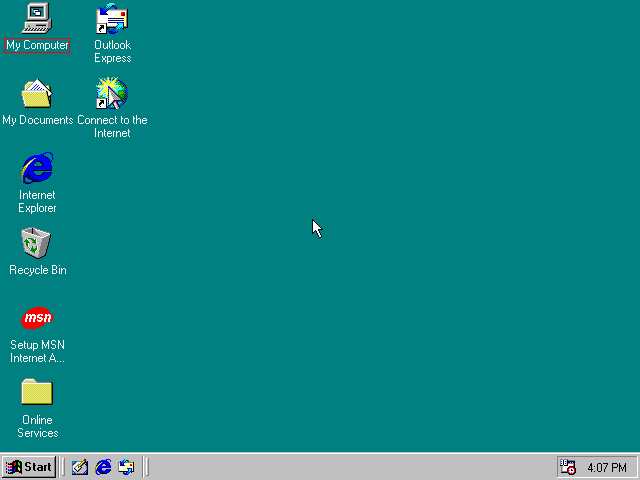
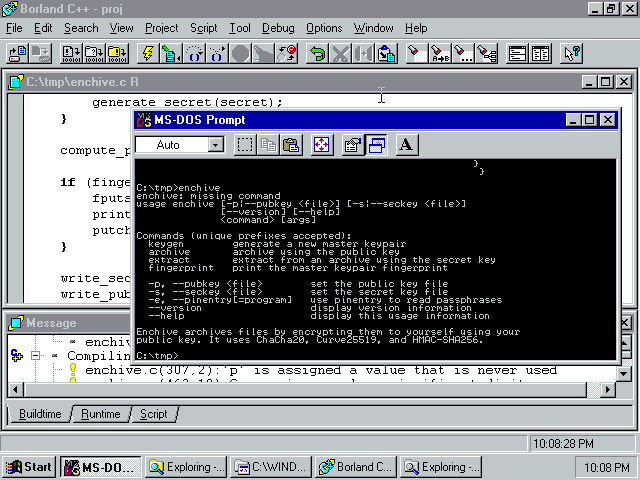
<p><a href="/img/win98/enchive.png"><img src="/img/win98/enchive-thumb.png" alt="" /></a></p>

<p>I thought it would be interesting to revisit this software, to
reevaluate it from a far more experienced perspective. Keep in mind
that C++ wasn’t even standardized yet, and the most recent C standard
was from 1989. Given this, what was it like to be a professional
software developer using a Borland toolchain on Windows 20 years ago?
Was it miserable, made bearable only by ignorance of how much better
the tooling could be? Or maybe it actually wasn’t so bad, and these
tools are better than I expect?</p>

<p>Ultimately my conclusion is that it’s a little bit of both. There are
some significant capability gaps compared to today, but the core
toolchain itself is actually quite reasonable, especially for the mid
1990s.</p>

<h3 id="the-setup">The setup</h3>

<p>Before getting into the evaluation, let’s discuss how I got it all up
and running. While it’s <em>technically</em> possible to run Windows 95 on a
modern x86-64 machine thanks to <a href="/blog/2014/12/09/">the architecture’s extreme backwards
compatibility</a>, it’s more compatible, simpler, and safer to
virtualize it. Most importantly, I can emulate older hardware that
will have better driver support.</p>

<p>Despite that early start in Windows all those years ago, I’m primarily
a Linux user. The premier virtualization solution on Linux these days
is KVM, a kernel module <a href="https://www.redhat.com/en/topics/virtualization/what-is-KVM">that turns Linux into a hypervisor</a> and
makes efficient use of hardware virtualization extensions.
Unfortunately pre-XP Windows doesn’t work well on KVM, so instead I’m
using <a href="https://www.qemu.org/">QEmu</a> (with KVM disabled), a hardware emulator closely
associated with KVM. Since it doesn’t take advantage of hardware
virtualization extensions, it will be slower. This is fine since my
goal is to emulate slow, 20+ year old hardware anyway.</p>

<p>There’s very little practical difference between Windows 95 and
Windows 98. Since Windows 98 runs a lot smoother virtualized, I
decided to go with that instead. This will be perfectly sufficient for
my toolchain evaluation.</p>

<h4 id="software">Software</h4>

<p>To get started, I’ll need an installer for Windows 98. I thought this
would be difficult to find, but there’s a copy available on the
Internet Archive. I don’t know how “legitimate” this is, but it works.
Since it’s running in a virtual machine without network access, I also
don’t really care if this copy is somehow infected with malware.</p>

<p>Internet Archive: <a href="https://archive.org/details/win98se_201607">Windows 98 Second Edition</a></p>

<p>Also on the Internet Archive is a complete copy of Borland C++ 5.02,
with the same caveats of legitimacy. It works, which is good enough for
my purposes.</p>

<p>Internet Archive: <a href="https://archive.org/details/BorlandC5.02">Borland C++ 5.02</a></p>

<p>Thank you Internet Archive!</p>

<h4 id="hardware">Hardware</h4>

<p>I’ve got my software, now to set up the virtualized hardware. First I
create a drive image:</p>

<div class="language-plaintext highlighter-rouge"><div class="highlight"><pre class="highlight"><code>$ qemu-image create -fqcow2 win98.img 8G
</code></pre></div></div>

<p>I gave it 8GB, which is actually a bit overkill. Giving Windows 98 a
virtual hard drive with modern sizes would probably break the
installer. This sort of issue is a common theme among old software,
where there may be complaints about negative available disk space due
to signed integer overflow.</p>

<p>I decided to give the machine 256MB of memory (<code class="language-plaintext highlighter-rouge">-m 256</code>). This is also a
little excessive, but I wanted to be sure memory didn’t limit Borland’s
capabilities. This amount of memory is close to the upper bound, and
going much beyond will likely cause problems with Windows 98.</p>

<p>For the CPU I settled on a Pentium (<code class="language-plaintext highlighter-rouge">-cpu pentium</code>). My original goal
was to go a little simpler with a 486 (<code class="language-plaintext highlighter-rouge">-cpu 486</code>), but the Windows 98
installer kept crashing when I tried this.</p>

<p>I experimented with different configurations for the network card, but
I couldn’t get anything to work. So I’ve disabled networking (<code class="language-plaintext highlighter-rouge">-net
none</code>). The only reason I’d want this is that it would be easier to
move files in and out of the virtual machine.</p>

<p>Finally, here’s how I ran QEmu. The last two lines are only needed when
installing.</p>

<div class="language-plaintext highlighter-rouge"><div class="highlight"><pre class="highlight"><code>$ qemu-system-x86_64 \
    -localtime \
    -cpu pentium \
    -no-acpi \
    -no-hpet \
    -m 256 \
    -hda win98.img \
    -soundhw sb16 \
    -vga cirrus \
    -net none \
    -cdrom "Windows 98 Second Edition.iso" \
    -boot d
</code></pre></div></div>

<p><a href="/img/win98/install.png"><img src="/img/win98/install-thumb.png" alt="" /></a></p>

<h4 id="installation">Installation</h4>

<p>Installation is just a matter of following the instructions. You’ll
need that product key listed on the Internet Archive site.</p>

<p><a href="/img/win98/base.png"><img src="/img/win98/base-thumb.png" alt="" /></a></p>

<p>That copy of Borland is just a big .zip file. This presents two
problems.</p>

<ol>
  <li>
    <p>Without network access, I’ll need to figure out how to get this
inside the virtual machine.</p>
  </li>
  <li>
    <p>This version of Windows doesn’t come with software to unzip this
file. I’d need to find and install an unzip tool first.</p>
  </li>
</ol>

<p>Fortunately I can kill two birds with one stone by converting that .zip
archive into a .iso and mounting it in the virtual machine.</p>

<div class="language-plaintext highlighter-rouge"><div class="highlight"><pre class="highlight"><code>unzip "BORLAND C++.zip"
genisoimage -R -J -o borland.iso "BORLAND C++"
</code></pre></div></div>

<p>Then in the QEmu console (<kbd>C-A-2</kbd>) I attach it:</p>

<div class="language-plaintext highlighter-rouge"><div class="highlight"><pre class="highlight"><code>change ide1-cd0 borland.iso
</code></pre></div></div>

<p>This little trick of generating .iso files and mounting them is how I
will be moving all the other files into the virtual machine.</p>

<h3 id="borland-c">Borland C++</h3>

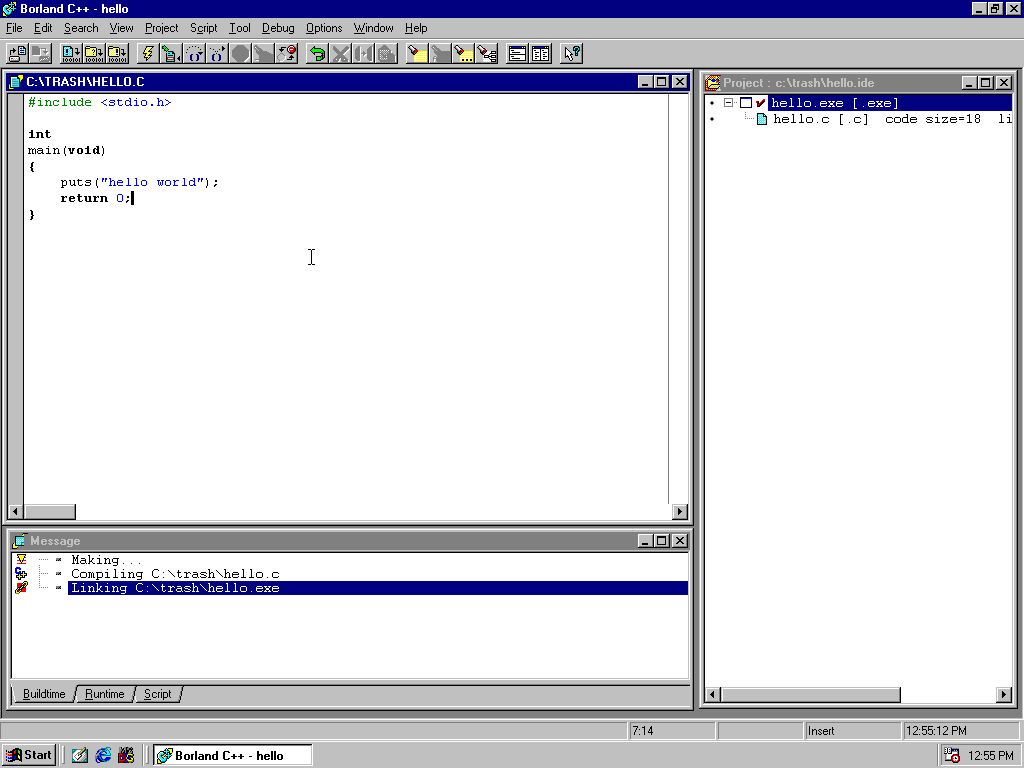
<p>The first thing I did was play around with with Borland IDE. This is
what I would have been using 20 years ago.</p>

<p><a href="/img/win98/ide.png"><img src="/img/win98/ide-thumb.png" alt="" /></a></p>

<p>Despite being Borland <em>C++</em>, I’m personally most interested in its ANSI
C compiler. As I already pointed out, this software pre-dates C++’s
standardization, and a lot has changed over the past two decades. On the
other hand, C <em>hasn’t really changed all that much</em>. The 1999 update to
the C standard (e.g. “C99”) was big and important, but otherwise little
has changed. The biggest drawback is the lack of “declare anywhere”
variables, including in for-loop initializers. Otherwise it’s the same
as writing C today.</p>

<p>To test drive the IDE, I made a couple of test projects, built and ran
them with different options, and poked around with the debugger. The
debugger is actually pretty decent, especially for the 1990s. It can be
operated via the IDE or standalone, so I could use it without firing up
the IDE and making a project.</p>

<p>The toolchain includes an assembler, and I can inspect the compiler’s
assembly output. To nobody’s surprise this is Intel-flavored assembly,
which <a href="http://x86asm.net/articles/what-i-dislike-about-gas/">is very welcome</a>. Imagining myself as a software developer
in the mid 1990s, this means I can see exactly what the compiler’s doing
as well as write some of the performance sensitive parts in assembly if
necessary.</p>

<p>The built-in editor is the worst part of the IDE, which is unfortunate
since it really spoils the whole experience. It’s easy to jump between
warnings and errors, it has incremental search, and it has good syntax
highlighting. But these are the only positive things I can say about it.
If I had to work with this editor full-time, I’d spend my days pretty
irritated.</p>

<h3 id="switch-to-command-line-tools">Switch to command line tools</h3>

<p>Like with the debugger, the Borland people did a good job modularizing
their development tools. As part of the installation process, all of the
Borland command line tools are added to the system <code class="language-plaintext highlighter-rouge">PATH</code> (reminder:
this is a single-user system). This includes compiler, linker,
assembler, debugger, and even an <a href="/blog/2017/08/20/">incomplete implementation</a> of
<code class="language-plaintext highlighter-rouge">make</code>.</p>

<p>With this, I can essentially pretend the IDE doesn’t exist and replace
that crummy editor with something better: Vim.</p>

<p>The last version of Vim to support MS-DOS and Windows 95/98 is Vim 7.3,
released in 2010. I download those binaries, trim a few things from my
<a href="https://github.com/skeeto/dotfiles/blob/master/_vimrc">.vimrc</a>, and smuggle it all into my virtual machine via a
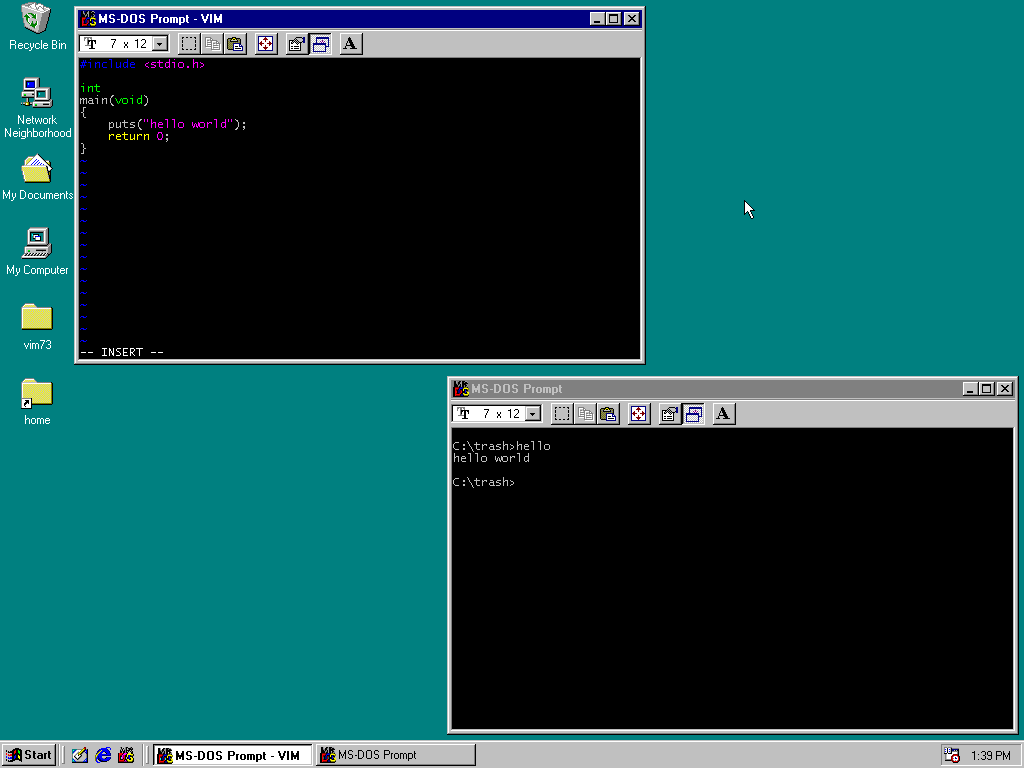
virtual CD. I’ve now got a powerful text editor in Windows 98 and my
situation has drastically improved.</p>

<p><a href="/img/win98/vim.png"><img src="/img/win98/vim-thumb.png" alt="" /></a></p>

<p>Since I hardly use features added since Vim 7.3, this feels <a href="/blog/2017/04/01/">right at
home</a> to me. I can <a href="/blog/2017/08/22/">invoke the build</a> from Vim, and it
can populate the quickfix list from Borland’s output, so I could
actually be fairly productive in these circumstances! I’m honestly
really impressed with how well this all works together.</p>

<p>At this point I only have two significant annoyances:</p>

<ol>
  <li>
    <p>Borland’s command line tools belong to that category of irritating
programs that print their version banner on every invocation.
There’s not even a command line switch to turn this off. All this
noise is quickly tiresome. The <a href="/blog/2016/06/13/">Visual Studio toolchain</a> does
the same thing by default, though it can be turned off (<code class="language-plaintext highlighter-rouge">-nologo</code>).
I dislike that some GNU tools also commit this sin, but at least
GNU limits this to interactive programs.</p>
  </li>
  <li>
    <p>The Windows/DOS command shell and console is <em>even worse</em> <a href="/blog/2017/11/30/">than it
is today</a>. I didn’t think that was possible. This is back when
it was still genuinely DOS and not just pretending to be (e.g. in
NT). The worst part by far is the lack of command history. There’s
no using the up-arrow to get previous commands. There’s no tab
completion. Forward slash is not a substitute for backslash in
paths. If I wanted to improve my productivity, replacing this
console and shell would be the first priority.</p>
  </li>
</ol>

<p><strong>Update</strong>: In an email, Aristotle Pagaltzis informed me that Windows 98
comes with <a href="https://en.wikipedia.org/wiki/DOSKEY">DOSKEY.COM</a>, which provides command history for
COMMAND.EXE. Alternatively there’s <a href="http://paulhoule.com/doskey/">Enhanced DOSKEY.com</a>, an
open source, alternative implementation that also provides tab
completion for commands and filesnames. This makes the console a lot
more usable (and, honestly, in some ways better than the modern
defaults).</p>

<h3 id="building-enchive-with-borland">Building Enchive with Borland</h3>

<p>Last year I wrote <a href="/blog/2017/03/12/">a backup encryption tool called Enchive</a>,
and I still use it regularly. One of my design goals was high
portability since it may be needed to decrypt something important in
the distant future. It should be as <a href="https://en.wikipedia.org/wiki/Software_rot">bit-rot</a>-proof as
possible. <strong>In software, the best way to <em>future</em>-proof is to
<em>past</em>-proof.</strong></p>

<p>If I had a time machine that could send source code back in time, and
I sent Enchive to a competant developer 20 years ago, would they be
able to compile it and run it? If the answer is yes, then that means
Enchive already has 20 years of future-proofing built into it.</p>

<p>To accomplish this, Enchive is 3,300 lines of strict ANSI C,
1989-style, with no dependencies other than the C standard library and
a handful of operating system functions — e.g. functionality not in
the C standard library. In practice, any ANSI C compiler targeting
either POSIX, or Windows 95 or later, should be able to compile it.</p>

<p>My Windows 98 virtual machine includes an ANSI C compiler, and can be
used to simulate this time machine. I generated an “amalgamation” build
(<code class="language-plaintext highlighter-rouge">make amalgamation</code>) — essentially a concatenation of all the source
files — and sent this into the virtual machine. Before Borland was able
to compile it, I needed to make three small changes.</p>

<p>First, Enchive includes <code class="language-plaintext highlighter-rouge">stdint.h</code> to get fixed-width integers needed
for the encryption routines. This header comes from C99, and C89 has
no equivalent. I anticipated this problem from the beginning and made
it easy for the person performing the build to correct it. This header
is included exactly once, in <code class="language-plaintext highlighter-rouge">config.h</code>, and this is placed at the top
of the amalgamation build. The include only needs to be replaced with
a handful of manual typedefs. For Borland that looks like this:</p>

<div class="language-c highlighter-rouge"><div class="highlight"><pre class="highlight"><code><span class="k">typedef</span> <span class="kt">unsigned</span> <span class="kt">char</span>    <span class="kt">uint8_t</span><span class="p">;</span>
<span class="k">typedef</span> <span class="kt">unsigned</span> <span class="kt">short</span>   <span class="kt">uint16_t</span><span class="p">;</span>
<span class="k">typedef</span> <span class="kt">unsigned</span> <span class="kt">long</span>    <span class="kt">uint32_t</span><span class="p">;</span>
<span class="k">typedef</span> <span class="kt">unsigned</span> <span class="n">__int64</span> <span class="kt">uint64_t</span><span class="p">;</span>

<span class="k">typedef</span> <span class="kt">long</span>             <span class="kt">int32_t</span><span class="p">;</span>
<span class="k">typedef</span> <span class="n">__int64</span>          <span class="kt">int64_t</span><span class="p">;</span>

<span class="cp">#define INT8_C(n)   (n)
#define INT16_C(n)  (n)
#define INT32_C(n)  (n##U)
</span></code></pre></div></div>

<p>Second, in more recent versions of Windows, <code class="language-plaintext highlighter-rouge">GetFileAttributes()</code> can
return the value <code class="language-plaintext highlighter-rouge">INVALID_FILE_ATTRIBUTES</code>. Checking for an error that
cannot happen is harmless, but this value isn’t defined in Borland’s
SDK. I only had to eliminate that check.</p>

<p>Third, the <a href="https://msdn.microsoft.com/en-us/library/windows/desktop/aa379942(v=vs.85).aspx"><code class="language-plaintext highlighter-rouge">CryptGenRandom()</code></a> interface isn’t defined in
Borland’s SDK. This is used by Enchive to generate keys. MSDN reports
this function wasn’t available until Windows XP, but it’s definitely
there in Windows 98, exported by ADVAPI32.dll. I’m able to call it,
though it always reports an error. Perhaps it’s been disabled in this
version due to <a href="https://en.wikipedia.org/wiki/Export_of_cryptography_from_the_United_States">cryptographic export restrictions</a>?</p>

<p>Regardless of what’s wrong, I ripped this out and replaced it with a
fatal error. This version of Enchive can’t generate new keys — unless
derived from a passphrase — nor encrypt files, including the use of a
protection key to encrypt the secret key. However, it <em>can</em> decrypt
files, which is the important part that needs to be future-proofed.</p>

<p>With this three changes — which took me about 10 minutes to sort out —
Enchive builds and runs, and it correctly decrypts files I encrypted on
Linux. So Enchive has at least 20 years of past-proofing! The
screenshot at the top of this article shows it running successfully in
an MS-DOS console window.</p>

<h3 id="whats-wrong-whats-missing">What’s wrong? What’s missing?</h3>

<p>I mentioned that there were some gaps. The most obvious is the lack of
the standard POSIX utilities, especially a decent shell. I don’t know if
any had been ported to Windows in the mid 1990s. But that could be
solved one way or another without too much trouble, even if it meant
doing some of that myself.</p>

<p>No, the biggest capability I’d miss, and which wouldn’t be easily
obtained, is Git, or a least a decent source control system. I really
don’t want to work without proper source control. Git’s support for
Windows is second tier, and the port to modern Windows is already a
bit of a hack. Getting it to run in Windows 98 would probably be a
challenge, especially if I had to compile it with Borland.</p>

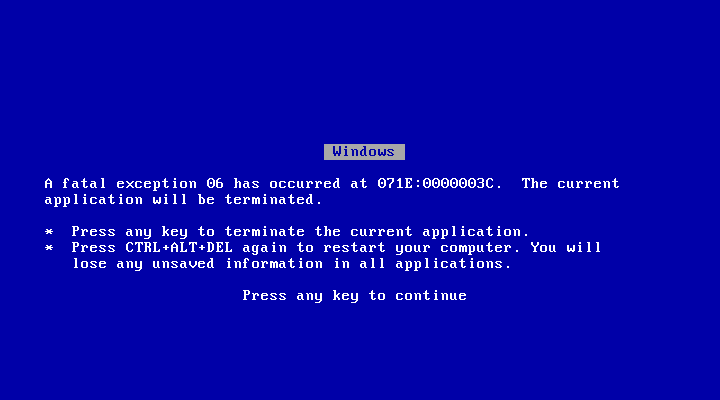
<p>The other major issue is the lack of stability. In this experiment, I’ve
been seeing this screen <em>a lot</em>:</p>

<p><a href="/img/win98/bsod.png"><img src="/img/win98/bsod-thumb.png" alt="" /></a></p>

<p>I remember Windows crashing a lot back in those days, and it certainly
had a bad reputation for being unstable, but this is far worse than I
remembered. While the hardware emulator may be <em>somewhat</em> at fault here,
keep in mind that I never installed third party drivers. Most of these
crashes are Windows’ fault. I found I can reliably bring the whole
system down with a single <code class="language-plaintext highlighter-rouge">GetProcAddress()</code> call on a system DLL. The
only way I can imagine this instability was so tolerated back then was
general ignorance that computing could be so much better.</p>

<p>I was tempted to write this article in Vim on Windows 98, but all this
crashing made me too nervous. I didn’t want some stupid filesystem
corruption to wipe out my work. Too risky.</p>

<h3 id="a-better-alternative">A better alternative</h3>

<p>If I was stuck working in Windows 98 — or was at least targeting it as a
platform — but had access to a modern tooling ecosystem, could I do
better than Borland? Yes! Programs built by <a href="https://mingw-w64.org/doku.php">Mingw-w64</a> can be
run even as far back as Windows 95.</p>

<p>Now, there’s a catch. I thought it would be this simple:</p>

<div class="language-plaintext highlighter-rouge"><div class="highlight"><pre class="highlight"><code>$ i686-w64-mingw32-gcc -Os hello.c
</code></pre></div></div>

<p>But when I brought the resulting binary into the virtual machine it
crashed when ran it: illegal instruction. Turns out it contained a
conditional move (<code class="language-plaintext highlighter-rouge">cmov</code>) which is an instruction not available until
the Pentium Pro (686). The “pentium” emulation is just a 586.</p>

<p>I tried to disable <code class="language-plaintext highlighter-rouge">cmov</code> by picking the specific architecture:</p>

<div class="language-plaintext highlighter-rouge"><div class="highlight"><pre class="highlight"><code>$ i686-w64-mingw32-gcc -march=pentium -Os hello.c
</code></pre></div></div>

<p>This still didn’t work because the statically-linked part of the CRT
contained the <code class="language-plaintext highlighter-rouge">cmov</code>. I’d have to recompile that as well.</p>

<p>I could have switched the QEmu options to “upgrade” to a Pentium Pro,
but remember that my goal was really the 486. Fortunately this was easy
to fix: compile my own Mingw-w64 cross-compiler. I’ve done this a number
of times before, so I knew it wouldn’t be difficult.</p>

<p>I could go step by step, but it’s all fairly well documented in the
Mingw-64 “howto-build” document. I used GCC 7.3 (the latest version),
and for the target I picked “i486-w64-mingw32”. When it was done I could
compile binaries on Linux to run in my Windows 98 virtual machine:</p>

<div class="language-plaintext highlighter-rouge"><div class="highlight"><pre class="highlight"><code>$ i486-w64-mingw32-gcc -Os hello.c
</code></pre></div></div>

<p>This should enable quite a bit of modern software to run inside my
virtual machine if I so wanted. I didn’t actually try this (yet?),
but, to take this concept all the way, I could use this cross-compiler
to cross-compile Mingw-w64 itself to run inside the virtual machine,
directly replacing Borland C++.</p>

<p>And the only thing I’d miss about Borland is its debugger.</p>

]]>
    </content>
  </entry>


  <entry>
    <title>Gap Buffers Are Not Optimized for Multiple Cursors</title>
    <link rel="alternate" type="text/html" href="https://nullprogram.com/blog/2017/09/07/"/>
    <id>urn:uuid:8c80d068-2342-356a-9b78-f180806418a4</id>
    <updated>2017-09-07T01:34:04Z</updated>
    <category term="emacs"/><category term="c"/><category term="vim"/>
    <content type="html">
      <![CDATA[<p>Gap buffers are a common data structure for representing a text buffer
in a text editor. Emacs famously uses gap buffers — long-standing proof
that gap buffers are a perfectly sufficient way to represent a text
buffer.</p>

<ul>
  <li>
    <p>Gap buffers are <em>very</em> easy to implement. A bare minimum
implementation is about 60 lines of C.</p>
  </li>
  <li>
    <p>Gap buffers are especially efficient for the majority of typical
editing commands, which tend to be clustered in a small area.</p>
  </li>
  <li>
    <p>Except for the gap, the content of the buffer is contiguous, making
the search and display implementations simpler and more efficient.
There’s also the potential for most of the gap buffer to be
memory-mapped to the original file, though typical encoding and
decoding operations prevent this from being realized.</p>
  </li>
  <li>
    <p>Due to having contiguous content, saving a gap buffer is basically
just two <code class="language-plaintext highlighter-rouge">write(2)</code> system calls. (Plus <a href="https://www.youtube.com/watch?v=LMe7hf2G1po"><code class="language-plaintext highlighter-rouge">fsync(2)</code>, etc.</a>)</p>
  </li>
</ul>

<p>A gap buffer is really a pair of buffers where one buffer holds all of
the content before the cursor (or <em>point</em> for Emacs), and the other
buffer holds the content after the cursor. When the cursor is moved
through the buffer, characters are copied from one buffer to the
other. Inserts and deletes close to the gap are very efficient.</p>

<p>Typically it’s implemented as a single large buffer, with the
pre-cursor content at the beginning, the post-cursor content at the
end, and the gap spanning the middle. Here’s an illustration:</p>

<p><img src="/img/gap-buffer/intro.gif" alt="" /></p>

<p>The top of the animation is the display of the text content and cursor
as the user would see it. The bottom is the gap buffer state, where
each character is represented as a gray block, and a literal gap for
the cursor.</p>

<p>Ignoring for a moment more complicated concerns such as undo and
Unicode, a gap buffer could be represented by something as simple as
the following:</p>

<div class="language-c highlighter-rouge"><div class="highlight"><pre class="highlight"><code><span class="k">struct</span> <span class="n">gapbuf</span> <span class="p">{</span>
    <span class="kt">char</span> <span class="o">*</span><span class="n">buf</span><span class="p">;</span>
    <span class="kt">size_t</span> <span class="n">total</span><span class="p">;</span>  <span class="cm">/* total size of buf */</span>
    <span class="kt">size_t</span> <span class="n">front</span><span class="p">;</span>  <span class="cm">/* size of content before cursor */</span>
    <span class="kt">size_t</span> <span class="n">gap</span><span class="p">;</span>    <span class="cm">/* size of the gap */</span>
<span class="p">};</span>
</code></pre></div></div>

<p>This is close to <a href="http://git.savannah.gnu.org/cgit/emacs.git/tree/src/buffer.h?h=emacs-25.2#n425">how Emacs represents it</a>. In the structure
above, the size of the content after the cursor isn’t tracked directly,
but can be computed on the fly from the other three quantities. That is
to say, this data structure is <em>normalized</em>.</p>

<p>As an optimization, the cursor could be tracked separately from the
gap such that non-destructive cursor movement is essentially free. The
difference between cursor and gap would only need to be reconciled for
a destructive change — an insert or delete.</p>

<p>A gap buffer certainly isn’t the only way to do it. For example, the
original <a href="https://ecc-comp.blogspot.com/2015/05/a-brief-glance-at-how-5-text-editors.html">vi used an array of lines</a>, which sort of explains
some of its quirky <a href="http://vimhelp.appspot.com/options.txt.html#'backspace'">line-oriented idioms</a>. The BSD clone of vi, nvi,
<a href="https://en.wikipedia.org/wiki/Nvi">uses an entire database</a> to represent buffers. Vim uses a fairly
complex <a href="https://en.wikipedia.org/wiki/Rope_(data_structure)">rope</a>-like <a href="https://github.com/vim/vim/blob/e723c42836d971180d1bf9f98916966c5543fff1/src/memline.c">data structure</a> with <a href="http://www.free-soft.org/FSM/english/issue01/vim.html">page-oriented
blocks</a>, which may be stored out-of-order in its swap file.</p>

<h3 id="multiple-cursors">Multiple cursors</h3>

<p><a href="http://emacsrocks.com/e13.html"><em>Multiple cursors</em></a> is fairly recent text editor invention that
has gained a lot of popularity recent years. It seems every major
editor either has the feature built in or a readily-available
extension. I myself used Magnar Sveen’s <a href="https://github.com/magnars/multiple-cursors.el">well-polished package</a>
for several years. Though obviously the concept didn’t originate in
Emacs or else it would have been called <em>multiple points</em>, which
doesn’t quite roll off the tongue quite the same way.</p>

<p>The concept is simple: If the same operation needs to done in many
different places in a buffer, you place a cursor at each position, then
drive them all in parallel using the same commands. It’s super flashy
and great for impressing all your friends.</p>

<p>However, as a result of <a href="/blog/2017/04/01/">improving my typing skills</a>, I’ve
come to the conclusion that <a href="https://medium.com/@schtoeffel/you-don-t-need-more-than-one-cursor-in-vim-2c44117d51db">multiple cursors is all hat and no
cattle</a>. It doesn’t compose well with other editing commands, it
doesn’t scale up to large operations, and it’s got all sorts of flaky
edge cases (off-screen cursors). Nearly anything you can do with
multiple cursors, you can do better with old, well-established editing
paradigms.</p>

<p>Somewhere around 99% of my multiple cursors usage was adding a common
prefix to a contiguous serious of lines. As similar brute force
options, Emacs already has rectangular editing, and Vim already has
visual block mode.</p>

<p>The most sophisticated, flexible, and robust alternative is a good old
macro. You can play it back anywhere it’s needed. You can zip it across
a huge buffer. The only downside is that it’s less flashy and so you’ll
get invited to a slightly smaller number of parties.</p>

<p>But if you don’t buy my arguments about multiple cursors being
tasteless, there’s still a good technical argument: <strong>Gap buffers are
not designed to work well in the face of multiple cursors!</strong></p>

<p>For example, suppose we have a series of function calls and we’d like to
add the same set of arguments to each. It’s a classic situation for a
macro or for multiple cursors. Here’s the original code:</p>

<div class="language-plaintext highlighter-rouge"><div class="highlight"><pre class="highlight"><code>foo();
bar();
baz();
</code></pre></div></div>

<p>The example is tiny so that it will fit in the animations to come.
Here’s the desired code:</p>

<div class="language-plaintext highlighter-rouge"><div class="highlight"><pre class="highlight"><code>foo(x, y);
bar(x, y);
baz(x, y);
</code></pre></div></div>

<p>With multiple cursors you would place a cursor inside each set of
parenthesis, then type <code class="language-plaintext highlighter-rouge">x, y</code>. Visually it looks something like this:</p>

<p><img src="/img/gap-buffer/illusion.gif" alt="" /></p>

<p>Text is magically inserted in parallel in multiple places at a time.
However, if this is a text editor that uses a gap buffer, the
situation underneath isn’t quite so magical. The entire edit doesn’t
happen at once. First the <code class="language-plaintext highlighter-rouge">x</code> is inserted in each location, then the
comma, and so on. The edits are not clustered so nicely.</p>

<p>From the gap buffer’s point of view, here’s what it looks like:</p>

<p><img src="/img/gap-buffer/multicursors.gif" alt="" /></p>

<p>For every individual character insertion the buffer has to visit each
cursor in turn, performing lots of copying back and forth. The more
cursors there are, the worse it gets. For an edit of length <code class="language-plaintext highlighter-rouge">n</code> with
<code class="language-plaintext highlighter-rouge">m</code> cursors, that’s <code class="language-plaintext highlighter-rouge">O(n * m)</code> calls to <code class="language-plaintext highlighter-rouge">memmove(3)</code>. Multiple cursors
scales badly.</p>

<p>Compare that to the old school hacker who can’t be bothered with
something as tacky and <em>modern</em> (eww!) as multiple cursors, instead
choosing to record a macro, then play it back:</p>

<p><img src="/img/gap-buffer/macros.gif" alt="" /></p>

<p>The entire edit is done locally before moving on to the next location.
It’s perfectly in tune with the gap buffer’s expectations, only needing
<code class="language-plaintext highlighter-rouge">O(m)</code> calls to <code class="language-plaintext highlighter-rouge">memmove(3)</code>. Most of the work flows neatly into the
gap.</p>

<p>So, don’t waste your time with multiple cursors, especially if you’re
using a gap buffer text editor. Instead get more comfortable with your
editor’s macro feature. If your editor doesn’t have a good macro
feature, get a new editor.</p>

<p>If you want to make your own gap buffer animations, here’s the source
code. It includes a tiny gap buffer implementation:</p>

<ul>
  <li><a href="https://github.com/skeeto/gap-buffer-animator">https://github.com/skeeto/gap-buffer-animator</a></li>
</ul>

]]>
    </content>
  </entry>


  <entry>
    <title>Vim vs. Emacs: the Working Directory</title>
    <link rel="alternate" type="text/html" href="https://nullprogram.com/blog/2017/08/22/"/>
    <id>urn:uuid:f27469f8-4731-35b5-1c55-4bbeb200fcad</id>
    <updated>2017-08-22T04:51:36Z</updated>
    <category term="vim"/><category term="emacs"/>
    <content type="html">
      <![CDATA[<p>Vim and Emacs have different internals models for the current working
directory, and these models influence the overall workflow for each
editor. They decide how files are opened, how shell commands are
executed, and how the build system is operated. These effects even reach
outside the editor to influence the overall structure of the project
being edited.</p>

<p>In the traditional unix model, which was <a href="https://web.archive.org/web/0/https://blogs.msdn.microsoft.com/oldnewthing/20101011-00/?p=12563">eventually adopted</a>
everywhere else, each process has a particular working directory
tracked by the operating system. When a process makes a request to the
operating system using a relative path — a path that doesn’t begin
with a slash — the operating system uses the process’ working
directory to convert the path into an absolute path. When a process
forks, its child starts in the same directory. A process can change
its working directory at any time using <a href="http://pubs.opengroup.org/onlinepubs/9699919799/functions/chdir.html"><code class="language-plaintext highlighter-rouge">chdir(2)</code></a>, though
most programs never need to do it. The most obvious way this system
call is exposed to regular users is through the shell’s built-in <code class="language-plaintext highlighter-rouge">cd</code>
command.</p>

<p>Vim’s spiritual heritage is obviously rooted in vi, one of the classic
unix text editors, and the <a href="http://pubs.opengroup.org/onlinepubs/9699919799/utilities/vi.html">most elaborate text editor standardized by
POSIX</a>. Like vi, Vim closely follows the unix model for working
directories. At any given time Vim has exactly one working directory.
Shell commands that are run within Vim will start in Vim’s working
directory. Like a shell, the <code class="language-plaintext highlighter-rouge">cd</code> ex command changes and queries Vim’s
working directory.</p>

<p>Emacs eschews this model and instead each buffer has its own working
directory tracked using a buffer-local variable, <code class="language-plaintext highlighter-rouge">default-directory</code>.
Emacs internally simulates working directories for its buffers like an
operating system, resolving absolute paths itself, giving credence to
the idea that Emacs is an operating system (“lacking only a decent
editor”). Perhaps this model comes from ye olde lisp machines?</p>

<p>In contrast, Emacs’ <code class="language-plaintext highlighter-rouge">M-x cd</code> command manipulates the local variable
and has no effect on the Emacs process’ working directory. In fact,
Emacs completely hides its operating system working directory from
Emacs Lisp. This can cause some trouble if that hidden working
directory happens to be sitting on filesystem you’d like to unmount.</p>

<p>Vim can be configured to simulate Emacs’ model with its <code class="language-plaintext highlighter-rouge">autochdir</code>
option. When set, Vim will literally <code class="language-plaintext highlighter-rouge">chdir(2)</code> each time the user
changes buffers, switches windows, etc. To the user, this feels just
like Emacs’ model, but this is just a convenience, and the core
working directory model is still the same.</p>

<h3 id="single-instance-editors">Single instance editors</h3>

<p>For most of my Emacs career, I’ve stuck to running a single,
long-lived Emacs instance no matter how many different tasks I’m
touching simultaneously. I start the Emacs daemon shortly after
logging in, and it continues running until I log out — typically only
when the machine is shut down. It’s common to have multiple Emacs
windows (frames) for different tasks, but they’re all bound to the
same daemon process.</p>

<p>While <a href="https://github.com/jwiegley/use-package">with care</a> it’s possible to have a complex, rich Emacs
configuration that doesn’t significantly impact Emacs’ startup time, the
general consensus is that Emacs is slow to start. But since it has a
really solid daemon, this doesn’t matter: hardcore Emacs users only ever
start Emacs occasionally. The rest of the time they’re launching
<code class="language-plaintext highlighter-rouge">emacsclient</code> and connecting to the daemon. Outside of system
administration, it’s the most natural way to use Emacs.</p>

<p>The case isn’t so clear for Vim. Vim is so fast that many users fire
it up on demand and exit when they’ve finished the immediate task. At
the other end of the spectrum, others <a href="https://vimeo.com/4446112">advocate using a single
instance of Vim</a> like running a single Emacs daemon. In <a href="/blog/2017/04/01/">my
initial dive into Vim</a>, I tried the single-instance, Emacs way of
doing things. I set <code class="language-plaintext highlighter-rouge">autochdir</code> out of necessity and pretended each
buffer had its own working directory.</p>

<p>At least for me, this isn’t the right way to use Vim, and it all comes
down to working directories. <strong>I want Vim to be anchored at the
project root</strong> with one Vim instance per project. Everything is
smoother when it happens in the context of the project’s root
directory, from opening files, to running shell commands (<code class="language-plaintext highlighter-rouge">ctags</code> in
particular), to invoking the build system. With <code class="language-plaintext highlighter-rouge">autochdir</code>, these
actions are difficult to do correctly, particularly the last two.</p>

<h3 id="invoking-the-build">Invoking the build</h3>

<p>I suspect the Emacs’ model of per-buffer working directories has, in a
<a href="https://en.wikipedia.org/wiki/Linguistic_relativity">Sapir-Whorf</a> sort of way, been responsible for leading developers
towards <a href="/blog/2017/08/20/">poorly-designed, recursive Makefiles</a>. Without a global
concept of working directory, it’s inconvenient to invoke the build
system (<code class="language-plaintext highlighter-rouge">M-x compile</code>) in some particular grandparent directory that
is the root of the project. If each directory has its own Makefile, it
usually makes sense to invoke <code class="language-plaintext highlighter-rouge">make</code> in the same directory as the file
being edited.</p>

<p>Over the years I’ve been reinventing the same solution to this
problem, and it wasn’t until I spent time with Vim and its alternate
working directory model that I truly understood the problem. Emacs
itself has long had a solution lurking deep in its bowels, unseen by
daylight: <em>dominating files</em>. The function I’m talking about is
<code class="language-plaintext highlighter-rouge">locate-dominating-file</code>:</p>

<blockquote>
  <p><code class="language-plaintext highlighter-rouge">(locate-dominating-file FILE NAME)</code></p>

  <p>Look up the directory hierarchy from FILE for a directory containing
NAME. Stop at the first parent directory containing a file NAME, and
return the directory. Return nil if not found. Instead of a string,
NAME can also be a predicate taking one argument (a directory) and
returning a non-nil value if that directory is the one for which we’re
looking.</p>
</blockquote>

<p>The trouble of invoking the build system at the project root is that
Emacs doesn’t really have a concept of a project root. It doesn’t know
where it is or how to find it. The vi model inherited by Vim is to
leave the working directory at the project root. While Vim can
simulate Emacs’ working directory model, Emacs cannot (currently)
simulate Vim’s model.</p>

<p>Instead, by identifying a file name unique to the project’s root (i.e.
a “dominating” file) such as <code class="language-plaintext highlighter-rouge">Makefile</code> or <code class="language-plaintext highlighter-rouge">build.xml</code>, then
<code class="language-plaintext highlighter-rouge">locate-dominating-file</code> can discover the project root. All that’s
left is wrapping <code class="language-plaintext highlighter-rouge">M-x compile</code> so that <code class="language-plaintext highlighter-rouge">default-directory</code> is
temporarily adjusted to the project’s root.</p>

<p>That looks <em>very</em> roughly like this (and needs more work):</p>

<div class="language-cl highlighter-rouge"><div class="highlight"><pre class="highlight"><code><span class="p">(</span><span class="nb">defun</span> <span class="nv">my-compile</span> <span class="p">()</span>
  <span class="p">(</span><span class="nv">interactive</span><span class="p">)</span>
  <span class="p">(</span><span class="k">let</span> <span class="p">((</span><span class="nv">default-directory</span> <span class="p">(</span><span class="nv">locate-dominating-file</span> <span class="s">"."</span> <span class="s">"Makefile"</span><span class="p">)))</span>
    <span class="p">(</span><span class="nb">compile</span> <span class="s">"make"</span><span class="p">)))</span>
</code></pre></div></div>

<p>It’s a pattern I’ve used <a href="https://github.com/skeeto/.emacs.d/blob/e8af63ca3585598f5e509bc274e0bb3b875206d3/lisp/ctags.el#L40">again</a> and <a href="https://github.com/skeeto/.emacs.d/blob/e8af63ca3585598f5e509bc274e0bb3b875206d3/etc/compile-bind.el#L38">again</a> and
<a href="https://github.com/skeeto/ant-project-mode/blob/335070891f1fabe8d3205418374a68bb13cec8c0/ant-project-mode.el#L211">again</a>, working against the same old friction. By running one
Vim instance per project at the project’s root, I get the correct
behavior for free.</p>

]]>
    </content>
  </entry>


  <entry>
    <title>Switching to the Mutt Email Client</title>
    <link rel="alternate" type="text/html" href="https://nullprogram.com/blog/2017/06/15/"/>
    <id>urn:uuid:ef3edda3-ddaa-37cd-6bfc-fc9d13cd3414</id>
    <updated>2017-06-15T21:55:01Z</updated>
    <category term="vim"/><category term="debian"/>
    <content type="html">
      <![CDATA[<p><em>Note: The way I manage my email wouldn’t really work for most people,
so don’t read this as a recommendation. This is just a discussion of
how I prefer to use email.</em></p>

<p>It was almost four years ago I switched from webmail to a customized
email configuration <a href="/blog/2013/09/03/">based on Notmuch and Emacs</a>. Notmuch served
as both as a native back-end that provided indexing and tagging, as well
as a front-end, written in Emacs Lisp. It dramatically improved my email
experience, and I wished I had done it earlier. I’ve really enjoyed
having so much direct control over my email.</p>

<p>However, I’m always fiddling with things — fiddling feels a lot more
productive than it actually is — and last month I re-invented my email
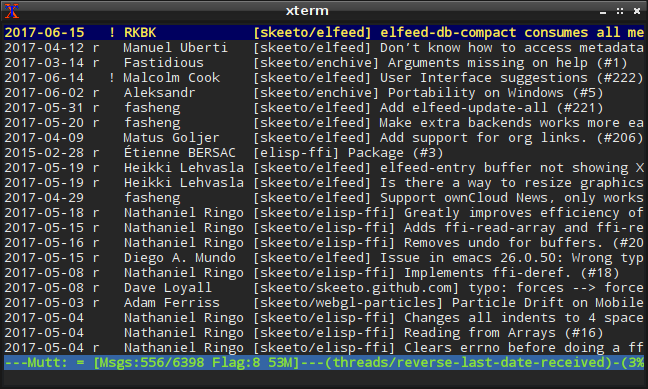
situation, this time switching to a combination of <a href="http://www.mutt.org/">Mutt</a>,
<a href="http://www.vim.org/">Vim</a>, <a href="https://www.djcbsoftware.nl/code/mu/">mu</a>, and <a href="https://tmux.github.io/">tmux</a>. The entirety of my email
interface now resides inside a terminal, and I’m enjoying it even more.
I feel I’ve “leveled up” again in my email habits.</p>

<p><a href="/img/screenshot/mutt.png"><img src="/img/screenshot/mutt-thumb.png" alt="" /></a></p>

<p>On the server-side I also switched from Exim to Postfix and procmail,
making the server configuration a whole lot simpler. Including
SpamAssassin, it’s just three lines added to the default Debian
configuration. It leaves a lot less room for error, and I could rebuild
it from scratch with little trouble if there was an emergency. My
previous configuration required quite a bit of system configuration,
such as relying on <a href="http://inotify.aiken.cz/?section=incron&amp;page=about">incron</a> to sort incoming mail, particularly
spam, but procmail now does this job more cleanly.</p>

<h3 id="towards-robustness">Towards Robustness</h3>

<p>Over the years I’ve gotten less patient when it comes to <a href="https://www.youtube.com/watch?v=oyLBGkS5ICk">dealing with
breaking changes</a> in software, and I’ve gotten more conservative
about system stability. Continuously updating my configurations and
habits to the latest software changes was an interesting challenge
earlier in my career, but today there are much better uses of my time.
Debian Stable, my preferred operating system, runs at pretty much the
perfect pace for me.</p>

<p>Following these changing preferences, one of the biggest motivations for
my recent email change was to make my email setup more robust and
stable. Until now, email was tied tightly to Emacs, with a configuration
drawing directly from <a href="https://melpa.org/">MELPA</a>, pulling in the bleeding edge
version of every package I use. Breaking changes arrive at unexpected
times, and occasionally the current version of a package temporarily
doesn’t work. Usually it’s because the developer pushed a bad commit
right before the latest MELPA build, and so the package is broken for a
few hours or days. I’ve been <a href="https://github.com/skeeto/elfeed/issues/202">guilty of this myself</a>. MELPA
Stable is intended to address these issues, but it seems to break more
often than normal MELPA. For example, at the time of this writing,
<a href="https://github.com/emacs-evil/evil">Evil</a> is not installable via MELPA Stable due to an unmet
dependency.</p>

<p>Tying something as vital as email to this Rube Goldberg machine made me
nervous. Access to my email depended on a number of independent systems
of various levels of stability to mostly work correctly. My switch to
Mutt cut this down to just a couple of very stable systems.</p>

<h3 id="formatflowed">format=flowed</h3>

<p>I’ve long believed HTML email is an abomination that should never have
been invented. Text is the ideal format for email, and there are a
number of specifications to make it work well across different systems.
One of those standards is <a href="https://tools.ietf.org/html/rfc3676">RFC 3676</a>, colloquially named
<a href="https://joeclark.org/ffaq.html">format=flowed</a>, or just f=f.</p>

<p>Messages encoded with f=f allow mail clients to safely reflow the
paragraphs to nicely fit the user’s display, whether that display be
thinner or wider than the sender’s original message. It’s also
completely compatible with mail clients that don’t understand
format=flowed, which will display the message as the sender originally
wrapped it.</p>

<p>The gist of f=f is that messages can have both “soft” and “hard” line
breaks. If a line ends with a space, then it’s a soft line break. The
mail client can safely reflow lines separated by a soft line break.
Without the trailing space, it’s a hard line break, which prohibits
flowing with the next line. The last line of a paragraph ends with a
hard line break. It’s also used for text that shouldn’t reflow, such as
code samples.</p>

<p>I’ll illustrate using an underscore in place of a space, so that you can
see it:</p>

<div class="language-plaintext highlighter-rouge"><div class="highlight"><pre class="highlight"><code>This is a message in the format=flowed style, allowing_
mail clients to flow this message nicely in displays of_
different widths.

&gt; This is an example of a quote block in a message,_
&gt; which is supported by the format=flowed specification.
&gt;&gt; It also supports nested quote blocks, which means_
&gt;&gt; this paragraph won't flow into the previous.
</code></pre></div></div>

<p>The RFC covers edge cases that require special “space-stuffing” rules,
but, when editing a text email in an editor, you only need to think
about soft and hard line breaks. In my case, Mutt takes care of the rest
of the details.</p>

<p>Unfortunately <a href="https://www.emacswiki.org/emacs/GnusFormatFlowed">Emacs’s lacks decent support for f=f</a>, though
I’m sure a minor mode could be written to make it work well. On the
other hand, Vim has been <a href="/blog/2017/04/01/">playing an increasing role in my day-to-day
editing</a>, and it has excellent built-in support for f=f. Since I’m
now using Vim to compose all of my email, I get it for free.</p>

<p>First, I tell Mutt that I want to use f=f in my <code class="language-plaintext highlighter-rouge">.muttrc</code>:</p>

<div class="language-plaintext highlighter-rouge"><div class="highlight"><pre class="highlight"><code>set text_flowed
</code></pre></div></div>

<p>Then in Vim, I add the <code class="language-plaintext highlighter-rouge">w</code> flag to <code class="language-plaintext highlighter-rouge">formatoptions</code>, which tells it to
wrap paragraphs using soft line breaks.</p>

<div class="language-plaintext highlighter-rouge"><div class="highlight"><pre class="highlight"><code>set fo+=w
</code></pre></div></div>

<p>If I want to inspect my f=f formatting, I temporarily enable the <code class="language-plaintext highlighter-rouge">list</code>
option, which displays a <code class="language-plaintext highlighter-rouge">$</code> for all newlines.</p>

<div class="language-plaintext highlighter-rouge"><div class="highlight"><pre class="highlight"><code>set list
</code></pre></div></div>

<p>Although few people would notice a difference, I feel a little bad for
<em>not</em> using f=f all these years! A few people may have endured some
ugly, non-flowing emails from me. My only condolance is that at least it
wasn’t HTML.</p>

<p>It’s not all roses, though. When I reply to a message, Mutt doesn’t
insert the quoted text as f=f into my reply, so I have to massage it
into f=f myself. Also, just as GitHub doesn’t support Markdown in email
responses, neither does it support f=f. When I reply to issues by email,
GitHub won’t nicely reflow my carefully crafted f=f message, needlessly
making email responses an inferior option.</p>

<h3 id="features-unneeded">Features unneeded</h3>

<p>One reason I didn’t choose this particular email arrangement 4 years ago
was that PGP support was one of my prime requirements. Mutt has solid
PGP support, but, with a Maildir setup (i.e. not IMAP), I’d have to use
the key on the server, which was out of the question. Since <a href="/blog/2017/03/12/">I no longer
care about PGP</a>, my email requirements are more relaxed.</p>

<p>Over the years wasn’t making much use of Notmuch’s tagging system. I
only used two tags: “unread” and “inbox” (e.g. read, but still needs
attention). Otherwise I’d use Notmuch’s powerful search to find what I
wanted. I still needed to keep track of the tags I was using, so the
Notmuch index, nearly as large as the email messages themselves, became
part of my mail backup.</p>

<p>The <a href="https://cr.yp.to/proto/maildir.html">Maildir format</a> itself supports some flags: passed (P),
replied (R), seen (S), trashed (T), draft (D), and flagged (F). These
are stored in the message’s filename. In my new configuration, the
“seen” tag (inversely) takes the place of Notmuch’s “unread” tag. The
“flagged” tag takes place of the “inbox” tag. Normally in Mutt you’d use
mailboxes — i.e. Maildir subdirectories — for something like this, but I
prefer all my mail to sit in one big bucket. Search, don’t sort.</p>

<p>Since the two flags are part of the filename, I no longer need to
include a tag database (i.e. the entire Notmuch index) in the backup,
and my mail backups are much smaller. I could continue to use Notmuch
for searching, but I’ve settled on mu instead. When I perform a search,
mu writes the results to a temporary Maildir using symbolic links, which
I visit with Mutt. The mu index is transient and doesn’t need to be
backed up.</p>

<p>Mu also manages my contacts alias list. It can produce a Mutt-style
alias file based on the contents of my Maildir:</p>

<div class="language-plaintext highlighter-rouge"><div class="highlight"><pre class="highlight"><code>mu cfind --format=mutt-alias &gt; aliases
</code></pre></div></div>

<p>It’s been really nice to have all my email sitting around as nothing
more than a big pile of files like this. I’ve begun <a href="https://docs.python.org/3.4/library/email.html">writing little
scripts to harvest data</a> from it, too.</p>

<h3 id="configuration-files">Configuration files</h3>

<p>As with all my personal configuration files, you can <a href="https://github.com/skeeto/dotfiles/blob/master/_muttrc">see my .muttrc
online</a>. The first few weeks I was tweaking this file hourly,
but I’ve now got it basically the way I want.</p>

]]>
    </content>
  </entry>


  <entry>
    <title>My Journey with Touch Typing and Vim</title>
    <link rel="alternate" type="text/html" href="https://nullprogram.com/blog/2017/04/01/"/>
    <id>urn:uuid:985ef250-4b1f-3ec0-76a4-79406f3e993e</id>
    <updated>2017-04-01T04:02:08Z</updated>
    <category term="vim"/><category term="emacs"/><category term="meatspace"/>
    <content type="html">
      <![CDATA[<p><em>Given the title, the publication date of this article is probably
really confusing. This was deliberate.</em></p>

<p>Three weeks ago I made a conscious decision to improve my typing
habits. You see, I had <a href="http://steve-yegge.blogspot.com/2008/09/programmings-dirtiest-little-secret.html">a dirty habit</a>. Despite spending literally
decades typing on a daily basis, I’ve been a weak typist. It wasn’t
exactly finger pecking, nor did it require looking down at the
keyboard as I typed, but rather a six-finger dance I developed
organically over the years. My technique was optimized towards Emacs’
frequent use of CTRL and ALT combinations, avoiding most of the hand
scrunching. It was fast enough to keep up with my thinking most of the
time, but was ultimately limiting due to its poor accuracy. I was
hitting the wrong keys far too often.</p>

<p>My prime motivation was to learn Vim — or, more specifically, to learn
modal editing. Lots of people swear by it, including people whose
opinions I hold in high regard. The modal editing community is without
a doubt larger than the Emacs community, especially since, thanks to
Viper and <a href="https://github.com/emacs-evil/evil">Evil</a>, a subset of the Emacs community is also part
of the modal editing community. There’s obviously <em>something</em>
significantly valuable about it, and I wanted to understand what that
was.</p>

<p>But I was a lousy typist who couldn’t hit the right keys often enough to
make effective use of modal editing. I would need to learn touch typing
first.</p>

<h3 id="touch-typing">Touch typing</h3>

<p>How would I learn? Well, the first search result for “online touch
typing course” was <a href="https://www.typingclub.com/">Typing Club</a>, so that’s what I went with. By
the way, here’s my official review: “Good enough not to bother
checking out the competition.” For a website it’s pretty much the
ultimate compliment, but it’s not exactly the sort of thing you’d want
to hear from your long-term partner.</p>

<p>My hard rule was that I would immediately abandon my old habits cold
turkey. Poor typing is a bad habit just like smoking, minus the cancer
and weakened sense of smell. It was vital that I unlearn all that old
muscle memory. That included not just my six-finger dance, but also my
<a href="http://www.nethack.org/">NetHack</a> muscle memory. NetHack uses “hjkl” for navigation just
like Vim. The problem was that I’d spent a couple hundred hours in
NetHack over the past decade with my index finger on “h”, not the
proper home row location. It was disorienting to navigate around Vim
initally, like <a href="https://www.youtube.com/watch?v=MFzDaBzBlL0">riding a bicycle with inverted controls</a>.</p>

<p>Based on reading other people’s accounts, I determined I’d need
several days of introductory practice where I’d be utterly
unproductive. I took a three-day weekend, starting my touch typing
lessons on a Thursday evening. Boy, they weren’t kidding about it
being slow going. It was a rough weekend. When checking in on my
practice, my wife literally said she pitied me. Ouch.</p>

<p>By Monday I was at a level resembling a very slow touch typist. For
the rest of the first week I followed all the lessons up through the
number keys, never progressing past an exercise until I had exceeded
the target speed with at least 90% accuracy. This was now enough to
get me back on my feet for programming at a glacial, frustrating pace.
Programming involves a lot more numbers and symbols than other kinds
of typing, making that top row so important. For a programmer, it
would probably be better for these lessons to be earlier in the
series.</p>

<h3 id="modal-editing">Modal editing</h3>

<p>For that first week I mostly used Emacs while I was finding my feet
(or finding my fingers?). That’s when I experienced first hand what
all these non-Emacs people — people who I, until recently, considered
to be unenlightened simpletons — had been complaining about all these
years: <strong>Pressing CTRL and ALT key combinations from the home row is a
real pain in in the ass!</strong> These complaints were suddenly making
sense. I was already seeing the value of modal editing before I even
started really learning Vim. It made me look forward to it even more.</p>

<p>During the second week of touch typing I went though <a href="http://derekwyatt.org/vim/tutorials/">Derek Wyatt’s
Vim videos</a> and learned my way around the :help system enough
to bootstrap my Vim education. I then read through the user manual,
practicing along the way. I’ll definitely have to pass through it a
few more times to pick up all sorts of things that didn’t stick. This
is one way that Emacs and Vim are a lot alike.</p>

<p>Update: <a href="https://pragprog.com/book/dnvim2/practical-vim-second-edition"><em>Practical Vim: Edit Text at the Speed of Thought</em></a> was
recommended in the comments, and it’s certainly a better place to
start than the Vim user manual. Unlike the manual, it’s opinionated
and focuses on good habits, which is exactly what a newbie needs.</p>

<p>One of my rules when learning Vim was to resist the urge to remap
keys. I’ve done it a lot with Emacs: “Hmm, that’s not very convenient.
I’ll change it.” It means <a href="https://github.com/skeeto/.emacs.d">my Emacs configuration</a> is fairly
non-standard, and using Emacs without my configuration is like using
an unfamiliar editor. This is both good and bad. The good is that I’ve
truly changed Emacs to be <em>my</em> editor, suited just for me. The bad is
that I’m extremely dependent on my configuration. What if there was a
text editing emergency?</p>

<p>With Vim as a sort of secondary editor, I want to be able to fire it
up unconfigured and continue to be nearly as productive. A pile of
remappings would prohibit this. In my mind this is like a form of
emergency preparedness. Other people stock up food and supplies. I’m
preparing myself to sit at a strange machine without any of my
configuration so that I can start the rewrite of the <a href="/blog/2016/11/17/">software lost in
the disaster</a>, so long as that machine has <a href="/blog/2017/03/30/">vi, cc, and
make</a>. If I can’t code in C, then what’s the point in surviving
anyway?</p>

<p>The other reason is that I’m just learning. A different mapping might
<em>seem</em> more appropriate, but what do I know at this point? It’s better
to follow the beaten path at first, lest I form a bunch of bad habits
again. Trust in the knowledge of the ancients.</p>

<h3 id="future-directions">Future directions</h3>

<p><strong>I am absolutely sticking with modal editing for the long term.</strong> I’m
<em>really</em> enjoying it so far. At three weeks of touch typing and two
weeks of modal editing, I’m around 80% caught back up with my old
productivity speed, but this time I’ve got a lot more potential for
improvement.</p>

<p>For now, Vim will continue taking over more and more of my text
editing work. My last three articles were written in Vim. It’s really
important to keep building proficiency. I still <a href="/blog/2013/09/03/">rely on Emacs for
email</a> and for <a href="https://github.com/skeeto/elfeed">syndication feeds</a>, and that’s not
changing any time soon. I also <a href="https://github.com/magit/magit">really like Magit</a> as a Git
interface. Plus I don’t want to <a href="/tags/emacs/">abandon years of accumulated
knowledge</a> and leave the users of my various Emacs packages out
to dry. Ultimately I believe will end up using Evil, to get what seems
to be the best of both worlds: modal editing and Emacs’ rich
extensibility.</p>

]]>
    </content>
  </entry>


</feed>