nullprogram.com/blog/2026/04/07/
CMake has a --debugger mode since 3.27 (July 2023),
allowing software to manipulate it interactively through the Debugger
Adaptor Protocol (DAP), an HTTP-like protocol passing JSON messages.
Debugger front-ends can start, stop, step, breakpoint, query variables,
etc. a live CMake. When I came across this mode, I immediately conceived a
project putting it to use. Thanks to recent leaps in software engineering
productivity, I had a working prototype in 30 minutes, and by the
end of that same day, a complete, multi-platform, native, GUI application.
I named it dcmake (“debugger for CMake”). I’ve tested it on macOS,
Windows, and Linux. Despite only being couple days old, it’s one of the
coolest things I’ve ever built. Prior to 2026, I estimate it would have
taken me a month to get the tool to this point.
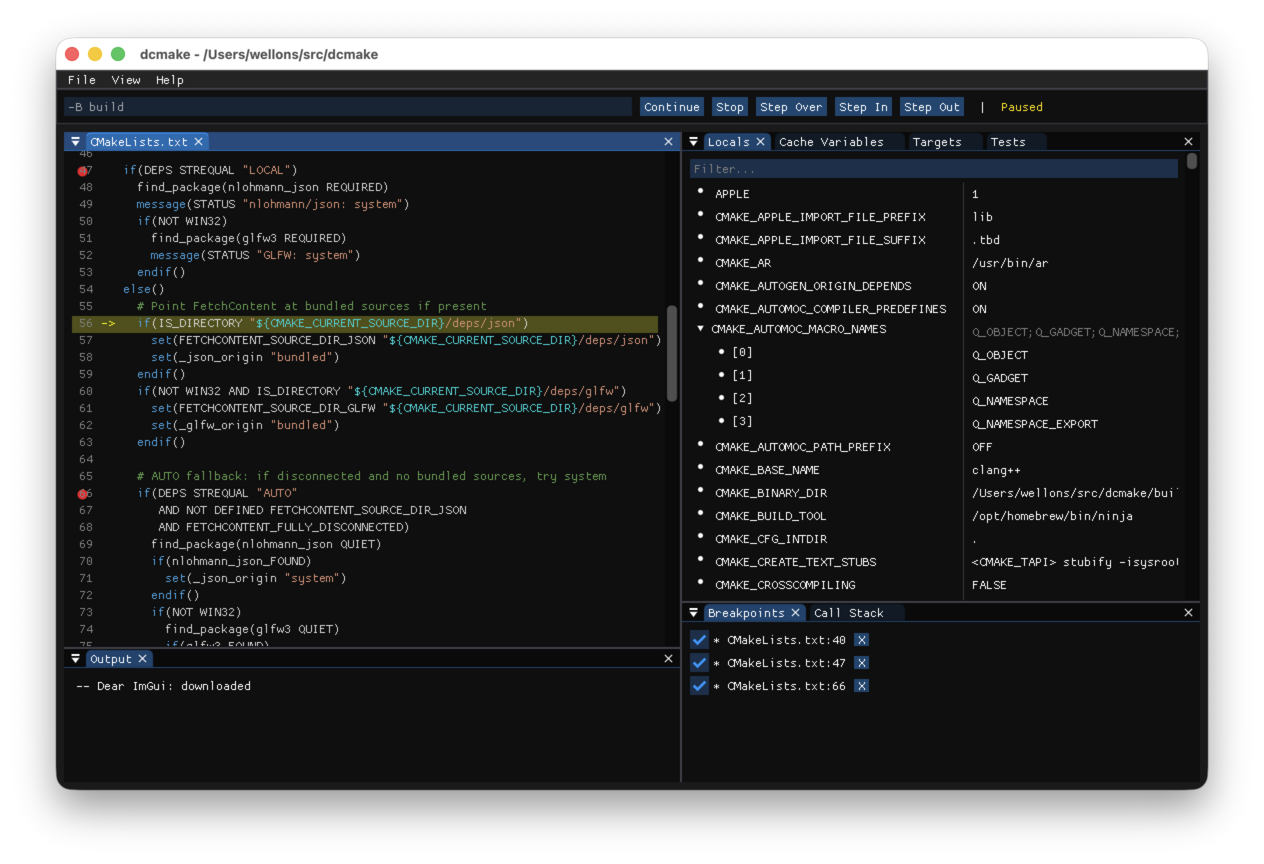
It has a Dear ImGui interface, which I’ve experienced as a user but
never built on myself before. Specifically the docking branch. In a
sense it’s a toolkit for building debuggers, so it’s playing an enormous
role in how quickly I put this project together. All of the “windows” tear
out and may be free-floating or docked wherever you like, closely matching
the classic Visual Studio UI. I borrowed all the same keybindings: F10 to
step over, F11 to step in, F5 to start/continue, shift+F5 to stop. Click
on line numbers to toggle breakpoints, right click to run-to-line, hover
over variables with the mouse to see their values. Nearly every every UI
state persists across sessions, and it opens nearly instantly.
This is just one of many situations I’ve used AI the past month for UI
development, and it’s been shockingly effective. I can describe roughly
the interface I want, and the AI makes it happen in a matter of minutes.
It understands what I mean, filling in the details, sometimes anticipating
what I’ll ask for next. If I’m unsure how I want a UI to work, it also
offers good advice. If I need simple icons and such, it can draw those,
too. It’s all incredibly empowering.
On macOS and Linux it runs on top of GLFW with OpenGL 3 rendering, and on
Windows it uses native Win32 windowing and DirectX 11 rendering.
Program arguments given to dcmake populate the top-left arguments text
input, which go straight into CMake on start. So you can prepend d to
your CMake configuration command to run it inside the debugger. Passing no
arguments sets it up for “standard” -B build configuration.
In general, if you don’t have anywhere in particular to look, likely the
first thing to do after starting dcmake (in a project) is press F10. It
starts CMake paused on the first line of CMakeLists.txt, or whatever
script you’re debugging. If you’re trying out dcmake for the first time,
that’s a good place to start. Keep pressing F10 to step through that
script, watching it run through its configuration. If you F11 through the
script then you’ll dive deeper and deeper into CMake itself, which can be
insightful.
There is no point in trying to debug --build invocations. It’s just a
uniform interface to the underlying build tool, and there is no CMake left
to debug at that point. However, it does work with -P script mode
invocations. CMake can operate as a platform-agnostic shell script-like
tool, but unlike shell scripts you can step through them with a
debugger like dcmake.
On Windows it supports Unicode paths all the way through, without a UTF-8
manifest. This took some special care, in particular
avoiding any C++ standard library I/O functionality. Current frontier AI
cannot handle this detail on their own. The macOS platform required a bit
of Objective-C, as it often does, and I’m happy I didn’t have to figure
that part out myself.
The next release of w64devkit will include dcmake, complementing its
recent addition of CMake. This new tool has already proven useful in its
own development.