nullprogram.com/blog/2026/10/13/
I spent a week creating a new deflate implementation from scratch in C
named tugz to provide an Info-ZIP-compatible zip program for
w64devkit 2.10.1 (released today). I also replaced busybox-w32’s
deflate-based unzip, gzip, gunzip, and zcat apps as well. My new
deflate performs much better than zlib and on par with libdeflate.
In general the new programs are substantially faster and produce slightly
smaller outputs than the BusyBox equivalents, which is optimized for size
than speed after all, but also compared to the original gzip and Info-ZIP
you get in a typical Linux distribution. The tugz programs are
CRT-free (inspect them with peports!) with first-class Windows
support and better Unicode handling.

Besides the cute logo, tugz is public domain and written entirely in my
personal style with unity builds, arena allocation, platforms layers
with minimal interfacing (read, write, open, etc.), and extensive fuzz
testing. The zip implementation carefully avoids a Windows deflate
bug that has personally bitten me. Its CMake build drives the more
complex machinery (tests, etc.), but it’s optional for straightforward
builds. Just compile the platform layers. For instance, in w64devkit:
$ cc -nostartfiles -O2 -o  zip  platform/zip_windows.c    -lmemory
$ cc -nostartfiles -O2 -o gzip  platform/gzip_windows.c   -lmemory
$ cc -nostartfiles -O2 -o unzip platform/unzip_windows.c  -lmemory
$ cc -shared -nostdlib -O2 -o tugz.dll platform/libtugz.c -lmemory
gunzip and zcat are aliases/symlinks for gzip. tugz.h defines the
library interface, featuring an allocator callback. I’m not currently
using the library in any projects, nor is it included in w64devkit, but it
might come in handy someday. The applications use the internal interfaces.
tugz unzip supports Deflate64 decompression, an extension to deflate
with a larger sliding window. Windows built-in ZIP support uses it for ZIP
files larger than 2GiB, to little practical benefit. BusyBox unzip does
not support Deflate64 and so cannot unzip some Windows-made ZIP files. The
replacement will work better in these cases.
Unlike u-config, I did not write Linux syscall platform layers this
time, but it would not be difficult to do so. Then such builds would truly
work in any Linux distribution, new or old. I leave it as a fun exercise
for the reader.
The original gzip and Info-ZIP are old, and like so many tools from that
era they include line conversion features. When you decompress files you
can translate the line endings at the same time in one tool. Over the
years, archaic line-ending features have caused far more harm than good
(arg… Git core.autocrlf), so I deliberately omit them. Using these
flags is an error.
Similarly, ZIP encryption features are deliberately left unimplemented.
Attempting to use encryption is an error.
One of my hard and fast rules was full support for Windows XP. This wasn’t
automatic, but nor was it difficult. tugz needs several *ByHandle{Ex,}W
functions from Win32 that are unavailable in XP. When they’re unavailable,
it falls back to equivalent Nt functions via GetProcAddress. I also made a
lightwight SSH server that is trivial to build and run on Windows
XP, allowing coding agents to automatically test and verify tugz on my old
systems. It’s quite fascinating to watch it take control of my old laptop,
and it’s already proving useful in other projects, including w64devkit.
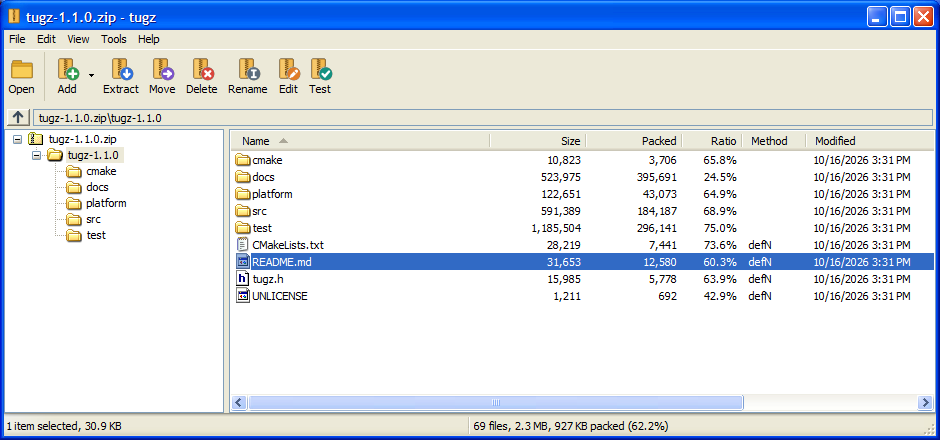
Update: After a request for zipinfo / unzip -Z, tugz
now has this utility as well. It will appear in the next w64devkit. It
also gained a minimal, classic Win32 GUI:
Usage in w64devkit
What does it mean for users? You can invoke zip in your build scripts or
whatever to package releases in a Windows-friendly ZIP file. Before today
the only option in w64devkit was going through CPack. A Makefile,
perhaps:
myapp-$VERSION.zip: myapp.exe README.md
    rm -f $@
    zip -X9 $@ $^
The rm because tugz follows the Info-ZIP behaviors of update-in-place.
The output is deterministic, particularly when given -X (omit extended
attributes) so that your releases are stable. The -9 requests maximum
compression. Or maybe after you’ve generated my blog, recursively
zip it up for archival:
$ ssg
$ zip -r nullprogram.zip _site/
This is another project I’d been considering for a couple years now. It
turned out better than I expected, and I’m quite excited about it. In my
eyes it represents a kind of ideal project, and I wish more projects were
shaped like this.